ROOFIT/ROOSTATS TUTORIAL CAT MEETING, JUNE 2009 - MAX BAAK THANKS TO: WOUTER VERKERKE, KYLE CRANMER!
←
→
Page content transcription
If your browser does not render page correctly, please read the page content below
RooFit/RooStats Tutorial
CAT Meeting, June 2009

          Max Baak
 Thanks to: Wouter Verkerke,
       Kyle Cranmer!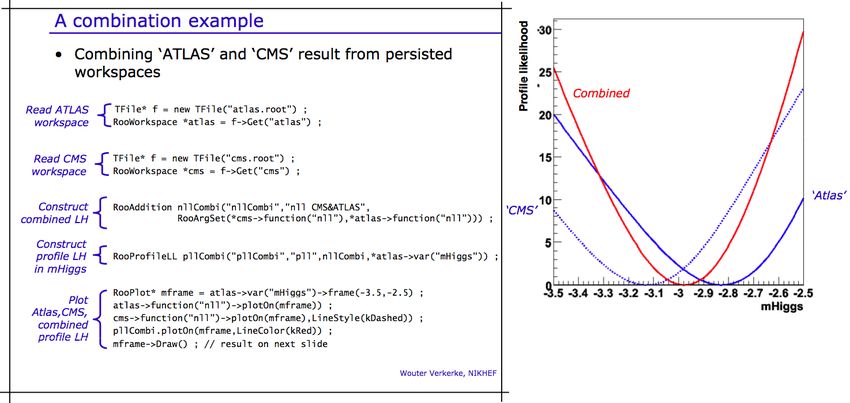
Structure of RooFit/RooStats tutorial
A tutorial in two sessions.

• Part one (Monday, 10h30):
   – Introduction to RooFit
   – Entry-level exercises
   – Aimed for beginners

• Part two (Friday, 10h00):
   – Introduction to RooStats (statistics extension to RooFit)
   – (Selection of) Advanced and new features of RooFit
   – Also useful for experienced users
RooFit: Your toolkit for data modeling

What is RooFit?

• A powerful toolkit for modeling and fitting the expected
  distribution(s) of events in a physics analysis
   – Very easy to setup large-scale fit in structured, transparent fashion.

• Primarily targeted to high-energy physicists using ROOT
   – But, even used in financial world.

• Originally developed for the BaBar collaboration by Wouter
  Verkerke and David Kirkby, back in year 2000.
   – Wouter is main developer

• Included with ROOT since v5.xx
   – Core code is very mature, stable
   – Continuous development, addition of more-powerful features.

• Standard in CMS!
Documentation Main sources of documentation: • http://root.cern.ch/drupal/content/users-guide – See for RooFit documentation (150+ pages) • $ROOTSYS/tutorials/roofit/ – See for example macros • http://root.cern.ch/root/Reference.html – See for (latest) class descriptions. RooFit classes start with “Roo”. – RooFit code itself is structured and well documented! • http://root.cern.ch/root/roottalk/roottalk09/ – Browse though RootTalk • Bug Wouter Verkerke directly No need to use RooFit as a black box …
Implementation – Add-on package to ROOT

         Shared library: libRooFit.so

                   Data Modeling

          ToyMC data        Model        Data/Model
          Generation     Visualization     Fitting

    C++ command line                            MINUIT
    interface & macros

        Data management &                 I/O support
           histogramming

                           Graphics interface
RooFit purpose - Data Modeling for Physics Analysis
→ →
Distribution of observables x
Define data model
→→→
Probability Density Function F(x; p, q)
→
• Physical parameters of interest p
→
• Other parameters q to describe
detector effect (resolution,efficiency,…)
→→ →
• Normalized over
→ allowed range of the
→ →
observables x w.r.t the parameters p and q
Fit model to data
→→
Determination of p,qData modeling - Desired functionality
Building/Adjusting Models
Easy to write basic PDFs ( normalization)
Easy to compose complex models (modular design)
cycle
Reuse of existing functions
Flexibility – No arbitrary implementation-related restrictions
Analysis
Using Models
Fitting : Binned/Unbinned (extended) MLL fits, Chi2 fits
Toy MC generation: Generate MC datasets from any model
Visualization: Slice/project model & data in any possible way
Speed – Should be as fast or faster than hand-coded modelData modeling – OO representation
• Mathematical objects are represented as C++ objects
Mathematical concept RooFit class
variable RooRealVar
function RooAbsReal
PDF RooAbsPdf
space point RooArgSet
integral RooRealIntegral
list of space points RooAbsDataModel building – (Re)using standard components
• RooFit provides a collection of compiled standard PDF classes
RooBMixDecay Physics inspired
ARGUS,Crystal Ball,
RooPolynomial Breit-Wigner, Voigtian,
B/D-Decay,….
RooHistPdf
RooArgusBG Non-parametric
Histogram, KEYS
RooGaussian
Basic
Gaussian, Exponential, Polynomial,…
PDF Normalization
• By default RooFit uses numeric integration to achieve normalization
• Classes can optionally provide (partial) analytical integrals
• Final normalization can be hybrid numeric/analytic formModel building – (Re)using standard components
• Most physics models can be composed from ‘basic’ shapes
RooBMixDecay
RooPolynomial
RooHistPdf
RooArgusBG
RooGaussian
+
RooAddPdfModel building – (Re)using standard components
• Most physics models can be composed from ‘basic’ shapes
RooBMixDecay
RooPolynomial
RooHistPdf
RooArgusBG
RooGaussian
*
RooProdPdfModel building – (Re)using standard components
• Building blocks are flexible
– Function variables can be functions themselves
– Just plug in anything you like
– Universally supported by core code
(PDF classes don’t need to implement special handling)
m(y;a0,a1) g(x;m,s)
g(x,y;a0,a1,s)
RooPolyVar m(“m”,y,RooArgList(a0,a1)) ;
RooGaussian g(“g”,”gauss”,x,m,s) ;Model building – Expression based components
• RooFormulaVar – Interpreted real-valued function
– Based on ROOT TFormula class
– Ideal for modifying parameterization of existing compiled PDFs
RooBMixDecay(t,tau,w,…)
RooFormulaVar w(“w”,”1-2*D”,D) ;
• RooGenericPdf – Interpreted PDF
– Based on ROOT TFormula class
– User expression doesn’t
need to be normalized
– Maximum flexibility
RooGenericPdf f("f","1+sin(0.5*x)+abs(exp(0.1*x)*cos(-1*x))",x)Using models – Fitting options
• Fitting interface is flexible and powerful, many options supported
Data type
Binned Sample interactive MINUIT session
RooNLLVar nll(“nll”,”nll”,pdf,data) ;
Unbinned RooMinuit m(nll) ;
Weighted unbinned Access any of MINUITs
minimization methods
m.hesse() ;
Goodness-of-fit x.setConstant() ;
measure y.setVal(5) ;
Change and fix param. values,
-log(Likelihood) m.migrad() ; using native RooFit interface
m.minos() during fit session
Extended –log(L)
Chi2 RooFitResult* r = m.save() ;
User Defined
(add custom/penalty
terms to any of these) Output
Modifies parameter objects of PDF
Interface
Save snapshot of initial/final parameters,
One-line: RooAbsPdf::fitTo(…) correlation matrix, fit status etc…
Interactive: RooMinuit classUsing models – Fitting speed & optimizations
• RooFit delivers per-fit tailored optimization without user overhead!
• Benefit of function optimization traditionally a trade-off between
– Execution speed (especially in fitting)
– Flexibility/maintainability of analysis user code
• Optimizations usually hard-code assumptions…
• Evaluation of –log(L) in fits lends it well to optimizations
– Constant fit parameters often lead to higher-level constant PDF components
– PDF normalization integrals have identical value for all data points
– Repetitive nature of calculation ideally suited for parallelization.
• RooFit automates analysis and implementation of optimization
– Modular OO structure of PDF expressions facilitate automated introspection
• Find and pre-calculate highest level constant terms in composite PDFs
• Apply caching and lazy evaluation for PDF normalization integrals
• Optional automatic parallelization of fit on multi-CPU hosts
– Optimization concepts are applied consistently and completely to all PDFs
– Speedup of factor 3-10 typical in realistic complex fitsUsing models – Plotting
• RooPlot – View of ≥1 datasets/PDFs projected on the same dimension
Create the view on mes
RooPlot* frame = mes.frame() ;
Project the data on the mes view
data->plotOn(frame) ;
Project the PDF on the mes view
pdf->plotOn(frame) ;
Project the bkg. PDF component
pdf->plotOn(frame,Components(“bkg”))
Draw the view on a canvas
frame->Draw() ;
Axis labels auto-generatedUsing models - Overview
• All RooFit models provide universal and complete
fitting and Toy Monte Carlo generating functionality
– Model complexity only limited by available memory and CPU power
• models with >16000 components, >1000 fixed parameters
and>80 floating parameters have been used (published physics result)
– Very easy to use – Most operations are one-liners
Fitting Generating
data = gauss.generate(x,1000)
RooAbsPdf
gauss.fitTo(data)
RooDataSet
RooAbsDataAdvanced features – Task automation
• Support for routine task automation, e.g. goodness-of-fit study
Accumulate
Input model Generate toy MC Fit model fit statistics
Distribution of
- parameter values
Repeat - parameter errors
N times - parameter pulls
// Instantiate MC study manager
RooMCStudy mgr(inputModel) ;
// Generate and fit 100 samples of 1000 events
mgr.generateAndFit(100,1000) ;
// Plot distribution of sigma parameter
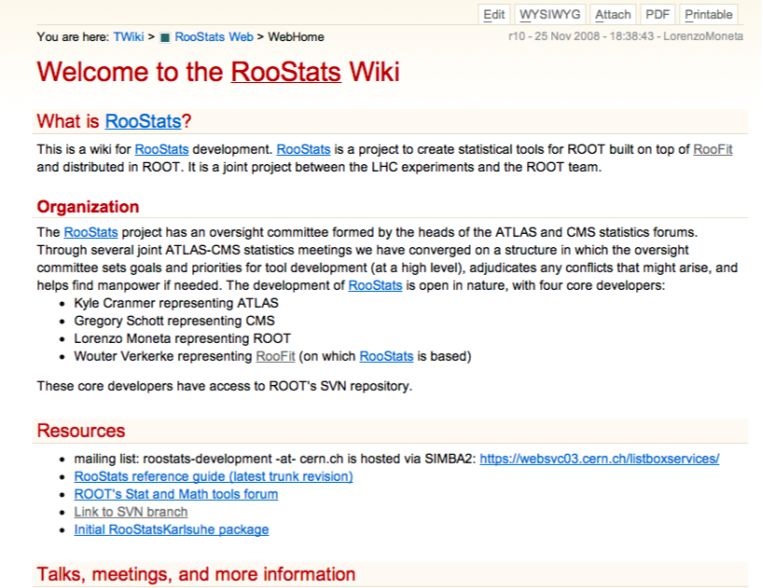
mgr.plotParam(sigma)->Draw()RooStats What is RooStats? • Set of statistical tools on top of RooFit (& ROOT). • Joint, open project between LHC experiments and ROOT. • Code is developing quickly. Goals • Enable the combining of results of multiple measurements/ experiments, including syst. uncertainties. – Standard in CMS! • Various tools to determine sensitivity and limits. • Techniques ranging from Bayesian to fully Frequentist.
RooStats documentation
• http://twiki.cern.ch/twiki/bin/view/RooStats/
• Mailing list: roostats-development@cern.ch
Combination of measurements: An Example
• Example shows opening (fake) Atlas and CMS
  measurements, and performing a combined fit to a
  common parameter with a profile likelihood.

                                      (thanks to Kyle Cranmer)
Appetizer for first part of tutorial Featuring: • The basic RooFit toolkit • Convolutions of functions • Calculate the P-value of your model. • Modelling the top mass spectrum • A combined fit to signal and control samples • Unbinned efficiency curve fit • And much more!
RooFit users tutorial

                     The basics

               Probability density functions & likelihoods
                    The basics of OO data modeling
          The essential ingredients: PDFs, datasets, functions
Outline of the hands-on part
1. Guide you through the fundamentals of RooFit
2. Look at some sample composite data models
1. Still quite simple, all 1-dimensional
3. Try to do at least one ‘advanced topic’, preferably more
1. Tutorial 8: Calculating the P-value of your analysis.
P-Value = How often does an equivalent data sample with no signal mimic
the signal you observe
2. Tutorial 9: Fit to a top mass distribution
– Tutorial 10: Simultaneous fit to signal and control samples
• Copy roofit_tutorial.tar.gz from ~mbaak/public/
– Untar roofit_tutorial.tar in your favorite directory on lxplus
– Contents of the tutorial setup
tutorial/setup.sh Source this setup script first!
tutorial/docs/roofit_tutorial.ppt This presentation
tutorial/macros Macros to be used in this tutorial
http://root.cern.ch/root/html/ClassIndex.html
Open in your favorite browserLoading RooFit into ROOT
• >source setup.sh (in the tutorial/ directory)
• Make sure libRooFit.so is in $ROOTSYS/lib
• Start ROOT
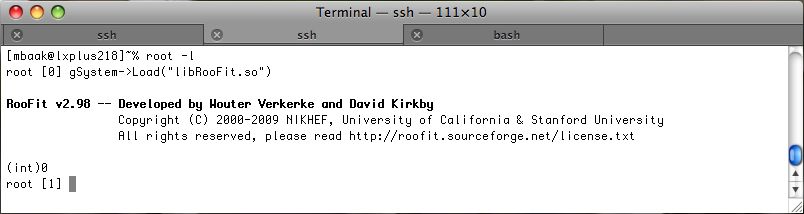
• In the ROOT command line load the RooFit library
gSystem->Load(“libRooFit”) ;
– Normally, this happens automatically.Creating a variable – class RooRealVar
• Creating a variable object
RooRealVar mass(“mass”,“m(e+e-)”,0,1000) ;
C++ name
Name Title Allowed range
– Every RooFit objects must have a unique name!Creating a probability density function
• First create the variables you need Try these commands
in an interactive
Allowed range root session.
RooRealVar x(“x”,“x observable”,-10,10) ;
RooRealVar mean(“mean”,“mean”,0.0,-10,10) ;
RooRealVar width(“width”,“width”,3.0,0.1,10.) ;
Allowed range
Initial value
• Then create a function object
RooGaussian gauss(“gauss”,”Gaussian”,
x, mean, width) ;
– Give variables as arguments to link variables to a function
Continue typing commands till slide 34 …Making a plot of a function
• First create an empty plot
RooPlot* frame = x.frame() ;
– A frame is a plot associated with a RooFit variable
• Draw the empty plot on a ROOT canvas
frame->Draw()
Plot range taken from limits of xMaking a plot of a function (continued)
• Draw the (probability density) function in the frame
gauss.plotOn(frame) ;
• Update the frame in the ROOT canvas
frame->Draw()
Axis label from gauss title
Unit
normalizationInteracting with objects
• Changing and inspecting variables
width.getVal() ;
(const Double_t) 3.00
width = 1.0 ;
width.getVal() ;
(const Double_t) 1.00
• Draw another copy of gauss
gauss.plotOn(frame) ;
frame->Draw()
macro/tut0.CInspecting composite objects
• Inspecting the structure of gauss
gauss.printCompactTree() ;
0x10b95fc0 RooGaussian::gauss (gauss) [Auto]
0x10b90c78 RooRealVar::x (x)
0x10b916f8 RooRealVar::mean (mean)
0x10b85f08 RooRealVar::width (width)
• Inspecting the contents of frame
frame->Print(“v”)
RooPlot::frame(10ba6830): "A RooPlot of "x""
Plotting RooRealVar::x: "x"
Plot contains 2 object(s)
(Options="L") RooCurve::curve_gaussProjected: "Projection of gauss"
(Options="L") RooCurve::curve_gaussProjected: "Projection of gauss"Data
• Unbinned data is represented by a RooDataSet object
• Class RooDataSet is RooFit interface to ROOT class TTree
RooDataSet
RooRealVar y
RooDataSet associates
RooRealVar x a RooRealVar with
TTree column of a TTree
row x y
Association by matching TTree
1 0.57 4.86 Branch name with RooRealVar
name
2 5.72 6.83
3 2.13 0.21
4 10.5 -35.
5 -4.3 -8.8Creating a dataset from a TTree
• First open file with TTree
macros/tut1.root
TFile f(“tut1.root”) ;
f.ls() ;
root [1] .ls
TFile** tut1.root
TFile* tut1.root
KEY: TTree xtree;1 xtree
xtree->Print() ;
• Create RooDataSet from tree
RooDataSet data(“data”,”data”,xtree,x) ;
Imported TTree RooFit Variable in datasetDrawing a dataset on a frame
• Create new plot frame, draw RooDataSet on frame,
draw frame
RooPlot* frame2 = x.frame() ;
data.plotOn(frame2) ;
frame2->Draw() ;
Note Poisson Error barsOverlaying a PDF curve on a dataset
• Add PDF curve to frame
gauss.plotOn(frame2) ;
frame2->Draw() ;
Unit normalized
PDF automatically
scaled to dataset
But shape is not right!
Lets fit the curve
to the dataFitting a PDF to an unbinned dataset
• Fit gauss to data
gauss.fitTo(data) ;
• Behind the scenes
1. RooFit constructs the Likelihood from the PDF and the dataset
2. RooFit passes the Likelihood function to MINUIT to minimize
3. RooFit extracts the result from MINUIT and stores in the
RooRealVar objects that represent the fit parameters
• Draw the result
gauss.plotOn(frame2) ;
frame2->Draw() ;Looking at the fit results
• Look again at the PDF variables
width.Print() ;
RooRealVar::sigma: 1.9376 +/- 0.043331 (-0.042646, 0.044033) L(-10 – 10)
mean.Print() ;
RooRealVar::mean: -0.0843265 +/- 0.061273 (-0.061210, 0.061361) L(-10 - 10)
Adjusted value Symmetric Asymmetric
error error
(from HESSE) (from MINOS,
not shown
by default)
– Results from MINUIT back-propagated to variablesPutting it all together
• A self contained example to construct a model, fit it,
and plot it on top of the data
void fit(TTree* dataTree) { macro/tut1.C
// Define model
RooRealVar x(“x”,”x”,-10,10) ;
RooRealVar sigma(“sigma”,”sigma”,2,0.1,10) ;
RooRealVar mean(“mean”,”mean”,-10,10) ;
RooGaussian gauss(“gauss”,”gauss”,x,mean,sigma) ;
// Import data
RooDataSet data(“data”,”data”,dataTree,x) ;
// Fit data
gauss.fitTo(data) ;
// Make plot
RooPlot* frame = x.frame() ;
data.plotOn(frame) ;
gauss.plotOn(frame) ;
frame->Draw() ; See next slide
} for instructionsPutting it all together
• A self contained example to construct a model,
fit it, and plot it on top of the dataset.
macro/tut1.C
root [0] TFile f("tut1.root")
root [1] .L tut1.C
root [2] fit(xtree)
In macro/tut1.C
uncomment two lines
(From hereon you can below // Make plot
modify the macros and see what happens
directly yourself.)
gauss.fitTo(data,Minos());
gauss.fitTo(data,Hesse()); // default
Edit the macro to
// (See RooMinuit.cxx for switch between Hesse
// all possible fit options) and Minos minimization.Building composite PDFS
• RooFit has a collection of many basic PDFs.
RooArgusBG - Argus background shape
RooBifurGauss - Bifurcated Gaussian
RooBreitWigner - Breit-Wigner shape
RooCBShape - Crystal Ball function
RooChebychev - Chebychev polynomial
RooDecay - Simple decay function
RooExponential - Exponential function
RooGaussian - Gaussian function
RooKeysPdf - Non-parametric data description
RooPolynomial - Generic polynomial PDF
RooVoigtian - Breit-Wigner (X) Gaussian
HTML class documentation in:
http://root.cern.ch/root/html/
ROOFIT_ROOFIT_Index.htmlBuilding realistic models • You can combine any number of the preceding PDFs to build more realistic models RooRealVar x(“x”,”x”,-10,10) macro/tut2.C // Construct background model RooRealVar alpha(“alpha”,”alpha”,-0.3,-3,0) ; RooExponential bkg(“bkg”,”bkg”,x, alpha) ; // Construct signal model RooRealVar mean(“mean”,”mean”,3,-10,10) ; RooRealVar sigma(“sigma”,”sigma”,1,0.1,10) ; RooGaussian sig(“sig”,”sig”,x,mean,sigma) ; // Construct signal+background model RooRealVar sigFrac(“sigFrac”,”signal fraction”,0.1,0,1) ; RooAddPdf model(“model”,”model”,RooArgList(sig,bkg),sigFrac) ; // Plot model RooPlot* frame = x.frame() ; model.plotOn(frame) ; model.plotOn(frame,Components(bkg),LineStyle(kDashed)) ; frame->Draw() ;
Building realistic models
Sampling ‘toy’ Monte Carlo events from model
• Just like you can fit models, you can also sample ‘toy’
  Monte Carlo events from models

RooDataSet* mcdata = model.generate(x,1000) ;

RooPlot* frame2 = x.frame() ;
mcdata->plotOn(frame2) ;

model->plotOn(frame2) ;
frame2->Draw() ;

 Try this yourself ...
RooAddPdf can add any number of models
 RooRealVar x("x","x",0,10) ;                     macros/tut3.C
 // Construct background model
 RooRealVar alpha("alpha","alpha",-0.7,-3,0) ;
 RooExponential bkg1("bkg1","bkg1",x,alpha) ;

 // Construct additional background model
 RooRealVar bkgmean("bkgmean","bkgmean",7,-10,10) ;
 RooRealVar bkgsigma("bkgsigma","bkgsigma",2,0.1,10) ;
 RooGaussian bkg2("bkg2","bkg2",x,bkgmean,bkgsigma) ;

 // Construct signal model
 RooRealVar mean("mean","mean",3,-10,10) ;
 RooRealVar width("width","width",0.5,0.1,10) ;
 RooBreitWigner sig("sig","sig",x,mean,width) ;

 // Construct signal+2xbackground model
 RooRealVar bkg1Frac("bkg1Frac","signal fraction",0.2,0,1) ;
 RooRealVar sigFrac("sigFrac","signal fraction",0.5,0,1) ;
 RooAddPdf model("model","model",RooArgList(sig,bkg1,bkg2),
                                 RooArgList(sigFrac,bkg1Frac))   ;

 RooPlot* frame = x.frame() ;
 model.plotOn(frame) ;
 model.plotOn(frame,Components(RooArgSet(bkg1,bkg2)),LineStyle(kDashed)) ;
 frame->Draw() ;
RooAddPdf can add any number of models
Try adding
another
signal termExtended Likelihood fits
• Regular likelihood fits only fit for shape
– Number of coefficients in RooAddPdf is always one less than
number of components
• Can also do extended likelihood fit
– Fit for both shape and observed number of events
– Accomplished by adding ‘extended likelihood term’ to regular LL
• Extended term automatically constructed in RooAddPdf
if given equal number of coefficients & PDFSExtended Likelihood fits and RooAddPdf
• How to construct an extended PDF with RooAddPdf
// Construct extended signal+2xbackground model
RooRealVar nbkg1(“nbkg1",“number of bkg1 events",300,0,1000) ;
RooRealVar nbkg2(“nbkg2",“number of bkg2 events",200,0,1000) ;
RooRealVar nsig( “nsig",“number of signal events",500,0,1000) ;
RooAddPdf emodel(“emodel",“emodel",RooArgList(sig, bkg1, bkg2),
RooArgList(nsig,nbkg1,nbkg2)) ;
Previous model Add extended term New representation
sigFrac sigFrac nsig
bkg1Frac bkg1Frac nbkg1
ntotal nbkg2
• Fitting with extended model macros/tut4.C
emodel.fitTo(data,”e”) ; Look at sum, expected
errors, and
Include extended term in fit correlations between
fitted event numbersSwitching gears
• Hands-on exercise so far designed to introduce you to
basic model building syntax
• Real power of RooFit is in using those models to explore
your analysis in an efficient way
• No time in this short session to cover this properly, so
next slide just gives you a flavor of what is possible
1. Multidimensional models, selecting by likelihood ratio
2. Demo on ‘task automation’ as mentioned in last slide of
introductory slideMulti-dimensional PDFs
• RooFit handles multi-dimensional PDFs as easily as 1D
PDFs
– Just use class RooProdPdf to multiply 1D PDFS
• Case example: selecting B+ D0 K+
– Three discriminating variables: mES, DeltaE, m(D0)
Signal Model
* *
Background Model * *
• Look at example
Run example model,
model, fit,fit, plotsin:
plots in macros/tut5.CSelecting by Likelihood ratio
• Plain projection of multi-dimensional PDF and dataset
often don’t do justice to analyzing power of PDF
– You don’t see selecting power of PDF in dimensions that are
projected out
Plain projection of mES
of previous excercise Result from 3D fit
Nsig = 91 ± 10
Close to sqrt(N)
– Possible solution: don’t plot all events, but
show only events passing cut of signal,bkg
likelihood ratios constructed from PDF
dimensions that are not shown in the plot
macros/tut6.CNext topic: How stable is your fit
• When looking at low statistics fit, you’ll want to check
explicitly
– Is your fit stable and unbiased
• Check by running through large set of toy MC samples
– Fit each sample, accumulate fit statistics and make pull
distribution
• Technical procedure
– Generate toy Monte Carlo sample with desired number of events
– Fit for signal in that sample
– Record number of fitted signal events
– Repeat steps 1-3 often
– Plot distributions of Nsig, σ(Nsig), pull(Nsig)
• RooFit can do all this for you with 2 lines of code!
– Try out the example in Experiment with
macros/tut7.C lowering number
of signal eventsHow often does background mimic your signal?
• Useful quantity in determining importance of your signal: the
P-value
– P-Value: How often does a data sample of comparable statistics with no
signal mimic the signal yield you observe
– Tells you how probable it is that your peak is the result of a statistical
fluctuation of the background
• Procedure very similar to previous exercise
– First generate fake ‘data’, fit data to determine ‘data signal yield’
– Generate toy Monte Carlo sample with 0 signal events
– Fit for signal in that sample
– Record number of fitted signal events
– Repeat steps 1-3 often
– See what fraction of fits result in a signal yield exceeding your ‘observed
data yield’
• Try out the example in macros/tut8.CTop mass fit
• Set up you own top mass fit!
• Fit the top quark mass distribution in macros/tut9.C
• For the top signal (around 160 GeV/c2), use a Gaussian.
• For the background, try out
– Chebychev polynomial (RooChebychev)
– Polynomial (RooPolynomial)
Minumum number of background terms needed?
Which background description works better?
Why? Look at correlation matrix.Simultaneous fit to signal and control sample(s)
• Often useful to split data sample into various categories in
a fit
– Signal region / control sample(s), number of good jets, b-tag / b-
veto, fiducial volumes, etc.
– Categories may be overlapping
• Assigning of categories done using ‘RooCategory’ objects
• Roofit: Easy to make simultaneous fit to various categories
– Use full statistical power of entire sample. Correlation of fit
parameters automatically propagated! Very powerful technique.
• Try out example in macros/tut10.C
– Simultanous fit to signal region and bkg control sample, using a
RooCategory
Add a third category & sample that contains a
control Gaussian shape with the same width (but
different mean) as needed in the signal region.
How does the simultaneous fit improve?Convolution of pdfs • RooFit can do both analytical and numerical convolutions. • Various analytical convolutions provided. – Eg. Exponential and Gaussian – see class: RooDecay • Numerical convolutions done with Fast Fourier transforms – Need the FFTW library. – Often as fast as analytical convolutions! • Try out example: macros/tut11.C Replace the Landau with a Breit-Wigner function. Add a second, wider exponential. Do the new fit to a toy sample.
Unbinned efficiency curve fit
   • Statistical error often not properly accounted for when
     performing a binned efficiency curve fit.
       – Binomial errors do not go to zero close when eff=0 or eff=1.

   • Proper implementation: unbinned efficiency curve fit,
     possible in RooFit
   • For an unbinned efficiency fit, see:          macros/tut12.C

Use a RooMCStudy to
proof that the pull
distributions of
the fit parameters
are as expected.
(See also tutorial
8.)
Outline of hands-on part 2
1. A few advanced RooFit examples.
2. Several RooStats examples.
• Copy roofit_tutorial.tar.gz from ~mbaak/public/
– Untar roofit_tutorial.tar in your favorite directory on lxplus
– Contents of the tutorial setup:
tutorial/setup.sh Source this setup script first!
tutorial/docs/roofit_tutorial.ppt This presentation
tutorial/macros2 Macros to be used in second part
of the tutorial
http://root.cern.ch/root/html/ClassIndex.html
Open in your favorite browserRoot news
• Root v5.24 will come out next Wednesday.
• This contains RooFit v3.00
• New RooStats functionality & examples.
• Example cool, new RooFit functionality:
choose between different fit minimizers
– Such as: Minuit2 GSLMultiMin
– pdf->fitTo(data,Minimizer("GSLMultiMin","conjugatefr"),...) ;This RooFit/RooStats tutorial session Featuring: • Making your own pdf • Adaptive kernel pdfs • Morphing between datasets • Working with workspaces • Combination of measurements • Profile likelihood scans • Fitting of negative weights • sPlots • Hypothesis testing
Leftover: Simultaneous fit to several samples
• Often useful to split data sample into various categories in
  a fit
   – Signal region / control sample(s), number of good jets, b-tag / b-
     veto, fiducial volumes, etc.
   – Categories may be overlapping

• Assigning of categories done using ‘RooCategory’ objects
• Roofit: Easy to make simultaneous fit to various categories
   – Use full statistical power of entire sample. Correlation of fit
     parameters automatically propagated! Very powerful technique.

• Try out example in macros/tut10.C
   – Simultanous fit to signal region and bkg control sample, using a
     RooCategory

           Add a third category & sample that contains a
           control Gaussian shape with the same width (but
           different mean) as needed in the signal region.
           How does the simultaneous fit improve?
Making your own PDF/Function
• RooFit contains ‘factories’ that make it very easy for you
to create a new pdf or function.
• Run the following macro and take a look at the
contensts:
macros2/rf104_classfactory.C.C
• Use the functionality RooClassFactory::makePdfInstance
to make your own Breit-Wigner function.
– 1. / ((x-m)*(x-m) + 0.25*w*w)
– The proper normalization is automatically done by RooFit …
– Note the produced, corresponding .cxx and .h file!
• Use your Breit-Wigner function to generate and fit a Z
spectrum.
– Mz = 90.2 GeV, GammaZ = 2.5 GeVA Few Cool Examples You Should Really See • Unfortunately we do not have time to go through all features of RooFit … • Next follows a selection of powerful examples. Please go through the macros to see what they do. Ask any related questions you may have.
More RooFit Examples
• Taking derivatives and integrals of pdfs/functions.
              macros2/rf111_derivatives.C
• Morphing between pdfs
   – RooLinearMorph          macros2/rf705_linearmorph.C

• Parallel fitting and plotting       macros2/rf603_multicpu.C
   – For comparison, do same macro with only 1 cpu-core.

• Adaptive kernel estimation.
  The following pdfs allow you to model models any
  dataset. Just plug your dataset into the pdf.
   – RooKeysPdf (1-dimensional), RooNDKeysPdf (n-dimensional)
   – Great for: modeling control samples or difficult correlations!
   – Great for generating realistic Toy MC samples from data/full-MC!

                             macros2/rf707_kernelestimation.C
Morphing with Keys pdfs
• The macro macros2/morph_keys.C
loads two Higgs datasets, one for m(H)=130 GeV, and
one for m(H) = 170 GeV.
Using the previous
example in
rf705_linearmorph.C, plot
the approximated Higgs
mass distributions for
m(H) = 140,150,160 GeV.Conditional pdfs
• A conditional pdf describes x, given the observable y.
– Pdf ( x | y ), eg: a mass resolution function, given the mass error.
• For an example conditional pdfs, see:
Here the mean of a
macros2/rf303_conditional.C
Gaussian for observable
x depends on observable y.
• When plotting the distribution of x, one needs to project
over the distribution of y.
– Note for the plotting: model.plotOn(xframe,ProjWData())
• Other detailed examples. These show decay
distributions with a Gaussian resolution function with
per-event
fit errors.
macros2/rf306_condpereventerrors.C
macros2/rf307_fullpereventerrors.CRooStats: Workspaces
• RooFit allows you to store an entire analysis into a
‘workspace’ object, that can be stored in a root file.
– This includes: pdfs, observables, functions, datasets.
• Try out: macros2/rf502_wspacewrite.C
This stores the file: rf502_workspace.root
• Study the macro how to add an object to a workspace.
• You can then read back the workspace in a new session.
• Try out: macros2/rf502_wspaceread.C
.. to read the workspace, and pick up where you left off!
Study the macro to see how easy this is done.
For the next exercise, rewrite out the workspace, where you
change all initial values of the fit parameters, except for
the ‘mean’ parameter. Eg sigma, bkgfrac, etc. Reduce the
number of signal events.RooStats: Combination of measurements
• Ask your neighbor for the workspace file (‘measurement’)
he/she has just created.
• Run: macros2/rf502_wspacewrite2.C
This creates a second workspace, rf502_workspace2.root,
which contains a second measurement.
• Now pretend these are two Higgs measurements! ;-)
• To calculate the average Higgs mass, run the script:
macros2/combination.C (see next slide for result)
• Study this script: the combined fit is a full, proper profile
likelihood fit! (Both measurements are completely refit!)
• What’s the 95% confidence region of ‘mean’?
• Rule for combining measurements: parameters with
identical names are assumed to be the same parameter.
Exercise: Add a third measurement to the combination.RooStats: Profile likelihood scan
“Workspaces are
the future of
digital
publishing.”RooStats: Weighted events and samples • Typical use-cases of sample or event-weights: – Combination of MC samples with different luminosities – MC@NLO events: positive and negative event weights • When using event weights in unbinned maximum likelihood fit: – Minimum found is correct – Associated errors are incorrect, unless calculated properly • Eg when using negative event weights, statistical error are typically underestimated. • RooFit can do the proper error calculation! • Try: macros2/topmassfit.C • See next slide …
RooStats: Weighted events and samples
 • Continue with macro: macros2/topmassfit.C

Turn off the usage
of event weights
in the fit and in
the plot.

(See next slide
for instructions.)

How do the
statistical errors
change? Can you
explain the change
in behaviour?
RooStats: How to use (event-) weights in RooFit

// set the weight observable
dataset->setWeightVar(weightvar) ;

// default option: errors from original HESSE error matrix
// errors are “as expected on data”, but do not reflect correct
// MC statistics
model.fitTo(*data,SumW2Error(kFALSE)) ;

// sum-of-weights corrected HESSE error matrix
// errors correspond to true MC statistics
model.fitTo(*data,SumW2Error(kTRUE)) ;

// plot weighted events
data->plotOn(frame,DataError(RooAbsData::SumW2)) ;
RooStats: sPlots
• sPlots is a technique to unfold two distributions, eg.
  signal and background events, when making a plot.
   – It’s not a supersymmetric plot ;-)

• In this macro, the distribution of interest is the electron
  isolation, for Z->ee vs QCD.
                                      macros2/rs301_splot.C

• To make sPlots for the isolation, a ‘control’ discriminator
  is needed to unfold the signal and bkg distributions.
   – In this example, provided by a mass fit.

• Based on the control variable, an s-eventweight is
  assigned for each event, which is used to draw the
  plots.
             Replace the isolation observable & pdf by
             antoher observable you are interested in, for
             example the trigger efficiency category & pdf
             from tut12.
RooStats: Profile Likelihood hypothesis test
• Profile-likelihood test macros2/
calculator rs102_hypotestwithshapes.C
– RooStats::ProfileLikelihoodCalculator
• The ProfileLikelihoodCalculator makes a profile
likelihood scan in the fraction of signal events (‘mu’).
– See function: DoHypothesisTest()
• Using a Gaussian interpretation (Wilk’s Theorem), the
LL-ratio at zero signal gets converted into a P-value
(=significance)
Try to make a Profile likelihood scan of ‘mu’ to test
the Gaussian interpretation (see also: macros2/
combination.C), and calculate the significance
yourself. Do this in the function: MakePlots()RooStats: HybridCalculator
• HybridCalculator macros2/
– RooStats::HypoTestCalculator rs201_hybridcalculator.C
– A hybrid Frequentist and Bayesian tool. The tool integrate over
nuisance (bkg) parameters using a Freq. technique.
• The macro has a (Gaussian) Bayesian prior for the
number of bkg events, but is Frequentist (ie. toy MC) to
get -2lnQ distributions from S&B and B-only samples.
• See: macros2/rf604_constraints.C
to add a Gaussian bkg constraint directly to the
likelihood sum.
Apply the ProfileLikelihoodCalculator to
compare with the HybridCalculator signal
significanceFurther reading
• There are more (advanced) RooFit features and
examples worth demonstrating than one can fit in two
brief tutorial sessions.
• I have tried to show a (popular) snapshot of all
possibilities. You are encouraged to take a look at:
– The RooFit documentation
(docs/RooFit_Users_Manual_2.91-33.pdf)
– The examples in the directory: examples/roofit/
• … to experience the full power of RooFit and RooStats !
I hope you’ve enjoyed the tutorials
and will continue to keep on using
RooFit and RooStats in the future!You can also read


