Smart Document Management System using OCR
←
→
Page content transcription
If your browser does not render page correctly, please read the page content below
INTERNATIONAL JOURNAL OF PROGRESSIVE RESEARCH IN SCIENCE AND ENGINEERING, VOL.3, NO.05, MAY 2022.

                      Smart Document Management System using OCR
                       Mihir P 1, Ritik D 1, Vivek V 1, Shrinit P 1, Chandrayani Rokade 2
               1Student,   Department of Computer Engineering, Government College of Engineering, Nagpur, Maharashtra, India.
       2Professor,   Department of Computer Science and Engineering, Government College of Engineering, Nagpur, Maharashtra, India.
                                                    Corresponding Author: shrinitpatil21i@gmail.com

Abstract: - Web applications are becoming more and more prevalent these days; it is normal for organizations to create specific
applications for custom needs such as filling up forms and storing various kinds of information in a digital medium. Digitalizing
these documents greatly contributes to the efficiency of organizations as it eradicates the need to maintain documents in their physical
forms. The extra space created due to the absence of file storage equipment can be used in many beneficial ways, such as for
additional equipment, a larger work area for employees, or any other use needed by the organization. This digitized information is
stored on a web-based server and is accessible to anyone with proper authentication, this reduces the access time of these documents
as all the information is searchable and eliminates the manual search time.

Key Words: — Digitalized Information, OCR, Authentication.

                         I. INTRODUCTION                                      As technology is evolving at a rapid pace, AI has enabled us
                                                                              to read information or text from the images and hence it is
          Nowadays, it is still very common in companies or                   possible to digitalize such old documents so that we wouldn't
organizations to have a large number of documents or forms                    have to worry about storing physical copies anymore.
that need to be filled manually by individuals and have to be
                                                                              We can also build a platform that will also help us search
kept as a record in huge stockpiles of files, be it typed or
                                                                              through documents using computers much quicker than the
handwritten, for reasons such as to keep track of processes in
                                                                              traditional way of searching through old documents by
their organization, to keep track of customers or vendors or
                                                                              skimming. It is also possible for the platform to have a way to
stakeholders, etc. It becomes very difficult to store hard copies
                                                                              verify the legitimacy of the documents. This will be very
of such documents as their number keeps on growing every
                                                                              helpful as it will save a lot of time and manpower behind these
day. However, it is possible to store such information digitally
                                                                              tasks and ensure that all the old documents get converted to a
through computer/web-based applications. PDFs have made it
                                                                              digitized form.
much easier to manage and share documents it is a reliable
format to export documents or images that you want to share                   1.1 OCR and its working
so that the information that you want to transfer is in the same              Optical character recognition enables the transformation of
manner as it was shared it helps you to maintain the format of                various types of documents or images into analyzable,
documents pdfs are widely used and easily accessible on any                   editable, and searchable data. During the last decade,
device so nearly all institutions are digitalizing their document             researchers have used artificial intelligence and machine
management system.                                                            learning tools to automatically analyze handwritten and
                                                                              printed documents to convert them into electronic format.
                                                                              OCR processed digital files, such as receipts, contracts,
    Manuscript revised May 10, 2022; accepted May 11, 2022.                   invoices, financial statements and more can be searched from
    Date of publication May 12, 2022.                                         a large repository to find the correct document and viewed
    This paper available online at www.ijprse.com                             with search capability within each document and can be edited
    ISSN (Online): 2582-7898; SJIF: 5.59                                      when corrections need to be made repurposed.
                                                                               OCR analyses the patterns of light and dark pixels of an
                                                                              image that make up the letters and numbers to turn the scanned
                                                                              image into text. OCR systems need to identify characters in

 MIHIR P., et.al: SMART DOCUMENT MANAGEMENT SYSTEM USING OCR                                                                              32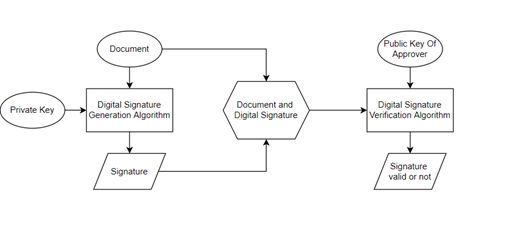
INTERNATIONAL JOURNAL OF PROGRESSIVE RESEARCH IN SCIENCE AND ENGINEERING, VOL.3, NO.05, MAY 2022.

various fonts, so rules are applied to help the system match        1.3 Digital Signature
what it sees in the picture to the right letters or numbers. For    Signatures are generally a way to authenticate documents to
optimal OCR performance, it is important to scan the sharpest       verify that they belong to a genuine entity. A digital signature
version of your document. Blurry text or marks on the copy          resembles a normal signature with the only difference being
can cause errors.                                                   that a digital signature is a combination of numbers generated
OCR consists of many steps: preprocessing, segmentation,            from a digital signature generating algorithm. The following
feature extraction, classification, and recognition. The output     fig illustrates how a digital signature is generated and
of one step is the input of the next step. Preprocessing involves   validated:
removing noise and handwriting variations. Some areas where
OCR is used, including mail classification, banking,
document reading, and email address recognition, require
standalone handwriting and image recognition systems.
1.2 What Affects the Accuracy of OCR
Various Factors affect the accuracy of OCR Engines, some
noteworthy and important factors which affect the Accuracy
are:
Quality of the Original Source: It is recommended that the
scanned image should have a resolution of at least 300 dpi.
The higher the resolution, the better the results.                                     Fig.1. Working of Digital Signature

Image Characteristics: Bit depth and Image Binarization play        The whole process of digital signature generation and
a vital role in OCR accuracy, if the scanned image is scanned       verification involves public and private keys of the
as grayscale or bi-tonal it significantly increases the accuracy    authenticator. The digital signature generating algorithm
of results. 50% brightness is recommended for scanning.             accepts two parameters: Document and Private keys of the
Characters present in the Image should have sharp focus.            authenticator. Once the signature is generated it is then sent
Marked, mouldy, faded source, characters not in sharp focus         along with the document to the document generator. Once the
negatively affects the identification of characters                 document generator receives the document with digital
                                                                    signature it can then be verified by the document generator
Skewing: A text is called skewed when it is not properly
                                                                    using the public key of the authenticator. The proposed system
aligned with the orientation of the page while text extraction
                                                                    follows the same concept of digital signature for the
is being performed. In general, perfectly horizontal text yield
                                                                    authentication of documents.
the best results. Pages should not be skewed prior to OCR so
that the word lines are horizontal other than the mentioned         1.4 Named-entity Recognition (NER)
factors, other factors such as inconsistent use of font faces and   Natural language processing is a subfield of linguistics,
sizes, texts published before 1850, and using multilingual text     computer science and artificial intelligence concerned with
on the page can lower OCR accuracy.                                 the interactions between computers and human language. It
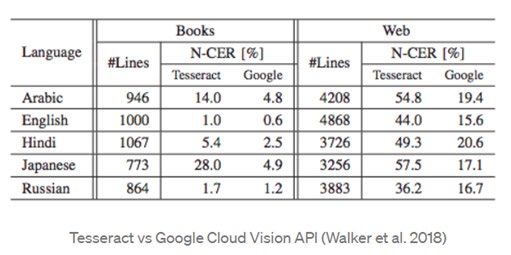
Table.1. Comparison between Tesseract and Google Vision:            includes techniques, which are used to analyze, synthesize or
                                                                    operate on the natural languages that humans use in day-to-
                                                                    day life. Named-entity recognition or NER is an NLP
                                                                    technique which helps us identify the named entities in a given
                                                                    text. Named entity consists of names or nouns that help us
                                                                    identify a person, an organization, a place, a product, etc.
                                                                    which can be given a proper name. It may be abstract or may
                                                                    have a physical form. Thus, NER is an information extraction
                                                                    technique which can help us extract important real-world
                                                                    objects from a text.

 MIHIR P., et.al: SMART DOCUMENT MANAGEMENT SYSTEM USING OCR                                                                     33
INTERNATIONAL JOURNAL OF PROGRESSIVE RESEARCH IN SCIENCE AND ENGINEERING, VOL.3, NO.05, MAY 2022.
II. PROPOSED SYSTEM 2.2 Report labs
It is a library that helps you create documents in Adobe's
A traditional file system is cumbersome, in that it does not
Portable Document Format (PDF) using Python. It also
allow users to easily edit files or send information to others.
provides high-end functionality like creating charts and data
Paper files often cannot be edited directly, forcing users to
graphics in multiple formats like bitmap, vector, and PDF.
make new copies to update old files. To distribute data on
The Report Lab library directly creates PDFs based on your
paper files, users must mail, fax, or scan the data. This
graphics commands. There are no intervening steps.
proposed system allows users to scan, upload or take photo of
Additionally, report labs have the advantage that we can get
document which then gets processed and text extraction is
input data in any format and make pdf as it is a python library.
performed on it. After the text is extracted, it is placed in an
We have used report labs to generate pdf from the output of
editable pdf file using the bounding box coordinates. This file
our Google Vision OCR. The output from OCR contains each
is stored in database and user is able to edit information fields
word and each letter along with its bounding box coordinates,
directly, and as the information is stored digitally, it is already
so using report labs each word is placed according to its
in a form that can be easily transmitted.
bounding box coordinates. So, to make a digitalized and
The UI of the system is simple to understand for the users so editable format of scanned image or document, report labs
that it is easier to adopt the system for them and in turn, this help to place the extracted text at its position in a new editable
would make the complete process effective and smoother. We pdf.
also provide admin access to the system, so that the admin in
2.3 Named-entity Recognition (NER)
the institution would be able to create multiple different users
based on their needs. The admin user is able to see all the The proposed system uses Natural Language Entity (NER) to
documents in the system regardless of whether they are extract important and unique keywords from the documents
approved or currently under the approval process. We can also by which the document can be uniquely identified and stored
allow the admin user to map certain initiators to certain in a database. These keywords extracted can be used to search
approvers for further control over the process. Hence, the a particular file and eases the work of managing documents.
exact functioning of the application can be controlled by the The keywords extracted can also be used for classification of
admin user as per their requirements. documents on their type and content. This reduces the effort
of classifying documents manually.
2.1 Google Cloud Vision OCR
Google Vision API is said to be consisting of 5 Major steps III. RESULTS AND CONCLUSION
and every image it receives goes through these 5 stages. The
steps are as follows: Smart Documentation App is a platform which is proposed for
legalization of documents using text extraction and digital
Text Detection: The first step is using a Conventional Neural
signature. The heart of the project lies in the Google Cloud
Network (CNN)-based model to detect and localized lines of
vision OCR which is used for text extraction from documents
text and generate a set of bounding boxes.
and digital signatures that are being used for authentication of
Direction Identification: This step classifies the direction per these documents. The whole idea behind the proposed system
bounding box. If necessary, some bounding box will be was to reduce the risk and man power that was previously
filtered out as it is erroneously detected as text. required for management of the physical documents.
Script Identification: This step identifies the script per Shifting from physical documents management system where
bounding box. It is assumed that there is one 1 script per there are risks of misplacement or damage to these documents
bounding box but allows multiple scripts per image. to a digitalized management system would reduce such risks
Text Recognition: This is the core part of OCR which is as these documents are being saved in a secured database with
recognizing text from images. It does not only include a proper authentication and validations. the concept of Digital
character-based language model but also an Inception-style Signature Used in the proposed system makes sure that the
optical model and custom decoding algorithm. documents are being verified by a legitimate or a genuine user.
Through this proposed system we wanted to demonstrate how
Layout Analysis: This step includes determining the reading
the idea of document digitalization can be a solution to many
of order and distinguishing title, headers, etc.
MIHIR P., et.al: SMART DOCUMENT MANAGEMENT SYSTEM USING OCR 34INTERNATIONAL JOURNAL OF PROGRESSIVE RESEARCH IN SCIENCE AND ENGINEERING, VOL.3, NO.05, MAY 2022.
problems that exists with the current system of managing
documents in physical format.
REFERENCES
[1]. OCR Accuracy, Rose Holley, DLib, March 10, 2022
[2]. OCR Best Practices, Scholarly Commons, Illinois Library,
January 17, 2022.
[3]. Google Vision Working, Edward Ma, Towards Data
Science, December 12, 2021.
[4]. Natural Language Processing, Wikipedia, December 13,
2021.
[5]. Named-entity Recognition Wikipedia, February 18, 2022.
[6]. Report labs official Documentation: Report Lab, Report Lab
PDF Library User Guide, Version 3.5.56, 2020.
MIHIR P., et.al: SMART DOCUMENT MANAGEMENT SYSTEM USING OCR 35You can also read


