YSGOL PENRHYN DEWI VA - Assessment and Tracking Policy and Guidance
←
→
Page content transcription
If your browser does not render page correctly, please read the page content below

YSGOL PENRHYN DEWI VA
  Assessment and Tracking
    Policy and Guidance
YSGOL PENRHYN DEWI VA
                       Assessment and Tracking Policy
                       The Purpose

•   To track and monitor all pupil progress and wellbeing, identify (to include attendance, behaviour and
    groups of learners).

•   To identify relevant issues and respond to the outcomes of tracking using appropriate intervention
    strategies.

•   To track the progress of pupils with ALN in relation to IEP targets.

•   To collaborate with partnership agencies to provide effective support.

•   To support pupils with social, emotional and health needs to enable them to engage positively in
    school.

•   To establish productive relationships with parents and carers to enable them to support their child’s
    progress and wellbeing.

•   To report to parents/carers, providing appropriate information on their child’s progress and the
    actions needed to make expected progress.

•   To achieve the best possible outcomes for all learners via a rigorous process of a continuous cycle of
    evaluation and intervention which is embedded throughout the Phases with an inclusive pupil
    centred focus.

•   To develop our pupils as independent learners who can take responsibility for their progress.

•   To embed processes where pupils are supported and held to account by subject and class/form
    teachers, who are held to account by HOPS and Heads of AOLE to ensure that expected progress is
    made in relation to targets and that appropriate interventions are employed after each data drop
    down.

•   To identify and resolve underachievement quickly and effectively.

•   To improve outcomes via an embedded system of assurance.

•   To improve outcomes through raising our aspirations as a school community.
•   Data drop conducted three times per academic year
    for Foundation, Development and Momentum phase,
    five times per year for Fulfillment phase.
•   Subject teachers and form tutors to complete pupil
    progress review to identify pupils for intervention.

•   In the week following the data dropdown, subject
    teachers, and form tutors to work with their line
    managers to identify those requiring intervention.
•   The start of the cycle begins in the second week at the
    start of the Michaelmas Term (September).
•   Pupils to have ownership of their target grades from
    week one and of their working at level immediately
    after each dropdown.
•   Interventions to be agreed by ALNCO, Head of LLC,
    Head of Maths and Numeracy, Heads of AoLE, and
    Head of Phase.
•   Interventions to begin in September and two weeks
    after each dropdown.

•   Subject based interventions to be implemented and
    monitored by subject/class teacher.
•   Core interventions to be monitored by the staff
    member delivering intervention (LSA’s, Youth Worker,
    Counsellor, Form/class Teacher, HOP, Outside
    agency).
•   Mentoring within form time is to be monitored by the
    form tutor.
•   All interventions will be measured at subsequent data
    drop down.
•   Subject teacher accountable on the outcome of class-
    based interventions to head of AoLE.
•   Staff delivering core interventions to measure impact
    based on the interventions aim. This will then need to
    be converted to +/- 2 measures.
•   Pupils to measure progress re target grades and set
    targets after every data dropdown.
•   Form tutors to use pupil planners to measure
    progress of mentoring.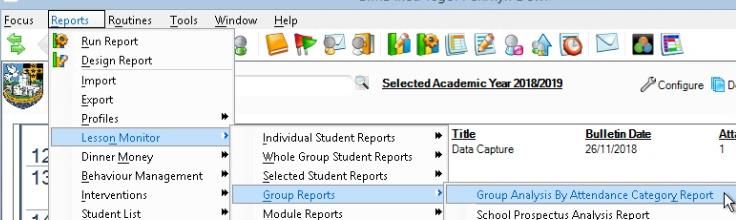
Detailed below is the week-by-week view of how the cycle will be carried out. This will occur
three times throughout the year, with the Foundation, Development and Momentum Phase
pupils having three data drops per year and the pupils in the Fulfilment Phase having 5 data
drops per year.

                                 •    Data drop; subject / class teachers and to complete pupil
                                      progress review sheet.

                                 •    AOLE meeting with subject teachers to review completed
                                      document.
                                 •    SMID reports made available to form tutors / class teachers to
                                      complete pupil progress review sheet.

                                  •   HOP meeting with form tutors / class
                                      teachers to review completed document.           Interventions stop
                                                                                      and all staff running
                                                                                         interventions to
                                                                                        complete review,
                                 •    Raising Achievement Team to reflect on           measure progress
                                      process and all interventions agreed.          and plan and prepare
                                                                                     for new pupils during
                                                                                            this week.

                                                  All interventions and support begin.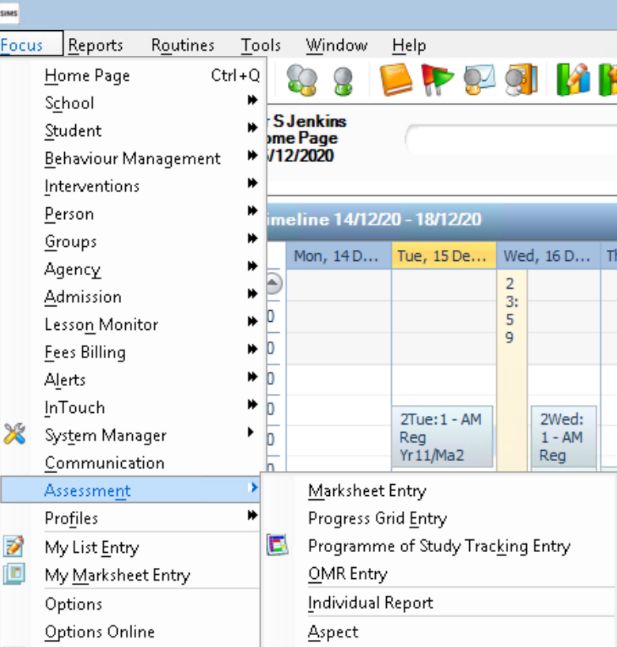
1.                                    2.

       Pupil                                 Pupil                       ---- 1 ----
Individual pupil in a                   Individual pupil
                                                              This underpins the curriculum
 subject and entire                    progress across all
                                                                planning and AFL. This is the
  class in a subject                        subjects
                                                               responsibility of class/subject
                                                             teachers under the guidance of
                                                              HoAOLE plus Hof FP and HoDP
                                                             (in those phases). Standards for
   Class teacher                         Class teacher
                                                                 individual subjects are the
   (Years N – 5)                         (Years N – 5)
                                                               HoAOLE and HoFP and HoDP
 Subject Teacher                          Form Tutor             responsibility and they are
  (Years 6 – 11)                         (Years 6 – 11)       accountable to Assistant Head
                                                                  of Curriculum. Extending
                                                                     subject content and
                                                                challenging learners (MATS),
   Head of AOLE                                                    sits here. Tracking pupil
    (MP & FP)                                                  progress within a subject and
                                        Head of Phase
                                                               entire classes in a subject sits
                                          & ALNCO
      and HOP                                                                here.
(FP & DP) & MAT Co

                                                                         ---- 2 ----
  Assistant Head                        Assistant Head
Teacher Curriculum                     Teacher Inclusion
                                                                   Underpinning this is
                                                                  attendance, wellbeing,
                                                             behaviour etc. as does tracking
                                                              them. ALN sits here. Tracking
                                                              Pupil progress across subject
                                                              sits here. This is all HOPS and
                                                               Assistant Head of Inclusion.
                        Head Teacher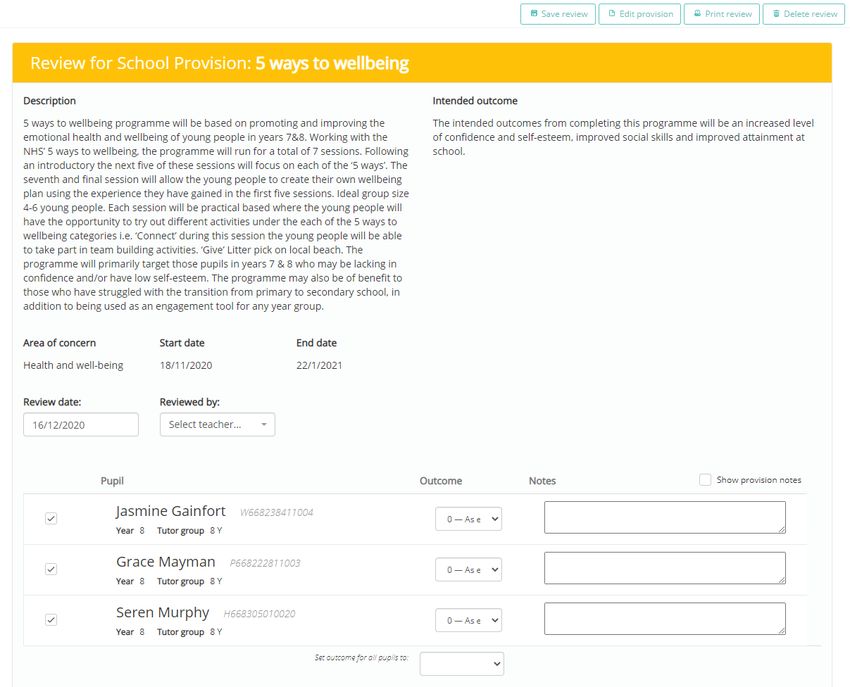
Foundation Phase: On entry Reception,
  Foundation Phase:                                  pupil targets will be set based on Head of
  Baseline assessments completed upon                Phase observations, Teacher assessment
  entry:                                             and NVR data.
  •  LLC                                             Year 1 will complete the FFP and NVR using this data the
  •  MaD                                             Head of Phase and Class teacher will agree End of Phase
  •  Phys D                                          targets.
  •  PSD WCD
  •  Targets for outcomes generated & fixed          Year 2 will complete the FFP and NVR and Welsh
     in Michaelmas term of year 2                    Government tests before October half term. These will
                                                     then be used to confirm/complete their targets.
Key Stage 2: Target setting for Year 3 pupils will
be set using their Foundation Phase outcomes         Development Phase (inc Yr 6):
and Welsh Government test data. Where pupils         Projected targets are set using data from:
have achieved Outcome 6 at the end of                •   FP Outcomes
Foundation Phase there will be an expectation        •   WG Tests
that these students are set a Level 5 End of Key     •   NVR
stage target.                                        •   Flightpath/teacher data
NVR test will be taken in September with the         •   Reading age/ spelling age.
option to complete another round in the              •   Targets are fixed in the Michaelmas Term of year 5
summer term. If a pupil consistently scores 115
or higher they will be identified as MAT and targeted a Level 5 or higher. Targets are fluid and will be
reviewed after every data drop. Where pupils are on target in a subject the target will be raised by at least
one sub level.
Year 5 will complete NVR and Welsh Government tests before October half term.
End of Key stage targets will be fixed in Year by October half term in conjunction with the Head of Momentum
and Development Phase and year 5 Class teacher.
                                                        Key stage 3 - Year 7: At the end of year 6 (CAT 4
  Momentum Phase (Yrs 7-8):                             Testing at end of Year 6). Targets to be set using CAT
  Prior to starting year 7 Targets are set using:       4, WG Test scores, flightpath data, Reading and
  •   KS2 data                                          Spelling age scores and KS2 data. They will complete
  •   CAT 4                                             GL testing in year 7 and targets will be reviewed at the
  •   Teacher data/Flightpath                           end of year 7 and then at the end of year 8 when they
  •   WG test Scores                                    will be fixed for year 9. Only three data drop downs
  •   Reading Age & Spelling age                        per year until year 9.
  •   GL testing completed during year 7 to
                                                        Data will be shared with all staff through SharePoint.
      review targets/identify needs
                                                        Which will be found by clicking the link below
Prior to starting Year 10 pupils will sit CAT4 in
March of year 9 to generate their GCSE targets.
                                                      Fulfilment Phase (Yrs 9-11):
                                                      Targets agreed at end of KS3 prior to starting Yr
Subject teachers should use the If Challenged as
their starting point. Where pupils are to be set      10 using:
                                                      •   KS3 Flightpath Data
target grades above the target If Challenged
                                                      •   CAT 4
grade, these Pupils will be identified as MAT for
that subject.                                         •   WG Tests
                                                      •   GL Tests
If the class teacher identifies a pupil as having too •   Teacher data
high, an If Challenged grade the class Teacher and    •   Targets are reviewed at the end of Year 10.
Head of AOLE will need to look at their supporting
KS3 Data and Welsh Government Test Data to provide corroborating data to justify using a different GCSE
grade.
The assistant head teacher in charge of target setting will produce the appropriate tracking information to
turn end of Phase/Key stage targets in to end of year targets. All targets will be uploaded into SIMs by the
relevant class teacher or Head of Phase/AOLE.
Predictions
• all targets for year 10 are set at the end of year 9. For new subjects they can still view relevant data.
• Teachers to enter a prediction for each pupil on their course.
• This should be an accurate judgement on what each pupil will achieve at the end of the course.
• The prediction should build in the impact of all interventions that will take place over the two years.
   Interventions will only be employed after each drop down and reviewed after each subsequent drop
   down when their impact can be measured.
• These will be whole grades recorded on the EXCEL sheet shared on OneDrive.

Assessment
• In YPD we are continuously assessing our pupils to provide them with immediate and meaningful
   feedback and support (detailed in our marking and feedback policy)
• To effectively meet the requirements of the cycle detailed in this policy, pupils need formal assessment
   that can then be recorded and tracked using data drop in SIMS.
• During assessment week, all teaching staff should take time to consider the levels of their pupils, this
   may be in the form of a formal assessment but will also include teacher assessment, class work,
   practical work and course work or any other work that can be used to provide pupils with their working
   at level. This will be specific to each subject and as such, directed by the HoAOLE.
• Prior to the data capture, there will be designated moderation time on a Monday night staff meeting
   for subject areas to discuss and moderate work. This should ensure consistency across subject areas
   and should also ensure that underachievement is picked up early and resolved.
• In the week following the data capture there will be a reflection week where pupils evaluate their
   progress to date. They will create personal learning goals with detailed plans of how to achieve them.
   They can produce personal learning checklists in their subjects to help focus their efforts. The learning
   kits should be used to help with this.
The first step in the cycle is to set target grades and then to monitor progress after each
data drop down. This is initially done using the Smid tool for the individual subject progress
and pupil/class profile and the Smid cross subject pupil profile.

     •     Academic progress
     •     3 – 16 Flightpath                                                     •   Attendance
                                             •    Rewards                        •   Pupil Overview Tracker
                                             •    Behaviour and Effort

                                                                                                   Detailed guidance
                                                         •   All pupil information                 on these below

                                                         •   Additional details

                                                  FP + DP Teachers
                         Subject Teacher           cover both (only          Form Tutors
                                                 produce one document)

 •       Subject teacher to complete the data drop             •   Form Tutors review pupil progress relating to
         based on the terms work including                         targets across subjects using Smid profile and
         assessment week and pupils to be given                    to complete Pupil Progress Review document
         working at targets and an effort and                      attached at this policy.
         behavior score on SIMS.                               •   Form tutors should also use SIMS,
 •       HoAOLEs to task subject teachers with                     ClassCharts / Class Dojo and Provision
         pupil(s) progress review based on the                     Mapping to gain a better insight into the
         performance of pupils in their subjects using             pupil’s school life and impact on
         SMID as the primary source of data.                       performance and wellbeing. (See attendance,
 •       Groups of learners such as; MAT, FSM, LAC,                behavior etc.) Detailed guidance on these are
         ALN, Male/Female and vulnerable are                       included in this policy.
         identified.                                           •   Focus/Identification on groups of learners;
 •       Review template document attached to this                 MAT, FSM, LAC, ALN, Vulnerable, males and
         policy to be completed by the subject                     females.
         teacher who meets to reflect with their               •   Completed template document attached, to
         HoAOLEs in the week following the drop                    be discussed with HOPS and ALNCO prior to
         down.                                                     meeting with the RAT team to agree
                                                                   interventions.
In this step of the cycle, the pupils identified will be finalised by going through the lines of
accountability and the interventions will begin.

      In the first week after the drop down, all pupils (Y5+) must be made aware of their target and
      working at levels for each subject They must be recorded in their subject books and planners.
      Subject teachers must inform pupils via feedback and reflection what is needed to achieve their
      target grades. Form/class teachers mentor pupils across subjects to set weekly targets to achieve
      their long-term targets

•   In the second week after the dropdown, the HOPs, ALNCO, MATCO and HoAOLEs (RATS) will meet to
    agree the targeted pupils and the relevant interventions. These will then be allocated to the relevant
    member of staff leading the intervention.

The types of interventions will be finalised by the following;
• Subject intervention - agreed during the AOLE subject teacher review meeting + MATCO.
• Core interventions - agreed by ALNCO, head of LLC and head of Math.
• Wellbeing interventions - agreed by HOPs and form tutor meeting (inclusion team).

•   In the second week after the drop down those staff who have led the interventions will review the
    impact/measure of the intervention on each pupil and complete their review which will be uploaded to
    the Provision Mapping tool.
•   The interventions should fall into one of these categories;

       Subject Intervention                     Core Intervention                         Wellbeing
    Class based support directed           ALN, Literacy, Numeracy and            Behaviour, ELSA, Attendance
    by the subject/class teacher                 outside agencies                             etc

•   At this point, HOPs and HoAOLE should consider groups of learners such as; MAT, FSM, ALN, LAC and
    boys and girls.
•   They can then be put into practice with the support of the ALNCO to implement the ‘Core
    interventions’ by tasking the staff responsible for leading the interventions. This may include updating
    IEPs and informing parents.
•   As can be seen in the cycle overview, all interventions and support should be finalised before the end
    of the second week, ready to implement on the first day of the following week (new cycle/term).
•   The staff responsible for delivering the core interventions are responsible for inputting the information
    into the Provision Mapping tool. Staff must include; pupils names, start dates, end dates, aims and any
    entry assessments. HOPs will then use this information to update the Pupil Overview Tracker in SIMS.
•   Details of using all tools mentioned are detailed later in this document.
Monitor

Between the implementation and measuring of the interventions, it is important to monitor their impact
through the duration of the cycle.

       Subject Intervention                 Core Intervention                       Wellbeing
    Class based support directed        ALN, Literacy, Numeracy and         Behaviour, ELSA, Attendance
    by the class/subject teacher              outside agencies                          etc

   The subject/class teacher is     The staff member leading the core           The form tutor is
   responsible for overseeing          intervention is responsible for           responsible for
          their classroom            monitoring the progress of pupils        monitoring pupils on
    interventions as directed          engaging in the interventions,       these interventions, such
   by their HoAOLE. These are      overseen by the ALNCO and Literacy          as BHSP’s and PSP’s
       informal monitoring         and Numeracy leads. The monitoring           monitored by the
      processes to be more           process will be different based on       HOP/outside agency
     formally assessed when           each intervention but must be
      measuring for impact.        recorded into the Provision Mapping
                                      tool. Impact should be evident
                                              across subjects

                                                Measure

     The subject teacher will      The staff member leading the core      The form tutor will measure
    measure the impact that          intervention is responsible for            the impact that the
          their classroom              measuring the impact of the            mentoring has had as
      intervention has had as      intervention. This will be different     directed by their HOP. For
    directed by their HoAOLE.      based on the intervention, but any      example, this evidence may
    This will likely be teacher        measurement data must be            come from improved pupil
       assessment as a short           uploaded into the Provision          confidence, behaviour or
     statement using the first         Mapping tool. To effectively       attendance. This may also be
    box in the pupil progress      measure and compare impact, each        a short statement using the
         review document.             intervention also needs to be            first box in the pupil
                                     measured as a +/- 2 measure.          progress review document.

At the end of every data dropdown all impact of all interventions should be visible and measured. After the
 measuring cycle has concluded, the cycle will begin again by identifying the pupils who need our support.
This guidance aims to show you some key features of using SMID, there are many more
useful features of this tool which can be found in the official SMID guidance document.
Subject / Class Teacher – To view information on pupils within your subject;
1. Select SMID
REPORT &
DASHBOARD
2. Select the year
group you wish to
view
3. Select the form
group you wish to
view
4. Select Qualifications then
select your subject area5. Here you can view your
class overview. You can
see the TA and WA level as
well and +/- measures
Form Tutor / Class Teacher – To view information on pupils within your form across all of their subjects;
1. Once you are on the page with
your form you can select Show
Performance Measures to get a
nice overview of each child within
the core subjects
2. You can then click on each pupil’s
name within your form to give you an
overview of their performance across
all subjects, including TA and WA
levels as well as +/- measuresThis guidance aims to show staff how to access data on pupil behaviour that is relevant to
them and how this data could be used.
To run a report on a group of learners relevant to you, login to ClassCharts;
1. Select ANALYTICS
4. Select BEHAVIOUR
2. Select a date
range, by clicking
on the drop down
3. Select a primary
breakdown from the drop-
down list. If you want, you
want to see individual
pupils then select pupils or
you can view groups such
as forms
5. Here you can order the data of a
chosen field by clicking on the titles
6. Select Behaviour only
7. Select your filter, e.g.
if you only want to see
the pupils in your 8. If you want to see details
form / class select on a specific pupil, you
filter by group then can click here which will
select the group you open a new tab
want to view
10. Press generate report 9. You can all see additional overview details by
clicking here on the bottom of the pageThis guidance is here to support you with analysing attendance data for your pupils and
instructions on how to access and use the Pupil Overview Tracker
Accessing the Pupil Overview Tracker;
1. Select Focus
2. Select Assessment
3. Select Marksheet Entry
5. Select Search
4. Type ‘%inter’ into this
box
6. This will bring up the
intervention marksheets you
have access to, select one
7. All staff have access to this document, here you can view key pupil
information and gain an overview of the interventions happening
in the school. For more in-depth detail regarding information, you
will need to visit Provision Mapping (detailed below)Viewing the most up to date attendance data on a selected group of pupils;
1. Select Reports > Lesson Monitor > Selected
Student Reports > Percentage Attendance Report
3. Here you can select a date 2. Select print
range
4. Here you can choose to only
show pupils with a certain
percentage or all pupils
6. Select the group you wish to
5. Select how you would like
view, or multiple by CTRL
them ordered
clicking
7. On the pop up, you can
either view the
information on a
browser (not saving) or
output as an excel 8. Your data
should appear
in this format
Comparing different group attendance;
1. Select Reports > Lesson Monitor > Group
Reports > Group Analysis By Attendance
Category Report
2. Select a date range
4. Select Percentages and
untick here
3. Choose your groups by CTRL clicking then
select print, the same as previousProvisionMap has all pupil information relating to wellbeing and any additional needs, this
guidance show how to access important features of ProvisionMap and provide guidance
for staff running interventions.
Viewing pupils’ additional needs and IEPs;
On the home screen, you should see pictures
of all pupils in school. Tick the box saying
‘Pupils I teach’ then go through your pupils
selecting those with this ( ) symbol to read
through their extra provision, including IEPs
Recording a safeguarding concern;
Recording using meetings logs, meetings with
parents and phone calls can be recorded here;
On the home screen hover
On the home screen hover over
over Admin, then select
safeguarding then report a concern
Meetings log. After this select
add new and follow the steps
Gathering information from staff using a Round Robin (very useful for reporting to parents);
1. Following this, follow the steps to select a
pupil, write a message and then select the
staff to send the Round Robin to. This will
automatically send an email to those staff
3. On the home screen hover over 2. When you are ready, revisit this are and
School Robins then select select view school robins and print as a
Create a school robin report.How to input a new provision (for staff running interventions);
1. On the home screen hover
over Provisions then select
Apply a provision
2. Fill in all the different fields of
information for your
interventions then click on the
Publish button to save
3. By clicking on the upload file button,
you can upload any additional
information or evidence for the
provision. This might be in / out
assessment, progress reviews, written
statements or referrals
How review a provision to measure its impact (for staff running interventions);
1. On the home screen, hover over the Provision drop down
then select Review a provision. When reviewing your
provision, you may also conduct an assessment or written
review, this should be photographed or scanned and saved
in the Files section of the intervention.2. Here you can add notes directly to your
review. Here you can also select the outcome
of the provision from -2 to +2. Ensure you
save the review.
How to finish and archive a provision (for staff running interventions);
2. On the home screen, hover over the Provision
drop down then select View applied provisions
1. Choose the provision to archive by ticking the
box then select Archive selectedThese A5 cards re designed to give the reader a brief but detailed overview of each of the
provisions we offer here at YPD, including; criteria, aims, monitoring, measure, in/out data.
EXAMPLES BELOW – NEED TO BE COMPLETED
ELSA
Emotional Literacy Support Assistant
Criteria Aims
Monitoring and Measuring
Lexia
Supporting Pupils to Develop their Reading Skills
Criteria Aims
Monitoring and MeasuringYSGOL PENRHYN DEWI VA
Pupil Progress Review
Class Teacher / Form Tutor
To be completed by: Staff member:
Comment on the outcome of the previous cycle:
Pupil Reason for identification Suggested next stepsYou can also read


