An Introduction to PHP for Web API
←
→
Page content transcription
If your browser does not render page correctly, please read the page content below

An Introduction to Php for
         Web API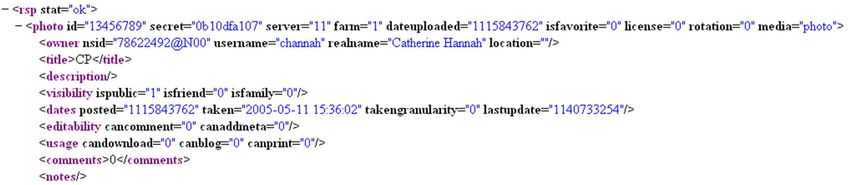
Principle
WEB Client
           of server WEB
                     side   script
                         SERVER
                                                               html document

                                                                      SCRIPT
                HTTP

                                                                      SCRIPT

                              Script engine
       • Pages are generated by a program
       • A html document at the server side includes the code to be
         executed (script)
       • The code is delimited via special escape characters
       • The web server extracts the script part from the document
       • A script engine runs the code
       • Web server replaces the script with the output of the execution
       • Client sees pure html (no way to access the code)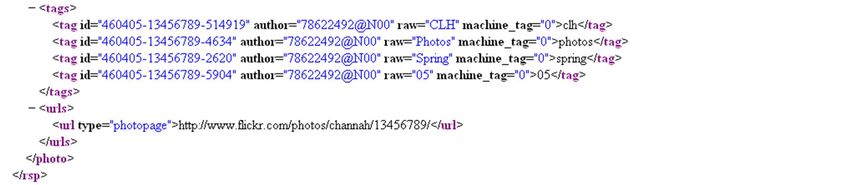
Access to Cloud computing
                                           Web URL
                                           (standard HTTP methods)
                                                                     web brower
          Service                                    HTTP

                                                  Rest,XML-RPC,etc
                     IaaS
                                                    HTTP
                            PaaS
                               SaaS
                                                               Application

                                      Programmatic Service Access
                                      (many methods)
• A service is delivered through two access points:
• Standard web browsing (HTTP) and
• Programmatic access (Rest,XML-RPC,SOAP, etc. over HTTP)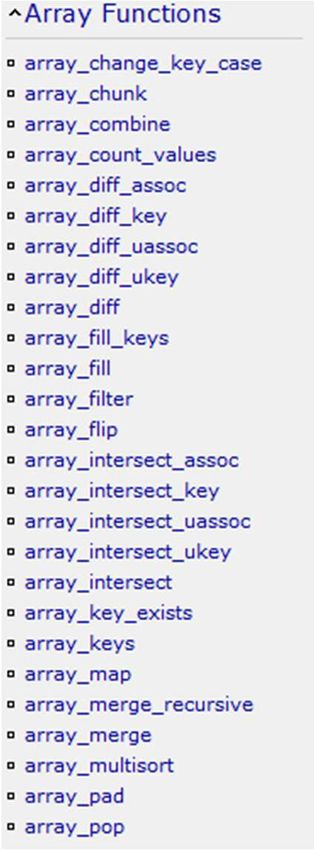
Introduction to PHP

• Scripting language

• Server side execution
   • Code is scattered inside a html document
   • The web server executes the code and produces a simple html page

• Useful to implement a service in the cloud
   • Other technologies are available

PHP code embedding

Sample PHP
  Script

The following prints "Hello, World":

Every time the PHP interpreter reaches a PHP open tag marker.
Can be changed, see short_open_tags INI option;
PHP code embedding

Sample PHP                       Sample PHP Script
  Script
                                 The following prints "Hello, World":
The following prints "Hello, World":   Hello, World

Every time the PHP interpreter reaches a PHP open tag marker.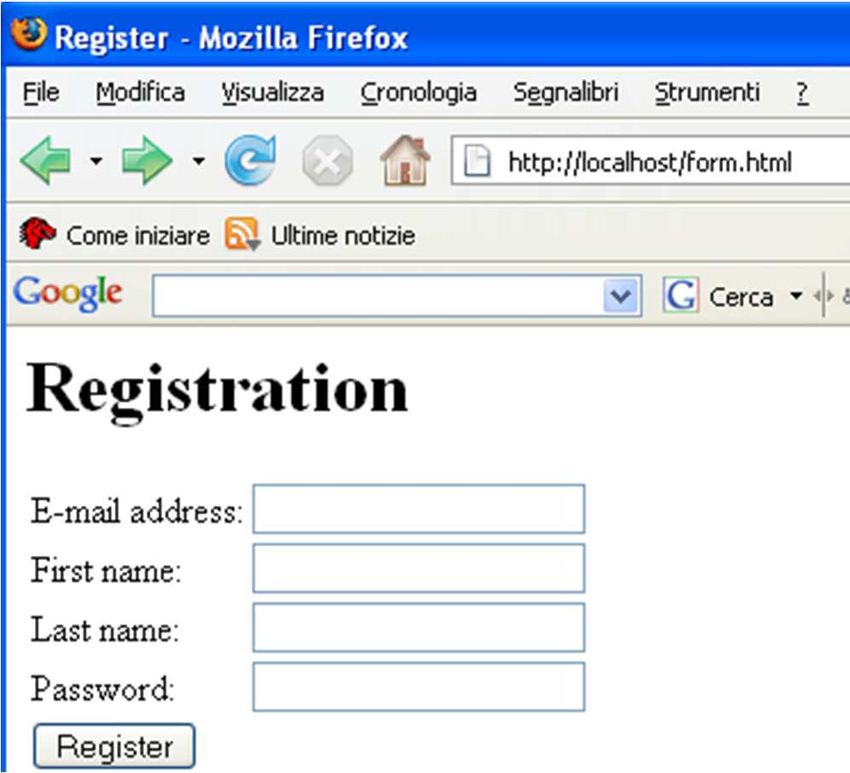
Variables
• A variable always starts with the dollar sign $
  • $a
  • $A
  • $1 (not allowed)
• Identifiers are case sensitive (not when referring to function)
• Variable and function can have the same name!
Types

• Basic types like in other programming languages
  • Boolean, Integer, Floating Point, Object,
• Main difference concerns:
  • string (regular expression,…)
     • single quoted (variables are not replaced with their values)
     • double quoted (variables are replaced with their values)
     •…
  • array (associative arrays)
• Other types:
  • null
     • No type associated yet
  • resource
     • Generic type, e.g. the result of a query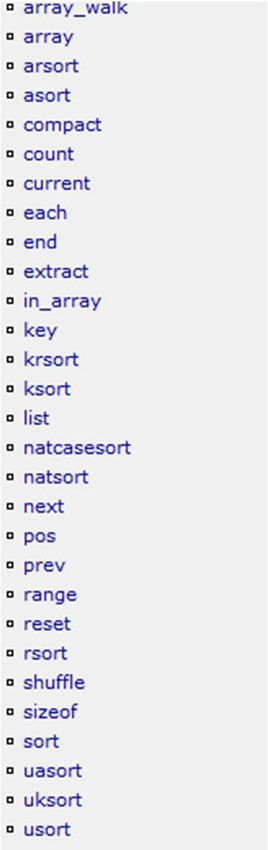
Types
• PHP uses a Weakly Typed System
• variables’ type is not declared
• PHP automatically converts the variable to the correct data
  type, depending on how they are set
• $integer=10
• $float = 10.0
• $string = “10”

Some example

$a = “fine” // $a is a string
$a = 10; // $a is an integer
$b = 6.3;
$c = $a + $b; /* $c is a float */
$d = (int)$c; // type casting ($d integer)

gettype($d);
settype($d, double); // $d is now double

print(gettype($e)); // print boolean

if (is_int($d)) // is_type to type check
Variable variables

                                John            Registered user
                               $name          $$name (=$John)
Managing variables
• isset ()
• determines whether a certain variable has already been declared by
PHP.
• unset()
• “undeclares” a previously set variable, and frees any memory that
was used by it if no other variable references its value.
• empty ()
• empty() may be used to check if a variable has not been declared or
its value is false.Variable’s scope
• Names inside a function has local scope
• Script level names can be accessed through the special built-in
array $GLOBALS
$m main script
function Af
$a $a is only visible in the function Af’s scope
$m can be seen via $GLOBALS[m]
function Bf
$b $b is only visible in the function Bf’s scope
$a is not visible
$m can be seen via $GLOBALS[m]Predefined System "Superglobals" • Provide access to key runtime data elements. • Set by and managed through web server run-time environment and available to the script. • Superglobals are key to form processing, cookies, and other techniques.
Some Superglobals

• $_GET[ ]. An array that includes all the GET variables that
  PHP received from the client browser.

• $_POST[ ]. An array that includes all the POST variables that
  PHP received from the client browser.

• $_COOKIE[ ]. An array that includes all the cookies that PHP
  received from the client browser.

• $_SERVER[ ]. An array with the values of the web-server
  variables.

• $_SESSION[ ]. Array with values concerning a ‘session’
Output: echo statement
• Placing a variable outside quotes outputs the variable’s value
  (line 2)
• Single quote ' sends literal string output (line 3), no variable
  value substitution
• Double quote “ sends variable value (line 4)

    Note: no declaration (line 1)
Constant
• Unchangeable values. In all caps by convention. No $.
• To output, must list constant name outside of ' and ".
• echo "Hello, ".NAME;
• Predefined system constants also exist.
• To see a complete list:
print_r(get_defined_constants())Output: print_r() • print_r() can be used to "dump" variable output, typically for debugging of complex structures.
Example
Comments

• Multi-line comments
       /* This is a multi-line comment */
• Single line comments
       // This single line is commented
       # So is this single line
   • PHP comments are distinct from HTML comments in that PHP comments are
     not sent to the client browser.
Operators • +, -, *, /, %, ++, -- same as other languages • Combining above with = for assignment can be done: • +=, -=, *=, /=, %=, .= • Two Comparison operators • == (performs type conversion) • === (no type conversion) • ‘1’==1 true • ‘1’===1 false
Creating a form

• Key elements:
   • Input fields must be contained inside a form tag.
   • All input fields must have a name.
   • Names cannot have spaces in them. Fields should be named well for clear
     identification.
• Form action should be URL to PHP processing script.
• Appropriate form transmission method selected:
   • GET or POST.
GET vs POST • Name/value pairs appended in clear text to the URL of the receiving page/script. • Each name/value pair separated by '&'. Value data automatically URL encoded. • Names are taken from the form field names. • GET URLs can be saved, bookmarked, etc. and used to recall the script with the same data. • GET strings provide 'transparency' that may/may not be desired. • Data available into the $_GET superglobal
GET vs POST

• Data is encoded in the page request body sent by
  the browser, but not shown in the URL. Unseen to
  user.
• Since data not part of URL, bookmarking and
  reusing URL to recall the script with the same data
  is not possible.
• Large POST packets not a problem.
• Data available into the $_POST superglobal
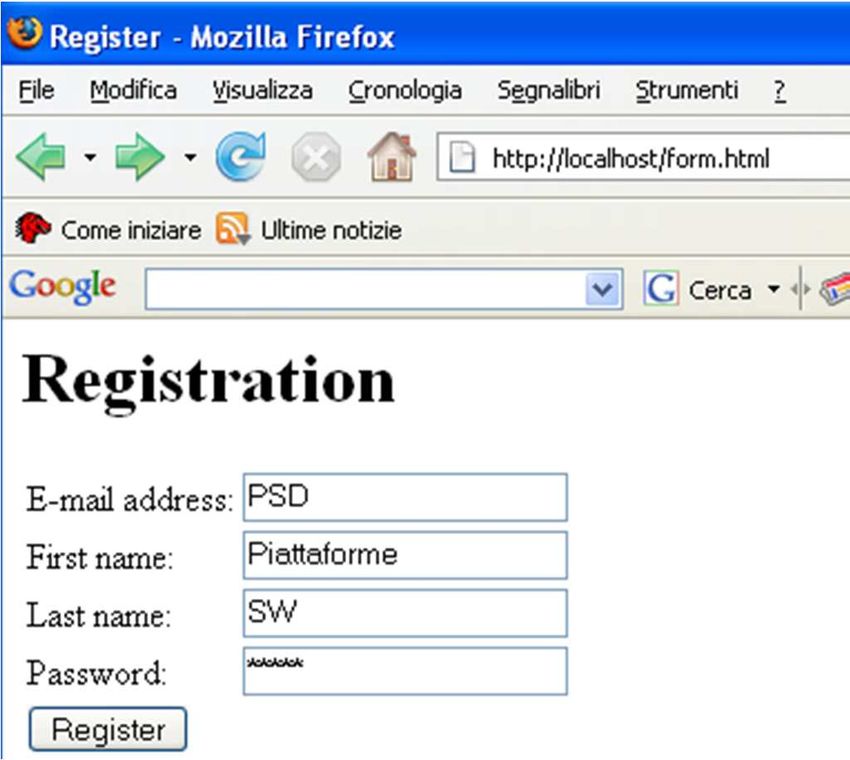
An example

Register

Registration

               E-mail address:
               First name:
               Last name:
               Password:
An example
method
Register Processing
script
Registration
E-mail address:
First name:
Last name:
Password:
Input tagskey value http://localhost/register.php?email=PSD&first_name=Piattaforme&last_name=SW&password=Pippo®ister=Register
Conditional control structures
if (expr)                          if (expr):
    statement     { statement1;         statement list
elseif (expr)       statement 2;
                                   elseif (expr) :
    statement      }
elseif (expr)                           statement list
    statement                      ...
...                                else :
else                                    statement list
    statement                      endif;
Traditional loop control structures
while (expr) while (expr) : do
statement list statement
statement endwhile; while (expr);
for (expr, expr, …; expr, expr, …; expr, expr, …)
statement
for ($i = 0; $iArray
array([key =>] value, [key =>] value, ...)
• The key is optional, and when it’s not specified, the key is
automatically assigned one more than the largest previous
integer key (starting with 0).
• There are three different kind of arrays:
• Numeric array - An array with a numeric ID key
• Associative array - An array where each ID key is associated with a value
• Multidimensional array - An array containing one or more arraysExamples
1. array(1, 2, 3)
2. array(0 => 1, 1 => 2, 2 => 3)
3. array ("name" => "John", "age" => 28)
4. array(1 => "ONE", "TWO", "THREE")
5. array(1 => "ONE", 2 =>"TWO", 3 => "THREE")
6. array (array ("name" => "John", "age" => 28), array ("name" =>
"Barbara", "age" => 67))
1 and 2 are same, 4 and 5 are same, 6 is a nested arrayExamples
$arr1 = array(1, 2, 3); Array
$arr2[0] = 1; (
print_r($arr1)
[0] => 1
$arr2[1] = 2;
[1] => 2
$arr2[2] = 3; [2] => 3
)
$arr1 = array("name" => "John", "age" =>28);
$arr2["name"] = "John";
$arr1 and $arr2 are the same
$arr2["age"] = 28;
if ($arr1 == $arr2) {
print '$arr1 and $arr2 are the same';
}Traversing
foreach($array as [$key =>] [&] $value)
• $key contains the currently iterated value’s key
• & if present allows to modify the array
• $value contains the value
$players = array ("John", "Barbara", "Bill", "Nancy"); The players are:
#0 = John
print "The players are:";
#1 = Barbara
foreach ($players as $key => $value) { #2 = Bill
print "#$key = $value"; #3 = Nancy
}Array related functions
json_encode
…Lab: simpe Shopping cart
methodName=list List
Android App Php
json
Add Items to the server from a web form (server side)
List item in the telephone
Add item into a DB on the serverExample
Functions

• Any valid PHP code may appear inside a user-defined function, even
  other function…
• Functions need not be defined before they are referenced
• Call-by-reference, call-by-value, default value, variable-length
  argument, lambda-style function
Parameter passing
function function_name (arg1, arg2, arg3, …)
{
statement list
}

                                                parameter by-value
function square(&$n)
{                                              function square($n)
$n = $n*$n;                                    {
}                                              $n = $n*$n;
                                               }

  … by-reference
Default value
function makeAcoffee ($type=“espresso”)
{
return “Making a cup of $type”;
}
echo makeAcoffee();
echo MakeAcoffee(“French”)
• The default value must be a constant
• Default arguments should be on the right side of any non-default argumentVariable-length argument list
function foo()
{
$numargs = func_num_args();
echo "Number of arguments: $numargs\n";
}
foo(1, 2, 3);Variable function
• If a variable name has parentheses appended to it, PHP looks for a
function with that name and executes it
function foo() {echo “in foo()”;}
$func = ‘foo’;
$func(); #call foo()Static variables
function do_something()
{
static $first_time = true;
if ($first_time) {
// Execute this code only the first time the function is called
...
$first_time=false;
}
// Execute the function's main logic every time the function is called
...
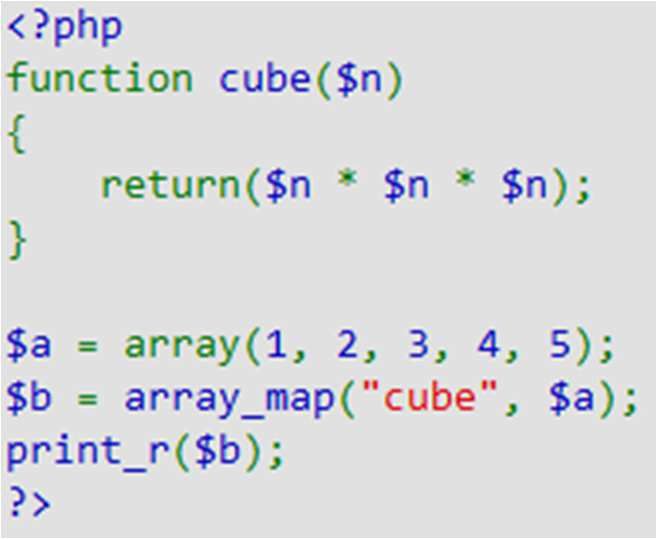
}Array_map • Applies a callback function to the elements of the given arrays • Other interesting functions (see manual): • array_walk • array_reduce • …
Code inclusion control structures

include file_name;

include_once file_name;                    include only once

require file_name;                        require: stop if not available

require_once file_name;

include URL;                   if allow_url_fopen is set

include "http://www.example.org/example.php";

include $_SERVER["DOCUMENT_ROOT"] . "/myscript.php";
Persistency
• Cookie, Session
   • Per browser data storage, no cross-browser data exchange
• File, DB
   • Site level persistence storage
SQLite / SQLite3
• Light and fast, shipped with php5
• No dedicated servers are required
• Procedural and object oriented APIs
• Cons: Lock mechanism is not very efficient
Open/create a db
  resource sqlite_open ( string $filename [, int $mode [, string &$error_message ]] )

  Opens a SQLite database or creates the database if it does not exist.
Create a table
bool queryExec ( string $query [, string &$error_msg ] )
Executes a result-less query against a given database

                                     Sql statment       $create_query = "
                                                          CREATE TABLE PRODUCTS (
                                                          id integer primary key,
                    Two types: integer and text           description,
                                                          quantity integer
                                                         )
                                                        ";
                                                          $db->queryExec($create_query);

         PRODUCTS

  db           id          description   quantity
Insert a row
$query = "INSERT INTO PRODUCTS (id,description,quantity) VALUES (1,'DVD',1)";
$db->queryExec($query);
id Description quantity
1 DVD 1
PRODUCTS
dbUpdate/delete
$db->queryexec('DELETE FROM PRODUCTS WHERE id=2');
$db->queryexec('UPDATE PRODUCTS SET id=19 WHERE id=4');Fetch results
SQLiteResult
query fetch, fetch all,
seek rewind, current…
unbufferedquery
SQLiteUnbuffered
forward only, much fasterFetch results
$q = "SELECT * FROM PRODUCTS;";
$qr = $db->query($q); //Executes a query against a given database and returns a result handle
$r = $qr->fetchAll();//Fetches all rows from a result set as an array of arrays
foreach ($r as $entry) {
echo $entry['id'].' '.$entry['description'].' '.$entry['quantity'].'';
}
1 DVD 1OO Model • An OO program is a collection of objects • Every object is an instance of a class • An object has properties • An object has a set of methods
Constructor
• Unified constructor name
• __construct()

     class MyClass {
     function __construct() {
     echo "Inside constructor";
     }
     }
Destructor
• __destruct() class MyClass {
function __destruct()
• Called when an object is {
destroyed (no more print "An object of type MyClass is being
destroyed\n";
reference) }
}
$obj = new MyClass();
$obj = NULL;
An object of type MyClass is being destroyedCopying objects
class MyClass {
public $var = 1;
}
obj1 $obj1 = new MyClass();
object
$obj2 = $obj1;
$obj2->var = 2;
obj2 print $obj1->var; //print 2
obj1 object
$obj1 = new MyClass();
$obj2 = clone $obj1;
obj2 object $obj2->var = 2;
print $obj1->var; //print 1Access protection of member
variables
class MyDbConnectionClass {
public $queryResult;
protected $dbHostname = "localhost";
private $connectionHandle;
// ...
}
class MyFooDotComDbConnectionClass extends MyDbConnectionClass {
protected $dbHostname = "foo.com";
}Example
class Person {
private $name;
function setName($name)
{
$this->name = $name;
}
function getName()
{
return $this->name;
}
};
$judy = new Person();
$judy->setName("Judy");
$joe = new Person();
$joe->setName("Joe");
print $judy->getName() . "\n"; //print Judy
print $joe->getName(). "\n"; //print JoeStatic properties
class MyUniqueIdClass {
static $idCounter = 0;
public $uniqueId;
function __construct()
{
self: refer to the current class
self::$idCounter++;
$this->uniqueId = self::$idCounter;
}
}
$obj1 = new MyUniqueIdClass();
print $obj1->uniqueId ; //print 1
$obj2 = new MyUniqueIdClass();
print $obj2->uniqueId ; //print 2POLYMORPHISM
• Single class inheritance
• like Java
• Multiple interface implementations
• Final keyword
class Child extends Parent { class A implements B, C, ... {
... ...
} }
interface I1 extends I2, I3, ... {
...
}public function authUser($email, $password)
{
$q = '
SELECT * FROM users
WHERE email=“ '. $email. ' "
AND passwd =“ '. sha1($password). ' "
';
$r = mysql_query($q);
if (mysql_num_rows($r) == 1) {
return TRUE;
} else {
return FALSE;
}}}
?>Reflection • Allows to have class information at run-time • Just an example
PHP Communication
string file_get_contents ( string $filename [ …])

Reads entire file into a string
Example

• Flickr is a web site that allows to share personal photos
• Free account for 90 days
• API with different formats
   • Request: REST,XML-RPC,SOAP
   • Reply: REST,XML-RPC,SOAP,JSON,PHP
Flickr’s application end-points
• http://api.flickr.com/services/rest/
• http://api.flickr.com/services/soap/
• http://api.flickr.com/services/xmlrpc/
• http://api.flickr.com/services/upload/
• http://api.flickr.com/services/replace/
REST format is the simplest way; it uses the HTTP POST method

                                           end-point-type

           http://api.flickr.com/services/rest/?method=...&name=value...

CLIENT                                                                     SERVER

            Reply, different format: REST,XML-RPC,SOAP,JSON,PHP

                                                       PHP_Serial
Example of API call
flickr.photos.getInfo
In Parameters:
api_key (Mandatory)
Your API application key.
photo_id (Mandatory)
The id of the photo to get information for.
secret (optional)
The secret for the photo.
If the correct secret is passed then permissions checking is skipped, unless photo is shared.
Out Parameters:
info with different format…Example of reply
An example:
  invoking a REST end-point from PHP code
$param = array(
          'api_key' =>                       'e568d81ac2ac47e943673641e037be8 c',
          'method' =>                        'flickr.photos.getInfo',                                                     Parameters
          'photo_id' =>                      '11111',
          'format' =>                        'php_serial',                                                    •Reply in php serial format
          );
$encoded_params = array();                                                                                    urlencode

foreach ($param as $k => $v)                                                                                  •non-alphanumeric as %
                                                                                                              sign two hex digits
                                                                                                              •spaces as plus (+) signs.
              $encoded_params [ ] = urlencode($k).'='.urlencode($v);

$url = "http://api.flickr.com/services/rest/?".implode('&',$encoded_params);                                  implode
                                                                                                              •Join array elements with
                                                                                                              a string,
                                                                                                              •& used as glue string

 $url
  http://api.flickr.com/services/rest/?api_key=e568d81ac2ac47e943673641e037be8&method=flickr.photos.getInfo&photo_id=11111&format=php_serial
Serialization
string serialize ( mixed $value ) mixed unserialize ( string $str )
Generates a storable
Creates a PHP value from
representation of a value
a stored representationInvoke method $ans = file_get_contents($url);
Transform $ans_obj = unserialize($ans);
format into an
associative array if ($ans_obj['stat']=='ok') {
echo $ans_obj['photo']['id'].'';
echo $ans_obj['photo']['title'] ['_content'];
echo $ans_obj['photo']['description']['_content'];
echo $ans_obj['photo']['dates']['taken'];
}You can also read


