AWS Prescriptive Guidance - VMware Cloud on AWS overview and operating model
←
→
Page content transcription
If your browser does not render page correctly, please read the page content below
AWS Prescriptive Guidance
    VMware Cloud on AWS
 overview and operating model
AWS Prescriptive Guidance VMware Cloud
on AWS overview and operating model
AWS Prescriptive Guidance: VMware Cloud on AWS overview and
operating model
Copyright © Amazon Web Services, Inc. and/or its affiliates. All rights reserved.
Amazon's trademarks and trade dress may not be used in connection with any product or service that is not
Amazon's, in any manner that is likely to cause confusion among customers, or in any manner that disparages or
discredits Amazon. All other trademarks not owned by Amazon are the property of their respective owners, who may
or may not be affiliated with, connected to, or sponsored by Amazon.AWS Prescriptive Guidance VMware Cloud
on AWS overview and operating model
Table of Contents
Introduction ...................................................................................................................................... 1
Overview ........................................................................................................................................... 2
Migration challenges .................................................................................................................. 2
Migration considerations ............................................................................................................. 3
Targeted business outcomes ........................................................................................................ 3
Best practices .................................................................................................................................... 5
Database migration options ................................................................................................................. 6
Operating model ................................................................................................................................ 7
On-premises operating model ..................................................................................................... 7
Provisioning and configuration team .................................................................................... 7
Operational health team ..................................................................................................... 7
Lifecycle management team ................................................................................................ 8
Capacity management team ................................................................................................ 8
Availability and continuity team ........................................................................................... 8
Security team .................................................................................................................... 8
BAU core IT processes team ................................................................................................ 9
BAU resource management team ......................................................................................... 9
VMware on AWS operating model ................................................................................................ 9
High-level transition of tasks from your organization to VMware .................................................... 10
Typical on-premises operating model .................................................................................. 10
VMware on AWS operating model ...................................................................................... 10
High-level responsibilities in the VMware Cloud on AWS operating model ................................ 11
Next steps and resources ................................................................................................................... 12
Resources ................................................................................................................................ 12
AWS Prescriptive Guidance glossary .................................................................................................... 13
Document history ............................................................................................................................. 21
iiiAWS Prescriptive Guidance VMware Cloud
on AWS overview and operating model
VMware Cloud on AWS overview and
operating model
Deepak Kumar, Migrations Consultant, and Punit Solanki, Cloud Architect
AWS Professional Services
April 2022
This strategy explains the reasons for migrating to VMware Cloud on Amazon Web Services (AWS),
the steps that your organization can take to ensure that the transition is smooth and effective, and
changes required in the operating model to support the new cloud environment. Your organization
might encounter several challenges during the migration. Planning and following the right strategies can
help you achieve the best business outcomes.
AWS provides a scalable, reliable, flexible, and cost-effective cloud environment for organizations that
want to modernize their processes and systems in the cloud. VMware Cloud on AWS supports your
VMware vSphere-based workloads in the AWS Cloud, and provides easy access to AWS services to help
modernize your applications. It enables your company to adopt the cloud in a short amount of time,
minimize risks, and manage complexity. The VMware Cloud on AWS environment is familiar, easy to
use, and modernized with the latest technological innovations. VMware Cloud on AWS can also unlock
diverse, additional services such as Amazon Relational Database Service (Amazon RDS) and Amazon
Route 53 that can assist in modernizing your application and improving its performance.
This strategy is for senior managers, CEOs, and operations managers who want to understand how to use
VMware Cloud and its integration with AWS to improve their business outcomes and decision-making
processes.
1AWS Prescriptive Guidance VMware Cloud
on AWS overview and operating model
Migration challenges
Overview
VMware provides infrastructure management and virtualization tools, and traditionally targets data
centers. VMware Cloud on AWS provides organizations with advanced VMware capabilities that are
integrated with AWS services and a single point of contact for service support and integration.
VMware Cloud on AWS gives you access to VMware Infrastructure, which delivers infrastructure
virtualization tools, and VMware Cloud Foundation, which provides compute, storage, networking,
security, and cloud management features for running enterprise workloads in a hybrid cloud
environment.
VMware Cloud on AWS includes three VMware infrastructure components: vSphere, NSX, and vSAN.
vSphere provides compute virtualization, NSX provides network virtualization, and vSAN provides
storage virtualization. In addition, VMware vCenter Server enables you to manage your vSphere
infrastructure, including authentication and authorization, from a central location. With VMware Cloud
on AWS, you can run your VMware-based workloads on Amazon Elastic Compute Cloud (Amazon EC2)
i3.metal and i3en.metal instances in an isolated, single-tenant virtual private cloud (VPC).
Amazon EC2 i3en.metal instances for VMware Cloud on AWS deliver high networking throughput and
lower latency so you can migrate data centers to the cloud for rapid data center evacuation, disaster
recovery, and application modernization. VMware Cloud on AWS is available in most AWS Regions; see
the VMware documentation for a complete list.
The main use cases for VMware on AWS are:
• Data center extension – The scalability and global presence of the AWS Cloud enables you to rapidly,
seamlessly, and cost-effectively meet your data center capacity and regional footprint expansion
needs.
• AWS integrated applications – Using AWS services help you modernize your applications or implement
a strategy to design hybrid applications.
• Disaster recovery programs – You can simplify, accelerate, and modernize your disaster recovery
solutions by enhancing your existing VMware-based disaster recovery approach with AWS Cloud-based
disaster recovery as a service (DRaaS) capabilities.
• Cloud migration opportunities – By sharing the common VMware Cloud Foundation-based cloud
infrastructure across on-premises data centers and the AWS Cloud, you can simplify and accelerate
the migration of mission-critical production workloads to the AWS Cloud at scale without having to
convert or re-architect workloads.
Migration challenges
The major challenges of the VMware to VMware Cloud on AWS migration process include the following:
• Workload assessment – Your organization should be prepared to manage the extra work required
for migration assessment, and your network systems should be capable of handling the increased
workload.
• Skills – We recommend that you hire professionals with the right skills and experience to plan and
carry out the migration. These individuals are responsible for:
• Creating a plan to ensure that your workload can be managed efficiently in the long term.
• Creating a timeline for the migration.
2AWS Prescriptive Guidance VMware Cloud
on AWS overview and operating model
Migration considerations
• Estimating the costs of the migration and potential savings in the long run.
• Network design and security protocols – Your organization must understand and evaluate network
design requirements for VMware Cloud on AWS and security factors to ensure data privacy and
confidentiality. We recommend that you follow your internal security protocols and train the
employees who will be involved in the migration project.
Migration considerations
• A critical part of the migration work is planning the capacity to run your workloads on AWS. Your
organization should be prepared to understand compliance requirements and the capacity that your
workloads would need in the future, and carry out planning and cost budgeting.
• You should also evaluate the exit strategy from your existing data centers. Some applications might
be faster and easier to migrate, depending on their size and complexity, whereas others might take
longer. You can use automation to simplify and speed up your migrations.
• Acquiring the right licenses is critical. Moving to AWS involves changes to your host servers, which
might necessitate licensing changes.
• We recommend that you plan a situational assessment, analyze probable costs, be aware of potential
security problems, and collect information on your organization’s resource requirements.
• The migration is carried out in three different stages: plan, build, and migrate. Each stage has its own
set of challenges and considerations, as discussed in the migration guide on the VMware website.
Targeted business outcomes
A successful migration to VMware Cloud on AWS helps you achieve the following objectives:
• Simplified operations – Your organization can simplify its hybrid IT operations by using the same
VMware Cloud Foundation technologies, including vSphere, vSAN, NSX, and vCenter Server, in
its on-premises data center environments and in the AWS Cloud. You can keep the same VMware
provisioning, storage, and lifecycle policies that you use now. This means that you can easily move
applications between your on-premises environment and AWS without having to purchase new
hardware, rewrite applications, or change your operations.
• Improved availability – VMware Cloud on AWS helps accelerate the migration of VMware vSphere
workloads to the AWS Cloud. Amazon EC2 i3en.metal instances for VMware Cloud on AWS deliver
high networking throughput and lower latency so you can migrate data centers to the cloud for rapid
data center evacuation, disaster recovery, and application modernization. This enables you to take
advantage of the scalability, availability, security, and global reach of the AWS Cloud.
• Application modernization – You can use AWS services to enrich your architecture for VMware Cloud
on AWS workloads. For example, you can connect your VMware application to Amazon Relational
Database Service (Amazon RDS) or Amazon EMR managed databases.
• Cost reductions – VMware Cloud on AWS enables organizations to optimize the cost of operating a
consistent and transparent hybrid IT environment. There is no custom hardware to deploy in your on-
premises environment and no need to modify applications to migrate to the hybrid cloud model. You
can use policy and management tools from VMware on premises and VMware Cloud on AWS for a
unified experience and consistent performance. This ability to leverage your existing investments help
save you money.
• Agile scaling capabilities – VMware Cloud on AWS is designed to scale without the limitations of on-
premises environments. Your organization can take advantage of the massive scalability and global
presence of the AWS Cloud to rapidly, seamlessly, and cost-effectively meet their capacity and regional
footprint expansion needs.
• Private cloud – VMware Cloud on AWS provides a unified cloud infrastructure for both the private and
the public cloud by integrating compute, storage, network virtualization, and lifecycle automation. As
3AWS Prescriptive Guidance VMware Cloud
on AWS overview and operating model
Targeted business outcomes
a completely unified software stack, it provides organizations with the fastest path to the private cloud
and consistent infrastructure across VMware-based public clouds.
• Easy adoption – If you're new to the cloud and have experience with VMware, you can easily apply your
on-premises skills to VMware Cloud on AWS. The traditional vCenter management interface looks and
works the same in the cloud and on premises. Your existing VMware administrators can apply their
existing skills to AWS. This results in reduced staffing and personnel costs, because it eliminates the
need to hire new employees or retrain engineers and administrators. Your organization can ramp up
and use VMware Cloud on AWS much faster compared with a brand-new platform.
• Access to expertise from Partners – You can benefit from the expertise of the global community
of AWS Partners who can help you solve migration challenges and innovate in the cloud. For more
information, see the AWS Partner Network.
• Portfolio of cloud services – You can use VMware’s cloud services or take advantage of a broad set of
AWS services to modernize your applications with increased flexibility, visibility, and cost optimization
across your cloud environment.
• Transition to a variable costs model – VMware Cloud on AWS helps you move from a fixed costs model
to a variable costs model, and frees you from long and expensive data center contracts and disaster
recovery locations. You can use savings in hardware, maintenance, and upgrades to invest in other
projects that benefit your organization.
4AWS Prescriptive Guidance VMware Cloud
on AWS overview and operating model
Best practices
Follow the recommendations in this section to get the best results from VMware Cloud on AWS.
• Infrastructure flexibility – VMware Cloud on AWS runs on top of the AWS global infrastructure and is
managed by VMware. VMware and AWS are accountable for the Software Defined Data Center (SDDC)
configuration, software updates, and hardware maintenance. To protect your workloads against
regional and data center failures, we recommend that you use the built-in capabilities of SDDC. For
details, see the VMware infrastructure service-level agreement.
• Virtual machine and data flexibility – In each SDDC cluster, VMware Cloud on AWS provides two
vSAN databases: the workload datastore (which stores the customer virtual machines) and the vSAN
datastore (which stores the management virtual machines). Your cloud administrator manages the
workload datastore, and VMware manages the vSAN datastore. Infrastructure backups are done daily,
but infrastructure configurations can’t be restored instantly. Keep in mind that your changes won’t be
backed up until the following day.
• Connectivity pliability – The keys to application workload availability are highly robust and fault-
tolerant network connections. To ensure that the failure of one network connection doesn’t affect
other connections, you should provide sufficient network capacity that meets your requirements. For
basic connectivity, IPsec virtual private networks (VPNs) are the most economical option, because a
VPN uses an internet connection. If you want to avoid a single point of failure, we recommend that you
use multiple internet service providers (ISPs) and keep track of the connectivity parameters for IPsec
VPNs.
Whenever you require consistent performance or expect to have more sustained traffic between
workloads in an on-premises environment and SDDC, we recommend that you use AWS Direct
Connect. You can also choose to have an IPSec VPN as a backup with AWS Direct Connect as your
primary connection option.
• Disaster recovery – Hardware failures, human errors, and natural disasters can cause a disaster event.
To secure easy business continuity in the case of such an event, you should have a solid data protection
strategy. In VMware Cloud for AWS, you can use VMware Site Recovery to avoid incurring the costs and
efforts involved in operating a fully functional disaster recovery site. For more information, see the
blog post Design Considerations for Disaster Recovery with VMware Cloud on AWS.
• Standard and stretched cluster resiliency – In a standard (unstretched) SDDC, all hosts are provisioned
in a single AWS Availability Zone. VMware vSphere high availability protects standard clusters from
basic host failures. SDDCs that have multiple nodes provide data redundancy by configuring redundant
array of inexpensive disks (RAID) and failure to tolerate (FTT) settings. These configurations define the
number of host and device failures that a virtual machine can tolerate.
If infrastructure availability is important, we recommend that you configure a stretched cluster for
your workloads. This provides a Multi-AZ arrangement where data is replicated synchronously to hosts
in different Availability Zones. This option provides SDDC with an additional layer of stability. For more
information, see the blog post Resiliency Design Considerations and Best Practices for VMware Cloud
on AWS.
5AWS Prescriptive Guidance VMware Cloud
on AWS overview and operating model
Database migration options
In your corporate portfolio, you probably have several types of databases. When you migrate to AWS,
you can choose to lift and shift your database (rehost) or switch to a database service managed by AWS
(replatform).
If you decide to rehost your database, AWS offers many services and tools to help you securely move,
store, and analyze your data. If you choose to switch to a database service managed by AWS, you
can choose from a variety of options (such as Amazon RDS, so you don't have to compromise on
functionality, performance, or scale.
The best database migration strategy allows you to get the most out of the AWS Cloud, including
migrating applications to use specially designed, cloud-native databases. Consider upgrading your
application and choosing the database that best suits the needs of your application's workflow.
There are seven common strategies for migrating your databases and applications to the cloud:
• Rehosting – Moving your application or database to an Amazon Elastic Compute Cloud (Amazon EC2)
instance (virtual machine)
• Replatforming – Modernizing applications by switching to AWS managed database services such as
Amazon Relational Database Service (Amazon RDS) for Oracle or Amazon RDS for SQL Server
• Repurchasing – Migrating to a different product or license
• Refactoring – Re-architecting or re-imagining your application to take advantage of cloud-native
technologies by using purpose-built databases such as Amazon Aurora or Amazon DynamoDB
• Retiring – Decommissioning or removing a legacy database that’s no longer needed
• Retaining – Keeping your database in your on-premises environment, because there’s no business
justification for migrating it
• Relocating – Hypervisor-level lift and shift to VMware Cloud on AWS
If you’re planning to move your relational database to AWS, we recommend that you read Migration
strategy for relational databases.
6AWS Prescriptive Guidance VMware Cloud
on AWS overview and operating model
On-premises operating model
Operating model
Every organization has an operating model for their on-premises infrastructure that involves various
teams, including partners. If your organization moves its workloads to VMware Cloud on AWS, its current
operating model will change. For example, the teams that support an on-premises environment include
the capacity management team, the operations team, and disaster recovery teams. However, when you
move to VMware Cloud on AWS, these tasks are shared by your organization, VMware, and AWS.
Your existing teams might also have to learn new tools and processes to manage the VMware Cloud on
AWS environment.
This section describes operating model changes and shared responsibilities when you move to VMware
Cloud on AWS.
Topics
• On-premises operating model (p. 7)
• VMware on AWS operating model (p. 9)
• High-level transition of tasks from your organization to VMware (p. 10)
On-premises operating model
VMware on-premises operations are typically handled by eight teams: provisioning and configuration,
operational health, lifecycle management, capacity management, availability and continuity, security,
business as usual (BAU) core IT, and BAU resource management teams. These are described in the
sections that follow.
Provisioning and configuration team
This team focuses on installing the operating system for the guest and the host, creating configurations
based on guidelines, and patching infrastructure components. Specifically:
• Operating system configuration and installation – Configuration of the guest operating system,
installing and updating the operating system when there are updates available
• Configuring network and security for management and compute clusters
• Storage provisioning and configuration – Provisioning new logical unit numbers (LUNs) and storage
when certain thresholds are met
• Hardware provisioning – racking and stacking of hardware
• Patching infrastructure stack – Patching network components, storage components, and hypervisors
• Configuration management – Managing continuous integration and continuous delivery (CI/CD)
pipelines and tools
Operational health team
This team sets up monitoring and logging for virtual machines (VMs) and hypervisors. They also set up
all security-related configurations for VMs. The operational health team is responsible for the following:
• Monitoring and logging for the guest operating system – Installing monitoring and logging agents on
the guest operating system, which then can be used to monitor the health of the system
7AWS Prescriptive Guidance VMware Cloud
on AWS overview and operating model
Lifecycle management team
• Infrastructure monitoring and logging – Setting up monitoring and logging on all infrastructure
components, including hypervisor, physical networking devices, and storage
• Antivirus – Installing agents on the guest operating system to secure the system and applications
• Hardware failure monitoring – Setting up thresholds on hardware to monitor failures and replace
hardware upon failure
• VM encryption
Lifecycle management team
This team focus on operating system and application patching to incorporate updates, including critical
security updates, bug fixes, and patches that are released by vendors for the following:
• Operating system patching
• Application software and components
• Networking (VMware NSX)
• Storage (VMware vSAN)
• Compute virtualization (VMware vSphere)
Capacity management team
This team focuses on resource forecasting, which includes understanding the rate of growth in the
current infrastructure and using tools to predict future requirements. Based on requirements, this team
orders the hardware to host more VMs in the future, as a time-bound activity. The capacity management
team is responsible for the following:
• Resource capacity intake – Determining the resources that should always be available in the data
center
• Resource forecasting – Using tools and past utilization metrics; forecasting the resource to purchase to
meet future demand
Availability and continuity team
This team is responsible for setting up, testing, and maintaining high availability and disaster recovery,
including VM and hypervisor failures. Specifically:
• Operating system and application backup – Setting up backup and restore functionality, and making
sure that backups don’t fail
• Recovery – Installing and configuring recovery tools
• High availability
• Disaster recovery – Configuring tools such as VMware Site Recovery Manager
• Business continuity
Security team
The security team focuses on maintaining the security posture of the infrastructure by setting up
permissions on vCenter and configuring infrastructure security, including Secure Shell (SSH) access and
connectivity to vCenter. This team is responsible for:
• Roles and permissions – Managing the authentication and authorization of users
8AWS Prescriptive Guidance VMware Cloud
on AWS overview and operating model
BAU core IT processes team
• Infrastructure security – Setting up infrastructure security for the data center
• Data protection in flight and at rest
• Firewall and VPN setup
• Incident response – Determining the steps to follow when a security incident occurs
• Managing vulnerabilities for the operating system and application
BAU core IT processes team
This team is responsible for:
• Change management
• Change workflow automation
• Incident management
• Problem management
BAU resource management team
This team manages:
• Software licensing – Managing licenses for the operating system and application
• Software inventory
• Managing the configuration management database (CMDB)
• VMware licensing – Licensing core Infrastructure components such as VMware ESXi, vSAN, vCenter, and
NSX
VMware on AWS operating model
When you move your workloads from your on-premises data center to VMware Cloud on AWS, there is a
big shift in roles and responsibilities. Operating tasks are now shared by your organization, VMware, and
AWS.
Activities that vSphere administrators perform on premises, such as configuring virtual networks, and
managing VMs, applications, and security, still have to be handled in the VMware on AWS environment.
However, other tasks such as patching and upgrading hypervisors, vSAN, and NSX, monitoring physical
hardware, adding and removing hosts during failures, and infrastructure security are handled behind the
scenes by VMware and AWS.
Activities managed by VMware and AWS include the following:
• Provisioning the infrastructure stack (vSphere, NSX, and vSAN) – When your organization uses VMware
Cloud on AWS, VMware provisions and manages the hypervisor components, including vSphere
(compute virtualization), NSX (network virtualization), and vSAN (storage virtualization). If you want
to add capacity, VMware adds hosts to your existing clusters and configures the network, security, and
storage.
• Infrastructure monitoring and logging – VMware and AWS monitor the infrastructure and manage
logging. If a failure happens, they replace hardware and other components behind the scenes.
• Lifecycle management of NSX, vSAN, and vSphere – VMware Cloud on AWS regularly performs
updates on your SDDCs. These updates ensure continuous delivery of new features and bug fixes, and
maintain consistent software versions across your SDDC fleet.
9AWS Prescriptive Guidance VMware Cloud
on AWS overview and operating model
High-level transition of tasks from
your organization to VMware
• Infrastructure security – The AWS global infrastructure includes AWS Regions, which are physical
locations around the world that contain clustered data centers. Each group of logical data centers is
called an Availability Zone. Each Availability Zone has independent power, cooling, networking, and
physical security. AWS Regions meet the highest levels of security, compliance, and data protection.
• Business continuity – With the help of high availability (HA) features on the cluster, VMs are
automatically restarted if the underlying hardware fails. If you’re using a stretched vSAN cluster, VMs
are automatically restarted in a different Availability Zone if an active Availability Zone goes down.
• Storage encryption – vSAN encrypts all user data at rest in VMware Cloud on AWS. Encryption is
enabled by default on each cluster deployed in your SDDC, and can't be turned off.
• VMware licensing for core infrastructure components – VMware provides licensing for VMware Cloud
on AWS core infrastructure components such as ESXi, vSAN, NSX, and vCenter.
High-level transition of tasks from your
organization to VMware
Typical on-premises operating model
VMware on-premises tasks and activities are managed by various operation teams, as discussed in the
earlier section On-premises operating model (p. 7) and illustrated in the following diagram. You
can also share these responsibilities with partners, who can help you manage activities such as lifecycle
management, operational health, and new hardware configurations. The operations teams do the
heavy lifting of data center operations such as patching and upgrading hypervisors, managing VMware
software components such as vSphere, vSAN, and NSX, getting in touch with vendors when hardware
fails, collecting logs, preserving them for root cause analysis, and waiting for part replacements.
VMware on AWS operating model
VMware Cloud on AWS integrates VMware’s flagship compute, storage, and network virtualization
products (vSphere, vSAN, and NSX) along with vCenter management, and optimizes these services to
run on elastic, bare-metal AWS infrastructure. Teams that have the same architectural and operational
experience on premises and in the cloud can take advantage of the business benefits of the AWS and
VMware hybrid cloud experience.
When you move your workloads to VMware Cloud on AWS, you can share the operating model with two
other stakeholders. As you can see in the following diagram, your organization has fewer operational
responsibilities. VMware and AWS share the heavy lifting and most of the time-consuming tasks such as
patching, upgrading, hardware monitoring, and provisioning new hardware. When hardware fails, your
10AWS Prescriptive Guidance VMware Cloud
on AWS overview and operating model
High-level responsibilities in the
VMware Cloud on AWS operating model
organization’s operations team no longer has to wait for replacements—the failed hardware is removed
and added in minutes
High-level responsibilities in the VMware Cloud on
AWS operating model
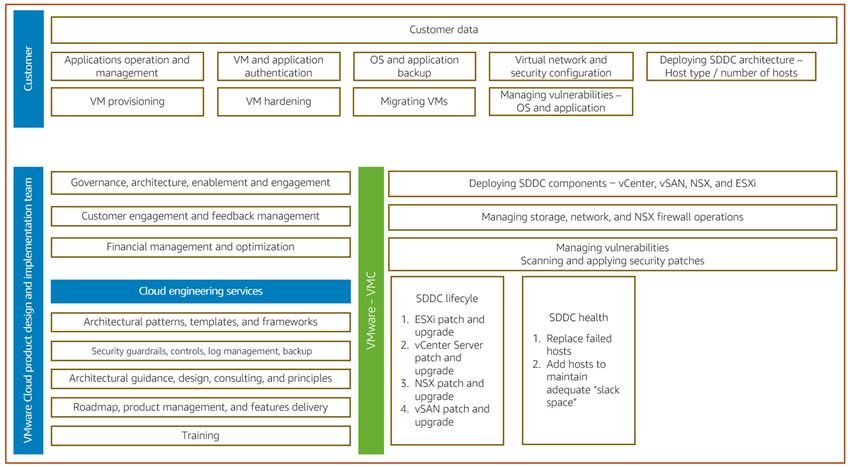
The following diagram illustrates the high-level responsibilities of your organization and VMware. These
were discussed in detail in the earlier sections On-premises operating model (p. 7) and VMware on
AWS operating model (p. 10).
11AWS Prescriptive Guidance VMware Cloud
on AWS overview and operating model
Resources
Next steps and resources
For more information about how you can benefit from the VMware Cloud on AWS, contact your AWS
account representative.
You can buy VMware Cloud on AWS directly through the AWS Solution Provider Program (SPP). This
program enables you to purchase VMware Cloud on AWS either through AWS or VMware, or through the
AWS Solution Provider or VMware VPN Solution Provider of your choice.
Resources
References
• The Business Value of VMware Cloud on AWS for Supporting Business-Critical Applications (IDC white
paper)
• Get to know VMware Cloud on AWS (VMware guide)
• Realize the benefits of a hybrid cloud environment with VMware Cloud on AWS (solutions briefs and
webinars)
• Cloud Migration for VMware Cloud on AWS (VMware technical resources)
Tools
• PowerShell Module for Managing VMware Cloud on AWS (PowerShell Gallery)
• Pricing and TCO Calculator (VMware website)
Partners
• Join the AWS Partner Network (APN website)
• VMware Cloud on AWS Partner Initiative (APN website)
Pattern
• Migrate VMware SDDC to VMware Cloud on AWS using VMware HCX (AWS Prescriptive Guidance)
12AWS Prescriptive Guidance VMware Cloud
on AWS overview and operating model
AWS Prescriptive Guidance glossary
AI and ML terms (p. 13) | Migration terms (p. 14) | Modernization terms (p. 18)
AI and ML terms
The following are commonly used terms in artificial intelligence (AI) and machine learning (ML)-related strategies,
guides, and patterns provided by AWS Prescriptive Guidance. To suggest entries, please use the Provide feedback
link at the end of the glossary.
binary classification A process that predicts a binary outcome (one of two possible classes). For
example, your ML model might need to predict problems such as “Is this email
spam or not spam?" or "Is this product a book or a car?"
classification A categorization process that helps generate predictions. ML models for
classification problems predict a discrete value. Discrete values are always distinct
from one another. For example, a model might need to evaluate whether or not
there is a car in an image.
data preprocessing To transform raw data into a format that is easily parsed by your ML model.
Preprocessing data can mean removing certain columns or rows and addressing
missing, inconsistent, or duplicate values.
deep ensemble To combine multiple deep learning models for prediction. You can use deep
ensembles to obtain a more accurate prediction or for estimating uncertainty in
predictions.
deep learning An ML subfield that uses multiple layers of artificial neural networks to identify
mapping between input data and target variables of interest.
exploratory data analysis The process of analyzing a dataset to understand its main characteristics. You
(EDA) collect or aggregate data and then perform initial investigations to find patterns,
detect anomalies, and check assumptions. EDA is performed by calculating
summary statistics and creating data visualizations.
features The input data that you use to make a prediction. For example, in a
manufacturing context, features could be images that are periodically captured
from the manufacturing line.
feature importance How significant a feature is for a model’s predictions. This is usually expressed
as a numerical score that can be calculated through various techniques, such
as Shapley Additive Explanations (SHAP) and integrated gradients. For more
information, see Machine learning model interpretability with AWS.
13AWS Prescriptive Guidance VMware Cloud
on AWS overview and operating model
feature transformation To optimize data for the ML process, including enriching data with additional
sources, scaling values, or extracting multiple sets of information from a single
data field. This enables the ML model to benefit from the data. For example, if
you break down the “2021-05-27 00:15:37” date into “2021”, “May”, “Thu”, and
“15”, you can help the learning algorithm learn nuanced patterns associated with
different data components.
interpretability A characteristic of a machine learning model that describes the degree to which
a human can understand how the model’s predictions depend on its inputs. For
more information, see Machine learning model interpretability with AWS.
multiclass classification A process that helps generate predictions for multiple classes (predicting one of
more than two outcomes). For example, an ML model might ask "Is this product
a book, car, or phone?" or "Which product category is most interesting to this
customer?"
regression An ML technique that predicts a numeric value. For example, to solve the problem
of "What price will this house sell for?" an ML model could use a linear regression
model to predict a house's sale price based on known facts about the house (for
example, the square footage).
training To provide data for your ML model to learn from. The training data must contain
the correct answer. The learning algorithm finds patterns in the training data that
map the input data attributes to the target (the answer that you want to predict).
It outputs an ML model that captures these patterns. You can then use the ML
model to make predictions on new data for which you don’t know the target.
target variable The value that you are trying to predict in supervised ML. This is also referred
to as an outcome variable. For example, in a manufacturing setting the target
variable could be a product defect.
tuning To change aspects of your training process to improve the ML model's accuracy.
For example, you can train the ML model by generating a labeling set, adding
labels, and then repeating these steps several times under different settings to
optimize the model.
uncertainty A concept that refers to imprecise, incomplete, or unknown information that
can undermine the reliability of predictive ML models. There are two types of
uncertainty: Epistemic uncertainty is caused by limited, incomplete data, whereas
aleatoric uncertainty is caused by the noise and randomness inherent in the data.
For more information, see the Quantifying uncertainty in deep learning systems
guide.
Migration terms
The following are commonly used terms in migration-related strategies, guides, and patterns provided by AWS
Prescriptive Guidance. To suggest entries, please use the Provide feedback link at the end of the glossary.
7 Rs Seven common migration strategies for moving applications to the cloud. These
strategies build upon the 5 Rs that Gartner identified in 2011 and consist of the
following:
• Refactor/re-architect – Move an application and modify its architecture by
taking full advantage of cloud-native features to improve agility, performance,
and scalability. This typically involves porting the operating system and
database. Example: Migrate your on-premises Oracle database to the Amazon
Aurora PostgreSQL-Compatible Edition.
14AWS Prescriptive Guidance VMware Cloud
on AWS overview and operating model
• Replatform (lift and reshape) – Move an application to the cloud, and introduce
some level of optimization to take advantage of cloud capabilities. Example:
Migrate your on-premises Oracle database to Amazon Relational Database
Service (Amazon RDS) for Oracle in the AWS Cloud.
• Repurchase (drop and shop) – Switch to a different product, typically by moving
from a traditional license to a SaaS model. Example: Migrate your customer
relationship management (CRM) system to Salesforce.com.
• Rehost (lift and shift) – Move an application to the cloud without making any
changes to take advantage of cloud capabilities. Example: Migrate your on-
premises Oracle database to Oracle on an EC2 instance in the AWS Cloud.
• Relocate (hypervisor-level lift and shift) – Move infrastructure to the cloud
without purchasing new hardware, rewriting applications, or modifying your
existing operations. This migration scenario is specific to VMware Cloud
on AWS, which supports virtual machine (VM) compatibility and workload
portability between your on-premises environment and AWS. You can use the
VMware Cloud Foundation technologies from your on-premises data centers
when you migrate your infrastructure to VMware Cloud on AWS. Example:
Relocate the hypervisor hosting your Oracle database to VMware Cloud on
AWS.
• Retain (revisit) – Keep applications in your source environment. These might
include applications that require major refactoring, and you want to postpone
that work until a later time, and legacy applications that you want to retain,
because there’s no business justification for migrating them.
• Retire – Decommission or remove applications that are no longer needed in
your source environment.
application portfolio A collection of detailed information about each application used by an
organization, including the cost to build and maintain the application, and its
business value. This information is key to the portfolio discovery and analysis
process and helps identify and prioritize the applications to be migrated,
modernized, and optimized.
artificial intelligence The process of using machine learning techniques to solve operational problems,
operations (AIOps) reduce operational incidents and human intervention, and increase service
quality. For more information about how AIOps is used in the AWS migration
strategy, see the operations integration guide.
AWS Cloud Adoption A framework of guidelines and best practices from AWS to help organizations
Framework (AWS CAF) develop an efficient and effective plan to move successfully to the cloud. AWS
CAF organizes guidance into six focus areas called perspectives: business,
people, governance, platform, security, and operations. The business, people,
and governance perspectives focus on business skills and processes; the
platform, security, and operations perspectives focus on technical skills and
processes. For example, the people perspective targets stakeholders who handle
human resources (HR), staffing functions, and people management. For this
perspective, AWS CAF provides guidance for people development, training, and
communications to help ready the organization for successful cloud adoption. For
more information, see the AWS CAF website and the AWS CAF whitepaper.
AWS landing zone A landing zone is a well-architected, multi-account AWS environment that is
scalable and secure. This is a starting point from which your organizations can
quickly launch and deploy workloads and applications with confidence in their
security and infrastructure environment. For more information about landing
zones, see Setting up a secure and scalable multi-account AWS environment.
AWS Workload Qualification A tool that evaluates database migration workloads, recommends migration
Framework (AWS WQF) strategies, and provides work estimates. AWS WQF is included with AWS Schema
15AWS Prescriptive Guidance VMware Cloud
on AWS overview and operating model
Conversion Tool (AWS SCT). It analyzes database schemas and code objects,
application code, dependencies, and performance characteristics, and provides
assessment reports.
business continuity planning A plan that addresses the potential impact of a disruptive event, such as a large-
(BCP) scale migration, on operations and enables a business to resume operations
quickly.
Cloud Center of Excellence A multi-disciplinary team that drives cloud adoption efforts across an
(CCoE) organization, including developing cloud best practices, mobilizing resources,
establishing migration timelines, and leading the organization through large-
scale transformations. For more information, see the CCoE posts on the AWS
Cloud Enterprise Strategy Blog.
cloud stages of adoption The four phases that organizations typically go through when they migrate to the
AWS Cloud:
• Project – Running a few cloud-related projects for proof of concept and
learning purposes
• Foundation – Making foundational investments to scale your cloud adoption
(e.g., creating a landing zone, defining a CCoE, establishing an operations
model)
• Migration – Migrating individual applications
• Re-invention – Optimizing products and services, and innovating in the cloud
These stages were defined by Stephen Orban in the blog post The Journey
Toward Cloud-First & the Stages of Adoption on the AWS Cloud Enterprise
Strategy blog. For information about how they relate to the AWS migration
strategy, see the migration readiness guide.
configuration management A database that contains information about a company’s hardware and software
database (CMDB) products, configurations, and inter-dependencies. You typically use data from a
CMDB in the portfolio discovery and analysis stage of migration.
epic In agile methodologies, functional categories that help organize and prioritize
your work. Epics provide a high-level description of requirements and
implementation tasks. For example, AWS CAF security epics include identity and
access management, detective controls, infrastructure security, data protection,
and incident response. For more information about epics in the AWS migration
strategy, see the program implementation guide.
heterogeneous database Migrating your source database to a target database that uses a different
migration database engine (for example, Oracle to Amazon Aurora). Heterogeneous
migration is typically part of a re-architecting effort, and converting the
schema can be a complex task. AWS provides AWS SCT that helps with schema
conversions.
homogeneous database Migrating your source database to a target database that shares the same
migration database engine (for example, Microsoft SQL Server to Amazon RDS for SQL
Server). Homogeneous migration is typically part of a rehosting or replatforming
effort. You can use native database utilities to migrate the schema.
idle application An application that has an average CPU and memory usage between 5 and
20 percent over a period of 90 days. In a migration project, it is common to retire
these applications or retain them on premises.
IT information library (ITIL) A set of best practices for delivering IT services and aligning these services with
business requirements. ITIL provides the foundation for ITSM.
16AWS Prescriptive Guidance VMware Cloud
on AWS overview and operating model
IT service management (ITSM) Activities associated with designing, implementing, managing, and supporting IT
services for an organization. For information about integrating cloud operations
with ITSM tools, see the operations integration guide.
large migration A migration of 300 or more servers.
Migration Acceleration An AWS program that provides consulting support, training, and services to
Program (MAP) help organizations build a strong operational foundation for moving to the
cloud, and to help offset the initial cost of migrations. MAP includes a migration
methodology for executing legacy migrations in a methodical way and a set of
tools to automate and accelerate common migration scenarios.
Migration Portfolio An online tool that provides information for validating the business case for
Assessment (MPA) migrating to the AWS Cloud. MPA provides detailed portfolio assessment
(server right-sizing, pricing, TCO comparisons, migration cost analysis) as well
as migration planning (application data analysis and data collection, application
grouping, migration prioritization, and wave planning). The MPA tool (requires
login) is available free of charge to all AWS consultants and APN Partner
consultants.
Migration Readiness The process of gaining insights about an organization’s cloud readiness status,
Assessment (MRA) identifying strengths and weaknesses, and building an action plan to close
identified gaps, using the AWS CAF. For more information, see the migration
readiness guide. MRA is the first phase of the AWS migration strategy.
migration at scale The process of moving the majority of the application portfolio to the cloud in
waves, with more applications moved at a faster rate in each wave. This phase
uses the best practices and lessons learned from the earlier phases to implement
a migration factory of teams, tools, and processes to streamline the migration of
workloads through automation and agile delivery. This is the third phase of the
AWS migration strategy.
migration factory Cross-functional teams that streamline the migration of workloads through
automated, agile approaches. Migration factory teams typically include
operations, business analysts and owners, migration engineers, developers,
and DevOps professionals working in sprints. Between 20 and 50 percent of
an enterprise application portfolio consists of repeated patterns that can be
optimized by a factory approach. For more information, see the discussion of
migration factories and the CloudEndure Migration Factory guide in this content
set.
migration metadata The information about the application and server that is needed to complete the
migration. Each migration pattern requires a different set of migration metadata.
Examples of migration metadata include the target subnet, security group, and
AWS account.
migration pattern A repeatable migration task that details the migration strategy, the migration
destination, and the migration application or service used. Example: Rehost
migration to Amazon EC2 with AWS Application Migration Service.
migration strategy The approach used to migrate a workload to the AWS Cloud. For more
information, see the 7 Rs (p. 14) entry in this glossary and see Mobilize your
organization to accelerate large-scale migrations.
operational-level agreement An agreement that clarifies what functional IT groups promise to deliver to each
(OLA) other, to support a service-level agreement (SLA).
operations integration (OI) The process of modernizing operations in the cloud, which involves readiness
planning, automation, and integration. For more information, see the operations
integration guide.
17AWS Prescriptive Guidance VMware Cloud
on AWS overview and operating model
organizational change A framework for managing major, disruptive business transformations from a
management (OCM) people, culture, and leadership perspective. OCM helps organizations prepare for,
and transition to, new systems and strategies by accelerating change adoption,
addressing transitional issues, and driving cultural and organizational changes. In
the AWS migration strategy, this framework is called people acceleration, because
of the speed of change required in cloud adoption projects. For more information,
see the OCM guide.
playbook A set of predefined steps that capture the work associated with migrations, such
as delivering core operations functions in the cloud. A playbook can take the form
of scripts, automated runbooks, or a summary of processes or steps required to
operate your modernized environment.
portfolio assessment A process of discovering, analyzing, and prioritizing the application portfolio
in order to plan the migration. For more information, see Evaluating migration
readiness.
responsible, accountable, A matrix that defines and assigns roles and responsibilities in a project. For
consulted, informed (RACI) example, you can create a RACI to define security control ownership or to identify
matrix roles and responsibilities for specific tasks in a migration project.
runbook A set of manual or automated procedures required to perform a specific task.
These are typically built to streamline repetitive operations or procedures with
high error rates.
service-level agreement (SLA) An agreement that clarifies what an IT team promises to deliver to their
customers, such as service uptime and performance.
task list A tool that is used to track progress through a runbook. A task list contains an
overview of the runbook and a list of general tasks to be completed. For each
general task, it includes the estimated amount of time required, the owner, and
the progress.
workstream Functional groups in a migration project that are responsible for a specific set of
tasks. Each workstream is independent but supports the other workstreams in
the project. For example, the portfolio workstream is responsible for prioritizing
applications, wave planning, and collecting migration metadata. The portfolio
workstream delivers these assets to the migration workstream, which then
migrates the servers and applications.
zombie application An application that has an average CPU and memory usage below 5 percent. In a
migration project, it is common to retire these applications.
Modernization terms
The following are commonly used terms in modernization-related strategies, guides, and patterns provided by AWS
Prescriptive Guidance. To suggest entries, please use the Provide feedback link at the end of the glossary.
business capability What a business does to generate value (for example, sales, customer service,
or marketing). Microservices architectures and development decisions can be
driven by business capabilities. For more information, see the Organized around
business capabilities section of the Running containerized microservices on AWS
whitepaper.
domain-driven design An approach to developing a complex software system by connecting its
components to evolving domains, or core business goals, that each component
serves. This concept was introduced by Eric Evans in his book, Domain-Driven
Design: Tackling Complexity in the Heart of Software (Boston: Addison-Wesley
18AWS Prescriptive Guidance VMware Cloud
on AWS overview and operating model
Professional, 2003). For information about how you can use domain-driven design
with the strangler fig pattern, see Modernizing legacy Microsoft ASP.NET (ASMX)
web services incrementally by using containers and Amazon API Gateway.
microservice A small, independent service that communicates over well-defined APIs and is
typically owned by small, self-contained teams. For example, an insurance system
might include microservices that map to business capabilities, such as sales or
marketing, or subdomains, such as purchasing, claims, or analytics. The benefits
of microservices include agility, flexible scaling, easy deployment, reusable code,
and resilience. For more information, see Integrating microservices by using AWS
serverless services.
microservices architecture An approach to building an application with independent components that run
each application process as a microservice. These microservices communicate
through a well-defined interface by using lightweight APIs. Each microservice
in this architecture can be updated, deployed, and scaled to meet demand for
specific functions of an application. For more information, see Implementing
microservices on AWS.
modernization Transforming an outdated (legacy or monolithic) application and its infrastructure
into an agile, elastic, and highly available system in the cloud to reduce costs,
gain efficiencies, and take advantage of innovations. For more information, see
Strategy for modernizing applications in the AWS Cloud.
modernization readiness An evaluation that helps determine the modernization readiness of an
assessment organization’s applications; identifies benefits, risks, and dependencies; and
determines how well the organization can support the future state of those
applications. The outcome of the assessment is a blueprint of the target
architecture, a roadmap that details development phases and milestones for the
modernization process, and an action plan for addressing identified gaps. For
more information, see Evaluating modernization readiness for applications in the
AWS Cloud.
monolithic applications Applications that run as a single service with tightly coupled processes. Monolithic
(monoliths) applications have several drawbacks. If one application feature experiences a
spike in demand, the entire architecture must be scaled. Adding or improving a
monolithic application’s features also becomes more complex when the code base
grows. To address these issues, you can use a microservices architecture. For more
information, see Decomposing monoliths into microservices.
polyglot persistence Independently choosing a microservice’s data storage technology based on data
access patterns and other requirements. If your microservices have the same
data storage technology, they can encounter implementation challenges or
experience poor performance. Microservices are more easily implemented and
achieve better performance and scalability if they use the data store best adapted
to their requirements. For more information, see Enabling data persistence in
microservices.
split-and-seed model A pattern for scaling and accelerating modernization projects. As new features
and product releases are defined, the core team splits up to create new product
teams. This helps scale your organization’s capabilities and services, improves
developer productivity, and supports rapid innovation. For more information, see
Phased approach to modernizing applications in the AWS Cloud.
strangler fig pattern An approach to modernizing monolithic systems by incrementally rewriting and
replacing system functionality until the legacy system can be decommissioned.
This pattern uses the analogy of a fig vine that grows into an established tree
and eventually overcomes and replaces its host. The pattern was introduced by
Martin Fowler as a way to manage risk when rewriting monolithic systems. For an
19You can also read


