Democracy, Digital Accessibility, and EU Member Parliament Websites - With foreword by the European Disability Forum (EDF)
←
→
Page content transcription
If your browser does not render page correctly, please read the page content below

Democracy, Digital
Accessibility, and EU
Member Parliament
Websites

     With foreword by the
     European Disability Forum (EDF)
This content is the copyright of
  Siteimprove A/S © 2019. All rights reserved.

        You may not, except with our express
            written permission, distribute or
           commercially exploit the content.

                                     Author:
                   Jessica O’Sullivan-Munck.

              For all enquires please email:
                        jos@siteimprove.com

Foreword by European Disability Forum (EDF).
Content Page

1. Foreword by European Disability Forum                               4

2. Executive Summary                                                   5

3. Methodology                                                         6

4. An Introduction to Web Accessibility                                7

5. The Accessibility DCI Score Results                                 8

6. Key Takeaways from the Findings                                     9

7. Investigation: Common Accessibility Issues Identified           10

   Inaccessible PDF Files                                              11

   Images That Aren’t Correctly Tagged                                 13

   Links Identified Only by Color                                      14

   Generic Link Text                                                   15

   Inaccessible Forms                                                  16

   Conclusion                                                          17

13. Glossary of Terms                                                  18

14. The Accessibility DCI Score Point System Explanation           20

15. About the Authors                                              22

                                                            Page 3 //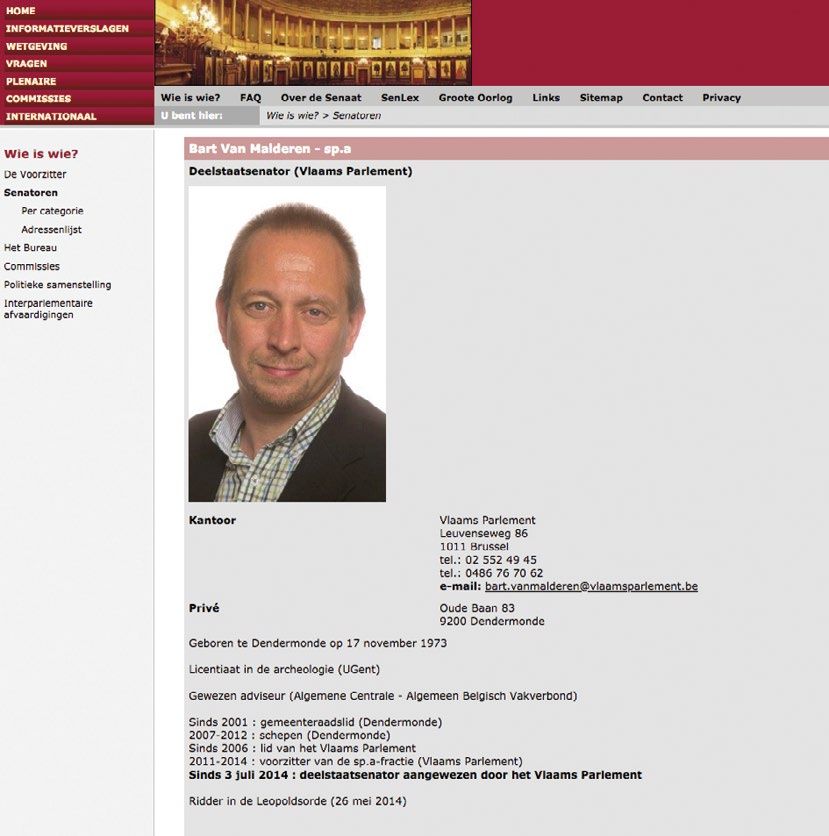
Foreword – European
  Disability Forum
  The European Disability Forum warmly            In addition to the obligations set by the
  welcomes the Democracy, Digital                 Convention, the EU adopted its ever-
  Accessibility, and EU Member Parliament         first Directive on the accessibility of the
  Websites Report by Siteimprove. It is a         websites and mobile applications of
  highly valuable contribution towards            public sector bodies, the Web Accessibility
  ensuring the right to political participation   Directive, in 2016. EU Member States are
  and equal access for persons with               now obliged to ensure that all public-sector
  disabilities.                                   bodies’ websites and mobile applications
  These rights are clearly set by the United      are accessible by 23 September 2020.
  Nation Convention on the Rights of              National parliaments have a decisive and
  Persons with Disabilities (CRPD).               representative role in modern democracy.
  The Convention, ratified by the European        The importance of having fully accessible
  Union and all its Members States, obliges       websites is clear: it is not only a legal
  State Parties to take appropriate measures      obligation, it is essential to assure that
  to ensure full and effective participation      persons with disabilities enjoy their right to
  and inclusion of persons with disabilities      participation in public and political life.
  in society. Article 9 sets accessibility        As this report reveals, Member States have a
  requirements for State Parties, such as         long way to go before they can demonstrate
  guaranteeing persons with disabilities          full compliance with the CRPD and the Web
  access, on equal basis with others,             Accessibility Directive. It is disappointing to
  to information and communications               see such low standards of accessibility of
  technologies and systems, including             Member States’ parliaments’ websites. We
  the Internet. Article 21 highlights States’     are hopeful that the findings will encourage
  responsibility to ensure that persons           Member States to swiftly meet the
  with disabilities can exercise their right      requirements set by the Web Accessibility
  to freedom of expression and opinion,           Directive.
  including the freedom to seek, receive and
  impart information and ideas on an equal        The lack of accessible information on the
  basis with others and through all forms         websites of national parliaments seriously
  of communication of their choice. Both          hinders the possibility of persons with
  obligations set out by Articles 9 and 21 are    disabilities to fully and effectively exercise
  preconditions for effective participation       their political rights. We call on Member
  of persons with disabilities in political and   States to assure national parliament
  public life, which is again something States    websites’ are fully accessible for persons
  must ensure according to Article 29 of the      with disabilities.
  Convention.                                     Yannis Vardakastanis, President
                                                  European Disability Forum

  Page 4 //
Page 4 //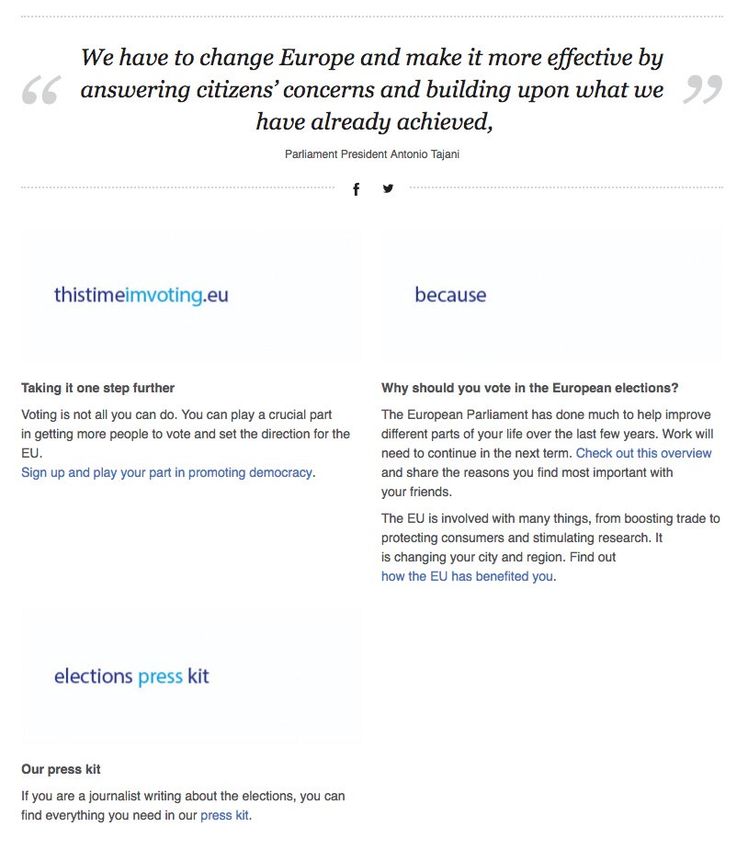
Executive Summary
The right to political participation, to vote, and to access democratic information is a
fundamental right for all citizens, as outlined in Article 29 of the United Nations Convention on
the Rights of Persons with Disabilities (UN CRPD).

Despite this designation millions of people in Europe with disabilities are deprived of exercising
this right. According to the European Disability Forum “Persons with disabilities are deprived
from their right to cast an informed ballot due to many accessibility hurdles: hard to understand
information; lack of subtitles; printed materials with a small font or not in braille, etc.”

In this whitepaper, digital accessibility of the 28 European Member State parliament websites,
as well as the overarching European Parliament website, www.europarl.europa.eu, will be
assessed against the Web Content Accessibility Guidelines (WCAG) 2.1. WCAG 2.1 covers a wide
range of recommendations for making web content more accessible.

Siteimprove’s Digital Presence Optimization (DPO) software is the scoring system used to
calculate and classify website accessibility. This system, known as the Accessibility Digital
Certainty Index®, uses a weighted score with a scale of 1-100.
The scoring key utilized by the Accessibility DCI is as follows:

                 Website Classification                Corresponding Score Range
                        Very Poor                                   0-50
                           Poor                                     51-70
                         Average                                    71-80
                          Good                                      81-90
                        Very Good                                   91-96
                       World Class                                 97-100

An overview of the most common issues is identified in this report, as well as brief
recommendations on how website accessibility can be improved.

                                                                                        Page 5 //
Methodology
For this whitepaper the parliament websites of all 28 European Member States, as defined by
the European Union as of 15 November 2018, were selected. The European Parliament website
was also included. Utilizing Siteimprove’s software, the first 500 pages of each parliament
website, starting with the homepage, was crawled. There were exceptions for France, Spain, and
Slovenia. For France 495 pages were crawled, for Spain 492, and for Slovenia 497 pages. These
exceptions were the result of the French, Spanish, and Slovenian websites not having 500 pages.
Each website was assessed based on the national country language version of the website.
In total, 29 websites and 14,484 pages were crawled.

            Country                         Parliament URL
            Austria                         https://www.parlament.gv.at/
            Belgium                         http://www.senaat.be/www/?MIval=/index_senate&LANG=nl
            Bulgaria                        http://www.parliament.bg/bg
            Croatia                         http://www.sabor.hr/hr
            Cyprus                          http://www.parliament.cy/el/home
            Czech Republic                  http://www.psp.cz/sqw/hp.sqw
            Denmark                         https://www.ft.dk/
            England                         https://www.parliament.uk/
            Estonia                         https://www.riigikogu.ee/
            European Parliament             http://europarl.europa.eu/portal/en
            Finland                         https://www.eduskunta.fi/fi/Sivut/default.aspx
            France                          https://www.senat.fr/
            Germany                         https://www.bundestag.de/
            Greece                          https://www.hellenicparliament.gr/
            Hungary                         http://www.parlament.hu/
            Ireland                         https://www.oireachtas.ie/
            Italy                           https://www.senato.it/home
            Latvia                          http://www.saeima.lv/lv
            Lithuania                       http://www.lrs.lt/
            Luxembourg                      https://gouvernement.lu/lb.html
            Malta                           https://parlament.mt/mt/
            Netherlands                     https://www.staten-generaal.nl/
            Poland                          http://www.sejm.gov.pl/
            Portugal                        http://www.parlamento.pt/
            Romania                         http://www.cdep.ro/pls/dic/site.home?idl=1
            Slovakia                        https://www.nrsr.sk/web/?sid=home
            Slovenia                        http://www.dz-rs.si/wps/portal/Home
            Spain                           http://www.senado.es/web/index.html
            Sweden                          http://www.riksdagen.se/sv/

Page 6 //
An Introduction to
Web Accessibility
What is web accessibility?                          Which accessibility standards should
Web accessibility refers to the inclusive
                                                    I use?
practice of making websites usable by people        WCAG 2.1 defines how to make web content
of all abilities and disabilities. When sites are   more accessible to people with disabilities.
correctly designed, developed, and edited,          The guidelines are internationally recognized
all users get equal access to information and       and are used as a best practice worldwide.
functionality.
                                                    WCAG has 12 guidelines organized under 4
Who is affected?                                    principles:
There are many different disabilities affecting
                                                     Perceivable
people using the web.
                                                    Web content can be perceived by the user’s
                                                    brain regardless of the senses they can use.
 Visual
Blindness, color blindness, and low-vision
                                                      Operable
caused by various eye conditions
                                                    Web content can be accessed and navigated
                                                    regardless of the user’s devices.
 Motor
Various forms of paralysis caused by injury,
                                                     Understandable
congenital conditions, and tremors
                                                    Web content can be understood as easily
                                                    as possible through simple language and
 Auditory
                                                    contextual information.
Difficulty hearing, deafness, and hearing
impairments
                                                     Robust
                                                    Web content can be accessed regardless of the
 Cognitive
                                                    user’s operating system, browser, and browser
Conditions that affect the brain’s memory,
                                                    version.
attention, or ability to interpret information
                                                    The WCAG 2.1 works with three different
                                                    conformance levels:
                                                    A (minimum conformance level)
                                                    AA (medium conformance level)
                                                    AAA (highest conformance level)

                                                                                        Page 7 //
The Accessibility DCI
Score Results
Country Accessibility DCI Score Corresponding Classification
Austria 56.7 Poor
Belgium 64.6 Poor
Bulgaria 60.4 Poor
Croatia 58.7 Poor
Cyprus 61.6 Poor
Czech Republic 62.4 Poor
Denmark 81 Good
England 61.6 Poor
Estonia 60.5 Poor
European Parliament 55.8 Poor
Finland 58.4 Poor
France 60.2 Poor
Germany 63.6 Poor
Greece 72.7 Average
Hungary 59.0 Poor
Ireland 62.7 Poor
Italy 61.9 Poor
Latvia 61.5 Poor
Lithuania 57.4 Poor
Luxembourg 61.0 Poor
Malta 64.2 Poor
Netherlands 84.4 Good
Poland 62.9 Poor
Portugal 62.9 Poor
Romania 58.7 Poor
Slovakia 62.3 Poor
Slovenia 59.2 Poor
Spain 61.6 Poor
Sweden 63.6 Poor
Page 8 //Key Takeaways From
the Findings
89.66% of websites provide a POOR accessibility experience.
3.45% of websites provide an AVERAGE accessibility experience.
6.89% of websites provide a GOOD accessibility experience.
E
ach Parliament URL had on average 65 PDF files with accessibility
problems
O
nly 3 of the 29 websites score above the industry average for accessibility
of 66.3.
EU Member States Parliament
Website Accessibility Findings World class: 97-100
58.4 Very good: 91-96
Good: 81-90
Finland
Finland
63.6 Average: 71-80
Poor: 51-70
Sweden
Swed
den
d n 60.5 Very poor: 0-50
Norway
Norw
way
No data
Estonia
Est
toni
to
on
o nia 61.5
62.7 61.1 Denmark
L
Latvia
a
57.4
Lithuania
Li
ithua
an
nia
Ireland
Ire
re d
reland 84 4
84.4 58
8
62.9
United
United
U
K
Kingdo
Kin
Kingdomm 64.6 Netherland
N ethe
he
erland
63.6
63
3.6
Beloru
ussia
a
Belorussia
Poland
d
European
ean 55.8
Belgium
Belgiu
um
61.0
Germany
Ge
erma
an
ny 58
ment
Parliament
Ukraine
Uk
kraine
62.3
Luxembour
rg
Luxembourg Czech
Republic 58
56.7
6.7
7 Slovakia
60.2 59.2 59.0 Moldo
dova
do a
Moldova
Austria
i 58.7
Switzerland
Switze
e
erland
Hu
ung
g y
gary
Hungary
61.6 France Italy
Italy
y
Croat
attia
Croatia Romania
Romania
Romania
62.9
61.9 Serbia
Se
S rrbia
a 60.4
Sp
pain
Spain Montte
eneg
ne
egr
egro
Montenegro
Kosovo
Ko
osov
o ov
ovo Bulgaria
Bu
Bulgaria
Portugal
Portu
tu al
tuga
Alban
nia
Albania
72.7 Greec
Greece
61.6
64.2 Cyprus
Malta
Page 9 //Investigation:
Common Accessibility
Issues Identified
Page 10 //Inaccessible PDF Files
Ensuring that PDF files on a website are accessible for everyone is important for every
organization. PDF documents are a popular file format and users rely on their content for
information and links to additional sources. Unfortunately, a routine custom of making
documents accessible is often overlooked.
One example discovered during the crawls was an inaccessible PDF which wasn’t tagged and
didn’t contain any bookmarks. The document, entitled the ‘House of Commons Service Diversity
and Inclusion Scheme,’ outlined its aim as “Equality, diversity and inclusion help make the
House of Commons Service respected, effective, efficient, and assist in ensuring that Members,
staff and the public are well informed about what we do”.
Despite the good sentiments contained in the
document, the lack of tagging means that for
a user with a screen reader no information
is tagged to distinguish text types such as
headings, paragraphs, lists, and tables. The
lack of bookmarks means a screen reader
user has to read through the entire document
to find what they need, rather than jumping
to the information they want from headings
bookmarked in the table of contents.
Page 11 //The following are some of the most important accessibility aspects to check
in PDF files:
Language Tables
For screen readers and other assistive When data tables are used, it is important
technologies to correctly read a document, to tag their structure. At a minimum, define
there should be an overall designation of the all column and row headings. Keep table
language in which the document is written. structure as simple as possible; avoid merging
Furthermore, if lines or blocks of text within rows and columns as it complicates navigation
the document change language, that text for assistive technology users.
should be tagged separately.
Reading Order
Title Assistive technologies rely on logical reading
At minimum, documents should include basic sequences to present content to users.
information like a title. It is also a good idea to During a document’s creation, it is extremely
provide the name of the author, a description, important to ensure there is a sensible reading
and a few relevant keywords. order.
Tagging Text Bookmarks
All text in a document should be tagged. The easiest and most accessible way to
Whether it’s paragraph text, a heading, a list, organize a table of contents is to provide
or similar it should be labeled as such. Doing bookmarks based on document headings. This
so not only makes a visual distinction between habit gives users the ability to navigate the
various text types, but also clarifies the site for PDF using bookmarked headings rather than
all users by providing the correct tagging for reading through the entire document to find
assistive technologies to use. what they need.
Images Exporting
An image can have different purposes There are a variety of ways to create PDFs from
depending on how it is used in the document. different editing programs. The document’s
Many images are purely decorative, which accessibility functions vary greatly depending
should be conveyed with alternative text. It is on the way it is exported, converted, or saved.
important to define those images as “artifact”.
Other images that have a function or convey Security Settings
important information require clear but Lock settings on documents make it more
concise descriptions as the “alt” text. difficult, or ultimately impossible, for assistive
technologies to extract content and render
it to the user. Make sure the final document
is not locked, allowing it to be accessed by
screen readers and more. Locking a PDF is not
the same as password protecting it.
Page 12 //Images That Aren’t
Correctly Tagged
When images are added to a web page, it is important to consider that some users cannot see
images and others may have images turned off in their browser. Therefore, images need a text
alternative. In most content management systems
(CMS) the label is referred to as “alternative text”
or “alt text.” The text you write here is not visually
displayed on the page but is embedded into the
code and accessed by screen readers.
Images without alternative text were found to be
a common problem across the board for most of
the websites assessed. This issue was most often
found on pages that displayed information about
politicians such as parliament members. Often the
biography pages included an image of the person.
However, in many cases these images had no
“alternative text.”
The following are some of the most important accessibility aspects to
consider when adding images:
The code for alternative text (alt="") must be present for all images. However, if the image
is decorative, the alt text field can be left empty. If the image conveys information that a person
not know without seeing the image, then descriptive information should be written as the
alternative text.
If the image links somewhere, it is important to use the alternative text to describe where
the link leads to or what happens when the user clicks on the image.
Be careful using images with text in them or text that’s been saved or presented as an
image. The alternative text for these ‘images’ should communicate the same information as the
text in the image. No screen reader technology can read images of text. They cannot highlight
that text within an image and read it aloud. Images of text also tend to pixelate and become
blurry upon magnification making them difficult to read for people with other visual or cognitive
impairments. For many dyslexic web users, their type of assistive technology requires the user to
manually highlight the text on a page that they would like to be read aloud.
Page 13 //Links Identified Only by Color Approximately every one in twelve men, and one in 200 women, globally are affected by color blindness which is also known as color vision deficiency. This designation is the decreased ability to see color or the difference of colors. It can make everyday tasks such as choosing the right pen or adhering to traffic lights more challenging. Likewise, hyperlinks that are only identified by color causes issues. This issue was identified across most of the surveyed websites. When links are only identified by color it makes it difficult for people to distinguish between the body of text and the link. In an example found on one of the European Parliament’s (Europarl’s) webpages concerning the 2019 European elections, four links were identifiable only by a blue font color which makes them difficult to identify as links. How to fix this: Links that are only identified by color need additional visual cues. When users point to the link with their mouse or move keyboard focus to the link alternative cues could be to underline the link or to make it bold. If links in blocks of text are identified only by color, then the color contrast ratio between the link text and the surrounding text needs to be at least 3:1. Page 14 //
Generic Link Text
Another commonly identified accessibility issue across parliament websites was the use of
generic link texts like ‘Read more’, ‘Here’, ‘PDF’, and ‘Click here’. These link texts tell the user
nothing about what content they will see if they click on the link nor does it provide the
destination page that the link points to. It’s important that link texts make sense when they are
read out of context especially for those utilizing a screen reader. The reason is that the software
often culls the various links on a page into one list for ease of navigation when tabbing around a
site. Therefore, it’s best that the link text doesn’t simply read ‘Click here’ 10 times in a row—or at
all.

How to Fix Generic
Link Text:
In general, instead of
writing ‘Read more’ it
is preferable to explain
what the visitor will be
reading more about.
So instead of just
‘Read more’ it would
be preferable to write
‘Read more about the
press tool kit’.

                                                                                          Page 15 //
Inaccessible Forms
Forms are a common part of websites and are ideal for signing up subscribers to a newsletter,
asking a question, getting registrations for membership, and so forth. When designed with
accessibility in mind they are useful and usable by all. However, forms are often neglected when
it comes to accessibility. This neglect was found to be the case on several of the parliament
websites. Forms should be a pressing issue with high priority as they often function as the
primary means for website users to contact an organization.
When a contact form is inaccessible, there is a potential for excluding 15% of website visitors.
In an example found on Europarl’s website the form on ‘Sending your question to the European
Parliament’ was inaccessible due to the ‘Send’ button being improperly formatted in the html
code. In this case, ‘Send’ visually looks like a button but is actually just a link. Proper code is
needed to make it a button. Visitors using a keyboard and reliant on the tab key to shift between
form fields will miss the ‘Send’ button because it will not actually be recognized as a submission
button. Those using a screen reader
will also not be able to detect the
‘Send’ button. Both cases make it
impossible to move beyond this
page and submit a question. Instead
the user is stuck eternally looping
around the page.
Page 16 //Conclusion
The battle for equality, justice, and fairness changes over time but remains a cornerstone of
our society. Just as integrity topics around segregation, “fake news”, and the rise of the #metoo
movement, evolve, so do principles around digital accessibility. The quickness with which issues
come and go in our consciousness means that it’s easy to claim victory when in fact an issue still
exists, or in some cases evolves. The Disability Rights Movement is certainly a point in case.
Over the last couple of decades, the movement has made great leaps in promoting the rights
of people with disabilities. Evidence is seen through employment legislation and mandatory
building modifications to name a few. Yet one area that remains underprioritized is the digital
world. Over 1 billion people, or one in seven people globally, experience disability. Many are
heavily reliant on the internet in their day-to-day life.
The role and relationship between the internet and democracy is also essential, as the rise
of digitalization means that more and more information is only available online. When an
important informational site such as a parliament website is inaccessible a significant amount
of the voting population are unable to access essential information that they are democratically
entitled to.
It is the hope that with the publication of this whitepaper EU member states will consider
prioritizing and improving the web accessibility of all their sites.
Page 17 //Glossary of Terms
UN CRPD Article 29 -
Participation in Political and Public Life
States Parties shall guarantee to persons with disabilities political rights and the
opportunity to enjoy them on an equal basis with others, and shall undertake to:
(a) Ensure that persons with disabilities can effectively and fully participate in
political and public life on an equal basis with others, directly or through
freely chosen representatives, including the right and opportunity for
persons with disabilities to vote and be elected, inter alia, by:
(i) Ensuring that voting procedures, facilities and materials are appropriate,
accessible and easy to understand and use;
(ii) Protecting the right of persons with disabilities to vote by secret ballot
in elections and public referendums without intimidation, and to stand
for elections, to effectively hold office and perform all public functions
at all levels of government, facilitating the use of assistive and new
technologies where appropriate;
(iii) Guaranteeing the free expression of the will of persons with disabilities
as electors and to this end, where necessary, at their request, allowing
assistance in voting by a person of their own choice;
(b) Promote actively an environment in which persons with disabilities can
effectively and fully participate in the conduct of public affairs, without
discrimination and on an equal basis with others, and encourage their
participation in public affairs, including:
(i) Participation in non-governmental organizations and associations
concerned with the public and political life of the country, and in the
activities and administration of political parties;
(ii) Forming and joining organizations of persons with disabilities to
represent persons with disabilities at international, national, regional
and local levels.
Page 18 //WCAG 2.1 Guidelines
Following these guidelines will make content more accessible to a wider range
of people with disabilities, including accommodations for blindness and low
vision, deafness and hearing loss, limited movement, speech disabilities,
photosensitivity, and combinations of these, and some accommodation for
learning disabilities and cognitive limitations; but will not address every user
need for people with these disabilities. These guidelines address accessibility of
web content on desktops, laptops, tablets, and mobile devices. Following these
guidelines will also often make Web content more usable to users in general.
Digital Presence Optimization (DPO) software
DPO software allows users to monitor, improve, and optimize all aspects of
their website. DPO software provides marketers with eye-opening insights that
empower them and their team to create higher quality content, drive better traffic,
measure digital performance, and work towards regulatory compliance—all from
one place.
Accessibility DCI Score
The DCI Accessibility score is a measure of how well a website tests against web
accessibility standards that have been set out in the Web Content Accessibility
Guidelines (WCAG 2.1). A website’s Accessibility Score is determined by the
number of success criteria a site fulfills under the three WCAG conformance levels
(A, AA, AAA).
Page Level
Page level refers to the level of a page relative to the site’s index URL. The index
URL is the URL where the crawler starts to scan the website. It is referred to as on
Page level 1. The index URL is normally but not always the homepage of a website.
Web Accessibility
Web accessibility refers to the inclusive practice of making websites usable
by people of all abilities and disabilities. When sites are correctly designed,
developed, and edited, all users can have equal access to information and
functionality.
Page 19 //The Accessibility DCI
Score Point System
Explanation
To generate a balanced Accessibility score, Siteimprove has designed an algorithm that ranks the
accessibility issues found against the Web Content Accessibility Guidelines (WCAG), which are
part of Siteimprove’s automated Accessibility checks. Siteimprove’s automated checks cover a
subset of the WCAG 2.1. success criteria spanning across all functional requirements as outlined
in the EN 301 549.
It makes a distinction between errors and warnings to distinguish between WCAG success
criteria and best practices:
Errors: automatically determined failures to meet success criteria in WCAG
Warnings: automatically determined failures to meet best practices in WCAG
Besides these two categories, the algorithm also assesses the WCAG A, AA, and AAA levels.
Here is a table showing the WCAG levels, the compliance requirements and their priority:
WCAG Level Compliant when Priority
All ‘A level’ issues have been fixed and best
A Highest priority: Minimal Accessibility
practices have been applied sitewide.
All ‘A level + AA level’ issues have been fixed
High priority: The preferred standard of
AA and best practices have been applied site-
Accessibility
wide.
All ‘A level + AA level + AAA level’ issues have
Medium priority: Highest standard of Acces-
AAA been fixed and best practices have been
sibility
applied sitewide.
With the categories and levels combined, the algorithm weighs the issues that occur on the
website and reflects these using points, which in turn generates the Accessibility score.
Page 20 //How are the issues being weighted?
Here is a table showing how the points are distributed:
WCAG Level issue Category Weight
Errors 0.81
A
Warnings 0.25
Errors 0.53
AA
Warnings 0.18
Errors 0.33
AAA
Warnings 0.07
The algorithm also allocates extra points based on the page level and WCAG A, AA, and AAA level:
Pages at level 1 (i.e. the homepage) with multiple Level A/AA errors
Pages at level 2 with multiple Level A/AA errors
Pages at level 3 with multiple Level A/AA errors
Here is a table showing the extra points that are allocated based on the page level and WCAG
level issue:
Page Level WCAG Level issue Weight
Page Level 1 A/AA errors 3.0 / divided among the number of pages
Page Level 2 A/AA errors 6.0 / divided among the number of pages
Page Level 3 A/AA errors 21.0 / divided among the number of pages
To secure a good score, it’s important to ensure the home page and internal links leading from
the homepage to level 2 and 3 pages have a low number of errors.
Page 21 //About the Authors Who is Siteimprove? We’re a people-centric software company driven by the desire to simplify website management and make the internet a better place. Siteimprove was founded in 2003 in Copenhagen, Denmark, and has since expanded into thirteen offices around the world (with more in the works): Amsterdam, Berlin, London, Minneapolis, Oslo, Paris, Singapore, Stockholm, Sydney, Tokyo, Toronto, Vienna, and Zurich. With over 500 employees working in numerous markets, we pride ourselves on having a truly global, yet truly local approach. Siteimprove’s global CSR strategy and vision is to positively contribute to the area of digital accessibility, with a specific emphasis on making the web better for individuals of all abilities and disabilities. Learn more about Siteimprove’s work with web accessibility: https://siteimprove.com/en/accessibility/what-is-accessibility/ Who is EDF? The European Disability Forum is an independent NGO that defends the interests of 80 million Europeans with disabilities. We are a unique platform which brings together representative organisation of persons with disabilities from across Europe. We are run by persons with disabilities and their families. We are a strong, united voice of persons with disabilities in Europe. Learn more about EDF and their work: http://www.edf-feph.org/ Page 22 //
You can also read


