DMSM Equipment 2019 Field Season - Specifications and Recommendations Digital Mobile Sketch Mapping (DMSM)
←
→
Page content transcription
If your browser does not render page correctly, please read the page content below

United States Department of Agriculture

     Digital Mobile Sketch Mapping (DMSM)

                  DMSM Equipment
Specifications and Recommendations
                  2019 Field Season
                                (Updated 2/14/2019)

 Forest Service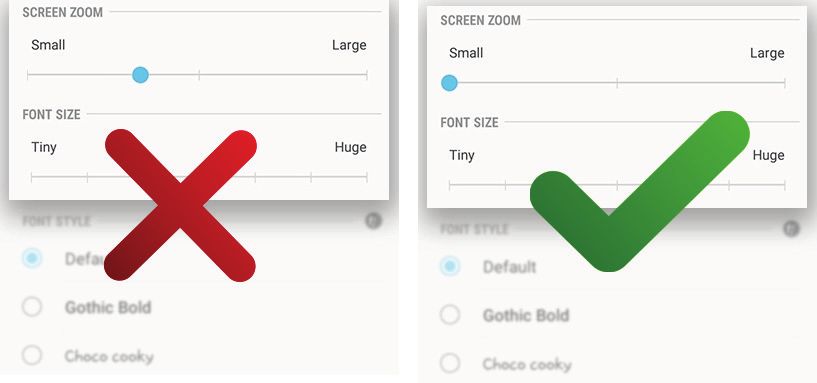
Digital Mobile Sketch Mapping Equipment                                                 2019

  Recommended Equipment

  Tablets
  Samsung Galaxy Tab S4 10.5” SM-T830NZKAXAR
                                                                                 POWER
     SCREEN SIZE           RAM (GB)       CPU (GHz)             OS
                                                                                (HOURS)

                                                            Android 8.0
        10.5                  4              2.35                                ~18
                                                               Oreo

      INTERNAL           EXTERNAL
                                            PRICE            OTTERBOX           NOTES
    STORAGE (GB)       STORAGE (GB)

      64 or 256              400          $600-$700             $90             S-pen

  Recommended Display Setting (Very Important)
  Prior to using DMSM, the default display setting for Screen Zoom needs changed to the
  Small setting or DMSM will not start.

  STEPS
  STEP 1. Go to the Settings menu > Display.
  STEP 2. Tap on Font and Screen zoom.
  STEP 3. Change Screen Zoom to Small. Tap on Apply to complete the process.

  Samsung Galaxy Tab Default Setting for SCREEN ZOOM Changed to Small Setting

          Forest Service                                                                  1
Digital Mobile Sketch Mapping Equipment 2019
CIO Mobile Computing Website
The Samsung Galaxy Tab S4 is available for purchase on the Forest Service CIO’s Devices
and Apps SharePoint site. Follow the ordering instructions on that page. No Technical
Approval (TA) is required.
Additional Recommendations
Memory Card
128GB
o Sandisk Extreme 128GB microSDXC UHS-I Card
o Samsung 128GB 95MB/s PRO Select Micro SDXC Memory Card
o SanDisk Extreme Plus 128GB Micro SDXC UHS-1 Card
o Samsung 128GB 100MB/s (U3) MicroSDXC EVO Select Memory Card
64GB
o SanDisk Extreme 64GB microSDXC UHS-I Card
o Samsung PRO Select 64GB 95MB/s MicroSDXC Memory Card
o SanDisk Extreme PLUS 64GB microSDXC UHS-I/U3 Card
o Samsung 64GB 100MB/s (U3) MicroSDXC EVO Select Memory Card
32GB
o SanDisk Extreme PLUS 32GB microSDXC UHS-I/U3 Card
o Samsung 32GB 95MB/s PRO Select Micro SDHC Memory Card
o SanDisk Extreme 32GB microSDHC UHS-I Card
Auxiliary Power
Anker PowerCore+ 26800 PD with 30W Power Delivery Charger
EC Technology 22400mAh Power Bank Ultra High Capacity External Battery
Manufacturers state that their external power supply models meets FAA requirements for
safe travel aboard aircraft.
Also see: 49 CFR 175 HAZARDOUS MATERIALS REGULATIONS - CARRIAGE BY AIRCRAFT
Forest Service 2Digital Mobile Sketch Mapping Equipment 2019
Bluetooth GPS
Bad Elf GPS Pro
Very important: The firmware for this receiver needs updated to v2.0.96 or higher to
maintain compatibility with newer versions of Android OS.
If you need to upgrade the firmware on your Bad Elf GPS Pro, here's how:
o Use the App Store to make sure you have the latest version of Bad Elf Utility App
o Plug your Bad Elf GPS Receiver into your iOS device.
o Open the Bad Elf Utility app on your iOS device.
o Press the button to update to the latest firmware.
o If this does not solve your problem, please contact support@bad-elf.com
FHAAST recommends this unit because it features a large, backlit LCD screen that lets
you see your location, speed, heading, altitude, and GPS lock status at a glance, which
can be very helpful.
FHAAST has also successfully tested the DMSM application with some older GPS receivers
from Emtac, Garmin, G-Sat, Holux and Qstarz.
There is an additional requirement of the application “Bluetooth GPS” from GG MobLab
being installed on the tablet which can be found for free in the Google Play Store.
Updates
S-Pen
1. In a December 2016 email exchange, Samsung assured FHAAST that there are no
plans to discontinue the S-Pen active pen technology used with the Galaxy Note
and Tab-A units.
2. In March 2017, Samsung indicated they would be making all future devices S-Pen
compatible.
3. This December 2018, FHAAST received a 10.5” Galaxy Tab A from Samsung (model
SM-T590NZKAXAR) that did not support S-pen technology.
New Tablet Models
1. In March 2017, Samsung confirmed that there are no current plans to develop new,
large-format (ca. 12”) Android tablets.
2. FHAAST conducts research regularly on new tablets and other DMSM equipment
available in the marketplace. We welcome input on devices and equipment
discovered by others that may be useful for aerial survey work. Please use the
contacts listed below if you have suggestions.
Forest Service 3Digital Mobile Sketch Mapping Equipment 2019
Contacts
Chris Dietrich, MS PMP
Software Applications Manager - ISSO
Forest Health Assessment and Applied Sciences Team (FHAAST)
Forest Service
Forest Health Protection, State and Private Forestry, Washington Office (Detached)
p: 970-295-5846
cdietrich@fs.fed.us
James D. Mullen
Systems Administrator
Forest Health Assessment and Applied Sciences Team (FHAAST)
Forest Service Contractor
Forest Health Protection, State and Private Forestry, Washington Office (Detached)
p: 970-295-5852
jmullen@fs.fed.us
Forest Service 4You can also read


