DOD ENTERPRISE DEVSECOPS REFERENCE DESIGN - VERSION 1.0 12 AUGUST 2019 DEPARTMENT OF DEFENSE (DOD) CHIEF INFORMATION OFFICER - DOD CIO
←
→
Page content transcription
If your browser does not render page correctly, please read the page content below
UNCLASSIFIED

             CLEARED
        For Open Publication

            Sep 12, 2019

          Department of Defense
OFFICE OF PREPUBLICATION AND SECURITY REVIEW

                                  DoD Enterprise DevSecOps
                                      Reference Design

                                                Version 1.0
                                               12 August 2019

                                      Department of Defense (DoD)
                                       Chief Information Officer

           DISTRIBUTION STATEMENT A. Approved for public release. Distribution is unlimited.

                                                     i
                                                UNCLASSIFIED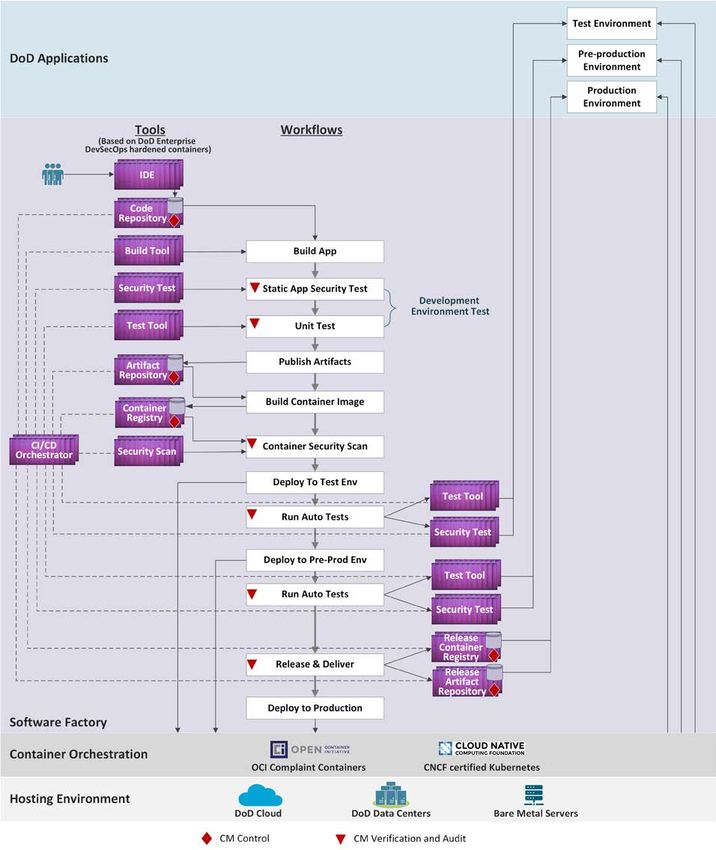
UNCLASSIFIED

Document Approvals

Prepared By:

 LAM.NGOAN.THOM Digitally                  signed by
                                   LAM.NGOAN.THOMAS.1229438960
 AS.1229438960                     Date: 2019.09.05 11:52:32 -04'00'
________________________________________________________
Thomas Lam
Acting Director of Architecture and Engineering
Department of Defense, Office of the Chief Information Officer (DoD CIO)

CHAILLAN.NICOLAS. Digitally                signed by
                                   CHAILLAN.NICOLAS.MAXIME.153505652

MAXIME.1535056524                  4
                                   Date: 2019.09.05 12:01:37 -04'00'
________________________________________________________
Nicolas Chaillan
Special Advisor for Cloud Security and DevSecOps
Department of Defense, Office the Undersecretary of Acquisition and Sustainment (A&S)
(currently: Chief Software Officer, Department of Defense, United States Air Force, SAF/AQ)

Approved By:

RANKS.PETER.TH Digitally   signed by
                   RANKS.PETER.THOMAS.1284
OMAS.12846166 616665
                   Date: 2019.09.05 21:41:37
65                 -04'00'
________________________________________________________
Peter Ranks
Deputy Chief Information Officer for Information Enterprise (DCIO IE)
Department of Defense, Office of the Chief Information Officer (DoD CIO)

                                              ii
                                      UNCLASSIFIED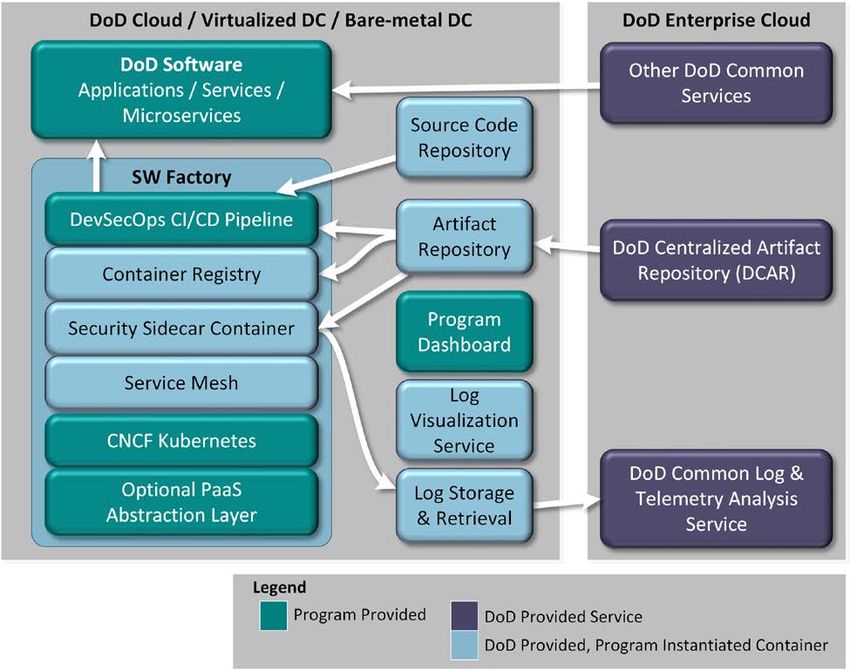
UNCLASSIFIED

Trademark Information
Names, products, and services referenced within this document may be the trade names,
trademarks, or service marks of their respective owners. References to commercial vendors and
their products or services are provided strictly as a convenience to our readers, and do not
constitute or imply endorsement by the Department of any non-Federal entity, event, product,
service, or enterprise.

                                              iii
                                      UNCLASSIFIED
UNCLASSIFIED

Executive Summary
Legacy software acquisition and development practices in the DoD do not provide the agility to
deploy new software “at the speed of operations”. In addition, security is often an afterthought,
not built in from the beginning of the lifecycle of the application and underlying infrastructure.
DevSecOps is the industry best practice for rapid, secure software development.
DevSecOps is an organizational software engineering culture and practice that aims at unifying
software development (Dev), security (Sec) and operations (Ops). The main characteristic of
DevSecOps is to automate, monitor, and apply security at all phases of the software lifecycle:
plan, develop, build, test, release, deliver, deploy, operate, and monitor. In DevSecOps, testing
and security are shifted to the left through automated unit, functional, integration, and security
testing - this is a key DevSecOps differentiator since security and functional capabilities are
tested and built simultaneously.
The benefits of adopting DevSecOps include:
   •   Reduced mean-time to production: the average time it takes from when new software
       features are required until they are running in production;
   •   Increased deployment frequency: how often a new release can be deployed into the
       production environment;
   •   Fully automated risk characterization, monitoring, and mitigation across the application
       lifecycle;
   •   Software updates and patching at "the speed of operations".
This DoD Enterprise DevSecOps Reference Design describes the DevSecOps lifecycle,
supporting pillars, and DevSecOps ecosystem; lists the tools and activities for DevSecOps
software factory and ecosystem; introduces the DoD enterprise DevSecOps container service that
provides hardened DevSecOps tools and deployment templates to the program application
DevSecOps teams to select; and showcases a sampling of software factory reference designs and
application security operations. This DoD Enterprise DevSecOps Reference Design provides
implementation and operational guidance to Information Technology (IT) capability providers,
IT capability consumers, application teams, and Authorizing Officials.

                                                 iv
                                        UNCLASSIFIED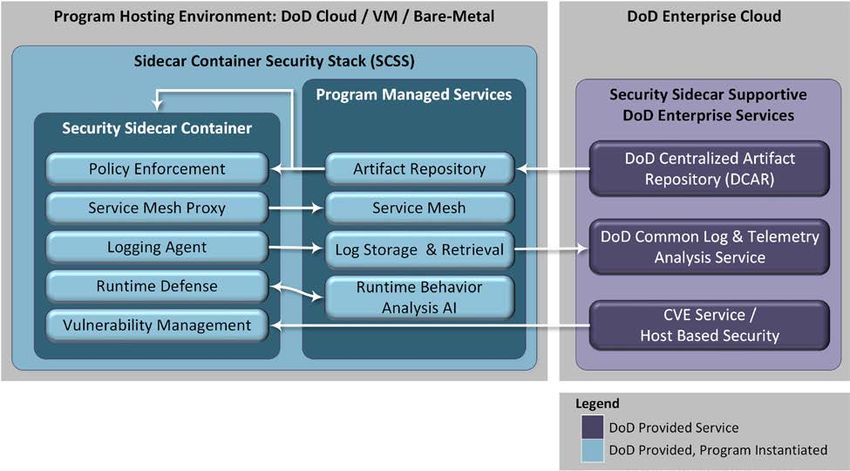
UNCLASSIFIED

Table of Contents

1     Introduction ......................................................................................................................... 10
    1.1     Background ................................................................................................................... 10
    1.2     Purpose .......................................................................................................................... 11
    1.3     Scope .............................................................................................................................. 11
    1.4     Document Overview ..................................................................................................... 12
2     Assumptions and Principles................................................................................................ 13
    2.1     Assumptions .................................................................................................................. 13
    2.2     Principles ....................................................................................................................... 13
3     DevSecOps Concepts ........................................................................................................... 15
    3.1     Key Terms ..................................................................................................................... 15
      3.1.1        Conceptual Model ................................................................................................... 18
    3.2     DevSecOps Lifecycle .................................................................................................... 18
    3.3     DevSecOps Pillars ........................................................................................................ 19
      3.3.1        Organization............................................................................................................ 20
      3.3.2        Process .................................................................................................................... 21
      3.3.3        Technology ............................................................................................................. 23
      3.3.4        Governance ............................................................................................................. 23
          3.3.4.1         Management Structure ..................................................................................... 23
          3.3.4.2         Authorizing Official ........................................................................................ 25
    3.4     DevSecOps Ecosystem.................................................................................................. 26
      3.4.1        Planning .................................................................................................................. 27
      3.4.2        Software Factory ..................................................................................................... 28
      3.4.3        Operations ............................................................................................................... 29
      3.4.4        External Systems ..................................................................................................... 29
4     DevSecOps Tools and Activities ......................................................................................... 31
    4.1     Planning Tools and Activities ...................................................................................... 31
    4.2     Software Factory Tools and Activities ....................................................................... 34

                                                                       v
                                                          UNCLASSIFIED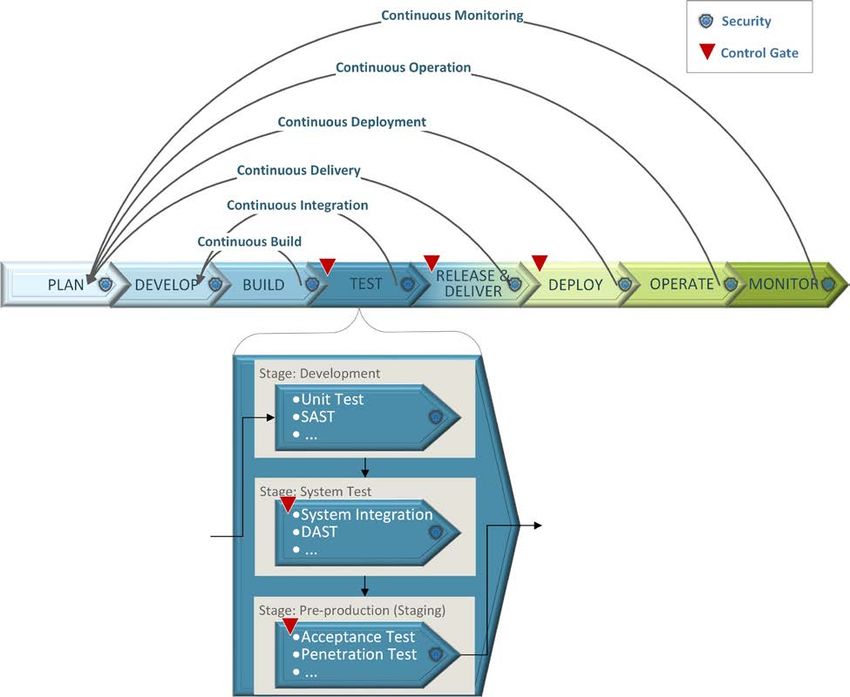
UNCLASSIFIED

      4.2.1      CI/CD Orchestrator ................................................................................................. 34
      4.2.2      Develop ................................................................................................................... 35
      4.2.3      Build........................................................................................................................ 38
      4.2.4      Test .......................................................................................................................... 40
      4.2.5      Release and Deliver ................................................................................................ 45
    4.3     Production Operation Tools and Activities ............................................................... 46
      4.3.1      Deploy ..................................................................................................................... 46
          4.3.1.1       Virtual Machine deployment ........................................................................... 46
          4.3.1.2       Container deployment...................................................................................... 47
      4.3.2      Operate .................................................................................................................... 49
      4.3.3      Monitor ................................................................................................................... 50
    4.4     Security Tools and Activities Summary ..................................................................... 53
    4.5     Configuration Management Tools and Activities Summary ................................... 54
    4.6     Database Management Tools and Activities Summary ............................................ 55
5     DoD Enterprise DevSecOps Container Service ................................................................ 57
    5.1     DoD Enterprise DevSecOps Container Factory ........................................................ 57
      5.1.1      DoD Hardened Containers ...................................................................................... 57
      5.1.2      Container Hardening Process .................................................................................. 58
          5.1.2.1       Select the Container Base Image ..................................................................... 58
          5.1.2.2       Harden the Container ....................................................................................... 59
          5.1.2.3       Store the Hardened Container.......................................................................... 59
          5.1.2.4       Documentation................................................................................................. 59
          5.1.2.5       Continuous Engineering .................................................................................. 60
          5.1.2.6       Cybersecurity ................................................................................................... 60
    5.2     DoD Centralized Artifact Repository ......................................................................... 60
6     DevSecOps Ecosystem Reference Designs ......................................................................... 61
    6.1     Containerized Software Factory ................................................................................. 61
      6.1.1      Hosting Environment .............................................................................................. 62
      6.1.2      Container Orchestration .......................................................................................... 63

                                                                     vi
                                                         UNCLASSIFIED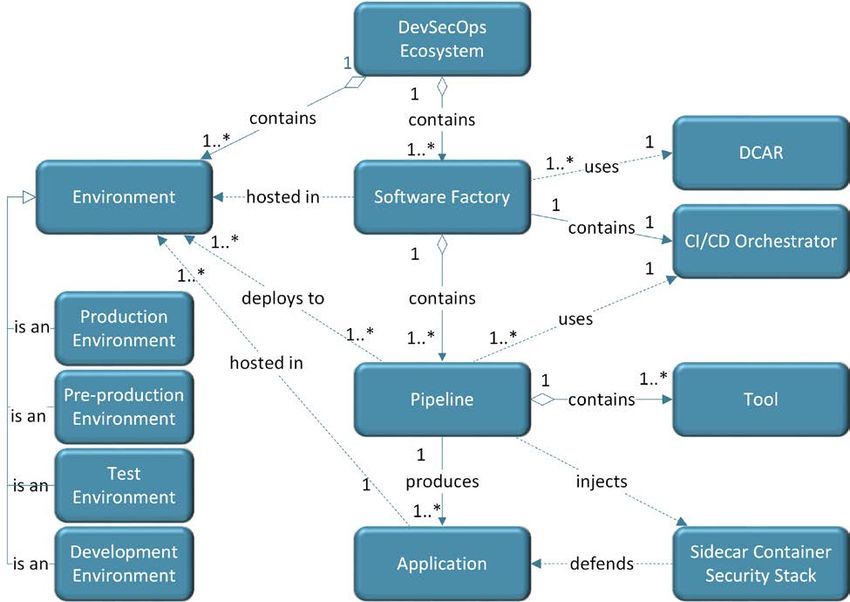
UNCLASSIFIED

      6.1.3        Software Factory Using Hardened Containers ....................................................... 63
      6.1.4        DoD Applications ................................................................................................... 64
    6.2     Software Factory using Cloud DevSecOps Services ................................................. 65
    6.3     Serverless Support........................................................................................................ 66
    6.4     Application Security Operations................................................................................. 68
      6.4.1        Continuous Deployment ......................................................................................... 68
      6.4.2        Continuous Operation ............................................................................................. 68
      6.4.3        Continuous Monitoring ........................................................................................... 69
      6.4.4        Sidecar Container Security Stack............................................................................ 70
7     Conclusion ............................................................................................................................ 75
Appendix A             Acronym Table .................................................................................................. 76
Appendix B             Glossary of Key Terms ..................................................................................... 79
Appendix C             References .......................................................................................................... 88

                                                                     vii
                                                          UNCLASSIFIED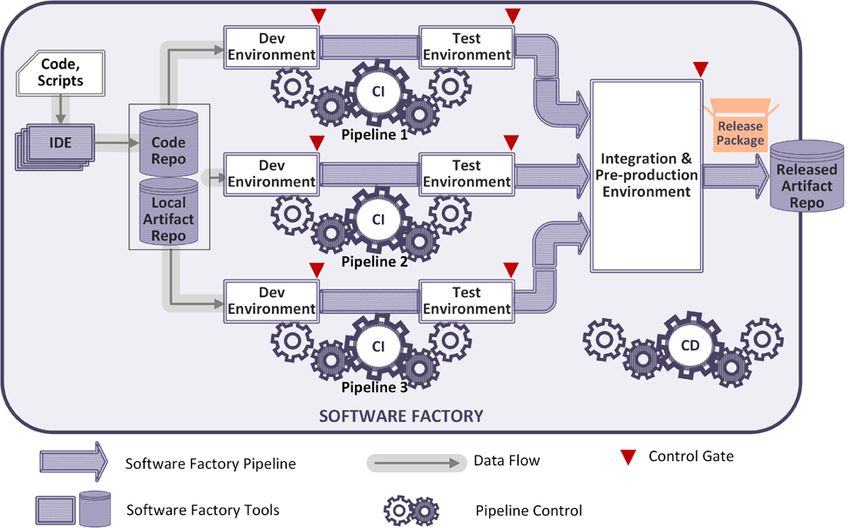
UNCLASSIFIED

List of Figures
Figure 1: Containers ................................................................................................................... 17
Figure 2: Conceptual Model ...................................................................................................... 18
Figure 3: DevSecOps Software Lifecycle .................................................................................. 19
Figure 4: DevSecOps Pillars ...................................................................................................... 20
Figure 5: Application DevSecOps Processes ............................................................................ 22
Figure 6: Five Principles of Next Generation Governance ..................................................... 25
Figure 7: Assessment and Authorization Inheritance ............................................................. 26
Figure 8: DevSecOps Ecosystem................................................................................................ 27
Figure 9: DevSecOps Software Factory .................................................................................... 28
Figure 10: DoD Enterprise DevSecOps Container Service Architecture .............................. 57
Figure 11: Major Steps in the Container Hardening Process................................................. 58
Figure 12: Containerized Software Factory Reference Design .............................................. 62
Figure 13: DevSecOps Platform Options .................................................................................. 63
Figure 14: Software Factory Phases in the Application Lifecycle .......................................... 64
Figure 15: Software Factory using Cloud DevSecOps Services ............................................. 66
Figure 16: Operational Efficiency ............................................................................................. 67
Figure 17: Logging and Log Analysis Process ......................................................................... 70
Figure 18: Sidecar Pattern ......................................................................................................... 71
Figure 19: Sidecar Components ................................................................................................ 72
Figure 20: Sidecar Container Security Stack Interactions ..................................................... 74
Figure 21: Hypervisor with Virtual Machines ......................................................................... 84

                                                                   viii
                                                        UNCLASSIFIED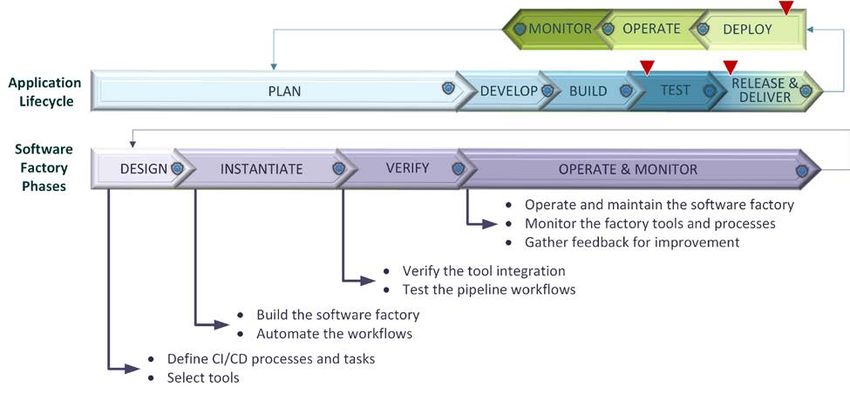
UNCLASSIFIED

List of Tables
Table 1: Key Terms .................................................................................................................... 15
Table 2: Roles of Authorizing Officials in DevSecOps ............................................................ 26
Table 3: Plan Phase Tools .......................................................................................................... 31
Table 4: Plan Phase Activities .................................................................................................... 33
Table 5: CI/CD Orchestrator ..................................................................................................... 35
Table 6: Develop Phase Tools .................................................................................................... 36
Table 7: Develop Phase Activities .............................................................................................. 37
Table 8: Build Phase Tools ......................................................................................................... 38
Table 9: Build Phase Activities .................................................................................................. 39
Table 10: Test Phase Tools ......................................................................................................... 40
Table 11: Test Phase Activities .................................................................................................. 43
Table 12: Release and Deliver Phase Tools .............................................................................. 45
Table 13: Release and Deliver Phase Activities ........................................................................ 46
Table 14: Deploy Phase Tools .................................................................................................... 47
Table 15: Deploy Phase Activities ............................................................................................. 48
Table 16: Operate Phase Tools .................................................................................................. 50
Table 17: Operate Phase Activities ........................................................................................... 50
Table 18: Monitor Phase Tools .................................................................................................. 51
Table 19: Monitor Phase Activities ........................................................................................... 52
Table 20: Security Activities Summary .................................................................................... 53
Table 21: Configuration Management Activities Summary ................................................... 54
Table 22: Database Management Activities Summary ........................................................... 56
Table 23: Sidecar Container Security Stack Components ...................................................... 72

                                                                   ix
                                                        UNCLASSIFIED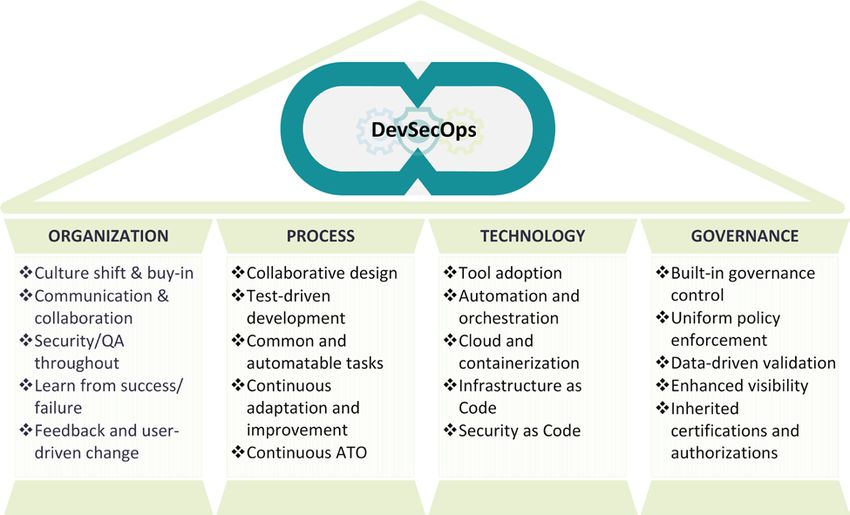
UNCLASSIFIED

1   Introduction
1.1 Background
DevSecOps is an organizational software engineering culture and practice that aims at unifying
software development (Dev), security (Sec) and operations (Ops). The main characteristic of
DevSecOps is to improve customer outcomes and mission value by automating, monitoring, and
applying security at all phases of the software lifecycle: plan, develop, build, test, release,
deliver, deploy, operate, and monitor. Practicing DevSecOps provides demonstrable quality and
security improvements over the traditional software lifecycle, which can be measured with these
metrics:
    •   Mean-time to production: the average time it takes from when new software features are
        required until they are running in production.
    •   Average lead-time: how long it takes for a new requirement to be delivered and deployed.
    •   Deployment speed: how fast a new version of the application can be deployed into the
        production environment.
    •   Deployment frequency: how often a new release can be deployed into the production
        environment.
    •   Production failure rate: how often software fails during production.
    •   Mean-time to recovery: how long it takes applications in the production stage to recover
        from failure.
In addition, DevSecOps practice enables:
    •   Fully automated risk characterization, monitoring, and mitigation across the application
        lifecycle.
    •   Software updates and patching at a pace that allows the addressing of security
        vulnerabilities and code weaknesses.
DevSecOps practice enables application security, secure deployment, and secure operations in
close alignment with mission objectives. In DevSecOps, testing and security are shifted to the
left through automated unit, functional, integration, and security testing - this is a key
DevSecOps differentiator since security and functional capabilities are tested and built
simultaneously. In addition, some security features are automatically injected into the application
without developer intervention via a sidecar container.

                                                10
                                        UNCLASSIFIED
UNCLASSIFIED
1.2 Purpose
The main purpose of this document is to provide a logical description of the key design
components and processes to provide a repeatable reference design that can be used to instantiate
a DoD DevSecOps software factory.
The target audiences for this document include:
• DoD Enterprise DevSecOps capability providers who build DoD Enterprise DevSecOps
hardened containers and provide a DevSecOps hardened container access service
• DoD organization DevSecOps teams who manage (instantiate and maintain) DevSecOps
software factories and associated pipelines for its programs
• DoD program application teams who use DevSecOps software factories to develop,
secure, and operate mission applications
• Authorizing Officials (AOs)
The DoD Enterprise DevSecOps reference design leverages a set of hardened DevSecOps tools
and deployment templates that enable DevSecOps teams to select the appropriate template for
the program application capability to be developed. For example, these templates will be
specialized around a specific programming language or around different types of capabilities
such as web application, transactional, big data, or artificial intelligence (AI) capabilities. A
program selects a DevSecOps template and toolset; the program then uses these to instantiate a
DevSecOps software factory and the associated pipelines that enable Continuous Integration and
Continuous Delivery (CI/CD) of the mission application.
This reference design aligns with these reference documents:
• DoD Cloud Computing Strategy [1]
• DoD Cloud Computing Security Requirements Guide [2]
• DoD Secure Cloud Computing Architecture (SCCA) [3]
• Presidential Executive Order on Strengthening the Cybersecurity of Federal Networks
and Critical Infrastructure (Executive Order (EO) 1380) [4]
• National Institute of Standards and Technology (NIST) Cybersecurity Framework [5]
• DoD Container Hardening Security Requirements Guide [6].
1.3 Scope
This document describes the reference design to enable DevSecOps to scale across the
department. DevSecOps is an established mature capability in industry, and it is already used
within some pockets of the Government; this reference design formalizes its usage across the
11
UNCLASSIFIEDUNCLASSIFIED
DoD. This design is product agnostic and provides execution guidance for use by software
teams. It is applicable to developing new capabilities and to sustaining existing capabilities in
both business and weapons systems software, including business transactions, C2, embedded
systems, big data, and Artificial Intelligence (AI).
This document does not address policy or acquisition.
1.4 Document Overview
The documentation is organized as follows.
• Section 1 describes the background, purpose and scope of this document.
• Section 2 describes the assumptions made in developing this reference design, as well as
stating foundational principles.
• Section 3 describes the DevSecOps lifecycle, the four pillars to assist DevSecOps
adoption, and a technical architecture of the DevSecOps software factory and its
ecosystem.
• Section 4 describes the DevSecOps ecosystem tools and the activities along software
lifecycle phases.
• Section 5 describes the DoD Enterprise DevSecOps Service. The target audience of this
section is DoD Enterprise DevSecOps capability providers.
• Section 6 describes the reference design for DoD programs to build their DevSecOps
software factory and ecosystem.
12
UNCLASSIFIEDUNCLASSIFIED
2 Assumptions and Principles
2.1 Assumptions
This document makes the following assumptions:
• For most organizations, deploying to a certified and monitored cloud environment will
become their preferred solution technically and culturally.
• Rapidly changing technology dictates designing the DevSecOps pipelines and patterns
for flexibility as new development capabilities enter/exit the commercial product market.
• The DoD Enterprise DevSecOps software factory is designed to avoid vendor lock-in and
leverage Open Container Initiative (OCI) compliant containers and Cloud Native
Computing Foundation (CNCF) certified Kubernetes to orchestrate and manage the
containers.
• The government must balance open source integration risks vs. using pre-integrated
Commercial Off-The-Shelf (COTS) products that have vendor “cost of exit” and vendor
insider risks.
• It must be possible to host a DevSecOps software factory in any DoD general-purpose
cloud environment, as well as in disconnected and classified environments.
• The DevSecOps architecture must have the capability to scale to any type of operational
requirement needing a software solution, including:
o Business systems
o Command and Control systems
o Embedded and Weapon systems
o Intelligence analysis systems
o Autonomous systems
o Assisted human operations
2.2 Principles
There are several key principles to implementing a successful DevSecOps approach:
• Remove bottlenecks (including human ones) and manual actions.
• Automate as much of the development and deployment activities as possible.
• Adopt common tools from planning and requirements through deployment and
operations.
13
UNCLASSIFIEDUNCLASSIFIED
• Leverage agile software principles and favor small, incremental, frequent updates over
larger, more sporadic releases.
• Apply the cross-functional skill sets of Development, Cybersecurity, and Operations
throughout the software lifecycle, embracing a continuous monitoring approach in
parallel instead of waiting to apply each skill set sequentially.
• Security risks of the underlying infrastructure must be measured and quantified, so that
the total risks and impacts to software applications are understood.
• Deploy immutable infrastructure, such as containers. The concept of immutable
infrastructure is an IT strategy in which deployed components are replaced in their
entirety, rather than being updated in place. Deploying immutable infrastructure requires
standardization and emulation of common infrastructure components to achieve
consistent and predictable results.
14
UNCLASSIFIEDUNCLASSIFIED
3 DevSecOps Concepts
DevSecOps describes an organization’s culture and practices enabling organizations to bridge
the gap between developers, security team, and operations team; improve processes through
collaborative and agile workflows; drive for faster and more secure software delivery via
technology; and achieve consistent governance and control. There is no uniform DevSecOps
practice. Each DoD organization needs to tailor its culture and its DevSecOps practices to its
own unique processes, products, security requirements, and operational procedures. Embracing
DevSecOps requires organizations to shift their culture, evolve existing processes, adopt new
technologies, and strengthen governance.
This section will briefly discuss the DevSecOps lifecycle, supporting pillars, and the DevSecOps
ecosystem.
3.1 Key Terms
Here are some key terms used throughout the document. Refer to the glossary in Appendix B for
the full list.
Table 1: Key Terms
Term Definition
DevSecOps Ecosystem A collection of tools and process workflows created and
executed on the tools to support all the activities throughout
the full DevSecOps lifecycle.
The process workflows may be fully automated, semi-
automated, or manual.
Software Factory A software assembly plant that contains multiple pipelines,
which are equipped with a set of tools, process workflows,
scripts, and environments, to produce a set of software
deployable artifacts with minimal human intervention. It
automates the activities in the develop, build, test, release,
and deliver phases. The software factory supports multi-
tenancy.
CI/CD Pipeline The set of tools and the associated process workflows to
achieve continuous integration and continuous delivery with
build, test, security, and release delivery activities, which
are steered by a CI/CD orchestrator and automated as much
as practice allows.
15
UNCLASSIFIEDUNCLASSIFIED
Term Definition
CI/CD Pipeline Instance A single process workflow and the tools to execute the
workflow for a specific software language and application
type for a project. As much of the pipeline process is
automated as is practicable.
Environment Sets a runtime boundary for the software component to be
deployed and executed. Typical environments include
development, integration, test, pre-production, and
production.
A local repository tied to the software factory. It stores
Software Factory Artifact
artifacts pulled from DoD Centralized Artifact Repository
Repository
(DCAR) as well as locally developed artifacts to be used in
DevSecOps processes. The artifacts include, but are not
limited to, virtual machine (VM) images, container images,
binary executables, archives, and documentation. It supports
multi-tenancy.
Note that programs may have a single artifact repository and
use tags to distinguish the content types. It is also possible
to have separate artifact repositories to store local artifacts
and released artifacts.
Software instructions for a computer, written in a
Code
programming language. These instructions may be in the
form of either human-readable source code, or machine
code, which is source code that has been compiled into
machine executable instructions.
16
UNCLASSIFIEDUNCLASSIFIED
Term Definition
Containers A standard unit of software that packages up code and all its
dependencies, down to, but not including the Operating
System (OS). It is a lightweight, standalone, executable
package of software that includes everything needed to run
an application except the OS: code, runtime, system tools,
system libraries and settings.
Several containers can run in the same OS without
conflicting with one another.
Figure 1: Containers
Containers run on the OS, so no hypervisor (virtualization)
is necessary (though the OS itself may be running on a
hypervisor).
Containers are much smaller than a VM, typically by a
factor of 1,000 (MB vs GB), partly because they don’t need
to include the OS. Using containers allows denser packing
of applications than VMs.
Unlike VMs, containers are portable between clouds or
between clouds and on-premise servers. This helps alleviate
Cloud Service Provider (CSP) lock-in, though an
application may still be locked-in to a CSP, if it uses CSP-
specific services.
Containers also start much faster than a VM (seconds vs.
minutes), partly because the OS doesn’t need to boot.
17
UNCLASSIFIEDUNCLASSIFIED
3.1.1 Conceptual Model
The following conceptual model shows some of the most important concepts described in this
paper along with their relationships. It should help to clarify these relationships. When reading
text along an arrow, follow the direction of the arrow. So, a DevSecOps Ecosystem contains one
or more software factories, and each software factory contains one or more pipelines. The
diagram also shows that each software factory contains only one CI/CD Orchestrator, and that
many software factories use DCAR.
Figure 2: Conceptual Model
3.2 DevSecOps Lifecycle
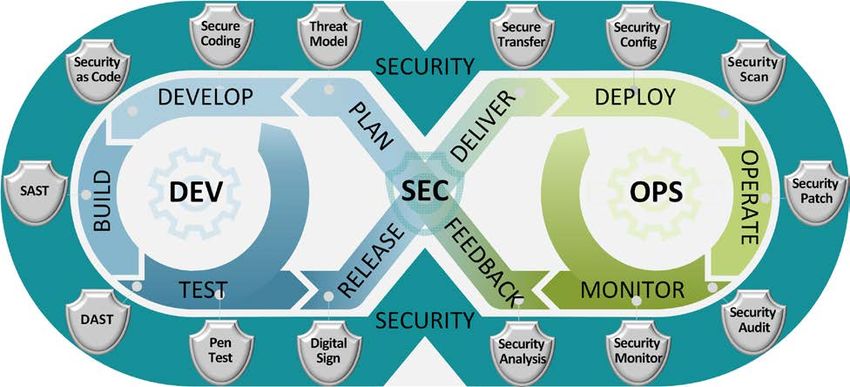
The DevSecOps software lifecycle phases are illustrated in Figure 3. There are nine phases: plan,
develop, build, test, release, deliver, deploy, operate, and monitor. Security is embedded within
18
UNCLASSIFIEDUNCLASSIFIED
each phase.
Figure 3: DevSecOps Software Lifecycle
With DevSecOps, the software development lifecycle is not a monolithic linear process. The
“big bang” style delivery of the Waterfall process is replaced with small but more frequent
deliveries, so that it is easier to change course as necessary. Each small delivery is accomplished
through a fully automated process or semi-automated process with minimal human intervention
to accelerate continuous integration and delivery. The DevSecOps lifecycle is adaptable and has
many feedback loops for continuous improvement.
3.3 DevSecOps Pillars
DevSecOps are supported by four pillars: organization, process, technology, and governance, as
illustrated in Figure 4.
19
UNCLASSIFIEDUNCLASSIFIED
Figure 4: DevSecOps Pillars
For each DoD organization, the practice of DevSecOps starts with buy-in of the DevSecOps
philosophy by senior leaders within the organization. This leads to a change to the organizational
culture, along with the development of new collaborative processes, technologies and tools to
automate the process and to apply consistent governance. A project must advance in all four
areas to be successful.
3.3.1 Organization
The organization should embrace the following philosophies and ideas and incorporate them into
their daily activities and software lifecycle management processes.
• Change the organizational culture to take a holistic view and share the responsibility of
software development, security and operations. Train staff with DevSecOps concepts and
new technologies. Gradually gain buy-in from all stakeholders.
• Break down organizational silos. Increase the team communication and collaboration in
all phases of the software lifecycle.
• Actionable security and quality assurance (QA) information, such as security alerts or
QA reports, must be automatically available to the teams at each software lifecycle phase
to make collaborative actions possible.
20
UNCLASSIFIEDUNCLASSIFIED
• Build a culture of safety by sharing after-action reports on both positive and negative
events across the entire organization. Teams should use both success and failure as
learning opportunities to improve the system design, harden the implementation, and
enhance the incident response capability as part of the DevSecOps practice.
• Make many small, incremental changes instead of fewer large changes. The scope of
smaller changes is more limited and thus easier to manage.
• Embrace feedback and user driven change to respond to new, emerging, and unforeseen
requirements.
• Plan and budget for continuous code refactoring to ensure constant buy down of
accumulated technical debt.
3.3.2 Process
Depending on the mission environment, system complexity, system architecture, software design
choices, risk tolerance level, and system maturity level, each program’s software lifecycle has its
own unique management processes.
For example, suppose a mature web application software system has adopted a microservices
design. Its development, pre-production, and production environment are on the same cloud. The
test procedures are fully automated. This system could have a process flow to automate the
develop, build, test, secure, and delivery tasks to push updates into production quickly without
human intervention. On the other hand, a complex mission critical embedded system, such as a
weapons system, may have a different process that requires some tests that cannot be fully
automated. The software lifecycle process for that system will be significantly different from the
process for the web application system.
To adopt a DevSecOps process successfully, implement it in multiple, iterative phases. Start
small with some tasks that are easy to automate, then gradually build up the DevSecOps
capability and adjust the processes to match. Figure 5 illustrates this concept; it shows that a
software system can start with a Continuous Build pipeline, which only automates the build
process after the developer commits code. Over time, it can then progress to Continuous
Integration, Continuous Delivery, Continuous Deployment, Continuous Operation, and finally
Continuous Monitoring, to achieve the full closed loop of DevSecOps. A program could start
with a suitable process and then grow progressively from there. The process improvement is
frequent, and it responds to feedback to improve both the application and the process itself.
21
UNCLASSIFIEDUNCLASSIFIED
Figure 5: Application DevSecOps Processes
There is no “one size fits all” solution for process design. Each software team has its own unique
requirements and constraints. Below is a list of some best practices to guide the process design:
1. The process design is a collective effort from multidisciplinary teams.
2. Most of the processes should be automatable via tools and technologies.
3. The DevSecOps lifecycle is an iterative closed loop. Start small and build it up
progressively to strive for continuous improvement. Set up human intervention at the
control gates when necessary, depending on the maturity level of the process and the
team’s confidence level in the automation. Start with more human intervention and
gradually decrease it as possible.
4. AO should consider automating the Authority to Operate (ATO) process as much as
possible.
22
UNCLASSIFIEDUNCLASSIFIED
To help organizations evolve their DevSecOps capabilities and processes, the DoD has
developed a DevSecOps Maturity Model. This model details many steps that organizations can
take to move incrementally towards a higher DevSecOps maturity level. That maturity model is
presented in the DoD DevSecOps Playbook [7].
3.3.3 Technology
Many DevSecOps tools automate many tasks in the software lifecycle without human
involvement. Other DevSecOps tools, such as collaboration and communication tools, facilitate
and stimulate human interaction to improve productivity. Some DevSecOps tools aim to help an
activity at a specific lifecycle phase. For example, an Integrated Development Environment
(IDE) DevSecOps plug-in for develop phase, or a static application security test tool for the build
phase. Most tools assist a particular set of activities. The tags added to artifacts in the artifact
repository help guarantee that the same set of artifacts move together along a pipeline. Section 4
will introduce a variety of DevSecOps tools.
The instantiation of the DevSecOps environments can be orchestrated from configuration files
instead of setting up one component at a time manually. The infrastructure configuration files,
the DevSecOps tool configuration scripts, and the application run-time configuration scripts are
referred to as Infrastructure as Code (IaC). Taking the same approach as IaC, security teams
program security policies directly into configuration code, as well as implement security
compliance checking and auditing as code, which are referred as Security as Code (SaC). Both
IaC and SaC are treated as software and go through the rigorous software development processes
including design, development, version control, peer review, static analysis, and test.
Technologies and tools play a key role in DevSecOps practice to shorten the software lifecycle
and increase efficiency. They not only enable software production automation as part of a
software factory, but also allow operations and security process orchestration.
3.3.4 Governance
Governance actively assesses and manages the risks associated with the mission program
throughout the lifecycle. Governance activities do not stop after ATO but continue throughout
the software lifecycle, including operations and monitoring. DevSecOps can facilitate and
automate many governance activities.
3.3.4.1 Management Structure
The management objective of DevSecOps must be both “top-down” and “bottom-up” to balance
larger strategic goals. Studies (e.g., [8]) have shown that senior leader buy-in is crucial for
success. But buy-in at the staff level is also important to engender a sense of ownership, to
encourage the appropriate implementation of processes related to governance, and to enable team
members to support continuous process improvement. Continuous process improvement –
seeking opportunities to simplify and automate whenever and wherever possible – is essential for
governance to keep pace with a rapidly changing world.
23
UNCLASSIFIEDUNCLASSIFIED
Early DevSecOps efforts in the DoD, such as [9] have leveraged and adopted commercial best
practices. That document identifies Five Fundamental Principles of Next Generation Governance
(NGG):
1. Run IT with Mission Discipline: Tie requirements back to your organization’s mission. Every
action should be aligned to the mission. If they are not, then an evaluation should be
performed with Continuous Process Improvement to address how to tie actions to missions.
2. Invest in Automation: Automate everything possible, including actions, business processes,
decisions, approvals, documentation, and more. Automation, including designs, interfaces,
functional and security tests, and their related documentation, create the Artifacts of Record
that provide the body of evidence required by the Risk Management Framework (RMF) and
for historical audits when needed.
3. Embrace Adaptability: Accept that change can be required at any time, and all options are
available to achieve it. Fail fast, fail small, and fail forward. An example of failing forward is
when a developer finds that a release does not work. Then instead of restoring the server to
its pre-deployment state with the previous software, the developer’s change should be
discrete enough that they can fix it and address the issue through a newer release.
4. Promote Transparency: Offer open access across the organization to view the activities
occurring within the automated process and to view the auto-generated Artifacts of Record.
Transparency generates an environment for sharing ideas and developing solutions
comprised of Subject Matter Experts (SMEs) or leads from across the enterprise in the form
of cross-functional teams to avoid the “silo effect.” When composed of all representative
stakeholders, the team possesses the skills needed to build a mission system and the
collective ingenuity necessary to overcome all encountered challenges.
5. Inherent Accountability: Push down or delegate responsibility to the lowest level:
• Strategic: This is related to the Change Control Board (CCB) or Technical Review Board
(TRB); it involves “Big Change” unstructured decisions. These infrequent and high-risk
decisions have the potential to shape the strategy and mission of an organization.
• Operational: (Various Scrum) Cross-cutting, semi-structured decisions. In these frequent
and high-risk decisions, a series of small, interconnected decisions are made by different
groups as part of a collaborative, end-to-end decision process.
• Tactical: (Global Enterprise Partners (GEP)/Product Owner/Developers Activities)
Delegated, structured decisions. These frequent and low-risk decisions are effectively
handled by an individual or working team, with limited input from others.
These 5 principles are summarized in Figure 6, which is from [9].
24
UNCLASSIFIEDUNCLASSIFIED
Figure 6: Five Principles of Next Generation Governance
3.3.4.2 Authorizing Official
DoD Instruction (DoDI) 8510.01 [10] is the ultimate governance policy and states processes that
all DoD information system and platform information technology system must follow. It is under
revision and the following DevSecOps related governance information will be incorporated in
the future release.
For initial standup of a new DevSecOps software factory instance and a production operations
environment, the RMF process follows an enterprise level process. The assessment and
authorization (A&A) should inherit the certifications and authorizations of the underlying
infrastructure (e.g., a DoD cloud provisional authorization) and of the DoD Enterprise Hardened
Containers, without having to re-certify them. The program should have a formal Service Level
Agreement (SLA) with the underlying infrastructure provider about what services are included
and what authorizations can be inherited. This affects the status of applicable assessment
procedures and prepares the stage for inheritance into the operations environment and
application. Once the instance is authorized and operational, the specialty AO for the functional
25
UNCLASSIFIEDUNCLASSIFIED
area or the local AO for the program has cognizance for Continuous Authorization of the
environment. Figure 7 illustrates the A&A inheritance.
The specialty AO for the functional area or the local AO for the program has cognizance for
Continuous Authorization of the mission applications.
Figure 7: Assessment and Authorization Inheritance
Table 2: Roles of Authorizing Officials in DevSecOps
Capability Authorizing Official
DoD Enterprise Hardened Containers Enterprise AO (e.g., Defense Information
Systems Agency (DISA))
DevSecOps software factory instances Enterprise AO (e.g., DISA, Military
Department (MilDep) CIO)
Continuous Process Improvement / Continuous Authorization Specialty or Local AO (e.g., Program executive
of DevSecOps software factory instances Officer (PEO))
AO for mission applications Specialty or Local AO (e.g., PEO)
3.4 DevSecOps Ecosystem
The DevSecOps ecosystem is a collection of tools and the process workflows created and
executed on the tools to support all the activities throughout the full DevSecOps lifecycle. As
illustrated in Figure 8, the DevSecOps ecosystem is composed of three subsystems: planning, a
software factory, and production operations. The DevSecOps ecosystem interacts with external
enterprise services to get all dependency support, and with enterprise and local AO to gain
operation authorization.
The DevSecOps administration team is responsible for administrating the ecosystem tools and
automating the process workflows. The mission application team focuses on the development,
testing, security and operations tasks using the ecosystem.
26
UNCLASSIFIEDUNCLASSIFIED
Figure 8: DevSecOps Ecosystem
3.4.1 Planning
The plan phase involves activities that help the project manage time, cost, quality, risk and
issues. These activities include business-need assessment, project plan creation, feasibility
analysis, risk analysis, business requirements gathering, business process creation, system
design, DevSecOps design and ecosystem instantiation, etc. The plan phase repeats when
DevSecOps the lifecycle recycles. It is a best practice to develop a minimum viable product
(MVP) for critical business needs as the first thing to develop. Then get into the feedback loop
process as quickly as possible; this is recommended in the Lean Startup methodology [11]. The
DevSecOps design creates the DevSecOps processes and control gates, which will guide the
automation throughout the lifecycle. DevSecOps ecosystem tools will facilitate process
automation and consistent process execution.
The DevSecOps planning subsystem supports the activities in the plan phase using a set of
communication, collaboration, project management, and change management tools. In this
phase, the process workflows are not fully automated. The planning tools assist human
interaction and increase team productivity.
27
UNCLASSIFIEDUNCLASSIFIED
3.4.2 Software Factory
A software factory, illustrated in Figure 9, contains multiple pipelines, which are equipped with a
set of tools, process workflows, scripts, and environments, to produce a set of software
deployable artifacts with minimal human intervention. It automates the activities in the develop,
build, test, release, and deliver phases. The environments that are set up in the software factory
should be orchestrated with scripts that include IaC and SaC and which run on various tools. A
software factory must be designed for multi-tenancy and automate software production for
multiple projects. A DoD organization may need multiple pipelines for different types of
software systems, such as web applications or embedded systems.
Figure 9: DevSecOps Software Factory
The factory starts with the development team developing application code and IaC, QA
developing test scripts, and the security team developing SaC in their suitable IDEs. The entire
Software Factory should leverage OCI compliant containers and DoD Hardened Containers
whenever available. Once COTS, Government off the Shelf (GOTS), or newly developed code
and scripts are committed into the Software Factory’s code repository, the assembly line
automation kicks in. There could be multiple CI pipeline instances as assembly lines. Each is for
a specific application subsystem, such as a JavaScript assembly line for a web front-end, a
Python or R assembly line for data analytics, or a GoLang assembly line for a backend
application. The CI assembly line guides the subsystem through continuous integration by
building the code and incorporating dependencies (such as libraries) from the local artifact
28
UNCLASSIFIEDUNCLASSIFIED
repository. In addition, it performs tests in the development and test environments, such as unit
tests, static code analysis, functional tests, interface tests, dynamic code analysis, etc. The
subsystems that pass CI assembly line control gate policies will move into the pre-production
environment for systems integration. The CD assembly line takes over control from this point.
More tests and security scans are performed in this environment, such as performance tests,
acceptance test, security compliance scan, etc. The CD assembly line releases and delivers the
final product package to the released artifact repository if the control gate policies are met.
Developing applications using a DevSecOps software factory provides many benefits:
• Improved software product consistency and quality
• Shortened time to market and increased productivity
• Simplified governance
3.4.3 Operations
In the production environment, the released software is pulled from the released artifact
repository and deployed. Operations, operation monitoring, and security monitoring are
performed. Production operation tools aim to streamline and automate the deployment,
operations, and monitoring activities. Tools should be selected based on system functional
requirements and their suitability for the production environment infrastructure.
3.4.4 External Systems
The DevSecOps ecosystem itself and program applications depend on some DoD enterprise
services to acquire the necessary baseline tools, application dependencies, and security services
to operate.
• DoD Centralized Artifact Repository (DCAR) holds the hardened VM images and
hardened OCI compliant container images of: DevSecOps tools, container security
tools, and common program platform components (e.g. COTS or open source products)
that DoD program software teams can utilize as a baseline to facilitate the authorization
process.
• DoD Common Security Services are DoD enterprise-level common services that
facilitate cybersecurity enforcement and IT management. One security service will
perform traffic inspection and filtering to protect the mission enclave and mission
applications. Some security service examples include firewalls; Intrusion Detection
System (IDS)/Intrusion Prevention System (IPS); malware detection; data loss
prevention; host-based security; log/telemetry aggregation and analysis; and Identity,
Credential, and Access Management (ICAM). A Cybersecurity Service Provider
(CSSP) will provide additional services, including Attack Sensing and Warning
(ASW), Forensic Media Analysis (FMA), Assurance Vulnerability Management
(AVM), Incident Reporting (IR), Incident Handling Response (IHR), Information
Operations Condition (INFOCON), Cyber Protection Condition (CPCON), Malware
Notification Protection (MNP), and Network Security Monitoring (NSM).
29
UNCLASSIFIEDUNCLASSIFIED
The DevSecOps ecosystem interacts with the enterprise AO for the initial software factory ATO
and initial application ATO, as well as the local AO for continuous ATO for the application.
30
UNCLASSIFIEDUNCLASSIFIED
4 DevSecOps Tools and Activities
This section describes both tools for the DevSecOps ecosystem and DevSecOps activities for
each phase. Activities and tools are listed in table format. The Baseline column in the tool tables
has two values: Minimal Viable Product (MVP) and objective. They indicate whether the tool
must be available in the DevSecOps ecosystem MVP as threshold or if the tool is an objective to
be reached as the ecosystem matures. Activity tables list a wide range of activities for
DevSecOps practice. DoD organizations should define their own processes, choose proper
activities, and then select tools suitable for their systems to build software factories and
DevSecOps ecosystems. With the DevSecOps maturity progression, the level of activity
automation will increase.
4.1 Planning Tools and Activities
The Planning tools support software development planning, which includes configuration
management planning, change management planning, project management planning, system
design, software design, test planning, and security planning. Table 3 lists some tools that can
assist the planning process. Some tools will be used throughout the software lifecycle, such as a
team collaboration tool, an issue tracking system, and a project management system. Some tools
are shared at the enterprise level across programs. Policy and enforcement strategy should be
established for access controls on various tools.
Table 3: Plan Phase Tools
Tool Features Benefits Inputs Outputs Baseline
Team Audio/video Simplify Team meetings; Organized MVP
collaboration conferencing; communication Design notes; teamwork;
system chat/messaging; and boost team Documentation Version
brainstorming efficiency controlled
discussion board; documents
group calendars;
file sharing;
Wiki website
Issue tracking Bugs and defect Easy to detect Bug report Issues MVP
system management; defect trends Feature/change feature/change
Feature and change Improve request tickets.
management; software product Root cause Issue
Prioritization quality analysis resolution
management; Reduce cost and Solutions tracking
Assignment improve Return history
management; on Investment
Escalation (ROI)
management;
Knowledge base
management
Asset Collect information Increase IT assets Asset Objective
inventory about all IT assets; situation (applications, inventory
management awareness software
31
UNCLASSIFIEDUNCLASSIFIED
Tool Features Benefits Inputs Outputs Baseline
Maintain a “real-time” licenses,
inventory of all libraries,
applications, software operating
licenses, libraries, systems, and
operating systems, and versioning
versioning information information)
Configuration Auto-discovery; Centralized IT hardware Configuration Objective
management Dependency mapping; database used by and software items
database Integration with other many systems components
(CMDB) tools; (such as asset information
Configuration auditing management,
configuration
management,
incident
management,
etc.) during
development
and operations
phases.
Project Task management Assist project Tasks, Project plan MVP
management Scheduling and time progress scheduling,
system management tracking resource
Resource management Optimize allocation, etc.
Budget management resource
Risk management allocation
Software Assist requirement Independent of User System design Objective
system design gathering, programming requirements documents,
tool system architecture languages Design ideas Function
design, components Helps visualize design
design, and interface the software document,
design system design Test plan,
System
deployment
environment
configuration
plan
Threat Document system Allows software System design Potential Objective
modeling tool security design; architects to threats and
Analyze the design for identify and mitigation plan
potential security mitigate
issues; potential
Review and analysis security issues
against common attack early.
patterns;
Suggest and manage
mitigation
Data modeling Model the Ensure the System Data model Objective if
tool interrelationship and required data requirement; using a
flows between different objects by the Business logic database
data elements system are
accurately
represented
32
UNCLASSIFIEDYou can also read


