Global Information Assurance Certification Paper - GIAC ...
←
→
Page content transcription
If your browser does not render page correctly, please read the page content below
Global Information Assurance Certification Paper

                           Copyright SANS Institute
                           Author Retains Full Rights
  This paper is taken from the GIAC directory of certified professionals. Reposting is not permited without express written permission.

Interested in learning more?
Check out the list of upcoming events offering
"Security Essentials Bootcamp Style (Security 401)"
at http://www.giac.org/registration/gsec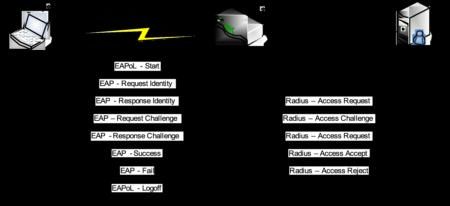
Wireless Security and the IEEE 802.11
                               Standards
                                          GIAC Security Essentials
                                            Certification (GSEC)
                                           Practical Assignment
                                                Version 1.4c

                                                                            ts.
                                        Option 1 - Research on Topics

                                                                         igh
                                            in Information Security

                                                                     ll r
                            Submitted by: Stéphane GARCIA, November 18, 2004
                             Location: SANS Conference - London - June 2004

                                                                   fu
                                                               ins
                                                            eta
                                                         rr
             The Institute of Electrical and Electronics Engineers (IEEE) 802.11 is the working
             group defining a family of specifications for wireless LAN technology. The IEEE goal
                                                      ho

             is to provide wireless LAN with security level equivalent to the wired LANs. The
                                                    ut

             following document will focus on the security characteristics of the 802.11 standard
             and will examine its strengths and its weaknesses that lead to the development of
                                                ,A

             new security mechanisms. Finally we will examine how the new 802.11i extension
                                              05

             provided  the necessary
               Key fingerprint = AF19 security
                                       FA27 2F94improvement
                                                  998D FDB5to    the original
                                                              DE3D   F8B5 06E4standard.
                                                                                  A169 4E46
                                           20
                                        te
                                      tu
                                   sti
                                 In
                             NS
                         SA
                        ©

© SANS Institute 2005                                                                     Author retains full rights.
                                                     -1-
Table of Contents
Wireless Security and the IEEE 802.11 Standards ....................................................1
List of Figures ............................................................................................................2
List of Tables .............................................................................................................3
1. Introduction ........................................................................................................3
2. Wireless LAN Standards – Overview ..................................................................3
Relationship between 802.11 And Wi-Fi: ............................................................4
3. 802.11 Standard and Security ............................................................................5
3.1. Service Set Identifier (SSID)........................................................................5
ts.
3.2. Access Control List (ACL) ...........................................................................5
3.3. Wired Equivalent Protocol (WEP) ................................................................6
igh
3.3.1. Encryption ............................................................................................6
3.3.2. Authentication ......................................................................................7
ll r
3.4. IEEE 802.11 Standard Security weaknesses...............................................8
3.4.1. SSID vulnerabilities ..............................................................................8
fu
3.4.2. ACL vulnerabilities................................................................................9
ins
3.4.3. WEP vulnerabilities ..............................................................................9
4. 802.1x ................................................................................................................9
eta
4.1. Summary ...............................................................................................13
5. 802.11i .............................................................................................................13
rr
5.1. Discovery ..................................................................................................14
ho
5.2. Authentication............................................................................................14
5.3. Key management ......................................................................................14
ut
5.4. Encryption and Control integrity.................................................................15
,A
5.4.1. Temporal Key Integrity Protocol (TKIP) ..............................................15
5.4.2. Counter mode with Cipher block chaining Message authentication code
05
Key fingerprint = AF19 FA27 2F94 998D FDB5 DE3D F8B5 06E4 A169 4E46
Protocol (CCMP) ..............................................................................................16
20
5.4.3. Wireless Robust Authenticated Protocol (WRAP)...............................18
5.5. Summary...................................................................................................18
te
6. Conclusion .......................................................................................................18
tu
7. References .......................................................................................................19
sti
List of Figures
In
NS
Figure 1: WEP Encryption Process [].........................................................................6
Figure 2: Open System Authentication ......................................................................7
SA
Figure 3: Shared Key Authentication .........................................................................8
Figure 4: 802.x Architecture.....................................................................................10
©
Figure 5: 802.1x Authentication Process .................................................................12
Figure 6: 802.11i, the 4 Operational Steps ..............................................................13
Figure 7: 802.11i Key Hierarchy Structure ...............................................................15
Figure 8: AES/CCM Relationship.............................................................................16
Figure 9: Counter Mode Encryption .........................................................................17
Figure 10: Encryption and Authentication with CCMP..............................................18
© SANS Institute 2005 Author retains full rights.
-2-List of Tables
Table 1: Sample Default Vendor’s SSID ....................................................................5
Table 2: EAP Authentication Methods Comparison .................................................11
1. Introduction
ts.
Over the past year the demand for wireless connectivity of computing devices is
igh
rapidly increasing. This demand is pushed by customers and organizations attracted
by the ‘any-time/anywhere’ network access capabilities, flexibility and cost effectives
ll r
solutions the wireless LANs (WLAN) can provide. Market projections shows huge
increases of mobile internet users over the next several years [1] and everywhere
fu
home users and corporations are deploying WLANs, extending and sometime
ins
replacing their existing wired network. To have these WLAN infrastructures and
devices interoperable with each other some uniformity or standardization was
eta
required. The IEEE (Institute of Electrical and Electronic Engineers) and other
organizations addressed the need by producing specifications, standards and
rr
extensions.
If it is indisputable that WLAN technology brings mobility and flexible deployment
ho
benefits, it also has the associated drawback of a major security risk that needs to be
ut
addressed. We will see here after how IEEE organization has addressed these
,A
security issues.
05
Key fingerprint = AF19 FA27 2F94 998D FDB5 DE3D F8B5 06E4 A169 4E46
20
2. Wireless LAN Standards – Overview
te
The rise of wireless systems with new applications and technologies drives
tu
countries, manufacturers and user interest groups to cooperate and develop new
sti
standards.
The main standards issued from the standardization groups are the High
In
Performance Radio Lan (HiperLan), Home Radio Frequency (HomeRF), IEEE
NS
802.11. These standards are focusing on the Radio Frequency (RF) wireless
networking communication. Note that the standard released by these different
SA
organizations are not compatible each other.
©
• HiperLAN is a standard issued from the ETSI (European Telecommunications
Standards Institute). The actual version defines two wireless network types,
HiperLAN1 and HiperLAN2. Both are using the 5 GHz frequency band. As of
today these standards have not been finalized and commercial products using
this standard are not available.
• HomeRF is a wireless standard using the 2.4 GHz frequency band referred as
Industrial, Scientific and Medical (ISM) unregulated band. The transmission
rate is 10-Mbps within a range of up to 150 feet.
[1] SANS Security Essentials Version 2.2. Networking Concepts. Pages 257-258.
© SANS Institute 2005 Author retains full rights.
-3-• 802.11 Direct Sequence Spread Spectrum (DSSS) is a standard for wireless
LANs approved in 1997 by IEEE 802 committee, allowing a bandwidth
throughput of 1-2Mbit/s. This standard offers a wireless connectivity to fix or
mobile stations allowing a quick network set up in a limited zone. 802.11
support IR (Infra Red) and ISM radio frequency as transmission media. To
increase throughput, the IEEE developed three 802.11’s extensions (802.11b
– 802.11a – 802.11g) based on new RF transmission techniques.
802.11b theoretical throughput is 11 Mbps similar to the Ethernet
10baseT which is large enough to handle most bandwidth intensive
application. This standard operates at 2.4GHz frequency, in the
ts.
unregulated ISM band. 802.11b is compatible with 802.11 DSSS.
igh
802.11a increased the theoretical throughput up to 54 Mbps. Because
ll r
it is operating in the 5 GHz frequency wavelength using the
Unlicensed-National Information Infrastructure (U-NII) band, 802.11a is
fu
not compatible with 802.11 and 802.11b themselves working in the ISM
ins
band.
eta
802.11g is the standard extension that can be defined as a
compromise between 802.11b and 802.11a: It offers wireless
rr
theoretical throughput up to 54 Mbps like 802.11a and because it
operated in the same ISM band, is backward compatible with 802.11b.
ho
802.11g is expected to be the most widely used standard for
ut
implementing WLAN technology.
,A
05
Key fingerprint = AF19 FA27 2F94 998D FDB5 DE3D F8B5 06E4 A169 4E46
Relationship between 802.11 And Wi-Fi:
20
The term Wi-Fi (Wireless-Fidelity) is a certification given by the Wi-Fi Alliance [2] to
te
802.11 products found to be interoperable with other Wi-Fi certified products.
tu
Founded in 1999, the initial name of the Wi-Fi Alliance was the WECA (Wireless
sti
Ethernet Compatibility Alliance). Wi-Fi alliance is an international non-profit
association of 802.11 product vendors. Its goal is to promote Wi-Fi as an
In
international standard for the wireless LAN. The Wi-Fi Alliance main focuses is the
NS
interoperability of the product issued from the IEEE 802.11b, 802.11a, 802.11g
specifications. They also worked to define two new certifications: WPA (Wi-Fi
SA
Protected Access) to address the critical aspects of wireless security and Wi-Fi Zone
for the expanding market of wireless connectivity for travellers. WPA is not a
©
standard but a certification given by the Wi-Fi Alliance to the product supporting
security features like 802.1x for authentication and TKIP for encryption. WPA2
certification refers to products implementing the new IEEE 802.11i standard as the
security feature.
After having presenting the general specifications relevant to wireless
communication, the following chapters will focus on 802.11, 802.1x and 802.11i as
they are the keys security standards for the wireless communication.
[2] http://www.weca.net/OpenSection/FAQ.asp?TID=2#WECA
© SANS Institute 2005 Author retains full rights.
-4-3. 802.11 Standard and Security
To be able to secure a wireless network, the 802.11 standard includes a set of
security features: Service Set Identifier (SSID) which is used to control access to an
Access Point (AP), the Access Control List (ACL) to prevent unauthorized access,
and the Wired Equivalent Privacy (WEP) protocol intended to provide data security.
These three 802.11 components will be first described, I will then explain in the
chapter 3.4, the underlying security vulnerabilities for each of them.
3.1. Service Set Identifier (SSID)
From a layered defense concept, the SSID is the first security level provided by the
ts.
802.11 standard to control the wireless network access. The SSID is a unique
igh
identifier up to 32 characters attribute to the network or a domain at network set up
time. Every wireless client and Access Point belonging to the same network must
ll r
use the same SSID. When a wireless client tries to connect to an AP, the SSID acts
as a password device must provide to be authorized to join the network.
fu
Contrary to other security features, the SSID mechanism is mandatory and cannot
be disabled.
ins
Each 802.11 device manufacturer provides a default identifier value. Below is a table
eta
of the major manufacturer’s SSID. The complete list of default wireless SSID for
each manufacturer can be found at the CIRT web site [3].
rr
ho
Manufacturer Default SSID
ut
3Com 101, comcomcom
,A
Cisco Tsunami, WaveLAN Network
Compaq Compaq
05
Dlink WLAN
Key fingerprint = AF19 FA27 2F94 998D FDB5 DE3D F8B5 06E4 A169 4E46
20
Intel 101, 195, xlan, intel
Linksys Linksys, wireless
te
Lucent/Cabletron RoamAbout
tu
NetGear Wireless
sti
Table 1: Sample Default Vendor’s SSID
In
NS
3.2. Access Control List (ACL)
SA
Still based on the layered defense concept, the Access Control List (ACL) is another
way to control access to the wireless network. The network administrator can allow
©
or deny access to the Access Point by configuring ACL on the AP itself.
ACL relies upon a MAC addresses table stored on the AP to authenticate individual
clients requesting access to the Access Point.
This feature increases the security of the wireless network by preventing
unauthorized access to the Access Point. Contrary to the SSID, the ACL is an
optional feature.
[3] http://www.cirt.net/cgi-bin/ssids.pl
© SANS Institute 2005 Author retains full rights.
-5-3.3. Wired Equivalent Protocol (WEP)
To give wireless networks an equivalent security level as the wired network, the
802.11 standard defined the Wired Equivalent Privacy (WEP) protocol. This protocol
is used to protect wireless communication from eavesdropping through encryption
and to prevent unauthorized access to the wireless network with authentication. Both
encryption and authentication mechanisms rely on a secret key shared between a
mobile station and the Access Point.
Note that WEP is defined by the standard as optional and neither Access Points nor
wireless devices are obliged to use it. It is also possible to have a wireless device
using the authentication feature but not the encryption one and vice versa.
ts.
igh
3.3.1. Encryption
With WEP enabled, all the data is encrypted using the Ron Rivest Code 4 (RC4)
ll r
developed in 1987 for RSA Data Security [4], in the purpose to provide secure
fu
communication. In addition, WEP protects the wireless traffic with a randomly
generated 24-bit Initialization Vector (IV), which is combined with the 40-bit or 104-bit
ins
shared secret key (so-called 128 bit in most product implementation). The WEP
encryption operation [5] is described below: eta
rr
ho
ut
,A
05
Key fingerprint = AF19 FA27 2F94 998D FDB5 DE3D F8B5 06E4 A169 4E46
20
Figure 1: WEP Encryption Process [6]
te
tu
sti
1: The 40-bit shared secret key is concatenated with the 24-bit randomly
generated Initialization Vector (IV). The IV is used to increased security by
In
introducing cryptographic variance to the Initial Shared Secret Key.
NS
2: The new 64-bit key is fed into the RC4 algorithm to create the Encryption
SA
key or key stream.
©
3: Before encrypting the data, an integrity check is performed with the Cyclic
Redundancy Check-32 (CRC-32) algorithm. This step intends to protect
against data modification. The CRC operation generates a 4 bytes CRC which
is concatenated to the initial data to obtain the plaintext that will be used as
input in step 4. The shared secret key is not used in this process.
[4] http://www.rsasecurity.com/rsalabs/node.asp?id=2250
[5] Khan Jahanzeb, Khwaja Anis. Building Secure Wireless Networks with 802.1. Page 125.
[6] Males Davor, Pujolle Guy. Wi-Fi par la pratique 2nd Edition. Page 111.
© SANS Institute 2005 Author retains full rights.
-6-4: The plaintext (data and its concatenated CRC) is encrypted with the
encryption key (or key stream) generated in step 2, using the mathematical
XOR function to obtain the ciphertext.
5: The encrypted output can now be send to transmission with the Initialization
Vector appended to the ciphertext.
6: The client will use the reverse steps to decrypt the ciphertext and recover
the original data.
ts.
3.3.2. Authentication
igh
The authentication mechanism is using the same shared secret key used for the
encryption process. The two possible ways of performing authentication are Open
ll r
System Authentication and Shared Key Authentication.
fu
• Open System Authentication:
ins
Open System Authentication is the default authentication method. The mechanism
as described below [7] is working in two steps:
eta
rr
ho
ut
,A
05
Key fingerprint = AF19 FA27 2F94 998D FDB5 DE3D F8B5 06E4 A169 4E46
Figure 2: Open System Authentication
20
te
tu
1: The station willing to join the wireless network sends an authentication request.
sti
2: The Access Point will check the shared secret key and will reply with a negative or
In
positive answer.
NS
Open System Authentication is also referred to as ‘null authentication’ as neither
client nor AP have the opportunity to authenticate each other. This process only
SA
checks that the wireless device trying to connect possesses the shared secret key.
This mechanism is not recommended for wireless network who care for security of
©
their data.
• Shared Key Authentication [8]:
Contrary to OSA, Shared Key Authentication needs to have WEP enable and is
using the Shared Secret Key defined on each station. This process is as follow:
[7] Khan Jahanzeb, Khwaja Anis. Building Secure Wireless Networks with 802.1. Page 128.
[8] Khan Jahanzeb, Khwaja Anis. Building Secure Wireless Networks with 802.1. Page 129.
© SANS Institute 2005 Author retains full rights.
-7-Figure 3: Shared Key Authentication
ts.
igh
1: The wireless device willing to connect to the network sends an Authentication
request to the Access Point.
ll r
2: The AP will return a 128 bits authentication frame of random challenge text.
fu
ins
3: After receiving the challenge text, the wireless device will encrypt the challenge
text with its shared secret key and will send it back to the AP.
eta
4: The AP receiving the challenge text encrypted will apply its own shared secret key
rr
and will compare with the challenge text sent in step 2. When both texts are
ho
identical, the AP will return a confirmation that the wireless device has been
authenticated. If not, the AP will send a negative authentication and will deny the
ut
access to the wireless device
,A
05
Key fingerprint
3.4. IEEE =802.11
AF19 FA27 2F94 998D
Standard FDB5 DE3D
Security F8B5 06E4 A169 4E46
weaknesses
20
The security mechanisms defined by the IEEE 802.11 intends to provide security to
the wireless LAN with access control, authentication, and encryption. Unfortunately
te
the mechanisms described above do not protect from trivial script kiddies to more
tu
sophisticated attacks. SSID, ACL and WEP present known vulnerabilities are
sti
described as follows:
In
3.4.1. SSID vulnerabilities
NS
The SSID is broadcasted periodically by the Access Point (beaconing frames) to all
wireless devices in range. Wireless devices, assuming they have the correct SSID
SA
configured, can dynamically discover Access Point and automatically join wireless
LAN. The drawback of this feature is that using a sniffer like Netstumbler [9], it is
©
easy for an attacker to find the SSID and get unauthorized access.
It is possible to disable the SSID broadcast feature. The user will have to manually
enter the SSID to be able to join the network. However, even with the SSID
broadcast turned off, it is still possible for an attacker to get to the SSID at the
association phase. As a matter of fact, the SSID still will need to be transmitted
during the association request between the AP and the wireless device and an
attacker might use this opportunity to steal the SSID.
Another way for an attacker to guess the SSID is to try several default SSIDs: Each
wireless product comes with a predefined default SSID (see table 1). If the default
[9] http://www.netstumbler.com/downloads/netstumbler_v0.4.0_release_notes.pdf
© SANS Institute 2005 Author retains full rights.
-8-SSID is not modified by the user, it becomes very easy for an attacker to get the
corresponding SSID as this information is freely available on the web [10].
3.4.2. ACL vulnerabilities
The ACL is an optional feature to allow the network administrator to restrict access to
authorized users only, based on MAC addresses filtering. Because the MAC
addresses are visible by packet sniffer, it is possible for an attacker to identify the
authorized MAC addresses. It is then possible for the attacker to use one of these
MAC addresses to deceive the AP and gain authorization to access the network.
3.4.3. WEP vulnerabilities
ts.
WEP protocol has major weaknesses on both authentication and encryption. What is
igh
making WEP very poor from a security stand point is the fact that every component
of this protocol including Integrity Check, Initialization Vector, and RC4 has inherent
ll r
security weaknesses.
fu
The shared secret keys are manually configured once at installation and most
ins
of the time rarely or never changed.
The use of the RC4 algorithm is vulnerable to several kinds of attacks. It has
eta
been shown by Fluhrer, Mantin and Shamir in their publication ‘Weaknesses
in the Key Scheduling Algorithm of RC4’ [11] that performing a cryptographic
rr
attack against RC4, it is possible to recover a WEP shared secret key in a
ho
couple of hours.
Under certain conditions, there is a non null probability to have repetition of
ut
the same IV, causing a so-called IV collision (e.g. two wireless devices
,A
connecting at the same time might both initialize the IV to the same value).
Because the shared secret key doesn’t change, an IV collision will generate
05
Key fingerprint = AF19 FA27 2F94 998D FDB5 DE3D F8B5 06E4 A169 4E46
the same key stream. It is then possible for an attacker predicting the IV
20
collision to collect enough data to recover a plain text message [12].
Because the CRC-32 is a linear hash, it is possible for an attacker to correctly
te
adjust the checksum and compute it in such a way that it will appear valid to
tu
the destination [13].
sti
Note that despite the security weaknesses described above, 802.11 WEP protocol is
In
commonly used on most of the WLANs, due to its low-cost implementation, its
NS
efficient service, easy of use and quick set up capacities.
SA
4. 802.1x
©
802.1x is presented as an improvement to the WEP as 802.1x provides a framework
for better protecting authentication and includes mechanism for automatic key
distribution. 802.1x authentication architecture originally defined for the wired
networks has been implemented on the 802.11 based wireless networks.
[10] http://www.cirt.net/cgi-bin/ssids.pl
[11] http://downloads.securityfocus.com/library/rc4_ksaproc.pdf
[12] http://www.isaac.cs.berkeley.edu/isaac/wep-faq.html
[13] http://www.isaac.cs.berkeley.edu/isaac/mobicom.pdf
© SANS Institute 2005 Author retains full rights.
-9-802.1x architecture, also called Port-based Network Access Control, is based on
three elements illustrated [14] below:
The user or wireless client that wants to get access to the wireless network
(so-called ‘Supplicant’ in the IEEE documentation).
An Access Point (also called ‘Authenticator’) controlling the wireless client
access by rejecting any non authentication traffic and relaying the information
to the Authentication server.
An authentication server.
ts.
igh
ll r
fu
Figure 4: 802.x Architecture
ins
eta
The wireless connection between the client and the Access Point is considered un-
trusted. Any traffic from the client to the Access Point will go through the controlled
rr
port and only authentication packets will be accepted until the client has been
authenticated by the Access Point.
ho
The connection between the Access Point and the authentication server which is
ut
considered as trusted network will go through an uncontrolled port.
,A
In the 802.1x standard, the authentication between the client and the Access Point
rely on the Extensible Authentication Protocol (EAP) protocol, and a Remote
05
Authentication
Key fingerprintDial-In
= AF19 User
FA27Service (RADIUS)
2F94 998D FDB5 server. Note06E4
DE3D F8B5 that RADIUS
A169 4E46is not
20
issued from the 802.1x standard but most wireless implementations adopted
RADIUS as the preferred authentication server. RADIUS as remote authentication
te
protocol [15] presents several advantages like a user-based authentication rather
tu
than device-based, and the ease to manage the authentication data on a centralized
location.
sti
In
Extensible Authentication Protocol (EAP) operate at the layer 2 (MAC address layer)
during the authentication stage of the wireless device. EAP will drive the
NS
authentication negotiations between the wireless device, the access point and the
SA
authentication server, along with the 802.1x which provides the port-based access
control.
Several EAP authentication are available, each of them propose different features
©
and functionality summarized [16] here after and in the table which compares the
different EAP methods [17 ].
[14] Males Davor, Pujolle Guy. Wi-Fi par la pratique 2nd Edition. Pages 123-126.
[15] http://www.untruth.org/~josh/security/radius/radius-auth.html
[16] John Rittinghouse, John. Ransome , James. Wireless Operational Security. Digital Press. 2004.
Chapter 10.2.
[17] http://www.funk.com/radius/Solns/EAP_type_chart.gif
© SANS Institute 2005 Author retains full rights.
- 10 - EAP-MD5 uses a challenge handshake equivalent to the PPP-based CHAP
protocol. An MD5 hash of a username and password is send for authentication to
the RADIUS server.
LEAP: Lightweight EAP is the Cisco proprietary implementation of EAP and uses
password only authentication.
EAP-TLS Transport Level Security is a Microsoft solution requiring a PKI
infrastructure. Digital certificate instead of user name password are used to
perform mutual authentication of client and server.
ts.
EAP-TTLS is an extension to EAP-TLS where only the server side is using
igh
certificate to authenticate while the client side can use any password-based
methods to authenticate.
ll r
PEAP: Protected EAP is designed to protect EAP communication between clients
fu
and authenticators. PEAP uses TLS to create an encrypted tunnel from the
ins
authentication server to the supplicant.
eta
Topic EAP-MD5 LEAP (Cisco) EAP-TLS (MS) EAP-TTLS
rr
(Funk); PEAP
(MS/Cisco)
ho
Security Standards- Proprietary Standards- Standards-
ut
solution based based based
,A
Certificates - No N/A Yes No
Clients
05
Key fingerprint
Certificates - = AF19 No
FA27 2F94 998D FDB5
N/A DE3D F8B5Yes
06E4 A169 4E46 Yes
20
Servers
Credential None Weak Strong Strong
te
Security
tu
Supported Requires Active Active Act Dir, NT
sti
Authentication clear-test Directory, NT Directory Domain,
Databases databases Domains Token
In
Systems SQL
NS
LDAP
Dynamic Key No Yes Yes Yes
SA
Exchange
Mutual No Yes Yes Yes
©
authentication
Table 2: EAP Authentication Methods Comparison
EAP over LAN (EAPol) is the standard encapsulation method used to carries EAP
messages over Ethernet-like LANs or 802.11 wireless LAN. EAPoL is used for all
communications between the Supplicant and the Authenticator and doesn’t provide
itself any authentication mechanisms.
© SANS Institute 2005 Author retains full rights.
- 11 -It is necessary when configuring the server and the client to choose one of the EAP
methods (EAP-TLS or EAP-TTLS or PEAP, etc), which defines how the
authentication takes place. The Access Point will act as a pass through between the
server and the client. The steps below describe a complete 802.1x process to
authenticate a client with the authentication server.
ts.
igh
ll r
fu
ins
eta
rr
Figure 5: 802.1x Authentication Process
ho
ut
1: The wireless client requests access with an EAPoL- Start message sent to the
,A
Access Point. This will begin the client authentication process.
05
Key fingerprint = AF19 FA27 2F94 998D FDB5 DE3D F8B5 06E4 A169 4E46
2: The AP replies with an EAP-Request Identity message.
20
3: The client sends an EAP-Response Identity message.
te
tu
4: The AP forwards the access request to the authentication server including the
sti
client’s identity.
In
5: The authentication server responds to the Access Point with an access Challenge
NS
including the type of EAP authentication that has to take place between the client
and the authentication server.
SA
6: The AP forwards the Access challenge to the client.
©
7: The client acknowledges on the EAP type to continue the negotiation. If the client
disagrees on the EAP type, it will send an alternative EAP type.
8: AP forwards to the Authentication server.
9: The authentication server uses the authentication algorithm to verify the client's
identity. If the credentials are correct, it server accepts the user. If not, the user is
rejected. An Access-Accept or Access-Reject is sent to the AP.
© SANS Institute 2005 Author retains full rights.
- 12 -10: The Accept or Reject is forwarded to the client. When authentication succeeds,
the Access Point sets the client's port to the authorized state and starts transmit
traffic.
4.1. Summary
802.1x/EAP implemented on a WLAN is a security improvement compare to the
WEP, by providing strong authentication methods, and ensuring both wireless clients
and server are mutually authenticated. The EAP dynamic key exchange also
provides a much stronger security solution than the static and per device shared
secret key used in WEP.
ts.
igh
5. 802.11i
ll r
802.11i developed by the IEEE 802.11 Task-group ‘i’, is a new standard designed to
fu
address many of the WEP security weaknesses and enhance the security in a
wireless LAN system in such a way that this system will be fully secured. The
ins
standard was approved on June 2004 [18].
eta
802.11i defined two main pieces: the first piece of this standard is authentication
rr
relying on 802.1x. The second piece provides encryption and data integrity based on
TKIP and AES. The key technical element of these pieces will be described in the
ho
following section.
ut
In parallel to this mechanism, 802.11i introduced the concept of security policies in
the equipment to reinforce the network access control. These security policies are
,A
set up in the wireless station and the Access Point.
05
AllKey
these mechanisms
fingerprint = AF19define
FA27 a2F94
secure wireless
998D LAN network
FDB5 DE3D so-called
F8B5 06E4 Robust
A169 4E46
Security Network (RSN).
20
Once the security policies have been defined in the equipments, four steps occur to
build the secure wireless LAN network:
te
tu
1. Discovery
sti
2. Authentication
In
3. Key management
4. Encryption
NS
SA
©
Figure 6: 802.11i, the 4 Operational Steps
[18] http://standards.ieee.org/cgi-bin/status?wireless
© SANS Institute 2005 Author retains full rights.
- 13 -5.1. Discovery
Because different encryption protocols are available, the IEEE 802.11i defines a
discovery phase between the Wireless device and the Access Point to negotiate
which protocol to use and to discover each other security parameters.
This discovery phase is under the initiative of the wireless station that automatically
sends a probe request to discover the nearest AP to connect. The AP sends back its
RSN security policy including the authentication and encryption algorithms to be
used for communications. Once the process is over, the wireless station and the AP
have setup a communication channel and both are ready to start the authentication
ts.
phase.
igh
Note that the RSN dynamic negotiation lets RSN be ‘future proof’ and open to new
encryption protocols or authentication schemes as new security threats will be
ll r
discovered.
fu
5.2. Authentication
ins
802.11i authentication relies on the 802.1x architecture meaning it uses EAP and an
authentication server as described in chapter 4. eta
802.11i requires mutual authentication between the client and the authentication
rr
server so only the modes EAP-TLS, EAP-TTLS, PEAP, and LEAP providing this
function will be supported by the standard (EAP-MD5 doesn’t have the mutual
ho
authentication capability).
There is no requirement relative to the authentication server but RADIUS is still the
ut
preferred solution.
,A
At the end of the authentication process, the wireless station and the AP have
05
established a session
Key fingerprint = AF19and each
FA27 of them
2F94 998D possesses
FDB5 DE3Da F8B5
Master KeyA169
06E4 (MK)4E46
and a derived
Pairwise Master Key (PMK).
20
te
5.3. Key management
tu
Contrary to the WEP which is based on a static keys system, IEEE 802.11i defines a
sti
dynamic key-distribution mechanism providing fresh and nonce cryptographic keys.
In
These keys mechanism relies on a hierarchical model to divide up the initial key into
multiple sub-keys. Two arborescence are defined as Pairwise key hierarchy and
NS
Group key hierarchy [19].
SA
A Master Key (MK) is defined in the wireless station and the authentication
server.
©
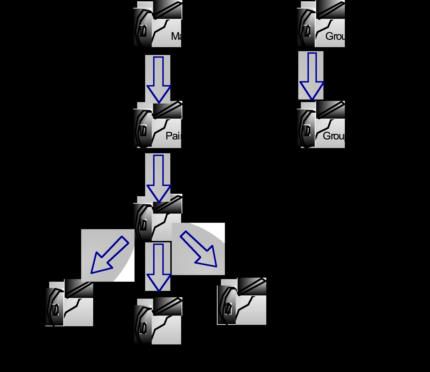
A soon as a new wireless station connect to the network, a new Pairwise
Master Key (PMK) is generated from the Master Key (MK). This key is defined
per session between the wireless station and the AP. The PMK is used for the
EAP authentication process.
The Pairwise Transient Key (PTK) is the collection of three operational keys:
o Key confirmation Key (KCK ) used to prove possession of the PMK.
o Key encryption Key (KEK) used to distribute Group Transient Key
(GTK)
[19] http://www.sans.org/rr/whitepapers/wireless/1467.php
© SANS Institute 2005 Author retains full rights.
- 14 -o Temporal Key (TK), used in the AES encryption process to secure the
data traffic.
The Group Transient Key (GTK) used to secure multicast and broadcast
traffic.
The figure 7 illustrates the process described above [20].
ts.
igh
ll r
fu
ins
eta
rr
ho
ut
,A
05
Key fingerprint = AF19 FA27 2F94 998D FDB5 DE3D F8B5 06E4 A169 4E46
20
te
tu
sti
Figure 7: 802.11i Key Hierarchy Structure
In
NS
5.4. Encryption and Control integrity
SA
802.11i defines three encryption modes: Temporal Key Integrity Protocol (TKIP),
Counter mode with Cipher block chaining Message authentication code Protocol
©
(CCMP) and Wireless Robust Authentication Protocol (WRAP).
5.4.1. Temporal Key Integrity Protocol (TKIP)
TKIP was initially developed to address the security weaknesses and deficiencies of
WEP. It has been included in the 801.11i especially to provide backward
compatibility for 802.11 legacy wireless hardware. TKIP offers the advantage of a
smooth migration from WEP to 802.11i with the capability to have legacy and new
[20] Males Davor, Pujolle Guy. Wi-Fi par la pratique 2nd Edition. Page 132.
© SANS Institute 2005 Author retains full rights.
- 15 -equipment working together. TKIP brings the following security improvements over
the WEP:
The initial WEP 24 bits IV is increased to 48 bits lowering the collision
probability.
An additional TKIP Sequence Counter (TSC) addresses the replay attack.
Integrity check initially performed with CRC-32, is replaced with Michael
algorithm so called Message Integrity Code (MIC) providing a keyed
cryptographic checksum using source and destination MAC address added to
the plaintext data.
Dynamic Key management is introduced, thus removing the weakness to
have identical/never changed key on the wireless devices. A Master Key (MK)
ts.
defined per user, generate two sub-key, the MIC key used for the data
igh
integrity and the Temporal Key (TK) used for the encryption process.
ll r
fu
5.4.2. Counter mode with Cipher block chaining Message
ins
authentication code Protocol (CCMP)
Instead of TKIP designed to improve security on legacy wireless devices, CCMP is a
eta
new security alternative for future manufactured wireless products.
CCMP relies on an evolution of Advanced Encryption Standard (AES) called AES-
rr
CCM (Counter with CBC MAC) to provide data privacy, data integrity and packets
ho
authentication. The picture below details the relationship between the protocols:
ut
,A
CCMP
05
Key fingerprint = AF19 FA27 2F94 998D FDB5 DE3D F8B5 06E4 A169 4E46
20
AES-CCM
te
tu
Data integrity
sti
Data privacy
Authentication
In
NS
Counter
Mode CBC MAC
SA
(CTR)
©
Figure 8: AES/CCM Relationship
AES is a cryptographic algorithm used to protect electronic data [21] based on
symmetric bloc cipher, using cryptographic key length of 128, 192 and 256 bits to
encrypt and decrypt data in block of 128 bits. Several cryptographic modes are used
by AES:
[21] http://csrc.nist.gov/publications/fips/fips197/fips-197.pdf
© SANS Institute 2005 Author retains full rights.
- 16 -Mode Cipher-Block Chaining (CBC): each block of plaintext is XORed with the
previous cipher text block before being encrypted. CBC is the encryption mode used
by CCMP to provide Data integrity.
Mode Counter (CTR) generates the cipher text by adding an arbitrary counter to the
AES key before XORed the plaintext. The counter can be any simple function which
produces a sequence which is guaranteed not to repeat for a long time (see figure
below) [22]. CTR is the encryption mode used by CCMP to provide data privacy.
ts.
igh
ll r
fu
ins
eta
rr
ho
ut
,A
Figure 9: Counter Mode Encryption
05
Key fingerprint = AF19 FA27 2F94 998D FDB5 DE3D F8B5 06E4 A169 4E46
CBC-MAC [23] is an iterative Message Authentication Code (MAC) algorithm based
20
on the CBC encryption mode. The MAC algorithm use AES to compute the plaintext
te
with a secret key and iterates the process until a Message Integrity Code (MIC)
value is generated and appended to the plaintext.
tu
sti
All together CCMP provides encryption and data integrity using CBC-MAC to
In
compute a MIC and CTR to encrypt the data and the MIC with AES. The figure 10
summarizes this process [24]:
NS
SA
©
[22] http://encyclopedia.thefreedictionary.com/counter%20mode
[23] http://www.win.tue.nl/~henkvt/cbcmacv1c.pdf
[24] http://www.cs.huji.ac.il/~sans/students_lectures/WEP_Solutions.ppt page 19-25.
© SANS Institute 2005 Author retains full rights.
- 17 -AES Encryption
Header Payload MIC
Authentication
(CBC-MAC)
Figure 10: Encryption and Authentication with CCMP
ts.
igh
ll r
5.4.3. Wireless Robust Authenticated Protocol (WRAP)
fu
WRAP relies on AES- Offset Code Book (OCB). Intellectual property issues caused
the IEEE to define this protocol as optional.
ins
eta
5.5. Summary
rr
The IEEE 802.11i extension adds to the initial 802.11 standard stronger encryption
enhancing confidentiality, better data origin authenticity, key management ties to
ho
authentication and encryption, bringing the wireless security model a step forward.
ut
,A
6. Conclusion
05
Key fingerprint = AF19 FA27 2F94 998D FDB5 DE3D F8B5 06E4 A169 4E46
Since the first draft of wireless standard released by the IEEE, many security
20
improvements have been introduced enhancing drastically the security of the
wireless networks. At the beginning, WEP can be defined as a ‘better than no
te
security’. Following the WEP was the 802.1x standard improving the security with a
tu
set of features fixing the WEP issues for legacy products. The new 802.11i standard
sti
intends to resolve the security issues for both legacy and future manufactured
generation of wireless products using a modular architecture and a set of protocols
In
bringing stronger encryption, authentication, and key management.
NS
Can we consider this latest standard as the ultimate solution to secure a wireless
network and the stop-gap the industry was waiting for to start massively the
SA
deployment of wireless LANs in their corporations? Probably yes, but let’s keep in
mind that the cryptography history is full of supposedly unbreakable codes and it
©
seems to be just a matter of time and technologies before hackers will find the
breach in the safest security algorithm. While the fight between improved security
technologies and code breaker will still go on, I think the important challenge is to
permanently seek out for new security threats that might compromise the security of
the wireless infrastructure to better protect against them, and plan to continually
keep up with newer technologies that might come out to enforce the security.
© SANS Institute 2005 Author retains full rights.
- 18 -7. References
“Advanced Encryption Standard (AES).” 26 November 2001. URL:
http://csrc.nist.gov/publications/fips/fips197/fips-197.pdf (30 Sept. 2004).
“Counter mode.” URL: http://encyclopedia.thefreedictionary.com/counter%20mode
(29 Sept. 2004).
“Default information on various vendor's wireless products. “ URL:
http://www.cirt.net/cgi-bin/ssids.pl (8 Sept. 2004).
ts.
“Designation: 802.11i-2004.” Approved Publication of IEEE. July 2004. URL:
igh
http://standards.ieee.org/cgi-bin/status?wireless (18 Oct. 2004).
ll r
“What does the Wi-Fi Alliance Do?.” Wi-Fi FAQ’s. URL:
fu
http://www.weca.net/OpenSection/FAQ.asp?TID=2#WECA (5 Sept. 2004).
ins
“What is RC4.” Crypto FAQ: Chapter 3: Techniques in Cryptography: 3.6 Other
Cryptographic Techniques. URL: eta
http://www.rsasecurity.com/rsalabs/node.asp?id=2250 (5 Sept. 2004).
rr
Borisov, Nikita, Goldberg, Ian, Wagner, David. “4. Message Authentication.”
ho
Intercepting Mobile Communications: The insecurity of 802.11. URL:
http://www.isaac.cs.berkeley.edu/isaac/mobicom.pdf (3 Oct. 2004).
ut
,A
Borisov, Nikita, Goldberg, Ian, Wagner, David. “Passive Attack to Decrypt Traffic.”
05
Security of the WEP
Key fingerprint algorithm.
= AF19 2001.
FA27 2F94 URL:
998D FDB5 DE3D F8B5 06E4 A169 4E46
http://www.isaac.cs.berkeley.edu/isaac/wep-faq.html (15 Sept. 2004).
20
Bracha, Hod. “Solution for WEP” 1st June 2003. URL:
te
http://www.cs.huji.ac.il/~sans/students_lectures/WEP_Solutions.ppt (18 Sept. 2004).
tu
sti
Fluhrer, Scott, Mantin, Itsik, Shamir, Adi. “Weaknesses in the key scheduling
In
Algorithm of RC4.” 2001. URL:
http://downloads.securityfocus.com/library/rc4_ksaproc.pdf (10 Sept. 2004).
NS
Funk Software. “Security Methods Comparison”. The Basics of Wireless LAN
SA
Security. 2001. URL: http://www.funk.com/radius/Solns/EAP_type_chart.gif (12
November 2004).
©
Hill, Joshua. “An Analysis of the RADIUS Authentication Protocol.” 24 November
2001. URL: http://www.untruth.org/~josh/security/radius/radius-auth.html (12 Oct.
2004).
John Rittinghouse, John. Ransome , James. Wireless Operational Security. Digital
Press. 2004. Chapter 10.2.
Khan Jahanzeb, Khwaja Anis. Building Secure Wireless Networks with 802.1.
Indianapolis: Wiley Publishing, Inc. 2003.
© SANS Institute 2005 Author retains full rights.
- 19 -Males Davor, Pujolle Guy. Wi-Fi par la pratique 2nd Edition. Paris: Groupe Eyrolles,
2004.
Milner, Marius. “NetStumbler v0.4.0 Release Note.” URL:
http://www.netstumbler.com/downloads/netstumbler_v0.4.0_release_notes.pdf (28
July 2004).
Perez, Elio. “802.11i (How we got here and where are we headed).” August 21,
2004. URL: http://www.sans.org/rr/whitepapers/wireless/1467.php (29 Oct. 2004).
ts.
Preneel, Leuven. “CBC-MAC and Variants.” URL:
igh
http://www.win.tue.nl/~henkvt/cbcmacv1c.pdf (5 Oct. 2004).
ll r
SANS Institute. SANS Security Essentials Version 2.2. Networking Concepts.
January 2004.
fu
ins
eta
rr
ho
ut
,A
05
Key fingerprint = AF19 FA27 2F94 998D FDB5 DE3D F8B5 06E4 A169 4E46
20
te
tu
sti
In
NS
SA
©
© SANS Institute 2005 Author retains full rights.
- 20 -Last Updated: January 5th, 2021
Upcoming Training
SANS Security East 2021 , Jan 11, 2021 - Jan 16, 2021 CyberCon
SANS Security Fundamentals 2021 , Netherlands Jan 18, 2021 - Jan 29, 2021 CyberCon
Cyber Threat Intelligence Summit & Training 2021 Virtual - US Eastern, Jan 21, 2021 - Feb 01, 2021 CyberCon
SANS Cyber Security West: Feb 2021 , Feb 01, 2021 - Feb 06, 2021 CyberCon
Open-Source Intelligence Summit & Training 2021 Virtual - US Eastern, Feb 08, 2021 - Feb 23, 2021 CyberCon
SANS Essentials Australia 2021 - Live Online , Australia Feb 15, 2021 - Feb 20, 2021 CyberCon
SANS Essentials Australia 2021 Melbourne, Australia Feb 15, 2021 - Feb 20, 2021 Live Event
SANS London February 2021 , United Kingdom Feb 22, 2021 - Feb 27, 2021 CyberCon
SANS Secure Japan 2021 , Japan Feb 22, 2021 - Mar 13, 2021 CyberCon
SANS Scottsdale: Virtual Edition 2021 , Feb 22, 2021 - Feb 27, 2021 CyberCon
SANS Cyber Security East: March 2021 , Mar 01, 2021 - Mar 06, 2021 CyberCon
SANS Secure Asia Pacific 2021 Singapore, Singapore Mar 08, 2021 - Mar 20, 2021 Live Event
SANS Secure Asia Pacific 2021 , Singapore Mar 08, 2021 - Mar 20, 2021 CyberCon
SANS Cyber Security West: March 2021 , Mar 15, 2021 - Mar 20, 2021 CyberCon
SANS Riyadh March 2021 , Kingdom Of Saudi Mar 20, 2021 - Apr 01, 2021 CyberCon
Arabia
SANS Secure Australia 2021 Canberra, Australia Mar 22, 2021 - Mar 27, 2021 Live Event
SANS Secure Australia 2021 Live Online , Australia Mar 22, 2021 - Mar 27, 2021 CyberCon
SANS 2021 , Mar 22, 2021 - Mar 27, 2021 CyberCon
SANS Munich March 2021 , Germany Mar 22, 2021 - Mar 27, 2021 CyberCon
SANS Cyber Security Mountain: April 2021 , Apr 05, 2021 - Apr 10, 2021 CyberCon
SANS London April 2021 , United Kingdom Apr 12, 2021 - Apr 17, 2021 CyberCon
SANS Autumn Australia 2021 - Live Online , Australia Apr 12, 2021 - Apr 17, 2021 CyberCon
SANS Autumn Australia 2021 Sydney, Australia Apr 12, 2021 - Apr 17, 2021 Live Event
SANS SEC401 (In Spanish) April 2021 , Spain Apr 12, 2021 - Apr 23, 2021 CyberCon
SANS Cyber Security East: April 2021 , Apr 12, 2021 - Apr 17, 2021 CyberCon
SANS Secure India 2021 , Singapore Apr 19, 2021 - Apr 24, 2021 CyberCon
SANS Baltimore Spring: Virtual Edition 2021 , Apr 26, 2021 - May 01, 2021 CyberCon
SANS Cyber Security Central: May 2021 , May 03, 2021 - May 08, 2021 CyberCon
SANS Security West 2021 , May 10, 2021 - May 15, 2021 CyberCon
SANS Cyber Security East: May 2021 , May 17, 2021 - May 22, 2021 CyberCon
SANS Stockholm May 2021 , Sweden May 31, 2021 - Jun 05, 2021 CyberConYou can also read


