Learning Scenarios - SIO Podpora
←
→
Page content transcription
If your browser does not render page correctly, please read the page content below
Learning Scenarios

Project: 2017-1-HR01-KA201-035362                 Page 1 of 67
Group of Authors
Primary school junior grade teachers – participants of GLAT education

Mentoring of Learning Scenarios Development
For the University of Rijeka, Faculty of Teacher Education
Jasminka Mezak, Petra Pejić Papak

For the Tallinn University, Centre for Educational Technology
Mart Laanpere, James Sunney Quaicoe, Viktoria Humal

For the Ss. Cyril and Methodius University in Skopje, Faculty of Computer Science and Engineering
Ana Madevska Bogdanova, Katerina Zdravkova, Vladimir Trajkovik

For the University of Ljubljana, Faculty of Education
Jože Rugelj, Irena Nančovska Šerbec, Mateja Bevčič, Anja Luštek

For the South-West University „Neofit Rilski”, Faculty of Mathematics and Natural Sciences
Daniela Tuparova, Kostadin Samardziev, Ivanichka Nestorova

Editors
Nataša Hoić-Božić (University of Rijeka, Department of Informatics)
Jasminka Mezak (University of Rijeka, Faculty of Teacher Education)
Martina Holenko Dlab (University of Rijeka, Department of Informatics)

English Language Proofreading
Lucia Načinović Prskalo (University of Rijeka, Department of Informatics)

Graphic Design and Digital Processing
Martina Holenko Dlab (University of Rijeka, Department of Informatics)

Contact
glat@inf.uniri.hr

Licence
This work is licensed under a Creative Commons Attribution-ShareAlike 4.0 International License.

Attribution should be given in the following way:
GLAT project, https://ec.europa.eu/programmes/erasmus-plus/projects/eplus-project-
details/#project/2017-1-HR01-KA201-035362

Disclaimer
The sole responsibility for the content of this document lies with the authors. It does not necessarily
reflect the opinion of the European Union.
Project: 2017-1-HR01-KA201-035362        GLAT – Learning Scenarios                            Page 2 of 67

Preface
The Learning Scenarios publication is one of the results of the project GLAT and includes materials
prepared by the primary school junior grade teachers as part of the GLAT education. The aim of the
education is to train teachers for developing algorithmic thinking among their students as preparation
for later programming learning.
Learning scenarios are documents in which the teacher demonstrates how to carry out teaching
activities in an innovative way, using modern pedagogical methods and appropriate digital content and
tools. The main elements that any learning scenario should have are the description of activities,
learning outcomes that will be realized with described activities, teaching methods and strategies and
digital tools for achieving the learning outcomes. Learning scenario should be designed to motivate
students, to bring them closer to the content and to link the content of a teaching subject to everyday
life situations. Learning scenarios can be applied to each school subject as a part or whole lesson or
more lessons.
When designing learning scenarios, in addition to the learning outcomes related to particular school
subjects, the outcomes related to the development of algorithmic thinking should also be defined.
While realizing those outcomes using appropriate methods and activities, the student is placed in the
centre of the learning process and encouraged to research, think, conclude, and act.
The participants of GLAT education had to prepare a learning scenario after each of the three
workshops: Workshop 1: Game-Based Learning (GBL) and Unplugged Activities, Workshop 2: Problem
Learning (PBL), Online Quizzes and Logic Tasks, and Workshop 3: Games and Tools for Programming,
in written form and graphic form using the LePlanner tool and apply it in the class with the students.
Teachers were able to choose any subject and any topic within the subject for their class (from 1st
through 4th grade).
Teachers started to work on the scenario during the workshops where they prepared the first versions.
This was followed by a period of online mentoring by experts from the GLAT project team. The final
versions of learning scenarios, modified according to the mentors’ comments, were applied by the
teachers in the classroom with their students.
In total, 62 learning scenarios were developed for primary school subjects: Croatian language,
Mathematics, Science, Music culture, Fine arts, Physical and health education, and several are
intended for integrated teaching. The scenarios are accompanied by additional materials, such as links
to online content or worksheets for unplugged activities. Particularly interesting are the scenarios
created in the Workshop 3 with Scratch digital games and stories included, designed by the teachers
in collaboration with their students. For those learning scenarios, game/story scripts are included as
additional materials. Games that allow students to practice math or learn about healthy eating,
seasons, cultural and historical monuments and many other topics are available at the GLAT Scratch
studio.
All GLAT scenarios are, as examples of good practice, integral part of training materials prepared for
the GLAT education, but can also be used independently as a stand-alone materials and ideas for
teachers who would like to modernize their teaching. Part of the learning scenarios is also translated
into English and presented in this publication.

                                                                                    Editors

Project: 2017-1-HR01-KA201-035362        GLAT – Learning Scenarios                            Page 3 of 67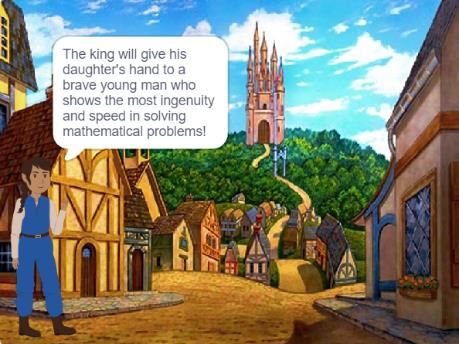
Contents:

Workshop 1: GBL and Unplugged Activities.................................................................5
   Rhythmic and dance structures .......................................................................................................6
   Playing and revising about the traffic ............................................................................................ 13
   Addition and subtraction to 20 ...................................................................................................... 23
Workshop 2: PBL, Online Quizzes and Logical Tasks ..................................................34
   Addition to 5 ................................................................................................................................. 35
   Months of the year ....................................................................................................................... 40
   Spatial orientation ........................................................................................................................ 45
Workshop 3: Games and Tools for Programming ......................................................48
   Nutrition ....................................................................................................................................... 49
   The fruits of the seasons ............................................................................................................... 54
   Playing and calculating up to 20 .................................................................................................... 62

Project: 2017-1-HR01-KA201-035362                           GLAT – Learning Scenarios                                                    Page 4 of 67
Workshop 1:
         GBL and Unplugged Activities

Project: 2017-1-HR01-KA201-035362   GLAT – Learning Scenarios   Page 5 of 67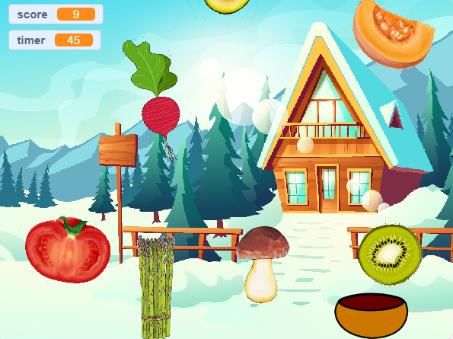
Learning Scenario
Workshop 1: GBL and unplugged activities
Mate Verović
Learning Scenario Rhythmic and dance structures / Folk dance selected from the native region
Title
Course/ Grade Physical Education
4th grade of primary school
Learning Outcomes Learning outcomes focused on general subjects:
Develop nerve-muscular motion control with an emphasis on the
development of coordination, flexibility and rhythm
Dance homeland folk dance „Crikvenički tanac“
Identify the cultural heritage of their homeland
Learning outcomes focused on algorithmic thinking:
Realize the repetitive parts of the dance
Link the melodic parts of a tune with specified parts of the dance
Convert the structural parts of the dance into a sequence of
commands
Display the dance structures in the proper order using coded labels
Aim, Tasks and Learn a few dance structures of Crikvenica's traditional dance by watching a
Short Description of YouTube video and using algorithmic thinking. Students will first listen to
Activities the music background by analysing melody and rhythm of the tune. Then
the parts of the song will be labelled with the agreed marks. The following
step is learning of the dance structures and finally labelling the entire dance
performance with the agreed marks in a way that each dance structure is
connected with the corresponding part of the music background. If there is
time left, the students will create a new dance with different order of dance
structures for the same music background with the help of coded
characters.
Students will be introduced to the term algorithm/loop as a series of
commands that repeat a particular number of times.
Keywords Loop, dance structure, repeat, rhythm, algorithm, command, folk dance
Correlation and Physical Education, Music, Informatics
Interdisciplinarity
Duration of 60 minutes
Activities
Learning and Active learning method, collaborative learning, problem solving, using
Teaching Strategy dialog, watching and demonstration methods, solving worksheet, practical
and Methods work, dance, dramatization
Teaching Forms Frontal teaching
Work in pairs
Group work
Tools -
Project: 2017-1-HR01-KA201-035362 GLAT – Learning Scenarios Page 6 of 67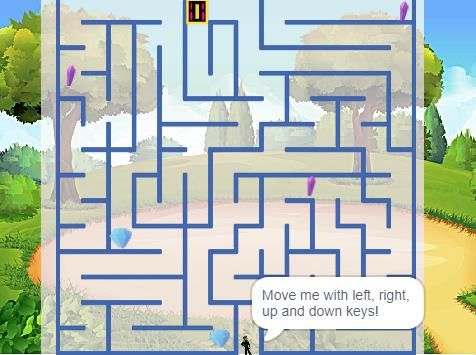
Resources/materials          Youtube, Canva, photos of the dance, ingredients and tools for preparing a
 for the Teacher              sandwich
 Resources/materials          A4 paper sheet for introductory part, worksheets, felt pen, pencil
 for the Students
 Teaching summary             Motivation-Introduction                                         Duration
                              The teacher demonstrates an already prepared sandwich,
                              which consists of a bun in which the ingredients have been
                              put according to the following order: a layer of
                              cucumbers, a layer of cheese, a layer of ham, a layer of
                              cheese, and a layer of tomatoes. The students are divided
                              into four groups consisting of four members. Each group
                              has to design an order of commands within 5 minutes so
                              that the teacher/robot can make a sandwich identical to
                              the demonstrated one (unsliced bun, cheese, ham,
                              vegetables in one piece, which will require certain pre-
                              activities in order to prepare the sandwich). Each group             15 min
                              writes down a set of commands and one student from the
                              group reads aloud the order of commands.
                              The teacher/robot carries out the commands through
                              dramatization, which leads to a more or less successful
                              goal. The winner is the group that creates the most
                              precise set of commands for making a sandwich. After the
                              successfully competed task students are introduced to the
                              term „algorithm“ as a series of commands leading to the
                              solution. The students discover the meaning of the word
                              „algorithm“ on a concrete example. They notice an
                              organised conduction of a series of commands in order to
                              achieve the goal. Moreover, they realise that some
                              commands are repeated (cheese) – the term „loop“.
                              Implementation
                              A lesson of the dance structures of the traditional dance
                              „Crikvenički tanac“ is announced. The students first listen
                              to the music background of the dance from Youtube (0.08
                              – 2.30). They notice rhythmical-melodic recurring
                              patterns (loops), and also the oscillation in the tempo. The
                              first task is to recognize the pattern of the recurring
                              change of the tempo. When the tempo is slower, the
                              students have to slowly walk around the hall, and when
                              the tempo quickens, the students jump.
                              They notice that the two kinds of tempo are alternatively
                              constantly repeated and are therefore labelled with the
                              letter „B“ (quick part) and with the letter „P“ (a transition
                              between the two quicker parts). With the repeated
                              listening it can be noticed that each of the two tempos is
                              repeated five times, usually one after the other starting
                              with the „P“ part.
                                                                                                 35 min

Project: 2017-1-HR01-KA201-035362              GLAT – Learning Scenarios                             Page 7 of 67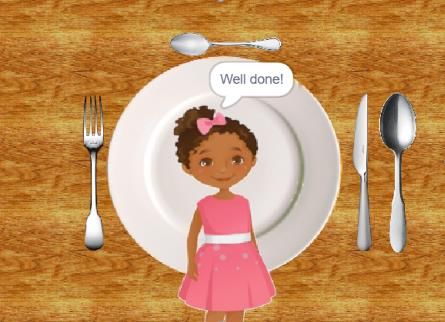
The students are divided into eight pairs followed by
                              learning dance structures watching a video from Youtube.
                              The teacher demonstrates and helps the students if
                              needed.
                              Students learn part by part of the dance in order as shown
                              in the video. The dance consists of ten shorter parts, five
                              quicker marked with the letter „B“ and five parts of a
                              slower tempo marked with the letter „P“ during which six
                              simpler dance structures alternate. The students
                              immediately notice that some dance structures repeat.
                              While rehearsing all six dance structures, they notice that
                              three dance structures belong to the „P“ part, and three
                              to the „B“ part. One pair of students demonstrates three
                              dance structures from the „P“ part which are marked as
                              „P1“, „P2“ and „P3“. The same is repeated with the „B“
                              part.
                              Reflection and evaluation
                              The students work in existing pairs. Every pair gets
                              worksheets, in which the labels of all six dance structures
                              are stated and a small photo is put next to each structure
                              as additional help in recognition. While watching the
                              video from YouTube the students have to write down the        10 min
                              exact order of dance structures/commands (algorithm)
                              for the set dance. The students who conduct this activity
                              faster get a task to create a new algorithm of commands
                              with the existing labels („P1“, „P2“, „P3“, „B1“, „B2“,
                              „B3“), for the same music background, and to
                              demonstrate it through dance.
 Annexes                      Worksheet
                              Photos of dance structures with labels
 Examples and game            Video „Crikvenički tanci“ (0.08 – 2.30). Available online:
 references                   https://www.youtube.com/watch?v=PPNbH1shbJI (30.7.2018)
                              Photos of dance structures –
                              https://www.google.hr/search?q=tradicijski+plesovi&hl=hr&source=lnms&
                              tbm=isch&sa=X&ved=0ahUKEwjDn7G178TaAhXMDOwKHYzlApAQ_AUICig
                              B&biw=1280&bih=650 (30.7.2018)

Project: 2017-1-HR01-KA201-035362             GLAT – Learning Scenarios                         Page 8 of 67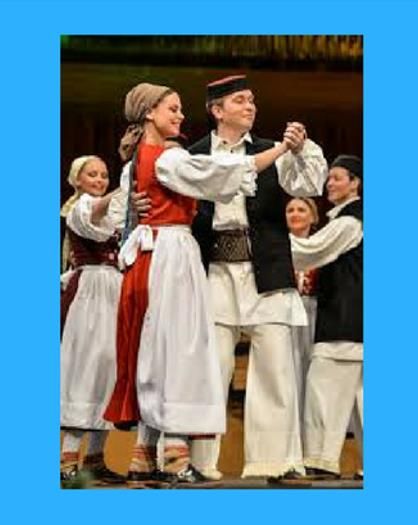
Annex: Worksheet

  „Crikvenički tanac“ dance
 Task - Convert the structural parts of the dance into a sequence of commands
 using the given labels (P1, P2, P3, B1, B2, B3)

 Algorithm – „Crikvenički tanac“ dance

Project: 2017-1-HR01-KA201-035362     GLAT – Learning Scenarios        Page 9 of 67
Annex: Photos of dance structures with labels

                                    FAST PART 1
                                        B1

                                    FAST PART 2
                                        B2

Project: 2017-1-HR01-KA201-035362    GLAT – Learning Scenarios      Page 10 of 67
FAST PART 3
B3
TRANSITION 1
P1
Project: 2017-1-HR01-KA201-035362 GLAT – Learning Scenarios Page 11 of 67TRANSITION 2
P2
TRANSITION 3
P3
Project: 2017-1-HR01-KA201-035362 GLAT – Learning Scenarios Page 12 of 67Learning Scenario
Workshop 1: GBL and unplugged activities
Sonita Penavin
Learning Scenario Playing and revising about the traffic
Title
Course/Grade Science, Homeroom class (topic “Personal and social development”)
2nd grade of primary school
Learning Learning outcomes focused on general subjects:
Outcomes Notice traffic signs for pedestrians
Distinguish, name and compare bus station, train station, airport and
shipping port
Describe the importance of traffic connections in the homeland
Name the professions related to the traffic and means of transport
Connect knowledge about traffic signs, means of transport and
behavior in traffic into a logical unit
Apply knowledge in everyday life situations
Review own traffic culture
Learning outcomes focused on algorithmic thinking:
Use the if command
Find different, but the shortest solutions for achieving a certain goal
(the shortest path in the game)
Aim, Tasks and By playing the game according to the rules, students revise subject matter
Short Description about traffic, means of transportation and traffic signs within the Science
of Activities course. In the homeroom class, students learn about the decision concept,
how to make a decision and about its consequences. In the game TRAFFIC,
students will practice the application of the decision making model on
examples by rolling a die, answering the questions, making decisions and
accepting the responsibility.
----
Students will use the if command to revise the subject matter, play the game
according to the rules - answer all the questions and reach the goal as fast as
possible.
Keywords - means of transportation (train, bus, airplane and ship), traffic signs
- decision, consequence, choice
___
- algorithm, command, a condition for making the decision, if command
Correlation and Mathematics, Homeroom class, Informatics
Interdisciplinarity
Duration of 90 minutes
Activities
Project: 2017-1-HR01-KA201-035362 GLAT – Learning Scenarios Page 13 of 67Learning and Game Based Learning
Teaching Strategy Dialogical method
and Methods Demonstration method
Problem solving method
Teaching Forms Frontal teaching
Individual work
Group work (5 students)
Tools -
Resources/materia Sketchpad, Canva, Microsoft Word for preparing materials
ls for the Teacher
Resources/materia Game rules, question cards, score table and game board.
ls for the Students Die
Pawns
Pen (for game leader)
Teaching summary Motivation-Introduction Duration
Introductory conversation of the teacher and students about
their way of arrival to and departure from school. 20 min
The conversation include questions like: Do they come on foot,
by car, by bus? What traffic signs do they see on the road? Do
they always use the same route? Is there another way to go to
school? Is a particular route longer or shorter? ...). Based on
discussion about longer or shorter routes, we repeat the model
of decision making and its consequences (the decision is what
we have chosen).
Examples:
If I use the long way I have to wake up early, otherwise, I can
sleep longer.
If it rains, will I wear rubber boots, or clothes sneakers? (WHY? -
So that my legs don’t get wet and I don’t get cold).
___
Repeat the concept DECISION
-if-then-else (In everyday life we also make decisions. For
example: If I get a good grade, then I can play games longer, or
else I have to learn more.)
Implementation
1st activity: The teacher divides the students into groups of 5 50 min
students (4 players and game leader). Benches are moved and
connected so that the students can sit in groups.
With the help of two students, teacher demonstrates the rules
and then distributes the working materials (question cards,
score tables, dice and pawns).
2nd activity: Playing the games (in groups of 5 students)
Project: 2017-1-HR01-KA201-035362 GLAT – Learning Scenarios Page 14 of 67At the beginning of the game, each student roles a die.
The student with the highest number becomes the game leader.
The leader gets a paper where she/he writes the players’ names
and keeps the scores. During the game, she/he is in charge for
reading the questions from the cards. She/he also writes "C" for
every correct answer or "I" for every incorrect answer as well as
how many times the player stopped on one of the numbered
fields (by putting the mark X for each stopping).
The aim is to reach the end of the path on the game board by
stepping on as few fields as possible.
The player who rolled the smallest number starts the game. The
player sitting on her/his right side plays next. The game starting
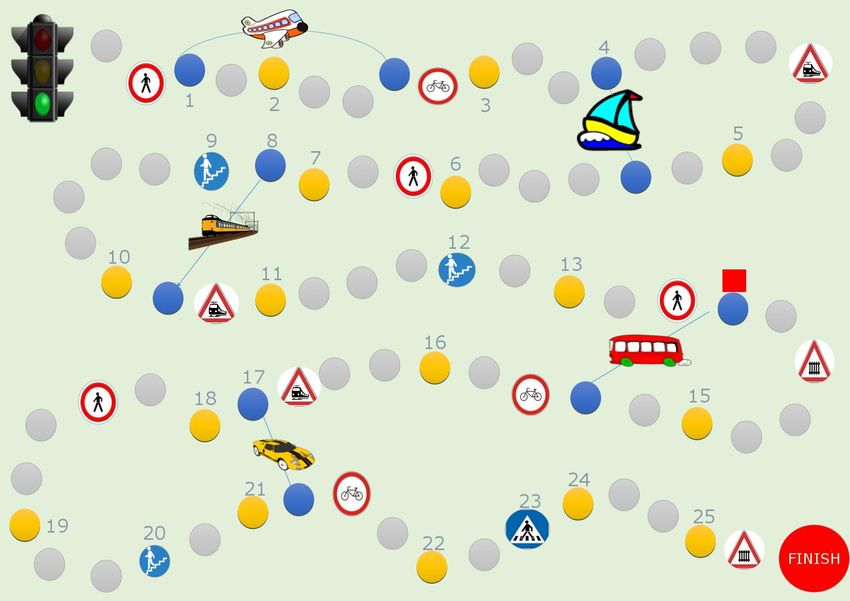
point is the picture of a traffic light ( ). Players move their
pawns forward along the path by the number of fields indicated
on the die. If the pawn ends on a field occupied by an opponent's
pawn, the opponent’s pawn is returned two fields backwards.
Explanations of specific fields:
or - Upon arrival in the fields with these traffic signs,
the player has to roll an even number to continue the game.
Otherwise, she/he pauses a round.
- By coming to this field, the player takes one of the
question cards and answers the question. If she/he
answers correctly, she/he can roll the die and move forward
according to the number indicated on the die. If her/his answer
is incorrect, she/he needs to remain in that field until the next
roll.
or - Upon arrival in the fields with these traffic signs,
the player moves her/his pawn backwards for the number of
fields that represents the smallest multiplier of the number
indicated on the die.
or - By coming to the fields with these traffic signs,
the player can move forward for two fields, if she/he explains
exactly their meaning. Otherwise, she/he remains in that field
until the next roll.
, , , or
- Upon arrival in these fields, the player has to
decide whether to use a shortcut to reduce the number of
Project: 2017-1-HR01-KA201-035362 GLAT – Learning Scenarios Page 15 of 67fields that he will step on or resume the game without using
the shortcut. If the player decides to use the shortcut, he needs
to take two cards and answer the questions correctly.
Otherwise, he needs to take the longer path.
A game winner is the one who has the most correct answers
and first reaches the end of the path.
Reflection and evaluation
Discuss with the students about the game using the following 20 min
questions: How did you like it? Was it interesting, difficult,
tense, ...? Do you have any new suggestions/ideas for the
game? Do you like this method of subject matter revision? . . .
What were the consequences of your decisions?
Would you make different decisions and why? How did you like
this group work? Did everyone respect given rules? Did you
respect each other's opinions? . . .
___
Repeat the meaning of the concept DECISION
Give few examples from everyday life (If I write my homework
then I can play. If it rains then I have to wear an umbrella or else
I'll get wet.)
Annexes Game rules, question cards, score table and game board.
Examples and Proprietary game - TRAFFIC
game references
Project: 2017-1-HR01-KA201-035362 GLAT – Learning Scenarios Page 16 of 67Annex: Game rules
Three to seven players may play. Each player has one token.
The aim of the game is to revise the lessons about traffic from the subject of
Science and to explain the concept DECISION.
At the beginning of the game, each student roles a die.
The student with the highest number becomes the game leader. The leader
gets a paper where she/he writes the players’ names and keeps the scores. During the game, she/he
is in charge for reading the questions from the cards. She/he also writes "C" for every correct answer
or "I" for every incorrect answer as well as how many times the player stopped on one of the numbered
fields (by putting the mark X for each stopping).
The aim is to reach the end of the path on the game board by stepping on as few fields as possible.
The player who rolled the smallest number starts the game. The player sitting on his right side plays
next.
The game starting point is the picture of a traffic light ( ).
Players move their pawns forward along the path by the number of fields indicated on the die. If the
pawn ends on a field occupied by an opponent's pawn, the opponent’s pawn is returned two fields
backwards.
Explanations of specific fields:
or - Upon arrival in the fields with these traffic signs, the
player has to roll an even number to continue the game. Otherwise, she/he pauses a round.
- By coming to this field, the player takes one of the question cards and answers the question.
If she/he answers correctly, she/he can roll the die and move forward according to the number
indicated on the die. If her/his answer is incorrect, she/he needs to remain in that field until the next
roll.
or - Upon arrival in the fields with these traffic signs, the player moves her/his
pawn backwards for the number of fields that represents the smallest multiplier of the number
indicated on the die.
Project: 2017-1-HR01-KA201-035362 GLAT – Learning Scenarios Page 17 of 67or - By coming to the fields with these traffic signs, the player can move forward
for two fields, if she/he explains exactly their meaning. Otherwise, she/he remains in that field until
the next roll.
, , ,
or -
Upon arrival in these fields, the player has to decide whether to use a shortcut to reduce the number
of fields that he will step on or resume the game without using the shortcut. If the player decides to
use the shortcut, he needs to take two cards and answer the questions correctly. Otherwise, he needs
to take the longer path.
A game winner is the one who has the most correct answers and first reaches the end of the path.
Project: 2017-1-HR01-KA201-035362 GLAT – Learning Scenarios Page 18 of 67Annex: Question cards
Explain the
What are the difference between
What do the trains
possible shapes of traffic lights for
run on?
traffic signs? drivers and
pedestrians.
What is the
purpose of helmet Name three
Which is the fastest
and protectors vehicles that drive
vehicle?
while you are riding on the road.
a bicycle?
What do you call the
How do you call
place where we enter How do you call the
the person who
the train and come person who travels?
drives a train?
out of it?
Where will you
What traffic signs What do we need
check the time of
did you notice next to buy in order to
departure and
to your school? travel?
arrival of the bus?
Why do we need to
What do traffic signs know the meaning Who checks the
tell us? of the traffic tickets on the bus?
signs?
Where can we check Describe the
the time of Does the railroad difference between
departure and arrival pass through your traveling by plane
of the bus at the bus town? and traveling by
station? car.
Project: 2017-1-HR01-KA201-035362 GLAT – Learning Scenarios Page 19 of 67Specify rules of
Which types of
Can you travel from polite behavior
ships do you
your town by plane? when traveling by
distinguish?
boat.
Compare the Where are the
How should we passenger and passengers waiting
behave when traveling freight train. for the departure
by bus? Explain the or arrival of the
difference. train?
Describe the
Who checks the
When can process of
tickets and takes
passengers get into passenger and
care of passengers
the plane? luggage control at
during the journey?
the airport?
Which traffic signs What do you call a
What is your role in
do you need to place where ships
traffic?
respect? dock?
Ships are sailing:
Where do we buy a) in the air
Who flies a plane?
tickets? b) on the water
c) on the road
Project: 2017-1-HR01-KA201-035362 GLAT – Learning Scenarios Page 20 of 67Annex: Score table Project: 2017-1-HR01-KA201-035362 GLAT – Learning Scenarios Page 21 of 67
Annex: Game board

Project: 2017-1-HR01-KA201-035362     GLAT – Learning Scenarios   Page 22 of 67
Learning Scenario
Workshop 1: GBL and unplugged activities
Ana Cvitak
Learning Scenario Addition and subtraction to 20 (repetition)
Title
Course/Grade Mathematics
1st grade of primary school
Learning Outcomes Learning outcomes focused on general subject:
Demonstrate the procedure of adding numbers to 20
Demonstrate the procedure of subtracting numbers to 20
Developing speed in addition and subtraction
Compare and distinguish between correct and incorrect results
Learning outcomes focused on algorithmic thinking:
Accept established, common rules of the game
Specify the steps for moving left-right, up-down
Explain the “algorithm”
Describe and give solutions for achieving a certain goal
Aim, Tasks and In the Mathematics class, the students will repeat and practice the addition
Short Description of and subtraction to 20 by playing the game “Math memory”, solving the
Activities maze worksheet, and playing bingo. By playing games with chosen rules, the
students repeat the lessons from Mathematics (addition and subtraction to
20).
Students will get acquainted with the concept of algorithm as a sequence of
commands/rules that need to be performed to achieve the goals.
Keywords Addition and subtraction to 20, left-right, up-down, algorithm, command
Correlation and Science (Orientation in space)
Interdisciplinarity
Duration of 45 minutes
Activities
Learning and Game Based Learning - game
Teaching Strategy Dialogical method
and Methods Demonstration method
Problem solving method
Teaching Forms Frontal teaching
Pair work
Individual work
Group work (all students)
Tools -
Project: 2017-1-HR01-KA201-035362 GLAT – Learning Scenarios Page 23 of 67Resources/materials Canva, Microsoft Word for preparing materials
for the Teacher
Resources/materials Maze, bingo cardboards, Math memory game, colored pencils
for the Students
Teaching summary Motivation-Introduction Duration
Introductory conversation between teacher and students
about Memory game and its rules, followed by giving the Math 10 min
memory game cards to students. Students play the game in
pairs. Teacher stresses out the importance of following the
rules of the games.
Teacher introduces the concept of “algorithm” and explains
that it represents a sequence of commands or rules that need
to be performed to achieve the task.
Implementation 25 min
1st activity: Solving the maze worksheet (individual work)
The student's task is to help the boy find the right way to the
ice cream. He/she has to paint the correct fields with a yellow
pencil, and if he/she makes a mistake, he/she must return and
start from the beginning. It is necessary to reach the goal as
fast as possible in order to prevent ice cream melting.
After all students finish the game, we check all together the
exact path, this time using the terms left-right, up-down.
2nd activity: Bingo (group work)
Each student receives a cardboard with numbers. The teacher
draws the paper with the task out of the bag (e.g. 12-6, the
correct answer is 6). If the student has number 6 on the
cardboard, it has to be colored in red. If there are more than
one numbers 6 on the cardboard, only one number can be
colored. The winner is the student who first colors all the
fields.
Reflection and evaluation 10 min
Discuss with the students about the game and its rules and
repeat the meaning of the term algorithm. Students are
encouraged to imagine a task that can be represented by the
algorithm and we come to the conclusion that the algorithms
are all around us, even crossing of the road itself represents
an algorithm. They all list common rules for crossing the road.
Annexes Maze, Math memory game, bingo cardboards, bingo tasks
Examples and game Proprietary memory, maze, and bingo games
references
Project: 2017-1-HR01-KA201-035362 GLAT – Learning Scenarios Page 24 of 67Annex: Maze Project: 2017-1-HR01-KA201-035362 GLAT – Learning Scenarios Page 25 of 67
Annex: Math memory game

Project: 2017-1-HR01-KA201-035362         GLAT – Learning Scenarios   Page 26 of 67
Annex: Bingo cardboards

       10                                4

        6                    5          17                  18       13   6

                                                            19

       10

       12                    6          12                    3      9    16

                                         5                           17

        6                   19

                            14          14                    3      10   4

                                                              5           18

Project: 2017-1-HR01-KA201-035362        GLAT – Learning Scenarios        Page 27 of 67
12 1
6 5 17 15 13 2
19
2
5 6 7 3 1 16
5 17
2 19
14 1 3 10 11
5 18
Project: 2017-1-HR01-KA201-035362 GLAT – Learning Scenarios Page 28 of 6711 4
2 5 17 18 1 6
19
2
12 1 12 3 11 16
5 17
15 19
1 14 2 10 4
5 18
Project: 2017-1-HR01-KA201-035362 GLAT – Learning Scenarios Page 29 of 6710 4
6 1 17 18 13 6
19
11
12 6 12 3 9 16
5 17
6 19
14 14 3 11 4
5 18
Project: 2017-1-HR01-KA201-035362 GLAT – Learning Scenarios Page 30 of 6710 4
1 5 17 18 2 6
19
10
12 1 12 3 11 16
5 17
11 19
14 14 3 2 4
5 18
Project: 2017-1-HR01-KA201-035362 GLAT – Learning Scenarios Page 31 of 6711 4
6 5 17 18 2 6
19
10
12 6 12 3 9 16
5 17
6 19
14 14 3 10 4
5 18
Project: 2017-1-HR01-KA201-035362 GLAT – Learning Scenarios Page 32 of 67Annex: Bingo tasks 17-10 13+4 17-8 16-10 17+2 17-11 13-7 11+8 8+4 12-6 7+12 5+7 11-5 9+7 8+6 19-16 16+3 7+7 18-13 13+6 19-7 19-14 8+10 19-3 17-13 14+4 8+5 20-10 16+1 9+9 Project: 2017-1-HR01-KA201-035362 GLAT – Learning Scenarios Page 33 of 67
Workshop 2:
  PBL, Online Quizzes and Logical
               Tasks

Project: 2017-1-HR01-KA201-035362   GLAT – Learning Scenarios   Page 34 of 67
Learning Scenario
Workshop 2: PBL, online quizzes and logical tasks
Bojana Lanča
Learning Scenario Addition to 5
Title
Course/Grade Mathematics
1st grade of primary school
Learning Outcomes General learning outcomes:
Specify numbers 1 to 5 independently
Connect number and number words
Analyse and describe the image examples
Adopt a notation for the addition
Develop the abilities to compare, differentiate and conclude
Add up numbers to 5
Specific learning outcomes oriented on algorithmic thinking:
Search, find and extract relevant information
Distinguish elements by attributes
Compare and classify the numbers we add
Aim, Tasks and AIM: learn to add up the numbers to 5
Short Description of
TASKS:
Activities
Cognitive: learn the meaning of the sign +; adopt a notation for
adding numbers; understand the concept of arithmetic operation;
understand the concept of adding numbers.
Psychomotor: write addition operations using mathematical signs;
develop the ability to apply the acquired knowledge.
Affective: develop the capacity for independent work, accuracy,
consistency and precision; develop and stimulate curiosity.
SHORT DESCRIPTION OF ACTIVITIES:
Repeat numbers up to 5 and compare them through short Learning Apps
computer games.
Using the Kahoot! quiz recognize the exact mathematical notation of tasks
given in the mathematical story.
Add and subtract numbers up to 5 through the short Learning Apps
computer games.
Explore the ways in which we can sum up multiple numbers in a way that
the sum is equal to 5 (problem solving).
Test the knowledge with the interactive Wizer worksheet.
Keywords Numbers 1, 2, 3, 4, 5, addition, equality.
Correlation and Croatian language (Little Red Riding Hood), Science (Orientation in space).
Interdisciplinarity
Project: 2017-1-HR01-KA201-035362 GLAT – Learning Scenarios Page 35 of 67Duration of 90 minutes
Activities
Learning and Dialogical method
Teaching Strategy Demonstration method
and Methods Method of writing
Problem solving method
Game Based Learning
Teaching Forms Frontal teaching
Individual work
Group work
Tools Kahoot! tools and Kahoot! quiz, Wizer, LearningApps.
Resources/materials Kahoot! tools, Wizer, LearningApps.
for the Teacher
Resources/materials Kahoot! quiz, Wizer, LearningApps.
for the Students
Teaching summary IMPLEMENTATION OF ACTIVITIES Duration
1st activity: MOTIVATION - Two short computer games
Students will repeat numbers up to 5, count them and
compare them.
10 min
Example 1: Mathematical warming up
(https://learningapps.org/display?v=p82852wi318)
Example 2: Mathematical sequence
( https://learningapps.org/display?v=p3k5fr3uk18)
ANNOUNCEMENT OF OBJECTIVE: Announce that we will
practice the addition of numbers to 5
2nd activity: “Brainstorming!“
7 min
Using brainstorming method students give examples of using
addition in everyday life.
3rd activity: “Kahoot!“ Quiz
Through five questions from everyday life (supported by
appropriate pictures) students need to find the correct 15 min
numerical expression of mathematical word problems.
QUESTION 1: There were three birds on the wire and two
more landed on the wire. How many birds are now on the
wire?
a. 1+2=3
b. 2 +3 =4
c. 3 + 1 =4
d. 3+2=5
Project: 2017-1-HR01-KA201-035362 GLAT – Learning Scenarios Page 36 of 67QUESTION 2: There are three apples in the basket and one
outside the basket. How many apples
are there in total?
a. 1+ 3 = 5
b. 3 + 1 = 4
c. 2 + 1 = 3
d. 2 + 2 = 4
QUESTION 3: There is a pilot and three children in the plane.
How many people are traveling by plane?
a. 2+ 2= 4
b. 3 +1 = 5
c. 4 +1 = 5
d. 1+3=4
QUESTION 4: Four cats are awake, and one is still sleeping.
How many cats are there?
a. 4+1=5
b. 1+4=4
c. 2+3=5
d. 3+2=5
QUESTION 5: There are two pencils and two pens in the box.
How many scribes are in the box?
a. 1+3=4
b. 4 +1 =5
c. 2+2=4
d. 3+1=4
4th activity „Let’s add up to 5“
Using three games students practice the addition of 20 min
numbers to 5.
Example 4: Color of the sum
(https://learningapps.org/display?v=pj7trtsia18)
Example 5: Adding up to 5
(https://learningapps.org/display?v=pyopr4nyj18)
Example 6: Mathematical puzzle
(https://learningapps.org/display?v=p4108eap318)
20 min
5th activity „Problem-based learning”
Project: 2017-1-HR01-KA201-035362 GLAT – Learning Scenarios Page 37 of 67The students work in groups to solve the following task:
Can we add various numbers to score 5? Explore.
If YES, write down all possible solutions that you have found.
If the answer is NO, explain why we cannot do this.
Students write down solutions on the paper.
Representatives of the group present their solutions. The
first group presents all the results. Other groups check
whether they have found the same solutions. The other two
groups present only solutions not presented by the firsts
group of students and so on.
The teacher checks the accuracy of the solutions and add
additional solutions if necessary. The teacher declares the
winners - the group that that found the most solutions. 10 min
6th activity “WIZER worksheet”
Students test their knowledge using Wizer worksheet.
Example 7: https://app.wizer.me/learn/55YALZ
8 min
7th activity “A task that encourages algorithmic thinking”
The students should solve the following task:
The rabbit wants the cabbage. The cabbage can be reached
only by jumping two fields forward and one back.
How many times a rabbit has to jump to reach the cabbage in
the picture?
Annexes Learning scenario in LePlanner:
https://beta.leplanner.net/#/scenario/5d728ae780a288cd3abb8783
Example 1 – Mathematical warming up:
https://learningapps.org/display?v=p82852wi318
Example 2 – Mathematical sequence:
https://learningapps.org/display?v=p3k5fr3uk18
Example 3 – Kahoot! Quiz: https://create.kahoot.it/details/zbrajanje-
brojeva-do-5/9717c21c-8043-4f9e-879c-f8a1885f3bf2
Example 4 - Color of the sum:
https://learningapps.org/display?v=pj7trtsia18
Example 5 – Adding up to 5:
https://learningapps.org/display?v=pyopr4nyj18
Project: 2017-1-HR01-KA201-035362 GLAT – Learning Scenarios Page 38 of 67Example 6 – Mathematical puzzle:
https://learningapps.org/display?v=p4108eap318
Example 7 - Worksheet: https://app.wizer.me/learn/55YALZ
Examples and game Kahoot! https://kahoot.com/ (15.12.2018.)
references
Learning Apps https://learningapps.org/(15.12.2018.)
Wizer: https://app.wizer.me/ (15.12.2018.)
Project: 2017-1-HR01-KA201-035362 GLAT – Learning Scenarios Page 39 of 67Learning Scenario
Workshop 2: PBL, online quizzes and logical tasks
Melita Stambulić
Learning Scenario Months of the year
Title
Course/Grade Science
2nd grade of primary school
Learning Outcomes General learning outcomes:
Name months of the year
Determinate the order of months of the year
Explore the specific characteristics of each month of the year
Specific learning outcomes oriented on algorithmic thinking:
Distinguish elements by attributes
Search, find and connect the month with its characteristic
Compare and classify months of the year
Aim, Tasks and Aim is to revise and systematize the knowledge about the months of the
Short Description of year and to learn the importance of the months in everyday life.
Activities
Students will revise the main concepts about months of the year by using
quiz, memory game and word association game on computer.
Problem-based learning will be used for exploring the specific characteristics
of each month of the year (group work on a computer).
Keywords Month, year, date
Correlation and Mathematics: numbers up to 100; roman numbers up to 100; ordinal
Interdisciplinarity numbers.
Art class
Science: seasons
Informatics
Duration of 45 minutes
Activities
Learning and Game Based Learning
Teaching Strategy Dialogical method
and Methods Problem solving method
Method of reading and working with text
Method of writing
Teaching Forms Frontal teaching
Individual work
Working in pairs
Group work
Tools Kahoot! tools and Kahoot! quiz, Match the Memory, Microsoft PowerPoint,
Internet browser
Project: 2017-1-HR01-KA201-035362 GLAT – Learning Scenarios Page 40 of 67Resources/materials Kahoot! tools, Match the Memory, Microsoft PowerPoint
for the Teacher
Resources/materials Kahoot quiz, Match the Memory, Microsoft PowerPoint (association game),
for the Students Internet browser
Teaching Summary 1. Motivation – introduction to the activity Duration
Talk about months of the year: students choose favorite
10 min
month of the year and argue their choice, mention what they
know about this month (the reason for the name, to which
season it belongs, holiday or event in that month)
Motivational game - association game
(playing in groups of three students)
2. Main part of the activity 25 min
Discussion for reviewing: year-month-number of days, names
of months in the year, number of days in the month
Revising and systematizing the knowledge about the months
of the year.
a) Kahoot! quiz
QUESTION 1: We call the first month of the year:
a. December
b. March
c. January
d. August
QUESTION 2: February has:
a. 30 days
b. 31 days
c. 28 days
d. 28 or 29 days
QUESTION 3: The month in which autumn starts is:
a. September
b. October
c. November
d. December
QUESTION 4: We celebrate the New Year in:
a. December
b. February
c. November
d. January
QUESTION 5: The school year starts in:
a. July
Project: 2017-1-HR01-KA201-035362 GLAT – Learning Scenarios Page 41 of 67b. April
c. September
d. June
QUESTION 6: The year ends in:
a. January
b. August
c. October
d. December
b) Memory game (Match the Memory) – students play in
pairs
Match the month of the year with the date:
January – 1.1.
February – 28.2.
March – 15.3.
April – 20.4.
May – 30.5.
June – 25.6.
July – 31.7.
August – 15.8.
September - 5.9.
October - 8.10.
November - 1.11.
December - 31.12.
c) Problem based learning
Students are divided into groups of 3. Each group draws a
paper with the name of one month of the year. The task is to
enter the name into Internet search engine and to choose one
of the pictures among the results. The students should explain
their selection: why exactly this picture presents main
characteristics of the month.
3. Reflection and evaluation 10 minutes
Each student receives a “paper candle” on which has to write
the date of his/her birthday.
Students attach their candle to a picture of a large 12-layer
cake. Layers are named according to the months of the year
and a student attaches the candle to the layer with the name
of the month in which he/she celebrates birthday.
After attaching the candle, students are forming groups by
month in which they celebrate birthday.
The students repeat names of months in the year in correct
order.
Project: 2017-1-HR01-KA201-035362 GLAT – Learning Scenarios Page 42 of 67Discussion: In which month most/least students celebrate
their birthday.
Annexes Learning scenario in LePlanner:
https://beta.leplanner.net/#/scenario/5d72907980a288cd3abb87c1
Association game
Kahoot! quiz: https://play.kahoot.it/#/k/d89977ac-f463-4a91-af3e-
1eed202b0a09
Match the Memory game:
https://matchthememory.com/mjeseciugodinimelita
Examples and game Kahoot! https://kahoot.com/ (15.12.2018.)
references
Match the memory https://matchthememory.com (15.12.2018.)
Project: 2017-1-HR01-KA201-035362 GLAT – Learning Scenarios Page 43 of 67Annex: Association game Project: 2017-1-HR01-KA201-035362 GLAT – Learning Scenarios Page 44 of 67
Learning Scenario
Workshop 2: PBL, online quizzes and logical tasks
Kristina Ujčić-Čučak
Learning Scenario Spatial orientation
Title
Course/ Grade Science
3rd grade of primary school
Learning Outcomes General Learning Outcomes:
Determine the cardinal and intermediate directions and know how to
note them with abbreviations
Name the cardinal directions where sun rises and fall and therefore
manage the orientation
Determine viewpoint and horizon, orientation by compass, sun or
other signs on the ground
Manage the topographic map or town map
Distinguish the meaning of colour hues on the map
Specific Learning Outcomes oriented on Algorithmic Thinking:
According to the adopted algorithm, create a map to find the hidden
treasure
Aim, Tasks and Aim: revise and systematize the processed teaching material (orientation in
Short Description of space)
Activities
Tasks:
a) Identify the viewpoint, the horizon, the plan, the map, to associate the
image and the word, to write abbreviations of the cardinal and
intermediate directions, to determine the cardinal points from the current
position of the sun, to orient by the compass, to determine the meaning of
colour on the map and to describe the relief, explain the legend on the
map, manage the map and plan and find the hidden treasure, according to
the algorithm create a treasure map.
b) To practice spatial orientation, develop logical thinking, conclusion,
memory
c) To promote conscientiousness in work, to develop patience, persistence
and tidiness in performing tasks, to develop Science.
LIST OF ACTIVITIES
1. Memory game
2. Review with Kahoot
3. Spatial orientation – treasure map (group work)
4. Creating a map (work in pair)
5. Worksheet Wizer
Keywords Cardinal and intermediate directions, viewpoint and horizon, town map,
topographic map
Project: 2017-1-HR01-KA201-035362 GLAT – Learning Scenarios Page 45 of 67Correlation and Art class – colour hues
Interdisciplinarity
Duration of 90 minutes
Activities
Learning and Dialogical method
Teaching Strategy Demonstration method
and Methods Problem solving method
Game Based learning
Teaching Forms Individual work, frontal teaching, work in pairs, group work
Tools Kahoot! tools and Kahoot! quiz, Wizer, Learning Apps, Match the memory
Resources/material Kahoot! tools, Match the memory, Wizer, LearningApps for preparing quiz,
s for the Teacher memory game and interactive worksheets
Resources/material Kahoot! quiz, Match the memory, Wizer, LearningApps for solving quiz,
s for the Students memory game and interactive worksheets on iPad
Teaching Summary IMPLEMENTATION OF ACTIVITIES
1. INTRODUCTORY PART
A game of Hangman (frontal work)
5 min
Using the game, reach the keywords and topics of today's
class (orientation). Repeat what it means to be oriented,
ie. spatial orientation.
2. MAIN PART
5 min
- Memory (individual work)
Visualize the basic concepts: viewpoint, horizon, map, plan.
- Kahoot quiz (individually solve the quiz, frontal analysis of 15 min
tasks)
Revise the processed content.
- Spatial orientation (work in pairs)
Select the viewpoint. 20 min
Determine the cardinal and intermediate directions on
school playground using the Sun.
Orient by the compass, follow the map with instructions, find
the hidden treasure.
Analysis and evaluation of activities.
- Making a treasure map (group work)
Project: 2017-1-HR01-KA201-035362 GLAT – Learning Scenarios Page 46 of 67According to the algorithm that followed, create a map that 30 min
will lead the other group to the hidden object.
3. FINAL PART
- Wizer worksheet
Solve worksheet for self-assessment.
10 min
Set homework - determine the cardinal and intermediate
directions in your bedroom / living room. Draw the map of
that room. 5 min
Annexes
Learning scenario in LePlanner:
https://beta.leplanner.net/#/scenario/5d7281a480a288cd3abb876e
GAME OF HANGMAN
https://learningapps.org/display?v=pxbx2d8o518
STAPLE
https://matchthememory.com/orijentacijakika
TREASURE HUNT
https://learningapps.org/display?v=p05tz96fn18
Kahoot!
https://create.kahoot.it/create#/edit/0196a25f-66c4-4973-8712-
13bdcfeafdc6/done
Wizer
https://app.wizer.me/learn/OY2KVJ
Examples and game Learning Apps https://learningapps.org (15.12.2018.)
references
Match the memory https://matchthememory.com (15.12.2018.)
Kahoot! https://create.kahoot.it (15.12.2018.)
Wizer https://app.wizer.me (15.12.2018.)
Project: 2017-1-HR01-KA201-035362 GLAT – Learning Scenarios Page 47 of 67Workshop 3:
Games and Tools for
Programming
Project: 2017-1-HR01-KA201-035362 GLAT – Learning Scenarios Page 48 of 67Learning Scenario
Workshop 3: Games and tools for programming
Tašana Bobanović
Learning Scenario Nutrition
Title
Course/ Grade Science
2nd grade of elementary school
Learning Outcomes General learning outcomes:
List the foods important to our health
Name the daily meals
Explain the relationship of diverse and regular diet with health
Describe decent behaviour at the table
Use the cutlery properly
Specific learning outcomes oriented on algorithmic thinking:
Identify and apply basic programming concepts when designing a
game in Scratch (algorithm, sequence, condition, loop, variable)
Identify different as well as the shortest solution to achieve a specific
goal and recognize
Solve simple logic tasks
Aim, Tasks and Students will visit food market and observe groceries that can be bought
Short Description of there. Students will learn about food that should be regular in the diet, the
Activities names of the main meals, and how to behave at the table during the meal.
They will design a computer game for identifying healthy foods.
Keywords Nutrition, groceries, meals, game
Correlation and Croatian, Art, Informatics
Interdisciplinarity
Duration of 5 school hours (5x45 minutes)
Activities
Learning and Oral presentation
Teaching Strategy Dialogical method
and Methods Problem solving method
Method of reading and working with text
Method of writing
Game Based Learning
Teaching Forms Frontal teaching
Individual work
Group work
Tools Internet browser, Scratch
Project: 2017-1-HR01-KA201-035362 GLAT – Learning Scenarios Page 49 of 67Resources/materials Photos, chalk and board, textbook, Internet browser, Scratch
for the Teacher
Resources/materials Prepared materials, notebook, textbook, Internet browser, Scratch
for the Students
Teaching Summary Motivation-Introduction Duration
The teacher will show food drawings to the students. They will
classify shown foods into two groups: foods that should be
15 min
regular in the diet and foods that should be eaten moderately
or avoided. The teacher will show the drawings in the
particular order: three types of food that should be regular in
the diet, and one that we should eat moderately or avoided.
Students will have to determine by themselves why the
teacher is showing the foods in this order.
Implementation
1. A few days before the activity, the teacher and students will 60 min
visit the town food market. Students will receive the research
question: What can we do at the market?
They will carefully look at all the part of the market, indoor
and outdoor, and observe groceries that can be bought at the
market. Students will keep their own notes to solve the
following tasks:
a) Observe the parts of the market and list them.
b) List the groceries that can be purchased outdoors. 15 min
c) List the groceries that can be purchased in the first pavilion.
d) List the groceries that can be purchased in the second
pavilion.
e) List the groceries that can be purchased in the third
pavilion.
f) Draw the space of the market place.
2. After motivation, I will ask the students to remember what
they saw at the town food market. Everything they remember
will be written on a whiteboard. The areas of the market will
be connected to the groceries.
Student will use the textbook and with the help of teacher
sort out the words related to proper nutrition. With these
words students will construct sentences. For example:
Proper nutrition is important for health.
Proper nutrition should include a variety of foods.
Oily, salty and sweet foods should be eaten
moderately.
30 min
Food is needed to grow and maintain health.
Then, the main meals and how people should behave at the
table will be discussed.
Project: 2017-1-HR01-KA201-035362 GLAT – Learning Scenarios Page 50 of 673. The teacher will guide students through the process of
designing a digital story with game elements. First, the
teacher will show several games created in Scratch:
https://scratch.mit.edu/projects/281378543/
60 min
https://scratch.mit.edu/projects/281460031/
https://scratch.mit.edu/projects/281418234/
Then, the teacher will announce that the student will design
a game with several logical mini-games.
The student will choose the main character and the part of
the market where the mini-games will be played. Students
should also design the flow of the game and agree on the
scoring method as well as the prize for the player who
achieves the goal of the game.
Reflection and evaluation
After university students create the game in Scratch, the 45 min
students will play and discuss whether they like the game.
Annexes Learning scenario in LePlanner:
https://beta.leplanner.net/#/scenario/5d71e0bd80a288cd3abb86ad
Story/game scenario
Examples and Game Developed Scratch game – Let's eat healthy!:
References https://scratch.mit.edu/projects/325739167/ (30.7.2019.)
Scratch – A story about cleanliness and health:
https://scratch.mit.edu/projects/281378543/ (30.7.2019.)
Scratch game – Red clocks: https://scratch.mit.edu/projects/281460031/
(30.7.2019.)
Scratch game – Live and inanimate nature:
https://scratch.mit.edu/projects/281418234/ (30.7.2019.)
Project: 2017-1-HR01-KA201-035362 GLAT – Learning Scenarios Page 51 of 67Annex: Game/story scenario
Title of the game Let’s eat healthy!
Type Scratch story with game elements
Course/ Grade Science
2nd grade of elementary school
Learning Get to know the groceries that are important to our health
outcomes Explain the relationship of diverse and regular diet with health
Play a simple game
Choose the right solution
Solve simple logic tasks
Recognize basic programming concepts
Goal of the game The goal of the game is to follow the instructions. With the help of
instructions, students will solve tasks and learn about healthy eating.
Characters and Tašana (main character)
their roles
Tašana is a little girl who appears throughout the game. Tašana gives different
instructions during the game. Based on these instructions, the student
accomplishes tasks in order to adopt new content and reach the goal, the end
of the game.
Grandma Sandra (supporting character)
Grandma is a character who appears in the game to give directions.
Grandmother represents a worker at the market. Tašana arrives to her food
stall to pick healthy groceries.
Description of the Pressing the s key starts the game. Tašana first calls a player (a student) to
game flow help her buy healthy foods. Tašana comes to the market where grandmother
appears and gives directions for the first mini-game. The game is started by
clicking the key 1. The player should use left and right keys to move and collect
20 healthy groceries in the basket. The player has 30 seconds to collect
groceries. If the player does not collect enough healthy groceries, the game
starts over. The next game is started using the key 2. The player should lead
Tašana through the maze to find cereals. After successfully passing the maze,
the girl goes home. On her way, she comes across a wall. To see the next task,
the player should press key 3. The task is to arrange the words of a phrase
related to healthy diet in the correct order. The player should also write the
name of the meal shown on the photo. If the player answers correctly, Tašana
is ready for lunch. Key 4 starts the final mini-game where the player should
set the table.
List of scenes / 1. Home
backgrounds 2. Market (market1, market2, market3, market4, market5)
3. Street
4. Wall
5. Kitchen
6. Breakfast
7. Table (table1, table2)
Project: 2017-1-HR01-KA201-035362 GLAT – Learning Scenarios Page 52 of 678. Set the table
9. Final
Logical mini- 1. Collect healthy groceries
games within the
The player moves left and right using the arrows on the keyboard to collect
story
healthy groceries to the basket. The player should avoid unhealthy foods.
2. The maze
Using the arrows on the keyboard (up, down, left, right) the player moves
through the maze and avoids obstacles and unhealthy foods to reach the
cereals.
3. The wall
The player should arrange the words of a phrase Healthy food – healthy life!
in the correct order.
4. Setting the table
There is a spoon, fork, knife and dessert spoon on the table. The player’s
task is to properly set the table for lunch.
End of the game After the player completes all the tasks, the game ends. To play again, the
player should press s key.
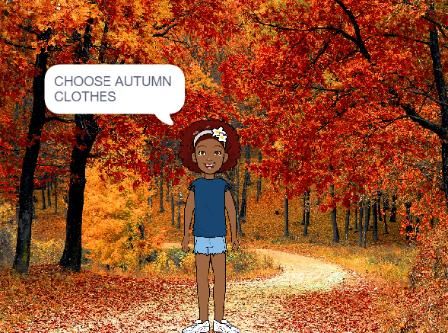
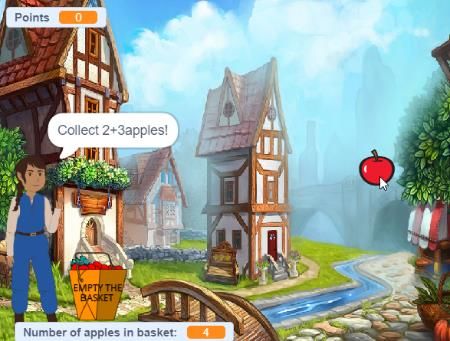
Screenshots from the game
Project: 2017-1-HR01-KA201-035362 GLAT – Learning Scenarios Page 53 of 67You can also read


