ONLINE SERVICES Procedure for Online Investments Via 1Link - ABL Asset Management Company ...
←
→
Page content transcription
If your browser does not render page correctly, please read the page content below
ONLINE SERVICES
Procedure for Online Investments
Via 1Link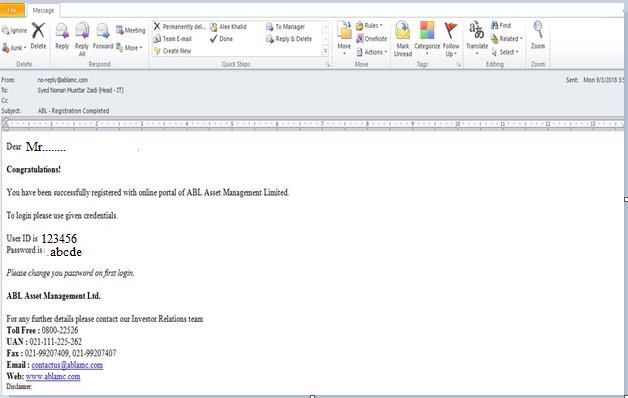
Contents

1. Introduction -------------------------------------------------------------------------------------------------------3

2. Objective -----------------------------------------------------------------------------------------------------------3

3. Investor Registration Process --------------------------------------------------------------------------------4

4. Process Flow (Investments) ----------------------------------------------------------------------------------5

5. Execution of Payment by Investor via Internet Banking (1link) ------------------------------------6

6. Terms & Conditions ---------------------------------------------------------------------------------------------7

7. Annexure “A” -----------------------------------------------------------------------------------------------------9

8. Annexure “B” ----------------------------------------------------------------------------------------------------10

9. Annexure “C” ----------------------------------------------------------------------------------------------------11

10. Annexure “D”----------------------------------------------------------------------------------------------------12

11. Annexure “E” ----------------------------------------------------------------------------------------------------13

12. Annexure “F” ----------------------------------------------------------------------------------------------------14

13. Annexure “G” ---------------------------------------------------------------------------------------------------15

14. Annexure “H” ---------------------------------------------------------------------------------------------------16

15. Annexure “I” ----------------------------------------------------------------------------------------------------17

                                                     Page 2 of 17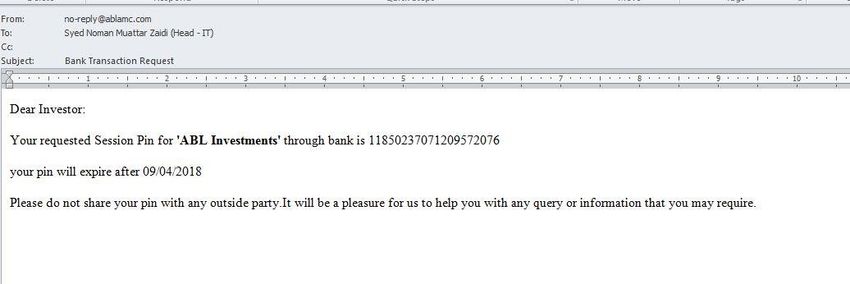
1. Introduction

ABL Asset Management Company Limited (ABL AMCL) is launching a web portal to facilitate its
individual investors to process / conduct investment transactions via ONLINE SERVICES in Collective
Investment Schemes (CIS) being managed by ABL AMCL under the trusteeship of Central Depository
Company of Pakistan Limited (CDCPL).

2. Objective

The main objective of web portal facility is to provide its investors a paperless environment and to
give an opportunity to manage their transactions in Collective Investment Schemes (CIS) on a real-
time basis.

                                         Page 3 of 17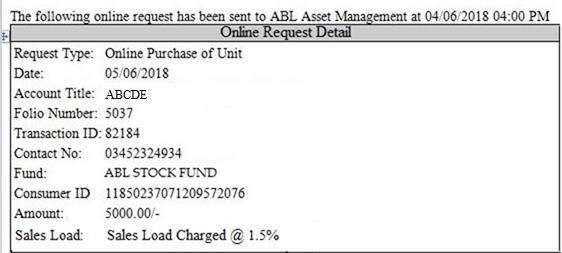
3. Investor Registration Process
New account opening via online facility is not allowed.
The investor(s) who are not already registered for online facility of the Company are
required to get register by filling the registration form (Annexure “A”).
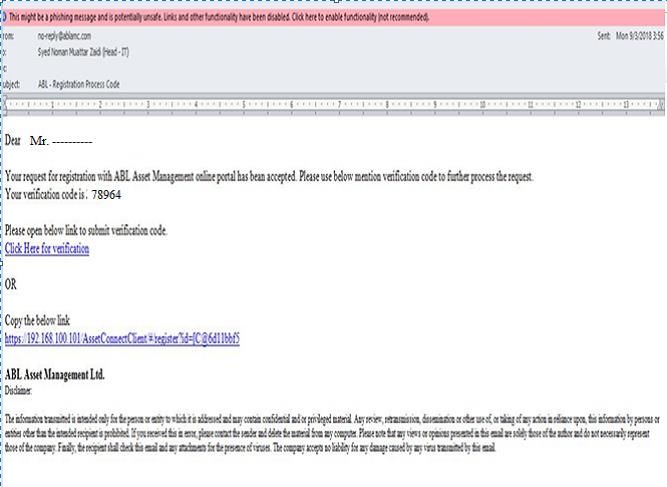
After submitting the registration form a verification code and a link for verification will be
sent via SMS to the client and simultaneously an email will be sent at the registered email ID
of the client. (Annexure “B”).
The client has to verify the verification code while submitting the form (Annexure “C”).
After verification a system generated user ID & password will be sent via SMS to the client
and simultaneously an email will be sent at the registered email ID of the client (Annexure
“D”).
The investor who are already registered for online facility of the Company are not required
to follow the above process, since their credentials have already been verified by the
Company at the time of registration.
Investor will be required to access the web portal on the home page of company's website
by given user ID & password.
In case of forget password, the client has to fill user ID & CNIC number and after filling the
detail the client will receive an SMS and an email to reset the password and after resetting
the password the client may log into the web portal (Annexure “E”).
3.1 Forget Password
Client has to fill user
Action Forget ID & CNIC number.
password.
Responsibility
Step-1 Customer
Client shall receive an
Action Acceptance of
email received.
Responsibility SMS and an email to
Step-2 Customer
reset the password.
After resetting password
Action Log into to the client may log into
online portal. Responsibility
Step-3 Customer the web portal.
Page 4 of 17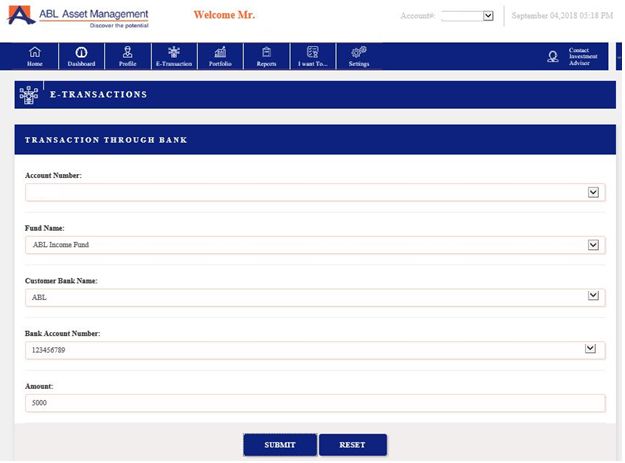
4. Process Flow
4.1 Investments
Investor will be required to access the portal on the home page of company's website by
given user ID & password.
After given user ID & password investor will be required to select "E Transaction" option on
the screen (Annexure “F”).
Upon selection, "E Transaction" the Investor will be required to select the “Transaction
Through Bank”.
After selection of “Transaction Through Bank” the investor will be required to fill investment
form / enter the investment details i.e. account number, fund name, customer bank account
name, customer account number and amount. (Annexure “G”).
After submission of purchase detail an SMS will be sent to client and simultaneously an auto
generated email indicating the customer ID will be sent at the registered email ID of client.
(Annexure “H”).
Following are some specific disclosures;
o Applicability of NAV and Units allocation:
NAV will be applied and units would be allocated / issued on the basis of form
submission along with the receipt of funds against the investments via 1link
within the cut-off time as mentioned in Offering Documents of respective funds.
o Sales Load: The Company shall charge sales load 0% to 1.5% of NAV per unit or any
amount as directed by SECP where transactions are done online or through a website in
the following fund under the Trusteeship of CDC. No sales load waiver will be granted to
any specific customer(s) who will be investing in the following fund.
ABL Stock Fund (ABL-SF)
Page 5 of 17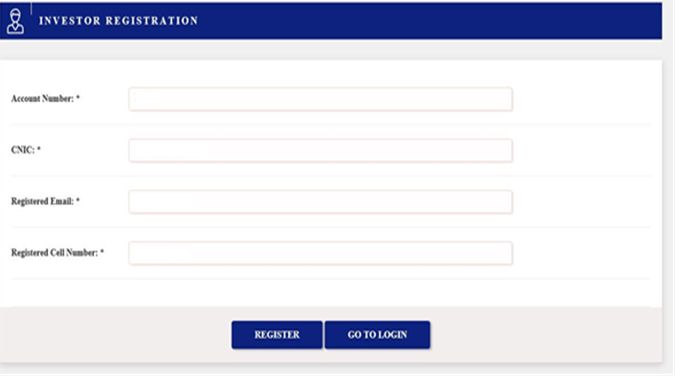
5. Execution of Payment by Investor via Internet Banking (1Link)
Following steps shall be performed for payment to be made against investment in the funds
managed by ABL AMCL:
Investor will be required to access the terminal and enter his user ID / password / pin code
for authentication of credential provided by his/her Bank.
From the list of type of transaction, investor shall select "Others/ Bill payment" option on
the menu.
A menu will pop -up displaying payment functionalities onboard with 1Link BPS such as
Electricity, Gas, Telcos, Mutual Funds, Insurance Company etc. Investor shall select "Mutual
Funds" option from the menu. Thereon, ABL AMCL shall be selected.
Upon selection, investor will be required to enter his unique "Customer Identification
number / bill number" given at the time of filling of investment form.
A screen will pop up displaying his account title with ABL AMCL and amount of investment
already booked by the investor against investment on web portal of ABL AMCL.
After, entering all the necessary details, investor shall select "Pay" option on the menu.
Upon selection, terminal will complete the transaction.
After completion of transaction an SMS will be sent to client and simultaneously an auto
generated email against the investment will be sent to the registered email ID of client and
an email will be sent to ABL AMCL’s registered email address (contactus@ablamc.com).
(Annexure “I”).
Standard Screen Flow: ABLAMC
Screen-1: Welcome Screen Screen-2: PIN Entry Screen-3: Transaction Selection Screen-4: Payment Selection
Others/Bill Payment Electricity Mutual Fund
Bank's Standard Please Enter PIN
Cash Withdrawal Gas Insurance
Welcome Screen
Balance Inquiry Online Shopping Others
Next Clear OK Funds Transfer Water and Gas Next>>
Screen-5: Payment Selection Screen-6: Account Details Screen-7: Payment Confirmation Screen-8: Acknowledgement
ABLAMC
Consumer # 123456 Your Amount has been received
Enter Consumer # Name: Mr. XYZ Please take your Receipt
1234567 Amount Due: 5000
Due Date: 29 Aug 2018 Thank You!
Next>> Confirm Cancel Pay Cancel
Page 6 of 17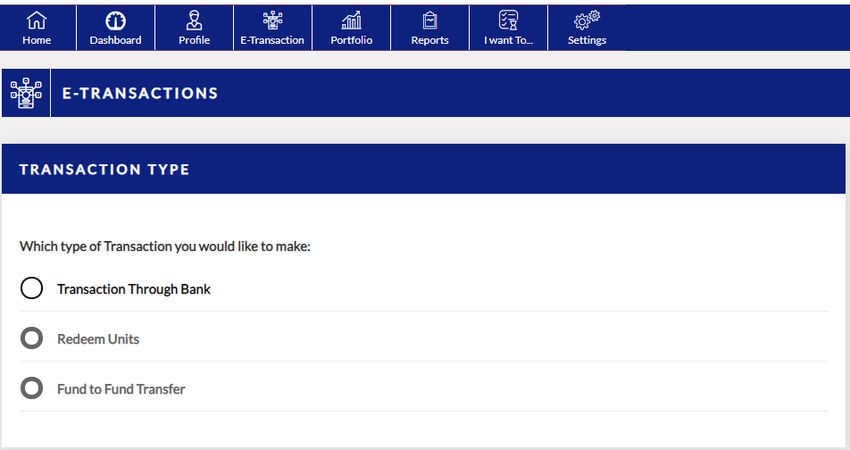
Terms & Condition
1. We, the Management Company hereby declare that:

         a. All transactions in Schemes are subject to market risk and the price of the Scheme's
            units may go down resulting in loss of principal investment. There can be no assurance
            that the objectives of the Scheme(s) will be achieved. Past performance of the Sponsor,
            AMC, Mutual Fund or any associates of the Sponsor/AMC does not indicate the future
            performance of the Scheme(s) of the Mutual Fund.

         b. Once the transactions request has been received by the Management Company, it
            cannot be cancelled;

2. We assert that the allocation of investment amount into units will be based on the NAV
   allocation policy of the fund. Please see Offering Document of the selected fund(s) for detailed
   explanation.

3. Messages sent over the internet cannot be guaranteed to be completely secure or error free as
   they are subject to possible interception, corruption, delays, loss or possible alteration. We are
   not responsible for them and will not be liable to you or anyone else for any damages or
   otherwise in connection with any messages sent by you to us or any message sent by us to you
   over the internet. If you send E-Mail (encrypted or not) to us over the internet, you are
   accepting the associated risks of lack of confidentiality.

4. ABL AMCL is authorized to block any transaction(s) or any other service(s) link with internet
   banking at any time (such as in the event of corporate action, etc), without prior notice to the
   unit holder(s).

5. ABL AMCL and the Trustee(s) shall not be responsible for any consequences, if the transactions
   involving the use of internet banking are not honored or operative for any reason(s),
   whatsoever, or if there is any malfunctioning and/ or failure of the internet banking or due to
   any other reasons or elements beyond the control of ABL AMCL.

6. ABL AMCL shall have right to disable any or all funds for internet banking transactions or any
   other service(s) linked with it at any time, without prior notice and without assigning any
   reasons.

7.    E-transaction request may be rejected if there is any discrepancy or incomplete information in
     the request that is submitted. In case an e-transaction request is rejected, the rejected request
     will be cancelled and a new request will have to be submitted and a refund of amount process
     will be initiated.

                                           Page 7 of 17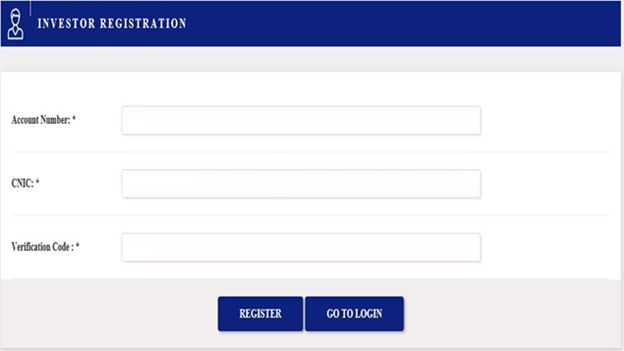
8. All E-Transaction Request received during the book closure period pertaining to respective funds
   / plans shall be marked rejected and customers would be required to re-submit his / her request
   after the Book Closure period is complete.

9. The use of the Internet is subject to other risks which are not of a security nature but which
   arise from factors beyond ABL AMCL's control, for example failure of communication networks,
   mechanical failures, power failures, malfunction, breakdown or inadequacy of equipment. These
   risks may result in e-transaction requests being delayed, lost or inaccurately transmitted and
   may cause the client(s) to suffer losses. Unless ABL AMCL has been grossly negligent, the
   company will not be responsible for such losses. In no event will ABL AMCL be liable for any loss
   or damage including without limitation, indirect or consequential loss or damage, or any loss or
   damage whatsoever arising from loss of data or profits arise out of, or in connection with, the
   use of this website.

10. ABL AMCL reserve the right in sole discretion to deny any user access to this Site, any interactive
    service herein, or any portion of this Site without notice, and the right to change the terms,
    conditions and notices under which this Site is offered. Any rights not expressly granted herein
    are reserved.

                                           Page 8 of 17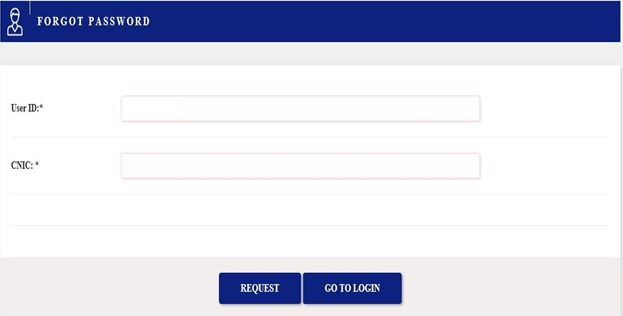
Annexure “A”

               Page 9 of 17
Annexure “B”
Page 10 of 17Annexure “C”
Page 11 of 17Annexure “D”
Page 12 of 17Annexure “E”
Page 13 of 17Annexure “F”
Page 14 of 17Annexure “G”
Page 15 of 17Annexure “H”
Page 16 of 17Annexure “I”
Page 17 of 17You can also read


