USER GUIDE ISO 20022 MESSAGING FOR DISTRIBUTIONS ENTITLEMENTS AND ALLOCATIONS - VERSION 2.1 MARCH 08, 2021 - DTCC
←
→
Page content transcription
If your browser does not render page correctly, please read the page content below
USER GUIDE
ISO 20022 MESSAGING FOR DISTRIBUTIONS ENTITLEMENTS AND
ALLOCATIONS
VERSION 2.1
MARCH 08, 2021

© 2021 DTCC. All rights reserved. DTCC, DTCC (Stylized), ADVANCING FINANCIAL MARKETS. TOGETHER, and the
Interlocker graphic are registered and unregistered trademarks of The Depository Trust & Clearing Corporation.
The services described herein are provided under the “DTCC” brand name by certain affiliates of The Depository Trust &
Clearing Corporation (“DTCC”). DTCC itself does not provide such services. Each of these affiliates is a separate legal
entity, subject to the laws and regulations of the particular country or countries in which such entity operates. Please see
http://www.dtcc.com for more information on DTCC, its affiliates and the services they offer.

This guide is meant as an educational tool to assist in your understanding of ISO 20022 messaging as it relates to
corporate action processing at DTCC. It should not be used as a basis for systems applications coding. For coding
purposes, please refer to specific schemas and message implementation guides that can be found at
http://www.dtcc.com/settlement-and-asset-services/corporate-actions-processing/iso-20022-messaging-specifications.

Doc Info: March 8, 2021
Publication Code: CA220
Service: Corporate Actions
Title: User Guide: ISO 20022 Messaging for Distributions Entitlements and Allocations
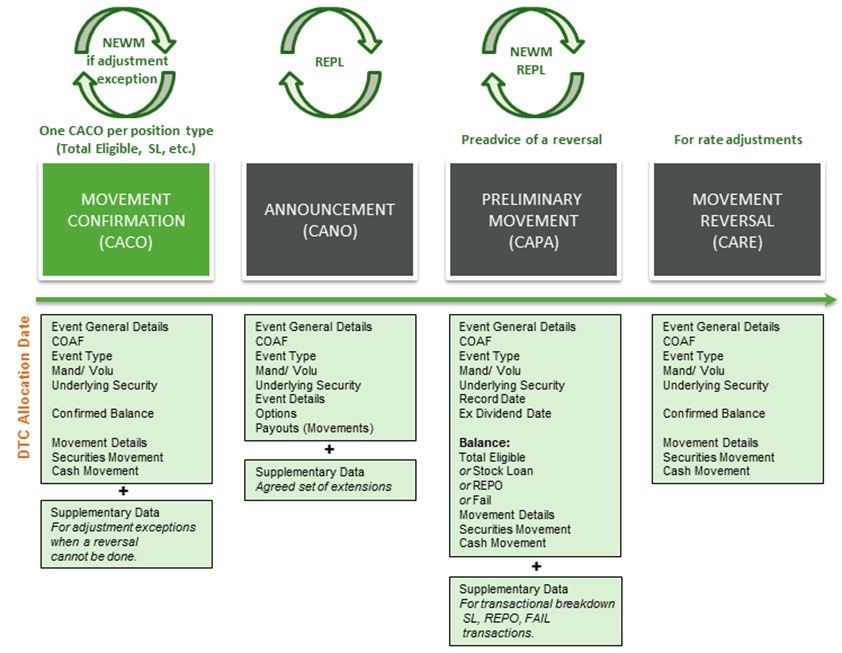
TABLE OF CONTENTS
An Introduction to ISO 20022 Messaging........................................................................................... 7

  What is ISO 20022 Messaging?........................................................................................................ 7

  Benefits of Using ISO 20022 Messaging for Corporate Actions .............................................................. 7

   Benefits of Using ISO 20022 Schemas for Entitlements and Allocations Processing ................................ 7

  How Can I Learn More?................................................................................................................... 8

  Corporate Actions Messages in the Entitlements and Allocations Workflow ............................................. 9

  How to Read an MX Identifier ........................................................................................................... 9

  Basic Message Flow of the Distribution Lifecycle ............................................................................... 10

Entitlements and Allocations Messaging..........................................................................................12

  Entitlements/Allocations Event Types Currently Supported by ISO 20022 Messaging for Distributions ....... 12

  Message Extensions and Stock Loan, REPO, and Fail Tracking .......................................................... 16

  Messages and Zero Amounts ......................................................................................................... 16

  Entitlement and Allocation Message Flows ....................................................................................... 16

   Basic Flow.................................................................................................................................. 16

   Exception Flow ........................................................................................................................... 17

   Example of a Cash Dividend–Basic Message Flow........................................................................... 21

   Example of a Same-Day Reversal.................................................................................................. 22

   Example of a Post-Payable Allocation Adjustment ............................................................................ 23

   Late Announcements ................................................................................................................... 24

     Scenario 1: All Details Known ...................................................................................................... 24

     Scenario 2: Most Details Known................................................................................................... 25

     Scenario 3: Few Details Known.................................................................................................... 25

     Scenario 4: No Details Known...................................................................................................... 26

  Message Subscriptions and Timing ................................................................................................. 26

   Subscription Options .................................................................................................................... 26

   Weekly Messaging Times ............................................................................................................. 28

   Holiday Processing Schedule........................................................................................................ 29

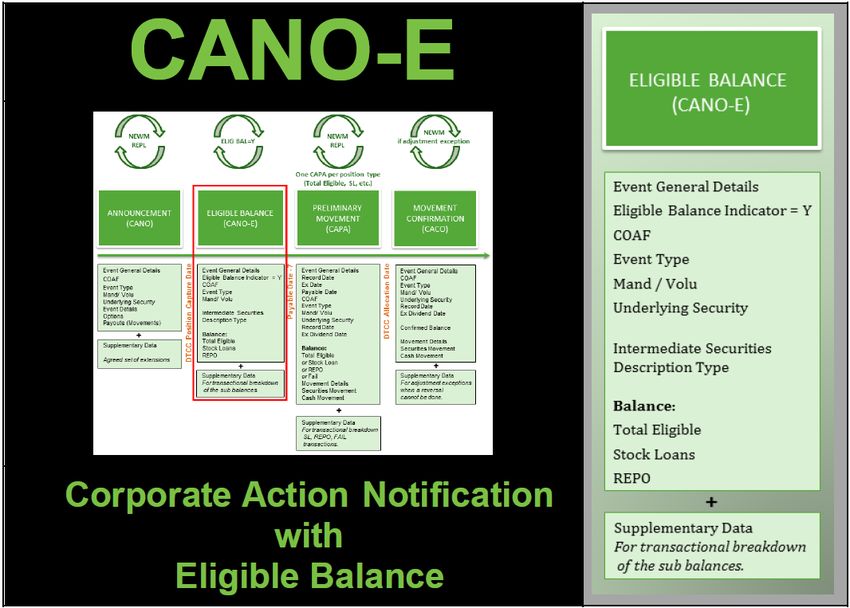
CANO-E Messages......................................................................................................................... 30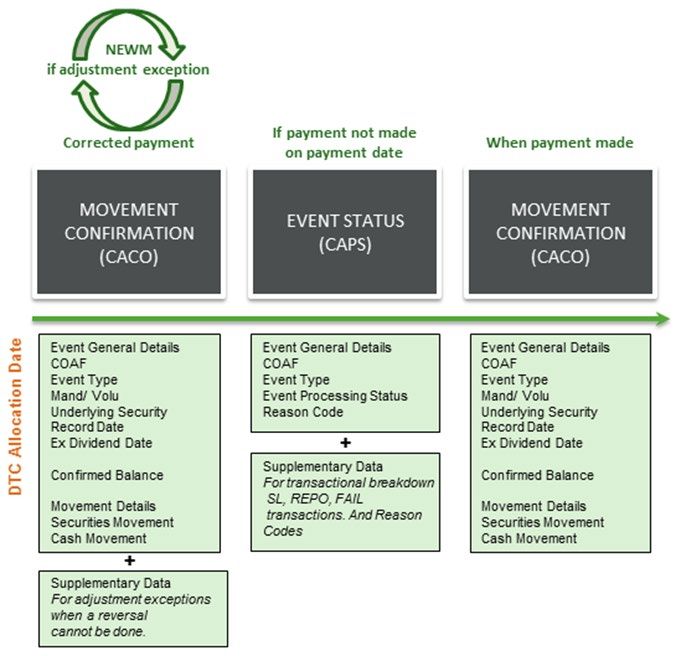
What is a CANO-E Message?......................................................................................................... 30

  When Are CANO-E Messages Generated? ...................................................................................... 31

   Intraday Position Capture ............................................................................................................. 32

   Message Timing.......................................................................................................................... 32

   Weekly Messaging Times ............................................................................................................. 32

   Holiday Processing Schedule........................................................................................................ 33

  Information Contained on the CANO-E Message ............................................................................... 33

  Examples and Scenarios for CANO-E Messages............................................................................... 36

   CANO-E for Position Adjustments .................................................................................................. 36

   CANO-E for Market Record Date or New York Record Date............................................................... 38

   Announcement Deleted; CA ID Remains in CA Web ......................................................................... 39

CAPA Messages ............................................................................................................................ 40

  What is a CAPA Message? ............................................................................................................ 40

  CAPA Message Creation and Timing ............................................................................................... 42

   What are the CAPA Subscription Options?...................................................................................... 42

   When are CAPA NEWM/REPL Messages Sent?.............................................................................. 42

   CAPA and CAPC Messages ......................................................................................................... 44

   Messaging Notes ........................................................................................................................ 44

   Intraday Position Capture ............................................................................................................. 44

   CAPA Messages and Reversals .................................................................................................... 45

   Messages and Zero Amounts ........................................................................................................ 45

   Late Announcements ................................................................................................................... 45

   Weekly Messaging Times ............................................................................................................. 45

   Holiday Processing Schedule........................................................................................................ 45

  Information Contained on the CAPA Message................................................................................... 46

  CAPA Message Data .................................................................................................................... 51

CAPC Messages ............................................................................................................................ 53

  What is a CAPC Message? ............................................................................................................ 53

   CAPA and CAPC Messages ......................................................................................................... 54

  When Are CAPC Messages Generated?.......................................................................................... 54
Messaging Note .......................................................................................................................... 54

   Weekly Messaging Times ............................................................................................................. 54

   Holiday Processing Schedule........................................................................................................ 55

  Information Contained on the CAPC Message .................................................................................. 55

  CAPC Message Data .................................................................................................................... 56

CACO Messages............................................................................................................................ 57

  What is a CACO Message?............................................................................................................ 57

  When Are CACO Messages Generated?.......................................................................................... 59

   Messaging Notes ........................................................................................................................ 59

   CACO Message Sequence for Late Announcements ........................................................................ 60

   Weekly Messaging Times ............................................................................................................. 60

   CACO Holiday Processing Schedule .............................................................................................. 60

   CACO Adjustment Codes ............................................................................................................. 61

  Information Contained on the CACO Message .................................................................................. 61

   Message Body ............................................................................................................................ 61

  CACO Message Data.................................................................................................................... 65

CARE Messages ............................................................................................................................ 67

  What is a CARE Message? ............................................................................................................ 67

  When Are CARE Messages Generated?.......................................................................................... 68

   Messaging Notes ........................................................................................................................ 68

   Weekly Messaging Times ............................................................................................................. 69

   CARE Holiday Processing Schedule .............................................................................................. 69

  Information Contained on the CARE Message .................................................................................. 69

   Message Body ............................................................................................................................ 70

  CARE Message Data .................................................................................................................... 71

CAPS Messages ............................................................................................................................ 72

  What is a CAPS Message? ............................................................................................................ 72

  When Are CAPS Messages Generated? .......................................................................................... 73

   Messaging Notes ........................................................................................................................ 73

   Weekly Messaging Times ............................................................................................................. 74
CAPS Holiday Processing Schedule............................................................................................... 74

  Information Contained on the CAPS Message................................................................................... 75

   Message Body ............................................................................................................................ 75

  CAPS Message Data .................................................................................................................... 77

  CAPS Reason Codes .................................................................................................................... 78

Appendix A: Reason Codes.............................................................................................................79

  Adjustment Reason Codes (CAPA/CACO Message).......................................................................... 79

  CAPA/CACO Sub Reason Codes ................................................................................................... 80

  Unallocated Reason Codes (CAPS Message)................................................................................... 90

   OTHR vs. NPAY ISO Codes ......................................................................................................... 91
ISO 20022 Messaging for Distributions Entitlements and Allocations

AN INTRODUCTION TO ISO 20022 MESSAGING

What is ISO 20022 Messaging?
ISO 20022 is an international messaging standard that is designed to simplify global business communication
by creating a common language for communicating financial information that is unrestricted by national borders
or regional conventions.

Even though the Depository has maintained its own proprietary formats for many years, DTCC recognized that
it needed to respond to an evolving business environment and to accommodate an increasingly global
investment business. DTCC's clients and customers had expanded their businesses throughout the world and
wanted to streamline, as much as possible, the standards and formats used to communicate. ISO 20022 meets
those needs and offers a host of benefits.

DTCC is theref ore moving all of its corporate actions announcements and processing files from proprietary
f ormats to this external, international format.

Benefits of Using ISO 20022 Messaging for Corporate Actions
One of the greatest benefits of ISO 20022 is its consistency and universality across the industry and around
the globe. It provides a common language with its own ever-growing dictionary, enabling businesses in the
f inancial industry to communicate corporate action information quickly, easily, and precisely.

On a more local scale, the automation of previously manual processes via ISO 20022 messaging provides a
significant cost savings to clients and a tremendous reduction in risk to the industry. With the advent of real-
time messaging via ISO 20022, clients receive their data in a much more timely fashion, which allows them to
manage their risk and streamline their processes.

The Corporate Actions Transformation Learning Center provides a more comprehensive list of benefits.

Benefits of Using ISO 20022 Schemas for Entitlements and Allocations
Processing
The six messages used in this portion of the Distributions lifecycle are more streamlined and contain fewer
data elements than the CANO announcements message. These messages do not replay all of the original
CANO inf ormation, but instead use the Corporate Actions Identifier (CAID) and the Official Corporate Action
Event Identification (COAF) to link back to the original announcement.

This allows the six messages to focus on specific pieces of information related to the movement of cash and
stock entitlements.

An Introduction to ISO 20022 Messaging                                                                                   7
ISO 20022 Messaging for Distributions Entitlements and Allocations

How Can I Learn More?
Visit the Corporate Actions area of the Asset Services Learning Center at https://dtcclearning.com/products-
and-services/asset-services.html to view a wealth of business and technical information about the initiative,
including the Benefits page and video, a Getting Started section, and a Readiness Checklist that provides you
with a convenient method for determining your organization’s ability to begin processing ISO 20022 messages.

The Learning Center also contains introductory videos, extensive documentation, a link to FAQs, and further
inf ormation regarding ISO 20022 messages and message scenarios.

First-time users should click Register Now in order to create an account. You need to be registered in order to
view the Learning Center.

An Introduction to ISO 20022 Messaging                                                                                  8
ISO 20022 Messaging for Distributions Entitlements and Allocations

Corporate Actions Messages in the Entitlements and Allocations
Workflow
There are f ifteen types of messages in the ISO 20022 group:

The messages specifically involved in the entitlement and allocation process are:

•    Corporate Action Notification with Eligible Balance (CANO-E)
•    Corporate Action Movement Preliminary Advice (CAPA)
•    Corporate Action Movement Preliminary Advice Cancellation Advice (CAPC)
•    Corporate Action Movement Confirmation (CACO)
•    Corporate Action Movement Reversal Advice (CARE)
•    Corporate Action Event Processing Status Advice (CAPS)

The messages illustrate the record date position capture, interim tracking, projected allocations, canceled
projections, allocations, post-allocation adjustments, unallocated positions, and same-day payable date
reversals.

All of the messages involved in this process are contingent upon the client having position in an event. Unless
you have position, you will not see any of these messages.

How to Read an MX Identifier
The MX Identifier identifies the business area, message ID, and version of an ISO Message.

An Introduction to ISO 20022 Messaging                                                                                   9
ISO 20022 Messaging for Distributions Entitlements and Allocations

As an example, for the identifier seev.036.002.06:

•    The f irst four alphabetic characters (“seev”) identify the business area. In this case, it is “Securities
     Events.” You can see the full list of business areas on the ISO 20022 Web site at
     http://www.iso20022.org/documents/general/ISO20022_BusinessAreas.pdf.
•    The next three characters (036) are the message identifier. The message in this example is a CACO
     message.
•    The next three characters (002) are the “variant” identifier. Since “001” is always the main ISO message,
     “002” would be the second variant (and the one that is compatible with ISO 15022). DTCC is using the
     second variant in order to comply with the industry’s requirement that the ISO 20022 messages we
     generate be backward compatible with ISO 20022.
•    The last two characters (06) are the “version.” In this example, this is the sixth version of this message,
     representing SR 2015.

Note:
The final two digits have the potential to change with each release.

     For your coding purposes, be sure to consult the latest documentation for the most current
     version number.

Basic Message Flow of the Distribution Lifecycle
The f ollowing graphic provides a high-level view of the basic flow of the distributions lifecycle.

It does not include exceptions such as event cancellations, instruction withdrawals, allocation reversals,
unallocated funds, etc. It is meant to give the user a high-level overview of the message and business flows as
a starting point for understanding ISO 20022 messaging.

Note:
Throughout this document, blue boxes represent inbound messages to DTCC from the client and green boxes represent
outbound messages to the client from DTCC.

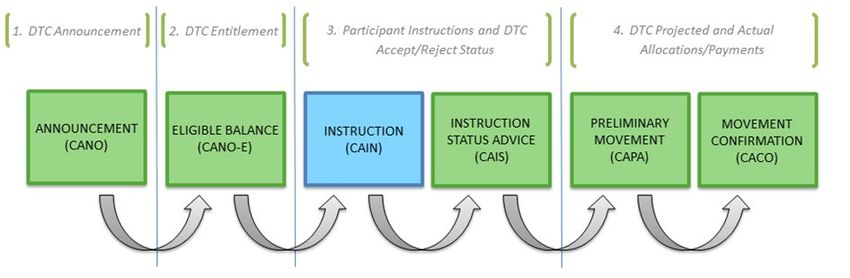
1.   DTCC sends a CANO to the client that announces the corporate action event. The CANO contains an
     indicator signaling that the event is eligible for ISO 20022 instruction messaging.

An Introduction to ISO 20022 Messaging                                                                                        10
ISO 20022 Messaging for Distributions Entitlements and Allocations
2. On Record Date, DTCC sends a CANO-E to inform the client about how it is specifically affected by the
corporate action: its eligibilities and options.
3. The client submits a CAIN message to DTCC, providing instructions for that event.
4. DTCC sends a CAIS message containing status information about the instructions back to the client.
5. DTCC sends a CAPA message to the client projecting its payment/allocation.
6. Af ter all actions specified in the CAIN (and any in the follow-up messages not specified in this flow) have
been taken, DTCC sends the client a CACO message to confirm movement of payment/allocation
proceeds.
Note:
The CAIN and CAIS messages are discussed in the Instructions User Guide, as they are instruction messages.
Please see the Entitlements/Allocations Messaging section for a more detailed explanation and examples
of alternate process flows. For specific message information, visit the Learning Center’s Messages and
Scenarios page.
An Introduction to ISO 20022 Messaging 11ISO 20022 Messaging for Distributions Entitlements and Allocations
ENTITLEMENTS AND ALLOCATIONS MESSAGING
Entitlements/Allocations Event Types Currently Supported by ISO
20022 Messaging for Distributions
In the new data model, these events and event subtypes represent function codes 02 through 49 in the legacy
DTCC data model.
Event Name Sub Function Function Code Name/Activity ISO Event Type Extended
Event Code/Activity Code Name Event Name (DTCC)
Name Code Code Event
Subtype
Automatic FC-31 Automatic Dividend DRIP Dividend
Dividend Reinvestment Reinvestment
Reinvestment
Capital Gains FC-32 Long Term Capital Gains CAPG Capital Gains
Distribution FC-33 Short term Capital Gains Distribution
FC-49 Capital Gains
Capital Gains DRIP FC-32 Long Term Capital Gains CAPG Capital Gains
Distribution (DTCC FC-33 Short term Capital Gains Distribution
only)
FC-49 Capital Gains
FC-30 Dividend Reinvestment
Capital Gains Opt Out FC-32 Long Term Capital Gains CAPG Capital Gains
Distribution (DTCC FC-33 Short term Capital Gains Distribution
Only)
FC-49 Capital Gains
FC-30 Dividend Reinvestment
Cash FC-07 Cash Div. on Increased Shares DVCA Cash Dividend
Dividend FC-08 Cash Dividend
FC-09 Foreign Cash Dividend
Cash FC-08 Cash Dividend DVCA Cash Dividend
Dividend FC-09 Foreign Cash Dividend
FC-35 Tax Exempt Div Service
FC-37 Foreign Cash Div Favorable
Cash Currency FC-08 Cash Dividend DVCA Cash Dividend
Dividend Election FC-09 Foreign Cash Dividend
Entitlements and Allocations Messaging 12ISO 20022 Messaging for Distributions Entitlements and Allocations
Event Name Sub Function Function Code Name/Activity ISO Event Type Extended
Event Code/Activity Code Name Event Name (DTCC)
Name Code Code Event
Subtype
Cash DRIP FC-08 Cash Dividend DVCA Cash Dividend
Dividend (DTCC FC-09 Foreign Cash Dividend
only)
FC-30 DRIP
FC-35 Tax Exempt Div Service
FC-37 Foreign Cash Div Favorable
Cash Opt Out FC-08 Cash Dividend DVCA Cash Dividend
Dividend (DTCC FC-09 Foreign Cash Dividend
Only)
FC-30 DRIP
FC-35 Tax Exempt Div Service
FC-37 Foreign Cash Div Favorable
Default Interim AC-86P Interim Default Distribution DFLT Bond Default
Payment
Distribution FC-43 Special Distributions OTHR Other Event
Distribution FC-43 Special Distributions OTHR Other Event
FC-06/11/12 Stock Dividend/SpinOff
Eligible/SpinOff InEligible
Distribution DRIP FC-43 Special Distributions OTHR Other Event
(DTCC FC-30 DRIP (UIT-related)
only)
Distribution Opt Out FC-43 Special Distributions OTHR
(DTCC FC-30 DRIP (UIT-related)
only)
Distribution Tax FC 24 Tax Credit (Build America OTHR Other Event
Credit Bonds)
Dividend with FC-14 Optional Dividend DVOP Dividend
Option FC-15 Optional Dividend–Stock Option
FC-16 Optional Dividend-Cash Stock
FC-17 Optional Dividend-Cash
FC-18 Optional Dividend-Fractions
FC-19 Optional Dividend-Fractions
FC-20 Optional Dividend-Fractions
FC-21 Optional Dividend-Fractions
Interest FC-13 Bond Interest INTR Interest
FC-23 Muni Bond Interest Payment
Entitlements and Allocations Messaging 13ISO 20022 Messaging for Distributions Entitlements and Allocations
Event Name Sub Function Function Code Name/Activity ISO Event Type Extended
Event Code/Activity Code Name Event Name (DTCC)
Name Code Code Event
Subtype
Interest FC-03 Foreign Debt Unfavorable Tax INTR Interest
Rate Payment
FC-04 Foreign Debt Favorable Tax
Rate*
FC-05 Foreign Debt Exempt Tax Rate*
Interest DRIP FC-13 Bond Interest INTR Interest
(DTCC FC-03 Foreign Debt Unfavorable Tax Payment
only) Rate
FC-04 Foreign Debt Favorable Tax
Rate*
FC-05 Foreign Debt Exempt Tax Rate*
FC-23 Muni Bond Interest
FC-30 DRIP
Liquidation Based on FC-45 Liquidation LIQU Liquidation
Record FC-11/12 SpinOff Eligible/SpinOff Dividend
Date InEligible
Holdings
Pay in Kind FC-38 Pay in Kind-Bonds PINK Payment in
Kind
Principal FC-25 Principal Payment PRED Partial
Redemption
Without
Nominal Value
Reduction
Principal DRIP FC-25 Principal Payment PRED Partial
(DTCC FC-30 DRIP Redemption
only) Without
Nominal Value
Reduction
Return of FC-34 Return of Capital CAPD Capital
Capital Distribution
Return of DRIP FC-34 Return of Capital CAPD Capital
Capital (DTCC FC-30 DRIP Distribution
only)
Return of DRIP FC-34 Return of Capital CAPD Capital DRPI
Capital (Issuer) Distribution
Return of Opt Out FC-34 Return of Capital CAPD Capital
Capital (DTCC FC-30 DRIP Distribution
Only)
Return of Sale of FC-46 Sale of Assets DRCA Capital SALE
Capital Assets Distribution
Entitlements and Allocations Messaging 14ISO 20022 Messaging for Distributions Entitlements and Allocations
Event Name Sub Function Function Code Name/Activity ISO Event Type Extended
Event Code/Activity Code Name Event Name (DTCC)
Name Code Code Event
Subtype
Rights FC-39 Rights Distributions RHDI Rights Issue
Distribution FC-47 Redemption of Rights
Rights Physical FC-39 Rights Distributions RHDI Rights Issue PRNI
Distribution Rights
not
Issued
Sale Of ADR FC-36 Sale of Rights on ADRs DRCA Cash
Rights Distribution
From Non
Eligible
Securities
Sales
Sale Of Poison FC-47 Redemption of Rights EXRI Call on POPI
Rights Pill Intermediate
Securities
Special FC-43 Special Cash Distributions DVCA Cash Dividend
Dividend
Special Currency FC-43 Special Cash Distributions DVCA Cash Dividend
Dividend Election
Special DRIP FC-43 Special Cash Distributions DVCA Cash Dividend
Dividend (DTCC FC-30 DRIP
only)
Special Opt Out FC-43 Special Cash Distributions DVCA Cash Dividend
Dividend (DTCC FC-30 DRIP
Only)
Spin-Off FC-12 SpinOff Eligible SOFF Spin-Off
FC-11 SpinOff Ineligible
Spin-Off FC-14 Optional Dividend SOFF Spin-Off
FC-15 Optional Dividend-Stock
FC-17 Optional Dividend-Cash
FC-18 Optional Dividend-Fractions
FC-19 Optional Dividend-Fractions
Stock FC-48 ADR Issuance Fee DVSE Stock
Dividend FC-06 Stock Dividend Dividend
Stock Split FC-02 Stock Split SPLF Stock Split
Tax Refund FC-09 Foreign Cash Dividend TREC Tax Reclaim
FC-40(s) Foreign Tax Refunds
Entitlements and Allocations Messaging 15ISO 20022 Messaging for Distributions Entitlements and Allocations
Message Extensions and Stock Loan, REPO, and Fail Tracking
Stock loan, REPO, and Fail balances can be found in the core section of the CAPA and CACO messages. You
can f ind contra party balances in the extension for each message.
Note:
CANO-E messages do not have Fail tracking. Stock loan and REPO balances (as well as contra information) can be found
in the message extension.
Please see the CANO-E, CAPA, and CACO sections for more information.
Messages and Zero Amounts
Projection amounts of zero are possible in the DTCC ISO 20022 messages. This may occur in several cases,
including:
1. A CAPA message projecting on an event that has a rate of “0” prior to the payable date.
You can see an example of this in the second scenario for Late Announcements, in which some of the
corporate actions details are known but the rate is not.
2. Any Stock Loan, REPO, and/or Fail activity in which the trade is still pending.
Entitlement and Allocation Message Flows
Basic Flow
The basic message flow for Distributions was presented above. Entitlements and allocations messages
comprise a subset of this flow 1.
The simplest message flow for entitlements and allocations, assuming that there are no changes to the event
or the allocation process, follows this sequence:
1
These message flows will become more complicated and include other message types when exceptions such as event cancellations, instructions
withdrawals, allocation reversals, etc. occur.
Entitlements and Allocations Messaging 16ISO 20022 Messaging for Distributions Entitlements and Allocations
1. A CANO message announces a corporate actions event.
2. This is f ollowed by a CANO-E message on the DTCC Position Capture Date, which informs the client of
its eligible balance related to the announcement.
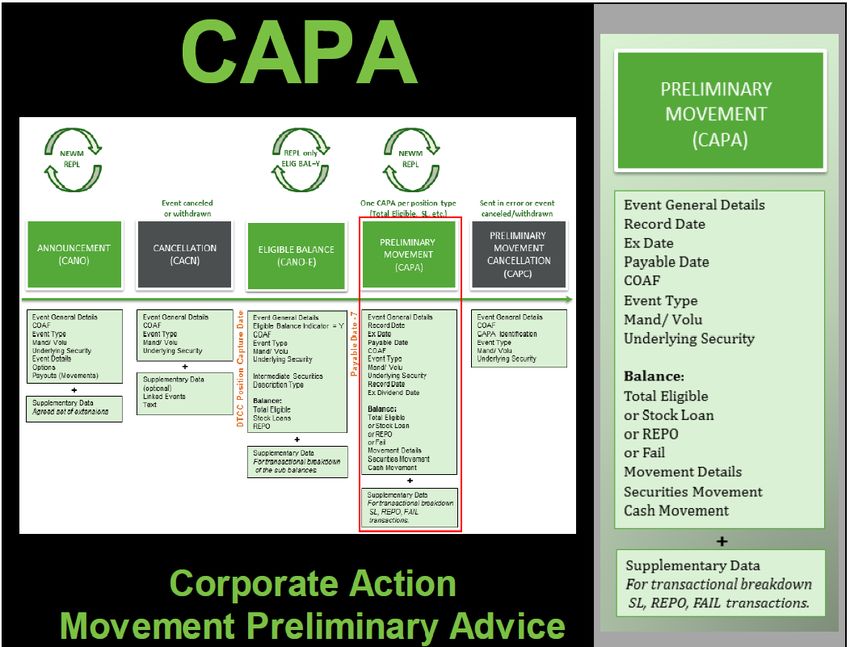
3. On Payable Date-7, a CAPA message is sent to the client. This contains the entitlement amount that will
be moved.
4. On the DTCC Allocation Date, DTCC sends a CACO message confirming that the entitlement has been
moved. One CACO is sent per position type. CACO messages are only sent as NEWMs.
Exception Flow
The purpose of the following diagrams is to present different messages that can occur, such as an event being
canceled, a payment cancellation, a payment change, an allocation reversal, etc.
If there are any such changes to the announcement, then the message flow contains more stages.
The three diagrams immediately following present this flow with variations. Boxes in green represent the usual
message flow, and boxes in gray represent some variations that can occur.
Entitlements and Allocations Messaging 17ISO 20022 Messaging for Distributions Entitlements and Allocations
Diagram 1 of 3
1. A CANO message announces a corporate actions event.
2. If the event is then canceled or withdrawn before DTCC’s Position Capture Date, a CACN cancellation
message is sent.
3. If the event has not been canceled or withdrawn, a CANO-E is sent to clients that are eligible for a
distribution on the Position Capture Date.
4. Af ter Payable Date-7, DTCC sends a CAPA message to inform the client of the amount that will be
moved.
5. If the CAPA was sent in error, or if the event is canceled or withdrawn before the Allocation Date, a
Preliminary Cancellation message (CAPC) is sent to the client.
The process continues with the following diagram:
Entitlements and Allocations Messaging 18ISO 20022 Messaging for Distributions Entitlements and Allocations
Diagram 2 of 3
6. If the event was not canceled or withdrawn, or if the CAPA was not sent in error, then a CACO message is
sent on the DTCC Allocation Date that confirms the movement of the entitlement amount. One CAPA and
one CACO are sent per position type (stock, cash, stock loan, fail, or REPO).
7. A reversal only occurs when a change takes place after the entitlement has already been allocated (after
the CACO has been sent on the DTCC Allocation Date) and it occurs on the same day that the funds are
being allocated (i.e., Payment Date). In addition, a reversal only takes place on P&I events.
A CANO replacement message is sent communicating the rate change.
8. A CAPA message is sent containing the preadvice of this reversal.
9. If a reversal is happening because of a rate change, a CARE message is sent to reverse the payment.
The CARE message is only used when the rate change is on payment date and after the funds have been
allocated. This is only applicable to P&I events. The reversal will always have to match exactly what is
being reversed from the original CACO–if the original CACO was allocating shares using CRED, then the
CARE message would be reversing the CRED.
Entitlements and Allocations Messaging 19ISO 20022 Messaging for Distributions Entitlements and Allocations
The process concludes with the following diagram:
Diagram 3 of 3
10. If the payment occurs as specified on the new rate communicated via the CANO, DTCC sends a CACO
message to confirm that the payment of the new entitlement amount was made.
11. If at any point in the process an allocation cannot occur on the payment date (or any date thereafter),
DTCC sends an Event Status message (CAPS). This message contains supplementary data and reason
codes to explain why the payment was not made.
12. A CACO is sent after payable date for 2 reasons:
a. The issuer did not allocate on payable date, and therefore no CACO was sent at that time, or
b. A post-allocation adjustment was made and a CACO containing that adjustment amount is sent.
Entitlements and Allocations Messaging 20ISO 20022 Messaging for Distributions Entitlements and Allocations
Example of a Cash Dividend–Basic Message Flow
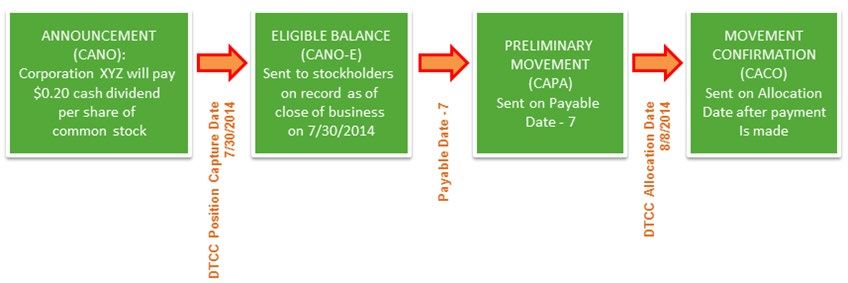
Corporation XYZ announced that its Board of Directors has declared an ordinary cash dividend on its common
stock of $0.20 per share. The dividend will be paid on August 8, 2014 to stockholders of record at the close of
business on July 30, 2014.
1. A CANO message containing the details of the cash dividend announcement is sent to clients.
2. Stockholders on record as of close of business on July 30, 2014 are sent CANO-E messages that detail
their entitlements.
3. On Settlement Date-7, CAPA messages are sent to the clients. They contain the entitlement amount that
will be moved.
4. On August 8, 2014 (the DTCC Allocation Date), DTCC sends CACO messages to clients that confirm that
their stated entitlements have been moved.
Entitlements and Allocations Messaging 21ISO 20022 Messaging for Distributions Entitlements and Allocations
Example of a Same-Day Reversal
For Principal and Interest (P&I) events only, a same-day reversal is performed by executing a reversal for the
f ull amount of the entitlement, then re-allocating the new amount.
In this example, a CACO arrives on Wednesday morning for an event that carries a rate of $1.00. The
entitlement amount, $1000, has been delivered.
Later that day, the rate is adjusted to $1.50. The client is then entitled to $1500, not $1000.
The messages involved in this sequence are as follows:
1. The original CACO confirms that $1000 was paid out to the customer.
2. A new CANO comes in, announcing the rate change.
3. A CAPA comes in that states what will happen: the original payment of $1000 will be reversed.
4. The CARE message is the confirmation of the reversal: $1000 has been debited.
5. Af ter the reversal has been performed, the new payment is made. A CACO message confirms that the
payment of $1500 has been paid to the client.
Entitlements and Allocations Messaging 22ISO 20022 Messaging for Distributions Entitlements and Allocations
Example of a Post-Payable Allocation Adjustment
For adjustments on allocations made after the payable date (such as funds that are received after payable date
or additional funds allocated by the issuer or agent), the difference will be handled in a separate payment via a
CACO message. A full reversal will not take place, but the change of entitlement will be credited to or debited
f rom the customer’s account.
This is true f or any item other than a same-day rate change on a P&I event.
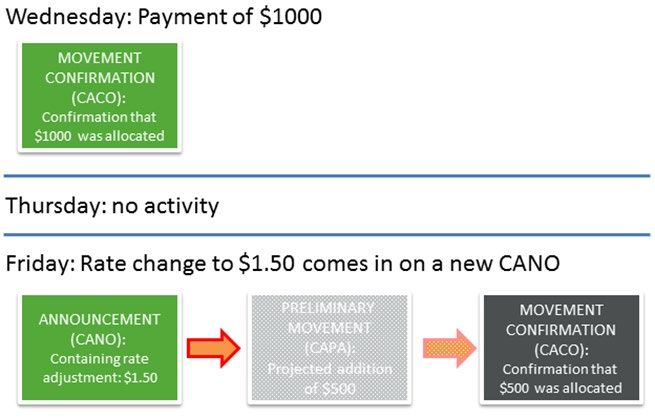
In this example, the same rate change is taking place as before: the original rate of $1.00 is changing to $1.50.
However, instead of the rate change occurring intraday, the rate change is announced two days later.
The messages involved in this sequence are as follows:
1. On Wednesday, the original CACO confirms that $1000 was paid out to the customer.
2. On Friday, a new CANO comes in that announces the rate change.
3. The CAPA announcing the anticipated credit balance of $500 would go out overnight if DTCC received the
adjustments during the start-of-day processing.
If the adjustment came intraday, no CAPA is generated. 2
In this example, no CAPA is sent.
4. The new payment is made with the adjusted amount only. A CACO message confirms that the difference
of $500 has been paid to the client.
2
The only time a CAPA would be sent is when an adjustment is received during the overnight processing.
The message sequence would then be CANO–CANO-E–CAPA–CACO–CAPA–CACO.
If the adjustment comes in intraday, then no CAPA is sent for the adjustment.
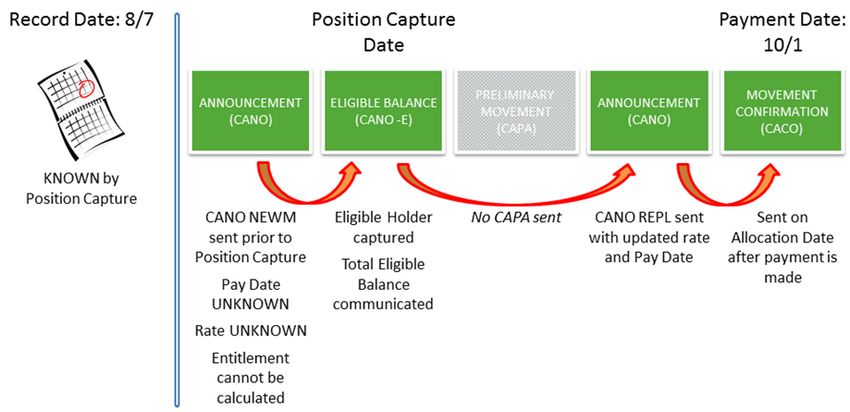
Entitlements and Allocations Messaging 23ISO 20022 Messaging for Distributions Entitlements and Allocations Late Announcements In most cases, the payable date occurs long after the record date–often by weeks or months. Sometimes, you will know the payable date well before that date arrives. Of ten, however, you will receive “late announcements.” This occurs when the announcement details (including rates and critical dates) are not made available to DTCC until the payable date. Whenever position is captured, a CANO-E will be sent. For late announcements, however, position is not always captured until the payable date. This happens when the rate is unknown: if no rate is captured, then no entitlement can be calculated. If no entitlement is calculated, a CAPA is not sent. The f ollowing scenarios present four examples of message flows for an event with a record date of August 7th and a payment date of October 1st. The key details of this event, including the payable date and rate, may not be known until October 1st, or may be known at any point in between the record date and the payable date. Scenario 1: All Details Known In this case, all details are known on record date. This is not a late announcement. Entitlements and Allocations Messaging 24
ISO 20022 Messaging for Distributions Entitlements and Allocations

Scenario 2: Most Details Known
Here, most of the details have been sent to DTCC. Since the rate is unknown, but all other details are known,
DTCC will project a zero entitlement. As soon as the rate is known prior to payable date, the projection will
ref lect the updated entitlement in the CAPA message.

Scenario 3: Few Details Known
In this scenario, the record date information has been sent to DTCC, but the payable date and the rate have
not. As the payable date is not known, a projection will not be sent: this is because the CAPA is sent on
payable date minus 7, 6, 5, 4, 3, 2, and 1.

Entitlements and Allocations Messaging                                                                                 25
ISO 20022 Messaging for Distributions Entitlements and Allocations

Scenario 4: No Details Known
In this case, all details are unknown until Payment Date.

Message Subscriptions and Timing
Entitlement and allocation messages will be sent to you based on your subscriptions. The timing for each is
determined by your subscription options.

The f ollowing tables describe message subscription options and their related times, as well as general
processing times and holiday schedules.

Subscription Options
 Message              Message Times                                      Notes
                      • Daily 2:00 p.m. eastern time (P&I).
 CANO-E                                                                  1.   Messages are available with or without
                                                                              Position Adjustment
                     Note:
                                                                              (Interim Accounting).
                     This is ONLY for late announcements created
                                                                         2.   Timing is the same for MQ or File delivery.
                     before 1:45PM on payable date.
                                                                         3.   A time stamp in the Business Application
                         and/or                                               Header (BAH) allows you to verify message
                      • Daily 11:30 p.m. eastern time (P&I, MMI).             order.

 CAPA                 Two message creation options:                      1.   Daily processing is triggered at 1:00 a.m.
                      • New messages sent on payable date minus 7             and can run up until 2:00 a.m. eastern time.
                        days and REPL messages on payable date           2.   MQ messages can be received starting at
                        minus 1.                                              about 1:02 a.m. and will end by 2:00 a.m.
                        or                                                    eastern time.
                      • New messages sent on payable date minus 7
                                                                         3.   Files (depending on volume) are usually
                        days and REPL (replacement/delta) messages            delivered at about 1:30 a.m. eastern time.
                        sent each applicable day thereafter until
                        payable date minus 1.                            4.   For option 2, messages are sent only on
                                                                              days when a change has occurred. These
                      Daily messages are sent at 1:30 a.m. eastern            messages are always REPL messages.
                      time (CAD, P&I, MMI, STKD).

Entitlements and Allocations Messaging                                                                                       26
ISO 20022 Messaging for Distributions Entitlements and Allocations
Message Message Times Notes
CAPC Via file: 1. A CAPC subscription will always require a
• Daily, 1:30a.m. eastern time (CAD, P&I, MMI, CAPA subscription as well.
STKD). 2. Conversely, a CAPA subscription does not
require CAPC subscription. However, if you
Via MQ:
subscribe to CAPA messages, it is
• Real time, every half hour between 10:30 a.m. suggested that you subscribe to CAPC
eastern time and 6:30 p.m. eastern time. messages.
• 1:30 a.m. eastern time for CAD, P&I, MMI, and
3. A time stamp in the Business Application
STKD.
Header (BAH) allows you to verify message
order.
CACO Via file: 1. Each message will be sent per one
CARE (P&I • Daily 4:00 p.m. eastern time (P&I, MMI) participant account and will include:
only) and/or • total eligible balance,
• Daily 7:00 p.m. eastern time • stock loans,
(STKD*) • repurchase agreements (REPOs), and
and/or • failed deliveries (Fails).
• 1:30 a.m. eastern time (STKD*).
2. Post-allocation adjustments will be
represented by additional CACO messages
Via MQ: under the same CA ID. These only take
• Real time, every 20 minutes between 8:20 place post-allocation, and reversals will only
a.m. and 4:30 p.m. eastern time (P&I, MMI). take place on payable date.
• Real time, 8:20 a.m. and 7:00 p.m. eastern 3. In case of a rate change on payable date, a
time (STKD*). reversal on the initial change will be allowed.
4. A time stamp in the Business Application
* CACO only. Header (BAH) allows you to verify message
order.
• Daily 4:00 p.m. eastern time (CAD, MMI).
CAPS 1. The CAPS message is sent based on the
• Daily 5:00 p.m. eastern time (P&I). CAPA that was previously sent.
• Daily 7:00 p.m. eastern time (STKD).
2. Reason codes are provided to explain why a
Times are the same for file and MQ formats, given event was not allocated.
except:
3. A time stamp in the Business Application
• Real time option for P&I, hourly between 1:00 Header (BAH) allows you to verify message
p.m. and 7:00 p.m. eastern time. order.
Entitlements and Allocations Messaging 27ISO 20022 Messaging for Distributions Entitlements and Allocations
Weekly Messaging Times
Generally, entitlements and allocations messages are sent Monday through Friday during the times specified
below. Exceptions are noted in the holiday processing schedule.
Message Monday–Friday Saturday and Sunday
CANO-E Messages at 2:00 p.m. and 11:30 p.m. eastern time. No messages or files transmitted.
2:00 p.m. message is ONLY for late announcements
created before 1:45 p.m. on payable date.
Files transmitted based on customer subscription.
CAPA Messages between 1:00 a.m. and 2:00 a.m. eastern time. No messages or files transmitted.
Files transmitted at 1:30 a.m. eastern time.
CAPC Messages between 10:30 a.m. and 6:30 p.m. eastern No messages or files transmitted.
time.
Files transmitted at 1:30 a.m. eastern time.
CACO Messages between 8:20 a.m. and 7:00 p.m. eastern time No messages or files transmitted.
CARE based on customer subscription.
Files transmitted at 4:00 p.m., 7:00 p.m., and 1:30 a.m.
eastern time, based on customer subscription.
CAPS Messages between 1:00 p.m. and 7:00 p.m. eastern time No messages or files transmitted.
based on customer subscription.
Files transmitted at 4:00 p.m., 5:00 p.m. and 7:00 p.m.
eastern time based on customer subscription.
Entitlements and Allocations Messaging 28ISO 20022 Messaging for Distributions Entitlements and Allocations
Holiday Processing Schedule
Messages/Holidays U.S. and Canadian U.S. Holidays Canadian Holidays
Holidays (DTCC closed, Canada open) (DTCC open, Canada
(both closed) closed)
CANO-E No messages. No messages or files Normal volumes.
transmitted. Files transmitted based on
customer subscription.
CAPA No messages. Normal volumes. Normal volumes.
CAPC Files transmitted based on Files transmitted based on
customer subscription. customer subscription.
CACO No messages. Only for Canadian payments. Normal volumes.
CARE Files transmitted based on
customer subscription.
CAPS No messages. 1:00 p.m., 2:00 p.m., and 3:00 Normal volumes.
p.m. eastern time for P&I and Files transmitted based on
Foreign payments. customer subscription.
• New Year's Day • Dr. Martin Luther King, Jr. • Good Friday (All)
For these holidays:
• Labor Day Day • Victoria Day
• Christmas Day • Presidents' Day • Canada Day
• Memorial Day • CDN Thanksgiving Day
• Independence Day • Boxing Day
• Thanksgiving Day
Note:
In addition to this chart, please note that DTCC operates on two U.S. bank holidays:
• Columbus Day (stock allocation only; no cash allocation)
• Veterans’ Day (stock allocation only; no cash allocation)
Entitlements and Allocations Messaging 29ISO 20022 Messaging for Distributions Entitlements and Allocations
What is a CANO-E Message?
The Corporate Action Notification with Eligible Balance (CANO-E) captures a customer’s DTCC position on
Record Date for a particular corporate action (announced in the original CANO). It determines whether a given
customer is eligible to receive an allocation (of either cash, stock, or both) on that event. The CANO-E is also
used to capture interim accounting activity between Record Date and Payable Date.
The identifying information for a CANO-E message is:
MX Identifier ISO 20022 Extension Short Equivalent Equivalent DTCC
Message Name Name ISO 15022 Processes
seev.031.002.xx 3 CA Notification with supl.007.001.xx 3 CANO-E MT 564 Record Date
Eligible Balance Entitlements
3
The last two digits in the MX Identifier and the Extension code signify the version number. The MX version number and/or the Supplementary version number
may change during the SWIFT annual release based on mandatory or optional updates to the standards and extensions.
Current schemas are available on MyStandards and DTCC.com.
Entitlements and Allocations Messaging 30ISO 20022 Messaging for Distributions Entitlements and Allocations
The CANO-E message is created on a daily basis for items for which the record date has been reached and
position capture has occurred. The message will be created once per event, unless there is interim accounting
activity taking place between Record and Payable Date. If such activity occurs and the customer is subscribed
to receive such notifications, a CANO-E REPL will be sent.
If a CANO message is not produced before record date, a CANO-E message will not be produced for the
event. Fails do not appear on the CANO-E.
Some main characteristics of the CANO-E are:
• General details about the event (including the CA ID and the COAF) replace the full CANO message. By
using these identifiers, the body of the CANO message is not repeated in the CANO-E.
• The Eligible Balance Indicator is set to “Y,” meaning that the customer has a balance affected by this
corporate action. The CANO-E is a notification of this balance.
Corresponding legacy CCF files for the record date statement are:
• DIVRDP,
• REORDP, and
• MMIRDP.
Stock Loan and Repo Record Date Position will be part of the Record Date Position message with a repeating
block of supplemental data for each of the contra participants associated with the transaction. The net total for
each balance type will be in the balance section and the transaction activity (with contra party details for each
stock loan, repo, or fail) will be in the message extension.
The message extension includes:
• Transaction Type–Long or Short,
• Transaction Shares, and
• Contra Participant Number.
When Are CANO-E Messages Generated?
A CANO with eligible balance message (CANO-E) will be generated on Position Capture Date, which is
generally Record Date or any other date on which interim accounting activity is taking place. The position
capture date can be found on the CANO. If there is both a market record date and a New York record date, the
message will only be generated once (for the earlier record date).
They are generated in two instances:
• Position capture, which can occur on various critical dates.
• Position adjustments, also known as “interim accounting activity.”
The f irst CANO-E received by a participant will always be a NEWM: this is the ISO notification type signifying a
new message. All subsequent CANO-Es are REPLs, or replacement messages.
Entitlements and Allocations Messaging 31ISO 20022 Messaging for Distributions Entitlements and Allocations
Items can get captured for interim-only activity without having had position on record date, in which case a
NEWM is generated.
Intraday Position Capture
Intraday Position Capture processes late announcements that are due to be paid today.
ISO messages are generated for intraday position capture processing. These include only Cash Principal and
Interest items, along with Stock Loans and Repos that are due to be paid today.
Foreign items that are EDS-eligible and MMI payments will not be included in the intraday CANO-E message
process.
Message Timing
The subscription options allow customers to receive the CANO-E messages once or twice daily on regular
business processing days:
• Daily 2:00 p.m. eastern time (P&I)
and/or
• Daily 11:30 p.m. eastern time (P&I, MMI)
Note:
The CANO-E subscription at 2:00 p.m. is ONLY for late announcements created before 1:45 p.m. on payable date.
The messages are available with or without position adjustment (Interim Accounting).
The timing of the messages is the same for both MQ and File formats.
Weekly Messaging Times
Generally, entitlements and allocations messages are sent Monday through Friday during the times specified
below. Exceptions are noted in the holiday processing schedule.
Message Monday–Friday Saturday and Sunday
CANO-E Messages at 2:00 p.m. and 11:30 p.m. eastern time. No messages or files transmitted.
2:00 p.m. message is ONLY for late announcements
created before 1:45 p.m. on payable date.
Files transmitted based on customer subscription.
Entitlements and Allocations Messaging 32ISO 20022 Messaging for Distributions Entitlements and Allocations
Holiday Processing Schedule
U.S. and Canadian Holidays U.S. Holidays Canadian Holidays
(both closed) (DTCC closed, Canada open) (DTCC open, Canada closed)
No messages or files are sent on: No messages or files are sent on: Normal volumes occur on these days:
• New Year's Day • Dr. Martin Luther King, Jr. Day • Good Friday (All)
• Labor Day, and • Presidents' Day • Victoria Day
• Christmas Day. • Memorial Day • Canada Day
• Independence Day, and • CDN Thanksgiving Day, and
• Thanksgiving Day. • Boxing Day.
Files are transmitted based on
customer subscription.
Note:
In addition to this chart, please note that DTCC operates on two U.S. bank holidays:
• Columbus Day (stock allocation only; no cash allocation)
• Veterans’ Day (stock allocation only; no cash allocation)
Information Contained on the CANO-E Message
Mapping for the message layout will conform to the ISO message rules. When applicable, supplemental data
will be included with sub balances for Stock Loan and Repo transaction information.
For more detailed technical information and source material for client coding, please refer to the message
usage guidelines (MUGs) and message schemas located at http://www.dtcc.com/settlement-and-asset-
services/corporate-actions-processing/iso-20022-messaging-specifications.
ISO Message Field Name DTCC Field Name/Notes
NotificationType Notification Type
Specifies the type of message: new message (NEWM) or replacement
message (REPL).
EventCompletenessStatus Event Status
Workflow status of the event, based on the statuses of options, payouts,
lottery, etc.
EventConfirmationStatus Event Status
Workflow status of the event; defaults to “CONF.”
EligibleBalanceIndicator Eligible Balance Indicator
This indicator differentiates this message from the original CANO: when it is
set to “True,” this message is identified as an “Eligible Balance” message
(containing account and balances) only.
Entitlements and Allocations Messaging 33ISO 20022 Messaging for Distributions Entitlements and Allocations
ISO Message Field Name DTCC Field Name/Notes
It carries the current eligible balance, which can contain a position captured
on position capture date as well as possibly a stock loan balance, a REPO
balance, or a Fail balance.
PreviousNotificationIdentification Previous Message ID
This is the identification of a previously sent notification document. It is
mandatory when the notification type is “REPL.”
CorporateActionEventIdentification CA ID
This is the DTC-unique identifier of the event.
OfficialCorporateActionEvent Official Reference CA ID
Identification This is the official corporate action unique identifier.
EventType Event Type
MandatoryVoluntaryEventType This specifies the nature of the event:
• DTC Mandatory/Voluntary
• Declared Mandatory/Voluntary
UnderlyingSecurity Security identification code of the event issue:
• Event Security ID
• Event Security Type
• Event Security Description
SafekeepingAccount Participant Number
This is the DTC-assigned participant identification number for the
safekeeping account.
TotalEligibleBalance Total Eligible Balance
This represents the current eligible balance for elections and allocations. It is
the total net position as of the day the message is sent.
• For long positions, map to “Long”
• For short positions, map to “Short”
• For non-debt security, map to “Unit”
• For debt security, map to “Face Amount.”
BorrowedBalance Borrowed Balance (Total Stock Loan Short)
This represents the negative net balance of the stock loans.
• For non-debt securities, use “Unit.”
• For debt securities, use “Face Amount.”
“Long” is the default value for Qty choice.
CollateralInBalance Collateral In Balance (Total REPO Long)
This represents the positive net balance of the repurchase agreements.
• For non-debt securities, use “Unit.”
• For debt securities, use “Face Amount.”
“Long” is the default value for Qty choice.
Entitlements and Allocations Messaging 34You can also read


