Yandex.Tank Documentation - Release 1.15.12 Yandex - Read the Docs
←
→
Page content transcription
If your browser does not render page correctly, please read the page content below
Yandex.Tank Documentation
               Release 1.15.12

                       Yandex

                     Sep 10, 2021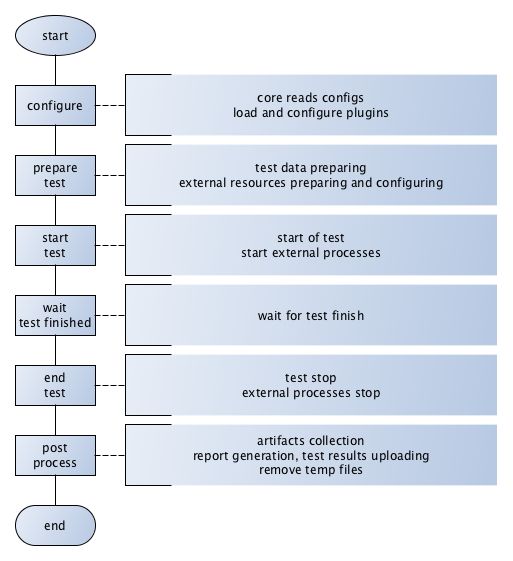
Contents

1   Getting started                                                                                                                                                                    3
    1.1 Getting Help . . . . . . . . . . . . . . .     .   .   .   .   .   .   .   .   .   .   .   .   .   .   .   .   .   .   .   .   .   .   .   .   .   .   .   .   .   .   .   .   3
    1.2 What are the Yandex.Tank components? .         .   .   .   .   .   .   .   .   .   .   .   .   .   .   .   .   .   .   .   .   .   .   .   .   .   .   .   .   .   .   .   .   3
    1.3 Running Yandex.Tank . . . . . . . . . .        .   .   .   .   .   .   .   .   .   .   .   .   .   .   .   .   .   .   .   .   .   .   .   .   .   .   .   .   .   .   .   .   3
    1.4 See also . . . . . . . . . . . . . . . . . .   .   .   .   .   .   .   .   .   .   .   .   .   .   .   .   .   .   .   .   .   .   .   .   .   .   .   .   .   .   .   .   .   4

2   Installation                                                                                                                                                                       5
    2.1 Docker container . . . . . . . . . . . . . . . . . . . . . . . . . . . . . . . . . . . . . . . . . . . . .                                                                     5
    2.2 Installation from PyPi . . . . . . . . . . . . . . . . . . . . . . . . . . . . . . . . . . . . . . . . . .                                                                     6
    2.3 Installation .deb packages . . . . . . . . . . . . . . . . . . . . . . . . . . . . . . . . . . . . . . . .                                                                     6

3   Routing and firewall                                                                                                                                                               7
    3.1 Firewall . . . . . . . . . . . . . . . . . . . . . . . . . . . . . . . . . . . . . . . . . . . . . . . . . .                                                                   7
    3.2 Routing . . . . . . . . . . . . . . . . . . . . . . . . . . . . . . . . . . . . . . . . . . . . . . . . . .                                                                    7
    3.3 Tuning . . . . . . . . . . . . . . . . . . . . . . . . . . . . . . . . . . . . . . . . . . . . . . . . . .                                                                     8

4   Tutorials                                                                                                                                                                           9
    4.1 Preparing requests . . . . . . . . . . . .     .   .   .   .   .   .   .   .   .   .   .   .   .   .   .   .   .   .   .   .   .   .   .   .   .   .   .   .   .   .   .   .   10
          4.1.1   URI-style, URIs in load.yaml . .     .   .   .   .   .   .   .   .   .   .   .   .   .   .   .   .   .   .   .   .   .   .   .   .   .   .   .   .   .   .   .   .   11
          4.1.2   URI-style, URIs in file . . . . .    .   .   .   .   .   .   .   .   .   .   .   .   .   .   .   .   .   .   .   .   .   .   .   .   .   .   .   .   .   .   .   .   12
          4.1.3   URI+POST-style . . . . . . . .       .   .   .   .   .   .   .   .   .   .   .   .   .   .   .   .   .   .   .   .   .   .   .   .   .   .   .   .   .   .   .   .   12
          4.1.4   Request-style . . . . . . . . . .    .   .   .   .   .   .   .   .   .   .   .   .   .   .   .   .   .   .   .   .   .   .   .   .   .   .   .   .   .   .   .   .   12
    4.2 Run Test! . . . . . . . . . . . . . . . . .    .   .   .   .   .   .   .   .   .   .   .   .   .   .   .   .   .   .   .   .   .   .   .   .   .   .   .   .   .   .   .   .   14
    4.3 Results . . . . . . . . . . . . . . . . . .    .   .   .   .   .   .   .   .   .   .   .   .   .   .   .   .   .   .   .   .   .   .   .   .   .   .   .   .   .   .   .   .   14
    4.4 Tags . . . . . . . . . . . . . . . . . . . .   .   .   .   .   .   .   .   .   .   .   .   .   .   .   .   .   .   .   .   .   .   .   .   .   .   .   .   .   .   .   .   .   14
    4.5 SSL . . . . . . . . . . . . . . . . . . . .    .   .   .   .   .   .   .   .   .   .   .   .   .   .   .   .   .   .   .   .   .   .   .   .   .   .   .   .   .   .   .   .   15
    4.6 Autostop . . . . . . . . . . . . . . . . .     .   .   .   .   .   .   .   .   .   .   .   .   .   .   .   .   .   .   .   .   .   .   .   .   .   .   .   .   .   .   .   .   15
          4.6.1   HTTP and Net codes conditions        .   .   .   .   .   .   .   .   .   .   .   .   .   .   .   .   .   .   .   .   .   .   .   .   .   .   .   .   .   .   .   .   15
          4.6.2   Average time conditions . . . .      .   .   .   .   .   .   .   .   .   .   .   .   .   .   .   .   .   .   .   .   .   .   .   .   .   .   .   .   .   .   .   .   16
    4.7 Logging . . . . . . . . . . . . . . . . . .    .   .   .   .   .   .   .   .   .   .   .   .   .   .   .   .   .   .   .   .   .   .   .   .   .   .   .   .   .   .   .   .   16
    4.8 Results in phout . . . . . . . . . . . . .     .   .   .   .   .   .   .   .   .   .   .   .   .   .   .   .   .   .   .   .   .   .   .   .   .   .   .   .   .   .   .   .   17
    4.9 Graph and statistics . . . . . . . . . . . .   .   .   .   .   .   .   .   .   .   .   .   .   .   .   .   .   .   .   .   .   .   .   .   .   .   .   .   .   .   .   .   .   20
    4.10 Thread limit . . . . . . . . . . . . . . .    .   .   .   .   .   .   .   .   .   .   .   .   .   .   .   .   .   .   .   .   .   .   .   .   .   .   .   .   .   .   .   .   20
    4.11 Dynamic thread limit . . . . . . . . . . .    .   .   .   .   .   .   .   .   .   .   .   .   .   .   .   .   .   .   .   .   .   .   .   .   .   .   .   .   .   .   .   .   20
    4.12 Custom stateless protocol . . . . . . . .     .   .   .   .   .   .   .   .   .   .   .   .   .   .   .   .   .   .   .   .   .   .   .   .   .   .   .   .   .   .   .   .   20
    4.13 Gatling . . . . . . . . . . . . . . . . . .   .   .   .   .   .   .   .   .   .   .   .   .   .   .   .   .   .   .   .   .   .   .   .   .   .   .   .   .   .   .   .   .   21

                                                                                                                                                                                        i
5 Advanced usage 23
5.1 Command line options . . . . . . . . . . . . . . . . . . . . . . . . . . . . . . . . . . . . . . . . . . 23
5.2 Advanced configuration . . . . . . . . . . . . . . . . . . . . . . . . . . . . . . . . . . . . . . . . . 24
5.2.1 Default configuration files . . . . . . . . . . . . . . . . . . . . . . . . . . . . . . . . . . . 24
5.2.2 Multiline options . . . . . . . . . . . . . . . . . . . . . . . . . . . . . . . . . . . . . . . . 24
5.2.3 Time units . . . . . . . . . . . . . . . . . . . . . . . . . . . . . . . . . . . . . . . . . . . . 24
5.3 Artifacts . . . . . . . . . . . . . . . . . . . . . . . . . . . . . . . . . . . . . . . . . . . . . . . . . 25
5.4 Sources . . . . . . . . . . . . . . . . . . . . . . . . . . . . . . . . . . . . . . . . . . . . . . . . . . 25
5.5 load.yaml example . . . . . . . . . . . . . . . . . . . . . . . . . . . . . . . . . . . . . . . . . . . . 25
6 Modules 27
6.1 TankCore . . . . . . . . . . . . . . . . . . . . . . . . . . . . . . . . . . . . . . . . . . . . . . . . . 27
6.1.1 Architecture . . . . . . . . . . . . . . . . . . . . . . . . . . . . . . . . . . . . . . . . . . . 28
6.1.2 Test lifecycle . . . . . . . . . . . . . . . . . . . . . . . . . . . . . . . . . . . . . . . . . . 29
6.1.3 Options . . . . . . . . . . . . . . . . . . . . . . . . . . . . . . . . . . . . . . . . . . . . . 29
6.1.4 consoleworker . . . . . . . . . . . . . . . . . . . . . . . . . . . . . . . . . . . . . . . . . . 30
6.1.5 apiworker . . . . . . . . . . . . . . . . . . . . . . . . . . . . . . . . . . . . . . . . . . . . 30
6.1.6 exit codes . . . . . . . . . . . . . . . . . . . . . . . . . . . . . . . . . . . . . . . . . . . . 31
6.2 Load Generators . . . . . . . . . . . . . . . . . . . . . . . . . . . . . . . . . . . . . . . . . . . . . 31
6.2.1 Phantom . . . . . . . . . . . . . . . . . . . . . . . . . . . . . . . . . . . . . . . . . . . . . 31
6.2.2 JMeter . . . . . . . . . . . . . . . . . . . . . . . . . . . . . . . . . . . . . . . . . . . . . . 36
6.2.3 BFG . . . . . . . . . . . . . . . . . . . . . . . . . . . . . . . . . . . . . . . . . . . . . . . 38
6.2.4 Pandora . . . . . . . . . . . . . . . . . . . . . . . . . . . . . . . . . . . . . . . . . . . . . 42
6.3 Artifact uploaders . . . . . . . . . . . . . . . . . . . . . . . . . . . . . . . . . . . . . . . . . . . . 43
6.3.1 Yandex.Overload . . . . . . . . . . . . . . . . . . . . . . . . . . . . . . . . . . . . . . . . 43
6.3.2 InfluxDB . . . . . . . . . . . . . . . . . . . . . . . . . . . . . . . . . . . . . . . . . . . . 44
6.4 Handy tools . . . . . . . . . . . . . . . . . . . . . . . . . . . . . . . . . . . . . . . . . . . . . . . . 44
6.4.1 Auto-stop . . . . . . . . . . . . . . . . . . . . . . . . . . . . . . . . . . . . . . . . . . . . 44
6.4.2 Telegraf . . . . . . . . . . . . . . . . . . . . . . . . . . . . . . . . . . . . . . . . . . . . . 46
6.4.3 Console on-line screen . . . . . . . . . . . . . . . . . . . . . . . . . . . . . . . . . . . . . 50
6.4.4 Aggregator . . . . . . . . . . . . . . . . . . . . . . . . . . . . . . . . . . . . . . . . . . . 51
6.4.5 ShellExec . . . . . . . . . . . . . . . . . . . . . . . . . . . . . . . . . . . . . . . . . . . . 51
6.4.6 Resource Check . . . . . . . . . . . . . . . . . . . . . . . . . . . . . . . . . . . . . . . . . 51
6.4.7 RC Assert . . . . . . . . . . . . . . . . . . . . . . . . . . . . . . . . . . . . . . . . . . . . 52
7 Ammo generators 53
8 Config reference 57
8.1 Core . . . . . . . . . . . . . . . . . . . . . . . . . . . . . . . . . . . . . . . . . . . . . . . . . . . 57
8.1.1 core (dict) . . . . . . . . . . . . . . . . . . . . . . . . . . . . . . . . . . . . . . . . . . . 57
8.1.2 version (string) . . . . . . . . . . . . . . . . . . . . . . . . . . . . . . . . . . . . . . . . 58
8.2 Android . . . . . . . . . . . . . . . . . . . . . . . . . . . . . . . . . . . . . . . . . . . . . . . . . . 58
8.2.1 volta_options (dict) . . . . . . . . . . . . . . . . . . . . . . . . . . . . . . . . . . . . 58
8.3 Autostop . . . . . . . . . . . . . . . . . . . . . . . . . . . . . . . . . . . . . . . . . . . . . . . . . 58
8.3.1 autostop (list of string) . . . . . . . . . . . . . . . . . . . . . . . . . . . . . . . . . . . 58
8.3.2 report_file (string) . . . . . . . . . . . . . . . . . . . . . . . . . . . . . . . . . . . . 58
8.4 Bfg . . . . . . . . . . . . . . . . . . . . . . . . . . . . . . . . . . . . . . . . . . . . . . . . . . . . 58
8.4.1 address (string) . . . . . . . . . . . . . . . . . . . . . . . . . . . . . . . . . . . . . . . . 58
8.4.2 ammo_limit (integer) . . . . . . . . . . . . . . . . . . . . . . . . . . . . . . . . . . . . 58
8.4.3 ammo_type (string) . . . . . . . . . . . . . . . . . . . . . . . . . . . . . . . . . . . . . . 59
8.4.4 ammofile (string) . . . . . . . . . . . . . . . . . . . . . . . . . . . . . . . . . . . . . . . 59
8.4.5 autocases (integer or string) . . . . . . . . . . . . . . . . . . . . . . . . . . . . . . . . 59
8.4.6 cache_dir (string) . . . . . . . . . . . . . . . . . . . . . . . . . . . . . . . . . . . . . . 59
8.4.7 cached_stpd (boolean) . . . . . . . . . . . . . . . . . . . . . . . . . . . . . . . . . . . 59
ii8.4.8 chosen_cases (string) . . . . . . . . . . . . . . . . . . . . . . . . . . . . . . . . . . . . 59
8.4.9 enum_ammo (boolean) . . . . . . . . . . . . . . . . . . . . . . . . . . . . . . . . . . . . . 59
8.4.10 file_cache (integer) . . . . . . . . . . . . . . . . . . . . . . . . . . . . . . . . . . . . 59
8.4.11 force_stepping (integer) . . . . . . . . . . . . . . . . . . . . . . . . . . . . . . . . . 60
8.4.12 green_threads_per_instance (integer) . . . . . . . . . . . . . . . . . . . . . . . . 60
8.4.13 gun_config (dict) . . . . . . . . . . . . . . . . . . . . . . . . . . . . . . . . . . . . . . 60
8.4.14 gun_type (string) . . . . . . . . . . . . . . . . . . . . . . . . . . . . . . . . . . . . . . . 60
8.4.15 header_http (string) . . . . . . . . . . . . . . . . . . . . . . . . . . . . . . . . . . . . 60
8.4.16 headers (list of string) . . . . . . . . . . . . . . . . . . . . . . . . . . . . . . . . . . . . 60
8.4.17 instances (integer) . . . . . . . . . . . . . . . . . . . . . . . . . . . . . . . . . . . . . 61
8.4.18 load_profile (dict) . . . . . . . . . . . . . . . . . . . . . . . . . . . . . . . . . . . . . 61
8.4.19 loop (integer) . . . . . . . . . . . . . . . . . . . . . . . . . . . . . . . . . . . . . . . . . 61
8.4.20 pip (string) . . . . . . . . . . . . . . . . . . . . . . . . . . . . . . . . . . . . . . . . . . . 61
8.4.21 uris (list of string) . . . . . . . . . . . . . . . . . . . . . . . . . . . . . . . . . . . . . . 61
8.4.22 use_caching (boolean) . . . . . . . . . . . . . . . . . . . . . . . . . . . . . . . . . . . 61
8.4.23 worker_type (string) . . . . . . . . . . . . . . . . . . . . . . . . . . . . . . . . . . . . 62
8.5 Bfg2020 . . . . . . . . . . . . . . . . . . . . . . . . . . . . . . . . . . . . . . . . . . . . . . . . . 62
8.5.1 address (string) . . . . . . . . . . . . . . . . . . . . . . . . . . . . . . . . . . . . . . . . 62
8.5.2 ammo_limit (integer) . . . . . . . . . . . . . . . . . . . . . . . . . . . . . . . . . . . . 62
8.5.3 ammo_type (string) . . . . . . . . . . . . . . . . . . . . . . . . . . . . . . . . . . . . . . 62
8.5.4 ammofile (string) . . . . . . . . . . . . . . . . . . . . . . . . . . . . . . . . . . . . . . . 62
8.5.5 autocases (integer or string) . . . . . . . . . . . . . . . . . . . . . . . . . . . . . . . . 62
8.5.6 bfg_cmd (string) . . . . . . . . . . . . . . . . . . . . . . . . . . . . . . . . . . . . . . . . 63
8.5.7 cache_dir (string) . . . . . . . . . . . . . . . . . . . . . . . . . . . . . . . . . . . . . . 63
8.5.8 cached_stpd (boolean) . . . . . . . . . . . . . . . . . . . . . . . . . . . . . . . . . . . 63
8.5.9 chosen_cases (string) . . . . . . . . . . . . . . . . . . . . . . . . . . . . . . . . . . . . 63
8.5.10 enum_ammo (boolean) . . . . . . . . . . . . . . . . . . . . . . . . . . . . . . . . . . . . . 63
8.5.11 file_cache (integer) . . . . . . . . . . . . . . . . . . . . . . . . . . . . . . . . . . . . 63
8.5.12 force_stepping (integer) . . . . . . . . . . . . . . . . . . . . . . . . . . . . . . . . . 63
8.5.13 green_threads_per_instance (integer) . . . . . . . . . . . . . . . . . . . . . . . . 63
8.5.14 gun_config (dict) . . . . . . . . . . . . . . . . . . . . . . . . . . . . . . . . . . . . . . 63
8.5.15 gun_type (string) . . . . . . . . . . . . . . . . . . . . . . . . . . . . . . . . . . . . . . . 64
8.5.16 header_http (string) . . . . . . . . . . . . . . . . . . . . . . . . . . . . . . . . . . . . 64
8.5.17 headers (list of string) . . . . . . . . . . . . . . . . . . . . . . . . . . . . . . . . . . . . 64
8.5.18 instances (integer) . . . . . . . . . . . . . . . . . . . . . . . . . . . . . . . . . . . . . 64
8.5.19 load_profile (dict) . . . . . . . . . . . . . . . . . . . . . . . . . . . . . . . . . . . . . 64
8.5.20 log_level (string) . . . . . . . . . . . . . . . . . . . . . . . . . . . . . . . . . . . . . . 65
8.5.21 loop (integer) . . . . . . . . . . . . . . . . . . . . . . . . . . . . . . . . . . . . . . . . . 65
8.5.22 pip (string) . . . . . . . . . . . . . . . . . . . . . . . . . . . . . . . . . . . . . . . . . . . 65
8.5.23 report_file (string) . . . . . . . . . . . . . . . . . . . . . . . . . . . . . . . . . . . . 65
8.5.24 uris (list of string) . . . . . . . . . . . . . . . . . . . . . . . . . . . . . . . . . . . . . . 65
8.5.25 use_caching (boolean) . . . . . . . . . . . . . . . . . . . . . . . . . . . . . . . . . . . 65
8.5.26 worker_type (string) . . . . . . . . . . . . . . . . . . . . . . . . . . . . . . . . . . . . 65
8.6 Console . . . . . . . . . . . . . . . . . . . . . . . . . . . . . . . . . . . . . . . . . . . . . . . . . . 65
8.6.1 cases_max_spark (integer) . . . . . . . . . . . . . . . . . . . . . . . . . . . . . . . . 65
8.6.2 cases_sort_by (string) . . . . . . . . . . . . . . . . . . . . . . . . . . . . . . . . . . . 66
8.6.3 disable_all_colors (boolean) . . . . . . . . . . . . . . . . . . . . . . . . . . . . . . 66
8.6.4 disable_colors (string) . . . . . . . . . . . . . . . . . . . . . . . . . . . . . . . . . . 66
8.6.5 info_panel_width (integer) . . . . . . . . . . . . . . . . . . . . . . . . . . . . . . . . 66
8.6.6 max_case_len (integer) . . . . . . . . . . . . . . . . . . . . . . . . . . . . . . . . . . . 66
8.6.7 short_only (boolean) . . . . . . . . . . . . . . . . . . . . . . . . . . . . . . . . . . . . 66
8.6.8 sizes_max_spark (integer) . . . . . . . . . . . . . . . . . . . . . . . . . . . . . . . . 66
8.6.9 times_max_spark (integer) . . . . . . . . . . . . . . . . . . . . . . . . . . . . . . . . 66
8.7 DataUploader . . . . . . . . . . . . . . . . . . . . . . . . . . . . . . . . . . . . . . . . . . . . . . . 66
iii8.7.1 api_address (string) . . . . . . . . . . . . . . . . . . . . . . . . . . . . . . . . . . . . 66
8.7.2 api_attempts (integer) . . . . . . . . . . . . . . . . . . . . . . . . . . . . . . . . . . . 66
8.7.3 api_timeout (integer) . . . . . . . . . . . . . . . . . . . . . . . . . . . . . . . . . . . . 67
8.7.4 chunk_size (integer) . . . . . . . . . . . . . . . . . . . . . . . . . . . . . . . . . . . . 67
8.7.5 component (string) . . . . . . . . . . . . . . . . . . . . . . . . . . . . . . . . . . . . . . 67
8.7.6 connection_timeout (integer) . . . . . . . . . . . . . . . . . . . . . . . . . . . . . . 67
8.7.7 ignore_target_lock (boolean) . . . . . . . . . . . . . . . . . . . . . . . . . . . . . . 67
8.7.8 job_dsc (string) . . . . . . . . . . . . . . . . . . . . . . . . . . . . . . . . . . . . . . . . 67
8.7.9 job_name (string) . . . . . . . . . . . . . . . . . . . . . . . . . . . . . . . . . . . . . . . 67
8.7.10 jobno_file (string) . . . . . . . . . . . . . . . . . . . . . . . . . . . . . . . . . . . . . 67
8.7.11 jobno (string) . . . . . . . . . . . . . . . . . . . . . . . . . . . . . . . . . . . . . . . . . 67
8.7.12 lock_targets (list or string) . . . . . . . . . . . . . . . . . . . . . . . . . . . . . . . . 67
8.7.13 log_data_requests (boolean) . . . . . . . . . . . . . . . . . . . . . . . . . . . . . . 68
8.7.14 log_monitoring_requests (boolean) . . . . . . . . . . . . . . . . . . . . . . . . . . 68
8.7.15 log_other_requests (boolean) . . . . . . . . . . . . . . . . . . . . . . . . . . . . . . 68
8.7.16 log_status_requests (boolean) . . . . . . . . . . . . . . . . . . . . . . . . . . . . . 68
8.7.17 maintenance_attempts (integer) . . . . . . . . . . . . . . . . . . . . . . . . . . . . 68
8.7.18 maintenance_timeout (integer) . . . . . . . . . . . . . . . . . . . . . . . . . . . . . 68
8.7.19 meta (dict) . . . . . . . . . . . . . . . . . . . . . . . . . . . . . . . . . . . . . . . . . . . 68
8.7.20 network_attempts (integer) . . . . . . . . . . . . . . . . . . . . . . . . . . . . . . . . 68
8.7.21 network_timeout (integer) . . . . . . . . . . . . . . . . . . . . . . . . . . . . . . . . 68
8.7.22 notify (list of string) . . . . . . . . . . . . . . . . . . . . . . . . . . . . . . . . . . . . . 68
8.7.23 operator (string) . . . . . . . . . . . . . . . . . . . . . . . . . . . . . . . . . . . . . . . 68
8.7.24 send_status_period (integer) . . . . . . . . . . . . . . . . . . . . . . . . . . . . . . 69
8.7.25 strict_lock (boolean) . . . . . . . . . . . . . . . . . . . . . . . . . . . . . . . . . . . 69
8.7.26 target_lock_duration (string) . . . . . . . . . . . . . . . . . . . . . . . . . . . . . 69
8.7.27 task (string) . . . . . . . . . . . . . . . . . . . . . . . . . . . . . . . . . . . . . . . . . . 69
8.7.28 threads_timeout (integer) . . . . . . . . . . . . . . . . . . . . . . . . . . . . . . . . 69
8.7.29 token_file (string) . . . . . . . . . . . . . . . . . . . . . . . . . . . . . . . . . . . . . 69
8.7.30 upload_token (string) . . . . . . . . . . . . . . . . . . . . . . . . . . . . . . . . . . . . 69
8.7.31 ver (string) . . . . . . . . . . . . . . . . . . . . . . . . . . . . . . . . . . . . . . . . . . . 69
8.7.32 writer_endpoint (string) . . . . . . . . . . . . . . . . . . . . . . . . . . . . . . . . . 69
8.8 InfluxUploader . . . . . . . . . . . . . . . . . . . . . . . . . . . . . . . . . . . . . . . . . . . . . . 69
8.8.1 address (string) . . . . . . . . . . . . . . . . . . . . . . . . . . . . . . . . . . . . . . . . 69
8.8.2 chunk_size (integer) . . . . . . . . . . . . . . . . . . . . . . . . . . . . . . . . . . . . 70
8.8.3 custom_tags (dict) . . . . . . . . . . . . . . . . . . . . . . . . . . . . . . . . . . . . . 70
8.8.4 database (string) . . . . . . . . . . . . . . . . . . . . . . . . . . . . . . . . . . . . . . . 70
8.8.5 histograms (boolean) . . . . . . . . . . . . . . . . . . . . . . . . . . . . . . . . . . . . 70
8.8.6 labeled (boolean) . . . . . . . . . . . . . . . . . . . . . . . . . . . . . . . . . . . . . . 70
8.8.7 password (string) . . . . . . . . . . . . . . . . . . . . . . . . . . . . . . . . . . . . . . . 70
8.8.8 port (integer) . . . . . . . . . . . . . . . . . . . . . . . . . . . . . . . . . . . . . . . . . 70
8.8.9 prefix_measurement (string) . . . . . . . . . . . . . . . . . . . . . . . . . . . . . . . 70
8.8.10 tank_tag (string) . . . . . . . . . . . . . . . . . . . . . . . . . . . . . . . . . . . . . . . 70
8.8.11 username (string) . . . . . . . . . . . . . . . . . . . . . . . . . . . . . . . . . . . . . . . 70
8.9 JMeter . . . . . . . . . . . . . . . . . . . . . . . . . . . . . . . . . . . . . . . . . . . . . . . . . . 71
8.9.1 affinity (string) . . . . . . . . . . . . . . . . . . . . . . . . . . . . . . . . . . . . . . . 71
8.9.2 args (string) . . . . . . . . . . . . . . . . . . . . . . . . . . . . . . . . . . . . . . . . . . 71
8.9.3 buffer_size (integer) . . . . . . . . . . . . . . . . . . . . . . . . . . . . . . . . . . . . 71
8.9.4 buffered_seconds (integer) . . . . . . . . . . . . . . . . . . . . . . . . . . . . . . . . 71
8.9.5 exclude_markers (list of string) . . . . . . . . . . . . . . . . . . . . . . . . . . . . . . 71
8.9.6 ext_log (string) . . . . . . . . . . . . . . . . . . . . . . . . . . . . . . . . . . . . . . . . 71
8.9.7 extended_log (string) . . . . . . . . . . . . . . . . . . . . . . . . . . . . . . . . . . . . 71
8.9.8 jmeter_path (string) . . . . . . . . . . . . . . . . . . . . . . . . . . . . . . . . . . . . 71
8.9.9 jmeter_ver (float) . . . . . . . . . . . . . . . . . . . . . . . . . . . . . . . . . . . . . . 71
iv8.9.10 jmx (string) . . . . . . . . . . . . . . . . . . . . . . . . . . . . . . . . . . . . . . . . . . . 72
8.9.11 shutdown_timeout (integer) . . . . . . . . . . . . . . . . . . . . . . . . . . . . . . . . 72
8.9.12 variables (dict) . . . . . . . . . . . . . . . . . . . . . . . . . . . . . . . . . . . . . . . 72
8.10 JsonReport . . . . . . . . . . . . . . . . . . . . . . . . . . . . . . . . . . . . . . . . . . . . . . . . 72
8.10.1 monitoring_log (string) . . . . . . . . . . . . . . . . . . . . . . . . . . . . . . . . . . 72
8.10.2 test_data_log (string) . . . . . . . . . . . . . . . . . . . . . . . . . . . . . . . . . . . 72
8.11 NeUploader . . . . . . . . . . . . . . . . . . . . . . . . . . . . . . . . . . . . . . . . . . . . . . . . 72
8.11.1 api_address (string) . . . . . . . . . . . . . . . . . . . . . . . . . . . . . . . . . . . . 72
8.11.2 db_name (string) . . . . . . . . . . . . . . . . . . . . . . . . . . . . . . . . . . . . . . . . 72
8.11.3 max_df_len (integer) . . . . . . . . . . . . . . . . . . . . . . . . . . . . . . . . . . . . 72
8.11.4 meta (dict) . . . . . . . . . . . . . . . . . . . . . . . . . . . . . . . . . . . . . . . . . . . 72
8.11.5 test_name (string) . . . . . . . . . . . . . . . . . . . . . . . . . . . . . . . . . . . . . . 73
8.12 OfflineReport . . . . . . . . . . . . . . . . . . . . . . . . . . . . . . . . . . . . . . . . . . . . . . . 73
8.12.1 offline_data_log (string) . . . . . . . . . . . . . . . . . . . . . . . . . . . . . . . . 73
8.12.2 offline_json_report (string) . . . . . . . . . . . . . . . . . . . . . . . . . . . . . . 73
8.12.3 offline_text_report (string) . . . . . . . . . . . . . . . . . . . . . . . . . . . . . . 73
8.12.4 print_report (boolean) . . . . . . . . . . . . . . . . . . . . . . . . . . . . . . . . . . 73
8.13 OpenTSDBUploader . . . . . . . . . . . . . . . . . . . . . . . . . . . . . . . . . . . . . . . . . . . 73
8.13.1 address (string) . . . . . . . . . . . . . . . . . . . . . . . . . . . . . . . . . . . . . . . . 73
8.13.2 chunk_size (integer) . . . . . . . . . . . . . . . . . . . . . . . . . . . . . . . . . . . . 73
8.13.3 custom_tags (dict) . . . . . . . . . . . . . . . . . . . . . . . . . . . . . . . . . . . . . 73
8.13.4 histograms (boolean) . . . . . . . . . . . . . . . . . . . . . . . . . . . . . . . . . . . . 74
8.13.5 labeled (boolean) . . . . . . . . . . . . . . . . . . . . . . . . . . . . . . . . . . . . . . 74
8.13.6 password (string) . . . . . . . . . . . . . . . . . . . . . . . . . . . . . . . . . . . . . . . 74
8.13.7 port (integer) . . . . . . . . . . . . . . . . . . . . . . . . . . . . . . . . . . . . . . . . . 74
8.13.8 prefix_metric (string) . . . . . . . . . . . . . . . . . . . . . . . . . . . . . . . . . . . 74
8.13.9 ssl (boolean) . . . . . . . . . . . . . . . . . . . . . . . . . . . . . . . . . . . . . . . . . . 74
8.13.10 tank_tag (string) . . . . . . . . . . . . . . . . . . . . . . . . . . . . . . . . . . . . . . . 74
8.13.11 username (string) . . . . . . . . . . . . . . . . . . . . . . . . . . . . . . . . . . . . . . . 74
8.13.12 verify_ssl (boolean) . . . . . . . . . . . . . . . . . . . . . . . . . . . . . . . . . . . . 74
8.14 Pandora . . . . . . . . . . . . . . . . . . . . . . . . . . . . . . . . . . . . . . . . . . . . . . . . . . 74
8.14.1 affinity (string) . . . . . . . . . . . . . . . . . . . . . . . . . . . . . . . . . . . . . . . 74
8.14.2 buffered_seconds (integer) . . . . . . . . . . . . . . . . . . . . . . . . . . . . . . . . 75
8.14.3 config_content (dict) . . . . . . . . . . . . . . . . . . . . . . . . . . . . . . . . . . . 75
8.14.4 config_file (string) . . . . . . . . . . . . . . . . . . . . . . . . . . . . . . . . . . . . 75
8.14.5 expvar (boolean) . . . . . . . . . . . . . . . . . . . . . . . . . . . . . . . . . . . . . . . 75
8.14.6 pandora_cmd (string) . . . . . . . . . . . . . . . . . . . . . . . . . . . . . . . . . . . . 75
8.14.7 report_file (string) . . . . . . . . . . . . . . . . . . . . . . . . . . . . . . . . . . . . 75
8.14.8 resource (dict) . . . . . . . . . . . . . . . . . . . . . . . . . . . . . . . . . . . . . . . . 75
8.14.9 resources (list) . . . . . . . . . . . . . . . . . . . . . . . . . . . . . . . . . . . . . . . 75
8.15 Phantom . . . . . . . . . . . . . . . . . . . . . . . . . . . . . . . . . . . . . . . . . . . . . . . . . 75
8.15.1 additional_libs (list of string) . . . . . . . . . . . . . . . . . . . . . . . . . . . . . . 75
8.15.2 address (string) . . . . . . . . . . . . . . . . . . . . . . . . . . . . . . . . . . . . . . . . 76
8.15.3 affinity (string) . . . . . . . . . . . . . . . . . . . . . . . . . . . . . . . . . . . . . . . 76
8.15.4 ammo_limit (integer) . . . . . . . . . . . . . . . . . . . . . . . . . . . . . . . . . . . . 76
8.15.5 ammo_type (string) . . . . . . . . . . . . . . . . . . . . . . . . . . . . . . . . . . . . . . 76
8.15.6 ammofile (string) . . . . . . . . . . . . . . . . . . . . . . . . . . . . . . . . . . . . . . . 76
8.15.7 autocases (integer or string) . . . . . . . . . . . . . . . . . . . . . . . . . . . . . . . . 76
8.15.8 buffered_seconds (integer) . . . . . . . . . . . . . . . . . . . . . . . . . . . . . . . . 77
8.15.9 cache_dir (string) . . . . . . . . . . . . . . . . . . . . . . . . . . . . . . . . . . . . . . 77
8.15.10 chosen_cases (string) . . . . . . . . . . . . . . . . . . . . . . . . . . . . . . . . . . . . 77
8.15.11 client_certificate (string) . . . . . . . . . . . . . . . . . . . . . . . . . . . . . . . 77
8.15.12 client_cipher_suites (string) . . . . . . . . . . . . . . . . . . . . . . . . . . . . . 77
8.15.13 client_key (string) . . . . . . . . . . . . . . . . . . . . . . . . . . . . . . . . . . . . . 77
v8.15.14 config (string) . . . . . . . . . . . . . . . . . . . . . . . . . . . . . . . . . . . . . . . . 77
8.15.15 connection_test (boolean) . . . . . . . . . . . . . . . . . . . . . . . . . . . . . . . . 77
8.15.16 enum_ammo (boolean) . . . . . . . . . . . . . . . . . . . . . . . . . . . . . . . . . . . . . 77
8.15.17 file_cache (integer) . . . . . . . . . . . . . . . . . . . . . . . . . . . . . . . . . . . . 78
8.15.18 force_stepping (integer) . . . . . . . . . . . . . . . . . . . . . . . . . . . . . . . . . 78
8.15.19 gatling_ip (string) . . . . . . . . . . . . . . . . . . . . . . . . . . . . . . . . . . . . . 78
8.15.20 header_http (string) . . . . . . . . . . . . . . . . . . . . . . . . . . . . . . . . . . . . 78
8.15.21 headers (list of string) . . . . . . . . . . . . . . . . . . . . . . . . . . . . . . . . . . . . 78
8.15.22 instances (integer) . . . . . . . . . . . . . . . . . . . . . . . . . . . . . . . . . . . . . 78
8.15.23 load_profile (dict) . . . . . . . . . . . . . . . . . . . . . . . . . . . . . . . . . . . . . 78
8.15.24 loop (integer) . . . . . . . . . . . . . . . . . . . . . . . . . . . . . . . . . . . . . . . . . 79
8.15.25 method_options (string) . . . . . . . . . . . . . . . . . . . . . . . . . . . . . . . . . . 79
8.15.26 method_prefix (string) . . . . . . . . . . . . . . . . . . . . . . . . . . . . . . . . . . . 79
8.15.27 multi (list of dict) . . . . . . . . . . . . . . . . . . . . . . . . . . . . . . . . . . . . . . . 79
8.15.28 name (string) . . . . . . . . . . . . . . . . . . . . . . . . . . . . . . . . . . . . . . . . . . 79
8.15.29 phantom_http_entity (string) . . . . . . . . . . . . . . . . . . . . . . . . . . . . . . 79
8.15.30 phantom_http_field_num (integer) . . . . . . . . . . . . . . . . . . . . . . . . . . . 79
8.15.31 phantom_http_field (string) . . . . . . . . . . . . . . . . . . . . . . . . . . . . . . . 79
8.15.32 phantom_http_line (string) . . . . . . . . . . . . . . . . . . . . . . . . . . . . . . . . 79
8.15.33 phantom_modules_path (string) . . . . . . . . . . . . . . . . . . . . . . . . . . . . . 79
8.15.34 phantom_path (string) . . . . . . . . . . . . . . . . . . . . . . . . . . . . . . . . . . . . 80
8.15.35 phout_file (string) . . . . . . . . . . . . . . . . . . . . . . . . . . . . . . . . . . . . . 80
8.15.36 port (string) . . . . . . . . . . . . . . . . . . . . . . . . . . . . . . . . . . . . . . . . . . 80
8.15.37 source_log_prefix (string) . . . . . . . . . . . . . . . . . . . . . . . . . . . . . . . . 80
8.15.38 ssl (boolean) . . . . . . . . . . . . . . . . . . . . . . . . . . . . . . . . . . . . . . . . . . 80
8.15.39 tank_type (string) . . . . . . . . . . . . . . . . . . . . . . . . . . . . . . . . . . . . . . 80
8.15.40 threads (integer) . . . . . . . . . . . . . . . . . . . . . . . . . . . . . . . . . . . . . . . 80
8.15.41 timeout (string) . . . . . . . . . . . . . . . . . . . . . . . . . . . . . . . . . . . . . . . . 80
8.15.42 uris (list of string) . . . . . . . . . . . . . . . . . . . . . . . . . . . . . . . . . . . . . . 80
8.15.43 use_caching (boolean) . . . . . . . . . . . . . . . . . . . . . . . . . . . . . . . . . . . 81
8.15.44 writelog (string) . . . . . . . . . . . . . . . . . . . . . . . . . . . . . . . . . . . . . . . 81
8.16 RCAssert . . . . . . . . . . . . . . . . . . . . . . . . . . . . . . . . . . . . . . . . . . . . . . . . . 81
8.16.1 fail_code (integer) . . . . . . . . . . . . . . . . . . . . . . . . . . . . . . . . . . . . . 81
8.16.2 pass (string) . . . . . . . . . . . . . . . . . . . . . . . . . . . . . . . . . . . . . . . . . . 81
8.17 ResourceCheck . . . . . . . . . . . . . . . . . . . . . . . . . . . . . . . . . . . . . . . . . . . . . . 81
8.17.1 disk_limit (integer) . . . . . . . . . . . . . . . . . . . . . . . . . . . . . . . . . . . . 81
8.17.2 interval (string) . . . . . . . . . . . . . . . . . . . . . . . . . . . . . . . . . . . . . . . 81
8.17.3 mem_limit (integer) . . . . . . . . . . . . . . . . . . . . . . . . . . . . . . . . . . . . . 81
8.18 ShellExec . . . . . . . . . . . . . . . . . . . . . . . . . . . . . . . . . . . . . . . . . . . . . . . . . 81
8.18.1 catch_out (boolean) . . . . . . . . . . . . . . . . . . . . . . . . . . . . . . . . . . . . . 81
8.18.2 end (string) . . . . . . . . . . . . . . . . . . . . . . . . . . . . . . . . . . . . . . . . . . . 82
8.18.3 poll (string) . . . . . . . . . . . . . . . . . . . . . . . . . . . . . . . . . . . . . . . . . . 82
8.18.4 post_process (string) . . . . . . . . . . . . . . . . . . . . . . . . . . . . . . . . . . . . 82
8.18.5 prepare (string) . . . . . . . . . . . . . . . . . . . . . . . . . . . . . . . . . . . . . . . . 82
8.18.6 start (string) . . . . . . . . . . . . . . . . . . . . . . . . . . . . . . . . . . . . . . . . . 82
8.19 ShootExec . . . . . . . . . . . . . . . . . . . . . . . . . . . . . . . . . . . . . . . . . . . . . . . . 82
8.19.1 cmd (string) . . . . . . . . . . . . . . . . . . . . . . . . . . . . . . . . . . . . . . . . . . . 82
8.19.2 output_path (string) . . . . . . . . . . . . . . . . . . . . . . . . . . . . . . . . . . . . 82
8.19.3 stats_path (string) . . . . . . . . . . . . . . . . . . . . . . . . . . . . . . . . . . . . . 82
8.20 Solomon . . . . . . . . . . . . . . . . . . . . . . . . . . . . . . . . . . . . . . . . . . . . . . . . . 82
8.20.1 api_host (string) . . . . . . . . . . . . . . . . . . . . . . . . . . . . . . . . . . . . . . . 82
8.20.2 enforce_check_token (boolean) . . . . . . . . . . . . . . . . . . . . . . . . . . . . . 82
8.20.3 panels (dict) . . . . . . . . . . . . . . . . . . . . . . . . . . . . . . . . . . . . . . . . . 83
8.20.4 timeout (string) . . . . . . . . . . . . . . . . . . . . . . . . . . . . . . . . . . . . . . . . 83
vi8.20.5 token_file (string) . . . . . . . . . . . . . . . . . . . . . . . . . . . . . . . . . . . . . 83
8.21 Telegraf . . . . . . . . . . . . . . . . . . . . . . . . . . . . . . . . . . . . . . . . . . . . . . . . . . 83
8.21.1 config_contents (string) . . . . . . . . . . . . . . . . . . . . . . . . . . . . . . . . . 83
8.21.2 config (string) . . . . . . . . . . . . . . . . . . . . . . . . . . . . . . . . . . . . . . . . 83
8.21.3 default_target (string) . . . . . . . . . . . . . . . . . . . . . . . . . . . . . . . . . . 83
8.21.4 disguise_hostnames (boolean) . . . . . . . . . . . . . . . . . . . . . . . . . . . . . . 84
8.21.5 kill_old (boolean) . . . . . . . . . . . . . . . . . . . . . . . . . . . . . . . . . . . . . . 84
8.21.6 ssh_timeout (string) . . . . . . . . . . . . . . . . . . . . . . . . . . . . . . . . . . . . 84
8.22 YASM . . . . . . . . . . . . . . . . . . . . . . . . . . . . . . . . . . . . . . . . . . . . . . . . . . 84
8.22.1 panels (dict) . . . . . . . . . . . . . . . . . . . . . . . . . . . . . . . . . . . . . . . . . 84
8.22.2 timeout (integer) . . . . . . . . . . . . . . . . . . . . . . . . . . . . . . . . . . . . . . . 84
8.22.3 verbose_logging (boolean) . . . . . . . . . . . . . . . . . . . . . . . . . . . . . . . . 85
9 Indices and tables 87
viiviii
Yandex.Tank Documentation, Release 1.15.12

     Author Alexey Lavrenuke
     Version 1.15.12
     Date Sep 10, 2021
     Homepage Yandex.Tank Homepage on Github
     Download Launchpad PPA Pypi
     Documentation PDF Documentation
     License GNU LGPLv3
     Issue tracker GitHub Issues
Contents:

Contents                                                                               1
Yandex.Tank Documentation, Release 1.15.12 2 Contents
CHAPTER            1

                                                                                                 Getting started

Welcome to Yandex.Tank documentation. Yandex.Tank is an extensible load testing utility for unix systems. It is
written in Python and uses different load generator modules in different languages.

1.1 Getting Help

Gitter.im

1.2 What are the Yandex.Tank components?

    • Core - basic steps of test prepare, configuration, execution. Artifacts storing. Controls plugins/modules.
    • Load generators - modules that uses and controls load generators (load generators NOT included).
    • Artifact uploaders - modules that uploads artifacts to external storages and services.
    • Handy tools - monitoring tools, console online screen, autostops and so on.

Note: Using phantom as a load generator for mild load tests (less then 1000rps) an average laptop with 64bit Ubuntu
(10.04/. . . /13.10) would be sufficient. The tank could be easily used in virtual machine if queries aren’t too heavy and
load isn’t too big. Otherwise it is recommended to request a physical server or a more capable virtual machine from
your admin.

1.3 Running Yandex.Tank

1.Install tank to your system Installation
2.Tune your system Routing and firewall

                                                                                                                        3
Yandex.Tank Documentation, Release 1.15.12 3.And run the tutorial Tutorials 4.If you are skilled enough, feel free to use Advanced usage. 5.For developers Modules. 1.4 See also Evgeniy Mamchits’ phantom - Phantom scalable IO Engine Alexey Lavrenuke’s pandora - A load generator in Go language Gregory Komissarov’s firebat - test tool based on Phantom BlazeMeter’s Sense - service for storing and analysing performance test results 4 Chapter 1. Getting started
CHAPTER      2

                                                                                                   Installation

2.1 Docker container

Install docker and use direvius/yandex-tank (or, if you need jmeter, try direvius/
yandex-tank:jmeter-latest) container. Default entrypoint is /usr/local/bin/yandex-tank
so you may just run it to start test:

docker run \
    -v $(pwd):/var/loadtest \
    -v $SSH_AUTH_SOCK:/ssh-agent -e SSH_AUTH_SOCK=/ssh-agent \
    --net host \
    -it direvius/yandex-tank

    • $(pwd):/var/loadtest - current directory mounted to /var/loadtest in container to pass data for test (con-
      fig file, monitoring config, ammo, etc)
    • tank will use load.yaml from current directory as default config, append -c custom-config-name.yaml
      to run with other config
    • you may pass other additional parameters for tank in run command, just append it after image name
    • $SSH_AUTH_SOCK:/ssh-agent - ssh agent socket mounted in order to provide use telegraf plugin (moni-
      toring). It uses your ssh keys to remotely login to monitored hosts
If you want to do something in the container before running tank, you will need to change entrypoint:

docker run \
    -v $(pwd):/var/loadtest \
    -v $SSH_AUTH_SOCK:/ssh-agent -e SSH_AUTH_SOCK=/ssh-agent \
    --net host \
    -it \
    --entrypoint /bin/bash \
    direvius/yandex-tank

Start test Within container with yandex-tank command:

                                                                                                              5
Yandex.Tank Documentation, Release 1.15.12 yandex-tank -c config-name.yaml # default config is load.yaml 2.2 Installation from PyPi These are the packages that are required to build different python libraries. Install them with apt: sudo apt-get install python3-pip build-essential python3-dev libffi-dev gfortran ˓→libssl-dev Update your pip: sudo -H pip3 install --upgrade pip Update/install your setuptools: sudo -H pip3 install --upgrade setuptools Install latest Yandex.Tank from master branch: sudo -H pip3 install https://api.github.com/repos/yandex/yandex-tank/tarball/master You’ll probably need Phantom load generator, so install it from our ppa: sudo add-apt-repository ppa:yandex-load/main && sudo apt-get update sudo apt-get install phantom phantom-ssl 2.3 Installation .deb packages Note: Deprecated. Deb packages aren’t renewed in PPA. You should add proper repositories on Debian-based environment. For instance, add following repos to sources.list : deb http://ppa.launchpad.net/yandex-load/main/ubuntu trusty main deb-src http://ppa.launchpad.net/yandex-load/main/ubuntu trusty main or this way sudo apt-get install python3-software-properties sudo apt-get install software-properties-common sudo add-apt-repository ppa:yandex-load/main Then update package list and install yandex-tank package: sudo apt-get update && sudo apt-get install yandex-tank 6 Chapter 2. Installation
CHAPTER              3

                                                                                       Routing and firewall

3.1 Firewall

Before test execution, please, check service availability. If service is running on server with IP x.x.x.x and listening
for TCP port zz, try to connect to it with telnet like this: telnet x.x.x.x zz If everything OK, you’ll see:

$ telnet 203.0.113.1 80
Trying 203.0.113.1...
Connected to 203.0.113.1. Escape character is '^]'.

Otherwise if port is unreachable:

$ telnet 203.0.113.1 80 Trying 203.0.113.1...
telnet: Unable to connect to remote host: Connection timed out

Note: it’s just an example, programs like nc/nmap/wget/curl could be used as well, but not ping!)

3.2 Routing

OK, the service is reachable, next thing you should know is how far Yandex.Tank is located from the service you’d
like to test. Heavy load can make switch to be unresponsible or to reboot, or at least it may lead to network losses, so
the test results would be distorted. Be careful. Path estimation could be done by execution of tracepath command
or it analogs (tracert/traceroute) on Yandex.Tank machine:

$ tracepath 203.0.113.1
1: tank.example.com (203.0.113.1)                              0.084ms pmtu 1450
1: target.load.example.com (203.0.113.1)                             20.919ms reached
1: target.example.com (203.0.113.1)                              0.128ms reached
Resume: pmtu 1450 hops 1 back 64``
                                                                                                   (continues on next page)

                                                                                                                         7
Yandex.Tank Documentation, Release 1.15.12
(continued from previous page)
Hops count = 1 means that tank and target are in closest location.
$ tracepath 24.24.24.24
1: 1.example.com (203.0.113.1) 0.084ms pmtu 1450
1: 2.example.com (203.0.113.1) 0.276ms
1: 3.example.com (203.0.113.1) 0.411ms
2: 4.example.com (203.0.113.1) 0.514ms
3: 5.example.com (203.0.113.1) 10.690ms
4: 6.example.com (203.0.113.1) 0.831ms asymm 3
5: 7.example.com (203.0.113.1) 0.512ms
6: 8.example.com (203.0.113.1) 0.525ms asymm 5
7: no reply
In the second example you’d better find another closer located tank.
3.3 Tuning
To achieve top performance you should tune the source server system limits:
ulimit -n 30000
net.ipv4.tcp_max_tw_buckets = 65536
net.ipv4.tcp_tw_recycle = 1
net.ipv4.tcp_tw_reuse = 0
net.ipv4.tcp_max_syn_backlog = 131072
net.ipv4.tcp_syn_retries = 3
net.ipv4.tcp_synack_retries = 3
net.ipv4.tcp_retries1 = 3
net.ipv4.tcp_retries2 = 8
net.ipv4.tcp_rmem = 16384 174760 349520
net.ipv4.tcp_wmem = 16384 131072 262144
net.ipv4.tcp_mem = 262144 524288 1048576
net.ipv4.tcp_max_orphans = 65536
net.ipv4.tcp_fin_timeout = 10
net.ipv4.tcp_low_latency = 1
net.ipv4.tcp_syncookies = 0
net.netfilter.nf_conntrack_max = 1048576
Note: tcp_tw_recycle has been removed as of Linux 4.12.
This is because Linux now randomizes timestamps per connection and they do not monotonically increase. If you’re
using Linux 4.12 with machines using tcp_tw_recycle and TCP timestamps are turned on you will see dropped con-
nections. You can of course disable it like so echo 0 > /proc/sys/net/ipv4/tcp_timestamps (temporarily, use sysctl.conf
for permanent changes).
Details on 4.12 removing tcp_tw_recycle: https://git.kernel.org/pub/scm/linux/kernel/git/torvalds/linux.git/commit/
?id=4396e46187ca5070219b81773c4e65088dac50cc
8 Chapter 3. Routing and firewallCHAPTER 4
Tutorials
So, you’ve installed Yandex.Tank to a proper machine, it is close to target, access is permitted and server is tuned.
How to make a test?
Note: This guide is for phantom load generator.
Create a file on a server with Yandex.Tank: load.yaml
phantom:
address: 203.0.113.1:80 # [Target's address]:[target's port]
uris:
- /
load_profile:
load_type: rps # schedule load by defining requests per second
schedule: line(1, 10, 10m) # starting from 1rps growing linearly to 10rps during
˓→10 minutes
console:
enabled: true # enable console output
telegraf:
enabled: false # let's disable telegraf monitoring for the first time
And run: $ yandex-tank -c load.yaml
phantom have 3 primitives for describing load scheme:
1. step (a,b,step,dur) makes stepped load, where a,b are start/end load values, step - incre-
ment value, dur - step duration.
Examples:
• step(25, 5, 5, 60) - stepped load from 25 to 5 rps, with 5 rps steps, step
duration 60s.
• step(5, 25, 5, 60) - stepped load from 5 to 25 rps, with 5 rps steps, step
duration 60s
9Yandex.Tank Documentation, Release 1.15.12
2. line (a,b,dur) makes linear load, where a,b are start/end load, dur - the time for linear load
increase from a to b.
Examples:
• line(10, 1, 10m) - linear load from 10 to 1 rps, duration - 10 minutes
• line(1, 10, 10m) - linear load from 1 to 10 rps, duration - 10 minutes
3. const (load,dur) makes constant load. load - rps amount, dur - load duration.
Examples:
• const(10,10m) - constant load for 10 rps for 10 minutes.
• const(0, 10) - 0 rps for 10 seconds, in fact 10s pause in a test.
Note:
You can set fractional load like this: line(1.1, 2.5, 10) - from 1.1rps to 2.5 for 10 seconds.
Note: step and line could be used with increasing and decreasing intensity:
You can specify complex load schemes using those primitives.
Example: schedule: line(1, 10, 10m) const(10,10m)
linear load from 1 to 10rps during 10 minutes, then 10 minutes of 10rps constant load.
Time duration could be defined in seconds, minutes (m) and hours (h). For example: 27h103m645
For a test with constant load at 10rps for 10 minutes, load.yaml should have following lines:
phantom:
address: 203.0.113.1:80 # [Target's address]:[target's port]
uris:
- /uri1
- /uri2
load_profile:
load_type: rps # schedule load by defining requests per second
schedule: const(10, 10m) # starting from 1rps growing linearly to 10rps during 10
˓→minutes
console:
enabled: true # enable console output
telegraf:
enabled: false # let's disable telegraf monitoring for the first time
4.1 Preparing requests
There are several ways to set up requests:
• Access mode
• URI-style
• URI+POST
• request-style.
10 Chapter 4. TutorialsYandex.Tank Documentation, Release 1.15.12 Note: Request-style is default ammo type. Note: Regardless of the chosen format, resulted file with requests could be gzipped - tank supports archived ammo files. To specify external ammo file use ammofile option. Note: You can specify URL to ammofile, http(s). Small ammofiles (~
Yandex.Tank Documentation, Release 1.15.12

4.1.2 URI-style, URIs in file

YAML-file configuration: ammo_type:            uri
Create a file with declared requests: ammo.txt

[Connection: close]
[Host: target.example.com]
[Cookie: None]
/?drg tag1
/
/buy tag2
[Cookie: test]
/buy/?rt=0&station_to=7&station_from=9

File consists of list of URIs and headers to be added to every request defined below. Every URI must begin from a
new line, with leading /. Each line that begins from [ is considered as a header. Headers could be (re)defined in the
middle of URIs, as in sample above.
Example: Request /buy/?rt=0&station_to=7&station_from=9 will be sent with Cookie:                                    test,
    not Cookie: None.
Request may be marked by tag, you can specify it with whitespace following URI.

4.1.3 URI+POST-style

YAML-file configuration: ammo_type:            uripost
Create a file with declared requests: ammo.txt

[Host: example.org]
[Connection: close]
[User-Agent: Tank]
5 /route/?rll=50.262025%2C53.276083~50.056015%2C53.495561&origin=1&simplify=1
class
10 /route/?rll=50.262025%2C53.276083~50.056015%2C53.495561&origin=1&simplify=1
hello!clas
7 /route/?rll=37.565147%2C55.695758~37.412796%2C55.691454&origin=1&simplify=1
uripost

File begins with optional lines [. . . ], that contain headers which will be added to every request. After that section there
is a list of URIs and POST bodies. Each URI line begins with a number which is the size of the following POST body.

4.1.4 Request-style

YAML-file configuration: ammo_type:            phantom
Full requests listed in a separate file. For more complex requests, like POST, you’ll have to create a special file. File
format is:

[size_of_request] [tag]\n
[request_headers]
[body_of_request]\r\n
[size_of_request2] [tag2]\n
[request2_headers]
[body_of_request2]\r\n

12                                                                                                 Chapter 4. Tutorials
Yandex.Tank Documentation, Release 1.15.12 where size_of_request – request size in bytes. ‘rn’ symbols after body are ignored and not sent anywhere, but it is required to include them in a file after each request. Pay attention to the sample above because ‘r’ symbols are strictly required. Note: Parameter ammo_type is unnecessary, request-style is default ammo type. sample GET requests (null body) 73 good GET / HTTP/1.0 Host: xxx.tanks.example.com User-Agent: xxx (shell 1) 77 bad GET /abra HTTP/1.0 Host: xxx.tanks.example.com User-Agent: xxx (shell 1) 78 unknown GET /ab ra HTTP/1.0 Host: xxx.tanks.example.com User-Agent: xxx (shell 1) sample POST requests (binary data) 904 POST /upload/2 HTTP/1.0 Content-Length: 801 Host: xxxxxxxxx.dev.example.com User-Agent: xxx (shell 1) ^.^........W.j^1^.^.^.2 ..^^.i.^B.P..-!(.l/Y..V^. ...L?...S'NR.^^vm...3Gg@s...d'.\^ ˓→.5N.$NF^,.Z^.aTE^. ._.[..k#L^`\RE.J.
Yandex.Tank Documentation, Release 1.15.12

533
POST /updateShopStatus? HTTP/1.0
User-Agent: xxx/1.2.3
Host: xxxxxxxxx.dev.example.com
Keep-Alive: 300
Content-Type: multipart/form-data; boundary=AGHTUNG
Content-Length:334
Connection: Close

--AGHTUNG
Content-Disposition: form-data; name="host"

load-test-shop-updatestatus.ru
--AGHTUNG
Content-Disposition: form-data; name="user_id"

1
--AGHTUNG
Content-Disposition: form-data; name="wsw-fields"

disable
 ˓→

--AGHTUNG--

sample ammo generators you may find on the Ammo generators page.

4.2 Run Test!

     1. Request specs in load.yaml – run as yandex-tank -c load.yaml
     2. Request specs in ammo.txt – run as yandex-tank -c load.yaml ammo.txt
Yandex.Tank detects requests format and generates ultimate requests versions.
yandex-tank here is an executable file name of Yandex.Tank.
If Yandex.Tank has been installed properly and configuration file is correct, the load will be given in next few seconds.

4.3 Results

During test execution you’ll see HTTP and net errors, answer times distribution, progressbar and other interesting
data. At the same time file phout.txt is being written, which could be analyzed later.
If you need more human-readable report, you can try Report plugin, You can found it here
If you need to upload results to an external storage, such as Graphite or InfluxDB, you can use one of existing artifacts
uploading modules Modules

4.4 Tags

Requests could be grouped and marked by some tag.
Example:

14                                                                                              Chapter 4. Tutorials
Yandex.Tank Documentation, Release 1.15.12
73 good
GET / HTTP/1.0
Host: xxx.tanks.example.com
User-Agent: xxx (shell 1)
77 bad
GET /abra HTTP/1.0
Host: xxx.tanks.example.com
User-Agent: xxx (shell 1)
75 unknown
GET /ab HTTP/1.0
Host: xxx.tanks.example.com
User-Agent: xxx (shell 1)
good, bad and unknown here are the tags.
Note: RESTRICTION: utf-8 symbols only
4.5 SSL
To activate SSL add phantom: {ssl: true} to load.yaml. Now, our basic config looks like that:
phantom:
address: 203.0.113.1:443
load_profile:
load_type: rps
schedule: line(1, 10, 10m)
ssl: true
Note: Do not forget to specify ssl port to address. Otherwise, you might get ‘protocol errors’.
4.6 Autostop
Autostop is an ability to automatically halt test execution if some conditions are reached.
4.6.1 HTTP and Net codes conditions
There is an option to define specific codes (404,503,100) as well as code groups (3xx, 5xx, xx). Also you can define
relative threshold (percent from the whole amount of answer per second) or absolute (amount of answers with specified
code per second).
Examples:
autostop: http(4xx,25%,10) – stop test, if amount of 4xx http codes in every second of last
10s period exceeds 25% of answers (relative threshold).
autostop: net(101,25,10) – stop test, if amount of 101 net-codes in every second of last 10s
period is more than 25 (absolute threshold).
4.5. SSL 15Yandex.Tank Documentation, Release 1.15.12
autostop: net(xx,25,10) – stop test, if amount of non-zero net-codes in every second of last
10s period is more than 25 (absolute threshold).
4.6.2 Average time conditions
Example: autostop: time(1500,15) – stops test, if average answer time exceeds 1500ms.
So, if we want to stop test when all answers in 1 second period are 5xx plus some network and timing factors - add
autostop line to load.yaml:
phantom:
address: 203.0.113.1:80
load_profile:
load_type: rps
schedule: line(1, 10, 10m)
autostop:
autostop:
- time(1s,10s)
- http(5xx,100%,1s)
- net(xx,1,30)
4.7 Logging
Looking into target’s answers is quite useful in debugging. For doing that use parameter writelog, e.g. add phantom:
{writelog: all} to load.yaml to log all messages.
Note: Writing answers on high load leads to intensive disk i/o usage and can affect test accuracy.**
Log format:
Where metrics are:
size_in size_out response_time(interval_real) interval_event net_code (request size,
answer size, response time, time to wait for response from the server, answer network code)
Example:
user@tank:~$ head answ_*.txt
553 572 8056 8043 0
GET /create-issue HTTP/1.1
Host: target.yandex.net
User-Agent: tank
Accept: */*
Connection: close
HTTP/1.1 200 OK
Content-Type: application/javascript;charset=UTF-8
For load.yaml like this:
16 Chapter 4. TutorialsYandex.Tank Documentation, Release 1.15.12
phantom:
address: 203.0.113.1:80
load_profile:
load_type: rps
schedule: line(1, 10, 10m)
writelog: all
autostop:
autostop:
- time(1,10)
- http(5xx,100%,1s)
- net(xx,1,30)
4.8 Results in phout
phout.txt - is a per-request log. It could be used for service behaviour analysis (Excel/gnuplot/etc) It has following
fields: time, tag, interval_real, connect_time, send_time, latency, receive_time,
interval_event, size_out, size_in, net_code proto_code
Phout example:
1326453006.582 1510 934 52 384 140 1249 37 478
˓→ 0 404
1326453006.582 others 1301 674 58 499 70 1116 37
˓→478 0 404
1326453006.587 heavy 377 76 33 178 90 180 37
˓→478 0 404
1326453006.587 294 47 27 146 74 147 37 478
˓→ 0 404
1326453006.588 345 75 29 166 75 169 37 478
˓→ 0 404
1326453006.590 276 72 28 119 57 121 53 476
˓→ 0 404
1326453006.593 255 62 27 131 35 134 37 478
˓→ 0 404
1326453006.594 304 50 30 147 77 149 37 478
˓→ 0 404
1326453006.596 317 53 33 158 73 161 37 478
˓→ 0 404
1326453006.598 257 58 32 106 61 110 37 478
˓→ 0 404
1326453006.602 315 59 27 160 69 161 37 478
˓→ 0 404
1326453006.603 256 59 33 107 57 110 53 476
˓→ 0 404
1326453006.605 241 53 26 130 32 131 37 478
˓→ 0 404
Note: contents of phout depends on phantom version installed on your Yandex.Tank system.
net codes are system codes from errno.h, on most Debian-based systems those are:
1 EPERM Operation not permitted
2 ENOENT No such file or directory
(continues on next page)
4.8. Results in phout 17Yandex.Tank Documentation, Release 1.15.12
(continued from previous page)
3 ESRCH No such process
4 EINTR Interrupted system call
5 EIO Input/output error
6 ENXIO No such device or address
7 E2BIG Argument list too long
8 ENOEXEC Exec format error
9 EBADF Bad file descriptor
10 ECHILD No child processes
11 EAGAIN Resource temporarily unavailable
12 ENOMEM Cannot allocate memory
13 EACCES Permission denied
14 EFAULT Bad address
15 ENOTBLK Block device required
16 EBUSY Device or resource busy
17 EEXIST File exists
18 EXDEV Invalid cross-device link
19 ENODEV No such device
20 ENOTDIR Not a directory
21 EISDIR Is a directory
22 EINVAL Invalid argument
23 ENFILE Too many open files in system
24 EMFILE Too many open files
25 ENOTTY Inappropriate ioctl for device
26 ETXTBSY Text file busy
27 EFBIG File too large
28 ENOSPC No space left on device
29 ESPIPE Illegal seek
30 EROFS Read-only file system
31 EMLINK Too many links
32 EPIPE Broken pipe
33 EDOM Numerical argument out of domain
34 ERANGE Numerical result out of range
35 EDEADLOCK Resource deadlock avoided
36 ENAMETOOLONG File name too long
37 ENOLCK No locks available
38 ENOSYS Function not implemented
39 ENOTEMPTY Directory not empty
40 ELOOP Too many levels of symbolic links
42 ENOMSG No message of desired type
43 EIDRM Identifier removed
44 ECHRNG Channel number out of range
45 EL2NSYNC Level 2 not synchronized
46 EL3HLT Level 3 halted
47 EL3RST Level 3 reset
48 ELNRNG Link number out of range
49 EUNATCH Protocol driver not attached
50 ENOCSI No CSI structure available
51 EL2HLT Level 2 halted
52 EBADE Invalid exchange
53 EBADR Invalid request descriptor
54 EXFULL Exchange full
55 ENOANO No anode
56 EBADRQC Invalid request code
57 EBADSLT Invalid slot
59 EBFONT Bad font file format
60 ENOSTR Device not a stream
61 ENODATA No data available
(continues on next page)
18 Chapter 4. TutorialsYandex.Tank Documentation, Release 1.15.12
(continued from previous page)
62 ETIME Timer expired
63 ENOSR Out of streams resources
64 ENONET Machine is not on the network
65 ENOPKG Package not installed
66 EREMOTE Object is remote
67 ENOLINK Link has been severed
68 EADV Advertise error
69 ESRMNT Srmount error
70 ECOMM Communication error on send
71 EPROTO Protocol error
72 EMULTIHOP Multihop attempted
73 EDOTDOT RFS specific error
74 EBADMSG Bad message
75 EOVERFLOW Value too large for defined data type
76 ENOTUNIQ Name not unique on network
77 EBADFD File descriptor in bad state
78 EREMCHG Remote address changed
79 ELIBACC Can not access a needed shared library
80 ELIBBAD Accessing a corrupted shared library
81 ELIBSCN .lib section in a.out corrupted
82 ELIBMAX Attempting to link in too many shared libraries
83 ELIBEXEC Cannot exec a shared library directly
84 EILSEQ Invalid or incomplete multibyte or wide character
85 ERESTART Interrupted system call should be restarted
86 ESTRPIPE Streams pipe error
87 EUSERS Too many users
88 ENOTSOCK Socket operation on non-socket
89 EDESTADDRREQ Destination address required
90 EMSGSIZE Message too long
91 EPROTOTYPE Protocol wrong type for socket
92 ENOPROTOOPT Protocol not available
93 EPROTONOSUPPORT Protocol not supported
94 ESOCKTNOSUPPORT Socket type not supported
95 ENOTSUP Operation not supported
96 EPFNOSUPPORT Protocol family not supported
97 EAFNOSUPPORT Address family not supported by protocol
98 EADDRINUSE Address already in use
99 EADDRNOTAVAIL Cannot assign requested address
100 ENETDOWN Network is down
101 ENETUNREACH Network is unreachable
102 ENETRESET Network dropped connection on reset
103 ECONNABORTED Software caused connection abort
104 ECONNRESET Connection reset by peer
105 ENOBUFS No buffer space available
106 EISCONN Transport endpoint is already connected
107 ENOTCONN Transport endpoint is not connected
108 ESHUTDOWN Cannot send after transport endpoint shutdown
109 ETOOMANYREFS Too many references: cannot splice
110 ETIMEDOUT Connection timed out
111 ECONNREFUSED Connection refused
112 EHOSTDOWN Host is down
113 EHOSTUNREACH No route to host
114 EALREADY Operation already in progress
115 EINPROGRESS Operation now in progress
116 ESTALE Stale file handle
117 EUCLEAN Structure needs cleaning
118 ENOTNAM Not a XENIX named type file
(continues on next page)
4.8. Results in phout 19Yandex.Tank Documentation, Release 1.15.12
(continued from previous page)
119 ENAVAIL No XENIX semaphores available
120 EISNAM Is a named type file
121 EREMOTEIO Remote I/O error
122 EDQUOT Disk quota exceeded
4.9 Graph and statistics
Use Report plugin OR use your favorite stats packet, R, for example.
4.10 Thread limit
instances: N in load.yaml limits number of simultanious connections (threads).
Example with 10 threads limit:
phantom:
address: 203.0.113.1:80
load_profile:
load_type: rps
schedule: line(1, 10, 10m)
instances: 10
4.11 Dynamic thread limit
You can specify load_type: instances instead of ‘rps’ to schedule a number of active instances which gen-
erate as much rps as they manage to. Bear in mind that active instances number cannot be decreased and final number
of them must be equal to instances parameter value.
Example:
phantom:
address: 203.0.113.1:80
load_profile:
load_type: instances
schedule: line(1,10,10m)
instances: 10
loop: 10000 # don't stop when the end of ammo is reached but loop it 10000 times
Note: When using load_type: instances you should specify how many loops of ammo you want to generate
because tank can’t find out from the schedule how many ammo do you need
4.12 Custom stateless protocol
In necessity of testing stateless HTTP-like protocol, Yandex.Tank’s HTTP parser could be switched off, providing
ability to generate load with any data, receiving any answer in return. To do that use tank_type parameter:
20 Chapter 4. TutorialsYandex.Tank Documentation, Release 1.15.12
phantom:
address: 203.0.113.1:80
load_profile:
load_type: rps
schedule: line(1, 10, 10m)
instances: 10
tank_type: none
Note: Indispensable condition: Connection close must be initiated by remote side
4.13 Gatling
If server with Yandex.Tank have several IPs, they may be used to avoid outcome port shortage. Use gatling_ip
parameter for that. load.yaml:
phantom:
address: 203.0.113.1:80
load_profile:
load_type: rps
schedule: line(1, 10, 10m)
instances: 10
gatling_ip: IP1 IP2
4.13. Gatling 21Yandex.Tank Documentation, Release 1.15.12 22 Chapter 4. Tutorials
CHAPTER      5

                                                                                          Advanced usage

5.1 Command line options

Yandex.Tank has an obviously named executable yandex-tank. Here are available command line options:
     -h, –help show command line options
     -c CONFIG, –config=CONFIG Read options from yaml file. It is possible to set multiple configuration
          files by specifying the option serveral times.
           Default: ./load.yaml
     -i, –ignore-lock Ignore lock files.
     -f, –fail-lock Don’t wait for lock file, quit if it’s busy.
           Default behaviour is to wait for lock file to become free
     -l LOG, –log=LOG Main log file location.
           Default: ./tank.log
     -m, –manual-start Tank will prepare for test and wait for Enter key to start the test.
     -n, –no-rc Don’t read /etc/yandex-tank/*.ini and ~/.yandex-tank
     -o OPTION, –option=OPTION Set an option from command line. Options set in cmd line override
          those have been set in configuration files. Multiple times for multiple options.
           Format: .=value
           Example:  yandex-tank -o "console.short_only=1" --option="phantom.
           force_stepping=1"
     -s SCHEDULED_START, –scheduled-start=SCHEDULED_START Run test on specified time, date
          format YYYY-MM-DD hh:mm:ss or hh:mm:ss
     -q, –quiet Only print WARNINGs and ERRORs to console.
     -v, –verbose Print ALL, including DEBUG, messages to console. Chatty mode.

                                                                                                           23
Yandex.Tank Documentation, Release 1.15.12
Add an ammo file name as a nameless parameter, e.g.: yandex-tank ammo.txt or yandex-tank ammo.gz
5.2 Advanced configuration
Configuration files organized as yaml-files. Those are files partitioned into named sections that contain ‘name: value’
records.
Example:
phantom:
address: example.com:80
load_profile:
load_type: rps
schedule: const(100,60s)
autostop:
autostop:
- instances(80%,10)
- time(1s,10s)
Note: A common rule: options with the same name override those set before them (in the same file or not).
5.2.1 Default configuration files
Note: --no-rc command line option disables this behavior
Yandex.Tank reads all *.yaml from /etc/yandex-tank directory, then a personal config file ~/.
yandex-tank. So you can easily put your favourite settings in ~/.yandex-tank
Example: tank.artifacts_base_dir, phantom.cache_dir, console.info_panel_width
5.2.2 Multiline options
Use indent to show that a line is a continuation of a previous one:
autostop:
autostop:
- time(1,10)
- http(404,1%,5s)
- net(xx,1,30)
Note: Ask Yandex.Tank developers to add multiline capability for options where you need it!*
5.2.3 Time units
Default : milliseconds.
Example:
24 Chapter 5. Advanced usageYandex.Tank Documentation, Release 1.15.12
``30000 == 30s``
``time(30000,120)`` is an equivalent to ``time(30s,2m)``
Time units encoding is as following:
Abbreviation Meaning
ms millisecons
s seconds
m minutes
h hours
Note: You can also mix them: 1h30m15s or 2s15ms.
5.3 Artifacts
As a result Yandex.Tank produces some files (logs, results, configs etc). Those files are placed with care to the artifact
directory. An option for that is artifacts_base_dir in the tank section. It is recommended to set it to a
convenient place, for example, ~/yandex-tank-artifacts; it would be easier to manage the artifacts there.
5.4 Sources
Yandex.Tank sources are here.
5.5 load.yaml example
phantom:
address: "ya.ru:80"
instances: 1000
load_profile:
load_type: rps
schedule: const(1,30) line(1,1000,2m) const(1000,5m)
header_http: "1.1"
uris:
- "/"
- "/test"
- "/test2"
headers:
- "[Host: www.ya.ru]"
- "[Connection: close]"
autostop:
autostop:
- http(5xx,10%,5s)
5.3. Artifacts 25Yandex.Tank Documentation, Release 1.15.12 26 Chapter 5. Advanced usage
CHAPTER            6

                                                                                                           Modules

6.1 TankCore

Core class. Represents basic steps of test execution. Simplifies plugin configuration, configs reading, artifacts storing.
Represents parent class for modules/plugins.
yaml file section: core

                                                                                                                       27
Yandex.Tank Documentation, Release 1.15.12 6.1.1 Architecture 28 Chapter 6. Modules
Yandex.Tank Documentation, Release 1.15.12

6.1.2 Test lifecycle

6.1.3 Options

Basic options:
      lock_dir Directory for lockfile.
           Default: /var/lock/.

6.1. TankCore                                                                   29
Yandex.Tank Documentation, Release 1.15.12
plugin_ Path to plugin. Empty path interpreted as disable of plugin.
artifacts_base_dir Base directory for artifacts storing. Temporary artifacts files are stored here.
Default: current directory.
artifacts_dir Directory where to keep artifacts after test.
Default: directory in artifacts_base_dir named in Date/Time format.
flush_config_to Dump configuration options after each tank step (yandex.tank steps. sorry, russian only)
to that file
taskset_path Path to taskset command.
Default: taskset.
affinity Set a yandex-tank’s (python process and load generator process) CPU affinity.
Default: empty.
Example: 0-3 enabling first 4 cores, ‘0,1,2,16,17,18’ enabling 6 cores.
6.1.4 consoleworker
Consoleworker is a cmd-line interface for Yandex.Tank.
Worker class that runs and configures TankCore accepting cmdline parameters. Human-friendly unix-way interface
for yandex-tank. Command-line options described above.
6.1.5 apiworker
apiworker is a python interface for Yandex.Tank.
Worker class for python. Runs and configures TankCore accepting dict(). Python-frinedly interface for yandex-
tank.
Example:
from yandextank.api.apiworker import ApiWorker
import logging
import traceback
import sys
logger = logging.getLogger('')
logger.setLevel(logging.DEBUG)
#not mandatory options below:
options = dict()
options['config'] = '/path/to/config/load.ini'
options['manual_start'] = "1"
options['user_options'] = [
'phantom.ammofile=/path/to/ammofile',
'phantom.rps_schedule=const(1,2m)',
]
log_filename = '/path/to/log/tank.log'
#======================================
apiworker = ApiWorker()
apiworker.init_logging(log_filename)
(continues on next page)
30 Chapter 6. ModulesYandex.Tank Documentation, Release 1.15.12
(continued from previous page)
try:
apiworker.configure(options)
apiworker.perform_test()
except Exception, ex:
logger.error('Error trying to perform a test: %s', ex)
6.1.6 exit codes
{
"0": "completed",
"1": "interrupted_generic_interrupt",
"2": "interrupted",
"3": "interrupted_active_task_not_found ",
"4": "interrupted_no_ammo_file",
"5": "interrupted_address_not_specified",
"6": "interrupted_cpu_or_disk_overload",
"7": "interrupted_unknown_config_parameter",
"8": "interrupted_stop_via_web",
"9": "interrupted",
"11": "interrupted_job_number_error",
"12": "interrupted_phantom_error",
"13": "interrupted_job_metainfo_error",
"14": "interrupted_target_monitoring_error",
"15": "interrupted_target_info_error",
"21": "autostop_time",
"22": "autostop_http",
"23": "autostop_net",
"24": "autostop_instances",
"25": "autostop_total_time",
"26": "autostop_total_http",
"27": "autostop_total_net",
"28": "autostop_negative_http",
"29": "autostop_negative_net",
"30": "autostop_http_trend",
"31": "autostop_metric_higher",
"32": "autostop_metric_lower"
}
6.2 Load Generators
6.2.1 Phantom
Load generator module that uses phantom utility.
yaml file section: phantom
6.2. Load Generators 31You can also read


