APPLIED ARTS AWARDS 2020 CALL FOR ENTRY KIT
←
→
Page content transcription
If your browser does not render page correctly, please read the page content below
APPLIED
                                   STUDENT-DESIGN-ADVERTISING
                                   PHOTOGRAPHY-ILLUSTRATION
                                                                ARTS
                                                                AWARDS
                                                                2020
                                                                CALL FOR
AWA R D I N G C R E AT I V I T Y

                                                                ENTRY KIT
                                                                		   Entering Applied Arts Awards competitions is easy,
                                                                		   with our more streamlined awards management
                                                                		   system. You can stop and restart at any time during
                                                                		   the entry form.

                                                                v Digital-only submissions with a simple upload
                                                                		 process and larger file-size limits.

                                                                v Easy to use Awards interface to help simplify
                                                                		 entry process and enter across multiple competitions.

                                                                v Simpler credits process – creative credit roles can now
                                                                		 be stored in your account and selected as required.

                                                                		 The call for entry information that follows should
                                                                		 answer more of your questions and provide you with
                                                                		 helpful entry tips.
What are the applied Arts Awards?
Launched in 1992, Applied Arts Awards have become an international recognition
of creative excellence, and we are Canada’s only competitions that recognize the work
of both professionals and students across the visual communications spectrum, from
image-makers to advertising, marketing and graphic designers.
Winning work is
published in print Each of our five competitions is judged by a different and independent jury of award-
and online. winning creative professionals. Winning entries are not ranked and there is no pre-deter-
mined quota of winners. If the jury votes you in, it means your work will be published in
the Awards Annual you entered.
Applied Arts magazine is Canada’s leading voice for visual communicators,
so being published as a winner is your best opportunity to promote your work across
Canada and beyond.
Eligibility
Each of the five competitions is open to international entrants and includes both
published and personal work from professionals and students.
Students: There is an individual awards competition for students studying in a creative arts
program at either the post-secondary or high school level. Work from any year of study
is eligible and may be entered anytime up to one year after graduation. Students are only
eligible to enter the Student Awards competition.
The Applied Arts Community Categories: For artists and studios in Canada working in smaller markets,
Awards competitions or with smaller businesses or budgets, you will find the Community categories in each
are international with professional competition. Work submitted to the Community categories is not eligible
categories for Cana- to be entered in any of the non-Community categories with the exception of the Young
dian and emerging Blood categories. You must live/work in Canada to be eligible to apply.
artists.
Young Blood Categories: There are Young Blood categories in each professional
competition. These categories are only open to work produced by entrants who have
been out of school up to a certain number of years (3 for Photography and Illustration,
and 5 for Design and Advertising competitions). Young Blood entries may also be entered
in non-Young Blood/professional categories, as well as in Community categories.
Eligibility Periods
2020 CALL FOR ENTRY - PAGE 02
Illustration Awards: January 2019 – January 2020
Photography awards: January 2019 – January 2020
Design Awards: March 2019 – March 2020
Student Awards: Work completed at any time during their program is eligible.
Advertising Awards: August 2019 – August 2020What Winners Receive
v The winning work published in print in the corresponding Awards Annual.
v A complimentary copy of the Annual your work appears in.
v Winning work published online in our Winners Gallery.
v The ability to share your winning entries in a digital tearsheet format directly
from our online Winners Gallery.
v A personalized Awards certificate for every winning entry, signed by
Georges Haroutiun, the founder and art director of Applied Arts.
Optional Opportunities For Winners*
v Order additional certificates for your creative team, client, etc. with an option
to order plaque-mounted certificates.
v Order additional copies of the Awards Annual at a discount price.
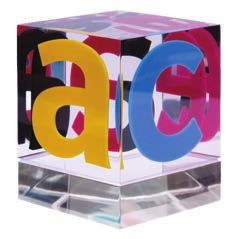
v Order a personalized, engraved Awards trophy.
This attractive Lucite cube is 3.5x3.5x3.5 square inches.
*Additional fees apply.
Opportunity to order a
personalized engraved
How Will You Know The Results? Awards trophy.
All entrants will be notified of the results by email once judging is complete.
At that time, you will have a very short window of time to correct or finalize any creative
credits and descriptions that you chose not to complete when entering.
To ensure you don’t miss the results notifications,
add winners@appliedartsmag.com to your address book.
2020 Awards Scheduale At a Glance Don’t miss the an-
nouncment, add win-
Awards Early Bird Deadline Final Deadline Winner Notifications Annual Published ners@appliedartsmag.
Photography Dec. 20, 2019 Jan. 10, 2020 Feb. 2020 April 2020 com to your contacts.
Illustration Dec. 20, 2019 Jan. 10, 2020 Feb. 2020 April 2020
Design Feb. 7, 2020 Feb. 28, 2020 Apr. 2020 June 2020
2020 CALL FOR ENTRY - PAGE 03
Student May 1, 2020 May 22, 2020 July 2020 Sept. 2020
Advertising Aug. 21, 2020 Sept. 11, 2020 Oct. 2020 Dec. 2020Judging Process
All work is entered digitally and judged digitally. There are no hard copies. Therefore,
please read our Helpful Tips throughout this document to ensure you prepare your work
to be viewed in the best possible way.
Work is judged A separate jury of senior creatives is chosen for each competition and does not include
independently and not anyone from Applied Arts’ staff. Judges must be invited.
compared or discussed.
The judges are divided into groups, each viewing a different and random group of entries.
Each judge reviews and scores the entries separately. Judges do not confer or discuss the
work and there is only one round of judging.
Entries are given one total score, based on three criteria only:
1. Creative merit
2. Technical excellence
3. Suitability for end use in the category into which it is entered
Note: Student, Young Blood and Community entries are judged with the level of experi-
ence and available resources taken into consideration.
v Each entry is judged independently on its own merit. Judges are asked not to rank or
compare entries. And, judges do not discuss the work.
v We have no pre-determined quota of winners. If a category has no winners, it is eliminated.
Similarly, a category may have multiple winners. All entries above the cut-off score are
declared winners and are published.
v We do not rank winners (i.e. no gold, silver, etc.). Every entry above the cut-off score is
given equal exposure in the Awards Annual.
Upon entry, you will Entry Material Requirements
need to grant us the
All entries are submitted digitally only. Hi-res, final files are to be submitted for judging.
rights to reproduce the
These files will be used for publication, if selected for the Annual.
image of images for
both our online You must enter the actual creative work following the ACCEPTABLE FILE FORMATS
Winners Gallery and AND FILE LIMITATATIONS, as noted below. Be sure to read the Supporting Files
print edition. section as well, for important notes re French (or other language) entries, case-study
videos/boards, and descriptions for judges.
2020 CALL FOR ENTRY - PAGE 04
Please be sure any URLs submitted will be available during the entire judging and publica-
tion process (please see the 2020 AWARDS SCHEDULE on page 03).
Please be sure any URLs submitted will be available during the entire judging and publica-
tion processAcceptable File Formats
Please also review the SUPPORTING FILES section below.
Stills: PDF (recommended), JPG, PNG, GIF
v File Size: 8-inches (or 203 mm) on the longest dimension
v Resolution: 300 dpi
v Colour Mode: RGB
v File size maximum: 5 MB
Motion / Online Video / Broadcast Video
The actual creative
v MP4 files are strongly recommended. In this case, we strongly suggest also including work must be entered.
a URL to the winning work so it may be published in the Awards Annual and Online
Winners Gallery. File size maximum: 80 MB.
v Important re MP4: Video files will be resized by our system to 800px wide keeping
aspect ratio.
v URLs to file sharing sites are acceptable, however, password-protected URLs are not Multiple-page PDFs
allowed. A URL is considered a file and counts towards one file upload. are preferred over
multiple, individual
Radio JPG, files.
v Include the script and the spot.
v MP3 files are strongly recommended. In this case, we strongly suggest also
including a URL to the winning work so it may be published in the Awards
Annual. File size maximum: 80 MB.
v URLs to file sharing are acceptable, however, password-protected URLs are
not allowed. A URL is considered a file and counts towards one file upload.
Password-protected
Digital / Interactive / Apps
URLs are not allowed.
v URLs to websites is an acceptable format, or you may upload a screen walk-through
file (File size maximum: 80 MB).
v A URL is considered a file and counts towards one file upload.
2020 CALL FOR ENTRY - PAGE 05
v URLs to file sharing sites are acceptable, however password-protected URLs are not
allowed.File Limitations
Single: One piece. Maximum of 1 file can be uploaded.
Series: 2-3 pieces from the same project. Maximum of 3 files may be uploaded.
(Exception: Photography & Illustration Awards – 2–5 pieces/files).
Be sure to curate Complete Single: 1 book/publication. Upload 1 file, with up to 9 pages.
entry to the number of (Exception: Student Awards – up to 6 pages).
max. pieces except in
Complete Series: 2-3 books/publications. Upload up to 3 files, with up to 9 pages per each
instances to show small
book. (Exception: Student Awards – up to 6 pages per book).
text, integrated or
mutliple views. etc. Campaign: Up to 9 pieces from an entire campaign. A maximum of 9 files can be upload-
ed. (Exception: Student Awards – up to 6 pieces/files).
Note: URLs with links to the work counts towards one file upload.
Supporting Files
Include English An additional supporting file may be included and does not count towards the file
translations or descrip- limitations noted above. Please note these important requirements for certain entries:
tions for judges.
French (or other language) entries: You must include an English translation for any import-
ant text for judging purposes.
Radio spots: You must include the script for publication purposes.
Case-study videos or boards: While we don’t recommend case-studies (as outcomes are not
a criteria for judges in scoring), they can be added for judging purposes only. You must
include the actual creative to be judged in a separate file.
Case-studies are not
Descriptions for the judges: Although not recommended (except where noted within a
required, outcomes are
category description), brief descriptions/explanations of up to 50 words may be added for
not a criteria for judges
clarity for the judges (or up to 10 seconds in the case of video/broadcast files).
or scoring.
Upload these documents to the Supporting Documents sub-section of the
Entry Materials section (Step 4 of the entry form) as a multi-page PDF file.
Helpful Tips
v Multiple-page PDFs are preferred over multiple, individual JPG files.
2020 CALL FOR ENTRY - PAGE 06
v Use a multi-page PDF to ensure the judges can easily get the full picture, at a
glance, on screen. We recommend entries be curated to the maximum number of
images indicated for each category, except in the following instances: show inside
pages, multiple views of 3D pieces and zoom in on small print or details. Also show
work in the context of how it was seen by the audience, especially in cases for
advertising work.
v Including English translations or descriptions for judges within your
multi-page PDF makes it easier for judges.v Look at your entry on a smaller-screen desktop. A judge may be viewing it at
that size, so take that into consideration and show zoom-ins on detail.
Winners Details
The primary company
On the online entry form the fields for the Winners Information, Description or individual to be
of Entry and Creative Credits are for publication use only and are not visible to the judges. credited on the project.
Please review this information carefully – it will be published if your entry wins. Additional team
members can be added
in the CREATIVE
Winners’ Information
CREDITS section.
The ‘Winner’ field is the primary company or individual you want to be credited on the
project. In most cases, it is the company name, but could be an individual or individuals in
the case of a photographer, illustrator, young blood, etc.
Description of Entry: The intention of the description is to provide an overall creative sum-
mary of the entry piece or project to be printed in the Annual. The description is limited to
a maximum of 500 characters (including spaces).
Helpful Tips
Descriptions for the judges are not recommended, except where specifically noted. The
judges do not see the typed Description of Entry – they are for publication in the Annual.
If you feel strongly that judges need a description/explanation, it must be added into your
image files, but please limit it to 50 words or a max 10-second intro for video/broadcast.
Case-study videos/boards are not recommended. Outcomes are not a criteria for judges
in scoring. If you wish to include, upload them within the Supporting Files subsection
(step 4 of the entry form).
Multiple names
with the same role are
Creative Credits
counted as one
Credits are a summary of the individuals or companies that have worked credit role.
on the project.
A credit can be designated with an individual’s name or an organization. A credit role is a
job function (i.e. Creative Director, or Production House).
Multiple names can be assigned to one credit role (i.e. if you have two Creative Directors, 2020 CALL FOR ENTRY - PAGE 07
they are counted as only one credit role).
Important: A maximum of six credit roles will be published in the Annual, however, all
creative credits you entered will appear in the online Winners Gallery.
Reminder: THE WINNERS’ INFORMATION (including the Description of Entry) and
CREATIVE CREDITS should be entered at the time of submission, as we only allow for a
very short window of time to edit or add these once winners are notified.Fees And Payments
Entry fees vary. Check each Awards competition for entry fees. Only once you have paid
Entries are not final for an entry is it considered final and officially entered and cannot be changed. You can
and submitted to pay for all or only some of your entries at any given time – just select which entries you
competition untl they want to pay for from your ‘My Entries’ account.
are paid.
Payments can be made by Interac, Visa, MasterCard or American Express
(Amex on Canadian payments only at this time). For US and international entries,
fees are in US funds.
We only accept cheque or direct deposit in special circumstances.
These cases must be pre-approved. Contact awards@appliedartsmag.com
with your request.
Note For The Students Awards Competition: School codes are available for teachers
who arrange for their school to pay for their students’ entries. Students can complete
the entry form individually and submit a school code as a form of payment. We will track
the entries and issue an invoice for payment by the school.
How To Enter
Bookmark The Entry Form consists of 5 steps. You will have the option to save your
appliedartsmag.com/ progress during each step of the process.
myentries for easy
access to your Create your ‘My Entries’ account by visiting appliedartsmag.com/awards.
account later. Note: This is your Applied Arts Awards account for all Awards competitions. Once logged in you
can edit your personal information, add, copy or edit entries and pay for entries.
Step 1: Entry Information
Select from one of the Awards competitions, choose a category and add your entry title.
Note: If you are a Canadian working within a small community or with smaller businesses
or budgets you may enter under the Community categories. See the Entry Kit for each Awards
competition for details.
Step 2: Entry Materials
2020 CALL FOR ENTRY - PAGE 00
08
Entry Format: All entries are to be submitted digitally only. High-resolution, final files
are to be submitted for judging. These files will also be used for publication. See ENTRY
MATERIAL REQUIREMENTS on page 04 for full details and helpful tips.File Limitations
Single: One piece. Maximum of 1 file can be uploaded.
Series: 2-3 pieces from the same project. Maximum of 3 files may be uploaded. URLs to file sharing
(Exception: Photography & Illustration Awards – 2–5 pieces/files). sites is acceptable, be
sure work is accessible
Complete Single: 1 book/publication. Upload 1 file, with up to 9 pages.
during the entire judg-
(Exception: Student Awards – up to 6 pages).
ing and publication
Complete Series: 2-3 books/publications. Upload up to 3 files, with up to 9 pages per each period, see page 03.
book. (Exception: Student Awards – up to 6 pages per book).
Campaign: Up to 9 pieces from an entire campaign. A maximum of 9 files can be uploaded.
(Exception: Student Awards – up to 6 pieces/files).
Note: URLs with links to the work counts towards one file upload. URLs to file sharing site for
videos are permitted, however, password-protected URLs are not allowed.
We recommend includ-
Reiminder: Case-study videos/board, translations, etc. that support the project can be
ing the URL as we don’t
uploaded to the Supporting Documents sub-section of the Entry Material section
upload the MP3 &
(Step 4 of the entry form).
MP4 files directly for
viewing in the Winners
Step 3: Winners’ Information Gallery; They are only
used for judging.
Everything entered in this section is for publication only and is not visible to the judges.
Please review it carefully. There will only be a short window of time to edit this informa-
tion after the Winners have been notified.
Reminder: The ‘Winner’ field is the primary company or individual you want to be credited
on the piece (i.e. company name, photographer, illustrator, Young Blood, etc.).
Note: For Young Blood categories & Student Awards entries, in the instance that a team All descriptions of
(ad/writer) worked together, enter the first name in the Winners field. The other individual or Entry are subject to
individuals can be added in the CREATIVE CREDITS section. Use the ‘Other’ role and enter be edited for length,
‘Young Blood’ or ‘Student’ in the blank field. It will not be counted towards your 6 credit roles clarity and grammar
(See Step 4: CREATIVE CREDITS for further explanation). in accordance with
Optional fields: Phone, email, web address and winning URL (to direct readers and visitors Applied Arts editorial
to view the winning work in its entirety - typically, for motion and video entries). If these style guide
are entered, they will be published beside your winning work.
2020 CALL FOR ENTRY - PAGE 09
Description of Entry: For the purpose of providing an overall creative summary of
the project in the Annual. The description is limited to a maximum of 500 characters
(includes spaces).
Note: Descriptions are for publication use only and are not shown to the judges. Descriptions you
wish to share with the judges must be included with your uploaded files.Step 4: Creative Credits
Credits are a summary of the individual or company that have worked on the project.
The first 6 credit roles you enter will be published in the Annual. Any/all additional credit
roles will appear online in the Winners Gallery.
Reminder: A credit can be designated with an individual’s name or an organization.
A credit role is a job function (i.e. Creative Director). Multiple names can be assigned
A credit can be to one credit role (i.e. if you have two Creative Directors, they are counted
designed with an as only one credit role).
indvidual’s name or an
organization. A credit You only have to enter credits once. Credits automatically get saved to your account to
role is a job function be used for any competition. You can either select a saved credit for your entry or you can
(i.e. Creative Director add a new credit. To change the order of the credits, change the number from the sort
or Production House). column and select ‘Update Sort’ when you are finished.
Multiple names can be
Note: It is recommended that credits be completed at the time of submission. Please review
assigned to one role.
your credits preview carefully, particularly the credits to be the printed in the Annual.
If your entry is selected to be published in the Annual there will be a very limited time period
to edit or add to your credits.
Step 5: Certificate information
You will receive one certificate for each winning entry. Complete the winning company/
individual and/or client you wish to appear on the certificate. The entry title and the cate-
gory the project won in will also be included on the certificate. You will have the opportu-
nity to order additional certificates once winners have been notified.
Winners will be given a
short window The entry form is now complete. You can now press the ‘Save’ button to return to
of time to make edits your ‘My Entries’ dashboard to apply a new entry, copy the entry to a new category
to information in their or to pay for your entry.
Winner’ Information
or Creative Credits Note: A submitted entry is not final and entered in the competition until you pay for it. You may
sections. edit an entry until you pay for it. Once payment is processed, it is final.
Reminder: Winners will be given a short window of time to make edits to information in
their WINNERS’ INFORMATION or CREATIVE CREDITS sections.
Frequently Asked Questions
00
PAGE 10
Eligibility FAQ
ENTRY -- PAGE
Can I enter something I entered last year? Not in the same competition, but if it meets the
eligibility period for a different competition, then yes.
FOR ENTRY
Can I enter something in multiple Awards competitions? Yes. Each competition has
different eligibility periods, please check each competition to ensure it meets the
CALL FOR
eligibility requirements.
2020 CALL
2020Can I enter something in multiple categories in the same competition? Yes. With the exception
of Community categories. Work submitted to the Community categories is not eligible
to be entered in the non-Community categories with the exception of the Young Blood
categories.
Can students enter? Students may only enter the Student Awards. They may not enter any
of the professional awards.
I’m a high school student. Can I enter? Yes. There are a limited number of categories available
for high-school students in the Student Awards competitions. The rest of the categories
are open only to post-secondary students attending a college, university or other type of
art school.
I am currently studying a post-graduate/graduate program, am I still eligible to enter? Yes. You
are still eligible to enter the Student Awards competition.
Am I still eligible to enter if I recently graduated? If you’ve graduated in the past year
you are still eligible to enter the Student Awards. You may also qualify to submit work
to the Young Blood categories in the professional competitions. Please see the
specific discipline for eligibility.
Categories FAQ
Can I enter a piece in multiple categories? Yes. In your account on the My Entries home page,
click “Copy” on any entry you’ve created. Be sure to change the discipline and entry cate-
gory to the new one you want to submit to.
Which category does my entry belong in? Often the best way to understand a category is to
see previous work that won in that category. Check our online Winners Gallery for exam-
ples. If you still have questions regarding our categories or require assistance in selecting
the appropriate category, contact awards@appliedartsmag.com.
Note: Applied Arts reserves the right to move an entry to another category if we feel it unsuitable
or incorrectly categorized.
Is my entry a single or a series? A single means one piece, and series means you are submit-
ting more than one piece of the same project to a maximum of three (five pieces for the
Photography & Illustration competitions). A campaign, unless otherwise specified in the
specific awards competition, is up to 9 pieces. If an entry contains more than the specified
images, we will either contact you to split the submission into multiple entries, or choose
which ones will be judged, so it’s best to stick to the indicated numbers for single or series.
2020 CALL FOR ENTRY - PAGE 11
What is a Complete Single/Complete Series? ‘Complete’ refers to a multiple-page
entry, such as a book or a publication. More images are typically required to properly
show it and judge it.
What is the Young Blood category? Young Blood is a series of categories open only to
entrants who have been out of school up to a certain number of years (three for Photogra-
phy and Illustration, and five for Design and Advertising). As with all categories, they are
judged on creative excellence, technical merit and suitability for end use, but the jury also
takes into account the level of professional experience. You will be required to specify the
name of the Young Blood entrant to qualify.What is the Community category? The Community Awards was our newest Awards
competition, launched in 2017, to help Canadian artists and studios working on smaller,
local clients get the recognition they deserve without competing directly with big-budget
projects and agencies/studios. In 2019, Community Awards categories were rolled into
each of the four professional competitions (Photography, Illustration, Design
and Advertising) giving these smaller studios and projects great exposure. Entries in
these categories may not be entered in any other non-Community category with
the exception of Young Blood categories.
Entry Material FAQ
At what specs do I need to submit my entry? Refer to Entry Material Requirments on page 04
for specifications. All competitions require hi-res, final files upon entry.
Can I submit a hard copy or disk? No. Only digitally-uploaded entries are accepted.
The program crashed. Did I lose everything? No – you will be saving your work as you go
through each section of the entry form. If the program crashes as you are completing a
certain section, it may not have saved.
The file I uploaded won’t show me a preview. Why? You may not see the image preview if you
haven’t followed the specs outlined in Entry Material Requirments on page 04.
Check your file and re-upload. If you continue to experience difficulties, contact
awards@appliedartsmag.com.
I uploaded the wrong file. Can I change it? Yes. You can resubmit images at any time until
payment is made. Click the ‘Remove’ beside the appropriate file and re-upload your im-
age. Note: Thumbnail images may not correctly display your new image. You may need to
close your browser and log back into my entries for the changes to show.
Right FAQ
Do I need to get the rights of the subjects or material used from external sources in my entry? It is
the responsibility of the entrant to ensure copyright is not infringed. Upon entry you must
grant us the rights to reproduce the image or images for both our online and print publica-
tions, so you would most likely need to have these rights in place to protect yourself.
Although you do not need to send us a copy of the release forms, we do suggest that you
get them. Entrants that come back to us requesting we don’t run their winning work
because they don’t have the rights will not be refunded for their entry. Note that student
work is often exempt from copyright rules.
00
PAGE 12
ENTRY -- PAGE
What rights do I retain if my work is chosen? You retain all rights to your images. Upon entry,
you will need to grant us the rights to reproduce the image or images for both our online
Winners Gallery and print edition.
FOR ENTRY
My client has revoked the right for me to enter work I’ve won for. What do I do? We do not issue
CALL FOR
refunds in these cases, but please contact awards@appliedartsmag.com if you need the
entry removed from the Winners’ pool.
2020 CALL
2020Payment FAQ
Can I submit more entries after paying? Yes. In My Entries, you will have the opportunity to
submit additional entries even if others already entered have been paid for. This will sim-
ply generate a new confirmation email when you complete your entries with payment.
I want to change something after I’ve paid. What do I do? Once an entry is paid, you cannot
change the category, entry format, entry title, description of entry or creative credits.
A paid entry is final, so check it carefully before proceeding to the payment fields.
If chosen as a winner, you will be given a small window of time to add or edit information.
Can I get a refund? Entries are non-refundable. Costs cover administration, processing
and the judging of the entry. A submission of entry acknowledges acceptance of
these rules.
I’m getting error messages when I try to pay. What do I do? If you entered your payment infor-
mation incorrectly on your first attempt, any subsequent attempts will be declined, even
if you change your payment type. Close your browser and log back into My Entries. You
should now be able to proceed with payment. If you continue to experience difficulties,
contact awards@appliedartsmag.com.
How do students enter and pay? Students can enter on their own, or teachers may submit
on their behalf. If you are a teacher with a large volume of student entries to submit and
would like to organize payment through your school, you can contact awards@applie-
dartsmag.com for a School Group Code. Students submitting their entry must complete
an online entry form (including final description of entry and creative credits, which will
be published if the entry wins), upload the corresponding images, then select ‘School
Code’ under Payment Method to finalize the entries. Once all students have submitted
their entries, contact us with your School Group Code so that we can process your pay-
ment for the group.
Winners FAQ
What do winners receive?
v Your work published in print in the corresponding Awards Annual.
v A complimentary copy of the Annual your work appears in.
v Your work published online in our Winners Gallery.
v The ability to share your winning entries in a digital tearsheet format directly from our
2020 CALL FOR ENTRY - PAGE 13
online Winners Gallery.
v A personalized Awards certificate for every winning entry, signed by Georges
Haroutiun, the founder and art director of Applied Arts.
There are also optional opportunities for winners. See the What Winners Receive section
on page 03.
If I win, what image will you use for reproduction? We will use the image(s) you submitted on
entry. In the case of series, complete, campaign, broadcast, digital or motion, we select a
sampling at our discretion from the images submitted.Contact
Questions? If you’ve checked all of the above sections and cannot find the answer to your
question, or if you are having difficulty entering, contact awards@appliedartsmag.com.
Disclaimer
Applied Arts reserves the right to amend these rules throughout the competition. Applied
Arts assumes all entries are original and the property of the entrant, with all rights granted
therein. Applied Arts reserves the rights to publish or exhibit entries for our print or elec-
tronic formats, or related promotions. Entries are non-refundable. Costs cover adminis-
tration, processing and the judging of the entry. All descriptions and credits are subject
to be edited for length, clarity and grammar in accordance with the Applied Arts editorial
style guide. A submission of entry acknowledges acceptance of these rules.
00
2020 CALL FOR ENTRY - PAGE 14You can also read


