ATLAS LAr Calorimeter Smart RTM - John Hobbs, Dean Schamberger Gene Shafto, Vaneet Singh Stony Brook University Charlie Armijo, Kade Gigliotti ...
←
→
Page content transcription
If your browser does not render page correctly, please read the page content below
ATLAS LAr Calorimeter
       Smart RTM
             John Hobbs, Dean Schamberger
               Gene Shafto, Vaneet Singh
                  Stony Brook University

Charlie Armijo, Kade Gigliotti, Ken Johns, Stephen Morrison
                     Univ. of Arizona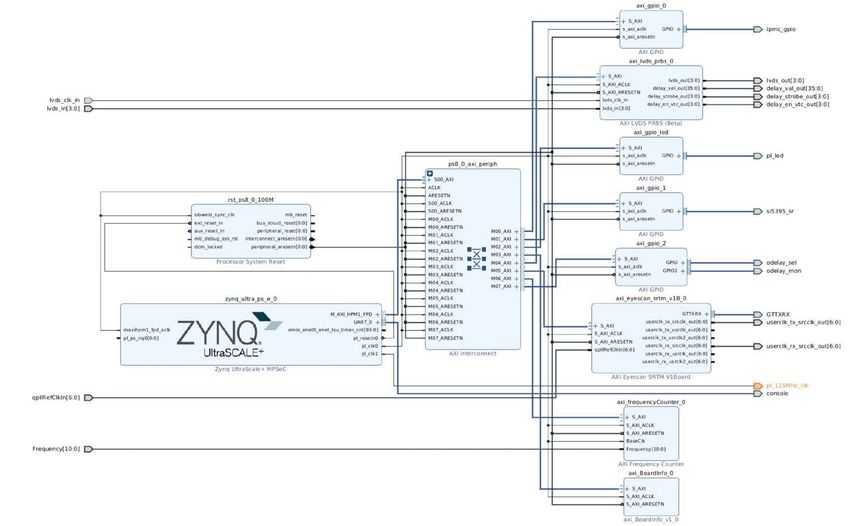
Outline
                • Introduction
                • SRTM Hardware Status
                • Processor / FPGA Functional Split
                • System Setup and Build
                • User Code

9 June., 2021                               SOC Workshop   2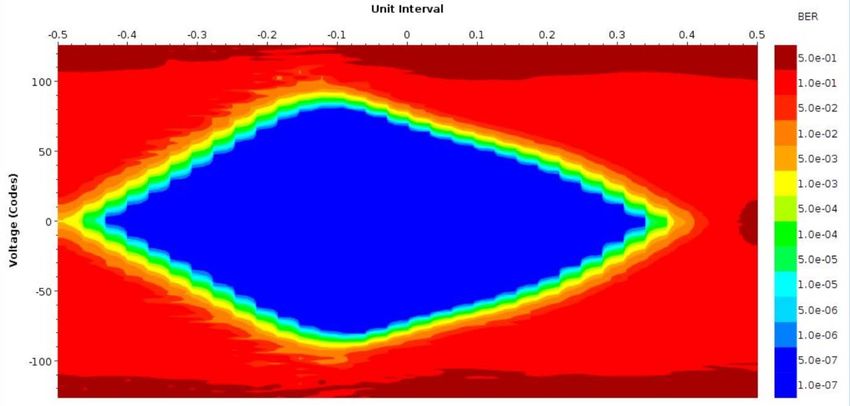
Introduction: HL-LHC Upgrade
                     On-detector             Off-detector

                                                                     Timing distribution

                                                                     LASP main blade
                                                                      receives LAr cell ADC
                                                                      determines E,t
                                                                      output to decision logic
                                                                      uses traditional FPGAs

                                                                     + Smart Rear Transition Module
                                                                     (SRTM)
                                                                       Interface for monitoring
                                                                       Interface to Felix
                                                                       Additional processing,
                                                                          merging under study

      LASP Input:                                            System output:
       Up to 1024 calo channels = 8 FEB2’s                     Forward FEX, ≤ 40 @ 25 Gbps
       176 links @ 10.24 Gbps                                  Global Trigger, ≤ 8 @ 25 Gbps
                                                               TDAQ, ≤ 8 @ 10.24 (25?) Gbps
9 June., 2021                                 SOC Workshop     Monitoring (10 Gbe?)               3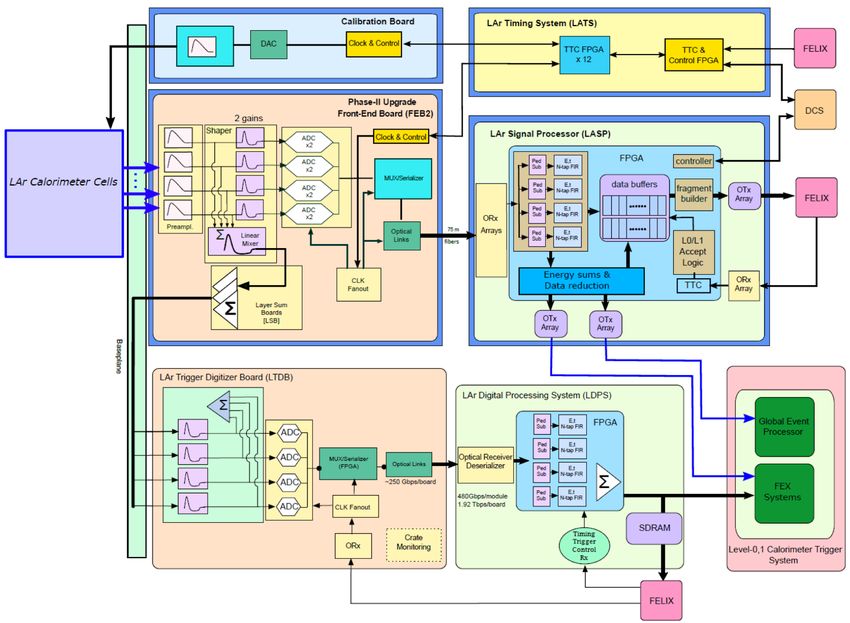
SRTM: First Test version in hand
        System
                • Zynq US+ MPSoc (XCZU11)
                    Choice based primarily on GTY transceiver count
                • 16 GB DDR4 module
                • GbE x2, μSD, flash, I2C, UART console, JTAG …
                • Clock recovery / generation
                • I2C Sensors: TMP, V-I, status registers, power management
                •   + internal sensors (Zynq, Firefly, clock, …)

     Communications Links via Zynq
                • 2 x 4 channel firefly Tx/Rx @ 25 Gbps (w/mon.)
                • 2 x 10 Gbps + 2 x XAUI monitoring
                • LVDS links

      “Pass through” links (not to Zynq)
                • 4 x 12 channel firefly Tx @ 25 Gbps (w/mon.)
9 June., 2021                                            SOC Workshop         4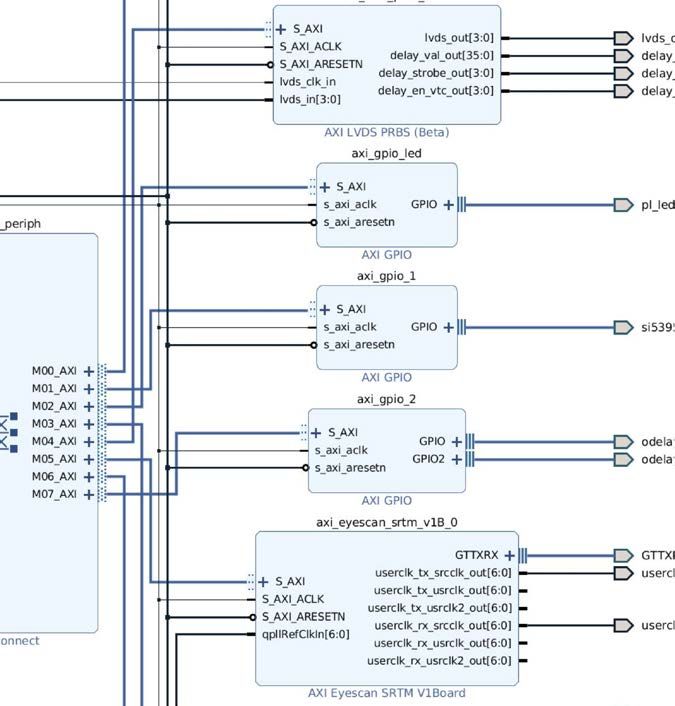
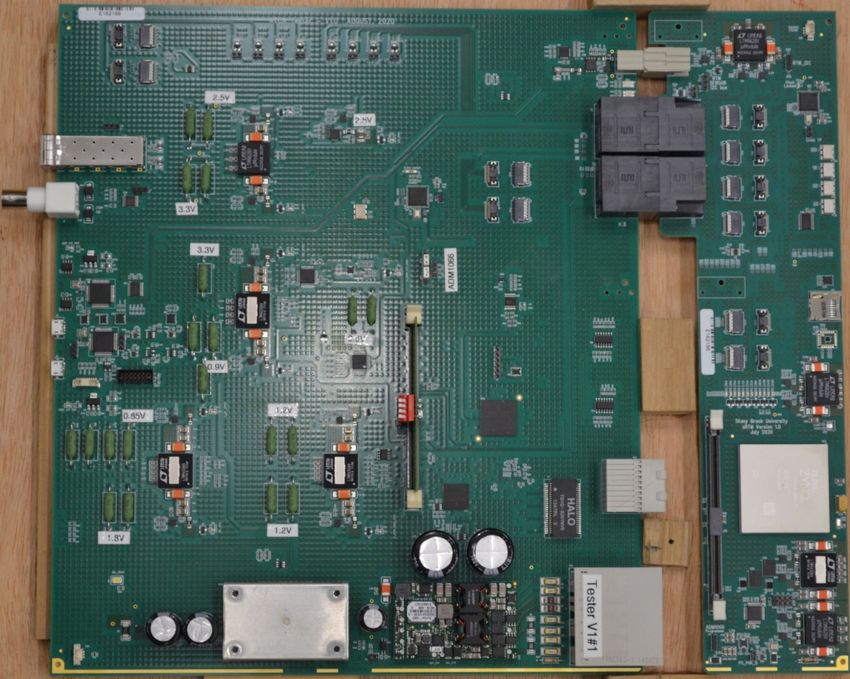
Test set up: SRTM + simple testing board
                            SRTM Tester card                                SRTM

                                                                                       Tester card
                                                                                         ATCA infrastructure
                Fireflies                                                                Zynq links, loopback
                                                                                         Pass thru: devkit

                                                                                       Full interface between
                                               Fireflies                                 LASP and SRTM
                                                                          Fireflies

                                                                                       Boot and file system
                                                                                         default from μSD card
                                                                                         also via flash (less storage)
                                                                                        run time switchable
                                                                                Zynq

9 June., 2021                                              SOC Workshop                                             5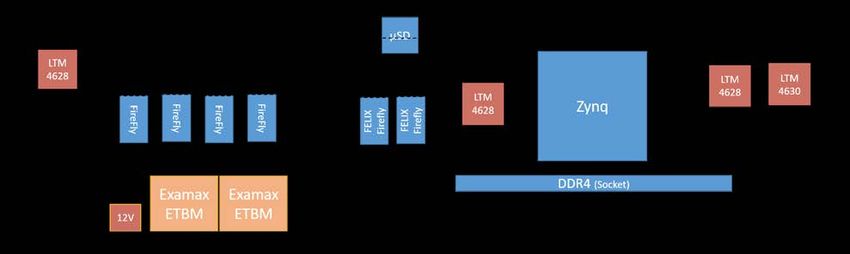
Testing Status
        All system infrastructure and links tested OK.
         No infrastructure problems seen                     Completed initial LDVS and transceiver tests
           I2C sensors, clock generation,                     connectivity good
           SD card booting and flash access,                  short initial runs show no errors
           GbE
             ….

                                SRTM Firefly@25 Gbps: 73% open (optical loopback; no tuning yet)

                  One issue: SAMTEC changed 12 channel, 25 Gbps, Tx only spec supply voltage
                   to 3.6 V (not a typo!). Design revision required
9 June., 2021                                            SOC Workshop                                       6
Functional Partitioning
• Arm Processor (PS in Xilinx terminology)
Non-time critical system level functions: OS boot, login,
board monitoring, GbE comm., configuration, infrastructure,
logging, slow controls, …
• FPGA (PL in Xilinx terminology)
Time critical data processing and handling: LHC clock recovery,
data paths including any extra processing and reformatting;
and higher-rate monitoring
9 June., 2021 SOC Workshop 7System Setup
HDL: Vivado as expected
• Use the “board files” approach for Custom HDL
Zynq parameterization and for
Xilinx IP instantiation
Xilinx core
• Link PS and PL sides through AXI
interconnect and dedicated HDL
Either using Vivado IP packaging flow
instantiated in the main block diagram
Or take AXI signals from interconnect
out of main block diagram
Both work. coding preference…
Custom HDL
• Script based project generation
Scripts created “by hand”
find a better solution for long term…?
e.g. HOG?
Through to bit stream and export
All firmware, software, scripts, etc in git
9 June., 2021 SOC Workshop 8System Setup
OS, using petalinux (for now at least; CENTOS replacement/Linux standardization?)
• Standard Xilinx workflow used. Limited specialization
Use I2C, GbE, GPIO, SPI, watchdogs, etc, from PS side; automatically supported in build
Routinely add a suite of packages provided w/petalinux: python, compilers, utilities …
Will eventually create a dedicated defconfig tuned to our boot process…
• AXI interfaced HDL blocks automatically in device tree and drivers in OS
This is an important constraint
• Write minimal user space I/O device drivers
Provides non-root interfaces to custom logic
Access at register level or read/write/ioctl. So far, register level exclusively
Snippet from boot sequence showing a uio device appearing
[3.539730] in axieyescan_probe
[3.539734] axieyescan b0100000.axi_eyescan_srtm: Device Tree Probing
[3.539751] axieyescan b0100000.axi_eyescan_srtm: no IRQ found
[3.539757] axieyescan b0100000.axi_eyescan_srtm: axieyescan at 0xb0100000 mapped to 0x0bf00000
[3.539760] axieyescan b0100000.axi_eyescan_srtm: UIO size = 1048576
[3.539847] axieyescan b0100000.axi_eyescan_srtm: return from uio_register_device = 0
• Petalinux tools for boot images: standard FSBL, image, root fs packaging
9 June., 2021 SOC Workshop 9System Setup
SDK for “User” code (defined as not in kernel or loadable modules)
• As for Vivado, script based builds
• Defined a simple directory structure and default locations
• Advantage is easy debugging via SDK.
• Some drawbacks: compilation by scripts and dependences
Code examples:
sensor monitoring (I2C), e.g. Clock frequency checking
Reference Counter: 100000000
clock programming (I2C; GPIO), Channel 1 counter: 125001382
clock frequency checks (uio, AXI), Channel 2 counter: 156251596
Channel 3 counter: 160317756
firefly control (GPIO; I2C), Channel 4 counter: 160317756
Channel 5 counter: 160317756
hardware versioning (uio, AXI), Channel 6 counter: 160317756
LVDS prbs testing (uio, AXI), Channel 7 counter: 160317756
Channel 8 counter: 160317756
transceiver eyescan (uio, AXI), Channel 9 counter: 43534017
Channel 10 counter: 160317756
web interfaces to these
• SDK is a temporary solution: 2018.3 is last supported release
• Soon resume looking for alternatives
• Could do native builds directly on an SRTM or a devkit. Debugging?
9 June., 2021 SOC Workshop 10Progress
• Routinely building system: HDL, petalinux, user code
• Primarily, so far, for low-level system testing
• Needed to establish basic functioning. DONE
• Set up some (temporary?) procedures and script trees
• Next steps focus on PL functionality with protocols
• IP bus on SRTM
• ATLAS functionality XAUI monitoring
• ATLAS functionality for GBT data
• Down the road
• Finalize interfaces, specs
• Decide on various user interfaces
Management: IP bus, OPC/UA server [supported version?]. Others?
Visual summary: now web-based for testing, but move to ATLAS standards
9 June., 2021 SOC Workshop 11Comments
• A need: we lack robust, simple build environments
Haven’t put sufficient time into exploring what’s available yet.
• Currently using command line build scripts
hand-maintained tree, basically boot strapped
using multiple git repos, so tools must handle this
mix of HDL, OS code and user code implies multiple environments
debugging tools?
Ideally, an ATLAS (or CERN) common solution could be used.
• Petalinux is (potentially) temporary
• Had planned to use CENTOS… Again, prefer an ATLAS common sol’n
• We are seeing impact of global chip shortage
Delaying assembling revised design for firefly spec change
9 June., 2021 SOC Workshop 12Summary
• ATLAS SRTM will provide up to 25 Gbps data paths for
monitoring, FELIX
• First test board working well
• Will begin integration tests with LASP this winter
• SOC CPU provides full OS support and used for non-critical tasks.
• Following examples to get started was relatively straight forward (DevKit)
• FPGA side for data flow
• Tested using low level code
• ATLAS firmware started: XAUI/10 GbE and GbE+IPBus
• Interfaces between CPU and FPGA using user space I/O
9 June., 2021 SOC Workshop 13BACKUP 9 June., 2021 SOC Workshop 14
From additional HDL

                                                                       To additional HDL
                                       Can also bring AXI interfaces
                                       out of block design
9 June., 2021           SOC Workshop                                                 15
Console and GbE comments
• The only SRTM design problem was a level shifter mistake
• Realized it during PCB production, so shifter wasn’t populated.
On the petalinux default boot console, PS side UART0.
• Have a redundant connection from the PL side.
• Switched to this routing PS uart through PL side instead of MIO pins
• GbE on both PS and PL side for testing
• Concern about using PS GEM -> PS GTR, the preferred solution, with
any on board GbE switch.
• PS side does work well
• PL side tested is actually PS GEM to PL PHY IP core
• Connections proven with a non-petalinux test program
• Not needed for basic functionality, but may be useful for (e.g.) IPBus.
9 June., 2021 SOC Workshop 16You can also read


