Belgian eID Authentication Reverse Proxy User's guide
←
→
Page content transcription
If your browser does not render page correctly, please read the page content below
Belgian eID
Authentication Reverse Proxy
User's guide

                                 For
                               Fedict

                                From
                CSC Computer Sciences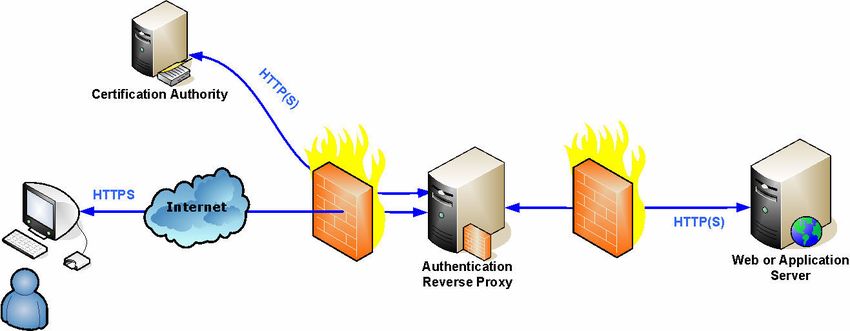
Belgian eID Authentication Reverse Proxy User's Guide

                                                 Table of Contents
1.     Introduction...................................................................................................................... 3
2.     Architecture...................................................................................................................... 4
     2.1      Infrastructure.......................................................................................................... 4
     2.2      Application access control ...................................................................................... 5
3.     Solution description ......................................................................................................... 6
4.     Prerequisites and limitations ........................................................................................... 7
     4.1      Notation.................................................................................................................... 7
     4.2      Wizard...................................................................................................................... 7

     4.3             Windows ........................................................................................................... 7
     4.4                Unix................................................................................................................ 8

     4.5       Known issues .................................................................................................... 9
5.     Installation ..................................................................................................................... 11

     5.1             Windows ......................................................................................................... 11
     5.2                Unix.............................................................................................................. 13
     5.3      Customisation ........................................................................................................ 15
     5.4      Proxy and SSL Configuration.............................................................................. 16
     5.5      Install Government Certificates .......................................................................... 17
     5.6      Install Server Certificate ...................................................................................... 18
     5.7      Configure security parameters ............................................................................ 20
     5.8      Server restart......................................................................................................... 21
6.     Usage .............................................................................................................................. 22
     6.1      Retrieving citizens’ certificate information ........................................................ 22
     6.2      Restricting access to a path requiring SSL authentication ............................... 22
     6.3      Logging OCSP answers ........................................................................................ 23
     6.4      SSL Error Redirection ......................................................................................... 23
     6.5      CRL ........................................................................................................................ 25
     6.6      Certificates validation........................................................................................... 25
7.     License issues ................................................................................................................. 26
     7.1      EID Authentication Reverse Proxy license agreement...................................... 26
     7.2      Third-party licenses .............................................................................................. 29
8.     Software History............................................................................................................. 36
9.     Document History .......................................................................................................... 39

Modified: 18/09/2006 14:35:00                                    2/40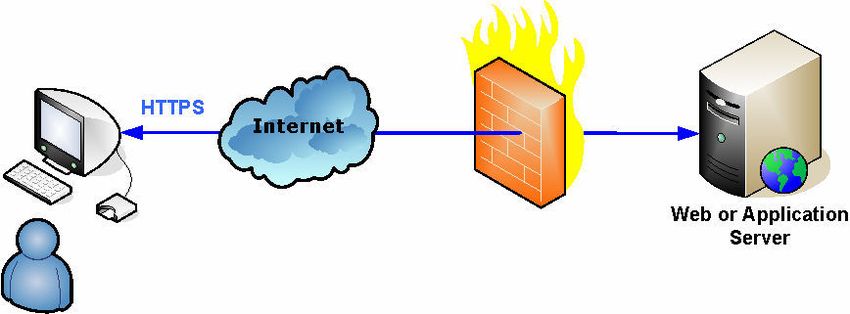
Belgian eID Authentication Reverse Proxy User's Guide

1. INTRODUCTION

This document describes the usage of the “Belgian EID Authentication Reverse Proxy” – being
referred here as “the reverse proxy”. This reverse proxy is a multi-platform solution for
authenticating citizens with their eID card on a Web Server (like Microsoft IIS, or Apache), or
an Application Server (like IBM Websphere, Weblogic, or Tomcat). We will refer this server as
“the Application Server”, although it could be a simple Web Server.
The main goal of this guide is the explain the architecture, the installation, the usage, and the
parameterisation of this reverse proxy.

Modified: 18/09/2006 14:35:00               3/40
Belgian eID Authentication Reverse Proxy User's Guide

2. ARCHITECTURE

2.1      Infrastructure

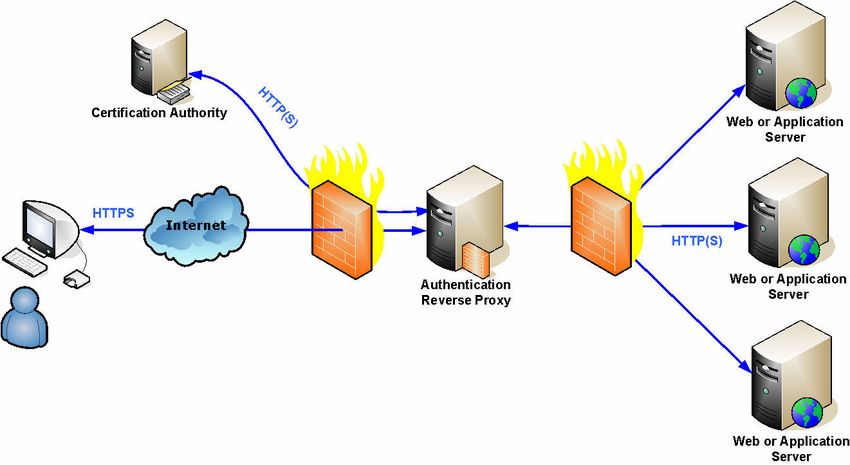
In the most simple situation, the user’s browser connects directly to the Application Server.

In order to add an authentication step, we will add the reverse proxy between the user’s browser
and the Application Server. The reverse proxy may (should) contact the Certification Authority
to check the certificates validity – that is, that they have not been revoked.

Note that a “normal” reverse proxy is often installed for other technical and security reasons, like
not having the users directly connected to it.
We represented here the most common architecture, with the reverse proxy between two
firewalls – in a zone called DMZ, but the solution would also work with the reverse proxy
installed on the same machine as the Application Server1.

1
    In this case, the Application Server must run on other ports than the standard ones, as the standard ones will be
      used by the reverse proxy.

Modified: 18/09/2006 14:35:00                          4/40
Belgian eID Authentication Reverse Proxy User's Guide 2.2 Application access control In order to integrate an access control mechanism in your Web application, you need to receive the citizen’s information. This information is provided in HTTP headers, that are usually mapped by your Application Server to environment variables. In case of a Web Server with static pages, the reverse proxy may also be used to limit the access to some parts of the site to specific people. The detailed information is described in chapter 6.2. Modified: 18/09/2006 14:35:00 5/40
Belgian eID Authentication Reverse Proxy User's Guide

3. SOLUTION DESCRIPTION

The reverse proxy is a customised version of the open source reverse proxy and Web Server
Apache (http://www.apache.org). Apache itself allows a much more complex architecture than
the one described above, like – for example – having one authentication reverse proxy for
several applications.

All the usual Apache features will be available, although only the authentication part for simple
architectures will be discussed in this document.
Customisations added to the default Apache package:
        Updated version of “mod_ssl” to support the OCSP protocol2
        External module to trap certificates validation errors and to redirect to a HTTP URL3
        Updated version of “mod_headers” to export SSL headers4
        Several bug fixes – see chapter 8
        Installation of the Belgian Government Root Certificate
        “Wizard” to automate the configuration of a simple architecture

2
  Submitted to the Apache group for inclusion in a next version
    (http://nagoya.apache.org/bugzilla/show_bug.cgi?id=31383).
3
  This required a modification in “mod_ssl” – Submitted to the Apache group for inclusion in a next version
    (http://nagoya.apache.org/bugzilla/show_bug.cgi?id=35083).
4
  To be included in future versions, see http://cvs.apache.org/viewcvs.cgi/httpd-
    2.0/modules/metadata/mod_headers.c?r1=1.49&r2=1.50

Modified: 18/09/2006 14:35:00                      6/40
Belgian eID Authentication Reverse Proxy User's Guide
4. PREREQUISITES AND LIMITATIONS
You must have administration privileges on the machine in order to install the software.
Port 80 and 443 must be free; any other service or application using them must be stopped
(like a Web server)
For more information, see the Apache Documentation http://httpd.apache.org/docs-2.0/; this
documentation will also be installed locally.
4.1 Notation
In the following chapters, the commands to be executed, or the parameters to adapt in the
configuration files use the following syntax:
All commands or parameters are written in a grey box
tar xvfz openssl-0.9.7f.tar.gz.tar
Everything that must be replaced by your own data is in italic bold green
ServerName myservername:80
Comment may be added in small italic brown
ServerName myservername:80 you must use the full domain name
4.2 Wizard
The “wizard” configure Apache Web Server as a Reverse Proxy to a single remote server.
Advanced features like Virtual servers, caching, Reverse Proxy to several remote servers, …
must be installed manually.
4.3 Windows
Microsoft Windows 2000 server or upper (a workstation could be used for tests)
Microsoft Windows Installer 2.0 must be installed.
IIS, if installed, must be stopped
Modified: 18/09/2006 14:35:00 7/40Belgian eID Authentication Reverse Proxy User's Guide
4.4 Unix
For all platforms, except Windows, Apache must be compiled on the target machine.
In order to compile Apache, the following programs must be available :
gcc
gawk
flex ?
gunzip
The following shared objects must be available in order to run Apache
libiconv 1.8
lzlib 1.1.4
4.4.1 Linux
All needed programs and shared objects are usually installed with all Linux distributions
4.4.2 Solaris
zlib is usually installed
Warning: on some version the program ar (needed to create dynamic modules) is located
in /usr/ccs/bin, which is not included in the path !
Modified: 18/09/2006 14:35:00 8/40Belgian eID Authentication Reverse Proxy User's Guide
4.5 Known issues
4.5.1 Apache bugs
Do not use session caching parameter “dbm”, as this introduces memory leaks; the best
parameter is usually “shmcb”
SSLSessionCache shmcb:...
...
When a user tries to reconnect a page in SSL with an invalid certificate (revoked, suspended,
…), Apache does not validate the certificate again if it is still in its cache; it immediately rejects
it. In this case, the SSL error handling module is notified about the error, but it does not receive
the “location” context: it traps the error in the “virtual host” context. So, if redirected pages were
defined in “location” contexts, they are ignored.
As only the “virtual host” context will be used in this case, be sure either to only define you SSL
error pages at the “virtual host” level, or, at least, to add some pages at the “virtual host” level.
Example:
...
/sub
SSL_Error_DefaultURL "/error/
/error/invalid
/error/invalid.html
invalid.html"
.html
SSL_Error_URL 23 "/error/
/error/revoked
/error/revoked.html
revoked.html"
.html
SSL_Error_URL 10 "/error/
/error/expired
/error/expired.html
expired.html"
.html
:...
...
...
becomes:
...
SSL_Error_DefaultURL "/error/invalid.html
/error/invalid.html"
/error/invalid.html
SSL_Error_URL 23 "/error/revoked.html
/error/revoked.html"
/error/revoked.html
SSL_Error_URL 10 "/error/expired.html
/error/expired.html"
/error/expired.html
:...
...
...
or:
...
SSL_Error_DefaultURL "/error/invalid.html
/error/invalid.html"
/error/invalid.html
SSL_Error_URL 23 "/error/revoked.html
/error/revoked.html"
/error/revoked.html
SSL_Error_URL 10 "/error/expired.html
/error/expired.html"
/error/expired.html
/fr
SSL_Error_DefaultURL "/error/invalid_fr.html
/error/invalid_fr.html"
/error/invalid_fr.html
SSL_Error_URL 23 "/error/revoked_fr.html
/error/revoked_fr.html"
/error/revoked_fr.html
SSL_Error_URL 10 "/error/expi
/error/expired_fr.html
/error/expired_fr.html"
red_fr.html
:...
...
...
Modified: 18/09/2006 14:35:00 9/40Belgian eID Authentication Reverse Proxy User's Guide
4.5.2 Microsoft Internet Explorer bugs
Some versions of Microsoft Internet Explorer do not correctly support one specific
encryption algorithm (RC4/RSA/64 bits); this should be disabled from the list of allowed
algorithms:
SSLCipherSuite -ALL:SSLv3+HIGH:-aNULL:!EXPORT56:RC4+RSA
!EXPORT56:RC4+RSA
SSLProtocol -ALL +SSLv3 +TLSv1
Some versions of Microsoft Internet Explorer do not correctly support the SSL protocol (see
http://support.microsoft.com/default.aspx?kbid=831167). In order to be compatible with these
versions, the following directive may be used:
SetEnvIf User-Agent ".*MSIE [456].*" ssl-unclean-shutdown
Some rare versions of Microsoft Internet Explorer 6.0 (after Windows XP Service Pack 2) do not
work with this configuration. In this case, the browser needs to be updated (typically, with
Windows/Microsoft Update).
Some versions of Microsoft Internet Explorer do not work correctly if SSL connection reuse
is not enabled on the server. To enable it, use the directive
SSLSessionCache shmcb:...
...
Remark: other mechanisms can be used than “shmcb”
4.5.3 Installation issues
Under Solaris, the build does not find the library libgcc_s.so.1 (see
http://issues.apache.org/bugzilla/show_bug.cgi?id=33696). To solve it, set the environment
variable LD_LIBRARY_PATH to the path in the GCC installation tree where libgcc_s.so.1
resides.
Modified: 18/09/2006 14:35:00 10/40Belgian eID Authentication Reverse Proxy User's Guide
5. INSTALLATION
Here is a high-level description of the installation steps:
1. Install (customised version of) Apache
2. Install OpenSSL
3. Configure Apache as a secured reverse proxy
4. Add Belgian Government Root certificate
5. Create a server certificate request
6. Ask a certificate to a certification authority
7. Install the server certificate
A wizard is provided to automate the steps. This wizard creates and installs a self-signed server
certificate. Before going in production, you must ask a real one to a real Certification Authority.
The provided Unix distribution already contains the new modules in the source code.
Step 3 may be re-run to modify the configuration later.
5.1 Windows
You must log in as Local Administrator.
This section describes all the steps to install and configure the software.
The steps can be automated with the provided script “install.bat”.
5.1.1 Delete previously installed Apache configuration files
The Apache uninstall procedure keeps the previous settings. In case you previously installed
Apache, and uninstall it, you must manually delete the whole Apache program folder and sub-
folders; otherwise, the configuration of the old version will be re-used, which is usually not
advisable.
Modified: 18/09/2006 14:35:00 11/40Belgian eID Authentication Reverse Proxy User's Guide
5.1.2 Install Apache
The installation consists in a MSI package.
Execute the install file “apache_2.0.54-win32-x86-no_ssl.msi”
Some information must be supplied :
o License agreement : Select “I accept …” and click on Next button
o Read this first : Click on Next button
o Server Information : Fill in all fields and click on Next button
Network Domain: your domain name, like “mycompany.com”
Administrator’s Email Address: …
The checkbox “for all users on port 80, as a service – recommended”
must be selected.
If you cannot select port 80 (only port 8080 for current user), you may
not have Administrator’s privileges.
Setup type : use Typical (default choice) and click on Next button
Destination Folder : Keep default directory and click on Next button
Ready to install the program : Click on Install button .
Installation Wizard completed : Click on Finish button
5.1.3 Install mod_ssl and OpenSSL
All directories – except the ones located under %SystemRoot% are relative to the Apache
installation directory (by default: “C:\Program Files\Apache Group\Apache2”)
copy “mod_ssl.so” to directory “modules\”
copy “mod_headers.so” to directory “modules\”
Install OpenSSL 0.97f (higher versions are not compatible with this Apache version)
Check that files “libeay32.dll” and “ssleay32.dll” were copied in system directory
“%SystemRoot%\system32\”
Create the directory “conf\ssl\”
5.1.4 Install additional module mod_ssl_error
copy “mod_ssl_error.so” to directory “modules\”
5.1.5 Configure Apache
See 5.3
5.1.6 Install the Belgian Government Root Certificate
See 5.5
5.1.7 Obtain and Install the Server Certificate
See 5.6
Modified: 18/09/2006 14:35:00 12/40Belgian eID Authentication Reverse Proxy User's Guide
5.1.8 Create and start Apache2SSL Service
Delete Apache2 service (automatically created during Apache Installation)
bin\apache.exe -w -k stop -n "Apache2"
bin\apache.exe -w -k uninstall -n "Apache2"
Create Apache2SSL service :
bin\apache.exe -w -k install -n "Apache2SSL" -D SSL
Start Apache2SSL service
bin\apache.exe -w -k start -n "Apache2SSL"
5.1.9 Starting and stopping the application
The service is started automatically by the installation procedure.
The Apache Monitor is also automatically started, an icon is available in the system tray to
start/stop/restart the service.
5.2 Unix
Execute all following commands as root.
This section describes all the steps to install and configure the software.
5.2.1 Automatic installation
The steps can be automated with the provided script “./install.sh”. This does not encompass the
daemon installation.
The default distribution of the files is a ZIP file. In this case, the shell scripts are not marked
as executable. To mark them as executable, use the following command:
Chmod +x *.sh
5.2.2 Manual installation
5.2.2.1 Install OpenSSL
tar xvfz openssl-0.9.7f.tar.gz.tar
cd openssl-0.9.7f
./config
make
make test
make install
Modified: 18/09/2006 14:35:00 13/40Belgian eID Authentication Reverse Proxy User's Guide
5.2.2.2 Install Apache
The distributed TAR file contains the modified version of “mod_ssl” and “mod_headers”.
tar xvfz httpd-2.0.54_OCSP.tar.gz
cd httpd-2.0.54
make clean
./configure --prefix=/usr/local/apache2
--enable-modules=”ssl proxy headers”
--with-ssl /usr/local/ssl
make
make install
5.2.2.3 Install additional module mod_ssl_error
The distributed TAR file contains the module “mod_ssl_error” (see 6.4).
cd modules/mod_ssl_error
apxs -cia /I../openssl/include mod_ssl_error.c
5.2.2.4 Configure Apache
See 5.3
5.2.2.5 Install the Belgian Government Root Certificate
See 5.5
5.2.2.6 Obtain and Install the Server Certificate
See 5.6
Modified: 18/09/2006 14:35:00 14/40Belgian eID Authentication Reverse Proxy User's Guide
5.2.2.7 Starting and stopping the application
Starting the application
./apachectl sslstart
Stopping the application
./apachectl stop
Restarting the application
./apachectl restart
5.2.3 Install Apache Daemon
By default, only the HTTP daemon can be started automatically. In order to automatically
start Apache with SSL support, you must add, in the file “apachectl”, “-DSSL” to the start
directive (it does not hurt to add it for all the commands – stop/restart/graceful).
If you want to start Apache automatically when the system boots, you must install daemons. This
installation depends on the Unix distribution you are using.
Here is an example to start Apache automatically on Red Hat Linux :
Change the working directory to the Apache binaries
cd /usr/local/apache2/bin
Create a link from the file called “apachectl” to the daemon initialization directory
ln -s /usr/local/apache2/bin/apachectl /etc/rc.d/init.d/httpd
Register the daemon (replace sequence number 85 depending on other daemon installed)
cd /etc/rc3.d
ln -s ../init.d/httpd S85httpd
ln -s ../init.d/httpd K85httpd
cd /etc/rc5.d
ln -s ../init.d/httpd S85httpd
ln -s ../init.d/httpd K85httpd
5.3 Customisation
Customisation of Apache can be executed as many times as you want. In this case, only Proxy
Remote server URL is asked and the new value introduced replace the old one.
Execute the script “customise_proxy.bat” (Windows) or “./customise_proxy.sh” (Unix) and
follow the instructions.
The scripts asks for the “Proxy Remote server”: Fill in the name of the remote Application
Server. If “http://” omitted at the beginning of the string, it is automatically added.
The default distribution of the files is a ZIP file. In this case, the Unix shell scripts are
not marked as executable. To mark them as executable, use the following command:
Chmod +x *.sh
Modified: 18/09/2006 14:35:00 15/40Belgian eID Authentication Reverse Proxy User's Guide
5.4 Proxy and SSL Configuration
Update configuration file “conf/httpd.conf”
Port :
Listen 80
Windows only: mandatory modules. Check that following modules are loaded (remove
# at the beginning)
LoadModule proxy_module modules/mod_proxy.so
LoadModule proxy_connect_module modules/mod_proxy_connect.so
LoadModule proxy_http_module modules/mod_proxy_http.so
LoadModule ssl_module modules/mod_ssl.so
Remark : for Unix, those modules are statically installed.
Do not use session caching parameter “dbm”, as this introduces memory leaks; the best
parameter is usually “shmcb”
SSLSessionCache shmcb:...
...
Add SSL :
Include conf/ssl.conf
Add Reverse Proxy :
ProxyRequests off
ProxyPass / http://remote_server_name_or_address/
ProxyPassReverse / http://remote.server.name/
More info on http://httpd.apache.org/docs-2.0/mod/mod_proxy.html
Adapt the number of concurrent requests handled by the server. In case more requests
come, they are queued, and thus wait for another to complete before being treated.
Note that the OCSP checking – if activated – may take several seconds, thus slowing
waiting requests.
For a normal server, 25 concurrent requests should be enough. If you expect a big number
of incoming requests, you may increase this number to enhance the response time, however
this will require more memory and CPU resource.
ThreadsPerChild 25
Modified: 18/09/2006 14:35:00 16/40Belgian eID Authentication Reverse Proxy User's Guide
5.5 Install Government Certificates
Update configuration file “conf\ssl.conf”
SSLCACertificateFile conf/ssl/client-trusted-list.pem
Add the Belgian Government Root certificate (or any other trusted root if any) to
“client-trusted-list.pem”. Just concatenate the file to the existing one.
The certificate must be in PEM format, like below:
# This is the Government Root Certificate
-----BEGIN CERTIFICATE-----
MIIDlDCCAnygAwIBAgIQWAsFbFMk27JQVxhf+eWmUDANBgkqhkiG9w0BAQUFADAn
MQswCQYDVQQGEwJCRTEYMBYGA1UEAxMPQmVsZ2l1bSBSb290IENBMB4XDTAzMDEy
NjIzMDAwMFoXDTE0MDEyNjIzMDAwMFowJzELMAkGA1UEBhMCQkUxGDAWBgNVBAMT
D0JlbGdpdW0gUm9vdCBDQTCCASIwDQYJKoZIhvcNAQEBBQADggEPADCCAQoCggEB
AMihcekcRkJ5eHFvna6pqKsot03HIOswkVp19eLSz8hMFJhCWK3HEcVAQGpa+XQS
J4fpnOVxTiIs0RIYqjBeoiG52bv/9nTrMQHnO35YD5EWTXaJqAFPrSJmcPpLHZXB
MFjqvNll2Jq0iOtJRlLf0lMVdssUXRlJsW9q09P9vMIt7EU/CT9YvvzU7wCMgTVy
v/cY6pZifSsofxVsY9LKyn0FrMhtB20yvmi4BUCuVJhWPmbxMOjvxKuTXgfeMo8S
dKpbNCNUwOpszv42kqgJF+qhLc9s44Qd3ocuMws8dOIhUDiVLlzg5cYx+dtA+mqh
pIqTm6chBocdJ9PEoclMsG8CAwEAAaOBuzCBuDAOBgNVHQ8BAf8EBAMCAQYwDwYD
VR0TAQH/BAUwAwEB/zBCBgNVHSAEOzA5MDcGBWA4AQEBMC4wLAYIKwYBBQUHAgEW
IGh0dHA6Ly9yZXBvc2l0b3J5LmVpZC5iZWxnaXVtLmJlMB0GA1UdDgQWBBQQ8AxW
m2HqVzq2NZdtn925FI7b5jARBglghkgBhvhCAQEEBAMCAAcwHwYDVR0jBBgwFoAU
EPAMVpth6lc6tjWXbZ/duRSO2+YwDQYJKoZIhvcNAQEFBQADggEBAMhtIlGKYfgP
lm7VILKB+MbcoxYA2s1q52sq+llIp0xJN9dzoWoBZV4yveeX09AuPHPTjHuD79ZC
wT+oqV0PN7p20kC9zC0/00RBSZz9Wyn0AiMiW3Ebv1jZKE4tRfTa57VjRUQRDSp/
M382SbTObqkCMa5c/ciJv0J71/Fg8teH9lcuen5qE4Ad3OPQYx49cTGxYNSeCMqr
8JTHSHVUgfMbrXec6LKP24OsjzRr6L/D2fVDw2RV6xq9NoY2uiGMlxoh1OotO6y6
7Kcdq765Sps1LxxcHVGnH1TtEpf/8m6HfUbJdNbv6z195lluBpQE5KJVhzgoaiJe
4r50ErAEQyo=
-----END CERTIFICATE-----
Because of a bug in Internet explorer, you also need to add GlobalSign Root certificate,
and restrict accepted certificates to the ones emitted by the Citizen CA – see “SSLRequire”
directive in 5.7.
The wizard installs all needed certificates, including test ones, but only real ones will be
accepted until you add their Distinguished Name in the accepted list – see “SSLRequire”
directive in 5.7.
Modified: 18/09/2006 14:35:00 17/40Belgian eID Authentication Reverse Proxy User's Guide
5.6 Install Server Certificate
This part heavily uses OpenSSL (http://www.openssl.org/). The program (openssl.exe) lies in the
“OpenSSL” subfolder of the Apache program folder.
Either go into that folder to type the commands, or make sure the “PATH” environment variable
points to this folder.
Obtain and Install certificates.
Create a private key and a server certificate signing request
o Generate a Private Key
openssl genrsa -out server.key 1024
o Edit file “config.txt” (at least CN field with server name or IP address).
Example (minimal) :
[ req ]
default_bits = 1024
default_md = sha1
default_keyfile = server.key
distinguished_name = req_distinguished_name
prompt = no
output_password =
[ req_distinguished_name ]
C = BE
ST = Belgium
L = City
O = Company name
OU = Departement
CN = server_name
emailAddress = name@company.com
o Generate a certificate signing request file
openssl req -config config.txt -out req.csr -new -key
server.key -sha1 -days 2000
Send the file “req.csr” to a Certification Authority
o In order to immediately test the environment, you may want to create a
self-signed certificate. This is done in the automated wizard.
openssl x509 -in req.csr -out server_cert.pem -req
-signkey server.key -days 2000
Modified: 18/09/2006 14:35:00 18/40Belgian eID Authentication Reverse Proxy User's Guide
The Certification Authority returns the certificate (let’s call it “certificates.xxx”),
together with the whole certificate chain. It may be one of the following formats:
a. PKCS#7 – usually with an extension “.P7B”
b. X.509 – usually with an extension “.CER” or “.CRT”
c. PKCS#12 – usually with an extension “.PFX” or “.P12”
This is only if the CA generated itself the secret key (not advised)
Furthermore, the file may be encoded in
a. PEM : base-64 encoded
b. DER : binary
To know the encoding, load the file in a text editor (like “notepad”): a PEM-encoded file
has one or several line(s) of the form “-----BEGIN CERTIFICATE-----”, and
“-----END CERTIFICATE-----”.
If needed: convert the certificates “certificates.xxx” received from the CA to a list of
certificates in PEM format (base-64 encoded)
a. If the certificates are a list of X.509 certificates PEM-encoded in a file
“certificates.cer”, just rename the file to “server_cert.pem”
b. If the certificates are a list of X.509 certificates DER-encoded in a file
“certificates.cer”
openssl x509 -in certificates.cer -inform DER -out server_cert.pem
c. If the certificates “certificates.p7b” are in PKCS#7 format
i. With OpenSSL
openssl pkcs7 -print_certs -in certificates.p7b -out server_cert.pem
(add “-inform DER” if the file is DER-encoded)
ii. With Windows
Open “certificates.p7b”
For each certificate
o Open it
o Click on the tab “Details”
o Click on “Copy to file…”
o Choose “Base-64 encoded”
o Give a filename “cert1.out”, “cert2.out”, “cert3.out”,…
Concatenate all certificates (“*.out”) to a file “server_cert.pem”
copy *.out server_cert.pem
Copy Certificates to directory “conf/ssl”
o Certificate server_cert.pem (received from CA)
o Private Key server.key
Modified: 18/09/2006 14:35:00 19/40Belgian eID Authentication Reverse Proxy User's Guide
Update configuration file “conf/ssl.conf”
See http://httpd.apache.org/docs-2.0/ssl/ for details.
o Define Certificates
SSLCertificateFile conf/ssl/server_cert.pem # from CA
SSLCertificateKeyFile conf/ssl/server.key # see step 1
5.7 Configure security parameters
o Ensure that “SSLRequireSSL” always take the precedence over a “Satisfy any'” directive
SSLOptions +StrictRequire
o Protect the site with client certificates
SSLVerifyClient require
SSLVerifyDepth 10
o Define the accepted cipher suites and protocols
SSLCipherSuite -ALL:SSLv3+HIGH:-aNULL
SSLProtocol -ALL +SSLv3 +TLSv1
o Add OCSP parameters
SSLUseOCSP on # try to connect to OCSP responder
o Force certificates validation
# Refuse certificate if specified validation mechanism (OCSP responder, CRL)
# is not available
SSLForceValidation on
This directive is used to refuse the certificate in case all the specified validation
mechanisms5 failed to answer (neither positively, nor negatively).
The following cases are never considered as an error:
The certificate does not contain the path to the OCSP responder
The following cases are considered as a technical error:
If OCSP has to be used
The OCSP responder is unavailable
The OCSP response is incorrect
If CRL have to be used
No CRL is found
A CRL is found but is incorrect
In case of a technical error with all specified validation mechanisms, the certificate is
accepted if the directive “SSLForceValidity” is set to “off”; it is refused if the directive
“SSLForceValidation” is set to “on”
o Accept only SSL connections (refuse HTTP connections)
SSLRequireSSL
5
Specified with the directives, SSLUseOCSP, SSLCARevocationFile, etc.
Modified: 18/09/2006 14:35:00 20/40Belgian eID Authentication Reverse Proxy User's Guide
o Accept only certificates emitted by Citizen CA
# Accept only certificates emitted by Citizen CA
# If test certificates are also needed, add "SPECIMEN Citizen CA" in the list
SSLRequire %{SSL_CLIENT_I_DN_C} eq "BE"
and %{SSL_CLIENT_I_DN_CN} in {"Citizen CA"}
Because of a bug in Internet explorer, you also need to add GlobalSign Root certificate,
and restrict accepted certificates to the ones emitted by the Citizen CA.
If you want to accept government test certificates, you need to add them explicitly in the list.
5.8 Server restart
Although the server may run for months without interruption, it is always a good practice to
restart it on a regular basis6. As the server can be restarted without interrupting the users – see
http://httpd.apache.org/docs-2.0/stopping.html - we advise to restart it each day or each week.
This also ensures that new CRL are loaded – see 6.5.
6
It is always difficult to assure no memory leak will occur in any circumstance
Modified: 18/09/2006 14:35:00 21/40Belgian eID Authentication Reverse Proxy User's Guide
6. USAGE
6.1 Retrieving citizens’ certificate information
The Application Server can receives the citizen’s distinguish name in a HTTP header; it can use
this value to identify the user.
Add the user’s full distinguished name in HTTP header, for example in variable
HTTP_SSL_USERID.
RequestHeader set SSL_ USERID "%{SSL_CLIENT_S_DN}e"
Add the user’s national number in HTTP header, for example in variable
HTTP_SSL_USERID.
SSL_USERID
RequestHeader set SSL_USERID \
"%{SSL_CLIENT_S_DN_serialNumber}e"
If Apache is not used as a proxy, but the Application Server is directly connected to it, the
header REMOTE_USER can be used. To set it to the user’s distinguish name:
SSLUserName SSL_CLIENT_S_DN
Or the user’s national number:
SSLUserName SSL_CLIENT_S_DN_serialNumber
Remark: In newer version of Apache (from 2.2), you must use
"%{SSL_CLIENT_S_DN}s" to retrieve the certificate’s distinguished name – and the same for
any SSL-related variable ("%{SSL_...}s").
6.2 Restricting access to a path requiring SSL authentication
If you want to restrict the access to some resources (URL), you may add the following lines to
“conf/ssl.conf”:
ex: /admin, or /internal/users/
SSLVerifyClient require
SSLRequireSSL
SSLOptions +FakeBasicAuth
AuthType Basic
AuthUserFile conf/group.auth
require valid-user
Then, you must add the complete distinguish name of each user in the file “conf/group.auth”7,
followed by a colon and the string “xxj31ZMTZzkVA” (without quotes):
/C=BE/CN=xxx/SN=xxx/serialNumber=xxx:xxj31ZMTZzkVA
/C=BE/CN=yyy/SN=yyy/serialNumber=yyy:xxj31ZMTZzkVA
Or, if you use the user’s national number ( SSLUserName SSL_CLIENT_S_DN_serialNumber),
you must only add the national number of each user in the file:
xxx:xxj31ZMTZzkVA
yyy:xxj31ZMTZzkVA
For more information, see http://httpd.apache.org/docs-2.0/howto/auth.html
7
Actually, you may use any filename ; this allows to group users by logical functions, etc.
Modified: 18/09/2006 14:35:00 22/40Belgian eID Authentication Reverse Proxy User's Guide
6.3 Logging OCSP answers
Answers coming from the OCSP server are logged in the mod_ssl error file. You need to specify
the “LogLevel” to at least “Info”
LogLevel info
The logging contains the certificate serial number, the certificate’s subject name, and the OCSP
answer. If you want to extract only the lines containing answers coming from the OCSP server,
you may search for the string “OCSP response”.
6.4 SSL Error Redirection
In case of error during certificates validation, the SSL error may be trapped in order to establish
the connection, and the browser may be redirected to an error page.
Note that, if no SSL connection can be established without client certificate (ex: no ciphersuite in
common, etc.), no redirection is possible, and the server returns the normal SSL error code.
To enable this feature, the module “mod_ssl_error” must be loaded:
LoadModule ssl_error_module modules/mod_ssl_error.so
modules/mod_ssl_error.so
Error page customisation
1. If nothing is specified, the server sends an error 403 to the browser.
2. If a default URL is specified, the browser is redirected to that page
http://...
SSL_Error_DefaultURL "http://.../error/ssl_valid.html
.../error/ssl_valid.html"
The browser is redirected to
http://.../error/ssl_valid.html?errorNb=N&error=XXX&serial=YYY&dn=ZZZ,
where N is the error number returned by the OpenSSL library, XXX is the error message,
YYY is the certificate serial number, ZZZ is the certificate distinguished name. A script on
the server could thus get the exact error message from the variable/header “error”, and
customize the page displayed to the user.
Modified: 18/09/2006 14:35:00 23/40Belgian eID Authentication Reverse Proxy User's Guide
3. If a specific error is specified, the browser is redirected to that page
SSL_Error_URL 10 /error/expired.html
"/error/expired.html"
SSL_Error_URL 12 "/error/crl_expired.html"
SSL_Error_URL 23 "/error/revoked.html"
The certificate serial number and distinguished name are included as above.
Valid errors are:
• 2 unable to get issuer certificate
• 3 unable to get CRL
• 4 unable to decrypt certificate signature
• 5 unable to decrypt CRL signature
• 6 unable to decode issuer public key
• 7 certificate signature failure
• 8 CRL signature failure
• 9 certificate not yet valid
• 10 certificate has expired
• 11 CRL not yet valid
• 12 CRL has expired
• 13 error in certificate “not before” field
• 14 error in certificate “not after” field
• 15 error in CRL “last update” field
• 16 error in CRL “next update” field
• 17 out of memory
• 18 depth zero self signed certificate
• 19 self signed certificate in chain
• 20 unable to get issuer certificate locally
• 21 unable to verify leaf signature
• 22 certificate chain too long
• 23 certificate revoked
• 24 invalid certification authority
• 25 path length exceeded
• 26 invalid purpose
• 27 certificate not trusted
• 28 certificate rejected, or no certificate provided
• 29 subject issuer mismatch
• 30 “akid” skid mismatch
• 31 “akid” issuer serial mismatch
• 32 “keyusage” different from “certsign”
• 33 unable to get CRL issuer
• 34 unhandled critical extension
• 35 “keyusage” not for CRL signing
• 36 unhandled critical CRL extension
Modified: 18/09/2006 14:35:00 24/40Belgian eID Authentication Reverse Proxy User's Guide
Important remarks:
The URL provided for the redirection should normally use the HTTP protocol, not
HTTPS, otherwise it may provoke another SSL error, resulting in a redirection, … thus
an infinite loop. The URL can be relative; in this case, a HTTP connection is used.
Due to a bug, it is better to not use error redirections inside “locations”. If you really
want to, read the problem description in 4.5.1.
6.5 CRL
CRL can be used to validate certificates – see : http://httpd.apache.org/docs-
2.0/mod/mod_ssl.html. New CRL have to be downloaded and installed in the corresponding
directory.
CRL are loaded at start-up time. In order to take new CRL into account, the server has to be
restarted. Note that the server can be restarted without interrupting the users – see
http://httpd.apache.org/docs-2.0/stopping.html.
6.6 Certificates validation
Here is the description of the certificates validation mechanism.
OCSP asked ? OCSP path
(SSLUseOCSP) yes yes OCSP check OK ? yes return status
in certificate ?
no
no no
CRL asked ?
CRL check
(SSLCARevocationFile , yes yes return status
SSLCARevocationPath ) OK ?
no
no
Validation mandatory ?
(SSLForceValidition )
yes Return “refused”
no
return “accepted”
Warning: in case no CRL is found (in the specified file or directory), the check is considered
as successful.
Modified: 18/09/2006 14:35:00 25/40Belgian eID Authentication Reverse Proxy User's Guide
7. LICENSE ISSUES
The eID Authentication Reverse Proxy use several third-party libraries or code.
Redistributions in any form of the eID Authentication Reverse Proxy– even embedded in a
compiled application – must reproduce all the eID Authentication Reverse Proxy, and third-
party’s copyright notices, list of conditions, disclaimers, and any other materials provided with
the distribution.
7.1 EID Authentication Reverse Proxy license agreement
IMPORTANT -- READ CAREFULLY BEFORE USING THIS SOFTWARE: Do not
install, download or use the eID Authentication Reverse Proxy software until you have
read and accepted this Agreement (including its Exhibit). By clicking on the "Accept"
button, installing, downloading or otherwise using the eID Authentication Reverse Proxy
you agree to be bound by the terms of this Agreement (including its Exhibit). If you do
not agree to the terms of this Agreement (and/or its Exhibit), click on the "cancel"
button and/or do not install the eID Authentication Reverse Proxy software.
eID Authentication Reverse Proxy Software License
Whereas this eID Authentication Reverse Proxy is being provided by Fedict for no fee and for wide use
by any third party under the terms and conditions of this Agreement;
WHEREAS THIS AGREEMENT REFERS TO AN OPEN-SOURCE LIBRARY, BEING ITSELF BASED
ON OPEN-SOURCE SOFTWARE, THE TERMS AND CONDITIONS OF WHICH ARE INCLUDED IN
THE EXHIBIT, WHICH NEED TO BE COMPLIED WITH BY ANY PARTY USING, REPRODUCING,
COPYING, MODIFYING, DISPLAYING AND DISTRIBUTING THE EID AUTHENTICATION
REVERSE PROXY;
WHEREAS THIS AGREEMENT DOES NOT TAKE AWAY YOUR FREEDOM TO SHARE THE EID
AUTHENTICATION REVERSE PROXY AND CHANGE IT IN ORDER TO ENABLE ITS WIDEST
POSSIBLE ROLL-OUT TO OTHER POTENTIAL USERS, PROVIDED THAT SUCH USE IN RELATION
TO THE EID AUTHENTICATION REVERSE PROXY COMPLIES WITH THE TERMS AND
CONDITIONS SET OUT IN THIS AGREEMENT (INCLUDING ITS EXHIBIT).
Article 1: Grant of license
The terms of this License Agreement (“License Agreement”) between you, the licensee, and the Belgian
Federal Government (“Fedict"), the Licensor, allow you, subject to the terms and limits set forth in this
License Agreement and its Exhibit (collectively "Agreement"), to receive from Fedict a world-wide,
royalty-free, non-exclusive, perpetual and transferable right of using, reproducing, copying, modifying,
displaying and distributing the software set out in the Exhibit ("eID Authentication Reverse Proxy").
Modified: 18/09/2006 14:35:00 26/40Belgian eID Authentication Reverse Proxy User's Guide
Article 2: Warranties of Licensor and Disclaimers
2.1. Since the eID Authentication Reverse Proxy has not specifically been created and tailored to address,
and which has not been based on, your specific needs, Fedict does not warrant that the eID Authentication
Reverse Proxy will meet your specific requirements or that the operation of the eID Authentication
Reverse Proxy will operate in the specific combinations which you may select for use. As no software is
error-free, Fedict cannot guarantee that the eID Authentication Reverse Proxy will operate without
interruption or be error free.
2.2. Without prejudice to the above paragraph, this eID Authentication Reverse Proxy is provided by
Fedict "AS IS" and any expressed or implied warranties other than those laid down in provision 2.1,
including, but not limited to, the implied warranties of merchantability and fitness for a particular purpose
are disclaimed.
2.3 This Agreement does not entitle you to receive any maintenance, support (be it telephone, fax or
e-mail) or any other assistance with respect to the eID Authentication Reverse Proxy or with respect to
any alteration made on the eID Authentication Reverse Proxy in any form whatsoever, including, but not
limited to additions, upgrades, improvements to the substance and structure of the software
("Modifications").
Article 3: Licensee obligations
3.1. Any use, including, but not limited to, reproduction, copy, modification, display and distribution, is
subject to compliance with the terms of this Agreement. You warrant that you will comply with the terms
of this Agreement including the licenses governing the libraries or codes developed (and protected by
intellectual property rights as the case may be) by third parties, which have been used wholly or in part
for the development of the eID Authentication Reverse Proxy, being embedded in the e-ID application,
linked to, being integrated into or compiled with other libraries and codes to form the eID Authentication
Reverse Proxy ("Third-Party Work").
3.2. You may not copy, modify, sublicense, or distribute the eID Authentication Reverse Proxy otherwise
than as expressly provided under this Agreement. Any attempt otherwise to copy, modify, sublicense or
distribute the Agreement is void, and will automatically terminate your rights under this Agreement.
3.3. Third parties who have received copies, or rights, from you under this Agreement will not have their
licenses terminated if you infringe the terms of this Agreement according to paragraph 1, so long as such
parties remain in full compliance with these terms.
Modified: 18/09/2006 14:35:00 27/40Belgian eID Authentication Reverse Proxy User's Guide Article 4: Liability 4.1. Under this Agreement, Fedict shall under no circumstances, except for fraud or wilful misconduct, be liable for any indirect, special, incidental or consequential damages, or for any loss of profits, loss of data, loss of savings or business opportunity, trading losses, staff costs or costs of staff turnover, computer failure or malfunction, IT system break-down, business interruption or other technical or operational damage of any dimension whatever, or other indirect, consequential or punitive damages arising from or in connection with the use of the eID Authentication Reverse Proxy or of any modified or derivative work, or for any other commercial damages or losses arising from the use of it. 4.2. Fedict shall not be liable to indemnify you for any claims of intellectual property right infringement, including contributory infringement or inducement to infringe, of any intellectual property claimed in the eID Authentication Reverse Proxy by the authors of the Third-Party Works as identified in the special notices in the Exhibit. You agree to indemnify, defend and hold harmless Fedict against any and all claims, demands, penalties, proceedings, losses, liabilities, damages of whatsoever nature, costs, fees and expenses of any kind relating to in any way directly or indirectly out of Modifications and/or the use of the eID Authentication Reverse Proxy alone or in combination with other devices, products, software, services and/or materials, provided that Fedict notifies you in writing of the claim and allows you to control and reasonably cooperates with you in the defence of the claim and any related settlement negotiations. 4.3. Fedict shall not be responsible for (i) the consequences of modifying the eID Authentication Reverse Proxy, integrating the eID Authentication Reverse Proxy in proprietary products, or using the eID Authentication Reverse Proxy in combination with other devices, products, software, services and/or materials or (ii) determining whether you require a license to or additional rights from any of the Third Party Works, obtaining any such license on its behalf, or paying any fees relating to any such licenses, to the extent that such Third Party Works are claimed to be open source products. Article 5: Termination 5.1 The Agreement and all licenses granted by the Licensor hereunder shall automatically terminate by law if you breach this Agreement. 5.2 Upon termination of the Agreement, you shall cease all use of the eID Authentication Reverse Proxy and shall destroy all copies of the eID Authentication Reverse Proxy within your possession or control. Modified: 18/09/2006 14:35:00 28/40
Belgian eID Authentication Reverse Proxy User's Guide

Article 6: General
6.1 If any term or provision of this Agreement is determined to be illegal or unenforceable, such term or
provision shall be deemed stricken, and all other terms and provisions shall remain in full force and
effect. Each such provision shall be modified by the parties to the extent necessary to make it valid, legal
and enforceable whilst preserving the intent of and balance between the parties.
6.2 This Agreement constitutes the entire understanding and agreement with respect to the eID
Authentication Reverse Proxy and supersedes all prior oral and written communications.
6.3 This Agreement shall be governed by the laws of Belgium. Any dispute that cannot be settled
amicably shall be subject to the courts of Brussels.

                                                              ([KLELW

The Belgian eID Authentication Reverse Proxy consists of
          The Apache software, with some extensions
          The OpenSSL software
          A procedure to configure the Apache software for the intended purpose
          Some scripts to automate the above Apache configuration

7.2       Third-party licenses

7.2.1 Apache

This Toolkit uses the Apache developed by the Apache Software Foundation
(http://www.apache.org/).
Here is a copy of the license (from http://www.apache.org/licenses/LICENSE-2.0.txt):
      Apache License
      Version 2.0, January 2004
      http://www.apache.org/licenses/

      TERMS AND CONDITIONS FOR USE, REPRODUCTION, AND DISTRIBUTION

      1. Definitions.

      "License" shall mean the terms and conditions for use, reproduction, and distribution as defined by Sections 1 through 9
      of this document.

      "Licensor" shall mean the copyright owner or entity authorized by the copyright owner that is granting the License.

      "Legal Entity" shall mean the union of the acting entity and all other entities that control, are controlled by, or are under
      common control with that entity. For the purposes of this definition, "control" means (i) the power, direct or indirect, to cause
      the direction or management of such entity, whether by contract or otherwise, or (ii) ownership of fifty percent (50%) or more of
      the outstanding shares, or (iii) beneficial ownership of such entity.

      "You" (or "Your") shall mean an individual or Legal Entity exercising permissions granted by this License.

      "Source" form shall mean the preferred form for making modifications, including but not limited to software source code,
      documentation source, and configuration files.

      "Object" form shall mean any form resulting from mechanical transformation or translation of a Source form, including but not
      limited to compiled object code, generated documentation, and conversions to other media types.

      "Work" shall mean the work of authorship, whether in Source or Object form, made available under the License, as indicated
      by a copyright notice that is included in or attached to the work (an example is provided in the Appendix below).

Modified: 18/09/2006 14:35:00                                 29/40
Belgian eID Authentication Reverse Proxy User's Guide
"Derivative Works" shall mean any work, whether in Source or Object form, that is based on (or derived from) the Work and for
which the editorial revisions, annotations, elaborations, or other modifications represent, as a whole, an original work of
authorship. For the purposes of this License, Derivative Works shall not include works that remain separable from, or merely
link (or bind by name) to the interfaces of, the Work and Derivative Works thereof.
"Contribution" shall mean any work of authorship, including the original version of the Work and any modifications or additions
to that Work or Derivative Works thereof, that is intentionally submitted to Licensor for inclusion in the Work by the copyright
owner
or by an individual or Legal Entity authorized to submit on behalf of the copyright owner. For the purposes of this definition,
"submitted" means any form of electronic, verbal, or written communication sent to the Licensor or its representatives,
including but not limited to communication on electronic mailing lists, source code control systems, and issue tracking systems
that are managed by, or on behalf of, the Licensor for the purpose of discussing and improving the Work, but excluding
communication that is conspicuously marked or otherwise designated in writing by the copyright owner as "Not a Contribution."
"Contributor" shall mean Licensor and any individual or Legal Entity on behalf of whom a Contribution has been received by
Licensor and subsequently incorporated within the Work.
2. Grant of Copyright License. Subject to the terms and conditions of this License, each Contributor hereby grants to You a
perpetual, worldwide, non-exclusive, no-charge, royalty-free, irrevocable copyright license to reproduce, prepare Derivative
Works of, publicly display, publicly perform, sublicense, and distribute the Work and such Derivative Works in Source or Object
form.
3. Grant of Patent License. Subject to the terms and conditions of this License, each Contributor hereby grants to You a
perpetual, worldwide, non-exclusive, no-charge, royalty-free, irrevocable (except as stated in this section) patent license to
make, have made, use, offer to sell, sell, import, and otherwise transfer the Work, where such license applies only to those
patent claims licensable by such Contributor that are necessarily infringed by their Contribution(s) alone or by combination of
their Contribution(s) with the Work to which such Contribution(s) was submitted. If You institute patent litigation against any
entity (including a cross-claim or counterclaim in a lawsuit) alleging that the Work or a Contribution incorporated within the
Work constitutes direct or contributory patent infringement, then any patent licenses granted to You under this License for that
Work shall terminate as of the date such litigation is filed.
4. Redistribution. You may reproduce and distribute copies of the Work or Derivative Works thereof in any medium, with or
without modifications, and in Source or Object form, provided that You meet the following conditions:
(a) You must give any other recipients of the Work or Derivative Works a copy of this License; and
(b) You must cause any modified files to carry prominent notices stating that You changed the files; and
(c) You must retain, in the Source form of any Derivative Works that You distribute, all copyright, patent, trademark, and
attribution notices from the Source form of the Work,
excluding those notices that do not pertain to any part of the Derivative Works; and
(d) If the Work includes a "NOTICE" text file as part of its distribution, then any Derivative Works that You distribute must
include a readable copy of the attribution notices contained within such NOTICE file, excluding those notices that do not
pertain to any part of the Derivative Works, in at least one of the following places: within a NOTICE text file distributed as part
of the Derivative Works; within the Source form or
documentation, if provided along with the Derivative Works; or, within a display generated by the Derivative Works, if and
wherever such third-party notices normally appear. The contents of the NOTICE file are for informational purposes only and do
not modify the License. You may add Your own attribution notices within Derivative Works that You distribute, alongside or as
an addendum to the NOTICE text from the Work, provided that such additional attribution notices cannot be construed
as modifying the License.
You may add Your own copyright statement to Your modifications and may provide additional or different license terms and
conditions for use, reproduction, or distribution of Your modifications, or for any such Derivative Works as a whole, provided
Your use,
reproduction, and distribution of the Work otherwise complies with the conditions stated in this License.
5. Submission of Contributions. Unless You explicitly state otherwise, any Contribution intentionally submitted for inclusion in
the Work by You to the Licensor shall be under the terms and conditions of this License, without any additional terms or
conditions. Notwithstanding the above, nothing herein shall supersede or modify the terms of any separate license agreement
you may have executed with Licensor regarding such Contributions.
6. Trademarks. This License does not grant permission to use the trade names, trademarks, service marks, or product names
of the Licensor, except as required for reasonable and customary use in describing the origin of the Work and reproducing the
content of the NOTICE file.
7. Disclaimer of Warranty. Unless required by applicable law or agreed to in writing, Licensor provides the Work (and each
Contributor provides its Contributions) on an "AS IS" BASIS, WITHOUT WARRANTIES OR CONDITIONS OF ANY KIND,
either express or implied, including, without limitation, any warranties or conditions of TITLE, NON-INFRINGEMENT,
MERCHANTABILITY, or FITNESS FOR A PARTICULAR PURPOSE. You are solely responsible for determining the
Modified: 18/09/2006 14:35:00 30/40You can also read


