CAPSULE REPORTING & ANALYTICS - Enhances Patient Safety & Clinical Efficiency - Capsule Technologies
←
→
Page content transcription
If your browser does not render page correctly, please read the page content below

CAPSULE REPORTING & ANALYTICS
    Enhances Patient Safety & Clinical Efficiency

Capsule Reporting and Analytics empowers healthcare providers to leverage the decision-making potential of clinical
medical device alarm data. With this suite of report creation and data analysis tools, users can view, sort and compare
alarm data to:

   • Know what is happening in their care areas across connected medical devices
   • Know which patients would benefit from adjustment of device alarms limits
   • Know how long it takes responders to answer all alarms, as well as specific alarms
   • Know the clinical and operational impact of changing alarm limits or care protocols

Capsule Reporting and Analytics works within any medical device integration infrastructure, from those that provide
basic connectivity, to more sophisticated ones that support sharing data with hospital IT, research and clinical surveillance
systems. When added to Capsule’s own Medical Device Information Platform infrastructure, Capsule Reporting and
Analytics can be integrated with Capsule Surveillance, utilizing the solution’s smart rules to optimize the delivery and
contextual value of clinical alerts.

ALARM REPORTING
For years caregivers have battled alarm fatigue, and efforts to manage medical device alarms have been only so effective,
mainly due to the lack of comprehensive data. But, with medical device connectivity now the norm, alarm data is plentiful,
attainable, and meaningful.

Leveraging the data liberating power of the Medical Device Information Platform, Capsule Reporting and Analytics
aggregates and organizes the alarm data generated by connected monitoring and therapy devices. The program’s
Alarm Reporting functionality enables the user to structure reports that can help in identifying problematic alarms and
conditions in need of improvement. Reducing the distraction and annoyance of medical device alarms that offer minimal
clinical value could enhance patient safety, caregiver satisfaction and clinical efficiency.

                                     CAPSULE MEDICAL DEVICE INFORMATION PLATFORM
                60
                95
                120/70
                28/15
                30

                         17
                         8.3
                         497
                         6.9
                         38

                               LIBERATE            AGGREGATE                  ANALYZE                   SHARE

Capsule Reporting and Analytics alarm reports can be as focused as the alarm events of an individual patient for a point in
time, and as broad as the alarm history of the entire hospital or health system. Data can be sorted by a wide range of criteria,
including patient populations, care locations, therapy types, and monitored parameters, for example all present patients on
capnography monitoring throughout the hospital. The program’s user interface features intuitive search capabilities such as
date range, unit/rooms/beds, alarm categories and alarm types and can be used to track changes over time.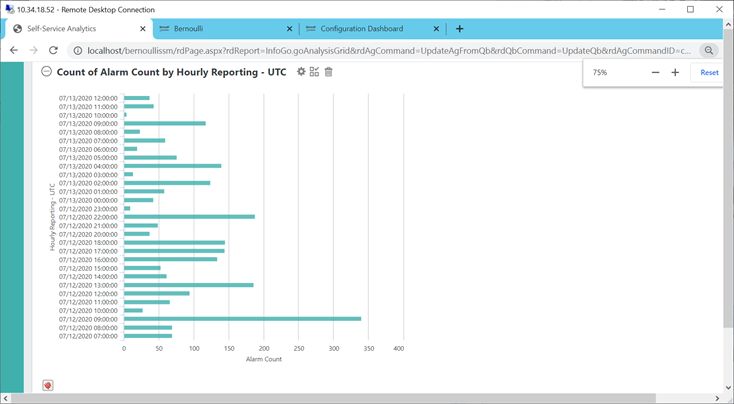
STANDARD REPORTS Reports - Hospital Summary
Logout
User: MHagen
Capsule Reporting and Analytics features standard reports for a range of applications,
Watch List
including quality and compliance initiatives, staff allocation, and direct patient care. Clear All Apply Hospital Summary
Units
Timeframe:
Unit 12/10/2020 9:39 PM - 12/11/2020 9:39 AM Alarm Counts by Unit Alarm Counts by Alarm
ICU
PACU
Units Alarm
Unit Minutes in Alarm Total Count 1 Hour Count Minutes in Alarm Total Count 1 Hour Count
POPULAR REPORTS:
TEST
ICU
PACU Unit 426 4303 363 PULSE OX LOW PERF 237 4303 363
Reports
• Hospital Summary Hospital administrators and alarm committees Snapshot Report
TEST
Unit
• Unit Volumes can review system-wide reports to identify areas
Log of Alerts
Log of Events
Rooms
Bed Minutes in Alarm Total Count 1 Hour Count Unit Minutes in Alarm Total Count 1 Hour Count
Flowsheet Report
• Top Alarms needing attention and monitor the progress of Hospital Summary Medical Devices
Unit 237 4210 356 Unit 238 4214 358
Threshold Scenarios
CapsuleDEC HL7Gateway
interventions and changes. Alarm Detail
Top Alarms IntelliVue
Category Minutes in Alarm Total Count 1 Hour Count Bed Minutes in Alarm Total Count 1 Hour Count
Unit Volume Report Legacy HL7Gateway VitalSigns 238 4214 358 Bed 01 238 4214 358
Alarm Reduction NihonKohdenBSM CNS-9601
• Unit Volume Clinical and department leads also need reports Room Detail
NPBE NBP 840
Alarm Minutes in Alarm Total Count 1 Hour Count
focused on specialties and care areas that could
Servo-i/s Servo-i
• Room Detail PULSE OX LOW PERF 238 4214 358
Alarm Categories
• Alarm Reduction help identify outlier patients and/or support the VPC MULTIFORM PVCs 116 62 5
Alarm Types
• Threshold Scenarios optimization of device alarms. Reviewing the VPC PAIR PVCs 72 32 3
reports regularly may help with tracking key Clear All Apply
performance indicators. Unit 188 94 8
• Patient Trends Caregivers will want to review the status of their Standard reports allow the Alarm Counts by Category Census
• Threshold Scenarios patients over time, particularly between bedside selection of data sets to
Category Minutes in Alarm Total Count 1 Hour Count New Admissions 0
visits. They will also want to see impact of reveal specific information:
Discharges 0
changing device alarm limits. • Start/End data and time
VitalSigns 426 4303 363
Internal Transfers 0
• Unit(s) – Room(s) Transfer In 0
• Device(s) Transfer Out 0
Drill down into counts to uncover the locations
Capsule standard reports provide user-friendly search capabilities by date range, unit/ • Category Total Active Devices Seen 26
and origins of alarms in areas of concern
rooms/beds, alarm categories and alarm types and can be used to track changes over • Alarm Types Total Active Patients Seen 23
time. Standard reports support drill down from summary to detail, from the overall
facility to the care unit to the individual patient. For flexibility, most standard reports
can be printed as PDFs and exported to CSV formatted spreadsheets which simplifies
Logout
importing of the data to other systems and applications. Reports – Threshold Scenarios Patient Select Threshold Scenarios
User: MHagen
CUSTOM REPORTS Watch List Back
Threshold Scenarios
Units
The Capsule Informatics team, experts in healthcare data analytics, can train and assist Patient: Crowder, Marilyn - 1872586953
Unit
clients in creating custom reports to meet their specific needs. ICU
PACU
Bed: 01
Timeframe: 01/05/2021 6:17 AM – 01/05/2021 10:17 AM
TEST Use the findings from one or more reports
Clients using Capsule Surveillance can create their own custom reports. The web-based Alarm: IntelliVue – Device Measurement: Pulse
to, in this case, test the impact of changing
Reports
interface of Capsule Surveillance makes laying out reports easy and quick. Applying Snapshot Report
High Low
device alarm settings before revising the
Current Values 120 60
analysis to the reports derives further value from the data. Log of Alerts
Log of Events setting of devices being used in actual
Flowsheet Report
Proposed Values 130 55
Hospital Summary Projected Reduction 12% patient care
Non-proprietary custom reports developed by the Capsule Informatics team can be Threshold Scenarios
Alarm Detail
templated, shared, and adapted for use by other Capsule clients. Top Alarms Proposed High 100 Low 85
Unit Volume Report
Alarm Reduction Show 100 entries
Room Detail
Time Stamp Value Duration
01/05/2021 10:14:20 AM 55 47
01/05/2021 10:13:43 AM 53 7
01/05/2021 10:13:07 AM 55 2
01/05/2021 10:12:37 AM 54 24
01/05/2021 09:57:04 AM 121 2
01/05/2021 09:56:38 AM 120 21
01/05/2021 09:52:53 AM 130 207
01/05/2021 09:50:27 AM 54 4
01/05/2021 09:48:11 AM 55 72
01/05/2021 09:46:46 AM 53 18
Showing 1 to 10 of 164 entries First Previous 1 2 3 4 5 ............... 17 Next Last
2 3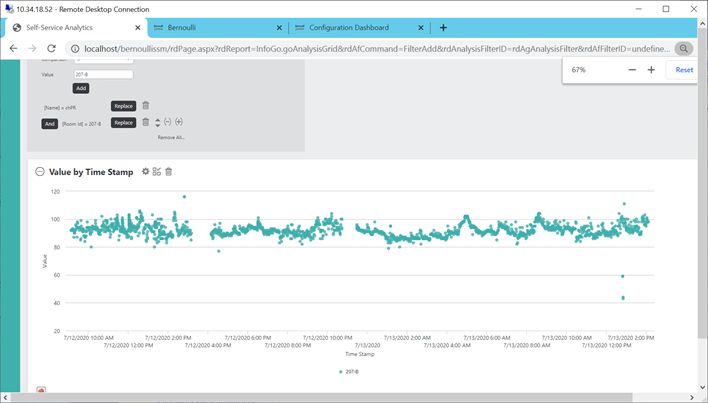
ANALYTICS
Capsule Analytics provides even greater understanding and evaluation of the medical
device alarms within a care setting, and the ability to generate custom reports and
perform analysis of both live and archived data obtained through the MDIP.

Capsule’s Surveillance Reporting Analytics provides tailored and customized analysis
and research tools for data visualization, manipulation, export and analysis. Data are
collected and available on all monitored patients, from all patient care devices, and
can be stored and managed by your IT department. Web-based access to Surveillance
Reporting Analytics is available from anywhere within the healthcare environment.

Alarm summaries can be created and tailored to look at specific alarms from specific
locations over desired time intervals, from the most recent shift or through the last
several months. Visualize and manipulate data in multiple formats, including tabular
or graphical presentations. Custom reports can be generated for Clinical Alarm
Committee meetings or for visualization by clinical department heads as part of weekly
or monthly quality improvement and assessment initiatives. Identification of chief alarm
annunciation sources and artifact can be chased using Surveillance Reporting Analytics,
with drilldown capability not only to the alarm but also to the measured parameter level.

RESPIRATORY   CUMULATIVE
 Respiratory Cumulative     DISTRIBUTION
                        Distribution       FREQUENCY
                                     Frequency (Resp Cdf )(RESP CDF)
           400k                                                                                     40%

                                                                                                    30%
Resp Cdf

                                                                                                          Resp Pdf
           200k                                                                                     20%

                                                                                                    10%

             0k                                                                                     0%
                  0   5       10        15         20                25   30    35         40

                                                  Value

                                             Resp Pdf     Resp Cdf

Frequency distribution diagram shows both the probability and cumulative distributions of respiration rate for a
patient over one week. Analysis of measurements as well as alarms are possible, providing deeper insight into the
nature and behavior of measurements so that alarms can be understood, not merely counted.

Capsule Surveillance Reporting Analytics offers a host of built-in capabilities from
querying the metadata to building dashboards of live vital signs measurements. To date,
Surveillance Reporting Analytics has enabled multiple hospital projects to ensure greater
data usability, shortened length of stay, improved patient safety and increase the overall
quality of care.
                                                                                                                     Custom Report Templates
                                                                                                                     •   Alarm Counts by Hour and Week
CAPSULE SURVEILLANCE
                                                                                                                     •   Alarm Counts by Type and Location
Live, streaming medical device data in the Capsule Medical Device Information Platform
                                                                                                                     •   Alarm Type by Location
(MDIP) are continuously analyzed by the Capsule Rules of Capsule Surveillance which
                                                                                                                     •   Alarm Type by Location Cross-Tab
are specifically configured to alert upon detecting emergent, clinically actionable patient
                                                                                                                     •   Parameter Histogram One Patient (1 and 7 Days)
events or changing patient condition based on the hospital’s clinical practice and policy.
                                                                                                                     •   Parameter Histograms All Patients (1 and 7 Days)
Smart notifications are then routed to care team members, and streaming data can also
                                                                                                                     •   Parameter Time Series
be viewed remotely at the Capsule Surveillance Workstation.
                                                                                                                     •   Parameter Time Series Cross-Tab
Reporting and user-defined Analytics are available to review results and support on-                                 Many more report templates are available
going optimization and quality improvement. Visualization of medical device generated
alarms in comparison with Capsule alerts can be shown, as well as “what-if” assessments
of both newly designed and existing Capsule alerts can be performed easily. Data can be
downloaded for offline assessments, as well.

4                                                                                                                                                                           5
INFORMATICS SERVICES
DRIVING TO BETTER OUTCOMES
The Capsule Informatics team partners with clients to support early identification of clinically relevant patient conditions.
We accomplish this by providing a quantitative assessment of the current alarm environment and then focusing on
specific areas for improvement. By identifying the top sources of alarms and targeting the devices and locations where
either workflow improvement or alarm reduction may be achieved, smart rules can then be implemented which can
trigger new synthetic Capsule Alerts.
FUTURE VISION
Capsule Reporting and Analytics is designed to help hospitals and health systems in transitioning from reactive care
delivery to insight-driven, proactive care. Through the continuing expansion of our alert rules library, and through
the increasing body of evidence obtained from clients and the effective use of the Capsule rules in improving the
identification of adverse events, we are dedicated to improving patient safety.
ALARM REPORTING & ANALYTICS
LICENSE REQUIREMENTS
Surveillance License or Surveillance Reporting Analytics License
License includes:
• Standard Reports and all future reports with upgrades • Blocks of hours with our informatics team based
• Full access to data via Surveillance Reporting Analytics on number of bed licenses (additional time can
be purchased separately)
TECHNICAL REQUIREMENTS
Minimum Recommended
Server (processor and database) 2 Virtual 4 Virtual
0-60 connected devices 0-600 connected devices
16 GB RAM or higher 32 GB RAM
Windows Server 2016 Windows Server 2016
MS Office 2016 or 365 local instance MS Office 2016 or 365 local instance
Hard Drive Free hard disk space: 300 GB
(processor and database) Dedicated NIC
Network (processor and database) Ethernet Network Card that supports high-speed With/without Multi-Feed:
(100 Mbps or more) network connection Ethernet 1 Gbps
Server (database) Access to Microsoft Office 2016 or Office 365 recommended, to provide for post-analysis document generation
and detailed assessments.
Note: To access the database, Capsule recommends installing the latest version of the SQL Server Management
Studio on the Capsule Server. This software is available.
Browser Supported Browsers:
• Microsoft Edge 40 and higher
• Google Chrome 45 and higher
• Internet Explorer 11.0
Note: It is strongly recommended that you keep your Internet browser updated to the most recent version.
Admission, Transfer and Discharge Required for patient-specific reporting and connectivity insurance alerting
(ADT) Interface (Required)
FOR MORE INFORMATION, CONTACT US
NORTH AMERICA INTERNATIONAL OFFICES Learn more at CapsuleTech.com
+1 800-260-9537 +33 1 84 17 12 50
support@capsuletech.com international@capsuletech.com
CapsuleTech.com
© 2021 Capsule Technologies, Inc. and/or its subsidiaries. All rights reserved. The Capsule logo is a registered
trademark of Capsule Technologie SAS in the US, EU and other countries. All other trademarks, service marks,
registered trademarks and registered service marks are the property of their respective owners. MKT0379 DCN 2021-031 Rev 0.0 Published 2021-FebYou can also read


