Dell EMC PowerEdge R640 - Technical Guide
←
→
Page content transcription
If your browser does not render page correctly, please read the page content below
Dell EMC PowerEdge R640
Technical Guide

Regulatory Model: E39S Series
Regulatory Type: E39S001
June 2021
Rev. A08
Notes, cautions, and warnings

     NOTE: A NOTE indicates important information that helps you make better use of your product.

     CAUTION: A CAUTION indicates either potential damage to hardware or loss of data and tells you how to avoid
     the problem.

     WARNING: A WARNING indicates a potential for property damage, personal injury, or death.

© 2017 - 2021 Dell Inc. or its subsidiaries. All rights reserved. Dell, EMC, and other trademarks are trademarks of Dell Inc. or its subsidiaries.
Other trademarks may be trademarks of their respective owners.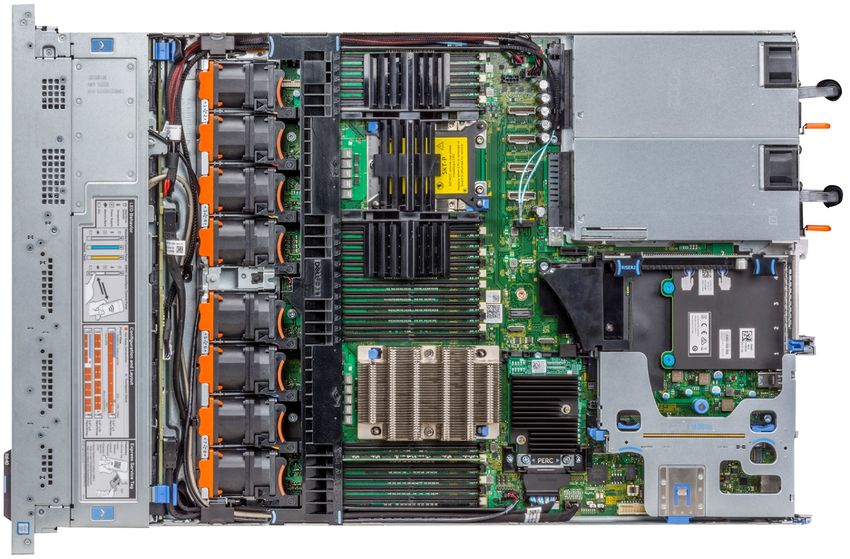
Contents

Chapter 1: Product overview......................................................................................................... 5
  Introduction...........................................................................................................................................................................5
  New technologies................................................................................................................................................................ 5

Chapter 2: System features...........................................................................................................7
  Product comparison............................................................................................................................................................ 7
  Technical specifications..................................................................................................................................................... 8

Chapter 3: Chassis views and features......................................................................................... 11
  Front view and features.................................................................................................................................................... 11
  Back view of the system...................................................................................................................................................11
  Internal view of the system............................................................................................................................................. 12

Chapter 4: Security features........................................................................................................14

Chapter 5: Processors................................................................................................................. 15
  Supported processors.......................................................................................................................................................15
  Chipset.................................................................................................................................................................................22

Chapter 6: Memory......................................................................................................................23

Chapter 7: Storage...................................................................................................................... 25
  Storage controllers........................................................................................................................................................... 26
  Optical drives..................................................................................................................................................................... 26
  Tape drives......................................................................................................................................................................... 26
  IDSDM or vFlash card...................................................................................................................................................... 26

Chapter 8: Networking and PCIe................................................................................................. 28
  PCIe riser and options...................................................................................................................................................... 28

Chapter 9: Power, thermal and acoustics.................................................................................... 29
  Power consumption and energy efficiency.................................................................................................................29
  Thermal and Acoustics.....................................................................................................................................................30
  Power supply units............................................................................................................................................................30
  Acoustical design...............................................................................................................................................................30

Chapter 10: Rack rails.................................................................................................................. 31

Chapter 11: Supported operating system..................................................................................... 33

Chapter 12: Dell EMC OpenManage systems management........................................................... 34
  Server and Chassis Managers........................................................................................................................................35
  Dell EMC consoles............................................................................................................................................................ 35

                                                                                                                                                              Contents                    3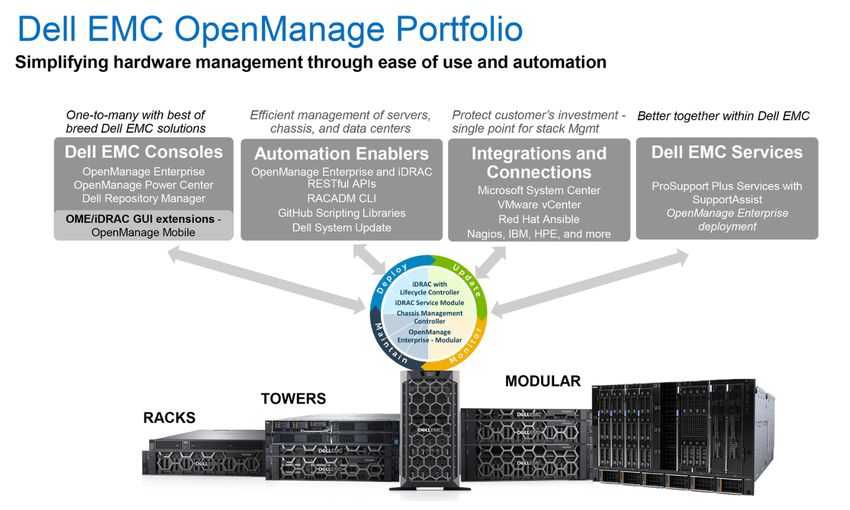
Automation Enablers........................................................................................................................................................ 35
         Integration with third-party consoles...........................................................................................................................35
         Connections for third-party consoles.......................................................................................................................... 35
         Dell EMC Update Utilities................................................................................................................................................ 35
         Dell resources.....................................................................................................................................................................35

    Chapter 13: Appendix A. Additional specifications........................................................................37
      Chassis dimensions........................................................................................................................................................... 37
      Video specifications.......................................................................................................................................................... 40
      USB.......................................................................................................................................................................................40
      Power supply specifications........................................................................................................................................... 40
      Environmental specifications...........................................................................................................................................41

    Chapter 14: Appendix B. Standards compliance........................................................................... 44

    Chapter 15: Appendix C Additional resources...............................................................................45

    Chapter 16: Appendix D. Support and deployment services..........................................................46
      Dell EMC ProDeploy Enterprise Suite ......................................................................................................................... 46
         Dell EMC ProDeploy Plus...........................................................................................................................................46
         Dell EMC ProDeploy....................................................................................................................................................47
         Dell EMC Basic Deployment......................................................................................................................................47
         Dell EMC Residency Services................................................................................................................................... 47
      Deployment services.........................................................................................................................................................47
      Dell EMC Remote Consulting Services........................................................................................................................ 47
      Dell EMC Data Migration Service.................................................................................................................................. 47
      ProSupport Enterprise Suite...........................................................................................................................................47
      ProSupport Plus.................................................................................................................................................................48
      ProSupport..........................................................................................................................................................................48
      ProSupport One for Data Center.................................................................................................................................. 48
      Support Technologies...................................................................................................................................................... 49
      Additional professional services.....................................................................................................................................50
      Dell Education Services................................................................................................................................................... 50
      Dell EMC Global Infrastructure Consulting Services................................................................................................ 50
      Dell EMC Managed Services.......................................................................................................................................... 50

4   Contents
1
                                                                             Product overview
Topics:
•      Introduction
•      New technologies

Introduction
The PowerEdge R640 is a general purpose platform expandable up to 7.68TB of memory, up to twelve 2.5 inch drives, and
flexible I/O options. The R640 can handle demanding workloads such as virtualization, dense private cloud, High Performance
Computing (HPC) and software-defined storage.
The Dell EMC PowerEdge R640 is the ideal dual-socket, 1U platform for dense scale-out data center computing. The R640
combines density, performance and scalability to optimize application performance and data center density.
The PowerEdge R640 features:
● 2nd Generation Intel® Xeon® Scalable Processor product family (with up to 28 cores and two threads per core)
● Up to six DDR4 memory channels with two DIMMs per channel per CPU and 24 DIMMs (supports DDR4 RDIMM/LRDIMM/
   NVDIMM-N/DCPMM)
● PCI Express® (PCIe) 3.0 enabled expansion slots (with up to 48 lanes per CPU)
● Networking technologies, such as Ethernet, Infiniband, OCP, OPA

New technologies
The following are the new technologies featured on the PowerEdge R640

Table 1. New technologies featured on the PowerEdge R640
    New technology                                 Detailed description
    2nd Generation Intel® Xeon® Scalable Processor The processor product family has embedded PCIe lanes for improved I/O
                                                   performance. For details, see the Processor section.
    Intel® C620 series chipset                     The R640 system uses the Intel Lewisburg chip. It is a 2 chip platform -
                                                   CPU and PCH.
    2933 MT/s DDR4 memory                          The Intel® Xeon® Scalable Processor product family that supports
                                                   2933 MT/s memory and twenty-four 288-pin DIMMs. The R640 system
                                                   supports:
                                                   ● Two DIMMs per channel for single ‐ rank and/or dual ‐ rank DIMMs
                                                   ● One or two DIMMs per channel for quad ‐ rank DIMMs For details, see
                                                      the Memory section.
                                                   See the Memory section for details.

    Intel® Optane™ DC persistent memory            Up   to 6 per CPU socket. Max 12 for 2S configuration.
                                                   ●    256GB, 512GB per DIMM
                                                   ●    1866, 2133, 2400, 2666 MT/s
                                                   ●    Up to 6.14TB max, (7.68TB max with DCPMM and LDRIMM)
    iDRAC9 with Lifecycle Controller               The new embedded systems management solution for the Dell EMC
                                                   systems features hardware and firmware inventory and alerting, data
                                                   center level power monitoring, and faster performance. For details, see
                                                   the Dell EMC OpenManage systems management section.
    2.5-inch PCIe SSD                              Supports up to ten CPU Direct Attach PCIe SSD

                                                                                                   Product overview           5
Table 1. New technologies featured on the PowerEdge R640 (continued)
New technology                          Detailed description
LCD bezel                               The PowerEdge R640 LCD control panel is embedded in the front bezel for
                                        easy access and management.

6     Product overview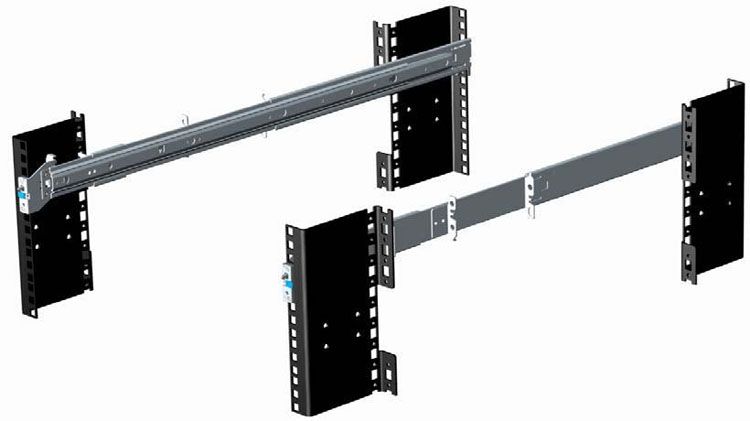
2
                                                                                   System features
Compared to previous generations, the PowerEdge R640 offers faster processing power and advanced system management.
The R640 system is a powerhouse 2S/1U rack system, which emphasizes performance and reliability in areas such as
virtualization, power, thermal and systems management, and usability. It is designed for mid-size to large data centers that
require high memory capacity and performance.
The R640 system consists of the planar subsystem with control panel, SAS backplane, storage card, riser card, VGA port,
Storage Enclosure Processor (SEP) (4 x HDD back plane, 8x HDD backplane, 10x HDD backplane, 10x NVMe backplane and 2
x rear backplane). It is a two-chip platform (CPU and PCH) because this family of processors includes an Integrated Memory
Controller (IMC) and Integrated I/O (IIO) (such as PCI Express and DMI3) on a single silicon die.
Topics:
•      Product comparison
•      Technical specifications

Product comparison
The following table shows the comparison between the R640 with the predecessor R630:

Table 2. Comparison of R640 with the predecessor R630
    Feature                   PowerEdge R640                                PowerEdge R630
    Processors                2nd Generation Intel® Xeon® Scalable          Intel® Xeon® processor E5-2600 v3 or E5- 2600
                              Processor Family                              v4
    Chipset                   Intel® C620                                   Intel® C610
    Memory                    ● 24x DDR4 RDIMM/LR-DIMM 12x NVDIMM 24x DDR4 RDIMM/LR-DIMM
                                + 12 x RDIMM
                              ● 12 x DCPMM + 12 x RDIMM or 12 x
                                LRDIMM
    Chassis                   Storage design modularity                     Three individual chassis for three SKU
                              ● 4 Hard Drive Chassis                        ● 8 Hard Drive Chassis
                              ● 8 Hard Drive Chassis                        ● 1 Hard Drive Chassis
                              ● 10 Hard Drive Chassis                       ● 24 Hard Drive Chassis
                              ● 10 NVMe Drive Chassis
    Disk Drives               Front drive bays:                             ● 8 x 2.5 -inch SAS/SATA or SATA only
                              ● Up to 10 x 2.5 -inch with up to 8 NVMe,     ● 10 x2. 5 -inch SAS/SATA or SAS/SATA/NVMe
                                 SAS/SATA/SSD/NVMe, max 76.8TB , or           (NVMe up to 4)
                                 up to 10 NVMe drives max 64TB. Or up to    ● 24 x 1.8 inch SATA (single PERC or dual PERCs)
                                 4 x 3.5” SAS/SATA, max 64TB
                              Rear drive bays:
                              ● Up to 2 x 2.5 -inch SAS/SATA/SSD/
                                NVMe, max 15.36TB
    PCIe SSD                  Up to 10 CPU Direct Attach PCIe SSD           Up to 4x PCIe SSD from PCIe bridge card
    RAID Controller           S140, HBA330, H330, H730, H730P, H740P,       S130, H330, H730, H730P, H830 (External)
                              H840P, 12Gbps SAS HBA(External)               Support for 2 internal RAID controllers for x24 SSD
                                                                            configuration only
    LCD Module                LCD module option in bezel                    LCD by default in base x8 chassis, not available on
                                                                            x10 and x24 chassis.

                                                                                                       System features            7
Table 2. Comparison of R640 with the predecessor R630 (continued)
Feature                   PowerEdge R640                                 PowerEdge R630
Backplane                 ● 10 x 2.5 inch SATA/SAS/NVMe (up to 8         ●      8 x 2. 5 inch SAS/SATA
                            NVMes)                                       ●      10 x 2. 5 inch SAS/SATA
                          ● 10 x 2.5 inch NVMe                           ●      10 x 2. 5 inch SAS/SATA/PCIeSSD
                          ● 8 x 2.5 inch SATA/SAS/NVMe                   ●      24 x 1.8 inch SATA
                          ● 4 x 3.5 inch SATA/SAS
Riser                     Up to 2 riser connectors (left/right)          Up to 3 riser connectors (left/center/right)
PCIe Slots                Up to 3x PCIe Gen3 (x16/x16/x16)               Up to 3x PCIe Gen3 (x16/x8/x16)
Embedded NIC              ●   4   x   1GbE                               ●      Broadcom 5730 Base-T
                          ●   2   x   10GbE + 2 x 1GbE                   ●      Intel 1350 Base-T
                          ●   4   x   10GbE                              ●      Broadcom 57800 SFP+
                          ●   2   x   25GbE                              ●      Broadcom 57800 Base-T
                                                                         ●      Intel X540 Base-T
Power supplies            ●   495W Platinum                              ●      495 W AC
                          ●   750W Platinum                              ●      750 W AC
                          ●   750 W Mixed Mode AC Platinum               ●      1100 W AC
                          ●   750 W Mixed Mode DC Platinum (for China    ●      1100 W DC
                              only)
                          ●   750W 240HVDC Platinum* (China only)
                          ●   1100W - 48VDC
                          ●   1100W Platinum
                          ●   1100W 380HVDC Platinum* (Available in
                              China and Japan only)
                          ●   1600W Platinum
                          ●   750W Titanium
Remote Management         iDRAC9                                         iDRAC8
TPM                       TPM China, TPM1.2, TPM2.0                      TPM China, TPM1.2, TPM2.0
USB 3.0 Hub board         Extra USB3.0 connector to front plane          None
iDRAC Direct front        Micro USB                                      USB type A
port
Fan                       Up to eight FAN support. (1X6 type)            Up to seven FAN support (2X3 type)
IDSDM Module              Internal Dual SD Module (IDSDM) and vFlash     Internal Dual SD Module (IDSDM)
BOSS Module               M.2 SATA interface                             None
PERC                      Mini-PERC 10                                   Mini-PERC 9
NVDIMM Battery            External 12 V power bank for NVDIMM used       None
ODD/TBU                   ODD via NPIO                                   TBU and ODD via 7-pin connectors
On board PCH SATA         4x NPIOs                                       2x Mini SAS_HDs
Connectors

Technical specifications
The following table shows the technical specifications of the PowerEdge R640:

Table 3. Technical specifications of PowerEdge R640
Features                              Technical Specification
Form factor                           1U rack

8       System features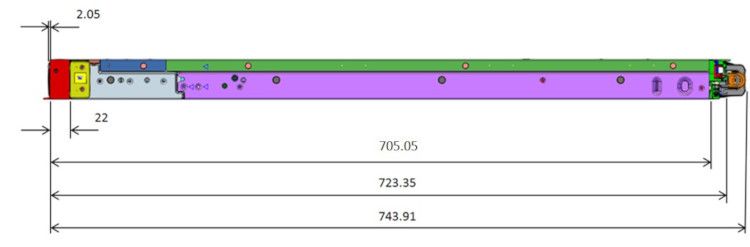
Table 3. Technical specifications of PowerEdge R640 (continued)
Features                    Technical Specification
Processor                   2nd Generation Intel® Xeon® Scalable Processors family
Internal interconnect       Up to 3 Intel Ultra Path Interconnect (Intel® UPI); up to 11.2 GT/s
Memory                      DIMM speed:
                            ● Up to 2933 MT/s
                            Memory type:
                            ● RDIMM
                            ● LRDIMM
                            ● NVDIMM
                            ● DCPMM
                            Memory module slots:
                            ● 24 DDR4 DIMM slots (12 NVDIMM or 12 DCPMM only)
                            ● Supports registered ECC DDR4 DIMMs only
                            Maximum RAM:
                            ●   RDIMM 1.53TB
                            ●   LRDIMM 3TB
                            ●   NVDIMM 192GB
                            ●   DCPMM* 6.14TB (7.68TB with LDRDIMM)
I/O slots                   Up to 3 x PCIeGen slots plus a dedicated PERC and rNDC slot
Storage controllers         ● Internal controllers: PERC S140 (SW RAID SATA), PERC H330, PERC H730, PERC
                              H730P, PERC H740P
                            ● Internal HBA (RAID): PERC HBA330
                            ● External HBA—non-RAID: 12 Gb/s SAS HBA
Hard drives                 ●   10 x 2.5 -inch SATA/SAS/NVMe (up to 8 NVMes)
                            ●   10 x 2.5 -inch NVMe
                            ●   8 x 2.5 -inch SAS/SATA/NVMe
                            ●   4 x 3.5 -inch SAS/SATA
                            ●   8 x 2.5 -inch SATA
Accelerators                Up to 3 single-width GPU (NVIDIA T4) or up to 1 FPGA

Embedded NIC                ●   4   x   1GbE
                            ●   2   x   10GbE + 2 x 1GbE
                            ●   4   x   10GbE
                            ●   2   x   25GbE
Power supply                ●   495W Platinum
                            ●   750W Platinum
                            ●   750W 240HVDC Platinum* (Available in China only)
                            ●   750 W Mixed Mode AC Platinum
                            ●   750 W Mixed Mode DC Platinum (for China only)
                            ●   1100W - 48VDC
                            ●   1100W Platinum
                            ●   1100W 380HVDC Platinum* (Available in China and Japan only)
                            ●   1600W Platinum
                            ●   750W Titanium
Operating systems           ●   Canonical® Ubuntu® Server LTS
                            ●   Citrix® Hypervisor
                            ●   Microsoft® Windows Server® LTSC with Hyper-V
                            ●   Oracle® Linux
                            ●   Red Hat® Enterprise Linux

                                                                                                  System features   9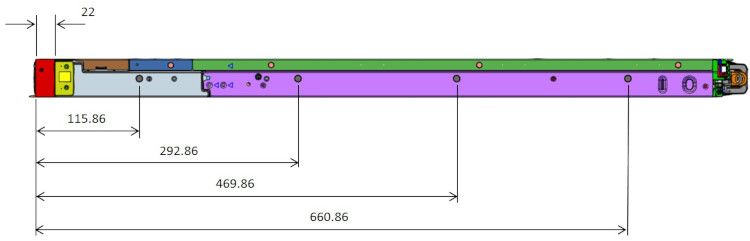
Table 3. Technical specifications of PowerEdge R640 (continued)
Features                    Technical Specification
                            ● SUSE® Linux Enterprise Server
                            For more information on the specific versions and additions, visit Dell.com/OSsupport

Systems management          ● Systems management: IPMI 2.0 compliant; Dell OpenManage Enterprise; Dell EMC
                              OpenManage Mobile; Dell EMC OpenManage Power Center
                            ● Remote management: iDRAC9; 8 GB vFlash media (upgrade), 16 GB vFlash media
                              (upgrade) iDRAC Quick Sync
                            ● Dell EMC OpenManage Integrations: Microsoft® System Center, VMware®
                              vCenter™, BMC Truesight, Red Hat Ansible Modules.
                            ● Dell EMC OpenManage Connections: IBM Tivoli® Netcool/OMNIbus, IBM Tivoli®
                              Network Manager IP Edition, Micro Focus® Operations Manager I, Nagios® Core,
                              Nagios® XI
Dimensions and weight       ●   Height: 42.8mm (1.69 -inch)
                            ●   Width: 482.0mm (18.98 -inch)
                            ●   Depth: 808.5mm (31.8 -inch)
                            ●   Weight: 21.9kg (48.3 lbs)
                            Dimensions include bezel

Recommended support         Dell EMC ProSupport Plus for critical systems or Dell EMC ProSupport for premium
                            hardware and software support for your PowerEdge solution. Consulting and deployment
                            offerings are also available. Contact your Dell EMC representative for more information.
                            Availability and terms of Dell EMC Services vary by region. For more information, visit Dell
                            EMC.com/ServiceDescriptions.

10    System features
3
Chassis views and features
Topics:
• Front view and features
• Back view of the system
• Internal view of the system
Front view and features
The images below illustrates the front view of the PowerEdge R640 with the types of supported chassis options:
Figure 1. Front view 4 x 3.5-inch drive chassis
Figure 2. Front view 8 x 2.5-inch drive chassis
Figure 3. Front view 10 x 2.5-inch drive chassis
Back view of the system
The back panel of a PowerEdge system contains access to I/O connectors for both embedded and add-in devices, including
networking, video, serial, USB, system ID, and system management access ports. Most add-in PCI cards are accessible through
the back panel. It is also the default location for power supply units (PSU), including the points for AC/DC connections.
Depending on your system configuration, the drive backplanes supported in PowerEdge R640 are listed here:
● 2.5 inch (x8) SAS, SATA, or NVMe backplane
● 2.5 inch (x10) SAS, SATA, or NVMe backplane
● 2.5 inch (x10) SAS, SATA, or NVMe backplane and 2.5 inch (x2) SAS or SATA backplane (back)
● 3.5 inch (x4) SAS or SATA backplane
Figure 4. Back panel view of 2 x 2.5 inch hard drives with 1 PCIe expansion slot
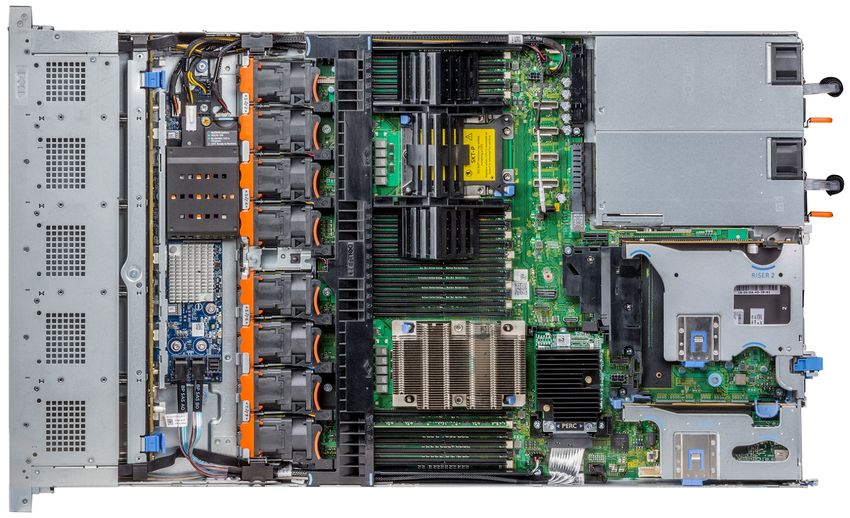
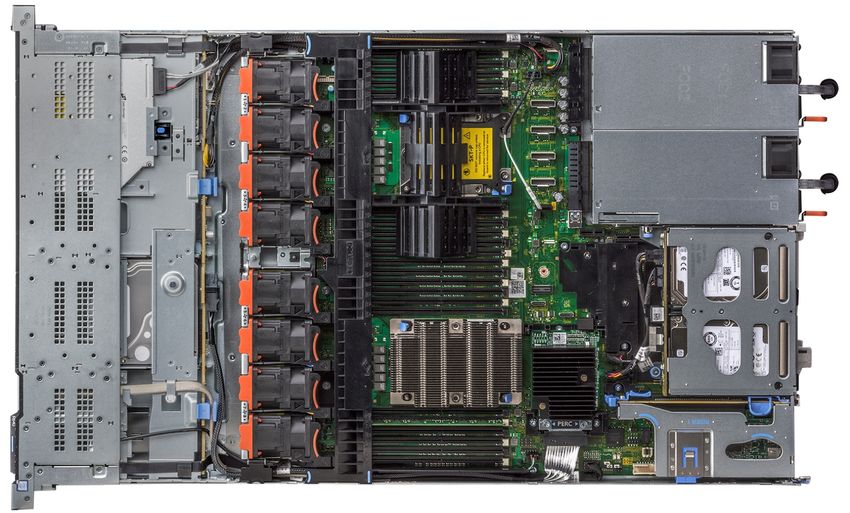
Chassis views and features 11Figure 5. Back panel view of system with 3 PCIe expansion slots Figure 6. Back panel view of system with 2 PCIe expansion slots Internal view of the system The chassis design of the PowerEdge R640 is optimized for easy access to components and for efficient cooling. The PowerEdge R640 supports up to 24 DIMMs, two processors, hot-plug redundant fans, system board and hard drive bays, and many other components and features. For more system views, see the Dell EMC PowerEdge R640 Installation and Service Manual at Dell.com/Support/Manuals.¶ Figure 7. Inside the system with 1 PCIe expansion riser 12 Chassis views and features
Figure 8. Inside the system with 2 PCIe expansion risers

Figure 9. Inside the system with 3 PCIe expansion risers

                                                           Chassis views and features   13
4
Security features
The latest generation of PowerEdge servers has the features listed in the table to help ensure the security of your data center.
Table 4. Security Features
Security feature Description
Cover latch A tooled latch is integrated in the top cover to secure it to the
system.
Bezel A standard bezel is an optional metal bezel mounted to the
chassis front. A lock on the bezel protects unauthorized
access to hard drives. The QuickSync NFC bezel enables
the iDRAC QuickSync management function for managing the
server from the front using an NFC-capable device and the
Dell EMC OpenManage Mobile App. Available only from the
factory and not supported after point of sale.
TPM The Trusted Platform Module (TPM) is used to generate/
store, protect/authenticate password, and create/store
digital certificates.
Power-off security BIOS has the ability to disable the power button function.
14 Security features5
Processors
The PowerEdge R640 server features the exceptional performance, value, and power efficiency of the 2nd Generation Intel
Xeon Scalable Processor. These processors provide high performance no matter what your constraint—floor space, power, or
budget—and on workloads that range from the most complicated scientific exploration to crucial web-serving and infrastructure
applications. In addition to providing raw performance gains, improved I/O is also made possible with Intel Integrated I/O, which
can reduce latency by adding more lanes and doubling bandwidth. This helps to reduce network and storage bottlenecks, which
improves the processor performance capabilities.
The 2nd Generation Intel Xeon Processor Scalable Family provides the foundation for a powerful data center platform. It is
the most advanced compute core featuring a new core micro architecture optimized to accelerate a wide range of compute
workloads. The key features are as follows:
● Higher Per-Core Performance: Up to 28 cores (24 cores with R440), delivery high performance, and scalability for
compute-intensive workloads across compute, storage, and network usages. The 2nd Generation Intel Xeon Scalable
Processors can offer even greater core or frequencies, or both.
● Greater Memory Bandwidth/Capacity: 50% increased memory bandwidth and capacity. 6 memory channels vs. 4 memory
channels of previous generation for memory intensive workloads.
● Expanded I/O: 48 lanes of PCIe 3.0 bandwidth and throughput for demanding I/O-intensive workloads.
● Intel Ultra Path Interconnect (UPI): Up to three Intel UPI channels increase scalability of the platform to as many as
eight sockets, and improves inter-CPU bandwidth for I/O intensive workloads.
● Intel Advanced Vector Extensions 512 (Intel AVX-512) with a single AVX512 fused multiply add (FMA) execution units.
SKUs which support Advanced RAS enable a second FMA execution unit.
● Security without Compromise: Near-zero encryption overhead enables higher performance on all secure data transactions
with enhanced hardware mitigation.
● Intel Deep Learning Boost: Accelerate data-intensive workloads within the CPU with inferencing capabilities.
Topics:
• Supported processors
• Chipset
Supported processors
The following table lists the 1st and 2nd Generation Intel® Xeon® Scalable supported processors for the PowerEdge R640:
Table 5. 1st and 2nd Generation Intel® Xeon® Scalable supported processors
Model Intel SKU Stepping Speed(GH Cache( UPI(GT/ Max Cores Turbo TDP
SKU type z) MB) s) Memory
Speed(M
T/s)
Intel Xeon 8280L Platinum XCC 2.7 38.5 NA 2933 28 Turbo 205W
Processor
Scalable
Family
Intel Xeon 8280M Platinum XCC 2.7 38.5 NA 2933 28 Turbo 205W
Processor
Scalable
Family
Intel Xeon 8280 Platinum XCC 2.7 38.5 NA 2933 28 Turbo 205W
Processor
Scalable
Family
Processors 15Table 5. 1st and 2nd Generation Intel® Xeon® Scalable supported processors (continued)
Model Intel SKU Stepping Speed(GH Cache( UPI(GT/ Max Cores Turbo TDP
SKU type z) MB) s) Memory
Speed(M
T/s)
Intel Xeon 8276L Platinum XCC 2.2 NA NA 2933 28 Turbo 165W
Processor
Scalable
Family
Intel Xeon 8276M Platinum XCC 2.2 NA NA 2933 28 Turbo 165W
Processor
Scalable
Family
Intel Xeon 8276 Platinum XCC 2.2 NA NA 2933 28 Turbo 165W
Processor
Scalable
Family
Intel Xeon 8270 Platinum XCC 2.7 NA NA 2933 26 Turbo 205W
Processor
Scalable
Family
Intel Xeon 8268 Platinum XCC 2.9 NA NA 2933 24 Turbo 205W
Processor
Scalable
Family
Intel Xeon 8260L Platinum XCC 2.4 NA NA 2933 24 Turbo 165W
Processor
Scalable
Family
Intel Xeon 8260M Platinum XCC 2.4 NA NA 2933 24 Turbo 165W
Processor
Scalable
Family
Intel Xeon 8260Y Platinum XCC 2.4 NA NA 2933 24/20/16 Turbo 165W
Processor
Scalable
Family
Intel Xeon 8260 Platinum XCC 2.4 NA NA 2933 24 Turbo 165W
Processor
Scalable
Family
Intel Xeon 8253 Platinum XCC 2.2 NA NA 2933 16 Turbo 125W
Processor
Scalable
Family
Intel Xeon 8180M Platinum XCC 2.5 38.5 10.4 2667 28 Turbo 205W
Processor
Scalable
Family
Intel Xeon 8180 Platinum XCC 2.5 38.5 10.4 2667 28 Turbo 205W
Processor
Scalable
Family
Intel Xeon 8176M Platinum XCC 2.1 38 10.4 2667 28 Turbo 165W
Processor
16 ProcessorsTable 5. 1st and 2nd Generation Intel® Xeon® Scalable supported processors (continued)
Model Intel SKU Stepping Speed(GH Cache( UPI(GT/ Max Cores Turbo TDP
SKU type z) MB) s) Memory
Speed(M
T/s)
Scalable
Family
Intel Xeon 8176 Platinum XCC 2.1 38 10.4 2667 28 Turbo 165W
Processor
Scalable
Family
Intel Xeon 8170M Platinum XCC 2.1 36 10.4 2667 26 Turbo 165W
Processor
Scalable
Family
Intel Xeon 8170 Platinum XCC 2.1 36 10.4 2667 26 Turbo 165W
Processor
Scalable
Family
Intel Xeon 8168 Platinum XCC 2.7 33 10.4 2667 24 Turbo 205W
Processor
Scalable
Family
Intel Xeon 8164 Platinum XCC 2.7 33 10.4 2667 26 Turbo 205W
Processor
Scalable
Family
Intel Xeon 8160M Platinum XCC 2.1 33 10.4 2667 24 Turbo 150W
Processor
Scalable
Family
Intel Xeon 8160 Platinum XCC 2.1 33 10.4 2667 24 Turbo 150W
Processor
Scalable
Family
Intel Xeon 8158 Platinum XCC 3 24.75 10.4 2667 12 Turbo 150W
Processor
Scalable
Family
Intel Xeon 8156 Platinum XCC 3.6 16.5 10.4 2667 4 Turbo 105W
Processor
Scalable
Family
Intel Xeon 8153 Platinum XCC 2.0 22 10.4 2667 16 Turbo 125W
Processor
Scalable
Family
Intel Xeon 6258R Gold XCC 2.7 38.5 10.4 2933 28 Turbo 205 W
Processor
Scalable
Family
Intel Xeon 6248R Gold XCC 3.0 35.75 10.4 2933 24 Turbo 205 W
Processor
Scalable
Family
Processors 17Table 5. 1st and 2nd Generation Intel® Xeon® Scalable supported processors (continued)
Model Intel SKU Stepping Speed(GH Cache( UPI(GT/ Max Cores Turbo TDP
SKU type z) MB) s) Memory
Speed(M
T/s)
Intel Xeon 6246R Gold XCC 3.4 22 10.4 2933 16 Turbo 205 W
Processor
Scalable
Family
Intel Xeon 6242R Gold XCC 3.1 27.5 10.4 2933 20 Turbo 205 W
Processor
Scalable
Family
Intel Xeon 6240R Gold XCC 2.4 35.75 10.4 2933 24 Turbo 165 W
Processor
Scalable
Family
Intel Xeon 6238R Gold XCC 2.2 38.5 10.4 2933 28 Turbo 165 W
Processor
Scalable
Family
Intel Xeon 6230R Gold XCC 2.1 35.75 10.4 2933 26 Turbo 150 W
Processor
Scalable
Family
Intel Xeon 6230 Gold XCC 2.1 27.50 10.4 2933 20 Turbo 125 W
Processor
Scalable
Family
Intel Xeon 6226R Gold XCC 2.9 22 10.4 2933 16 Turbo 150 W
Processor
Scalable
Family
Intel Xeon 6209U Gold NA 2.1 27.50 NA 2933 20 Turbo 125 W
Processor MB
Scalable
Family
Intel Xeon 6208R Gold NA 2.9 22 MB NA 2933 16 Turbo 150 W
Processor
Scalable
Family
Intel Xeon 6222 V Gold NA 1.8 27.50 NA 2400 20 Turbo 115 W
Processor MB
Scalable
Family
Intel Xeon 6226 Gold NA 2.7 19.25 NA 2933 12 Turbo 125 W
Processor MB
Scalable
Family
Intel Xeon 6208U Gold XCC 2.9 22 NA 2933 16 Turbo 150 W
Processor
Scalable
Family
Intel Xeon 5222 Gold XCC 3.9 16.50 10.4 2933 4 Turbo 105 W
Processor
18 ProcessorsTable 5. 1st and 2nd Generation Intel® Xeon® Scalable supported processors (continued)
Model Intel SKU Stepping Speed(GH Cache( UPI(GT/ Max Cores Turbo TDP
SKU type z) MB) s) Memory
Speed(M
T/s)
Scalable
Family
Intel Xeon 5220 Gold XCC 2.2 24.75 10.4 2666 18 Turbo 125 W
Processor
Scalable
Family
Intel Xeon 5220R Gold XCC 2.2 35.75 10.4 2667 24 Turbo 150 W
Processor
Scalable
Family
Intel Xeon 5218R Gold XCC 2.1 27.5 10.4 2667 20 Turbo 125 W
Processor
Scalable
Family
Intel Xeon 5218 Gold XCC 2.3 22 10.4 2667 16 Turbo 125 W
Processor
Scalable
Family
Intel Xeon 5217 Gold HCC 3.0 11 10.4 2666 8 Turbo 125 W
Processor
Scalable
Family
Intel Xeon 5215 Gold HCC 2.5 13.75 10.4 2666 10 Turbo 85 W
Processor
Scalable
Family
Intel Xeon 4216 Silver HCC 2.5 22 9.6 2666 16 Turbo 100 W
Processor
Scalable
Family
Intel Xeon 4215 Silver HCC 2.5 11 9.6 2666 8 Turbo 85 W
Processor
Scalable
Family
Intel Xeon 4215R Silver HCC 3.2 11 9.6 2400 8 Turbo 130 W
Processor
Scalable
Family
Intel Xeon 4214 Silver HCC 2.2 16.50 9.6 2666 12 Turbo 85 W
Processor
Scalable
Family
Intel Xeon 4210 Silver LCC 2.2 13.75 9.6 2400 10 Turbo 85 W
Processor
Scalable
Family
Intel Xeon 4208 Silver LCC 2.1 11 9.6 2666 8 Turbo 85 W
Processor
Scalable
Family
Processors 19Table 5. 1st and 2nd Generation Intel® Xeon® Scalable supported processors (continued)
Model Intel SKU Stepping Speed(GH Cache( UPI(GT/ Max Cores Turbo TDP
SKU type z) MB) s) Memory
Speed(M
T/s)
Intel Xeon 3204 Silver LCC 1.9 8.25 9.6 2666 6 Turbo 85 W
Processor
Scalable
Family
Intel Xeon 6138 Gold XCC 2 27.5 10.4 2666 20 Turbo 125 W
Processor
Scalable
Family
Intel Xeon 6130 Gold XCC 2.1 22 10.4 2666 16 Turbo 125 W
Processor
Scalable
Family
Intel Xeon 6126 Gold XCC 2.6 19.25 10.4 2666 12 Turbo 125 W
Processor
Scalable
Family
Intel Xeon 5122 Gold XCC 3.6 16.5 10.4 2400 4 Turbo 105 W
Processor
Scalable
Family
Intel Xeon 5120 Gold HCC 2.2 19.25 10.4 2400 14 Turbo 105 W
Processor
Scalable
Family
Intel Xeon 5118 Gold HCC 2.3 16.5 10.4 2400 12 Turbo 105 W
Processor
Scalable
Family
Intel Xeon 5117 Gold HCC 2.0 19.25 10.4 2400 10 Turbo 105 W
Processor
Scalable
Family
Intel Xeon 4214R Silver HCC 2.4 16.5 9.6 2400 12 Turbo 100 W
Processor
Scalable
Family
Intel Xeon 4210R Silver HCC 2.4 13.75 9.6 2400 10 Turbo 100 W
Processor
Scalable
Family
Intel Xeon 4116 Silver HCC 2.1 16 9.6 2400 12 Turbo 85 W
Processor
Scalable
Family
Intel Xeon 4114 Silver LCC 2.2 13.75 9.6 2400 10 Turbo 85 W
Processor
Scalable
Family
Intel Xeon 4112 Silver LCC 2.6 8.25 9.6 2400 4 Turbo 85 W
Processor
20 ProcessorsTable 5. 1st and 2nd Generation Intel® Xeon® Scalable supported processors (continued)
Model Intel SKU Stepping Speed(GH Cache( UPI(GT/ Max Cores Turbo TDP
SKU type z) MB) s) Memory
Speed(M
T/s)
Scalable
Family
Intel Xeon 4110 Silver LCC 2.1 11 9.6 2400 8 Turbo 85 W
Processor
Scalable
Family
Intel Xeon 4108 Silver LCC 1.8 11 9.6 2400 8 Turbo 85 W
Processor
Scalable
Family
Intel Xeon 3206R Bronze LCC 1.9 11 9.6 2400 8 No Turbo 85W
Processor
Scalable
Family
Intel Xeon 3104 Bronze LCC 1.7 8.25 9.6 2133 6 No Turbo 85 W
Processor
Scalable
Family
Table 6. Speed Select Technology- Performance Profile (SST-PP) (-Y) offerings
Processor Model # Frequency Cores- Threads
8260Y ● 2.40 GHz ● 24–48
● 2.50 GHz ● 20–40
● 2.70 GHz ● 16–32
6240Y ● 2.60 GHz ● 18–36
● 2.80 GHz ● 14–28
● 3.10 GHz ● 8 -16
4214Y ● 2.20 GHz ● 12–24
● 2.30 GHz ● 10–20
● 2.40 GHz ● 8–16
Table 7. Search Optimized (-S) offerings
Processor Model # Frequency Cores- Threads
5220S 2.70 GHz 18–32
Table 8. Single Socket (-U) offerings
Processor Model # Frequency Cores- Threads
6212U 2.40 GHz 24–48
6210U 2.50 GHz 20–40
6209U 2.10 GHz 20–40
Table 9. VM Density Optimized (-V) offerings
Processor Model # Frequency Cores- Threads
6262V 1.90 GHz 24–48
6222V 1.80 GHz 20–40
Processors 21NOTE: For the most up-to-date information on available processors, please visit https://www.dell.com/en-us/work/shop/
povw/poweredge-r640 (view configurations) or talk to your Dell EMC representative.
Chipset
The following table shows the high level features supported by the chipset implemented on the PowerEdge R440:
● ACPI Power Management Logic Support, Revision 4.0a
● PCI Express Base Specification, Revision 3.0
● Integrated Serial ATA host controller, supports data transfer rates of up to 6 GB/s on all ports
● xHCI USB controller with SuperSpeed USB 3.0 ports
● Direct Media Interface
● Serial Peripheral Interface
● Enhanced Serial Peripheral Interface
● Flexible I/O - Allows some high-speed I/O signals to be configured as the PCIe root ports, the PCIe uplink for use with
certain PCH, SATA (and sSATA), or USB 3.0.
● General Purpose Input Output (GPIO)
● Low Pin Count interface, interrupt controller, and timer functions
● System Management Bus Specification, Version 2.0
● Integrated Clock Controller, Real Time Clock Controller
● Intel High Definition Audio and Intel® Smart Sound Technology
● Integrated 10/1 Gb Ethernet
● Integrated 10/100/1000 Mbps Ethernet MAC
● Supports Intel Rapid Storage Technology Enterprise
● Supports Intel Active Management Technology and Server Platform Services
● Supports Intel Virtualization Technology for Directed I/O
● Supports Intel Trusted Execution Technology
● JTAG Boundary Scan support
● Intel Trace Hub for debug
For more information, visit Intel.com
22 Processors6
Memory
The PowerEdge R640 support up to 24 DIMMs. Depending on the 2nd Generation Intel® Xeon Scalable processor CPU, memory
speeds of up to 2933 MT/s with 1 DIMM per channel and 2666 MT/s with 2 DIMMs per channel are available. They support
flexible memory configurations ranging from capacities of 8 GB minimum to 7.68TB maximum.
Each CPU has 12 memory DIMM slots. Those DIMMs are organized into 6 different channels so there are 2 DIMMs per channel.
For best performance all memory channels should be populated with the same number of DIMMs, either 6 or 12 DIMMs per
CPU.
There are 4 different types of DIMMs:
● RDIMM: Registered DIMM – Provides for higher capacity options and advanced RAS features. It is the most commonly used
DIMM type, and offers the best mix of frequency, capacity, and rank structure choices.
● LRDIMM: Load Reduced DIMM – Provides maximum capacity beyond that of an RDIMM but at a higher power consumption.
Uses a buffer to reduce memory loading to a single load on all DDR signals, allowing for greater density.
● DCPMM (also known as Intel Optane DC persistent memory): Provides a large memory capacity at an affordable price. Any
application can take advantage of DCPMM in Memory Mode with a compatible operating system. Unlock more performance
as well as persistency when using an application that supports App Direct Mode. DCPMM is used in conjunction with
RDIMMs or LRDIMMs and a maximum number of 6 DCPMMs can be used per CPU. This persistent memory technology does
not require a battery.
● NVDIMM: Non-Volatile DIMM – Provides a persistent memory solution with NAND and DRAM that maintains data in power
loss, system crash, or normal shutdown. This solution requires a battery as a power source for an AC loss condition. It can be
used in conjunction with RDIMMs.
Intel® Optane™ DC Persistent Memory (DCPMM)
Intel® Optane™ DC Persistent Memory is a new memory technology that allows customers to reach a large memory capacity at
an affordable price. Additionally, when operating the memory in “App Direct Mode” the memory is persistent.
DCPMM comes in 3 different memory sizes, 128GB, 256GB, and 512. RDIMMs and LRDIMMs are used in conjunction with Intel
Optane DC persistent memory. Each channel will be populated with up to one DIMM of DRAM and one DIMM of DPCMM. That
means that each CPU will have up to 6 DIMMs of DRAM and 6 DIMMs of DCPMM. For best performance it is recommended to
have all 12 DIMMs slots per CPU populated
Intel Optane DC persistent memory operates in two modes, Memory Mode and Application Direct Mode.
Table 10. Intel Optane DC persistent memory modes
Trait Memory Mode App Direct Mode
Application support Any application Application must state that it supports
"App Direct Mode"
DRAM Used as cache and is not available as Both DCPMM and DRAM are available as
system memory system memory
Persistence No Yes
Memory Operating Modes
Performance Optimized or Optimizer Mode: prioritizes performance and does not provide any RAS features beyond
standard ECC (Error-Correcting Code).
Memory mirroring has two adjacent memory channels configured to write the same data to each channel. If one memory
channel fails or encounters an error, the other channel continues to transmit data. It's an excellent safeguard for systems
requiring uninterrupted operation, though it cuts memory capacity in half, can double the cost per gigabyte, and can increase
power consumption.
Memory 23Fault resilient memory is a Dell patented technology that works with the VMWare ESXi Hypervisor to provide a fault resilient
zone that protects virtual machines from the ramifications of memory faults.
Memory sparing can reduce downtime from correctable errors by allocating one rank (64-bit wide data area on a DIMM) per
channel (Single Rank Spare Mode) or two ranks per channel (Multi Rank Spare Mode) as memory spares. If a correctable error
occurs in a rank or channel, it's moved to the spare rank while the OS is running. This prevents the error from causing a failure.
Memory sparing reduces memory capacity by one rank per channel or two ranks per channel (depending if Single Rank or Multi
Rank is selected) and can increase the cost per gigabyte.
DIMM speed and frequency
The following table shows the PowerEdge memory speeds and CPU support:
Table 11. Memory speeds and CPU support
CPU family DIMM type DIMM ranking Capacity Speed
(MT/s)
Intel® Xeon® Scalable RDIMM 1R/2R 8GB, 16GB, and 32GB 2666
2nd Generation Intel® Xeon® Scalable RDIMM 1R 8GB 2666
2nd Generation Intel® Xeon® Scalable RDIMM 2R 16GB, 32GB, and 64Gb 2933
Intel® Xeon® Scalable LRDIMM 4R/8R 64GB and 128GB 2666
2nd Generation Intel® Xeon® Scalable LRDIMM 8R 128GB 2666
2nd Generation Intel® Xeon® Scalable DCPMM N/A 128GB, 256GB, and 512GB 2666
Intel® Xeon® Scalable or 2nd Generation NVDIMM 1R 16GB 2666
Intel® Xeon® Scalable
24 Memory7
Storage
The PowerEdge R440 provides scalable storage that allows you to adapt to your workload and operational requirements. With
comprehensive storage options, the PowerEdge R440 offers various internal and external storage controllers, drive types, and
different chassis and backplanes for varied numbers of drives. Features such as Express Flash PCIe SSDs, PERC H740P, and
H840 RAID controllers provide vastly accelerated performance compared to the previous technologies.
PERC series controller offerings
The following table describes the PERC series controller supported by the PowerEdge R440:
Table 12. Perc offering
Performance level Controller and description
Entry ● S140-SATA, NVMe
● (SW RAID) SATA, NVMe
Value ● HBA330-Internal, 12 Gbps SAS HBA-External
● H330, 12 Gbps SAS HBA-External
Value Performance H730P
Premium Performance H740P, H840P
Supported drives - SAS and SATA:
The PowerEdge R440 system supports:
● Up to 4 x 3.5 inch hot-swappable HDDs or 2.5 inch hot-swappable SSDs or HDDs using hybrid carrier to fit in the 3.5 inch
drive bay
● Up to 8 x 2.5 hot-swappable HDDs or SSDs
● Up to 10 x 2.5 hot-swappable HDDs or SSDs
Table 13. Supported drives - NVMe SSD
NVMe SSD drives description
375 GB 2.5-inch Device
1.6 TB 2.5-inch Device
3.2 TB 2.5-inch Device
3.84TB 2.5 -inch Device
6.4TB 2.5 -inch Device
Table 14. External storage
Device Type Description
External Tape Supports connection to external USB tape products
NAS/IDM appliance Software Supports NAS software stack
JBOD Supports connection to 12 Gb MD‐series JBODs
Topics:
Storage 25• Storage controllers
• Optical drives
• Tape drives
• IDSDM or vFlash card
Storage controllers
The new PERC Controller offerings is a heavy leverage of previous generation PERC family. The Value Performance level
controllers, carried-over from previous generation to PowerEdge R640, are a high-end offering that drives Input/Output
Operations Per Second (IOPs) performance and enhance the SSD performance.
NOTE: On-board SATA ports (S140) are not accessible if mini PERC is installed.
Table 15. Performance level and controllers
Performance Level Controller and Description
Entry S140-SATA, NVMe (SW RAID) SATA, NVMe
Value HBA330-Internal, 12 Gbps SAS HBA-External H330, 12 Gbps SAS HBA-External
Value Performance H730P
Premium Performance H740P, H840
Optical drives
The PowerEdge R640 supports one of the following internal optical drive options:
● DVD-ROM
● DVD+ROM
Tape drives
The R640 does not support internal tape drives, however, external tape backup devices are supported.
Supported external tape drives:
● External RD1000 USB
● External LTO-5, LTO-6, LTO-7 and LTO-8 and 6 Gb SAS tape drives
● 114X rack mount chassis with LTO-6 and LTO-7 and LTO-8 6 Gb SAS tape drives
● TL1000 with LTO-5, LTO-6 and LTO-7 and LTO-8 6Gb SAS tape drives
● TL2000 with LTO-5, LTO-6 and LTO-7 and LTO-8 6Gb SAS tape drives
● TL4000 with LTO-5, LTO-6 and LTO-7 and LTO-8 6Gb SAS tape drives
● TL4000 with LTO-5, LTO-6 and LTO-7 and LTO-8 8Gb FC tape drives
● ML3/ML3e with LTO-6 and LTO-7 and LTO-8 6Gb SAS tape drives
● ML3/ML3e with LTO-6 and LTO-7 and LTO-8 8Gb FC tape drives
IDSDM or vFlash card
In the PowerEdge R640 system, the IDSDM module contains the Internal Dual SD Module (IDSDM) and vFlash card that are
combined into a single card module. The following are options available for PowerEdge R640 system:
● vflash only
● IDSDM only
● vflash + IDSDM
NOTE: The IDSDM only option is available with vFlash hardware and requires an iDRAC Enterprise license to enable this
feature.
26 StorageThe IDSDM with vFlash module has a dedicated slot at the back of the system chassis. This is a Dell EMC-proprietary PCIe x1
slot that uses a USB 3.0 interface to host. In the PowerEdge R640 systems, the IDSDM and vFlash card size changes from SD
to microSD and the supported capacity for IDSDM microSD cards are 16 GB, 32 GB, or 64 GB, while for vFlash the capacity is 16
GB only. The write-protect switch is built onboard on the IDSDM module.
Boot Optimized Storage Subsystem (BOSS)
BOSS is offered as a means of booting 14G servers to a full OS when:
● A solution such as IDSDM may be desired, but the target OS is a full OS (not just a hypervisor)
● The user does not wish to trade off standard hot plug drive slots for OS install
● A separate hardware RAID is required for OS boot so that data drives can be in Passthrough mode with an HBA
The HW RAID BOSS card is a RAID controller with a limited feature set that presents M.2 SATA-only SSDs as either Non-RAID
disks or a single RAID1 volume.
Storage 278
Networking and PCIe
The PowerEdge R440 offers balanced, scalable I/O capabilities, including integrated PCIe 3.0-capable expansion slots. Dell EMC
Network Daughter Cards allow you to choose the right network fabric without using up a valuable PCI slot. You can pick the
speed, technology, vendor, and other options, such as switch-independent partitioning, which allows you to share and manage
bandwidth on 10 GbE connections.
For details on the various networking cards available, talk to Dell representative or visit https://www.dell.com/en-us/work/
shop/povw/poweredge-r440 and choose the green view configurations button at the top for a full list of options.
Topics:
• PCIe riser and options
PCIe riser and options
The PowerEdge R640 system has one standard PCIe connector and four Speededge connectors. The PowerEdge R640 system
has the following four riser cards:
● Right Riser 1A - One x16 PCIe Gen3 for low-profile cards on left side and one x16 PCIe Gen3 for low-profile card on right side
– connected to processor 1—Top and bottom.
● Right Riser 1B - One x16 PCIe Gen3 for low-profile card on left side – connected to processor 1—Top and bottom.
● Left Riser 2A - One x16 PCIe Gen3 for low-profile cards - connected to processor 2.
● Left Riser 2B - One x16 PCIe Gen3 for full-height cards, may be used for full-height 3/4 length PCIe cards - connected to
processor 2.
With all the risers, the PowerEdge R640 system board provides one x8 PCIe Gen3 slot for dedicated storage controller card
connected to the processor 1 and one x8 PCIe Gen3 slot for dedicated NDC connected to the processor 1.
PCIe expansion card riser configurations
The following table shows the PCIe expansion card riser configurations for PowerEdge R640:
Table 16. PCIe expansion card riser configurations for PowerEdge R640
Expansion card riser PCIe slots on the Height Length Link
riser
Riser 1A Slot 2 Low Profile Half Length x16
Slot 1 Low Profile Half Length x16
Riser 1B Slot 1 Low Profile Half Length x16
Riser 2A Slot 3 Low Profile Half Length x16
Riser 2B Slot 2 Full Height 3/4 Length x16
28 Networking and PCIe9
Power, thermal and acoustics
Topics:
• Power consumption and energy efficiency
• Thermal and Acoustics
• Power supply units
• Acoustical design
Power consumption and energy efficiency
With the rise in the cost of energy coupled with increasing data center density, Dell EMC provides tools and technologies to
help you realize greater performance with lower energy cost and wastage. More efficient data center usage can reduce costs by
slowing the need for additional data center space. The following table lists the tools and technologies that Dell EMC offers to
help you achieve your data center goals by lowering power consumption and increasing energy efficiency.
Table 17. Power tools and technologies
Feature Description
Power supply units (PSU) portfolio PSU portfolio includes intelligent features such as dynamically optimizing efficiency
while maintaining availability and redundancy.
Tools for right-sizing Enterprise Infrastructure Planning Tool (EIPT) is a tool that helps you plan and tune
your computer and infrastructure equipment for maximum efficiency by calculating
hardware power consumption, power infrastructure and storage. Learn more at
Dell.com/calc.
Industry compliance Dell EMC's servers are compliant with all relevant industry certifications and
guidelines, including 80 PLUS, Climate Savers, and ENERGY STAR.
Power monitoring accuracy PSU power monitoring improvements include:
● Power monitoring accuracy of 1%, whereas the industry standard is 5%
● More accurate reporting of power
● Better performance under a power cap
Power capping Use Dell EMC systems management tools such as OpenManage Power Center and
iDRAC9 with an Enterprise license can be used to set a power limit for your server.
This limits the output of a PSU and reduce system power consumption and help in
constrained power situations.
Systems management The integrated Dell Remote Access Controller 9 (iDRAC9) with Lifecycle Controller
is embedded within every Dell EMC PowerEdge™ server and provides functionality
that helps IT administrators deploy, update, monitor, and maintain servers with
no need for any additional software to be installed. iDRAC functions regardless
of operating system or hypervisor presence because from a pre-OS or bare-metal
state, iDRAC is ready to work because it is embedded within each server from the
factory.
Active power management Dell EMC offers a complete power management solution accessed through the
iDRAC9 with Enterprise licensing and OpenManage Power Center to implement
policy-based management of power and thermal levels at the individual system,
rack, or data center level. Hot spares reduce power consumption of redundant
power supplies. Thermal control of fan speed optimizes the thermal settings for your
environment to reduce fan consumption and lower system power consumption.
Power, thermal and acoustics 29Thermal and Acoustics
The system's thermal management delivers high performance through optimized cooling of components at the lowest fan
speeds across a wide range of ambient temperatures from 10°C to 35°C (50°F to 95°F) and to extended ambient temperature
ranges. These optimizations result in lower fan power consumption which translate to lower system power and data center
power consumption.
Power supply units
Energy Smart power supplies have intelligent features, such as the ability to dynamically optimize efficiency while maintaining
availability and redundancy. Also featured are enhanced power-consumption reduction technologies, such as high-efficiency
power conversion and advanced thermal-management techniques, and embedded power-management features including high-
accuracy power monitoring.
The system supports two hot-swappable AC power supplies with 1 + 1 redundancy, auto-sensing and auto-switching capability.
Acoustical design
Dell EMC focuses on sound quality in addition to sound power level and sound pressure level. Sound quality describes how
disturbing or pleasing a sound is interpreted, and Dell EMC references a number of psychacoustical metrics and thresholds in
delivering to it. Tone prominence is one such metric. Sound power and sound pressure levels increase with greater populations
or higher utilization, while sound quality remains good even as the frequency content changes. A reference for comparison to
sound pressure levels for familiar noise sources is given in the following table. An extensive description of Dell EMC Enterprise
acoustical design and metrics is available in the Dell Enterprise Acoustics white paper.
Table 18. Acoustical performance
Value measured at your ears Equivalent familiar noise experience
LpA, dBA, re 20 μPa Loudness, sones
90 80 Loud concert.
75 39 Data center, vacuum cleaner, voice must be
elevated to be heard.
60 10 Conversation levels.
45 4 Whispering, open office layout, normal living
room.
35 2 Quiet office
30 1 Quiet library
20 0 Recording studio
30 Power, thermal and acoustics10
Rack rails
The rail offerings for the R640 system consist of two types of rails—sliding and static.
The sliding rails allow the system to be fully extended out of the rack for service. They are available with or without the optional
cable management arm (CMA).
Figure 10. Sliding rails
The static rails support a wider variety of racks than the sliding rails. However, they do not support serviceability in the rack and
are thus not compatible with the CMA.
Figure 11. Static rails
One key factor in selecting the proper rails is identifying the type of rack in which they are installed. Both the sliding rails and
the static rails support tool-less mounting in 19 inch-wide, EIA-310-E-compliant square hole and unthreaded round hole 4-post
racks. Both also support tooled mounting in threaded hole 4-post racks, but only the static rails, as the more universal solution,
support mounting in 2-post (Telco) racks.
Rack rails 31Table 19. Static and sliding rails
Sliding and static rail
Product Rail Mounting Rail type Rack types supported
identifier interface
4-Post 2-Post
Square Round Thread Flush Center
R640 B6 ReadyRails II Sliding √ √ √ X X
B4 ReadyRails Static √ √ √ √ √
Screws are not included in either kit as threaded racks are offered with various thread designations. Users must therefore
provide their own screws when mounting the rails in threaded racks.
NOTE: Screw head diameter for the sliding rails must be 10 mm or less.
Other key factors governing proper rail selection include the following:
● Spacing between the front and rear mounting flanges of the rack
● Type and location of any equipment mounted in the back of the rack such as power distribution units (PDUs)
● Overall depth of the rack
The static rails offer a greater adjustability range and a smaller overall mounting footprint than the sliding rails. This is because
of their reduced complexity and lack of need for CMA support.
Table 20. Static rails adjustability
Product Rail Rail type Rail adjustable range (mm) Rack types supported Rail depth—mm
identifie
r Square Round Threaded Without With
CMA CMA
Min Max Min Max Min Max
R640 B6 Sliding 630 883 616 876 630 897 714 845
B4 Static 608 879 594 872 604 890 622 N/A
The adjustment range of the rails is a function of the type of rack in which they are being mounted. The Min/Max values listed
above represent the allowable distance between the front and rear mounting flanges in the rack. Rail depth without the CMA
represents the minimum depth of the rail with the outer CMA brackets removed (if applicable) as measured from the front
mounting flanges of the rack.
32 Rack rails11
Supported operating system
The following lists the supported operating systems for the PowerEdge R740 and R740xd:
1. Canonical® Ubuntu® Server LTS
2. Citrix® Hypervisor
3. Microsoft® Windows Server® LTSC with Hyper-V
4. Oracle® Linux
5. Red Hat® Enterprise Linux
6. SUSE® Linux Enterprise Server
7. VMware® ESXi®
For specifications and interoperability details, see Dell.com/OSsupport.
Supported operating system 3312
Dell EMC OpenManage systems management
Figure 12. Dell EMC OpenManage Portfolio
Dell EMC delivers management solutions that help IT Administrators effectively deploy, update, monitor, and manage IT assets.
OpenManage solutions and tools enable you to quickly respond to problems by helping them to manage Dell EMC servers
effectively and efficiently; in physical, virtual, local, and remote environments, operating in-band, and out-of-band (agent-free).
The OpenManage portfolio includes innovative embedded management tools such as the integrated Dell Remote Access
Controller (iDRAC), Chassis Management Controller and Consoles like OpenManage Enterprise, OpenManage Power Manager
plug in, and tools like Repository Manager.
Dell EMC has developed comprehensive systems management solutions based on open standards and has integrated with
management consoles that can perform advanced management of Dell hardware. Dell EMC has connected or integrated the
advanced management capabilities of Dell hardware into offerings from the industry's top systems management vendors and
frameworks such as Ansible, thus making Dell EMC platforms easy to deploy, update, monitor, and manage.
The key tools for managing Dell EMC PowerEdge servers are iDRAC and the one-to-many OpenManage Enterprise console.
OpenManage Enterprise helps the system administrators in complete lifecycle management of multiple generations of
PowerEdge servers. Other tools such as Repository Manager, which enables simple yet comprehensive change management.
OpenManage tools integrate with systems management framework from other vendors such as VMware, Microsoft, Ansible, and
ServiceNow. This enables you to use the skills of the IT staff to efficiently manage Dell EMC PowerEdge servers.
Topics:
• Server and Chassis Managers
• Dell EMC consoles
• Automation Enablers
• Integration with third-party consoles
• Connections for third-party consoles
• Dell EMC Update Utilities
• Dell resources
34 Dell EMC OpenManage systems managementYou can also read


