Empower docs for Microsoft Word - Made in Office
←
→
Page content transcription
If your browser does not render page correctly, please read the page content below

empower® docs for Microsoft Word
01
Why empower® docs?

empower® docs
                                                       Ribbon

   What is empower® docs?
   ▪ empower® docs is a fully integrated Content Management System that sits in the Word Ribbon-menu (see the background
     image).

   ▪ empower® docs allows users in a company to quickly create uniform documents and access common knowledge sources.

   ▪ With integrated company information, empower® docs ensures compliance with legal requirements.

   ▪ empower® docs is part of a holistic product Suite for Microsoft Office that enables efficient and cross-program work in
     PowerPoint, Excel, Word and Outlook.

Copyright © 2019 Made in Office GmbH.
Create quickly legally correct documents
Current situation                                               The benefits of empower® docs
▪ Many employees work intensively with Word.                    ▪ empower® docs from Made in Office is used worldwide by
                                                                  well-known companies and consultations, e.g. at Continental
▪ Departments are asking for supporting tools to facilitate       and Schaeffler.
  document management and production.
                                                                ▪ empower® docs provides tools for more efficient document
▪ Templates and text elements are not easily accessible.          creation, better management of templates and the direct
▪ Legally relevant or general information is only provided or     integration of site, user and customer information.
  communicated with a delay.                                    ▪ With empower® docs, you ensure that every employee can
▪ Document uniformity leaves something to be desired and does     always access legally correct and uniform templates.
  not comply with the Corporate Design guidelines.              ▪ empower® docs is continuously developed by a 40-strong
                                                                  team in close cooperation with Microsoft and will also support
                                                                  Office Online and Mac OS in future.

Copyright © 2019 Made in Office GmbH.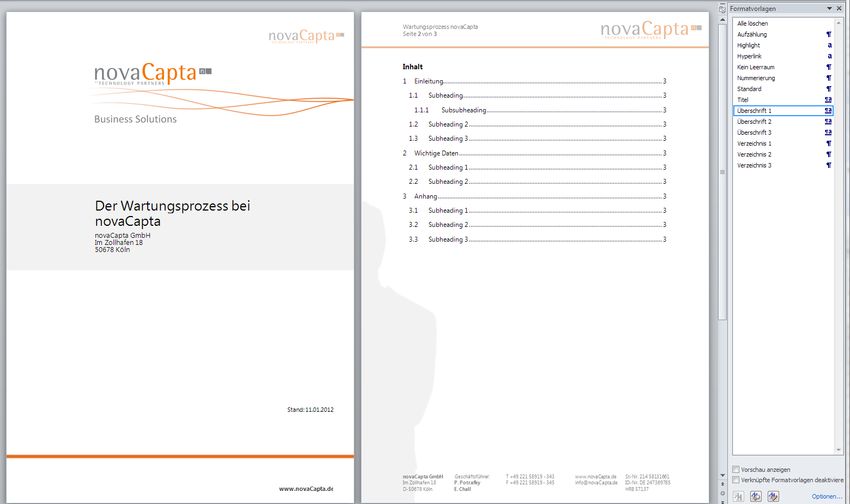
How empower® docs helps your company

 No longer searching for the right templates

                                                                       Always all templates available offline

                                                  Automatic entry of your own sender data in each template

 Easily insert the address data from all Outlook contacts

                                                       Insert predefined text blocks directly into the documents

 Show or hide logos at any time

                                                            Always the legally correct information in the footer

Copyright © 2019 Made in Office GmbH.
02
Functional Overview
Functionality of empower® docs
Central template management                                    Central text element administration
▪ Provision of all Word templates from one location            ▪ Predefined, central text blocks to insert
▪ Advanced user rights concept                                 ▪ Text blocks can also contain images, tables, and diagrams
▪ multilingualism                                              Show or hide your stationery
▪ Automatic offline synchronization                            Logo and header and footer can be dynamically displayed and
Profiles & Locations                                           dimmed

▪ Automatic entry of sender information with own profile       Manage footer information

▪ Select other senders as needed                               ▪ Central administration of all footer data

▪ Management and use of multiple site identifiers and legal    ▪ Automatically update footer data
  forms                                                        Restricted formatting tools
Adress data                                                    ▪ E.g. Fonts, sizes and colors
▪ Directly insert Outlook contacts or other sources into any   ▪ Locked format templates
  document

Copyright © 2019 Made in Office GmbH.
Every template available anytime & anywhere
                                        ▪ Direct integration into Word
                                        ▪ Central maintenance and administration of all templates
                                        ▪ Updating message with intermediate update
                                        ▪ Any complex file structure is definable
                                        ▪ Multilingualism
                                        ▪ Available Offline
                                        ▪ Your own user library
                                        ▪ User rights (Active Directory) control who can use which
                                          templates for use or editing

Copyright © 2019 Made in Office GmbH.
Change template language with one click Copyright © 2019 Made in Office GmbH.
Directly select, manage and use sender profiles
                                        ▪ Direct integration of your (default) profiles into Word

                                        ▪ Default location for users

                                        ▪ Up to 3 profiles per document is possible

                                        ▪ User profiles are taken directly from Active Directory

                                        ▪ Additions and translation possible

                                        ▪ Secretarial service - Write in behalf of third parties

                                        ▪ Effortlessly add more profiles

Copyright © 2019 Made in Office GmbH.
Easily insert address data from Outlook
▪ Integration into defined placeholders
▪ Access the contact data directly from your Outlook ▪ The integration of other address data databases is possible at
any time in the context of an individual extension
Copyright © 2019 Made in Office GmbH.Show and hide the stationery and logo ▪ If you want to print the stationery easily (for example, header ▪ You can also define and temporarily use additional logos (for and footer) example, in sponsoring actions) ▪ When sending as a PDF file (e-mail attachment) simply activate ▪ Complement your company logo by location or language the header and footer display Copyright © 2019 Made in Office GmbH.
Central text blocks available in every document
                                        ▪ Central maintenance of text modules, which can be used
                                          independently of the template

                                        ▪ Storage of further document elements, such as tables,
                                          diagrams, icons, and images

                                        ▪ Available offline

                                        ▪ User rights (Active Directory) control who has which rights

                                        ▪ Any complex file structure is definable

                                        ▪ Own (shareable) user library

Copyright © 2019 Made in Office GmbH.
Automatically update old footer information
▪ Via a central footer management, different company names
and different locations (and logo) can be maintained per
company.
▪ The number of templates to be maintained can be reduced to
a minimum as all data from the central administration are
inserted.
▪ Changes can be centrally maintained and automatically set for
all templates.
▪ Besides location information, additional data can also be
integrated and managed:
– Management team members
– Bank compound(s)
– Legal information
Copyright © 2019 Made in Office GmbH.Your corporate design directly in Word
Reduced fonts Reduced font sizes Reduced font colors
! Provide your users with direct, compliant selection options!
Copyright © 2019 Made in Office GmbH.Locked templates ensure corporate design compliance Copyright © 2019 Made in Office GmbH.
03
technical requirements
Architecture at empower® docs
Architecture                            Description
                                        ▪ empower® docs is a client-server application.

                                        ▪ A Word plug-in is installed on each client (the offline sync
                                          process is part of the installation).

                                        ▪ Offline synchronization regularly checks whether new content
                                          is available on the SQL server. The adjustment takes place in
                                          the background.

Copyright © 2019 Made in Office GmbH.
19
Technical requirements
Supported Office versions Server requirements for empower® docs
Office 2010 SQL Server 2008 or higher
Office 2013 or
Office 2016 hosting via Microsoft Azure in our
Office 365 Pro Plus empower® Cloud
Office for mac is not supported yet, but Optional connection to SharePoint and
a virtualization / remote apps / Citrix is other systems such as CRM, PIMS,
already possible DAMS
Supported operating systems
Available Languages (Multi-Language Support)
English
Windows XP Spanish
Windows Vista French
Windows 7 Chinese
Windows 8 Japanese
Windows 10 German
Russian
Terminal-Server Italian
Citrix Portuguese
Other languages on request
Copyright © 2019 Made in Office GmbH.04 References
a scalable solution for global companies

Selected References:

      80,000                             50,000                  5,000                2,000                   1,000
    Users in 20 countries               Users in 42 countries   Users in Germany   Users in 19 countries   Users in 14 countries

Copyright © 2019 Made in Office GmbH.
05 About Made in Office
Facts & Figures

                         #1                      50                              5
                                                                   Locations in Germany, USA, France,
Leader in the field of Office programming    Full-time employees
                                                                        England and Switzerland

       >1.2 m
           empower® users worldwide
                                            >1,500
                                             customers worldwide
                                                                        2005   founded

Copyright © 2019 Made in Office GmbH.
Our Locations
Made in Office GmbH
Im Mediapark 8
50670 Köln
+49 221 99 37 85 77
Made in Office UK
41 Wardour Street Folienwerke GmbH
London W1F 0UT (Partner)
Made in Office US +44 7946 504 977 Zollikerstraße 153
80 Broad Street 8008 Zürich
New York, NY 10004 +41 44 578 44 84
1-800-657-0270
Made in Office France
3B Rue Taylor, CS 20004,
75481 PARIS CEDEX 10
Paris
+33 (0)1 84 88 01 70
Contact us to discuss your requirements, learn about pricing and schedule an
online demo.
Copyright © 2019 Made in Office GmbH.You can also read


