NVIDIA Mellanox NIC's Performance Report with DPDK 21.11
←
→
Page content transcription
If your browser does not render page correctly, please read the page content below
NVIDIA Mellanox NIC’s
Performance Report with DPDK 21.11

Rev 1.2

                                | 1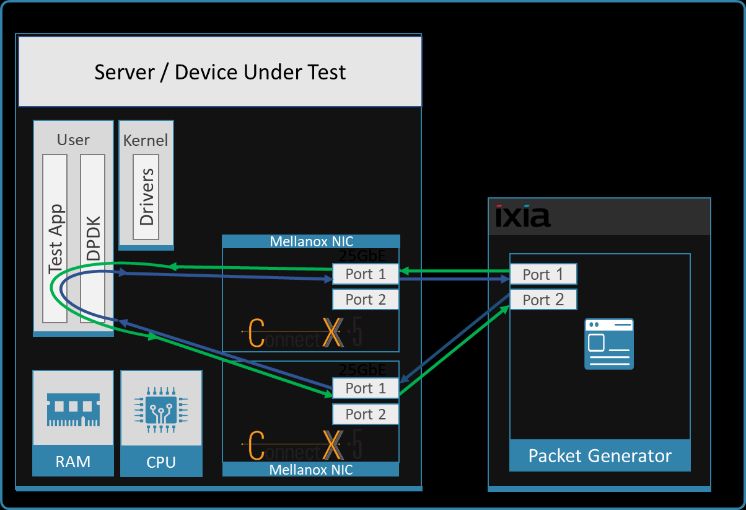
Notice
This document is provided for information purposes only and shall not be regarded as a warranty of a certain functionality, condition, or quality of a product.
NVIDIA Corporation NVIDIA makes no representations or warranties, expressed or implied, as to the accuracy or completeness of the information contained in
this document and assumes no responsibility for any errors contained herein. NVIDIA shall have no liability for the consequences or use of such information or for
any infringement of patents or other rights of third parties that may result from its use. This document is not a commitment to develop, release, or deliver any
Material (defined below), code, or functionality.
NVIDIA reserves the right to make corrections, modifications, enhancements, improvements, and any other changes to this document, at any time without notice.
Customer should obtain the latest relevant information before placing orders and should verify that such information is current and complete.
NVIDIA products are sold subject to the NVIDIA standard terms and conditions of sale supplied at the time of order acknowledgement, unless otherwise agreed in
an individual sales agreement signed by authorized representatives of NVIDIA and customer Terms of Sale NVIDIA hereby expressly objects to applying any
customer general terms and conditions with regards to the purchase of the NVIDIA product referenced in this document. No cont ractual obligations are formed
either directly or indirectly by this document.
NVIDIA products are not designed, authorized, or warranted to be suitable for use in medical, military, aircraft, space, or l ife support equipment, nor in
applications where failure or malfunction of the NVIDIA product can reasonably be expected to result in personal injury, death, or property or environmental
damage. NVIDIA accepts no liability for inclusion and/or use of NVIDIA products in such equipment or applications and therefore such inclusion and/or use is at
customer s own risk.
NVIDIA makes no representation or warranty that products based on this document will be suitable for any specified use. Testi ng of all parameters of each
product is not necessarily performed by NVIDIA. It is customer s sole responsibility to evaluate and determine the applicability of any information contained in this
document, ensure the product is suitable and fit for the application planned by customer, and perform the necessary testing for the application in order to avoid a
default of the application or the product. Weaknesses in customer s product designs may affect the quality and reliability of the NVIDIA product and may result in
additional or different conditions and/or requirements beyond those contained in this document. NVIDIA accepts no liability related to any default, damage, costs,
or problem which may be based on or attributable to: (i) the use of the NVIDIA product in any manner that is contrary to this document or (ii) customer product
designs.
No license, either expressed or implied, is granted under any NVIDIA patent right, copyright, or other NVIDIA intellectual pr operty right under this document.
Information published by NVIDIA regarding third-party products or services does not constitute a license from NVIDIA to use such products or services or a
warranty or endorsement thereof. Use of such information may require a license from a third party under the patents or other intellectual property rights of the
third party, or a license from NVIDIA under the patents or other intellectual property rights of NVIDIA.
Reproduction of information in this document is permissible only if approved in advance by NVIDIA in writing, reproduced without alteration and in full
compliance with all applicable export laws and regulations, and accompanied by all associated conditions, limitations, and notices.

Trademarks
NVIDIA, the NVIDIA logo, and Mellanox are trademarks and/or registered trademarks of NVIDIA Corporation in the U.S. and other countries. Other company and
product names may be trademarks of the respective companies with which they are associated.
For the complete and most updated list of Mellanox trademarks, visit http://www.mellanox.com/page/trademarks.

Copyright
© 2021 NVIDIA Corporation. All rights reserved.

NVIDIA Corporation | 2788 San Tomas Expressway, Santa Clara, CA 95051
http://www.nvidia.com

NVIDIA Mellanox NIC’s                Performance Report with DPDK 21.11                                                                          Rev 1.2 | Page 2
Table of Contents
1        About this Report......................................................................................................................................... 8
     1.1         Target Audience ........................................................................................................................................................... 8
     1.2         Terms and Conventions ................................................................................................................................................ 8

2        Test Description ........................................................................................................................................... 9
     2.1         Hardware Components ................................................................................................................................................ 9
     2.2         Zero Packet Loss Test ................................................................................................................................................... 9
     2.3         Zero Packet Loss over SR-IOV Test ............................................................................................................................... 9
     2.4         Single Core Performance Test ...................................................................................................................................... 9
3        Test#1 Mellanox ConnectX-4 Lx 25GbE Throughput at Zero Packet Loss (2x 25GbE) .................................. 10
     3.1         Test Settings ............................................................................................................................................................... 11
     3.2         Test Results ................................................................................................................................................................ 12
4        Test#2 Mellanox ConnectX-5 25GbE Throughput at Zero Packet Loss (2x 25GbE)....................................... 13
     4.1         Test Settings ............................................................................................................................................................... 14
     4.2         Test Results ................................................................................................................................................................ 15

5        Test#3 Mellanox ConnectX-5 Ex 100GbE Throughput at Zero Packet Loss (1x 100GbE) .............................. 16
     5.1         Test Settings ............................................................................................................................................................... 17
     5.2         Test Results ................................................................................................................................................................ 18

6        Test#4 Mellanox ConnectX-5 Ex 100GbE Single Core Performance (2x 100GbE) ......................................... 19
     6.1         Test Settings ............................................................................................................................................................... 20
     6.2         Test Results ................................................................................................................................................................ 21

7        Test#5 Mellanox ConnectX-5 25GbE Single Core Performance (2x 25GbE) ................................................. 22
     7.1         Test Settings ............................................................................................................................................................... 23
     7.2         Test Results ................................................................................................................................................................ 24

8     Test#6 Mellanox ConnectX-5 25GbE Throughput at Zero Packet Loss (2x 25GbE) using SR-IOV over VMware
ESXi 7.0U3 ........................................................................................................................................................... 25
     8.1         Test Settings ............................................................................................................................................................... 27
     8.2         Test Results ................................................................................................................................................................ 28
9   Test#7 Mellanox ConnectX-5 Ex 100GbE Throughput at Zero Packet Loss (1x 100GbE) using SR-IOV over
KVM Hypervisor ................................................................................................................................................... 29
     9.1         Test Settings ............................................................................................................................................................... 30
     9.2         Test Results ................................................................................................................................................................ 33
10       Test#8 Mellanox ConnectX-6Dx 25GbE Throughput at Zero Packet Loss (2x 25GbE) .................................. 34
     10.1        Test Settings ............................................................................................................................................................... 35
     10.2        Test Results ................................................................................................................................................................ 36
11       Test#9 Mellanox ConnectX-6 Dx 100GbE PCIe Gen4 Throughput at Zero Packet Loss (1x 100GbE) ............. 37
     11.1        Test Settings ............................................................................................................................................................... 38
     11.2        Test Results ................................................................................................................................................................ 39
12       Test#10 Mellanox ConnectX-6Dx 100GbE PCIe Gen4 Single Core Performance (2x 100GbE) ...................... 40
     12.1        Test Settings ............................................................................................................................................................... 41
     12.2        Test Results ................................................................................................................................................................ 42
13       Test#11 Mellanox ConnectX-6 Dx 100GbE PCIe Gen4 Throughput at Zero Packet Loss (2x 100GbE) ........... 43
     13.1        Test Settings ............................................................................................................................................................... 44
     13.2        Test Results ................................................................................................................................................................ 45
14  Test#12 Mellanox ConnectX-6 Dx 100GbE Throughput at Zero Packet Loss (1x 100GbE) using SR-IOV over
KVM Hypervisor ................................................................................................................................................... 46
NVIDIA Mellanox NIC’s                    Performance Report with DPDK 21.11                                                                                         Rev 1.2 | Page 3
14.1    Test Settings ............................................................................................................................................................... 48
     14.2    Test Results ................................................................................................................................................................ 50
15     Test#13 Mellanox ConnectX-6 Dx 200GbE PCIe Gen4 Throughput at Zero Packet Loss (1x 200GbE) ........... 51
     15.1    Test Settings ............................................................................................................................................................... 52
     15.2    Test Results ................................................................................................................................................................ 53
16     Test#14 BlueField-2 25GbE Throughput at Zero Packet Loss (2x 25GbE) ..................................................... 54
     16.1    Test Settings ............................................................................................................................................................... 55
     16.2    Test Results ................................................................................................................................................................ 56
17     Test#15 Mellanox ConnectX-6 Lx 25GbE Throughput at Zero Packet Loss (2x 25GbE) ................................ 57
     17.1    Test Settings ............................................................................................................................................................... 58
     17.2    Test Results ................................................................................................................................................................ 59

NVIDIA Mellanox NIC’s                Performance Report with DPDK 21.11                                                                                         Rev 1.2 | Page 4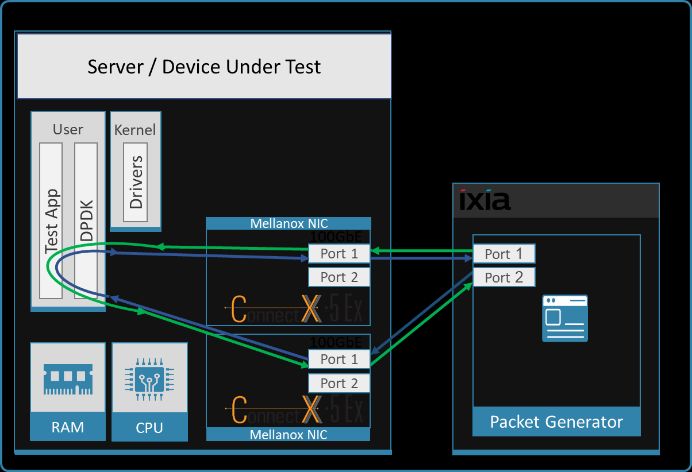
List of Figures
Figure 1: Test #1 Setup – Mellanox ConnectX-4 Lx 25GbE Dual-Port connected to IXIA ................................................................ 10
Figure 2: Test #1 Results – Mellanox ConnectX-4 Lx 25GbE Dual-Port Throughput at Zero Packet Loss ........................................ 12
Figure 3: Test #2 Setup – Mellanox ConnectX-5 25GbE Dual-Port connected to IXIA ..................................................................... 13
Figure 4: Test #2 Results – Mellanox ConnectX-5 25GbE Dual-Port Throughput at Zero Packet Loss ............................................ 15
Figure 5: Test #3 Setup – Mellanox ConnectX-5 Ex 100GbE connected to IXIA .............................................................................. 16
Figure 6: Test #3 Results – Mellanox ConnectX-5 Ex 100GbE Throughput at Zero Packet Loss ...................................................... 18
Figure 7: Test #4 Setup – Two Mellanox ConnectX-5 Ex 100GbE connected to IXIA ....................................................................... 19
Figure 8: Test #4 Results – Mellanox ConnectX-5 Ex 100GbE Single Core Performance ................................................................. 21
Figure 9: Test #5 Setup – Two Mellanox ConnectX-5 25GbE connected to IXIA ............................................................................. 22
Figure 10: Test #5 Results – Mellanox ConnectX-5 25GbE Single Core Performance ..................................................................... 24
Figure 11: Test #6 Setup – Mellanox ConnectX-5 25GbE connected to IXIA using ESXi SR-IOV ...................................................... 26
Figure 12: Test#6 Results – Mellanox ConnectX-5 25GbE Throughput at Zero Packet Loss using ESXi SR-IOV............................... 28
Figure 13: Test #7 Setup – Mellanox ConnectX-5 Ex 100GbE connected to IXIA using KVM SR-IOV .............................................. 30
Figure 14: Test #7 Results – Mellanox ConnectX-5 Ex 100GbE Throughput at Zero Packet Loss using KVM SR-IOV ..................... 33
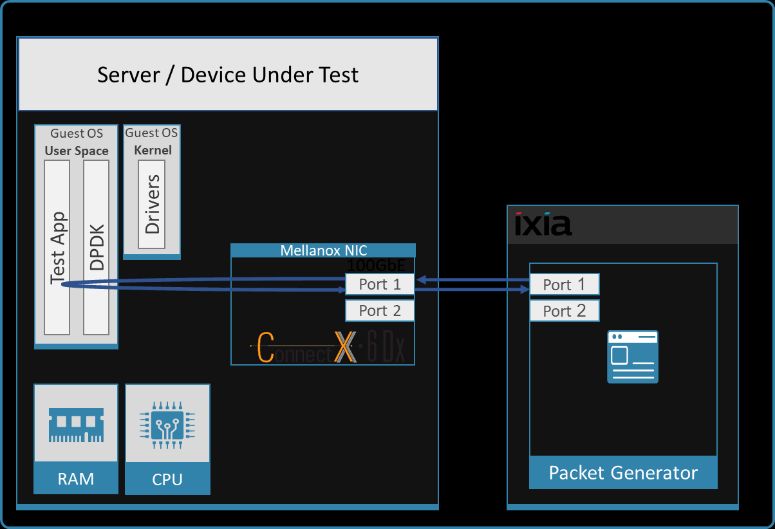
Figure 15: Test #8 Setup – Mellanox ConnectX-6 Dx 25GbE Dual-Port connected to IXIA .............................................................. 34
Figure 16: Test #8 Results – Mellanox ConnectX-6Dx 25GbE Dual-Port Throughput at Zero Packet Loss ...................................... 36
Figure 17: Test #9 Setup – Mellanox ConnectX-6 Dx 100GbE connected to IXIA ............................................................................ 37
Figure 18: Test #9 Results – Mellanox ConnectX-5 Ex 100GbE Throughput at Zero Packet Loss .................................................... 39
Figure 19: Test #10 Setup – Two Mellanox ConnectX-6 Dx 100GbE connected to IXIA .................................................................. 40
Figure 20: Test #10 Results – Mellanox ConnectX-6Dx 100GbE Single Core Performance ............................................................. 42
Figure 21: Test #11 Setup – Mellanox ConnectX-6 Dx 100GbE connected to IXIA .......................................................................... 43
Figure 22: Test #11 Results – Mellanox ConnectX-6 Dx 100GbE dual port PCIe Gen4 Throughput at Zero Packet Loss ................ 45
Figure 23 - Test #12 Setup – Mellanox ConnectX-6 Dx 100GbE connected to IXIA using KVM SR-IOV ........................................... 47
Figure 24 - Test #12 Results – Mellanox ConnectX-6 Dx 100GbE Throughput at Zero Packet Loss using KVM SR-IOV................... 50
Figure 25 - Test #13 Setup – Mellanox ConnectX-6 Dx 200GbE connected to IXIA ......................................................................... 51
Figure 26 - Test #13 Results – Mellanox ConnectX-6 Dx 200GbE dual port PCIe Gen4 Throughput at Zero Packet Loss ............... 53
Figure 27 -Test #14 Setup – BlueField-2 25GbE Dual-Port connected to IXIA ................................................................................. 54
Figure 28 - Test #14 Results – BlueField-2 25GbE Dual-Port Throughput at Zero Packet Loss........................................................ 56
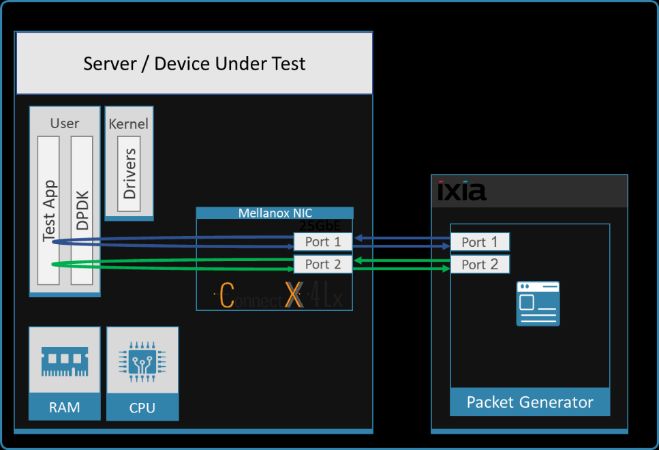
Figure 29 - Test #15 Setup – Mellanox ConnectX-6 Lx 25GbE Dual-Port connected to IXIA ........................................................... 57
Figure 30 - Test #15 Results – Mellanox ConnectX-6 Lx 25GbE Dual-Port Throughput at Zero Packet Loss ................................... 59

NVIDIA Mellanox NIC’s              Performance Report with DPDK 21.11                                                                  Rev 1.2 | Page 5
List of Tables
Table 1 - Document History ...................................................................................................................................................... 7
Table 2 - Terms, Abbreviations and Acronyms .......................................................................................................................... 8
Table 3: Test #1 Setup ............................................................................................................................................................. 10
Table 4: Test #1 Settings ......................................................................................................................................................... 11
Table 5: Test #1 Results – Mellanox ConnectX-4 Lx 25GbE Dual-Port Throughput at Zero Packet Loss ................................. 12
Table 6: Test #2 Setup ............................................................................................................................................................. 13
Table 7: Test #2 Settings ......................................................................................................................................................... 14
Table 8: Test #2 Results – Mellanox ConnectX-5 25GbE Dual-Port Throughput at Zero Packet Loss...................................... 15
Table 9: Test #3 Setup ............................................................................................................................................................. 16
Table 10: Test #3 Settings ....................................................................................................................................................... 17
Table 11: Test #3 Results – Mellanox ConnectX-5 Ex 100GbE Throughput at Zero Packet Loss ............................................. 18
Table 12: Test #4 Setup ........................................................................................................................................................... 19
Table 13: Test #4 Settings ....................................................................................................................................................... 20
Table 14: Test #4 Results – Mellanox ConnectX-5 Ex 100GbE Single Core Performance ........................................................ 21
Table 15: Test #5 Setup ........................................................................................................................................................... 22
Table 16: Test #5 Settings ....................................................................................................................................................... 23
Table 17: Test #5 Results – Mellanox ConnectX-5 25GbE Single Core Performance............................................................... 24
Table 18: Test #6 Setup ........................................................................................................................................................... 25
Table 19: Test#6 Settings ........................................................................................................................................................ 27
Table 20: Test#6 Results – Mellanox ConnectX-5 25GbE Throughput at Zero Packet Loss using ESXi SR-IOV ........................ 28
Table 21: Test #7 Setup ........................................................................................................................................................... 29
Table 22: Test #7 Settings ....................................................................................................................................................... 30
Table 23: Test #7 Results – Mellanox ConnectX-5 Ex 100GbE Throughput at Zero Packet Loss using KVM SR-IOV ............... 33
Table 24: Test #8 Setup ........................................................................................................................................................... 34
Table 25: Test #8 Settings ....................................................................................................................................................... 35
Table 26: Test #8 Results – Mellanox ConnectX-6Dx 25GbE Dual-Port Throughput at Zero Packet Loss ............................... 36
Table 27: Test #9 Setup ........................................................................................................................................................... 37
Table 28: Test #9 Settings ....................................................................................................................................................... 38
Table 29: Test #9 Results – Mellanox ConnectX-6 Dx 100GbE Throughput at Zero Packet Loss ............................................. 39
Table 30: Test #10 Setup ......................................................................................................................................................... 40
Table 31: Test #10 Settings ..................................................................................................................................................... 41
Table 32: Test #10 Results – Mellanox ConnectX-6 Dx 100GbE Single Core Performance...................................................... 42
Table 33: Test #11 Setup ......................................................................................................................................................... 43
Table 34: Test #11 Settings ..................................................................................................................................................... 44
Table 35: Test #11 Results – Mellanox ConnectX-6 Dx 100GbE dual port PCIe Gen4 Zero Packet Loss Throughput .............. 45
Table 36 - Test #12 Setup ........................................................................................................................................................ 46
Table 37 - Test #12 Settings .................................................................................................................................................... 48
Table 38 - Test #12 Results – Mellanox ConnectX-6 Dx 100GbE Throughput at Zero Packet Loss using KVM SR-IOV ............ 50
Table 39 - Test #13 Setup ........................................................................................................................................................ 51
Table 40 - Test #13 Settings .................................................................................................................................................... 52
Table 41 - Test #13 Results – Mellanox ConnectX-6 Dx 200GbE single port PCIe Gen4 Throughput at Zero Packet Loss ...... 53
Table 42 - Test #14 Setup ........................................................................................................................................................ 54
Table 43 - Test #14 Settings .................................................................................................................................................... 55
Table 44 - Test #14 Results – BlueField-2 25GbE Dual-Port Throughput at Zero Packet Loss ................................................. 56
Table 45 - Test #15 Setup ........................................................................................................................................................ 57
Table 46 - Test #15 Settings .................................................................................................................................................... 58
Table 47 - Test #15 Results – Mellanox ConnectX-6 Lx 25GbE Dual-Port Throughput at Zero Packet Loss ............................ 59

NVIDIA Mellanox NIC’s                      Performance Report with DPDK 21.11                                                                                     Rev 1.2 | Page 6
Document History
Table 1 - Document History

 Version      Date                         Description of Change
 1.0         03-FEB-2022                   Initial report release
 1.1         17-JAN-2023                   Adjust the number of cores used in command line for Test#11
 1.2         21-Feb-2023                   Fix a typo in Test#13 results

NVIDIA Mellanox NIC’s      Performance Report with DPDK 21.11                                            Rev 1.2 | Page 7
1 About this Report
The purpose of this document is to provide packet rate performance data for NVIDIA® Mellanox® Network Interface
Cards (NICs - ConnectX®-4 Lx, ConnectX®-5, ConnectX®-5 Ex, ConnectX®-6 Lx, ConnectX®-6 Dx) and Data Processing
Unit (BlueField-2 DPU) (that has been achieved with the specified Data Plane Development Kit (DPDK) release. The
report provides the measured packet rate performance as well as the hardware layout, procedures, and
configurations for replicating these tests.
The document does not cover all network speeds available with the ConnectX® or BlueField® family of NICs / DPUs
and is intended as a general reference of achievable performance for the specified DPDK release.

1.1 Target Audience
This document is intended for engineers implementing applications with DPDK to guide and help achieving optimal
performance.

1.2 Terms and Conventions
The following terms, abbreviations, and acronyms are used in this document.

Table 2 - Terms, Abbreviations and Acronyms

 Term       Description
 DPU        Data Processing Unit
 DUT        Device Under Test
 MPPS       Million Packets Per Seconds
 PPS        Packets Per Second
 OFED       OpenFabrics Enterprise Distribution; An open-source software for RDMA & kernel bypass.
            Read more on Mellanox OFED here.
 SR-IOV     Single Root IO Virtualization
 ZPL        Zero Packet Loss

NVIDIA Mellanox NIC’s      Performance Report with DPDK 21.11                                        Rev 1.2 | Page 8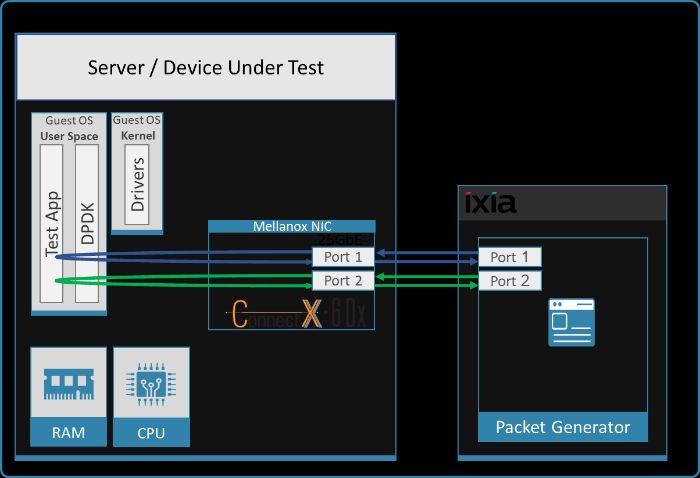
2 Test Description
2.1 Hardware Components
The following hardware components are used in the test setup:
One of the following servers:
o HPE® ProLiant DL380 Gen10 Server
o HPE® ProLiant DL380 Gen10 Plus Server
One of the followings NICs, SmartNICs or DPUs:
o Mellanox ConnectX-4 Lx, ConnectX-5, ConnectX-5 Ex, ConnectX-6 Lx, ConnectX-6 Dx Network Interface
Cards (NICs) and BlueField-2 Data Processing Unit (DPU)
IXIA® XM12 packet generator
2.2 Zero Packet Loss Test
Zero Packet Loss tests utilize l3fwd (http://www.dpdk.org/doc/guides/sample_app_ug/l3_forward.html) as
the test application for testing maximum throughput with zero packet loss at various frame sizes based on
RFC2544 https://tools.ietf.org/html/rfc2544.
The packet generator transmits a specified frame rate towards the Device Under Test (DUT) and counts the
received frame rate sent back from the DUT. Throughput is determined with the maximum achievable transmit
frame rate and is equal to the received frame rate i.e. zero packet loss.
Duration for each test is 60 seconds.
Traffic of 8192 IP flows is generated per port.
IxNetwork (Version 9.00EA) is used with the IXIA packet generator.
2.3 Zero Packet Loss over SR-IOV Test
The test is conducted similarly to the bare-metal zero packet loss test with the distinction of having the DPDK
application running in a Guest OS inside a VM utilizing SR-IOV virtual function.
2.4 Single Core Performance Test
Single Core performance tests utilize testpmd (http://www.dpdk.org/doc/guides/testpmd_app_ug), for
testing the max throughput while using a single CPU core. The duration of the test is 60 seconds and the average
throughput that is recorded during that time is used as the result of the test.
Duration for each test is 60 seconds.
Traffic of 8192 UDP flows is generated per port.
IxNetwork (Version 9.00EA) is used with the IXIA packet generator.
NVIDIA Mellanox NIC’s Performance Report with DPDK 21.11 Rev 1.2 | Page 9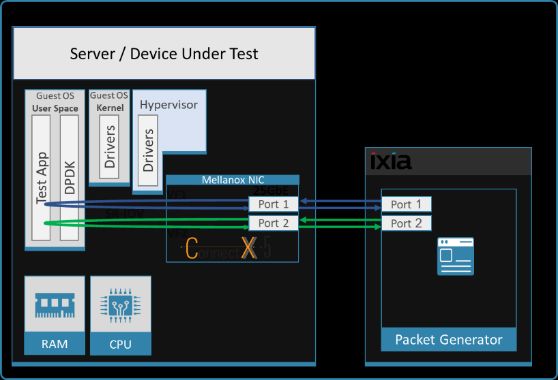
3 Test#1 Mellanox ConnectX-4 Lx 25GbE Throughput at Zero Packet
  Loss (2x 25GbE)
Table 3: Test #1 Setup

Item                  Description
Test #1               Mellanox ConnectX-4 Lx 25GbE Dual-Port Throughput at zero packet loss

Server                HPE ProLiant DL380 Gen10

CPU                   Intel(R) Xeon(R) Platinum 8168 CPU @ 2.70GHz
                      24 CPU cores * 2 NUMA nodes

RAM                   384GB: 6 * 32GB DIMMs * 2 NUMA nodes @ 2666MHz

BIOS                  U30 rev. 1.36 (02/15/2018)

NIC                   One MCX4121A-ACAT - ConnectX-4 Lx network interface card
                      25GbE dual-port SFP28; PCIe3.0 x8; ROHS R6

Operating System      Ubuntu 20.04.2 LTS (Focal Fossa)

Kernel Version        5.4.0-65-generic.x86_64

GCC version           gcc (Ubuntu 9.3.0-17ubuntu1~20.04) 9.3.0

Mellanox NIC          14.32.1010
firmware version

Mellanox OFED         MLNX_OFED_LINUX-5.5-1.0.3.2
driver version

DPDK version          21.11

Test                  1 NIC, 2 ports used on the NIC.
Configuration         Each port receives a stream of 8192 IP flows from the IXIA
                      Each port has 4 queues assigned for a total of 8 queues
                      1 queue assigned per logical core with a total of 8 logical cores

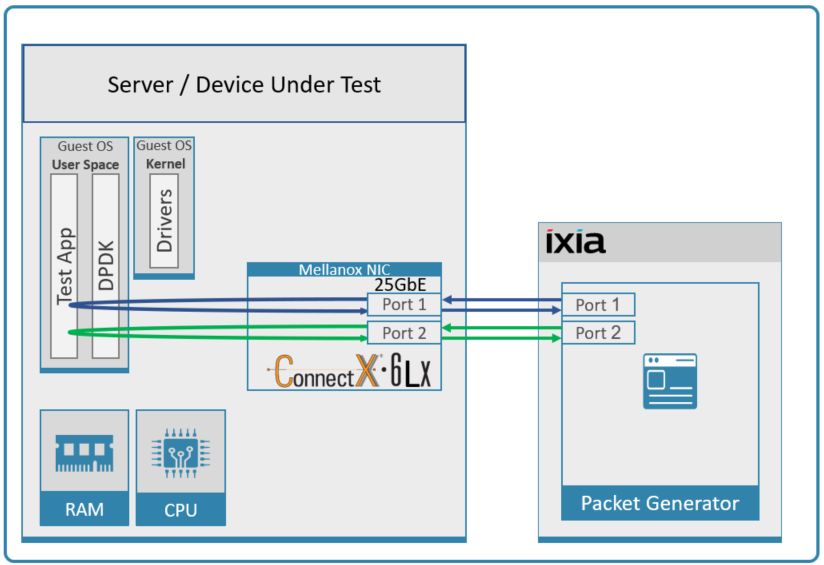
The Device Under Test (DUT) is made up of the HPE server and the Mellanox ConnectX-4 Lx Dual-Port NIC. The DUT
is connected to the IXIA packet generator which generates traffic towards the ConnectX-4 Lx NIC.
The ConnectX-4 Lx data traffic is passed through DPDK to the test application l3fwd and is redirected to the
opposite direction on the opposing port. IXIA measures throughput and packet loss.
                   Figure 1: Test #1 Setup – Mellanox ConnectX-4 Lx 25GbE Dual-Port connected to IXIA

NVIDIA Mellanox NIC’s         Performance Report with DPDK 21.11                                 Rev 1.2 | Page 10
3.1 Test Settings
Table 4: Test #1 Settings
Item Description
BIOS 1) Workload Profile = Low Latency”;
2) Jitter Control = Manual, 3400. (Setting turbo boost frequency to 3.4 GHz)
See Configuring and tuning HPE ProLiant Servers for low-latency applications”:
hpe.com > Search DL380 gen10 low latency”
BOOT Settings isolcpus=24-47 intel_idle.max_cstate=0 processor.max_cstate=0 intel_pstate=disable nohz_full=24-47
rcu_nocbs=24-47 rcu_nocb_poll default_hugepagesz=1G hugepagesz=1G hugepages=64 audit=0
nosoftlockup
DPDK Settings Compile DPDK using:
meson -Dexamples=l3fwd ; ninja -C
During testing, l3fwd was given real-time scheduling priority.
L3fwd settings Updated values /l3fwd/l3fwd.h:
#define RTE_TEST_RX_DESC_DEFAULT 4096
#define RTE_TEST_TX_DESC_DEFAULT 4096
#define MAX_PKT_BURST 64
Command Line ./build/examples/dpdk-l3fwd -c 0xff0000000000 -n 4 -a d8:00.0,txq_inline=200,txq_mpw_en=1 -a
d8:00.1,txq_inline=200,txq_mpw_en=1 --socket-mem=0,8192 -- -p 0x3 -P --
config='(0,0,47),(0,1,46),(0,2,45),(0,3,44),(1,0,43),(1,1,42),(1,2,41),(1,3,40)' --eth-
dest=0,00:52:11:22:33:10 --eth-dest=1,00:52:11:22:33:20
Other a) Flow Control OFF: "ethtool -A $netdev rx off tx off"
optimizations b) Memory optimizations: "sysctl -w vm.zone_reclaim_mode=0"; "sysctl -w vm.swappiness=0"
c) Move all IRQs to far NUMA node: "IRQBALANCE_BANNED_CPUS=$LOCAL_NUMA_CPUMAP
irqbalance --oneshot"
d) Disable irqbalance: "systemctl stop irqbalance"
e) Change PCI MaxReadReq to 1024B for each port of each NIC:
Run "setpci -s $PORT_PCI_ADDRESS 68.w", it will return 4 digits ABCD -->
Run "setpci -s $PORT_PCI_ADDRESS 68.w=3BCD"
f) Set CQE COMPRESSION to AGGRESSIVE”: mlxconfig -d $PORT_PCI_ADDRESS set
CQE_COMPRESSION=1
G) Disable Linux realtime throttling: echo -1 > /proc/sys/kernel/sched_rt_runtime_us
NVIDIA Mellanox NIC’s Performance Report with DPDK 21.11 Rev 1.2 | Page 113.2 Test Results
Table 5: Test #1 Results – Mellanox ConnectX-4 Lx 25GbE Dual-Port Throughput at Zero Packet Loss
Frame Size (Bytes) Frame Rate (Mpps) Line Rate [50G] (Mpps) % Line Rate
64 70.80 74.4 95.17
128 39.22 42.23 92.88
256 22.64 22.64 100
512 11.75 11.75 100
1024 5.99 5.99 100
1280 4.81 4.81 100
1518 4.06 4.06 100
Figure 2: Test #1 Results – Mellanox ConnectX-4 Lx 25GbE Dual-Port Throughput at Zero Packet Loss
DPDK 21.11 Zero Packet Loss
Frame-Rate by Frame Size
Mellanox ConnectX-4 Lx 25GbE Dual Port (2 Ports total)
70.80
80
Frame Rate [Mpps]
60
39.22
40
22.64 Frame Rate
20 11.75
5.99 4.81 4.06 Line Rate [50G]
0
64 128 256 512 1024 1280 1518
Frame Size [B]
NVIDIA Mellanox NIC’s Performance Report with DPDK 21.11 Rev 1.2 | Page 124 Test#2 Mellanox ConnectX-5 25GbE Throughput at Zero Packet Loss
(2x 25GbE)
Table 6: Test #2 Setup
Item Description
Test #2 Mellanox ConnectX-5 25GbE Dual-Port Throughput at zero packet loss
Server HPE ProLiant DL380 Gen10
CPU Intel(R) Xeon(R) Platinum 8168 CPU @ 2.70GHz
24 CPU cores * 2 NUMA nodes
RAM 384GB: 6 * 32GB DIMMs * 2 NUMA nodes @ 2666MHz
BIOS U30 rev. 1.36 (02/15/2018)
NIC One MCX512A-ACAT ConnectX-5 EN network interface card;
10/25GbE dual-port SFP28; PCIe3.0 x8; tall bracket; ROHS R6
Operating System Ubuntu 20.04.2 LTS (Focal Fossa)
Kernel Version 5.4.0-65-generic.x86_64
GCC version gcc (Ubuntu 9.3.0-17ubuntu1~20.04) 9.3.0
Mellanox NIC 16.32.1010
firmware version
Mellanox OFED MLNX_OFED_LINUX-5.5-1.0.3.2
driver version
DPDK version 21.11
Test 1 NIC, 2 ports;
Configuration Each port receives a stream of 8192 IP flows from the IXIA
Each port has 4 queues assigned for a total of 8 queues
1 queue assigned per logical core with a total of 8 logical cores
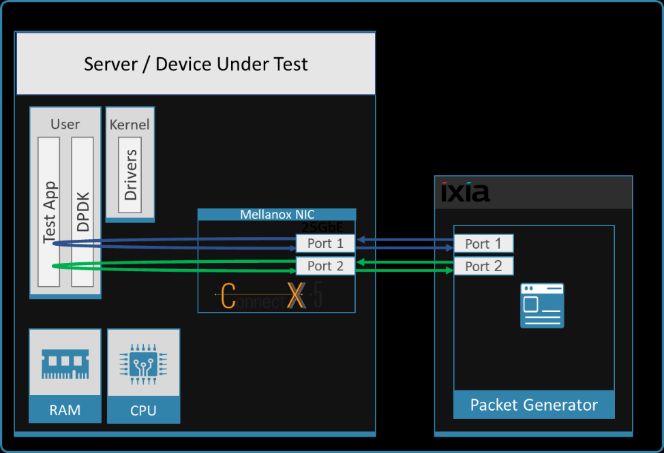
The Device Under Test (DUT) is made up of the HPE server and the Mellanox ConnectX-5 Dual-Port NIC. The DUT is
connected to the IXIA packet generator which generates traffic towards the ConnectX-5 NIC.
The ConnectX-5 data traffic is passed through DPDK to the test application l3fwd and is redirected to the opposite
direction on the same port. IXIA measures throughput and packet loss.
Figure 3: Test #2 Setup – Mellanox ConnectX-5 25GbE Dual-Port connected to IXIA
NVIDIA Mellanox NIC’s Performance Report with DPDK 21.11 Rev 1.2 | Page 134.1 Test Settings
Table 7: Test #2 Settings
Item Description
BIOS 1) Workload Profile = Low Latency”;
2) Jitter Control = Manual, 3400. (Setting turbo boost frequency to 3.4 GHz)
See Configuring and tuning HPE ProLiant Servers for low-latency applications”:
hpe.com > Search DL380 gen10 low latency”
BOOT Settings isolcpus=24-47 intel_idle.max_cstate=0 processor.max_cstate=0 intel_pstate=disable nohz_full=24-
47 rcu_nocbs=24-47 rcu_nocb_poll default_hugepagesz=1G hugepagesz=1G hugepages=64 audit=0
nosoftlockup
DPDK Settings Compile DPDK using:
meson -Dexamples=l3fwd ; ninja -C
During testing, l3fwd was given real-time scheduling priority.
L3fwd settings Updated values /l3fwd/l3fwd.h:
#define RTE_TEST_RX_DESC_DEFAULT 4096
#define RTE_TEST_TX_DESC_DEFAULT 4096
#define MAX_PKT_BURST 64
Command Line ./build/examples/dpdk-l3fwd -c 0xff0000000000 -n 4 -a d8:00.0,mprq_en=1,rxqs_min_mprq=1 -a
d8:00.1,mprq_en=1,rxqs_min_mprq=1 --socket-mem=0,8192 -- -p 0x3 -P --
config='(0,0,47),(0,1,46),(0,2,45),(0,3,44),(1,0,43),(1,1,42),(1,2,41),(1,3,40)' --eth-
dest=0,00:52:11:22:33:10 --eth-dest=1,00:52:11:22:33:20
Other optimizations a) Flow Control OFF: "ethtool -A $netdev rx off tx off"
b) Memory optimizations: "sysctl -w vm.zone_reclaim_mode=0"; "sysctl -w vm.swappiness=0"
c) Move all IRQs to far NUMA node: "IRQBALANCE_BANNED_CPUS=$LOCAL_NUMA_CPUMAP
irqbalance --oneshot"
d) Disable irqbalance: "systemctl stop irqbalance"
e) Change PCI MaxReadReq to 1024B for each port of each NIC:
Run "setpci -s $PORT_PCI_ADDRESS 68.w", it will return 4 digits ABCD -->
Run "setpci -s $PORT_PCI_ADDRESS 68.w=3936"
f) Set CQE COMPRESSION to AGGRESSIVE”: mlxconfig -d $PORT_PCI_ADDRESS set
CQE_COMPRESSION=1
g) Disable Linux realtime throttling: echo -1 > /proc/sys/kernel/sched_rt_runtime_us
NVIDIA Mellanox NIC’s Performance Report with DPDK 21.11 Rev 1.2 | Page 144.2 Test Results
Table 8: Test #2 Results – Mellanox ConnectX-5 25GbE Dual-Port Throughput at Zero Packet Loss
Frame Size (Bytes) Frame Rate (Mpps) Line Rate [50G] (Mpps) % Line Rate
64 74.40 74.40 100.00
128 42.23 42.23 100.00
256 22.64 22.64 100.00
512 11.75 11.75 100.00
1024 5.99 5.99 100.00
1280 4.81 4.81 100.00
1518 4.06 4.06 100.00
Figure 4: Test #2 Results – Mellanox ConnectX-5 25GbE Dual-Port Throughput at Zero Packet Loss
DPDK 21.11 Zero Packet Loss
Frame-Rate by Frame Size
74.4 Mellanox ConnectX-5 25GbE Dual Port (2 Ports total)
80
Frame Rate [Mpps]
60
42.23
40 4 cores per port
22.64 Line Rate [50GBE]
20 11.75
5.99 4.81 4.06
0
64 128 256 512 1024 1280 1518
Frame Size [B]
NVIDIA Mellanox NIC’s Performance Report with DPDK 21.11 Rev 1.2 | Page 155 Test#3 Mellanox ConnectX-5 Ex 100GbE Throughput at Zero Packet
Loss (1x 100GbE)
Table 9: Test #3 Setup
Item Description
Test #3 Mellanox ConnectX-5 Ex 100GbE Throughput at zero packet loss
Server HPE ProLiant DL380 Gen10
CPU Intel(R) Xeon(R) Platinum 8168 CPU @ 2.70GHz
24 CPU cores * 2 NUMA nodes
RAM 384GB: 6 * 32GB DIMMs * 2 NUMA nodes @ 2666MHz
BIOS U30 rev. 1.36 (02/15/2018)
NIC One MCX516A-CDAT ConnectX-5 Ex network interface card
100GbE dual-port QSFP28; PCIe3.0/PCIe4 x16; ROHS R6
Operating System Ubuntu 20.04.2 LTS (Focal Fossa)
Kernel Version 5.4.0-65-generic.x86_64
GCC version gcc (Ubuntu 9.3.0-17ubuntu1~20.04) 9.3.0
Mellanox NIC firmware 16.32.1010
version
Mellanox OFED driver version MLNX_OFED_LINUX-5.5-1.0.3.2
DPDK version 21.11
Test Configuration 1 NIC, 1 port used on NIC; Port has 12 queues assigned to it, 1 queue per logical core for a
total of 12 logical cores.
Each port receives a stream of 8192 IP flows from the IXIA
The Device Under Test (DUT) is made up of the HPE server and the Mellanox ConnectX-5 Ex Dual-Port NIC (only the
first port is used in this test). The DUT is connected to the IXIA packet generator which generates traffic towards
the ConnectX-5 Ex NIC.
The ConnectX-5 Ex data traffic is passed through DPDK to the test application l3fwd and is redirected to the
opposite direction on the same port. IXIA measures throughput and packet loss.
Figure 5: Test #3 Setup – Mellanox ConnectX-5 Ex 100GbE connected
to IXIA
NVIDIA Mellanox NIC’s Performance Report with DPDK 21.11 Rev 1.2 | Page 165.1 Test Settings
Table 10: Test #3 Settings
Item Description
BIOS 1) Workload Profile = Low Latency”;
2) Jitter Control = Manual, 3400. (Setting turbo boost frequency to 3.4 GHz)
See Configuring and tuning HPE ProLiant Servers for low-latency applications”:
hpe.com > Search DL380 gen10 low latency”
BOOT Settings isolcpus=24-47 intel_idle.max_cstate=0 processor.max_cstate=0 intel_pstate=disable
nohz_full=24-47 rcu_nocbs=24-47 rcu_nocb_poll default_hugepagesz=1G hugepagesz=1G
hugepages=64 audit=0 nosoflockup
DPDK Settings Compile DPDK using:
meson -Dexamples=l3fwd ; ninja -C
During testing, l3fwd was given real-time scheduling priority.
L3fwd settings Updated values /l3fwd/l3fwd.h:
#define RTE_TEST_RX_DESC_DEFAULT 4096
#define RTE_TEST_TX_DESC_DEFAULT 4096
#define MAX_PKT_BURST 64
Command Line ./build/examples/dpdk-l3fwd -c 0xfff000000000 -n 4 -a 0000:af:00.0,mprq_en=1,rxqs_min_mprq=1
--socket-mem=0,8192 -- -p 0x1 -P --
config='(0,0,47),(0,1,46),(0,2,45),(0,3,44),(0,4,43),(0,5,42),(0,6,41),(0,7,40),(0,8,39),(0,9,38),(0,10,37
),(0,11,36)' --eth-dest=0,00:52:11:22:33:10
Other optimizations a) Flow Control OFF: "ethtool -A $netdev rx off tx off"
b) Memory optimizations: "sysctl -w vm.zone_reclaim_mode=0"; "sysctl -w vm.swappiness=0"
c) Move all IRQs to far NUMA node: "IRQBALANCE_BANNED_CPUS=$LOCAL_NUMA_CPUMAP
irqbalance --oneshot"
d) Disable irqbalance: "systemctl stop irqbalance"
e) Change PCI MaxReadReq to 1024B for each port of each NIC:
Run "setpci -s $PORT_PCI_ADDRESS 68.w", it will return 4 digits ABCD -->
Run "setpci -s $PORT_PCI_ADDRESS 68.w=3BCD"
f) Set CQE COMPRESSION to AGGRESSIVE”: mlxconfig -d $PORT_PCI_ADDRESS set
CQE_COMPRESSION=1
g) Disable Linux realtime throttling: echo -1 > /proc/sys/kernel/sched_rt_runtime_us
NVIDIA Mellanox NIC’s Performance Report with DPDK 21.11 Rev 1.2 | Page 175.2 Test Results
Table 11: Test #3 Results – Mellanox ConnectX-5 Ex 100GbE Throughput at Zero Packet Loss
Frame Size (Bytes) Frame Rate (Mpps) Line Rate [100G] % Line Rate
(Mpps)
64 148.66 148.81 99.91
128 84.46 84.46 100.00
256 45.29 45.29 100.00
512 23.50 23.50 100.00
1024 11.97 11.97 100.00
1280 9.62 9.62 100.00
1518 8.13 8.13 100.00
Figure 6: Test #3 Results – Mellanox ConnectX-5 Ex 100GbE Throughput at Zero Packet Loss
DPDK 21.11 Zero Packet Loss Frame-Rate by Frame Size
Mellanox ConnectX-5 Ex 100GbE Single Port
200 148.66
Frame Rate [Mpps]
150
100 84.46
45.29 12 cores
50 23.50 11.97 9.62 8.13 Line Rate [100GbE]
0
64 128 256 512 1024 1280 1518
Frame Size [B]
NVIDIA Mellanox NIC’s Performance Report with DPDK 21.11 Rev 1.2 | Page 186 Test#4 Mellanox ConnectX-5 Ex 100GbE Single Core Performance
(2x 100GbE)
Table 12: Test #4 Setup
Item Description
Test #4 Mellanox ConnectX-5 Ex 100GbE Single Core Performance
Server HPE ProLiant DL380 Gen10
CPU Intel(R) Xeon(R) Platinum 8168 CPU @ 2.70GHz
24 CPU cores * 2 NUMA nodes
RAM 384GB: 6 * 32GB DIMMs * 2 NUMA nodes @ 2666MHz
BIOS U30 rev. 1.36 (02/15/2018)
NIC Two MCX516A-CDAT- ConnectX-5 Ex network interface cards
100GbE dual-port QSFP28; PCIe3.0/PCIe4 x16; ROHS R6
Operating System Ubuntu 20.04.2 LTS (Focal Fossa)
Kernel Version 5.4.0-65-generic.x86_64
GCC version gcc (Ubuntu 9.3.0-17ubuntu1~20.04) 9.3.0
Mellanox NIC firmware version 16.32.1010
Mellanox OFED driver version MLNX_OFED_LINUX-5.5-1.0.3.2
DPDK version 21.11
Test Configuration 2 NICs, each using 1 port
Each port receives a stream of 8192 UDP flows from the IXIA
Each port has 1 queue assigned, a total of two queues for two ports and both queues are
assigned to the same single logical core.
The Device Under Test (DUT) is made up of the HPE server and two Mellanox ConnectX-5 Ex NICs utilizing one port
each. The DUT is connected to the IXIA packet generator which generates traffic towards the first port of both
ConnectX-5 Ex NICs.
The ConnectX-5 Ex data traffic is passed through DPDK to the test application testpmd and is redirected to the
opposite direction on the opposing NIC’s port. IXIA measures throughput and packet loss.
Figure 7: Test #4 Setup – Two Mellanox ConnectX-5 Ex 100GbE connected to IXIA
NVIDIA Mellanox NIC’s Performance Report with DPDK 21.11 Rev 1.2 | Page 196.1 Test Settings
Table 13: Test #4 Settings
Item Description
BIOS 1) Workload Profile = Low Latency”;
2) Jitter Control = Manual, 3400. (Setting turbo boost frequency to 3.4 GHz)
See Configuring and tuning HPE ProLiant Servers for low-latency applications”:
hpe.com > Search DL380 gen10 low latency”
BOOT Settings isolcpus=24-47 intel_idle.max_cstate=0 processor.max_cstate=0 intel_pstate=disable nohz_full=24-
47 rcu_nocbs=24-47 rcu_nocb_poll default_hugepagesz=1G hugepagesz=1G hugepages=64 audit=0
DPDK Settings Compile DPDK using:
meson ; ninja -C
During testing, testpmd was given real-time scheduling priority.
Command Line ./build/app/dpdk-testpmd -c 0x110000000000 -n 4 -a 86:00.0 -a af:00.0 --socket-mem=0,8192 -- --
port-numa-config=0,1,1,1 --socket-num=1 --burst=64 --txd=1024 --rxd=1024 --mbcache=512 --rxq=1
--txq=1 --nb-cores=1 -i -a --rss-udp --disable-crc-strip --record-core-cycles --record-burst-stats
Other optimizations a) Flow Control OFF: "ethtool -A $netdev rx off tx off"
b) Memory optimizations: "sysctl -w vm.zone_reclaim_mode=0"; "sysctl -w vm.swappiness=0"
c) Move all IRQs to far NUMA node: "IRQBALANCE_BANNED_CPUS=$LOCAL_NUMA_CPUMAP
irqbalance --oneshot"
d) Disable irqbalance: "systemctl stop irqbalance"
e) Change PCI MaxReadReq to 1024B for each port of each NIC:
Run "setpci -s $PORT_PCI_ADDRESS 68.w", it will return 4 digits ABCD -->
Run "setpci -s $PORT_PCI_ADDRESS 68.w=3BCD"
f) Set CQE COMPRESSION to AGGRESSIVE”: mlxconfig -d $PORT_PCI_ADDRESS set
CQE_COMPRESSION=1
g) Disable Linux real-time throttling echo -1 > /proc/sys/kernel/sched_rt_runtime_us
NVIDIA Mellanox NIC’s Performance Report with DPDK 21.11 Rev 1.2 | Page 206.2 Test Results
Table 14: Test #4 Results – Mellanox ConnectX-5 Ex 100GbE Single Core Performance
Frame Size Frame Rate Line Rate Line Rate Throughput CPU Cycles per
(Bytes) (Mpps) [200G] (Mpps) [100G] (Mpps) (Gbps) packet
NOTE: Lower is Better
64 79.01 297.62 148.81 40.491 31
128 76.41 168.92 84.46 78.220 30
256 64.82 90.58 45.29 132.753 31
512 46.84 46.99 23.50 191.845 32
1024 23.95 23.95 11.97 196.161 30
1280 19.23 19.23 9.62 196.880 33
1518 16.25 16.25 8.13 197.376 29
Figure 8: Test #4 Results – Mellanox ConnectX-5 Ex 100GbE Single Core Performance
DPDK 21.11 Single Core Performance
Frame-Rate by Frame Size
Two Mellanox ConnectX-5 Ex 100GbE Single Port
300
Single Core
Frame Rate [Mpps]
250
200 100GbE Line Rate
150
200GbE Line Rate
100 79.01
76.41
50 23.95 19.23 16.25
64.82
0 46.84
64 128 256 512 1024 1280 1518
Frame Size [B]
NVIDIA Mellanox NIC’s Performance Report with DPDK 21.11 Rev 1.2 | Page 217 Test#5 Mellanox ConnectX-5 25GbE Single Core Performance (2x
25GbE)
Table 15: Test #5 Setup
Item Description
Test #5 Mellanox ConnectX-5 25GbE Single Core Performance
Server HPE ProLiant DL380 Gen10
CPU Intel(R) Xeon(R) Platinum 8168 CPU @ 2.70GHz
24 CPU cores * 2 NUMA nodes
RAM 384GB: 6 * 32GB DIMMs * 2 NUMA nodes @ 2666MHz
BIOS U30 rev. 1.36 (02/15/2018)
NIC Two MCX512A-ACA ConnectX-5 EN network interface cards;
10/25GbE dual-port SFP28; PCIe3.0 x8; tall bracket; ROHS R6
Operating System Ubuntu 20.04.2 LTS (Focal Fossa)
Kernel Version 5.4.0-65-generic.x86_64
GCC version gcc (Ubuntu 9.3.0-17ubuntu1~20.04) 9.3.0
Mellanox NIC firmware version 16.32.1010
Mellanox OFED driver version MLNX_OFED_LINUX-5.5-1.0.3.2
DPDK version 21.11
Test Configuration 2 NICs; 1 port used on each.
Each port receives a stream of 8192 UDP flows from the IXIA
Each port has 1 queue assigned, a total of two queues for two ports, and both queues
are assigned to the same single logical core.
The Device Under Test (DUT) is made up of the HPE server and two Mellanox ConnectX-5 25GbE NICs utilizing one
port each. The DUT is connected to the IXIA packet generator which generates traffic towards the first port of both
ConnectX-5 25GbE NICs.
The ConnectX-5 25GbE data traffic is passed through DPDK to the test application testpmd and is redirected to the
opposite direction on the opposing NIC’s port. IXIA measures throughput and packet loss.
Figure 9: Test #5 Setup – Two Mellanox ConnectX-5 25GbE connected to IXIA
NVIDIA Mellanox NIC’s Performance Report with DPDK 21.11 Rev 1.2 | Page 227.1 Test Settings
Table 16: Test #5 Settings
Item Description
BIOS 1) Workload Profile = Low Latency”
2) Jitter Control = Manual, 3400. (Setting turbo boost frequency to 3.4 GHz)
See Configuring and tuning HPE ProLiant Servers for low-latency applications”:
hpe.com > Search DL380 gen10 low latency”
BOOT Settings isolcpus=24-47 intel_idle.max_cstate=0 processor.max_cstate=0 intel_pstate=disable
nohz_full=24-47 rcu_nocbs=24-47 rcu_nocb_poll default_hugepagesz=1G hugepagesz=1G
hugepages=64 audit=0 nosoftlockup
DPDK Settings Compile DPDK using:
meson ; ninja -C
During testing, testpmd was given real-time scheduling priority.
Command Line ./build/app/dpdk-testpmd -c 0x30000000000 -n 4 -a d8:00.0 -a d9:00.0 --socket-mem=0,8192 -- --
port-numa-config=0,1,1,1 --socket-num=1 --burst=64 --txd=1024 --rxd=1024 --mbcache=512 --
rxq=1 --txq=1 --nb-cores=1 -i -a --rss-udp --disable-crc-strip --record-core-cycles --record-burst-
stats
Other optimizations a) Flow Control OFF: "ethtool -A $netdev rx off tx off"
b) Memory optimizations: "sysctl -w vm.zone_reclaim_mode=0"; "sysctl -w vm.swappiness=0"
c) Move all IRQs to far NUMA node: "IRQBALANCE_BANNED_CPUS=$LOCAL_NUMA_CPUMAP
irqbalance --oneshot"
d) Disable irqbalance: "systemctl stop irqbalance"
e) Change PCI MaxReadReq to 1024B for each port of each NIC:
Run "setpci -s $PORT_PCI_ADDRESS 68.w", it will return 4 digits ABCD -->
Run "setpci -s $PORT_PCI_ADDRESS 68.w=3BCD"
f) Set CQE COMPRESSION to AGGRESSIVE”: mlxconfig -d $PORT_PCI_ADDRESS set
CQE_COMPRESSION=1
g) Disable Linux realtime throttling: echo -1 > /proc/sys/kernel/sched_rt_runtime_us
NVIDIA Mellanox NIC’s Performance Report with DPDK 21.11 Rev 1.2 | Page 237.2 Test Results
Table 17: Test #5 Results – Mellanox ConnectX-5 25GbE Single Core Performance
Frame Size Frame Rate Line Rate [25G] Line Rate [50G] Throughput CPU Cycles per
(Bytes) (Mpps) (Mpps) (Mpps) (Gbps) packet
NOTE: Lower is Better
64 68.94 37.2 74.4 35.297 28
128 42.14 21.11 42.23 43.156 23
256 22.64 11.32 22.64 46.371 27
512 11.75 5.87 11.75 48.114 28
1024 5.99 2.99 5.99 49.037 32
1280 4.81 2.4 4.81 49.224 29
1518 4.06 2.03 4.06 49.342 32
Figure 10: Test #5 Results – Mellanox ConnectX-5 25GbE Single Core Performance
DPDK 21.11 Single Core Performance
Frame-Rate by Frame Size
Two Mellanox ConnectX-5 25GbE Single Port
80 68.94
Frame Rate [Mpps]
60
Single Core
42.14 25GbE Line Rate
40 50GbE Line Rate
22.64
20 11.75
5.99 4.81 4.06
0
64 128 256 512 1024 1280 1518
Frame Size [B]
NVIDIA Mellanox NIC’s Performance Report with DPDK 21.11 Rev 1.2 | Page 248 Test#6 Mellanox ConnectX-5 25GbE Throughput at Zero Packet Loss
(2x 25GbE) using SR-IOV over VMware ESXi 7.0U3
Table 18: Test #6 Setup
Item Description
Test #6 Mellanox ConnectX-5 25GbE Dual-Port Throughput at zero packet loss SRIOV over
VMware ESXi 7.0U3
Server HPE ProLiant DL380 Gen10
CPU Intel(R) Xeon(R) Platinum 8168 CPU @ 2.70GHz
24 CPU cores * 2 NUMA nodes
RAM 384GB: 6 * 32GB DIMMs * 2 NUMA nodes @ 2666MHz
BIOS U30 rev. 1.36 (02/15/2018)
NIC One MCX512A-ACAT ConnectX-5 EN network interface card;
10/25GbE dual-port SFP28; PCIe3.0 x8; tall bracket; ROHS R6
Hypervisor VMware ESXi 7.0U3
Hypervisor Build VMware-VMvisor-Installer-7.0-18945352.x86_64.iso
Hypervisor Mellanox Driver Mellanox-nmlx5_4.23.73.0007-1OEM.703.1.0.18806049
Guest Operating System Red Hat Enterprise Linux Server release 7.7 (Maipo)
Guest Kernel Version 3.10.0-1062.el7.x86_64
Guest GCC version 4.8.5 20150623 (Red Hat 4.8.5-28) (GCC)
Guest Mellanox OFED driver version MLNX_OFED_LINUX-5.5-1.0.3.2
Mellanox NIC firmware version 16.32.1010
DPDK version 21.11
Test Configuration 1 NIC, 2 ports with 1 VF per port (SR-IOV);
Each port receives a stream of 8192 IP flows from the IXIA
Each VF (SR-IOV) has 4 queues assigned for a total of 8 queues
1 queue assigned per logical core with a total of 8 logical cores.
The Device Under Test (DUT) is made up of the HPE server and the Mellanox ConnectX-5 NIC with dual-port. The
DUT is connected to the IXIA packet generator which generates traffic towards the ConnectX-5 NIC. The ConnectX-
5 data traffic is passed to VF1 (SR-IOV assigned to Port1) and VF2 (SR-IOV assigned to Port2) to VM running over
ESXi 6.5 hypervisor. VM runs l3fwd over DPDK and is redirects traffic to the opposite direction on the same
VF/port. IXIA measures throughput and packet loss.
NVIDIA Mellanox NIC’s Performance Report with DPDK 21.11 Rev 1.2 | Page 25Figure 11: Test #6 Setup – Mellanox ConnectX-5 25GbE connected to IXIA using ESXi SR-IOV NVIDIA Mellanox NIC’s Performance Report with DPDK 21.11 Rev 1.2 | Page 26
8.1 Test Settings
Table 19: Test#6 Settings

Item                               Description
BIOS                               1) Workload Profile = Low Latency”;
                                   2) Jitter Control = Manual, 3400. (Setting turbo boost frequency to 3.4 GHz)
                                   3) Change "Workload Profile" to "Custom"
                                   4) Change VT-x, VT-d and SR-IOV from "Disabled" to "Enabled".
                                   See Configuring and tuning HPE ProLiant Servers for low-latency applications”:
                                   hpe.com > Search DL380 gen10 low latency”

BOOT Settings                      isolcpus=0-22 intel_idle.max_cstate=0 processor.max_cstate=0 intel_pstate=disable
Guest OS                           idle=poll nohz_full=0-22 rcu_nocbs=0-22 rcu_nocb_poll default_hugepagesz=1G
                                   hugepagesz=1G hugepages=16 nosoftlockup

Hypervisor settings                1) Enable SRIOV via NIC configuration tool: (requires installation of mft-tools)
                                   /opt/mellanox/bin/mlxconfig -d  set NUM_OF_VFS=2 SRIOV_EN=1
                                   CQE_COMPRESSION=1
                                   reboot
                                   2) Install Driver
                                   esxcli software vib install -d Mellanox-nmlx5_4.21.71.1-1OEM.702.0.0.17473468.zip
                                   reboot
                                   esxcfg-module -s 'max_vfs=1,1,1,1,1,1,1,1 supported_num_ports=8' nmlx5_core
                                   reboot
                                   3) Virtual Hardware Configuration:
                                    CPU”: 23
                                    Cores per Socket” : 1 Sockets = 23) or 23 (Socket = 1 )
                                    Hardware virtualization”: enabled
                                    Scheduling Affinity”: 25-47
                                    CPU/MMU Virtualization”: Hardware CPU and MMU”
                                    RAM”: 32768 MB
                                    Reservation”: 32768 MB
                                    Reserve all guest memory All locked)”: enabled
                                   VM options > Advanced > Configuration Parameters” > Edit Configuration” : Add
                                   parameter: numa.nodeAffinity = 1
                                   4) Create virtual switch:
                                   Networking>Virtual Switches>Add standard virtual switch>Switch_SRIOV_1> Uplink :
                                    select vmnicXXXX matching the card under test
                                   5) Add port group to Switch_SRIOV_XX (VLAN=0):
                                   Networking>Port groups>Add port group>SRIOV_PG1>Switch_SRIOV_XX
                                   6) Add 2xSRIOV network adapters to VM (same settings for both ports):
                                   Select correct port group created previously (SRIOV_PG1)
                                   Adapter Type: SR-IOV passthrough
                                   Physical function: select pci for the portX of the card under the test

DPDK Settings on Guest OS          Compile DPDK using:
                                   meson  -Dexamples=l3fwd ; ninja -C
                                   During testing, l3fwd was given real-time scheduling priority.

L3fwd settings on Guest OS         Updated values /l3fwd/l3fwd.h:
                                             #define RTE_TEST_RX_DESC_DEFAULT 2048

NVIDIA Mellanox NIC’s        Performance Report with DPDK 21.11                                               Rev 1.2 | Page 27
You can also read


