Oracle Maximum Availability Best Practices: Oracle Database 18c
←
→
Page content transcription
If your browser does not render page correctly, please read the page content below
Oracle Maximum Availability Best
Practices: Oracle Database 18c
Best Practices and Techniques

Michael Smith
Consulting Member of Technical Staff
Oracle Database MAA

October 25, 2018

                                       Copyright © 2018, Oracle and/or its affiliates. All rights reserved. | Confidential – Oracle Internal/Restricted/Highly Restricted
Safe Harbor Statement
The following is intended to outline our general product direction. It is intended for
information purposes only, and may not be incorporated into any contract. It is not a
commitment to deliver any material, code, or functionality, and should not be relied upon
in making purchasing decisions. The development, release, and timing of any features or
functionality described for Oracle’s products remains at the sole discretion of Oracle.

                                        Copyright © 2018, Oracle and/or its affiliates. All rights reserved. |   2
Agenda
         • MAA validated reference architectures and blueprints
         • MAA best practices and tips
          – Active Data Guard
          – Application Continuity
          – Multitenant
          – GoldenGate
          – Sharding
          – Oracle Cloud

                                     Copyright © 2018, Oracle and/or its affiliates. All rights reserved. |   3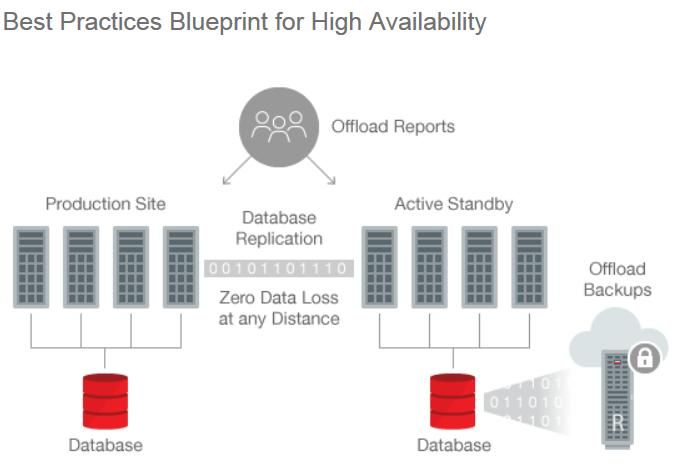
Oracle Maximum Availability Architecture (MAA)
High Availability, Disaster Recovery and Data Protection

• Applying 25+ years of lessons learned in solving                                                   Production                     Copy
  toughest HA problems around the world
                                                                                                                       Database
• Solutions to reduce downtime for planned &                                                                          Replication

  unplanned outages for Enterprise customers with most
  demanding workloads and requirements
• Service level oriented architectures
• Books, white papers, blueprints
• MAA integrated Engineered Systems
                                                          R
• Continuous feedback into products
               https://oracle.com/goto/maa
                                             Copyright © 2018, Oracle and/or its affiliates. All rights reserved. |                        4
MAA Reference Architectures
Meet Downtime (RTO) and Data Loss (RPO) SLAs
   MAA Reference
    Architectures                          Topology                                                                   Suitable Databases

     BRONZE                        Single Instance + Backup                                                            Dev, Test, Prod

                                                                                                                                           Downtime & Data Loss
      SILVER                       HA Clustering + Backup                                                            Prod/Departmental

      GOLD                HA Clustering + Disaster Recovery + Backup                                                  Mission Critical

    PLATINUM                   Zero Data Loss & Zero Downtime                                                         Extreme Critical

           Addresses SLAs for Data Loss and Downtime during Planned & Unplanned Outages

                                            Copyright © 2018, Oracle and/or its affiliates. All rights reserved. |                                 5
Oracle MAA
Designed to Address the Complete Range of Business Requirements

                                     Oracle
                                    Database

     On Premises                                                                                               On Cloud

             Common Platform – On Premises, Cloud, and Hybrid Cloud
                               Big Differentiator
                                      Copyright © 2018, Oracle and/or its affiliates. All rights reserved. |              6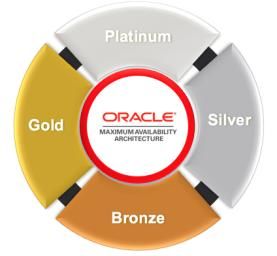
MAA Best Practices
Active Data Guard

                     Copyright © 2018, Oracle and/or its affiliates. All rights reserved. |   7
Active Data Guard
Best Disaster Protection, Real-time Failover, High ROI

      Primary Database                                                                                 Active Standby Database
      Open Read-Write                                                                                      Open Read-Only

 Primary                     Oracle-aware Replication                                                                   Standby
  Oracle                  Continuous Oracle Data Validation                                                              Oracle
 Instance                                                                                                               Instance

Database                                                                                                                Database
  Files                                                                                                                   Files

                                         Copyright © 2018, Oracle and/or its affiliates. All rights reserved. |                    8
Data Guard Creation Best Practices

• Fastest and easiest Data Guard deployment for your environment
• New master MOS note that directs you to the best way to deploy a Data
  Guard standby
• My Oracle Support Note 2275154.1
 – If you are 11.2 use the standard RMAN DUPLICATE method
 – If you are 12.1.0.2 or higher then use RMAN restore from service method
 – If you 12.2.0.1 or higher and single instance use DBCA method (RAC in 18c)

                                       Copyright © 2018, Oracle and/or its affiliates. All rights reserved. |   9
Data Guard Transport Best Practices
• Learn to push ASYNC performance to provide near zero data loss
• How to accurately determine transport lag
• Diagnosing and tuning ASYNC transport
– Network performance
– Identify bottlenecks
• Diagnosing reasons for ASYNC transport lag
– Using AWR to assess peak redo rate can be misleading due to averages bring down
the rate over longer period of time
– Examine the time spent in each log to determine the peak redo rate on a finer level
Copyright © 2018, Oracle and/or its affiliates. All rights reserved. | 10Data Guard Transport Best Practices
• Achieve zero data loss with minimal performance impact
• Deep dive on SYNC performance tuning
– Test results that illustrate performance gains when using best practices
– For example, proper online log file sizes with a large banking customer improved
performance by 30%
– Frequent log switches force a checkpoint on the standby which results in increased
I/O thereby affecting performance
– Single member standby redo log placed on fast storage
Copyright © 2018, Oracle and/or its affiliates. All rights reserved. | 11Data Guard Transport Best Practices
• Benefit: AchieveTIP zero data loss with minimal performance impact
• Deep dive on SYNC • performance
The vast majority tuningof Data Guard
Transport
– Test results that illustrate performance
performance gains whenissues
using can
best be
practices
– For example, proper attributed
online log filetosizes
frequent log switches
with a large banking customer improved
performance by 30%
• Log switches should occur
– Frequent log switches force a checkpoint on the standby which results in increased
I/O thereby affectingapproximately
performance every 15 minutes
– Single member standby redo log placed on fast storage
Copyright © 2018, Oracle and/or its affiliates. All rights reserved. | 12Data Guard Redo Apply Best Practices
• Updated MAA Whitepaper
• How to tune with examples for various scenarios
– Tuning using top five wait events
– Test results that illustrate performance gains when using best practices
• New installation and usage instructions for using AWR with standby
• New update that includes multi instance redo apply
Copyright © 2018, Oracle and/or its affiliates. All rights reserved. | 13Multi-Instance Redo Apply Performance
• Scale redo apply and keep RTO low
• Parallel, multi-instance recovery : standby will keep up
– Standby recovery - utilizes CPU and IO across all nodes of RAC standby
– OLTP workload tests on Exadata show great scalability
1400
Standby 1200 OLTP Workload
Apply 1000
Rate 800
MB/sec 600
400
200
0
1 Instance 2 Instances 4 Instances 8 Instances
Copyright © 2018, Oracle and/or its affiliates. All rights reserved. | 14Multi-Instance Redo Apply Performance
• Benefit: Scale redo
TIPapply and keep RTO low
• Parallel, multi-instance
• The recovery : standby
vast majority will Guard
of Data keep up
Redo
– Standby recovery - utilizes
ApplyCPU and IO acrossissues
performance all nodes
canofbe
RAC standby
– Some of our OLTP workload tests to
attributed on frequent
Exadata show
loggreat scalability
switches
1400
Standby 1200 • Increasing the number of OLTP Workload
Apply 1000
Rate
db_writer_processes can reduce high
800
MB/sec 600 checkpoint wait events
400
200
0
1 Instance 2 Instances 4 Instances 8 Instances
Copyright © 2018, Oracle and/or its affiliates. All rights reserved. | 15Multi-Instance Redo Apply Enhancements
• Multi-Instance Redo Apply allows all standby nodes to participate in
recovery
• In-memory DB (IMC) on Active Data Guard allows: *
– Creation of IMC tables and columns for analytics on Active Data Guard
– Population with different data than production database Month Year
– Offloading even more to your standby! In-Memory In-Memory
• Multi-Instance Redo apply also works with BCT
* Available only on Exadata and Oracle Cloud Offerings
Primary Standby
Copyright © 2018, Oracle and/or its affiliates. All rights reserved. | 16Data Guard Role Transition Best Practices
• Updated MAA Whitepaper
• Benefit: Reduced downtime for both unplanned and planned
• Expected performance and tuning advice
• How to assess your role transition timings and where the time is being
spent
Copyright © 2018, Oracle and/or its affiliates. All rights reserved. | 17Preserve Buffer Cache During Role Change
Read/Write Read
• The database buffer cache state will be
maintained on an ADG standby during
a role change
• Automatic, nothing to set up.
Primary Active Data Guard
Standby – Except for init parameter on the standby
Read/Write – STANDBY_DB_PRESERVE_STATES
Failed Primary Primary
Copyright © 2018, Oracle and/or its affiliates. All rights reserved. | 18Data Guard and No Force Logging*
*Available on Engineered Systems and Oracle Cloud only
• Extended to provide better support in an Active Data Guard environment
without significantly increasing the amount of redo generated.
• Two new modes are added as alternatives to the existing nologging mode
– Standby Nologging for Load Performance
• Ensures that standbys will receive the nonlogged data changes with the minimum impact to the
speed of loading at the primary
– The standby can transiently have nonlogged blocks. These nonlogged blocks will be automatically resolved by
managed standby recovery.
– Standby Nologging for Data availability
• Ensures all standbys have the data when the primary load commits but at the cost of throttling the
speed of loading data at the primary
– The standbys will never have any nonlogged blocks.
Copyright © 2018, Oracle and/or its affiliates. All rights reserved. | 19MAA Best Practices
Application Continuity
Copyright © 2018, Oracle and/or its affiliates. All rights reserved. | 20Applications see no errors during outages
Standardize on Transparent Application Continuity
Hides errors, timeouts, and
Request maintenance
No application knowledge or
changes to use
Rebuilds session state & in-flight
transactions
Errors/Timeouts hidden
Adapts as applications change:
protected for the future
TAC
Copyright © 2018, Oracle and/or its affiliates. All rights reserved. | 21TAC Explained
Normal Operation Failover Phase 1: Failover Phase 2: Replay
Reconnect
• Client marks requests: • Restores and verifies the
explicit and discovered. • Checks replay is enabled session state
• Server tracks session • Verifies timeliness • Replays held calls,
state, decides which calls restores mutables
• Creates a new connection automatically
to replay, disables side
effects. • Checks target database is • Ensures results, states,
• Directed, client holds legal for replay messages match original.
original calls, their inputs, • Uses Transaction Guard to • On success, returns
and validation data. guarantee commit control to the application
outcome
New with TAC
Copyright © 2018, Oracle and/or its affiliates. All rights reserved. | 22Configuration at Database
Service Attributes
• FAILOVER_TYPE = AUTO
• FAILOVER_RESTORE = AUTO
• COMMIT_OUTCOME = TRUE
• AQ_HA_NOTIFICATIONS=True for FAN OCI
• REPLAY_INITIATION_TIMEOUT = 300 - seconds before replay is canceled
Copyright © 2018, Oracle and/or its affiliates. All rights reserved. | 23Connections Appear Continuous Configure in One
Standard for All Drivers from 12.2 Place
Single description
alias =(DESCRIPTION = Automatic Retries
(CONNECT_TIMEOUT=90) (RETRY_COUNT=20)(RETRY_DELAY=3)
(TRANSPORT_CONNECT_TIMEOUT=3)
(ADDRESS_LIST =
(LOAD_BALANCE=on)
( ADDRESS = (PROTOCOL = TCP)(HOST=primary-scan)(PORT=1521)))
(ADDRESS_LIST = No reliance on DNS
(LOAD_BALANCE=on)
( ADDRESS = (PROTOCOL = TCP)(HOST=secondary-scan)(PORT=1521)))
(CONNECT_DATA=(SERVICE_NAME = gold-cloud)))
ALWAYS use a SERVICE that is NOT DB/PDB name
Copyright © 2018, Oracle and/or its affiliates. All rights reserved. | 25FAN for INSTANT Interrupt
The dead thing cannot tell you it is dead
All Oracle uses FAN Auto-Configured in 12c
JDBC Universal Connection Pool DESCRIPTION =
(CONNECT_TIMEOUT=90)
OCI/OCCI driver (RETRY_COUNT=20)(RETRY_DELAY=3)
(TRANSPORT_CONNECT_TIMEOUT=3)
ODP.NET Unmanaged Provider (OCI)
(ADDRESS_LIST =
ODP.NET Managed Provider (C#) (LOAD_BALANCE=on) ONS Node Set 1
OCI Session Pool ( ADDRESS = (PROTOCOL = TCP)
(HOST=primary-scan) (PORT=1521)))
WebLogic Active GridLink (ADDRESS_LIST =
Tuxedo
(LOAD_BALANCE=on) ONS Node Set 2
( ADDRESS = (PROTOCOL = TCP)
JDBC Thin Driver (new 12.2) (HOST=second-
scan)(PORT=1521)))
CMAN and Listeners (CONNECT_DATA=(SERVICE_NAME=gold)))
Copyright © 2018, Oracle and/or its affiliates. All rights reserved. | 26Draining and Failover Locally – Switchover between sites
Fast Application Notification
Production Site – Notify draining, failover, load balancing
Transparent Application Continuity
TIP – Application HA Active Data Guard
RAC Global Data Services – Scheduled switchover
– Online Rolling Maintenance – Data Protection, DR
– Scalability
– Server HA
• Use AWR statistics
– Cross Site Placement
to determine your – Query Offload
RAC One
level of protection Data Guard
– Scheduled switchover
– Online Rolling Maintenance – Data Protection, DR
– Server HA
• Drain
Use ExaChk/OraChk to view
within RAC Drain within RAC GoldenGate
– Scheduled switchover
unprotected calls
Switchover
– Active-active replication
– Heterogeneous
ADG or GG
Sharding
– Massive OLTP
– Scheduled switchover
– Active-active replication
– Heterogeneous
Copyright © 2018, Oracle and/or its affiliates. All rights reserved. | 27Always Know Your Protection Level
• AWR, system, session, service stats
–Requests completed per second
–User calls in request
–Protected user calls Statistic Total per Second per Trans
-------------------------------- ------------------ -------------- -------------
cumulative requests 177,406 49.2 5.0
cumulative user calls in request 493,329 136.8 13.8
cumulative user calls protected 493,329 136.8 13.8
Copyright © 2018, Oracle and/or its affiliates. All rights reserved. | 28Detailed Protection Report when needed
Copyright © 2018, Oracle and/or its affiliates. All rights reserved. | 29MAA Best Practices
Multitenant
Copyright © 2018, Oracle and/or its affiliates. All rights reserved. | 30Oracle Multitenant
Architecture for consolidating databases and simplifying operations
AP Self-contained PDB for each application
• Portability (via pluggability)
GL OE • Rapid provisioning (via clones)
• Applications run unchanged
• PDB upgrades via plug/unplug
PDBs Common operations performed at CDB level
• Manage many as one (upgrade, backups, HA)
CDB • Granular control when appropriate
• Simple DR
Root Shared memory and background processes
• More applications per server
MAA and Multitenant
• Solutions for planned / unplanned outages
Copyright © 2018, Oracle and/or its affiliates. All rights reserved. | 31PDB Relocate
• Provides the ability to move a PDB from one CDB to another
with minimal downtime
• Relocate is done in 2 phases
• Phase 1: Copy datafiles from source to destination - No
application downtime
• Phase 2: Apply any redo that has occurred at source since
phase 1 completion, quiesce the PDBs (downtime), open the
new PDB
• Downtime is a function of redo generated at source CDB -
must be shipped & applied
Copyright © 2018, Oracle and/or its affiliates. All rights reserved. | 32PDB Relocate
• With AVAILABILITY MAX clause allows deferral of changing
connect strings
• Apps connect via previous connect string to "tombstone"
PDB left in previous CDB
• Listener connection forwarding redirects connection to new
location
• When connect strings have been changed, drop the
tombstone
Copyright © 2018, Oracle and/or its affiliates. All rights reserved. | 33PDB Relocate
• With AVAILABILITY MAX clause allows deferral of changing
TIP
connect strings
• Monitor
• Apps connect MOS connect
via previous note 2049127.1
string tofor
"tombstone"
PDB left in previous CDB to PDB relocate which
improvements
will reduces
• Listener connection downtime
forwarding redirects connection to new
location
• Remove source PDB to avoid extra
• When connect stringshop
network have been changed, drop the
tombstone
Copyright © 2018, Oracle and/or its affiliates. All rights reserved. | 34Multitenant and Data Guard Enhancements
• When performing a remote clone on a primary database the
standby automates copying of the datafiles for the new PDB
• On the standby CDB set
the STANDBY_PDB_SOURCE_FILE_DBLINK initialization
parameter.
• This parameter specifies the name of the database link used
in CREATE PLUGGABLE DATABASE ... FROM dblink.
• The standby CDB attempts to copy the data files from the
source PDB referenced in the database link
Copyright © 2018, Oracle and/or its affiliates. All rights reserved. | 35MAA Best Practices
GoldenGate
Copyright © 2018, Oracle and/or its affiliates. All rights reserved. | 36Oracle GoldenGate
Flexible Logical Replication
LAN / WAN / Internet
Over TCP/IP
Source & Target Target & Source
Oracle & Non-Oracle Database(s) Bi-directional Oracle & Non-Oracle Database(s)
• Zero-downtime maintenance and migrations
• Active-Active high availability
• Heterogeneous replication, data distribution and integration
Note: MAA for GoldenGate Microservices Architecture is currently WIP
37
Copyright © 2018, Oracle and/or its affiliates. All rights reserved. |MicroServices Architecture
HTTPS RESTFul
GGSCI Manager Service Interfaces
GGSCI Manager
Admin Admin
Server Server
Source Target
Database Metrics Metrics
Server Database
Server
Pumps Collectors
Distribution Receiver
Service Service
Extract Trail
Files Trail Replicat
Files
Service
Manager Service
Source Manager Target
Copyright © 2018, Oracle and/or its affiliates. All rights reserved. |Microservices Architecture: Benefits
• Cloud-ready Administration
– Industry-standard communications protocol: HTTPS (Hypertext Transport Protocol
Secure)
– HTTPS: widely supported and permitted by firewalls
– Industry-standard JSON (JavaScript Object Notation) wire-level data representation
• Ease of maintenance
– Can remotely issue commands to OGG; no need to logon to host servers
– Role based authentication
– Easier patching across multiple deployments and better security model
– Multi-threaded version of Pump and Collector replacing multiple processes
Copyright © 2018, Oracle and/or its affiliates. All rights reserved. | 39Oracle GoldenGate with RAC
MAA Best Practices
• GoldenGate Microservices Architecture Configuration
• Oracle Grid Infrastructure Bundled Agent (XAG)
• DBFS or ACFS for shared GoldenGate files (trails & checkpoint files)
• Application VIP for target GoldenGate environments
• Updated MAA white paper
• https://www.oracle.com/technetwork/database/features/availability/maa-
gg-microservices-on-rac-5073545.pdf
Copyright © 2018, Oracle and/or its affiliates. All rights reserved. | 40Oracle GoldenGate
MAA Performance Best Practices
• Configure database STREAMS_POOL_SIZE
– (# of integrated GG processes * 1GB) + 25% head room
• Use the automatic heartbeat table to monitor end-to-end latency
• For integrated Extract/Replicat install and run Streams Performance
Advisor (SPADV)
– Shows process percentage split between idle, busy and waiting (flow control)
• Use GoldenGate Integrated Extract and Replicat Performance
Diagnostic Collector (MOS note 2262988.1)
– Gathers required data for diagnosing performance issues by a single script.
Copyright © 2018, Oracle and/or its affiliates. All rights reserved. | 41Oracle GoldenGate
MAA Performance Best Practices
TIP
• Configure database STREAMS_POOL_SIZE
• Make sure you benchmark GG
– (# of integrated GG processes * 1GB) + 25% head room
performance before going live with
• Use the automatic heartbeat table to monitor end-to-end latency
REAL data volumes and workload type
• For integrated Extract/Replicat install and run Streams Performance
Advisor (SPADV) • When implementing GG in an HA
– Shows process percentage split between
configuration, idle, busy
dedicate andto
time waiting
test (flow control)
• Use GoldenGate Integrated Extract
ALL failure and Replicat Performance
scenarios
Diagnostic Collector (MOS note 2262988.1)
– Gathers required data for diagnosing performance issues by a single script.
Copyright © 2018, Oracle and/or its affiliates. All rights reserved. | 42MAA Best Practices
Sharding
Copyright © 2018, Oracle and/or its affiliates. All rights reserved. | 43Oracle Database Sharding – Benefits
Linear Scalability Fault Tolerant Geographic Distribution
… …
Add shards online to scale No shared hardware or software User defined data placement for
transactions and concurrent users. to isolate faults. Shards may run performance, availability, DR or to
Online rebalance. different Oracle releases. meet regulatory requirements.
Copyright © 2018, Oracle and/or its affiliates. All rights reserved. | 44Deployment of a System-Managed SDB with Data Guard
Shardgroup
Shard Director Shard Catalog shgrp1
Region
shdir1,2 shardcat
Availabilty_Domain1
Primaries
Clients Connection …
Pools
HA Standbys
Connection
Pools …
Region
Availability_Domain2
Shard Director Shard Catalog Shardgroup
shdir3,4 shardcat_stdby shgrp2
Data Guard
Fast-Start Failover
Copyright © 2018, Oracle and/or its affiliates. All rights reserved. | 45Oracle Sharding – MAA Outage Testing
• Outage of Shard Catalog has no
effect on application
performance
• Shard Keys are cached within the
shard directors
• MAA Best Practice is to protect
catalog with Data Guard
Maximum Availability
Copyright © 2018, Oracle and/or its affiliates. All rights reserved. | 46Oracle Sharding – MAA Outage Testing
• Outage of shard directors does
not affect a running connection
pool
• Connection pool caches range of
shard keys / shards
• MAA best practice to have 3
shard directors per region
Copyright © 2018, Oracle and/or its affiliates. All rights reserved. | 47Oracle Sharding – MAA Outage Testing
Failover Performance
4500
• Failover of an individual shard
4000 does not affect application
3500 performance for remaining
shards
Transactions Per Second
3000
• Fast failover for both read / write
2500
2000 Read/Write
Read Only and read only connections
1500
1000 • Generic MAA best practices apply
500 for sharded environments
0
18:12:50
18:12:53
18:12:56
18:12:59
18:13:02
18:13:05
18:13:08
18:13:11
18:13:14
18:13:17
18:13:20
18:13:23
18:13:26
18:13:29
18:13:32
18:13:35
18:13:38
18:13:41
18:13:44
18:13:47
18:13:50
18:13:53
Copyright © 2018, Oracle and/or its affiliates. All rights reserved. | 48Oracle Sharding – MAA Outage Testing
Failover Performance
4500
• Failover of an individual shard
4000
TIP does not affect application
3500 performance for remaining
• Shard catalog database must
shards
Transactions Per Second
3000
be
• Fast
2500
2000
protected against data loss using DG for both read / write
failover Read/Write
and read only connections
with SYNC transport (Max Availability) Read Only
1500
1000 • Generic MAA best practices apply
500 for sharded environments
0
18:12:50
18:12:53
18:12:56
18:12:59
18:13:02
18:13:05
18:13:08
18:13:11
18:13:14
18:13:17
18:13:20
18:13:23
18:13:26
18:13:29
18:13:32
18:13:35
18:13:38
18:13:41
18:13:44
18:13:47
18:13:50
18:13:53
Copyright © 2018, Oracle and/or its affiliates. All rights reserved. | 49User-defined Sharding
Explicit mapping of data to shards for better control, compliance & performance
• Partition data across shards by RANGE or LIST
Sharded Database
– Ranges or lists of sharding key values are assigned to User-defined shards on hybrid cloud
shards by the user
• User-controlled data distribution provides:
+ Regulatory compliance
• Data remains in country of origin
+ Hybrid cloud and cloud bursting
• Some shards on premises; other shards in the cloud
+ Control of data availability for planned maintenance
+ Ability to customize hardware resources and HA
configuration for subsets of data
+ More efficient range queries
- User needs to maintain balanced data distribution
Copyright © 2018, Oracle and/or its affiliates. All rights reserved. | 50PDB Sharding
Multitenant Support
• In 12c, a shard must be a non-CDB
• In 18c, a shard can also be a PDB
– Only a single PDB-shard per CDB
– CDB can contain other non-shard PDBs.
– Support for multiple PDB-shards within a CDB is
planned for future release
• PDB sharding provides all manageability …
benefits of Multitenant
– database consolidation, manage many as one,
database upgrades, relocation, etc.
Copyright © 2018, Oracle and/or its affiliates. All rights reserved. | 51RAC Sharding
High performance for shard-aware RAC applications
• Affinitizes table partitions to RAC instances Instance 3
Instance 1 Instance 2
– Affinity gives better cache utilization and reduced block
pings across instances P1 P2 P3
• Takes advantage of data-dependent routing for sharding
– Requests that specify sharding key are routed to the
instance that logically holds the corresponding partition
– Requests that don’t specify sharding key still work
transparently
• Gives RAC the performance and scalability of a Sharded
Database with minimal application changes
– Just add sharding key to the most performance critical
operations; no changes to the database schema
– alter system enable affinity ;
RAC Database
Copyright © 2018, Oracle and/or its affiliates. All rights reserved. | 52MAA Best Practices
Oracle Cloud
Copyright © 2018, Oracle and/or its affiliates. All rights reserved. | 53MAA Evolution from On-Premises to Autonomous
Customer • Choosing the SLA policy
• Architecture
Oracle • Application performance
• Database Management (Tooling)
• Infrastructure • Configuration, Tuning
Management • Lifecycle Operations (Tooling)
• Architecture • Application Performance
• Database Management Autonomous
Database
• Configuration, Tuning Exadata
• Lifecycle operations Cloud
• Infrastructure • Application Performance
Management On-Premises
• Architecture • Oracle owns and • Oracle owns and
Exadata manages the best
• Configuration, Tuning manages Infrastructure
• Database Management • Blueprints integrated MAA • Policy driven
• Lifecycle Operations • Exadata is the best DB platform deployments
• Application Performance integrated MAA DB • Cloud automation • MAA Integrated cloud
On-Premises platform for provisioning • Fully automated Self-
and life cycle Driving, Self-Securing,
• Blueprints operations Self-Repairing Database
• Feedback to
products & features
Copyright © 2018, Oracle and/or its affiliates. All rights reserved. | 54MAA Automation in the Cloud
Database Deployment Made Easy
• MAA made easy
• Simple UI / CLI / REST interfaces
• Databases are provisioned with optimal parameter configurations
Region #1
AD #1
SILVER (HA)
SILVER (HA)
GOLD (DR)
BRONZE
Primary Primary
DB Backup
Single Service
Instance RAC
Region #2
AD #2
Standby Standby
Copyright © 2018, Oracle and/or its affiliates. All rights reserved. | 55Zero Data Loss with Minimal Performance Impact
ExaCS Primary / Standby in different regions
SYNC Performance Impact
2500
ASYNC FAST SYNC SYNC
2000 Redo Rate (MB/sec) 14.93 14.48 14.39
Transactions Per Second
1500
Block Changes/sec
async 96.92 94.3 93.86
fastsync (KB/sec)
1000 sync
Txn Rate 2082 2025 2018
500
% Difference from
N/A 97% 97%
0 ASYNC
1
14
27
40
53
66
79
92
105
118
131
144
157
170
183
196
209
222
235
248
261
274
287
300
Copyright © 2018, Oracle and/or its affiliates. All rights reserved. | 56Database Failover with Minimal Downtime
ExaCS Primary / Standby in different regions
Failover Performance
4500
• Swingbench OLTP application
4000
performing mixture of inserts,
3500
updates, and deletes
• Application redo rate of
Database Failover - 8 Seconds
Transactions Per Second
FSFO Threshold - 6 Seconds
3000
2500 15MB/sec
• Fast Start failover in Maximum
2000 Read/Write
Read Only
1500
Availability mode, FSFO threshold
1000
configured for 6 seconds
500
0
• Database failover time of 8
seconds
18:12:50
18:12:53
18:12:56
18:12:59
18:13:02
18:13:05
18:13:08
18:13:11
18:13:14
18:13:17
18:13:20
18:13:23
18:13:26
18:13:29
18:13:32
18:13:35
18:13:38
18:13:41
18:13:44
18:13:47
18:13:50
18:13:53
Copyright © 2018, Oracle and/or its affiliates. All rights reserved. | 57Database Failover
• All Practices of Silver
TIP Plus
• Decision: • Setup Data Guard Fast-start Failover
– Data Guard FSFO across ADs ADs
across versus Data you
when Guardrequire
FSFO across Regions (Site Failover)
existing
• Key Customer Actions Application Tiers to failover
transparently
– Follow Application Checklist for Continuous Service for Data Guard Fast-Start Failover
– Data Guard Fast-Start setup and tuning failover times is manual (refer to updated
Oracle Cloud MAA• paper)
Note: DNS + Complete Site Failover is
required
– Database Rolling Upgrade when
with Data failing
Guard over
is also to a Refer to generic MAA doc
manual.
different region
• Operational Practices
– Test complete application + Data Guard role transitions
Copyright © 2018, Oracle and/or its affiliates. All rights reserved. | 58Planned Maintenance with Minimal Downtime
ExaCS Primary / Standby in different regions
Switchover Performance
4500 • Swingbench OLTP application
4000 performing mixture of inserts,
3500 updates, and deletes
Transactions Per Second
3000
• Application redo rate of
2500
Read Write
15MB/sec
2000
1500
Read Only
• Application outage of 12 seconds
1000 during the switchover process
500
0
• Total switchover time of
approximately 40 seconds
18:45:50
18:45:53
18:45:56
18:45:59
18:46:02
18:46:05
18:46:08
18:46:11
18:46:14
18:46:17
18:46:20
18:46:23
18:46:26
18:46:29
18:46:32
18:46:35
18:46:38
18:46:41
18:46:44
18:46:47
18:46:50
18:46:53
Copyright © 2018, Oracle and/or its affiliates. All rights reserved. | 59MAA Evolution from On-Premises to Autonomous
Customer • Choosing the SLA policy
• Architecture
Oracle • Application performance
• Database Management (Tooling)
• Infrastructure • Configuration, Tuning
Management • Lifecycle Operations (Tooling)
• Architecture • Application Performance
• Database Management Autonomous
Database
• Configuration, Tuning Exadata
• Lifecycle operations Cloud
• Infrastructure • Application Performance
Management On-Premises
• Architecture • Oracle owns and • Oracle owns and
Exadata manages the best
• Configuration, Tuning manages Infrastructure
• Database Management • Blueprints integrated MAA • Policy driven
• Lifecycle Operations • Exadata is the best DB platform deployments
• Application Performance integrated MAA DB • Cloud automation • MAA Integrated cloud
On-Premises platform for provisioning • Fully automated Self-
and life cycle Driving, Self-Securing,
• Blueprints operations Self-Repairing Database
• Feedback to
products & features
Copyright © 2018, Oracle and/or its affiliates. All rights reserved. | 60Additional Resources
www.oracle.com/goto/maa www.oracle.com/goto/ha
Copyright © 2018, Oracle and/or its affiliates. All rights reserved. | 61Q&A
Copyright © 2018, Oracle and/or its affiliates. All rights reserved. |You can also read


