GXP Xplorer Platform Powered by the - Geospatial eXploitation Products
←
→
Page content transcription
If your browser does not render page correctly, please read the page content below
Powered by the
GXP Xplorer® Platform
Rapid access to critical data
                                                                Utilizing dynamic discovery techniques, GXP Xplorer software crawls your enterprise network
                                                                searching for relevant files in existing data systems, on shared network drives, and in an analyst’s
                                                                local shoebox. Geospatial, temporal, free‑text, and advanced metadata searches are performed
                                                                across multiple data stores with a single query without the need to switch between systems.

                                                                This solution identifies files without moving them, creates an online catalog for rapid retrieval, and
                                                                even alerts users to new content. The catalog, which is searchable through the GXP Xplorer Web
                                                                Client, GXP Xplorer Mobile application, and the SOCET GXP ® Workflow Improvement Module (WIM),
                                                                delivers geotagged search results graphically on a map and textually within an attribute list.

                                                                Enabling rapid access to critical data, GXP Xplorer software ensures that you are maximizing the
                                                                value of all of your geospatial resources. Relevant data and imagery can be visualized, downloaded,
                                                                processed, or opened directly into other applications for additional analysis and exploitation.

                                                                              The GXP Xplorer software solution has received the SAFETY Act designation from
                                                                              the Department of Homeland Security as a qualified anti-terrorism technology.
                                                                              This special designation was awarded based on extensive operational testing,
                                                                              performance achievement, quality assurance, security assessments, audit and
                                                                              accountability, and a variety of other key metrics.

    GXP Xplorer                        ®

    Powered by the GXP Xplorer Platform
    GXP Xplorer software represents a revolutionary data                                                      Reduce costly data search efforts
    management solution that makes it easy to rapidly                                                         Statistics show that analysts spend up to 50 percent of
                                                                                                              their time locating imagery and data across disparate
    locate, retrieve, and share geospatial data files.                                                        systems, networks, and geographic locations.

    Combined with the GXP WebView® and GXP InMotion™                                                          GXP ® solutions streamline process workflows, increase
                                                                                                              productivity, and enable a more effective final product,
    solutions, GXP Xplorer software provides an effective                                                     saving both time and money for your organization!
    platform for not only accessing mission‑critical content,
    but for exploiting both still imagery and video feeds,

                                                                                                    ! 50%
    and creating intelligent analysis and reporting to ensure                                                              of total project time is spent
                                                                                                                           searching for data
    optimum strategy moving forward.

1                                                                                                                                                                        2
Catalog in place
    Data                                                                                                       GXP Xplorer software reads and catalogs data in their current location, which eliminates the
                                                                                                               need to move or copy large volumes of data across the network while enabling organizations

    discovery
                                                                                                               to leverage existing data storage investments.

                                                                                                               Files can also be moved automatically to a user-defined location during the cataloging
                                                                                                               process, allowing for a seamless organization of geospatial and other data scattered across
    The GXP Xplorer dynamic discovery agent crawls directories across the enterprise                           the enterprise domain.
    to find data products of interest. A cataloger agent reads properties and relevant
    details from inside the files to create a searchable repository, making every data
    product discoverable via these ingested attributes.                                                        Catalog features
                                                                                                               »   Directories and types of data can be tailored to the catalog
                                                                                                               »   Data validation rules can be customized to exclude undesirable products
                                                                                                               »   Cataloger can be configured to utilize multiple CPUs for high performance
                                                                                                               »   Image thumbnail creation can be disabled or deferred

                                                          Multiple data stores
                                                                                                               »   Status of catalog process tracked in a control panel
    Discoverable structured and                                                                                »   Text inside all files is indexed and searchable
    unstructured data types                               GXP Xplorer software connects intelligence data      »   Geotags are extracted from structured files to pin products to the map
    »   Imagery                                           store catalogs and reference data to provide a       »   Ground coordinates are extracted from textual files to pin to map
    »   Terrain and LiDAR                                 comprehensive operating picture without moving       »   Notifications are delivered when bad files fail to ingest
    »   Features and shapefiles                           from one application to another to locate data.      »   Multi-file products, including shapefiles, are consolidated into single catalog items
    »   Maps and charts                                   The different source results are uniquely marked     »   Stale data is eliminated and purged based on configurable aging rules
    »   Raster-derived products                           for identification of source.
    »   Vector-derived products
    »   Videos                                            The GXP Xplorer solution also has an open
    »   Documents, reports, and presentations             architecture and an Application Programming
    »   Slides                                            Interface (API) with support for plug-in
    »   Spreadsheets                                      connections to data store catalogs. This
    »   Custom types                                      architecture is standards-based to ensure simple
    »   Microsoft ® Office products and GeoPDF ®          connection to third-party applications as mash-
                                                          ups to monitor, geotag, and visualize social media
                                                          and world events. API documentation is provided
    Change detection capabilities                         through the use of the Swagger ™ framework.
    » Listens for file system changes in all selected
      directories                                         Data store catalog connectors
    » Discovers new files, deletions, and changes          » Product and national libraries
    » Keeps catalog updated in near-real-time              » Map and chart libraries
    » Notifies and flags file duplicates                   » Tactical data stores
                                                           » Video catalogs
                                                           » Activity Based Intelligence (ABI) data catalog
                                                           » Target databases
                                                           » Geographic Information System (GIS) and
                                                             feature databases
                                                           » Open Geospatial Consortium (OGC ®)
                                                             content stores

3                                                                                                                                                                                                             4
Layer Manager
                                                                                                             »

    Visualize your data                                                                                          Available with both GXP Xplorer and
                                                                                                                 GXP WebView software, our Layer Manager
                                                                                                                 capability enables users to easily toggle, manage,
    Visualize structured and unstructured data searches                                                          and position a variety of geospatial content layers.

    Users can search, download, and take data with them, accessing the enterprise
    catalog either from their desk or remotely, using a Web browser or mobile device.                            Content layers
    Textual searches are designed for all-source and other intelligence analysts who                              »   OGC Services
    search for data non-geospatially.                                                                             »   Esri ® ArcGIS ® Services
                                                                                                                  »   Google Maps mapping service
                                                                                                                  »   OGC WMS
                                                                                                                  »   Cataloged shapefiles
                                                                                                                  »   Cataloged imagery
    Simple search                                        Customize your experience
    » Search both structured and unstructured            Set   global preferences for:                           Layer control
      information within the data                         »    Basemaps                                           » Right-click on a layer to manage the layer:
    » Search by:                                          »    Web Services                                         Move to Top, Move Up, Move Down, Move to
     • Product type                                       »    Reference Layers                                     Bottom, Rename layers, designate a layer as a
     • Keywords                                           »    Map Grid Display                                     Basemap, Remove layers
     • Geospatial areas                                   »    Auto Search                                        » Select check box to enable/disable layers
     • Product attributes (e.g., author, cloud            »    Image Download
        cover, target ID, image type, image               »    Toolbar options                                   Imagery courtesy of the National Oceanic
        resolution, image quality, sensor name)                                                                  and Atmospheric Administration (NOAA).
     • Time and data ranges                              Visualize results
     • Free-text                                          » Select maps such as Google Maps™ mapping
    » Overlay grid for systematic searches                  service, Fusion Maps, Web Map Service (WMS)
      by grid cell                                          or Web Map Tile Service (WMTS) maps
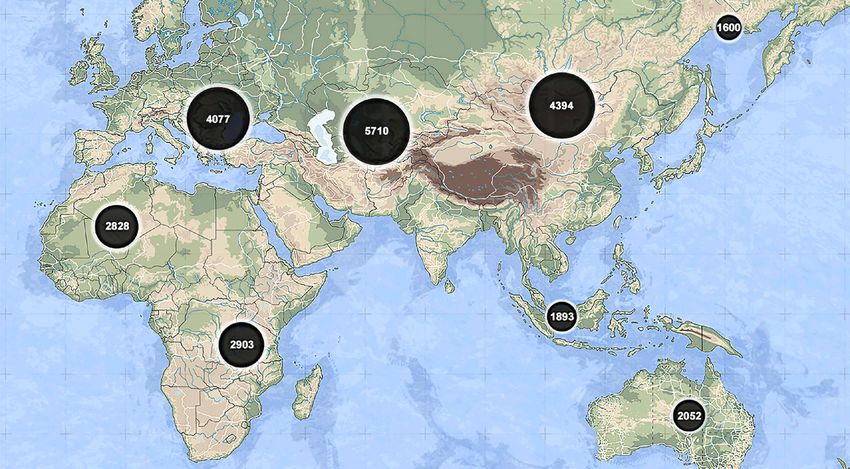
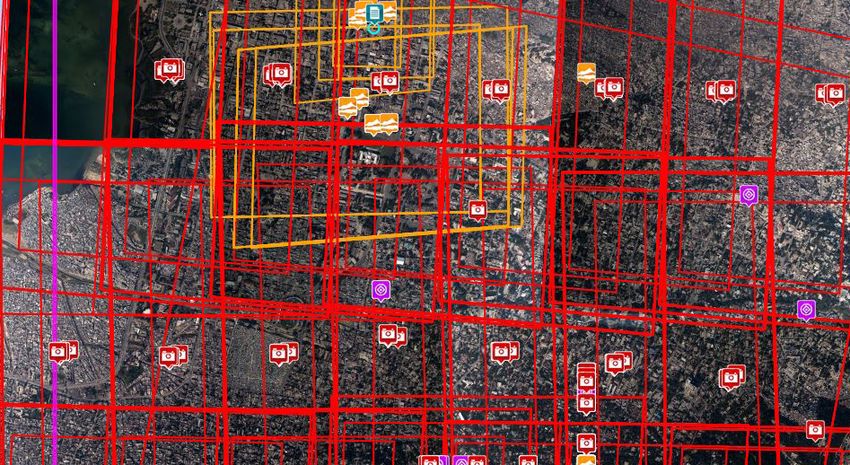
    » View results by relevance and proximity             » Cluster results for a condensed view of
                                                            overall coverage
    All-source searches                                   » Break clusters into individual color-coded
    » Search text for words and strings with                product markers or coverage footprints
      wildcards such as * and ?                           » Summarize results by type and quantity
    » Include Boolean options such as AND, OR,            » Filter results hierarchically by type and
      and NOT                                               sub‑type
    » Receive spelling corrections and similar word       » Filter results by product attributes such as
      suggestions for concept searches                      Ground Sample Distance (GSD), accuracy,
    » Filter, sort, and refine search results to find       and content
      the correct data                                    » Filter map markers in real-time and group
    » View, print, and export configurable list or          products on a slider with the Time Slider
      table of products, attributes, and thumbnails       » Compare selected results in a filmstrip in the
    » View location through optional mini-map               Product Gallery
                                                          » Display reference data feed services to help
                                                            make data selection decisions

5                                                                                                                                                                       6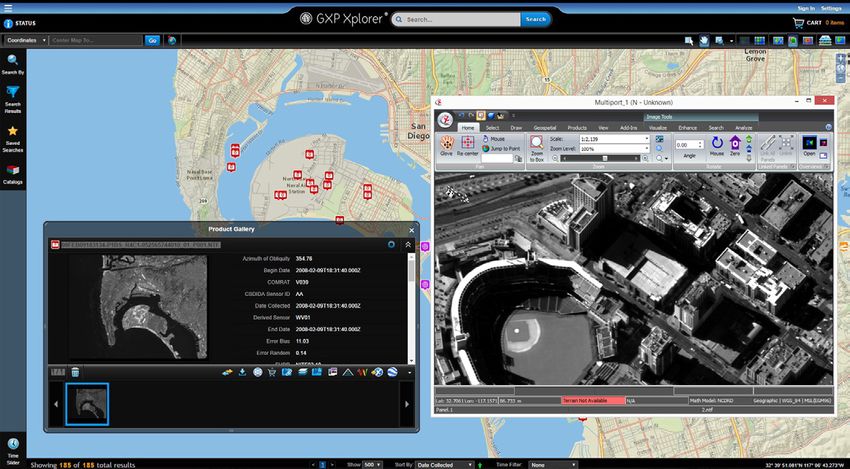
Federation                                              Data processing
                                                                                                           Decrease the need for data duplication and increase     GXP Xplorer data processing services convert data

    Convert data awareness
                                                                                                           collaboration across an enterprise by performing        into usable finished products. Users can change the
                                                                                                           federated searches simultaneously on geographically     format of the product; combine it with valuable

    to finished products
                                                                                                           dispersed data. Federation connects multiple            reference data; clip, combine, or create derived
                                                                                                           GXP Xplorer servers together – enabling a search from   products; and work in batch mode when multiple files
                                                                                                           one GXP Xplorer Web Client to return results from all   require similar modifications.
                                                                                                           federated GXP Xplorer servers.
    Save time with automated alerts, federated search, and enhanced data processing.                                                                               » Convert data to selected formats before download
                                                                                                                                                                   » Chip an image into its native format or into
                                                                                                           Catalog sharing                                           PowerPoint ® in JPEG format
                                                                                                           » Sites can easily disseminate their data               » Orthorectify imagery
                                                                                                             and products to other connected                       » Generate Reduced Resolution Data Sets (RSets)
                                                                                                             GXP Xplorer Platform Catalog servers                    from image files
                                                                                                           » Search and download data from federated               » Mosaic images and other data
                                                                                                             GXP Xplorer servers                                   » Clip video to area or event criteria
    Alerts and notifications                              » KML export of search criteria shares saved
                                                            searches between GXP Xplorer software
                                                                                                           » Connects permitted users that may be                  » Batch operations act on multiple products

    GXP Xplorer software automatically performs                                                              unaware of each other’s data
    common searches and delivers results to the
                                                            and Google Earth™ mapping service
                                                                                                           » Extends to the external non‑GXP Xplorer               Jobs
                                                                                                             data stores that are connected to a                   » Detailed information about every data processing
    analyst, eliminating the inefficiencies of repeated   Collaboration                                      GXP Xplorer Server                                      job
    manual searches.                                      » Collaborate via the Web, email, download,
                                                                                                           » Users are presented with login screens                » Status indicates when job is complete
                                                            and mobile applications
                                                                                                             when necessary                                        » Jobs run in the background
    Notifications                                         » Email a link that zooms GXP Xplorer software
                                                            to the product location and attributes
    » Name and save search parameters for
                                                          » Email products as attachments from within
                                                                                                           Synchronization                                         Update
      subsequent use as a Favorites search                                                                 » Deliver both files and catalog metadata               » Update the attribute metadata for a product
                                                            the GXP Xplorer UI
    » Share saved Favorites searches with                                                                    automatically from one GXP Xplorer                    » Change or add geospatial footprints
                                                          » Send products to an FTP site
      colleagues                                                                                             Server to another                                     » Perform batch updates
                                                          » Subscribe to popular feeds provided by a
    » Generate and subscribe to RSS feeds                                                                  » Dynamically copy an existing GXP Xplorer Server
                                                            colleague
    » Receive notifications when new data becomes                                                            as a failover to prevent operational interruptions
                                                          » Receive notifications, view products, and
      available (RSS-subscribed users only)                                                                » Configure for direct feed of selected data from
                                                            report submissions in the GXP Xplorer and
    » Standing Order option automatically delivers                                                           a primary GXP Xplorer Server to connected
                                                            GXP Xplorer Mobile applications
      new results of a selected Favorites search                                                             GXP Xplorer servers
      via FTP
                                                                                                                                                                                                  Imagery courtesy of NOAA.

7                                                                                                                                                                                                                             8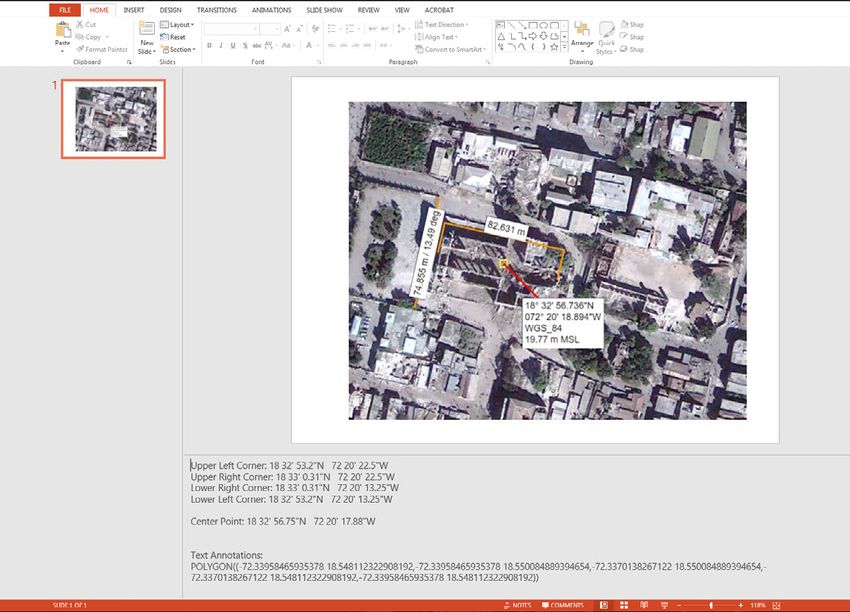
Control access with                                                             A secure connection                           Controlled access

    precision security
                                                                                    » Operate the GXP Xplorer Web Client          » Allow access to data through
                                                                                      over a Hypertext Transfer Protocol Secure     Discretionary Access Control (DAC)
                                                                                      (HTTPS) connection                          » Hide data, prevent manipulation, and
                                                                                    » Employ secured certificate                    restrict editing based on user roles
    GXP Xplorer software supports many diverse security protocols while allowing      authentication                              » Compartmentalize data based on
    administrators to update these protocols based on evolving site requirements.   » Integrate with an organization’s existing     accessibility
                                                                                      user authentication, such as Passport or    » Log transactions including logins,
                                                                                      Lightweight Directory Access Protocol         searches, downloads, uploads, edits, and
                                                                                      (LDAP)                                        deletions
                                                                                    » Remove anonymous access and require
                                                                                      user login
                                                                                    » Assign user roles to upload products to
                                                                                      the catalog, update details of a specific
                                                                                      product, or delete products out of the
                                                                                      catalog
                                                                                    » Manage GXP Xplorer user credentials
                                                                                    » Customize password policies

9                                                                                                                                                                              10
Adaptable and
                                                                                                GXP Xplorer software provides a flexible architecture comprised of services
                                                                                                and plug-ins to rapidly add new data formats with simple configuration to

     extensible architecture
                                                                                                support and accept data feeds from third-party tools.

                                                                                                Extensible                                           Scalable
     Powered by the GXP Xplorer Platform, the open-architecture standards within GXP Xplorer    » Flexible ingest services                            » Server virtualization
     software allow developers to integrate GXP Xplorer capabilities with other applications.   » Flat metadata model that can be extended by         » Distributed processing capable
                                                                                                  developers                                          » Heterogeneous federation
                                                                                                » Plug-in metadata extraction for custom data
                                                                                                  types
                                                                                                » Plug-in data processing services
                                                                                                                                                     Open interfaces
                                                                                                » Plug-in data store connections                      »   REST / JSON / KML / RSS
                                                                                                » Customizable Web user interface                     »   OGC
                                                                                                » Supports multiple external interfaces               »   DIB Connector
                                                                                                » Ozone Widget Framework (OWF) ready                  »   Geospatial Imagery Access Services (GIAS)
     Imagery courtesy of Maxar.
                                                                                                                                                      »   NATO STANAGs 4559
                                                                                                                                                      »   Use of metadata standards including
                                                                                                Interoperability                                          Dublin Core
                                                                                                » Stream imagery and rigorous metadata
                                                                                                  directly to SOCET GXP software to eliminate
                                                                                                  the need for download
                                                                                                » Upload products directly from SOCET GXP
                                                                                                  software into the GXP Xplorer catalog
                                                                                                                                                                                 Imagery courtesy of Maxar.

11                                                                                                                                                                                                            12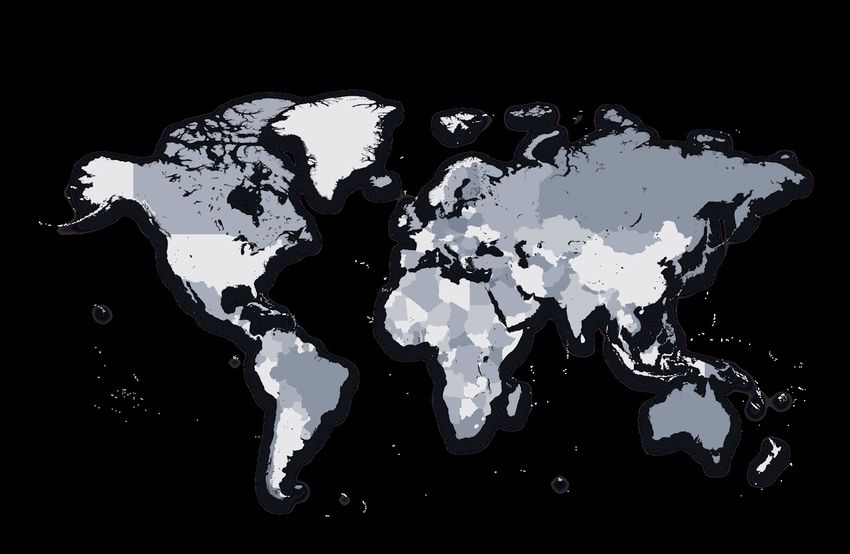
GXP Xplorer Mobile                                                                                                                     Worldwide support
     Your entire data catalog accessible on-the-go
     GXP Xplorer Mobile applications deliver critical geospatial assets both to and from the field. Built for
                                                                                                                                            and training
     field operations to view server products, and create and upload data and reports, GXP Xplorer Mobile                                   GXP Customer Technical Solutions offers flexible training modules and support
     applications relay key tactical information between everyone connecting to the GXP Xplorer Server.                                     options for your organization, whether you require training for an entire project
                                                                                                                                            team or simply need supplemental one-on-one instruction.

                                                                                                                                            Our worldwide training centers deliver complimentary customer training with
                                                                                                                                            curriculum tailored specifically to your learning requirements. Onsite training, which
                                                                                                                                            is available at the time of initial installation to introduce you to the functionality of
                                                                                                                                            GXP Xplorer software, can be supplemented at a later date with refresher courses
                                                                                                                                            or advanced workflows.

                                                                                                                                                                               Cambridge, United Kingdom

                                                                                                                                                       San Diego, California           Madrid, Spain

                                                                                                                                                                     St. Louis, Missouri

                                                                                                                                                                         Durham, North Carolina

                                                                                                                                                                           Reston, Virginia
                                                                                                                                                                                                                                        Tokyo, Japan

                                                                                                                                                                             Rome, New York

                                                                                                                                       Denver, Colorado

     Imagery courtesy of Esri.                                                                                                                      Tampa, Florida

                                                                                                                                                                                                           Petah Tikva, Israel
     GXP Xplorer Mobile                                              GXP Xplorer Snap                                                                                                                        Kuala Lumpur, Malaysia
     Designed for enhanced field visibility of geospatial            Using GXP Xplorer Snap, individuals on the scene can quickly
     content, GXP Xplorer Mobile provides remote access to           snap pictures of interest, enter a title and description, and     █ Headquarters                                                                                 Canberra, Australia
                                                                                                                                       █ Offices
     GXP Xplorer servers using a cellular data connection or         submit for further review. Images are automatically geotagged,    █ Training centers

     Wi-Fi. Field personnel can obtain up-to-date imagery and        time-stamped, and uploaded to the GXP Xplorer Server, where       █ Distributors

     documents, create reports from the field, and upload critical   they are cataloged and made accessible to everyone in your
     imagery and video back to the server. Data can be located       enterprise. GXP Xplorer Snap transforms every field device into
     and viewed from multiple sources, enabling real‑time            an eye on the target, allowing you to crowd-source information
     collaboration between both enterprise and mission partners.     and share timely intelligence across your organization.

13                                                                                                                                                                                                                                                          14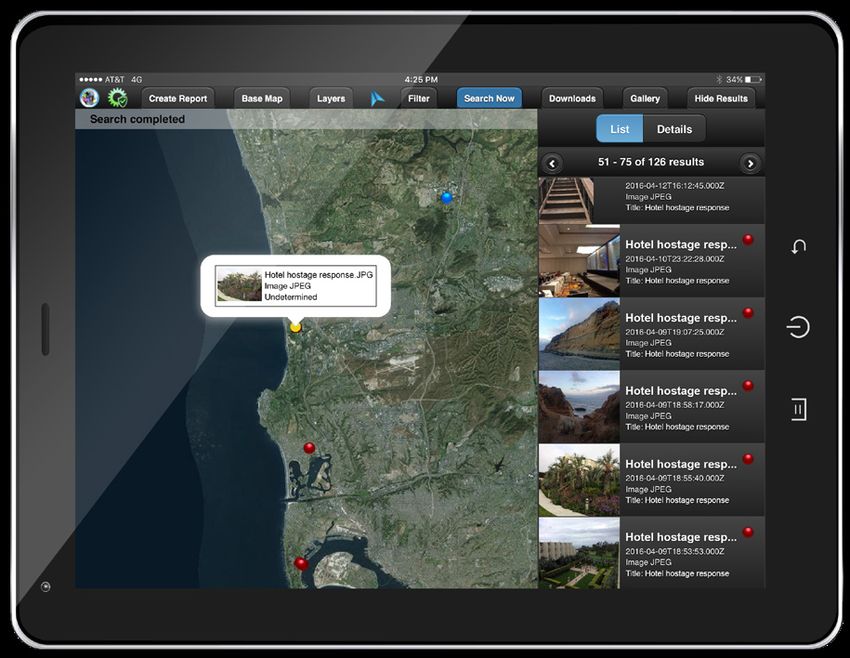
BAE Systems, Inc.
BAE Systems, Inc. is the U.S. subsidiary of BAE Systems plc, an international defense, aerospace and security
company which delivers a full range of products and services for air, land and naval forces, as well as advanced
electronics, security, information technology solutions and customer support services.

BAE Systems, Inc. provides support and service solutions for current and future defense, intelligence, and
civilian systems; designs, develops and manufactures a wide range of electronic systems and subsystems for
both military and commercial applications; produces specialized security and protection products; and designs,
develops, produces, and provides service support of armored combat vehicles, artillery systems, and munitions.

GXP software solutions
Supporting development of the most advanced geospatial intelligence, BAE Systems GXP software enables
rapid discovery, exploitation, and dissemination of mission-critical geospatial data. From key military, security,
and incident response operations, to a variety of commercial development and research initiatives, GXP
provides a comprehensive suite of solutions to inform effective decision making and ensure a safer world.

GXP software solutions support image, video, and all-source analysts at defense and intelligence agencies, as
well as commercial organizations, around the world including:

 » Defense forces, intelligence agencies, and                               » Systems integrators
     homeland security (including all major branches                        » State, local, and regional governments
     of the military)                                                       » Transportation departments
 » Private security and first responder personnel                           » Natural resource management consultants
 » Photogrammetry, mapping, and surveying agencies                          » Universities and research organizations

More information on BAE Systems and GXP products:

Americas                                              Asia
Toll free: 800 316 9643                               Telephone +603 2191 3000
gxpsales@baesystems.com                               gxpsales.asia@baesystems.com

Australia and New Zealand                             Europe, Middle East, and Africa
Telephone +61 2 6160 4000                             Telephone +44 1223 370 022
gxpsales.apac@baesystems.com                          gxpsales.emea@baesystems.com

For additional contact information and worldwide distributors, please visit our website:
www.baesystems.com/gxp
© 2021 BAE Systems. All Rights Reserved. Geospatial eXploitation Products, GXP, GXP InMotion, GXP WebView, GXP Xplorer, and SOCET GXP are
registered trademarks of BAE Systems. This document gives only a general description of the product(s) or service(s) offered by BAE Systems. From time
to time, changes may be made in the products or conditions of supply. Approved for public release as of 03/30/2016; rev 01/04/2021. This document
consists of general information that is not defined as controlled technical data under ITAR Part 120.10 or EAR Part 772. ES-GEO-32416-0017.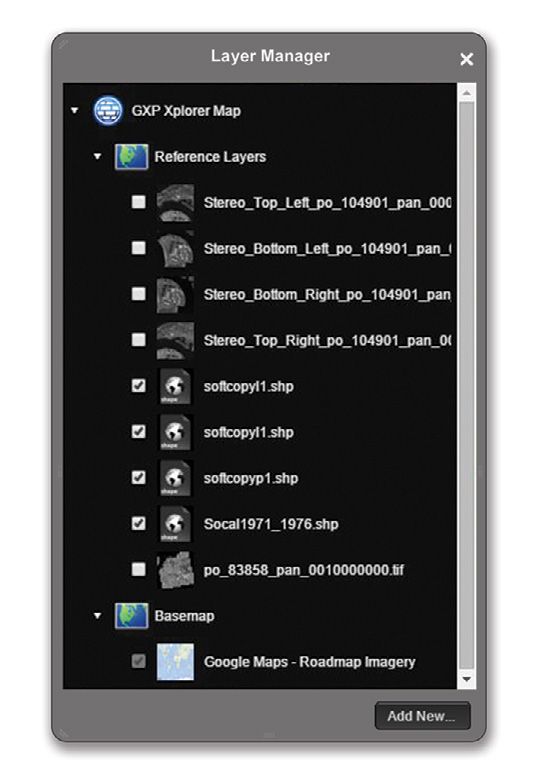
You can also read


