Restoring Microsoft Office 365 Service Quality for WFH Users With NETSCOUT Smart Edge Monitoring
←
→
Page content transcription
If your browser does not render page correctly, please read the page content below

l USE CASE l

Restoring Microsoft Office 365 Service Quality for WFH
Users With NETSCOUT Smart Edge Monitoring
One of the many new challenges facing               Degradation
                                                    This enterprise had thousands of employees dispersed across
enterprise information technology (IT)              numerous U.S. regions, with the majority of workers remaining in
teams involves expanded reliance on                 WFH environments. Several employees in the Central U.S. began
                                                    experiencing Office 365 SaaS responsiveness problems that quickly
Microsoft Office 365 Software as a Service          impacted their productivity. It wasn’t long thereafter that associated
(SaaS) solutions in work-from-home (WFH)            Help Desk tickets found their way into IT Operations for response,
                                                    troubleshooting, and, hopefully, quick resolution.
and branch office environments.
                                                    Since the Microsoft Office 365™ environment also incorporated the
                                                    company’s Microsoft SharePoint® and Microsoft Exchange™ services,
Given the pervasive use of cloud-based              the IT Operations team was fully aware that these responsiveness
Microsoft Office 365 SaaS solutions                 issues could also impact WFH employees’ abilities to reliably access
                                                    email, enterprise productivity tools, and strategic information critical to
designed to support employee productivity           everyday business operations.

in enterprises of all sizes, it is up to IT teams   Impact
to shoulder the responsibility of assuring          Since this business is focused on supplying business-critical enterprise
reliable access to business services, as well       technology solutions, it wasn’t long until these issues reverberated at
                                                    the Executive level.
as identifying the root cause of any issues
                                                    In the perspective of this Executive team, if one of their Sales Managers
impacting user experience in the hybrid             was unable to access information regarding a purchase order,
workplace, regardless of location.                  customer service concern, or high-level meeting, technology had
                                                    become an obstacle to corporate success. As a result, this Office 365
                                                    technology issue needed quick resolution by IT leadership to avoid
This Use Case example details how one               negative impact on customer perception and revenue, not to mention
                                                    employee productivity.
U.S. IT team was able to successfully
troubleshoot Office 365 end-user                    Troubleshooting
experience issues by employing their                IT Operations had earlier implemented the NETSCOUT® Smart Edge
                                                    Monitoring solution, which had expanded visibility into the enterprise
newly deployed NETSCOUT Smart Edge                  client edges of the network supporting both WFH and remote office
                                                    users dependent upon reliably performing Office 365 services, as
Monitoring solution.                                well as Virtual Private Network, Citrix Virtual Desktop Infrastructure,
                                                    and Unified Communications as a Service, and other SaaS solutions.
                                                    As an essential part of this solution, IT Operations had deployed
                                                    nGenius®PULSE nPoint virtual sensors on WFH employee laptops,
                                                    as well as hardware nPoints in remote offices operating in the
                                                    Eastern and Western U.S. These nPoint sensors provided visibility
                                                    into, and assessment of, the quality of end-user experience across
                                                    the company’s client edge by conducting synthetic tests into the
                                                    performance of business services supporting remote users, including
                                                    Office 365.

                                                    From their experience, the IT leadership team was well-apprised
                                                    of Microsoft data center locations in the U.S., which came in handy
                                                    as they consulted their nGeniusPULSE Service Dashboard’s Sites
                                                    Overview results to visualize the locations of impacted users in the

ENT ERPRISE
l USE CASE l Restoring Microsoft Office 365 Service Quality for WFH Users With NETSCOUT Smart Edge Monitoring

context of Office 365 service delivery hubs. As exhibited in Figure 1,
this geographic view of enterprise users located in both WFH and
corporate environments indicated that one of the company’s remote
offices in Des Moines was experiencing the highest instance of
impacted performance. This nGeniusPULSE analysis corresponded
to the origin of the Office 365 service tickets arriving at the Help Desk
from employees in the Des Moines office.

                                                                            Figure 3: The initial Office 365 synthetic tests also yielded the analytics
                                                                            seen in this Service Test Log, which informed IT Operations that root
                                                                            cause instead related to Microsoft Outlook email services, which were
                                                                            providing slow responsiveness for impacted WFH users.

                                                                            At this point in the workflow, IT Operations accessed the broader
                                                                            NETSCOUT Smart Edge Monitoring solution to transition
Figure 1: This nGeniusPULSE business transaction test showed                troubleshooting from “what” WFH users were experiencing to “why”
degraded performance for employees in the Des Moines area, which            these issues were occurring.
was comprised of WFH users rather than remote office workers.
                                                                            For this IT team, an essential element of the next-stage
                                                                            troubleshooting workflow directly accessed the Smart Edge Monitoring
At this initial troubleshooting workflow phase, nGeniusPULSE                solution’s ability to integrate packet captures and analysis from both
provided context that the IT team utilized to narrow the scope of both      nPoint sensors and InfiniStreamNG® (ISNG) appliances with NETSCOUT
impacted users and affected services. As a result, IT Operations quickly    Cloud Adaptors deployed across the company’s data center and office
transitioned to the nGeniusPULSE Service Dashboard views exhibited          locations. By accessing NETSCOUT smart data generated by patented
in Figures 2 and 3. These views provided IT Operations with contextual      Adaptive Service Intelligence® (ASI) technology generated from this
drill-downs to nGeniusONE® Service Assurance analytics regarding how        network packet traffic, IT then had a true, end-to-end view into WFH
the company’s business services were supporting their user base.            user experience, including employee interactions with Microsoft’s
                                                                            Office 365 data centers.

                                                                            By contextually drilling down from the nGeniusPULSE Service
                                                                            Dashboard to a Universal Monitor view that incorporated NETSCOUT
                                                                            Smart Edge Monitoring metrics derived from both nPoint synthetic
                                                                            testing and network packet traffic, IT Operations used long-established,
                                                                            intuitive nGeniusONE analytics workflows to quickly determine Office
                                                                            365 application round-trip times were high, as were numbers of
                                                                            requests and transactions.

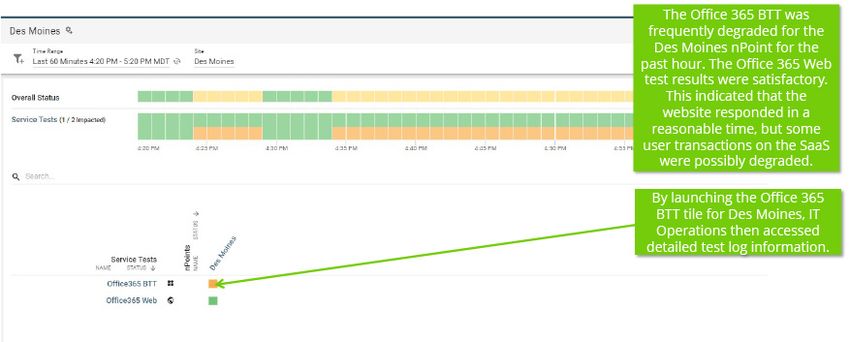
Figure 2: The nGeniusPULSE synthetic testing results into Office 365
performance narrowed the scope of IT investigations.

                                                                            Figure 4: The NETSCOUT Smart Edge Monitoring analysis seen in this
                                                                            nGeniusONE view invited next-stage analysis for IT Operations root
                                                                            cause analysis and resolution.

ENT ERPRISE                                                                                                                                          2
l USE CASE l Restoring Microsoft Office 365 Service Quality for WFH Users With NETSCOUT Smart Edge Monitoring

At this stage of the workflow, IT Operations knew that fully accessing                                                      Summary
nGeniusONE Universal Monitor analytics and corresponding Session
                                                                                                                            Rather than expending hours and IT cycles that would otherwise
Analysis views would soon reveal root cause to them. As exhibited in
                                                                                                                            be spent troubleshooting difficult-to-visualize Microsoft Office 365
Figure 5, the analysis showed root cause related to specific application
                                                                                                                            performance in a WFH environment, with the infinite number of paths
servers at a Microsoft Office 365 data center located in close
                                                                                                                            the transactions could take complicating the investigation process, this
geographic proximity to the impacted WFH users.
                                                                                                                            IT Operations team was able to quickly monitor and troubleshoot this
                                                                                                                            employee digital experience issue with NETSCOUT.

                                                                                                                            Should an IT organization be faced with these challenges, using the
                                                                                                                            end-through-end visibility provided by the NETSCOUT Smart Edge
                                                                                                                            Monitoring solution enables rapid troubleshooting and restoration of
                                                                                                                            Office 365 services.

                                                                                                                            As seen in this Use Case, IT Operations restored the Executive team’s
                                                                                                                            confidence in the quality of user experience in the WFH environment,
                                                                                                                            returned employees to reliably performing Office 365 services, and
                                                                                                                            appropriately communicated this issue to an important strategic
                                                                                                                            technology partner for collaborative resolution. In the process, the IT
                                                                                                                            staff protected both customer service and employee productivity.
Figure 5: This nGeniusONE Universal Monitor view showed Outlook-
related delay in the Office 365 service as being associated with
application servers operating at a regional Microsoft data center facility.

Remediation
Based on IT Operations’ assessment of the issue in the context of their
Service Level Agreement (SLA) and their highly collaborative business
partnership with Microsoft, associated nGeniusONE analytics views
and packet captures were presented as evidentiary data related to the
Office 365 and Outlook performance issues being experience by the
company’s WFH users.

With this data in hand, Microsoft was equipped with information that
assisted in their efforts to modify the application server environment in
the local data center.

                                                                                  Corporate Headquarters                                   Sales Information                                        Product Support
                                                                                  NETSCOUT Systems, Inc.                                   Toll Free US: 800-309-4804                               Toll Free US: 888-357-7667
                                                                                  Westford, MA 01886-4105                                  (International numbers below)                            (International numbers below)
                                                                                  Phone: +1 978-614-4000
                                                                                  www.netscout.com

                                                                                  NETSCOUT offers sales, support, and services in over 32 countries. Global addresses, and international numbers are
                                                                                  listed on the NETSCOUT website at: www.netscout.com/company/contact-us

© 2021 NETSCOUT SYSTEMS, INC. All rights reserved. NETSCOUT, the NETSCOUT logo, Guardians of the Connected World, Adaptive Service Intelligence, Arbor Networks, the Arbor Networks logo, ATLAS,
InfiniStream, InfiniStreamNG, nGenius, and nGeniusONE are registered trademarks or trademarks of NETSCOUT SYSTEMS, INC., and/or its subsidiaries and/or affiliates in the USA and/or other countries.
Third-party trademarks mentioned are the property of their respective owners.
                                                                                                                                                                                                            EUC_048_EN-2101 09/2021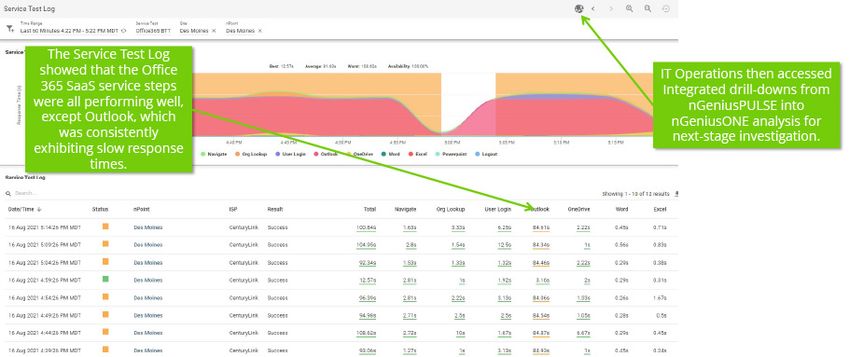
You can also read


