RULEBOOK & CODEX - Arcane Wonders
←
→
Page content transcription
If your browser does not render page correctly, please read the page content below
RULEBOOK & CODEX

The Arena Calls…
      A hush falls over the crowd as the two Mages enter the arena. Casting
      a look across the cracked flagstones, you try to estimate his powers
      and guess his secrets as you are announced to the crowd. In a moment,
      the signal will begin, and nothing can stop the battle until one of you
      lies defeated in the dust. Running your fingers across the edge of your
      spellbook, you mentally select your first few spells. But in the back of
      your mind, the doubt is there: do you have the power and the wits to
      defeat the foe before you?

      Mage Wars is the customizable strategy game of dueling Mages. Two
      rivals trained in different schools and philosophies of magic have come
      to the arena to determine whose magic will reign supreme…and the
      winner will be the last Mage standing! Armed only with your spellbook,
      you must outwit and outmaneuver your foe while protecting your own
      Mage from destruction. Prepare to enter the Arena!

                        www.magewars.com

                                    Created by Bryan Pope
                                    ©2012 Arcane Wonders

This book may not be reproduced in whole or in part without the express written consent of the author.
           Mage Wars® is a registered trademark of Arcane Wonders®. All rights reserved.
2
APPRENTICE
MODE

4
SETUP

6
THE GAME
ROUND

9
ACTIONS

12
SPELLS
 14 ATTACKS
 14 INCANTATIONS
 14 CREATURES
 16 CONJURATIONS
 17 WALLS
 18 ENCHANTMENTS
 20 EQUIPMENT

22
COMBAT
 22 ATTACKS
 29 GUARDING

31
MAGES

35
SPELLBOOKS

39
MULTIPLAYER

40
CODEX
CHAPTER ONE: APPRENTICE MODE
2
                       APPRENTICE MODE

     STOP!
                                     Before you open your packs of spell cards you need to know that they have
                                     been pre-organized for your convenience. Each pack of cards contains the
                                     apprentice spellbook for the Mage displayed on the top.

    Learning Mage Wars                                                 Spellbooks
    Mage Wars was designed to be as intuitive as possible, and         You will need to assemble 2 spellbooks. Choose 2 Mages that
    play as if magic were real. Spells work the way you think          you and a friend wish to play; we recommend the Warlock
    they should, and affect the battle in a way that makes sense.      and Beastmaster. On page 3 is a list of spells each Mage
    As a result, you will find that you can learn the rules very       will use during the game. Find the Mage card, and all of the
    quickly.                                                           spell cards on the list for each of the chosen Mages. The
    During your first few games, while you’re familiarizing            spell cards have been pre-organized so you can find them
    yourself with the rules, you may not want to slow things           all quickly. Each of the 4 included decks has a mage card on
    down by looking things up. Rather than pause your game to          top, followed by all the spells for that mage in the exact order
    check the rulebook, just do what you think makes sense and         as listed to the right. The Mage Ability card marks the end
    make a note to check the rules after the game.                     of that mage’s spells, and is not used in Apprentice Mode.
                                                                       Each player chooses a spellbook, and places the spell cards
    Note: You can look up key words and get quick answers              for their Mage into their spellbook. You can put them into
    in the Codex at the back of these rules. For additional            the pockets in whatever manner is easiest for yourself. We
    information to common questions, a Rules and Codex                 recommend one spell card per pocket.
    Supplement is available for download at http://www.
    arcanewonders.com/resources-and-downloads.                         The Rules
    Video tutorials are also available at http://www.                  Remember, the object of Mage Wars is to kill the other
    arcanewonders.com/video-tutorials.                                 Mage! Keep your Mage alive at all costs!
                                                                       Read through the rules up through page 30. Then, play
    Apprentice Mode                                                    your first game or two in Apprentice Mode. Later, continue
    Let’s start off by playing a few games in Apprentice Mode.         reading the rules and play the full game! In the full game, you
    Apprentice Mode games are faster and easier because you            will play on a full size game board. The Mages will have
    will play in a smaller arena, and use fewer spells. Setup the      different attributes and can use special abilities. Also, you
    game as shown on pages 4-5.                                        will build your own custom spellbooks!

    The Arena
    In Apprentice Mode, we use                                         The Magic Rule
    an arena that is 2 zones by 3                                      Mage Wars is a game of magic and magic spells. Often, these
    zones, which is half the size of                                   spells will violate the normal rules in some way. In all cases,
    the regular arena. Just use half                                   if there is a conflict between the text on a spell card and these
    of your game board, and ignore                                     rules, the spell card always takes precedence.
    the other half. The Mages start in
    opposite corners like normal.
    The Mages                                                                               The Sidebars
    In Apprentice Mode, all Mages                                          This rulebook has been designed to get you
    are equal: Each Mage starts with 10 Channeling, 24 Life (this          started with Mage Wars as quickly as possible.
    is a reduced Life value from what Mages normally have), and
    a basic melee attack of 3 attack dice. They do not have any            You will find many “sidebars” (like this one),
    special abilities, so you will not need their Mage Ability card.       which provide you with rules for special terms
    When you setup your Mage status board, you will use these              and specific situations. The sidebars are
    values (see page 5).                                                   designed to help you find information quickly
                                                                           while you play. Feel free to skip over these as
                                                                           you read the rules for the first time, and then
                                                                           come back and refer to them as needed later.
CHAPTER ONE: APPRENTICE MODE
                                                                                                                                         3
                                    APPRENTICE SPELLBOOKS
 Mage Wars allows you to play one of four Mages, each with their own unique strategies and play style.
   Choose the Mage that suits you best, then find their spells below and put them into a spellbook.

   Beastmasters study Nature      The Priestess is a master           Warlocks dabble in           With their mastery of
     magic, and overwhelm           of healing, protection,       Dark magic, summoning           Arcane magic, Wizards
      opponents with their         and divine powers that           terrifying demons and        frustrate their opponents
     animal minions. Their        make her knights, angels,       debilitating their enemies      by stealing their mana,
    enchantments transform         and other holy minions,        with curses. A master of          and countering, or
    mere forest creatures into     virtually undefeatable.      fire, he will incinerate those    redirecting their spells.
       formidable beasts.                                          who stand in his way.

                   BEASTMASTER                   PRIESTESS                       WARLOCK                        WIZARD
                   1 Bearskin Armor              1 Regrowth Belt                 1 Demonhide Armor              1 Dragonscale Hauberk
EQUIPMENT
                   1 Elemental Cloak             1 Staff of Asyra                1 Lash of Hellfire             1 Staff of the Arcanum
                   1 Staff of Beasts             1 Wind Wyvern Hide              1 Leather Gloves               1 Suppression Cloak

                   3 Bitterwood Fox              2 Asyran Cleric                 1 Darkpact Slayer              1 Darkfenne Hydra
CREATURES          1 Emerald Tegu                1 Brogan Bloodstone             2 Firebrand Imp                1 Gorgon Archer
                   1 Redclaw, Alpha Male         2 Highland Unicorn              1 Flaming Hellion              2 Mana Leech
                   1 Steelclaw Grizzly           2 Royal Archer                  1 Goran, Werewolf Pet          1 Stonegaze Basilisk
                   2 Timber Wolf                                                 1 Skeletal Sentry

                   2 Bear Strength               1 Divine Protection             1 Agony
ENCHANTMENTS       1 Cheetah Speed               2 Pacify                        1 Bear Strength                1 Essence Drain
                   1 Regrowth                    1 Rhino Hide                    1 Death Link                   1 Force Hold
                   2 Rhino Hide                  1 Sacred Ground                 1 Enfeeble
                                                                                 1 Ghoul Rot
                                                                                 1 Magebane
                                                                                 1 Marked for Death
                                                                                 1 Vampirism

                   1 Call of the Wild            1 Dispel                        1 Dispel                       1 Dispel
INCANTATIONS       2 Charge                      1 Dissolve                      1 Drain Life                   1 Dissolve
                   1 Dispel                      1 Force Push                    1 Explode                      2 Minor Heal
                   1 Dissolve                    1 Group Heal                    1 Force Push                   1 Sleep
                   1 Group Heal                  1 Heal                          2 Vampiric Strike              1 Steal Enchantment
                   1 Minor Heal                  1 Minor Heal                                                   1 Teleport
                   1 Rouse the Beast             1 Sleep

ATTACKS            2 Geyser                      1 Blinding Flash                1 Fireball                     1 Chain Lightning
                   1 Jet Stream                  2 Pillar of Light               1 Firestorm                    1 Electrify
                                                                                 2 Flameblast                   2 Lightning Bolt
4   CHAPTER TWO: SETUP

                                SETUP

        SPELLBOOKS
                                                                      MAGE ABILITY CARD

                                                                                               MAGE CARD

           COMPONENTS
    •   1 Rulebook
    •   The Arena
    •   2 Spellbooks
    •   336 Spell Cards
    •   4 Mage Cards
    •   4 Mage Ability Cards
    •   2 Mage Status Boards
                               STATUS CUBES
    •   8 Status Cubes         (RED, BLACK)
                                                  MAGE STATUS BOARD
    •   20 Action Markers
    •   2 Quickcast Markers
    •   9 Attack Dice
    •   1 Effect Die (d12)
    •   1 Initiative Marker                                                    SPELL CONDITION MARKERS

    •   3 Ability Markers
    •   8 Guard Markers
    •   6 Ready Markers
                                    ATTACK DICE
    •   23 Condition Markers                                                      EFFECT DIE
    •   13 Spell Tokens
    •   27 Damage Counters
    •   12 Mana Counters
CHAPTER TWO: SETUP
                                                                                                                   5
                                                                  The Mage Wars Arena
                                                          The game board shows the arena where you
                                                          will battle your rivals for magical supremacy!
                                                          The board is divided into 12 areas called
                                                          “zones,” which control movement and range.
                                                          Zones are adjacent only if they share a
                                                          common edge orthogonally (horizontally or
                                                          vertically). Zones that touch only at a corner
                               336 SPELL CARDS
                                                          (diagonally) are not adjacent.
 ARENA
 BOARD

                                                       Mage Wars comes with 336 spells to start your spell
                                                       library. These spells can be stored in the Mage Wars
                                                       box. The spells you will play with during a game
                                                       are placed in your spellbook and can be changed
                                                       between games.
                                                       Setting Up the Game
                                                       Place the game board on the table. Each player
                                                       chooses a Mage and takes the matching Mage Card
                                                       and Ability Card for that Mage (in Apprentice Mode,
                                                       don’t use the Ability Cards). Each player chooses red
                                                       or blue, and takes 10 action markers of that color.
                                                       Additionally, each player takes 3 black status cubes, 1
                                                       red status cube, and 1 black quickcast marker.
                                     ACTION MARKERS
                                                       Place your Mage Card in the corner zone closest to
                                                       you (marked with a door on the board). In Apprentice
                                   INITIATIVE MARKER   Mode, you will play on just half the game board (see
                                                       page 2). Place one of your action markers and your
                                                       quickcast Marker on your Mage Card, with the white
                                                       symbols up, as shown in the diagram to the left.
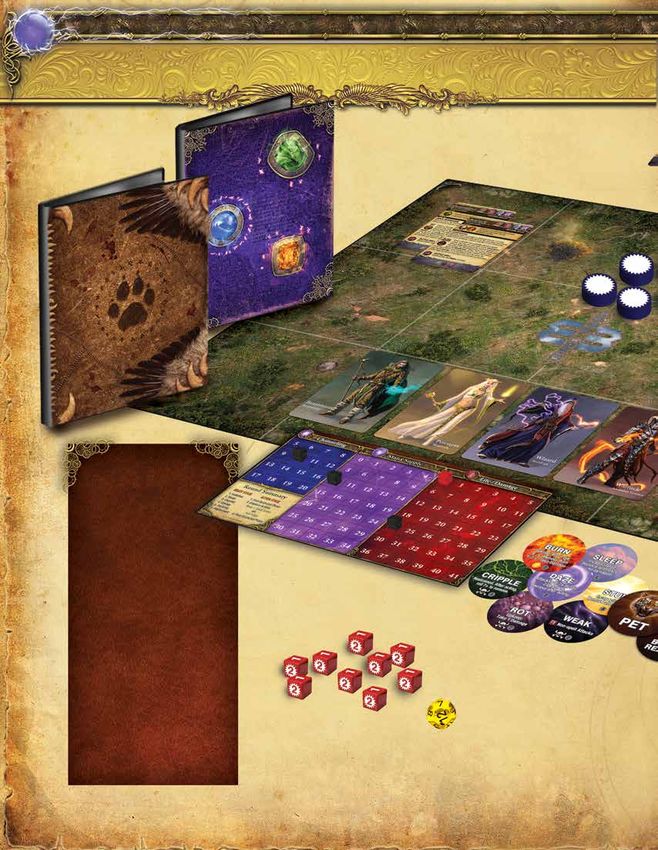
                                    DAMAGE COUNTERS    Place your Mage status board near you. Place a black
                                                       status cube on your Mage’s starting Channeling,
                                                       Mana Supply (all Mages start with 10 mana in their
                                                       supply), and Life value. In Apprentice Mode, all
                                                       Mages have the same attributes (see page 2). Place a
                           QUICKCAST MARKER
                                                       red status cube on the “0” of your Mage’s Life track.
                                                       This marks how much damage the Mage has taken.
                                                       See example 1.
                                                       Choose a spellbook. If this is your first game, you will
                                                       need to assemble your spellbook (see “Apprentice
                                                       Mode” on page 2). Place the dice, condition markers,
                                  SPELL TOKENS         and other game markers in easy reach.
                                                       Both players roll the effect die (the d12). The higher
                                                       roller decides who takes the initiative marker: that
                                 MANA COUNTERS         player will act first during the first round of the game!

MAGE ABILITY MARKERS
                       GUARD AND READY MARKERS

                                                         EXAMPLE 1: APPRENTICE MAGE STATUS BOARD SET UP
6        CHAPTER THREE: THE GAME ROUND

                    THE GAME ROUND
                                                                     this manner the initiative marker alternates back and forth
                                                                     between players.
             THE GAME ROUND                                          The player with the initiative acts first during the Action
                                                                     Stage, and goes first whenever you must determine the
                                                                     order of events.
                   THE READY STAGE
                            Initiative                               Phase 2: RESET
                             Reset                                   Reset all action markers, quickcast markers, and ready
                            Channel                                  markers on your cards by flipping them to their active side.
                            Upkeep
                            Planning
                           Deployment                                              ACTION MARKERS
                                                                                   & READY MARKERS
                  THE ACTION STAGE                                      Every creature in the arena is marked with an action
                    First Quickcast Phase                               marker (including your Mage).
                   Creature Action Phases                               The action marker is used to show when that
                   Final Quickcast Phase                                creature takes its action during the round:

                                                                                           If the action marker is face up,
    Mage Wars is played over a series of rounds, which continue                            the creature is active. Only
    until one Mage takes enough damage to be destroyed. The                                active creatures get
    last Mage standing wins the game!                                                      to take actions.
    Each game round is divided into two stages:
    • The Ready Stage                                                                       If the action marker is
    • The Action Stage                                                                      face down, the creature
                                                                                            is inactive.
    The Ready Stage must be completed before the Action
    Stage can begin. During the Action Stage, each creature
    in the arena takes its actions. Once all creatures have acted,                          Some abilities and
    the game round ends, and a new one begins with a new                                   effects can be used only once
    Ready Stage.                                                                           each round. These are tracked
                                                                                           with a ready marker placed on
                                                                                           the card. If the marker shows
                                                                                           the “ready” side, that ability is
                THE READY STAGE                                                            available for use. After using
                                                                                           the ability, flip the marker to the
    This is the “bookkeeping” part of the game round: where                                “used” side. You won’t be able
    you channel mana, pay upkeep costs, and pick your spells                               to use that ability again until the
    for the round. Both players play simultaneously during the                             marker is flipped back to the
    Ready Stage.                                                                           ready side (usually during the
    The Ready Stage is divided into 6 phases. Both players must                            next Reset Phase).
    complete each phase before the next one can begin:

                                                                                           Your Mage also has a
    Phase 1: INITIATIVE                                                                    quickcast marker.
    On the first round of the game, each                                                   You must flip this marker to the
    player rolls the effect die to see who                                                 inactive side when your Mage
    gets the initiative marker. The high                                                   takes their quickcast action.
    roll decides who has the initiative
    for the first round. After each game
    round, during this phase, the player
    with the initiative marker must give it to his opponent. In
CHAPTER THREE: THE GAME ROUND
                                                                                                                                   7
Phase 3: CHANNEL                                                    You always choose the order in
                                                                    which events that affect your
              Each Mage adds mana equal to his channeling
                                                                    creatures and objects occur
              to his mana supply. Any objects in the arena
                                                                    during this phase. In the rare
              that channel mana also add mana to their
                                                                    case that a timing issue occurs,
              supply at this time.
                                                                    the player with the initiative
              Your Mage records his mana supply on your             decides the order.
              Mage status board. If other creatures or objects
                                                                    Example: You control a Highland
              channel mana, place mana counters on the
                                                                    Unicorn with the Regenerate 2 trait
card to show how much mana is available. There is no limit
                                                                    that has a Burn marker on it. Since
to the amount of mana a Mage or object can have.
                                                                    the creature has a lot of damage on
Example: The Beastmaster has Channeling 9, so he gains 9 mana       it, the Burn effect could destroy
each round. In the first round of the game, during the Channeling   it. You can choose to resolve the
Phase, he adds 9 mana to his starting Mana Supply of 10, for a      Regenerate trait first or the Burn
total of 19 mana.                                                   condition first.

                                                                                     WHAT IS A TRAIT?
                                                                       Spells, creatures, objects, and attacks may all have
                                                                       a number of special abilities called traits, printed on
                                                                       their card. These traits may allow you to act in ways
                                                                       not normally allowed, such as moving farther during
                                                                       an action phase.
                                                                       Traits are listed on the lower half of a spell card or
                                                                       inside the attack bar. Some spells and abilities may
                                                                       also add traits to an object. For example, you might
                                                                       cast an enchantment to give a creature the Fast trait.
                                                                       Many traits are followed by a value. For example, the
                                                                       Highland Unicorn has the Regenerate 2 trait. This
                  WHAT IS MANA?                                        number shows the strength of the trait. Regenerate
                                                                       2 means that the Unicorn will heal 2 damage every
   Mana is the mystical power that Mages control.                      Upkeep Phase.
   A spell caster spends mana in order to cast a spell.                Sometimes, this strength value has a plus or minus
   In a way, mana is like electricity, and the Mage is a               sign. Multiple traits of the same kind with plus or
   battery that stores it.                                             minus signs can be combined on the same object.
   Each round, your Mage will generate or “channel”                    So, if a creature with Lightning +1 is enchanted with a
   some amount of mana. This mana is added to your                     spell that gives Lightning -2, those two traits combine
   “mana supply.” When your Mage casts a spell, you                    and the creature now has Lightning -1.
   spend mana from your supply.                                        If a trait does not have a plus or minus sign, it does
   Mages cannot spend mana they don’t have. If you                     not combine with other traits that have the same
   don’t have enough mana, you can’t cast your spell!                  name. Only the trait with the highest value counts.
   You’ll have to make some tough choices: should you                  If the same unicorn was enchanted with a spell that
   save up your mana to summon a large, expensive                      gave it Regenerate 3, it would only heal 3 damage
   creature? Or parcel it out to power a lot of weaker but             every round, not 5.
   less expensive spells? The choice is yours!                         In these rules, and on the spell cards, traits are always
                                                                       capitalized. See the Codex at the end of this rulebook
                                                                       for a list of all trait effects.
Phase 4: UPKEEP
Some spells have an upkeep cost. This is a mana cost which          Phase 5: PLANNING
must be paid each Upkeep Phase, or the spell is destroyed.
                                                                    Each Mage prepares for the round by choosing up to 2 spells
You always choose whether to pay the upkeep cost or allow
                                                                    from his spellbook. Both players simultaneously choose
the object to be destroyed.
                                                                    their spells. Place your chosen spells face down in front of
Also, some spells and conditions take effect during this phase      you. Keep your chosen spells secret from your opponent, so
(such as Burn or Rot), and creatures with the Regenerate trait      that he doesn’t know what you are planning!
remove damage (See the Codex, page 40).
                                                                    The spells you prepare are the only spells you will be able
CHAPTER THREE: THE GAME ROUND
8
    to cast during this game round. You do not have to cast the
    spells you choose.                                                                  QUICKCAST ACTION
    Some objects, such as Familiars or Spawnpoints, have the
                                                                                          A quickcast action is a special action
    ability to cast spells. You may choose one spell for each of
    these objects at this time. Place these spells face down next                         that only a Mage may take during a
    to the creature or object.                                                            round, in addition to his regular actions
                                                                                          during his Action Phase. This action
    Spells which are not cast during the round are returned to
    your spellbook at the beginning of the next Planning Phase.                           can only be used to cast one quick
                                                                                          spell (a spell with the quick action
                                                                                          symbol), and cannot be used to take
    Phase 6: DEPLOYMENT
                                                                                          any other action.
    Spawnpoints are objects which cast spells for you. For
    example, the Beastmaster’s Lair spawnpoint can cast animal                            You can use your quickcast action
    spells. Starting with the player who has the initiative, you                          at three times during the Action Stage:
    may cast the spells you assigned to your spawnpoints (see
    “Spawnpoints” on page 16). Reveal the spell you have                    • During the First Quickcast Phase
    chosen, pay the mana required, and resolve the spell. If you            • Immediately before or after any creature
    choose not to cast the spell (or if you cannot), it is returned to        you control takes its Action Phase
    your spellbook at the beginning of the next Planning Phase.
                                                                            • During the Final Quickcast Phase

               THE ACTION STAGE                                             When you take your quickcast action, flip your
                                                                            quickcast marker face down and play any quick
    This is where the exciting part of the round takes place.               spell you have prepared for this round. Using a
    Every active creature in the arena gets to take one Action              quickcast action and his regular action, your Mage
    Phase to move, attack, or take other actions. Your Mage is a            can cast two spells in the same round!
    creature too and acts during this stage.                                Examples: The Beastmaster could use an
    The Action Stage is divided into three parts:                           Action Phase to activate his Timber Wolf to go
                                                                            on guard, then afterwards use his quickcast action
    First Quickcast Phase                                                   to enchant his Feral Bobcat. The Wizard could use
    Before any creature can take an action, each Mage has an                his quickcast action to cast his quick attack spell
    opportunity to take a quickcast action, starting with the               “Arcane Zap”, printed on his ability card. This special
    player who holds the initiative marker. The quickcast action            attack counts as a quick spell. Afterwards, he could
    allows you to cast one quick spell. To do this, you must                use his normal Action Phase to cast another spell.
    flip over your Mage’s quickcast marker. You do not have to
    use your quickcast action at this time. You may save it to use
    later in the Action Stage.                                           Action Phases
                                                                         The player with the initiative takes the first Action Phase.
                                                                         During an Action Phase, you will activate and use one
                                                                         creature that you control. Then your opponent takes
                                                                         an Action Phase with one of his creatures, then you take
                                                                         another, and so on. Continue taking turns back and forth
                                                                         between players until all creatures in the arena have had an
                                                                         Action Phase.
                                                                         When it is your turn to take an Action Phase, you are the
                                                                         acting player, and the creature you activate is the acting
                                                                         creature.
                                                                         When it is your turn to take an Action Phase, you must
                                                                         activate one of your active creatures. However, if your
                                                                         opponent has more active creatures in the arena than you
                                                                         have, you may choose to pass when it is your turn to take
                                                                         an Action Phase. You may continue passing as long as you
                                                                         have fewer active creatures than your opponent. Once the
                                                                         number of active creatures is equal, you must take an Action
                                                                         Phase on your turn (you cannot pass).
                                                                         Example: The Warlock stands alone against a Beastmaster and
                                                                         an Emerald Tegu when it is his turn to act. The Warlock may pass
                                                                         his turn, forcing the Beastmaster to take an Action Phase instead.
                                                                         The Beastmaster activates and uses his Summoned creature, so the
                                                                         numbers are now equal and it is the Warlock’s turn again. Now he
                                                                         cannot pass.
CHAPTER FOUR: ACTIONS
9
marker, your opponent can reveal any hidden enchantments
(see “Revealing Enchantments” on page 18). You must give
ACTIVE AND your opponent a chance to reveal his enchantments before
you decide which action you want to take with your
INACTIVE CREATURES creature.
Any creature that has not yet had an Action Phase When the creature’s actions are complete, resolve any effects
(with a face up action marker) is active. Any creature that occur at the end of its Action Phase. For example, all Stun
which has taken its Action Phase (with a face down markers on the creature are removed at the end of its Action
Phase. In some cases you will have to make an “escape roll”
action marker) is inactive. All creatures that are
to see if a spell or condition ends. After resolving any of
Summoned into the arena begin play inactive, and these effects, the creature’s Action Phase is over and it is
start with an action marker with the inactive side up. now inactive, and will remain inactive until the next Reset
Phase (unless a spell or effect reactivates it). In this manner,
each creature gets to act one time during each Action Stage.
Exception: If your creature receives a condition during
its Action Phase due to an enemy damage barrier or
counterstrike, if that condition has an “end of Action Phase
effect” it is not resolved until your creature’s next Action
Phase (see “Counterstrike” and “Damage Barriers” on pages
27 and 28).
Remember that before you activate a creature (including
your Mage), or immediately after you have completed its
Action Phase, you can use your quickcast action (if your
quickcast marker is active).
Hint: You can use your quickcast action to set up powerful
ACTIVE INACTIVE
combo actions! Just before its Action Phase, you can
increase a creature’s attack or Teleport it to an enemy zone
Creature Actions for a surprise attack.
When you choose a creature to take an Action Phase, you
activate it. You must flip over the creature’s action marker to Final Quickcast Phase
the inactive side, and you must discard any guard marker (if When all the creatures in the arena have taken their Action
it has one). Then your creature may take its actions for the Phases (and are now inactive), each player has a final
round (see “What Can A Creature Do” on page 11). opportunity to use his quickcast action for the round (if he
Important: Even though you flip your creature’s action wants to), starting with the player who has the initiative.
marker over at the beginning of its Action Phase, the phase You may only do this if you have not already used the
does not end until it has completed all of its actions. quickcast action earlier in the round.
Note: As soon as you activate a creature and flip its action
ACTIONS
MOVEMENT Hindering Movement
The presence of enemy creatures can limit your creature’s
During its Action Phase, a creature can move. If it moves, it ability to move.
must finish all movement before it takes any other action. A If a creatures moves out of zone with enemy creatures in
creature cannot take any other kind of action before it moves. it, or if it moves into a zone with enemy creatures in it, it
When a creature takes a move action it moves one zone is hindered. A hindered creature can only take one move
into any adjacent zone. The zone must be orthogonally action during its Action Phase (even if it has the Fast trait).
adjacent (creatures never move diagonally). Some creatures may have a trait or ability which allows
After taking a move action, a creature may then take a quick them to ignore other creatures that hinder movement. For
action (see “What Can a Creature Do” on page 11). As a example, a creature with the Flying trait can ignore non-
quick action, a creature can choose to move again to a second Flying creatures when moving, and a creature with the
zone. In this manner, creatures can move 2 zones per round. Elusive trait , or who is Teleporting or is Pushed, may always
Moving into a second zone completes its Action Phase, and it ignore enemy creatures when
won’t be able to take another action (such as guard or attack).CHAPTER FOUR: ACTIONS
10
moving. If an enemy creature is Incapacitated or Restrained,
or if it has the Pest trait, it can be ignored and cannot hinder
other creatures. Please refer to the Codex for details on each MOVE ACTION
of these traits and conditions.
A creature moves to a new zone by taking a move
Example: This Timber Wolf has just been activated. Creatures can action, or by being Pushed or Teleported. Whenever it
normally move 2 zones (use a move action to move 1 zone, and then moves, it follows the 6 steps below. Some steps might
as their quick action move a second zone). If the Wolf moves to the not apply. In most cases you will just simply move the
left, then as a quick action it can move a second zone down. However, creature to the new zone.
if it moves down first, it must stop moving because the enemy there
will hinder its movement. Note, it cannot move to the right because
that direction is blocked by a wall (see “Walls” on page 17.) STEP 1: Declare Move
Choose which zone the creature will move to. Check
to see if the move is possible. For example, make
sure a wall will not block the move (see “Walls” on
page 17). Make sure the creature is not Restrained
or Incapacitated. If you change your mind, or find
you cannot move the creature, you may cancel the
move action and choose a different action instead.
However, after this step the move action is committed
to, and if it is later canceled for any reason, you will
lose the action.
STEP 2: Pay Costs
You must pay any costs associated with the move.
For example, a spell might require your creature to
pay a mana cost in order to move. If you cannot pay
all of the costs, the move is cancelled, and you have
lost the action!
STEP 3: Leaving Zone Effects
Any spells, abilities, or effects which trigger when a
creature leaves a zone occur at this time.
COUNTING DISTANCES
When a creature moves, or when you make an STEP 4: Walls
attack, you will need to count distance across the The creature encounters any intervening walls. Some
arena. The distance, or “range,” is always counted walls will “attack” a creature when they move through it
from one adjacent zone to another (only horizontally (such as a Wall of Fire). Teleporting creatures bypass
and vertically, never diagonally). and ignore walls. See “Walls” on page 17.
Example: This Royal Archer has a ranged attack
with a range of “1-2”. It can only be used to target STEP 5: Move
an enemy who is 1 or 2 zones away. The zone the The creature must be moved into the new zone.
archer occupies is “range 0”, the wolf is at “range 1”,
and the bear is at “range 2”.
STEP 6: Entering Zone Effects
Any spells, abilities, or effects which trigger when
a creature enters a zone occur at this time. For
example, some enchantment spells create a “trap”
which triggers when a creature moves into a zone.
See “Traps” on page 20.
If a creature becomes unable to move during the move
action, it stops the move sequence at that point, and
the rest of the move action is canceled. For example,
a creature could become Restrained from a “Leaving
Zone Effect” in Step 3. If this happens, the rest of the
move action is canceled, and it will not encounter any
walls, nor actually be moved into the new zone.CHAPTER FOUR: ACTIONS
11
WHAT CAN A CREATURE DO DURING ITS ACTION PHASE?
ACTIVATION: First, choose a creature and activate it: Flip over its action marker to the inactive side, and remove its
guard marker (if any). Now you are ready to act with it! Choose one of the 3 options below. Your creature can either:
TAKE A MOVE ACTION FIRST, AND THEN TAKE A QUICK ACTION
1 First, move the creature one zone to an adjacent zone. Then, you may choose and take a quick action
(see below). Both the move action and the quick action are optional; you can do one without doing the other.
However, if you want to move the creature, you must complete the move action before you take a quick action.
OR 2 TAKE A FULL ACTION
Do not take a move action. You may choose and take a full action (see below).
Full actions “take longer to complete” and do not allow you to move first.
DO NOTHING
OR 3 Sometimes your creature will have nothing useful to do, or it may be prevented from taking any actions
(Incapacitated). Even if your creature does nothing, you must still flip its action marker to the inactive side.
QUICK ACTIONS FULL ACTIONS
TAKE ANOTHER MOVE ACTION MAKE A FULL ATTACK
The acting creature moves one additional zone into any Your creature can make an attack listed on its card that
adjacent zone, following the normal rules for movement. has the full action icon (see “Attacks” on page 22).
The presence of enemy creatures may hinder its Example: The Steelclaw Grizzly has 2 different melee
movement and not allow it to move a second time. attacks printed on its card. It can use its Claws as a quick
MAKE A QUICK ATTACK action, but its more powerful Heavy Claw Strike attack
Your creature can make an attack listed on its card that requires a full action.
has the quick action icon (see “Attacks” on page 22). CAST A FULL SPELL
Example: The Thunderift Falcon has moved into a zone A creature with the ability to cast spells (such as your Mage
with an enemy creature. The Falcon has a quick melee or a Familiar) may cast a spell that has the full action icon
attack on its card, so it can attack as a quick action. (See “Casting Spells” on page 13). You can only cast the
GUARD spells that you prepared during the Planning Phase.
The acting creature can choose to defend the zone it is TAKE A SPECIAL FULL ACTION
in by guarding. Place a guard marker on the creature. Some creatures have a special action they can take.
A creature that is on guard can protect other objects in See “Special Actions” below.
its zone (see “Guarding” on page 29).
CAST A QUICK SPELL
A creature with the ability to cast spells (such as your Mage
SPECIAL ACTIONS
Some creatures have special abilities
or a Familiar) may cast a spell that has the quick action
which are special actions they can take.
icon (See “Casting Spells” on page 13). You can only cast
These are described on their card, or may
the spells that you prepared during the Planning Phase.
appear as an “ability bar” on their card.
Example: The Priestess wants to cast Minor Heal. It is a
The ability will describe or show the
quick spell, so she can cast it with a quick action.
action required (quick or full) to use it.
TAKE A SPECIAL QUICK ACTION Example: As a quick action, Huginn can
Some creatures have a special action they can take. peek at a target hidden enchantment up
See “Special Actions” to the right. to 2 zones away.
Some ability bars have
a mana cost printed on
QUICKCAST ACTION them, or a mana cost
Important: Anytime before or after a friendly is described in the text for them. This is the cost that must be
creature’s Action Phase, your Mage can use paid to use that ability. Example: The Wizard’s Arcane Zap is
his special quickcast action. See an ability shown on his ability card, and has a “1” mana cost
“Quickcast Action” on page 8. symbol on it. In order to cast it, he must pay 1 mana.CHAPTER FIVE: SPELLS
12
SPELLS
Ultimately, a duel between Mages is a duel of magical spells. • Effect: This section of the spell card describes what the
Your spells define your Mage, and what he can do. In Mage spell does when you cast it. If the spell has any upkeep
Wars, spells are represented by cards. costs, these are described here. Any special traits the
spell may have are also listed here.
Let’s Look at a Spell Card • School and Level: This information is used when
you choose spells to include in your spellbook (see
Your spellbook holds a number of spell cards that you
“Spellbooks” on page 35).
can use during the game. Each spell card can be used only
once. After the spell is cast or destroyed, it is placed in your Your spells are stored in your spellbook until you “prepare
discard pile. Normally, you cannot take any spell cards out them” (choose them during the Planning Phase). This helps
of your discard pile. you organize and sort your spells, and allows you to search
Every spell card has information you will need during the your spells without tipping off your opponent about what
game: spells you have available.
• Spell Name: Name of the Spell. Destroyed or discarded spells are placed in your discard pile.
• Spell Type: Identifies the type of spell: Attack, Creature, See “Discarding Spells” on page 13.
Conjuration, etc.
• Subtypes: Some spells or abilities can only affect or
target particular spell subtypes.
• Casting Line: At the top of the spell card is a “casting
line”, that shows the information you need to cast the
spell, including the casting cost, action required, range,
and target.
• Casting Cost: You must spend this amount of mana
from your mana supply when you cast the spell.
• Action Icon: This tells you the type of action required
to cast the spell. Quick spells are simple and can be cast
after moving (requiring a quick action), but full spells
are “complex”, so you cannot move first (requiring a full
action). The icon shows what kind of action you must
spend to cast the spell (quick action or full action).
• Range: You may only cast a spell at a target that is
in range. Range is always listed as a minimum and a
maximum. If the target is too close or too far away, you
cannot cast the spell.
• Target: Every spell must be cast at a legal target. You
may select the target only if it matches the requirements
listed on the spell you are casting. Some spells may target
objects with particular traits or subtypes. For example,
the Minor Heal spell may only target a Living creature.
It cannot target a conjuration, or a creature with the
Nonliving trait.CHAPTER FIVE: SPELLS
13
action instead. However, after this Step the spell action is
committed to, and if it is later canceled for any reason, you
SPELL LEVELS will lose the action.
All spells have a spell Level,
listed in the upper right Step 2: Pay Costs
corner of the card below the
school symbol. Some spells have a variable cost You must pay all costs for the spell: reduce the mana in
that is determined by the Level of the spell’s target. your Mana Supply equal to the casting cost (or reduce the
mana on your Familiar or Spawnpoint by removing mana
Example: The Sleep spell has a casting cost which markers). Some spells may have additional costs (such as
depends upon the Level of the creature you are taking damage, lowering your Life value, or destroying an
putting to sleep. A Level 3 creature costs 6 mana. object in play). These costs must also be paid now.
Some spells can only affect targets of a certain As soon as you pay the costs required, your spell has been
Level, or have different effects depending on the cast. If you cannot pay all of the costs, the spell is cancelled
Level of the target. and discarded, and you have lost the action.
Note: Your Mage is a Level 6 creature.
DISCARDING SPELLS
CASTING SPELLS Each Mage has his own separate discard pile.
Any spell or object that is destroyed is always
Mages (and a few other creatures and objects) have the abil- placed in its owner’s discard pile (regardless of
ity to cast spells. You can only cast the spells that you pre- who “controls” it at the time). Many spells, such as
pared to cast during the Planning Phase. incantations, are automatically discarded after they
When you cast a spell, follow these 4 steps in order: are resolved.
1. Declare Spell Important: Any player may freely examine the
2. Pay Costs contents of any discard pile at any time.
3. Counter Spell Cards in your discard pile are “expended”. They
4. Resolve Spell are outside of your spellbook, and cannot be used
again. Thus, each spell in your book can be cast
Step 1: Declare Spell only once during the game (unless a spell or ability
allows you to re-use it).
Announce that you are casting a spell and what the target
will be. You may only choose a target that matches the target
requirements listed in the casting line of the spell. Some
spells will target a zone on the game board. Other spells will
target a single object, such as a creature or conjuration.
Step 3: Counter Spell
The target of a spell must be in range (see “Counting Once the spell has been cast, your
Distances” on page 10). All spells have a range, given in opponent has a chance to “counter”
zones. The range lists two numbers, such as “0-2.” The first it. Normally, there is nothing your
number is the minimum distance the caster must be from opponent can do, and the spell
the target, and the second number is the maximum distance. simply takes effect. However, some
For example, if a spell has a range of “0-2,” the target can be spells and abilities, such as the
zero (in the same zone), one, or two zones away from the Nullify enchantment, may allow him
spell caster. If the spell has a range of “1-2,” it can only target to counter your spell. When a spell
objects one or two zones away, and cannot target objects is countered it is discarded without
in the same zone (range “0”), or 3 or more zones away. effect, and you lose the mana spent
Remember to count range orthogonally, never diagonally. and any action used to cast the spell
(unless the spell or ability which
Note: If there are any walls between your spell caster and the counters says otherwise).
target, the walls may block your spell (see “Walls” on page 17).
Step 4: Resolve Spell
Some spells require you to make additional choices. Your At this point, the spell takes effect. The spell type (e.g.,
spell may have multiple effects for you to choose from. You conjuration) and the text on the spell card determine the
must announce which choices you are making when you effects of the spell. If you have cast an attack spell, you must
cast the spell. now resolve the attack.
When a spell resolves, if you find that the target of the spell
If you change your mind, or find you cannot cast the spell,
is no longer a legal target or has moved, even to the same
you may cancel the spell action and choose a different
zone, then the spell is cancelled.CHAPTER FIVE: SPELLS
14
SPELL TYPES CREATURES
There are six types of spells; attacks, incantations, creatures,
conjurations, enchantments, and equipment. How spells
resolve and behave depends on the type of spell you are casting.
ATTACKS
Creature spells summon a creature into the arena, which
will fight for you until destroyed. Place the card face up on
the game board in the target zone. Creature spells usually
have a range of “0-0”, and are always placed in the same
zone as the caster. Place an action marker on the creature
card with the inactive side up (creatures always enter the
game inactive).
Note: The game includes 10 action markers per player, but
there is no limit to how many creatures you can Summon.
Attack spells allow your spell caster to attack a target in the
arena. When the spell resolves, you make the attack on the Just like your Mage, creature spells have Life and Armor
target. Attack spells have an “attack bar” (just like an attack attributes, and generally have one or more attacks. If a
bar on a creature card) that has the information you need creature receives damage equal to or greater than its Life,
to resolve the attack, including the number of attack dice the creature is destroyed.
rolled, additional effects table, traits, etc. Once the attack is Most creatures have one or more special traits printed on
resolved, place the attack spell on your discard pile. Attack the card, which gives them special abilities. You can look up
spells are always ranged attacks. See “Attacks” on page 22. traits in the Codex located on page 40.
Life and Damage
INCANTATIONS All creatures and conjurations have a Life value. Life is the
maximum amount of damage the object can take before
being destroyed. If the object suffers damage equal
to or greater than its Life value, it is destroyed.
Record damage to your Mage using your Mage
status board, and record damage to other objects
with damage counters.
Damage and Life are tracked separately for all
creatures and conjurations, including Mages. Note
that various spells and abilities can change an object’s Life
value without changing the amount of damage it has taken.
FAST CREATURES
Some creatures have the Fast trait. These creatures
may take two move actions before taking a quick
action. However, Fast creatures may not move
again as a quick action. Like other creatures, their
movement can still be hindered by enemy creatures
Incantation spells have a brief, temporary effect on the (see “Hindering Movement” on page 9).
game. When the spell resolves, follow the instructions on
the spell card, then place it on your discard pile.CHAPTER FIVE: SPELLS
15
LIVING AND NONLIVING CORPOREAL & INCORPOREAL
All creatures and conjurations are either Living or Normal objects, from a Mage’s wand to a Summoned
Nonliving. These are “catch-all” traits that describe angel, have a solid, physical form. We call these
certain characteristics of an object. objects Corporeal. Some objects have no physical
Unless the spell card specifies otherwise, all creatures form, such as a Wall of Fire or a ghostly apparition.
have the Living trait, and all conjurations have the These objects are said to be Incorporeal.
Nonliving trait. • Corporeal: All objects in the game are
• Living: These creatures and conjurations are Corporeal unless they have the Incorporeal
living things, such as plants or animals. All of the trait. No special rules are needed for Corporeal
rules apply to Living objects normally. For instance, objects.
Living creatures can be healed or put to sleep.
• Nonliving: These creatures and conjurations are • Incorporeal: An object that has the Incorporeal
not alive. They may be a machine or some kind trait has a few special rules:
of magical construct, or the re-animated skeleton
of a dead creature. All Nonliving objects have the • All Incorporeal objects also have the
following traits: Poison Immunity and Finite Life, Uncontainable, Nonliving, and Burnproof
in addition to other traits listed on their card. Look traits, even if they are not listed on their card.
these traits up in the Codex at the end of the rules. • Incorporeal objects are difficult to damage.
When you roll attack dice to damage an
Incorporeal object, you must treat all “2”
FLYING results as “0” results. Only the “1” results are
counted to determine the amount of damage
Creatures with the Flying trait ignore walls and all
done. Also, the Incorporeal object is not
non-Flying enemy creatures when moving. Flying
and non-Flying creatures do not hinder each other’s affected by any Special Effects or Conditions
movement. Likewise, enemy non-Flying creatures from the attack.
ignore your Flying creatures when they move. • Ethereal Damage: Incorporeal objects are not
Non-Flying creatures cannot make a melee attack immune to everything, however. Any attack that
against a Flying creature unless they have the Reach has the Ethereal trait has a “magical” element
trait. Ranged attacks can target a Flying creature to it and affects creatures on all planes of
normally. Important: Any ranged attack can always existence. Ethereal attacks affect Incorporeal
target a Flying creature in the same zone, even if objects as if they were normal Corporeal
the minimum range for that attack is greater than 0. objects. That means that an Ethereal attack
Likewise, a Flying creature can ignore the minimum counts all attack die results as normal, and may
range requirements when attacking a non-Flying inflict effects or conditions as normal (except
target in its zone. Burn, since the Incorporeal object has the
For a Flying creature to make a melee Burnproof trait).
attack against a non-Flying creature, it
must lose the Flying trait until the end Example: A Whirling Spirit is an Incorporeal
of that attack action and is affected by creature. If the Priestess made a normal
damage barriers and counterstrikes as melee attack and rolled 2 dice, with results of
normal (the flyer must swoop down the die roll being a 1 and a 2, the spirit would
into reach to make the attack). only suffer 1 damage (the “2” is treated as
A creature cannot gain or lose the a “0”). But, if she instead cast a Pillar of
Flying trait in the middle of an attack Light at the Whirling Spirit, the Spirit would
action. For example, if a creature suffer the full 3 damage from the 2 attack
gains Flying in the middle of an attack dice, and might be
action, the entire attack action is Dazed or Stunned by
resolved as if the creature did not have the additional effects,
Flying, and the Flying trait is gained after that attack because Pillar of Light
action is complete. has the Ethereal trait.
A Flying creature is affected by guards when it makes
a melee attack, but only if it is attacking a non-Flying All Incorporeal objects have
object in the guard’s zone. Attacks against other Flying no Armor, and cannot gain
objects always ignore guards (see “Guarding” on page Armor. They are usually
29). easily destroyed by Ethereal
If a Flying creature guards, it loses, and cannot gain, attacks. Many also have an
the Flying trait for as long as it has the guard marker. upkeep cost that must be
paid every round to keep the
All creatures always have LoS (Line of Sight) to all
Flying creatures, and vice versa (see “Line of Sight” object in the game.
on page 17).16 CHAPTER FIVE: SPELLS
These traits are not printed on the cards, so as to not repeat
FAMILIARS information that is intuitive and inherent for all Conjurations.
Some conjurations have the Living trait, which replaces the
Familiars are objects that have the ability Nonliving trait conjurations normally have.
to cast spells. Often, these objects can
Most conjurations target a zone, and are attached to that zone.
channel mana as well. When a Familiar
gains mana, place the appropriate When you cast one of these spells, place the conjuration face up
mana counters on the object. in the target zone. A zone may never have multiple conjurations
with the same name attached to it. Normally conjurations
If you control a Familiar during the cannot move. But, if they do move, they cannot move to
Planning Phase, you may select a another zone with a conjuration of the same name attached.
spell for it to cast during the round. The
Familiar may have restrictions on the A few conjurations target an object instead. These spells
types of spells you may choose. Place the spell face are attached to the target object, and move with it if it is
down near your Familiar, and tell your opponent that moved. If the target object is destroyed or Teleports away, the
it is the Familiar’s spell. Only your Familiar may cast conjuration is removed and destroyed. An object may never
that spell during the round. have multiple conjurations with the same name attached to it.
When your Familiar takes its Action Phase, you may Nearly all conjurations have a special ability or effect as long
have it cast that spell. The type of action the Familiar as the conjuration is in play. These effects are described on
must take depends on the spell it is casting. The the spell card. Unless the card says otherwise, conjurations
Familiar must spend any mana that it has towards the affect the entire game board, regardless of the range.
casting cost first. If it does not have enough mana, you Example: The Beastmaster has conjured the Tooth and Nail
must make up the difference from your mana supply. conjuration. As long as it remains in play, all animal creatures in the
The Familiar is treated as the spell caster for all arena (friend and foe) gain the Piercing +1 trait for their melee attacks
purposes, such as range, etc. You control all spells
your Familiar casts.
SPAWNPOINTS
If your Familiar does not cast its prepared spell,
the spell returns to your spellbook at the beginning Objects with the Spawnpoint trait have the ability
of the next Planning Phase. But, if your Familiar is to cast spells for you. You select spells for your
destroyed before it casts the spell you assigned to Spawnpoints during the Planning Phase, at the same
it, the spell is also destroyed. time that you choose spells for your Mage to cast.
Usually, the Spawnpoint can only cast certain types of
Tip: You should assign a spell to your Familiar, even spells, as listed on the Spawnpoint’s card. Place the
if you may not cast it this round. In this manner, you selected spell face down near the Spawnpoint, and tell
can keep your opponent guessing your true intentions. your opponent that it is the Spawnpoint’s spell. Only
that Spawnpoint may cast that spell during the round.
During the Deployment Phase, both players may cast
these assigned spells, starting with the player who has
CONJURATIONS the initiative. If you cast your spell, pay the casting costs
and resolve the spell. If you do not (or cannot) cast the
spell, it returns to your spellbook at the beginning of
the next Planning Phase. If a Spawnpoint is destroyed,
any spell still assigned to it is also destroyed.
Most Spawnpoints also have a Channeling attribute,
which means that they produce their own mana during
the Channel Phase. Track the Spawnpoint’s mana by
placing mana counters on it.
Spawnpoints cast spells the same way your Mage
does, using the target and range shown on the spell.
Always count range from the Spawnpoint (instead of
your Mage). The Spawnpoint must spend its own mana
first (by removing mana counters). If the Spawnpoint
does not have enough mana to cast the spell, you must
pay the difference from your Mage’s mana supply. You
control all spells cast by your Spawnpoints.
Example: The Beastmaster has a Lair, which has a
Channeling attribute of 2. Each Channeling Phase,
A conjuration is a spell that creates an object in the arena he places 2 mana counters on the Lair. During the
that remains in play until destroyed. Conjurations have a Life Planning Phase, he may choose an additional animal
value, and can be attacked, damaged, and destroyed, just like creature spell from his spellbook, and declare that
creatures. They may have Armor to protect them. Unlike spell is planned for his Lair. Then, in the Deployment
creatures, conjurations cannot take any actions, and do not Phase, the Lair may cast that creature spell, spending
have an action marker. any mana counters on the Lair first. If the spell requires
more mana, the rest comes from the Beastmaster’s
Important: Unless the card says otherwise, all conjurations mana supply.
have the following traits: Nonliving, Psychic Immunity, and
Unmovable (you can look these traits up in the Codex).CHAPTER FIVE: SPELLS
17
If you do, when the spell resolves, you may get a second
WALLS copy of that same wall from your spellbook and place it as
a continuation of the first wall, either in a straight line or
Walls are special types bending around a corner. Only the first wall must be within
of conjurations, and are range, and both walls must be within LoS.
printed “sideways” on
the card. Unlike other Example: The Wizard casts a Level 2 wall with a mana cost of 7.
conjurations, walls are He may extend that wall to cover a second side of the target zone,
always placed on the but would have to pay a total of 16 mana (7 per wall plus 2 for the
border between two spell Level).
zones. Walls cover Attacking Walls
the full length of the
zone border. At least A creature in either of the zones bordering a wall may
one of the two zones make a melee attack against that wall. Ranged attacks
adjacent to the target zone border must be in range, and may target a wall if either of the adjacent zones is in range,
the zone border in LoS when you cast the wall spell. Only and the wall is in LoS. Walls do not occupy a zone, and are
one wall can occupy the border between those two zones not affected by Zone Attacks or spells that target a zone.
at a time. If you want to place a different wall there, you
must destroy the old wall first.
LINE OF SIGHT
Wall cards may have one or more of these three special traits:
• Passage Blocked: If the wall has this symbol, creatures may In order to cast a spell or make a ranged attack
not move through that wall unless they have the against a target, you must have a clear “line of sight”
Climbing or Flying traits (you can look up these (called “LoS” for short). Normally, a creature has LoS
traits in the Codex). If a creature is Pushed into a to the entire game board, even into zones that are
wall with this trait it is Bashed (See “Pushed” and out of range. But, some walls block LoS. You cannot
“Bashed’ in the Codex.) cast a spell or make a ranged attack through a wall
that blocks LoS.
• Passage Attacks: This symbol indicates
that a creature may move through the wall When you count range to your target, you must also
to enter the zone on the other side, but the check if you have clear line of sight (LoS). Draw an
creature automatically suffers an attack from imaginary straight line from the center of the attacker’s
the wall. This attack occurs before the creature or caster’s zone to the center of the target’s zone. LoS
completes its movement action, so if the creature is blocked if the line crosses through a zone border
is Restrained or Incapacitated during the attack, that has a wall on it with the blocks LoS trait. Walls do
it must remain in its original zone. This is a not normally block LoS if the line crosses diagonally
special kind of attack that is neither melee nor through the corner of a wall border, as long as at least
ranged, cannot be avoided, and does not trigger one side of that corner does not block LoS. When
any damage barrier or Counterstrike attacks (see drawing LoS to a wall, draw it to the center of the
“Attacks” on page 22). The attack occurs during zone border.
the Walls Step of the Move Action (see “Move Example: The Warlock is preparing to cast a Fireball
Action” on page 10). at his enemies, but the Walls of Stone block his line
If the wall does not have either the Passage of sight. He can only target the creatures in the zones
Attacks or Passage Blocked symbols, creatures marked green. The Walls of Stone block LoS and
may move through the wall freely. prevent him from seeing (and targeting) any creatures
in the zones marked red.
• Blocks Line of Sight (LoS):
Note that he can trace LoS to the Wolf, because
This symbol indicates that the wall prevents the line traced from his zone to the Wolf’s zone only
creatures on one side of the wall from seeing touches a wall corner, and does not pass through its
anything on the other side. Abilities and spells border. However, he has no LoS to the Hydra. Even
cannot target any object or zone that is on the though a traced line only crosses a wall corner, both
other side of a wall that blocks LoS. Walls never zone borders of that corner have a wall blocking LoS.
block LoS to or from any creature with the
Flying trait.
Note: The walls around the outside of the arena
have the Passage Blocked and Blocks LoS traits. They are
considered high enough to affect Flying creatures too.
• Extendable: All walls have the Extendable trait, which
allows you to extend them and place 2 walls at one time. As
you cast a wall, you may choose to pay an additional cost
equal to the casting cost of the wall plus the wall’s Level.CHAPTER FIVE: SPELLS
18
Enchantment Mana Costs
ZONE EXCLUSIVE All enchantments have two mana
Many conjurations have a trait called Zone costs on the card. The first cost, next
Exclusive. Each zone can only have one Zone to the closed eye, is the casting cost
Exclusive conjuration at a time (even if those that you must pay when you cast
conjurations have different names). You may the spell and play it face down as a
not cast a Zone Exclusive spell that targets hidden enchantment. The casting
a zone that already has a Zone Exclusive cost is always two mana.
conjuration in it. The second cost, next to the open eye, is the reveal cost, which
you may pay when the spell is revealed. When an enchantment is
revealed, if the reveal cost is not paid, because you can’t pay it or
ENCHANTMENTS choose not to, the spell is destroyed immediately without effect.
REVEALING AN ENCHANTMENT
Note: Some enchantments have a trait called Magebind.
If this enchantment is attached to a Mage, the reveal cost is
increased by the Magebind trait. For example, the Harmonize
enchantment has a reveal cost of 2. It also has the Magebind +2 trait.
Enchantments are different from all other types of spells If Harmonize is revealed on a Mage, the reveal cost is 4 (instead of 2).
in Mage Wars because they are played face down. Your
opponent does not know what your enchantment does
until you reveal it! A face down enchantment is called a Revealing Enchantments
hidden enchantment. You may examine your own hidden Important: Hidden Enchantments have no effect as
enchantments at any time. long as they are hidden! You may choose to reveal an
Enchantments create an object in the arena that remains in enchantment immediately after any action, step, or phase,
play until destroyed. Since enchantments have no Life value, even if it is your opponent’s turn! This is a “free action”
they cannot be attacked and cannot take damage. that does not require you to activate a creature or flip
an action marker (See sidebar “When Can You Reveal?”).
Enchantments are always attached to their target. Place the
When you reveal your enchantment, first you pay the reveal
attached enchantment beneath the target object, but don’t
cost, before resolving the effect of the enchantment. If the cost
cover it completely (so both players can see all attached
is not paid, the enchantment is destroyed before it can resolve
spells). An attached enchantment moves with the target. If
and have any effect. If the cost is paid, flip the enchantment
the target is destroyed, all attached spells are also destroyed.
over and reveal it to your opponent, then place it partially under
Some enchantments target, and are attached to, a zone.
the object it is attached to.
Simply place the spell face down in the target zone.
There is no limit to the number of different enchantments When you reveal an enchantment, check to be sure the target
that can be attached to an object, but each object or zone listed on the enchantment matches the object it is attached to.
cannot have more than one enchantment with the same If it does not, destroy the enchantment without effect. In some
name attached to it at one time. This includes both hidden cases, the object may have changed and is no longer a valid target.
and revealed enchantments. For example, you cannot attach
two Bear Strength spells to the same creature. It is possible Enchantments cannot affect an event that occurred before
that both players may attach an identical enchantment to it was revealed. For example, you cannot reveal a Rhino Hide
the same target. If an enchantment is revealed on an object enchantment after the enchanted creature takes damage from
which already has an identical revealed enchantment an attack, to reduce the amount of damage it received.
attached to it, the newly-revealed enchantment is destroyed If both players want to reveal an enchantment at the same time,
without effect. the player with the initiative goes first. He may reveal as many
Important: Players are not permitted to “shuffle” or mix enchantments as he wants, one at a time, resolving each one
up their enchantments. Your opponent may want to keep before revealing the next. When he is finished, then the other
an eye on which enchantment was cast at a particular time player may reveal any enchantments, revealing and resolving
by you. Always place newly cast enchantments on top of them one at a time. Then the first player can reveal again, and
old ones. so on. Each enchantment is resolved as soon as it is revealed.You can also read


