A.A.D. Vigil Cuatro User's Manual - US v2021.05 - Vigil AAD
←
→
Page content transcription
If your browser does not render page correctly, please read the page content below
A.A.D.
         A.A.D.

Vigil®®Cuatro
Vigil  CuatroUUser’s
               ser's MManual
                      anual
        US
        US v22019.02
            v2021.05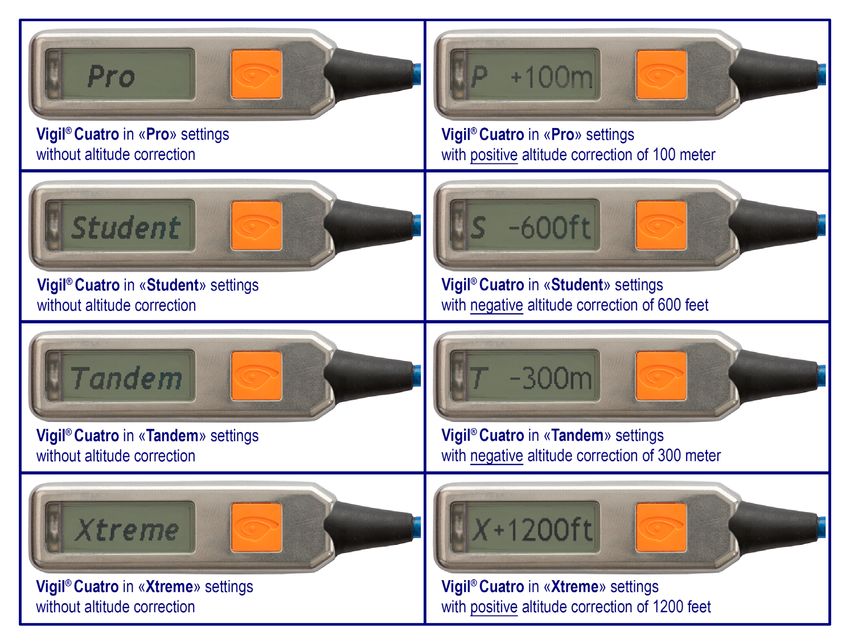
After take-off (max 32 sec. above 90 ft) the Vigil® Cuatro will go in to fast measuring mode (Airborn
You can notice this when the LCD pixels invert. (see image on § 5.6)
For 2 minutes after each landing, your jump information will be displayed (Last FF time & s
Vigil® Cuatro is developed, produced & tested in our factory, that is ISO 9001 certified. inverted. This same jump information is accessible at any time (displayed for 30 sec.) by pushing t
If the LCD carefully
Please pixels areread
inverted on the that
and ensure ground
you and
fullyprior off, your Vigil® Cuatro is Air
to take this
understand
reading theuser’s
correctmanual
Ground Zero any
before reference.
use of In
thethis case,
Vigil ® you must switch off and restart your
Cuatro.
Vigil® Cuatro “Single Cutter Unit” correct Ground Zero reference.
NATO Stock Number (NSN) 1377-13-121-8661 YOU
3.5.9. MUST
Shut down. ALSO(TheREAD,
shut down FULLY UNDERSTAND
procedure is similar to theAND AGREE
start up procedure)TO THE
TERMS OF THE DISCLAIMER AND LIMITED WARRANTY PRIOR
A quick press of the push button after each LED flash (4 times) will shut down the Vigil® Cuatro. TO
Vigil® Cuatro “Dual-pin Cutter Unit” USING
On the THE VIGIL
first press the «Cuatro.
®
Sys OFF» IF YOUmessage
DO NOTis FULLY displayed.UNDERSTAND
Press the buttonAND a second and third
AGREE
as the redTO LEDALL OF THE TERMS OF THE DISCLAIMER AND LIMITED
flashes.
NATO Stock Number (NSN) 1377-13-121-3937 Press the button
WARRANTY, YOUas MUST
soon asNOT the USE
red LEDTHEflashes
VIGILa® Cuatro.
fourth andYOU last MAY
time. The
RE- display will show
«Vigil» for a few seconds. Finally, the green LED flashes
TURN IT, IN ITS ORIGINAL PACKAGING, FOR A FULL REFUND. very briefly and then the Vigil® Cuatro shuts down.
For Example:
ActionUSE OF THE VIGIL
YOUR ResultCuatro IN THE EQUIPMENT YOU USE FOR
®
MAKING A PARACHUTE JUMP IS CONCLUSIVE PROOF THAT YOU
1. Push Short « Sys OFF»
(2) THE
flash ➯OF
AGREE TO ALL OF THE TERMS DISCLAIMER AND LIMITED
2. Push Short flash
WARRANTY. (see page 39 to 41) ➯ (3) « Sys OFF»
3. Push Short flash ➯ (4) « Sys OFF»
4. Push «Goodbye» followed by «Vigil» are displayed before the AAD shuts down.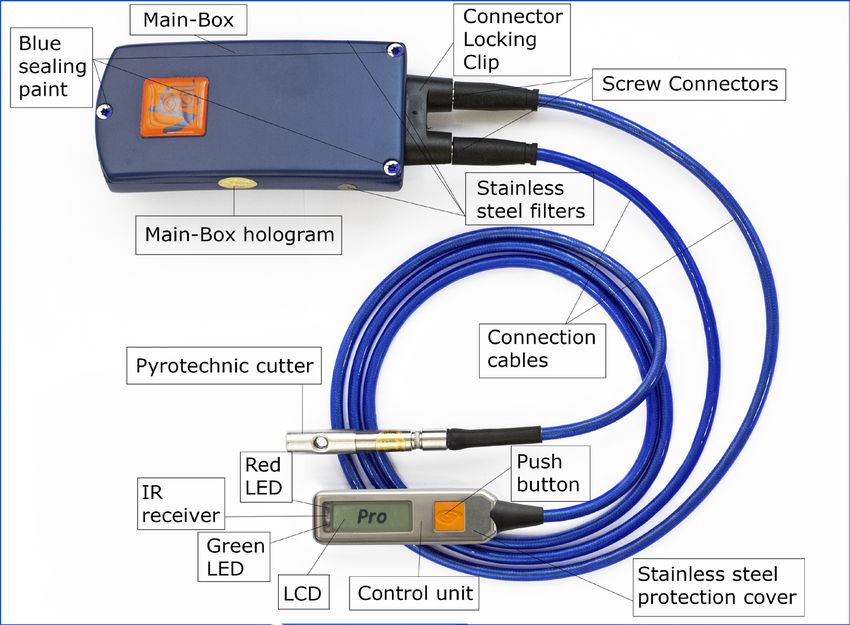
The Vigil is endorsed by:

                                                                                                                               English
                                                                                                                                         English
                                           AAD     NV/SA .   - Advanced Aerospace Designs
                                                                                                                           1
                                        AAD       nv/sa     - Advanced Aerospace Designs
                                                   Bld A. Reyers 193 • B-1030 Brussels • Belgium                                 1
                                                  Tel: +32 (0)2 732 65 52 • Fax: +32 (0)2 736 06 27
                                                   Bld A. Reyers 193 • B-1030 Brussels • Belgium
                                                            info@vigil.aero • www.vigil.aero
                                                 Tel: +32 (0)2 732 65 52 • Fax: +32 (0)2 736 06 27
                                                           info@vigil.aero • www.vigil.aero

                            Vigil America Inc.                                                Vigil Far East
                            1400 Flightline Blvd. Suite C    Vigil America Inc.
                                                                             Nam Fong Industrial Building Block 1
                              DeLand, FL 32724 USA         1400 Flightline Blvd. Suite227
                                                                                        C R/C Avenida Vencelau de Morais
                               Tel: +(1)386 736 8464         DeLand, FL 32724 USA                   Macau
                                                 Tel: +(1)386 736 8464 • Fax: +(1)386 736 8468
                              Fax: +(1)386 736 8468                                            fareast@vigil.aero
                                                  candace@vigilamerica.com • www.vigil.aero
                            candace@vigilamerica.com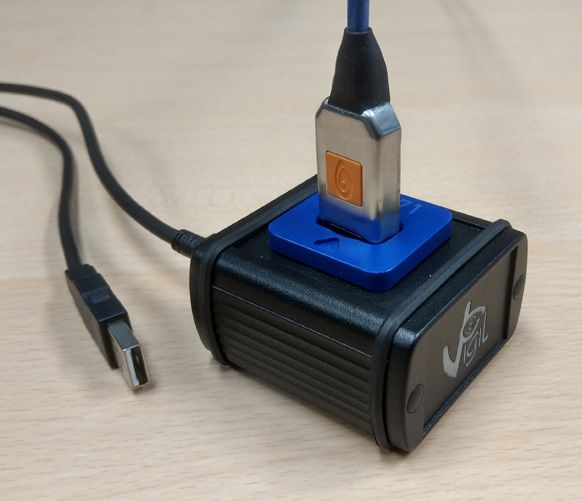
Table of contents                                                                                                                                         Paragraph                                                                                                                               Page

                         Paragraph                                                                                                                                        Page         4       Flight Restriction for the Pilot - Airborne ...............................................................                  24
                                                                                                                                                                                       4.1     Recommendations ................................................................................................             26
                                      Warning + Disclaimer and limited warranty (see page 39-41)..........................................                                     4
VigilVIGIL

                                                                                                                                                                                       5       Vigil ® Cuatro Components ..................................................................................                 26
                             1        Welcome to the Vigil ® Cuatro World! ..............................................................................                      5

                                                                                                                                                                                                                                                                                                                                         English
                                                                                                                                                                                       5.1     Main Box ...............................................................................................................     27
     ®

                                                                                                                                                                                                                                                                                                                                       English
                             2       Introduction .......................................................................................................................      7
       Cuatro

                                                                                                                                                                                       5.2     Dual Battery Pack .................................................................................................          27
                             3       Function ............................................................................................................................     8
           Cuatro

                                                                                                                                                                                       5.3     Pulses Plus Element .............................................................................................            28
                             3.1     General Working Principle ................................................................................................                8                                                                                                                                            28
                                                                                                                                                                                       5.4     Electronic Unit .......................................................................................................
                             3.2     Installation .........................................................................................................................   10       5.5     Cutter Unit .............................................................................................................    29
                             3.3     The Four Activation Modes ...............................................................................................                10       5.6     Control Unit ...........................................................................................................     30
                             3.3.1   “P
                                      PRO” Mode ......................................................................................................................        10       6       Waterproof - IP68 ..................................................................................................         31
                             3.3.2   “S
                                      STUDENT” Mode .............................................................................................................             10       7       Replacement of Parts of the Vigil ® Cuatro...........................................................                        32
                    22       3.3.3   “TTANDEM” Mode ..............................................................................................................            10                                                                                                                                                  33
                                                                                                                                                                                       7.1     Replacing the Battery Pack ...................................................................................               32
                             3.3.4   “XTREME” Mode ...............................................................................................................            11       7.2     Replacing the Cutter or Control Unit ....................................................................                    32
                             3.4     Information regarding the Activation Altitude ....................................................................                       12       7.3     Spare Part Card ....................................................................................................         34
                             3.5     Start Up and Shut Down Procedures ................................................................................                       14       7.4     RMA (return merchandise authorization) ...............................................................                       34
                             3.5.1   Start Up – Display .............................................................................................................         14       8       Technical Specifications .......................................................................................             36
                             3.5.2   Starting Up the Vigil ® Cuatro.............................................................................................              15       8.1     Glossary ................................................................................................................    36
                             3.5.3   Self Tests ..........................................................................................................................    15       8.2     Dimensions ............................................................................................................      37
                             3.5.4   «INFO» Menu (Information) ..............................................................................................                 17       8.3     Operating Description ............................................................................................           37
                             3.5.5   «SETUP» Menu (Parameters) - Altitude correction ..........................................................                               18       8.4     Units and conversion factors .................................................................................               37
                             3.5.6   Using a positive altitude correction to raise the activation altitude.....................................                               19       9       Communication Port – IR Download Box ..............................................................                          38
                             3.5.7    «CONFIG» Menu (Configuration) .....................................................................................                     21       10      Service life limit of Vigil ® Cuatro units ..................................................................                39
                             3.5.8   Choice confirmation ..........................................................................................................           22      11       Disclaimer and limited warranty .............................................................................                39
                             3.5.9   Shut Down ........................................................................................................................       23       12      Road Map / Grafcet (Parameter Sequence Flow Chart) ....................................                                      43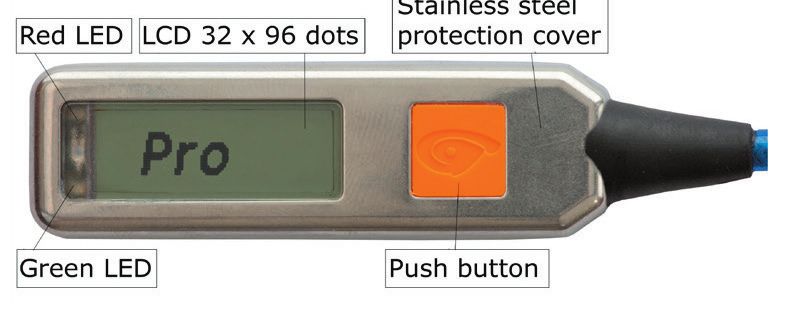
WARNING 1. Welcome to the Vigil® Cuatro World!
SKYDIVING IS A DANGEROUS ACTIVITY AND YOU RISK MINOR OR SERIOUS PERMANENT INJURY OR DEATH EACH We congratulate you on your purchase of today’s most sophisticated and modern, multimode Automatic Activation
TIME YOU SKYDIVE. THE CORRECT USE OF THE VIGIL® AAD MAY REDUCE THIS RISK, HOWEVER, THERE ARE Device. It is a revolutionary safety device, with no imposed maintenance schedule. The Vigil® Cuatro will automa-
SITUATIONS IN WHICH A VIGIL® AAD MAY NOT REDUCE AND MAY ACTUALLY INCREASE THE RISK. THE VIGIL® IS tically check all of its functional features each time it is switched on. The Vigil® Cuatro will detect any anomalies
Vigil® Cuatro
A BACKUP DEVICE, WHICH MAY OR MAY NOT SAVE YOUR LIFE AND IT IS IMPORTANT TO NEVER RELY ON THE
English
by itself. Should an abnormality be found, the controller will display an error message (see § 3.5.3.), and the Vigil®
VIGIL® AS A LIFESAVING DEVICE. PRIOR TO USING THE VIGIL®, IT IS IMPORTANT TO READ THE VIGIL® Cuatro Cuatro unit will not switch on. In this case, the Vigil® Cuatro needs to be analyzed by an authorized dealer, or sent
USER’S MANUAL VERY CAREFULLY. ALWAYS OBSERVE ALL WARNINGS, AND FOLLOW ALL MANUFACTURER’S back to the factory for analysis.
INSTRUCTIONS, RECOMMENDATIONS AND SAFETY PROCEDURES. ALWAYS FOLLOW CORRECT OPENING PRO-
CEDURES AND, IF NECESSARY, EMERGENCY PROCEDURES. NEVER SKYDIVE UNLESS YOU ARE FULLY TRAINED The Vigil® Cuatro is designed for a life expectancy of maximum 20 years from the date of manufacture. The above
AND COMPETENT IN THE USE OF ALL OF YOUR EQUIPMENT, INCLUDING VIGIL®. life The Vigil
expectancy
® Cuatro is now ready for use and is in a stand-by status. While in stand-by status, the unit r
is based on the fact that the cutter, the Pulses Plus element and the electronic components have been
designed 2 for
minutes. After
a functional take-off
lifespan of 20the Vigil® Cuatro will become armed once 1000.ft above “ground zero” refere
years.
The Vigil® Cuatro is equipped with an integrated Piezo resistive barometric pressure sensor. Do not expose The Vigil a
®
Cuatro is very
positive user friendly.
altitude It can is
correction be implemented.
used in your choice of 4 activation
When a negativemodes:
altitude correction is implemented
The ®Vigil
your Vigil
® Cuatro
Cuatro is now
to pressures ready
above 3000for
hPa,use(45.5
andpsi),
is or
in toa temperatures
stand-by status.
above While in70°C.
158°F or stand-by status, the unit re-calibrates
“PRO”,itself every
“STUDENT”, “TANDEM” or “X TREME”. The Vigil® Cuatro, an ALL-IN-ONE Automatic Activation Device
4 The battery pack isAfter
2 minutes. designed to operate
take-off within® aCuatro
the Vigil temperature range fromarmed
will become -13°F to +158°F
once or -25°C
1000.ft to +70°C.
above “ground zero” reference is (AAD)
reached,isbecome
designed armed 1000 ft above the preset negative altitude correction (see § 3.1.)
if no orto work in U.S. or Metric standards units. ® ®
5
a positive altitude correction is implemented. When a negative altitude correction is implemented, the Vigil When After take-off (max 32 sec. above 90 ft) the Vigil Cuatro will go in to fast measuring
traveling on any commercial flight with your the Vigil Cuatro, this manual as well as the Vigil X-Ray Card
® Cuatro willyou. It contains explanations that will be useful to the airport security staff.
® mode (Airborne sta
DISCLAIMER AND LIMITED WARRANTY see § 10 & 11. should accompany
You can notice this when the LCD pixels invert. (see image on § 5.6)
become armed 1000 ft above the preset negative altitude correction (see § 3.1.) The most recent manual is available on the Vigil website at www.vigil.aero on the download page.
► You must switch ON your Vigil® Cuatro ONLY at the take-off zone® (reference altitude or ground zero)
After take-off (max 32 sec. above 90 ft) the Vigil Cuatro will go in to fast measuring mode (Airborne status). ForThe2 Vigil
minutes
® after
Cuatro is, ineach landing,
principle, your safety
a last resort jumpdevice,
information
which maywill be not
or may displayed
save your(Last
life. FF time & spee
► If you intend to change to a different take off zone, YOU NEED TO SWITCH OFF YOUR VIGIL® CUATRO
You TRAVELLING,
can notice this on § 5.6) inverted. Thisbeen
It has never same jump toinformation
intended be, and is notistoaccessible
be used as, at any time (displayed
a parachute’s for system.
primary opening 30 sec.) by pushing the L
BEFORE and when
switch itthe
backLCD pixels invert.
take off(see
zone,image
English
ON at the new before take-off. The procedures written in this manual must be followed to ensure that the Vigil® Cuatro functions prop-
►
BeforeForeach
2 jump
minutes after each
it is essential landing,
to visually your
check your LCDjump
screen information will be its
to ensure its functionality, displayed (Last FF time & speed). LCD pixels remain
activation mode erly.
If Incorrect
the LCDsetup or use
pixels arecaninverted
lead to improper
on the functioning
ground and Vigil®toCuatro.
of theprior take off, your Vigil® Cuatro is Airborn
inverted. This same jump information is accessible at any time (displayed for 30 sec.) by pushing the LCD button once. reading the correct® Ground Zero reference. In this case, you country’s
(“PRO”, “STUDENT”, “TANDEM” or “XTREME”) and its pre-selected parameters A skydiver should always adhere to all rules and regulations set by his/her skydiving federa-
must switch off and restart your Vig
(altitude correction in feet or in meters) are correctly set. tion. The use of a Vigil Cuatro AAD does not exempt the parachutist from performing proper emer-
correct
gency Ground Zero reference.
procedures.
If the LCD pixels are inverted on the ground and prior to take off, your Vigil® Cuatro is Airborne and thereforeALTHOUGH
not
NEVER JUMP WITH A BLANK SCREEN!!!
reading the correct Ground Zero reference. In this case, you must switch off and restart your Vigil® Cuatro, to get
3.5.9. Shutthedown.
LIFE,
VIGIL®s HAVE SAVED MANY LIVES, NEVER RELY ON THE VIGIL® TO SAVE YOUR
IT MAY(The
NOTshut down
DO SO procedure
IN SOME is similar to the start up procedure)
SITUATIONS.
correct Ground Zero reference.
A quick press of the push button after each LED flash (4 times) will shut down the Vigil Cuatro.
®
3.5.9. Shut down. (The shut down procedure is similar to the start up procedure) On the first press the « Sys OFF» message is displayed. Press the button a second and third time
as the red LED23flashes.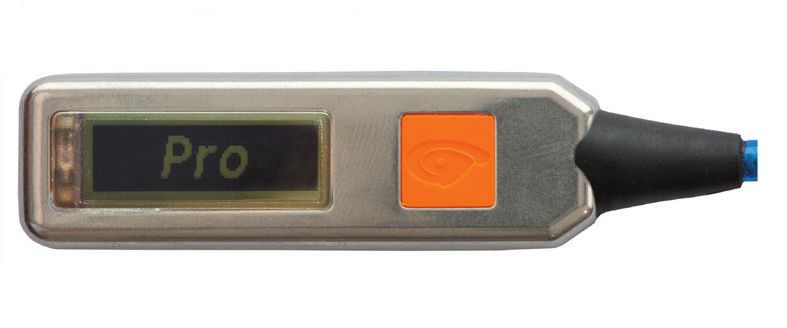
2. Introduction
                   Your Vigil® Cuatro was designed and developed by a professional team of engineers and skydivers.
                   Its function is to cut the reserve closing loop in the event that you reach a freefall speed at an unsafe altitude.
Vigil® Cuatro

                   The flat metal alloy mainbox is exceptionally strong; its ergonomic design fits easily into most current rigs.

                                                                                                                                                  English
    VIGIL Cuatro

                   A Vigil® Cuatro installation kit (pouch, controller window and cutter retainer) can be supplied to rig manufacturers, on
                   demand. The Vigil® Cuatro can be used for four types of skydiving by pushing just one button.
                   These user programmable modes are: «PRO», «STUDENT», «TANDEM» or «XTREME».
                   The Vigil® Cuatro also has a data recorder function (black box). The unit memorizes the last 16 minutes of freefall
                   time (with a maximum of 16 graphs, whichever is reached first), total time in freefall and total number of jumps.
                   This data can be viewed directly from the control unit’s LCD display, or it can be downloaded to a PC through an
                   infrared communication port.
              66   The infrared reader and the associated software are available as an option ( § 9).                                         7

                   The Kevlar reinforced cables are especially developed for the Vigil® Cuatro and deliver a unique combination of
                   strength and flexibility.
                   The gold plated contacts and the locking system with a specific locking clip to keep the connectors in place to ensure
                   optimal connection reliability in all circumstances.
                   The control unit: - is equipped with a 32 x 96 dots LCD display which allows interactive and clear
                                        communication with the parachutist.
                                     - is protected by a special anti-scratch coating and a stainless steel protection cover.
                   The electromagnetic shielding protects the Vigil® Cuatro from electromagnetic interferences, such as those found
                   in airports as in airplanes (see § 5.1).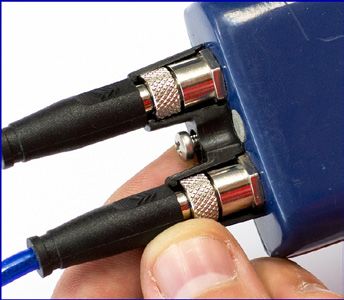
3. Function In freefall, the Vigil® Cuatro continuously calculates the altitude.
3.1. General Working Principle Each mode «PRO», «STUDENT», «TANDEM» or «XTREME» has its own factory-set activation altitude and speed.
Choice of mode can be done in the “SETUP” menu (see § 3.3). During your aircraftascent, the Vigil® Cuatro’s red
The Vigil® Cuatro must only be turned on at ground level; it will recalibrate itself every 2 minutes progressively to the
Vigil® Cuatro
LED will briefly flash three times when it passes through its pre-set activation altitude.
English
current ground elevation pressure. This is the “GROUND ZERO” reference.
Once your Vigil® Cuatro is on, at each take-off it will become armed once 1000 ft or 304 m above “ground zero” The Vigil® Cuatro will automatically remain ON for 14 hours; it may of course be switched off manually before that
reference is reached, if a positive altitude correction is or not implimented. time. The selected activation mode «PRO», «STUDENT», «TANDEM» or «XTREME» will remain visible on the LCD
display until the Vigil® Cuatro is switched off or turns off automatically after 14 hours.
When a negative altitude correction is set, the Vigil® Cuatro will become armed 1000 ft or 304 m above the preset
The Vigil ® Cuatro is now ready for use and is in a stand-by status. While in stand-by status, the unit re-calibrates itself every
negative altitude correction, so if the negative altitude correction is over 1000 ft or 304 m, the Vigil® Cuatro will beco- When the activation altitude (or lower) is reached by the jumper at a speed equal to or higher than the factory-set
me armed maximum 32 sec. after youthe
2 minutes. After take-off haveVigil
® Cuatro will become armed once 1000.ft above “ground zero” reference is reached,
reached 90 ft or 27,5m above or under the “GROUND ZERO” reference parameters,if the
no cutter
or of the Vigil® Cuatro will instantly fire and cut the closing loop of your emergency parachute
(take offalocation).
positive altitude correction is implemented. When a negative altitude correction is implemented, the Vigil (in +/- Cuatro
® will
0,002 sec).
8 Vigil Cuatro will armed
then stay1000
armed until 2 minutes after itnegative
has comealtitude
back to the “GROUND(see ZERO ZONE” reference
®
become ft above the preset correction § 3.1.) 9
(Between + 90ft and – 90ft or +27,5 m and -27,5 m). An “altitude correction” allows you to implement a positive or negative altitude difference between the departure and
After take-off (max 32 sec. above 90 ft) the Vigil® Cuatro will go in to fast measuring mode (Airborne status). landing levels (from +6000 ft to -6000 ft or from +2000 m to -2000 m) in steps of 150 ft or 50 m.
To avoidYouan “airborne condition” (See page 25 forpixels
more detail) (seeVigil
of your Cuatro
on § due
5.6)to a difference in pressure
®
can notice this when the LCD invert. image Vigil® Cuatro takes this altitude correction into account to calculate the new activation altitude.This principle also
English
that is equivalent to 90ft or more (positive or negative altitude) compared to the “ground zero” reference (pressure), allows you to modify the activation altitude permanently if the airport where you take off and the landing zone are at
youmustFor 2 minutes
ALWAYS manuallyafter
shut each
down yourlanding, your jump
Vigil® Cuatro information
at the end of the day orwill be displayed
BEFORE leaving the (Last FF time & speed). LCDDIFFERENT
drop-zone. pixels remain
altitudes or if there is a hillock near the drop zone.
inverted. This same jump information is accessible at any time (displayed for 30 sec.) by pushing the LCD button once.
If the LCDLCD
If the pixelspixels
are inverted on the ground
are inverted andground
on the prior to take
and off, yourtoVigil
prior take®
Cuatro is Airborne
off, your Vigil® and
Cuatro is Airborne and therefore not
therefore not reading the correct Ground Zero reference. In this case, you must switch off and restart
reading the correct Ground Zero reference. In this
your Vigil® Cuatro, to get the correct Ground Zero reference.. case, you must switch off and restart your Vigil® Cuatro, to get the
correct Ground Zero reference.
3.5.9. Shut down. (The shut down procedure is similar to the start up procedure)
23
A quick press of the push button after each LED flash (4 times) will shut down the Vigil® Cuatro.
On the first press the « Sys OFF» message is displayed. Press the button a second and third time; do this as soon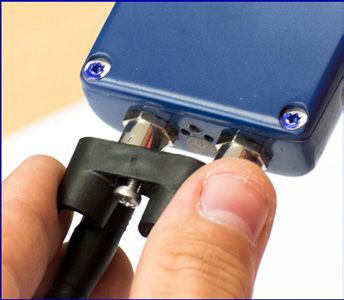
2 minutes. After take-off the Vigil® Cuatro will become armed once 1000.ft above “ground zero” refere
a positive altitude correction is implemented. When a negative altitude correction is implemented
become armed 1000 ft above the preset negative altitude correction (see § 3.1.)
3.2. Installation 3.3.4.
“XTREME”
After Mode(max 32 sec. above 90 ft) the Vigil® Cuatro will go in to fast measuring mode (Airborne st
take-off
The Vigil® Cuatro has been designed to be compatible with most sport harness/container systems on the market VigilThe
The Vigil®activates
Cuatro Cuatro inis“XTREME” now readyMode for use
whenand is in a stand-by
it measures* 1100 ft or status.
335 meters While in stand-by altitude**status, the unit r
5.6)300 (average be-
®
You can1100 notice thismwhen them,LCD pixelsoninvert. (see image on §until
today. If a suitable installation kit for an electronic AAD is not yet installed by the rig manufacturer, a Vigil® Cuatro tween 8402 minutes. After take-off the Vigil Cuatro will become armed once 1000.ft above “ground zero” refere
ft and ft or 265 and 335 depending
® body position) and below, ft or 91 m, if the freefall
Installation Kit (pouch, controller window, and cutter retainer) can be supplied and installed in your container by the speed
isaForequal2 orminutes
superior toafter
positive altitude141correctionft/sec
eachorlanding,
96 mph oryour 43 m/sec.
is implemented. jump When information a negative will bealtitude displayed (Last FF
correction time & spee
is implemented
Vigil® Cuatro
harness/container manufacturer, or by a propper certified authorized rigger.
becomeinverted.
TheThe Vigil This
armed
Cuatro same
1000 jump
is nowftisabove information
ready thedeveloped
forpreset is
use and accessible
negative
for is at
aaltitude
highin performance any
stand-by time
correction (displayed
status.landings (see §when
While for 30
in3.1.)
stand-bysec.) by pushing
status, the unit the rL
English
®
“Xtreme” mode specially canopy the vertical
It can be easily sewn into any harness/container system designed for an electronic AAD.
speeds exceeds 115 ft/sec or 35 m/sec. (“PRO” mode). In “Xtreme” mode, the Vigil ®
Cuatro will not
All reserve closing loops currently on the market that are similar to Vigil® Dyneema or the Spectra CSR style #9512-
2After minutes. After take-off Vigil 90Cuatro
theabove will become® Cuatroarmed once to1000.ft above “ground zero” refere
®
300 or the Cypres™ loop (Spectra Cord) are acceptable for use by the installation of the Vigil®. Iftake-off
activate theif the
LCD (max
vertical 32speed
pixels sec.
aredoesinverted
not exceedft) the
on the Vigil
141 ground
ft/sec or 43andm/sec. will
priorItgo
is to intake
important fast
thatmeasuring
off, your
in il®mode
Vigcircum-
certain Cuatro (Airborne
is Airbornst
The Vigil® Cuatro’s cutter must be positioned and rigged as specified by the harness/ container manufacturer’s
aYoupositive
can
stances, altitude
notice
such this
as low correction
when
cut-away, the it is
LCD
will implemented.
pixels
most likely invert.
take When
(see
longer image
time a tonegative
on
reach § 5
the . 6altitude
)
required correction
vertical measured is implemented
Thespeed reading
Vigil ® Cuatro the correct
isornow Ground
ready Zero reference. Instand-by
this case,status. you must switch off and restartthe your
unitVri
instructions for electronic AAD’s.
become armed
of 141 ft/sec 1000 ft43above
m/sec of for
the this use
preset
“Xtreme” and
negative is in aaltitude
mode, comparedcorrection
to the “Pro” While
(see
mode §in3.1.)
stand-by
(115 ft/sec or status,
35
2For 2 minutes
correct
minutes. Ground
After after Zero
take-off each the landing,
reference.
Vigil your
® Cuatro ® jump information will be displayed (Last FF time & spee
will become
m/sec). This can make a difference. The Vigil Cuatro® in “Xtreme ” mode will not activate below 300 ft armed once 1000.ft above “ground zero” refere
3.3. The Four Activation Modes After take-off (max 32jump sec.zeroabove 90300ft)isthe or Vigil Cuatro willtime
goaltitude
in to fast measuring mode (Airborne thestL
The Vigil® Cuatro has four activation modes that can be selected by the user. ainverted.
or 100
positive mThis
above
altitude same
the ground
correction information
level
is or ft accessible
implemented. 100 m When aboveat aanyanegative
negative (displayed for
correction,
altitude 30
when sec.)
correction by
set..is pushing
implemented
You
3.5.9.become
Shut can notice
down. (The this when the LCD pixels invert. (see image on § 5 . 6 )
The choice can be made in the “SETUP” menu (§ 3.5.4.). Each mode has its own factory settings. The TheVigil armed
® Cuatro
cutter 1000
will activateisshutnow down
ready procedure
ft instantaneously
above the forpreset
use
onceand
is similar
negative
the is
tostand-by
pre-determined
the start
in aaltitude up procedure)
correction
status.
activation (seeparameters
While
mode §in3.1.)
stand-by status, the unit r
(altitude
10 The cutter activation data is defined by selecting an activation mode.
For 2If falling
the LCD
minutes pixels
after are inverted
each landing, on
your the jumpground and
information prior to take
will be off,® determining
displayedyour V(Last Cuatro
igil®your
FF time 11 is Airborn
Aquick press
2After
minutes.
and of the
take-off push
After
speed)
(max button
take-off
are
32 after
theabove
reached.
sec. each90
Vigil
Please
®
LED
Cuatro
take
ft) flash
thethis (4 times)
will become
information
Vigil will shut
® Cuatro intoarmed downonce
consideration
will go intheto Vigil
1000.ft
when
fast Cuatro.
above “ground
measuring mode zero”& refere
(Airborne spee
3.3.1. “PRO” Mode main
inverted. reading
canopy
This the samecorrect
deployment jump Ground
altitudes!
information Zero is
Always reference.
allow enoughIn
accessible thistoany
time
at case,
havetime you
a fully mustmain
open
(displayed switch
canopy
for 30 off andbyrestart
approx-
sec.) pushing yourtheVstiL
On the aYoupositive
first
can
imately pressaltitude
notice
1000 ftthe
this
or
correction
« Zero
300 Sys
when
m aboveOFF»
the is implemented.
LCD
activation message
pixels
altitude!..
When
invert.is (see displayed.
imagea negative
Press
on § 5.6the altitude
) button correction
a secondis and implemented
third tim
The Vigil® Cuatro activates in “PRO” mode when it measures* 1100 ft or 335 m (average altitude** between 840 correct Ground reference.
ft and 1100 ft or 256 m or 335 m, depending on body position) and below, until 150 ft or 46 m, if the freefall speed is as thebecome
red LED armed
flashes. 1000 ft above the preset negative altitude correction (see § 3.1.)
ForIf you 2If minutes
the
are inLCD after
freefall faceeach
pixels landing,
areearth,
to inverted
your your
on
Vigil ® thejump
Cuatro ground information
is®in and
the prior will
depression tozone be(burble)
take displayed
off, and V(Last
yourcould igmeas-FF timeis &Airborn
il® Cuatro spee
equal or superior to 115 ft/sec. or 78 mph or 35 m/sec. Press
After
3.5.9. the
Shut
inverted.
button
take-off
down. as
(max
(The soon
32
shut as
sec.
down the
above red
90
procedure LED
ft) theis flashes
Vigil
similar a
Cuatro
to thefourthwill
start and
go
up in last
to
procedure) time.
fast The
measuring display
mode will show
(Airborne «
theVstiL
up toThis
urereading ±260 the sameor ±79jump
ft correct information
m Ground
higher than youris
Zero accessible
reference.
actual altitude at
In (§ any
this3.4).. timeyou
case, (displayed
must for
switch 30 sec.)
off and by pushing
restart your
3.3.2. “STUDENT” Mode «Vigil» Youfor acan fewnotice
correct
seconds. thisFinally, thethegreen
whenreference. LCDLED flashes
pixels very(see
invert. brieflyimage
and then onthe§ 5Vigil
.6) Cuatro
® shuts down.
The Vigil® Cuatro activates in “STUDENT” Mode when it measures* 1300 ft or 396 m (average altitude** between A quick pressBefore
theGround
ofeach push
jump
Zero
button after each
it is essential
LED check
to visually
flash (4your times) will
LCD andscreen
shuttodownensure
theitsVigil ® Cuatro.
functionality,
Fortion If
2 modethe
minutes LCD pixels are inverted on the ground prior to take off, your Vitsigactiva-
il® Cuatro timeisthird
&Airborn
1040 ft and 1300 ft or 315 m and 396 m, depending on body position) and below, until 150 ft or 46 m, if the freefall For
Example:
On the first press(“PRO”,theafter eachOFF»
«“STUDENT”,
Sys landing,
“TANDEM” your orjump
message is information
“XTREME”) displayed.and itsPresswill bethedisplayed
pre-selected button a (Last
parameters second FF and
(altitude spee
tim
speed is equal or superior to 65 ft/sec or 45 mph or 20 m/sec. 3.5.9. Shut
inverted. reading
down.This the
(The samecorrect
shut
jump Ground
downinformation Zero
procedure reference.
is is similar
accessible In
to this
the
at any case,
start
time upyou must
procedure)
(displayed switch
for 30 off
sec.)and by restart
pushing yourtheViL
asAction
the red LED flashes.
correction in feet or in meters)
Result
are correctly set..
3.3.3. “TANDEM” Mode correct Ground Zero reference.
The Vigil® Cuatro activates in “TANDEM” Mode when it measures* 2300 ft or 701 meters (average altitude** be- A quick the
Press pressbutton of the push as soon buttonas afterthe eachred LEDLED flashflashes
(4 times)awillfourth shut down and the lastVigil ® Cuatro.
time. The display will show «
1. Push If the LCD
WARNING: IF THE pixels are inverted
Short
CLOSING flash
LOOP➯ IS on(2)
NOT the « ground
ROUTED Sys and priorTHEtoCUTTER,
OFF»
THROUGH take ®off, your Vigil® Cuatro is Airborn
tween 2040 ft and 2300 ft or 622 m and 701 m, depending on body position) and below, until 150 ft or 46 m, if the On the
«Vigil»
3.5.9. Shutfor first
a few press
seconds.
down.
VIGIL®(The
the Finally,
« shut Sys the
down green
OFF»
NOTprocedure
LED message
flashes very
is similar is displayed.
briefly
to thisand
the start thenPress
the the
Vigil button
Cuatro ashutsseconddown.and third tim
freefall speed is equal or superior to 115 ft/sec or 78 mph or 35 m/sec.
THE reading the
Cuatro correctWILL Ground CUTZeroTHE reference.
LOOP ! In case,up youprocedure)
must switch off and restart your Vi
as2.the
Pushred LED flashes. Short flash ➯ (3) « Sys OFF»
For Example:
A quick press correct
of theGround
push button Zero after
reference.
each LED flash (4 times) will shut down the Vigil® Cuatro.
Press
3. Pushthe button as soonShort as the flashred LED flashes a fourth and last time. The display will show «
➯ (4)
OnAction
theforfirst press the « Sys « Sys OFF» Press the® button a second and third tim
«Vigil»
3.5.9. Shuta few seconds.
down. theOFF»
shutResult
(The Finally,
down green LEDmessage
flashes
procedure
is briefly
very
is similar
displayed.
to theand thenup
start Vigil Cuatro shuts down.
theprocedure)
as4.the red LED flashes.
Push «Goodbye» followed by «Vigil» are displayed before the AAD shuts down.
3.4. Information regarding
3.4. Information regarding thetheActivation Altitude
Activation Altitude Conclusion:
Please be aware that the Vigil® Cuatro functions are based on measured air pressure. This parameter permits the
Pleaseofbethe
calculation aware
exact the Vigilin® Cuatro
thataltitude, functionfunctions are based on
of the registered air measured
pressure,air
aspressure. Thisvertical
well as the parameter permits
speed the to a
related If the Vigil® Cuatro is set in “PRO” mode, it will activate at a average altitude of 840 ft or 256 m above the ground, at
calculation
pressure of the
variation in aexact
certainaltitude,
periodin of
function
time. of the registered air pressure, as well as the vertical speed related to a a falling speed of 115 ft/sec or 78 mph or 35 m/sec or greater.
VIGIL Cuatro
pressure variation in a certain period of time.
Vigil® Cuatro
English
For information: Vigil® Cuatro is able to register pressure differences of 0,1 hPa which is equivalent to an altitude It is well accepted that this minimum activation level must be guaranteed whatever the position of the skydiver.
For information
difference of only ± 2,6: ftThe Vigilm!
or 0,8
® Cuatro is able to register pressure differences of 0,1 hPa which is equivalent
to an altitude difference of only ± 2,6 ft (or 0,8 meter)! If the skydiver is falling in a back to earth position, the reading will reflect the correct pressure, since the sensor is not
Important note: The registered pressure by the sensor will vary, according to the body position of the skydiver influenced by a depression (burble), but if the skydiver is falling face to earth, then the sensor located in the depres-
(face Important
to earth or note:
back toThe registered
earth) up to 10pressure by thewhich
hPa (=mbar) sensor will vary, toaccording
is equivalent to +-79
+-260 ft or the body
m! position of the sion zone (burble) will read a pressure up to 10mbar lower, or an altitude ±260 ft or ±79 m above the real altitude,
skydiver (face to earth or back to earth) up to 10 hPa (=mbar) which is equivalent to +-260 ft (+-79 m)!
and will, in this case, activate later, or ±260 ft or ±79 m lower, i.e. at an actual altitude of 580 ft or 177 m above the
Example: Let’s consider two skydivers in free fall, at exactly the same altitude but one is falling back to earth and the ground level, which would be too low.
12 Example: Let’s consider two skydivers in free fall, at exactly the same altitude but one is falling back to earth
second
andone
theissecond
fallingone
faceistofalling
earth.face to earth.
12 Therefore, a compensation of +260 ft or +79 m above the nominal activation altitude has been integrated into the 13
The influence of theiroffalling
The influence position
their falling on theironrespective
position AAD reading
their respective is as follows:
AAD reading is as follows: software. For example in “PRO” mode, a programmed activation altitude of 1100 ft or 335 m has been set to ensure
that, notwithstanding the skydiver’s body position, activation will always be at a minimum altitude of 840 ft or 256 m
(I) back to earth (II) Face to earth (actual altitude) above the ground level.
Depression zone (burble) AAD or pressure sensor
No influence located in depression zone
Both at the same altitude Y (burble) Remarks:
Pressure sensor location • In a test chamber, the activation in “PRO” mode will be at 1100 ft (840 ft + 260 ft) or 335 m (256 m + 79 m) as there
Pressure = X hPa – 10
Pressure 10 hPa
hPa
Pressure = X hPa is no depression zone (burble).
Vigil
® Cuatroinindepression
Vigi®l Cuatro depressionzone
zonewill
willregister
registerananupuptoto10
10 hPa
hPa
Vigil® Cuatro will register a pressure of X hPa
lowerpressure,
lower pressure,notwithstanding
notwithstandingthey
theyareareatatthe
thesame
samelevel
level
The stated or real altitude y ft (or m) The
Thestated
statedaltitude YY+(±260
altitude +(±260ft)ft)oror+(+(±79
±79 m)m)
2 minutes. After take-off the Vigil Cuatro will become armed once 1000.ft above “ground zero” reference is reached, if no or
After take-off (max 32 sec. above 90 ft) the Vigil® Cuatro will go in to fast measuring mode (Airborne status).
a positive altitude correction is implemented. When a negative altitude correction is implemented, the Vigil® Cuatro will
You can notice this when the LCD pixels invert. (see image on § 5.6)
become armed 1000 ft above the preset negative altitude correction (see § 3.1.)
English English
For 2take-off
minutes(max
after32each landing, yourthejump
Vigil®information willin be displayed (Lastmode
FF time & speed). LCD pixels remain
After
3.5. Start Up and Shut Down
sec. above
Procedures
90 ft) Cuatro will go to fast measuring (Airborne status). 3.5.2. Starting Up the Vigil® Cuatro
3.5.2.once.
Starting Up the Vigil® Cuatro
inverted. This same jump information is accessible at any time
You can notice this when the LCD pixels invert. (see image on § 5.6) (displayed for 30 sec.) by pushing the LCD button
®
The
The Vigil Cuatrobecomes
Vigil® Cuatro becomesoperational
operational
afterafter pressing
pressing the orange
the orange push push
buttonbutton four times.
four times.
ForIt is2If imperative
minutes
the LCDthat after
pixels each
the Vigil
landing,
are® inverted
Cuatro be on
your thejump
switched ground information
ON at theand groundprior will be
leveltooftake
displayed
off, your
your take-off V(Last
zone.
FF timeis &Airborne
igil® Cuatro speed). andLCDThese pixels
These shortremain
therefore
short not must
presses
presses mustbebe done
done immediately
immediately afterafter
eacheach
flash flash
of theofredtheLED.
redAfter
LED.the
After
firstthe first
push push
(hold for (hold
1 or 2for 1 or 2
inverted.
reading This same jump
thethecorrect information
Ground is accessible at any time (displayed for 30 sec.) by
In this case, you must switch off and restart your Vigil Cuatro,pushing the LCD seconds)
button once. the «Cuatro» message is shown. If no message appears, please repeat the previous operation.
ZERO”Zero reference. to get the
Vigil® Cuatro
® seconds) the «Cuatro» message is shown. If no message appears, please repeat the previous operation.
(This becomes “GROUND reference altitude)..
«Cuatro» is immediately followed by «Vigil» on the LCD.
English
English
correct ®Ground Zero reference. «Cuatro» is immediately followed by «Vigil» on the LCD.
Press the push button immediately after the red LED first flashes.
If the
If the VigilLCD pixels
Cuatro are inverted
discovers a variable on the ground
air pressure duringand prioruptoprocedure,
the start take off,it will igil® Cuatro is Airborne and Press
yournotVcomplete therefore
Press the pushnot button immediately after the red LED first flashes.
the push button immediately after the second flash of the red LED.
the start up procedure, and will show a alternating blinking “GROUND ZERO WARNING” on the con- Presstothe push button
3.5.9. Shut reading the correct Ground Zero reference. In this case, you must switch off and restart your Vigil® Cuatro, theget thebuttonimmediately after the the
second
thirdflash
flashofofthethe
redred
LED.
trollerdown.
LCD. (The shut down procedure is similar to the start up procedure)
Press push immediately after LED.
Press
The the
Vigil ®push button immediately after the third flash of the red LED.
Cuatro 23 will then automatically start its self-test sequence.
The correct
Vigilof the Ground
Cuatro Zero reference.
push is nowafter ready forLEDuseflash and (4istimes)
in a stand-by status. theWhile
Vigil® in stand-by status, the unit re-calibrates itself every
®
A quick press button each will shut down Cuatro. The Vigil ® Cuatro will then automatically start its self-test sequence.
Your Vigil2 ®
Cuatro willAfter
minutes. take-off
calibrate the Vigil
itself according ®toCuatro will
the atmospheric become
pressure armed once
variations. 1000.ft above “ground zero” reference is reached, if no or
On theShut
3.5.9. firstdown.
press(Thethe « Sys OFF» message is displayed. Press the button a second and third time; do this In as soon
short:
altitudeshut down procedure is similar to theastart up procedure) In short:
as the
3.5.1
a positive
Startred
UpLED flashes.
– Display
correction is implemented. When negative altitude correction is implemented, the Vigil® Cuatro will 23 Result
Action
14 In A become
itsquick
standard ofarmed
pressconfiguration,
the push1000the ftVigil
button above
after
® the ispreset
each
Cuatro LED
used negative
flash
with (4thetimes)altitude
orange willpush correction
shut down
button the
situated(seeat®§the
Vigil 3.1.)
Cuatro.
right side of the will show «Goodbye» followed by 15 15
Press the button as soon as the red LED flashes a fourth and last time. The display 1. Push «Cuatro» followed by «Vigil» appears + flash ➯ (2) « VIGIL»
On
display. the
«Vigil»
green The first
After
for
red LED press
atake-off
few the
is positioned
(max
seconds. «32Sys
Finally,
in the
sec. upper
theOFF»
above cornermessage
and
90theft)flashes
greenofLED
indicates
the Vigilveryis® displayed.
the
Cuatrotiming of
andwill Press
the
go start the
inofVigil
to up button
procedure.
fast measuring
® Cuatro a second and third time; do
mode (Airborne status). 2. Push this as soon
The LED is situated in the bottom corner controller andbriefly
confirms then
the the
end the start shuts down.
up procedure. Flash ➯ (3) « VIGIL»
as theYoured can
LEDnotice
flashes.this when the LCD pixels invert. (see image on § 5.6) 3. Push Flash ➯ (4) « VIGIL»
English
►For
TheExample:
Press the® Cuatro‘s
Vigil button display
as soon as the(seered§ 3.5.7.)
is reversible LED «view»
flashes a fourth and last time. The(Last
display will show «Goodbye»Push
followed by
FF time & speed). LCD4.pixels Start of self tests
«View»
For 2 minutes after each landing, your jump information will be displayed remain « BAT OK »
«Vigil»
Action for a few seconds. Finally,
inverted. This same jump the
Result green LED flashes very briefly and then the Vigil® Cuatro shuts down.
information is accessible at any time (displayed for 30 sec.) by pushing the LCD button once.
The startup and shut down procedures listed in this manual have been established to reduce the risk of an
For Example: The startupstart
andupshut downdown
procedures
sequencelisted
and into this manual
that have been established
cannottobereduce
turnedthe
on risk of by
an
1. Push Short flash ➯ (2) « Sys OFF» unwanted or shut ensure the Vigil ® Cuatro or off
® and prior to take off, your Vigil Cuatro is Airborne and accidentally
If the LCD pixels are inverted on the ground ® unwanted start up or shut down sequence and to ensure that the Vigil® Cuatro cannot be turned on or off by
therefore pressing
not the push button.
ActionNever
2. Push switch
reading the onflash
correctResult
Short
Groundyour Vigil
➯ (3)reference.
Zero « SysInCuatro
this case, in
OFF» you an
mustaircraft ! restart your Vigil® Cuatro,
switch off and accidentally pressing the push button.
to get the
1.
3. Push correct Ground Zero reference. « Sys
(4) « Sys OFF»
Short flash ➯ (2) OFF» 3.5.3. Self
3.5.3. Self Tests
Tests
® The Vigil Cuatro automatically goes through a complete test sequence each time it is switched on.
2. Push Short (3) is«by The Vigilthat
Cuatro automatically
pack, the goes
cutter through a complete
®
test sequence eachare
timein itproper
is switched
workingon.
4. Push
3.5.9. downflash
Shut down. (The shut«Goodbye» followed
procedure
➯ Sys
similar toOFF»
«Vigil» are
the displayed before the AAD shuts down.
start up procedure) It verifies the battery and the electronic circuits (main functions) order.
It verifies that the battery pack, the cutter and the electronic circuits (main functions) are in proper working order..
23
A 3. Push
quick Short
press of the push button afterflash LED(4)flash« (4Sys
each ➯ times)OFF»
will shut down the Vigil® Cuatro.
On4. Push
the first press the « Sys message
OFF» followed
«Goodbye» is displayed.
by «Vigil» Pressbefore
are displayed the the
button
AADashuts
second
down.and third time; do this as soon
as the red LED flashes.This first test procedure is followed by 3 different menus: «INFO», «SETUP», and «CONFIG» (see § 3).
The following messages are shown: This first test procedure is followed by 3 different menus: «INFO», «SETUP», and «CONFIG» (see § 3).
Recommendation: If the Vigil® Cuatro is not yet configured to your standard measurement units, go first
• «Bat OK» The battery pack is functioning properly.
Recommendation:
to the “CONFIG” menuIf(see the Vigil ®
Cuatro
§ 3.5.7.) is not
to set the yet configured
required units (U.S.tooryour standard
metric) measurement
before other settings. units, go first
• «Cut OK» The cutter resistance is tested O.K.
to the “CONFIG” menu (see § 3.5.7.) to set the required units (U.S. or metric) before other settings.
• «Ctrl OK» The electronic circuits are functioning properly.
3.5.4. «INFO» Menu (Information)
Vigil® Cuatro
3.5.4. «INFO» Menu (Information)
• This menu allows you to display your Vigil® Cuatro’s
English
reference parameters (version, date of manufacture and
English
If an error is detected the following messages may be shown: This menu allows you to display your Vigil® Cuatro’s reference parameters (version, date of manufacture and
• «Bat Low» Low Battery, the Vigil® Cuatro is still operational, but the dual battery pack must be replaced as serial number), data of previous jumps, as well as temperature
serial number), data of previous jumps, as well as temperature and atmospheric pressure.
and atmospheric pressure.
soon as possible. * (see § 7.1) To enter
• To enter the
the«INFO»
«INFO»menu,
menu,press
pressthethe
push button
push as soon
button as theasdisplay
as soon showsshows
the display «INFO»«INFO»
and the and
red light flashes.
the red light flashes.
• «Bat Rpl» The dual battery pack must be replaced, the Vigil® Cuatro will not switch on.* (see § 7.1)
• «Cut Err» Cutter resistance is outside tolerance, the Vigil® Cuatro will not switch on. These parametersare
These parameters areininclear
clear language
language in function
in function of chosen
of the the chosen
units units
and asand as follows
follows (*see (*see § 3.5.7.):
§ 3.5.7.):
• «Ctrl Err» A discrepancy in one of the electronic circuits is observed, unit will not switch on.
If one of these messages is displayed (except for «Bat Low»), the startup procedure will end Display Note: the number 8 is used for illustration (all segments used in a number)
The ®Vigil Cuatro is now ready for use and is in a stand-by status. While in stand-by status, the unit re-calibrates itself every
®
and the Vigil Cuatro will switch itself off. Ver :88.88 Software Version 17 17
16
2 minutes.
If the «Bat Low»message Afterappears,
take-offthethe Vigilpack
battery ® Cuatro
must bewillreplaced
become armed
as soon once 1000.ft
as possible (see § above
7.1) “ground zero” reference is reached,
Lcd :88.88if no or Controller version
If the «Bat Rpl» message
a positive appears,
altitude the battery
correction ispack must be replaced
implemented. When priora tonegative
the next jump (see §correction
altitude 7.1) is implemented, the Vigil ® Cuatro will
#88888 Electronic Unit Serial Number
If the «Cut Err» message appears, the cutter unit must be replaced prior to the next jump (see § 7.2). Production week and year
become
A new cutter will bearmed 1000
supplied freeftofabove
charge the preset negative
if a completed altitude
“Life Saving Report” correction (see
is posted and § 3.1.)
approved
88/88
(for example 26/06 = week 26 in 2006)
(see
ourAfter
website http://www.vigil.aero/
take-off (max 32 sec.onabove the download page).
90 ft) the Vigil Cuatro will go in to fast measuring mode (Airborne status).
®
TJ :8888 Total Jumps (Total number of jumps with this unit)
You can notice
► We recommend this
that Vigil®
whenparts
Cuatro the LCD
(exeptpixels invert.are
the batteries) (see imagebyon
replaced § 5.6) certified and authorized
a propper TFF :88h Total Free Fall - Total free fall time with this unit in
English
rigger or by a Vigil® approved expert. 88m88s hours, followed by minutes and seconds
For 2 minutes
The regulations in someafter each
countries landing,
require your
a certified jump
rigger to doinformation will be
such replacements. Thedisplayed (Last
user may not have FF time & speed). LCD LFFpixels
:188sremain Last Free Fall - Duration displayed in seconds
inverted. This same jump information is accessible at any time (displayed for 30 sec.) by pushing the LCD button
authorization to replace the cutter or controller unit. In such situations, you must adhere to your country’s rules. 888once.
km/h and maximum speed of the last freefall displayed in mph or km/h
Saves 8 Number of activations on your Vigil® Cuatro
If the «CtrlLCD
If the Err»pixels
message areappears due on
inverted to a the
failure in the electronic
ground and priorcircuits,
to takeyou off,
mustyour igiVigil
send Vthe ®
l® Cuatro is Airborne and therefore not
T:+88°C or +88°F Temperature of Vigil® Cuatro main unit in °F or °C depending on the configuration
Cuatro back to your dealer or to the factory for a complete checkup, before the next jump. (see § 7.4).
reading the correct Ground Zero reference. In this case,
If the «Ctrl Err» message appears DO NOT try to restart the Vigil Cuatro again.
® you must switch off and restart your Vigil® Cuatro, to getor the
88.88inHg 8888hPa Atmospheric Pressure in inches of mercury (inHg) or hectopascal (hPa)
correct Ground Zero reference.
3.5.9. Shut down. (The shut down procedure is similar to the start up procedure)
233.5.5. «SETUP» Menu (Parameters) Altitude correction 3.5.6. Using a positive altitude correction to raise the activation altitude
The «SETUP» menu enables you to implement a positive or negative altitude correction (in feet or meters) between As stated on § 3.3, in «PRO» settings a Vigil® Cuatro activates at a measured altitude of 1100.ft or 335 m (real
the departure and arrival ground levels, as well as select the desired mode («PRO», «STUDENT», «TANDEM» or activation altitude will be between 840 & 1100 ft or 256 m & 335 m, depending on body position).
«XTREME») (see example page 20). To increase safety margins, an altitude correction can be performed (see § 3.5.5.)
Vigil® Cuatro
It The to
is possible Vigil
enterCuatro
®
the «SETUP» is now ready
menu at theforend
use andself
of the is testing
in a stand-by
sequence.status. While in stand-by status, the unit re-calibrates Some itself
importanteverypoints to remember:
English
2 minutes. After take-off the Vigil Cuatro will become armed once 1000.ft above “ground zero” reference is reached, if no orcorrection is applied, this will stay in the Vigil® Cuatro’s memory, until you manually remove it in
To do this, press the push button as soon as the ®display shows «SETUP» and the red LED flashes. - Once an altitude
It is possible to implement
a positive an altitude
altitude correction
correction is from +6000 ft to -6000
implemented. When ft orafrom +2000 maltitude
negative to -2000correction
m. is implemented, the Vigilthe ® «SETUP»
Cuatro will menu.
To enter or modify a positive or negative altitude correction, press the push button while «Alti Cor» appears. - When you raise the activation altitude, always allow enough time to have a fully open main canopy approximately
Thearrowbecome
Thefacing armed
Vigilup Cuatro 1000
® corresponds fttoabove
is now anready theforpreset
increase ofuse negative
and
the altitude in aaltitude
isvalue stand-by
and correction
the arrow status.
facingWhile(see §toin3.1.)
down a stand-by
decrease ofstatus,the the unit re-calibrates itself
1000ft aboveevery
your new activation altitude. During a slow opening, it may take longer until you have a fully open
main The Vigil ® Cuatro is now readytofor
altitude value.
2After The correction
take-off
minutes. After(max is made in increments
32 sec.theabove
take-off of
Vigil 90Cuatro
® 150 ft
ft) thewill or 50® m.
VigilbecomeCuatroarmed will gooncein to1000.ft
fast measuring
above “ground mode (Airborne
status).is reached,
zero” reference canopy,
if no which
or may bring you closer theuse and is
activation in a stand-by
altitude you choose.status. While in stand-by status, the unit r
Press the push button until the desired positive or negative altitude correction is achieved. - A®Vigil2 ®minutes.
Cuatro willAfter take-off
activate at the measured Cuatro
the Vigil®altitude it iswill become
set in. Please armed
read pageonce
10, 11,1000.ft
12 andabove “ground
13 carefully to zero” refere
aYou can notice
positive altitudethis correction
when the LCD pixels invert. (see
is implemented. Whenimage on § 5.6altitude
a negative ) correction is implemented, the Vigilunderstand Cuatrothis will
a positive!! altitude correction is implemented. When a negative altitude correction is implemented
English
For example: +100®m for higher landing zone compared to the take-off zone and -100 m. for a lower landing zone.
18 When theThe
become
For Vigil Cuatrocorrection
armed
altitude1000
2 minutes
required
is now
after fteach ready
above theforpreset
landing,
is displayed
use
your
wait
and is in information
fornegative
ajump
aaltitude
few moments
stand-by status.
andcorrection
thewill
modebe
While
(see §in3.1.)
displayed
selection
stand-by
(«PRO»,(Last status,
FF timethe& unit re-calibrates
speed). LCD - When itself
pixels everyaltitude correction is implemented, the Vigil® Cuatro can activate at the preset altitude plus the 19
a positive
remain
become armed 1000 ft above the preset negative altitude correction (see § 3.1.)
2Afterminutes. After ortake-off sec.the Vigil ® Cuatro will become armed once 1000.ft above “ground zero” reference is reached, if no or
added altitude correction till 150 ft or 50 m (300 ft or 100 m in «Xtreme» setting) above the “start ground zero
«STUDENT», «TANDEM»
take-off
inverted. This (max
same «XTREME»)
32jump will appear
above
information 90 ft)ison
thescreen.
Vigil® Cuatro
accessible at any willtime
go (displayed
in to fast measuringfor 30 sec.)mode (Airborne
by pushing thestatus).
LCD button once.
aYou
positive
If can altitude
notice
you land at this correction
whenaltitude
a different the LCD isthan
implemented.
pixels
your invert.
“GROUND When
(see a negative
image
ZERO”, on § 5be
please . altitude
6 ) aware that correction
the original is implemented, the Vigil ® Cuatro willis the(max
After
reference”. take-off
This same 32 sec.asabove
altitude 90 ft) the
if no altitude Vigil®isCuatro
correction applied.will go in to fast measuring mode (Airborne sta
- This means on a positive altitude correction, you will increase the activation window. The “stop activation” altitude of 150 ft
You can
notft or 100 m in «Xtreme» setting) above the “original startimage
notice this when the LCD pixels invert. (see on § 5.6)
English English
become
“GROUND
If thearmed
LCD 1000
ZERO” pixels ft above theremain
are inverted
reference, will preset negative
onin the
the Vigil
ground
®
altitude
Cuatro’s
andmemory correction
prior to will(see
andtake beoff,§ your
3.1.)toValligfollow-
applied il® Cuatro is Airborne and therefore or 50 m (300 ground zero reference” does NOT change!
Foring2 jumps,minutes as longafter
as youreachVigillanding,
®
Cuatro yourhas notjump been®information
switched off. Your willVigil
be® Cuatro
displayed MUST(Last
be reset FF time & speed).® LCD- pixels
When remain
a negative altitudeafter
correction Vigil Cuatro
reading thelanded,
correct sec.Ground Zeroft) reference. Inother
thisdropcase, goyou
in tomust fast switch off and restart igil Cuatro,
your Vstatus). to For
get 2theminutes eachis landing,
implemented, yourthe jump can activate
information will atbethedisplayed
preset altitude minus
(Last FF time & spee
®
After aftertake-off
have(max 32 and above 90 next the Vigil at theCuatro willzone. measuring mode (Airborne
inverted. youThis same jump information
prior to your is jump
accessible at any time (displayed for 30 sec.) by pushing the LCD button theonce.
added altitude correction till 150 ft or 50 m (300 ft or 100 m in «Xtreme» setting) above the set negative
correct
YouBycan Ground
notice
switching Zero
thisVigil
your when ® reference.
the off
Cuatro LCD andpixels
back on invert.
again,(see image
the Vigil ® on §will
Cuatro 5.6reset
) itself. inverted. This same jump
altitude correction (the “new landing zone”).information is accessible at any time (displayed for 30 sec.) by pushing the L
ForPleaseIf minutes
theremember
LCD after
pixelsany
areimplemented
inverted “Alti
on the ground and the
prior to® Cuatro
take off, yourandV(Last
iwill Cuatro
gil®only
FF timeis &Airborne
speed). and
LCDthereforeIt not
3.5.9. Shut2 down. shuteach
(The that downlanding, your
procedure jump
isCor” information
will remain
similar will
Vigil
to thein start be displayed
memory
up procedure) pixels remain
is each’s individual’s responsibility to make sure he or she, has a fully open main canopy well above
If the LCD pixels are inverted on the ground and prior to take off, your Vigil® Cuatro is Airborn
bereading
inverted. Thisthe
cancelled correct
ifsame jump
manually Ground Zero
information
reconfigured reference.
in theis In at
accessible
“SETUP” thisany
menu. case,
timeyou must switch
(displayed for 30off andbyrestart
sec.) pushing gil Cuatro,
yourtheViLCD ® to get the 23
button once. the activation altitude. We recommend allowing approximately 1000 ft or 304 m between a fully open
reading the correct Ground Zero reference. In this case, you must switch off and restart your Vig
main canopy and the activation altitude. This should allow enough time to deal with emergency proce-
A quick press of theGround
correct push button
Zero after each LED flash (4 times) will shut down the Vigil® Cuatro.
reference.
When an altitude correction is applied, and the system of measurement is changed in the «CONFIG» correct
dures Ground Zero
(if necessary) reference.
and prevent a possible two-canopy out situation.
On the (USfirst press
If tothe LCDthe
Metric or pixels
« Sys arethe
visaversa) inverted
OFF» message
on willisbedivided
the ground
altitude correction displayed. Press
and orprior to take
multiplied the button
by 3.off,
Foryour l Cuatro
a Vsecond
igi900
example,
®
ft and isthird time; do
Airborne andthis as soonnot
therefore
3.5.9. The possibility to raise the activation altitude, and keep it until manually changed in the «SETUP» menu, has always
as the Shut
red down.
reading
LED
becomes 300(The
the
flashes.m or shut
150 mdown
correct Ground
becomesprocedure
Zeroft. Be
450 isaware
similar
reference. tothere
thatIn theisstart
this case, upyouprocedure)
a deviation must
! switch off and restart your Vigil® Cuatro, to get
3.5.9.
in allShut
the
Vigil®down.
This is
correctdue to the fixed increments of 150 ft or 50 m. been 23 (The
AAD’s shutsince
produced down procedure is similar to the start up procedure)
2003..
Press
A quick the
press of theGround
button as soon
push Zero as
button reference.
afterthe
eachred LEDLED flashflashes
(4 times)awillfourth and the
shut down lastVigil
time. The display will show «Goodbye» followed by
® Cuatro.
the Vigil down.and third time; do thisA quick press of the push button after each LED flash (4 times) will shut down the Vigil® Cuatro.
«Vigil»
On theforfirst
a fewpress
seconds.
the Finally, theOFF»
green LEDmessage
flashes very is briefly and then the Cuatro
button ashuts
®
« Sys displayed. Press second as soon
3.5.9. Shut down. (The shut down procedure is similar to the start up procedure) On the first press the « Sys OFF» message is displayed. Press the button a second and third time
as the
For red LED flashes.
Example: 23You can also read


