C Compiler V3 User's Guide - Revision: V1.60 Date: April 08, 2021 - Holtek
←
→
Page content transcription
If your browser does not render page correctly, please read the page content below
C Compiler V3 User's Guide

   Revision: V1.60   Date: April 08, 2021
C Compiler V3 User's Guide

                                                  Notice

This document may be not be the latest version. As Holtek's tools and documents will continue to be updated,
some dialog boxes and tool descriptions in actual use may differ from the contents of this document. For the most
up-to date information, visit the Holtek website at:
http://www.holtek.com.tw/en/mcu_tools_users_guide

Rev. 1.60                                              2                                          April 08, 2021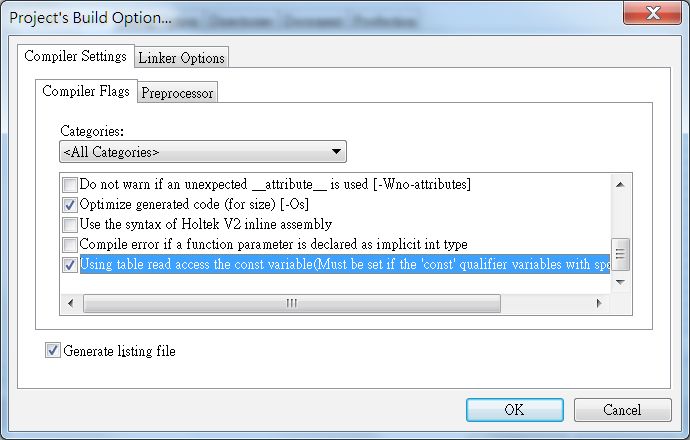
C Compiler V3 User's Guide

Table of Contents
  Introduction........................................................................................................... 7
  Chapter 1 C language........................................................................................... 8
       1.1 Data types, operators and expressions...................................................................................8
            1.1.1 C Data types.....................................................................................................................8
            1.1.2 Constant and Variable......................................................................................................9
            1.1.3 C Language Operation Introduction................................................................................12
       1.2 Functions...............................................................................................................................14
            1.2.1 Function declaration and definition.................................................................................14
            1.2.3 Function Call...................................................................................................................16
            1.2.4 Main Function.................................................................................................................18
            1.2.5 Standard Library.............................................................................................................18
       1.3 Pointer and Array..................................................................................................................18
            1.3.1 Array Definition, Initialization and Usage........................................................................18
            1.3.2 Multidimensional Array....................................................................................................19
            1.3.3 String and End Flag........................................................................................................19
            1.3.4 Pointer............................................................................................................................19
            1.3.5 Pointer Data Type...........................................................................................................19
            1.3.6 Pointer Operation............................................................................................................19
            1.3.7 Differences between array name and pointer.................................................................21
       1.4 Structure, Union and Enumeration........................................................................................22
            1.4.1 Using Structure, Union and Enumeration.......................................................................22
            1.4.2 Differences between Structure and Union......................................................................23
       1.5 Differences between Preprocessor, Macro definition and Inline function..............................23
       1.6 Flow Control..........................................................................................................................25
            1.6.1 Three Execution Flow.....................................................................................................25
            1.6.2 Using of, if and switch.....................................................................................................25
            1.6.3 Loop and nested-looping................................................................................................26
            1.6.4 break and continue.........................................................................................................26
            1.6.5 goto statement................................................................................................................27
       1.7 Scope....................................................................................................................................28

  Chapter 2 C compiler V3 Expansion and Limitation....................................... 29
       2.1 Holtek C compiler V3 settings in the HT-IDE3000................................................................29
            2.1.1 Operation environment...................................................................................................29
            2.1.2 Building a new project use Holtek C V3 compiler...........................................................29
            2.1.3 After opening the project, how to use the Holtek C V3 compiler ....................................30
            2.1.4 Project Compiler Option settings....................................................................................30
            2.1.5 Linker options.................................................................................................................32
       2.2 C compiler V3 Extended syntax and function.......................................................................34
            2.2.1 Interrupt Service Routines..............................................................................................34
            2.2.2 Absolute variable............................................................................................................35
            2.2.3 MCU header file introduction..........................................................................................36
            2.2.4 Variable Initialization.......................................................................................................38

Rev. 1.60                                                                 3                                                         April 08, 2021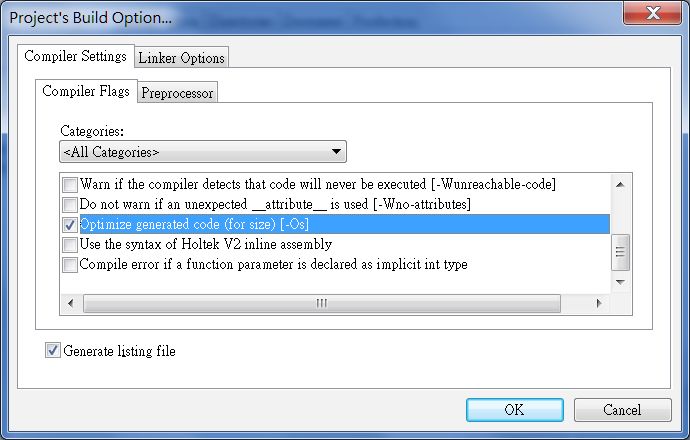
C Compiler V3 User's Guide

            2.2.5 Inline Assembly Code.....................................................................................................39
            2.2.6 Specify Function Address...............................................................................................40
            2.2.7 Specify Const Address....................................................................................................40
            2.2.8 Variable Assignment.......................................................................................................41
            2.2.9 __attribute__ Syntax.......................................................................................................41
            2.2.10 Hardware Multiplier and Divider....................................................................................42
            2.2.11 Bit data type..................................................................................................................44
       2.3 C compiler V3 limitation........................................................................................................44
            2.3.1 Function Pointer..............................................................................................................44
            2.3.2 Recursive Function.........................................................................................................45
            2.3.3 7-bit MP – Memory Pointer.............................................................................................45
       2.4 Compiler managed resources...............................................................................................45

  Chapter 3 C compiler V3 optimization function............................................... 46
       3.1 Optimization Contents Introduction.......................................................................................46
       3.2 Algebraic Transformations.....................................................................................................46
       3.3 Copy Propagation/Value Propagation...................................................................................46
       3.4 Unreachable Code Elimination..............................................................................................47
       3.5 Dead-code Elimination..........................................................................................................47
       3.6 Constant Folding...................................................................................................................47
       3.7 Constant Propagation...........................................................................................................47
       3.8 Inline Procedure....................................................................................................................48
       3.9 Strength Reduction...............................................................................................................48
       3.10 Tail Recursive Call...............................................................................................................49
       3.11 Subexpression Elimination..................................................................................................49
       3.12 Tail Merging.........................................................................................................................50
       3.13 ROM BP Optimization.........................................................................................................50
       3.14 Dead section Elimination.....................................................................................................51

  Chapter 4 Contrast of Holtek C V1, Holtek C V2, Holtek C V3, ANSI C.......... 52
       4.1 Data Type..............................................................................................................................52
       4.2 Array......................................................................................................................................52
       4.3 Identifier Reserved Words ....................................................................................................53
       4.4 Operator................................................................................................................................54
       4.5 Preprocessor Instructions.....................................................................................................54
       4.6 Preprocessor directive #pragma...........................................................................................55
       4.7 Const Variable.......................................................................................................................55
       4.8 Pre-defined Head Files.........................................................................................................56
       4.9 Main Functions......................................................................................................................56
       4.10 Interrupt Functions..............................................................................................................56
       4.11 Built-in Functions.................................................................................................................57
       4.12 Other Functions...................................................................................................................57

  Chapter 5 Command Line Mode........................................................................ 59
       5.1 Setting Environment Variable................................................................................................59
       5.2 Using the Command Mode to compile the original file .........................................................59

Rev. 1.60                                                                4                                                           April 08, 2021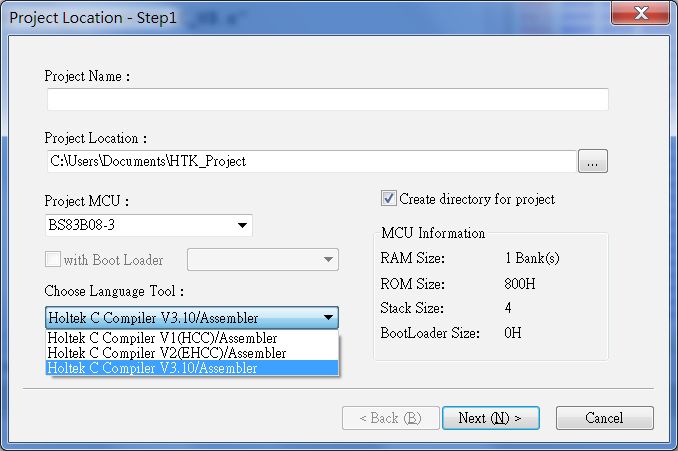
C Compiler V3 User's Guide

       5.3 Command line parameter......................................................................................................59

  Chapter 6 Multiple file programming................................................................ 61
       6.1 Header File............................................................................................................................61
       6.2 Common Variables................................................................................................................61
       6.3 Calling a function from other original files.............................................................................61
       6.4 Using libraries.......................................................................................................................62

  Chapter 7 Mixed Language................................................................................ 63
       7.1 Data format...........................................................................................................................63
       7.2 Variable and function naming rules.......................................................................................63
       7.3 Calling an assembly function from the C program................................................................63
       7.4 Calling a C function from the assembly program..................................................................64

  Chapter 8 Common Error Solutions................................................................. 67
       8.1 Internal Error.........................................................................................................................67
       8.2 RAM bank0 overflow.............................................................................................................67
       8.3 ROM/RAM space overflow....................................................................................................67
       8.4 Variable Overlap Warning.....................................................................................................67
       8.5 Variable Redefinition.............................................................................................................68

  Chapter 9 Programming Examples .................................................................. 69
       9.1 LED flashing using the interrupt ...........................................................................................69
       9.2 7-segment LED display number using table.........................................................................69

  Chapter 10 Program Optimization..................................................................... 71
       10.1 Optimization Options...........................................................................................................71
       10.2 Variable Declaration............................................................................................................74
            10.2.1 unsigned/signed............................................................................................................74
            10.2.2 Date type......................................................................................................................74
            10.2.3 Floating Constant..........................................................................................................74
            10.2.4 Const Array...................................................................................................................75
       10.3 Arithmetic Operation............................................................................................................75
            10.3.1 Bitwise AND (&) replaces Remainder (%) operation....................................................75
       10.4 Program structure...............................................................................................................76
            10.4.1 Replace the if else statement with the switch statement..............................................76
            10.4.2 Replace repeated operations with a loop.....................................................................76
            10.4.3 Using preprocessors to maintain source code..............................................................77
       10.5 Function Call.......................................................................................................................77
            10.5.1 Avoid unnecessary function calls..................................................................................77
            10.5.2 Encapsulate frequently used codes as a function........................................................78
            10.5.3 If the function can only be called in the current file, it can be defined as static............78
       10.6 Global Variable Assignment................................................................................................79
       10.7 Interrupt Service Routines...................................................................................................79

  Appendix A: ASCII CODE TABLE...................................................................... 80
  Appendix B: Operator Priority .......................................................................... 81
  Appendix C: Command line mode command parameters and functions..... 82

Rev. 1.60                                                               5                                                         April 08, 2021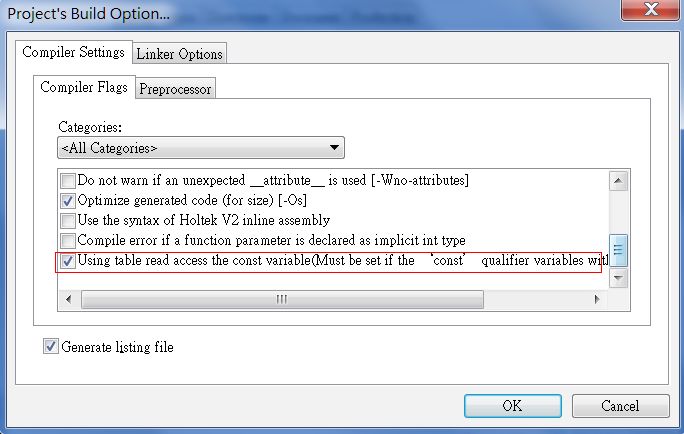
C Compiler V3 User's Guide

  Reference books................................................................................................. 84
            《HT-IDE3000 User’s Guide》..................................................... 84
            《C standard library user's guide》................................................. 84
            《Holtek C Compiler V3 FAQ》..................................................... 84
            《gcc manual》.................................................................. 84

Rev. 1.60                                                6                                            April 08, 2021
C Compiler V3 User's Guide

Introduction
            This document describes the C programming language basic functions and the C compiler V3 syntax
            structure and its optimization, helping the users develop application programs quickly by using the
            C compiler V3.
            The C compiler V3 is based on the GCC 4.6.2 version or above. Refer to the GCC user’s guide
            except for the machine related chapters.
            It is assumed that the reader already has the following basic qualities:
            • Knows how to write C programs
            • Has already read and understood the target MCU datasheet

Rev. 1.60                                              7                                        April 08, 2021
C Compiler V3 User's Guide

Chapter 1 C language
            This chapter introduces the C language syntax and structure from the simplest to the more complex,
            providing a basic knowledge for learning the C compiler V3. Due to the architecture of the Holtek
            microcontroller, the contents described in this chapter are all based on the C language (ANSI C99
            protocol), compatible with the C compiler V3 syntax.
            This chapter covers the following topics:
             • Data types, operators and expressions
             • Functions
             • Arrays and Pointers
             • Structures, unions and enumeration
             • Preprocessor directives
             • Flow control
             • Scope

    1.1 Data types, operators and expressions

        1.1.1 C Data types
            Due to the necessity of using ROM or RAM, before using the variables, the data type must be
            defined. The data types consist of basic data types, Structure data types, Pointer and void. The basic
            data types contain integer, character and floating types. The structure data types contain structure,
            arrays, union and enumeration. Using these structure data types will be able to construct the required
            data structures.
            The basic data types (C compiler V3) are shown in the following table 1-1-1:
                            Data Type                          Size(bit)                         Scope
             bit[1]                                               1              0, 1
             _Bool[2]                                             8              0, 1
             char [3]                                             8              -128~127
             unsigned char                                        8              0~255
             short                                                16             -32 768~32 767
             unsigned short                                       16             0~65535
             int                                                  16             -32 768~32 767
             unsigned int                                         16             0~65535
             long                                                 32             -2147483648~2147483647
             unsigned long                                        32             0~4294967295
             long long                                            32             -2147483648~2147483647
             unsigned long long                                   32             0~4294967295
             float [4]                                            24             -3.4E+038~3.4E+038
             double [5]                                           32             -3.4E+038~3.4E+038
             long double [5]                                      32             -3.4E+038~3.4E+038

                                           Table 1-1-1 Basic Data Types (C compiler V3)
            Note: [1] Bit type, the least significant bit is valid. For example, if bit a = 4; then a=0.
                      [2] _Bool type, when the value is not 0, then the result is 1, when the value is 0, then the result
                         is 0. For example: _Bool a = 4; then a=1.
                      [3] If no signed or unsigned is marked in front of the basic data type, it will be regarded as
                          signed. It is the same for below.

Rev. 1.60                                                  8                                               April 08, 2021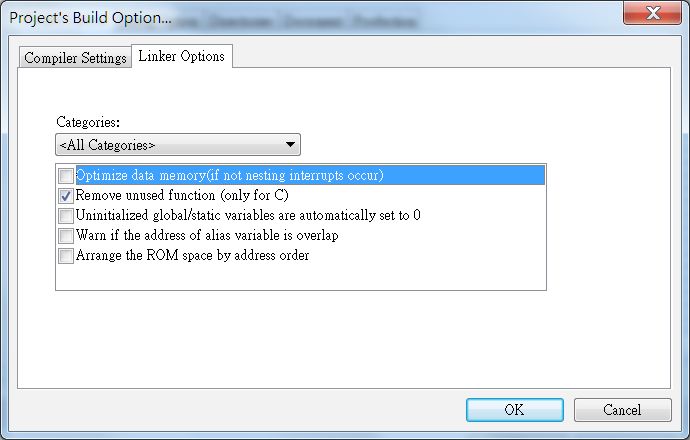
C Compiler V3 User's Guide

                  [4] The floating type is 24-bit supported by C compiler V3, and only 4~5 digit precision is
                      supported by V3.20 or above.
                              sign           exponent (e)                       mantissa (m)
                               23                22~15                            14~8 7~0

                  [5] Double and long double data types have IEEE 754 32-bit format, and 6~7 digit precision
                      supported by V3.20 or above.
                             sign            exponent (e)                       mantissa (m)
                               31               30~23                        22~16 15~8 7~0

        1.1.2 Constant and Variable
            A constant value remains unchanged during program execution. A variable is a storage unit with
            specific attributes in memory, which is used to store data, depending upon the required data type for
            the defined variables.

            1.1.2.1 Numeric Constant, String Constant, Constant
             • Numeric Constant: C Compiler V3 supports the specified Hexadecimal(0x) and Octal(0) prefix.
                The binary value begins with 0b. For example, the number 237 is represented in binary as
                0b11101101.
             • String Constant: Included within double quotation marks, ex. “abc”.
             • Constant: C Compiler V3 supports up to 64 pages of const constants and also supports const
               array, the pointer pointed to const and so on.
            Example:
             const unsigned char TABLE[8]={1,2,3,4,5,6,7,8}
             unsigned char Test[10];
             void TEST_Const(unsigned char *data, unsigned char counter)
             {
                 unsigned char i, T_counter;
                 T_counter = counter;
                 for(i=0; i< T_counter; i++)
                 {
                   Test[i] = *data++;
                 }
             }
             void main()
             {
                 TEST_Const(TABLE,8);
             }
            Regarding the extended instruction MCUs (such as the HT66F70A), the ROM width is 16 bits and
            with TBHP register (such as the HT66F60) need to selete the following option, V3 Compiler (V3.20
            or above) supports the const constants which are designated address.

Rev. 1.60                                             9                                          April 08, 2021
C Compiler V3 User's Guide

            The statements are as follows:
             const type __attribute__ ((at(addr))) var[] = {1,2,3,4,5};
            for example:
              const char __attribute__ ((at(0x123))) ci[5] = {1,2,3,4,5};
            then, the results in ROM are as follows:
                   address               0x123                0x124                0x125                  …
                   content              0x0201               0x0403               0x0500                  …

            1.1.2.2 Variable Definition
             During program execution, the variable values will change. Every variable must have a name
             defined before it is used. This name is case-sensitive. The variable must be declared in advance.
             When making variable declarations, the data type must be designated so as to inform the compiler of
             the required memory size, such as int a;.
            Identifiers are used to identify variables, constants, functions, types and a number of characters.
            Identifiers must consist of letters, digits and underscores and begin with letters and underscores.

            1.1.2.3 Variable Storage Class
             Each variable has two properties in C language, they are Data Type and Storage Class. The storage
             class has two kinds of types, Static Storage and Dynamic Storage, including auto, static, register and
             extern.
            1. auto: Local variable, if not declared as static, it defaults to auto, writing “auto char a” or “char a”
               has the same effectiveness.
            2. static: Can be divided into global static storage and local static storage. If static is added to the
               global variable, then the variable can only be referenced in this document. The local static storage
               is that the variable will retain its value after the whole program ends. When the function is called
               next time, the variable will already have a value.
            3. register: The above two kinds of variables are stored in the memory, while this variable is stored
               in a register. As there are special case MCUs, the details will not be described here.

Rev. 1.60                                              10                                             April 08, 2021
C Compiler V3 User's Guide
4. extern: This type of variable is defined in another document, which indicates that the variable has
been defined externally. Therefor add an “extern” when using the variable. Details are described
in the following sections.
5. volatile: A type specifier. Designed to qualify the variables which are accessed or modified by
different operators. Variables defined using volatile cannot be omitted because of compiler
optimization.
Variables recommended to be defined with volatile: special register, variables used in the
interrupt functions, variables defined for some certain function codes (such as a delay function).
With regard to other variables, it is not recommended that they are defined using volatile, as this
will reduce the compiler optimization.
code list 1.1:
File1.c
int cpv;
File2.c
extern cpv; // quotes the variable cpv in File1.c
int c;
int statictest()
{
cpv = 5;
static int k = 26; // static variable
auto int p = 0; // auto may be omitted
k++;
p++;
cpv++;
return (k + p + cpv);
}
void main()
{
c = statictest(); // c = 34
c = statictest(); // c = 35
}
The result is 34, 35.
Rev. 1.60 11 April 08, 2021C Compiler V3 User's Guide
1.1.3 C Language Operation Introduction
C language has many kinds of operations, including arithmetic operation, logical operation, bitwise
operation, assignment operation, conditional operation, comma operation, etc. The operation priority
is listed in Appendix B.
1.1.3.1 Type conversion
Type conversion rules:
• Mix Data type Arithmetic Operation
♦ if the conversion type is smaller than the integer, the result is integer
♦ convert small type to large type (The conversion process is shown in fig. 2_1_1)
• assignment between different data types
♦ the conversion type is the type to the left assignment statement
• Function Arguments/Passing Return values
♦ the conversion type is the type of the parameter /returned value
fig. 2_1_1
Rev. 1.60 12 April 08, 2021C Compiler V3 User's Guide
Type Conversion Example:
int a = 20000; char a = 100;
int b = 20000; char b = 100;
void main(void) void main(void)
{ {
long c = a+b; int c = a+b;
} }
Result: C = -25536; Result = 200;
Description: a and b are all int type, so should Description: a and b are all smaller than int,
use int type to calculate, the result is 40000, therefore using int type to calculate, the result
but the result is beyond the range of int, is 200.
therefore the result is -25536.
Solution:
long c = (long)a+b;
Result = 40000;
1.1.3.2 Logical Operation
The results of both the Logical Operation and Relational Operation only have two values: TRUE
or FALSE. The numeric value of a relational or logical expression is 1 if the relation is true, and 0
otherwise. Logical operations are AND, OR and NOT, and expressions are connected by && ,|| or !.
Code List 1.2:
char a, b, c, d, e, f, g, h;
void main()
{
a = 0x41;
b = 0x31;
e, f;
c = 0xaa, d = 0x55, g = 0x5a, h = 0xa5;
if((c = a > b) || (d = a)){ // logic “OR” short circuiting
e = 0x18;
}
else{
e = 0x81;
}
if((g = a < b) && (h = a)){ // logic “AND” short circuiting
f = 0x18;
}
else{
f = 0x81;
}
}
Operation Result: a = 0x41, b = 0x31, c = 0x01, d = 0x55, e = 0x18, f = 0x81, g = 0x00, h = 0xa5,
both d and h are not given any value.
NOT(!) operation special application: !!(0xXX), when 0xXX is not 0, then the operation result is 1.
Rev. 1.60 13 April 08, 2021C Compiler V3 User's Guide
1.1.3.3 Bitwise operation
There are two very attractive points in the C lauguage, one is the pointer, and the other is the bitwise
operation. There are six operators for manipulating bit-by-bit operations, they are bitwise AND(&),
bitwise OR(|),bitwise XOR (^), bit complement (~), left shift (). The operation
time will be reduced significantly by using the bitwise operation skillfully. The following are
common applications and operations:
1. Change lower case to upper case, clear bit: ‘a’ & 0xDF, the result is ‘A’
2. Change upper case to lower case, set bit: ‘A’ | 0x20, the result is ‘a’
3. Take one’s complement, in other words, Exclusive-OR to the bit and 1 (the first bit complement):
0xFF ^ 0x01, the result is 0xFE
4. Partial multiplication simplification, multiply with the n-th power of 2, which is equated to a
variable left shift for n bits, such as 0x02 multiplies 4, 0x02 > 2, here, 2 is shown that 4
= twice the power of 2, the result is 2
6. Partial remainder simplification, remainder with the n-th power of 2, which is equated to 2n AND
(2n-1), such as the remainder of 15 and 8, which is equated to 15 & 7. Here, 7 is shown that 8-1=7,
the result is 8
7. Other Multiplication Simplification, such as 0x08 * 7 = 0x08 * (8 - 1) = (0x08 > (16 - n) | 0xXX n
1.2 Functions
The function is the same as a subprogram, where each function can implement one special function.
During the application program development, frequently used function modules can be written as
a single function, so as to reduce the repetitive work. In fact, a function is an address, calling the
program to jump to this address to excute the instructions.
1.2.1 Function declaration and definition
It is not necessary to define the function before being declared. The declared function must be an
existent function. If using a library function, then directly add the header file. If it is a user-defined
function, then the function must be declared behind the document. Functions cannot be nested.
Function definitions include the return value type, function name, parameter list and the function
body, form:
return-type function-name (arg1, arg2, ...)
{
statements… function body
}
Rev. 1.60 14 April 08, 2021C Compiler V3 User's Guide
Example 2: Find the larger one of two numbers
code list 1.3:
int max(int, int); // function declaration
int a;
void main()
{
a = max(10, 20); // function calling
a++;
}
int max(int a, int b) // return value type, function name (parameters list)
{
return a > b ? a : b;
}
Operation result: a = 21
1.2.2 Parameter list and return value
Parameters are written in parentheses after the function name, and will be called into a function.
Formal and actual parameters:
Actual parameters can be constants, variables or expressions, but they must be definite values, which
will be passed to the formal parameters of the function when the function is called.
When the function is defined, the formal parameter must be specified as a data type.
The formal and actual parameters must be compatible.
The most important characteristic of formal parameters is one-way passing. This means that any
changes to the formal parameters will not affect the actual parameter values in the calling routine.
In the C compiler V3, the naming rules of function Local variables and parameters is _
funname_2[n]. For example, variables of fun function are named as _fun_2, n indicates the variables
number.
If the return value size is one byte, then the value is stored in the ACC, if it is two bytes, then its low
byte is stored in ra, the high byte is stored in rb, if it is four bytes, then the four bytes are stored in
ra, rb, rc, rd from low byte to high byte.
Due to the MCU limitations (no stack), the parameters and internal variables will take up RAM
space. The function variables which do not have a call relationship with each other can share the
same RAM space.
Example 3: The value a is changeable?
Code list1.4:
int a;
void change(int b)
{
b = 7;
}
void main()
{
a = 15;
change(a);
}
Operation result a = 15
A function can return a value to the calling routine, the return type can be void, but it is important to
not write any statements after the return statement.
Rev. 1.60 15 April 08, 2021C Compiler V3 User's Guide
1.2.3 Function Call
1.2.3.1 Function Call method and Process
There are three methods to call the function:
1. Function statements: the function call can be used as a statement to achieve a function, such as
change(a);
2. Function expressions: for example, int a = 3*max(10, 20);
3. Function parameters: for example, int a = max(max(20, 30), 20);
Function Call Process:
The function call process and the function parameters passing direction of the different compilers
are different. In the C language, the formal parameter passing direction is from right to left. The
following example describes the process of calling a function in the C compiler V3 (take Example 2
as an example):
Process 1:
store return value
Return the address back from
int a=max(10, 20);
the stack to the PC
Push the next instruction address
End of the function call
onto the stack
Pass 20 to the formal parameter b; Call max: jump to max address
pass 10 to the formal parameter a to execute the instructions
1.2.3.2 Nest Call
The function nest call means that the function can be called in another function. The function call
can be nested, but the function definition can not be nested. The recursive call is a special nest call.
It means that the function can be called directly or indirectly in this function itself.
1.2.3.3 External Function
There are two methods to use external functions, one is using the header files and include, the other
is using the keyword extern.
1. Header file include method:
Example 4: Call the external addition and subtraction function.
Code List 1.5:
File1.h
#ifndef _File1_H
#define _File1_H
Rev. 1.60 16 April 08, 2021C Compiler V3 User's Guide
typedef unsigned char u8;
u8 add(u8 a, u8 b);
u8 sub(u8 a, u8 b);
#endif
File1.c
#include “FILE1.H”
u8 add(u8 a, u8 b)
{
return a + b;
}
u8 sub(u8 a, u8 b)
{
return a - b;
}
File2.c
#include “FILE1.H”
u8 c, d;
void main()
{
u8 a = 10;
u8 b = 10;
c = add(a, b);
d = sub(c, b);
}
Operation Result: a = 10, b = 10, c = 20, d = 10
2. extern method:
Example 5: call the external multiplication and division function
Code List 1.6:
File1.c
typedef unsigned char u8;
u8 mul(u8 a, u8 b)
{
return a * b;
}
u8 div(u8 a, u8 b)
{
return a / b;
}
File2.c
typedef unsigned char u8;
extern u8 mul(u8 a, u8 b);
extern u8 div (u8 a, u8 b);
u8 c, d;
void main()
{
u8 a = 10,b = 10;
c = mul(a, b);
d = div(a, b);
}
Operation Result: a = 10, b = 10, c = 100, d = 1
Rev. 1.60 17 April 08, 2021C Compiler V3 User's Guide
1.2.3.4 Inline Function
Using the keyword inline to qualify functions, then the function is named inline function. Using
inline function body statments instead of calling functions to achieve the function purpose will
reduce time and stack overheads when calling functions. However the inline function of multiple
calls may add much additional code.
Code List 1.7:
unsigned char max;
inline void getmax(unsigned char var1, unsigned char var2)
{
max = var2 > var1 ? var2 : var1;
}
void main()
{
getmax(23,32);
}
Here, using the codes max = var2 > var1 ? var2 : var1; in place of getmax(23,32); function.
1.2.4 Main Function
The Main function is a special function, which is the start of a program execution. After initializing
the MCU environment, the Main function is executed. Every project must include a main function,
however the main function does not require parameters and return values.
1.2.5 Standard Library
The C Compiler V3 (v3.20 or above)supports math.h, string.h and other standard librarys. For a
more complete description refer to the IDE/doc--< standard library user’s guide >.
1.3 Pointer and Array
An array is composed of elements of the same data type, using the array name and index to
distinguish each element of the array. Every byte has one number called address in memery, while
the pointer itself is a variable that stores the address numbers.
1.3.1 Array Definition, Initialization and Usage
Array definition: data-type array-name [argument number], argument number must be a literal
constant or a symbolic constant. Ex. unsigned char led_table[5] [1].
Array Initialization:
1. Define an array. Ex. unsigned char led_table[5];[2] then give values to the elements one by one.
2. Initialization when define an array. Ex. unsigned char led_table[5] = {0, 1, 2, 3, 4};
3. Initialization without argument number. Ex. unsigned char led_table[] = {0, 1, 2, 3, 4}; it shows
the argument number is 5.
4. Partial initialization. Ex. unsigned char led_table[5] = {2, 1};[3]
Note: [1] The array index is a positive integer starting from zero up to the total number of elements
minus one.
[2] when giving values to the array, the array index should not exceed the elements number,
for example, when the elements number is 10, then the maximum index is 9.
[3] led_table[0] = 2, led_table[1] = 1 the values of the others which are not given any values
are 0.
An array can be used in the following form: array_name[index]. Ex. led_table[2]. Because the C
language doesn’t check the array boundaries, it is important to prevent situations of array index
overflow.
Rev. 1.60 18 April 08, 2021C Compiler V3 User's Guide
1.3.2 Multidimensional Array
An array which has a multiple index is not required to define the highest dimension. Ex.
led_table[][4] = {{1, 2, 3},{},{1}};
The second dimension is 3 in the above example. Each dimension must be specified when it is used.
1.3.3 String and End Flag
String constants are saved in ROM, ended with ‘\0’. For example, String char c[] = “chip”, “chip”
takes 5 characters.
If the last element of a character array is ‘\0’, then it also can be used as string.
An array name is the array starting address in the memory, such as led_table[5]. Then led_table is
the address of led_table[0].
1.3.4 Pointer
Variables defined in programs will be assigned to the memory unit, while the memory unit has a
number which is called “address”, the pointer content stores the address of the variables.
1.3.5 Pointer Data Type
The pointer points to the address of the different types of variables (RAM address), such as int, char
and so on. Therefore, the data type of variables which is pointed to by the pointer must be indicated
when defining the pointer. There are some special pointer data types such as the data types of the
pointer which points to functions, points to pointers and points to multidimensional arrays. Pointer
size is not relevant to the pointer data types, regardless of what the data type is, the pointer size
is fixed and only depends on the microcontroller architecture. Ex. char *p; long *q. When using
sizeof(p) and sizeof(q), the value is always 2(C compiler V3).
1.3.6 Pointer Operation
There are three steps to operate a pointer: pointer definition, pointer initialization and using a
pointer. It is important to be careful that the pointer is initialized when being used. If writing values
to the address where the uninitialized pointer are pointed to, unpredictable errors will be created.
There are two pointer operators: &( obtain the memory address) and *( obtain the content).
1. Operation of the pointer pointed to variables:
Example 6: Is the value changeable?
Code List 1.8:
char a;
void change(char *b)
{
*b = ‘b’;
}
void main()
{
a = ‘a’;
change(&a);
}
operation result: a = ‘b’, because the passed parameter is the address of a, changing the value of
the address is equal to changing the argument.
Rev. 1.60 19 April 08, 2021C Compiler V3 User's Guide
2. Operation of the pointer pointed to pointers:
Example 7: Is the value changeable?
Code List 1.9:
char *a;
void change(char *b)
{
b = (char *)0x81; // modify the pointer itself
}
void main()
{
a = (char *)0x80;
change(a);
}
Operation Result:a = 0x80
Since the parameter passing is unidirectional, if it is desired to change the value a, the code is as
follows:
Code List 1.10:
char *a;
void change(char **b)
{
*b = (char *)0x81; // modify pointer content
}
void main()
{
a = (char *)0x80;
change(&a);
}
Operation Result: a = 0x81
3. Operation of an array pointer and pointer array:
An array pointer is the pointer which is pointed to in an array, defined as: char (*b)[5];
The pointer array is the array which stores the data type of pointer. defined as: char* a[5].
What is the difference? Here, a is the first address of the array, 5 pointer values are stored in the
array a, while b is a pointer, it points to the first address of the array that the data type is char and
length is 5. If using sizeof to operate, we can know that the length of a is 10, the length of b is 2.
4. Index overflow:
Code List 1.11:
unsigned char a8[5] = {0,1,2,3,4};
unsigned char *p = a8;
*(p + 5) = 8;
Operation results: if a8 is stored in the start address 0x0085 of memory, then the value of address
0x008a is 8. If an important value is stored in 0x008a, it will affect the operation results of the
entire programs.
Rev. 1.60 20 April 08, 2021C Compiler V3 User's Guide
5. Operation constant pointer and pointer constant:
constant pointer means that the contents of the pointer pointed to is constant, defined as the
follows: const char *c_p1;
The pointer constant means that the value of the pointer itself cannot be changed, but the pointed
contents can be changed, defined as follows: char *const p2_c;
code list 1.12:
void main()
{
char a[5] = {0, 1, 2, 3, 4}, b[5];
const char *p = "Hello Word!";
char * const q = a;
*(p + 1) = 'o'; // try to modify the contents of the string constants,
error.
p = "Hello! Word!"; // the pointer pointed to the constant can be changed
p = b; // can also point to the variable address
*(q + 1) = 2; // modify the contents of the pointer constant pointed to
q = b; // try to modify the value of constant pointer, error.
}
6. Pointer operation:
The Pointer can execute add, subtract, increment, decrement and other operations.
code list 1.13:
unsigned int a[5] = {1,2,3,4,5}; // assume a = 0x84
unsigned int *p = a; // p = 0x84
void main()
{
p = p + 1; // p = 0x86, unsigned int occupies 2 bytes.
*(++p) = 10; // p = 0x88
}
operation result: p = 0x88, a[2] = 10
1.3.7 Differences between array name and pointer
The array name is the first address of the array in memory, it is similar to the pointer, but there are
also a few differences between them:
1. The array name is a constant, so is not allowed to be modified and is equal to a pointer constant.
2. The operation result is different when using sizeof to operate, the result of the array name shows
the occupied space, while the result of the pointer is fixed 2.
3. The array name cannot be incremented and decremented.
Rev. 1.60 21 April 08, 2021C Compiler V3 User's Guide
1.4 Structure, Union and Enumeration
A structure is a collection of data, unlike an array, the elements of the array must be same types,
while the structure can be different data types. A union is similar to the structure. The enumeration
limits the value of variables in a scope of a specified range.
1.4.1 Using Structure, Union and Enumeration
Example 8: The definition of register PA and bit PA5 (using Structure and Union)
code list 1.14:
#define DEFINE_SFR(sfr_type, sfr, addr) \
static volatile sfr_type sfr __attribute__ ((at(addr)))
typedef unsigned char __sfr_byte;
typedef struct { // define structure
unsigned char __pa0 : 1;
unsigned char __pa1 : 1;
unsigned char __pa2 : 1;
unsigned char __pa3 : 1;
unsigned char __pa4 : 1;
unsigned char __pa5 : 1;
unsigned char __pa6 : 1;
unsigned char __pa7 : 1;
} __pa_bits;
typedef union { // define union
__pa_bits bits; // using of structure
__sfr_byte byte;
} __pa_type;
DEFINE_SFR(__pa_type, __pa, 0x1a); // define register PA
#define _pa __pa.byte // using of union members
#define _pa5 __pa.bits.__pa5 // using of structure members
The first enumeration constant has the last specified value if no explicit value is specified. If all
the enumeration constants are not specified, then the first enumeration constant has the value 0.
Subsequent enumeration constants without explicit associations receive an integer value one greater
than the value associated with the previous enumeration constant.
code list 1.15:
enum weekday{sun = 6, mon = 0, tue, wed, thu, fri, sat};
const unsigned char *dayLine;
const unsigned char *printDay[7] = {
"HI, Monday ! ",
"I am Tuesday ! ",
"Today is Wednesday ! ",
"Today is Thursday ! ",
"Happy Friday ! ",
"Today is Saturday ! ",
"Today is Sunday ! ",
};
const unsigned char* getDay(enum weekday today)
{
return printDay[today];
}
Rev. 1.60 22 April 08, 2021C Compiler V3 User's Guide
void main()
{
enum weekday today = sat;
dayLine = getDay(today); //dayLine = "Today is Saturday !"
unsigned char ch;
while(*dayLine){
ch = *dayLine;
dayLine++;
}
}
1.4.2 Differences between Structure and Union
The main difference between structure and union is the configuration of the memory space. A
structure assigns memory space for every member while a union provides a way to manipulate
different kinds of data in a single storage area. The union size is the largest data type size.
For example, in the example 8, if using sizeof (__pa_type)to operate the structure size, then the
result is 1, if _pa5 is set to 1,then the 5th member of __pa_type is set to 1 as well.
1.5 Differences between Preprocessor, Macro definition and Inline function
There are three preprocessors in the C language: macro define (#define), include file (#include),
conditional compiler (#if, etc.). If preprocessing was executed before compiling, such as in macro
expansion, then it is performed when precompiling.
1. Macro definition: note that when using macro definition, the macro name is simply replaced
by the macro defined content and does not execute any operations. For example, #define S(r)
3.1415926*r*r, if using S(6+6), then the result is 3.1415926*6+6*6+6, but it is not the desired
result. Then by using #define S(r) 3.1415926*(r)*(r) the desired result can be obtained.
2. Include file: using #include to include the files, using “file.h” is different from using “”
to include files, “file.h” is used for user defined files, while “” is used for library files, in order
to reduce the time spent in searching path when compiling. Pay attention to avoid duplication of
header file including.
3. Conditional compiler (Compilation): choose one of the source codes to compile as there is no
need to compile all the codes. This is used for debugging and code transplants between the
different machines. There are 3 types: (the else directive is alternative):
(1) #ifdef symbol
source code1
#else
source code2
#endif
(2) #ifndef symbol
source code1
#else
source code2
#endif
(3) #if symbol
source code1
#else
source code2
#endif
Rev. 1.60 23 April 08, 2021C Compiler V3 User's Guide
4. Differences between macro definition and inline function:
(1) Macro definition only does simple replacement without any operations.
(2) Macro is defined when precompiling, while the inline function is used when function calls
occur.
(3) Macro definition parameters can not be specified with any data types, while the inline
function must specify the data types.
(4) The compiler does not check the macro definition contents, if using #define error **8, there is
no error to be found, while the inline function is different.
Example 9: preprocessor comprehensive example
code list 1.16:
FUNCTION.H
#ifndef _FUNCTION_H //if removing #ifndef, then the redefinition error occurs
#define _FUNCTION_H
typedef unsigned char u8;
typedef unsigned int u16;
typedef unsigned long u32;
#define BOOL u8
#define TRUE 1
#define FALSE 0
#define LeftShift(val, times) (val) (num2) ? (num1) : (num2)
u8 getMax(u8 num1, u8 num2)
{
return Max(num1, num2);
}
#endif
KEY.H
#ifndef _KEY_H
#define _KEY_H
#include “FUNCTION.H”
u8 GetKey(u8 num1, u8 num2)
{
u8 key = getMax(num1, num2);
return LeftShift(key, 2);
}
#endif
MAIN.C
#include “FUNCTION.H”
#include “KEY.H”
#define DEBUG 1 //using when debugging
u8 _debugval;
Rev. 1.60 24 April 08, 2021C Compiler V3 User's Guide
void main()
{
u8 ch;
const u8 *Led_String = “YOU”;
while(*Led_String){
#if DEBUG //if changing 1 to 0, then this statement can not be compiled.
_debugval = *Led_String;
#endif
ch = *Led_String;
ch = LeftShift(ch, 1);
GetKey(ch, 0);
Led_String++;
}
}
If passing ch++ to num1, passing 0 to num2 of macro definition Max(num1, num2), then(ch++) > (0)
? (ch++) : (0), but the value of ch is not the expected value. Therefore, the macro definition should
be noted.
1.6 Flow Control
1.6.1 Three Execution Flow
The execution flow of the C language is sequential execution, optional execution and loop execution.
1.6.2 Using of, if and switch
If and switch are conditional expressions. When many conditions exist, the if statement can be
replaced with the switch statement. The switch variable must be enumerated and a basic data type
except for float. The case statement variable must be a constant value (not including the constant
with const), the break statement will be used after the case statement was executed. If no break
statement exists, then the next statement will continue to be executed. Multiple case expressions can
execute the same statements. The default statement shows the default cases and can execute without
a break.
Code List 1.17:
unsigned char f;
……
switch(f){
case 12:
case 13:
f += 1;
break;
case 14:
f += 2;
break;
default:
f += 3;
}
Rev. 1.60 25 April 08, 2021C Compiler V3 User's Guide
1.6.3 Loop and nested-looping
1. while(expression) statement
2. do…while(expression);
Differences: do…while(expression); the statement executes at least once.
code list 1.18:
int sum = 0; int sum = 0;
void main() void main()
{ {
int i = 11; int i = 11;
while(i < 11){ do{
sum += i; sum += i;
i++; i++;
} } while(i < 11);
} }
result:sum = 0 sum = 11
3. nested-looping
In loop statements, the loop can be executed more than once.
1.6.4 break and continue
Break is used for loop or switch case statement, while continue is only used for the loop statement,
the differences between them are that the continue statement orders the program to skip to the end
of the loop and begins the next iteration of the loop, while the break statement is to jump out from a
loop and execute other statements outside this loop.
code list 1.19:
while(1)
{
int j = 0;
while(1)
{
j++;
if(j == 5)
{
continue; // execute the next iteration of the loop
}
if(j == 10)
{
break; // jump out from the loop
}
}
}
Rev. 1.60 26 April 08, 2021C Compiler V3 User's Guide
1.6.5 goto statement
The goto statement can directly jump to a statement label to execute programs. It is generally not
recommended to use goto statements.
Example 10: using goto correctly to optimizes code
code list 1.20:
typedef unsigned char u8
#define BOOL u8
#define TRUE 1
#define FALSE 0
u8 result;
BOOL fun1() BOOL fun2() BOOL fun3()
{ { {
…… …… ……
} } }
Original version: goto version:
void main() void main()
{ {
BOOL b_result = FALSE; BOOL b_result = FALSE;
u8 b[3], a[3]; u8 b[3], a[3];
u8 *p = a; u8 *p = a;
b_result = fun1(); b_result = fun1();
if(!b_result){ if(!b_result) goto error;
result = 0x55; b_result = fun2();
p = b; if(!b_result) goto error;
} b_result = fun3();
b_result = fun2(); if(!b_result) goto error;
if(!b_result){ error:
result = 0x55; result = 0x55;
p = b; p = b;
} }
b_result = fun3();
if(!b_result){
result = 0x55;
p = b;
}
}
Rev. 1.60 27 April 08, 2021C Compiler V3 User's Guide
example 11:using do…while(0)instead of goto
do…while(0)version:
void main()
{
char b_result = 0;
u8 b[3], a[3];
u8 *p = a;
do{
b_result = fun1();
if(!b_result) break;
b_result = fun2();
if(!b_result) break;
b_result = fun3();
if(!b_result) break;
}while(0);
result = 0x55;
p = b;
}
1.7 Scope
Both the variable and the function has its scope. Global variable/function can be used in the whole
project after being configured as extern. If a global variable is defined as static, then this variable can
only be used in this file. In order to save ROM space, static is not recommend. The local variable
can be used in the statements of the function after being declared. If the variable is declared in the if
and switch of the loop, then the variable can not be used in the following statements after executing
the if and switch statements. As seen with the j variable of code list 1.19, the external statements of
the while loop can not be used.
Rev. 1.60 28 April 08, 2021C Compiler V3 User's Guide
Chapter 2 C compiler V3 Expansion and Limitation
2.1 Holtek C compiler V3 settings in the HT-IDE3000
2.1.1 Operation environment
This chapter is written based on the HT-IDE3000 7.85 version.
Note: The Holtek C V3 must operate in the HT-IDE3000 7.71 or later version
2.1.2 Building a new project use Holtek C V3 compiler
In the HT-IDE3000 development environment, build a new project using the following method:
• Move the mouse cursor to the Project menu, and click the left button
• Move the mouse cursor to the New command, and click the left button
• In the following window, select Holtek C Compiler V3.10/Assembler(default) in the Choose
Language Tool
Rev. 1.60 29 April 08, 2021C Compiler V3 User's Guide
2.1.3 After opening the project, how to use the Holtek C V3 compiler
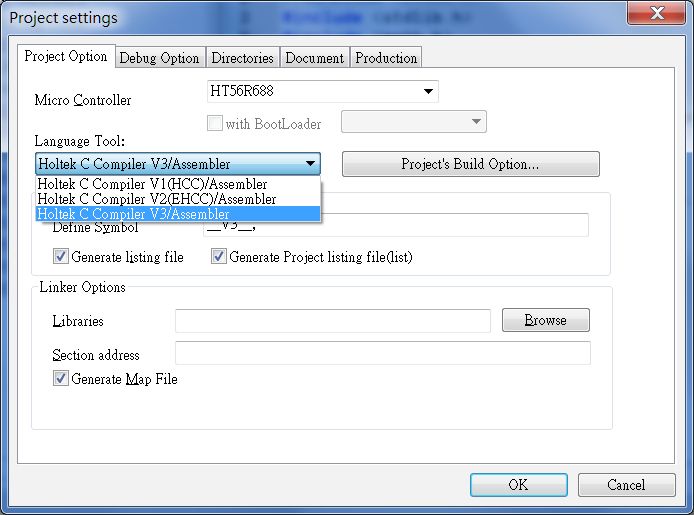
After opening the project, click Project Setting command in Option menu, and click Holtek C
Compiler V3.10/Assembler in the Language Tool to set Holtek C V3 compiler.
2.1.4 Project Compiler Option settings
1. Define Symbol
The setting is shown as the following red box. The HT-IDE3000 will pass the parameter to the
compiler: -DGCC_COMPILER -DCOUNT=5
Be equivalent to macro definition:
#define GCC_COMPILER
#define COUNT 5
Its effective scope is the whole project, the multiple macro definitions are separated by ‘,’.
The example of using -D command line option is conditional compilation. Ex:
#if GCC_COMPILER
typedef unsigned int uint16;
#else
typedef unsigned int uint8;
#endif
#if COUNT==5
x = 5
#elif COUNT == 2
x = 6;
#else
x = 7;
#endif
Note: When using the C Compiler V3,HT-IDE3000 (7.72 or above version), the macro definition
is “__V3__” by default.
Rev. 1.60 30 April 08, 2021C Compiler V3 User's Guide
2. Compile parameter
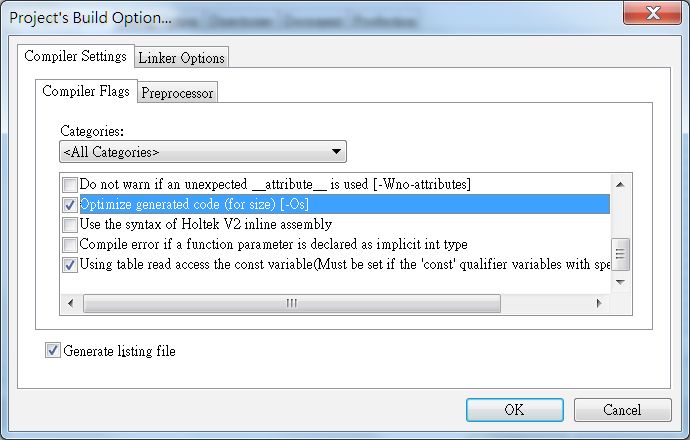
When using Holtek C V3, choose the compiler option, the optimizing parameter -Os is selected
by default in the HT-IDE3000, click “Project’s Build Option” in the project settings, and a dialog
box as follows will appear:
Rev. 1.60 31 April 08, 2021C Compiler V3 User's Guide
Case sensitive for assembly: For mixed language projects. If a project includes either a c file or
an asm file, then this option can be enabled. (Words in C are Case-sensitive, words in assembly
language are Case-insensitive by default).
String alignment(eg. DW ‘string1’). Two chars will be aligned in one program ROM word: For
an asm file, when the selected MCU is 16 bits(such as HT66F50), this option can be enabled, then
every two characters in the string will take one word. If disabled, then one character takes one word
by default. If the selected MCU is 14 or 15 bits (such as the HT46R4AE), then this option can not be
enabled.
Enable extra compiler warnings: such as lack of function return value, unsigned value comparing
with zero
Optimize generated code (for size) [-Os]: Optimization option.
Use the syntax of Holtek V2 inline assembly: You can use the #asm/#endasm completed inline
assembler syntax function when select this option
Using table read access the const variable: MCU (without extended instructions) with TBHP
register and the PROM width is 16 bits has this option.The size of table will be halved when this
option is selected.The option must be set if the ‘const’ qualifier variables with specified address
exist.
2.1.5 Linker options
2.1.5.1 Include The Library
1. Add the library paths to the directories:
Rev. 1.60 32 April 08, 2021You can also read


