CONTENT SECURITY BEST PRACTICES COMMON GUIDELINES - MPAA Content Security Program - Motion ...
←
→
Page content transcription
If your browser does not render page correctly, please read the page content below
MPAA Content Security Program

CONTENT SECURITY BEST PRACTICES
      COMMON GUIDELINES

         https://www.mpaa.org/best-practices
                                               Version 4.05
                                               May 31, 2019
MPAA Global Content Security Program May 31, 2019
D OCUMENT H ISTORY
Version Date Description Author
1.0 December 31, 2009 Initial Public Release Deloitte & Touche LLP, MPAA, MPAA Member Companies
2.0 May 15, 2011 Updates and Revisions Consolidation into Common Guidelines and PwC LLP, MPAA, MPAA Member Companies
Supplementals
2.1 January 1, 2013 Updates and Revisions PwC LLP, MPAA, MPAA Member Companies
3.0 April 2, 2015 Updates and Revisions MPAA, MPAA Member Companies
4.02 December 1, 2017 Updates and Revisions MPAA, MPAA Member Companies
4.03 July 18, 2018 Updates and Revisions MPAA, MPAA Member Companies
4.04 October 12, 2018 Updates and Revisions MPAA Content Security, MPAA IT, MPAA Member Companies
4.05 May 31, 2019 Updates and Revisions MPAA Content Security, MPAA Member Companies
MPAA Best Practices - Common Guidelines Page iMPAA Global Content Security Program May 31, 2019 TABLE OF CONTENTS Document History ......................................................................................................................................................................................................... i I. Best Practices Overview .................................................................................................................................................................................... 2 II. Facility Overview ................................................................................................................................................................................................ 3 III. Risk Management and Document Organization ................................................................................................................................................ 4 IV. Best Practices Format ........................................................................................................................................................................................ 6 V. Best Practice Common Guidelines .................................................................................................................................................................... 7 Appendix A — Glossary............................................................................................................................................................................................. 77 Appendix B — MPAA Title and Distribution Channel Definitions .............................................................................................................................. 81 Appendix C — Mapping of Controls to References ................................................................................................................................................... 83 Appendix D — Suggested Policies and Procedures ................................................................................................................................................. 88 Appendix E — Other Resources and References ..................................................................................................................................................... 89 MPAA Best Practices - Common Guidelines Page 1
MPAA Global Content Security Program May 31, 2019
I. B EST P RACTICES O VERVIEW
Providing a standard assessment vehicle for further individual
Introduction discussions regarding content security between Members and
their business partners.
For more than three decades, the Motion Picture Association of
America, Inc. (MPAA) has managed content security assessments
on behalf of its Member Companies (Members): Paramount Purpose and Applicability
Pictures Corporation; Sony Pictures Entertainment Inc.; Universal
City Studios LLC; Netflix; Walt Disney Studios Motion Pictures and The purpose of this document is to provide current and future third-
Warner Bros. Entertainment Inc. party vendors engaged by Members with an understanding of
general content security expectations and current industry best
Starting in 2007, these reviews were performed using a practices. Decisions regarding the use of vendors by any particular
standardized survey model, process and report template. Since Member are made by each Member solely on a unilateral basis.
then, almost 500 facilities have been surveyed in 32 countries.
Content security best practices are designed to take into
During the middle of 2018, the MPAA started performing consideration the services the facility provides, the type of content
assessments through the TPN (Trusted Partner Network). The the facility handles, and in what release window the facility
MPAA is also involved in the governance and operations of the operates.
TPN program.
Best practices outlined in this document are subject to local, state,
The MPAA is committed to protecting the rights of those who create regional, federal and country laws or regulations.
entertainment content for audiences around the world. From
creative arts to the software industry, more and more people Best practices outlined in this document, as well as the industry
around the globe make their living based on the power of their standards or ISO references contained herein, are subject to
ideas. This means there is a growing stake in protecting intellectual change periodically.
property rights and recognizing that these safeguards are a Compliance with best practices is strictly voluntary. This is
cornerstone of a healthy global information economy. not an accreditation program.
The MPAA Content Security Program’s purpose is to strengthen
Exception Process
the process by which its Member content is protected during
production, post-production, marketing and distribution. This is Where it may not be feasible to meet a best practice, facilities
accomplished by the following: should document why they cannot meet the best practice and
Publishing a set of best practices by facility service outlining implement compensating measures used in place of the best
standard controls that help to secure Member content; practice. Exceptions should also be communicated directly to the
Member.
Assessing and evaluating content security at third-party
partners based on published best practices; Questions or Comments
Reinforcing the importance of securing Member content; and If you have any questions or comments about the best practices,
please email: contentsecurity@mpaa.org
MPAA Best Practices - Common Guidelines Page 2MPAA Global Content Security Program May 31, 2019
II. F ACILITY O VERVIEW
The following table describes the typical services offered, content handled and release window involved with each facility type.
Typical Facility Typical Facility
No. Facility Type Type of Content Release Window No. Facility Type Type of Content Release Window
Services Services
1 Audio, Original and Foreign Low-Resolution Pre-Theatrical 8 In Flight IFE Lab High-Resolution – Full or Pre-Theatrical
Dubbing and Language Dubbing Watermarked/Spoiled Pre-Home Video Entertainment IFE Integration Partial Content Pre-Home Video
(IFE) and Spoiled – Full or Partial
Sub-Titling Subtitling Full/Partial Feature Hotel Catalog
Hospitality Content
SFX Content Airline
Services
Scoring Audio Masters Cruise Ship/Ferry
ADR/Foley Libraries
Hospitals
2 Courier, Courier Services Varied Pre-Theatrical
Prisons
Delivery and Delivery Services Pre-Home Video
Catalog 9 Post- Telecine High-Resolution – Full or Pre-Theatrical
Freight Shipping Companies
Production Duplication Partial Content Pre-Home Video
3 Creative Non-Finishing Watermarked, Spoiled Pre-Theatrical Services
Editing Catalog
Advertising Trailer Full/Partial Feature Pre-Home Video Finishing
Content Catalog
TV Spots QC
Stills
Teasers Replication Pre-Mastering High Resolution Pre-Home Video
Clips 10
Graphics Mastering Clean Image
Web Ads Replication
4 Digital Digital Cinema High-Resolution – Full or Pre-Theatrical Check Disc Creation
Mastering Partial Content Visual Digital Post-Production High-Resolution – Partial Pre-Theatrical
Cinema 11
Replication Digital Cinema Effects Computer Generated Frames, Shots, Sequences Post-Theatrical
Distribution Masters
Key Management (VFX) Imagery and Stills (2D to 3D)
Digital Cinema Packages Animation Scripts
5 Digital Digital Intermediate Clean and High Pre-Theatrical Storyboards
Scanning Resolution – Full or Catalog
Services 12 Application Application Varied Varied
Partial Content (Film
Film Recording Tape) Development
Film Restoration
6 Distribution Distribution High Resolution Pre-Theatrical
Clean Image Pre-Home Video 13 Cloud Hosting Varied Varied
Fulfillment
Catalog Data Center
Backroom/Film Depot
DVD/Tape Recycling
7 DVD Compression Clean – Full Feature Pre-Home Video
Creation Authoring
Encoding
Regionalization
Special Features
Check DiscQC
MPAA Best Practices - Common Guidelines Page 3MPAA Global Content Security Program May 31, 2019
III. R ISK M ANAGEMENT AND D OCUMENT ORGANIZATION
Risk Assessment
In consultation with the Member (its client), an organization is
Risks should be identified through a risk assessment, and
responsible for determining which client assets require a higher
appropriate controls should be implemented to decrease risk to an
level of security. The following table provides an example of how to
acceptable level and ensure that business objectives are met.
classify content:
The International Organization for Standardization (ISO) 27000
defines risk as the "combination of the probability of an event and Classification Description Examples
its consequence." For example, what is the probability that content
can be stolen from a facility’s network and released publicly and High-Security Any content that the Theft of a blockbuster
what is the business consequence to an organization and the client Content organization believes feature before its first
if this occurs (e.g., contractual breach and/or loss of revenue for would result in worldwide theatrical
that release window). financial loss, negative release
brand reputation, or Theft of home video
The importance of a robust management system is also highlighted serious penalties content before its first
in the ISO 27001 standard that shows how to establish an should the asset be worldwide street date
Information Security Management System (ISMS). stolen or leaked Theft of masters or
Asset Classification screeners
Additional information about risks generally associated with each
One way to classify assets at your facility is to follow a four-step facility type is also included in each supplemental best practice.
process, which is summarized below:
Security Controls
Identify and The IT Governance Institute defines controls as “the policies,
Classify Assets
procedures, practices and organizational structures designed to
provide reasonable assurance that business objectives will be
Monitor and Determine achieved and undesired events will be prevented or detected and
Evaluate Minimum Security
Effectiveness Control Set corrected.” Security controls are typically selected based on the
classification of the asset, its value to the organization, and the risk
of the asset being leaked or stolen.
Implement
Controls In order to mitigate identified risks, organizations are encouraged to
implement controls commensurate to each specific risk. Such
measures should also be evaluated periodically for their design and
effectiveness based on the current threat environment.
MPAA Best Practices - Common Guidelines Page 4MPAA Global Content Security Program May 31, 2019 MPAA Best Practices – Common Guidelines Page 5
MPAA Global Content Security Program May 31, 2019
IV. B EST P RACTICES F ORMAT
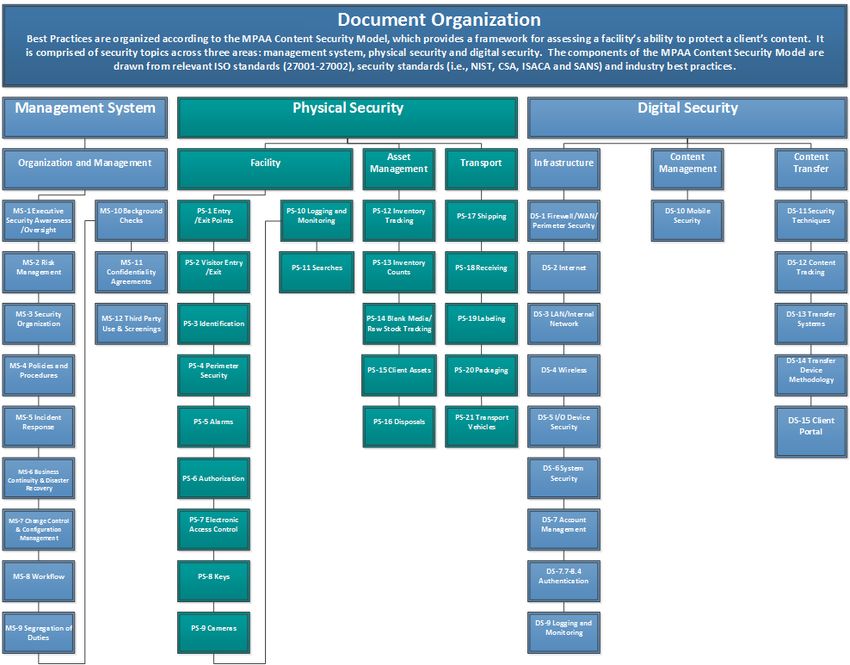
Best practices are presented for each security topic listed in the MPAA Content Security Model using the following format:
MANAGEMENT SYSTEM PHYSICAL SECURITY DIGITAL SECURITY
ASSET CONTENT CONTENT
ORGANIZATION AND MANAGEMENT FACILITY TRANSPORT INFRASTRUCTURE
MANAGEMENT MANAGEMENT TRANSFER
The chart at the top of every page highlights the security area being addressed
within the overall MPAA Content Security Model.
No. Security Topic Best Practice Implementation Guidance
PS-8.0 Keys Limit the distribution of master keys to authorized Maintain a list of company personnel who are allowed to
personnel only (e.g., owner, facilities management) check out master keys
Update the list regularly to remove any company personnel
who no longer require access to master keys
PS-8.1 Implement a check-in/check-out process to track and Maintain records to track the following information:
monitor the distribution of master keys Company personnel in possession of each master key
Time of check-out/check-in
Reason for check-out
P
No. Security Topic Best Practice Implementation Guidance Glossary
Each best practice is Each capability area is Best practices are Additional considerations, potential All terms that are
assigned a reference comprised of one of more outlined for each implementation steps and included in the
number in the form of XX- “Security Topics.” Each Security Topic. examples are provided to help glossary are
Y.Z. XX for the general Security Topic is addressed organizations implement the best highlighted in bold
area, Y for the Security with one or more best practices. and defined in
Topic, and Z for the practices. Appendix A.
specific control.
MPAA Best Practices - Common Guidelines Page 6MPAA Global Content Security Program May 31, 2019
MANAGEMENT SYSTEM PHYSICAL SECURITY DIGITAL SECURITY
ASSET CONTENT CONTENT
ORGANIZATION AND MANAGEMENT FACILITY TRANSPORT INFRASTRUCTURE
MANAGEMENT MANAGEMENT TRANSFER
V. B EST P RACTICE C OMMON G UIDELINES
No. Security Topic Best Practice Implementation Guidance
MS-1.0 Executive Security Establish an information security management system Reference established information and content security
Awareness/ that implements a control framework for information frameworks e.g. MPAA Best Practices, ISO27001’s, NIST
Oversight security which is approved by the business owner(s) / 800-53, SANS, CoBIT, etc.
senior management. Establish an independent team for information security.
Persons responsible for information security should not be
working on content.
MS-1.1 Executive Security Review content / information security management Consider adjustments to policies and procedures from the
Awareness/ policies and processes at least annually. Policies must be following changes:
Oversight approved by senior management.
Organization’s business, services offered, etc.
Technology infrastructure
Client requirements
Regulations or laws
Risk landscape
MS-1.2 Executive Security Train and engage executive management/owner(s) on the Trainings and attendees should be documented in training
Awareness/ business' responsibilities to protect content at least logs
Oversight annually.
MS-1.3 Executive Security Create an information security management group to Members of the information security management group
Awareness/ establish and review information security management should also attend security awareness training (see MS-
Oversight policies. 1.2)
MS-2.0 Risk Management Develop a formal, documented security risk assessment Define a clear scope for the security risk assessment and
process focused on content workflows and sensitive modify as necessary
assets in order to identify and prioritize risks of content Incorporate a systematic approach that uses likelihood of
theft and leakage that are relevant to the facility. risk occurrence, impact to business objectives/content
protection and asset classification for assigning priority
Refer to MS-8.0 for best practices regarding documented
workflows
MPAA Best Practices - Common Guidelines Page 7MPAA Global Content Security Program May 31, 2019
MANAGEMENT SYSTEM PHYSICAL SECURITY DIGITAL SECURITY
ASSET CONTENT CONTENT
ORGANIZATION AND MANAGEMENT FACILITY TRANSPORT INFRASTRUCTURE
MANAGEMENT MANAGEMENT TRANSFER
No. Security Topic Best Practice Implementation Guidance
MS-2.1 Risk Management Conduct an internal security risk assessment annually and Conduct meetings with management and key stakeholders
upon key workflow changes—based on, at a minimum, at least quarterly to identify and document content theft
the MPAA Best Practice Common Guidelines and the and leakage risks
applicable Supplemental Guidelines—and document and Conduct external and internal network vulnerability scans
act upon identified risks. and external penetration testing, per DS-1.8 and DS-1.9
Identify key risks that reflect where the facility believes
content losses may occur
Implement and document controls to mitigate or reduce
identified risks or where risks are being accepted with
rationale (e.g. budget constraints, resource constraints
etc.)
Monitor and assess the effectiveness of remediation efforts
and implemented controls at least quarterly
Document and budget for security initiatives, upgrades,
and maintenance
Indicate rationale for initiative/project prioritization (risk-
based, cost-based, schedule based, etc.)
MS-3.0 Security Identify security key point(s) of contact and formally define Prepare organization charts and job descriptions to
Organization roles and responsibilities for content and asset protection. facilitate the designation of roles and responsibilities as it
pertains to content security
Provide online or live training to prepare security personnel
on policies and procedures that are relevant to their job
function
MPAA Best Practices - Common Guidelines Page 8MPAA Global Content Security Program May 31, 2019
MANAGEMENT SYSTEM PHYSICAL SECURITY DIGITAL SECURITY
ASSET CONTENT CONTENT
ORGANIZATION AND MANAGEMENT FACILITY TRANSPORT INFRASTRUCTURE
MANAGEMENT MANAGEMENT TRANSFER
No. Security Topic Best Practice Implementation Guidance
MS-4.0 Policies and Establish policies and procedures regarding asset and Consider facility/business-specific workflows in
Procedures content security; policies should address the following development of policies and procedures.
topics, at a minimum: Require executive management to sign off on all policies
and procedures before they are published and released
Acceptable use (e.g., social media, Internet, phone, Communicate disciplinary measures in new hire orientation
personal devices, mobile devices, etc.) training
Asset and content classification and handling policies Please see Appendix D for a list of policies and procedures
Business continuity (backup, retention and restoration) to consider
Content transfer processes and systems
Change control and configuration management policy
Confidentiality policy
Digital recording devices (e.g., smart phones, digital
cameras, camcorders)
Exception policy (e.g., process to document policy
deviations)
Incident response policy
Mobile device policy
Network, internet and wireless policies
Password controls (e.g., password minimum length,
screensavers)
Security policy
Visitor policy
Disciplinary/Sanction policy
Internal anonymous method to report piracy or
mishandling of content (e.g., telephone hotline or email
address)
MPAA Best Practices - Common Guidelines Page 9MPAA Global Content Security Program May 31, 2019
MANAGEMENT SYSTEM PHYSICAL SECURITY DIGITAL SECURITY
ASSET CONTENT CONTENT
ORGANIZATION AND MANAGEMENT FACILITY TRANSPORT INFRASTRUCTURE
MANAGEMENT MANAGEMENT TRANSFER
No. Security Topic Best Practice Implementation Guidance
MS-4.0.1 Policies and Establish dedicated policies governing the use of social Social media policies should state that the following not be
Procedures media by company personnel. shared on any social media platform (e.g. Facebook,
Twitter, IMDB, YouTube), forum, blog post, or website:
Personal experiences, opinions and information related to
pre-release content and related project activities
References to clients without the express written consent
from the client
Posting, referencing or sharing of pre-release security or
working titles
Use separate dedicated email accounts for marketing
purposes when accessing social media platforms (e.g.
Facebook, Twitter, IMDB, YouTube), forum, blog post, or
website.
MS-4.0.2 Policies and Establish policies governing the using of mobile Address the following in mobile computing device policies:
Procedures computing devices. o BYOD if allowed: define the rights of the company and
the rights of the owner, allowable devices / models
o Acceptable use: corporate and personal
o Restrictions on areas of the facility where mobile
computing devices with recording capabilities are not
allowed
o Procedures for lost or stolen devices
o Security measures (see Section DS-10)
MS-4.1 Policies and Review and update security policies and procedures at Log/track versions & revisions
Procedures least annually. Incorporate the following factors into the annual
managerial review of security policies and procedures:
Recent security trends
Feedback from company personnel
New threats and vulnerabilities
Recommendations from regulatory agencies (i.e., FTC,
etc.)
Previous security incidents
MPAA Best Practices - Common Guidelines Page 10MPAA Global Content Security Program May 31, 2019
MANAGEMENT SYSTEM PHYSICAL SECURITY DIGITAL SECURITY
ASSET CONTENT CONTENT
ORGANIZATION AND MANAGEMENT FACILITY TRANSPORT INFRASTRUCTURE
MANAGEMENT MANAGEMENT TRANSFER
No. Security Topic Best Practice Implementation Guidance
MS-4.2 Policies and Communicate and require sign-off from all company Provide the company handbook containing all general
Procedures personnel (e.g., employees, temporary workers, interns) policies and procedures upon hire of new company
and third party workers (e.g., contractors, freelancers, personnel and third party workers
temp agencies) for all current policies, procedures, and/or Notify company personnel and third party workers of
client requirements. updates to security policies, procedures and client
requirements
Management must retain sign-off of current policies,
procedures, and client requirements for all company
personnel and third party workers
MS-4.3 Policies and Develop and regularly update an awareness program Communicate security awareness messages during
Procedures about security policies and procedures and train management/staff meetings
company personnel and third party workers upon hire Implement procedures to track which company personnel
and annually thereafter on those security policies and have completed their annual security training (e.g.,
procedures, addressing the following areas at a minimum: database repository, attendee logs, certificates of
completion)
IT security policies and procedures Provide online or in-person training upon hire to educate
Content/asset security and handling in general and company personnel and third party workers about
client-specific requirements common incidents, corresponding risks, and their
Social media policies responsibilities for reporting detected incidents
Social engineering prevention Distribute security awareness materials such as posters,
Security incident reporting and escalation emails, and periodic newsletters to encourage security
Disciplinary policy awareness
Encryption and key management for all individuals who Develop tailored messages and training based on job
handle encrypted content responsibilities and interaction with sensitive content (e.g.,
Asset disposal and destruction processes IT personnel, production) to mitigate piracy issues
Conduct social engineering education, training, and testing
(see NIST SP 800-115 and SANS Methods for
Understanding and Reducing Social Engineering Attacks)
Consider recording training sessions and making
recordings available for reference
MPAA Best Practices - Common Guidelines Page 11MPAA Global Content Security Program May 31, 2019
MANAGEMENT SYSTEM PHYSICAL SECURITY DIGITAL SECURITY
ASSET CONTENT CONTENT
ORGANIZATION AND MANAGEMENT FACILITY TRANSPORT INFRASTRUCTURE
MANAGEMENT MANAGEMENT TRANSFER
No. Security Topic Best Practice Implementation Guidance
MS-5.0 Incident Response Establish a formal incident response plan that describes Consider including the following sections in the incident
actions to be taken when a security incident is detected response plan:
and reported. Definition of incident
Notification of security team
Escalation to management
Analysis of impact and priority
Containment of impact
Eradication and recovery
Key contact information, including client studio contact
information
Notification of affected business partners and clients
Notification of law enforcement
Report of details of incident
Reference NIST SP800-61 Revision 2 on Computer
Security Incident Handling
MS-5.1 Incident Response Identify the security incident response team who will be Include representatives from different business functions in
responsible for detecting, analyzing, and remediating order to address security incidents of all types; consider
security incidents. the following:
Management
Physical security
Information security
Network team
Human resources
Legal
Provide training so that members of the incident
response team understand their roles and responsibilities
in handling incidents
MPAA Best Practices - Common Guidelines Page 12MPAA Global Content Security Program May 31, 2019
MANAGEMENT SYSTEM PHYSICAL SECURITY DIGITAL SECURITY
ASSET CONTENT CONTENT
ORGANIZATION AND MANAGEMENT FACILITY TRANSPORT INFRASTRUCTURE
MANAGEMENT MANAGEMENT TRANSFER
No. Security Topic Best Practice Implementation Guidance
MS-5.2 Incident Response Establish a security incident reporting process for Consider implementing a group email address for reporting
individuals to report detected incidents to the security incidents that would inform all members of the incident
incident response team. response team
Communicate and document incidents promptly to clients
whose content may have been leaked, stolen or otherwise
compromised (e.g., missing client assets), and conduct a
post-mortem meeting with management and client.
Implement a security breach notification process, including
the use of breach notification forms
Involve the Legal team to determine the correct actions to
take for reporting content loss to affected clients
Discuss lessons learned from the incident and identify
improvements to the incident response plan and process
Perform root cause analysis to identify security
vulnerabilities that allowed the incident to occur
Identify and implement remediating controls to prevent
similar incidents from reoccurring
Communicate the results of the post-mortem, including the
corrective action plan, to affected clients
MS-5.2.1 Incident Response Anonymous reporting should be made available to
organizations with 50 or more employees and third party
personnel for reporting of content protection and piracy
concerns. The anonymous reporting tool consisting of an
internal, anonymous telephone number, email address,
and / or website should be published and also provided
during security awareness training.
MS-5.3 Incident Response (Removed and combined with MS-5.2)
MPAA Best Practices - Common Guidelines Page 13MPAA Global Content Security Program May 31, 2019
MANAGEMENT SYSTEM PHYSICAL SECURITY DIGITAL SECURITY
ASSET CONTENT CONTENT
ORGANIZATION AND MANAGEMENT FACILITY TRANSPORT INFRASTRUCTURE
MANAGEMENT MANAGEMENT TRANSFER
No. Security Topic Best Practice Implementation Guidance
MS-6.0 Business Establish a formal plan that describes actions to be taken Consider including the following sections in the business
Continuity & to ensure business continuity. continuity plan:
Disaster Recovery Threats to critical assets and content, including loss of
power and telecommunications, systems failure, natural
disasters etc.
Detailed information system, content and metadata
backup procedures and information system
documentation, including configuration of critical WAN
and LAN / Internal Network devices
Encryption of backups (AES-256)
Backup power supply to support at least 15 minutes for the
CCTV system, alarm and critical information systems,
including software to perform a safe shutdown of critical
systems
Consider use of an off-site backup location
Notification of security team
Escalation to management
Analysis of impact and priority
Containment of impact
Priorities for recovery and detailed recovery procedures,
including manual workarounds and configuration details
of restored systems
Key contact information
Notification of affected business partners and clients
Testing of business continuity and disaster recovery
processes at least annually
MS-6.1 Business Identify the business continuity team who will be Include defined roles and responsibilities
Continuity & responsible for detecting, analyzing and remediating Provide training so that members of the business
Disaster Recovery continuity incidents. continuity team understand their roles and responsibilities
MPAA Best Practices - Common Guidelines Page 14MPAA Global Content Security Program May 31, 2019
MANAGEMENT SYSTEM PHYSICAL SECURITY DIGITAL SECURITY
ASSET CONTENT CONTENT
ORGANIZATION AND MANAGEMENT FACILITY TRANSPORT INFRASTRUCTURE
MANAGEMENT MANAGEMENT TRANSFER
No. Security Topic Best Practice Implementation Guidance
MS-6.2 Business Establish a data backup policy that addresses the Align backup policy with the business continuity plan
Continuity & following: Implement physical and environmental security controls
Disaster Recovery (per MPAA guidelines) for offsite storage to prevent
Systems and data unauthorized access or stolen / lost content
Retention and protection requirements Encrypt backups using AES with at least 256 bit key before
Backup frequency storing content offsite in remote locations or on the cloud
Encryption Notify clients if the cloud backups will be used
Recovery time objectives (RTO) Frequency of backups and recovery testing must be based
Recovery point objectives (RPO) on RTO and RPO that meets client requirements. The
Restoration testing following is recommended:
Secure offsite storage Daily incremental and weekly backups
RTO of 48 hours or less for client content
Quarterly data restoration testing
Review process should be in place to ensure that only
authorized administrators are able to access backup
location
MPAA Best Practices - Common Guidelines Page 15MPAA Global Content Security Program May 31, 2019
MANAGEMENT SYSTEM PHYSICAL SECURITY DIGITAL SECURITY
ASSET CONTENT CONTENT
ORGANIZATION AND MANAGEMENT FACILITY TRANSPORT INFRASTRUCTURE
MANAGEMENT MANAGEMENT TRANSFER
No. Security Topic Best Practice Implementation Guidance
MS-7.0 Change Control & Establish policies and procedures to ensure new data, Include documentation that describes installation,
Configuration applications, network, and systems components have configuration and use of devices, services and features,
Management been pre-approved by business leadership. and update documentation as needed
Document known issues and procedures for dealing with
them
Include procedures for reporting bugs and security
vulnerabilities
Restrict and monitor the installation of hardware or
software
Manage risks associated with changes to data,
applications, network infrastructure and systems
o Review security controls and integrity procedures to
ensure they will not be compromised by changes
o Ensure that appropriate backup or roll-back procedures
are documented and tested
o Identify all affected computer software, data files,
database entities, and infrastructure
o Minimize business disruption when implementing
change
Document and retain all change requests, testing results
and management approvals
MS-8.0 Workflow Document workflows tracking content and authorization Use swim lane diagrams to document workflows
checkpoints. Include the following processes for both Include asset processing and handling information where
physical and digital content: applicable
Evaluate each touch-point for risks to content
Delivery (receipt/return) Implement controls around authorization checkpoints
Ingest Identify related application controls
Movement Update the workflow when there are changes to the
Storage process, and review the workflow process at least
Removal/destruction annually to identify changes.
Follow the content workflow and implemented controls for
each process in order to determine areas of vulnerability
MS-8.1 Workflow (Removed and combined with MS-8.0)
MPAA Best Practices - Common Guidelines Page 16MPAA Global Content Security Program May 31, 2019
MANAGEMENT SYSTEM PHYSICAL SECURITY DIGITAL SECURITY
ASSET CONTENT CONTENT
ORGANIZATION AND MANAGEMENT FACILITY TRANSPORT INFRASTRUCTURE
MANAGEMENT MANAGEMENT TRANSFER
No. Security Topic Best Practice Implementation Guidance
MS-9.0 Segregation of Segregate duties within the content workflow. Implement Document roles and responsibilities to eliminate an overlap
Duties and document compensating controls where segregation of role-based job functions such as:
is not practical. Vault and server/machine room personnel
Shipping and receiving personnel
Asset movement within facility (e.g., runners) from vault
and content / production area
Digital asset folder access (e.g., data wrangler sets up
access for producer)
Content transfer personnel from production personnel
Segregate duties using manual controls (e.g., approval
from producer before working on content) or automated
controls in the work ordering system (e.g., automated
approval for each stage of the workflow)
Implement compensating controls when segregation is
unattainable, such as:
Monitor the activity of company personnel and/or third
party workers
Retain and review audit logs
Implement physical segregation
Enforce management supervision
MS-10.0 Background Perform background screening checks on all company Carry out background checks in accordance with relevant
Checks personnel, third party workers, and their relevant laws, regulations, union bylaws, and cultural
subcontractors. considerations
Screen potential company personnel and third party
workers using background screening checks that are
proportional to the business requirements, the sensitivity of
content that will be accessed, and possible risks of content
theft or leakage
Perform identity, academic, and professional qualification
checks where necessary
Where background checks are not allowed by law,
document as an exception and use reference checks
MPAA Best Practices - Common Guidelines Page 17MPAA Global Content Security Program May 31, 2019
MANAGEMENT SYSTEM PHYSICAL SECURITY DIGITAL SECURITY
ASSET CONTENT CONTENT
ORGANIZATION AND MANAGEMENT FACILITY TRANSPORT INFRASTRUCTURE
MANAGEMENT MANAGEMENT TRANSFER
No. Security Topic Best Practice Implementation Guidance
MS-11.0 Confidentiality Require all company personnel to sign a confidentiality Include non-disclosure guidance pertaining to
Agreements agreement (e.g., non-disclosure) upon hire and annually confidentiality after termination of their employment,
thereafter, that includes requirements for handling and contract, or agreement
protecting content. Explain the importance of confidentiality / NDA in non-legal
terms, as necessary
Ensure all relevant information on equipment used by
company personnel to handle business-related sensitive
content is transferred to the organization and securely
removed from the equipment
Management must retain signed confidentiality
agreements for all company personnel
MS-11.1 Confidentiality Require all company personnel to return all content and Utilize an off boarding process for terminated employees to
Agreements client information in their possession upon termination of ensure the following:
their employment or contract. o all content and client information is returned
o company equipment and property is returned
o keys, access cards, badges are returned
o reasons for termination are documented
o user accounts / access rights on all systems are
removed or disabled
MS-12.0 Third Party Use Require all third party workers (e.g., freelancers) who Include non-disclosure guidance in policies pertaining to
and Screening handle content to sign confidentiality agreements (e.g., confidentiality during and after their employment, contract,
non-disclosure) upon engagement. or agreement
Explain the importance of confidentiality / NDA in non-legal
terms, as necessary
Ensure all relevant information on equipment used by third
party workers to handle business-related sensitive
content is transferred to the organization and securely
removed from the equipment
Management must retain signed confidentiality
agreements for all third party workers
Include requirements for handling and protecting content
MS-12.1 Third Party Use Require all third party workers to return all content and
and Screening client information in their possession upon termination of
their contract.
MPAA Best Practices - Common Guidelines Page 18MPAA Global Content Security Program May 31, 2019
MANAGEMENT SYSTEM PHYSICAL SECURITY DIGITAL SECURITY
ASSET CONTENT CONTENT
ORGANIZATION AND MANAGEMENT FACILITY TRANSPORT INFRASTRUCTURE
MANAGEMENT MANAGEMENT TRANSFER
No. Security Topic Best Practice Implementation Guidance
MS-12.2 Third Party Use Include security requirements in third party contracts. Service Level Agreements (SLAs) and contracts with the
and Screening third party vendors should the following provisions:
Require third party workers to comply with the security
requirements per MPAA Best Practices
A right to audit clause for activities that involve sensitive
content
Notification to clients upon suspected or actual security
breaches
Content ownership, return, and destruction
Termination clause
Implement a process to monitor for compliance with
security requirements
Require annual update of information when contracts are
renewed
MS-12.3 Third Party Use Implement a process to reclaim content when terminating Ensure all content on third party equipment is transferred
and Screening relationships with third party service providers. to the organization and securely erased from the
equipment
MS-12.4 Third Party Use Require third party workers to be bonded and insured Require third party workers to show proof of insurance
and Screening where appropriate (e.g., courier service). and keep a record of their insurance provider and policy
number
Require annual update of information when contracts are
renewed
MS-12.5 Third Party Use Restrict third party access to content / production areas Ensure that third party workers who do not handle
and Screening unless required for their job function. content (e.g., cleaning crews, HVAC maintenance, etc.)
are not given any access to areas housing or exhibiting
content
Escort third party workers who do not handle content
when access to restricted areas (e.g., vault) is required
MPAA Best Practices - Common Guidelines Page 19MPAA Global Content Security Program May 31, 2019
MANAGEMENT SYSTEM PHYSICAL SECURITY DIGITAL SECURITY
ASSET CONTENT CONTENT
ORGANIZATION AND MANAGEMENT FACILITY TRANSPORT INFRASTRUCTURE
MANAGEMENT MANAGEMENT TRANSFER
No. Security Topic Best Practice Implementation Guidance
MS- Third Party Use Control access of third party IT service providers to the Third-party VPN remote access should only be used in
12.5.1 and Screening computing environment. cases where no other solution is available. Client approval
is required in writing.
All third-party VPN remote access should have a finite end
date and be reviewed for activity every three months at a
minimum
Third-party VPN remote access should not provide access
to network infrastructure that includes
networks or systems used to store, transfer, or manipulate
content
All third-party access sessions should be monitored by an
employee and logged
Log and monitor IT service providers access to systems,
networks, and infrastructure
Third-party systems used for remote access should be
subjected to an inspection, by an employee, on a
periodic and ongoing basis
IT service provider remote access must utilize multi-factor
authentication
Disable IT service provider remote access when not
needed
Change remote access passwords for every session
Follow change control processes for elevating user access
rights
Consider real-time notification when IT service providers
access systems
MPAA Best Practices - Common Guidelines Page 20MPAA Global Content Security Program May 31, 2019
MANAGEMENT SYSTEM PHYSICAL SECURITY DIGITAL SECURITY
ASSET CONTENT CONTENT
ORGANIZATION AND MANAGEMENT FACILITY TRANSPORT INFRASTRUCTURE
MANAGEMENT MANAGEMENT TRANSFER
No. Security Topic Best Practice Implementation Guidance
MS-12.6 Third Party Use Notify clients if third parties are used to handle or store Work offloaded to another company must be reported to
and Screening content, or work is offloaded to another company. Perform the content owners and requires written client sign-off /
due diligence of third parties. approval
Production servers and systems hosted on third-party
Third parties also include providers of IT services. Obtain networks must be vetted by content owners prior to
client approval for use of third parties who handle, store, deployment.
or have access to content. Cloud-Hosted systems and servers are strictly prohibited
without advanced written consent of content owners.
Workflows using cloud hosted servers should be approved
by content owners.
Perform due diligence and ongoing monitoring of third
parties to verify the following:
o Security controls meet MPAA Best Practices
o Adequate level of insurance coverage (refer to MS-
12.4)
o Viable financial state
Request that third parties obtain an independent security
assessment for submission to the member studios
MPAA Best Practices - Common Guidelines Page 21MPAA Global Content Security Program May 31, 2019
MANAGEMENT SYSTEM PHYSICAL SECURITY DIGITAL SECURITY
ASSET CONTENT CONTENT
ORGANIZATION AND MANAGEMENT FACILITY TRANSPORT INFRASTRUCTURE
MANAGEMENT MANAGEMENT TRANSFER
No. Security Topic Best Practice Implementation Guidance
PS-1.0 Entry/Exit Points Secure all entry/exit points of the facility at all times, Permit entry / exit points to be unlocked during business
including loading dock doors and windows. hours if the reception area is segregated from the rest of
the facility with access-controlled doors
PS-1.1 Entry/Exit Points Control access to areas where content is handled by Allow access to content / production areas on a need-to-
segregating the content area from other facility areas know basis
(e.g., administrative offices, waiting rooms, loading docks, Require rooms used for screening purposes to be access-
courier pickup and drop-off areas, replication and controlled (e.g., projection booths)
mastering). Limit access into rooms where media players are present
(e.g., Blu-ray, DVD)
Enforce a segregation of duties model which restricts any
single person from having access to both the replication
and mastering rooms
PS-1.2 Entry/Exit Points Control access where there are collocated businesses in
a facility, which includes but is not limited to the following:
Segregating work areas
Implementing access-controlled entrances and exits
that can be segmented per business unit
Logging and monitoring of all entrances and exits within
facility
All tenants within the facility must be reported to client
prior to engagement
PS-2.0 Visitor Entry/Exit Maintain a detailed visitors’ log and include the following: Verify the identity of all visitors by requiring them to
present valid photo identification (e.g., driver's license or
Name government-issued ID)
Company Consider concealing the names of previous visitors
Time in/time out The facility should retain visitor logs for twelve months at a
Reason for visit minimum.
Person/people visited
Signature of visitor
Badge number assigned
MPAA Best Practices - Common Guidelines Page 22MPAA Global Content Security Program May 31, 2019
MANAGEMENT SYSTEM PHYSICAL SECURITY DIGITAL SECURITY
ASSET CONTENT CONTENT
ORGANIZATION AND MANAGEMENT FACILITY TRANSPORT INFRASTRUCTURE
MANAGEMENT MANAGEMENT TRANSFER
No. Security Topic Best Practice Implementation Guidance
PS-2.1 Visitor Entry/Exit Assign an identification badge or sticker which must be Make visitor badges easily distinguishable from company
visible at all times, to each visitor and collect badges upon personnel badges (e.g., color coded plastic badges)
exit. Consider a daily rotation for paper badges or sticker color
Consider using badges that change color upon expiration
Log badge assignments upon entry/exit
Visitor badges should be sequentially numbered and
tracked
Account for badges daily
Facilities that have less than 25 employees are not
required to have visitor badges
PS-2.2 Visitor Entry/Exit Do not provide visitors with key card access to content /
production areas.
PS-2.3 Visitor Entry/Exit Require visitors to be escorted by authorized employees
while on-site, or in content / production areas.
PS.2.3.1 Visitor Entry/Exit Visitors should be required to sign a nondisclosure
agreement (NDA) and sign a visitor log prior to entering a
facility.
PS-3.0 Identification Provide company personnel and long-term third party Issue photo identification badge to all company
workers (e.g., janitorial) with a photo identification personnel and long-term third party workers after a
badge that is required to be visible at all times. background check has been completed
Establish and implement a process for immediately
retrieving photo identification badge upon termination
Consider omitting location, company name, logo and other
specific information on the photo identification badge
Consider using the photo identification badge as the
access key card where possible
Require employees to immediately report lost or stolen
photo identification badges
Provide a 24/7 telephone number or website to report lost
or stolen photo identification badges
Train and encourage employees to challenge persons
without visible identification
MPAA Best Practices - Common Guidelines Page 23MPAA Global Content Security Program May 31, 2019
MANAGEMENT SYSTEM PHYSICAL SECURITY DIGITAL SECURITY
ASSET CONTENT CONTENT
ORGANIZATION AND MANAGEMENT FACILITY TRANSPORT INFRASTRUCTURE
MANAGEMENT MANAGEMENT TRANSFER
No. Security Topic Best Practice Implementation Guidance
PS-4.0 Perimeter Security Implement perimeter security controls that address risks Implement security controls based upon the location and
that the facility may be exposed to as identified by the layout of the facility, such as:
organization's risk assessment. Restricting perimeter access through the use of walls,
fences, and/or gates that, at a minimum, are secured
after hours; walls/fences should be 8 feet or higher
Securing and enclosing, as necessary, common
external areas such as smoking areas and open
balconies
Installing lighting with full coverage outside the facility to
decrease risk of theft or security violations
Sufficient external camera coverage around common
exterior areas (e.g., smoking areas), as well as parking
Being cognizant of the overuse of company signage
that could create targeting
Glass break sensors as necessary
Using alarms around the perimeter, as necessary
PS-4.1 Perimeter Security Place security guards at perimeter entrances and non- Note: Not all sites require security guards. This should be
emergency entry/exit points. determined based on risk, per MS-2.1
PS-4.2 Perimeter Security Implement a daily security patrol process with a Consider the following if applicable:
randomized schedule and document the patrol results in a Require security guards to patrol both interior and
log. exterior areas
Include a review of emergency exits, including
verification of seals
Use a guard tour patrol system to track patrolling (e.g.,
checkpoint) and verify locks
PS-4.3 Perimeter Security Lock perimeter gates at all times. Consider the following if applicable:
Implement an electronic arm, that is manned by security
personnel, to control vehicle access into the facility
Distribute parking permits to company personnel and third
party workers who have completed proper paperwork
Require visitor vehicles to present identification and ensure
that all visitors have been pre-authorized to enter the
premises
MPAA Best Practices - Common Guidelines Page 24MPAA Global Content Security Program May 31, 2019
MANAGEMENT SYSTEM PHYSICAL SECURITY DIGITAL SECURITY
ASSET CONTENT CONTENT
ORGANIZATION AND MANAGEMENT FACILITY TRANSPORT INFRASTRUCTURE
MANAGEMENT MANAGEMENT TRANSFER
No. Security Topic Best Practice Implementation Guidance
PS-5.0 Alarms Install a centralized, audible alarm system that covers all Place alarms at every entrance to alert security personnel
entry/exit points (including emergency exits), windows, upon unauthorized entry to the facility
loading docks, fire escapes, and restricted areas (e.g., Enable the alarm when facility is unsupervised
vault, server/machine room, etc.).
PS-5.1 Alarms Install and effectively position motion detectors in Ensure the alarm system covers storage areas and vaults
restricted areas (e.g., vault, server/machine room) and (e.g., through motion sensors) after normal business
configure them to alert the appropriate security and other hours, as an added layer of security
personnel (e.g. project managers, producer, head of
editorial, incident response team, etc.).
PS-5.2 Alarms Install door prop alarms in restricted areas (e.g. vault, Configure access-controlled doors to trigger alarms and
server, machine rooms) to notify when sensitive entry/exit alert security personnel when doors have been propped
points are open for longer than a pre-determined period of open for an extended period of time
time (e.g., 60 seconds).
PS-5.3 Alarms Configure alarms to provide escalation notifications Establish and implement escalation procedures to be
directly to the personnel in charge of security and other followed if a timely response is not received from security
personnel (e.g., project managers, producer, head of personnel upon notification
editorial, incident response team, etc.). Consider implementing automatic law enforcement
notification upon breach
Implement procedures for notification on weekends and
after business hours
PS-5.4 Alarms Assign unique arm and disarm codes to each person that Use unique alarm codes to track individuals responsible for
requires access to the alarm system and restrict access to arming or disarming the alarm
all other personnel. Update assigned alarm codes at an interval approved by
management in order to reduce risk involved with sharing
and losing codes
Issue alarm codes to personnel on a least privilege basis
Security personnel, contractors, vendors, cleaning crews,
and freelance staff should not have administrator rights to
the alarm system
Alarm notifications should be sent to appropriate company
personnel according to an escalation tree.
MPAA Best Practices - Common Guidelines Page 25MPAA Global Content Security Program May 31, 2019
MANAGEMENT SYSTEM PHYSICAL SECURITY DIGITAL SECURITY
ASSET CONTENT CONTENT
ORGANIZATION AND MANAGEMENT FACILITY TRANSPORT INFRASTRUCTURE
MANAGEMENT MANAGEMENT TRANSFER
No. Security Topic Best Practice Implementation Guidance
PS-5.5 Alarms Review the list of users who can arm and disarm alarm Remove users who have left the company or have
systems quarterly, or upon change of personnel. changed job roles
Deactivate the alarm codes that were assigned to removed
users
PS-5.6 Alarms Test the alarm system quarterly. Simulate a breach in physical security and ensure the
following:
Alarm system detects the breach
Security personnel are alerted
Security personnel respond in a timely manner according
to procedures
PS-5.7 Alarms Implement fire safety measures so that in the event of a
power outage, fire doors fail open, and all others fail shut
to prevent unauthorized access.
PS-6.0 Authorization Document and implement a process to manage facility Designate an individual to authorize facility access
access and keep records of any changes to access Notify appropriate personnel (e.g., facilities management)
rights. of changes in employee status
Create a physical or electronic form that must be filled out
by a supervisor to request facility access for company
personnel and/or third party workers
Assign responsibility for investigating and approving
access requests
PS-6.1 Authorization Restrict access to production systems to authorized
personnel only.
PS-6.2 Authorization Review access to restricted areas (e.g., vault, Validate the status of company personnel and third party
server/machine room) quarterly and when the roles or workers
employment status of company personnel and/or third Remove access rights from any terminated users
party workers are changed. Verify that access remains appropriate for the users’
associated job function
MPAA Best Practices - Common Guidelines Page 26MPAA Global Content Security Program May 31, 2019
MANAGEMENT SYSTEM PHYSICAL SECURITY DIGITAL SECURITY
ASSET CONTENT CONTENT
ORGANIZATION AND MANAGEMENT FACILITY TRANSPORT INFRASTRUCTURE
MANAGEMENT MANAGEMENT TRANSFER
No. Security Topic Best Practice Implementation Guidance
PS-7.0 Electronic Access Implement electronic access throughout the facility to Assign electronic access to specific facility areas based on
Control cover all entry/exit points and all areas where content is job function and responsibilities
stored, transmitted, or processed. Update electronic access accordingly when roles change
or upon termination of company personnel and third party
workers
Keep a log that maps electronic access device number to
company personnel
See Logging and Monitoring PS-10.0
Review the times when electronic access is not required
for common areas (e.g., public elevators)
PS-7.1 Electronic Access Restrict electronic access system administration to Restrict electronic system administration to designated
Control appropriate personnel. personnel and do not allow individuals who have access to
production content to perform administrative electronic
access tasks
Assign an independent team to administer and manage
electronic access
PS-7.2 Electronic Access Store card stock and electronic access devices (e.g., Limit access to the locked cabinet to the keycard /
Control keycards, key fobs) in a locked cabinet and ensure electronic access device system administration team
electronic access devices remain disabled prior to being Require sign-out for inventory removal
assigned to personnel. Store unassigned electronic
access devices (e.g., keycards, key fobs) in a locked
cabinet and ensure these remain disabled prior to being
assigned to personnel.
PS-7.3 Electronic Access Disable lost electronic access devices (e.g., keycards, Educate company personnel and third party workers to
Control key fobs) in the system before issuing a new electronic report lost electronic access devices immediately to
access device. prevent unauthorized access into the facility
Require identification before issuing replacement
electronic access devices
PS-7.4 Electronic Access Issue third party access electronic access devices with Ensure that third party electronic access devices are
Control a set expiration date (e.g. 90 days) based on an approved easily distinguishable from company personnel electronic
timeframe. access devices
Ensure that expiration date is easily identifiable on the
electronic access devices
Assign third party electronic access devices on a need-to-
know basis
MPAA Best Practices - Common Guidelines Page 27MPAA Global Content Security Program May 31, 2019
MANAGEMENT SYSTEM PHYSICAL SECURITY DIGITAL SECURITY
ASSET CONTENT CONTENT
ORGANIZATION AND MANAGEMENT FACILITY TRANSPORT INFRASTRUCTURE
MANAGEMENT MANAGEMENT TRANSFER
No. Security Topic Best Practice Implementation Guidance
PS-8.0 Keys Limit the distribution of master keys and / or keys to Maintain a list of company personnel who are allowed to
restricted areas to authorized personnel only (e.g., owner, check out master keys
facilities management). Update the list regularly to remove any company
personnel who no longer require access to master keys
PS-8.1 Keys Implement a check-in/check-out process to track and Maintain records to track the following information:
monitor the distribution of master keys and / or keys to Company personnel in possession of each master key
restricted areas. Time of check-out/check-in
Reason for check-out
Require master keys to be returned within a set time
period and investigate the location of keys that have not
been returned on time
PS-8.2 Keys Use keys that can only be copied by a specific locksmith Use high-security keys (cylinders) that offer a greater
for exterior entry/exit points. degree of resistance to any two or more of the following:
Picking
Impressioning
Key duplication
Drilling
Other forms of forcible entry
PS-8.3 Keys Inventory master keys and keys to restricted areas, Identify, investigate, and address any missing keys
including facility entry/exit points, quarterly. (lost/stolen)
Review logs to determine who last checked out a key that
cannot be accounted for
Change the locks when missing master keys or keys to
restricted areas cannot be accounted for
PS-8.4 Keys Obtain all keys from terminated employees/third-parties or
those who no longer need the access.
PS-8.5 Keys Implement electronic access control or rekey entire facility
when master or sub-master keys are lost or missing.
MPAA Best Practices - Common Guidelines Page 28You can also read


