Big Data Systems Winter Semester 2019 / 2020 Database Systems Recap - Prof. Tilmann Rabl Data Engineering Systems Hasso-Plattner-Institut
←
→
Page content transcription
If your browser does not render page correctly, please read the page content below
Big Data Systems                     Prof. Tilmann Rabl
Winter Semester 2019 / 2020   Data Engineering Systems
Database Systems Recap
                                 Hasso-Plattner-Institut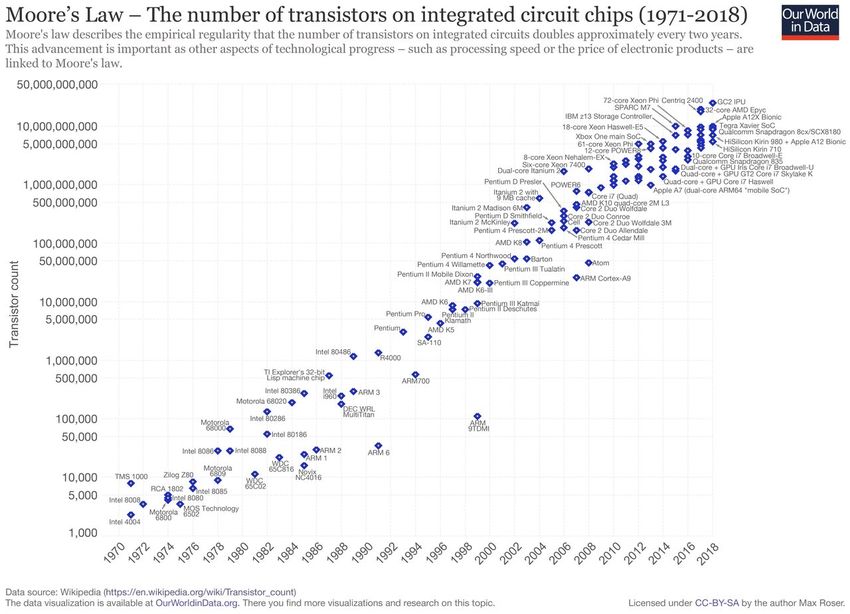
Announcements

■   Tonight 5pm:
    Maximilian Jenders (GetYourGuide)
    Recommending Tourist Activities - Data Science Challenges And The Needs for Data
    Pipelines

■   Access to Moodle:
    □   Non-HPI students, who do not have an account yet: write me an email
    □   Learn how to write professional emails: https://medium.com/@lportwoodstacer/how-
        to-email-your-professor-without-being-annoying-af-cf64ae0e4087

■   Quiz will be online soon!

                        (c) 2019 - Data Engineering Systems Group                      Chart 2
Tentative Timeline

Date           Tuesday                                 Thursday
15./17.10.     Introduction                            No class
22./24.10.     DBS Recap                               DBS Recap II
29.10/31.10.   20 Years HPI                            Holiday
5./7.11.       Big Data Stack                          Solution Quiz I
12./14.11.     Benchmarking & Measurement Cloud/Container
19./21.11.     Facebook Chief Scientist                File Systems (starts 20 min late)
26. /28.11.    Map/Reduce                              Solution Quiz II
3./5.12.       KV-Stores                               Consistency
10./12.12.     Stream Processing                       Windows
17./19.12.     Tables and State                        Solution Quiz III

                   (c) 2019 - Data Engineering Systems Group                           Chart 3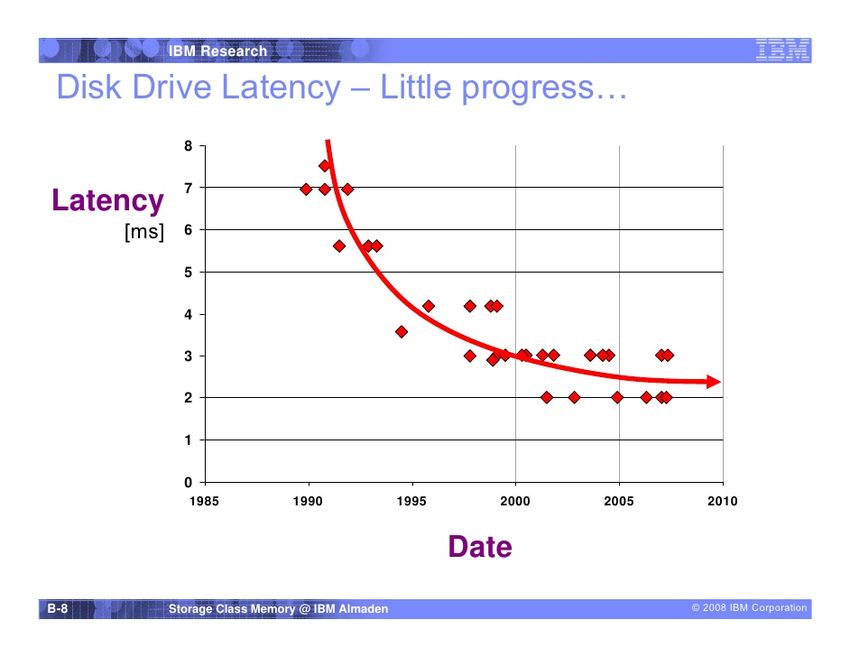
Tentative Timeline cont‘d

Date        Tuesday                                   Thursday
7./9.1.     Stream Optimizations                      Solution Quiz IV
14./16.1.   ML Systems                                ML Exec Strategies
21./23.1.   ML Lifecycle                              Graph Processing
28./30.1.   Graph Processing II                       Solution Quiz V
4./6.2.     Q&A                                       Final Exam

                  (c) 2019 - Data Engineering Systems Group                Chart 4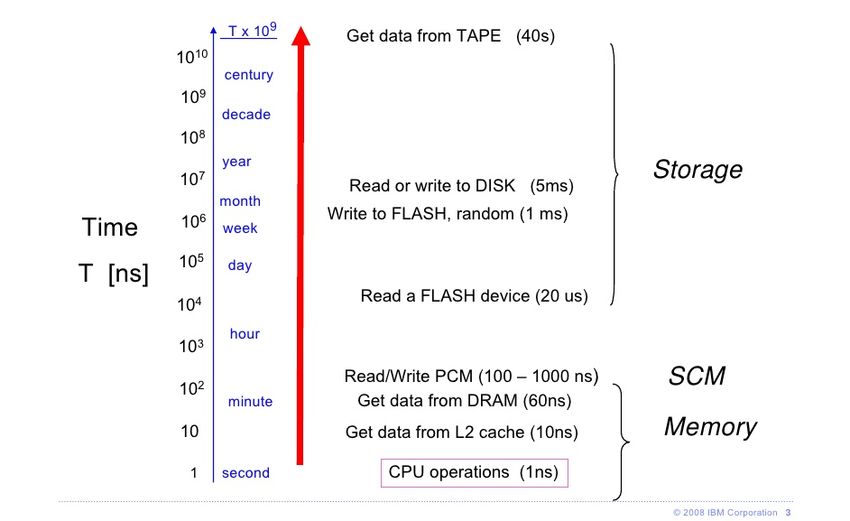
This Lecture

1. Review of Relational Database Management
   ■ Relational Model
   ■ Operators
   ■ Algebra
   ■ SQL
2. Review of Relational Database Systems
   ■ Storage and Data Representation
   ■ Hashing & B-Trees
   ■ Query Execution
   ■ Query Compilation / Optimization

                   (c) 2019 - Data Engineering Systems Group   Chart 5
Relational Databases
■ Relational database management system (RDBMS)
□ Server based software
□ One RDBMS – many relational databases (RDBs)
□ Responsibilities of these servers
– Management of main storage and secondary storage
– Transaction management
– Query processing and optimization
– Backup and recovery
– Data consistency
– User management
□ Systems
– Oracle, DB2 (Informix), Sybase, NCR Teradata, SQL Server
– PostgreSQL, InterBase, Berkeley DB, db4o, MySQL, Ingres, SAP DB, MonetDB, ...
(c) 2019 - Data Engineering Systems Group Chart 6Client-Server
JAVA (JDBC) DBMS1- Secondary
JAVA (JDBC) Server
JAVA (JDBC) storage
Listener
Native (SQL*Plus,
Native (SQL*Plus,
OCI)
Native (SQL*Plus, DBMS2- Secondary
OCI)
OCI) Server storage
Consistency
Parallelization
Other database Recovery
Load Balancing
Authentication
Authorization
....
(c) 2019 - Data Engineering Systems Group Chart 7Three Levels of Data Representation
■ Conceptual level
Relational Model
□ Relations, Tuple (first part)
□ Values of attributes
■ Logical level
□ Files
□ Records
□ Fields RDBMS Internals
■ Physical level (second part)
□ Drives
□ Blocks
□ Cylinders and Sectors
(c) 2019 - Data Engineering Systems Group Chart 8Relational Data Model
■ Representation of all data
(e.g., Entity-Types and Relationship-Types of the ER-Model)
through Relations
□ Relation Name
□ Attributes
□ (Data types) Employee Columns/Attributes
P_ID Given Name Last Name Age Adress
1 Peter Müller 32 10101 Berlin
Rows/ 2 Stefanie Meier 34 11202 Berlin
Tuples 5 Petra Weger 28 80223 München
7 Andreas Zwickel 44 80443 München
... ... ... ... ...
(c) 2019 - Data Engineering Systems Group Chart 9ER-Modeling
■ Relational data model has „limited semantics“
■ Modeling with tables is not very expressive/intuitive
■ Modeling languages: ER, EER, UML, ...
■ Entity-Relationship Model
Employee Project
emp_id proj_id
Given Name start
Last Name works for
customer
(c) 2019 - Data Engineering Systems Group Chart 10University ER Schema
requires
Predecessor Successor
MatrNr LectNr
N M
Name Student attends Lecture SWS
N M
N I s this
Semester M N Title
correct?
Grade examines gives
PersNr 1 1 Position
Professor Room
Name Assistant works for 1
N
PersNr Name
Departement
(c) 2019 - Data Engineering Systems Group Chart 11Developing the Relational Schema
■ 1:N Relationship Type
Initial Schema
Lecture : {LectNr, Title, SWS}
Professor : {PersNr, Name, Position, Room}
Gives: {LectNr, PersNr}
Professor gives Lecture
1 N
(c) 2019 - Data Engineering Systems Group Chart 12Refinement of the Relational Schema
1:N-Relationship Type
■ Initial schema
Lecture : {LectNr, Title, SWS}
Professor : {PersNr, Name, Position, Room}
Gives: {LectNr, PersNr}
■ Refinement through combination
Lecture : {LectNr, Title, SWS, GivenBy}
Professor : {PersNr, Name, Position, Room}
Rule
■ Relations with the same key can be combined.
■ But only these and no others!
■ Beware of weak entity types and semantics!
(c) 2019 - Data Engineering Systems Group Chart 13ER Model, Relational Schema, and Instance
Lecture
LectNr Title SWS GivenBy
Professor
5001 Grundzüge 4 2137
PersNr Name Position Room
5041 Ethik 4 2125
2125 Sokrates C4 226
5043 Erkenntnistheorie 3 2126
2126 Russel C4 232
5049 Mäeutik 2 2125
2127 Kopernikus C3 310
4052 Logik 4 2125
2133 Popper C3 52
5052 Wissenschaftstheorie 3 2126
2134 Augustinus C3 309
5216 Bioethik 2 2126
2136 Curie C4 36
5259 Der Wiener Kreis 2 2133
2137 Kant C4 7
5022 Glaube und Wissen 2 2134
4630 Die 3 Kritiken 4 2137
Professor gives Lecture
1 N
(c) 2019 - Data Engineering Systems Group Chart 14This Does NOT Work
Professor Lecture
PersNr Name Position Room Gives LectNr Title SWS
2125 Sokrates C4 226 5041 5001 Grundzüge 4
2125 Sokrates C4 226 5049 5041 Ethik 4
2125 Sokrates C4 226 4052 5043 Erkenntnistheorie 3
... ... ... ... ... 5049 Mäeutik 2
2134 Augustinus C3 309 5022 4052 Logik 4
2136 Curie C4 36 ?? 5052 Wissenschaftstheorie 3
5216 Bioethik 2
5259 Der Wiener Kreis 2
5022 Glaube und Wissen 2
4630 Die 3 Kritiken 4
Professor gives Lecture
1 N
(c) 2019 - Data Engineering Systems Group Chart 15Insert Anomaly
■ What, if we want to insert Lawrence as a new Employee?
EmpProj
EmpID Name Room ProjID ProjName
1234 Tilmann 103 111 BBDC
4560 Durgesh 754 111 BBDC
3456 Yue 723 111 BBDC
5468 Sebastian 798 121 BIFOLD
8748 Hendrik 101 121 BIFOLD
8733 Nina 789 121 BIFOLD
(c) 2019 - Data Engineering Systems Group Chart 16Update Anomaly
■ What, if we rename BBDC into BBDC2?
EmpProj
EmpID Name Room ProjID ProjName
1234 Tilmann 103 111 BBDC
4560 Durgesh 754 111 BBDC
3456 Yue 723 111 BBDC
5468 Sebastian 798 121 BIFOLD
8748 Hendrik 101 121 BIFOLD
8733 Nina 789 121 BIFOLD
(c) 2019 - Data Engineering Systems Group Chart 17Delete Anomaly
■ What, if project BIFOLD is cancelled?
EmpProj
EmpID Name Room ProjID ProjName
1234 Tilmann 103 111 BBDC
4560 Durgesh 754 111 BBDC
3456 Yue 723 111 BBDC
5468 Sebastian 798 121 BIFOLD
8748 Hendrik 101 121 BIFOLD
8733 Nina 789 121 BIFOLD
(c) 2019 - Data Engineering Systems Group Chart 18Relationship-Type „attends“
■ M:N Relationship
■ „Bridge table“ with two foreign keys
lecture
v_id name ...
Student Lecture 10 ... ... attends
11 ... ... s_id v_id
M N 1 10
student 2 10
s_id name ... 1 11
attends 2 11
1 ... ...
2 ... ...
(c) 2019 - Data Engineering Systems Group Chart 19Relationship-Type „attends“
■ attends : Professor x Student -> Seminar topic
■ attends: Seminar topic x Student -> Professor
1
Professor
N
Student attends
1
Seminar topic
Grade
(c) 2019 - Data Engineering Systems Group Chart 20Representing Integrity Constraints
■ Students may only attend one seminar topic by one professor
■ Students may work on the same topic only once – they may not have worked on the
same topic with another professor
■ However, the following should be possible:
□ Professors can re-use a seminar topic (i.e., can assign the same topic to multiple
students)
□ The same topic may be mentored by multiple professors (for different students!)
(c) 2019 - Data Engineering Systems Group Chart 21Relational Schema for the Constraints
■ attends{ student, professor, topic, grade}
■ unique(student, professor)
□ each student works only on one topic with a professor
■ unique(student, topic)
□ each student works on a topic only once
1
Professor
N
Student attends
1
Seminar topic
Grade
(c) 2019 - Data Engineering Systems Group Chart 22Instance of the Relation attends
p1
b1 p2
Professor
b2 p3
s1
Student b3 p4
s2
s3 b4
t1
s4 b5
t2
Seminar
Dashed lines marking illegal b6 t3 topic
relationships
t4
(c) 2019 - Data Engineering Systems Group Chart 23Normal Forms
Attributes are functionally dependent
■ Key List of Values
■ Examples:
□ pers_id name, first_name, age ...
□ proj_id customer, status, ...
■ Candidate Key
□ Minimal set of attributes that functionally determines all the other attributes in a table
(= minimal superkey)
■ Decompose after functional dependencies
□ Done during schema design
□ Goal: No redundancy, no anomalies
□ Caveat: Normalization often hurts performance, tuning may involve de-normalization
(c) 2019 - Data Engineering Systems Group Chart 24Normal Forms
■ Relational Schema R, Candidate Keys P
■ First Normal Form (1NF)
□ All attributes in R are atomic (example: address)
□ No automatic verification, depends usually on the format in which the application expects the data
types
■ Second Normal Form (2NF)
□ R is in 1NF
□ No attribute A, which is not part of a key, depends on a subkey
□ Violating example: teaches (prof_id, student_id, date, stud_name)
■ Third Normal Form (3NF)
□ R in 2NF
□ No attribute A depends on a non-key attribute A’
□ Violating Example: residence(pers_id, zip, city)
(c) 2019 - Data Engineering Systems Group Chart 25Relational Operations
pers_id
proj_id
first_name worker
last_name projects
kickoff
participates
share
(c) 2019 - Data Engineering Systems Group Chart 26Basic Operations on Tables
■ Selection
□ Get tuples of worker, satisfying age>40 and last_name=“Anderson”
■ Projection
□ Get only the worker -columns first_name, last_name
■ Cartesian Product
□ Combine all tuples from the table worker with all tuples from the table participates
■ Composition/Nesting of Operators
□ Project columns last_name and proj_id in all tuples of the Cartesian Product of worker
and participates, having worker.pers_id=participates.pers_id and share > 10%
(c) 2019 - Data Engineering Systems Group Chart 27Relational Algebra
■ σ Selection ■ ∪ Union
■ π Projection ■ ∩ Intersection
■ x Cartesian Product ■ ⋉ Left Semijoin
■ ⋈ Join ■ ⋊ Right Semijoin
■ ρ Renaming ■ ⟕ Left Outer Join
■ − Set Difference ■ ⟖ Right Outer Join
■ ÷ Division ■ ⟗Full Outer Join
(c) 2019 - Data Engineering Systems Group Chart 28Set Operations
Given two sets:
■ R = {t1, ..., tm, tm+1, ..., tn}
■ S = {tm+1,..., tn, tn+1, ..., tk}
R⋃S
R−S R∩S S−R
t1 t2 ... tm tm+1 tm+2 ... tn tn+1 tn+2 ... tk
(c) 2019 - Data Engineering Systems Group Chart 29Natural Join
■ Natural-Join / Equi-Join
L R Result
⋈ =
A B C C D E A B C D E
a1 b1 c1 c1 dA eA a1 b1 c1 dA eA
a2 b2 c2 c1 dB eB a1 b1 c1 dB eB
a3 b3 c3 c4 dC eC a4 b4 c4 dC eC
a4 b4 c4 c6 dD eD
a5 b5 c5
■ L ⋈ R = ΠL.A, L.B, L.C, R.D, R.E (σL.C=R.C (L x R))
(c) 2019 - Data Engineering Systems Group Chart 30Other Join Types
■ Left Outer Join
L R Result
=
A B C C D E A B C D E
a1 b1 c1 ⟕ c1 d1 e1 a1 b1 c1 d1 e1
a2 b2 c2 c3 d2 e2 a2 b2 c2 - -
■ Left Semi Join
L R
⋉
Result
=
A B C C D E
A B C
a1 b1 c1 c1 d1 e1
a1 b1 c1
a2 b2 c2 c3 d2 e2
(c) 2019 - Data Engineering Systems Group Chart 31Structured Query Language (SQL)
■ ANSI-SQL, SQL-92, SQL-99, SQL-3
■ Declarative: What to execute, not how to execute!
■ Four basic commands (CRUD): Insert, Update, Delete, Select
■ DDL defines schema, DML works on the data
■ Other languages:
□ Tuple-Calculus, Relational Algebra, Query By Example
■ Most common: Select Query:
SELECTINSERT
■ Inserting of values into a table
INSERT INTO worker VALUES
(1, “John“, “Smith“, 38, “95112 San José“);
INSERT INTO projects (proj_id, name, customer) VALUES
(1, “BMW World“, “BMW“);
INSERT INTO worker SELECT * FROM worker_backup;
INSERT INTO … WHEN … INTO … WHEN …;
(c) 2019 - Data Engineering Systems Group Chart 33UPDATE
■ Edit values in a table
■ Set semantics: Edit multiple values
UPDATE projects
SET status = “cancelled“
WHERE customer=“Lehman Brothers“
■ Typical pattern
UPDATE table
SET ... = (SELECT ... FROM ... WHERE)
WHERE id in (SELECT ... FROM ... WHERE)
■ Extensions
UPSERT, MERGE
(c) 2019 - Data Engineering Systems Group Chart 34DELETE
■ Remove tuples from a table
DELETE FROM projects
WHERE status = “finished“
■ Typical use case
DELETE FROM projects
WHERE proj_id in (SELECT ... FROM ... WHERE)
■ Deletion alternatives for performance reasons
DELETE, DROP TABLE, TRUNCATE
(c) 2019 - Data Engineering Systems Group Chart 35SELECT
■ Query values across tables
SELECT w.last_name, pt.share
FROM worker w, participates pt
WHERE w.pers_id = pt.pers_id AND
pt.share > 0.1
SELECT w.last_name, p.name, pt.share
FROM worker w, projects p, participates pt
WHERE w.pers_id = pt.pers_id AND
pt.proj_id = p.proj_id
SELECT w.last_name
FROM worker w, participates pt
WHERE w.pers_id = pt.pers_id
■ Result again a table
■ Physical execution up to RDBMS
(c) 2019 - Data Engineering Systems Group Chart 36Additional Concepts
■ Subqueries SELECT first_name, last_name
FROM worker w
□ Correlated / Uncorrelated WHERE EXISTS (
SELECT pt.pers_id
□ Does Uncorrelated form exist?
FROM participates pt
WHERE pt.pers_id = w.pers_id )
■ Self-Join SELECT p1.name, p2.name
FROM projects p1, projects p2
WHERE p1.predecessor=p2.proj_id AND
p2.status=“closed“
■ Nested Table Expressions SELECT X.last_name, X.status
FROM (
□ SQL in FROM clause SELECT w.last_name, p.status
FROM worker w, projects p, participates pt
WHERE w.pers_id = pt.pers_id AND
pt.proj_id = p.proj_id
) X
WHERE X.status=“acquisition“
(c) 2019 - Data Engineering Systems Group Chart 37Correlation in Subqueries
■ Often possible to transform correlated subqueries to uncorrelated ones
SELECT s.*
FROM students s
WHERE EXISTS
(SELECT p.*
FROM professors p
WHERE p.dob > s.dob);
SELECT s.*
FROM students s
WHERE s.dob <
(SELECT max(p.dob)
FROM professors p);
(c) 2019 - Data Engineering Systems Group Chart 38Aggregating and Sorting
■ Aggregation und GROUP BY
SELECT proj_id, COUNT(*), SUM(age)/COUNT(*)
FROM worker w, participates pt, projects p
WHERE w.pers_id = pt.pers_id AND
pt.proj_id = p.proj_id
GROUP BY p.proj_id
■ ORDER BY
SELECT p.name, w.last_name
FROM worker w, participates pt, projects p
WHERE w.pers_id = pt.pers_id AND
pt.proj_id = p.proj_id
ORDER BY p.name, w.last_name
(c) 2019 - Data Engineering Systems Group Chart 39Views
■ Abstraction layer through “named queries”
CREATE VIEW proj_pers AS
SELECT p.proj_id, p.name,
w.pers_id, w.last_name, w.age,
FROM worker w, participates pt, projects p
WHERE w.pers_id = pt.pers_id AND
pt.proj_id = p.proj_id;
■ Save common parts in queries
SELECT proj_id, COUNT(*), SUM(age)/COUNT(*)
FROM proj_pers
GROUP BY proj_id;
■ Can be used for tuple-wise access control
■ During query execution, views are syntactically expanded
■ Additional concepts
□ Materialized Views (MQTs), Indexes on Views
□ Statistical Views
(c) 2019 - Data Engineering Systems Group Chart 40DDL vs. DML
■ DML: Data Manipulation Language
■ DDL: Data Definition Language
■ Definition of
□ Tables, Indexes, Views, ...
□ Administration: Tablespaces, Segments, Roles
□ Access Control: User, Groups, Privileges, ...
CREATE TABLE worker (
pers_id NUMBER,
first_name VARCHAR2(100),
last_name VARCHAR2(100),
age NUMBER(2) CHECK (age > 0 AND age < 150),
address VARCHAR2(1000)
);
(c) 2019 - Data Engineering Systems Group Chart 41Data Integrity
■ Semantically consistent state of the data
□ Constraints have to be defined in context of the application
■ RDBMS monitors those constraints
□ Referential Integrity (key/foreign-key)
□ CHECK Constraints in DDL
□ Trigger
■ When to perform the checks
□ Operation wise
□ Transaction wise
(c) 2019 - Data Engineering Systems Group Chart 42ACID Principle
Atomicity
■ A transaction is either executed completely (commit) or not at all (abort)
Consistency
■ A transation transforms a consistent database state into a (possibly different) consistent database
state
Isolation
■ A transaction is executed in isolation, i.e., does not see any effect of other concurrently running
(„uncommitted“) transactions.
Durability
■ A successfully completed („committed“) transaction has a permanent effect on the database
Note: ACID is important for OLTP (online transaction processing) applications. Other applications
(e.g., OLAP (online analytical processing) with fewer write operations often trade off the ACID
principle with performance. Esp. true for Big Data.
(c) 2019 - Data Engineering Systems Group Chart 43Problems with Concurrent Access
■ Nonrepeatable Read
□ A transaction T1 modifies a data item. Another transaction T2 reads the same item
before T1 commits or rolls back. If T1 rolls back, T2 has read a value that never
existed.
■ Dirty Read
□ T1 reads a data item. T2 modifies or deletes the data item and commits. T1 attempts
to reread the data item. It discovers another value or that the item has been deleted.
■ Phantom-Problem
□ T1 searches using a < X < b. T2 creates some items that fall in the range (or updates
items in the range so they do not qualify anymore). T1 repeats its search, and
discovers a different set of items.
■ Lost Update
□ Two transactions, T1 and T2, read a data item concurrently. T1 updates the item first
and then T2, without considering T1‘s update. T1‘s update is lost.
(c) 2019 - Data Engineering Systems Group Chart 44Transactions and Serializability
■ Which operations are in conflict? How do determine if serializable?
T1
T2
T3
S = r1(y)r3(u)r2(y)w1(y)w1(x)w2(x)w2(z)w3(x)
(c) 2019 - Data Engineering Systems Group Chart 45Locking Overview
■ Serializability enforced by locking data items
■ Lock manager: global in-memory data structure that keeps tracks of locks
■ Two types of locks
□ Shared (S) lock: Used to protect read access
□ Exclusive (X) lock: Used to protect write access
Lock requested
S X
■ Schedule with locks: Lock held
X1(A);R1(A);W1(A);U1(A);S2(A);R2(A);S2(B);R2(B); S yes no
U2(A);U2(B);S1(B);R1(B);U1(B);X2(B);W2(Β);U2(B) X no no
(c) 2019 - Data Engineering Systems Group Chart 46Two Phase Locking (2PL)
■ Transaction is well formed if
□ It holds an S or X lock on a data item while reading it
□ It holds an X lock on a data item while writing it
■ Two phase locking (2PL)
□ Every transaction is well formed
□ Once a transaction has released a lock, it is not allowed to
obtain any additional locks
■ Transactions have two phases
□ Growing phase: Acquiring locks
□ Shrinking phase: Releasing locks
□ Transition from growing to shrinking as soon as the first lock
is released
(c) 2019 - Data Engineering Systems Group Chart 47RDBMS Internals
Chart 48Overview: Memory Hierarchy
■ Very Expensive
Register
■ Very Expensive Cache
■ ~ 10 € / GB Main Memory
■ ~ 0.05 € / GB Hard Disk
■ < 0.02 €/GB Tertiary Storage
(c) 2019 - Data Engineering Systems Group Chart 49Overview: Memory Hierarchy
■ Head (1min)
Register
■ Room (10 min) Cache
■ Berlin (1.5h) Main Memory
Access Time Gap
105
■ Pluto (2 years) Hard Disk
■ Andromeda
Tertiary Storage
(2000 years)
(c) 2019 - Data Engineering Systems Group Chart 50More Modern View (by IBM)
https://www.slideshare.net/Flashdomain/flash-and-storage-class-memories-technology-overview
(c) 2019 - Data Engineering Systems Group Chart 515 Layer Architecture
Bulk oriented access
Query compilation, Access path selection,
Data model level Access control, Integrity checks
Record oriented access
Logical access Sorting, Transaction management, Cursors,
Data Dictionary
Internal record interface
Memory structure Physical Record Manager, Index Manager,
Locking, Log / Recovery
Buffer interface
Buffer management Page management, Buffer management,
Caching
File interface
Operating system Peripheral memory management
Device interface
(c) 2019 - Data Engineering Systems Group Chart 52Objects and Operations
Bulk oriented access
SQL: select ... from ... Where
Data model level Grant access to ...
Create index on ...
Record oriented access
OPEN – FETCH – CLOSE (Tab o. Index)
Logical access STORE record
Internal record interface
STORE record on pages, UPDATE all access
Memory structure paths, B*-Tree
Buffer interface
READ page
Buffer management WRITE page
File interface
Disc driver
Operating system MOVE head ...
Device interface
(c) 2019 - Data Engineering Systems Group Chart 53Interfaces
■ Set-oriented interface
□ Access to sets of tuple by a declarative language
□ SELECT ... FROM ... WHERE ...
□ Monitoring of data integrity and authorization
■ Record-oriented interface
□ Access to typed tuple
□ Access through logical access paths (Indexes, Scans)
□ Open/Next/Close Interface
□ Partition management
■ Generic record interface
□ Access to uniform and un-typed tuple
□ Locking
□ Mapping tuples (logical objects) to pages
(c) 2019 - Data Engineering Systems Group Chart 54Interfaces
■ Buffer interface
□ Uniform access to all blocks within the virtual address space
□ Mapping of virtual block addresses to physical block addresses
□ Synchronization of blocks (cache management, concurrent access)
(“locking”, but different to “transaction locks”, often called “latching” or
“pinning”)
■ File interface
□ Access to physical blocks
□ Managing the mapping between block and segment, tablespaces, files
□ Software-RAID
■ Device interface
□ Access to hard drive data
□ Addressing discs – Disc, Track, Sector
□ Controller cache, Prefetching
□ Hardware RAID
(c) 2019 - Data Engineering Systems Group Chart 555 Layer Architecture
■ Idealized representation
□ No need to strictly stick to that model
□ Some techniques cut through layers, e.g., synchronization, recovery
■ Combination of layers is possible
□ E.g. „Record oriented and internal record interface“
■ Often a direct access to another layer
□ Prefetching: Caching needs information about the actual workload; not only about the actual
tuple
– From layer logical record layer to buffer/OS layer
– Perhaps from data model layer to buffer/OS layer
□ The optimizer needs information about physical allocation of blocks From OS layer to logical
record/data model layer
□ Thus: In many DBMS implementations, the principle of „Information Hiding“ is not 100%
adhered to for performance reasons
(c) 2019 - Data Engineering Systems Group Chart 56Bottom Up
■ Many topics cannot simply be associated with a single layer
□ Locking Data model level
□ Recovery
□ Request optimization
Logical access
□ ...
Memory structure
Buffer management
Operating system
(c) 2019 - Data Engineering Systems Group Chart 57Magnetic Hard Disk
■ Access time for a disk page:
□ Positioning time (track) (~4-8 ms)
□ Rotational delay (sector)(~8 ms for 7200 rpm)
□ Transfer time (sector) (> 1 GB/s)
■ Distinction
□ random I/O
□ sequential I/O
■ disk page# =
f(cylinder#, platter#, track# , sector#)
□ usual size: (2, 4 ,8, 16, 32, 64, 128 kB)
(c) 2019 - Data Engineering Systems Group Chart 58Disk vs. CPU
https://www.slideshare.net/Flashdomain/flash-and-storage-class-memories-technology-overview
Transistors per CPU Disk Speed
(c) 2019 - Data Engineering Systems Group Chart 59RAID 1
A B A B
C D C D
■ Data security: redundancy of all data (mirror)
□ But no help when bit errors occur – who‘s right
■ Double amount of capacity will be needed
■ Load sharing when reading: e.g. block A can be read from the left or the right hard drive
■ But upon write accesses, both copies must be written
□ It may be parallelized
□ The needed time is the same as writing on a single hard disk
(c) 2019 - Data Engineering Systems Group Chart 60Other RAID Levels
■ RAID 0: Block-level striping
■ RAID 0+1: Mirrored striping
■ RAID 4: Block-level striping with parity disk
■ RAID 5: Block-level striping with distributed
parity
(c) 2019 - Data Engineering Systems Group Chart 61Introduction to Access Methods
Sequential File
■ Access to records by record/tuple identifier (“RID” or ”TID”)
1522 Bond ...
123 Mason ...
... ... ...
1754 Miller ...
Operations:
■ INSERT(Record): Move to end of file and add, O(1)
■ SEEK(TID): Sequential scan, O(n)
□ FIRST (File): O(1)
□ NEXT(File): O(1)
□ EOF (File): O(1)
■ DELETE(TID): Seek TID; flag as deleted
■ REPLACE(TID, Record):Seek TID; write record
(c) 2019 - Data Engineering Systems Group Chart 62Introduction to Access Methods 2
■ Index File
■ Access by search key (note: not necessarily data model key)
Root
Internal Node
■ Operations: Leaves
□ SEEK( key):Use order in TIDs; O(log(n))
– Only if tree is perfectly balanced
□ INSERT( key): Seek key and insert; might require restructuring
□ DELETE( key):Seek key and remove; might require restructuring
□ REPLACE( key):Seek key and write
– Variable size keys?
(c) 2019 - Data Engineering Systems Group Chart 63Indexing: B and B* Trees
Tree with degree m
■ Nodes have at most 2m keys
■ Nodes have at least m keys, the root at least 1 key
■ Node with x keys has x+1 children
■ Balance: All leaves have the same depth
B*-Tree: data only in leaves, intermediate nodes only store separator of search key
K
CF OT
AB DE GHIJ LMN PQRS UVW
(c) 2019 - Data Engineering Systems Group Chart 64Example
■ n=2
□ All nodes: At most 4 keys and 5 pointers
□ Root: At least 1 key and 2 pointers
□ Inner Nodes: At least 2 key and 3 pointers
□ leaves: At least 2 keys and 3 pointers
41
12 28 46 67
1 5 9 12 15 19 28 33 37 41 45 46 53 59 67 71 83 99
(c) 2019 - Data Engineering Systems Group Chart 65Inserting into a B-Tree
Recursive Algorithm:
□ Search corresponding leaf.
– If room, insert key and pointer.
□ If no room: Overflow
– Split leaf in two parts and distribute keys equally
□ Split requires inserting a new key/pointer pair in parent node
– Recursively ascend the tree
□ Exception: If no space in root
– Split root
– Create new root (with only one key)
(c) 2019 - Data Engineering Systems Group Chart 66Example of B-Tree Insertion
K = 60
41
41 ≤ 60
12 28 46 67
46 ≤ 60< 67
1 5 9 12 15 19 28 33 37 41 45 46 53 59 60 67 71 83 99
Easy
(c) 2019 - Data Engineering Systems Group Chart 67Example of B-Tree Insertion
K = 61
41
41 ≤ 61
12 28 46 67
46 ≤ 61< 67
1 5 9 12 15 19 28 33 37 41 45 46 53 59 60 67 71 83 99
?
(c) 2019 - Data Engineering Systems Group Chart 68Example of B-Tree Insertion
K = 61
41
12 28 46 67
1 5 9 12 15 19 28 33 37 41 45 67 71 83 99
We need a key/pointer 46 53 59 60 61
pair Key: 59
(c) 2019 - Data Engineering Systems Group Chart 69Example of B-Tree Insertion
K = 61
41
12 28 46 59 67
1 5 9 12 15 19 28 33 37 41 45 67 71 83 99
46 53 59 60 61
(c) 2019 - Data Engineering Systems Group Chart 70Hashing
■ Hash file consists of
□ Set of buckets (one or more pages)
– B0, B1, ..., Bm-1, m>1;
□ A hash function h(K) = {0 ,...m-1 } on a set K of keys;
□ A hash table (bucket directory) as array of size m with pointers to buckets
■ Hash files are structured according to one attribute value only
Buckets with overflow pages
Hash
table
(c) 2019 - Data Engineering Systems Group Chart 71Hashing 2
■ Extensible Hashing ■ Linear Hashing
For illustration: Hash values
instead of keys i = 1 (number of relevant bits)
i=1 n = 2 (number of buckets)
r = 3 (number of records)
0001 1
0 Choose n such that r ≤ 1,7·n
1 (for block size 2)
1001 1
1100
0 0000
1010
j: bit count (number
Buckets Data blocks of relevant bits. 1 1111
not identical across
blocks)
(c) 2019 - Data Engineering Systems Group Chart 72Caching = Buffer Management
Logical Page Request
■ First-In-First-Out (FIFO)
Replace oldest block
■ Least Recently Used (LRU)
Buffer Manager Replace block with oldest
access timestamp
■ CLOCK
Fast approximation for LRU
■ Least Frequently Used (LFU)
Replace block with smallest
access count
P0 P1 P2 ■ Least Reference Density (LRD)
Main Memory Buffer Replace block with smallest
reference count
Disk
(c) 2019 - Data Engineering Systems Group Chart 73Record Addressing
Mapping alternatives
■ absolute addressing: rid =
Offset
Page Id
■ absolute addressing + search: rid =
-- Search --
Page Id
(c) 2019 - Data Engineering Systems Group Chart 74Three Layer Model
External External External Views
schema schema schema
Logical model (tables,
Data model level Conceptual
attributes, requests)
schema
Physical model
Manufacturer-specific Internal schema
(indexing, storage)
(c) 2019 - Data Engineering Systems Group Chart 75Query Processing
Data model level External External External
schema schema schema
Query transformation;
View expansion
Conceptual
schema Query translation:
Access paths, choosing
index, order of joins,
Logical access Internal schema optimization
Execution of the chosen
Memory structure query plan
(c) 2019 - Data Engineering Systems Group Chart 76Query Processing
Declarative query
SELECT Name, Address, Checking, Balance
FROM customer C, account A
WHERE Name = “Bond” and C.Account# = A.Account#
Generate a Query Execution Plan
FOR EACH c in CUSTOMER DO
IF c.Name = “Bond” THEN
FOR EACH a IN ACCOUNT DO
IF a.Account# = c.Account# THEN
Output (“Bond”, c.Address, a.Checking, a.Balance)
Query Execution Plan (QEP)
■ Procedural Specification
■ Semantically equivalent to query
(c) 2019 - Data Engineering Systems Group Chart 77Query Translation and Optimization
■ Parse the query (check syntax)
□ Check if the semantics of schema elements match
■ Generic rewriting
□ View Expansion, Common Subexpressions, …
■ Pick optimal execution plan
□ Rule-Based Optimizer: Iteratively apply rules
□ Cost-Based Optimizer:
– Generate candidate plans (exponentially in number)
– Compare plans by applying cost functions
– Requires statistics on the data
■ Execute the query plan
□ Possibly involves dynamic runtime refinement
(c) 2019 - Data Engineering Systems Group Chart 78Logical and Physical Plans πR.X,S.Z return return σR.X
Logical – Physical Mapping

■   Relation -> Scan
■   σ -> Filter, or index-access
■   π (with duplicates) -> Trivial
■   x -> Nested-loops-join
■   ⋈ -> Hash-, sort-merge-, index-nested-loops-join
■   γ -> Hash-aggregation, sorted-aggregation
■   π (eliminating duplicates) -> Special case of aggregation
■   ∩ -> Special case of a join
■   - (difference) -> Inverse case of a join (anti join)
■   U -> Union

                       (c) 2019 - Data Engineering Systems Group   Chart 80
Degrees of Freedom
Choices to be made
□ Algebraic transformations
□ Order of joins
□ Join method/algorithm
– Nested Loop, Sort-Merge, Hash, ...
□ Access path: Index (which?) vs. Full-Table-Scan
□ Order of operators
– push down predicates/aggregation
□ Correlate / un-correlate subqueries
(c) 2019 - Data Engineering Systems Group Chart 81Cost Based Optimization
■ Enumerate Plans and estimate their execution costs
■ Use statistics to estimate costs
□ Table Cardinalities: Size of base table;
□ Column Cardinalities & Frequent Values: Selectivity of equality predicates
□ High/low keys & Histograms: Selectivity of range predicates
□ Indexes depth/density/cluster-ratio: Cost of index seeks
■ Statistics are always flawed
■ Using sampling is expensive
(c) 2019 - Data Engineering Systems Group Chart 82Rule Based Optimization
■ Employ Heuristics
□ Minimize intermediate results
□ Minimize materialization
□ Minimize access to secondary storage
■ Example
□ Push selections as far as possible
□ Push projections as far as possible
□ Does not use information about current state of relations and indexes
□ Does not help much for join order
(c) 2019 - Data Engineering Systems Group Chart 83Join Methods
■ Nested loop join has complexity O(m*n)
□ m,n: sizes of joined relations
■ Other methods
□ Sort-merge join
– First sort relations in O(n*log(n)+m*log(m))
– Merge results in O(m+n)
□ Might be better, but ...
– external sorting is expensive
– does not pay off if relations already in cache
□ Hash join, …
■ Note: Usual complexities measure number of comparisons
□ This is “main-memory” viewpoint
□ Should not be used for I/O tasks
□ For data intensive operations, we need to look at number of I/Os (or communications) as bottleneck
(c) 2019 - Data Engineering Systems Group Chart 84Grace Hash Join
partition R into n buckets so that each bucket fits in memory;
partition S into n buckets;
for each bucket j do
for each record r in Rj do
insert into a hash table;
for each record s in Sj do
probe the hash table.
■ Works good when memory is small
■ Otherwise: Hybrid-Hash-Join
(c) 2019 - Data Engineering Systems Group Chart 85Data Dictionary
■ Statistics are useful but
□ Need to be stored and accessed
□ Need to be kept current
□ Difficult problem!
■ Query transformation and optimization needs data dictionary
□ Semantic parsing of query: Which relations exist?
□ Which indexes exists?
□ Cardinality estimates of relations?
□ Size of buffer for in-memory sorting?
□ ...
Table_name Att_name Att_type size Avg_size
Customer Name Varchar2 100 24
Customer account# Int 8 8
Customer ...
(c) 2019 - Data Engineering Systems Group Chart 86Access Control
■ Read and write access on objects
■ Read and write access on system operations
□ Create user, kill session, export database, …
■ GRANT, REVOKE Operations
■ Example:
□ GRANT ALL PRIVILIGES ON ACCOUNT TO Lawrence WITH GRANT OPTION
□ “User Lawrence has Read/Write access to the ACCOUNT relation
□ It is possible for Lawrence to grant this rights to others”
■ No complete protection
□ Granularity of access rights usually relation/attribute – not tuple
□ Access to data without DBMS
□ Ask several questions to derive requested data
□ In addition: file protection, encryption of data
(c) 2019 - Data Engineering Systems Group Chart 87Transactions
■ Transaction: “Logical unit of work”
Begin_Transaction
UPDATE ACCOUNT
SET Savings = Savings + 1M
SET Checking = Checking - 1M
WHERE Account# = 007;
INSERT JOURNAL
End_Transaction
(c) 2019 - Data Engineering Systems Group Chart 88Synchronization and Locking
■ When are two schedules „conflict-free“?
□ when they are serializable
□ when they are equivalent to a serial schedule
□ Prove serializability of schedules
■ Checking after execution is wasteful
□ Synchronization protocols
□ Guarantee only serializable schedules
□ Require certain well-behavior of transactions
□ Methods
– Two phase locking
– Multi-version synchronization
– Timestamp synchronization
(c) 2019 - Data Engineering Systems Group Chart 89Transaction Manager
Synchronization is the “I” in ACID
Transaction manager is responsible for
■ Concurrency control
□ Concurrent access to data objects
□ Synchronization & locking
□ Deadlock detection and deadlock resolution
■ Logging & recovery
□ Compensate for system und transaction errors
□ Based on log files (redundant storage of information)
□ Error recovery protocols – undo; redo
(c) 2019 - Data Engineering Systems Group Chart 90Recovery – Broad Principle
■ Store data redundantly
□ Save old values
■ Uses different file format, adapted to different access characteristics
□ Sequential write, rare reads Transactions
Concurrency Control
Manager
Secondary
Main Memory (MM). Storage
Log
Recovery-Mgr.
MM-Log S-Log
Buffer-Mgr. MM-DB
S-DB
DB
(c) 2019 - Data Engineering Systems Group Chart 91DBMS Overview
Inexperienced Advanced Software Database
Users Users Engineers Administrators
Interactive Management
Application Precompiler
Request Tool
DML-Compiler DDL-Compiler
Handling Requests DBMS Query Processing
Database Manager Schema Management
Multiuser Synchronization
Error/Exception Handling
Access Methods File Management
Log Files Indexes Database Data Dictionary
Back-End Storage
(c) 2019 - Data Engineering Systems Group Chart 92Thank you for your attention!
■ Next week: no lectures!
■ Next lecture:
□ Big Data Stack and Overview
■ Questions?
(c) 2019 - Data Engineering Systems Group Chart 93You can also read


