DELL EMC POWERSCALE: ONEFS NFS DESIGN CONSIDERATIONS AND BEST PRACTICES - DELL ...
←
→
Page content transcription
If your browser does not render page correctly, please read the page content below
Technical White Paper

 Dell EMC PowerScale: OneFS NFS Design
 Considerations and Best Practices
                         Abstract
                         This document shows how to implement the Network File System (NFS) service
                         on Dell EMC PowerScale OneFS and provides key considerations and best
                         practices when using PowerScale to provide NFS storage service. This paper
                         covers OneFS 8.0.x and later.

                         October 2021

H17240.3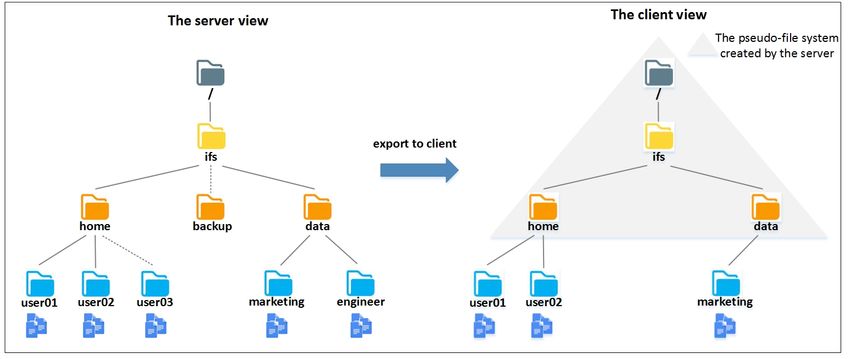
Revisions

Revisions
                 Date                       Description
                 May 2018                   Initial release

                 June 2020                  PowerScale rebranding

                 May 2021                   NFSv3 over RDMA new feature in OneFS 9.2.0

                 October 2021               NFSv4.1 support in OneFS 9.3.0

Acknowledgments
               Author: Lieven Lin

The information in this publication is provided “as is.” Dell Inc. makes no representations or warranties of any kind with respect to the information in this
publication, and specifically disclaims implied warranties of merchantability or fitness for a particular purpose.

Use, copying, and distribution of any software described in this publication requires an applicable software license.

Copyright ©2018--2021 Dell Inc. or its subsidiaries. All Rights Reserved. Dell Technologies, Dell, EMC, Dell EMC and other trademarks are trademarks
of Dell Inc. or its subsidiaries. Other trademarks may be trademarks of their respective owners. [10/13/2021] [Technical White Paper] [H17240.3]

2         Dell EMC PowerScale: OneFS NFS Design Considerations and Best Practices | H17240.3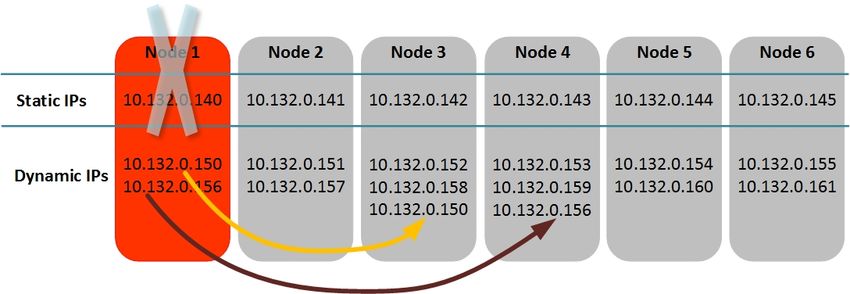
Table of contents

Table of contents
    Revisions.............................................................................................................................................................................2
    Acknowledgments ...............................................................................................................................................................2
    Table of contents ................................................................................................................................................................3
    Executive summary.............................................................................................................................................................5
    Audience .............................................................................................................................................................................5
    1     NFS protocol and OneFS .............................................................................................................................................6
          1.1      OneFS overview .................................................................................................................................................6
          1.2      NFS protocol introduction ...................................................................................................................................6
          1.2.1 NFSv3 .................................................................................................................................................................7
          1.2.2 NFSv4.x ..............................................................................................................................................................7
          1.2.3 Advantages of NFSv4.x ......................................................................................................................................8
          1.3      NFS compatibility with OneFS ............................................................................................................................8
          1.3.1 NFSv4.1 support .................................................................................................................................................9
    2     Implementing NFS ......................................................................................................................................................10
          2.1      Identity management and authentication .........................................................................................................10
          2.2      Create NFS export ............................................................................................................................................11
          2.3      Mount export over NFSv3/NFSv4.0/NFSv4.1/NFSv4.2 ...................................................................................12
    3     PowerScale OneFS considerations ...........................................................................................................................13
          3.1      NFS export considerations ...............................................................................................................................13
          3.2      SmartConnect ...................................................................................................................................................13
          3.3      Access zone .....................................................................................................................................................15
          3.4      AIMA (Authentication, Identity Management, Access) .....................................................................................16
          3.5      OneFS protocol audit ........................................................................................................................................18
    4     NFS client considerations...........................................................................................................................................20
          4.1      Linux client ........................................................................................................................................................20
          4.2      macOS client ....................................................................................................................................................23
    5     NFS security considerations.......................................................................................................................................24
          5.1      Network security considerations .......................................................................................................................24
          5.2      Authentication ...................................................................................................................................................25
          5.3      NFSv4.x ACL ....................................................................................................................................................26
          5.4      NFSv4.x pseudo-file system .............................................................................................................................30
    6     NFSv3 over RDMA .....................................................................................................................................................32
          6.1      NFSv3 over RDMA overview ............................................................................................................................32
          6.2      Management options ........................................................................................................................................33

3            Dell EMC PowerScale: OneFS NFS Design Considerations and Best Practices | H17240.3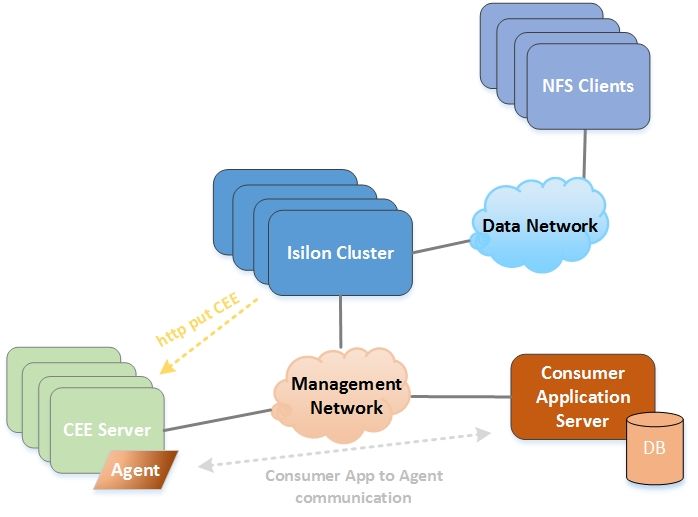
Table of contents

        6.2.1 Enable/disable NFS over RDMA globally .........................................................................................................33
        6.2.2 Filter RoCEv2 capable network interfaces for an IP pool .................................................................................34
        6.2.3 Check ROCEv2 capability of network interfaces ..............................................................................................35
        6.3     Key considerations ...........................................................................................................................................36
    7   Useful NFS commands and tools ...............................................................................................................................37
        7.1     isi statistics command .......................................................................................................................................37
        7.2     Packet capture tool and analysis ......................................................................................................................39
    A   Technical support and resources ...............................................................................................................................41
        A.1     Related resources ............................................................................................................................................41

4         Dell EMC PowerScale: OneFS NFS Design Considerations and Best Practices | H17240.3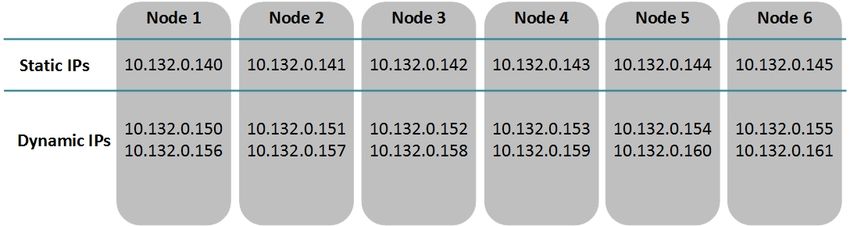
Executive summary

Executive summary
           This document provides common configurations and considerations to help you implement, configure, and
           manage NFS storage service on Dell EMC PowerScale products. This content includes the following:

               •    NFS protocol introduction and its compatibility with OneFS
               •    Quick start implementation guide to use NFS service on OneFS
               •    NFS considerations on OneFS
               •    NFS considerations on client
               •    NFS security considerations

Audience
           This document is intended for administrators who are using NFS storage service on PowerScale OneFS. The
           document assumes you have knowledge of the following:

               •    Network Attached Storage (NAS) systems
               •    Network File System (NFS) protocol
               •    PowerScale OneFS distributed file system and scale-out architecture
               •    Directory service such as Active Directory and LDAP

           You should also be familiar with Dell EMC PowerScale documentation resources, including:

               •    Dell EMC PowerScale OneFS: A Technical Overview
               •    PowerScale OneFS Web Administration Guide
               •    PowerScale OneFS CLI Administration Guide
               •    Current PowerScale Software Releases
               •    OneFS Security Configuration Guide

5      Dell EMC PowerScale: OneFS NFS Design Considerations and Best Practices | H17240.3
NFS protocol and OneFS

1          NFS protocol and OneFS

1.1        OneFS overview
           OneFS is a fundamental component for Dell EMC PowerScale storage. It is used to power all Dell EMC
           PowerScale NAS storage solutions and offers the following key advantages:

               •   Scale-out architecture: OneFS is designed to scale in terms of machine, by adding more PowerScale
                   nodes to a cluster, both performance and capacity is scaled. It enables PowerScale scale to a multi-
                   petabyte large cluster which contains a maximum of 252 nodes.
               •   Single file system and namespace: Traditional storage model contains file system, volume manager,
                   and data protection. OneFS combines all of them into a single intelligent distributed file system, and
                   provides a single namespace that is accessible through multi-protocol (NFS, SMB, HDFS, S3, HTTP,
                   and FTP) simultaneously.
               •   Efficiency and ease of management: OneFS provides unique features to improve PowerScale NAS
                   storage system efficiency and ease of management. For example, with OneFS SmartPools, you can
                   tier your cold data to lower-cost PowerScale nodes automatically.

           OneFS is not only the operating system but also the underlying file system that drives and stores data in the
           PowerScale scale-out NAS cluster. For more details, see the document Dell EMC PowerScale OneFS: A
           Technical Overview.

1.2        NFS protocol introduction
           The Network File System (NFS) protocol allows users to mount remote file systems transparently and access
           to shared files across networks. It uses a client/server model based on Remote Procedure Call Protocol
           (RFC5531), so NFS is portable across different machines, operating systems, network architecture, and
           transport protocols. NFS eliminates the need to keep copies of files on several machines by letting the clients
           all share a single copy of a file on the server.

           There are three major NFS versions. Each of them is defined in an RFC specification as shown in the Table
           1. This chapter will provide a brief summary about NFSv3 and NFSv4.x as they are implemented in most
           enterprise environments. For more details, you can refer to the links in the table.

                       NFS versions and evolution
           Version          RFC                                             Status
           NFSv2            RFC1094 (published on 1989)                     Obsolete
           NFSv3            RFC1813 (published on 1995)                     Most popular
           NFSv4.0          RFC3010 (published on 2000, obsolete)           Slowly replacing NFSv3
                            RFC3530 (published on 2003, obsolete)
                            RFC7530 (published on 2015)
           NFSv4.1          RFC5661 (published on 2010)                     Adopted graduallly
           NFSv4.2          RFC7862 (published on 2016)

6      Dell EMC PowerScale: OneFS NFS Design Considerations and Best Practices | H17240.3
NFS protocol and OneFS

1.2.1       NFSv3
            The NFSv3 is a stateless protocol. Statelessness means that the server does not need to maintain state
            about any of its clients in order to function correctly. The NFSv3 has following key enhancements compared
            with NFSv2:

                    •   The file handle has been increased to a variable length up to 64 bytes, instead of 32 bytes.
                    •   Supports files larger than 2 GB. Maximum file size depends on the NFS server’s local file
                        systems.
                    •   Eliminates the 8 KB limit of the maximum size of an on-the-wire NFS read or write operation.
                    •   Introduces the concept of Weak Cache Consistency. A server reply to a read or write operation
                        returns extra attribute information which can be used by clients to decide whether its data and
                        attribute caches are stale. So NFSv3 clients will detect changes to files faster that are modified by
                        other client.
                    •   Introduces safe asynchronous writes to improve performance. New COMMIT procedure is added
                        to flush data to stable storage for an asynchronous write and to detect if retransmit the data is
                        needed.

            To function correctly, NFSv3 also relies on several auxiliary protocols.

            Mount protocol

            The mount protocol is separate from, but related to, the NFS protocol. It provides operating system-specific
            services to get NFS off the ground - looking up export pathnames, validating user identity, and checking
            access permissions. Clients use the mount protocol to get the first file handle, which allows them entry into a
            remote file system.

            Network Lock Manager (NLM) protocol and Network Status Monitor (NSM) protocol

            Because NFS is a stateless service, auxiliary protocols are needed to offer inherently stateful services such
            as file locking and access control synchronization. So the RPC-based NLM protocol and NSM protocol are
            provided to work together to provide file locking and access control capability.

            Binding protocol (RFC1833)

            As NFS protocol and its auxiliary protocols mentioned above are all based on RPC, it is necessary to map
            RPC program number/version number pairs to the network port number (TCP/UDP port number) for that
            version of that program. Binding protocol provides such a lookup service to find a network port number for a
            specific RPC program number/version. There are three versions of a lookup service: RPCBIND (Versions 3
            and 4) which uses a transport-independent format for the transport address, and Port Mapper (Version 2)
            which is an older protocol only specific for TCP and UDP transport.

1.2.2       NFSv4.x
            The biggest change in NFSv4.x is that it is designed as a stateful protocol. Unlike earlier NFS versions which
            needs auxiliary protocols to provide additional functions, the NFSv4.x integrates the file locking (NLM/NSM)
            and the mount protocol. Besides, the NFSv4.x also provides some of the key features as follows:

                    •   Introduces the COMPOUND procedure as a wrapper to coalesce one or more operations into a
                        single RPC request.
                    •   Introduces the NFSv4.x Access Control Lists (ACL) to support more expressive and granular
                        access control while clients accessing the NFS shared files.

7       Dell EMC PowerScale: OneFS NFS Design Considerations and Best Practices | H17240.3
NFS protocol and OneFS
• The server can grant a read or write file delegation to the clients, which enables the clients to
aggressively cache file data.
• Session model is introduced since NFSv4.1 for better connection management.
1.2.3 Advantages of NFSv4.x
The NFSv4.x retains the essential characteristics of previous version, such as independent of operating
systems, simplicity, and good performance. It also has more advantages compared with older versions.
COMPOUND procedure
The compound procedure will combine multiple individual operations into a single request to reduce the
number of RPC packets transmitted over the network. The client can avoid the cumulative latency of multiple
RPCs. So the NFSv4.x will perform better in a potentially high latency network like Internet.
Firewall friendly
To access an NFSv3 server, the client needs to involve NFS protocol and its auxiliary protocols (port mapper,
mount, NLM/NSM), each of them needs TCP/UDP ports which would not be the well-known ports listening on
the network. This will cause problem for using NFS through firewall. In the NFSv4.x, there are no auxiliary
protocols and it is designed as a single protocol using a single TCP port, usually listening on port 2049. So it
traverses firewalls and network address translation (NAT) devices easily, and makes the network
management and configuration easily. More details and considerations are discussed in 5.1 Network security
considerations.
Stronger security
The NFSv4.x ACL file attribute is added to enable more expressive access control. The NFSv4.x ACL model
is quite rich. With the use of NFSv4.x ACL, the server does all access control based on the server’s
interpretation of the ACL although the client can manipulate the ACL attributes. More details and
considerations are discussed in 5.3 NFSv4.x ACL.
1.3 NFS compatibility with OneFS
This document focuses on OneFS 8.0.0 and above. However, to provide an overview of the NFS compatibility
with OneFS families, a compatibility table is shown in Table 2.
NFS compatibility with OneFS
NFS OneFS compatibility
version **8.x 9.0.x 9.1.x 9.2.x 9.3.x
NFSv3 √ √ √ √ √
NFSv4.0 √ √ √ √ √
NFSv4.1 √
Note: NFSv4.2 just adds additional new features based on NFSv4.1, therefore, OneFS allows clients to
mount NFS export with NFSv4.2, but OneFS does not implement NFSv4.2 features. ** indicates that the
version of OneFS is EOSL. For information about the support and service life-cycle dates for PowerScale
hardware and software products, see the PowerScale Product Availability Guide.
8 Dell EMC PowerScale: OneFS NFS Design Considerations and Best Practices | H17240.3NFS protocol and OneFS
1.3.1 NFSv4.1 support
NFSv4.1 introduced several new features to the NFSv4 protocol standard, as covered in RFC-5661. These
differences are covered in Section 1.8 of the RFC.
Some features are listed as required, which means that the feature must be implemented in or supported by
the NFS server to claim RFC standard. Other features are listed as recommended or optional features and
are supported ad hoc by the NFS server but are not required to claim RFC compliance. Starting from OneFS
9.3.0, OneFS supports NFSv4.1 and NFSv4.2 to access data by implementing all the required features
defined in RFC-5661. This support excludes the Secret State Verifier (SSV) which is not implemented by any
open-source Linux clients. OneFS 9.3.0 implements the session model which allows NFSv4.1 and NFSv4.2
clients to leverage trunking. Trunking is the use of multiple connections between a client and server in order
to widen the I/O path. OneFS 9.3.0 supports both session trunking and client ID trunking.
• Session trunking is the association of multiple TCP connections to the same session. Most Linux
supports session trunking by using nconnect option which is included in Linux kernel version higher
than 5.3.
• Client ID trunking is the association of multiple sessions to the same client ID. Not observed any
open-source Linux clients support client ID trunking.
Figure 1 shows the supported NFS operations in OneFS 9.3.0. Both NFSv4.1 and NFSv4.2 use the existing
NFSv4.0 I/O stack in OneFS. NFSv4.2 is a superset of NFSv4.1, with all new features being optional. OneFS
still allows clients to mount NFS export of OneFS with NFSv4.2 and access OneFS data even OneFS does
not implement any NFSv4.2 features.
NFSv4.2 Spec
NFSv4.1 Spec
NFSv4.0 Spec
Operation 20: OPEN_CONFIRM Operation 3: ACCESS Operation 21: OPEN_DOWNGRADE Operation 40: BACKCHANNEL_CTL *Operation 59: ALLOCATE
Operation 30: RENEW Operation 4: CLOSE Operation 22: PUTFH Operation 41: BIND_CONN_TO_SESSION *Operation 60: COPY
*Operation 35: SETCLIENTID Operation 5: COMMIT Operation 23: PUTPUBFH Operation 42: EXCHANGE_ID *Operation 61: COPY_NOTIFY
*Operation 36: Operation 6: CREATE Operation 24: PUTROOTFH Operation 43: CREATE_SESSION *Operation 62: DEALLOCATE
SETCLIENTID_CONFIRM *Operation 7: DELEGPURGE Operation 25: READ Operation 44: DESTROY_SESSION *Operation 63: IO_ADVISE
Operation 39: RELEASE_LOCKOWNER *Operation 8: DELEGRETURN Operation 26: READDIR Operation 45: FREE_STATEID *Operation 64: LAYOUTERROR
Operation 9: GETATTR Operation 27: READLINK *Operation 46: GET_DIR_DELEGATION *Operation 65: LAYOUTSTATS
Operation 10: GETFH Operation 28: REMOVE *Operation 47: GETDEVICEINFO *Operation 66: OFFLOAD_CANCEL
Operation 11: LINK Operation 29: RENAME *Operation 48: GETDEVICELIST *Operation 67: OFFLOAD_STATUS
Operation 12: LOCK Operation 31: RESTOREFH *Operation 49: LAYOUTCOMMIT *Operation 68: READ_PLUS
Operation 13: LOCKT Operation 32: SAVEFH *Operation 50: LAYOUTGET *Operation 69: SEEK
Operation 14: LOCKU Operation 33: SECINFO *Operation 51: LAYOUTRETURN *Operation 70: WRITE_SAME
Operation 15: LOOKUP Operation 34: SETATTR Operation 52: SECINFO_NO_NAME *Operation 71: CLONE
Operation 16: LOOKUPP Operation 37: VERIFY Operation 53: SEQUENCE
Operation 17: NVERIFY Operation 38: WRITE Operation 54: SET_SSV
Operation 18: OPEN Operation 55: TEST_STATEID
Operation 19: OPENATTR *Operation 56: WANT_DELEGATION *Represent no support in
Operation 57: DESTROY_CLIENTID OneFS 9.3.0
Operation 58: RECLAIM_COMPLETE
Supported NFS operations in OneFS 9.3.0
9 Dell EMC PowerScale: OneFS NFS Design Considerations and Best Practices | H17240.3Implementing NFS
2 Implementing NFS
The Dell EMC PowerScale OneFS operating system can enable seamless multiprotocol data access with
unified security model. NFS is one of the protocols that gives UNIX and Linux system access to OneFS. This
chapter will provide a quick start guide to implement NFS as your data access protocol to OneFS in your
environment: identity management and authentication, create NFS export and mount export to clients.
2.1 Identity management and authentication
It is important to understand the identity management and authentication methods before implementing NFS
to your environment. Identity management will provide a location to store user information, tell where a user
is. Authentication is a process that validates the identity of a user. In OneFS, the identity management and
authentication is offered by authentication providers. OneFS supports the following methods for authenticating
user:
• Active Directory (AD)
• Lightweight Directory Access Protocol (LDAP)
• Network Information Service (NIS)
• Local users and groups
It is recommended to use Active Directory service and LDAP for ease of user identity and access
management.
Active Directory (AD)
Active Directory is implemented by Microsoft that provides several services: LDAP, Kerberos, and DNS. The
primary reason for a PowerScale cluster to join an AD domain is to provide user/group identity management
and authentication. Active Directory service is used to authenticate all Windows clients and users. OneFS is
compliant with RFC2307, therefore in a multiprotocol environment it is recommended to integrate AD with
OneFS to provide a centralized identity management and authentication.
RFC2307 allows you to implement unified authentication for UNIX and Windows Active Directory accounts by
associating a user ID (UID), group ID (GID), home directory, and shell with an Active Directory object.
Windows Server supported some variations of these schema extensions in versions before Windows 2003 R2
with Microsoft Services for UNIX. Windows 2003 R2 and later versions provide full RFC 2307 support. This
means that, when configured, the standard UNIX attributes exist in the schemas of domains created with
Windows 2003 R2 and later.
To use Active Directory as authentication provider for NFS service. You need to configure the OneFS and
Active Directory for RFC2307 compliance, and integration with AD for NFS is also needed on the NFS client
side. For more details about how to enable RFC2307 for OneFS and Active Directory, refer to the blog article.
For more details about how to integrate Linux client with AD for NFS, refer to the associated official
documentations, for example, refer to Red Hat Windows Integration Guide for Red Hat Linux distribution.
Lightweight Directory Access Protocol (LDAP)
OneFS cluster can also be configured to use LDAP as the authentication provider. The LDAP service in a
OneFS cluster supports the following features:
• Users, groups, and netgroups
• Customized LDAP attribute mapping
10 Dell EMC PowerScale: OneFS NFS Design Considerations and Best Practices | H17240.3Implementing NFS
• Simple BIND authentication
• Redundancy and load balancing across all server with identical directory data
• Encrypted passwords
For more details on configure OneFS cluster integrate with LDAP, refer to OneFS Web Administration Guide.
To enable a Linux client using LDAP, you can refer to the corresponding Linux distribution official
documentation, for example, refer to Red Hat System-level Authentication Guide for Red Hat Linux
distribution.
Network Information Service (NIS)
The NIS is a directory services protocol designed by Sun Microsystems. It has inherent limitations, especially
in the areas of scalability and security. So it is usually replaced by LDAP unless your environment has been
using NIS for a long time.
Local users and groups
The OneFS cluster supports local users and groups for authentication. You can create local users and groups
accounts directly on the cluster. Local authentication can be useful for a test environment or if there is no
directory service available.
In a multi-protocol environment, there are usually multi-authentication providers with Active Directory for
Windows client’s access and LDAP for Linux or UNIX client’s access. If a user exists in both Active Directory
and LDAP, it is required to configure a user-mapping rule for the user to have enough permission to access
files. You can use isi auth mapping create/view to create or view the user mapping rules.
2.2 Create NFS export
OneFS supports NFSv3, NFSv4.0, NFSv4.1 and NFSv4.2. OneFS does not implement NFSv4.2 new
features, but it allows clients to mount NFS export with NFSv4.2. By default, OneFS has NFS service
disabled. You need to enable NFS service first from WebUI or using isi command. Enabling NFSv4.x is non-
disruptive on a OneFS cluster, and it will run concurrently with NFSv3. Any existing NFSv3 clients will not be
impacted by enabling NFSv4.x.
OneFS NFS export is zone-aware, every NFS export is associated with an Access Zone. By default, there is
an access zone named “System” which will be used if you do not specify an Access Zone name when the
export is created. More details about access zones are discussed in 3.3 Access Zone.
The NFS export can be created using both WebUI and isi command. For details about creating NFS exports,
refer to OneFS Web Administration Guide and OneFS CLI Administration Guide.
By default, the NFS service applies a root-squashing rule (map the root user to nobody user) for the NFS
export. This will prevent the client gain root privileges to the server despite the user’s credential. It is
recommended to keep the rule as the default setting since the root account is the super user in Linux and
UNIX environments.
Note: If you are creating an NFSv4.x export, you need to configure a same NFSv4.x domain on both the
OneFS cluster and NFSv4.x clients. You can configure the NFSv4.x domain for the OneFS from WebUI or
using isi command isi nfs settings zone modify. To configure the NFSv4.x domain for NFSv4.x
11 Dell EMC PowerScale: OneFS NFS Design Considerations and Best Practices | H17240.3Implementing NFS
client, you can edit the Domain = example.local to your NFSv4.x domain in the /etc/idmapd.conf file
on the client.
2.3 Mount export over NFSv3/NFSv4.0/NFSv4.1/NFSv4.2
NFS v3/v4 are supported on Linux 2.6 kernels and later. In this white paper, we will use Centos 6.9 as NFS
client to illustrate the client side configuration.
NFS exports are mounted on the client using the mount command. The format of the command shown as
below:
# mount -t nfs -o options server:/remote/export /local/directory
When you mount an NFS export, the NFS protocol version is determined at mount time, and can be modified
by specifying the version of the NFS protocol using mount options nfsvers or vers. For example, the
command mount -t nfs -o nfsvers=4.1 server:/remote/export /local/directory will
mount the export with NFSv4.1.
The drawback of using mount command is that the mounted NFS export is not persistent across client
reboots. So you can use /etc/fstab and autofs to mount the NFS file system. For more details about
mount, /etc/fstab and autofs, refer to Red Hat Storage Administration Guide. More mount options and
considerations are discussed in 3.3 NFS Client Considerations.
Note: mount options nfsvers and vers have the same meaning in the mount command. The option vers is
compatible with NFS implementations on Solaris and other vendors.
12 Dell EMC PowerScale: OneFS NFS Design Considerations and Best Practices | H17240.3PowerScale OneFS considerations
3 PowerScale OneFS considerations
3.1 NFS export considerations
NFS export read size and write size on OneFS
While mounting export to a client, you can specify the read size (rsize) and write size (wsize) options,
larger rsize and wsize will improve the throughput performance. By default in OneFS, the rsize of 128 KB
and wsize of 512 KB are advertised for NFSv3 Linux clients, but can be set as high as 1 MB. NFSv4.x
defaults to 1 MB for both rsize and wsize. Explicitly setting these values too small will override the default
value and may result in slower than optimal performance.
NFS aliases
In general, it is recommended to create an export with short path when possible. If the long directory path
must be used, you can create an NFS alias for the directory path. An NFS alias is designed to give functional
parity with SMB share name within the context of NFS. It provides a shortcut for the path. Like exports, NFS
aliases are also access zone-ware. You can specify the access zone when you create an alias. You can
check the status of an alias from the WebUI or using isi command isi nfs aliases with --check option
(status can be: good, illegal path, name conflict, not exported, or path not found).
NFSv3 encoding support
OneFS 8.1.1.1 includes enhancements to NFSv3 encoding. This sets the cluster encoding and export
encoding to the same character set using RFC-compliant filenames, enabling exports to any NFSv3 client that
uses western or nonwestern characters.
Before OneFS 8.1.1.1, non-utf-8 encoded files or directories may be inaccessible to NFSv3 and NFSv4.x
clients. If this issue occurs in your environment, please contact Dell EMC technical support service to help
solve the issue or upgrade your OneFS cluster to OneFS 8.1.1.1 or higher.
32-bit file IDs over NFS
The NFS protocol supports 64-bit file IDs from NFSv3 onwards. However, some applications do not support
64-bit file IDs. To accommodate these applications, OneFS allows enabling 32-bit file IDs from WebUI or
using isi command isi nfs export --return-32bit-file-ids.
Note: When this change is made, all clients must be remounted. Clients that are not remounted will encounter
errors such as "error: fileid changed" or the clients will continue to receive 64-bit file IDs. You might need to
schedule a maintenance window before making this change.
3.2 SmartConnect
SmartConnect, a licensable software module of the PowerScale OneFS operating system, helps to greatly
simplify client management across the enterprise. Through a single host name, SmartConnect enables client
connection load balancing and dynamic NFS failover and failback of client connections across storage nodes
to provide optimal utilization of the cluster resources.
13 Dell EMC PowerScale: OneFS NFS Design Considerations and Best Practices | H17240.3PowerScale OneFS considerations
Client Connection Load Balancing
SmartConnect balances client connections across nodes based on policies that ensure optimal use of cluster
resources. By leveraging your existing network infrastructure, SmartConnect provides a layer of intelligence
that allows all client and user resources to point to a single hostname, enabling easy management of a large
and growing numbers of clients. Based on user configurable policies, SmartConnect applies intelligent
algorithms (CPU utilization, aggregate throughput, connection count, or round robin) and distributes clients
across the cluster to optimize client performance and end-user experience. SmartConnect can be configured
into multiple zones that can be used to ensure different levels of service for different groups of clients. All of
this is transparent to the end user.
It is recommended to use SmartConnect load balancing for NFS to improve the cluster resource utilization.
And it is also recommended to limit the active NFSv3 or NFSv4.x connections under 1000, and monitor the
number of NFS connections to each node to prevent overloading a node with connections. There is no
established maximum NFS connections per node, however, the number of available TCP sockets can limit
the number of NFS connections. The number of connections that a node can process depends on the ratio of
active-to-idle connections and the resources that are available to process the sessions. Use the following
command to monitor the number of connections:
isi statistics query current --node=all --degraded --
stats=node.clientstats.connected.nfs, node.clientstats.active.nfs
NFS failover using dynamic IP pool
SmartConnect uses a virtual IP failover scheme that is specifically designed for PowerScale scale-out NAS
storage and does not require any client-side drivers. The PowerScale cluster shares a “pool” of virtual IPs that
is distributed across all nodes of the cluster. The cluster distributes an IP address across NFS (Linux and
UNIX) clients based on a client connection balancing policy.
This is an example illustrating how NFS failover works. As shown in Figure 1, in the six-node OneFS cluster,
an IP address pool provides a single static node IP (10.132.0.140 – 10.132.0.145) to an interface in each
cluster node. Another pool of dynamic IPs (NFS failover IPs) has been created and distributed across the
cluster (10.132.0.150 – 10.132.0.161).
Dynamic IPs and Static IPs
When Node 1 in the cluster goes offline, the NFS failover IPs and connected clients associated with Node 1
failover to the remaining nodes based on the configured IP failover policy (Round Robin, Connection Count,
Network Throughput, or CPU Usage). The static IP for Node 1 is no longer available as shown in Figure 2.
14 Dell EMC PowerScale: OneFS NFS Design Considerations and Best Practices | H17240.3PowerScale OneFS considerations
NFS Failover with Dynamic IP Pool
Therefore, it is recommended to use dynamic IP pool for NFS workload to provide NFS service resilience. If a
node with client connections established goes offline, the behavior is protocol-specific. Because NFSv3 is a
stateless protocol, after the node failure, workflows can be moved easily from one cluster node to another. It
will automatically reestablish the connection with the IP on the new interface and retries the last NFS
operation. NFSv4.x is a stateful protocol, the connection state between the client and the node is maintained
by OneFS to support NFSv4.x failover and in OneFS 8.x versions and higher, OneFS keeps that connection
state information for NFSv4.x synchronized across multiple nodes. Once the node failure occurs, the client
can resume the workflow with the same IP on the new node using the previous maintained connection state.
The number of IPs available to the dynamic pool directly affects how the cluster load balances the failed
connections. For small clusters under N (NPowerScale OneFS considerations
The considerations for access zone are as below:
• Each access zone may include at most one MIT Kerberos provider.
• An access zone is limited to a single Active Directory provider; however, OneFS allows multiple
LDAP, NIS, and file authentication providers in each access zone. It is recommended that you
assign only one type of each provider per access zone in order to simplify administration.
• As creating a large number of local users and groups may affect system performance, it is
recommended to limit the number of local users and groups per cluster to 25,000 for each.
• Use the System access zone for cluster management. And create additional ones for data
access.
• Separate organization tenants using access zone with no more than 50 zones.
• Designate separate directory path for each access while you creating multiple access zones.
• If DNS settings are different for your different NFS workflows, you can specify the dedicated DNS
settings for each workflow using groupnet.
3.4 AIMA (Authentication, Identity Management, Access)
When a user connects to a PowerScale cluster, OneFS checks the directory services to which the user’s
access zone is connected for an account for the user. If OneFS finds an account that matches the user’s login
name, OneFS verifies the user’s identity to authenticate the user. During authentication, OneFS creates an
access token for the user. The token contains the user’s full identity including group memberships and OneFS
uses the token later to check access to directories and files.
When OneFS authenticates users with different directory services, OneFS maps a user’s account from one
directory service to the user’s accounts in other directory services within an access zone—a process known
as user mapping. A Windows user account managed in Active Directory, for example, is mapped by default to
a corresponding UNIX account with the same name in NIS or LDAP.
As a result, with a single token, a user can access files that were stored by a Windows computer over SMB
and files that were stored by a Linux computer over NFS.
Similarly, because OneFS provides multiprotocol access to files, it must translate the permissions of Linux
and UNIX files to the access control lists of Windows files. As a result, a user who connects to the cluster with
a Linux computer over NFS can access files that were stored on the cluster by a Windows user with SMB.
The following diagram Figure 3 summarizes how directory services, identity mapping, policies, and
permissions play a role in the OneFS system of authentication and access control. For more details about
AIMA, refer to OneFS Multiprotocol Security Guide.
16 Dell EMC PowerScale: OneFS NFS Design Considerations and Best Practices | H17240.3PowerScale OneFS considerations
External Authentication and Directory Services
AD with
AD LDAP NIS Kerberos
RFC2307
SID SID + UID-GID UID-GID
OneFS
User Mapper Database
User Mapper Local
Rule based
NFS Client Authentication
Providers SID + UID-GID
ID Mapper Database
ID Mapper
SID UID-GID File
UID-GID
SMB Client
Permission Translation
On-disk Identity Policy Global ACL Policy
Native/Unix/SID Balanced/Unix Only/Windows Only/Custom
OneFS authentication and access control
No overlapping ID ranges and avoid common ID ranges
In the case that you contain multiple identity sources, like LDAP and Active Directory with RFC2307, you
should ensure that the UID and GID ranges do not overlap. Besides, OneFS also allocates a UID and GID as
needed. The default range from which OneFS automatically allocate a UID and GID is 1,000,000 to
2,000,000. Other identity source ID range must not overlap with the OneFS default range. If UIDs and GIDs
overlap across two or more directory services, some users could have right to access to other users’ files.
In addition, there are UIDs and GIDs below 1000 are reserved for system, do not assign them to users or
groups in the identity source.
User mapping in multiple directory services
When the name of an account in different directory services match exactly, OneFS automatically combines
their access tokens into a single token. AIMA requires that SAMAccount name is populated in AD for each
user. For example, the user-mapping service maps, by default, a Windows account named CORP\jane from
Active Directory to a UNIX account named jane from LDAP and generates an access token that combines the
group membership information from the two accounts. OneFS also automatically maps two groups with the
same name. Besides the automatic user mapping, OneFS allows the administrator to map users from
different directory services manually from the WebUI and CLI. See the OneFS Web Administration Guide and
OneFS CLI Administration Guide.
Below are some considerations for user mapping:
• Employ a consistent username strategy: The simplest configurations name users consistently,
so that each UNIX user corresponds to a similarly named Windows user. Such a convention
allows rules with wildcard characters to match names and map them without explicitly specifying
each pair of accounts.
• Do not use UPNs in mapping rules: You cannot use a user principal name (UPN) in a user-
mapping rule. A UPN is an Active Directory domain and username that are combined into an
Internet-style name with an @ symbol, such as an email address: jane@example. If you include a
UPN in a rule, the mapping service ignores it and may return an error. Instead, specify names in
17 Dell EMC PowerScale: OneFS NFS Design Considerations and Best Practices | H17240.3PowerScale OneFS considerations
the format DOMAIN\\user (as the backslash is a special character, using additional backslash as
the escape character on OneFS).
• Group rules by type and order them: The system processes every mapping rule by default,
which can present problems when you apply a deny-all rule—for example, to deny access to all
unknown users. In addition, replacement rules might interact with rules that contain wildcard
characters. To minimize complexity, it is recommended that you group rules by type and organize
them in the following order: replacement rules, join/add/insert rules, allow/deny rules.
3.5 OneFS protocol audit
OneFS allows you to audit protocol activities. All audit data is stored and protected in the cluster file system
and organized by audit topic. Starting in OneFS 8.0, protocol audit tracks and stores activity performed
through SMB, NFS, and HDFS protocol connections in an access zone level. You can specify which events to
log in each access zone. For example, you might want to audit the default set of protocol events in the
System access zone but audit only successful attempts to delete files in a different access zone.
The audit events are logged on the individual nodes where the SMB, NFS, or HDFS client initiated the
activity. The events are then stored in a binary file under /ifs/.ifsvar/audit/logs. The logs
automatically roll over to a new file after the size reaches 1 GB.
OneFS integration with Dell EMC Common Event Enabler (CEE) enables third-party auditing applications to
collect and analyze protocol auditing logs. Figure 4 shows a logical data flow in an NFS environment when
using CEE and third-party applications. During the NFS client access the PowerScale cluster over NFS, the
event will be stored as configured to the cluster, the OneFS daemon isi_adudit_cee exports protocol
audit events to CEE, and then the CEE will forward protocol audit events to the consumer application.
Protocol audit logical data flow
Note: Dell EMC CEE does not support forwarding HDFS protocol events to a third-party application.
By default, the tracked events are create, close, delete, rename, and set_security. For the details of
supported event types and its description, refer to the Auditing chapter of OneFS Web Administration Guide.
18 Dell EMC PowerScale: OneFS NFS Design Considerations and Best Practices | H17240.3PowerScale OneFS considerations
Because each audited event consumes system resources, it is recommended to only configure zones for
events that are needed by your auditing application. In addition, we recommend that you install and configure
third-party auditing applications before you enable the OneFS auditing feature. Otherwise, all the events that
are logged are forwarded to the auditing application, and a large backlog causes a delay in receiving the most
current events.
19 Dell EMC PowerScale: OneFS NFS Design Considerations and Best Practices | H17240.3NFS client considerations
4 NFS client considerations
4.1 Linux client
Use NFS over TCP
The advantage using NFS over TCP is that it works far better than UDP over unstable networks. When using
TCP, a single dropped packet can be retransmitted, without the retransmission of the entire RPC request,
resulting in better performance over unstable networks.
In addition, TCP will handle network speed differences better than UDP, due to the underlying flow control at
the network level. When using UDP, if network speeds of the client and server are not identical, dropped
packets and retransmissions might cause performance to be extremely slow when the faster entity tries to
send data to the slower entity.
The overhead incurred by the TCP protocol will result in somewhat slower performance than UDP under ideal
network conditions, but the cost is not severe, and is often not noticeable without careful measurement. If you
are using 10 GB Ethernet or above from end to end, you might also investigate the usage of jumbo frames.
The high-speed network may allow the larger frame sizes without encountering increased collision rates,
particularly if you have set the network to full duplex.
Client support for NFS over TCP is integrated into all Linux kernel 2.4 and later. You can check your client
kernel version with command uname –r before you use NFS over TCP. By default, the client will attempt to
mount NFS export with TCP if supported, you can also use option –proto=tcp to explicitly use TCP.
Security-Enhanced Linux (SELinux)
Security-Enhanced Linux (SELinux) is an implementation of a mandatory access control mechanism in the
Linux kernel, checking for allowed operations after standard discretionary access controls are checked.
By default, NFS mounts on the client side are labeled with a default context defined by policy for NFS
volumes. In common policies, this default context uses the nfs_t type. Depending on policy configuration,
services such as Apache HTTP Server and MySQL may not be able to read files labeled with the nfs_t type.
This may prevent file systems labeled with this type from being mounted and then read or exported by other
services.
If you would like to mount an NFS volume and read or export that file system with another service, use the -
context option when mounting to override the nfs_t type. For example, use the following context option to
mount NFS volumes so that they can be shared through the Apache HTTP Server:
mount -o context="system_u:object_r:httpd_sys_content_t:s0" onefs_server:/export
/mnt/mount_point
SELinux can enforce rules on files and processes in a Linux system and on their actions based on defined
policies. It will introduce a performance overhead, so it is recommended to disable the SELinux in the Linux
client unless it is explicitly required. To permanently disable SELinux, follow the procedure below:
1. Configure SELINUX=disabled in the /etc/selinux/config file.
2. Reboot your system.
3. Check that your SELinux is disabled. Use command getenforce which returns Disabled. Or, you
can check the status using the command sestatus.
20 Dell EMC PowerScale: OneFS NFS Design Considerations and Best Practices | H17240.3NFS client considerations
NFS read size (rsize) and write size (wsize)
The mount options rsize and wsize specify the size of the data block size in bytes to be transferred at one
time between the client and server. Setting a larger data block size would improve the performance. But be
careful when changing these values; some older Linux kernels and network cards do not work well with larger
block sizes. For most of modern systems, these settings are negotiated during mount and the server will
specify the recommended settings. By default in OneFS, a rsize of 128 KB and wsize of 512 KB are
advertised for NFSv3 Linux clients, but can be set as high as 1 MB. NFSv4.x defaults to 1 MB for both rsize
and wsize.
Setting these values incorrectly will result in slower performance, so it is recommended to do an experiment
before you change rsize and wsize. You can test your options with some simple commands if your network
environment is not heavily used. Here is an example using command dd to do a simple test to see the speed
while using different rsize and wsize.
Commands use to write file to a OneFS cluster and read file from a OneFS cluster:
• Write file to OneFS cluster: this command transfers 30720 blocks of 1024k each (32 GB file of zeroed
bytes) from a special file /dev/zero to the mount point /mnt/. We will measure the completion
time. On a client machine, type:
time dd if=/dev/zero of=/mnt/test.file bs=1024k count=30720
• Read back the file from OneFS cluster into the null device on the client machine (/dev/null) by
typing the following:
time dd if=/mnt/test.file of=/dev/null bs=1024k
Result shows in Figure 5 while mounting NFS with options nfsvers=4,rsize=1048576,wsize=1048576,
which is the default value advised by OneFS. And leaves the other mount options as default.
Result with options nfsvers=4,rsize=1048576,wsize=1048576
Result shows in Figure 6 while mounting NFS with options nfsvers=4,rsize=32768,wsize=32768. And
leaves the other mount options as default.
21 Dell EMC PowerScale: OneFS NFS Design Considerations and Best Practices | H17240.3NFS client considerations
Result with options nfsvers=4,rsize=32768,wsize=32768
From the above results, we can find that the performance will decrease if the inappropriate rsize and wsize
values are used. It is recommended to not specify these options when mounting a OneFS cluster NFS export.
If you desire to specify these options, it is recommended to verify them as shown above before you apply
these setting in your production environment.
Note: The test result above may vary widely in different test environments, like a different Linux OS/Kernel or
network. If you achieve unexpected test results or if you would like to test different types of workloads
(sequential, random, mix), use more complex benchmarks, such as IOZone, FIO.
Hard mounts and soft mounts, timeout, and retransmissions
• Hard mounts: If you have mounted the NFS file system using a hard mount and if for any reason that
share is not available, the client will repeatedly retry to contact the server. Once the NFS server is
back online, the program will continue to perform undisturbed from the state where it was during
server crash. Therefore, with a tradeoff of unavailable applications, the client will not lose any data
during the NFS server is unavailable. We can use the mount option intr which allows NFS requests
to be interrupted if the server goes down or cannot be reached. So the recommended settings are
hard and intr options.
• Soft mounts: In case of a soft mount, when a program or application requests a file from the NFS file
system, NFS client daemons will try to retrieve the data from the NFS server. But, if it does not get
any response from the NFS server (due to any crash or failure of NFS server), the NFS client will
report an error to the process on the client machine requesting the file access. A so-called "soft"
timeout can cause silent data corruption in certain cases. As such, it is not suggested to use the soft
option unless the application requires I/O operations to fail when the NFS server is unresponsive for a
specified period. Failure will be the time requires for the iterations of the timeout value. Using NFS
over TCP or increasing the value of the retrans option may mitigate some of the risks of using the
soft option.
• Timeout: The timeout period is specified by the mount parameter timeo and is expressed in
deciseconds (tenths of a second). By default, for NFS over TCP the default timeo value is 600 (60
seconds). The NFS client performs linear back off: After each retransmission the timeout is increased
by time up to the maximum of 600 seconds.
• Retransmissions: The number of times the NFS client retries a request before it attempts further
recovery action. This setting is irrelevant with hard mounts, because they will retry indefinitely.
Setting these options incorrectly would cause unnecessary retransmissions in some cases, for example, in a
high latency network. So unless you have an explicitly requirement to these options for your application and
system, you should leave these options as default.
22 Dell EMC PowerScale: OneFS NFS Design Considerations and Best Practices | H17240.3NFS client considerations
Sync and async mounts
The options is async by default, the NFS client delays sending application writes to the server until any of
these events occur:
• Memory pressure forces reclamation of system memory resources.
• An application flushes file data explicitly with sync, msync, or fsync.
• An application closes a file with close.
• The file is locked/unlocked by fcntl.
In other words, under normal circumstances, data written by an application may not immediately appear on
the server that hosts the file. If the sync option is specified on a mount point, any system call that writes data
to files on that mount point causes that data to be flushed to the server before the system call returns control
to user space.
So the sync write introduces a significant performance overhead while providing better data cache coherence
between clients. Applications can use the O_SYNC open flag to force application writes to individual files to
go to the server immediately without the use of the sync mount option. It is recommended to use async
mounts and the application control the safe write behavior by writing with the O_SYNC open flag or flush data
with sync.
Attribute caching (ac/noac)
Use the noac mount option to achieve attribute cache coherence among multiple clients. Almost every file
system operation checks file attribute information. The client keeps this information cached for a period to
reduce network and server load. When noac is in effect, a client's file attribute cache is disabled, so each
operation that needs to check a file's attributes is forced to go back to the server. Besides, the noac option
forces application writes to become synchronous so that a client sees changes to a file upon opening, at the
cost of many extra network operations. By default, the attribute caching is enabled when mounting the NFS. It
is recommended to enable the attribute caching to improve the attribute checking performance and reduce
the NFS operation latency.
nconnect
This mount option exists in all Linux distributions with kernel 5.3 or higher and can be set up to a limit of 16. It
allows clients establish multiple TCP connections to a OneFS cluster node for a specific NFS version, as it
can be used with NFSv3 and NFSv4.x with each individual version being tracked separately. This option is set
during the client's first mount for a particular OneFS node and NFS version combination. If the client
performs another NFS mount for the same OneFS node and NFS version, it will reuse the connections
established by the first mount. Subsequent mount commands cannot override the nconnect value already
established. To set a new nconnect value, all client-mounted NFS file systems which point to a certain
OneFS node and NFS version must be unmounted, and you must remount the NFS mount with the desired
nconnect value.
4.2 macOS client
For more details about using OneFS NFS service on macOS client and its configurations, please refer to
Using macOS Clients with PowerScale OneFS.
23 Dell EMC PowerScale: OneFS NFS Design Considerations and Best Practices | H17240.3You can also read


