SANS Institute Information Security Reading Room
←
→
Page content transcription
If your browser does not render page correctly, please read the page content below
SANS Institute
Information Security Reading Room

Evaluating Open-Source HIDS
with Persistence Tactic of
MITRE ATT&C
______________________________
Jon Chandler

Copyright SANS Institute 2021. Author Retains Full Rights.

This paper is from the SANS Institute Reading Room site. Reposting is not permitted without express
written permission.
ts
                                                                                                 gh
                                                                                             Ri
                   Evaluating Open-Source HIDS with Persistence
                              Tactic of MITRE ATT&CK

                                                                                         ll
                                                                                    Fu
                                                                              ns
                                                                           ai
                                       GIAC (GSEC) Gold Certification

                                                                       et
                                     Author: Jon Chandler, jchandler003@cox.net

                                                                  rR
                                               Advisor: Sally Vandeven

                                                             ho
                                                         ut
                                               Accepted: March 4, 2020

                                                    ,A
                                                te
                                                       Abstract
                                           itu

               Small companies with limited budgets need to understand if open-source tools can
                                        st

               provide adequate security coverage. The MITRE ATT&CK framework provides an
               excellent source to evaluate endpoint security tool effectiveness. A MITRE research
                                    In

               paper provides the following insight into the value of ATT&CK, “The techniques in the
                             NS

               ATT&CK model describe the actions adversaries take to achieve their tactical objectives”
               (Strom, et al., 2019). This paper examines two open-source endpoint tools, OSSEC and
                        SA

               WAZUH, against the MITRE ATT&CK framework. This analysis will determine each
               endpoint tool’s ability to detect a select number of the MITRE ATT&CK framework
                     e

               persistence techniques. Out of the techniques reviewed, this paper will analyze the degree
                Th

               to which the ATT&CK technique can be accurately identified by the evaluated tools.
               MITRE also conducts evaluations but on proprietary tools. The results of the open-source
          21

               endpoint tools analyzed here can be compared to the MITRE ATT&CK Evaluations
               conducted on the proprietary endpoint toolsets. The MITRE ATT&CK framework is a
     20

               valuable methodology that allows a company to compare endpoint tools from a security
               risk and product evaluation perspective.
 ©

© 2020 The SANS Institute                                                                        Author retains full rights.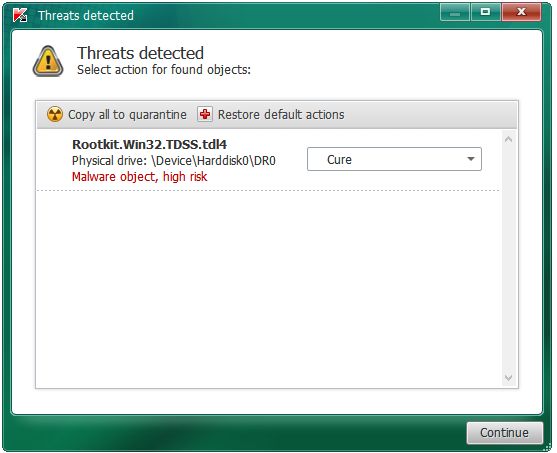
ts
                    Evaluating Open Source HIDS with Persistence Tactic of MITRE ATT&CK 2

                                                                                                       gh
                                                                                                  Ri
               1. Introduction

                                                                                              ll
                                                                                         Fu
                       A few years ago, during an annual penetration test for the researcher’s employer,
               the penetration test team performed a purple team analysis utilizing the MITRE

                                                                                   ns
               ATT&CK framework. This evaluation was not conducted to understand the threats to the

                                                                               ai
               corporate environment but to understand how the deployed cybersecurity tools and

                                                                           et
               incident response team detected known attacks. The MITRE ATT&CK framework is a

                                                                     rR
               knowledge base of common tactics and techniques that attackers utilize to compromise a

                                                                ho
               system. MITRE builds on real-world compromises. Each technique within the framework

                                                            ut
               lists the known threat actors utilizing its vector. It is critical for any company to

                                                      ,A
               understand the importance of the return on investment of the cybersecurity tools and the
                                                   te
               information it provides to their cybersecurity teams to make informed decisions on
                                             itu

               security. As MITRE ATT&CK has grown in popularity, more companies are jumping on
                                         st

               the bandwagon and touting how well their tool stands against the framework. For
                                      In

               instance, “FireEye Endpoint Security delivered the highest efficacy scores, highest
                              NS

               number of behavior-based detections, and provided the most relevant context in the 2018
                        SA

               MITRE ATT&CKTM assessment, announced on Feb. 13, 2019” (FireEye, 2019). Of
               course, this research will not attempt to determine the validity of the previously
                     e
                Th

               mentioned marketing material that summarizes the FireEye MITRE ATT&CK
               evaluation. The actual MITRE ATT&CK Evaluations can be found at the
          21

               https://attackevals.MITRE.org website. All the best-known proprietary EDR solutions are
     20

               either in the process or have had the ATT&CK Evaluation completed for a specific
 ©

               Advanced Persistent Threats (APT). These evaluations can then be used as a comparison
               point to determine which tools might be most advantageous to a given company. Of
               course, these evaluations cannot protect against unknown zero-day attacks. Based on this
               understanding, the MITRE ATT&CK framework is an excellent baseline that can be used
               to understand how the various cybersecurity tools alert and protect a company.

                       There is a push for companies to implement the MITRE ATT&CK framework.
               Per CSO Online, “ATT&CK can serve as a unifying taxonomy for different groups
               within an organization to share information, work together, and build the necessary
               detection and response procedures” (King, 2019). Companies are shifting security focus

               Jon Chandler, jchandler003@cox.net
© 2020 The SANS Institute                                                                              Author retains full rights.
ts
Evaluating Open Source HIDS with Persistence Tactic of MITRE ATT&CK 3
gh
Ri
to detection and response. Once a company understands what needs to be secured, they
ll
can utilize the framework to secure those areas. The MITRE ATT&CK framework helps
Fu
companies know themselves and their detection abilities. The framework also helps the
ns
company understand the detected real-world compromise tactics and techniques and the
ai
enemies that utilize these steps.
et
For companies with large security budgets, it is typical to have high-priced
rR
endpoint detection and response (EDR) solutions for exposing malicious activity.
ho
However, for many smaller companies or companies with tight security budgets, these
ut
toolsets are prohibitively expensive. There are a few open-source projects that will cover
,A
some, if not all, of the functionality of the proprietary tools. For these smaller or budget-
te
tight companies, it would be valuable to determine how effective these open-source
itu
toolsets are at identifying and monitoring system events that occur during a host
st
compromise.
In
NS
2. Research Tools
SA
As mentioned previously, MITRE ATT&CK is a knowledge base of adversary
tactics, techniques, and procedures (TTPs) based on real-world compromises. The
e
Th
ATT&CK site further explains the extent of the framework as, “The attack knowledge
base is used as a foundation for the development of specific threat models and
21
methodologies in the private sector, in government, and the cybersecurity product and
20
service community” (ATT&CK Matrix, n.d.). The framework constantly grows as
©
research is regularly added. In order to further understand a technique, a research article
describes it as, “The techniques in the ATT&CK model describe the actions adversaries
take to achieve their tactical objectives” (Strom, et al., 2019). The framework as a
baseline allows a comparison point between endpoint tools. One of these comparison
points, MITRE ATT&CK evaluations have been conducted on the proprietary toolsets.
However, evaluations of open-source tools are lacking.
At the time of this writing, MITRE has twelve different tactics defined. Each
tactic includes from ten to seventy-three different techniques. It has a total of three
Jon Chandler, jchandler003@cox.net
© 2020 The SANS Institute Author retains full rights.ts
Evaluating Open Source HIDS with Persistence Tactic of MITRE ATT&CK 4
gh
Ri
hundred and forty-three techniques. Each technique could have many different associated
ll
procedures.
Fu
This research identified two viable open-source Host Intrusion Detection Systems
ns
(HIDS): OSSEC and Wazuh. Wazuh was forked from the OSSEC project so there are
ai
many similar functions and configurations. Per the OSSEC website, users download their
et
tool 500,000 times per year. The site describes, ”OSSEC has a powerful correlation and
rR
analysis engine, integrating log analysis, file integrity monitoring, Windows Registry
ho
monitoring, centralized policy enforcement, rootkit detection, real-time alerting and
ut
active response. OSSEC runs on most operating systems, including Linux, OpenBSD,
,A
FreeBSD, MacOS, Solaris, and Windows” (OSSEC, n.d.). OSSEC is an open-source
te
software, which means it is distributed for free based on the GNU General Public
itu
License.
st
The other open-source tool tested in this research is the Wazuh Host Intrusion
In
Detection System (HIDS). Per the Wazuh website, “The Wazuh server is in charge of
NS
analyzing the data received from the agents, processing events through decoders and
SA
rules, and using threat intelligence to look for well-known IOCs (Indicators of
Compromise)” (Wazuh, n.d.). Wazuh can analyze data from thousands of different
e
Th
agents. It can be set up in cluster mode which allows scalability. The server manages
agents and can be used to remotely upgrade agents if desired. Wazuh can send remote
21
commands to the endpoints. Wazuh is also an open-source tool that is freely distributed
20
and “it provides new detection and compliance capabilities, extending OSSEC core
©
functionality” (OSSEC vs Wazuh, n.d.).
StackShare.io, a web resource for developers and engineers, described OSSEC as
a Host-based Intrusion Detection System and Wazuh as an Open Source Host and
Endpoint Security. Features offered by OSSEC include Open Source HIDS,
Multiplatform HIDS and PCI Compliance. Features offered by Wazuh include Security
Analytics, Intrusion Detection and Log Data Analysis (OSSEC vs Wazuh, n.d.). These
description differences were apparent during research as Wazuh included more data
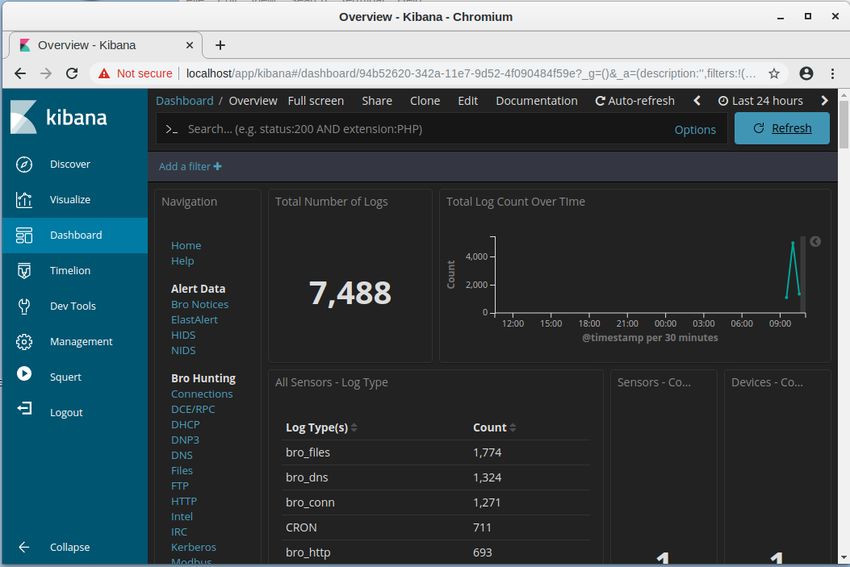
analytic tools with Kibana, Elk, Squil, Squert, etc. Figure 1 below demonstrates Wazuh’s
functionality including graphs and data analytics.
Jon Chandler, jchandler003@cox.net
© 2020 The SANS Institute Author retains full rights.ts
Evaluating Open Source HIDS with Persistence Tactic of MITRE ATT&CK 5
gh
Ri
ll
Fu
ns
ai
et
rR
ho
ut
,A
te
itu
st
In
Figure 1 – Wazuh Monitoring Screen
NS
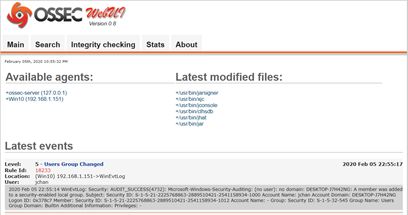
On the other hand, OSSEC sports a rudimentary GUI that includes a Main, Search,
SA
Integrity checking, Stats and About informational tabs on the top of the page as seen in
Figure 2 below. The basic search ability and stats accumulation offer handy tools but is
e
Th
far less advanced than the Wazuh counterpart.
21
20
©
Figure 2 – OSSEC Monitoring Screen
Jon Chandler, jchandler003@cox.net
© 2020 The SANS Institute Author retains full rights.ts
Evaluating Open Source HIDS with Persistence Tactic of MITRE ATT&CK 6
gh
Ri
Other than the differences described above, it appears that the two engines have
ll
very similar backend functionality. However, the two Windows agent config files show
Fu
many similarities and differences. These comparisons are for the default settings of each
ns
tool. Even though the defaults are different, many of the settings can be set in a similar
ai
fashion in both systems. For instance, the section of both tool configuration files
et
defines the server IP for the agent to communicate information. Each tool utilizes
rR
different names to define the server. OSSEC uses and Wazuh uses
ho
. Wazuh has more configuration settings by default in the section
ut
which includes settings for port, protocol, crypto_method, notify_time, time-reconnect,
,A
and auto_restart parameters. In all the OSSEC documentation there was no reference to
the crypto_method to select between different encryption methods. The Wazuh
te
itu
documentation lists Blowfish and AES as encryption method options.
st
Other notable differences in the default setup include the initial files and registry
In
key entries being monitored. The line entries were slightly different as Wazuh utilized the
NS
backslash while OSSEC utilized the forward slash as a file path delimiter. Despite the file
SA
path difference, the default-monitored files section of each of the config files include
forty-five specific files that both tools monitor. Wazuh includes six lines of unique files
e
to monitor while OSSEC had seventeen unique files. During testing, the researcher
Th
identified that files that are necessary to identify changes for the specific test conducted
21
as part of this research were not always included by default. For instance, sethc.exe is one
20
of the files that can be changed in the Accessibility Features test. The sethc.exe file was
©
included by default in Wazuh but not in OSSEC. The registry settings were the same
between the two config files for eighteen registry keys. Wazuh included twenty unique
registry keys while OSSEC only included ten unique keys. Either tool could easily
include all the possible registry keys in both files including the unique entries to each
tool.
To further compare the two endpoint tools, the rootcheck section of the config file
was very similar in both Wazuh and OSSEC, with only one unique line to each config
section. The OSSEC tool included a line for the win_audit_rcl.txt file. This file is used to
check registry values and is available in both systems but is only included in the OSSEC
Jon Chandler, jchandler003@cox.net
© 2020 The SANS Institute Author retains full rights.ts
Evaluating Open Source HIDS with Persistence Tactic of MITRE ATT&CK 7
gh
Ri
by default. The Wazuh tool included a line called disabled which implies that the
ll
rootcheck can be enabled or disabled. Figure 3 and Figure 4 show the differences in the
Fu
two rootcheck sections of each tool.
ns
ai
et
rR
ho
Figure 3 – OSSEC Rootcheck
ut
,A
te
itu
Figure 4 – Wazuh Rootcheck
st
In
As mentioned in this section, OSSEC and Wazuh have many similarities and
NS
differences. The fact that Wazuh originated from OSSEC helps us understand the reason
for the similarities. Many of the differences stem from Wazuh’s attempts to provide extra
SA
features such as the improved GUI interface and the ability to remotely update agents.
e
Next, this paper will discuss of how the research will utilize the MITRE ATT&CK
Th
persistent tactics to understand the effectiveness of the OSSEC and Wazuh tools.
21
20
3. MITRE ATT&CK
©
3.1. Persistence Tactics
Attackers are continually finding new ways to persist on compromised systems in
the hopes of avoiding detection. The MITRE ATT&CK framework constantly updates
the framework based on new research and detected compromises. ATT&CK was selected
for this research because of its all-inclusive model created from real-world compromises.
It also serves as a baseline during the testing process. For this research, it’s not feasible to
test all three hundred and forty-three techniques. Therefore, due to the plethora of TTPs,
a select sample of thirty techniques under the persistence tactic will be utilized to test
how well OSSEC and WAZUH can identify the techniques and procedures of the
Jon Chandler, jchandler003@cox.net
© 2020 The SANS Institute Author retains full rights.ts
Evaluating Open Source HIDS with Persistence Tactic of MITRE ATT&CK 8
gh
Ri
persistence tactic. The attacker must maintain persistence by altering the victim system in
ll
a detectable way. ATT&CK outlines how attackers alter the victim’s system.
Fu
The MITRE ATT&CK framework is outlined on the attack.mitre.org website. It
ns
must be pointed out that all these mechanisms require administrative access to the
ai
Windows 10 system. Understanding how the attackers gain administrative access is
et
beyond the scope of this paper. The following is a list of the techniques selected from the
rR
persistence tactic. For definitions of each of these techniques, refer to Appendix II.
ho
1. Accessibility Features 17. Netsh Helper DLL
ut
2. AppCert DLLs 18. New Service
,A
3. Appinit DLLs 19. Path Interception
4. Application Shimming 20. Port Monitoring
te
5. Auhentication Package 21. PowerShell Profile
itu
6. BITS Jobs 22. Redundant Access
st
7. Bootkits 23. Registry Run Keys / Startup
In
8. Change Default File Folder
NS
Association 24. Schedule Tasks
SA
9. Create Accounts 25. Screensaver
10. DLL Search Order Hijacking 26. Security Support Provider
e
11. Hidden Files and Directories 27. Service Registry Permission
Th
Weakness
12. Hooking
21
13. Image File Execution Option 28. Shortcut Modification
20
Injection 29. Windows Management
Instrumentation Event
14. Logon Scripts
©
Subscription
15. LSASS Driver
30. Winlogon Helper DLL
16. Modify Existing Service
The researcher analyzed each of the selected techniques in the MITRE ATT&CK
framework to categorize the underlying Windows 10 system changes utilized in the
technique. Through this analysis, the researcher identified the following change
categories/methods required to maintain Windows persistence from the selected thirty
techniques:
• Registry addition or change
Jon Chandler, jchandler003@cox.net
© 2020 The SANS Institute Author retains full rights.ts
Evaluating Open Source HIDS with Persistence Tactic of MITRE ATT&CK 9
gh
Ri
• File addition or change
ll
• Account usage, creation, or manipulation
Fu
• Application shimming
ns
ai
• Master boot record alteration
et
By categorizing changes as outlined above, this paper will eliminate redundancy as most
rR
of the techniques could utilize registry additions and changes. The reverse is also true in
ho
that a technique may fall under multiple change categories as there may be multiple ways
ut
in which to accomplish the technique’s objective. For instance, Accessibility Features can
,A
either change a file or a registry key to accomplish its objectives.
te
3.2. Documentation Methodology
itu
The change categories identified above will be used to document the testing
st
In
for this paper instead of documenting techniques individually. For instance, many of
the techniques alter registry entries and the HID tools should be able to identify
NS
these changes at the registry level despite the technique utilized. Furthermore,
SA
techniques may utilize more than one of the change categories, therefore it would be
e
redundant to list a technique and how the tool identifies a registry change and them
Th
move to the next technique and list the same conclusion about registry changes
21
through all the techniques that alter a registry key. Out of the thirty techniques
20
tested, a majority can be exploited with either registry changes or file changes.
Methods will be utilized to change one change category at a time. After the test, each
©
HIDS tools will be analyzed to determine if the categorical change was identified.
The bootkit technique adds another dimension to the change categories. This
single technique typically requires multiple categories at the same time. For
instance, a bootkit may require registry changes, file changes, and master boot
record alterations altogether in order to install. The previous paragraph explains the
changes as either of the two categories to accomplish the technique objective while
bootkits alters more than one category at the same time. This is a generalization as
each bootkit has its own method of compromising a system. However, for the
Jon Chandler, jchandler003@cox.net
© 2020 The SANS Institute Author retains full rights.ts
Evaluating Open Source HIDS with Persistence Tactic of MITRE ATT&CK 10
gh
Ri
purposes of this research, bootkits will be viewed holistically instead of broken out
ll
into the subsets of changes. The master boot record changes will be considered only
Fu
as part of a bootkits. Bootkits fall under a unique process and will be documented
ns
individually as multiple categories of changes are coupled together in the malware.
ai
The malware that was selected to test this technique includes registry, file and
et
master boot record changes.
rR
The testing conducted against the thirty techniques utilized regular built-in
ho
Windows functionality such as command prompt or PowerShell. This is like “living off
ut
the land” for real attackers. Tools that are already available on a Windows machine are
,A
much less likely to raise a red flag when executed. Albeit, Windows functionality such as
te
command prompt and PowerShell are typically only executed by administrators.
itu
Several organizations have created test scripts or automated tools to complete
st
testing against the MITRE ATT&CK framework. One such option is the Purple Team
In
ATT&CK Automation tool by Praetorian. This method requires a payload.exe file
NS
created from msfvenom to be run on the Windows 10 test machine. Praetorian
SA
recommended whitelisting the binary in order to complete testing. At the time of writing,
the Praetorian Red Team Automation tool automated one hundred and nine techniques
e
Th
across all the tactics. Another option more suitable for this research is a set of tools
created by the Atomic Red Team as hosted on GitHub. The “Atomic Red Team allows
21
every security team to test their controls by executing simple ‘atomic tests’ that exercise
20
the same techniques used by adversaries” (Red Canary Co., n.d.). These Atomic Red
©
Team tests utilize the underlying change categories mentioned above to make the
Windows system configuration changes. Therefore, the researcher utilized the Atomic
Red Team scripts for the selected testing.
4. Findings and Discussion
In order to provide more context around the Atomic Red Team testing scripts, an
explanation must be presented about the specific scripts utilized. In many of the scripts,
the Reg.exe command changed registry entries from the normal functionality to
Jon Chandler, jchandler003@cox.net
© 2020 The SANS Institute Author retains full rights.ts
Evaluating Open Source HIDS with Persistence Tactic of MITRE ATT&CK 11
gh
Ri
something abnormal. For instance, one item utilized the following command to cause an
ll
executable to run at startup for the Registry Run Keys / Startup Folder test.
Fu
REG ADD "HKCU\SOFTWARE\Microsoft\Windows\CurrentVersion\Run" /V "Atomic Red
ns
Team" /t REG_SZ /F /D "c:\temp\T1060-notepad.exe"
ai
et
Notice that this change did not introduce malicious content but utilized the Reg command
rR
to cause the Notepad.exe to run at startup. The same concept could be utilized to cause
the command prompt to execute instead of the normal Accessibility Features. Changing
ho
the Accessibility Features to launch the command prompt allows an attacker to gain
ut
access to the system prior to authentication. As can be seen, the test demonstrates that an
,A
attacker could utilize a Windows command to change functionality to run their intended
te
objectives.
itu
The changed functionality does not need to be defined as malicious (IOC) as it
st
In
could include any functionality benefiting their intentions which could include a zero-day
NS
exploit. The Notepad program mentioned above could easily be replaced by background-
running malicious code that runs unnoticed by the user. Therefore, the true objective of
SA
the test is to understand if a change can be made to a specific configuration item within
e
Windows 10 and how the HIDS tools identify or alert on those changes. The results of
Th
the tests will be posted in Appendix I as a supplement. The analysis will focus on the
21
categories of changes allowed to the system such as registry or file changes. Focusing on
20
category of changes helps with the redundancy of testing the techniques specifically. For
instance, registry key change tests repeat multiple times for each of the techniques that
©
utilize that category of changes. The Accessibility Features, AppCert DLLS, Appinit
DLLs, and many the other techniques alter registry keys to accomplish malicious intent.
The paper will describe how each of the categories were used to accomplish the
technique objectives. Please note that some techniques could be accomplished in different
ways. For instance, Accessibility Feature can be changed by either the registry or by
copying files. The analysis will then explain how the tools identified the specific category
of change. It will also identify the shortcomings and strengths associated with each area.
It is important to note that alert rules were not required due to the techniques that were
Jon Chandler, jchandler003@cox.net
© 2020 The SANS Institute Author retains full rights.ts
Evaluating Open Source HIDS with Persistence Tactic of MITRE ATT&CK 12
gh
Ri
chosen. If a technique was not detected by the HIDs, research was conducted to
ll
determine what needed to be added to the configuration files.
Fu
4.1. Registry Additions or Changes
ns
The first change category that will be analyzed is the registry key updates. The
ai
majority of the techniques (seventeen out of thirty) can utilize registry edits to
et
rR
accomplish the objective of the specific technique procedure. Both OSSEC and Wazuh
include configuration file entries that defines which registry keys to monitor, although it
ho
was necessary to add specific registry key entries during tested. Both HIDS offer a
ut
similar setup regarding registry monitoring. The following line associated with a service
,A
registry changes is listed under the SysCheck section of the configuration file.
te
itu
HKEY_LOCAL_MACHINE\System\CurrentControlSet\
Services
st
Per both OSSEC and Wazuh’s documentation for the latest instances, the
In
windows_registy tag states, “new entries will not trigger alerts, only changes to existing
NS
entries” (OSSEC, n.d.). For these changed registry keys, the HIDS capture both MD5
SA
hash and SHA1 hash to compare against historic values. When a registry change is
detected, the HIDS generates a Syscheck alert in the log files. The specific rule is
e
‘Registry Integrity Checksum Changed’ for that specific registry key. However, the alert
Th
doesn’t provide specifics about what changed. Figure 5 below shows an example of an
21
OSSEC Registry Integrity Checksum Changed alert. The Wazuh alert shows the same
20
information just in a different format.
©
Figure 5 – Trying to find registry key for CurrentVersion/Run
You can see in this alert that the registry key that changed was listed. However, the alert
doesn’t show exactly what changed within the key.
Jon Chandler, jchandler003@cox.net
© 2020 The SANS Institute Author retains full rights.ts
Evaluating Open Source HIDS with Persistence Tactic of MITRE ATT&CK 13
gh
Ri
An example of a registry key change is the Winlogon Helper DLL test. In this
ll
test, neither the old nor the new command associated with that registry key was provided.
Fu
The only details in the logs showed the Integrity checksum changed for the following
ns
registry key.
ai
HKEY_LOCAL_MACHINE\System\CurrentControlSet\Services\
et
USBHUB3\Enum
rR
In the Accessibility Features technique, neither the osk.exe, utilman.exe. magnify.exe,
ho
narrator.exe nor the sethc.exe files were identified as being changed in the registry key.
ut
The cmd.exe or calc.exe files that replaced the legitimate Accessibility Features files
were not identified either.
,A
te
itu
The vagueness of the alert leads to the conclusion that it would be very difficult
for an incident responder to determine what changed in the system. Although the specific
st
In
registry keys reviewed should not fluctuate over time, they typically remain static after
installation, except when Windows is updating. The potential for false positives in this
NS
category is small as the tool does not alert on new registry entries—it will only alert on
SA
registry changes. However, the researcher noted that when tools such as Windows
e
Defender are running, more noise occurs in the registry changes. Windows Defender
Th
automatically reverted some of the testing changes back to original after they executed.
21
Please note that a monitored registry key can stop short of the final subkey. This
20
means that multiple subkeys could exist under a key that is being monitored. For
©
instance, on the Windows 10 test VMs, the following OSSEC configuration file entry
includes six different subkeys.
KEY_LOCAL_MACHINE\Software\Microsoft\
Windows\CurrentVersion\Policies
If a ‘Registry Integrity Checksum Changed’ alert is generated, it will take time to
understand which are the unchanged registry keys and which are the malicious changes.
In the Windows 10 test VM, the following only has one value under the key.
HKEY_LOCAL_MACHINE\Software\Microsoft\Windows\
CurrentVersion\Run
Jon Chandler, jchandler003@cox.net
© 2020 The SANS Institute Author retains full rights.ts
Evaluating Open Source HIDS with Persistence Tactic of MITRE ATT&CK 14
gh
Ri
Although a registry key with only limited subkeys would be less tedious, it would still
ll
take time to understand what is normal and abnormal. A savvy attacker would take every
Fu
effort to ensure that additional changes to the registry keys appear as normal as they can
ns
in order to avoid detection. This could include only making a one-character change that is
ai
hard to detect such as changing to a character that looks like the original character.
et
Therefore, the Incident Response analyst following up on the alert might not recognize
rR
the insignificant alteration to the changed registry key. The problem could be exasperated
ho
depending on how many false positives are identified by the system. Only select registry
ut
keys are entered into the configuration file to ensure the number of false positives are
,A
kept minimal. te
4.2. File Additions or Changes
itu
File additions and changes are difficult to monitor. OSSEC and Wazuh both allow
st
monitoring on either directory or a specific file basis. On a directory monitoring basis, a
In
company can set the configuration to monitor for directory changes but unless the folder
NS
only contains relatively few unchangeable files, the number of false positives from a
SA
security perspective could be very large. Applications don’t always separate executable
files from data files within a folder or directory. Even if they are separated, the potential
e
Th
to create temporary files while the application is running could cause unwanted false
positives in monitoring. It would create too much noise to monitor everywhere on a drive
21
or volume and the HIDS tool would generate hundreds of alerts per endpoint just for
20
regular system usage. As a test to determine the number of false positives that would be
©
created, the researcher set monitoring for just the Windows folders and noticed several
alerts that were generated due to temporary file creation and regular system usage. As for
specific file monitoring, it is cumbersome to create entries for hundreds of specific files
on the system and monitoring specific files will not capture new files added to a
directory. Therefore, one can see that monitoring file additions and changes requires a
fine line between monitoring specific files and specific directories.
The potential to add or change a file occurs in nearly all the selected sample of
ATT&CK techniques. There are many tools normally available to a user to perform
administrative tasks on a Windows system. Utilizing these available tools can add or
Jon Chandler, jchandler003@cox.net
© 2020 The SANS Institute Author retains full rights.ts
Evaluating Open Source HIDS with Persistence Tactic of MITRE ATT&CK 15
gh
Ri
change typical functionality to incur malicious intent on a system. A normal Windows 10
ll
tool such as BITS Jobs exist to perform remote downloads from the internet, “In fact,
Fu
malware-free attacks in general have surged in recent years, accounting for 40 percent of
ns
the total number of cyberattacks globally last year: according to the 2019 CrowdStrike®
ai
Global Threat Report, attackers continue to shift to defense evasion methods, like living
et
off the land techniques, to remain undetected” (Goudie, 2019). However, at some point in
rR
the attack process a file change will be required on a Windows system to accomplish the
ho
full intent of the comprise. The only problem is that this is the weakest detection potential
ut
due to the plethora of already changing files on a system and the many locations in which
,A
files can be placed and hidden. If detection teams can focus on the high-risk files which
consists of a small number of folders such as c:\windows\system32 or a small number of
te
itu
specific high-risk files such as the Accessibility Feature files to monitor, they would
detect a larger percentage of attacks. They would have to rely on other mechanisms to
st
In
detect attacks that don’t utilize the high-risk files. Teams must realize that they are only
NS
detecting a small percentage of the potential changed files, especially since many of the
registry entries can easily change file locations to anywhere on the disk. Focusing on the
SA
highest risk files and folders would be the appropriate actions to take with the
e
understanding that this method/technique is not foolproof.
Th
Both OSSEC and Wazuh utilize similar line structure to monitor specific files. As
21
mentioned previously, OSSEC separates items in the path by a forward slash while
20
Wazuh utilizes the backslash. The out-of-the-box configuration of both OSSEC and
©
Wazuh have a specific set of sensitive Windows files being monitored. Each system also
includes a subset of unique files that HIDS deems important. If desired, a file or folder
could be easily added to each of the monitoring configurations. During testing, it was
required to add entries into the configuration file of each HIDS to cover the risks of the
MITRE ATT&CK framework. Again, like the registry monitoring, this functionality does
an MD5 and SHA1 to compare current files with historic files. The system regularly
checks the file integrity to determine if changes were made. Once a change is detected, an
alert is generated in the alerts log file (and email alerts are generated, if configured to do
so).
Jon Chandler, jchandler003@cox.net
© 2020 The SANS Institute Author retains full rights.ts
Evaluating Open Source HIDS with Persistence Tactic of MITRE ATT&CK 16
gh
Ri
The researcher performed two tests for this section. The first test copied the
ll
cmd.exe file over the sethc.exe file. The change required booting up to a bootable CD
Fu
that could still access the local hard drive of the image. Once the temporary system was
ns
activated, a command prompt could be launched to copy the files as mentioned above.
ai
Once the system was rebooted and waiting to login, the operator could press the shift key
et
five times to cause the StickyKeys window to appear. However, since the StickyKey
rR
program was replace by the cmd.exe, the command prompt executed when the shift key
ho
combination executed. This allows a user to gain access to the system bypassing
ut
authentication as the command prompt executes in system mode. A hacker could then
,A
copy files to the system or change the password for the administrator account. The
following line caused OSSEC to monitor this file change:
te
itu
%WINDIR%/SysNative/sethc.exe
st
After logging back into the system, the alert in Figure 6 showed up in the alerts log file.
In
NS
SA
e
Th
21
20
Figure 6 – Log Alert for sethc.exe File Change
©
It is noted that the alert shows the file size changes as well as the checksums from the old
and new files. Unlike the registry changes that require additional research to determine
what changed, this alert is very clear and shows the exact altered file.
The second test copied a file to the Startup folder. The system only allows
administrative access to copy files to the Startup folder. The researcher copied the
calc.exe file to the folder listed below:
C:\ProgramData\Microsoft\Windows\Start Menu\Programs\Startup
Jon Chandler, jchandler003@cox.net
© 2020 The SANS Institute Author retains full rights.ts
Evaluating Open Source HIDS with Persistence Tactic of MITRE ATT&CK 17
gh
Ri
The configuration file for OSSEC contained the following entry to monitor the additions
ll
to the Startup folder.
Fu
< directories check_all="yes" realtime="yes">%PROGRAMDATA%/
ns
Microsoft/Windows/Start Menu/Programs/Startup
ai
et
rR
When the machine rebooted, the calculator automatically executed. Obviously, this
change could have included malicious code via a batch script or another executable
ho
program type. Regardless of the executable method, the program runs if an attacker can
ut
add to this folder. Figure 7 shows the alert that generated in the alerts.log file. Since this
,A
is a new file, comparisons cannot be completed from hashes. However, this alert
te
demonstrates simply the addition of a file to the Startup folder.
itu
st
In
NS
SA
Figure 7 – Results of the calc.exe file added to the Startup folder
e
Th
4.3. Account Additions
21
Account addition adds a new account to the Windows 10 environment. If
20
unnoticed, the attacker has continual system access. Windows 10 logs the creation of new
accounts. The Windows logs are transferred to both OSSEC and Wazuh. Both HIDS
©
integrate monitoring the Windows logs. They also both detect password changes.
However, this category consisted only of the Account Creation technique. The difference
in the two HIDS configuration files can be seen in Figure 8 and Figure 9 below. The
OSSEC file references eventlog while Wazuh references eventchannel. The Wazuh
documentation lists that eventlog supports every version of Windows while eventchannel
supports Windows Vista and later (Wazuh, n.d.). Also, Wazuh configuration file is
specifically excluding a list of specific events from its log file.
Jon Chandler, jchandler003@cox.net
© 2020 The SANS Institute Author retains full rights.ts
Evaluating Open Source HIDS with Persistence Tactic of MITRE ATT&CK 18
gh
Ri
ll
Fu
ns
ai
et
rR
ho
ut
,A
te
itu
Figure 8 – OSSEC Event Log Monitoring
st
In
NS
SA
e
Th
21
20
©
Figure 9 – Wazuh Event Log Monitoring
In both HIDS, they easily identified account creations. The Atomic Red Team test plan
for Account Modification was a regular Windows 10 command to add a user from the
Jon Chandler, jchandler003@cox.net
© 2020 The SANS Institute Author retains full rights.ts
Evaluating Open Source HIDS with Persistence Tactic of MITRE ATT&CK 19
gh
Ri
command prompt. The following line was executed as administrator on each of the
ll
Windows 10 test machine.
Fu
net user /add eviluser
ns
After the command was run, the tester ran the net user command to confirm the added
ai
et
user. After verification, a review of the logs confirmed that the system identified the
rR
added account. Figure 10 below shows four entries created in the alert log.
ho
ut
,A
te
itu
st
In
NS
SA
e
Th
21
Figure 10 – Results of an account creation
20
Two sets of logs identify a user account created and user account changed. The second
©
alert in each set specifically names eviluser as the created account. The amount of
information in this alert makes it difficult to identify the created account as the account
name is nested in the middle of the text.
4.4. Application Shimming
Application Shimming test plans include three different tests. The first test
consists of running the sdbinst.exe file to import a database into the Application
Shimming database as follows:
sdbinst.exe AtomicShimx86.sdb
Jon Chandler, jchandler003@cox.net
© 2020 The SANS Institute Author retains full rights.ts
Evaluating Open Source HIDS with Persistence Tactic of MITRE ATT&CK 20
gh
Ri
As mentioned above, Application Shimming is for backwards compatibility. Companies
ll
may want to copy an Application Shimming database across their environment to ensure
Fu
all machines can correctly run older software. Obviously, the sdbinst.exe file is adding
ns
configuration information for legacy applications to be able to continue to run. The
ai
sdbinst.exe is just copying files to the Application Shimming system location. The other
et
two methods specifically set a registry entry or copy a file to the system location as
rR
shown below.
ho
Method 1
New-ItemProperty -Path HKLM:"\SOFTWARE\Microsoft\Windows
ut
NT\CurrentVersion\AppCompatFlags\Custom" -Name "AtomicRedTeamT1138" -Value
,A
"AtomicRedTeamT1138"
New-ItemProperty -Path HKLM:"\SOFTWARE\Microsoft\Windows
te
NT\CurrentVersion\AppCompatFlags\InstalledSDB" -Name "AtomicRedTeamT1138" -
Value "AtomicRedTeamT1138"
itu
st
Method 2
In
Copy-Item $PathToAtomicsFolder\T1138\bin\T1138CompatDatabase.sdb
C:\Windows\apppatch\Custom\T1138CompatDatabase.sdb
NS
Copy-Item $PathToAtomicsFolder\T1138\bin\T1138CompatDatabase.sdb
C:\Windows\apppatch\Custom\Custom64\T1138CompatDatabase.sdb
SA
The above sections (Registry Changes and File Changes) covered the Application
Shimming category.
e
Th
4.5. Bootkits / Rootkit
21
According to Kasperky’s Encyclopedia, a rootkit is “A program or collection of
20
software tools programmed to hide certain objects or activity in the system. As a rule,
©
cybercriminals hide the registry keys for the autorun of malicious objects, as well as files,
folders, processes in the infected computer’s memory, and malicious network activity”
(Rootkit, n.d.). The same website described “a bootkit is a malicious program designed to
load as early as possible in the boot process, in order to control all stages of the operating
system start up, modifying system code and drivers before anti-virus and other security
components are loaded” (Bootkit, n.d.). Bootkits can load malicious code in the Master
Boot Record (MBR) or boot sector. Both OSSEC and Wazuh have been designed to
detect Rootkits. However, nothing is noted in their documentation about Bootkits.
Therefore, this test will focus on running a rootkit on the test machines to determine if
OSSEC and Wazuh detect its existence.
Jon Chandler, jchandler003@cox.net
© 2020 The SANS Institute Author retains full rights.ts
Evaluating Open Source HIDS with Persistence Tactic of MITRE ATT&CK 21
gh
Ri
The tester utilized the Rootkit.Win32.TDSS.tdl4 (TDSS) rootkit provided in the
ll
SANS course SEC501 in a package called badkit3.exe. SEC501 describes the badkit3.exe
Fu
as a Master Boot Record (MBR) Rootkit. When installed in administrative mode, the
ns
rootkit caused the system to blue screen with a message that stated, “Your PC ran into a
ai
problem and needs to restart. We’re just collecting some error info, and then we’ll restart
et
for you.” The system rebooted after the blue screen message. Both the Wazuh and
rR
OSSEC Windows 10 machines created the same blue screen error messages. Both Wazuh
ho
and OSSEC reported anomalies due to the rootkit. Figure 11 below shows that Wazuh
ut
identified alerts related to the rootkit.
,A
te
itu
st
In
NS
SA
e
Th
21
Figure 11 – Wazuh Alerts for Rootkit
20
OSSEC showed similar error messages that the malware caused system problems. See
©
Figure 12 below of the OSSEC error alert generated. This alert only shows that Windows
error was generated due to the rootkit changing files.
Figure 12 – OSSEC alert generated due to malware cause a system error
Jon Chandler, jchandler003@cox.net
© 2020 The SANS Institute Author retains full rights.ts
Evaluating Open Source HIDS with Persistence Tactic of MITRE ATT&CK 22
gh
Ri
However, neither tool directly identified the malware. The TDSKiller program provided
ll
in SEC501 effectively identified and removed the Rootkit.Win32.TDSS.tdl4 malware as
Fu
Figure 12 below shows.
ns
ai
et
rR
ho
ut
,A
te
itu
st
In
NS
Figure 12 – TDSSKiller Removing MBR Rootkit
SA
The HIDS did not effectively detect this MBR Rootkit. It showed signs that a problem
existed and that something suspicious happened on the infected PC. However, the HIDS
e
Th
did not provide a clear description of the malware. In fact, the Incident Response (IR)
21
team would struggle to understand the true alerts associate with an MBR Rootkit. In this
case, suspicion would most likely generate enough concern that the IR team’s utilization
20
of other tools would identify the root cause of the issue.
©
5. Proprietary Tool Comparison
A comparison of OSSEC and Wazuh results from above can be compared to the
MITRE ATT&CK Evaluation as found at the following link.
On this site, a section evaluates Crowdstrike against the entire framework (MITRE
ATT&CK, n.d.). In the persistence column, Crowdstrike detected the following
techniques: Accessibility Features, Create Account, New Service, Registry Run Keys /
Jon Chandler, jchandler003@cox.net
© 2020 The SANS Institute Author retains full rights.ts
Evaluating Open Source HIDS with Persistence Tactic of MITRE ATT&CK 23
gh
Ri
Startup Folder, Scheduled Task, and Valid Account. For instance, the evaluation
ll
provided the information in Figure 13 for the Accessibility Features of the Crowdstrike
Fu
Evaluation.
ns
ai
et
rR
ho
ut
,A
te
itu
Figure 13 – Crowdstrike’s ATT&CK Evaluations – Accessibility Features
st
In
This figure shows a procedure followed by different detection techniques. For 17.c.1, the
NS
magnifying glass stands for telemetry and the other symbol stands for tainted. For 20.A.1,
the symbols represent specific behavior, telemetry, and general behavior (delayed). If the
SA
user clicks on the symbols, more information is provided. The screen shows that
e
“Telemetry showed a file write of magnify.exe by powershell.exe in the system directory.
Th
The telemetry was tainted by an alert on its parent powerhsell.exe process” (MITRE,
21
n.d.). Because the research conducted here and the evaluation conducted by MITRE did
20
not follow the exact same process, it is uncertain if similar comparisons were made. Out
of the methods utilized by MITRE, we do not have a full understanding of what the
©
stipulations were for the tests. Based on the website, the MITRE evaluation process
included legitimate compromises instead of tests to see if defined functions and
commands already available on a Windows 10 machine could be altered and if they
continue to work. In Appendix I, the table shows that OSSEC and Wazuh have four
detections and two partial detections. This table also shows that Crowdstrike has two
detections and three partials. Again, the result doesn’t reflect the exact same testing
methodology.
According to the testing as outlined in Appendix I, the HIDS tested here fared just
as well, if not better (depending on testing methodology) with a proprietary tool like
Jon Chandler, jchandler003@cox.net
© 2020 The SANS Institute Author retains full rights.ts
Evaluating Open Source HIDS with Persistence Tactic of MITRE ATT&CK 24
gh
Ri
Crowdstrike. However, there are pros and cons to proprietary tools versus open-source
ll
tools. Proprietary tools typically offer configuration and support as part of the product
Fu
purchase. The company has the expertise and can help resolve issues when they arise as
ns
part of the support model. This is built into the price for the software and support. The
ai
issues identified working with open-source tools are common complaints that result from
et
using free tools. If you have a problem, you are on your own to resolve the issue.
rR
Employees that support open-source tools need to be experts on the systems. It was
ho
noticed that companies do exist that charge a fee to provide support for their version of
ut
OSSEC.
,A
During the testing, many issues came up that caused problems for the researcher
te
to understand and resolve. Granted, the researcher is new to these tools and had a steep
itu
learning curve understanding how to install and configure the tools. Installing
st
supplemental functionality like adding the GUI for OSSEC or Kibana / Elk for Wazuh
In
was problematic. The configuration of each of the tested tools requires different skill
NS
levels and experience for the employee supporting the tools. The small window of
SA
functionality that was tested here is miniscule compared to the full functionality required
to protect an organization. During the testing, no additional rules were required as the
e
focus was on persistence and the Atomic Red Team testing methodology didn’t require
Th
actual compromises to complete the testing which would have necessitated additional
21
rules for detection.
20
©
6. Conclusion
Based on the evaluation completed the researcher saw that both OSSEC and
Wazuh function similarly. The two test system engines appear to function similarly. The
configuration files offer much of the same monitoring capabilities. Both HIDs provided
similar functionality from the detection perspective. They have the ability to detect
rootkits, specific file changes, registry changes and account creation and modification.
The main difference between the two tools lies in their external functionality.
Wazuh offered cluster mode that allows scalability; however, this functionality wasn’t
mentioned for OSSEC. As mentioned in the sections above, the Wazuh server manages
Jon Chandler, jchandler003@cox.net
© 2020 The SANS Institute Author retains full rights.ts
Evaluating Open Source HIDS with Persistence Tactic of MITRE ATT&CK 25
gh
Ri
agents and can be used to remotely upgrade agents if desired. Wazuh can send remote
ll
commands to the endpoints. This functionality appears to be only available in Wazuh.
Fu
The data analytic functionality appeared to be much more advanced for Wazuh compared
ns
to OSSEC. These are only a few differences that were noticed during testing, but it is
ai
certain that many other differences between the two HID systems exist.
et
As for comparison to proprietary tools, it appears from the surface that both tools
rR
function well in the security detection arena. According to the testing, with the right
ho
configurations, many additional registry changes were identified than what was identified
ut
for Crowdstrike. However, if an attack resulted in both file changes and registry changes,
,A
it would be apparent that the identification would quickly dwindle. Both tools struggled
te
with file detection based on the location of the changed file. If the Accessibility Features
itu
file change requires it to be in a specific location such as c:\windows\system32, detection
st
is certain.
In
For many smaller companies, open-source tools may be a great alternative to
NS
expensive EDR solutions. It would be critical for a small company thinking about
SA
OSSEC or Wazuh to fully evaluate the resources required to support an open-source tool.
Internal human resources to support open-source tools can add up which means the open-
e
Th
source tools are not free of costs. Errors in monitoring and detection could be very costly
for less experienced cybersecurity teams. Companies need to fully analyze their options
21
and assess their risk appetite to understand the monitoring tools that best meet their
20
company’s objectives.
©
Jon Chandler, jchandler003@cox.net
© 2020 The SANS Institute Author retains full rights.ts
Evaluating Open Source HIDS with Persistence Tactic of MITRE ATT&CK 26
gh
Ri
References
ll
Fu
AppInit DLLs and Secure Boot - Win32 apps. (2018, May 30). Retrieved January 25,
ns
2020, from https://docs.microsoft.com/en-us/windows/win32/dlls/secure-
ai
boot-and-appinit-dlls
et
rR
ATT&CK Matrix for Enterprise. (n.d.). Retrieved January 25, 2020, from
ho
https://attack.MITRE.org/
ut
Bejtlich, R. (2019, March 28). Thoughts on OSSEC Con 2019. Retrieved January 25,
,A
2020, from https://taosecurity.blogspot.com/2019/03/thoughts-on-ossec-
te
itu
con-2019.html
st
Bootkit. (n.d.). Retrieved January 25, 2020, from
In
https://encyclopedia.kaspersky.com/glossary/bootkit/
NS
Cid, D. (2015, December 9). Server Security: OSSEC Updated With GeoIP Support.
SA
Retrieved January 25, 2020, from https://blog.sucuri.net/2015/12/ossec-
e
Th
with-geoip.html
21
FireEye Endpoint Security Leads MITRE ATT&CK Evaluation. (2019, February 19).
20
Retrieved January 25, 2020, from https://www.fireeye.com/blog/products-
©
and-services/2019/02/MITRE-evaluation-validates-fireeye-endpoint-
security-as-most-effective-edr-solution.html
Goudie, M. (2019, May 9). The Rise of "Living off the Land" Attacks. Retrieved
January 25, 2020, from https://www.crowdstrike.com/blog/going-beyond-
malware-the-rise-of-living-off-the-land-attacks/
Kang, A. (2019, May 21). How to implement and use the MITRE ATT&CK framework
| CSO ... Retrieved January 25, 2020, from
Jon Chandler, jchandler003@cox.net
© 2020 The SANS Institute Author retains full rights.ts
Evaluating Open Source HIDS with Persistence Tactic of MITRE ATT&CK 27
gh
Ri
https://www.csoonline.com/article/3396139/how-to-implement-and-use-
ll
the-mitre-attandck-framework.html
Fu
MITRE ATT&CK. (n.d.). Retrieved January 25, 2020, from
ns
ai
https://attackevals.mitre.org/evaluations/crowdstrike.1.apt3.1.html
et
OSSEC. (n.d.). Retrieved January 25, 2020, from https://www.ossec.net/
rR
Ossec vs Wazuh: What are the differences? (n.d.). Retrieved February 5, 2020, from
ho
ut
https://stackshare.io/stackups/ossec-vs-wazuh
,A
Red Canary Co. (n.d.). Retrieved January 25, 2020, from
te
https://github.com/redcanaryco/atomic-red-team
itu
st
Rootkit. (n.d.). Retrieved January 25, 2020, from
In
https://encyclopedia.kaspersky.com/glossary/rootkit/
NS
Strom, B. (2019, July 17). Getting Started with ATT&CK: Adversary Emulation and
SA
Red Teaming. Retrieved October 21, 2019, from https://medium.com/mitre-
e
Th
attack/getting-started-with-attack-red-29f074ccf7e3
21
Strom, B. E., Battaglia, J. A., Kemmerer, M. S., Kupersanin, W., Miller, D. P., Wampler,
20
C., … Wolf, R. D. (2019, October 11). Finding Cyber Threats with ATT&CK-
©
Based Analytics. Retrieved October 19, 2019, from
https://www.mitre.org/publications/technical-papers/finding-cyber-
threats-with-attck-based-analytics.
Wazuh. (n.d.). Retrieved January 25, 2020, from https://wazuh.com/
Strunk, W., & White, E. B. (1999). The elements of style. Boston: Allyn and Bacon.
Jon Chandler, jchandler003@cox.net
© 2020 The SANS Institute Author retains full rights.ts
Evaluating Open Source HIDS with Persistence Tactic of MITRE ATT&CK 28
gh
Ri
Appendix I
ll
Rubric - Persistence Vector OSSEC WAZUH Crowdstrike
Fu
1. Accessibility Features Partial Partial Partial
2. AppCert DLLs Not Detected Not Detected Not Detected
ns
3. AppInit DLLs Not Detected Not Detected Not Detected
ai
4. Application Shimming Not Detected Not Detected Not Detected
et
5. Authentication Package Not Detected Not Detected Not Detected
rR
6. BITS Jobs Not Detected Not Detected Not Detected
7. Bootkit Not Detected Not Detected Not Detected
ho
8. Change Default File Association Detected Detected Not Detected
9. Create Account Detected Detected Detected
ut
10. DLL Search Order Hijacking Not Detected Not Detected Not Detected
,A
11. Hidden Files and Directories Not Detected Not Detected Not Detected
12. Hooking Detected Detected Not Detected
te
13. Image File Execution Options Injection Not Detected Not Detected Not Detected
itu
14. Logon Scripts Not Detected Not Detected Not Detected
st
15. LSASS Driver Not Detected Not Detected Not Detected
16. Modify Existing Service Partial Partial Not Detected
In
17. Netsh Helper DLL Not Detected Not Detected Not Detected
NS
18. New Service Not Detected Not Detected Partial
19. Path Interception Not Detected Not Detected Not Detected
SA
20. Port Monitors Not Detected Not Detected Not Detected
21. PowerShell Profile Not Detected Not Detected Not Detected
e
22. Redundant Access Not Detected Not Detected Not Detected
Th
23. Registry Run Keys / Startup Folder Not Detected Not Detected Detected
24. Scheduled Task Not Detected Not Detected Partial
21
25. Screensaver Not Detected Not Detected Not Detected
20
26. Security Support Provider Not Detected Not Detected Not Detected
27. Service Registry Permissions Weakness Not Detected Not Detected Not Detected
©
28. Shortcut Modification Detected Detected Not Detected
29. Windows Management Instrumentation
Not Detected Not Detected Not Detected
Event Subscription
30. Winlogon Helper DLL Not Detected Not Detected Not Detected
Jon Chandler, jchandler003@cox.net
© 2020 The SANS Institute Author retains full rights.You can also read


