LAN-2-LAN API FOR DOORBIRD AND BIRDGUARD
←
→
Page content transcription
If your browser does not render page correctly, please read the page content below
LAN-2-LAN API
     FOR DOORBIRD AND BIRDGUARD
                                    Revision: 0.24
                                  Date: July 5th 2018

OVERVIEW
This document specifies the external API of Bird Home Automation products. The
interface provides the functionality for IP communicating with Bird Home Automation
products via LAN (Local Area Network), handled by the built-in servers in Bird Home
Automation products.

COPYRIGHT NOTICE
This document is copyright protected and is the property of Bird Home Automation
GmbH and may not be copied, reproduced or distributed in any way without the prior
written consent of Bird Home Automation GmbH.

BETA AND SUPPORT NOTICE
This API is currently in beta status and is subject to change without prior
notice. This API is not part of the product purchase and thus comes without
any kind of support and without any kind of warranty.

LICENSE AGREEMENT
This License Agreement (“License”) is a legal agreement between you (either
individual or an entity) and Bird Home Automation GmbH (“Bird Home Automation”).
By using the INTERFACE and INTERFACE DESCRIPTION (each defined below),
whether in whole or in part, you agree to be bound by the terms of this License.
1. GRANT OF LICENSE
Bird Home Automation hereby grants to you the right to use BIRD HOME
AUTOMATION LAN API (“INTERFACE”) and the written specification of the
INTERFACE (the “INTERFACE DESCRIPTION”) for the sole and limited purpose of
creating, manufacturing and developing a solution that integrates any unit or portion
included in the product range of Bird Home Automation network products, as defined
by Bird Home Automation at its discretion (an “Bird Home Automation Product”) and
to market, sell and distribute any such solution.
2. COPYRIGHT
The INTERFACE and the INTERFACE DESCRIPTION are owned by Bird Home
Automation and are protected by copyright laws and international treaty provisions.
Any use of the INTERFACE and/or the INTERFACE DESCRIPTION outside the
limited purpose set forth in Section 1 above is strictly prohibited.
3. RESTRICTIONS ON USE
You have no rights with respect to the INTERFACE, INTERFACE DESCRIPTION or
any portions thereof and shall not use the INTERFACE, INTERFACE DESCRIPTION

Copyright © 2018 by Bird Home Automation GmbH                                      1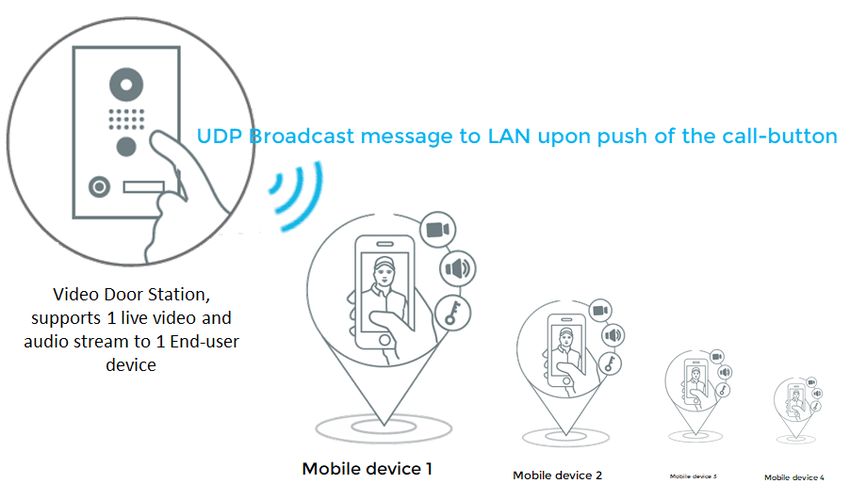
or any portion thereof except as expressly set forth herein. You may not reverse
engineer, decompile, or disassemble the INTERFACE except to the extent required
to obtain interoperability with other independently created computer programs as
permitted by mandatory law.
4. THIRD PARTY RIGHTS
You agree that you are fully responsible for your own conduct while using the
INTERFACE and integrating any Bird Home Automation Products into your solution
and the consequences thereof. Bird Home Automation Products may be combined
with a virtually infinite number of potential solutions. Consequently, you recognize
that (i) other third parties may claim to own patents or copyrights that could cover
certain solutions which integrate Bird Home Automation products, or which result
from the combination of Bird Home Automation products and additional technology or
solutions and (ii) you are responsible for ensuring that any solution which integrates
with an Bird Home Automation Product, or a combination of a solution and an Bird
Home Automation product, does not infringe upon or misappropriate any intellectual
property or personal right of any third party.
5. TERMINATION
This License is effective until terminated. Your rights under this License will terminate
automatically without notice from Bird Home Automation if you fail to comply with any
term(s) of this License. Upon the termination of this License, you shall cease all use
and disposition of the INTERFACE and/or THE INTERFACE DESCRIPTION whether
for the purpose set forth in Section 1 above or not.
6. REPRESENTATIONS AND WARRANTIES; DISCLAIMER
6.1. You represent and warrant that (i) any solution created, manufactured and/or
developed by you which integrates an Bird Home Automation Product shall not
infringe or otherwise violate any third party rights, including but not limited to third
party intellectual property rights; and (ii) your use of the INTERFACE and
INTERFACE DESCRIPTION will comply with all applicable foreign and domestic
laws, rules and regulations.
6.2. YOUR USE OF THE INTERFACE IS AT YOUR SOLE RISK. THE INTERFACE
AND THE INTERFACE DESCRIPTION ARE DELIVERED FREE OF CHARGE AND
"AS IS" WITHOUT WARRANTY OF ANY KIND. THE ENTIRE RISK AS TO THE
USE, RESULTS AND PERFORMANCE OF THE INTERFACE AND THE
INTERFACE DESCRIPTION IS ASSUMED BY THE USER/YOU. BIRD HOME
AUTOMATION DISCLAIMS ALL WARRANTIES, WHETHER EXPRESS OR
IMPLIED, INCLUDING BUT NOT LIMITED TO, THE IMPLIED WARRANTIES OF
MERCHANTABILITY, FITNESS FOR A PARTICULAR PURPOSE, TITLE, NON-
INFRINGEMENT AND PRODUCT LIABILITY, OR ANY WARRANTY ARISING OUT
OF ANY PROPOSAL, SPECIFICATION OR SAMPLE WITH RESPECT TO THE
INTERFACE AND THE INTERFACE DESCRIPTION.
Without limiting the generality of the foregoing, you acknowledge and agree that Bird
Home Automation does not make any representation or warranty that the integration
of Bird Home Automation Products into your solution does not infringe any third party
rights. You are solely responsible for any intellectual property infringement claims that
are based on or relate to solutions created, manufactured and distributed by you
which integrate Bird Home Automation Products. Bird Home Automation is unaware
of the details regarding your particular solution, has not conducted any investigation

Copyright © 2018 by Bird Home Automation GmbH                                          2
relating to potential third party rights issues relating to your solution and does not
accept any responsibility or liability with respect thereto.
6.3. THIS LICENSE DOES NOT CONVEY ANY LICENSE TO THIRD PARTY
INTELLECTUAL PROPERTY. YOU ARE SOLELY RESPONSIBLE FOR (I)
EXAMINING WHETHER THE INTERFACE AND THE INTERFACE DESCRIPTION
ARE ENCUMBERED BY OR INFRINGES UPON A RIGHT HELD BY A THIRD
PARTY AND (II) ANY INTELLECTUAL PROPERTY INFRINGEMENT CLAIMS THAT
ARISE OUT OF OR RELATE TO SOLUTIONS CREATED, MANUFACTURED AND
DISTRIBUTED BY YOU WHICH INTEGRATE BIRD HOME AUTOMATION
PRODUCTS.

DOCUMENT HISTORY
Version     Description
0.16        Add information about Digest Authentication. Describe “test” parameter
            for notification requests. Change example to show HTTPS support at
            notifications. Update web links at AEC/ANR hint.
0.17        History images are stored in the cloud.

0.18        Added document history. Add DoorBird D21x to compatible devices.

            Describe permission check and RC 204 for several requests: live video
            stream, live image, live audio transmit/receive, open door, light on,
            history image.

            Remove outdated chapters for notification, monitor and check requests.

            Add information about the “API operator” permission and where it's
            necessary.

            Add chapters for UDP events, favorites, schedules and peripherals.

            Extend info.cgi chapter (MAC address, device type and relays).
            Extend description of history.image requests (permission check).

            Include information about the SIP API. SIP API now handles the “API
            operator” permission, property “autocall_doorbell_url” is now
            deprecated.
0.19        Added generic information about the integration scheme.
            Describe more response codes from favorites.cgi and schedules.cgi.
0.20        Add monitor.cgi chapter.

0.21        Add more examples to the “schedule management” chapter.

0.22        Updated app url schemes for preventing full-screen on landscape
            mode
0.23        Add restart.cgi chapter. Change some doorbird.com links to HTTPS.

Copyright © 2018 by Bird Home Automation GmbH                                        3
0.24 Fix description and example of time intervals for weekly schedules at
the “schedules management” chapter.
COMPATIBLE DEVICES
Device Hardware version Firmware version
DoorBird Video Door Station D10x 1.00 and above 000099 and above
DoorBird Video Door Station D20x 1.00 and above 000099 and above
DoorBird Video Door Station D21x 1.00 and above 000108 and above
BirdGuard B10x 1.00 and above 000099 and above
Please check also the Firmware Change Log at https://www.doorbird.com/changelog
and check the descriptions of firmware updates.
For reasons of brevity, we use the terms “device” to refer to our “DoorBird Video Door
Station” and “BirdGuard” products and “mobile device” to refer to a smartphone or
tablet.
GENERAL INFORMATION
PRIVACY STATEMENT
Please observe any relevant country-specific statutory regulations concerning the
use of surveillance components and security surveillance applicable at the
installation site and within your third-party solution.
LOCATING DEVICES IN YOUR LAN
You can locate devices and obtain its IP address within your LAN using the Apple
Bonjour Protocol, see e.g.
DoorBird App → Settings → Administration → Search
Online tool https://www.doorbird.com/checkonline
Apple Bonjour command line tool “dns-sd”, e.g. “dns-sd.exe -B _http._tcp
local”. Please see the Apple Bonjour documentation for further information on
this topic
http://en.wikipedia.org/wiki/Bonjour_%28software%29
http://www.axis.com/de/de/axis-ip-utility/download
CONCURRENT CONNECTIONS
The device handles via this third-party API a maximum of 1 concurrent connection
per second for API access.
Please keep in mind that the device is a Video Door Station, which handles in
Copyright © 2018 by Bird Home Automation GmbH 4general - like all commercially relevant door stations - only one simultaneous audio/video call for live communication. You get a status code "503" (Busy) if another user already took the call. In that case you can notify the user with a message dialog on your GUI, e.g. "Line busy" and additionally preview one still image (LIVE IMAGE REQUEST). INTEGRATION SCHEME The following is a professional integration scheme and process flow. You should realize your integration like this. The mobile devices (e.g. smartphone, tablet, smart-home panel) listen for UDP Broadcast messages within the LAN from the door station. If a valid UDP Broadcast message (valid: fits to the call-button number) is received from the door station by the mobile devices, then the mobile devices play a "ding-dong" notification sound and offer the End-user the possibility to take the call upon user-interaction by e.g. pressing a button on the mobile devices. The mobile devices MUST NOT fetch the video and audio stream automatically upon receipt of a valid UDP Broadcast message, because a Video Door Station is a security device and not powered by an 8 GHz Octa-Core CPU with 32 GB RAM and thus is not capable to handle many concurrent streams. A Video Door Station (traditional and nowadays) is designed to have an active video Copyright © 2018 by Bird Home Automation GmbH 5
and audio call with only one mobile device simultaneously (1:1, not 1:n) ! The
connection to the first mobile device is automatically interrupted if another (additional)
mobile devices picks the call. Please do not try to lower the end-user experience by
realizing simultaneous video and audio calls with several mobile devices. A Video
Door Station does not support this.
When the End-user makes user-interaction (by e.g. pressing a button on the mobile
device) then the mobile device tries to fetch a video and audio stream from the Video
Door Station. If it fails because the Video Door Station is busy because another
mobile is already fetching the video and audio stream then the End-user should be
notified with e.g. "Line is busy, someone is already speaking" by the mobile device.
URL SCHEME
The URL-Scheme offers simple methods to interact with the DoorBird App on an iOS
or Android smartphone in order to perform tasks like opening a specific DoorBird
device.
General information about how to use these URL Schemes are available within the
programming guides of iOS and Android:
https://developer.apple.com/library/ios/documentation/iPhone/Conceptual/iPho
neOSProgrammingGuide/Inter-AppCommunication/Inter-
AppCommunication.html#//apple_ref/doc/uid/TP40007072-CH6-SW1
https://developer.android.com/training/basics/intents/sending.html
Calling URL
The DoorBird Apps register the URL-Scheme doorbird:// which can be called from
within a browser or an App.
To test the available services you can enter the URLs on iOS in Safari or on Android
with the App “URL Scheme Sender”
Available services
1. Opens the DoorBird App
doorbird://
2. Opens the DoorBird App, and shows the specific DoorBird device based on it's
device ID in the live view. If the passed DoorBird device doesn't exists, only the App
starts.
doorbird://live/%id
3. Opens the DoorBird App and prevents fullscreen mode for landscape. (available
since DoorBird app version 4.40)
Copyright © 2018 by Bird Home Automation GmbH 6doorbird://nofullscreen
4. Opens the DoorBird App, prevents fullscreen mode for landscape and shows the
specific DoorBird device based on it's device ID in the live view. If the passed
DoorBird device doesn't exists, only the App starts. (available since DoorBird app
version 4.40)
doorbird://nofullscreen/live/%id
The device ID is six characters long and is contained in the DoorBird's usernames.
The first six characters of a username represent the device ID.
Example
Username: abcdef0001
The correct url for this example is: doorbird://live/abcdef
HTTP INTERFACE DESCRIPTION
AUTHENTICATION
Please use Basic or Digest authentication as defined in RFC 2617 for each HTTP
request. Use the same credentials as you are using to add a device to the DoorBird
App.
Alternatively to authentication as defined in RFC 2617 you can you can use the plain-
text HTTP parameters "http-user" and "http-password" to authenticate (more insecure
because of plain-text, but some third-party home automation platforms support only
HTTP parameters), e.g. "http:///bha-api/video.cgi?http-
user=xxxxxx0001&http-password=xxxxxxx".
AVAILABLE PERMISSIONS
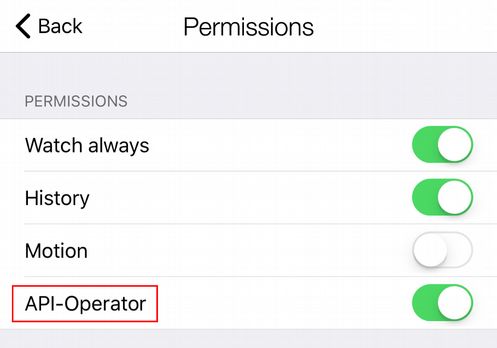
Users can have several permissions, which can be managed in the Administration
area of the DoorBird App.
Watch always: User can see live view and control the door/s at any time,
even if there is no ring event
History: User can access the history (e.g. Cloud-Recording)
Motion: User can obtain motion notifications and access the motion history
Copyright © 2018 by Bird Home Automation GmbH 7(e.g. Cloud-Recording)
API-Operator: User can change settings through the Open API
( www.doorbird.com/api ) e.g. schedules and notifications and e.g. initiate an
active SIP call ( “makecall”) sing API command. You should only enable the
“API-Operator” permission for users which are used on central Home
Automation Servers, you should NOT enable “API-Operator” permission for
users which are configured in Home Automation panels or Apps of end-users
because then this user could change global settings for other users.
DEMONSTRATION
You may browse to http:///bha-api/view.html with a web browser to see a
demonstration of the API in a standard webpage.
Copyright © 2018 by Bird Home Automation GmbH 8LIVE VIDEO REQUEST Returns a multipart JPEG live video stream with the default resolution and compression as defined in the system configuration. When MJPG video is requested, the server returns a continuous flow of JPEG files. The content type is "multipart/x- mixed-replace" and each image ends with a boundary string . The returned image and HTTP data is equal to the request for a live image request. An average of up to 8 fps can be provided using this third-party API, depending on the network speed and load factor of the device. When the request is correct, but the requesting user has no permission to view the live stream at the moment, the request is answered with a return code 204. This usually happens for users without “watch-always” permission when there was no ring event in the past 5 minutes. Please note, that the video connection can get interrupted at any time, when the official DoorBird App requests the stream. It has precedence over users of the LAN- API. Method: GET Required permission: valid user, “watch always” or ring event in the past 5 minutes for the requesting user Syntax: http:///bha-api/video.cgi Example Request: http:///bha-api/video.cgi Return: HTTP/1.0 200 OK\r\n Content-Type: multipart/x-mixed-replace;boundary=\r\n \r\n \r\n \r\n \r\n \r\n : : where the proposed is “my-boundary” and the returned field is Content-Type: image/jpeg\r\n Content-Length: \r\n \r\n Example: Requested Multipart JPEG image. Copyright © 2018 by Bird Home Automation GmbH 9
LIVE IMAGE REQUEST
 Returns a JPEG file with the default resolution and compression as defined in the
 system configuration. The content type is "image/jpeg".
 When the request is correct, but the requesting user has no permission to view the
 live image at the moment, the request is answered with return code 204. This usually
 happens for users without “watch-always” permission when there was no ring event
 in the past 5 minutes.

 Method: GET
 Required permission: valid user, “watch always” or ring event in the past 5 minutes for the requesting user

 Syntax:
http:///bha-api/image.cgi

 Example Request:
http:///bha-api/image.cgi

 Return:
HTTP/1.0 200 OK\r\n
Content-Type: image/jpeg\r\n
Content-Length: \r\n
\r\n
\r\n

 Copyright © 2018 by Bird Home Automation GmbH                                                                 10
OPEN DOOR
 Energize the door opener/ alarm output relay of the device. Returns JSON.
 We assume, that the API user watches the live image in order to open the door or
 trigger relays. So, when the request is correct, but the requesting user has no
 permission to view the live image at the moment, the request is answered with return
 code 204. This usually happens for users without “watch-always” permission when
 there was no ring event in the past 5 minutes.

 Method: GET
 Required permission: valid user, “watch always” or ring event in the past 5 minutes for the requesting user

 Syntax:
http:///bha-api/open-door.cgi?=

= Values                                                     Description
r=                         1|2|                                        optional: relay to trigger, e.g.
                                   @                                           on an paired IP I/O
                                                                               DoorController. You can get
                                                                               the paired devices by calling
                                                                               info.cgi (see info.cgi chapter
                                                                               here in this document.
                                                                               If the parameter is ommitted,
                                                                               physical relay 1 gets triggered.

 Example Requests:
http:///bha-api/open-door.cgi
http:///bha-api/open-door.cgi?r=1
http:///bha-api/open-door.cgi?r=gggaaa@1

 Copyright © 2018 by Bird Home Automation GmbH                                                                    11
LIGHT ON Energize the light relay of the device. Returns JSON. We assume, that the API user watches the live image in order to activate the light. So, when the request is correct, but the requesting user has no permission to view the live image at the moment, the request is answered with return code 204. This usually happens for users without “watch-always” permission when there was no ring event in the past 5 minutes. Method: GET Required permission: valid user, “watch always” or ring event in the past 5 minutes for the requesting user Syntax: http:///bha-api/light-on.cgi Example Request: http:///bha-api/light-on.cgi Copyright © 2018 by Bird Home Automation GmbH 12
HISTORY IMAGE REQUEST
 Returns a JPEG history image with the default resolution and compression as
 defined in the system configuration. The history images are stored in the cloud.
 If the authentication of the requesting user is ok, but he has no permission for this
 history, the request is answered with response code 204. This can be either the
 general “history” permission or the more specific “motion” permission.

 Method: GET
 Required permission: valid user, history permission, motion permission to access images from motion events

 Syntax:
http:///bha-api/history.cgi?=

=                Values                           Description
index=                        1..50                            Index of the history images, where
                                                                    1 is the latest history image
event=                     doorbell|                        Event type (optional), default is the
                                   motionsensor                     ring history for DoorBird devices
                                                                    and the input trigger history for
                                                                    BirdGuard devices.
                                                                    The API automatically requests
                                                                    images from the history of the
                                                                    requesting user (doorbell number or
                                                                    keycode which got assigned in the
                                                                    administration settings).

 Example Request:
http:///bha-api/history.cgi?index=1
http:///bha-api/history.cgi?index=22
http:///bha-api/history.cgi?
event=motionsensor&index=5

 Return:
HTTP/1.0 200 OK\r\n
Content-Type: image/jpeg\r\n
Content-Length: \r\n
\r\n
\r\n

 MONITOR REQUEST
 Returns the state of motionsensor and doorbell as a continuous multipart stream.
 Trigger information about rfid and keypad events coming soon. There are up to 8

 Copyright © 2018 by Bird Home Automation GmbH                                                                13
concurrent Streams allowed. When all streams are busy returns HTTP code 509.
Method: GET
Required permission: valid user
Syntax:
http:///bha-api/monitor.cgi?ring=doorbell[,motionsensor]
= Values Description
ring= doorbell| Event type to monitor.
motionsensor Note: rfid and keypad events coming soon
Example Request:
http:///bha-api/monitor.cgi?ring=doorbell,motionsensor
Example Return:
HTTP/1.1 200 OK\r\n
Content-Type: multipart/x-mixed-replace; boundary=--ioboundary\r\n
\r\n
--ioboundary\r\n
Content-Type: text/plain\r\n
\r\n
doorbell:H\r\n
\r\n
--ioboundary\r\n
Content-Type: text/plain\r\n
\r\n
motionsensor:L\r\n
\r\n
..
--ioboundary\r\n
Content-Type: text/plain\r\n
\r\n
doorbell:L\r\n
\r\n
--ioboundary\r\n
Content-Type: text/plain\r\n
\r\n
motionsensor:L\r\n
\r\n
HTTP status codes:
200 – OK
400 – Parameter missing or invalid
401 – Authentication required
Copyright © 2018 by Bird Home Automation GmbH 14LIVE AUDIO RECEIVE AND TRANSMIT – General information
Audio can be received and transmitted via our HTTP interface or SIP interface.
AEC/ANR: The transmitting user device (e.g. Home Automation tablet) MUST
do the echo and noise reduction on its own (AEC, ANR). The DoorBird Video
Door Station has a high-end hardware- and software-based echo canceller
built-in, but due to natural physical circumstances you have to do echo
cancellation on both sides, user device and door station. Our native Apps use
high-end self-learning AEC and ANR algorithms. Our AEC and ANR algorithms
in our native Apps are one of our core technologies and thus not available for
any third party. You must develop an AEC / ANR on your own or use the native
AEC / ANR of the operating system, see e.g.
https://developer.apple.com/library/content/documentation/MusicAudio/
Conceptual/AudioUnitHostingGuide_iOS/UsingSpecificAudioUnits/Usin
gSpecificAudioUnits.html and
https://developer.android.com/reference/android/media/audiofx/Acousti
cEchoCanceler.html for information about acoustic echo cancellation.
Codec: When using this API audio MUST be G.711 µ-law (sampling rate 8000
Hz).
Wireshark: When using Wireshark for packet inspection during development,
audio transmission might not be shown in the “http” Filter, please chose a
different filter.
LIVE AUDIO RECEIVE
Use this method to obtain real-time audio (G.711 μ-law) from the device.
When the request is correct, but the requesting user has no permission to view the
live stream at the moment, the request is answered with a return code 204. This
usually happens for users without “watch-always” permission when there was no ring
event in the past 5 minutes.
Please note, that the audio connection can get interrupted at any time, when the
official DoorBird App requests the stream. It has precedence over users of the LAN-
API.
Method: GET
Required permission: valid user, “watch always” or ring event in the past 5 minutes for the requesting user
Syntax:
http:///bha-api/audio-receive.cgi
Example Request:
http:///bha-api/audio-receive.cgi
Copyright © 2018 by Bird Home Automation GmbH 15Return: HTTP/1.0 200 OK\r\n ... LIVE AUDIO TRANSMIT Transmit audio (G.711 μ-law) from your mobile device (e.g. Home Automation tablet) to the device. Only one consumer can transmit audio (talk) at the same time. The second consumer will be rejected. When the request is correct, but the requesting user has no permission to view the live stream at the moment, the request is answered with a return code 204. This usually happens for users without “watch-always” permission when there was no ring event in the past 5 minutes. Please note, that the audio connection can get interrupted at any time, when the official DoorBird App requests the stream. It has precedence over users of the LAN- API. Method: POST Required permission: valid user, “watch always” or ring event in the past 5 minutes for the requesting user Syntax: http:///bha-api/audio-transmit.cgi Example 1: Singlepart audio data transmit with G.711 μ-law (authorization omitted). POST /bha-api/audio-transmit.cgi HTTP/1.0\r\n Content-Type: audio/basic\r\n Content-Length: 9999999\r\n Connection: Keep-Alive\r\n Cache-Control: no-cache\r\n \r\n ... Example 2: Multipart audio data transmit with G.711 μ-law (authorization omitted). INFO REQUEST Get some version information from the device in JSON format. Starting with firmware 000108, the relays configuration is included in the JSON output. It includes both, physical relays and paired DoorBird IP I/O Door Controllers. Method: GET Copyright © 2018 by Bird Home Automation GmbH 16
Required permission: valid user

Syntax:
http:///bha-api/info.cgi

Example Request:
http:///bha-api/info.cgi

Example Return 1: DoorBird D101 with outdated firmware
{
    "BHA": {
      "RETURNCODE": "1",
      "VERSION": [{
         "FIRMWARE": "000096",
         "BUILD_NUMBER": "41865"
      }]
    }
}
Example Return 2: DoorBird D21x with paired DoorBird IP I/O DoorController
{
    "BHA": {
      "RETURNCODE": "1",
      "VERSION": [{
         "FIRMWARE": "000109",
         "BUILD_NUMBER": "15120529",
         "PRIMARY_MAC_ADDR": "1CCAE3700000",
         "RELAYS": ["1", "2", "gggaaa@1", "gggaaa@2"],
        "DEVICE-TYPE": "DoorBird D101"
      }]
    }
}

FAVORITE MANAGEMENT

In order to react on events and execute actions on the DoorBird device, this API
features favorites and schedules. Favorites are basic configuration units that can be
used in schedules, e.g. an HTTP(S)-URL for notifications or SIP numbers. Favorites
can be seen as address book entries. If you want to use an HTTP favorite for
different events (e.g. smart home server), it is advised to save it's twice and handle
the event type in the URL.
The user needs the “API operator” permission in order to access favorites.cgi.
Firmware 000110 or higher is required on your DoorBird/BirdGuard in order to access
favorites and schedules.

LIST FAVORITES

Copyright © 2018 by Bird Home Automation GmbH                                        17
List all currently configured favorites as JSON.
Method: GET
Required permission: valid user, API operator permission
Syntax:
http:///bha-api/favorites.cgi
Example Request:
http:///bha-api/favorites.cgi
Return:
HTTP/1.0 200 OK\r\n
\r\n
{
"sip":{
"0":{
"title":"Concierge",
"value":"1234@sip.example.com"
}
},
"http":{
"1":{
"title":"MyServer",
"value":"http://10.0.0.1/foo/notify"
},
"5":{
"title":"ServerX",
"value":"https://login:password@192.168.1.100?
action=notify"
}
}
}
ADD OR CHANGE FAVORITE
Add a new favorite or change an existing favorite. If you add a new favorite, it's id is
available as response header value for key “favoriteid”.
Method: GET
Required permission: valid user, API operator permission
Syntax:
Copyright © 2018 by Bird Home Automation GmbH 18http:///bha-api/favorites.cgi?
action=save&=
= Values Description
action= save Fixed parameter for saving favorites
type= sip|http Type of the favorite; ATTENTION: it's not
allowed to switch this type when saving an
existing favorite!
title= name / title Name or short description of the favorite
value= URL / address URL of the favorite, including protocol and
user credentials, if necessary (see
example above). This can be an HTTP(S)
URL or an SIP target.
id= optional: id of Specify the ID of the favorite to change;
the favorite omit, if saving a new favorite
Example Requests: add HTTP favorite, change SIP favorite
http:///bha-api/favorites.cgi?
action=save&type=http&title=RingServ&value=https://172.17.1.5/
notify/ring
http:///bha-api/favorites.cgi?
action=save&type=sip&title=Johns
%20Phone&value=101@sip.domain.local&id=2
Return:
HTTP/1.0 200 OK\r\n
\r\n
HTTP status codes:
200 – OK
400 – Parameter missing or invalid
401 – Authentication required
500 – Internal error
507 – Size limit exceeded (too many or to large favorites)
DELETE FAVORITE
Remove an favorite from the DoorBird device. If the favorite is actively used in a
schedule configuration, the schedule entry will also be removed.
Method: GET
Required permission: valid user, API operator permission
Copyright © 2018 by Bird Home Automation GmbH 19Syntax: http:///bha-api/favorites.cgi? action=remove&= = Values Description action= remove Fixed parameter for deleting favorites type= sip|http Type of the favorite id= ID of the favorite The ID of the favorite to delete Example Request: http:///bha-api/favorites.cgi? action=remove&type=sip&id=2 Return: HTTP/1.0 200 OK\r\n \r\n HTTP status codes: 200 – OK 400 – Parameter missing or invalid 401 – Authentication required 500 – Internal error Copyright © 2018 by Bird Home Automation GmbH 20
SCHEDULE MANAGEMENT
 With schedule entries one can configure the actions, that a DoorBird device executes
 at certain events. It is possible to setup the input event (e.g. ring, motion), the output
 event (e.g. HTTP notification, SIP call) and the time window, where this rule is active.
 The API handles 3 different schedule types: “once” (one time event), “from-to” and
 “weekdays” (recurring time ranges on a weekly base).
 “Once” is rather self explanatory, the schedule gets invalid after a single use. You can
 enable it again, so you don't have to configure it again.
 “From-to” can be used for all distinct – not recurring - time ranges. Time unit are
 seconds since 1.1.1970 and the timezone is UTC.
 Seconds are used as unit for time information in “weekdays” setup. Starting point is
 Sunday 0:00 o'clock. Maximum time value for weekly events is 604799 seconds (7
 days * 24 hours * 60 minutes * 60 seconds – 1 second). The 24 hours of a day are
 divided into 48 time slices of 30 minutes (1800 seconds) length each. It is important,
 that all starting times are multiples of 1800 seconds. Start and end second of time
 intervals are included, thats why one must subtract a second to calculate the ending
 time of an interval. Use “from” 0 “to” 604799 to configure a schedule entry which is
 valid for the whole week (always).
 There can be only one schedule entry for each output type, time slot and event slot.
 Example: just one HTTP trigger for ring events at 8 o'clock. But an SIP call at the
 same time is possible. If more events are needed, one needs to implement event-
 multiplexing. Exceptions are relays, where more can be triggered for the same event.
 The user needs the “API operator” permission in order to access schedules.cgi.
 Firmware 000110 or higher is required on your DoorBird/BirdGuard in order to access
 favorites and schedules.
 Hint: entries from the old “notification.cgi” configuration get migrated to schedule
 entries.

 LIST SCHEDULES

 List all currently configured schedules settings as JSON.

 Method: GET
 Required permission: valid user, API operator permission

 Syntax:
http:///bha-api/schedule.cgi
 Attributes of the schedule JSON object:
JSON                  Values                                Description
attributes
input                 doorbell|motion|rfid|input            The input event type, e.g. doorbell or

 Copyright © 2018 by Bird Home Automation GmbH                                                       21
motion
param               ||         Parameter value for the input, e.g.
                    |                       input
output              JSON array                    JSON array of output action
                                                  configurations

 Attributes of the JSON object for an “output” configuration:
JSON                Values                        Description
attributes
event               notify|sip|relay|http         The action to execute. e.g. issue HTTP
                                                  notification or trigger a relay
                                                  Type “notify” is used to trigger push
                                                  notifications and cloud recordings
param               ||| e.g. favorite id (for sip or http) or relay
                                                 number for relay events
schedule            once|from-to|weekdays         Schedule configuration, e.g. trigger
                                                  just once, trigger for a certain time
                                                  range, trigger on weekday base

 Example Request:
http:///bha-api/schedule.cgi

 Return:
HTTP/1.0 200 OK\r\n
\r\n
[
{
   "input":"doorbell",
   "param":"1",
   "output":[
     {
       "event":"http",
       "param":"1",
       "schedule":{
         "weekdays":[
           {
              "from":"122400",
              "to":"151199"
           }
         ]
       }
     }
   ]
},
{
   "input":"motion",
   "param":"",

 Copyright © 2018 by Bird Home Automation GmbH                                               22
"output":[
{
"event":"relay",
"param":"2",
"schedule":{
"from-to":[
{
"from":"1509526800",
"to":"1509555600"
},
{
"from":"1509613200",
"to":"1509642000"
}
]
}
}
]
},
{
"input":"input",
"param":"1",
"output":[
{
"event":"sip",
"param":"4",
"schedule":{
"once":{
"valid":"1"
}
}
}
]
}
]
HTTP status codes:
200 – OK
204 – No data for the requested input (if parameter “input” is available at the request)
401 – Authentication required
ADD OR UPDATE SCHEDULE ENTRY
Add or update an schedule setting by sending the configuration as JSON object. One
request for each input type (e.g. ”motion” or “doorbell #6789”) is required.
Method: POST
Required permission: valid user, API operator permission
Syntax:
http:///bha-api/schedule.cgi
Example Request:
http:///bha-api/schedule.cgi
Example JSON content for doorbell events:
Copyright © 2018 by Bird Home Automation GmbH 23{
"input": "doorbell",
"param": "1",
"output": [{
"event": "notify",
"param": "",
"enabled": "1",
"schedule": {
"weekdays": [{
"to": "82799",
"from": "82800"
}]
}
}, {
"event": "http",
"param": "3",
"enabled": "1",
"schedule": {
"weekdays": [{
"to": "82799",
"from": "82800"
}]
}
}]
}
Example JSON content for motion events:
{
"input": "motion",
"param": "",
"output": [{
"event": "notify",
"param": "",
"enabled": "1",
"schedule": {
"weekdays": [{
"to": "82799",
"from": "82800"
}]
}
}, {
"event": "relay",
"param": "1",
"enabled": "1",
"schedule": {
"weekdays": [{
"to": "82799",
"from": "82800"
}]
},
}]
}
Return:
HTTP/1.0 200 OK\r\n
\r\n
HTTP status codes:
200 – OK
400 – Any of: invalid JSON format; Content-Length header missing; Content-Length header does not match real content size;
content size too large
401 – Authentication required
500 – internal error
507 – Size limit exceeded (too many or to large schedules
Copyright © 2018 by Bird Home Automation GmbH 24DELETE SCHEDULE ENTRY
Delete an schedule entry.
Method: GET
Required permission: valid user, API operator permission
Syntax:
http:///bha-api/schedule.cgi?
action=remove&=
= Values Description
action= remove Fixed parameter
for deleting a
schedule entry
input=doorbell|motion|rfid| doorbell|motion|rfid|input The input event
input type, e.g.
doorbell or
motion
param= || The ID of the
| to delete, e.g.
doorbell
number, RFID
transponder id,
input
Example Request:
http:///bha-api/schedule.cgi?
action=remove&input=motion¶m=xxx
Return:
HTTP/1.0 200 OK\r\n
\r\n
HTTP status codes:
200 – OK
401 – Authentication required
500 – internal error
Copyright © 2018 by Bird Home Automation GmbH 25RESTART
Restarts the device. There will be no diagnostic sound (e.g. “successfully connected
to internet”) after this restart.
Method: GET
Required permission: valid user, API operator permission
Syntax:
http:///bha-api/restart.cgi
Example Request:
http:///bha-api/restart.cgi
Return:
HTTP/1.0 200 OK\r\n
\r\n
HTTP status codes:
200 – OK
401 – Authentication required
503 – device is busy (e.g. currently installing an firmware update)
EVENT MONITORING (UDP BROADCASTS)
After an event occurred, the DoorBird sends multiple identical UDP-Broadcasts on
the ports 6524 and 35344 for every user and every connected device. You can split
the package in two sections. The first one contains information about the package,
the second part about encryption with payload. Please notice, we are also sending
keep alive broadcasts every 7 seconds on this two ports, these packets are not
relevant for the decryption of event broadcasts, you can skip them.
To decode these UDP packets in version 1, the algorithms Argon2i and ChaCha20
must be supported. Both are included in the well-known Sodium crypto library
(libsodium).
First Part:
Fieldname Length in Bytes Datatype Explanation
IDENT 3 Byte To identify this kind of package the first three
bytes contains a identifier.
IDENT[0] = 0xDE
IDENT[1] = 0xAD
IDENT[2] = 0xBE
VERSION 1 Byte The VERSION Flag allows us to distinguish
between different encryptions and package
types. Right now we support the following ones:
Copyright © 2018 by Bird Home Automation GmbH 260x01 – ChaCha20-Poly1305 with Argon2i
(currently the only supported version)
Second Part for a package in VERSION 0x01:
Fieldname Length in Bytes Datatype Explanation
OPSLIMIT 4 Long Used for password stretching with Argon2i.
MEMLIMIT 4 Long Used for password stretching with Argon2i.
SALT 16 Byte Used for password stretching with Argon2i.
NONCE 8 Byte Used for encryption with ChaCha20-Poly1305
CIPHERTEXT 34* Byte With ChaCha20-Poly1305 encrypted text which
contains informations about the Event.
*The encrypted CIPHERTEXT contains 16 byte with random values, these bytes are
no longer present after decryption.
The CIPHERTEXT after decryption:
Fieldname Length in Bytes Datatype Explanation
INTERCOM_ID 6 String The first 6 digits of the user name. You can
ignore all packets, where this doesn't match your
DoorBird user).
EVENT 8 String Contains the doorbell or „motion“ to detect which
event was triggered. Padded with spaces.
TIMESTAMP 4 Long A Unix timestamp, long.
Used Algorithms:
Version Name Function
0x01 Argon2i Key derivation
0x01 ChaCha20-Poly1305 Authenticated Encryption
Copyright © 2018 by Bird Home Automation GmbH 27Step by step example:
Your DoorBird-User: foobar0001
Password from foobar0001: QzT3jeK3JY
Step 1: You capture the following packet via UDP:
0xDE 0xAD 0xBE 0x01 0x00 0x00 0x00 0x04 0x00 0x00 0x20 0x00 0x77 0x35 0x36 0xDC
0xC3 0x0E 0x2E 0x84 0x7E 0x0E 0x75 0x29 0xE2 0x34 0x60 0xCF 0xE3 0xFF 0xCC 0x52
0x3F 0x37 0xB2 0xF2 0xDC 0x1A 0x71 0x80 0xF2 0x9B 0x2E 0xA0 0x27 0xA9 0x82 0x41
0x9C 0xCE 0x45 0x9D 0x27 0x45 0x2E 0x42 0x14 0xBE 0x9C 0x74 0xE9 0x33 0x3A 0x21
0xDB 0x10 0x78 0xB9 0xF6 0x7B
Step 2: Split it up:
Field Content
IDENT 0xDE
0xAD
0xBE
VERSION 0x01
OPSLIMIT 0x00 0x00 0x00 0x04
MEMLIMIT 0x00 0x00 0x20 0x00
SALT 0x77 0x35 0x36 0xDC 0xC3 0x0E 0x2E 0x84 0x7E 0x0E 0x75 0x29
0xE2 0x34 0x60 0xCF
NONCE 0xE3 0xFF 0xCC 0x52 0x3F 0x37 0xB2 0xF2
CIPHERTEXT 0xDC 0x1A 0x71 0x80 0xF2 0x9B 0x2E 0xA0 0x27 0xA9 0x82 0x41
0x9C 0xCE 0x45 0x9D 0x27 0x45 0x2E 0x42 0x14 0xBE 0x9C 0x74
0xE9 0x33 0x3A 0x21 0xDB 0x10 0x78 0xB9 0xF6 0x7B
Step 3: Generate stretched password.
To achieve this take the first 5 chars of your password („QzT3j“), use the OPSLIMIT with value 4 and
the MEMLIMIT with value 8192 and stretch it with Argon2i, the result of stretching:
0x47 0xB8 0xA5 0xBC 0xDD 0xDA 0x29 0xEB 0x4C 0x0F 0xF6 0x78 0x46 0x41 0xE7 0x2F 0x7B
0x9C 0x45 0xD5 0x46 0x1A 0x60 0x71 0x2C 0x68 0x1F 0x05 0x23 0x9B 0xCC 0xA2
Step 4: Decrypt CIPHERTEXT with ChaCha20-Poly1305, use the stretched
password and NONCE, output should be this:
0x66 0x6F 0x6F 0x62 0x61 0x72 0x31 0x30 0x32 0x20 0x20 0x20 0x20 0x20 0x5A 0x12 0xE4
0x13
Step 5: Split the output up:
Field Byte Value Value
INTERCOM_ID 0x66 0x6F 0x6F 0x62 0x61 0x72 „foobar“
Starting 6 chars from the user name. Skip the
packet, if this doesn't match your DoorBird
user).
EVENT 0x31 0x30 0x32 0x20 0x20 0x20 „102 “
0x20 0x20
(doorbell number from an D2102 or D2103 in
this example, padded with spaces)
Copyright © 2018 by Bird Home Automation GmbH 28TIMESTAMP 0x5A 0x12 0xE4 0x13 1511187475 or readable for humans:
Monday, 20. November 2017 14:17:55 UTC
EXAMPLE SOURCE CODE
The following c-code shows the decoding part using libsodium method calls. It uses a
few internal structs, methods and macros, but these are self explanatory.
Password stretching:
unsigned char* stretchPasswordArgon(const char *password, unsigned char *salt, unsigned* oplimit, unsigned*
memlimit) {
if (sodium_is_zero(salt, CRYPTO_SALT_BYTES) && random_bytes(salt, CRYPTO_SALT_BYTES)) {
return NULL;
}
unsigned char* key = malloc(CRYPTO_ARGON_OUT_SIZE);
if (!*oplimit) {
*oplimit = crypto_pwhash_argon2i_OPSLIMIT_INTERACTIVE;
}
if (!*memlimit) {
*memlimit = crypto_pwhash_MEMLIMIT_MIN;
}
if (crypto_pwhash(key, CRYPTO_ARGON_OUT_SIZE, password, str_len(password), salt, *oplimit, *memlimit,
crypto_pwhash_ALG_DEFAULT)) {
LOGGING("Argon2 Failed");
*oplimit = 0;
*memlimit = 0;
CLEAN(key);
return NULL;
}
return key;
}
Decryption:
NotifyBroadcastCiphertext decryptBroadcastNotification(const NotifyBroadcast* notification, const
StretchedPassword* password) {
NotifyBroadcastCiphertext decrypted = {{0},{0},0};
if(crypto_aead_chacha20poly1305_decrypt((unsigned char*)&decrypted, NULL, NULL, notification->ciphertext,
sizeof(notification->ciphertext), NULL, 0, notification->nonce, password->key)!=0){
LOGGING("crypto_aead_chacha20poly1305_decrypt() failed");
}
return decrypted;
}
Copyright © 2018 by Bird Home Automation GmbH 29RTSP INTERFACE DESCRIPTION LIVE VIDEO REQUEST Returns a MPEG4 H.264 live video stream with the default resolution and compression as defined in the system configuration. Uses RTSP on 554 and the RTSP-over-HTTP protocol on port 8557 of DoorBird and BirdGuard devices. An average of up to 12 fps can be provided using this third-party API, depending on the network speed and load factor of the device. Requires standard RTSP authentication (no parameter authentication supported as we support for HTTP). When the request is correct, but the requesting user has no permission to view the live stream at the moment, the request is answered with a return code 204. This usually happens for users without “watch-always” permission when there was no ring event in the past 5 minutes. Please note, that the RTSP connection can get interrupted at any time, when the official DoorBird App requests the stream. It has precedence over users of the LAN- API. Method: GET Required permission: valid user, “watch always” or ring event in the past 5 minutes for the requesting user Syntax: rtsp://:/mpeg/media.amp Example Request: rtsp://:8557/mpeg/media.amp rtsp:///mpeg/media.amp Copyright © 2018 by Bird Home Automation GmbH 30
Session Initiated Protocol (SIP)
SIP
This method is to configure and use the SIP service which is built into the device. The
SIP service is in early stage of development, please note the following:
The SIP registration will be stored permanently in the device. Every hardware
restart will force the SIP service to restart / register again
You must use a username/password combination with the “API operator”
permission (DoorBird App → Administration → User → Edit → Permissions).
This makes sure that no other user (a non SIP relevant user) can modify the
SIP settings.
Each SIP call terminates 180 seconds after it was initiated, for security reason
(auto-hangup).
The SIP service will not initiate the call automatically when someone pushes
the doorbell button, you have to listen to the notifications of the device (see
document: LAN API) and initiate the call with the "makecall" action of "sip.cgi"
The device supports only one simultaneous SIP call
If DTMF Support is enabled the telephone (recipient of the SIP call) can trigger
the door open relay by pressing the pincode for relay.
Making / establishing the call takes sometimes a few seconds, the SIP
handshake needs some synchronization, this is comparable to a standard SIP
softphone or hardphone.
We do a lot of debugging. If something is not working, please wait 5-7
seconds. If this doesn’t solve the issue, please restart the device and let us
know what environment you are using (network, SIP Proxy, calling device etc.)
Don’t penetrate the device with many concurrent SIP requests, please wait
min 3 seconds between each SIP request
Please note that you need an Acoustic Echo Canceller (AEC) on the client-
side as well as an Acoustic Noise Canceller (ANC). This ensures high quality
Copyright © 2018 by Bird Home Automation GmbH 31audio calls
The device will close any ongoing SIP connection, if there is an listen/talk
request from the official DoorBird App.
From device version 000099 on, peer-2-peer (P2P) SIP calls are supported.
After enabling the SIP functionality with “enable=1”, the device is ready to
receive SIP calls on port 5060. To issue outgoing calls from the device, call
“action=makecall” or configure automatic calls on ring events using parameter
“autocall_doorbell_url”.
SIP Registration
Register to a SIP Proxy. This is not necessary, if you are using peer-2-peer calls.
Method: GET
Required permission: valid user, “API operator” permission
Syntax:
http:///bha-api/sip.cgi?
action=registration&user=&password=&url=
= Description
user= Authentication user for the SIP Proxy
password= Authentication password for the SIP Proxy
url= IP/Hostname of the SIP Proxy
Example "registration" Request:
http:///bha-api/sip.cgi?
action=registration&user=foo&password=bar&url=192.168.123.22
Returns:
200 if everything is okay.
401 on authentication failure (user name/password from Basic Authentication wrong or no “API operator” permission)
SIP Make Call
Manually initiate the SIP call. This can either be an peer-2-peer call or a “normal” SIP
call using the configured PBX / SIP proxy.
Method: GET
Required permission: valid user, “API operator” permission
Syntax:
http:///bha-api/sip.cgi?action=makecall&url=
= Description
url= SIP URL to call
Example "makecall" Request:
http:///bha-api/sip.cgi?
action=makecall&url=sip:108@192.168.123.22
Copyright © 2018 by Bird Home Automation GmbH 32Returns:
200 if everything is ok
400 if there is something wrong, e.g. parameter missing
401 on authentication failure (user name/password from Basic Authentication wrong or no “API operator” permission)
503 if the call does not work, e.g. line busy
SIP Hangup
Hangup the SIP call. If there is currently no ongoing call, this CGI returns “200 OK”
too.
Method: GET
Syntax:
http:///bha-api/sip.cgi?action=hangup
Returns:
200 if everything is ok
401 on authentication failure (user name/password from Basic Authentication wrong or no “API operator” permission)
SIP Settings (CGI)
Configure several SIP related settings.
Important note on the autocall_doorbell_url setting: this feature is deprecated
here and will be removed in the future. It got replaced by schedule.cgi (together with
favorites.cgi), because of the possibility to use schedules (e.g. call a different number
at night). Currently all changes to autocall_doorbell_url get migrated into appropriate
favorite and schedule entries in order to stay compatible with existing 3 rd party
drivers.
Method: GET
Required permission: valid user, “API operator” permission
Syntax:
http:///bha-api/sip.cgi?action=settings&=
= Values Description
enable= 0..1 Enable or disable SIP registration
after reboot of the device, default: 0
mic_volume= 1..100 Set the microphone volume, default:
33
spk_volume= 1..100 Set the speaker volume, default: 70
dtmf= 0..1 Enable or disable DTMF support,
default: 0
Copyright © 2018 by Bird Home Automation GmbH 33autocall_doorbell_url= URL or DEPRECATED: use schedule.cgi
"none" SIP URL to automatically call upon
doorbell event. By the second
doorbell event hangs the previous
call. Set to "none" to disable this
automatic call. Default: "none"
relay1_passcode= 0..9999999 Pincode for triggering the door open
9 relay
incoming_call_enable= 0..1 Enable or disable incoming calls,
default:0
incoming_call_user= SIP user Allowed SIP user which will be
authenticated for DoorBird. E.g.
“sip:10.0.0.1:5060“ or
“sip:user@10.0.0.2:5060“.
anc= 0..1 Enable or disable acoustic noise
cancellation, default: 1
Example "settings" Request:
http:///bha-api/sip.cgi?
action=settings&autocall_doorbell_url=sip:108@192.168.123.22
Returns:
200 if everything is okay
401 on authentication failure (user name/password from Basic Authentication wrong or no “API operator” permission)
SIP Status
You can query the current SIP status by calling the following URL.
Method: GET
Required permission: valid user, “API operator” permission
Syntax:
http:///bha-api/sip.cgi?action=status
Returns:
JSON, where ‘"LASTERRORCODE": "200"’ means that the SIP client is successfully registered. The attribute LASTERRORCODE
contains the most recent SIP status code and "LASTERRORTEXT" the most recent SIP error text.
200 if everything is okay
401 on authentication failure (user name/password from Basic Authentication wrong or no “API operator” permission)
SIP Settings Reset
Resets all SIP related settings except the license, e. g. SIP proxy settings
(action=registration) and SIP settings (action=settings). Hangs up any ongoing call.
Method: GET
Required permission: valid user, “API operator” permission
Syntax:
http:///bha-api/sip.cgi?action=reset
Copyright © 2018 by Bird Home Automation GmbH 34Returns:
JSON, where ‘LASTERRORCODE": "200"’ means that the SIP client is successfully registered. The LASTERRORCODE returns the
most recent SIP status code and “LASTERRORTEXT” the most recent SIP error text.
200 if everything is okay
401 on authentication failure (user name/password from Basic Authentication wrong or no “API operator” permission)
SIP Settings (DoorBird App)
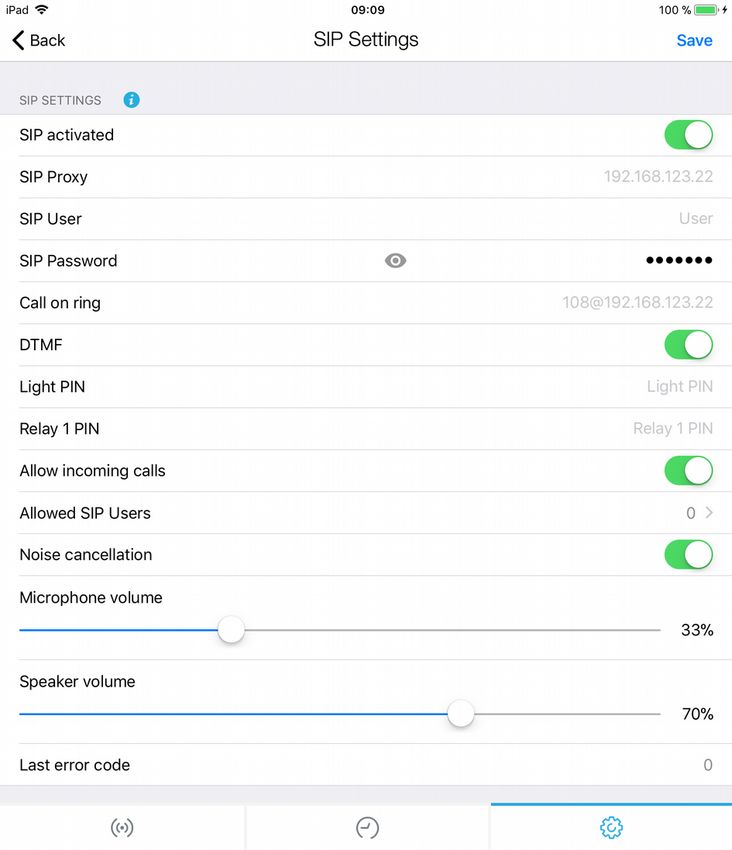
The DoorBird App supports setting SIP properties directly at the Administration
section. Log into your DoorBird with the Administration credentials (e.g. QR code),
scroll down to “Expert Settings” where you can find the “SIP Settings”.
Example SIP settings at the DoorBird App:
Copyright © 2018 by Bird Home Automation GmbH 35Copyright © 2018 by Bird Home Automation GmbH 36
You can also read


