S5-TCP/IP 100 User Manual - S5-TCP/IP 100
←
→
Page content transcription
If your browser does not render page correctly, please read the page content below
User Manual
S5-TCP/IP 100

    Ethernet CP for Simatic S5
  Manual Version HB200400001E-0307-001

                            S5-TCP/IP 100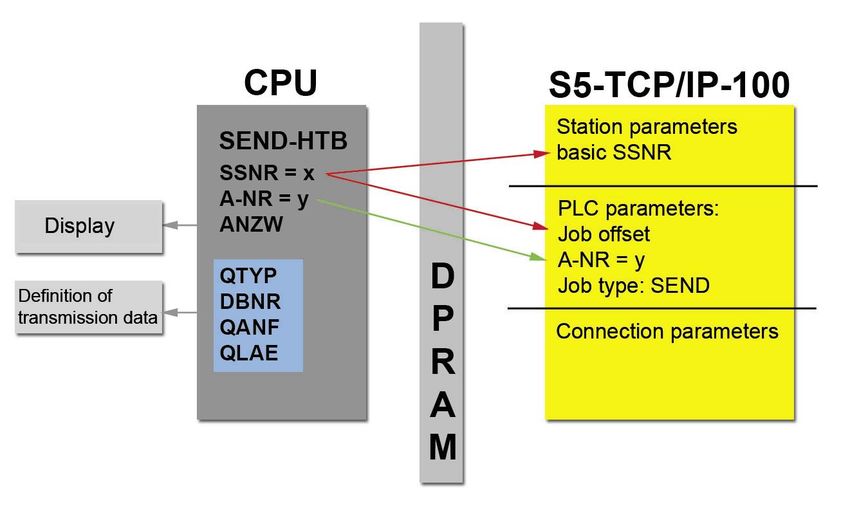
[ S5-TCP/IP 100 Manual ]

                COPYRIGHT
                The contents of this manual and the related configuration software are the property of INAT GmbH. This
                material is subject to the conditions of a general or special license contract (one-time license), and may only
                be used or reproduced when the terms of agreement as set forth in this contract are fulfilled.
                The specifications in these documents are provided without responsibility for errors or omissions.
                The contents are subject to change without prior notice. The contents are subject to change due to technical
                advance.
                     © Copyright INAT GmbH 1996-2007
                Industrial Networks for Automation Technology
                Ostendstrasse 50A
                90482 Nuremberg
                Germany
                Tel: + 49 911 / 5 44 27-0
                Fax: + 49 911 / 5 44 27-27
                Web: www.inat.de
                Email: Info@inat.de

                All rights reserved

                NOTE
                Please read the manual before using INAT S5-TCP/IP 100. In case of damage caused by misuse of this
                product, we assume no liability.
                The recent version of this manual is available in the Download Area of INAT at www.inat.de
                ______________________________________________________
                Simatic®, Step® and Sinec® are registered trademarks of the Siemens AG.
S5-TCP/IP 100

                Page 2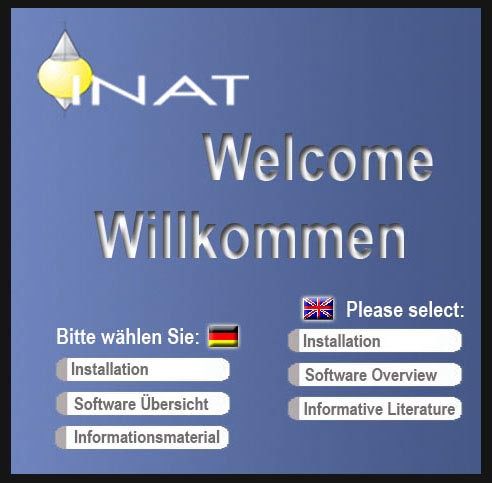
[ S5-TCP/IP 100 Manual ]

CONTENTS
1 GENERAL                                                                                            6
1.1 Scope of supply     6
1.2 Specifications       6
1.3 Compatibility with S5-TCP/IP        7

2 HARDWARE                                                                                       10
2.1 Overview 10
    2.1.1 Compact Flash11
    2.1.2 Reset 11
    2.1.3 LEDs 11
    2.1.4 Switch 12
    2.1.5 PG interface (AS511 interface) 12
    2.1.6 Jumper 1100 14
2.2 Installation 15
    2.2.1 Installing the S5-TCP/IP 100 in the PLC rack 15
    2.2.2 Connecting the CP to Ethernet and connecting further Ethernet components   15
    2.2.3 Connecting the CP to PC/PG 15

3 FUNCTION OF THE S5-TCP/IP 100                                                                  18
   3.1.1 Handling blocks         18
   3.1.2 Supplying Parameters for handling blocks (HDBs)       20
   3.1.3 Functionality of handling blocks       20
3.3 Job types 23
    3.3.1 SEND / RECEIVE       23
    3.3.2 WRITE active / WRITE passive 24
    3.3.3 FETCH active / FETCH passive         25
    3.3.4 FETCH on EVENT passive       26
3.4 Connections         27
    3.4.1 H1 connection 27
    3.4.2 TCP/IP Connection      29
    3.4.3 Difference: TCP/IP - H1       31
    3.4.4 RFC1006       32
    3.4.5 INAT PLC Header        32
3.5 Nomenclature INAT – Siemens         34
                                                                                                                S5-TCP/IP 100

3.6 Function of the Switch      34
    3.6.1 Address management 34
    3.6.2 Network analysis, monitored port     34

                                                                                                 Page 3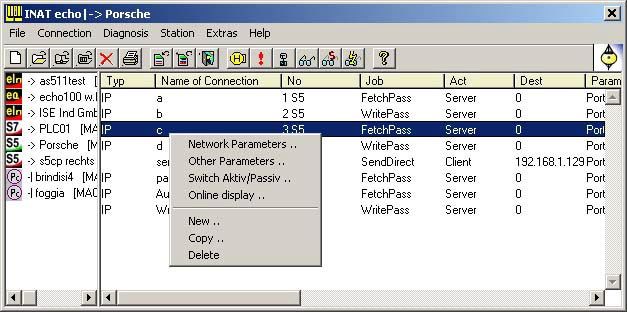
[ S5-TCP/IP 100 Manual ]

                4 PARAMETERIZATION                                       36
                4.1 Installation of the INATnet parameterization    36
                4.2 Initial Configuration of the S5-TCP/IP 100 37
                    4.2.1 Setting Parameters via IP or H138
                    4.2.2 Serial Parameterization        40
                    4.2.3 Offline        41
                4.3. Setting up connection      43
                    4.3.1 PLC parameter settings         44
                    4.3.3 TCP/IP Parameter Settings      46
                    4.3.4 H1 Parameter Settings          47
                4.4 FTP Connection         49
                4.5 Standard connections        51
                4.6 Modbus table           51

                5 MENU FUNCTIONS                                         54
                5.1 Station list 54
                    5.1.1 Station not found     54
                    5.1.2 OK 55
                    5.1.3 Cancel          55
                    5.1.4 New 55
                    5.1.5 Edit 55
                    5.1.6 Delete 55
                    5.1.7 Print 55
                    5.1.8 Help 55
                    5.1.9 Internet        55
                    5.1.10 Timeout        56
                5.2 Connection window            56
                    5.2.1 Functions via right mouse button     56
                    5.2.2 Menu File       58
                    5.2.3 Menu Connection        59
                    5.2.4 Menu Diagnosis         60
                    5.2.5 Menu Station 63
                    5.2.6 Menu Extras 64
                    5.2.7 Menu Help       72

                 APPENDIX                                                74
                Special TCP/IP Settings         74
S5-TCP/IP 100

                Page 4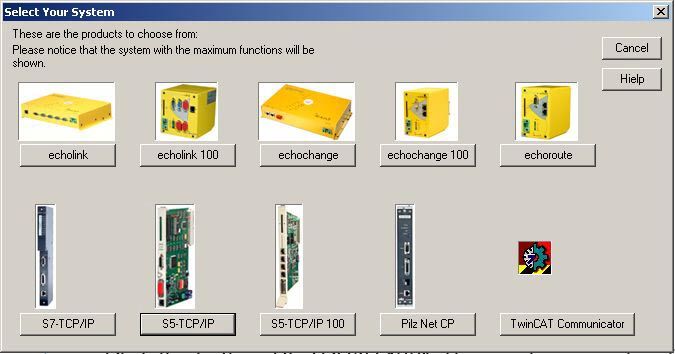
C H A P T E R 1:
 GENERAL
[ S5-TCP/IP 100 Manual / Chapter 1: General ]

                      1 GENERAL
 Chapter 1: General

                      1.1 Scope of supply
                      Before getting started with INAT S5-TCP/IP 100, check the following list of components contained in the S5-
                      TCP/IP 100 package.
                                    S5-TCP/IP 100

                                    CDROM with
                                            INATnet Parameterization
                                            INAT Demo software
                                            INAT Manuals

                      1.2 Specifications
                                    Ethernet interfaces:               4 port switch:
                                                                       ● 10 / 100 Mbps
                                                                       ● full duplex / half duplex - 10Base-T/100Base-TX
                                                                       ● Auto-negotiation
                                                                       ● RJ45
                                                                       ● Link LED and Activity LED for each single port
                                    PG interface:                      TTY, 15 pin D-sub female with locking post
                                    Compact Flash Slot:                Type I or II (standard) to save the configuration, hot plug
                                                                       capacity
                                    Supply voltage:                    DC +5V via S5 backplane
                                    Power input:                       max. 3A
                                    Conditions:
                                    Operating temperature:             0 to 60°C
                                    Storing / transport temperature:   -20 to 70°C
                                    Relative humidity:                 max. 95%
                                    Card format:                       Double Europe
                                    Measures [L x H x D in mm]:        255 x 20,3 x 174
                                    Weight:                            350g
                                    Required space:                    1 slot; for use in AG-115 adaptation casing required
S5-TCP/IP 100

                                    Configuration tool:                INATnet Parameterization
                                    Other:                             Protected configuration in case of failure in power supply

                      Page 6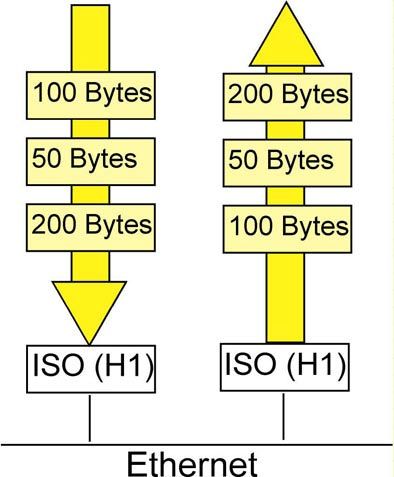
[ S5-TCP/IP 100 Manual / Chapter 1: General ]

1.3 Compatibility with S5-TCP/IP

                                                                                                                                  Chapter 1: General
S5-TCP/IP and S5-TCP/IP 100 are compatible. Existing parameterization data can be used when a change
is made.
Save the stations and connection parameters of your „old“ S5 CP with the INATnet parameterization soft-
ware (File > Store Data to File) as .NetParameter file. Load this file to your new CP with the INATnet para-
meterization software (File > Load File to Device). As a result of different card slots, a transfer via memory
card is not possible.

                                                                                                                                    S5-TCP/IP 100

                                                                                                                  Page 7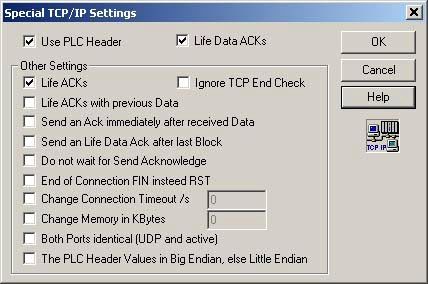
[ S5-TCP/IP 100 Manual / Chapter 1: General ]
 Chapter 1: General
S5-TCP/IP 100

                      Page 8
C H A P T E R 2:
H A R D WA R E
[ S5-TCP/IP 100 Manual / Chapter 2: Hardware ]

                       2 HARDWARE
 Chapter 2: Hardware

                       2.1 Overview

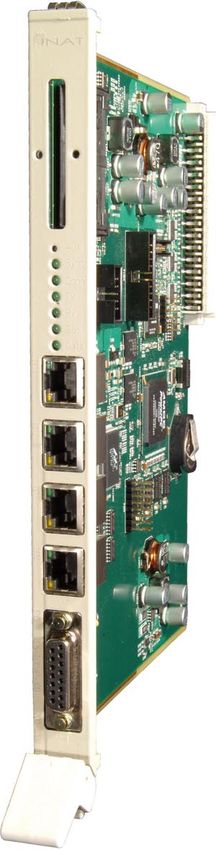
                             Compact Flash Slot

                             Reset

                              LEDs
                                                                        {         Flash EEPROM

                             4 Port Switch

                             TP4: Monitored
                             Port
                                                                            Jumper JP1100

                             PG Interface
S5-TCP/IP 100

                       Page 10
[ S5-TCP/IP 100 Manual / Chapter 2: Hardware ]
2.1.1 Compact Flash
Chapter 2: Hardware
The Compact Flash Slot on the front panel can be used for Compact Cards Type I or II. The pin assignment
is compatible with Compact Flash Standard. The Compact Flash Slot is Hot Plug capable. You use a CF
Card:
as additional backup for parameter data of the S5-TCP/IP 100 (station parameters, configured connec-
tions etc.), that is configured with INATnet parameterization.
to transfer saved parameter data from a CF Card to the FLASH-EEPROM of the S5-TCP/IP 100.
When the CF Card is plugged and voltage is connected, data is transferred.
Only cards for 3,3 V Supply voltage without DMA Mode are supported. The CF Card should be DOS
formatted. You can get such a card from INAT GmbH.
When using the Compact Flash Card, it may happen that the CP stops in a undefined status. If this happens,
reset the CP.
2.1.2 Reset
The reset button causes a reset of the S5-TCP/IP 100. Connections and system settings are not changed.
To avoid a reset by mistake, the reset button is counter-sunk and can only be pressed with a small nail. It
may happen that the CPU of the PLC stops when using the reset button.
2.1.3 LEDs
There are 5 LEDs on the front panel to display the operating status of the CP. The RJ45 interfaces are
equipped with 2 additional LEDs to display the communication status:
The LEDs have the following meaning:
LED Meaning
Sync illuminated: CP is synchronized
Conn illuminated: the connection is established
Tx blinking: CP is sending data via Ethernet
Rx blinking: CP is receiving data via Ethernet
S5-TCP/IP 100
Ser illuminated: the serial interface is used
illuminated: PLC and CP are transferring data (with slow
Data communication, LED may blink)
Page 11[ S5-TCP/IP 100 Manual / Chapter 2: Hardware ]
2.1.4 Switch
Chapter 2: Hardware
The S5-TCP/IP 100 is equipped with a 4 port switch. With it, a small local network may be set up or several
Ethernet devices may be connected. Port 4 is a so called „monitored port“. All frames, that are transferred
via port 4, are sent, as a copy to the internal NetSpector Record and can be analyzed with INAT NetSpector.
The interfaces are configured as follows:
Pin Signal Function
1 TD+ Transmit Data +
2 TD- Transmit Data -
3 RD+ Receive Data +
4 ---- not used
5 ---- not used
6 RD- Receive Data -
7 ---- not used
8 ---- not used
Each port has a Link LED and a Activity LED:
LED Meaning
Activity LED (green) blinking: the port receives or sends data via Ethernet
Link LED (yellow) illuminated: a TP cable is connected to this port
The ports support auto-negotiation and Auto MDI / MDI-X auto-crossing. More information about the functio-
nality of the switch can be found in chapter 3.6.
2.1.5 PG interface (AS511 interface)
The PG interface is a 15 pin socket connector for connecting a programming device or the S5-CP / AG-
cable.
Pin Name / Description
8 GND
Name / Description Pin
7 TXD- (Transmit Data Back Signal)
GND 15
6 TXD+3 (Transmit Data Signal)
+5V 1 14
5 GND
S2 (Power source 2) 13
4 ---
GND 12
3 +5V (Power supply +5V for external
S1 (Power source 1) 11 transceiver)
GND 10 2 RXD- (Receive Data Back Signal)
RXD+ (Receive Data Signal) 9 1 GND
S5-TCP/IP 100
1 Power supply +5V for external transceiver.
Configurable via jumper (see Chapter 2.1.6
jumper 1100). Default: OFF
Page 12[ S5-TCP/IP 100 Manual / Chapter 2: Hardware ]
Chapter 2: Hardware
The wiring and programming of the PG interface determines which signals will be used. The following wiring
has proven successful when using the PG functions with the S5-TCP/IP 100 and the PLC.
PLC S5-TCP/IP 100
Signal Pin No. Pin No. Signal
Mext (ext. ground, shield) 1 1 Mext (ext. ground, shield)
TTY IN (current output) 2 2 TTY IN (current output)
jumpered jumpered
Masse (interne Masse) 12 12 Masse (interne Masse)
TTY OUT (current input) 6 6 TTY OUT (current input)
jumpered jumpered
20mA current source of sender 11 11 20mA current source of sender
TTY OUT (current output) 7 9 TTY IN (current input)
Mext (external ground) 8 8 Mext (external ground)
TTY IN (current input) 9 7 TTY OUT (current output)
S5-TCP/IP 100
Page 13[ S5-TCP/IP 100 Manual / Chapter 2: Hardware ]
2.1.6 Jumper 1100
Chapter 2: Hardware
As default there is no voltage at pin 14 of the PG interface. The power supply can be configured with a
jumper to the pins with the identifier „JP1100“.
Compact Flash
LED
LED
LED
LED
LED
LED
RJ45
CPU
RJ45
Bat
RJ45
RJ45
Jumper not set:
OFF 0V at Pin 14 (default)
JP 1100 Jumper set:
ON +5V at Pin 14
DSUB
S5-TCP/IP 100
Page 14[ S5-TCP/IP 100 Manual / Chapter 2: Hardware ]
2.2 Installation
Chapter 2: Hardware
For installation of the S5-TCP/IP 100 follow these steps:
Step 1: Installing the S5-TCP/IP 100 in the PLC rack
Step 2: Connecting the CP to the Ethernet network
Step 3: Connecting the CP to PC/PG
Step 4: Connecting the Swing Cable
2.2.1 Installing the S5-TCP/IP 100 in the PLC rack
The S5-TCP/IP 100 can be installed in any PLC slot of the AG 115U, 135U, 150U and 155U that is allowed
for CP operation. For further information about PLC slots, please refer to the PLC manual (in AG 115 an
adaptation casing is required).
when plugging in the S5-TCP/IP 100 please switch off the power supply
Hang the S5-TCP/IP 100 in the rack
Tighten the CP
NOTE
For both plugging and pulling the S5-TCP/IP 100 the power supply
must be turned off!
2.2.2 Connecting the CP to Ethernet and connecting further Ethernet components
The S5-TCP/IP 100 has four TP ports, which can be used for the connection of the module to the Ethernet.
Connect the CP via one of the four ports to Ethernet.
If desired further components may be connected to Ethernet via one of the TP ports (e.g. programming devi-
ces /PC/PLC). An auto-crossing mechanism is integrated in the switch so that a connection to other stations
is possible with a standard cable.
2.2.3 Connecting the CP to PC/PG
A connection between the S5-TCP/IP 100 and a PG/PC is required for:
Online Parameterization
Serial Parameterization
Transfer of a parameter file from the PG/PC to CP and vice versa
S5-TCP/IP 100
Diagnosis and test functions
Programming the PLC
The connection between PC/PG and CP can be made directly over the serial interface or indirectly over a
bus path.
Page 15[ S5-TCP/IP 100 Manual / Chapter 2: Hardware ]
Chapter 2: Hardware
�������
������
������������������
���������������
�����
�������������������
�����
������
������������������
In the illustration the upper of the two controls is connected by a serial connection cable to the PG/PC, while
the lower PLC is accessed via Ethernet (TCP/IP and/or H1).
A serial RS232/TTY cable is not included in the scope of delivery. Please order it separately with the order
number 700-1500-05 (RS232, 9pin D-sub female - TTY, 15pin D-sub male).
2.2.4 Connecting the Swing Cable (PLC Cable S5-CP / PLC)
For programming the PLC via Ethernet a connection between CP and PLC is required. Therefore a cable
S5-CP / PLC is used. PLC cable S5-CP / PLC (TTY, 15pin D-sub male - TTY, 15pin D-sub male) is not
����������� ��������
included in the scope of delivery of the S5-TCP/IP 100. Please order it separately with the order number
700-1700-01. � � � �
����
�����
�����
�����
Additional start-up information covers the basic configuration of the S5-TCP/IP 100 as well as the connec-
�����
�����
ting parameterization. Both are accomplished with������
the INATnet Parameterization software and is described
������
in detail in chapter 4. ������� ������
��������
������ �����������
��������
����
� � � �
�����
�����
�����
�����
�����
������
������
������
S5-TCP/IP 100
�������
Page 16C H A P T E R 3: FUNCTION
[ S5-TCP/IP 100 Manual / Chapter 3: Function ]

                       3 FUNCTION OF THE S5-TCP/IP 100
 Chapter 3: Function

                       The CPU of the PLC and the S5-TCP/IP-100 exchange data messages via the periphery bus. All modu-
                       les connected to the S5 are electrically connected via that bus. The S5-TCP/IP-100 supports page frame
                       addressing. That means, that the data exchange with the CPU is handled via the so-called „page frame“.
                       The page frame is an address space that may be used by 256 modules simultaneously. The dual port RAM
                       of the CP lies in this address space. Since the modules use the addresses together, the module that shall be
                       accessed by the application program must be previously chosen. That is made with the interface number.
                       Communication is triggered by the application program on the S5 PLC using handling blocks (HDBs).

                       3.1.1 Handling blocks
                       Handling blocks (HDB) are standard function blocks that allow the data exchange between modules, which
                       support page frame addressing. They control the communication between the central processor and the
                       communications processor in the PLC. To send and receive data, the handling blocks SEND and RECEIVE
                       are used.
                       When there is a send job to be executed, the automation program supplies the SEND HDB with parameter
                       values and transfers the send job via the dual-port RAM to the communications program of the CP. The
                       communications program executes the send job and reports the status of the job back to the automation
                       program.
                       When there is a receive job, the automation program supplies the RECEIVE HDB with parameter values and
                       transfers the receive job via the dual-port RAM to the communications program of the CP. The communicati-
                       ons program then executes the receive job and reports the status of the job back to the automation program.
                       The communications program receives the SEND and RECEIVE jobs from the PLC program via the dual
                       port RAM. To allow these jobs to be passed on, the background communication must be activated. In this
                       case the SEND-ALL handling block is called in the user program to trigger send jobs and the RECEIVE ALL
                       handling block to trigger receive jobs.

                                                                                      Handling blocks
                                                                        S5 135U / 150U / 155U            S5 115U
                           Function
                           SYNCHRON                                 FB 125                      FB 249
                           SEND                                     FB 120                      FB 244
                           RECEIVE                                  FB 121                      FB 245
                           SEND ALL                                 FB 126 (A-NR = 0)           FB 244 (A-NR=0)
                           RECEIVE ALL                              FB 127 (A-NR = 0)           FB 245 (A-NR=0)
                           FETCH                                    FB 122                      FB 246
                           CONTROL                                  FB 123                      FB 247
S5-TCP/IP 100

                       Page 18
[ S5-TCP/IP 100 Manual / Chapter 3: Function ]
3.1.1.1 SYNCHRON
Chapter 3: Function
The SYNCHRON handling block is used to establish the synchronization between CP and PLC. Only after
the synchronization data can be exchanged over this interface.
3.1.1.2 SEND
The SEND handling block is used to transfer a job (with or without the user data for transfer) to the CP.
=> Job types SEND direct and WRITE active
3.1.1.3 SEND-ALL
The SEND-ALL block is used for background communication, which is responsible for the complete delivery
of the data of the CPU to the CP.
3.1.1.4 RECEIVE
The RECEIVE handling block is used to accept a job (with or without the user data for transfer) from the CP.
=> Job type RECEIVE direct
3.1.1.5 RECEIVE-ALL
The RECEIVE-ALL block is used for so-called „background communication“, which is responsible for the
complete takeover of the data of the CPU to the CP.
3.1.1.6 FETCH
The FETCH handling block is used to fetch data. It is used for the job type FETCH.
3.1.1.7 CONTROL
The CONTROL handling block is used to query the status of a job.
S5-TCP/IP 100
Page 19[ S5-TCP/IP 100 Manual / Chapter 3: Function ]
3.1.2 Supplying Parameters for handling blocks (HDBs)
Chapter 3: Function
The HDBs must be supplied with the following interface parameters:
SEND RECEIVE
SSNR interface number (=page frame base address + job offset)
A-NR job number, number of the activated job
ANZW status word
QTYP type of data source
ZTYP type of data destination
DBNR data block number
QANF relative start address within the type
ZANF relative start address within the type
QLAE number of source data
ZLAE number of destination data
PAFE parameter assignment error byte
3.1.3 Functionality of handling blocks
CPU and CP communicate via the dual port RAM (DPRAM). In order that several CPs are able to exchange
data with the CPU via this memory, the DPRAM is divided into pages. Each page is numbered. In the
handling block of the PLC program, the interface number (SSNR) is used to address the S5-TCP/IP 100. It
identifies the page frame base address of the S5-TCP/IP as well as the job offset.
With the initial configuration of the S5-TCP/IP it is assigned a page frame base address. Each connection
parameterized with the INATnet software is assigned a job offset and a job number (A-NR). The S5-TCP/IP
100 identifies the individual job based on the combination of A-NR and SSNR. This combination must be
unique.
3.1.3.1 Send job
S5-TCP/IP 100
● For a send job the automation program supplies the SEND handling block with parameter values.
● The interface number (SSNNR) identifies the page frame basic address of the CP and the transfer
area (job offset) in dual port RAM (DPRAM) for the exchange of messages between S5 PLC and S5-
TCP/IP 100
Page 20[ S5-TCP/IP 100 Manual / Chapter 3: Function ]
● The S5-TCP/IP 100 makes a data buffer available and transfers the all sending data into the data
Chapter 3: Function
buffer via background communication (SEND ALL).
● The S5-TCP/IP 100 identifies the job based on the A-NR. This number enables a connection parame-
terized in the S5-TCP/IP 100. This connection contains the connection parameters.
● With the connection parameters the S5-TCP/IP 100 creates a PDU. When the receive enable is set on
the partner station, the PDU is transferred via the network to the partner station.
● After the PDU has been received in the partner station, the S5-TCP/IP 100 receives an acknowledge-
ment via the network and transfers the status of the send job to the assigned status word.
3.1.3.2 Receive job
● For a receive job the automation program supplies the RECEIVE handling block with parameter
values.
● The interface number (SSNNR) identifies the page frame basic address of the CP and the transfer
area (job offset) in dual port RAM (DPRAM) for the exchange of messages between S5 PLC and S5-
TCP/IP 100
● The S5-TCP/IP 100 makes a data buffer available and sends a receive enable to the partner station
for this connection.
● The partner station sends the PDU for this connection. The S5-TCP/IP 100 receives the PDU and
extracts the data to be received. With the help of the background communication (RECEIVE ALL) the
communications program transfers the data into the data buffer of CPU.
S5-TCP/IP 100
● The receive job with the actualization of the status word is terminated.
Page 21[ S5-TCP/IP 100 Manual / Chapter 3: Function ]
3.2 Communications S5-TCP/IP 100 with other Ethernet stations
Chapter 3: Function
For communication with other Ethernet stations transport connections are required. When sending data the
S5-TCP/IP 100 packs the data in one or more protocol data units (PDU). This PDU(s) is (are) transferred via
the network to the partner station. The S5-TCP/IP 100 receives PDUs addressed to it from the Ethernet and
decodes these PDUs so that they can be understood by the application program of the S5 PLC.
Message exchange
via HDBs
CPU CP
Message exchange
via
S5 PLC transport
with connections
S5-TCP/IP-100
PLC
ETHERNET
S5-TCP/IP 100
Page 22[ S5-TCP/IP 100 Manual / Chapter 3: Function ]
3.3 Job types
Chapter 3: Function
The S5-TCP/IP 100 supports the following job types:
Job types
Send direct Receive direct
Fetch activ Fetch passive
Write activ Write passive
Fetch on Event passive
3.3.1 SEND / RECEIVE
SEND / RECEIVE is a program controlled communication to any other station (PC, S5, S7...). The station,
that handles the SEND job sends data to the other station. The other station receives this data with a
RECEIVE job. SEND and RECEIVE build together a job pair.
Station A Station B
RECEIVE direct
SEND direct
SEND to Station B RECEIVE from Station A
- Source address of data is set - Dest. address of data is set
- Dest. address of data is unknown - Source address of data is unknown
Definition of data source Definition of data sink
via SEND HDB via RECEIVE HDB
Complete transfer of Complete transfer of
send data from the received data
CPU to CP via from CP to CPU via
SEND ALL HDB RECEIVE ALL HDB
In the application program of the sending station is defined, when and which data shall be send. In the appli-
cation program of the receiving station is defined how to interpret the data and where to save it.
SEND / RECEIVE is layer 4 communications that can be handled via H1, TCP, UDP or RFC1006.
S5-TCP/IP 100
Page 23[ S5-TCP/IP 100 Manual / Chapter 3: Function ]
3.3.2 WRITE active / WRITE passive
Chapter 3: Function
The WRITE function allows a data record to be transferred from a PLC (Write active) to a remote device
(Write passive). In contrast to SEND/RECEIVE, with WRITE, the parameter data record that defines the
data sink (data destination) is also transmitted. The active end of the WRITE service can therefore force
data on to the passive end.
Station A Station B
WRITE passive
WRITE active
WRITE active Write passive
- Source address of data is set - Dest. address of data is set
- Dest. address of data is unknown
Definition of data source Complete transfer of
via SEND-HDB received data from CP
to CPU via
Definition of data sink RECEIVE ALL-HDB
via SEND-HDB
Complete transfer of
send data from CPU
to CP via
SEND ALL-HDB
In contrast to a RECEIVE job, the receiver initially does not know, how to interpret the data or where to save
it. This information has to be transmitted together with the raw data.
WRITE is layer 7 communications that can be handled via H1, TCP, UDP or RFC1006. In addition to the
transport protocols, application protocols are required that control additional handling of the data. Such appli-
cation protocols are S7, S5 or Modbus on TCP.
S5-TCP/IP 100
Page 24[ S5-TCP/IP 100 Manual / Chapter 3: Function ]
3.3.3 FETCH active / FETCH passive
Chapter 3: Function
The FETCH function allows a data record to be fetched. The receiving station (Fetch active) is the active
part, while the sending station (Fetch passive) is passive and allows the active station to fetch data. In the
application program of the receiving station is defined which data shall be fetched and where it shall be
saved in the local station.
Station A Station B
FETCH passive
FETCH active
FETCH active FETCH passive
- Source address of data is set - Source addres of data is not set
- Dest.address of data is set
Definition of data source Complete transfer of
via FETCH-HDB send data from CPU
to CP via
Definition of data sink SEND ALL-HDB
via FETCH-HDB
Complete transfer of
received data from CP
to CPU via
RECEIVE ALL-HDB
In contrast to a SEND job, the sender does initially not know, which data shall be send. This information has
to be transmitted.
FETCH is layer 7 communication that can be handled via H1, TCP, UDP or RFC1006. In addition to the
transport protocols, application protocols are required, that control additional handling of the data. Such
application protocols are S7, S5 or Modbus on TCP.
S5-TCP/IP 100
Page 25[ S5-TCP/IP 100 Manual / Chapter 3: Function ]
3.3.4 FETCH on EVENT passive
Chapter 3: Function
The Fetch on Event function allows the FETCH on Event data to be read from a remote station (passive
end). The active end requests data and the passive end provides this data. The parameter data record that
describes the data source is also transmitted. In contrast to the „normal“ Fetch function, with Fetch on Event
data, is only transferred in case of an event (when the value of the requested data has changed). This check
is made by the communications processor.
With „normal“ Fetch function, the requested data is sent always - no matter if it has changed or not. Fetch on
Event functionality can thereby reduce network traffic.
Station A Station B
FETCH on Event
Passive
FETCH Active
CP compares the data.
FETCH active If an event occures (value change)
- Source address of data is known data is send
- Dest. address of data is set
Definition of data source
via FETCH-HDB FETCH on EVENT passive
- Source address of data is not set
Definition of data sink
via FETCH-HDB Complete transfer of
send data from CPU
Complete transfer of to CP via
received data from CP SEND ALL-HDB
to CPU via
RECEIVE ALL-HDB
Fetch on Event Passive Fetch on Event Passive
simple repeated / automatic
It is based on the S5 standard protocol. It is based on the Fetch on Event protocol.
Event-controlled inquiries of systems, which Event-controlled inquiries of systems, which
support the S5 protocol, can be made support the Fetch on Event protocol, can be
(example: CP 1430). The partner station made (exemple: INAT OPC Server).
is parameterized like with a „normal“ Fetch
active job.
S5-TCP/IP 100
Page 26[ S5-TCP/IP 100 Manual / Chapter 3: Function ]
3.4 Connections
Chapter 3: Function
Different connection parameters are required depending on the application protocol that is used to transport
over the network.
3.4.1 H1 connection
H1 is an ISO 8073 class 4 protocol which is arranged on the layer 4 of OSI reference model. ISO 8073 is
an ISO standard that describes connection-oriented transport protocols. A connection-oriented protocol
exchanges control information with the remote system to verify that it is ready to receive data before sending
it. When the handshaking is successful, the systems are said to have established a connection.
3.4.1.1 Connection establishment
The station with an active connection established sends a connection request to the passive station. If the
passive station accepts the inquiry, it sends back a connection established confirmation. The active station
then sends a confirmation to the passive station and the connection is established. Both stations are now
ready for data transfer.
3.4.1.2 Progress of the H1 connection
The data transfer with an ISO (H1) transport connection is characterized by acknowledging data blocks.
● After the sending station transfers a data block, it expects an acknowledgment from the receiver within
a certain time.
● The receiver sends an acknowledgment to the sender as soon as a data block was received.
● Only after the sender receives this acknowledgment will it sends new data blocks.
● If the acknowledgment is not receives within the defined time, the data block is considered lost or not
sent and the sender transfers the data block again.
3.4.1.3 Closing the H1 connection
A connection is closed when one of the two stations asks for a connection clearing. The partner confirms
the request and confirms the connection clearing to have taken place. The connection is considered as
closed.
3.4.1.4 Required parameters for H1 connections
H1 connections use MAC addresses and TSAPs for the unique connection from the sender to the receiver.
Address information in H1 connections
Station access MAC Addresses
Application access TSAPs
S5-TCP/IP 100
Page 27[ S5-TCP/IP 100 Manual / Chapter 3: Function ]
MAC address
Chapter 3: Function
Ethernet components targeted by messages need an unambiguous physical address, the MAC address.
The MAC address and destination MAC address are part of the Source Field (the Destination Field) of the
MAC header of an Ethernet frame. With the MAC address a machine is unambiguously identified on the
network. In ISO (H1) networks the MAC addresses uniquely identify the access to the stations.
Since the addressing of stations in H1 networks is made exclusively by the MAC address, communication is
limited to an individual LAN.
Stations outside of its own network may not be reached with the protocols of Layers 1 and 2. H1 is not able
to route.
The MAC address ensures that data reaches the required destination station. TSAPs ensure that the data
reached the required application within the destination station.
TSAPs
TSAPs (transport service ACCESS POINTs) are connection end points that are used in H1 connections to
enable the data transfer between 2 applications. For each connection between the communication partners
one pair of TSAPs is used:
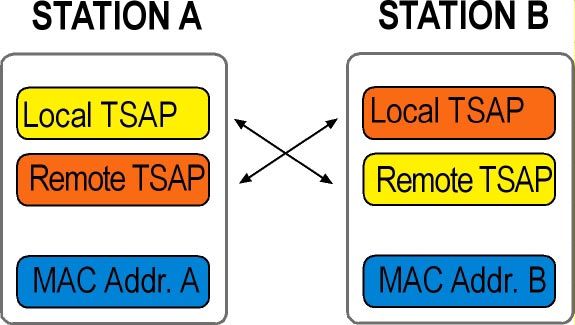
local TSAP defines the connection end point of the local system
remote TSAP defines the connection end point of the partner station
In order to establish the connection, TSAPs must correspond crosswise i.e. „local TSAP“ of communication
partner A must correspond to the „remote TSAP“ of communication partner B. The „remote TSAP“ of station
A must correspond to „local TSAP“ of station B.
local TSAP (Station A) = remote TSAP (Station B)
remote TSAP (Station A) = local TSAP (Station B)
TSAPs have a minimum length of 2 bytes and a maximum length of 16 bytes. An H1 connection is clearly
described by the combination of TSAPs and MAC addresses.
S5-TCP/IP 100
Page 28[ S5-TCP/IP 100 Manual / Chapter 3: Function ]
3.4.2 TCP/IP Connection
Chapter 3: Function
IP
The IP (Internet protocol) provides the communication to individual global addresses of computers. IP uses
IP addreses. No circuit setup is needed, IP is a connectionless protocol.
TCP
Using TCP applications on networked hosts can create connections to one another and exchange streams
of data. The protocol guarantees a reliable and orderly delivery of data from sender to receiver. While IP
provides the transport between 2 stations, TCP provides the data transfer between 2 applications. The appli-
cations of the upper layers are addressed with port numbers.
UDP
UDP provides application programs direct access to a datagram delivery service such as he delivery service
that IP provides. This allows applications to exchange messages over the network with a minimum of proto-
col overhead. UDP is unreliable, connectionless datagram protocol. There are no techniques in the protocol
for verifying that the data reached the other end of the network correctly. UDP uses 16-bit Source Port
and Destination Port numbers in word 1 of the message header, to deliver data to the correct applications
process.
3.4.2.1 TCP connection establishment
The type of handshake used by TCP is called a three-way handshake because three segments are
exchanged. After this exchange, TCP has positive evidence that the remote TCP is alive and ready to
receive data. As soon as the connection is established, data can be transferred.
3.4.2.2 Procedure of the TCP connection
The data transfer with a TCP transport connection is characterized by acknowledging the TCP segments.
This procedure is called Positive Acknowledgment with Retransmission:
● After sending the TCP segment the sender keeps a copy of the sent packets and expects an acknow-
ledgement of the receiver within a certain time. Thereto the sender starts a timer.
● If a TCP segment is received, the receiver sends an acknowledgment of receipt to the sender.
● Only after the receipt of the acknowledgment can new TCP segments are dispatched.
● If the timer runs out the sender assumes it pack was lost and repeats the transmission.
TCP segments are transferred in IP datagrams. These datagrams can be transported over different ways.
The individual TCP segments can arrive at the receiver in different sequence than they were sent.
TCP must be able to reorganize the individual TCP segments to the same sequence as they were sent.
S5-TCP/IP 100
Page 29[ S5-TCP/IP 100 Manual / Chapter 3: Function ]
3.4.2.3 TCP connection termination
Chapter 3: Function
When an endpoint wishes to cancel the connection it sends a FIN and the communication partner replies
with a FIN & ACK. Station 1 replies with an ACK.
3.4.2.4 Required parameters for TCP connections
TCP connections use IP addresses and ports for the unique route from the sender to the receiver.
IP address Data exchange between 2 stations
Port Data exchange between 2 applications
IP address
In a TCP/IP-based network each station or each device receives a unique IP address. In the Source
Address Field and Destination Address Field of the IP header, the source IP address and the IP address of
the destination station are used. Only with this additional addressing can stations that are outside the own
network can be addressed. The MAC header alone is not sufficient for it. IP addresses have a length of
32 bits, which are divided in four groups of numbers. The groups are separated by a dot (example of an IP
address: 192.0.9.4).
Port number
After IP passes incoming data to the transport protocol, the transport protocol passes the data to the correct
application process. Application processes are identified by port numbers, which are 16-bit values. The
Source Port Number which identifies the process that sent the data and the Destination Port Number which
identifies the process that is to receive the data are contained in the first header word of each TCP segment
and UDP packet. Port numbers below 256 are reserved for „well-known-services“ (like FTP and TELNET)
and are defined in the RFCs. Ports numbered from 256 to 1023 are used for other specific services.
The combination of an IP address and a port number is called socket. A socket uniquely identifies a single
network process within the entire Internet.
STATION A STATION B
Port Port
IP-Adr. A IP-Adr. B
S5-TCP/IP 100
Page 30[ S5-TCP/IP 100 Manual / Chapter 3: Function ]
3.4.3 Difference: TCP/IP - H1
Chapter 3: Function
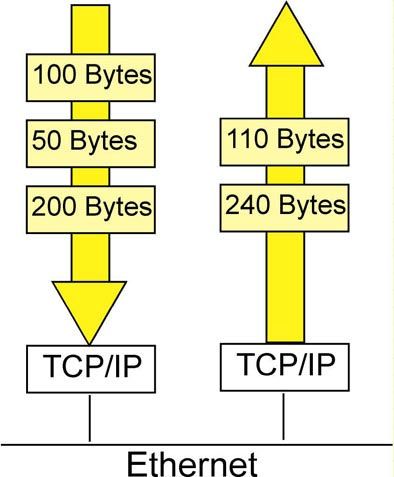
TCP is a stream-oriented protocol. It is permitted to send almost any length IP packet it chooses. If two mes-
sages were passed to a TCP/IP stack, the TCP/IP stack may choose to put both messages in one Ethernet
frame. Alternatively it may choose to place half of the first message in the first Ethernet frame and all the
rest in the next Ethernet frame. There is no EOM recognition.
H1 (ISO) is a message-oriented protocol. There is EOM recognition. Messages arrive at the destination
exactly in the same form they have been sent from the sender. Input block and Output block are identical.
Message-oriented ISO Data stream-oriented TCP/IP
In automation technology the block oriented transmission is common. To give TCP a message structure,
there are two possibilities:
TCP with a message structure
ISO on TCP (RFC1006)
INAT PLC Header
S5-TCP/IP 100
Page 31[ S5-TCP/IP 100 Manual / Chapter 3: Function ]
3.4.4 RFC1006
Chapter 3: Function
RFC1006 (ISO Transport Service on the top of the TCP) specifies how to carry an ISO transport protocol on
top of the TCP/IP protocol and is used for standard connections in the Simatic environment. The services of
the ISO transport protocol are transferred „on the back“ of TCP/IP. The transport connection is handled via
TCP/IP, where port 102 is used.
To address stations, IP addresses are used; to address applications, TSAPs are used. For each connection
a local and a remote TSAP is defined.
STATION A STATION B
Local TSAP Local TSAP
Remote TSAP Remote TSAP
IP Address A IP Address B
3.4.5 INAT PLC Header
With the PLC Header data transfer to the PLC is optimized. The header provides a frame counter, frame
length information and the possibility to send acknowledgments. All INAT components support the INAT PLC
header. The header is 8 bytes long:
Byte Value Function
0 ´M´ (0x4d)
Signature for Recognition
1 ´K´ (0x4b)
Signature for Recognition
2 Datalen LSB or MSB
(WMK_BIG_ENDIAN) Data Length
3
Datalen LSB or MSB
(WMK_BIG_ENDIAN)
Data Length
WMK_BLOCKFLAG
4 WMK_BIG_ENDIAN Bit field for transmission state
WMK_BIW_SEQ
5 Must be 0 Reserved for add-ons
Sequece No. LSB or MSB
6 (WMK_BIG_SEQ) Sequence Number
Sequece No. LSB or MSB
7 (WMK_BIG_SEQ) Sequence Number
User Data
S5-TCP/IP 100
Page 32[ S5-TCP/IP 100 Manual / Chapter 3: Function ]
Field Datalen
Chapter 3: Function
In the field Datalen the length of the data is indicated. If DataLen is 0, a life data acknowledge (Life Data
Ack) is involved and not user data. Data acknowledgement permits a form of connection monitoring in
which the TCP/IP actually does not provide for a remote-communication frame. Since the standard times for
connection monitoring correspond to those of the H1 protocol, the S5-TCP/IP system is compatible with H1
as seen from the PLC or PC.
Bit field for transmission state
In byte 4 special bits are set to receive specific transmission states:
Bit Position Symbolic name Use
0 WMK_BLOCKFLAG 0: the telegram is the last one in a block sequence
1: the telegram is not the last one in a block sequence.
Other telegrams are transferred.
1 WMK_BIG_ENDIAN Data length is indicated in Big Endian Format.
2 WMK_BIG_SEQ Sequence number is indicated in Big Endian Format.
Field Sequence Number
Byte 6 and byte 7 represent a sequence number which has the value 0 when the connection is established
and which is incremented by one each time user data is sent. This frame counter is used as an additional
safety mechanism for the data transmission. When life data acks are sent, the sequence number is not
incremented and DataLen is 0.
Connections Fetch and Write
During the jobs, Fetch and Write, the first 16 data bytes at the start of a job correspond to the SINEC AP
header, which is inserted also to the communication over H1.
S5-TCP/IP 100
Page 33[ S5-TCP/IP 100 Manual / Chapter 3: Function ]
3.5 Nomenclature INAT – Siemens
Chapter 3: Function
Siemens uses a different nomenclature than INAT does for job types. If you want to configure a communi-
cation between INAT S5-TCP/IP 100 and the Siemens CP 1430 or CP 143, you must consider the different
nomenclatures when defining job types.
INAT Type of job Send Receive Fetch Fetch Write Write
Direct Direct active passive active passive
Standard handling block SEND RECEIVE FETCH RECEIVE ALL SEND SEND ALL
Required Job Send Receive Fetch Fetch Send Receive
parameters on READ/WRITE No No Yes Yes Yes Yes
Siemens side
Active / (Active) (Passive) Active Passive Active Passive
Passive
3.6 Function of the Switch
The S5-TCP/IP 100 is equipped with integrated 4 port switch with the following functions:
Autonegotiation: Procedure by which the switch recognizes the speed (10 or 100 Mbps) and duplex
mode (half duplex or full duplex) of the connected device. The switch then chooses the same
transmission parameters. Autonegotiation function can not be turned off.
Auto MDI/MDI-X; Autocrossing: The port automatically determines the configuration of the port
and the end point with which it is connected. It is not necessary to make a distinction between 1:1
or crossover ethernet copper cables
3.6.1 Address management
The switch is self-learning. It determines which station is connected to which port and what its MAC address
is. When a station sends a data packet, the switch analyses the source address and enters it into a port-
based address table. This way the switch gets an overview about the design of the network.
The destination address of the data packet ist analyzed as well and is compared with the address table.
The switch decides from which port to which other port the connection has to go. The data packet is then
sent to the correct port and only to this one.
If a packet is sent to a new - up to now unknown MAC address, the switch transfers the packet to all ports
(except the port, where the packet came from). The switch only learns the current „active“ MAC addresses.
If a station is disconnected from the port and another station is connected to it, a new combination MAC
address/ port must be learned. That is why the combinations are only valid for a defined time. Address
entries that are not used for as while, are removed from the address table. This time is called „Aging Time“,
and is 5 minutes with the S5-TCP/IP 100. Each port of the switch is equipped with a link LED and an activity
LED for simple diagnosis.
3.6.2 Network analysis, monitored port
The S5-TCP/IP 100 has an integrated INAT NetSpector Record. NetSpector is a protocol analyzer for
industrial networks that consists of an indication part (View) and a recording part (Record).
S5-TCP/IP 100
NetSpector Record inside the S5 CP automatically records the entire data traffic where the CP is involved
and sends it - if required - to NetSpector View. Port 4 of the switch is a so-called „monitored port“. The entire
data traffics that passes thru this port is re-directed to the integrated Record and can be visualized and
analyzed with INAT NetSpector. The data traffic at ports 2 and 3 of the switch can not be captured.
Page 34C H A P T E R 4: P A R A M E T E R I Z AT I O N
[ S5-TCP/IP 100 Manual / Chapter 4: Parameterization ]

                               4 PARAMETERIZATION
 Chapter 4: Parameterization

                               4.1 Installation of the INATnet parameterization
                               With the INATnet parameterization software you can register the S5-TCP/IP 100 in the network and set up
                               the parameters for your connections. The parameters edited here are loaded directly to the S5-TCP/IP 100
                               or are saved locally for later transmission to the S5-TCP/IP 100. With the parameter settings software you
                               can monitor connections and make diagnostic checks.
                               For the parameterization of the S5-TCP/IP 100 you need a PC with installed INATnet parameterization
                               software. PC and S5-TCP/IP 100 have to be connected directly or indirectly.
                               For installing the software follow these steps:

                               1. If you received the INATnet parameterization from the INAT website (Download Area), please refer to
                                  point 5. If you received the software on a CDROM, please refer to point 2.

                               2. Insert the CDROM „S5-TCP/IP 100“. If autostart is not activated in your PC, use start.exe or index.html.
                                  If autostart is activated, the following dialogue appears:

                                    Installation: a list of the files to install the S5-TCP/IP 100
                                    Software Overview: a downloadable overview with INAT software and manuals
                                    Informative Literature: a downloadable overview with INAT informative literature

                               3. Select „Installation“. The following window appears:
S5-TCP/IP 100

                               Page 36
[ S5-TCP/IP 100 Manual / Chapter 4: Parameterization ]
4. Click inatnet.exe
Chapter 4: Parameterization
5. Save the file in a directory of your choice
6. Run the .exe file
7. When the parameter setting software is installed, S5-TCP/IP 100 can be registered in the network
4.2 Initial Configuration of the S5-TCP/IP 100
With the basic configuration the S5-TCP/IP 100 receives all necessary station parameters so that it can be
identified as a network user like name, page frame base address, IP address (n), subnet mask etc.
Start the parameter setting software. The start dialogue appears:
Four methods of setting the parameters are provided here: online (IP / H1), serial or offline.
Whenever you start the parameter setting software, you are asked which method you want to use.
Set Parameters via IP / H1
For setting parameters via IP / H1 the S5-TCP/IP 100 has to be connected
indirectly with the PC via the Ethernet network. This method of setting parame-
ters permits you to set parameters for modules from any point of a TCP/IP or H1
network.
Set Parameters using a serial connection
To set parameters using a serial connection the PC and S5-TCP/IP 100 have
to be connected directly via RS232/TTY converter cable. The parameter data
are stored directly into the S5-TCP/IP 100. When the serial connection is used,
the cable length is usually limited to a few meters (i.e., the module must have its
parameters set on site).
File (offline)
S5-TCP/IP 100
With Offline the parameter files are stored locally in a file on the PC for later
transmission to the S5-TCP/IP 100.
Page 37[ S5-TCP/IP 100 Manual / Chapter 4: Parameterization ]
4.2.1 Setting Parameters via IP or H1
Chapter 4: Parameterization
NOTE
When registering S5-TCP/IP 100 in the network (via IP or H1) the device has to be
connected to the same LAN as the PC running the parameter setting software.
Stations behind routers are not detected!
Select „Parameterization via IP“ or „Parameterization via H1“. The station list appears.
All stations which are currently available online on the network are indicated.
The new S5-TCP/IP 100 is indicated with its MAC address.
NOTE
All stations with „0021A0“ at the beginning of the MAC address
are INAT components.
● Mark the S5-TCP/IP 100 station and click the button „OK“.
● The window to enter the station parameters appears.
S5-TCP/IP 100
Page 38[ S5-TCP/IP 100 Manual / Chapter 4: Parameterization ]
4.2.1.1 Station parameter settings
Chapter 4: Parameterization
Station name
Each station can be assigned a name. This name is used to identify the station.
Remember that each station name within a network must be unambiguous.
Station password
The station password protects the parameters in the station. If a password is set, this password is required
whenever you try to edit the parameters. This applies only with online parameterization.
Ethernet address
Each station in an Ethernet network has an unambiguous station address.
This address is stored on the network interface card and is used to identify the station in the network.
INAT components always begin with the MAC address 0021A0.
Page frame base address
It determines the starting point of the 4 page frames imaged in the memory area of the controller.
The page frame base address must be a number divisible by 8 (0, 8, 16...). When you set the base address,
make sure it is unique in the S5 if you are using more than one CP.
TCP/IP Parameters
TCP/IP Parameters are required, when S5-TCP/IP 100 is used in a TCP/IP network.
If „only“ H1 is used, these parameters are not required.
Use DHCP
If there is a DHCP Server configured in your LAN that can provide IP addresses from a pool of IP
addresses, activate the button DHCP.
IP Address
The IP address defines the logical network address in TCP/IP networks. This address is indicated as a
„sender“ address as well as „receiver address“ in data packets that are transferred with the IP protocol.
So that there is always a clear package receiver, each user needs his unambiguous address.
Subnet mask
The IP Subnet Mask determines which station requests may pass to the active network.
Addresses, which can be different in their masked part, are sent to the routers.
If no router is parameterized the Subnet mask has no meaning.
IP Domain Name Server
Domain name
S5-TCP/IP 100
The domain name can be used to address a maximum of three Domain Name Servers in the network.
Page 39[ S5-TCP/IP 100 Manual / Chapter 4: Parameterization ]
Max. of three Domain Name Server
Chapter 4: Parameterization
The IP domain name server converts the symbolic Internet names into station addresses.
Up to three domain names can be used.
Router
A router is used when an address cannot be located on the local network.
Enter the address of the Routers here.
NOTE
Ask your system administrator for your IP address, subnet mask, gateway etc.
● Confirm your entries with „OK“. The station window appears again. The station is now indicated
with Name, MAC address and IP address (if entries have been made)
4.2.2 Serial Parameterization
● Select „Serial Parameterization“.
● Select the COM port of your PC, where the cable is plugged for connection with the S5-TCP/IP 100.
If the connection is established the empty connection list appears.
If the connection can not be established, a warning notice appears
--------------------------------------------------------------------------------------
Possible causes:
● The connection cable may not be plugged in
● The connection cable is allocated incorrectly
● The interface card on your PC is defective
S5-TCP/IP 100
● The interface on your PC is being used for another task
--------------------------------------------------------------------------------------
Page 40[ S5-TCP/IP 100 Manual / Chapter 4: Parameterization ]
● Select Station > Current Station
Chapter 4: Parameterization
● The window „Station parameter Settings“ appears
● Please refer to chapter 4.2.1.1 station parameter settings to learn what entries can be made here.
● Confirm your entries with „OK“. The station window appears. The station is now indicated with Name,
MAC address and IP address (if entries have been made).
● The registration is complete. Connections can be parameterized now.
4.2.3 Offline
● Start the parameter setting software and select „File (Offline)“.
● The window „Reading the connection file“ appears. Here you can open an existing parameter
file or create a new one.
● To create a new parameter file enter a new name and click the button „Open“.
● The window to select the system appears:
S5-TCP/IP 100
Page 41[ S5-TCP/IP 100 Manual / Chapter 4: Parameterization ]
Chapter 4: Parameterization
● Click the button „S5-TCP/IP 100“. The empty connection list appears:
● Select Station > Current Station
● The window „Station Parameter Settings“ appears
● Please refer to chapter 4.2.1.1 station parameter settings to learn which entries can be made here.
● Confirm your entries with „OK“. You get back to the connection list.
The parameters are stored in the file created at the beginning for later transfer to the S5-TCP/IP 100.
This file must be transferred into the S5-TCP/IP 100 (serial or online).
S5-TCP/IP 100
Page 42[ S5-TCP/IP 100 Manual / Chapter 4: Parameterization ]
4.3. Setting up connection
Chapter 4: Parameterization
Setting up connections is always the same, no matter if you are using online, offline or serial mode.
The difference is: when setting parameters online (via IP or H1), or via serial line the parameters are stored
directly in the CP, while when setting parameters off line they are stored in a parameter file.
When setting parameters online all stations on the network are indicated.
To create of a new connection follow these steps:
● Start the parameterization software, select the type of parameterization and select the S5-TCP/IP 100.
--------------------------------------------------------------------------------------
Station not found
● Stations located behind routers are not automatically detected.
Establish a direct connection to the desired station clicking the button „New“
● Enter the name and the IP address of the S5-TCP/IP 100 station (these parameters have been defined
during the registration process ) and click the button „OK“. The new station is indicated in the station
list. If there is an arrow in front of the station (->) the station is reachable.
● Mark the S5-TCP/IP 100 in the station list and click the Button „OK“.
The empty connection list appears.
--------------------------------------------------------------------------------------
● To set up a new connection select Connection > New...
● The window „New connection“ appears
● Here you specify which protocols for the connection are to be used.
NEW CONNECTION
Connection name
All parameterization data is allocated to the connections. Every connection is identified
by a connection name.
Network
Select the used network protocol H1, TCP/IP or FTP
Type of Protocol
You can decide which „higher“ protocols (protocols situated on higher layers of the ISO/
OSI reference model: application protocols such as S5, S7, Modbus on TCP) to use.
S5-TCP/IP 100
None: Select None when no application protocol to be used (raw data).
● Confirm your entries with the button „OK“. The window „PLC Parameter Settings“ appears.
For FTP connection see chapter chapter 4.4.
Page 43[ S5-TCP/IP 100 Manual / Chapter 4: Parameterization ]
4.3.1 PLC parameter settings
Chapter 4: Parameterization
The PLC parameters regulate the connection between the S5-TCP/IP 100 and the S5 PLC (local parameter)
Connection name
All parameterization data is allocated to the connections. Each connection is identified by a connection
name.
Job number (A-NR)
Each connection to be used by the Siemens S5 standard handling blocks requires a job number.
The same A-NR is used in the handling block. With the unique combination job number (A-NR) and SSNR,
the connection can be addressed.
If Double connection the Other
Layer 4 communications (Send / Receive) can be handled via one connection, a socalled double-connec-
tion. This means, that only ONE connection has to be parameterized for both Sending and Receiving.
This connection contains two job numbers, one for Send and one for Receive. With this setting
a half-duplex mode is realized.
Job Offset
The job offset determines the page frame which is used for the current job. Job off sets are used normally
only in multiprocessor systems (i.e. several CPUs with one or more CPs). The following rule usually applies:
CPU 1 communicates via page frame 1 (Base SSNR + Job offset 0)
CPU 2 communicates via page frame 2 (Base SSNR + Job offset 1)
CPU 3 communicates via page frame 3 (Base SSNR + Job offset 2)
CPU 4 communicates via page frame 4 (Base SSNR + Job offset 3)
The page frame base address is set at the station parameters.
Standard job type
S5-TCP/IP 100
A description of the standard job types can be found in chapter 3.3 job types.
Page 44[ S5-TCP/IP 100 Manual / Chapter 4: Parameterization ]
Special Job Type
Chapter 4: Parameterization
The Event mode enables spontaneous data traffic. With „normal“ Fetch communication, requested data is
sent via network within the Poll cycle even if the data has changed. Data is polled cyclically from the PLC via
the network. With Event mode, the S5-TCP/IP 100 compares the requested data. Data is only sent when the
data changes. This reduces network traffic. There are two operating modes of the Event Fetch function.
● Single:
The Fetch is started by the calling system. Data is only then returned from the destination system when it
has changed. Immediately after the establishment of a connection, data is returned when a fetch is made.
The fetch has to be restarted after every data return. This operating mode can also be used in combination
with products from other companies.
● Multiple / autom.
The fetch is started by the calling system. Data is returned from the destination system when is has
changed. The job does not have to be started again. The responses from the destination system contain
an expanded AP header for identification. The header contains the parameters of the call. Therefore it is
possible to start several „Multiple / Autom.“ with only one connection. Via these parameters the responses
for the different „Multiple / Autom“ can be identified unambiguous. Entered Multiple / Autom. jobs can be
stopped individually.
Poll all
Here you enter the poll cycle for Fetch Event Passive connections. The S5-TCP/IP 100 polls the data from
the CPU via the back plane bus. „0“ indicates, that data shall be polled as fast as possible. In order to save
calculating time, we recommend using the value „200 ms“.
Do direct jobs always with all
Some older PLC programs require the setting „Do Direct Jobs Always with All“. If this mode is active the
data communication is slower and the cycle time load of the CPU is greater. If this mode is not active the
data from the PLC is accepted immediately. With this mode data is accepted with the next Senc/Rec-ALL
call.
Flag word
An indication word is intended for the passive order types (Fetch passive, Write passive). The indication
word, which is specified at the ALL-block, refers to all jobs, which use the ALL function (A-NR = 0). With job
types Write Passive and Fetch Passive, the status of communication can only be indicated, if an indication
word is parameterized here.
Source / Destination
Source/Dest. is used with the active job types (Write active, Fetch active, Send, Receive). Data source or
S5-TCP/IP 100
data destination can be edited here. The values edited here become operative if there are no parameters
for Source/Dest. at the corresponding HDB (QTYP / ZTYP = NN: no source/destination parameters on the
block; Parameters must be present on the CP).
With Send job enter the Source, with Receive job enter the destination. With Fetch active or Write active
Page 45You can also read


