Ambient Assisted Route Planner Based on XML Files with Accessibility Information
←
→
Page content transcription
If your browser does not render page correctly, please read the page content below

WISP 2009 • 6th IEEE International Symposium on Intelligent Signal Processing • 26–28 August, 2009 Budapest, Hungary
Ambient Assisted Route Planner Based on
XML Files with Accessibility Information
Paulo F. S. Amaral*, Juan Carlos G.García†, Teodiano F. Bastos Filho*, Manuel Mazo†
* Departamento de Engenharia Elétrica, Universidade Federal do Espírito Santo
Av. Fernando Ferrari 514, Campus de Goiabeiras, 29075-910, Vitória, ES, Brasil
E-mails: paulo@ele.ufes.br, teodiano@ele.ufes.br
†Departamento de Electrónica, Universidad de Alcalá. E. Politécnica Superior, Edificio Politécnico
Campus Universitario, 28805, Alcalá de Henares, Madrid, España
E-mails: jcarlos@depeca.uah.es, mazo@depeca.uah.es
Abstract This work introduces an Ambient Assisted Route But indoor environments are not suitable for GPS
Planner (A2RP) aimed for providing route planning in unknown positioning information. Several works in literature
indoor environments. System was first designed as an assistive
mobility aid to be used by intelligent powered wheelchairs, use mobile robotics techniques and advanced sensors
although it can be suitable also for other autonomous mobile (video cameras, laser range finders) in order to
robotics systems, non-automated mobility device users or determine wheelchair location and the creation of
pedestrians. A2RP system is based on a set of XML description maps of the environment, using SLAM techniques
files that can be retrieved from the internet. These files contain all
the information needed to access public or private buildings: floor (Simultaneous Localization and Mapping).
maps, accessibility information, available routes and calibration Other research lines propose the development of
landmarks. XML description files must be created, located and Smart Spaces [5 and 6], in which some of the system
maintained in an internet server specially dedicated for this sensing and processing capabilities have been
purpose. This paper presents description files structure and the
associated software applications: a visual editor to build and
installed over the environment itself, making easier
maintain XML accessibility information files and a navigation the tasks of route planning and navigation inside it.
setup program to be run on board of the intelligent wheelchair In [7] is proposed a navigation system that models
processor. the environment in a hierarchically structured tree
using the architectural features of the building. In
Keywords Route planning, navigation maps, accessibility,
this work, navigation uses odometry based on optical
assisted mobility, intelligent wheelchair.
encoders coupled to wheelchair’s motors.
Wheelchair position calibration is based on video
cameras and visual landmarks placed in doors and
I. INTRODUCTION
halls.
Reference [8] proposes a small area autonomous
For people with some kind of locomotion
navigation system for a wheelchair using
disability some tasks and situations of everyday life
technologies applied to AGV (Automatic Guided
can have physical constrains sometimes impossible
Vehicles) and maps fetched from a local server. The
to overcome for them. In this case manual or
location system of the wheelchair is based on an
powered wheelchairs are standard devices that help
external radio system and the route planning
them to increase their locomotion ability and quality
algorithm is left to the local server.
of life.
In [6] is presented a navigation method for service
But it is very difficult for a wheelchair user to
mobile robots in indoor environments. It uses XML
make a plan to move in a place never visited before.
(eXtensible Markup Language) semantic maps and
These difficulties are mainly due to the lack of
sensors placed in the smart space for robot location.
accessibility information [1] ensuring that there is a
Maps simplify routing tasks, describing the features
possible way for a wheelchair to go from an entry
of the multiple cells, their connection points and the
point to the desired location in the building.
location sensors in each one.
For outdoor navigation a common solution [2, 3,
The work presented here is part of a research
and 4] is the use of high precision systems and
project that aims to develop a simple and efficient
databases like GPS (Global Positioning System) and
tool for the retrieval of accessibility information of
GIS (Geographic Information System). This is
public or private buildings (hospitals, shopping
intended to provide a navigation system to
centers, airports, etc.) to help the navigation of an
wheelchair users that could display, in real time,
autonomous wheelchair in these kinds of indoor
accessibility information that allows a safe motion
environments.
between locations in open environments.
978-1-4244-5059-6/09/$26.00 ©2009 IEEE 147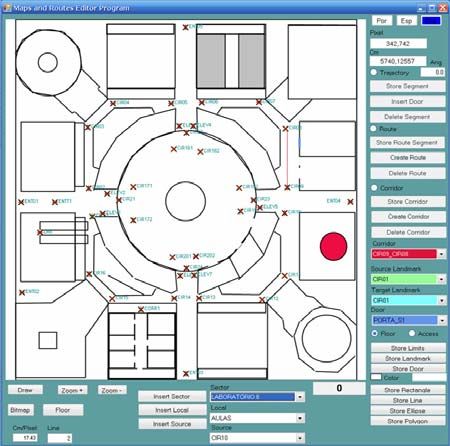
P. F. S. Amaral et al. • Ambient Assisted Route Planner Based on XML Files with Accessibility Information
The accessibility information of a particular
building will be provided by an Internet Service (IS).
Administrators of buildings and public places will
store in servers of this IS the accessibility
information in the form of XML files; these files
should contain the description of floor maps, access
points, places of interest and optimal routes for a
wheelchair to move inside the building. Wheelchair
route is estimated using dead reckoning, where
actual position and path can be corrected by means
of visual marks placed on the ceiling at certain
locations.
Many of the related works present solutions for Fig. 1. Architecture of the indoor wheelchair navigation system.
autonomous navigation of a wheelchair in indoor
environments. But none of them establish a complete
structure where the environment itself helps to find Communication and positioning structures of
the route to any place of interest on any floor of the navigation system can also be used for remote
building from any point within it or even from an monitoring of biological signals and location of
external sidewalk. This is the aim of the Ambient wheelchair users, opening a broad range of possible
Assisted Route Planner (A2RP) and its associated health care services.
advanced wheelchair navigation system.
This work presents the definition of the A2RP A. Maps and accessibility information modeling in
system architecture for buildings with several floors. XML Files
It presents an editor for XML files containing metric
maps and accessibility information. It also shows a Building maps and accessibility information
control program for a wheelchair to fetch these files should include the existing locations to be visited,
from the server using a cell phone. With the maps the best entry point, the best path from this entry to
and accessibility information retrieved from the an elevator that reaches the desired floor (if needed)
XML files it controls the wheelchair for autonomous and then the best path to go to the desired place.
navigation within the building. These paths must be achieved by a wheelchair so
they can not have stairs, narrow corridors or
II. WHEELCHAIR INDOOR NAVIGATION SYSTEM passages, and doors difficult to open. This
ARCHITECTURE information is included in a set of XML building
description files.
Fig. 1 shows the main components and functions These files describe the ways to access the
of the Ambient Assisted Route Planner (A2RP) and building, the position of its entries (suitable to a
wheelchair indoor navigation system. wheelchair) the map of each floor with the location
In the top left corner it is shown an internet of lifts, doors and places of public access. They also
server, dedicated to the storage of the XML files define landmarks for wheelchair position calibration
containing the maps and accessibility information. and a set of optimum routes, free from physical
Creation, maintenance and updating of this barriers, from each landmark to all of its neighbors.
information can be done off-line, even in a different In the proposed architecture, a building to be
location (in top right corner of Fig. 1). At the bottom visited is considered as having a ground floor, n
the embedded control system onboard the wheelchair floors and k basements, defined by XML files with
is shown. the formats described in following sections.
System behavior is as follows: when approaching
to a certain location of interest, wheelchair controller File type: Building.xml
send to the internet server its geographical position
(obtained from a GPS) using a mobile phone or any This file (Fig. 2) defines the number of floors and
similar device. Then it gets the information from basements of the building; the position in UTM
registered buildings in the nearby. User selects the coordinates of the map of access to it; the location
desired building to go and gets its XML files with and orientation of the ground floor on the map of
the maps and accessibility information to be used by
the navigation system.
Selection of the location to be visited may be done
by a menu system or directly pointing to a position
on a floor map. This is made using the appropriate
Human Machine Interface (HMI), depending on user
profile. Fig. 1 shows a head mouse as input device; it
uses accelerometers to detect command actions made
Fig. 2. XML file with the basic parameters of a building.
with specific head movements.
148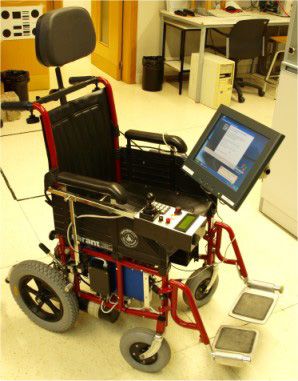
WISP 2009 • 6th IEEE International Symposium on Intelligent Signal Processing • 26–28 August, 2009 Budapest, Hungary
Fig. 3. Floor’s xml file describing map of the floor.
access and the limits of the ground floor map in
order to establish its initial scale on the wheelchair
computer screen. In this example the coordinates are
given in centimeters. The file also defines the
existing lifts and their connectivity (which floors can Fig. 4. XML file structure of the floor accessibility information
be reached with them).
This file defines all building sectors in the floor
and the rooms or locals of each one of the sectors
File type: Floor.xml
that could be visited. For each one of the defined
locals there is one or more sources that are a close
These files define the map of each floor including landmark that can have a path from it to those locals.
doors and position calibration marks (or landmarks) For each source is defined a path connecting the
for paths to be made by the wheelchair. landmark to the concerned place. In Fig. 4, a first set
If a building has n floors and k basements with of lines, limited by tag, shows the
possible locations to be visited by a wheelchair we
structure of definition of these rooms and paths in the
have a total of (n + k + 2) files with this structure. A
XML file. The path from a landmark to a room can
file for each floor and basement, a file for the ground
be defined as a sequence of straight lines or as a door
floor and a file for the building access map. Fig. 3
associated with a corridor.
shows the main fields of the XML floor files.
Then, lines delimited with tag show the
In this Fig. 3, a first set of lines represents the
fields of definition of the routes linking the
scale vector map of the floor and may be defined by
landmarks with its neighbors. These routes are
geometric figures like lines, rectangles, ellipses and
outlined following the best and free of obstacles path
polygons; floor’s reference is always considered to
to a wheelchair. Its length should not be very long,
be in the top left corner of picture.
allowing the path position control to be performed
Next lines encode doors in corridors and rooms of
using the signals coming from the optical encoders
places to be visited in the building. Last lines of file
of the wheelchair.
represent positions and orientations of the calibration
Final lines of Fig. 4 show an example of the
points (landmarks) of floor paths; these landmarks
corridor definition on a floor ( tag).
can define different behaviors that are coded in a
The corridor is defined by a landmark and a line
type field; there are: landmarks of circulation,
segment or two landmarks and a line segment (an
landmarks of access to the building and landmarks of
existing route) linking the two landmarks. With the
floor’s elevators.
definition of doors associated to these corridors, the
path of a landmark until the door can be generated
File type: InfoFloor.xml automatically by the intersection of two straight
lines.
For each XML floor file there is another XML file
with the accessibility information of that floor. Fig. 4 B. Wheelchair route planning
shows the format of the fields of the accessibility
information. Fig. 5 shows a diagram of the accessibility
information structure described in the defined XML
149
P. F. S. Amaral et al. • Ambient Assisted Route Planner Based on XML Files with Accessibility Information
III. RESULTS
This work is under development at the Electronics
Department of the University of Alcalá (Spain) in the
framework of EINTA research project (Smart Spaces
in Assistive Technology) granted from CAPES
(Brasil) and Ministerio de Educación (Spain).
A. Prototype of A2RP Wheelchair
It has been built a wheelchair prototype (Fig. 6)
equipped with an intelligent distributed control
architecture. It has got a set of nodes interconnected
by a CAN bus (Control Area Network) formed by
several LPC2194 ARM micro-controllers (NXP
Semiconductors) and an embedded PC.
The computer has got a touch screen display and
internet wireless connection. It also manages other
devices like a cell phone, a GPS, a video camera to
Fig. 5. Sector, locals and landmark tree for path planning. the calibration of wheelchair position and special
HMI, like a head mouse using accelerometers.
files. Places of interest are stored as sectors. Each ARM processors implements several functions in
sector can have multiple locals and each local can be a modular concept: system behavior depends on
accessed by a number of sources, which are marks of number and nature of installed nodes. A minimum
navigation, represented by circles in Fig. 5. The lines system needs only two nodes: a power control, in
connecting the circles represent the routes defined charge of both motors driving and control; and an
between landmarks and its neighbors. The lines intelligent input device with different programmable
connecting the sources to the locals are paths to behaviors coming from a standard joystick to a blow
reach the local from the source. sensor drive mode. Actual prototype has got a third
The algorithm to plan the best route to go to node in charge of safety devices based on ultrasonic
another location takes into account the lower length sensors and accelerometers.
path, using a variation of Dijkstra's algorithm [9] In manual mode there are three ways to control
from all the existing routes in the XML file. All the wheelchair:
possible routes, using all possible sources, are Standard joystick.
analyzed, and the shortest path is chosen as the Blowing drive, using a linear flow sensor device
optimal one. If the destination is on the same floor to control speed and direction of the wheelchair.
that the wheelchair is, the direct path is found. If the A head mouse based on accelerometers that
destination is on another floor, the route is split first implements joystick like commands for speed
to get to the closest elevator that goes to both floors and direction control with head movements.
and then out of the elevator to the destination on the In automatic modes, HMI devices can be used to
other floor, reaching the desired location. make path corrections and other safety related issues.
Once the route has been defined, control program
commands the wheelchair to follow a set of straight
and circular paths in each route section. Wheelchair
relative position is determined integrating motor
encoders pulses (Dead Reckoning) between
calibration landmarks. When the wheelchair reaches
a landmark, absolute position and orientation
information can be retrieved from them [7] using a
video camera pointing to the ceiling. This
information is used to correct dead reckoning
estimations.
Autonomous navigation can be overridden at any
time by user actions (i.e. with the joystick) or by the
detection of an obstacle in the path.
In case of a change in the existing routes, either
by a placement of a fixed obstacle in the way, as a
kiosk in a mall, or a defective elevator or automatic
door, building administrators must edit the affected
route and send this modification to the server in a
Fig. 6. General view of the prototype of A2RP wheelchair.
new XML file containing the change.
150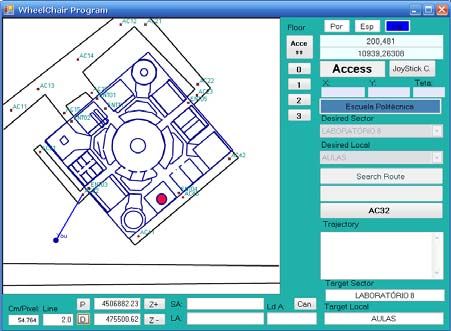
WISP 2009 • 6th IEEE International Symposium on Intelligent Signal Processing • 26–28 August, 2009 Budapest, Hungary

                                                                   Fig. 9. User position from the closest access entry to the building.

                                                                   Polytechnic School building. Once fetched the
                                                                   accessibility information from the XML files, it will
                                                                   be available the geographic positioning screen of the
 Fig. 7. Screenshot of the accessibility information XML editor.   building ground floor, along with the current position
                                                                   of the wheelchair and the nearest building access.
                                                                   The desired location can be chosen by touching the
B. System software components                                      screen or by using the head mouse. Next, computer
                                                                   generates the path planning.
   Fig. 7 shows a screenshot of the developed                         Fig. 10 shows an example path from the nearest
accessibility information XML files editor. This tool              entry (number 03) to the desired location, passing
allows the creation of vector maps for each of the                 through each one of the existing landmarks for
building floors and the accessibility information                  calibration.
(sectors, local, sources, routes and paths between                    In this screen of control program user can
locals and sources) for route and path planning.                   navigate in several ways: selecting the desired sector
   Fig. 8 shows a picture of a georeferenced map of                and location in the combo boxes; using the touch
the Escuela Politécnica building of the University of              screen; or with other HMI devices, like the head
Alcalá (UAH, Spain). This building was used as an                  mouse. If user can identify desired locations directly
example for the creation of XML maps in the editor                 on the map he can select it directly by pointing the
and to make the geographic position of the ground                  desired destination. This screen also allows the
floor and the building accesses, along with their                  change of the building floor to perform the
entries accessible to a wheelchair.                                navigation between places in different floors.
   Fig. 9 shows the screen of the navigation setup                    Wheelchair control program executes planned
program onboard of the wheelchair. In the case                     routes to marked destination using line segments and
shown in this figure, user has selected the                        landmarks checkpoints.
                                                                      User can change scale of graphics to see small
                                                                   details of it. Fig. 11 shows a zoom screen of an
                                                                   actual run of the example shown in Fig. 10. It has
                                                                   been added a detail of an interesting section of this
                                                                   run in order to improve its visibility. Planned route is

   Fig. 8. Edition of building geographic position information.      Fig. 10. Path generated from entry 03 to the desired location.

                                                           151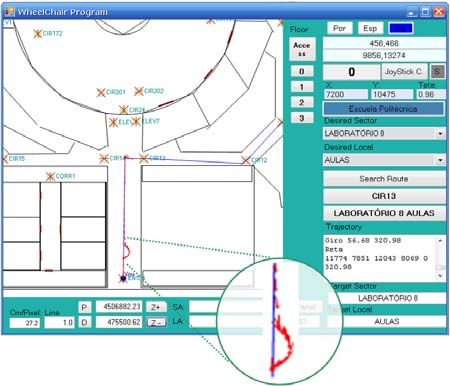
P. F. S. Amaral et al. • Ambient Assisted Route Planner Based on XML Files with Accessibility Information

                                                                              even in automatic mode. Minor corrections can be
                                                                              done by pulling the joystick to control the speed;
                                                                              strong actions on the same device force a temporary
                                                                              exit from the automatic mode for safety reasons, to
                                                                              avoid obstacles or persons in the path.
                                                                                 The blowing sensor and the head mouse make
                                                                              possible the full use of the system even to persons
                                                                              with severe mobility restrictions, so they can have
                                                                              only the ability to blow or move their heads.
                                                                                 The proposed system can also be used by other
                                                                              kind of users, as the accessibility information may
                                                                              also be presented on the screen of a hand computer
                                                                              and provide the best route to a traditional wheelchair
                                                                              user or pedestrian.

                                                                                                   ACKNOWLEDGMENTS
  Fig. 11. User zoom screen and a detail of an actual run: planned
  route (shown in blue) and executed path (superimposed, in red).             This work had financial support from: CAPES/Brazil
                                                                              under the number BEX1142/08-9; and from the Mi-
drawn with straight segments (in blue). Actual path                           nisterio de Educación of the Spanish Government
has been superimposed to planned one using red                                through EINTA (ref. PHB2006-0077-PC) and
directional marks. Executed path is located between                           RESELAI (ref. TIN2006-14896-C02-01) projects.
the first landmark and the following one.
    In automatic mode the HMI (in this prototype, the                                                       REFERENCES
joystick and/or the head mouse) may be used to
make minor corrections of the trajectory, control its                           [1]   D. Ding, B. Parmanto, H.A. Karimi, D. Roongpiboonsopit,
                                                                                      G. Pramana, T. Conahan, and P. Kasemsuppakorn, “Design
speed or to temporary set a manual mode control to                                    Considerations for a Personalized Wheelchair Navigation
avoid obstacles. An example of this behavior is                                       System,” Engineering in Medicine and Biology Society,
illustrated in the deviation shown in the beginning of                                EMBS 2007, 29th Annual International Conference of the
the executed path (detailed view in circular area at                                  IEEE, pp. 4790 – 4793.
the bottom of Fig. 11) to the right side of the planned                         [2]   M. Kurihara, H. Nonaka, and T. Yoshikawa, “Use of
                                                                                      highly accurate GPS in network-based barrier-free street
one.                                                                                  map creation system,” IEEE International Conference on
    Currently the project is in the final stage of                                    Systems, Man and Cybernetics, Vol. 2, pp.1169 – 1173.
integrating the video camera and the ceiling                                          2004.
landmarks to make the automatic position correction                             [3]   O. Matsumoto, K. Komoriya, T. Hatase, H. Nishimura, H.
of the wheelchair.                                                                    Tsutomu and N. Hideki, “Autonomous Traveling Control
                                                                                      of the TAO Intelligent Wheelchair,” IEEE/RSJ Interna-
                                                                                      tional Conference on Intelligent Robots and Systems, pp.
                       IV. CONCLUSIONS                                                4322 – 4327. 2006.
                                                                                [4]   W. Yi-Hui, L. Bing-Yuh, C. Heng-Yin, O. Yao, L. Jin-
   This paper has proposed an Ambient Assisted                                        shin, K. Te-Son and C. Fok-Ching, “The Development of
Route Planner (A2RP), as part of a wheelchair                                         M3S-Based GPS Navchair and Tele-Monitor System,”
                                                                                      IEEE-EMBS 2005, 27th Annual International Conference
indoor navigation system based on XML files that                                      of the Engineering in Medicine and Biology Society, pp.
store building accessibility information. These files                                 4052 – 4055. 2005.
are retrieved from an internet server specifically                              [5]   J. C. Garcia, M. Marrón, M. Mazo, and J. Ureña,
created for this purpose. It was also presented an                                    “Positioning and localization system for autonomous
editor of the XML files and the navigation setup                                      wheelchairs,” IECON’02 IEEE 2002 28th Annual
                                                                                      Conference of the Industrial Electronics Society, Vol.
program onboard the wheelchair to follow the                                          2, pp. 1555 – 1560. 2002.
desired routes.                                                                 [6]   P. Jae-Han, B. Seung-Ho, and B. Moon-Hong, “An
   Unlike other works the proposed system does not                                    Intelligent Navigation Method for Services Robots in the
need a structure of high cost equipments in the                                       Smart Environment,” International Conference on Control,
building. Only the placement of calibration marks on                                  Automation and Systems, Seoul, pp.494-497. 2007.
the ceiling on special points is enough to allow the                            [7]   M. Marrón, and J. C. Garcia, “Sistema de navegación
                                                                                      autónoma en entornos interiores estructurados,” TELEC`02
indoor navigation of the wheelchair.                                                  International Conference, pp.1-4. 2002.
   Equipments needed for the autonomous                                         [8]   H. Chuan-heng, L. Ming-long, S. Yuan-Chung and L.
navigation with this system are not complex and                                       Feipei, “A design of small-area automatic wheelchair,”
most of them are already available in the wheelchair                                  IEEE International Conference on Networking, Sensing
with an external navigation system, such as GPS and                                   and Control, Vol. 2, pp. 1341 – 1345. 2004.
cell phone for internet access.                                                 [9]   E. W. Dijkstra, “A note on two problems in conexion with
                                                                                      graphs,” Numerische Mathematik, pp.269-271. 1959
   It’s important to note that in the proposed system
wheelchair user always has the control of his vehicle,
                                                                                152
You can also read


