ProDSP Media Presentation Matrix Switcher - Extron
←
→
Page content transcription
If your browser does not render page correctly, please read the page content below
Matrix Switchers

     ProDSP                  ™

                                           ➤ ProDSP audio signal processing:
Media Presentation                           – 3 2/64-bit floating point digital
                                                signal processing engine

 Matrix Switcher                             – L ow latency DSP processing
                                             – Intuitive Graphical User
                                                Environment

       MPX Plus 866 A                      ➤ Extensive selection of audio
                                             DSP tools:
                                             – Dynamics
                                             – Ducking
                                             – Loudness
                                             – Filters
                                             – Delay
 Powerful DSP plus four matrix switchers     – Feedback suppression
                                             – 32 Global or DSP Partial presets
       in one compact enclosure
                                           ➤ DSP Configurator Software with Live
                                             and Emulate operation modes
                                           ➤ SpeedNav™ keyboard navigation
                                           ➤ Four matrix switchers in one:
                                             – 8x6 VGA/component video
                                             – 6x6 composite video or S-video
                                             – 14x6 stereo audio
                                             – 4x6 mic/line audio matrix mixer

                                                       www.extron.com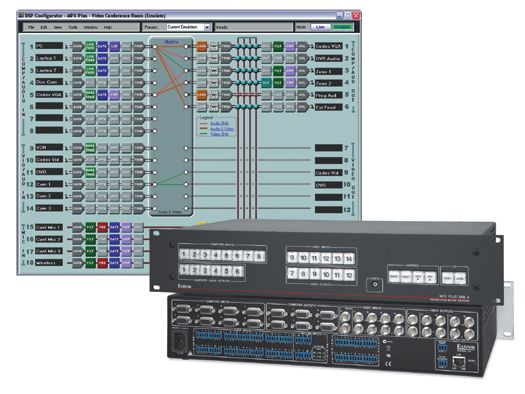
M e d i a pr e s e n tat i o n M at r i x s w i t c h e r s

Introduction
         The MPX PLUS 866 A ProDSP Media Presentation Matrix                       In any A/V environment, audio signal management is crucial
         Switcher is the A/V industry’s first matrix switcher to                   to the overall quality of the presentation. The MPX Plus 866
         incorporate a powerful 32/64-bit floating point DSP engine                A includes a 14x6 audio switcher, which allows audio to
         for complete A/V signal routing and audio control. Extron                 be switched independently from any video group. The 4x6
         ProDSP is an audio platform loaded with powerful tools to                 microphone/line audio matrix mixer features microphone
         control audio level, dynamics, filters, delay, ducking, loudness,         bussing that allows each of the four Mic/Line inputs to be
         and feedback suppression processing. ProDSP is managed                    mixed into any or all of the first six matrix switcher outputs.
                     by the intuitive DSP Configurator Software,
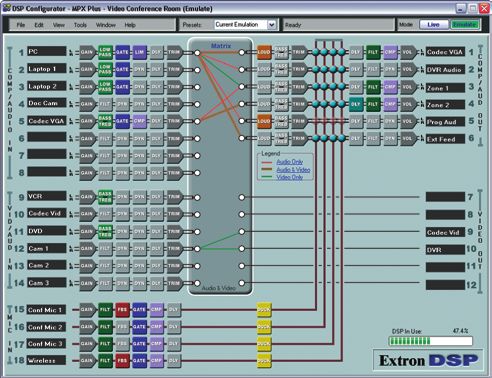
                              which also provides for configuration of             DSP Configurator Software simplifies audio system
                                   four matrix switchers: an 8x6 VGA               design and commissioning. The flexible, fixed on-screen
                                      switcher, 6x6 video switcher for             layout offers an extensive selection of digital audio signal
                                      composite video and S-video,                 processing tools including level control, dynamics, filters,
                                       14x6 stereo audio switcher, and             delay, ducking, loudness, feedback suppression, A/V matrix
                                       a 4x6 microphone/line audio                 switching ties, and audio matrix mixing. Designers can
                                      matrix mixer. The MPX Plus 866 A             quickly get a snapshot view of the entire audio system
                                   is a complete, one-box solution that            including processing blocks, routing ties, and mixing matrix
                               eliminates the need for outboard audio              assignments all at once.
                         processing equipment when integrating video
         and audio for small presentation systems or divisible-room                The graphical user environment of the DSP Configurator

         applications.                                                             Software follows program and microphone-level audio through
                                                                                   the signal chain from input to output, providing comprehensive
         Extron’s exclusive ProDSP is engineered from the ground up                control of all audio parameters and routing. Signals from
         using a powerful 32/64-bit floating point DSP engine and                  different sources with varying quality can be equalized via
         studio grade 24-bit audio converters with 48 kHz sampling.                filter processors and leveled through dynamics processing to
         Audio designers and system installers can access the power                maintain consistent audio signal quality. Four microphone or
         and flexibility of ProDSP using the DSP Configurator Software,            mono line level signals can be matrix mixed over six stereo
         a PC-based application that provides an intuitive Graphical               signals from the matrix switcher to create finely-tuned audio
         User Environment for access to all audio processing, A/V                  zones for each of the six stereo audio outputs.
         matrix switching ties, and audio matrix
         mixing from a single screen.

         Modern courtrooms, lecture halls, and
         auditoriums have multiple sources that
         need to be routed to multiple displays.
         One of the primary advantages of
         the MPX Plus 866 A is that it can
         independently route high resolution
         computer or component video signals,
         and low-resolution video signals, as
         well as audio. This means that there
         is no need for a separate scaler and
         audio   switcher     to   accommodate
         different signal types.

                                                     The DSP Configurator Software allows integrators to fine tune audio parameters for the unique properties
                                                     of the room. Users can quickly switch between audio and video I/O views for easy, real-time signal
                                                     management.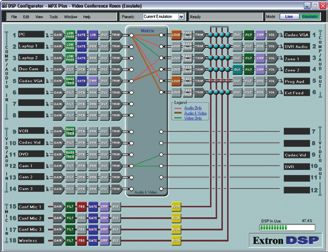
M e d i a pr e s e n tat i o n M at r i x s w i t c h e r s

What is ProDSP?
The MPX Plus 866 A features ProDSP, a powerful digital audio signal processing platform based on a 32/64-bit floating point DSP engine. ProDSP
provides an extensive array of digital audio processing tools for audio system design, configuration, and commissioning. The DSP Configurator Software
is the user interface to ProDSP for full control and management of the MPX Plus 866 A and all of its audio DSP functions, including audio gain, dynamics,
compression, filtering, delay, microphone ducking, loudness, and feedback suppression.

An integral part of the DSP Configurator Software is the Graphical User Environment, which allows for quick and easy visualization of all input and output
signal paths inside a single window. Working within this user-friendly environment, an audio system designer or installer can clearly view and adjust all
input levels, audio DSP processing parameters, audio and video I/O ties, microphone mixing points, and output levels. To simplify these adjustments,
SpeedNav keyboard navigation ensures efficient and fast navigation through the Graphical User Environment, using just the keyboard on a laptop.

Highest Quality Converters Plus Floating Point DSP
The MPX Plus 866 A features studio grade ADCs - analog-to-digital converters
                                                                                            SpeedNav for easy operation without a mouse
and DACs - digital-to-analog converters using professional level 24-bit
resolution and 48 kHz sampling, fully preserving the integrity of the original
audio signal.

The processing power of the 32/64-bit floating point audio DSP engine allows
for simultaneous audio processing algorithms within the same audio channel
and across multiple channels without compromising sound quality, all with
minimal latency. This powerful DSP engine also delivers very wide audio
dynamic range to prevent clipping and fully maintain audio signal quality.

Fixed Yet Flexible DSP Architecture
The DSP Configurator Software features a fixed layout of audio DSP
processing blocks for each input and output signal chain. Each block in
the Graphical User Environment represents a Gain, Dynamics, Delay, Filter,
Ducking, or FBS - Feedback Suppression algorithm within the DSP engine.
                                                                                              One of the challenges of on-site sound system
While this architecture is fixed, each block offers flexible options and
                                                                                              commissioning is the lack of sufficient workspace for a PC
customizable parameters. For example, the Filter block contains three, five,                  and mouse. An integrator or sound technician often has
or nine individual filters depending on the input or output, each of which                    to work with a laptop balanced on their lap, while trying to
can be customized as parametric EQ, low pass, high pass, or bass or treble                    use the touch pad to navigate through windows and menus
shelving. Each block and each individual filter can be selectively bypassed.                  of the GUI for the audio DSP software. Working in this
                                                                                              environment can be time-consuming and even frustrating.
Emulate and Live Modes
The DSP Configurator Software features an Emulate mode, which provides                        SpeedNav simplifies this task by allowing the use of
complete audio system design while working offline on a PC. When                              only the keyboard to access the GUI through directional
connected to the MPX Plus 866 A, Live mode enables real-time control                          keys and shortcuts. It is designed with commissioning

of all settings, file updates and archiving, plus active metering of all input                technicians and sound system designers in mind. With

and output channels. In Live mode, integrators can “push” all or part of                      SpeedNav, users will experience faster, easier set-up and
                                                                                              commissioning while working in the field with laptop PCs to
a configuration to the MPX Plus 866 A from the PC, while preserving the
                                                                                              configure sound systems and refine audio DSP settings.
existing file on the switcher. Emulate and Live modes give audio system
designers the flexibility to create an entire project from their PC in advance
of installation, and then, once they are on site, use the same software to
provide accurate system set-up and final commissioning.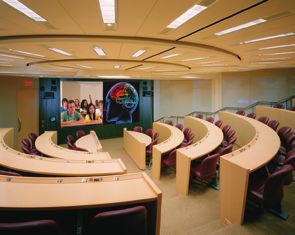
M e d i a pr e s e n tat i o n M at r i x s w i t c h e r s

ProDSP

                      DSP Configurator Software

ProDSP includes all the essential DSP tools needed to set up and          EXTENSIVE ARRAY OF DSP TOOLS
commission audio systems. These tools, or blocks, allow for control                  4 gain stages across line level channels
                                                                       GAIN STAGES
                                                                                     2 gain stages across mic/line channels
and management of audio gain, dynamics, filtering, delay, ducking,
                                                                                     AGC
and FBS - Feedback Suppression. The MPX Plus 866 A, in addition                      Compressor
                                                                        DYNAMICS
to providing the A/V signal routing for the system, also serves as                   Limiter
                                                                                     Noise gate
the audio DSP center for sound system setup and optimization.
                                                                        DUCKING      1 ducking processor per mic input; 2 ducking priority groups
This can simplify system designs and save money by eliminating
                                                                        LOUDNESS     1 loudness processor per line output
outboard audio DSP equipment.                                                        3 filters per line input, 5 filters per mic input, 9 filters per output
                                                                                     High pass
                                                                         FILTERS     Low pass
Dynamics, Filter, and Delay blocks are available for each input and
                                                                                     Shelving
output. Ducking and FBS blocks are specific to each mic input.                       Parametric EQ
Loudness and Bass/Treble filter blocks are available for each of the     DELAY       1 processor per input and output up to 200 ms each

six outputs. Selecting any of these blocks opens a dedicated pop-       FEEDBACK
                                                                                     1 anti-feedback processor per mic/line input
                                                                       SUPPRESSION
up window with a range of options and customizable parameters.
                                                                                     32 presets
Multiple windows can be open at the same time. Input and output          PRESETS     Global – audio and video ties only
                                                                                     Partial – selected DSP settings
levels can be monitored at any time by simply opening any of the
input or output Gain or Volume windows.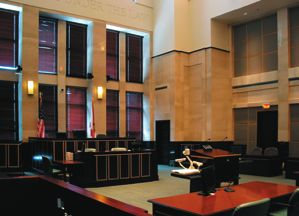
M e d i a pr e s e n tat i o n M at r i x s w i t c h e r s

ProDSP Features
Powerful Floating Point Audio                                       Intuitive Graphical User Environment                                   Copy and Paste for Processing Blocks
DSP Engine                                                          The DSP Configurator Software features a                               To help speed audio system design and set-
The MPX Plus 866 A features 32/64-bit floating                      Graphical User Environment that offers a clear                         up, parameter settings can be quickly copied
point audio DSP processing which provides                           view of all input and outputs, audio processing                        between individual processing blocks or
very wide dynamic range and maintains audio                         blocks, audio and video routing ties, and                              identical groups of blocks within the Graphical
signal transparency while preventing DSP signal                     microphone mixing points in a single window.                           User Environment, using conventional cut-and-
clipping and simplifying management of gain                         This allows a designer or installer to quickly                         paste commands.
staging.                                                            view all audio and video-related activities
                                                                    without having to access multiple windows or                           4x6 Mic/Line Audio Matrix Mixer
Low Latency DSP Processing                                          menus.                                                                 The MPX Plus 866 A provides microphone
This DSP engine within the MPX Plus 866 A                                                                                                  bussing so that each of the four mic/line inputs
supports a large array of concurrent audio                          SpeedNav Keyboard Navigation                                           can be mixed into any or all of the six matrix
processing algorithms within an audio channel                       SpeedNav enables user-friendly, keyboard-                              switcher stereo audio outputs.
and across multiple channels, while maintaining                     based navigation of the DSP Configurator
extremely low latency from input to output.                         Software without the need for a mouse or                               DSP Partial Presets
                                                                    touchpad. Using keyboard navigation keys and                           Using the DSP Configurator Software, any
                                                                    shortcuts, the user can access any input or                            parameters for DSP processing, levels, or
DSP Configurator Software
                                                                    output, audio and video I/O ties, microphone                           audio and video I/O ties can be saved as DSP
A powerful yet user-friendly PC-based software
                                                                    mixing points, and all audio DSP tools. Using                          Partial Presets. These settings can be saved
tool for managing all audio and video set-up and
                                                                    only the keyboard for software access can                              for the entire system, or any selected group of
operations of the MPX Plus 866 A. It enables
                                                                    help expedite audio system set-up and                                  inputs, outputs, I/O ties, and DSP blocks. The
complete set-up and configuration of digital audio
                                                                    commissioning while on-site using laptop PCs.                          DSP Configurator Software can also be used to
processing tools on the ProDSP platform, as well
as I/O routing ties and microphone mixing.                                                                                                 create Global presets for saving just the audio
                                                                                                                                           and video I/O ties.

                                                        COMPLETE SYSTEM VISUALIZATION

    The Graphical User Environment lets the designer or installer quickly and clearly follow the entire audio signal flow for all channels, from input to output, including all audio DSP processes.
    All of this is presented in a single window without the need to scroll or bring up multiple windows or menus.

                                                                    ALTERNATE WORKSPACES

                                     Audio Workspace                                                                                             Video Workspace

      With just the touch of a function key, the user can toggle between Audio, Video, or Audio & Video workspaces. The DSP Configurator Software allows for live changes to audio and video
      routing ties using keystrokes or a mouse. In the Video workspace, video-specific options are available including composite and S-video transcoding, RGB output delay, and video output
      muting.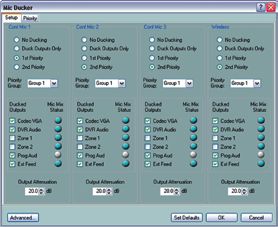
M e d i a pr e s e n tat i o n M at r i x s w i t c h e r s

ProDSP Features

              Feedback suppression                                                                             ducking

 The FBS - Feedback Suppression block is used to counteract the ringing due to frequencies         The Ducking block is used is to give priority to specific microphones by automatically
 cycling out of control through the microphone and speakers. The feedback suppression              attenuating the levels of other microphones and program sources, whenever the priority
 processor for the MPX Plus 866A engages up to twenty notch filters with adjustable Q.             microphone is active. Ducking setup is performed for all mic/line inputs on a unique
 Fifteen of the filters are dynamic, and the processor uses these to automatically detect and      global setup page. An extensive range of customizable options for ducking are available.
 then reduce the ringing. Five additional fixed filters can be adjusted manually or transferred
 from the dynamic filters.

          dynamics and delay                                                                                   Filtering

The DSP Configurator Software enables fine tuning and adjustment of the dynamics of all            The Filter block offers three customizable filters for each line input, five for each mic input, and
incoming and outgoing signals. Two Dynamics processing blocks are available for each input         nine for each of the six outputs. Each of these filters can be selected as parametric EQ, low pass,
and output. These blocks can be selected and customized to provide automatic gain control,         high pass, or bass and treble shelving. Standard parameters include frequency, roll-off slope,
compression, limiting, or noise gating.                                                            boost/cut, and Q, depending on the specific filter.

A Delay processing block is available for each input and output. Each delay is adjustable up
to 200 ms, and can be selected in units of time, feet, or meters. A temperature parameter is
available for distance adjustments.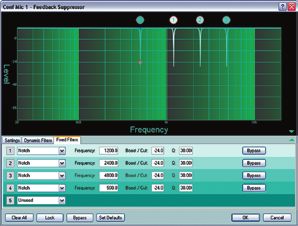
M e d i a pr e s e n tat i o n M at r i x s w i t c h e r s

ProDSP Features
In addition to powerful digital audio processing control, the DSP Configurator Software allows for user-friendly control of traditional matrix switcher
functions, including management of audio and video I/O ties, input audio gain and attenuation, output volume adjustment, and muting. Video settings such
as video mute, RGB delay, and video input format can be controlled in Video Only I/O view. The DSP Configurator also provides matrix mixing for four mic/
line inputs over up to six stereo audio line outputs.

            audio with Video i/o ties                                                                             Mic/Line Matrix switcher

The Graphical User Environment of the DSP Configurator Software provides a clear view of all          The DSP Configurator Software is also used to manage and control mic/line audio matrix mixing.
audio and video I/O ties. Using the mouse or the keyboard, ties for audio or video signals, or both   Each mic/line input can be mixed into each of the six available line outputs, with dedicated
can be created, modified, or deleted in real-time. They can then be saved and recalled as presets     stereo mix level and muting controls at each node.
within the DSP Configurator Software. Presets can also be recalled from the MPX Plus 866 A front
panel, through RS-232 serial control, or via IP Link Ethernet control.

             input Gain                                                                                            output Volume

Audio gain adjustment as well as muting is available for each of the 18 inputs on the                 The MPX Plus 866 A provides adjustment of output volume as well as muting for each of the six
MPX Plus 866 A. Input signal levels can be monitored through real-time meters with peak               audio outputs, along with real-time metering. To monitor any or all input and output signal levels,
hold display.                                                                                         a meter bridge window is also available.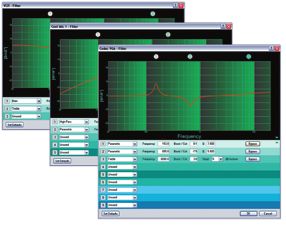
M e d i a pr e s e n tat i o n M at r i x s w i t c h e r s

Key Features and Applications

Courtrooms
Courtrooms worldwide are adopting a variety of A/V enhancements
to help expedite proceedings, effectively present case material, and
archive video evidence and recorded testimony. The MPX Plus 866
A is the heart of such a system, switching a broad array of sources
such as:

• Visual presenters – VCR, DVD, and document cameras
• Prosecution and defense PCs
• Video telestration and data annotation equipment
• Audio sources, including assistive listening, language interpreta-
  tion, audio archiving, and real-time audio transcription
• Video conference links for remote depositions

In the example shown here, the courtroom is equipped for typical
evidence presentation and audio transcription needs. Provision is
made for remote video input and output on an as-needed basis.
Video, data, and audio sources are efficiently managed through the
MPX Plus 866 A. Microphones for the judge, attorneys, witness, and
clerk are integrated into the overall audio system, which may include
support for assistive listening and, in many cases, simultaneous lan-
guage interpretation. The clarity of audio reproduction is key to any
courtroom system and, as such, the powerful, integrated audio DSP
built into the MPX Plus 866 A allows live speech and pre-recorded
audio to be fine tuned to the unique acoustic environment in each
individual courtroom.

Divisible Rooms
Divisible meeting rooms offer optimum flexibility for schools,          The MPX Plus 866 A simplifies control of video and audio signal routing
businesses, hotels/conference centers, and government agencies.         in these complex environments by providing a total of 32 Global and DSP
Moveable wall sections, referred to as “air walls,” are used as         Partial presets. Global presets are used to save and recall general video
temporary partitions to define individual rooms within the larger       and audio I/O ties for the facility, while the DSP partial presets handle the
space. In the divisible room environment illustrated here, each         wide range of audio parameters that come into play as acoustic properties
small room is configured with dedicated inputs for low and high         change. Once a preset has been created and saved, it can be recalled with
resolution video sources, program audio, and a pair of microphones:     a single control system command.
one mounted on the lectern, and the other available as a floating
microphone for audience participation. Video is projected on a
screen appropriately sized for a small audience. Audio is zoned such
that each of the smaller rooms has its own program audio playback
at the front of the room, as well as distributed audio for speech
reinforcement within
the room.

When the smaller rooms are combined, presets optimize video and
audio playback for a larger audience. Video sources are automatically
routed to all screens, and audio is distributed evenly throughout the
new room configuration. Divided and combined rooms also present
a unique challenge when placing microphones to prevent feedback.
The powerful, integrated feedback suppression within the MPX Plus
866 A actively detects audio feedback and engages up to 20 notch
filters to counteract and eliminate it.
M e d i a pr e s e n tat i o n M at r i x s w i t c h e r s
Key Features and Applications
Videoconferencing and Distance Learning
Videoconferencing and distance learning systems serve similar
communication and presentation needs, differing primarily in scale:
videoconference rooms tend to be more intimate spaces, typically installed
in a small to mid-sized conference room seating up to 10 people. Distance
learning, on the other hand, is typically based in a larger room, such as a
classroom or lecture hall, with seats for 25 or more. Regardless of the size
of the room, both facilities share a range of common requirements.
First, both low and high resolution video sources must be displayed within
the local room, or “near end,” and made available to the remote location,
or “far end,” via the conference system codec. Depending on their size,
these rooms may be equipped with separate displays for near end and far
end video, or with a single display and multi-window processor such as
the Extron MGP 464. Video sources commonly include the videoconference
system camera(s), a document camera, and provision for installed or
portable computers. Both high resolution and low resolution sources
must be switched and routed independently within the room and through Flat Panel Displays
VCR
the codec. In many system designs, inputs and outputs are provided for Composite
temporary feeds to or from overflow rooms, for remote monitoring or DVD Y/C
recording of the presentation, and other needs. RGBHV
PC Composite
RGBHV
The MPX Plus 866 A provides the optimum combination of video inputs for Composite
Camera
these typical sources. Built-in video signal transcoding simplifies system Y/C
design, allowing composite and S-video signals to be converted from one RGBHV
Camera
Document Y/C
to the other type. For example, the composite video output from VHS or Camera
Camera
DVD/VCR combination players can be decoded to Y/C for ease of integration RGBHV
Y/C
Laptop DVR
with the S-video outputs from conference system cameras. Because high
resolution signals are routed through a separate, 8x6 VGA matrix, each Y/C
group of signal types can be managed efficiently within the presentation RGBHV
system.
COMPUTER INPUTS VIDEO INPUTS
1 2 3 4 5 6 7 8 9 10 11 12 13 14
Second, audio routing and reproduction quality are vital to the function 1 2 3 4 5 6 7 8 9 10 11 12 CONFIG ENTER
CONTROL
PRESET VIEW ESC VIDEO
I/O
AUDIO
of the facility. Conference audio typically includes microphones for the
COMPUTER/AUDIO OUTPUTS VIDEO OUTPUTS
MPX PLUS 866 A
PRESENTATION MATRIX SWITCHER
presenter and participants, line level audio from video playback devices, Extron
RGBHV MPX Plus 866 A
Matrix Switcher
and often a “telephone hybrid” to support participants who must call into RGBHV
and
and Y/C
Composite
the conference through a wired or wireless telephone connection. Audio
must be made available to the far end location via the codec, which also CODEC with AEC Control
System
provides AEC - acoustic echo cancellation for the microphones. Near end External
Feed
audio playback is typically zoned in such a way that voice and program RGBHV
Table
audio supports, but does not overwhelm, the local room. Videoconference Microphone
and distance learning environments differ significantly from one to another Table SI 28
Microphone
and rooms must be acoustically tuned to ensure audio clarity. Feedback
XPA 1002
suppression is required to allow for the greatest flexibility when placing Table
Microphone
microphones within the room. ProDSP provides a multitude of filters and XPA 2001-70V
SI 26CT
equalization on the input, output, and microphone stages that allow the XPA 2001
integrator to fine tune the reproduction and acoustic qualities of the various
audio sources for optimum clarity on both ends of the conference.M e d i a pr e s e n tat i o n m at r i x s w i t c h e r s
What's Inside the MPX Plus 866 A
Four Matrix Switchers in One: Video Genlock Front Panel Security Lockout
• 8x6 VGA/component video The MPX Plus 866 A genlocks to video input 9, Prevents unauthorized use in non-secure
• 6x6 composite video and S-video providing for vertical interval switching and environments.
• 14x6 stereo audio enabling smooth, seamless transitions when
• 4x6 mic/line audio matrix mixer switching between synchronized video sources. Graphical I/O Tie Creation
Input and output ties can be quickly viewed and
300 MHz (-3 dB) RGB Video Bandwidth, For applications such as videoconference and created using the DSP Configurator Software
Fully Loaded for VGA distance learning, an Extron BBG 6 A black graphical user environment. This intuitive
Designed for routing most common high burst, color bars, and audio generator can be software provides for video only, audio only, and
resolution computer-video rates, as well permanently connected to this input, providing video/audio ties with the click of a mouse.
as HDTV component video, without signal the genlock reference signal as well as a
degradation. known, broadcast quality source – color bars Front Panel Configuration Port
and 1kHz audio test tone – to verify system Enables easy configuration without having to
150 MHz (-3 dB) Video Bandwidth for operation and quality of service prior to the access the switcher’s rear panel.
actual conference session.
Composite Video and S-Video
Ensures switching and distribution of video QS-FPC QuickSwitch Front Panel
™
signals without degradation. DSVP™ - Digital Sync Validation Controller with Tri-Color, Backlit
Processing Buttons
ProDSP Audio Signal Processing
TM DSVP verifies active computer-video sources
Provides a discrete button for each input and
• 32/64-bit floating point digital signal by polling the VGA inputs for valid sync signals.
output, allowing for simple, intuitive operation.
processing engine Horizontal and vertical sync information is
Buttons can be custom labeled for easy
• Intuitive Graphical User Environment transmitted to the user through the serial or
identification and illuminate red, green, or
• Extensive selection of audio DSP tools IP Link ports.
amber, depending on function, for ease of use
in low-light environments.
Composite Video and S-Video Triple-Action Switching for RGB Delay
™
Blanks the screen when switching to a new
Transcoding The Extron QS-FPC provides the ability to install,
source. The new sync signals precede the RGB wire, and start testing AV signal routing before
The MPX Plus 866 A includes built-in bi-
signals, so there is no glitch on screen during the DSP and control system programming has
directional video transcoding, which simplifies
the transition. begun. This saves valuable time during system
the integration of composite video and S-video
sources. installation and setup.
Audio/Video Mute
For example, the output from a single composite Inputs can be muted individually or all at once IP Link® Ethernet Monitoring
with a single SIS command.
video source, such as a legacy VCR, can be and Control
decoded into S-video and switched along with Engineered to meet the needs of professional
other S-video sources, such as videoconference Four Mic/Line Inputs A/V environments, IP Link enables the
cameras, with a common output signal going to The MPX Plus 866 A is equipped with four MPX Plus 866 A to be proactively monitored
the projector or other display. switchable mic/line inputs and an integrated and managed over a LAN, WAN, or the Internet,
4x6 mic/line matrix mixer. Selectable +48V using standard network communication
High Quality Video Decoder with Time Phantom power is provided for ease of use with protocols.
condenser microphones.
Base Stabilization
The MPX Plus 866 A is equipped with a Compact 2U Enclosure
broadcast-quality digital decoder that eliminates 32 Global Tie and DSP Partial Presets Rack-mountable for ease of integration
jitter, dot crawl, and other decoding artifacts Thirty-two presets can be saved and recalled.
Global tie presets contain only video and audio
while also stabilizing and improving the video Internal Universal Power Supply
from older analog VCRs or worn videotapes. switching ties, while DSP Partial presets also
The 100-240 VAC, 50/60 Hz, international
The decoder automatically senses NTSC or PAL include DSP settings and audio levels. An inte-
power supply provides worldwide power
standard video signals. grator can use the DSP Configurator Software,
compatibility.
select any portion of the switcher I/O layout
within the Graphical User Environment, and
Quad Standard Compatible
then save all relevant settings and parameters
Capable of switching NTSC 3.58, NTSC 4.43,
as a DSP Partial preset. All presets are recalled
PAL, and SECAM video for worldwide
via the DSP Configurator Software, the Matrix
compatibility.
Switcher Control Program, or serial commands
from a control system. Up to 26 presets are
accessible directly from the front panel of the
switcher.M e d i a pr e s e n tat i o n m at r i x s w i t c h e r s
header_main
What's Inside the MPX Plus 866 A
Four matrix switchers in one: Wideband video performance Global presets and Partial presets
• 8x6 VGA/component video 300 MHz (-3dB) RGB bandwidth accommodates Up to 32 presets can be saved and recalled as
• 6x6 composite video and S-video high resolution computer-video sources Global presets for audio and video I/O ties, or
• 14x6 stereo audio Partial presets for saving audio DSP settings as
• 4x6 mic/line matrix mixer well as I/O ties
QuickSwitch front panel controller Front Panel Configuration Port
with tri-color backlit buttons Enables easy configuration without having to
Intuitive front panel design groups inputs access the switcher’s rear panel
and outputs by signal type
Video genlock High quality video decoder Video transcoder
Provides for vertical interval switching for Eliminates jitter, dot crawl, and other Built-in video transcoder simplifies integration
smooth, seamless transitions when switching decoding artifacts and improves the of composite video and S-video sources
between synchronized video sources video from older analog sources or
worn videotape
Audio matrix switcher ProDSP™ Mic/Line audio matrix mixer Dual serial ports and IP Link®
14x6 audio matrix with active audio Provides full control of audio input 4x6 mic/line audio matrix mixer with Two serial ports and IP Link® Ethernet for
buffering for ease of integration with and output levels plus a wide array of selectable +48V Phantom power for ease optimized control in single and divided room
consumer-grade A/V products audio processing tools for program and of integration with common microphone applications
microphone signals types, including wireless microphonesM e d i a pr e s e n tat i o n m at r i x s w i t c h e r s
Specifications
Video COMPUTER INPUTS VIDEO INPUTS
Bandwidth 1 2 3 4 5 6 7 8 9 10 11 12 13 14
RGB/VGA..............................................................300 MHz (-3 dB), fully loaded CONTROL I/O
S-video/composite video........................................150 MHz (-3 dB), fully loaded 1 2 3 4 5 6 7 8 9 10 11 12 CONFIG ENTER PRESET VIEW ESC VIDEO AUDIO
0 - 10 MHz.......................................................No more than +0.1 dB to -0.1 dB
COMPUTER/AUDIO OUTPUTS VIDEO OUTPUTS
MPX PLUS 866 A
0 - 30 MHz.......................................................No more than +0.1 dB to -0.5 dB
PRESENTATION MATRIX SWITCHER
Differential phase error.......................................1.0˚ at 3.58 MHz and 4.43 MHz MPX Plus 866 A - Front
Differential gain error..........................................1.0% at 3.58 MHz and 4.43 MHz
Crosstalk COMPUTER INPUTS COMPUTER OUTPUTS VIDEO INPUTS VIDEO OUTPUT
1 3 5 7 1 3 5 9 11 12 13 14 7 9 10 11 12
Y
RGB/VGA..............................................................You can also read


