User and computer accounts - Ondrej Sevecek
←
→
Page content transcription
If your browser does not render page correctly, please read the page content below
2. 3. 2020
User and computer accounts
Ing. Ondřej Ševeček | GOPAS a.s. |
MCSM:Directory2012 | MCM:Directory2008 | MVP:Enterprise Security |
Certified Ethical Hacker | CISA |
ondrej@sevecek.com | www.sevecek.com |
GOPAS: info@gopas,cz | www.gopas.cz | www.facebook.com/P.S.GOPAS
User accounts recap
Two logins
• sAMAccountName: gps\kamil
20 characters limit
• userPrincipalName: kamil@gopas.cz
can have variable UPN suffixes
64 characters limit on login prefix, and 64 chars UPN suffix
Password stored in AD or local SAM database
• hashed form (full-text can be enabled)
Stores hash history
• up to 24 hashes
Applies password policies
• complexity, length, regular expiration, history
1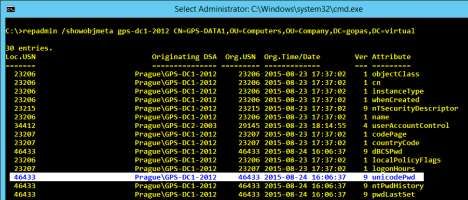
2. 3. 2020
Password modifications
Change
• LDAP method ChangePassword(), Win32 function
NetUserChangePassword()
• Everyone as long as the current password is supplied
Reset
• LDAP method ResetPassword(), Win32 function
NetUserSetInfo()
• administrative action, no previous password knowledge
no history constraint (history yet pushed further)
no minimum password age
Interfaces in Secure Channel, LDAPS, Kerberos
• SMB TCP 445 named pipes, Netlogon DCOM, TCP 636
(389), TCP/UDP 464
Interesting point about password history #1
Password history check (N-2)
badPasswordCount and badPasswordTime do not
update for two previous password attempts
• requires password history with at least 2 previous hashes
2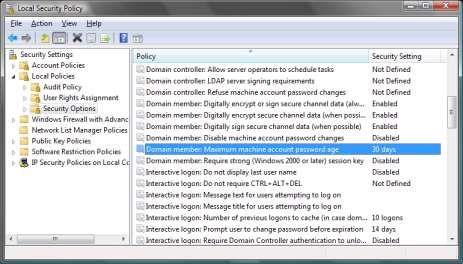
2. 3. 2020
Interesting point about password history #2
1 hour after a password change
NTLM and LDAP simple bind can use previous
password for logon
• requires password history enabled
• (example - for sure works with IIS NTLM provider)
Does not apply to Kerberos
Password and account expiration
Password expiration
• 0xC0000071 = STATUS_PASSWORD_EXPIRED
• 0xC0000224 = STATUS_PASSWORD_MUST_CHANGE
• 0x17 = KDC_ERR_KEY_EXPIRED
• The user account's password has expired
• cannot log on at all, visual effect is just different
• controlled by pwdLastSet attribute
• "Must change password at next logon"
pwdLastSet = 0
Account expiration
• 0xC0000193 = STATUS_ACCOUNT_EXPIRED
• 0x12 = KDC_ERR_CLIENT_REVOKED (TGT request)
• 0x01 = KDC_ERR_NAME_EXP (TGS request)
• The user's account has expired
3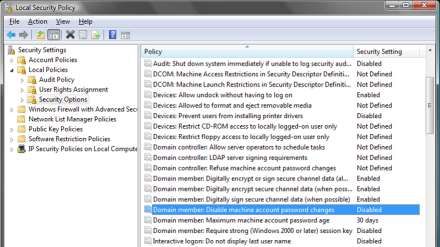
2. 3. 2020
Computer accounts
AD classes
• user, computer
userPrincipalName = -
sAMAccountName = comp$
No password policies
• never lock out
• no complexity enforced
• history maintained because of the previous two specials
• never expires
Computer account password
Stored locally in registry
• HKLM\SECURITY\Policy\Secrets\$MACHINE.ACC
current and previous password
full-text version
Changed regularly every 30 days
• does not change if offline
4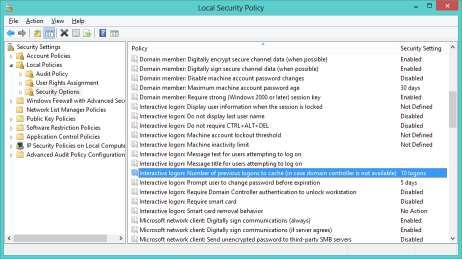
2. 3. 2020

Maximum machine account password age

Disable machine account password changes

                                                   5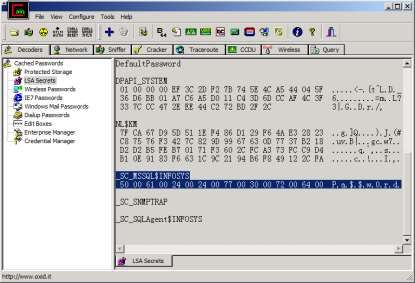
2. 3. 2020
Computer password change event on DC
Audit Success
Event ID: 4742
Source: Microsoft
Windows security
auditing
Category: Computer
Account Management
Password Last Set
attribute modified by
ANONYMOUS LOGON
Computer password tools
nltest /sc_verify:gps
nltest /sc_reset:gps
netdom resetpwd /Server:dc1 /UserD:gps\domain-
admin /PasswordD:Pa$$w0rd
• or dis-join and re-join again
• Test-ComputerSecureChannel -Repair
• Reset-ComputerMachinePassword
6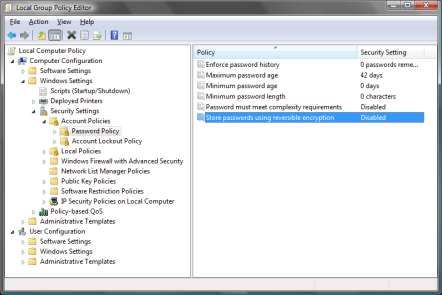
2. 3. 2020
Machine password and secure channel error
symptoms on the affected server
Cannot logon locally online (from cache ok)
• the trust relationship between this workstation and the
primary domain failed
Machine password and secure channel error
symptoms on the affected server
nltest /sc_verify:gps
• ERROR_ACCESS_DENIED = 0x5
7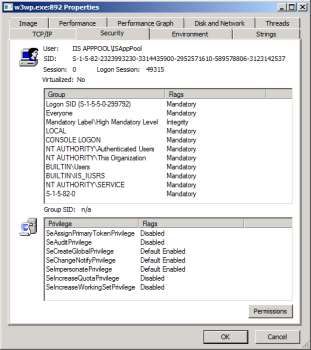
2. 3. 2020
Machine password and secure channel error
symptoms on the affected server
gpupdate
• computer
update fails
• user update ok
ipconfig
/registerdns
• fails
Machine password and secure channel error
symptoms on the affected server
Warning, Event ID 130, Time-Service
• NtpClient was unable to set a domain peer to use as a time source because of failure in establishing a trust
relationship between this computer and the domain in order to securely synchronize time.
8
2. 3. 2020
Machine password and secure channel error
symptoms on the affected server
Error, Event ID 3210, NETLOGON
• This computer could not authenticate with a Windows domain controller for domain, and therefore this
computer might deny logon requests. This inability to authenticate might be cause by the password for this
computer account is not recognized.
The session setup from computer failed to
authenticate when doing NTLM pass-through
Error, Event ID 5722, NETLOGON
9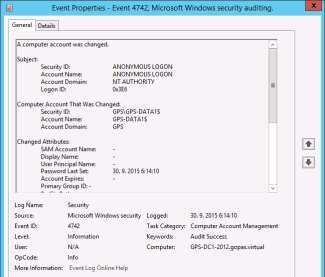
2. 3. 2020
Machine password and secure channel error
symptoms from the remote client side
NTLM authentication fails with
• the trust relationship between this workstation and the
primary domain failed
Kerberos authentication fails with
• the target principal name is incorrect
Machine password and secure channel error
symptoms from the remote client side
RDP access fails
• an authentication error has occurred. The specified network
password is not correct
102. 3. 2020
Machine password and secure channel error
troubleshooting on DCs
pwdLastSet attribute
Machine password and secure channel error
troubleshooting on DCs
unicodePwd attribute metadata
• repadmin /showobjmeta
• repadmin /replsummary
112. 3. 2020
Service Accounts
Services, jobs and IIS application pools run under
some service identity
NT AUTHORITY\System
NT AUTHORITY\Network Service
NT AUTHORITY\Local Service
NT SERVICE\*
IIS APPPOOL\*
\*
Service identities on Windows XP+
SYSTEM
• local Administrators
• uses COMPUTER$ to access network resources
• must use Kerberos on 2003- (cannot use NTLM)
• 2008+ Allow Local System to use computer identity for
NTLM
Network Service
• local Users
• uses COMPUTER$ to access network resources
Local Service
• local Users
• anonymous network access
122. 3. 2020
Network Service vs. Local Service
DNS Client must register DNS name
• NT AUTHORITY\Network Service
• dynamic dns update requires Kerberos authentication
DHCP Client although is a networking service, does
not require any authentication
• NT AUTHORITY\Local Service
Network Service does not have local isolation only
SRV-IIS SRV-SQL
http://finance
Network Service GPS\SRV-IIS$ DB_Finance
G:\IIS\finance
http://warehouse GPS\SRV-IIS$
Network Service
DB_Warehouse
G:\IIS\warehouse
132. 3. 2020
NT SERVICE
IIS APPPOOL
142. 3. 2020
NT SERVICE and IIS APPPOOL have local isolation only
SRV-IIS SRV-SQL
http://finance
IIS APPPOOL\fin GPS\SRV-IIS$ DB_Finance
G:\IIS\finance
http://warehouse GPS\SRV-IIS$
IIS APPPOOL\wh
DB_Warehouse
G:\IIS\warehouse
Isolation
Domain Account Network Groups Local Network Kerberos OS
Password Isolation Isolation PAC
Validation
NT SYSTEM automatic Administrators no MACHINE$ no 2000
AUTHORITY 30 days
NT Network Service automatic Users no MACHINE$ no XP
AUTHORITY 30 days
NT Local Service no Users no anonymous no XP
AUTHORITY
NT SERVICE automatic Users yes MACHINE$ no Vista
30 days 2008
IIS APPPOOL automatic Users yes MACHINE$ no Vista
30 days 2008
manual Users yes yes yes 2000
automatic Users yes yes no 7
30 days 2008 R2
automatic Users yes yes no 8
30 days 2012
152. 3. 2020
Local administrator can obtain service and
scheduled task passwords
AppPool passwords
C:\Windows\System32\InetSrv\APPCMD LIST
APPPOOL MyPool /text:*
162. 3. 2020
Task scheduler passwords
Task scheduler without password requires S4U
read tokenGroupsGlobalAndUniversal attribute on the
service account
or be member of Windows Authorization Access
Group (WAAG)
Anonymous access to network resources
• or enable Kerberos delegation
172. 3. 2020
Password hashes in Active Directory
Windows 2000 DC
• LM, MD4 (NT hash)
Windows 2003 DC
• LM, MD4 (NT hash), MD5 (advanced digest hash, CHAP)
Windows 2008+ DC
• LM (not by default), MD4 (NT hash), MD5, SHA-1 (Kerberos
AES)
MD4 NT hash
• NTLM, NTLMv2, Kerberos DES, Kerberos RC4 (Kerberos
AES)
Hash propagation in mixed environments
password
MD4
DC 2003
MD4 SHA-1
MD4
DC 2008
MD4 SHA-1
MD4
DC 2008
password
MD4 SHA-1
182. 3. 2020
Notes to stored hashes
Regardless of DFL
• the hashes are updated only on DC which computes it and
replicate
• after upgrading DFL, some passwords need change before
digest/AES
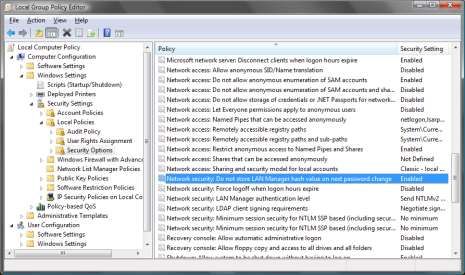
LM can be disabled
LM is disabled by default if first domain DC is 2008+
LM is not stored if password is 15+ chars
DC can store passwords in full-text
Password (confidential attribute) replication
permissions
Replication Synchronization
• invoke DC's own replication operation, such as trigger the
following outside of schedule
repadmin /kcc
repadmin /replicate
repadmin /syncall
Replicate Directory Changes in Filtered Set
• contains only the GC/RODC attributes
Replicate Directory Changes
• contains everything except for secrets and confidential attributes
(such as BitLocker and TPM secrets, KDS secrets etc.)
Replicate Directory Changes All
• can download the whole replica from a DC including password
hashes etc.
• required by Azure AD (AAD) DirSync for example when syncing
passwords to AAD
192. 3. 2020
LM hash is extremely weak
64 User’s password
14 UPPERCASE PASSWORD
7 LEFT 7 RIGHT
DES KGS!@#$% DES KGS!@#$%
8 Left part of the hash 8 Right part of the hash
16 LM hash
Do not store LM hashes
202. 3. 2020
Password longer than 14 chars
Does not generate LM hash at all
Full-text passwords for digest on 2000
212. 3. 2020
Cracking hashes
Brute-force MD4
• ca 80^N
• 12+ chars well unbreakable today
• hashes from: AD, SAM, LSASS memory, NTLM/Kerberos network
authentication
Rainbow table
• hash dictionary
• very quick
• complete LM table 2 GB
• 120 GB for full 8 MD4 character set
• 4 TB for 9 character set
• hashes from: AD, SAM, LSASS memory
SSD vs. RAM ~ 10 000 x slower
Password policies
3 of 4 character classes
• a-z, A-Z, 0-9, #!@$%^&*()
No 3 and more letters from login sequentially
• ondrej: #.JaME5-BonD38
Maximum password age
• prevents colleagues from guessing the password
• does not affect security against remote anonymous attacks
Minimum password age
• only to enforce password history
222. 3. 2020
Password changes
Go to DC in full-text
• channel encrypted with Kerberos (original password)
Password filters .DLL
• policies
• identity integration
• auditing
• HKLM\System\CCS\Control\Lsa
NotificationPackages = MULTI_SZ
.DLL in System32
• must be installed on all writable DCs
Password filters
Client
VoIP
plain text password
Oracle
DC with
password
filter
custom application
SAP password change
protocol
hash replication
Unix
Router DC DC
232. 3. 2020
Partial secrets DC (RODC)
Physically insecure locations
Caches/replicates only some hashes
Forwards other authentication transparently to
writable DCs
Has a local Administrators member who does not
need to be member of Domain Admins group
Password caching/forwarding
not cached yet
not cached yet after
DC1 DC2 DC3 recent password change
wrong password
2003 2003 2008 expired password
GC account locked
London
10.10.x.x SRV
DC5
SRV
2008 CL1
Cyprus
10.40.x.x
242. 3. 2020
Ticket produced by KDC on RODC
Kamil
Writable
Client RODC
DC
Kamil Pwd
Jitka Pwd
Writable
Tana - DC
Writable
DC
Ticket produced by KDC on a full DC
Tana
Writable
Client RODC
DC
Kamil Pwd
Jitka Pwd
Writable
Tana - DC
Writable
DC
252. 3. 2020
Ticket produced by KDC on a full DC
Kamil Pwd2
Writable
Client RODC
DC
Kamil Pwd
Jitka Pwd
Writable
Tana - DC
Writable
DC
Cached passwords
By default 10 different password and access token
caches
• interactive logon
• service logon
• batch logon (scheduled tasks, IIS app pools)
Available only for local logon
Never expires
• no regard to password expiration
No network credentials
• anonymous access to network resources
262. 3. 2020
Number of previous logons to cache
Cached hashes
Version 1 (MSCACHEv1)
• Windows 2000, XP, 2003
• 2x MD4 salted with user login
prevents rainbow-table attacks
Version 2 (MSCACHEv2)
• Windows Vista, 2008+
• 1000x SHA-1 salted with user login
prevents rainbow-tables and complicates brute-force attacks
272. 3. 2020
Local access token refresh
Most logons from cache since XP+
• speed up access token creation
Log off twice to update local access token
• verify always with Process Explorer or WHOAMI
28You can also read


