Accelerating Customer Adoption of End-User Compute Services with AWS - Authored by: Dujean Keegan & Samad Ameer - Glasshouse.io
←
→
Page content transcription
If your browser does not render page correctly, please read the page content below
Accelerating Customer Adoption
       of End-User Compute Services
                 with AWS

Authored by: Dujean Keegan & Samad Ameer
Accelerating Customer Adoption of End-User Compute Services with AWS

Table of Contents
         Executive Summary ................................................................................................................ 2

         Environment Discovery and Assessment ............................................................................... 4
          2.1 Current VDI Infrastructure ........................................................................................ 4
          2.2 Current AWS Infrastructure ...................................................................................... 4
          2.3 Usage Patterns and Cost Modelling .......................................................................... 5
          2.4 Sizing and Cost Estimation ........................................................................................ 6

         Design..................................................................................................................................... 9
          3.1 Amazon WorkSpaces ................................................................................................ 9
          3.2 Amazon AppStream 2.0 .......................................................................................... 11

         Migration/Deployment ........................................................................................................ 14
          4.1 Amazon WorkSpaces .............................................................................................. 14
          4.2 Amazon AppStream 2.0 .......................................................................................... 15

         Operations ........................................................................................................................... 17
          5.1 Amazon WorkSpaces .............................................................................................. 17
          5.2 Amazon AppStream 2.0 .......................................................................................... 18
          5.3 Smart Operations .................................................................................................... 18

         Summary .............................................................................................................................. 20

GlassHouse.io                                                                                                                               Page i
Adopting Cloud Native End-User Compute Services with AWS

       Executive Summary
       AWS end-user compute solutions have continued to evolve with AmazonWorkSpaces and
       AppStream 2.0. Both solutions provide cloud-native capability for a full persistent Desktop-
       as-a-Service using Amazon WorkSpaces or a non-persistent desktop application streaming
       service using AppStream 2.0. For context on this whitepaper, we will focus on the following
       technical services from AWS:

                Amazon WorkSpaces: Amazon WorkSpaces is a fully managed, secure Desktop-as-a-
                Service (DaaS) solution which runs on AWS. With Amazon WorkSpaces, you can
                easily provision virtual, cloud-based Microsoft Windows desktops for your users,
                providing them access to the documents, applications, and resources they need,
                anywhere, anytime, from any supported device.

                Amazon Appstream 2.0: Amazon AppStream 2.0 is a fully managed, secure
                application streaming service that allows the streaming of desktop applications (or
                full desktop) to the end-user, presenting them via an HTML 5 compatible web
                browser, without requiring the applications to be rewritten. Amazon AppStream 2.0
                manages the AWS resources required to host and run the applications, scales
                automatically, and provides access to users on demand.

       GlassHouse is an Advanced Consulting partner with AWS, with deep expertise in end user
       computing. We deliver AWS and Modern Workspace transformations for traditional IT
       environments and provide integrated support services to ensure stable run-time operations
       for cloud environments. A summary of our capabilities is provided here.
       Key Tenants of the GlassHouse/AWS Capability:

           •    GlassHouse provides vendor independent consulting and support services,
                specialising in Modern Workspace transition to cloud

           •    CloudAccelerate is a delivery framework to provide rapid deployments for cloud
                solutions using automation for deployments

           •    GlassHouse designs, deploys, and supports cloud native end-user compute services.
                Our SME experience in EUC solutions allows for rapid design and deployment
                outcomes for customers.

           •    Post deployment, CloudControl is an support services framework to allow flexible
                technical support and monitoring, often blended with customer operations support.

       This whitepaper aims to provide a set of guiding principles and considerations that should be
       used for migrating existing legacy virtual desktop infrastructure (VDI) and published / hosted
       applications across to a pay as you go model incorporating Amazon WorkSpaces or Amazon
       AppStream 2.0.

       The target audience includes IT Infrastructure Managers, Architects, Directors, and those
       who are planning updates to, or considering migration of their desktop services from
       traditional on-premises environments to Cloud, hybrid-Cloud based, or fully managed virtual
       workspace solutions.

GlassHouse.io                                                                                 Page 2
Adopting Cloud Native End-User Compute Services with AWS
This document discusses a practical approach including various uses cases, benefits of using
one technology over the other, and pricing estimates. We will also discuss the most common
challenges and frequently asked questions when planning a migration to Amazon
WorkSpaces or Amazon AppStream 2.0.
This document is broken into four categories:
- Environment Discovery and Assessment
- Design (Use cases considerations)
- Migration / Deployment
- Operations
Discovery and
Assessment
Design
Migration /
Deployment
Operate
Figure 1: Migration Path
GlassHouse.io Page 3Adopting Cloud Native End-User Compute Services with AWS
Environment Discovery and Assessment
2.1 Current VDI Infrastructure
Traditional VDI environments typically provide access to applications or desktop
environments using both Server and / or Desktop operating systems, providing a high degree
of flexibility in terms of what can be hosted by the VDI environment. This distinction
between providing access to a number of applications or access to a complete desktop
environment is key to the overall design of a hosted environment.
The Hosted Application model is frequently used by Task Workers, who only require access
to a limited number of applications, or where these may be unsuitable for deployment to
the desktop environment. In these environments, multiple user sessions are typically hosted
together on a Server based operating system, with the system resources being shared
amongst the users logged in.
Within the Hosted Desktop model, two main variants are used - Server based operating
systems accessed by multiple users, sharing the server's resources, or individually accessed
Desktop based operating systems for each user.
2.2 Current AWS Infrastructure
If the customers already have a tenancy in AWS, a detailed understanding of the current
AWS infrastructure is essential during the assessment phase to determine the feasibility and
impact of migrating the current VDI workloads to Amazon WorkSpaces or Amazon
AppStream 2.0.
As Amazon WorkSpaces and Amazon AppStream 2.0 heavily rely on backbone infrastructure
services such as Directory Services, it is critical that this is taken into consideration during
the initial assessment and planning phase. The location of the shared infrastructure such as
domain controllers, file servers, proxy servers etc. will determine the disaster recovery
solution, and in some cases, will also affect the end user experience.
As per best practices, it is also advised that all the essential services be migrated to AWS
within a shared services VPC in order to specify the necessary governance and security
controls for your environment.
It is also recommended that an appropriately sized and redundant AWS Direct Connect
service is configured to ensure that applications which need to traverse over the WAN to
connect to on premise services will not be affected due to network congestion or network
failure.
The following diagrams depicts a full Amazon WorkSpaces and AppStream 2.0 architecture
with connectivity to an on-premises data centre.
GlassHouse.io Page 4Adopting Cloud Native End-User Compute Services with AWS
Figure 2: Standard AWS Deployment Model using Shared Services VPC
2.3 Usage Patterns and Cost Modelling
The usage patterns of the existing desktops should be assessed to help determine the cost
model for the Amazon WorkSpaces or Amazon AppStream 2.0 implementations.
In some traditional VDI environments, licensing for the environment may either be based on
a concurrent user model or a named user / device model, with a concurrent use license
approximately twice the cost of a named user / device license.
It is crucial that the questions below are taken into consideration to identify the usage
pattern and in turn licensing requirements.
• Does the existing environment provide shared resources for multiple users per
desktop? This is a common scenario for task-based workers, particularly when the
customer runs a 24x7 operation, and where the compute resources are used by
multiple shifts of staff.
• What are the compute and storage requirements for the users? Determination of
the compute / storage requirements can be used to provision the appropriate
resources to the users.
• What type of licenses are currently held and when is their renewal date? Knowing
where the customer is within their technology refresh cycle / annual maintenance
for existing licenses can help with the construction of the business case for the
deployment.
• How many hours a day (on average) do the users access their desktops? This has a
direct bearing on the cost model for Amazon WorkSpaces, whether this is ad-hoc
hourly billing or a monthly billing option. Amazon AppStream 2.0 only has an hourly
billing option, but the type of provisioned resource (Always-On or On-Demand) will
determine the cost.
GlassHouse.io Page 5Adopting Cloud Native End-User Compute Services with AWS
• Is Microsoft Office required? If so, which version (Office 2013, Office 2016, or Office
365)? Office 2013 and Office 2016 can be obtained via the "Plus" application
bundles; Office 365 will require BYO licensing, which in turn will require the use of a
dedicated tenancy and minimum volumes.
2.4 Sizing and Cost Estimation
The following tables provide sizing and cost estimations for the deployment of Amazon
WorkSpaces and AppStream 2.0 within the Sydney region. Common use case parameters
have been used as the basis for the estimates, with both AWS and BYO licensing options
costed. Cost estimations for all Amazon workspaces instances are available on Amazon
workspaces pricing website which may differ based on the region. Cost estimations for all
AppStream 2.0 is again available on AppStream2.0 pricing website from AWS.
2.4.1 Amazon Workspaces (Sydney Region)
Note: Prices mentioned herein are in USD and are valid as of 12th February 2021. AWS prices are subject to
frequent change and regional effective pricing may vary. Consult with GlassHouse and AWS for current pricing.
License Hardware Option Resources Storage Monthly Hourly
Pricing Pricing
AWS Supplied Standard 2 vCPU 80 GiB Root Volume $45 $14 plus
Licensing 4 GiB RAM 50 GiB User Volume $0.39/hour
AWS Supplied Performance 2 vCPU 80 GiB Root Volume $59 $14 plus
Licensing 8 GiB RAM 50 GiB User Volume $0.58/hour
BYO Licensing Standard 2 vCPU 80 GiB Root Volume $41 $14 plus
4 GiB RAM 50 GiB User Volume $0.33/hour
BYO Licensing Performance 2 vCPU 80 GiB Root Volume $55 $14 plus
8 GiB RAM 50 GiB User Volume $0.53/hour
Plus Microsoft Office Professional, Trend Micro Worry-Free $15 N/A
Application Business Security Services, Utilities (Internet Explorer 11,
Bundle Firefox, WinZip)
Table 1: Amazon WorkSpaces Cost Estimates
Notes:
• To comply with Microsoft licensing requirements for running Windows10 in cloud
environments, Dedicated Hardware must be used. Amazon WorkSpaces gives you
the freedom to Bring Your Own Win10 License (BYOL) and to enable this, AWS
allocates Dedicated Hardware to your AWS Account. This has a requirement for
customers to deploy 200 WorkSpaces, and customers need to provide a ramp plan
showing how they are intending to reach 200 WorkSpaces over a period of time.
Customers who intend to BYOL should reach out to their AWS representative or
AWS Premium Support who will be able to help facilitate the process. The model
also includes the costs elements for the dedicated instances and tenancy required to
use BYOL – this requirement is driven by Microsoft licensing requirements More
details on this is available on BYOL website.
GlassHouse.io Page 6Adopting Cloud Native End-User Compute Services with AWS
• AWS provides several options to support Bring Your Own Licensing (BYOL) as well as
License Included models for non-BYOL workloads. Most Enterprise customers have
EA’s with Microsoft which can skew their licensing strategy when considering Azure,
On-premises and other Cloud Service Providers such as AWS.
• Pricing is shown in USD.
• When used for approximately 80 hours or more per month, specifically around the
standard and performance WorkSpaces tier, the Monthly pricing model becomes
more cost efficient.
2.4.2 Amazon AppStream 2.0
Note: Prices mentioned herein are in USD and are valid as of 12th February 2021. AWS prices are subject to
frequent change and regional effective pricing may vary. Consult with GlassHouse and AWS for current pricing.
Instance Category Instance Type Resources Hourly
Pricing
General Purpose stream.standard.medium 2 vCPU $0.136
4 GiB RAM
Compute Optimised stream.compute.xlarge 4 vCPU $0.70
7.5 GiB RAM
Memory Optimised stream.memory.large 2 vCPU $0.35
15.3 GiB RAM
Graphics Design stream.graphics-design.xlarge 4 vCPU $0.77
15.3 GiB RAM
2 GiB GPU
Graphics Pro stream.graphics-pro.4xlarge 2 vCPU $3.04
7.5 GiB RAM
8 GiB GPU
On Demand stopped All instance types $0.025
instance fee
Table 2: Amazon AppStream 2.0 Cost Estimates
Costs for the use of Amazon AppStream 2.0 will depend on the type of fleet deployed
(Always-On or On-Demand), costs for the Image Builders, and the Microsoft RDS licensing
components:
• Always-On fleet instances – The instance charge includes compute, storage, and
bandwidth that is consumed by the streaming protocol. With Always-On fleets, all
instances that are running are charged the running instance fees based on the
instance type and size, even if no users are connected.
• On-Demand fleet instances - The instance charge includes compute, storage, and
bandwidth that is consumed by the streaming protocol. With On-Demand fleets,
instances that are being used for streaming are charged the running instance fees
based on the instance type and size. Instances in an On-Demand fleet that are
stopped and don’t have an active streaming connection are charged a small hourly
fee that is the same for all instance types and sizes.
• Image builder instances - The image builder instance charge includes compute,
storage, and bandwidth that is consumed by the streaming protocol. All image
GlassHouse.io Page 7Adopting Cloud Native End-User Compute Services with AWS
builder instances that are running are charged the running instance fees even if no
administrators are connected.
• User fees - For each authorized end user in an AWS Region accessing applications on
your fleet instances, you will be charged a Microsoft RDS SAL fee of $4.19 / user /
month. Schools, universities, and public institutions may qualify for a reduced
Microsoft RDS SAL user fee of $0.44 / user / month. Alternatively, customers can
choose to bring their own RDS licenses as per the AppStream 2.0 FAQs website.
With the exception of User fees which are charged monthly, the AppStream 2.0 instances
are charged on an hourly basis.
Note: Hourly pricing fee charged for running instances only. For Image Builder and
Always-On fleets, instances may be considered running if they are available for use,
even if no user is connected. For On-Demand fleets, instances are considered
running only if users are connected with an active streaming session.
GlassHouse.io Page 8Adopting Cloud Native End-User Compute Services with AWS
Design
Post the assessment phase, a clear understanding of what type of environment is required
for the users is therefore a fundamental requirement to design for the migration of these
workloads to Amazon WorkSpaces or Amazon AppStream 2.0 depending upon the use case.
Workloads typically fall into one of the two models:
• Access to a desktop environment
• Access to a limited number of specific applications
Where access to a full desktop is required, Amazon WorkSpaces can be used to provide the
resources for the hosted desktop. In the standard deployment model, a Server 2016
operating system is used, with each named user being provisioned a desktop. Amazon Linux
WorkSpace (Amazon Linux 2) is also available as a choice in WorkSpaces which is very
popular with the developers.
Where access to specific applications or a non-persistent full desktop experience is required,
Amazon AppStream 2.0 can be utilised.
3.1 Amazon WorkSpaces
Amazon WorkSpaces is a fully managed, secure Desktop-as-a-Service (DaaS) solution which
runs on AWS. With Amazon WorkSpaces, you can easily provision virtual, cloud-based
Microsoft Windows desktops for your users, providing them access to the documents,
applications, and resources they need, anywhere, anytime, from any supported device.
Amazon WorkSpaces leverages Teradici’s PCoIP protocol or the new cloud native
WorkSpaces streaming protocol (WSP) to deliver virtual desktops to remote users. PCoIP
performs well over medium to high bandwidth and low to medium latency network
connections, however, the performance is significantly affected over low bandwidth and
high latency connections.
WorkSpaces Streaming Protocol (WSP) is new cloud-native streaming protocol that enables
a consistent user experience when accessing your end user’s WorkSpaces across global
distances and unreliable networks. WSP also enables additional features such as the beta
feature of bi-directional video. As a cloud-native protocol, WSP delivers feature and
performance enhancements without manual updates on your WorkSpaces.
Today, streaming protocols run as applications on users' hosted desktops. These protocols
analyse the hosted desktop, network, and user’s device to select compression and
decompression algorithms (codecs) that encode a rendering of the user's desktop and
transmit it as a pixel stream to the user's device. Streaming protocols use many different
codecs to deliver an interactive experience, because codecs are optimized for different
scenarios. For example, some codecs are better at showing motion than displaying text, and
others are better over low-bandwidth networks.
WSP decouples the streaming protocol from the WorkSpace by offloading metric analysis,
codec selection, and encoding to microservices that run natively on AWS. This lets WSP
apply a better understanding of each user’s session that adapts its industry-standard and
GlassHouse.io Page 9Adopting Cloud Native End-User Compute Services with AWS
purpose-built codecs in real-time to provide a consistent user experience across challenging
network conditions.
Using the Windows Desktop Experience feature, users are presented with a Windows 10-like
desktop respectively. For most desktop use cases, this can be appropriate, although in rare
instances a full Windows Desktop operating system may be required when the applications
to be used within the environment are either not installable or supported on a Server based
operating system. In these instances, Amazon WorkSpaces can still be used to provision
Windows 10, using the customer's BYO licensing, and using a dedicated Amazon WorkSpaces
tenancy.
The BYO licensing model is also applicable where the customer has a specific Windows
desktop image that they wish to use within AWS. As per Microsoft licensing requirements,
the Windows Desktop license is not eligible for Windows License Mobility, necessitating the
need for dedicated hosts and / or instances when the BYOL model is used. Software
Assurance or Virtual Desktop Access (VDA) rights may also be required for the Desktop OS.
The other primary consideration for the use of the BYOL model is where there is a specific
requirement to use Microsoft Office 365. License Mobility is not provided for Office 365 or
the other Office applications. We suggest speaking with your Specialist License Provider
(LSP) for specific guidance as applicable to your existing agreements. Also note, Customers
can now use AWS SPLA licensing (WinSrv or BYOL Win10 OS) for MS Office Pro Plus.
AWS also launched Amazon Linux workspace desktop that runs on Amazon Linux 2 in mid-
2018 which is based upon MATE. MATE is under active development to add support for new
technologies while preserving a traditional desktop experience. Amazon Linux workspace in
combination with Amazon Linux 2 makes for a great development environment with all the
AWS SDKs, tools and developer clients such gcc, Mono and Java. Linux workloads are great
for running data science, machine learning, engineering and other Linux friendly workloads
taking advantage of AWS storage, analytics and machine learning services. More details
around the available Linux workspace bundle options and estimates can be found from the
Amazon workspace pricing website.
GlassHouse.io Page 10Adopting Cloud Native End-User Compute Services with AWS
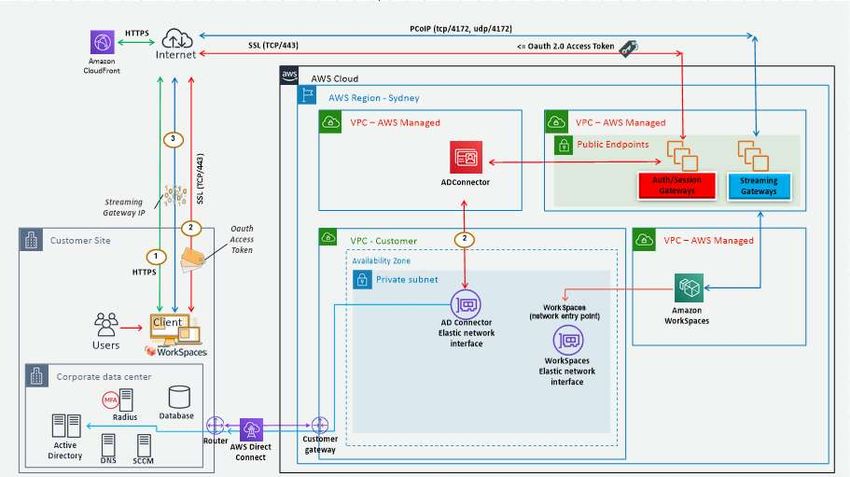
3.1.1 High Level Design Overview
Figure 3: High Level Amazon WorkSpaces Design Overview
3.1.2 When to use Amazon WorkSpaces
• Where this is a requirement to provide a full persistent desktop solution to the end
users
• When serving reliable applications and services to remote office workers
• When migrating from an existing on-premises VDI solution such as Citrix XenDesktop
or VMware View and a pay-as-you-go Cloud model is desired
• When users connecting to the Amazon WorkSpaces environment will have a
medium to high bandwidth connection with low to medium latency
• When user data persistence is desired
• When rapid scaling of VDI infrastructure is required
• When automated provisioning of desktops and workflows is desired
3.1.3 When not to use Amazon WorkSpaces
• When non-persistent desktops and applications are required where AppStream 2.0
can be utilised.
3.2 Amazon AppStream 2.0
Amazon AppStream 2.0 is a fully managed, secure application streaming service that allows
the streaming of desktop applications from AWS to the end-user, presenting them via an
HTML 5 compatible web browser, without requiring the applications to be rewritten.
GlassHouse.io Page 11Adopting Cloud Native End-User Compute Services with AWS
Amazon AppStream 2.0 manages the AWS resources required to host and run the
applications, scales automatically, and provides access to users on demand.
You can now enable the native desktop experience for your Amazon AppStream 2.0 fleets.
Previously, AppStream 2.0 streaming sessions only showed the windows of the applications
that were launched. With this launch, you can enable Desktop View on your fleet, which
provides the same desktop experience your users are used to with the existing non-
persistent capabilities AppStream 2.0 provides. You can enable the Desktop View when you
create a new fleet, or update a stopped fleet. Desktop view is a great solution for delivering
complex and GPU intensive applications providing a desktop like experience through
AppStream2.0 and gives a lower price point as compared to Amazon WorkSpaces.
Amazon AppStream 2.0 leverages the NICE DCV protocol to deliver hosted applications to
remote users. This was designed to work across low bandwidth and high latency network
connections and provides a reasonable experience to the end users with poor network
connectivity.
Using Amazon AppStream 2.0, users can stream their desktop applications hosted on
Windows Server 2012 R2, 2016 or 2019 via an HTML5 enabled browser. Unlike other RDS
based streaming technologies, Amazon AppStream 2.0 leverages a 1:1 relationship between
the user and server. As the server resources are not shared between users, use cases
requiring access to resource intensive applications including high end graphic or 3D
applications can be addressed with suitably provisioned AppStream instances.
The BYO licensing model is also applicable where the customers wish to use their own
Microsoft RDS CALs as long as they are eligible for Windows License Mobility. The other
primary consideration for the use of the BYOL model is where there is a specific requirement
to use Microsoft Office 365. License Mobility is not provided for Office 365 or the other
Office applications. As per the Microsoft Product Terms, BYO licensing cannot be used for
Office on Amazon AppStream as it does not provide dedicated instances and / or hosts.
Figure 4: High Level AWS AppStream 2.0 Design Overview
GlassHouse.io Page 12Adopting Cloud Native End-User Compute Services with AWS
3.2.1 When to use Amazon AppStream 2.0
• Where access to hosted applications by end-users should be a standards-compatible
HTML5 browser
• When migrating from an existing application streaming solution such as Citrix
XenApp or Microsoft RemoteApp
• When delivering applications with high-computational or graphical requirements
• When user data persistence is not desired or required
• Where rapid scaling of application streaming infrastructure is required
3.2.2 When not to use Amazon AppStream 2.0
• When a full persistent desktop solution is required.
• When a high user-density or session sharing is required. Amazon AppStream
leverages 1:1 mapping between users and servers
GlassHouse.io Page 13Adopting Cloud Native End-User Compute Services with AWS
Migration/Deployment
4.1 Amazon WorkSpaces
This section discusses the best practices and considerations for migration or deployment to
Amazon WorkSpaces.
4.1.1 Authentication
Amazon WorkSpaces has a requirement for integration with Directory services to provide
authentication for the users using one of the following options:
• Microsoft AD - Microsoft AD provides many Microsoft Active Directory features
including adding trust relationships with on-premises domains. It is based on
Microsoft Active Directory in Windows Server 2012 R2.
• Simple AD - Microsoft Active-Directory compatible directory powered by Samba 4
that provides a subset of Microsoft Active Directory features.
• AD Connector - AD Connector is a gateway that sends authentication request to an
existing on-premises Microsoft Active Directory. No directory information is
replicated into or cached in AWS.
Administrators can also configure RADIUS based multi-factor authentication for additional
security.
Note: At this time, SAML or OAuth authentication methods are not supported for Amazon
WorkSpaces authentication.
4.1.2 Images and Bundles
Amazon Workspaces Bundles are essentially a combination of the instance type (hardware)
and the image which contains operating system and applications. Depending on the
outcome from the design phase, suitable bundles need to be selected for users based on
their hardware and software requirements.
Administrators can also provision custom bundles based on existing Workspace bundles or
by importing their own custom desktop image or previous VDI image and combining it with
the suitable instance type, provided that licensing agreement with Microsoft allows it. The
default service limits apply for the number or images but can be increased if required.
4.1.3 Application Management
As Amazon WorkSpaces utilises persistent desktops model, all changes made to the
workspace are retained until the instance is terminated. As such, a centralised application
technology will help streamline the application delivery to end users.
Amazon WorkSpaces allows administrators to leverage multiple application deployment
technologies including Microsoft SCCM and Intune. For more cloud friendly options,
ManageEngine and LiquidWare’s FlexApp can be leveraged. For developer style
deployments, Chocolatey is becoming more prevalent.
GlassHouse.io Page 14Adopting Cloud Native End-User Compute Services with AWS
4.1.4 Migration Methodology
The following migration options can be utilised depending on the type of workload being
migrated.
• Migrate base images to Amazon WorkSpaces - Where non-persistent VDIs are being
used within the existing environment, or where the migration of user data along
with the VDI is not essential, administrators can import the base images/golden
images into Amazon WorkSpaces and create appropriate bundles.
This is a practical approach where applications are installed directly into the image
or are being deployed by use of Microsoft SCCM or similar technology.
This migration model requires the use of a dedicated tenancy for Amazon
WorkSpaces, which requires a minimum of 200 instances within a single region.
• Create image directly on Amazon Workspaces - Where migration of existing images
is not required, administrators can create an image and bundle directly on Amazon
Workspaces.
This would be an ideal approach when upgrading to Windows 10 or re-skinned
Windows Server 2016. Administrators can use third-party technology like Microsoft
SCCM, Intune, ManageEngine, LiquidWare FlexApp etc to streamline application
delivery to the end users.
This approach would minimise the risk of carrying over issues from the legacy
environment.
Where a full 10 desktop is required in place of a Windows 10 Experience, this
migration model will require the use of a dedicated tenancy for Amazon
WorkSpaces.
4.2 Amazon AppStream 2.0
This section discusses the best practices and considerations for migration or deployment to
Amazon AppStream 2.0.
4.2.1 Authentication
Amazon AppStream 2.0 currently provides three methods for user authentication.
• User Pool - The Amazon AppStream 2.0 user pool offers a simplified way to manage
access to applications for end users through a persistent portal for each region. This
feature is offered as a built-in alternative to user management through Active
Directory and SAML 2.0 federation, with users defined natively within the AWS
environment.
• SAML 2.0 - Amazon AppStream 2.0 o provides SAML Identity Provider (SAML IdP)
based authentication, meaning that users need to login to their SAML provider
website in order to access the assigned stacks (e.g. Microsoft ADFSv3, Okta, etc.)
GlassHouse.io Page 15Adopting Cloud Native End-User Compute Services with AWS
• Streaming URL - StreamingURL can also be used, which is especially helpful if you
want to automate and orchestrate short lived URL’s without prompting the user to
login manually. It provides programmatically provide access to AppStream 2.0 by
using temporary URLs.
4.2.2 Stacks and Fleets
Amazon AppStream 2.0 Stacks are used to stream applications to users’ browsers. A Stack
consists of a Fleet of streaming instances coupled with user access policies and
configurations. The Fleet type determines when the instances run and how you pay for
them. You can specify a Fleet type when you create a Fleet.
The default service limits currently apply to fleets and stacks but can be increased if
required.
4.2.3 Image Builders
Amazon AppStream 2.0 provides virtual machines or instances that are used to create the
initial images or to install and add applications into the image. These instances are called
“image builders”, and they can be launched from a base image provided by AWS, or from an
existing custom image. Once image builder instance is available, administrators can connect
to the image builder to start a desktop session, install applications, add applications to an
image, and create an image.
At the time of writing, it is not possible to import your existing Microsoft Windows Server
images directly into Amazon AppStream 2.0.
4.2.4 Application Management
Unlike Amazon WorkSpaces, Amazon AppStream 2.0 does not provide any built-in tools to
manage application deployments. Administrators can leverage their existing third-party
application deployment including Microsoft SCCM to streamline application deployment.
Also note, that you are now able to programmatically create an AppStream 2.0 image from
start to finish using the image assistant command line interface(CLI) operations. Full details
can be found in this AppStream 2.0 article.
4.2.5 Migration Methodology
As Amazon AppStream 2.0 does not allow existing images to be imported, it is essential for
administrators to create new images within Amazon AppStream 2.0. User data migration can
be performed and presented to the users via Amazon S3 (Home Folders) or by use of
roaming profiles and redirected folders.
GlassHouse.io Page 16Adopting Cloud Native End-User Compute Services with AWS
Operations
This section discusses the best practices for ongoing maintenance and automation for
Amazon WorkSpaces and Amazon AppStream 2.0.
5.1 Amazon WorkSpaces
5.1.1 Workspace Self-Service Portal
The Amazon WorkSpaces self-service portal allows the end users to provision new
WorkSpaces or rebuild existing WorkSpaces in case of failure without contacting the IT
Service Desk.
The workflow can be automated to submit provisioning or re-provisioning approvals to the
end users’ manager which in turn reduces the administrative overhead for IT administrators.
5.1.2 User Assignment
Each WorkSpace is assigned to a single user and cannot be shared by multiple users.
Whenever administrators launch a WorkSpace, they must assign it to a user that does not
already have a WorkSpace. Should a user require an additional WorkSpace, they would
need to access this via a second user account or via an additional Amazon WorkSpaces
environment.
5.1.3 WorkSpaces Bulk Provisioning
Bulk provisioning of Amazon Workspaces can be performed to decreases the administrative
burden and save time. GlassHouse can work through with customers for large scale
deployments of Workspaces using scripting and automation to minimise the engineering
time and administrative overheads. Both AWS provided bundles or Custom bundles can be
deployed for large fleet of users through a automated and managed process.
5.1.4 Operating Systems updates and Application Updates
Administrators can automate operating system updates by utilising Microsoft WSUS or other
patch management technologies.
Depending on the application deployment technology used, administrators can make
application updates available to the users or push the updates to the user’s WorkSpaces.
5.1.5 Cost Optimisation
As Amazon WorkSpaces provides monthly as well as hourly billing options, it might be
difficult to predict the costs during the initial months if the usage patterns are not intimately
known.
Administrators can choose to analyse the usage patterns and adjust the billing options
accordingly or use the Amazon WorkSpaces Cost Optimizer to analyse and convert the billing
to monthly/hourly based on the usage – when used for 80 hours or more, the monthly fee is
more cost efficient than the hourly charged rate.
GlassHouse.io Page 17Adopting Cloud Native End-User Compute Services with AWS
5.2 Amazon AppStream 2.0
5.2.1 User Assignment
Users can be assigned to multiple stacks depending on the applications that they require.
Where AppStream 2.0 is AD integrated, the easiest way to control access is via Active
Directory Security groups which are associated with the stacks. If using user pools, users can
be assigned directly to stacks.
5.2.2 Operating Systems updates and Application updates
Due to the non-persistent nature of the AppStream 2.0 servers, both operating system
updates and application updates need to be rolled out on the image builder and a new
image needs to be created in order for them to be distributed to the end users.
Blue/Green type deployments can be catered for, allowing seamless migration of users to
the updated image and rollback should this be required.
5.2.3 Cost optimizations
Amazon AppStream 2.0 allows administrators to deploy either an Always-On or On-Demand
fleet. Depending on which fleet type is chosen will greatly impact the cost. Hence it is vital
that administrators configure time based or usage-based auto-scaling policies.
Note: The RDS licensing cost is charged on a non-prorated monthly basis and should be
considered in overall cost models.
5.3 Smart Operations
GlassHouse provides CloudControl for operations and control of Amazon Workspaces and
AppStream 2.0 deployments. This service framework includes integrated monitoring and
alerting, to provide 24x7 operational management of the customer production environment.
Given AWS manages the underlying platforms as a service, the added service layer controls
from GlassHouse provide customers a streamlined and cost-efficient support model, which
can be coupled with automation features for ticketing, management, provisioning, and
support operations.
Since both Amazon Workspaces and AppStream 2.0 are built with fully featured APIs, a wide
range of opportunities for innovation exist around these platforms. Use cases may include
the following:
• Help-desk integrations with ticketing systems
• Integration with monitoring tools and portals
• Integration with Jira ticketing and workflow management systems
• Provisioning portals for administrators and managers
• Image Automation (AppStream 2.0) and Application deployments
GlassHouse.io Page 18Adopting Cloud Native End-User Compute Services with AWS
• Self-Service portals (e.g. user driven provisioning with underlying automation and
workflows)
• ChatOps (end-user facing experiences to support basic L1 issues, FAQ, route to
agent, user sentiment analysis, etc)
With these examples, we see a bright future for customer innovation based on the
combination of Amazon Workspaces and AppStream, plus core AWS services for chat,
workflow, automation, and call centre automation.
GlassHouse.io Page 19Adopting Cloud Native End-User Compute Services with AWS
Summary
Cloud native VDI and Hosted Application services have matured significantly and can be a suitable
replacement for legacy systems that are nearing end of life or where a change in operational cost
model is desired.
Both Amazon WorkSpaces and AppStream 2.0 represent different approaches to the presentation of
legacy world applications to end-users, addressing persistent desktop or specific application use-
cases.
As these services continue to evolve and mature, largely based on customer uptake and feedback,
we foresee these services playing a larger role in addressing specific use cases where SaaS type
applications are either not yet available or where legacy world applications are required.
With any migration activity where the technology stack is different to the existing environment,
GlassHouse recommend that organisations wishing to adopt Amazon WorkSpaces and/or AppStream
2.0 engage a suitable partner for the programme, ensuring that the business’ use-cases and specific
requirements are appropriately captured, and translated to a successful outcome.
We simplify and accelerate your migration into AWS. GlassHouse specializes in Modern Workspace
deployments with AWS and provides continued support options for customers embarking on cloud
native end user computing solutions.
For questions or a technical requirements discussion, please contact us at: info@glasshouse.io
GlassHouse.io Page 20You can also read


