Drafting and Design Presentation Standards Manual Volume 1: Chapter 2 - General Standards - March 2021 - Transport and Main Roads
←
→
Page content transcription
If your browser does not render page correctly, please read the page content below
Drafting and Design Presentation Standards Manual
Volume 1: Chapter 2 – General Standards
March 2021
Copyright
© The State of Queensland (Department of Transport and Main Roads) 2021.

Licence

This work is licensed by the State of Queensland (Department of Transport and Main Roads) under
a Creative Commons Attribution (CC BY) 4.0 International licence.

CC BY licence summary statement
In essence, you are free to copy, communicate and adapt this work, as long as you attribute the
work to the State of Queensland (Department of Transport and Main Roads). To view a copy of this
licence, visit: https://creativecommons.org/licenses/by/4.0/

Translating and interpreting assistance
              The Queensland Government is committed to providing accessible services to
              Queenslanders from all cultural and linguistic backgrounds. If you have difficulty
              understanding this publication and need a translator, please call the Translating and
              Interpreting Service (TIS National) on 13 14 50 and ask them to telephone the
              Queensland Department of Transport and Main Roads on 13 74 68.

Disclaimer
While every care has been taken in preparing this publication, the State of Queensland accepts no
responsibility for decisions or actions taken as a result of any data, information, statement or
advice, expressed or implied, contained within. To the best of our knowledge, the content was
correct at the time of publishing.

Feedback
Please send your feedback regarding this document to: tmr.techdocs@tmr.qld.gov.au

Drafting and Design Presentation Standards Manual, Transport and Main Roads, March 2021
Amendment Register
Issue /
Reference
Rev Description of revision Authorised by Date
section
no.
- First Issue Steering January
1
Committee 2006
Appendix 2A • Addition of the first page Steering March
2 Committee 2006
Appendix 2E • Amended drawing sheets
Appendix 2E • Amended drawing sheets Steering December
Appendix 2F • Additional and amended XRef Committee 2006
3 names
• Additional and amended drawing
type codes
2.1, 2.2 and 2.3 Update sections February
4 2011
Appendix updates
Appendix 2D Update title blocks Owen Arndt February
2014
5
Chapter 2 Update the department's corporate
template
Table 2.1.3 Update cross reference to Director (Road October
Appendix 2C Design) 2016
Geospatial,
Table 2.1.3.1 Update cross reference to
Design and
Appendix 2B
Capability
2.1.6.1 Model names table moved to (E&T)
Appendix 2C
2.1.6.2 Minor changes due to added
2.1.6.3 reference to new 'TMR Surveying
Standards - Schedule 1'
2.3
6
2.2 Added new Section 2.2 to link
Chapter 2 to Appendices 2E and
2F
2.4.3 Removal of copyright and GILF
sections
Table 2.4.3.1 Update to table
2.4.3.6 Update to issue identifiers
All Appendices Various updates – refer to each
Appendix’s amendment register
Drafting and Design Presentation Standards Manual, Transport and Main Roads, March 2021 iIssue /
Reference
Rev Description of revision Authorised by Date
section
no.
– Removal of microfilm references Director (Road August
Design) 2019
2.1.3 COGO Software removed
Geospatial,
2.1.6.3 Bridge naming convention and Design and
examples removed Capability
(E&T)
2.4.4.3 New plotting media requirements
for final drawings
7
2.4.5.1 Changes to the format of Project
2.4.5.2 and Contract Numbers due to
3PCM numbers
Table 2.4.3.1 Update to table
Appendix 2D Update title blocks
Appendix 2E Minor updates
2.4.3.5 Update to issue identifiers
2.4.4.1 Update to media requirements Director
February
8 Update to final drawings (Road Design)
2.4.4.3 2021
requirements (E&T)
Appendix 2E Minor update
Drafting and Design Presentation Standards Manual, Transport and Main Roads, March 2021 iiContents
2 General Standards ......................................................................................................................1
2.1 Data modelling............................................................................................................................ 1
2.1.1 Scope ............................................................................................................................................1
2.1.2 Media .............................................................................................................................................1
2.1.2.1 Type............................................................................................................................. 2
2.1.2.2 Format ......................................................................................................................... 2
2.1.2.3 Compression ............................................................................................................... 2
2.1.3 CADD software..............................................................................................................................2
2.1.3.1 Data format .................................................................................................................. 3
2.1.3.2 Target data formats ..................................................................................................... 3
2.1.4 Data delivery .................................................................................................................................4
2.1.4.1 Data presentation ........................................................................................................ 4
2.1.4.2 Data delivery ............................................................................................................... 4
2.1.4.3 Data ownership ........................................................................................................... 4
2.1.5 CADD data transmission ...............................................................................................................4
2.1.6 Naming convention for modelling systems ...................................................................................5
2.1.6.1 Model naming convention ........................................................................................... 5
2.1.6.2 Survey feature codes .................................................................................................. 5
2.1.6.3 Design string naming convention ................................................................................ 5
2.1.6.4 Project data file structure .......................................................................................... 15
2.2 AutoCAD drawing environments and attributes ................................................................... 16
2.3 Line types, symbols and text .................................................................................................. 16
2.3.1 Line types ................................................................................................................................... 16
2.3.1.1 Spacing of parallel lines ............................................................................................ 16
2.3.2 Symbols ...................................................................................................................................... 17
2.3.2.1 Arrowheads ............................................................................................................... 18
2.3.3 Text ............................................................................................................................................ 18
2.3.3.1 Font ........................................................................................................................... 18
2.3.3.2 Height of characters .................................................................................................. 19
2.3.3.3 Thickness of character pen strokes .......................................................................... 19
2.3.3.4 Spacing between lines of lettering ............................................................................ 19
2.3.3.5 Fractions / decimals .................................................................................................. 20
2.3.3.6 Abbreviations, contractions and acronyms ............................................................... 20
2.3.3.7 Glossary of terms ...................................................................................................... 21
2.3.3.8 Units of measurements ............................................................................................. 21
2.3.3.9 Chainages ................................................................................................................. 25
2.3.3.10 Curve components .................................................................................................... 25
2.4 Drawings ................................................................................................................................... 26
2.4.1 General ....................................................................................................................................... 26
2.4.2 Drawing size ............................................................................................................................... 27
2.4.3 Drawing sheets........................................................................................................................... 27
2.4.3.1 Electronic drawing sheets ......................................................................................... 27
2.4.3.2 North point ................................................................................................................. 28
2.4.3.3 Sheet overlap ............................................................................................................ 28
2.4.3.4 Adjoins lines and numbers ........................................................................................ 29
2.4.3.5 Issue identifier ........................................................................................................... 29
2.4.3.6 Consultants logo ........................................................................................................ 30
2.4.3.7 Drawing Revisions ..................................................................................................... 30
Drafting and Design Presentation Standards Manual, Transport and Main Roads, March 2021 iii2.4.4 Drawing media ........................................................................................................................... 30
2.4.4.1 Use of print and electronic media .............................................................................. 30
2.4.4.2 Preliminary drawings ................................................................................................. 31
2.4.4.3 Final drawings ........................................................................................................... 31
2.4.5 Title block data ........................................................................................................................... 31
2.4.5.1 Job numbers .............................................................................................................. 31
2.4.5.2 Contract numbers ...................................................................................................... 32
2.4.5.3 Associated job numbers ............................................................................................ 32
2.4.5.4 Auxiliary drawing numbers ........................................................................................ 32
2.4.5.5 Through distance ....................................................................................................... 32
2.4.5.6 Scales ........................................................................................................................ 32
2.5 References ................................................................................................................................ 33
Tables
Table 2.1.3.1 – Data format description .................................................................................................. 3
Table 2.1.3.2 – Data format / CADD package matrix .............................................................................. 3
Table 2.3.1 – Line type / symbol categories .......................................................................................... 16
Table 2.3.1.1 – Spacing of parallel lines ............................................................................................... 16
Table 2.3.2 – Standard line types (generic) .......................................................................................... 17
Table 2.3.3.2 – Minimum height of characters on drawings .................................................................. 19
Table 2.3.3.8(a) – Approved shortened forms....................................................................................... 21
Table 2.3.3.8(b) – Approved units of measurement .............................................................................. 24
Table 2.3.3.10 – Standard curve notations ........................................................................................... 26
Table 2.4.1 – Standard drawing sheets ................................................................................................. 27
Table 2.4.3.1 – Standard electronic drawing sheets ............................................................................. 28
Figures
Figure 2.1.2 - Overview of CADD data modelling components............................................................... 1
Figure 2.1.6.3(a) – Typical cross section of two lanes two-way rural road ............................................. 6
Figure 2.1.6.3(b) – Typical cross section of multilane rural road – independently aligned ..................... 7
Figure 2.1.6.3(c) – Typical cross section of undivided urban road.......................................................... 8
Figure 2.1.6.3(d) – Typical cross section of multilane urban road .......................................................... 9
Figure 2.1.6.3(e) – Typical cross section of urban arterial road – separated function type .................. 10
Figure 2.1.6.3(f) – Typical cross section of urban arterial road – separated function type ................... 11
Figure 2.1.6.3(g) – Typical cross section of multilane motorway (no transit lanes) .............................. 12
Figure 2.1.6.3(h) – Design string labels – plan view example ............................................................... 13
Figure 2.1.6.3(i) – Design string labels – drainage profile example ...................................................... 14
Drafting and Design Presentation Standards Manual, Transport and Main Roads, March 2021 ivFigure 2.1.6.4 – Example of project data file structure .......................................................................... 15 Figure 2.3.3.10(a) – Standard alignment ............................................................................................... 25 Figure 2.3.3.10(b) – Standard curve components ................................................................................. 26 Figure 2.4.1 – Characteristics of ‘A’ series paper size .......................................................................... 27 Drafting and Design Presentation Standards Manual, Transport and Main Roads, March 2021 v
Volume 1: Chapter 2 – General Standards

2     General Standards
2.1     Data modelling

The purpose of this section is to provide guidance in the modelling and transfer of data, to ensure
uniformity of both data generated, using internal systems, or data supplied to the Department of
Transport and Main Roads (department) from external sources.

2.1.1    Scope

Generally, all documents prepared by or on behalf of the department, are in electronic format and use
data modelled with Computer Aided Design and Drafting (CADD) software. The general standards
outlined in this Chapter detail data modelling standards that are acceptable to the department. They
are to be read in conjunction with the requirements for preparation and presentation of each specific
type of CADD data used by the department, which are detailed in the following sections of this
document. Figure 2.1.2 provides an overview of CADD Data Modelling Components.

2.1.2    Media

A Standard Operating Environment (SOE) based on the Microsoft Windows platform, is the default
desktop across the department. It is recommended that advice is sought from the department in
relation to the current platform in use.

Figure 2.1.2 - Overview of CADD data modelling components

Drafting and Design Presentation Standards Manual, Transport and Main Roads, March 2021                 1
Volume 1: Chapter 2 – General Standards

2.1.2.1    Type

The media on which the data is to be supplied, is to be agreed to by the Project Manager and the data
supplier and set out in the brief. Hardware compression on devices must not be used under any
circumstances.

2.1.2.2    Format

Only media formatted using the Windows format command is acceptable. It is the data supplier's
responsibility to supply data in a media format appropriate to the department's systems.

2.1.2.3    Compression

Data may be supplied in compressed format agreed to by the Project Coordinator. This must be
detailed on accompanying documentation and a copy of the software to reverse the process. Also,
instructions on how to use the programme to extract the file(s) shall be provided. Hardware
compression on devices must not be used under any circumstances. The use of utilities that produce
compressed files compatible with the SOE detailed in Section 2.1.2, is the only acceptable method of
file compression.

It is the data supplier's responsibility to supply data using a compression format appropriate to the
department's systems.

2.1.3     CADD software

The department currently uses both propriety and in-house developed software for modelling a
drawing presentation. This software is continually developed and customised to meet the department's
needs.

The current CADD software systems used in design offices throughout the department and a
description of their uses are as follows:

    •     12D

          12D Model is an interactive three-dimensional modelling package designed to quickly build
          terrain, conceptual and detail design string models. The survey features of the software are
          extensively used by the Survey section of the department for inputting terrain and feature data.
          Large survey data models can be triangulated and contoured to build an initial terrain model.
          Roads, channels and other design features can be added interactively and a merged model
          containing the initial terrain and the new design features formed to produce conceptual design
          models.

          All models can be examined in plan, section or perspective views including extensive
          visualisation and drive through facilities.

          To maintain uniformity throughout the department, customised features have been developed
          and added to the 12D Model to simplify the planning and design process. The
          TMR 12D Customisation software is a collection of custom files incorporating departmental
          standard features which include standard drawing sheets, line styles, mapping files, title files,
          plot parameter files, definition files, fonts and various macros. The department's
          12D customisation, used in the design process and conforming to the Data Modelling
          Standards, is detailed in Appendix 2C.

Drafting and Design Presentation Standards Manual, Transport and Main Roads, March 2021                       2
Volume 1: Chapter 2 – General Standards
• AutoCAD / MAP 3D
A general-purpose Computer Aided Drafting system designed with an open architecture that
can be customised to individual requirements. For departmental purposes, AutoCAD has been
customised to include standard plan sheets, blocks (or shapes) containing survey symbols
and traffic signs and a layer-naming convention with assigned line styles for use in survey,
design and environmental drawings. The TMR AutoCAD Customisation software is also used
to simplify the importing of survey data from other systems with TMR Customisation, such
as 12D.
• Data is to be supplied in a format suitable for the receiving CADD package.
2.1.3.1 Data format
In many instances, information is required to be transferred between various software systems. There
is no simple or perfect mechanism for data transfer that satisfies all systems. Some systems are
specialised in their application requiring specific software to operate.
CADD data is to be supplied in a data format agreed to by the Project Manager and compatible with
currently used versions of the supported CADD software listed above. The more common data
exchange systems used in the department are shown in Table 2.1.3.1.
Table 2.1.3.1 – Data format description
Data Format Description
AutoCAD's binary drawing file format (.dwg). Guidelines for
AutoCAD drawing (DWG)
AutoCAD drawing exchange are included in Appendix 2B.
An ascii based data transfer system developed by AutoDesk.
The exchange of data in this format may vary across packages
Data eXchange Format (DXF) possibly causing some incompatibilities. If this format is to be
used, it is the data supplier's responsibility to supply data
compatible with the department's CADD software.
A proprietary model file format developed by 12D Solutions for
12D Ascii
the modelling of road infrastructure design using 12D Model.
Not all design offices are able to accept all of the data formats listed above. It is the data supplier's responsibility
to supply data in a format agreed to by the issuing office.
2.1.3.2 Target data formats
The following Table 2.1.3.2 shows a matrix of data formats and the CADD packages they can receive.
Table 2.1.3.2 – Data format / CADD package matrix
Data Formats Receiving CADD Package
12D AutoCAD
AutoCAD drawing Y Y
12D Models Y N
Drafting and Design Presentation Standards Manual, Transport and Main Roads, March 2021 3Volume 1: Chapter 2 – General Standards
2.1.4 Data delivery
2.1.4.1 Data presentation
CADD data will be presented in accordance with the following sections for preparation and
presentation of each specific type of CADD data used by the department.
2.1.4.2 Data delivery
CADD data is to be delivered as detailed in the following chapters of this manual for preparation and
presentation of each specific type of CADD data used by the department. A copy of all data files, as
delivered to the department, will be stored in accordance with the issuing office's quality system.
2.1.4.3 Data ownership
All data supplied by the data supplier, shall become the property of the department. Nominal
ownership shall reside with the officer responsible for the provision of funds, for the acquisition of such
data.
It shall not be used, copied or reproduced by the data supplier for any other purpose without the prior
written approval by the owners, or the department.
2.1.5 CADD data transmission
Transmission of data is to be carried out in accordance with the Project Manager’s quality system.
Data may be transferred as an attachment to an email, memo or letter, or made available over the
Internet. Regardless of the method of transmission, the following information should typically be
included with the data:
• direction of transfer (From:... – To:..)
• name and address details of data supplier
• contact person for data supply
• date
• road number
• job number and location
• media type
• media format
• compression method
• authoring software and version number
• data format
• CADD filename(s) and description(s)
• adequacy of data and data verification (proof plot etc.), and
• person responsible for data verification.
Drafting and Design Presentation Standards Manual, Transport and Main Roads, March 2021 4Volume 1: Chapter 2 – General Standards 2.1.6 Naming convention for modelling systems For uniformity throughout all departmental design offices within the state, a standard naming convention for models and strings has been developed for use within all design software modelling packages. 2.1.6.1 Model naming convention To take full advantage of current and future automated procedures within our modelling packages (i.e. TMR Customisation software), a standard model naming convention is required. Designers and constructors will then have immediate recognition of model contents, regardless of the design office the project originated from. This naming convention follows closely the names associated with the types of models and the surfaces they contain. Appendix 2C contains a list of the model names to be adopted, together with a brief description of their contents. 2.1.6.2 Survey feature codes All survey feature coding and modelling must be in accordance with the department's current standards as set out in the department's Surveying Standards. No variations will be allowed to the codes, symbols, line styles or designated models for each code. 2.1.6.3 Design string naming convention The department has adopted a standard naming convention for labelling design model strings. The use of a labelling convention during design, will allow for a more efficient use of current and future automated features. These features, such as transferring data, are available within existing design software. A further benefit of a standard String Naming Convention (SNC), is that a string label signifies the same feature throughout all design offices and to all constructors. This results in easier understanding of any project model, regardless of the origin of the design. Appendix 2A, represents the department's design string naming convention. In most cases, only the first two characters of the string label are relevant for string recognition. The number of characters in the string label and its definition, will be dependent on the modelling software used. Line style names have also been included. See also Section 2.3. Examples showing design elements for roadways of the string naming convention, are included as Figure 2.1.6.3(a) to Figure 2.1.6.3(i). Bridge and structural components naming convention is detailed in Volume 3, Chapter 20. Drafting and Design Presentation Standards Manual, Transport and Main Roads, March 2021 5
Volume 1: Chapter 2 – General Standards

Figure 2.1.6.3(a) – Typical cross section of two lanes two-way rural road

Drafting and Design Presentation Standards Manual, Transport and Main Roads, March 2021   6
Volume 1: Chapter 2 – General Standards

Figure 2.1.6.3(b) – Typical cross section of multilane rural road – independently aligned

Drafting and Design Presentation Standards Manual, Transport and Main Roads, March 2021     7
Volume 1: Chapter 2 – General Standards

Figure 2.1.6.3(c) – Typical cross section of undivided urban road

Drafting and Design Presentation Standards Manual, Transport and Main Roads, March 2021   8
Volume 1: Chapter 2 – General Standards

Figure 2.1.6.3(d) – Typical cross section of multilane urban road

Drafting and Design Presentation Standards Manual, Transport and Main Roads, March 2021   9
Volume 1: Chapter 2 – General Standards

Figure 2.1.6.3(e) – Typical cross section of urban arterial road – separated function type

Drafting and Design Presentation Standards Manual, Transport and Main Roads, March 2021      10
Volume 1: Chapter 2 – General Standards

Figure 2.1.6.3(f) – Typical cross section of urban arterial road – separated function type

Drafting and Design Presentation Standards Manual, Transport and Main Roads, March 2021      11
Volume 1: Chapter 2 – General Standards

Figure 2.1.6.3(g) – Typical cross section of multilane motorway (no transit lanes)

Drafting and Design Presentation Standards Manual, Transport and Main Roads, March 2021   12
Volume 1: Chapter 2 – General Standards

Figure 2.1.6.3(h) – Design string labels – plan view example

Drafting and Design Presentation Standards Manual, Transport and Main Roads, March 2021   13
Volume 1: Chapter 2 – General Standards

Figure 2.1.6.3(i) – Design string labels – drainage profile example

Drafting and Design Presentation Standards Manual, Transport and Main Roads, March 2021   14
Volume 1: Chapter 2 – General Standards

2.1.6.4    Project data file structure

To facilitate data retrieval and other processes within the department, it is necessary to have a
common file structure for the long-term storage of relevant project data information.

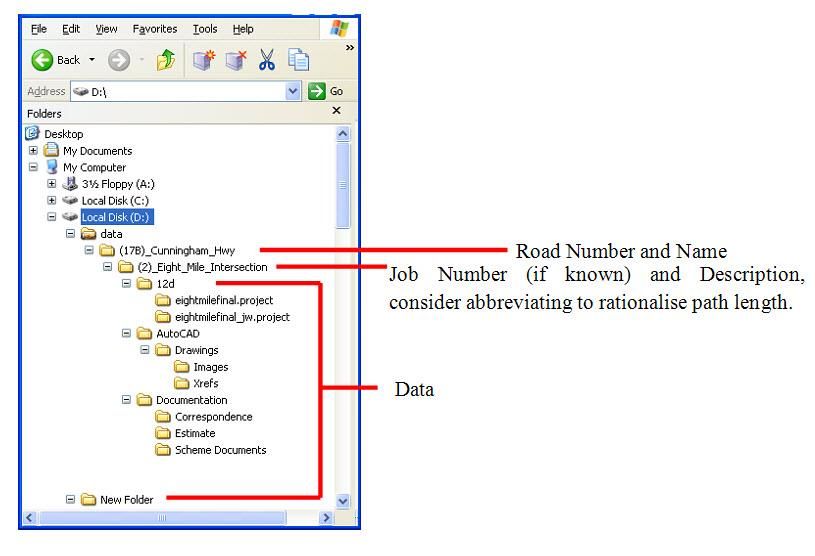
All internal and external designers should adopt the following file structure. It divides the data directory
path into Roads under which are placed relevant Projects. Under each project, is placed the data for
the software used under their various application names such as 12D, and AutoCAD / Map 3D.

Advantages to be achieved in using this method are:

    •     all relevant project files are kept together

    •     a common directory path is easily accessed by all users, and

    •     copying and archiving a project's data files is more easily achieved.

An example of this project data file structure is shown in Figure 2.1.6.4 and is recommended as a
standard to be used in all design offices and by all consultants. It shows a typical road project folder
for (17B)_Cunningham_Highway. Under this, are held relevant Jobs such as
(2)_Eight_Mile_Intersection. This folder then contains the project data for each of the software
applications used for that project (e.g. 12D, AutoCAD/Map 3D). Also included, is any project
documentation as well as provision for Management Correspondence. On completion of the design,
the entire content of the Project Folder is to be placed on CD(s) / DVD for distribution and archiving.

Figure 2.1.6.4 – Example of project data file structure

Drafting and Design Presentation Standards Manual, Transport and Main Roads, March 2021                    15
Volume 1: Chapter 2 – General Standards
2.2 AutoCAD drawing environments and attributes
There are several components in a CAD drawing, which are required to be understood properly when
preparing a drawing for the department in order to efficiently manage the data within such AutoCAD
drawing for the long-term, and simultaneously producing a drawing complying with the department's
Design and Drafting Presentation Standards.
Appendix 2E Transport and Main Roads AutoCAD Drawing Environments and Appendix 2F Transport
and Main Roads Drawing Attributes provide guidelines in preparing CAD drawings to accomplish the
above requirements.
2.3 Line types, symbols and text
2.3.1 Line types
Line types are divided into categories, those that are generic as shown in Table 2.3.2 and those that
are applicable to specific disciplines. Table 2.3.1 shows each category, the prefix used for the
category and the corresponding reference, which provides examples of each line type.
Table 2.3.1 – Line type / symbol categories
Prefix Category Reference
MR Generic Table 2.3.3.2
MRR Road Design Appendix 2A
MRB Bridge Design Appendix 2A
MRE Erosion and Sediment Control Appendix 2A
MRT Traffic Signals Appendix 2A
MRL Roadway Lighting Appendix 2A
MRG Geotechnical Appendix 2A
MRLR Landscaping & Revegetation Appendix 2A
Departmental Surveying
MRS Survey
Standards
2.3.1.1 Spacing of parallel lines
To allow for drawing reduction or enlargement for reproduction purposes, it is necessary to draw
parallel lines on the original, with a clear space between them as shown in Table 2.3.1.1
Minimum line spacing should not be less than 0.5 mm on an A3 drawing.
Table 2.3.1.1 – Spacing of parallel lines
Reduction Minimum Line
Size Ratio Spacing
A0 to A2 2.0:1 0.8 mm
A0 to A3 3.0:1 1.2 mm
A1 to A3 2.0:1 0.8 mm
Drafting and Design Presentation Standards Manual, Transport and Main Roads, March 2021 16Volume 1: Chapter 2 – General Standards
2.3.2 Symbols
Symbols are also divided into categories applicable to specific disciplines. Refer to Appendix 2A for
design symbols and string naming conventions.
The department's customised features in AutoCAD contain blocks of all the required symbols and
features used for scheme presentation purposes as follows:
• kerb types as shown on Standard Drawing 1033 Kerb and channel – Kerbs, channels and
ramped vehicular crossing of the Standard Drawings Manual
• selected traffic signs and pavement markings as shown in the Manual of Uniform Traffic
Control Devices (MUTCD)
• North Points
• Scale Bars, and
• selected standard notes.
Table 2.3.2 – Standard line types (generic)
Description of Line Type Line Type name CAD Line Type
Continuous lines
Continuous lines 0.18 mm MR_CON_018 CONTINUOUS
Continuous lines 0.25 mm MR_CON_025 CONTINUOUS
Continuous lines 0.35 mm MR_CON_035 CONTINUOUS
Continuous lines 0.50 mm MR_CON_050 CONTINUOUS
Continuous lines 0.70 mm MR_CON_070 CONTINUOUS
Continuous lines 1.00 mm MR_CON_100 CONTINUOUS
Chain lines
Chain lines 0.18 mm MR_CHN_018 MR_CHN
Chain lines 0.25 mm MR_CHN_025 MR_CHN
Chain lines 0.35 mm MR_CHN_035 MR_CHN
Chain lines 0.50 mm MR_CHN_050 MR_CHN
Chain lines 0.70 mm MR_CHN_070 MR_CHN
Chain lines 1.00 mm MR_CHN_100 MR_CHN
Double dashed chain lines
Double dashed chain lines 0.18 mm MR_DCH_018 MR_DCH
Double dashed chain lines 0.25 mm MR_DCH_025 MR_DCH
Double dashed chain lines 0.35 mm MR_DCH_035 MR_DCH
Double dashed chain lines 0.50 mm MR_DCH_050 MR_DCH
Double dashed chain lines 0.70 mm MR_DCH_070 MR_DCH
Double dashed chain lines 1.00 mm MR_DCH_100 MR_DCH
Drafting and Design Presentation Standards Manual, Transport and Main Roads, March 2021 17Volume 1: Chapter 2 – General Standards
Description of Line Type Line Type name CAD Line Type
Dashed lines
Dashed lines 0.18 mm MR_DSH_018 MR_DSH
Dashed lines 0.25 mm MR_DSH_025 MR_DSH
Dashed lines 0.35 mm MR_DSH_035 MR_DSH
Dashed lines 0.50 mm MR_DSH_050 MR_DSH
Dashed lines 0.70 mm MR_DSH_070 MR_DSH
Dashed lines 1.00 mm MR_DSH_100 MR_DSH
Construction Lines
Construction lines 0.25 mm MR_CON CONTINUOUS
Phantom Lines
Phantom lines 0.25 mm MR_PHM MR_PHM
2.3.2.1 Arrowheads
Dimension leader lines should terminate in arrowheads rather than in dots. Arrowheads should be
drawn to suit detail scale.
2.3.3 Text
The photocopier is the means by which most drawings are reproduced for issue. A scanner is the
means by which original wet blue signed drawings are converted into digital format for electronic
archival. These methods dictate a need to produce original drawings capable of being reduced,
enlarged and photocopied without losing the original details and that the intended information on the
plans is not lost through these processes.
Drawings, therefore, must be dense and clear with lettering size and thickness of line complying with
minimum standards. Drawings must be planned to avoid cramping of detail and a bold, open-spaced
original should produce a clear print.
Lettering, numerals and dimensions should be drawn to be readable from the bottom or right-hand
side of the sheet.
Contour values should be arranged to be read in the direction of increasing height.
Chainage values should be located on the left-hand side of the base/control line(s) when looking in the
direction of increasing chainage.
2.3.3.1 Font
Characters shall be of a simple open form, without serifs. They must remain legible when reduced for
documentation purposes and when scanned as an image in electronic format (also see Table 2.3.3.2
for minimum character height).
One style of character should be used generally throughout a drawing, with preference for vertical
characters. Vertical characters must be used for title, drawing numbers and reference numbers.
Underlined lettering should be avoided. Special emphasis may be achieved by using larger
characters, different character font, sloping versus vertical characters or with care, different pen size.
Drafting and Design Presentation Standards Manual, Transport and Main Roads, March 2021 18Volume 1: Chapter 2 – General Standards
Vertical characters/numerals are to be used where they refer to either established or existing data and
features. Referencing to design information and design details should be shown in italic. For example,
height values established by survey as recorded in the survey books, such as for spot and
benchmarks, would be shown vertical. Interpolated height values would be shown sloping. In addition,
designed heights would be shown sloping.
Various approved fonts, for general use in the preparation of departmental drawings, have been
selected because of their acceptable legibility when producing drawings on printers and reproducing
drawings in photocopiers. These shapes and their proportions have been included as standards in the
department's computer aided drafting (CAD) package, TMR AutoCAD Customisation.
2.3.3.2 Height of characters
The height, in millimetres, of characters on original (full scale) drawings should preferably be one of
the following:
• 2.5*, 3.5, 5, 7, 10, 14, 20 (*note – not suitable for reduction).
These text heights are included as standard sizes in the TMR AutoCAD Customisation system. Other
heights may be used, provided that the minimum height requirements of this clause are met.
The minimum height of characters is shown in Table 2.3.3.2 and is to be adopted on original drawings
for the various reductions required for documentation purposes. TMR Customisation requires that text
be shown in upper and lower case. Some notes and text have been forced to upper case in the
TMR Customisation for their importance. When reduced for scheme documentation the character
height for capitals should desirably be not less than 1.5 mm. Table 2.3.3.2 shows the minimum heights
of characters.
Table 2.3.3.2 – Minimum height of characters on drawings
Character Size Character Size
Reduction
Original drawings Reduced Drawings
Caps/ lower Caps/ lower
Size Ratio Caps Caps
case case
A0>A3 ≈3:1 4.5 5.0 1.5 ≈1.7
A1>A3 2:1 3.0# 3.5 1.5 1.75
# Note – 3.0 mm is not a standard text height and may only be used where all characters are capitals and where
its use can be justified due to limited space on a drawing.
2.3.3.3 Thickness of character pen strokes
TMR Customisation applies the following ratio of lettering thickness to height:
• 1:10 medium thick.
2.3.3.4 Spacing between lines of lettering
Line spacing is not to be less than 1.6 'h', where 'h' is the height of capitals. This is normally a
predefined standard in CAD packages.
Drafting and Design Presentation Standards Manual, Transport and Main Roads, March 2021 19Volume 1: Chapter 2 – General Standards 2.3.3.5 Fractions / decimals All values that are not whole numbers, shall be expressed in decimal form to two decimal places. Where the quantity is less than one, the decimal should be preceded by the number '0', e.g. 0.45. The number of decimal places is two. Chainages to be to three decimal places. Concrete to one decimal place. Reference MRS01 Introduction to Specifications. 2.3.3.6 Abbreviations, contractions and acronyms This section details the abbreviations, contractions and acronyms, glossary of terms and units of measurements, which have been selected from those commonly used in civil engineering drawings and documents. It is necessary that consistency of usage be maintained throughout the department, particularly in relation to the presentation in contract documents. The object of using shortened forms is to save space and make reading easier by avoiding needless repetition. They should not be used for their own sake, but only when appropriate. Their best use is with words and phrases which are important in context, but become so familiar to the reader, from constant repetition, that all the reader needs is some simple code to identify them. The word 'contraction' refers to a shortened form of a word that ends in the same letter as the word itself (e.g. Dept for Department). The word 'abbreviation' refers to a shortened form consisting of the initial letter alone, or of the initial letter followed by other letters of the word except the final one (e.g. Mon. for Monday). Contractions normally have no full stop, abbreviations normally do. Avoid using apostrophes in abbreviations and contractions. An acronym is a word developed usually from the initial letters of other words. These letters are always in capitals, e.g. Reinforced Concrete Slab Deck Culvert (RCSDC). Common departmental usage is shown in Table 2.3.3.8(a). The correct names of local authorities and roads must be used. Some minor abbreviations and contractions of road names will be permitted as indicated below but in general, if space is available, the full names should be given: Highway Hwy Road Rd Shire Sh. Developmental Dev. Town T. City C. Note that, although highways and developmental roads have numbered and lettered sections to assist in identification, they are known by name only, never by number. Contractions in place names are discouraged, but if it should be decided to shorten place names, care must be taken that the contraction is well known with no misinterpretation. Drafting and Design Presentation Standards Manual, Transport and Main Roads, March 2021 20
Volume 1: Chapter 2 – General Standards

For example, the following may be acceptable:

 Townsville                                              Tville
 Rockhampton                                             Rton
 Bundaberg                                               Bberg
 Charters Towers                                         Ch. Towers
Reference 2 tabulates further abbreviations outside normal departmental usage.

2.3.3.7    Glossary of terms

Words and terms that have specific meaning in road design and construction, are generally to be
adopted from Australian Standard AS 1348.1. Where conflict arises between departmental
terminology and the Australian Standard, the departmental standard shall prevail.

2.3.3.8    Units of measurements

There are many units of measurements commonly used in society, e.g. centimetre, which are not to
be used in departmental documents. Table 2.3.3.8(b) lists the approved units of measurements,
together with their abbreviations that are to be used in the department's documentation.

Table 2.3.3.8(a) – Approved shortened forms

                     Description                                             Abbreviation
 About                                                   Abt
 Approximate                                             Approx.
 Authorisation                                           Auth.
 Auxiliary                                               Aux
 Bitumen                                                 Bit_
 Boundary                                                Bdy
 Centre Line                                             CL (prefer C)
 Chainage                                                Ch
 Communication Cables:
     Low Band                                            L (line type use)
     High Band                                           H (line type use)
     Coaxial                                             Cx
     FibreOptics                                         FO
 Coordinate Geometry System                              COGO
 Roadway Earthworks Design System                        REDS
 Control                                                 Ctl
 Crossfall                                               Cfall
 Culvert                                                 Clvt
     Corrugated Steel Helical Pipe                       CSHP
     Corrugated Steel Nestable Pipe                      GSNP
     Corrugated Steel Plate Arch                         CSPA

Drafting and Design Presentation Standards Manual, Transport and Main Roads, March 2021            21
Volume 1: Chapter 2 – General Standards
Description Abbreviation
Corrugated Steel Plate Pipe CSPP
Corrugated Steel Plate Pipe-Arch GSPPipe-Arch
Reinforced Concrete Box Culvert RCBC
Reinforced Concrete Culvert RCC
Reinforced Concrete Pipe RCP
Reinforced Concrete Slab Deck Culvert RCSDC
Reinforced Concrete Spanning Slab RCSS
Slab Link Box Culvert SLBC
Special RC Spanning Slab SRCSS
Curve Widening CW
Deck Wearing Surface DWS
Distance Dist.
District Dist
Drawing Drg
Earthworks Ewks
Excav.
Excavation Inlet and Outlet
l&O
Except or Excluding Ex.
Existing Exist.
Formation Form.
Gravel No abbreviation
Height Ht
Australian Height Datum AHD
Australian Height Datum Correction AHD Corr_
Australian Height Datum Derived AHDD
Job Number Job No,
Left or left hand L or LH
Limited Access Drawing LA Drg
Opposite Opp.
Pavement Pvt
Pavement Marking Pvt Mkg
Pegged Pgd (in context P}
Real Property Plans RP Plans
Reinforced Concrete RC
Reinforcing. Reinf.
Right or right hand R or RH
Remaining Rem.
Required Reqd
Drafting and Design Presentation Standards Manual, Transport and Main Roads, March 2021 22Volume 1: Chapter 2 – General Standards
Description Abbreviation
Restricted Visibility Widening RVW
Resumption Drawing RDrg
Rock No abbreviation
Crushed Cr.
Uncrushed Uncr.
Handpacked Hndpkd
Round Fence Post RFP
Square Fence Post SEP
Shift Sh (in contex 5)
Special Spcl
Superelevation Super.
Surfacing or Surface Surf.
Survey Svy
Benchmark BM
Cadastral Survey Mark CSM
Field Book FB
Geocentric Datum of Australia GDA
Level Book LB
Universal Survey Book USB
Instrument (traverse Station) Station IS
Land Survey Pin LSPin
Land Survey Plans LS Plans
Land Survey Post LS Post
Map Grid of Australia MGA
Offset Peg OP
Offset Mark OM
Permanent Reference Point PRP
Permanent Survey Mark PSM
Project Control Station PCS
Survey Mark SM
Vertical Curve VC
Working Drawing W Drg
Drafting and Design Presentation Standards Manual, Transport and Main Roads, March 2021 23Volume 1: Chapter 2 – General Standards
Table 2.3.3.8(b) – Approved units of measurement
Quantity Unit Abbreviation
kilometre km
length/height metre m
millimetre mm
square kilometre km²
area hectare ha
square metre m²
cubic metre m³
volume
litre L
tonne t
mass kilogram kg
gram g
kilogram/cubic metre kg/m³
density
kilogram/litre kg/L
kilometre/hour km/h
velocity
metre/second m/s
acceleration metre/second squared m/s²
flow cubic metres/second m³/s
energy joule J (kgm²/s²=Nm)
force newton N (kgm/s²=J/m)
power watt W
pascal Pa (N/m²)
pressure and stress kilopascal kPa
megapascal Mpa
temperature degree Celsius °C
time second s
degree ...°
degree minute second dms
angle minute ...'
radian rad
second ..."
luminous flux lumen Im
luminous intensity candela cd
illumination (illuminance) lux lx
luminance candela/square metre cd/m²
Drafting and Design Presentation Standards Manual, Transport and Main Roads, March 2021 24Volume 1: Chapter 2 – General Standards
Quantity Unit Abbreviation
10-6 - micro µ
10-3 - milli m
PREFIXES
103 - kilo k
106 - mega M
2.3.3.9 Chainages
Standard alignment descriptions and notation are shown in Figure 2.3.3.10(a) and Table 2.3.3.10.
Chainages are shown on the drawing sheets generally left to right in the direction of increasing
chainage (road gazettal).
Chainages are to be given at the beginning and end of each plan and are normally shown at the top of
the control line. These chainages are normally at intervals of 100 m and at a regular offset from the
control line.
Control line chainages are generally to be clear of road boundaries and details and positioned in such
a way as to identify the relevant chainage mark. All chainages and references to the alignment are to
be in italic. In extreme cases of curved alignment, it may be necessary to draw lead lines (thin, short,
and broken) to the points to which they refer.
2.3.3.10 Curve components
Standard curve component descriptions and notation are shown in Figure 2.3.3.10(b) and
Table 2.3.3.10.
In urban schemes, where complex geometry is used, it may be necessary to show the full geometric
details for use by field staff during construction. Normally, all that is required for a control line, are the
tangent points that occur between straights for transitioned curves and circular curves.
These should be shown on the drawings in the form of their relevant abbreviation and corresponding
chainage.
Figure 2.3.3.10(a) – Standard alignment
Drafting and Design Presentation Standards Manual, Transport and Main Roads, March 2021 25Volume 1: Chapter 2 – General Standards
Figure 2.3.3.10(b) – Standard curve components
Table 2.3.3.10 – Standard curve notations
XXXX Control Line Label
Q Alignment part or alignment segment number SLT Long Tangent of spiral
Short Tangent of
BgBT Bearing Back Tangent SST
spiral
BgAT Bearing Ahead Tangent SEC Secant length
R Radius of circular curve TC Tangent to Circle
T Tangent length of circular curve CT Circle to Tangent
TT Total Tangent length CC Circle to Circle
∆ Intersection Angle at point of intersection (in degrees) SS Spiral to Spiral
L Spiral Length TS Tangent to Spiral
S Shift Distance SC Spiral to Circle
θ Spiral Angle CS Circle to Spiral
ß Intersection Angle of circular curve (Vertex angle) ST Spiral to Tangent
ARC Total arc length IP Intersection Point
(circular curve plus spirals) SP Secant Point
For transitioned curves with unequal spiral lengths, the abbreviations TT, L, S, θ, SLT, SST, are to be suffixed by
the letter A (ahead) or B (back), e.g. LA=Spiral Length Ahead.
2.4 Drawings
2.4.1 General
This section sets out the department's general requirements for drawing size, borders and media to be
used for preparing and presenting drawings.
AS 1612 lists the standard specification for paper sizes in millimetres. The department uses the
standard ‘A’ series drawing sheets that have the characteristics shown in Figure 2.4.1.
Drafting and Design Presentation Standards Manual, Transport and Main Roads, March 2021 26Volume 1: Chapter 2 – General Standards
Figure 2.4.1 – Characteristics of ‘A’ series paper size
A standard drawing sheet depicts a standard title block and border with the overall sheet sizes
outlined in Table 2.4.1.
Table 2.4.1 – Standard drawing sheets
Sheet Designation Trimmed Width (W) mm Trimmed Length (L) mm
A0 841 1189
A1 594 841
A2 420 594
A3 297 420
A4 210 297
A drawing refers to a standard drawing sheet with project design and construction information included together
with a completed title block. When completed this forms part of a scheme prototype document.
2.4.2 Drawing size
The cost and time in drawing preparation and the serviceability of the finished product in use, must be
taken into account when making initial decisions as to the basic drawing sheet material and size.
Throughout a particular scheme, it is necessary to adopt a standard drawing size. Therefore, when
drawing work is undertaken by more than one office, early liaison is necessary.
A4 or smaller is not to be used for final drawing presentation.
2.4.3 Drawing sheets
2.4.3.1 Electronic drawing sheets
The department has developed standard electronic drawing sheets in the sizes and for the uses
specified in Table 2.4.3.1 and as shown in Appendix 2D: Transport and Main Roads Drawing Sheets.
These drawing sheets are included in the electronic drawing and are output when the drawing is
plotted. These frames are available as part of the department's standardised drafting system and are
made available to outside parties engaged to prepare drawings for the department as requested.
Title block formats have been standardised to facilitate inclusion of the necessary information in a
uniform manner.
The information presented in Appendix 2D provides guidelines for predefined information associated
with drawings created using the TMR Customisation.
Drafting and Design Presentation Standards Manual, Transport and Main Roads, March 2021 27Volume 1: Chapter 2 – General Standards
Table 2.4.3.1 – Standard electronic drawing sheets
Drawing Type Discipline Drawing Sheet Name Usage
GENERAL MRR_Detail Miscellaneous
E.g. Locality Plan and Drawing List E.g. MRR_Detail with 'scheme scope E.g.: First sheet(s) in series
approval statement' and 'drawing list table'
ROAD DESIGN AND CIVIL WORKS MRR_Detail Detail plan drawings
STRUCTURAL DESIGN MRB_Detail Structural detail drawings
For all structures that carry BIS
numbers, such as bridges,
tunnels, jetties, weirs, culverts,
cattle grids, LTMS, retaining
walls, obstructions, etc.
ROADWAY LIGHTING MRR_Detail Detail Plan drawings
Traffic signals cabling table
TRAFFIC SIGNALS MRT_Detail
Detail Plan drawings
GEOTECHNICAL MRG_Detail Geotechnical drawings
MRG_Invest Geotechnical Investigations
MRR_Resumption Resumption drawings
RIGHT OF WAY MRR_Native Title Native Title drawings
MRR_Limited Access Limited Access drawings
ROAD DECLARATION These plans are prepared in MapInfo Road Declaration drawings
Notes:
1. All the above standard drawing sheets are size A1.
2. Refer to Appendix 2D for detailed drawing sheets.
3. When using the MRB_Detail sheet for Structures Other than Bridges, the 'Bridge' related fields are not
required to be filled out, bridge fields can be left blank, or these fields can be removed from the title block if
not applicable and any applicable criteria can be inserted in lieu of the bridge criteria.
2.4.3.2 North point
Where possible, it is preferred that all plans in a drawing set share the same orientation on the
drawing sheet.
Where practicable, north points are to occupy the same position within the standard border for each
sheet throughout the drawing set.
2.4.3.3 Sheet overlap
The plan information depicted on sheets, is to overlap marginally with immediately preceding and
succeeding drawings within the documentation set.
This will assist in the overall legibility of site drawings, by demonstrating each drawing's relationship to
adjoining ones.
Drafting and Design Presentation Standards Manual, Transport and Main Roads, March 2021 28Volume 1: Chapter 2 – General Standards
A minimum of 15 mm page space overlap (at A1 size) is recommended, depending on the road
alignment.
2.4.3.4 Adjoins lines and numbers
Each drawing must bear a reference to preceding and succeeding drawings within the drawing set.
The drawing number of adjoining preceding and succeeding drawings, is to be printed parallel to and
against the right and/or left-hand borders of the drawing.
The line at which adjoining drawings abut, is also to be clearly marked along the width of the drawing.
2.4.3.5 Issue identifier
The department has developed plot stamps. If used, each page of the drawing set is to be clearly
marked near the top left-hand corner, with the relevant drawing sets issue identifier during drawing
development stages prior to completion and release approval:
• Concept Only
• Preliminary
• Preliminary Advice Only
• Issued for Pricing Only
• Issued for Constructability
• Issued for Review
• Issued for Check
• Issued for Tender.
The names are for the different stages of each drawing issued and must have the date and time
clearly within this plot stamp detailing when the drawing is plotted.
Concept Only
This stamp is to be used for concept phase drawings which are produced for information only and not
to be used for construction purposes, such as project proposals, options analysis, business case,
community consultation, and so on.
Preliminary
These are preliminary drawings comprising the workings / building up, or development of the design
i.e. design work in progress.
Preliminary Advice Only
Typically, Preliminary Advice Only drawings would still be under development. These drawings may
be transmitted to other parties and signifies the drawings are not final and may change.
Issued for Pricing Only
Issued for Pricing Only drawings are provided for obtaining quantities and development of unit rates.
Drafting and Design Presentation Standards Manual, Transport and Main Roads, March 2021 29Volume 1: Chapter 2 – General Standards Issued for Constructability Issued for Constructability drawings are those prepared for review/check by all stakeholders that is, public utility plant services managers, electrical, structural, landscaping specialists, environmental, maintenance and construction personnel and other officers necessary to provide input into design. Issued for Review These drawings are typically issued during the design review process, to ensure broad compliance with engineering standards and technical governance across the department, to meet the intent of the documented policies, standards and systems. Issued for Check These drawings are issued for checking prior to final completion, to ensure the design meets the brief's requirements, expectations of the district and a rigorous scheme prototype check. Issued for Tender For Transport Infrastructure Contracts - Construct Only (TIC-CO), these are final detailed design drawings (they are Issued For Construction drawings) issued for tender purposes so that tenderers/proponents submit a price for constructing the project. Drawings show sufficient detail so that there is not significant change and subsequently no significant change of the construction cost. The above also applies for Transport Infrastructure Contracts - Sole Invitation (TIC-SI). For Transport Infrastructure Contracts - Design and Construct (TIC-DC), these are drawings of the preliminary design, also known as reference design, issued for tender purposes. Drawings show sufficient detail, but tenderers/proponents are expected to further develop the design and fine tune it to provide a tender proposal including cost which demonstrates fit for purpose, value for money and best design practices. Further changes to the design are expected throughout the design and construct process. 2.4.3.6 Consultants logo Where drawing/s are prepared by a consultant, their logo is to appear in the top right corner of the drawing sheet. 2.4.3.7 Drawing Revisions 'Revision clouds' with corresponding ‘alphabetical revision identifier’ inside a triangle positioned next to the revision clouds, are to be used when there have been amendments on previously approved drawings. This revision cloud outlines the modification being made to that particular drawing. The revisions area in the bottom left of the title block, is to be filled in outlining the modification being made to the drawing. Also refer to Chapter 1, Section 1.7.1.2. 2.4.4 Drawing media 2.4.4.1 Use of print and electronic media Tracing, bond and high gloss papers and double matte polyester films can be supplied for general drafting purposes in sheets or rolls, to suit most ink jet printers or plotters. Print media can be used in the concept phases such as project proposals, options analysis, business case, community consultation and so on. Drafting and Design Presentation Standards Manual, Transport and Main Roads, March 2021 30
You can also read


