ZYNQ ULTRASCALE+ RFSOC RF DATA CONVERTER EVALUATION TOOL (ZCU111) - USER GUIDE UG1287 (V2020.1) JUNE 3, 2020 - XILINX
←
→
Page content transcription
If your browser does not render page correctly, please read the page content below
Zynq UltraScale+ RFSoC RF
Data Converter Evaluation
Tool (ZCU111)

User Guide

UG1287 (v2020.1) June 3, 2020
Revision History
The following table shows the revision history for this document.

                         Section                                     Revision Summary
                                       06/03/2020 Version 2020.1
                                                    Released with Vivado Design Suite 2020.1 with no
                          N/A
                                                    changes from previous version.
                                       10/31/2019 Version 2019.2
Updated “SDK software development kit” to “Vitis    Updated for Vivado Design Suite version 2019.2.
united software platform”.
                                       05/29/2019 Version 2019.1
General updates                                     Updated for Vivado Design Suite version 2019.1.
                                       12/05/2018 Version 2018.3
Programmable Logic Filter                           Added this section.
Chapter 2, Package Details                          Updated the evaluation tool package name for Vivado
                                                    Design Suite version 2018.3.
                                       11/06/2018 Version 2018.2
Chapter 2, Package Details                          Updated design package link.
                                       10/01/2018 Version 2018.2
DAC Data Flow                                       Added information about feeding data to the RF-DAC.
Streaming MUX                                       Added channel control selection information.
GPIO Selection                                      Replaced Table 3-2.
Application Flow                                    Added DDR and BRAM selection information and
                                                    information to start DMA.
DAC Flow for PL DDR                                 Added this section.
Example Commands and Responses                      Added commands to Table A-1.
                                       08/14/2018 Version 2018.2
Initial Xilinx release                              N/A

RFSoC Data Converter Evaluation Tool User Guide                                    Send Feedback
                                                                                                          2
UG1287 (v2020.1) June 3, 2020              www.xilinx.com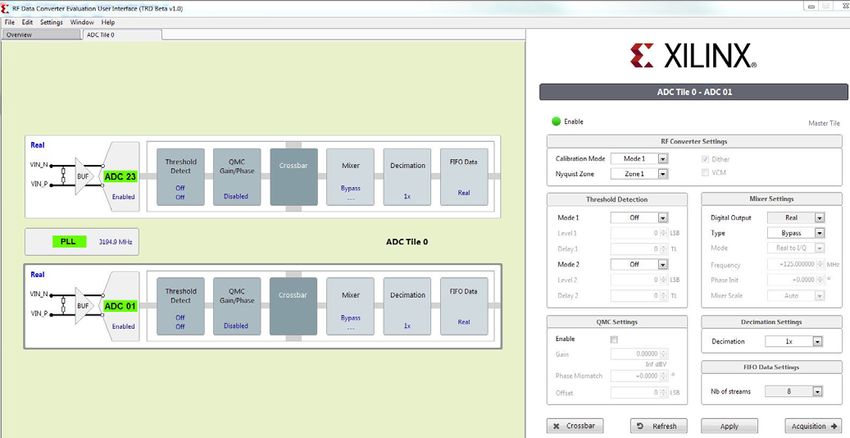
Table of Contents
          Revision History . . . . . . . . . . . . . . . . . . . . . . . . . . . . . . . . . . . . . . . . . . . . . . . . . . . . . . . . . . . . . . . . . . . . 2

       Chapter 1: Introduction
          Overview . . . . . . . . . . . . . . . . . . . . . . . . . . . . . . . . . . . . . . . . . . . . . . . . . . . . . . . . . . . . . . . . . . . . . . . . 5
          Zynq UltraScale+ RFSoC Overview . . . . . . . . . . . . . . . . . . . . . . . . . . . . . . . . . . . . . . . . . . . . . . . . . . . . 7
          Reference Design Overview . . . . . . . . . . . . . . . . . . . . . . . . . . . . . . . . . . . . . . . . . . . . . . . . . . . . . . . . . 9

       Chapter 2: Package Details

       Chapter 3: Hardware Design
          Hardware Overview. . . . . . . . . . . . . . . . . . . . . . . . . . . . . . . . . . . . . . . . . . . . . . . . . . . . . . . . . . . . . . .           13
          DAC Data Flow . . . . . . . . . . . . . . . . . . . . . . . . . . . . . . . . . . . . . . . . . . . . . . . . . . . . . . . . . . . . . . . . . . .      14
          ADC Data Flow . . . . . . . . . . . . . . . . . . . . . . . . . . . . . . . . . . . . . . . . . . . . . . . . . . . . . . . . . . . . . . . . . . .      20
          Programmable Logic Filter. . . . . . . . . . . . . . . . . . . . . . . . . . . . . . . . . . . . . . . . . . . . . . . . . . . . . . . . . .             23
          Stream Pipes Control and Status Registers . . . . . . . . . . . . . . . . . . . . . . . . . . . . . . . . . . . . . . . . . . . .                        24
          GPIO Selection . . . . . . . . . . . . . . . . . . . . . . . . . . . . . . . . . . . . . . . . . . . . . . . . . . . . . . . . . . . . . . . . . . .     25

       Chapter 4: Clocking
          Clock Switching . . . . . . . . . . . . . . . . . . . . . . . . . . . . . . . . . . . . . . . . . . . . . . . . . . . . . . . . . . . . . . . . . . 29
          Resets . . . . . . . . . . . . . . . . . . . . . . . . . . . . . . . . . . . . . . . . . . . . . . . . . . . . . . . . . . . . . . . . . . . . . . . . . . 35

       Chapter 5: Evaluation Tool System Configuration using the GUI
          External Component Configuration . . . . . . . . . . . . . . . . . . . . . . . . . . . . . . . . . . . . . . . . . . . . . . . . . .                     38
          ADC Configuration . . . . . . . . . . . . . . . . . . . . . . . . . . . . . . . . . . . . . . . . . . . . . . . . . . . . . . . . . . . . . . . .        39
          ADC Clock Configuration . . . . . . . . . . . . . . . . . . . . . . . . . . . . . . . . . . . . . . . . . . . . . . . . . . . . . . . . . . .            42
          Digital Down Converter Configurations . . . . . . . . . . . . . . . . . . . . . . . . . . . . . . . . . . . . . . . . . . . . . . .                      43
          DAC Configuration . . . . . . . . . . . . . . . . . . . . . . . . . . . . . . . . . . . . . . . . . . . . . . . . . . . . . . . . . . . . . . . .        43
          DAC Clock Configurations . . . . . . . . . . . . . . . . . . . . . . . . . . . . . . . . . . . . . . . . . . . . . . . . . . . . . . . . . .             43
          Digital Up Converter Configurations. . . . . . . . . . . . . . . . . . . . . . . . . . . . . . . . . . . . . . . . . . . . . . . . . .                   44
          ADC Tone Testing . . . . . . . . . . . . . . . . . . . . . . . . . . . . . . . . . . . . . . . . . . . . . . . . . . . . . . . . . . . . . . . . .       44

       Chapter 6: Software Architecture
          Software Architecture . . . . . . . . . . . . . . . . . . . . . . . . . . . . . . . . . . . . . . . . . . . . . . . . . . . . . . . . . . . . . 46

RFSoC Data Converter Evaluation Tool User Guide                                                                                 Send Feedback
                                                                                                                                                                     3
UG1287 (v2020.1) June 3, 2020              www.xilinx.com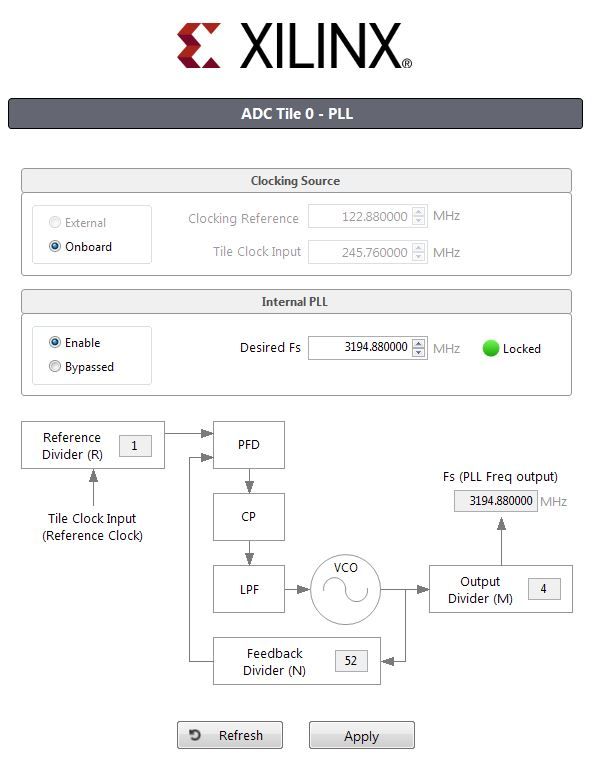
Chapter 7: Protocol Specification
          Socket Interface . . . . . . . . . . . . . . . . . . . . . . . . . . . . . . . . . . . . . . . . . . . . . . . . . . . . . . . . . . . . . . . . . .     50
          Command Types. . . . . . . . . . . . . . . . . . . . . . . . . . . . . . . . . . . . . . . . . . . . . . . . . . . . . . . . . . . . . . . . . .         52
          Application Flow . . . . . . . . . . . . . . . . . . . . . . . . . . . . . . . . . . . . . . . . . . . . . . . . . . . . . . . . . . . . . . . . .       52
          Multi-Tile Sync . . . . . . . . . . . . . . . . . . . . . . . . . . . . . . . . . . . . . . . . . . . . . . . . . . . . . . . . . . . . . . . . . . .    55

       Chapter 8: Zynq UltraScale+ RFSoC Data Converter Bare-metal/Linux Driver

       Chapter 9: System Considerations
          Boot Process. . . . . . . . . . . . . . . . . . . . . . . . . . . . . . . . . . . . . . . . . . . . . . . . . . . . . . . . . . . . . . . . . . . . .    60
          Global Address Map. . . . . . . . . . . . . . . . . . . . . . . . . . . . . . . . . . . . . . . . . . . . . . . . . . . . . . . . . . . . . . .          61
          Memory . . . . . . . . . . . . . . . . . . . . . . . . . . . . . . . . . . . . . . . . . . . . . . . . . . . . . . . . . . . . . . . . . . . . . . . .   61
          Memory Mapping for RF-DAC/RF-ADC. . . . . . . . . . . . . . . . . . . . . . . . . . . . . . . . . . . . . . . . . . . . . . . .                          62

       Appendix A: Reference Design Protocol Specification
          Commands . . . . . . . . . . . . . . . . . . . . . . . . . . . . . . . . . . . . . . . . . . . . . . . . . . . . . . . . . . . . . . . . . . . . . . 63
          Example Commands and Responses . . . . . . . . . . . . . . . . . . . . . . . . . . . . . . . . . . . . . . . . . . . . . . . . . 65
          Control Path Core Implementation . . . . . . . . . . . . . . . . . . . . . . . . . . . . . . . . . . . . . . . . . . . . . . . . . . 66

       Appendix B: Additional Resources and Legal Notices
          Xilinx Resources . . . . . . . . . . . . . . . . . . . . . . . . . . . . . . . . . . . . . . . . . . . . . . . . . . . . . . . . . . . . . . . . . .     69
          Solution Centers. . . . . . . . . . . . . . . . . . . . . . . . . . . . . . . . . . . . . . . . . . . . . . . . . . . . . . . . . . . . . . . . . .      69
          Documentation Navigator and Design Hubs . . . . . . . . . . . . . . . . . . . . . . . . . . . . . . . . . . . . . . . . . . .                            69
          References . . . . . . . . . . . . . . . . . . . . . . . . . . . . . . . . . . . . . . . . . . . . . . . . . . . . . . . . . . . . . . . . . . . . . .   70
          Please Read: Important Legal Notices . . . . . . . . . . . . . . . . . . . . . . . . . . . . . . . . . . . . . . . . . . . . . . . .                     71

RFSoC Data Converter Evaluation Tool User Guide                                                                                 Send Feedback
                                                                                                                                                                   4
UG1287 (v2020.1) June 3, 2020              www.xilinx.com
Chapter 1

Introduction

       Overview
       The objective of this reference design is to help you quickly and easily evaluate the new RF
       Data Converter (DC) Evaluation Tool functionality in the Zynq® UltraScale+™ family of
       RFSoCs. The RFSoC design demonstrates the capabilities and performance of the RF data
       converter (RFDC—RF-ADC and RF-DAC) available in the RFSoC devices. The evaluation tool
       serves as a platform for you to evaluate the Zynq UltraScale+ RFSoC features and helps
       accelerate the product design cycle.

       The evaluation tool consists of a ZCU111 evaluation board and a custom-developed
       graphical user interface (GUI) installed on a Windows host machine. The evaluation tool
       allows you to configure the operation of the RF-ADCs and RF-DACs and perform some basic
       tests e.g., FFT analysis of the ADC output for various input test signals. The key
       differentiator of Zynq UltraScale+ RFSoC devices when compared to many other discrete
       solutions is that the device contains both RF-ADCs and RF-DACs. However, one significant
       benefit is the DACs can be used to provide test signals for the ADC (i.e., loopback) which
       facilitates a very compact and easy to use solution for early demonstration or evaluation.

       All communications to the host PC (GUI) use the processing system (PS) Ethernet interface.
       This is necessary to facilitate the transfer of a large amount of test data as efficiently as
       possible. The ZCU111 evaluation board supports an external DDR4 memory interface on the
       programmable logic (PL) in addition to the PS DDR4 memory. Waveforms with a limited
       number of samples can leverage on-chip memory, but application testing and prototyping
       require the use of much larger external memories.

       The Xilinx® Vivado® IP integrator flow is used to create the hardware design, which is
       partitioned between the PS, RFDC, and PL. The reference design uses the IP integrator core
       for the RF Data Converter subsystem. The implementation supports all data rates on PL to
       the Data Converter interface, all converter sample rates and digital up conversion
       (DUC)/digital down conversion (DDC) configurations with a single design. The Xilinx
       PetaLinux flow is used to create and integrate the software components, including the Linux
       kernel and drivers.

RFSoC Data Converter Evaluation Tool User Guide                               Send Feedback
                                                                                                   5
UG1287 (v2020.1) June 3, 2020              www.xilinx.com
Chapter 1: Introduction
This user guide describes the architecture of the design and provides a functional
description of its components. It is organized as follows:
Chapter 1, Introduction (this chapter) provides a high-level overview of the Zynq
UltraScale+ RFSoC architecture, the design architecture, and a summary of key features.
Chapter 2, Package Details gives an overview of the design modules and design
components that make up this design.
Chapter 3, Hardware Design describes the hardware platform of the design including
key PS and PL peripherals.
Chapter 4, Clocking describes the details on clocking used for the design.
Chapter 5, Evaluation Tool System Configuration using the GUI describes the details of
system configuration and features supported using the GUI.
Chapter 6, Software Architecture describes the application processor unit (APU)
software platform including the Linux software stack and the Linux rftool application
running on the APU.
Chapter 7, Protocol Specification describes the protocol used to communicate between
the host and RFSoC.
Chapter 8, Zynq UltraScale+ RFSoC Data Converter Bare-metal/Linux Driver describes
where to get more information about the driver.
Chapter 9, System Considerations describes system architecture considerations
including boot flow and the system address map.
Appendix A, Reference Design Protocol Specification describes the commands used in
the software design.
Appendix B, Additional Resources and Legal Notices lists additional resources and
references.
RFSoC Data Converter Evaluation Tool User Guide Send Feedback
6
UG1287 (v2020.1) June 3, 2020 www.xilinx.comChapter 1: Introduction
Zynq UltraScale+ RFSoC Overview
The Zynq UltraScale+ RFSoC family integrates the key subsystems required to implement a
complete software-defined radio including direct RF sampling data converters, enabling
CPRI and Gigabit Ethernet-to-RF on a single, highly programmable SoC.
Each RFSoC offers multiple RF-sampling analog-to-digital (RF-ADC) and RF-sampling
digital-to-analog (RF-DAC) data converters. The RF-ADC supports a maximum sample rate
of 4 GSPS with dynamic range and has a signal bandwidth of up to 4 GHz. The RF-DAC can
clock at up to 6.554 GSPS with an output signal bandwidth of greater than 4 GHz. The RF
data converters also include power efficient digital down converters (DDCs) and digital up
converters (DUCs) that include programmable interpolation, decimation rates, a
numerically controlled oscillator (NCO), and a complex mixer. The DDCs and DUCs can also
support multi-band operation. Figure 1-1 shows the block diagram of the Zynq UltraScale+
RFSoC RF Data Converter.
X-Ref Target - Figure 1-1
Zynq UltraScale+ RFSoC
Data Converter IP Core
DUC
AXI4-Stream
Processing System DAC
Quad ARM Cortex-A53
Dual ARM Cortex-R5 DUC 8 TX Channels
AXI4-Stream
DAC
AXI4-Lite
Control and
Programmable Configuration
Logic
DDC
AXI4-Stream
ADC
GTY Serial DDC 8 RX Channels
Transceivers AXI4-Stream
ADC
X21232-092118
Figure 1-1: Zynq UltraScale+ RFSoC RF Data Converter in RFSoC
RFSoC Data Converter Evaluation Tool User Guide Send Feedback
7
UG1287 (v2020.1) June 3, 2020 www.xilinx.comChapter 1: Introduction
The RF-ADCs and RF-DACs are organized into tiles, each containing either two or four
RF-ADCs or four RF-DACs (see Figure 1-2). Each tile also includes a block with a PLL and all
the necessary clock handling logic and distribution routing for the analog and digital logic.
X-Ref Target - Figure 1-2
s03_axis m13_axis m03_axis
Data Path 3 DAC3 Data Path 3 ADC3
Data Path 1 ADC1
s02_axis m12_axis m02_axis (23) (23)
Data Path 2 DAC2 Data Path 2 ADC2
IP State IP State IP State
Machine Machine Machine
s01_axis m11_axis m01_axis
Data Path 1 DAC1 Data Path 1 ADC1 Data Path 0 ADC0
m00_axis (01) (01)
s00_axis m10_axis
Data Path 0 DAC0 Data Path 0 ADC0
DAC_X0Y0 ADC_X0Y1 ADC_X0Y0
6.4 GSPS RF-DAC Tile 2 GSPS RF-ADC Tile 4 GSPS RF-ADC Tile
X21300-090918
Figure 1-2: Converter Tile Structure
For device specifications and additional information, see:
• Zynq UltraScale+ RFSoC Data Sheet: Overview (DS889) [Ref 1]
• Zynq UltraScale+ RFSoC Data Sheet: DC and AC Switching Characteristics (DS926)
[Ref 2]
• Zynq UltraScale+ Device Technical Reference Manual (UG1085) [Ref 3].
RFSoC Data Converter Evaluation Tool User Guide Send Feedback
8
UG1287 (v2020.1) June 3, 2020 www.xilinx.comChapter 1: Introduction
Reference Design Overview
The evaluation tool targets the Zynq UltraScale+ RFSoC ZU28DR-FFVG1517 running on the
ZCU111 evaluation board and provides a platform to evaluate the RFSoC features. The
system level block diagram of the evaluation tool design is shown in Figure 1-3.
X-Ref Target - Figure 1-3
Clock I2C Power
ZCU111 Evaluation Board
Module Mux Controller
Zynq® UltraScale+™ RFSoC
Software
Application
AXIS
Stream Daughter
I2C I2C Driver DMA AXIS DAC
Pipes Card
AXIS
PL DDR (HW-
RFdo AXI AXI4-Lite RFdc IP RFMC- Filters
Driver
PC User DMA XM500)
AXIS
Interface
Gigabit Stream ADC
DMA AXIS
Ethernet Pipes
GEM
GEM Driver
AXIS
$38
Clocking
and Control
Processing System Programmable Logic
PS DDR PL DDR
X21291-092118
Figure 1-3: RF Data Converter Evaluation Tool System Level Block Diagram
The evaluation tool uses an integrated RF Data Converter in an 8x8 configuration along with
AXI DMA and AXI4-Stream components for high performance data transfers between
PL-DDR to RFDC and vice versa. Stream Pipe comprises various AXI4-Stream Infrastructure
IPs. The AXI DMA is configured in Scatter Gather (SG) mode for high performance. The
evaluation tool also makes use of multiple processing units available inside the PS, such as
Gigabit Ethernet, I2C, and SD Interface. The APU inside the PS is configured to run in
symmetric multiprocessing (SMP) Linux mode. The main task of the Linux application is to
configure and control the RF-ADC and RF-DAC blocks and the flow of data through the
streaming pipeline.
A custom-developed Windows-based GUI is provided along with this evaluation tool. It can
interact with the RFSoC running on the ZCU111 evaluation board. The GUI connects to the
Linux application running on the RFSoC via a TCP Ethernet interface. Based on commands
RFSoC Data Converter Evaluation Tool User Guide Send Feedback
9
UG1287 (v2020.1) June 3, 2020 www.xilinx.comChapter 1: Introduction
received from the GUI, the Linux application performs various operations that are described
in Chapter 6, Software Architecture. Because a TCP socket is used to transfer the data over
Ethernet, it is possible to run the GUI on any machine connected to the network (i.e., cloud).
The evaluation tool can be run in three separate modes:
Standalone DAC: In this mode, a pattern is generated using the GUI on the host
machine. This pattern is constantly replayed on the selected DAC channel. The output of
the DAC can be monitored on any standard external equipment, such as a spectrum
analyzer or oscilloscope.
Standalone ADC: In this mode, you generate an analog signal from external equipment,
and this signal is fed to ADC inputs. Digital output of the ADC can be analyzed on the
host machine using the GUI.
DAC to ADC Loopback: In this mode, the output of the DAC is looped back to the input
of ADC. In this way, you can generate a pattern on DAC from the GUI and can analyze the
same pattern on ADC output in the GUI. It is recommended to manage RF signal
conditioning well. Anti-aliasing filters are supplied in the ZCU111 development kit for
the existing RF line up of RFMC-XM500.
Note: For system performance and limitations in various scenarios, see the ZCU111 RFSoC RF Data
Converter Evaluation Tool Getting Started Guide [Ref 4].
Components
• Evaluation platform
° ZCU111 evaluation board
° Daughter card (HW-FMC-XM500)
° Cables and filters (see the Zynq UltraScale+ RFSoC ZCU111 Evaluation Kit Quick
Start Guide (XTP490) [Ref 5]
• Xilinx tools
° Vivado® Design Suite 2020.1 [Ref 6]
° Vitis™ Software Development Kit 2020.1 [Ref 7]
° PetaLinux tools 2020.1 [Ref 8]
• Hardware interfaces and IP
° RFDC
° AXI DMA
° DDR controller interface
° AXI SmartConnect
° AXI interconnect
RFSoC Data Converter Evaluation Tool User Guide Send Feedback
10
UG1287 (v2020.1) June 3, 2020 www.xilinx.comChapter 1: Introduction
° AXI4-Stream IPs
• Auxiliary peripherals
° SD
° I2C
° PS-GPIO
° Gigabit Ethernet
° UART
° JTAG
Software Components
• Operating systems
° APU: SMP Linux
• Linux frameworks
° Ethernet
° Clock
° Contiguous memory allocator (CMA)
• User applications
° APU: Ethernet-based server application
• RFDC driver-based features
° Digital down conversion (DDC)/digital up conversion (DUC)
° Nyquist Mix mode
° Digital complex mixers
° Quadrature modulation correction (QMC)
° Internal PLL
° ADC calibration
° DAC high linearity and low noise
° Inverse sinc filter
° DAC Output Current mode (20 or 32 mA)
° External clock driver
• AXI-DMA client driver
• Board-specific components
° Voltage controller
RFSoC Data Converter Evaluation Tool User Guide Send Feedback
11
UG1287 (v2020.1) June 3, 2020 www.xilinx.comChapter 2
Package Details
The evaluation tool ZIP file package rdf0476-zcu111-rf-dc-eval-tool-2019-2.zip
contains the following components grouped by application processor unit (APU) or
programmable logic (PL). The package is available at the Zynq UltraScale+ RFSoC ZCU111
Evaluation Kit documentation website.
APU
petalinux_bsp: PetaLinux board support package (BSP) is included to build a
pre-configured SMP Linux image for the APU. The BSP includes the following components:
• First stage boot loader (FSBL)
• ARM trusted firmware (ATF)
• U-Boot
• Linux kernel
• Device tree
• Root file system (rootfs)
PL
Vivado: Vivado IP integrator design that integrates the RF Data Converter subsystem, AXI
DMA, Stream Pipe, AXI Interconnect, and PL DDR controller.
Host System GUI
The user interface connecting to the ZCU111 platform via Ethernet cable.
RFSoC Data Converter Evaluation Tool User Guide Send Feedback
12
UG1287 (v2020.1) June 3, 2020 www.xilinx.comChapter 3
Hardware Design
Hardware Overview
The Vivado IP integrator flow is used to create the hardware design which is partitioned
between the processing system (PS), RF Data Converter (RFDC), and programmable logic
(PL). Figure 3-1 shows the hardware block diagram.
X-Ref Target - Figure 3-1
Processing System
APU
APU
DDR APU
GEM APU SD I2C
Controller
AXI Interconnect
S_AXI_HP0_FPD S_AXI_HP1_FPD M_AXI_HPM0_FPD
AXI Interconnect AXI Interconnect AXI Smartconnect
GPIOs
DMA DMA DDR4 Controller (MIG)
Channel Select Mux Stream Mux Clocking and Control
Stream Pipe Stream Pipe Stream Pipe Stream Pipe
Programmable Logic
ADC0 ADC7 DAC0 DAC7
RFdc
X21233-092118
Figure 3-1: Hardware Block Diagram
RFSoC Data Converter Evaluation Tool User Guide Send Feedback
13
UG1287 (v2020.1) June 3, 2020 www.xilinx.comChapter 3: Hardware Design
The design is configured to operate in 8x8 mode (8-channel RF-DAC and 8-channel
RF-ADC). The RFDC datapath consists of AXI DMA and Stream Pipe IPs for high performance
data transfers between PS/PL DDR memories and RFDC IP. The RFDC datapath is based on
AMBA AXI4-Stream protocol and the control path is based on the AXI4-Lite interface. Both
datapath and control paths are implemented in the PL.
The PS is configured with a GEM Ethernet controller (GEM3) and I2C controllers (I2C0 and
I2C1). The GEM Ethernet controller enables a Gigabit Ethernet interface between the host
machine and the ZCU111 board. The I2C controller provides an interface between the PS
and the on-board RF PLLs.
The SD card holds the image and file system, which loads the FPGA part when power is
switched on.
The information passed from the host system GUI via Ethernet to the ZCU11 platform is
stored in the PL DDR using a DDR controller. The application running on the processor then
transfers this data to the programmable logic over the AXI ports.
The following sections provide detailed information for both RF-DAC and RF-ADC
datapaths.
DAC Data Flow
Figure 3-2 shows the datapath implementation for the 8-channel RF-DAC (RF-DAC0 and
RF-DAC7). There are eight stream pipes implemented. Each of these stream pipes feed data to
the RF-DAC. Due to the extreme speed of the RF-DAC, it is not possible to live-feed the data
using Ethernet, hence user-selected signals are continuously looped over or replayed to create
a continuous and measurable signal at the output of the DAC.
There are two ways input samples are stored and replayed:
• Samples are stored and looped over in PL DDR (high storage but reduced speed).
• Samples are stored and looped over in block RAM (low storage but highest speed).
RFSoC Data Converter Evaluation Tool User Guide Send Feedback
14
UG1287 (v2020.1) June 3, 2020 www.xilinx.comChapter 3: Hardware Design
X-Ref Target - Figure 3-2
Memory
DAC0
Loopback 0
Memory
DAC1
Loopback 1
Memory
DAC2
Loopback 2
Memory
DAC3
Loopback 3
PL DDR + MIG AXI SG DMA Stream Mux
Memory
DAC4
Loopback 4
Memory
DAC5
Loopback 5
Memory
DAC6
Loopback 6
Memory
DAC7
Loopback 7
AXI Streaming Interface
512 bits x 300 MHz 256 bits x 300 MHz 256 bits x DAC CLK
X21293-092118
Figure 3-2: Datapath Implementation for 8-Channel RF-DAC
Figure 3-2 represents the architecture of the 8-channel RF-DAC (RF-DAC0 to RF-DAC7). The
Scatter Gather (SG) DMA is used to source the data from the PL DDR memory controller to
the DACs. The DMA sends this data to the stream MUX block, which is connected to each of
the DAC channel's stream data path. Based on the channel select line input (PS-GPIOs
routed through extended multiplexed I/Os (EMIOs)) of the stream pipe, the data gets
routed to the corresponding RF-DAC channel. (See GPIO Selection.) In case of continuous
replay from DDR, DMA constantly fetches the data and streaming mux switches the channel
based on the user selection of enabled channels. For sample storag e and replay from BRAM
mode, the functionality of the memory loopback system is elaborated upon in Memory
Loopback Details.
RFSoC Data Converter Evaluation Tool User Guide Send Feedback
15
UG1287 (v2020.1) June 3, 2020 www.xilinx.comChapter 3: Hardware Design
Streaming MUX
The streaming MUX connects the incoming pattern to the selected channel(s) based on a
GUI command.
Figure 3-3 shows the stream data interface with AXIS FIFOs.
X-Ref Target - Figure 3-3
Memory Loopback
0
Memory Loopback
1
TDATA
------------
Memory Loopback
7
X21235-090918
Figure 3-3: Stream Data Interface with AXIS FIFOs
The TDATA is broadcast as is without any additional component in the path. This helps to
achieve timing closure because there is no multiplexer in the path.
The TVALID signal is ANDed with the Channel Control signal as shown in Figure 3-4. Based
on user channel selection, the TVALID signal is enabled. The channel control select is
asserted based on mode (BRAM or DDR). For BRAM mode, it is controlled by software using
GPIOs. For DDR mode, it is controlled by a hardware logic block channel arbiter. The arbiter
block allocates the DMA access among the eight streaming interfaces based on number of
channels selected in the GUI. Software programs the Channel Select register based on the
GUI command. After the register is programmed, the arbiter block first samples the
predefined register to determine the active channels and arbitrates only among those
active channels in a round robin fashion (based on the TLAST on the streaming interface),
thereby effectively using the DDR bandwidth.
RFSoC Data Converter Evaluation Tool User Guide Send Feedback
16
UG1287 (v2020.1) June 3, 2020 www.xilinx.comChapter 3: Hardware Design
X-Ref Target - Figure 3-4
Memory
Loopback
0
Memory
Loopback
1
------------
Tvalid 0..7 Memory
Channel Select 0..7 Loopback
7
Channel Arbiter
X21236-092118
Figure 3-4: Channel Selection Control Signals
Figure 3-5 shows the TREADY signal generation. Only a single TREADY signal is selected
based on the Channel Select signal; other TREADY signals are ignored.
X-Ref Target - Figure 3-5
Memory Loopback
0
Memory Loopback
1
TReady
Mux
------------
Memory Loopback
7
Channel Arbiter
X21237-092118
Figure 3-5: TREADY Signal Generation
RFSoC Data Converter Evaluation Tool User Guide Send Feedback
17
UG1287 (v2020.1) June 3, 2020 www.xilinx.comChapter 3: Hardware Design
Memory Loopback Details
Figure 3-6 illustrates the working of memory loopback (BRAM mode) in one DAC path.
X-Ref Target - Figure 3-6
DMA AXIS FIFO DAC
To DAC
Interface
(S00) AXI Stream Control AXIS
AXIS FIFO
Mux Switch Broadcaster
Loopback
(S01)
AXIS
DMA Clock FIFO
Domain DAC CLK Domain
X21239-092118
Figure 3-6: Implementation of Memory Loopback Component
The data coming from the DMA via the AXI4-Stream decoder (Stream MUX) is fed into an
asynchronous AXI4-Stream FIFO. This takes care of the clock domain crossing between the
DMA clock and DAC clock domain. The output of the FIFO is fed into an AXI4-Stream
multiplexer component. This component switches between regular BRAM (Loopback) mode
and DDR (Continuous Playback) mode. The control switch logic block takes input from
PS-GPIOs through an EMIO interface, and when it is High (controlled by software), the
output of the corresponding control logic goes High and enables the channel. The working
of the control switch is further described in the DAC Control Switch section. Based on mode
selection, either data is continuously replayed from AXIS FIFO to the AXIS broadcaster, or
data is continuously fetched from DMA and subsequently transferred to DAC.
RFSoC Data Converter Evaluation Tool User Guide Send Feedback
18
UG1287 (v2020.1) June 3, 2020 www.xilinx.comChapter 3: Hardware Design
DAC Control Switch
The control switch is the final control logic before the streaming interface is connected to
the DAC. This logic provides tight control over the streaming path and helps synchronize all
the stream interfaces at any given time. Figure 3-7 shows the control switch.
X-Ref Target - Figure 3-7
Tvalid In
Tvalid Out to DAC
Control Switch
Channel Start
Tready
TReady Out to FIFO Control
Switch Channel Start
X21238-090918
Figure 3-7: Control Switch
The channel control signal acts as a channel start/stop signal. This signal exists individually
for all channels and can be used to control each channel independently. This is done using
PS-GPIOs through the EMIO interface that are in turn controlled by software. The control
switch controls TVALID input to DAC and TREADY input to FIFO, as shown in Figure 3-7. See
GPIO Selection.
RFSoC Data Converter Evaluation Tool User Guide Send Feedback
19
UG1287 (v2020.1) June 3, 2020 www.xilinx.comChapter 3: Hardware Design
ADC Data Flow
Figure 3-8 shows the datapath implementation for 8-channel RF-ADC (RF-ADC0 and
RF-ADC7). The default configuration of Real to IQ is enabled in the design so that all
possible streaming interfaces from RF-ADC are accessible.
X-Ref Target - Figure 3-8
Control AXIS FIFO
ADC0 I & Q Merge
Switch 64 KS
Control AXIS FIFO
ADC1 I & Q Merge
Switch 64 KS
Control AXIS FIFO
ADC2 I & Q Merge
Switch 64 KS
Control AXIS FIFO
ADC3 I & Q Merge
Switch 64 KS
Channel PL DDR +
SG DMA
Select Mux MIG
Control AXIS FIFO
ADC4 I & Q Merge
Switch 64 KS
Control AXIS FIFO
ADC5 I & Q Merge
Switch 64 KS
Control AXIS FIFO
ADC6 I & Q Merge
Switch 64 KS
Control AXIS FIFO
ADC7 I & Q Merge
Switch 64 KS
128 bits x 512 MHz 256 bits x 512 MHz 256 bits x 300 MHz
X21302-092518
Figure 3-8: Datapath Implementation for 8 Channel RF-ADC
All the incoming ADC streams are gated through the control switch logic. After the gates
are enabled, the I and Q streams are fed through IQ Merge logic. Based on user selection,
either a real or a complex stream is passed on to the AXIS FIFO. The Channel Select MUX
connects one of the AXIS FIFO to DMA, based on user selection. This data is further
provided to SG DMA to be stored in PL DDR memory. The synchronization among all eight
channels is achieved through control switch logic. A common global start signal is used for
this purpose.
RFSoC Data Converter Evaluation Tool User Guide Send Feedback
20
UG1287 (v2020.1) June 3, 2020 www.xilinx.comChapter 3: Hardware Design
ADC Control Switch
The control switch is the final control logic before the streaming interface is connected to
the ADC. This logic controls the streaming path and also helps to synchronize all the stream
interfaces when required through software control. Figure 3-9 shows the control switch.
X-Ref Target - Figure 3-9
Tready
Tready Out to ADC
Control Switch
Channel Start
Tvalid
Tvalid Out to FIFO Control
Switch Channel Start
X21241-090918
Figure 3-9: Control Switch
The channel select signal acts as a channel start/stop signal. This signal exists individually
for all channels and can be used to control each channel independently. This is done using
PS-GPIOs through the EMIO interface that are in turn controlled by software.
The control switch controls TVALID input to FIFO and TREADY input to ADC.
I & Q Merge Logic
The IQ datapath for RF-ADC is shown in Figure 3-10. This pipe can capture IQ data while
maintaining synchronization and coherency. The data is captured in an interleaved fashion
i.e., eight samples of I data and eight samples of Q data. The AXIS combiner IP is used to
combine I and Q streams.
Alternatively, you can select a Real channel only (in which case, the width converter IP is
used to convert the incoming 128-bit Real data to 256-bit Real data). Finally, the data is
stored into an AXIS FIFO.
RFSoC Data Converter Evaluation Tool User Guide Send Feedback
21
UG1287 (v2020.1) June 3, 2020 www.xilinx.comChapter 3: Hardware Design
X-Ref Target - Figure 3-10
Data Width
Converter
I (Real) Stream AXIS Broadcaster
AXI4-Stream DMA
Mux
AXIS Combiner
Q Stream
IQ Select
X21242-091318
Figure 3-10: IQ Datapath
Channel Select MUX
The Channel MUX implementation is an 8:1 streaming selection logic as shown in
Figure 3-11. Among eight incoming streaming inputs, only one streaming data is passed to
SG DMA interface based on channel-select input.
X-Ref Target - Figure 3-11
AXIS FIFO
0
AXIS FIFO Stream
1 Out to
DMA
Channel
Select Mux
------------
AXIS FIFO
7
Channel Select
X21243-090918
Figure 3-11: Channel MUX
RFSoC Data Converter Evaluation Tool User Guide Send Feedback
22
UG1287 (v2020.1) June 3, 2020 www.xilinx.comChapter 3: Hardware Design
Programmable Logic Filter
This design element illustrates the ease with which custom high-performance signal
processing elements can be added to the signal chain in the Vivado IP integrator. These
blocks are generated using the Xilinx System Generator flow. System Generator is a plug-in
to the Simulink environment, adding a block set to the Simulink® software library browser.
The block set has about 90 blocks. These blocks leverage the Xilinx IP core generators to
deliver optimized results for RFSoCs. Using SysGen flow in Vivado Design Suite 2020.1, you
can generate vector or multi-sample designs using super sample rate (SSR) filters. These
filters help process data at a speed that matches RFDC ADC/DACs.
In the current evaluation design, SSR filters are implemented on tile 0/block0 for both ADC
and DAC. The configuration of these filters is fixed to x8, with the user having an option
either to bypass or enable x8 interpolation and decimation. If used along with RFDC IPs
Interpolation/decimation filters, you can achieve an interpolation/decimation rate of 16x,
32x, and 64x.
Details of the implementation of the SSR filter are shown in Figure 3-12 and Figure 3-13.
X-Ref Target - Figure 3-12
From
Memory
Loopback Bypass
Demux
AXIS
AXIS
MUX
AXIS Width AXIS
SSR IP
FIFO Converter FIFO
X21953-112718
Figure 3-12: DAC SSR IP Block Diagram
The AXIS demux and AXIS multiplexer are is controlled through a common GPIO pin. You
have the option to either bypass (disable) SSR IP or enable the SSR IP through the GPIO pin.
Additional AXIS FIFO are added to the SSR IP input and output interface to provide a
cushion for maintaining rate control.
RFSoC Data Converter Evaluation Tool User Guide Send Feedback
23
UG1287 (v2020.1) June 3, 2020 www.xilinx.comChapter 3: Hardware Design
Similarly, SSR IP for ADC is also enabled. Figure 3-13 shows the implementation of SSR ADC
Filter IP.
X-Ref Target - Figure 3-13
Bypass
Demux
)URP 7R
AXIS
AXIS
MUX
$'& ,40HUJH
AXIS Width AXIS
SSR IP
FIFO Converter FIFO
X21954-112718
Figure 3-13: ADC SSR IP Block Diagram
Stream Pipes Control and Status Registers
The register sets in the design are available under the user_axilite_control block. The block
has an AXI4-Lite interface through which the registers can be accessed. In the current
implementation, the base address of the user_axilite_control is 0xB005_0000. Table 3-1 lists
the registers that are available currently.
Table 3-1: Control and Status Register
Name Offset Description Default Value
DAC_path_0_fifo_data_count 0x00 Indicates the count inside the FIFO 32'd0
DAC_path_1_fifo_data_count 0x04 Indicates the count inside the FIFO 32'd0
DAC_path_2_fifo_data_count 0x08 Indicates the count inside the FIFO 32'd0
DAC_path_3_fifo_data_count 0x0C Indicates the count inside the FIFO 32'd0
DAC_path_4_fifo_data_count 0x10 Indicates the count inside the FIFO 32'd0
DAC_path_5_fifo_data_count 0x14 Indicates the count inside the FIFO 32'd0
DAC_path_6_fifo_data_count 0x18 Indicates the count inside the FIFO 32'd0
DAC_path_7_fifo_data_count 0x1C Indicates the count inside the FIFO 32'd0
ADC_path_0_fifo_data_count 0x20 Indicates the count inside the FIFO 32'd0
ADC_path_1_fifo_data_count 0x24 Indicates the count inside the FIFO 32'd0
ADC_path_2_fifo_data_count 0x28 Indicates the count inside the FIFO 32'd0
ADC_path_3_fifo_data_count 0x2C Indicates the count inside the FIFO 32'd0
ADC_path_4_fifo_data_count 0x30 Indicates the count inside the FIFO 32'd0
ADC_path_5_fifo_data_count 0x34 Indicates the count inside the FIFO 32'd0
ADC_path_6_fifo_data_count 0x38 Indicates the count inside the FIFO 32'd0
ADC_path_7_fifo_data_count 0x3C Indicates the count inside the FIFO 32'd0
RFSoC Data Converter Evaluation Tool User Guide Send Feedback
24
UG1287 (v2020.1) June 3, 2020 www.xilinx.comChapter 3: Hardware Design
GPIO Selection
Table 3-2 provides the list of GPIOs for channel control, memory loopback reset, and IQ
selection.
Table 3-2: Control Signals
DAC ADC Common
Function GPIO# Function GPIO# Function GPIO#
DAC0 Memory Loopback Reset 0 ADC0001 FIFO Reset 32 DAC Arbiter Reset 64
Reserved 1 ADC0001_IQ_Merge_sel 33 ADC Arbiter Reset 65
DAC0 Channel Control 2 ADC0001 Channel Control 34 Reserved 66
DAC0 Loopback select 3 Reserved 35 Reserved 67
DAC1 Memory Loopback Reset 4 ADC0203 FIFO Reset 36 DAC Multi Tile Select 68
DAC1 Loopback select 5 ADC0203_IQ_Merge_sel 37 Reserved 69
DAC1 Channel Control 6 ADC0203 Channel Control 38 Reserved 70
DAC2 Loopback select 7 Reserved 39 Reserved 79:71
DAC2 Memory Loopback Reset 8 ADC1011 FIFO Reset 40 ADC Channel MUX 82:80
select
DAC3 Loopback select 9 ADC1011_IQ_Merge_sel 41 Reserved 83
DAC2 Channel Control 10 ADC1011 Channel Control 42 ADC Multi Tile Select 84
DAC4 Loopback select 11 Reserved 43 ADC Fabric Filter 90
Select
DAC3 Memory Loopback Reset 12 ADC1213 FIFO Reset 44 DAC Fabric Filter 91
Select
DAC5 Loopback select 13 ADC1213_IQ_Merge_sel 45
DAC3 Channel Control 14 ADC1213 Channel Control 46
DAC6 Loopback select 15 Reserved 47
DAC4 Memory Loopback Reset 16 ADC2021 FIFO Reset 48
DAC7 Loopback select 17 ADC2021_IQ_Merge_sel 49
DAC4 Channel Control 18 ADC2021 Channel Control 50
Reserved 19 Reserved 51
DAC5 Memory Loopback Reset 20 ADC2223 FIFO Reset 52
Reserved 21 ADC2223_IQ_Merge_sel 53
DAC5 Channel Control 22 ADC2223 Channel Control 54
Reserved 23 Reserved 55
DAC6 Memory Loopback Reset 24 ADC3031 FIFO Reset 56
Reserved 25 ADC3031_IQ_Merge_sel 57
RFSoC Data Converter Evaluation Tool User Guide Send Feedback
25
UG1287 (v2020.1) June 3, 2020 www.xilinx.comChapter 3: Hardware Design
Table 3-2: Control Signals (Cont’d)
DAC ADC Common
DAC6 Channel Control 26 ADC3031 Channel Control 58
Reserved 27 Reserved 59
DAC7 Memory Loopback Reset 28 ADC3132 FIFO Reset 60
Reserved 29 ADC3132_IQ_Merge_sel 61
DAC7 Channel Control 30 ADC3132 Channel Control 62
Reserved 31 Reserved 63
RFSoC Data Converter Evaluation Tool User Guide Send Feedback
26
UG1287 (v2020.1) June 3, 2020 www.xilinx.comChapter 4
Clocking
The evaluation tool design has 256 MHz, 409.625 MHz, 300 MHz, and 512 MHz clock
domains. The RF-DAC output is a maximum of 409.625 MHz and RF-ADC 256 MHz. The
256 MHz output from ADC is supplied to the clocking wizard for generating 512 MHz for
driving the PL ADC path whereas 409.625 MHz drives the PL DAC path directly. The 300 MHz
clock is generated from the PL DDR block (ddr4_0).
Figure 4-1 shows the analog and mixed signal (AMS) clocking structure in the ZCU111
evaluation board.
X-Ref Target - Figure 4-1
LMX2594 To ADC Tile 0 - 1
PLL 1
To ADC Tile 2 - 3
LMX2594
PLL 2
To DAC Tile 0 - 1
LMX2594
PLL 3
FPGA REF CLK
I2C I2C
I2C0 LMK04208
Mux SPI
SysRef FPGA
PS
SysRef In SysRef
RFSoC
I2C
I2C1
Expander
X21244-092118
Figure 4-1: ZCU111 AMS Clocking Structure
The RF data converter clocking includes a primary external onboard reference PLL
(LMK04208) and onboard RF PLLs (LMX2594) to generate RF-ADC and RF-DAC sample
clocks. The primary management interface for the PLL devices is the Serial Protocol
Interface (SPI). The SPI is enabled on the ZCU111 via an I2C to SPI bridge. The bridge
components are enabled using the I2C MUX/Expander component present on ZCU111. This
RFSoC Data Converter Evaluation Tool User Guide Send Feedback
27
UG1287 (v2020.1) June 3, 2020 www.xilinx.comChapter 4: Clocking
scheme allows the application software to program the PLL chip sets without any external
tools.
The LMK component shown in Figure 4-1 provides a low jitter and low noise clock to RFDC
IP and to RF PLLs which act as a source for further clock generation and clock
synchronization. LMK modules generate six clock outputs that are connected to these
various blocks and components:
• PL: Sys Ref
• DAC: Sys Ref
• PL: FPGA Ref Clk
• LMX: Ref Clock
• LMX: Sync Clock
• SMA: 12.8 MHz Clock
Refer to Appendix A, Reference Design Protocol Specification for more details about clock
commands and arguments.
In each Zynq UltraScale+ RFSoC, each RF-ADC or RF-DAC tile has its own clock input.
Additionally, there is a dedicated input PL SYSREF pin pair per package. The PL SYSREF clock
is used for multi-tile and multi-chip synchronization. For multi-tile designs, the PL SYSREF
connects into a master tile and the signal is distributed within the master tile and all the
other tiles in the design. The generation from PL SysRef is done using the output of the LMK
module. The RFDC IP requires PL SysRef synchronously captured in the PL. For this purpose,
PL SysRef provided to the IP must be synchronous to the clock domain of the group, i.e., PL
clock. This is achieved using the logic diagram shown in Figure 4-2.
X-Ref Target - Figure 4-2
PL SYSREF (LMK) user_sysref to RFdc
Sync Sync
1st Stage 2nd Stage
PL REF CLK (LMK) Fabric Clock
MMCM Fabric Logic
X21245-092118
Figure 4-2: SysRef Synchronization
RFSoC Data Converter Evaluation Tool User Guide Send Feedback
28
UG1287 (v2020.1) June 3, 2020 www.xilinx.comChapter 4: Clocking
First, the PL SysRef is synchronized to the incoming PL clock for both DAC and ADC as
shown in Figure 4-2. This output of the second stage synchronizer is connected to
user_sysref ports of RFDC IP. Refer to Zynq UltraScale+ RFSoC RF Data Converter LogiCORE IP
Product Guide (PG269) for more details on multi-tile synchronization [Ref 9].
Clock Switching
The design supports multi-tile synchronization (MTS) mode and non-MTS mode. The
requirements for both modes are different. In MTS mode, all the DAC and ADC streams
should be triggered and captured at the same time. Hence all the DAC fabric paths
associated with different tiles are sourced by a common PL clock. This is the same case with
all the ADC paths. In non-MTS mode, the streaming interface clocks can be sourced by their
respective DAC and ADC tile clocks. The switching of the clock is controlled via a clock MUX
primitive BUFGMUX (see Figure 4-3 and Figure 4-4). Clock selection depends on whether
MTS mode is selected or not.
X-Ref Target - Figure 4-3
Tile Clock
BUFGMUX
PL Fabric Clock
Multi-Tile Mode
X21246-091318
Figure 4-3: Clock MUX Selection
The other requirement of MTS mode is that all the incoming and outgoing streams of RFDC
IP should be triggered at the same instant. This is achieved using a combination of control
switch and channel control logic (Figure 4-5 and Figure 4-6). Figure 4-6 shows the channel
control scheme implemented in the design. The individual channel control signal is
generated using PS-GPIO pins. Later on, these signals are synchronized with respect to the
selected clock from BUFGMUX. This signal acts as an individual channel start/stop signal
which is fed to the control switch block of the ADC/DAC datapath. However, in MTS mode,
RFSoC Data Converter Evaluation Tool User Guide Send Feedback
29
UG1287 (v2020.1) June 3, 2020 www.xilinx.comChapter 4: Clocking
this signal is overridden with a global start/stop signal which is generated using Channel
Select of the Master DAC block, i.e., tile 0 block 0. This signal selection is controlled using
multi-tile mode select.
X-Ref Target - Figure 4-4
Multi-Tile Control
PL CLK
Tile0_clk Tile0 _ADC_Clock out
PLL
AXIS FIFO I&Q ADC 0
Example:
64 KS Merge
Fs = 3.2 GHz ADC 0 Analog Clock (PCB)
Tile 0
Decimation = x1
SYREF = 8 MHz ADC 1
AXIS FIFO I&Q
PL SYSREF = 8 MHz 64 KS Merge
PL REF CLK = 200 MHz
PL CLK = 400 MHz
ADC 2
333 MHz
ADC 1 Analog Clock (PCB)
Tile 1
To Tile0 To Tile1
channels channels
ADC 3
SYSREF (PCB)
PL DDR + DMA Stream PL
MIG Mux Sync logic
CLK User_sysref_dac (Fabric Clock)
To Tile2 To Tile3 ADC 4
channels channels ADC 2 Analog Clock (PCB)
GP
PS Tile 2
IO
ADC 5
PL SYSREF (PCB) Multi-Tile Control
PL REF CLK (PCB) PL CLK
User_sysref_adc Tile3_clk
Tile3 _ADC_Clock out
PLL
I&Q ADC 6
AXIS FIFO
64 KS Merge ADC 3 Analog Clock (PCB)
Tile 3
MMCM PL CLK ADC 7
(Fabric Clock) AXIS FIFO I&Q
64 KS Merge
X21247-092118
Figure 4-4: RF-ADC Multi-Tile Sync Clocking Structure
RFSoC Data Converter Evaluation Tool User Guide Send Feedback
30
UG1287 (v2020.1) June 3, 2020 www.xilinx.comChapter 4: Clocking
X-Ref Target - Figure 4-5
Channel 0 Control ADC 0 Control
N-stage Multi-Tile Control
Channel 1 Control ADC 1 Control
Sync logic
PL CLK ADC 0
PL CLK Tile0_clk Tile0 _ADC_Clock out
ADC 0 Analog Clock (PCB)
PLL Tile 0
Channel 2 Control ADC 2 Control
N-stage
Channel 3 Control ADC 3 Control ADC 1
Sync logic
PS Clock
PS
GPIO Multi-Tile Control Multi-Tile Control
Channel 4 Control PL CLK ADC 2
ADC 4 Control
N-stage Tile1_clk Tile1 _ADC_Clock out
Channel 5 Control ADC 5 Control ADC 1 Analog Clock (PCB)
Sync logic PLL Tile 1
ADC 3
Channel 6 Control ADC 6 Control SYSREF (PCB)
N-stage ADC 7 Control
Channel 7 Control Sync logic
Multi-Tile Control User_sysref_dac (Fabric Clock)
PL CLK ADC 4
Tile2_clk Tile2 _ADC_Clock out ADC 2 Analog Clock (PCB)
PLL Tile 2
ADC 5
Multi-Tile Control
PL CLK ADC 6
Tile3_clk Tile3 _ADC_Clock out ADC 3 Analog Clock (PCB)
PLL Tile 3
ADC 7
X21248-092118
Figure 4-5: RF-ADC Control Signals for Multi-Tile Sync (Sync Block)
X-Ref Target - Figure 4-6
PS Clock Tile0 _clk PS Clock Tile2 _clk
Channel 0 Control Synchronizer ADC 0 CONTROL Channel 4 Control Synchronizer ADC 4 CONTROL
Multi-Tile Control Multi-Tile Control
Channel 1 Control Synchronizer ADC 1 CONTROL Channel 5 Control Synchronizer ADC 5 CONTROL
Multi-Tile Control Multi-Tile Control
PS Clock Tile1 _clk PS Clock Tile3 _clk
Channel 2 Control Synchronizer ADC 2 CONTROL Channel 6 Control Synchronizer ADC 6 CONTROL
Multi-Tile Control Multi-Tile Control
Channel 3 Control Synchronizer ADC 3 CONTROL Channel 7 Control Synchronizer ADC 7 CONTROL
Multi-Tile Control Multi-Tile Control
Channel 0 Control Synchronizer
PS Clock PLL CLK
X21249-091318
Figure 4-6: N-Stage Sync Logic for RF-ADC
RFSoC Data Converter Evaluation Tool User Guide Send Feedback
31
UG1287 (v2020.1) June 3, 2020 www.xilinx.comChapter 4: Clocking
Table 4-1 lists the clocks used for the RF-ADC control path and datapath.
Table 4-1: Clock Domains in RF-ADC Control and Datapath
ADC Stream Clock Domain ADC Clock Domain
Logic Block Clock Domain
(512 MHz) (300 MHz) (256 MHz)
ADC (usp_rf_data_converter) X
Channel select multiplexer X
FIFO (axis_data_fifo_0) (ADC 0-ADC7)
X (WRITE Clock) X (READ Clock)
Asynchronous FIFO
DMA (axi_dma) X
AXI interconnect (AXI smart connect) X
PL DDR controller interface X
ADC_0 I & Q Merge X
ADC_1 I & Q Merge X
ADC_2 I & Q Merge X
ADC_3 I & Q Merge X
ADC_4 I & Q Merge X
ADC_5 I & Q Merge X
ADC_6 I & Q Merge X
ADC_7 I & Q Merge X
The RF-DAC has 300 MHz and DAC_CLK_OUT (409.625 MHz) clock domains. The
DAC_CLK_OUT is an output of RF data converter block (usp_rf_data_converter_0) and is
currently being configured to 409.625 MHz. Figure 4-7 and Figure 4-8 show the RF-DAC
clock domains.
RFSoC Data Converter Evaluation Tool User Guide Send Feedback
32
UG1287 (v2020.1) June 3, 2020 www.xilinx.comChapter 4: Clocking
X-Ref Target - Figure 4-7
Clock Loopback AXIS FIFO
Example: DAC 0
Converter Component 64 KS
Fs = 6.4 GHz
Interpolation = x1
SYREF = 8 MHz AXIS FIFO
Clock Loopback
PL SYSREF = 8 MHz DAC 1
Converter Component 64 KS
PL REF CLK = 200 MHz PL CLK DAC 0 Analog Clock (PCB)
PL CLK = 400 MHz Tile 0
Tile0 _DAC_
Clock out DAC 2
333 MHz Multi-Tile Control
To Tile0
channels DAC 3
SYSREF (PCB)
PL DDR Stream PL CLK
DMA Sync User_sysref_dac
+ MIG Mux logic (Fabric Clock)
To Tile1 DAC 4
PS
GP channels
IO
Multi-Tile Control DAC 5
PL SYSREF (PCB)
PL CLK
PL REF CLK (PCB) User_sysref_dac DAC 1 Analog Clock (PCB)
Tile 1
Tile1 _DAC_
Clock Loopback AXIS FIFO Clock out
DAC 6
Converter Component 64 KS
PL CLK
MMCM (Fabric DAC 7
Clock Loopback AXIS FIFO
Clock) Component 64 KS
Converter
X21250-092118
Figure 4-7: RF-DAC Multi-Tile Sync Clocking Structure
X-Ref Target - Figure 4-8if
DAC 0
DAC 0 to DAC 3
DAC 1
Tile0 _clk PL CLK DAC 0 Analog Clock (PCB)
BUFG
MUX Tile0 _DAC_Clock out Tile 0
Channel 0-4 Control DAC 2
N-stage
Sync logic
PL CLK Multi-Tile Control DAC 3
SYSREF (PCB)
PS Clock
PS User_sysref_dac (Fabric Clock)
GPIO Multi-Tile Control
DAC 4
N-stage
Sync logic
Channel 5-6 Control DAC 5
PL CLK
Tile1 _clk BUFG
MUX Tile0 _DAC_Clock out DAC 1 Analog Clock (PCB)
Tile 1
DAC 4 to DAC 7 DAC 6
Multi-Tile Control
DAC 7
X21251-092118
Figure 4-8: RF-DAC Control Signals for Multi-Tile Sync (Sync Block)
RFSoC Data Converter Evaluation Tool User Guide Send Feedback
33
UG1287 (v2020.1) June 3, 2020 www.xilinx.comChapter 4: Clocking
X-Ref Target - Figure 4-9
PS Clock Tile0 _clk PS Clock Tile1 _clk
Channel 0 Control Synchronizer DAC 0 CONTROL Channel 4 Control Synchronizer DAC 4 CONTROL
Multi-Tile Control Multi-Tile Control
Channel 1 Control Synchronizer DAC 1 CONTROL Channel 5 Control Synchronizer DAC 5 CONTROL
Multi-Tile Control Multi-Tile Control
Channel 2 Control Synchronizer DAC 2 CONTROL Channel 6 Control Synchronizer DAC 6 CONTROL
Multi-Tile Control Multi-Tile Control
Channel 3 Control Synchronizer DAC 3 CONTROL Channel 7 Control Synchronizer DAC 7 CONTROL
Multi-Tile Control Multi-Tile Control
Channel 0 Control Synchronizer
PS Clock PL CLK
X21252-090918
Figure 4-9: N-Stage Sync Logic for RF-DAC
Table 4-2 lists the clocks used for RF-DAC control path and datapath.
Table 4-2: Clock Domains in RF-DAC Control and Datapath
Clock Domain DAC_CLK_OUT
Logic Block
(300 MHz) (409.625 MHz)
PL DDR MIG X
SG DMA X
Streaming MUX X
Memory Loopback 0 x (Write) x (Read)
Memory Loopback 1 x (Write) x (Read)
Memory Loopback 2 x (Write) x (Read)
Memory Loopback 3 x (Write) x (Read)
Memory Loopback 4 x (Write) x (Read)
Memory Loopback 5 x (Write) x (Read)
Memory Loopback 6 x (Write) x (Read)
Memory Loopback 7 x (Write) x (Read)
RFSoC Data Converter Evaluation Tool User Guide Send Feedback
34
UG1287 (v2020.1) June 3, 2020 www.xilinx.comChapter 4: Clocking
Resets
The following reset sources are in the design:
• pl_resetn0 (from PS to PL)
This active-Low reset is asserted by the PS during initialization.
• ddr4_sync_rst (or c0_ddr4_ui_clk_sync_rst from the PL DDR memory interface group
(MIG))
This active-High reset is asserted by the PL DDR MIG. It is synchronized to the UI clock
coming out the PL DDR MIG.
• User-controlled reset block
This reset block is used to control the reset of FIFOs in both the RF-ADC datapaths
(adc_0, adc_1) and RF-DAC datapath (dac_0). It has an AXI4-Lite interface through which
the reset register can be accessed. Each bit of the register can be used to drive reset to
the block appropriately.
Table 4-3: Reset Distribution in the Evaluation Tool Design
User-controlled
Logic Block pl_resetn0 ddr4_sync_rst Reset Block
PL DDR MIG X
DAC DMA X
ADC DMA X
RF data converter AXIS slave and master
X
interfaces (so, s1, and m0)
ADC_0 block AXIS data FIFO x (reset_0_n)
ADC_1 block AXIS data FIFO x (reset_1_n)
ADC_2 block AXIS data FIFO x (reset_2_n)
ADC_3 block AXIS data FIFO x (reset_3_n)
ADC_4 block AXIS data FIFO x (reset_4_n)
ADC_5 block AXIS data FIFO x (reset_5_n)
ADC_6 block AXIS data FIFO x (reset_6_n)
ADC_7 block AXIS data FIFO x (reset_7_n)
DAC 0 block- output AXIS data FIFOs x (dac reset_0_n)
DAC 1 block- output AXIS data FIFOs x (dac reset_1_n)
DAC 2 block- output AXIS data FIFOs x (dac reset_2_n)
DAC 3 block- output AXIS data FIFOs x (dac reset_3_n)
RFSoC Data Converter Evaluation Tool User Guide Send Feedback
35
UG1287 (v2020.1) June 3, 2020 www.xilinx.comChapter 4: Clocking
Table 4-3: Reset Distribution in the Evaluation Tool Design (Cont’d)
Logic Block pl_resetn0 ddr4_sync_rst User-controlled
Reset Block
DAC 4 block- output AXIS data FIFOs x (dac reset_4_n)
DAC 5 block- output AXIS data FIFOs x (dac reset_5_n)
DAC 6 block- output AXIS data FIFOs x (dac reset_6_n)
DAC 7 block- output AXIS data FIFOs x (dac reset_7_n)
RFSoC Data Converter Evaluation Tool User Guide Send Feedback
36
UG1287 (v2020.1) June 3, 2020 www.xilinx.comChapter 5
Evaluation Tool System Configuration
using the GUI
The evaluation tool GUI is PC-based software that allows you to configure the operating
modes of the ADCs and DACs. The GUI also generates test patterns which can be
downloaded for DAC testing and manages the upload of data from the ADCs for analysis in
the GUI. The GUI shipped with the Xilinx evaluation board supports most of the API
functions and configuration options for the ADC and DACs. The GUI also supports the
testing of all ADCs and DACs, both individually and simultaneously. Details of the supported
configuration are outlined in the following sections.
The GUI is further documented in the RF Data Converter Interface User Guide (UG1309)
[Ref 10].
RFSoC Data Converter Evaluation Tool User Guide Send Feedback
37
UG1287 (v2020.1) June 3, 2020 www.xilinx.comChapter 5: Evaluation Tool System Configuration using the GUI
External Component Configuration
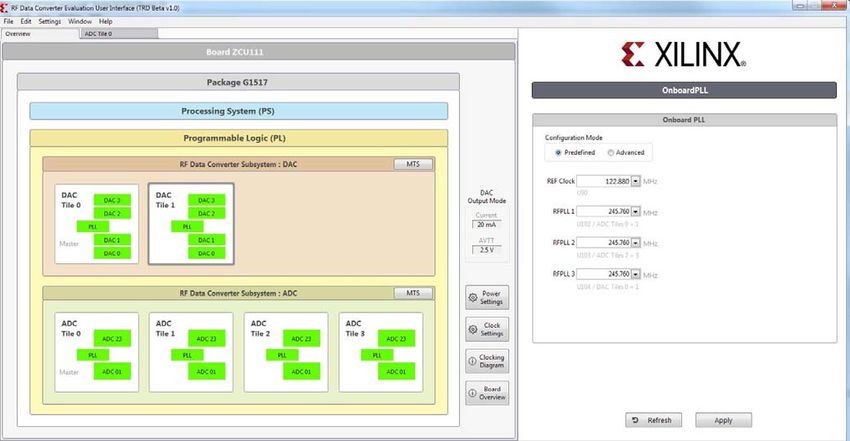
In the overview tab, when clicking on Clock Settings, the external PLL can be configured
with a set of predefined frequencies as shown in Figure 5-1.
X-Ref Target - Figure 5-1
X21283-090918
Figure 5-1: Overview of External PLLs
When clicking on Power Settings, the DAC power mode can be changed between 20 mA
and 32 mA.
RFSoC Data Converter Evaluation Tool User Guide Send Feedback
38
UG1287 (v2020.1) June 3, 2020 www.xilinx.comChapter 5: Evaluation Tool System Configuration using the GUI
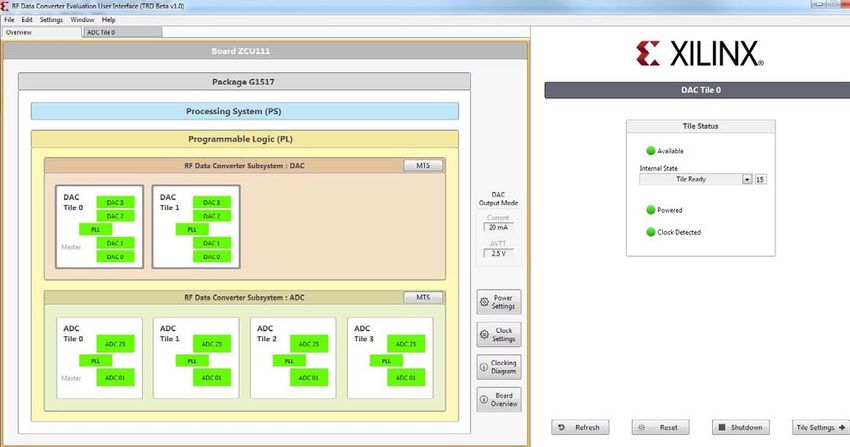
When selecting a tile, the tile status is displayed on the left side as shown in Figure 5-2,
including the power up state machine’s current state. Controls for reset and
shutdown/startup are provided. A reset reconfigures the tile to its original bitstream state.
X-Ref Target - Figure 5-2
X21284-090918
Figure 5-2: Overview of Tile Status
Each individual tile configuration can be accessed by double-clicking the desired tile.
ADC Configuration
The ADC tiles contain the ADCs and supporting signal processing blocks or digital down
converters (DDCs). There are also clock generators or PLLs in each ADC tile. The GUI
supports the configuration of all these blocks.
The ADC settings need to be optimized for certain modes of operation. The modes relate to
where the signal being sampled by the ADC (Fin) lies in relation to the sampling frequency
(Fs) of the ADCs. As shown in Figure 5-3, the ADC configuration is similar to the RF Data
RFSoC Data Converter Evaluation Tool User Guide Send Feedback
39
UG1287 (v2020.1) June 3, 2020 www.xilinx.comChapter 5: Evaluation Tool System Configuration using the GUI
Converter IP GUI. A notable difference is the multi-band and complex/real settings available
in the crossbar setting shown in Figure 5-4.
X-Ref Target - Figure 5-3
X21280-090918
Figure 5-3: ADC Configuration
RFSoC Data Converter Evaluation Tool User Guide Send Feedback
40
UG1287 (v2020.1) June 3, 2020 www.xilinx.comChapter 5: Evaluation Tool System Configuration using the GUI
X-Ref Target - Figure 5-4
X21281-092118
Figure 5-4: ADC Crossbars
RFSoC Data Converter Evaluation Tool User Guide Send Feedback
41
UG1287 (v2020.1) June 3, 2020 www.xilinx.comChapter 5: Evaluation Tool System Configuration using the GUI
ADC Clock Configuration
The GUI supports:
• Selection of external or internal (PLL) sample clock options
• On-chip PLL configuration for internal sample clock generation (see Figure 5-5).
• The configuration of the RF PLLs on the evaluation board for external clocking
Note: RFPLL (LMK) is also used to set up the reference clock for the on-chip PLLs. The nominal
settings are 245.76 MHz or 491.52 MHz, for example.
X-Ref Target - Figure 5-5
X21282-092118
Figure 5-5: ADC Internal PLL
RFSoC Data Converter Evaluation Tool User Guide Send Feedback
42
UG1287 (v2020.1) June 3, 2020 www.xilinx.comChapter 5: Evaluation Tool System Configuration using the GUI
Digital Down Converter Configurations
The GUI supports:
• Setting up complex mixer functionality and NCO frequency
• Setting the decimation rate on the decimation filters
• Selecting and configuring the decimation filter in the PL, if desired
• Configuring the quadrature modulator correction block
• Enabling and configuring dual band support
DAC Configuration
Like the ADC tiles, the DAC tiles contain four DACs. Unlike the ADC tiles, there is only one
configuration. The DAC tile contains the same clock generation (PLL) functionality as the
ADC tiles and a digital up converter (DUC) signal processing block.
The following features are supported in the GUI:
• DAC output current range (20 mA or 32 mA)
• DAC low noise mode
• DAC enhanced linearity mode
• DAC mix mode operation for second Nyquist zone operation
DAC Clock Configurations
The GUI supports:
• Selection of external or internal (PLL) sample clock options
• On-chip PLL configuration for internal sample clock generation
• Full access to configuring the on-chip PLLs using the software API
RFSoC Data Converter Evaluation Tool User Guide Send Feedback
43
UG1287 (v2020.1) June 3, 2020 www.xilinx.comChapter 5: Evaluation Tool System Configuration using the GUI
Digital Up Converter Configurations
The GUI supports:
• Setting the complex mixer functionality and NCO frequency
• Setting the interpolation rate on the filters
• Selecting and configuring the interpolation filters in the PL, if desired
• Configuring the quadrature modulator correction block
• Enabling and configuring dual band support
ADC Tone Testing
The GUI supports uploading ADC output data for all ADC channels one by one, but the
capture can happen simultaneously. The GUI supports the simultaneous capture and
generation of samples in Real and Complex mode (in-phase and quadrature I/Q data).
For FFT analysis, the setup supports coherent sampling. The two basic requirements for
coherent sampling are:
• The sample clocks for the DAC (or external signal generator) and ADC are
frequency-locked. This is achieved if the ADC and DAC clocks are derived from the
same reference clock in the case of the on-chip PLLs or external PLLs that use the same
clock reference.
• The test signal (e.g., test tone) should generate an integer number of complete cycles
when sampled by the ADC at the specified rate because the FFT expects a periodic
signal. This is usually managed by carefully choosing the frequency of the input test
tone(s) to the ADC or output tone(s) from the DAC for a fixed sample clock setting. For
loopback testing, it means careful generation of the DAC output tone(s) frequency (i.e.,
SRAM vectors), which is sent to the DAC. This is automatically handled by the GUI for
DAC for CW generation. For the ADC, the recommended coherent tones are listed to
allow you to set external test equipment.
RFSoC Data Converter Evaluation Tool User Guide Send Feedback
44
UG1287 (v2020.1) June 3, 2020 www.xilinx.comYou can also read


