User Manual GPS User Module OWL Family (Industrial Cellular Router)
←
→
Page content transcription
If your browser does not render page correctly, please read the page content below
User Manual
GPS User Module
OWL Family (Industrial Cellular Router)

OWL Family                                               Technical Support
GPS User Module – Release 1.6.9 – 03/2020   https://hirschmann-support.belden.com
The naming of copyrighted trademarks in this manual, even when not specially indicated,
should not be taken to mean that these names may be considered as free in the sense of the
trademark and tradename protection law and hence that they may be freely used by
anyone.

© 2020 Hirschmann Automation and Control GmbH

Manuals and software are protected by copyright. All rights reserved. The copying,
reproduction, translation, conversion into any electronic medium or machine scannable form
is not permitted, either in whole or in part. An exception is the preparation of a backup copy
of the software for your own use.

The performance features described here are binding only if they have been expressly
agreed when the contract was made. This document was produced by Hirschmann
Automation and Control GmbH according to the best of the company's knowledge.
Hirschmann reserves the right to change the contents of this document without prior notice.
Hirschmann can give no guarantee in respect of the correctness or accuracy of the
information in this document.

Hirschmann can accept no responsibility for damages, resulting from the use of the network
components or the associated operating software. In addition, we refer to the conditions of
use specified in the license contract.

You can get the latest version of this manual on the Internet at the Hirschmann product site
(http://www.hirschmann.com).

Hirschmann Automation and Control GmbH
Stuttgarter Str. 45-51
72654 Neckartenzlingen
Germany

OWL Family
GPS User Module – Release 1.6.9 – 03/2020
Contents
           Contents                                                                 3

           1 User Module Description                                                4

           2 Web interface                                                           5
             2.1 Location                                                            5
             2.2 System Log                                                          6
             2.3 Global                                                              7
             2.4 GPSD                                                                8
             2.5 SNMP                                                                9
             2.6 Time Synchronization                                               10

           3 Recommended Literature                                                 11

           A. Abbreviations                                                         12

           B. Maintenance                                                           13

           Fur ther Suppor t                                                        14

Page 3 of 15                                                       OWL Family
                                        GPS User Module – Release 1.6.9 – 03/2020
1 User Module Description
The user module GPS (Global Positioning System) allows your device with GPS module to provide
location and time information in all weather, anywhere on or near the earth, where there is an
unobstructed line of sight to four or more GPS satellites.
This module is not contained in the standard router firmware. Uploading of this user module is
described in the “Configuration” user manual. You can download the PDF on the Internet at:
https://www.doc.hirschmann.com.
Note: For routers with 2 antennas diversity reception does not work when using GPS. In case that
the router has 3 antennas, GPS and diversity reception can be used simultaneously.
Note: GPS Rollover issue, related to firmware of the cellular module, resulted in incorrect display
of date in the GPS user module. This issue was fixed in user module of version 1.6.6.
Page 4 of 15 OWL Family
GPS User Module – Release 1.6.9 – 03/20202 Web interface
The left part of the web interface contains the menu with pages for monitoring (Status),
Configuration and Customization of the router. Customization block contains only the return item,
which switches the GPS web interface to the interface of the router.
2.1 Location
If the device has an unobstructed line of sight to four or more GPS satellites, detailed information
about the accurate location of the device (router) is available.
Item Description
Current time(UTC) Current time in hhmmss format (patterned on Coordinated
Universal Time)
Latitude Geographic coordinate that specifies the north-south position (in
degrees)
Longitude Geographic coordinate that specifies the east-west position (in
degrees)
Altitude Specifies the height above sea level of a location (in meters)
Satellites in view Number of satellites that are directly visible for the router
Fix status 0 = No GPS data
1 = GPS data from satellite
Speed over ground Current speed of the router relative to Earth’s surface (in knots)
Course over ground The actual course the router is moving along at the moment relative
to Earth’s surface (in degrees)
Date Current date in ddmmyyyy format
Table 1: Location Status
There is a clickable item called Show on map at the bottom part of the window that displays an
exact location of the Hirschmann router on the map server of Google company (Google Maps) in a
new tab.
Figure 1: GPS Status – Location
Page 5 of 15 OWL Family
GPS User Module – Release 1.6.9 – 03/20202.2 System Log
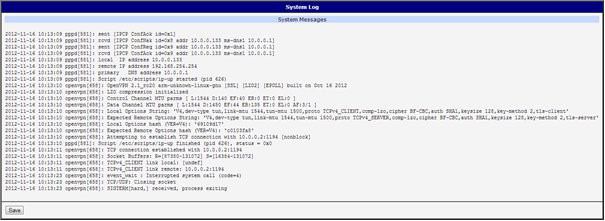
In case of any problems it is possible to view the system log by pressing the System Log menu
item. There are displayed detailed reports from individual applications running in the router. Using
the Save button it is possible to save the system log to the computer.
Figure 2: System Log
The System Log default size is 1000 lines. After completion of the 1000 lines it will be created a
new file for storing system log. After completion of the 1000 lines in the second file, the first file will
be deleted and then will be created a new one.
Page 6 of 15 OWL Family
GPS User Module – Release 1.6.9 – 03/20202.3 Global
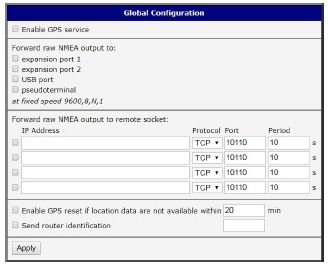
After clicking the Global item in the configuration part of the menu, you can find a form that allows
you to activate the GPS service by checking Enable GPS service item. In the next part of this form
is an availability to choose the port that will be used for sending data from the GPS. You can select
from the following options: expansion port 1, expansion port 2, USB port and
pseudoterminal/dev/ttyp5. Expansion port 1 and expansion port 2 are optional ports of the router.
Data are stored in raw NMEA format.
The configuration form also allows router to forward raw NMEA output to a remote socket. In this
case it is necessary to check the box in front of the "configuration line" and define the following
information:
Item Description
IP Address IP address to which the raw NMEA output will be forwarded
Protocol The protocol by which raw NMEA output will be sent
Port Port on which the communication will be underway
Period Forwarding period
Table 2: Forwarding data to remote socket
At the bottom of the form, it can be enabled the automatic reset of GPS. It is performed every time
when location data are not available within set number of minutes.
The last item configures router’s identification. When switched on, the identification string
$GPFID, RouterIdentificationString is being sent in every NMEA batch. The RouterIdentificationString
is the string configured in the GUI.
Figure 3: Global Configuration
Page 7 of 15 OWL Family
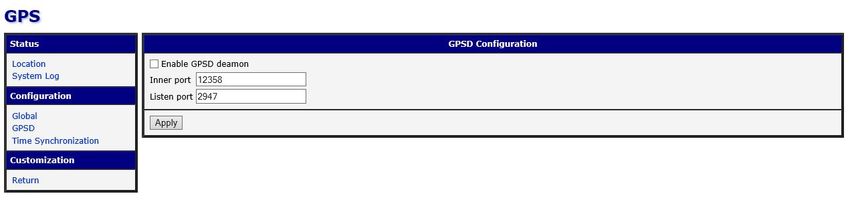
GPS User Module – Release 1.6.9 – 03/20202.4 GPSD
GPSD is a monitor daemon that collects information from the GPS module, making all data on the
location/course/velocity of the sensors available to be queried on the TCP port. It uses standard
textual NMEA 0183 protocol.
This service can be started by selecting the GPSD item in the configuration part of the menu. If the
enable selection box is checked, the router automatically sends messages to supervisory system.
Item Description
Inner port Inner communication port for special services of the router. Default
is set to 12358, should not be chanced unless other services are
started.
Listen port Set TCP/IP port on which to listen for GPSD client
(default is 2947).
Table 3: GPSD configuration
Figure 4: Global GPSD Configuration
GPSD parses the following NMEA sentences: RMC, GGA, GLL, GSA, GSV, VTG, ZDA, GBS,
HDT, DBT, GST.
Page 8 of 15 OWL Family
GPS User Module – Release 1.6.9 – 03/20202.5 SNMP
The SNMP form can be displayed by selecting the SNMP item in the configuration part of
the menu. If the Enable reporting to supervisory system option is checked, the router automatically
sends messages to supervisory system at the specified period.
Item Description
IP Address Destination IP address
Period Interval of sending messages to supervisory system (in seconds)
Table 4: SNMP configuration
Figure 5: SNMP configuration
For sending GPS messages is used the following range of OIDs. The importance of individual
items is described in table 2.1 Location on page 4.
OID Designation
.1.3.6.1.4.1.30140.7.1.0 gpsTimeUTC
.1.3.6.1.4.1.30140.7.2.0 gpsLatitude
.1.3.6.1.4.1.30140.7.3.0 gpsLongitude
.1.3.6.1.4.1.30140.7.4.0 gpsAltitude
.1.3.6.1.4.1.30140.7.5.0 gpsSatellites
.1.3.6.1.4.1.30140.7.6.0 gpsFixStatus
.1.3.6.1.4.1.30140.7.7.0 gpsSpeedOverGround
.1.3.6.1.4.1.30140.7.8.0 gpsCourseOverGround
.1.3.6.1.4.1.30140.7.9.0 gpsDate
Table 5: GPS OID
Page 9 of 15 OWL Family
GPS User Module – Release 1.6.9 – 03/20202.6 Time Synchronization
Form for synchronization of the system time can be invoked by pressing Time Synchronization
item in the configuration part of the web interface menu. Enable system time synchronization
check box is used to activate automatic time synchronization. Number of hours after which the
synchronization is performed must be defined in the box below.
Figure 5: Time synchronization
Page 10 of 15 OWL Family
GPS User Module – Release 1.6.9 – 03/20203 Recommended Literature
Application Notes, the “Installation” user manual, the “Configuration” user manual and
documentation of several OWL user modules can be found as PDF files for downloading on the
Internet at: https://www.doc.hirschmann.com/.
Page 11 of 15 OWL Family
GPS User Module – Release 1.6.9 – 03/2020A. Abbreviations
Abbreviation Description
ACA AutoConfiguration Adapter
ACL Access Control List
BOOTP Bootstrap Protocol
CLI Command Line Interface
DHCP Dynamic Host Configuration Protocol
F/O Optical Fiber
FDB Forwarding Database
GPS Global Positioning System
GPSd Global Positioning System Deamon
GSM Global System for Mobile Communications
GUI Graphical User Interface
HTTP Hypertext Transfer Protocol
HTTPS Hypertext Transfer Protocol Secure
ICMP Internet Control Message Protocol
IEEE Institute of Electrical and Electronics Engineers
IGMP Internet Group Management Protocol
IP Internet Protocol
LLDP Link Layer Discovery Protocol
LTE Long-Term-Evolution
MAC Media Access Control
MIB Management Information Base
MRP Media Redundancy Protocol
MSTP Multiple Spanning Tree Protocol
NMEA National Marine Electronics Association
NMS Network Management System
NTP Network Time Protocol
PTP Precision Time Protocol
QoS Quality of Service
RFC Request For Comment
RM Redundancy Manager
RSTP Rapid Spanning Tree Protocol
SCP Secure Copy
SFP Small Form-factor Pluggable
SFTP SSH File Transfer Protocol
SNMP Simple Network Management Protocol
SNTP Simple Network Time Protocol
TCP Transmission Control Protocol
TFTP Trivial File Transfer Protocol
TP Twisted Pair
UDP User Datagram Protocol
URL Uniform Resource Locator
UTC Universal Time Coordinated
UTC Universal Time Coordinated
VLAN Virtual Local Area Network
Page 12 of 15 OWL Family
GPS User Module – Release 1.6.9 – 03/2020B. Maintenance
Hirschmann is continually working on improving and developing their software. Check regularly
whether there is an updated version of the software that provides you with additional benefits. You
find information and software downloads on the Hirschmann product pages on the Internet
(http://www.hirschmann.com).
Page 13 of 15 OWL Family
GPS User Module – Release 1.6.9 – 03/2020Further Support
Technical Questions
For technical questions, please contact any Hirschmann dealer in your area or Hirschmann
directly.
You will find the addresses of our partners on the Internet at http://www.hirschmann.com
A list of local telephone numbers and email addresses for technical support directly from
Hirschmann is available at
https://hirschmann-support.belden.com
This site also includes a free of charge knowledge base and a software download section.
Hirschmann Competence Center
The Hirschmann Competence Center is ahead of its competitors:
Consulting incorporates comprehensive technical advice, from system evaluation through
network planning to project planning.
Training offers you an introduction to the basics, product briefing and user training with
certification.
The current technology and product training courses can be found at
http://www.hicomcenter.com
Support ranges from the first installation through the standby service to maintenance
concepts.
With the Hirschmann Competence Center, you have decided against making any
compromises. Our client-customized package leaves you free to choose the service
components you want to use.
Internet: http://www.hicomcenter.com
Page 14 of 15 OWL Family
GPS User Module – Release 1.6.9 – 03/2020Page 15 of 15 OWL Family
GPS User Module – Release 1.6.9 – 03/2020You can also read


