CANIS CANPico MicroPython SDK - TECHNOLOGY BRIEFING DR. KEN TINDELL 2018-07-18
←
→
Page content transcription
If your browser does not render page correctly, please read the page content below
CANIS
                                             AUTOMOTIVE L ABS
                               Security Products for the Automotive Industry

                               CAN-HG
                  CANPico MicroPython SDK
                               TECHNOLOGY
                          Reference Manual
                               BRIEFING
                               DR. KEN TINDELL
                               2018-07-18

Document number   2104
Version           1
Issue date        2021-04-29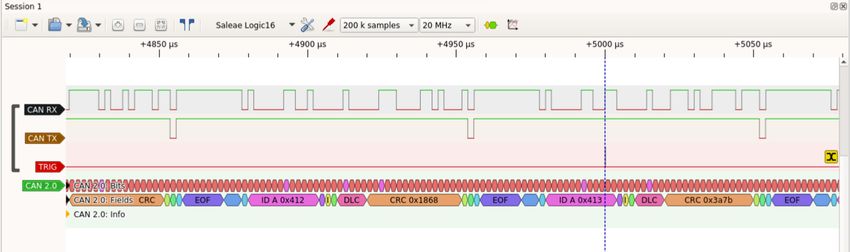
1     Introduction
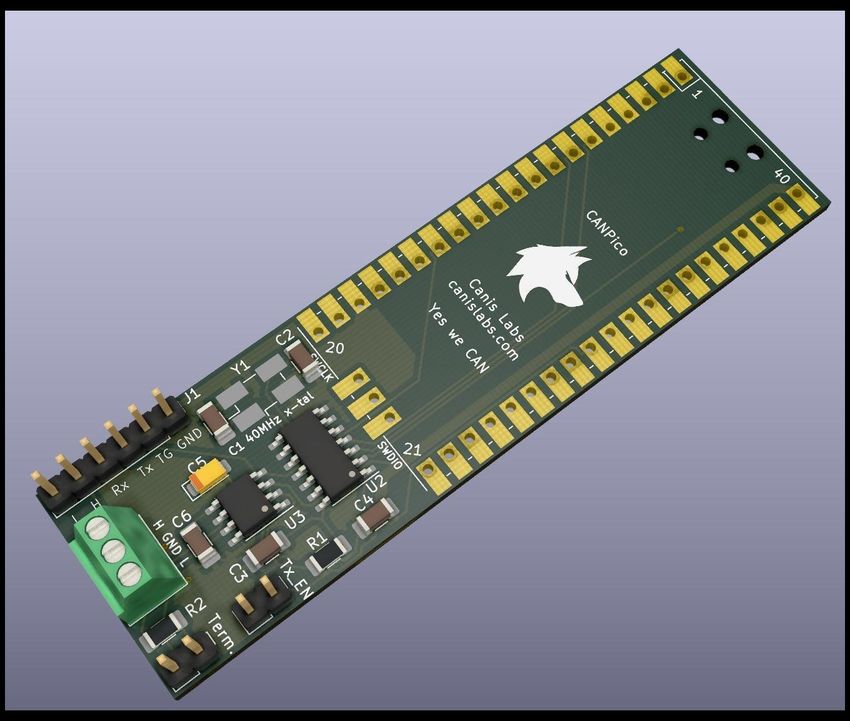
The CANPico is a ‘sock’ board designed to connect a Raspberry Pi Pico board to a CAN
bus. A Pico board is soldered down on to the upper area of the board and the lower area
of the board contains the CAN connectors.

CAN bus is a protocol used in many applications, from trucks to buses to aircraft to
agricultural equipment to medical devices to construction equipment and even
spacecraft but its most common use is in cars.
This document describes the MicroPython SDK that provides functions for software on
the Raspberry Pi Pico to access CAN bus.

WARNING. Connecting the CANPico directly to a vehicle CAN bus comes with risk
and should not be undertaken without understanding this risk. Grounding a vehicle
chassis through the USB port of a Pico connected to a laptop, PC or USB hub powered
from the mains may cause permanent damage to the vehicle’s electronics and/or the
Raspberry Pi Pico and devices it is connected to. The CAN transceiver will tolerate a
ground potential difference (“ground offset”) of between -2V/+7V. Connecting pin 2 of
the screw terminal to the target system’s ground will establish a common
ground reference. The CAN bus must be properly terminated (with 120W resistors at
either end). If the CAN bus is already terminated at both ends then the termination
jumper on the CANPico should not be closed. In addition, causing disruption to a
vehicle’s CAN bus traffic may be interpreted by the vehicle fault management systems
as a hardware fault and cause the vehicle to permanently shut down CAN
communications with consequent loss of functionality.

Copyright © 2021 Canis Automotive Labs Ltd.                                     2 / 32
2        Overview
The MicroPython SDK for the CANPico contains two major APIs:
    •   CAN
    •   CANHack
The firmware is supplied as a binary file of the form firmware- yyyymmdd.uf2 and as
a source code patch file against the upstream MicroPython repository (the file
README.txt contains instructions on how to apply the patch against the MicroPython
source). The firmware works on both the CANPico and CANHack boards (in the latter
case there is no CAN controller so the CAN API cannot be used).
As well as providing the above APIs there are some other features included in the
firmware:
    -   A second USB serial port is included (so when the Pico connects to a host, two virtual
        ports are instantiated1).
    -   A new GPIO FLIH (First Level Interrupt Handler); this is to ensure that the CAN
        interrupts are handled as quickly as possible to avoid frames being lost.
    -   An implementation of the MIN (Microcontroller Interconnect Network) protocol2.
The drivers create four queues in RAM and use interrupt handlers to keep these up to
date:
    -   A 128 entry FIFO of all the received frames (optionally also error frames)
    -   A 32 entry priority-ordered transmit queue (mapped into the CAN controller's
        hardware priority queue)
    -   A 32 entry FIFO transmit queue (the head of the FIFO is kept in the priority queue)
    -   A 128 entry transmit event queue (that records when a frame was transmitted)

1
    By default these would be /dev/ttyACM0 and /dev/ttyACM1 on a machine running Linux
2
    See https://github.com/min-protocol/min

Copyright © 2021 Canis Automotive Labs Ltd.                                              3 / 32
3 CAN API
The CAN API is included in the rp2 module and consists of the following classes:
- The CAN class provides control and status of the CAN controller
- The CANFrame class encapsulates CAN frames, which are either created in software
or by receiving them from the CAN controller hardware
- The CANError class encapsulates CAN error frames, which are created receiving
them from the CAN controller hardware
- The CANID class describes a CAN ID: every CAN frame has a CAN ID, but many
frames can have the same ID
- The CANIDFilter class describes how a CAN controller should identify and accept
CAN frames based on their CAN ID
3.1 CAN – CAN controller
class CAN ([, profile=BITRATE_500K_75] [, id_filters=None] [, hard_reset=False] [,
mode=NORMAL] [, brp=None] [, tseg1=10] [, tseg2=3] [, sjw=2] [, recv_errors=False] [,
tx_open_drain=False])
Represents CAN controller hardware.
For the CANPico board there is a single CAN controller but other supported hardware
may support more than one instance of this class.
The CANHack board has no CAN controller and the RuntimeError exception will be
raised.
Parameters
• profile (int) – The profile for the CAN bus bit rate (see Profiles).
• id_filters – A dictionary mapping integers to CANIDFilter instances (see ID
filtering)
• hard_reset (bool) – Set to True to reset the CAN controller at the lowest level
(equivalent to power-on reset)
• mode (int) – Request the mode for the CAN controller (see Modes)
• brp (int) – Baud rate prescaler; if this parameter is set then the profile
parameter is overridden and brp, tseg1, tseg2 and sjw are used to directly set
the bit rate of the controller.
• tseg1 (int) – TSEG1
• tseg2 (int) – TSEG2
• sjw (int) – SJW
• recv_errors (bool) – If False then error frames are discarded and not placed in
the receive FIFO
Copyright © 2021 Canis Automotive Labs Ltd. 4 / 32• tx_open_drain (bool) – If True then the TX pin of the MCP2517/18FD is set to
open drain
Raises
• TypeError – if the key/value pairs in id_filters are not int/instances of
CANIDFilter
• RuntimeError – if the controller hardware is not connected via SPI
A value of None for id_filters sets up the CAN controller to accept all incoming
frames.
Open drain for the controller's TX pin allows the CAN transceiver's input pin to
be driven by a GPIO pin. Open drain mode should not be selected if the controller
is put into a mode where it will drive its TX pin to dominant (i.e. it's only
appropriate if in offline or listen-only modes).
Methods
send_frame (frame [ , fifo=False ] )
Queue a frame for transmission on the CAN bus.
Parameters
• frame (CANFrame) – The CAN frame to send
• fifo (bool) - Whether the queue the frame in the FIFO queue (see section 3.6)
Returns None
Raises
• TypeError – if frame is not an instance of CANFrame.
• ValueError – if there is insufficient room in the queues
send_frames(frames [, fifo=False)
Send a collection of CAN frames on the bus
Parameters
• frames (CANFrame) – A list of CAN frames to send
• fifo (bool) – Whether the queue the frames in the FIFO queue (see section 3.6)
Returns None
Raises
• TypeError – if frames is not a list of CANFrame instances
• ValueError – if there is insufficient room in the queues
recv([, limit=RX_FIFO_SIZE] [, as_bytes=False])
Receive CAN remote, data and error frames
Parameters
• limit (int) – The maximum number of frames to remove from the FIFO
(defaults to the entire FIFO)
Copyright © 2021 Canis Automotive Labs Ltd. 5 / 32• as_bytes (bool) – If True then returns a block of bytes representing the frames
Returns a list of CANFrame and CANError instances or a block of bytes
representing the CAN frames received since the last call to recv (up to a maximum
of limit frames)
Return type list or bytes
The list is ordered by the order of CAN frame reception into the receive FIFO and
the frames are removed from the FIFO. If no frames have been received then an
empty list is returned. An element in the list is None if there are one or more
missing frames because the FIFO was full at that point.
The block of bytes contains a binary representation of the frames, ordered by the
order of CAN frame reception into the receive FIFO, and the frames are removed
from the FIFO. If no frames have been received then a zero-length block of bytes is
returned.
This function can be polled regularly to return the frames received. The as_bytes
option is to allow the frames to be converted into a standard bytes format for
transmission over a network connection for processing elsewhere.
recv_pending()
Number of CAN frames in the receive FIFO
Returns the number of CAN frames pending in the receive FIFO (including any
elements of type None)
Return type int
recv_tx_events([, limit=TX_EVENT_FIFO_SIZE] [, as_bytes=False])
Get frame transmission events
Parameters
• limit (int) – The maximum number of transmit events to remove from the
transmit event FIFO (defaults to the entire FIFO)
• as_bytes (bool) – If True then returns a block of bytes representing the transmit
events
Returns a list of transmit events or a block of bytes representing the transmit
events since the last call (up to a maximum of limit frames)
Return type list or bytes
The tuple in a list element has the following contents:
- If the first element is EVENT_TYPE_TRANSMITTED_FRAME then the
next two elements are a frame tag and the timestamp of start-of-frame
- If the first element is EVENT_TYPE_OVERFLOW then the next two
elements are a count of the number of dropped transmit events and a
Copyright © 2021 Canis Automotive Labs Ltd. 6 / 32timestamp of the start-of-frame of the first transmit event that was
dropped.
recv_tx_events_pending()
Number of transmit events in the event FIFO
Returns the number of events in the event FIFO (including any elements of type
None)
Return type int
get_status()
Status of CAN controller
Returns a tuple of four elements: a bool indicating bus off state, a bool indicating
error passive state an int representing the Transmit Error Counter, and an int
representing the Receive Error Counter
Return type tuple
get_send_space( [ fifo=False ] )
Number of slots for CAN frames in the transmit priority queue or FIFO
Returns the space in the transmit FIFO (if fifo is False) else the space in the transmit
priority queue
Return type int
get_time()
Current time
Returns The value of the free-running timer used for timestamping transmitted
and received CAN frames
Return type int
The time is represented by an incrementing integer that wraps around to 0.
get_time_hz()
Returns The number of ticks per second of the timestamp timer
Return type int
This function can be used to automatically adjust to different timestamp timers.
set_trigger([on_error=False ] [, on_canid=None ] [, as_bytes=None])
Set the conditions for a pulse on the TRIG pin.
This method sets the trigger system running, putting a pulse on the TRIG pin when
certain conditions are seen. These including seeing a CAN error (enabled by
setting on_error to True), matching a specific CAN ID (by setting on_canid to an
instance of CANID) or by a frame matching a more complex template of ID, DLC
and data field (by setting trigger to a block of bytes).
Copyright © 2021 Canis Automotive Labs Ltd. 7 / 32Parameters
• on_error (bool) – Whether trigger when an error occurs
• on_canid (CANID) – If not None then trigger when a given CAN ID is received
from the bus
• as_bytes (bytes) – If not None a block of bytes that sets a trigger based on CAN
ID, DLC and data fields (see section 3.10 for a definition of the byte format)
Returns None
Raises
• TypeError – if on_canid is not an instance of CANID or as_bytes is not an
instance of bytes
• ValueError – if both on_canid and as_bytes are specified or the as_bytes
parameter is not bytes in a specific format
A pulse will be placed on the TRIG pin on the CANPico board each time the event
occurs. An external logic analyzer tool can use this to trigger. A trigger set by
trigger or on_canid will only trigger for frames passing through the ID acceptance
filters (see section 3.7).
clear_trigger()
Disables the trigger
Returns None
After this is called there will be no more pulses on the TRIG pin until a new trigger
is set via a new call to set_trigger().
pulse_trigger()
Puts a pulse on the TRIG pin
Returns None
This method allows application software in MicroPython to directly trigger a logic
analyzer.
Modes
The table below gives the controller modes.
Mode Description
NORMAL Normal CAN 2.0 mode
LISTEN_ONLY Listens to CAN RX but never sets CAN TX to dominant
ACK_ONLY Like listen-only but will generate a dominant bit for ACK
OFFLINE Sets up the controller pins but keeps the controller off the bus
Copyright © 2021 Canis Automotive Labs Ltd. 8 / 32Profiles
The table below gives the CAN bit rate settings for the valid profiles.
Profile Bit rate (Kbit/sec) Sample point (%)
BITRATE_500K_75 500 75
BITRATE_250K_75 250 75
BITRATE_125K_75 125 75
BITRATE_1M_75 1000 75
BITRATE_500K_50 500 50
BITRATE_250K_50 250 50
BITRATE_125K_50 125 50
BITRATE_1M_50 1000 50
BITRATE_2M_50 2000 50
BITRATE_4M_90 4000 90
BITRATE_2_5M_75 2500 75
BITRATE_2M_80 2000 80
The bit rates above 1Mbit/sec are non-standard and experimental.
Queue sizes
The following table gives the sizes of the various queues.
Queue Size Pre-defined constant
Receive FIFO 128 RX_FIFO_SIZE
FIFO-ordered transmit 32 TX_FIFO_SIZE
Priority-ordered transmit 32 TX_QUEUE_SIZE
Event FIFO 128 TX_EVENT_FIFO_SIZE
3.2 CANFrame – CAN frame
class CANFrame(canid, [, data=None] [, remote=False] [, tag=0] [, dlc=None])
Represents a CAN frame for transmission or reception. A CANFrame instance is created
either directly in order to transmit a frame, or is returned from the recv() call.
Parameters
• canid (CANID) – The CAN ID of the frame
• data (bytes) – The payload of the CAN frame
• remote – Set to True if the frame is a remote frame
• tag – An integer value that is returned along with a timestamp as a transmit
event
• dlc – Set the specific DLC value to send on the wire
Raises
• ValueError – if the length of the data field is greater than 8 or greater than
0 if remote is True or there is mismatch between DLC and the data length
• TypeError – if data is not of type bytes or if canid is not an instance CANID
Copyright © 2021 Canis Automotive Labs Ltd. 9 / 32Methods
is_remote()
Returns True if the frame is a remote frame
Return type bool
get_canid()
Returns the frame's CAN ID
Return type CANID
get_id()
Returns the numeric arbitration ID as an integer value of the frame's CAN ID
Return type int
is_extended()
Returns True if the CAN frame has an extended 29-bit ID
Return type bool
This is the equivalent function to the is_extended() method of CANID. Note that the
CAN protocol specifies that an extended ID of 0x100 and a standard ID of 0x100
are not the same and are arbitrated differently (the top 11 bits of an extended ID
are arbitrated against the 11 bits of a standard ID).
get_data()
Returns the frame's payload; remote frames return zero bytes
Return type bytes
get_dlc()
Returns the frame's DLC value
Return type int
get_timestamp()
Returns the frame's timestamp
Return type int
The timestamp returns None when a frame is created through its constructor. If the
frame is returned via recv() then the timestamp is an integer representing the time
of start-of-frame when it was received. If a frame is queued for transmission then
the timestamp is the time of the start-of-frame when it was successfully
transmitted.
The timestamp can also be used to determine if a frame queued for transmission
has been sent.
The current time in the CAN controller is returned by the get_time() call.
Copyright © 2021 Canis Automotive Labs Ltd. 10 / 32get_index()
Returns the frame's ID filter index
Return type int
The filter index is the key value of the ID filter that matched in the CAN controller's
ID filtering system (see section 3.7). If the frame was not returned via recv() then
this call returns None. The filter index is a fast way to identify the received frame.
static from_bytes(block)
Parameters
• block (bytes) – A block of bytes representing list of CAN frames
Returns a list of instances of CANFrame specified by a block of bytes
Return type list
Raises
• ValueError – if the length of block is not an integer multiple of the CAN
frame binary format
• TypeError – if block is not of type bytes
This is a factory method that takes a block of bytes in a specific binary format and
returns a list of CANFrame instances representing the frames specified by those
bytes.
Examples
In all the examples, the classes are assumed to have been imported and a CAN controller
initialized like this:
>>> from rp2 import *
>>> c = CAN()
(This initializes the CAN controller to the defaults, which includes setting the bit rate to
500kbit/sec)
To send a CAN frame with a payload:
>>> f = CANFrame(CANID(0x123), data=b'hello')
>>> c.send_frame(f)
>>>
This sends a CAN frame with a standard ID of 0x123 and a 5 byte payload of 68 65 6c 6c
6f.
3.3 CANError — CAN error frame
class CANError
Represents a CAN error frame. Instances are returned from the recv() method.
Copyright © 2021 Canis Automotive Labs Ltd. 11 / 32Methods
get_timestamp()
Returns the error frame's timestamp
Return type int
If the error frame is returned via recv() then the timestamp is an integer representing the
time when the error occurred. This is less accurate than remote and data frame
timestamps due to the variability in fetching the time from the controller. The timestamp
is 0 if an error frame is created through its constructor.
The current time in the CAN controller is returned by the get_time() call.
is_crc_error()
Returns True if the error was a CRC error
Return type bool
is_stuff_error()
Returns True if the error was a stuff error
Return type bool
is_form_error()
Returns True if the error was a form error
Return type bool
is_bit1_error()
Returns True if the error was a bit error where a recessive was sent but a dominant
received
Return type bool
is_bit0_error()
Returns True if the error was a bit error where a dominant was sent but a recessive
received
Return type bool
is_bus_off()
Returns True if the controller is now Bus Off
Return type bool
3.4 CANID — CAN identifier
class CANID(canid [ , extended=False ])
Represents a CAN identifier. A CANID instance is created either directly or is returned
from the get_canid() call.
Parameters
• canid (int) – The CAN identifier of the frame
Copyright © 2021 Canis Automotive Labs Ltd. 12 / 32• extended (bool) – Set to True if the ID is a 29-bit identifier.
Raises
• ValueError – if canid is not in the range 0..0x7ff (when extended is False) or
0..0x1fffffff (when extended is True).
Methods
is_extended()
Indicates if the CAN ID is a standard 11-bit ID or an extended 29-bit ID.
Returns True if the CAN ID is a 29-bit identifier
Return type bool
get_id()
Returns the integer value of the CAN ID
Returns the frame's CAN ID represented as an integer
Return type int
get_id_filter()
Returns a CAN ID filter that accepts this (and only this) ID
Returns the ID filter for the CAN ID
Return type CANIDFilter
3.5 CANIDFilter — CAN ID acceptance identifier
class CANIDFilter( [ filter=None ] )
Represents a CAN ID filter to select which incoming frames match.
Parameters
• filter (str) – The filter mask string describing the ID to match, or None to match
all 11- and 29-bit identifiers
Raises
• ValueError – if the length of the filter string is not 11 or 29 characters long
or contains characters other than ‘X’, ‘1’ or ‘0’
• TypeError – if filter is not of type str
The filter is a character string that defines the ID matching to take place. It is composed
of only ‘X’, ‘1’ or ‘0’ and must be 11 or 29 characters long. A ‘X’ character means “don’t
care”, a ‘1’ means “Must be 1” and ‘0’ means “Must be 0”.
Examples
The following gives an ID filter that accepts all CAN frames:
>>> filter = CANIDFilter()
To accept all frames with 11-bit identifiers:
>>> filter = CANIDFilter(filter='XXXXXXXXXXX')
Copyright © 2021 Canis Automotive Labs Ltd. 13 / 32To accept all CANOpen ‘Transmit SDO’ frames:
>>> filter = CANIDFilter(filter='1101XXXXXXX')
3.6 FIFO transmission
The CAN arbitration phase selects the highest priority frame to transmit. A well-
designed CAN controller will perform internal arbitration on the same basis: it will enter
into bus arbitration its highest priority frame. The drivers of the MCP2517/18FD
configure it for a priority queue of 32 frames. But when two frames with the same ID are
queued then the order that the hardware chooses to send a frame will typically be
arbitrary, and this might not be good enough in some cases. For example, a block
message made up from multiple CAN frames must be transmitted in the correct order.
To support this the drivers create an additional FIFO priority queue. At any point in time
the frame at the head of the FIFO queue will be in the priority queue. Once a FIFO frame
is transmitted on the CAN bus, the drivers will copy in the next frame in the FIFO queue,
and so on.
Note that the FIFO queue for the MCP2517/18FD is implemented in software: there is a
hardware FIFO queue provided by the controller but it suffers from priority inversion3
with respect to the priority queue.
3.7 ID filtering
The CAN protocol engine of a CAN controller receives every frame but in most
applications the host software does not need to see all these frames. Instead, ID filters
are used to filter out unwanted frames. The MCP2517/18FD allows 32 ID filters. The
matching filter is included in the CANFrame instance when the frame is received. ID
filters are matched in order, so filter 0 is matched first, down to 31. If no filters are
specified then a default ‘match all frames’ filter is defined.
See CANIDFilter for more information on creating ID acceptance filters.
3.8 Controller specifics
The Microchip MCP2517/18FD CAN controller has the following hardware-specific
behaviors:
• The number of ID acceptance filters is limited to 32, and key values in the id_filters
dictionary must be in the range 0..31.
• The number of frames in the transmit priority queue is limited to 32.
• The controller will automatically attempt to recover from a Bus Off state (which
requires the controller to see 127 idle periods of 11 recessive bits each).
• Pending outgoing CAN frames will be discarded when entering Bus Off.
In addition there are specifics of the MCP2517/18FD driver:
• The number of frames in the FIFO queue that feeds into the hardware priority queue
is limited to 32.
3
See https://kentindell.github.io/2020/06/29/can-priority-inversion for
more details on this common but important CAN driver problem
Copyright © 2021 Canis Automotive Labs Ltd. 14 / 32• The free-running timestamp counter is a 32-bit integer counting microseconds.
The CAN bit time parameters brp, tseg1, tseg2 and sjw are intepreted to be one less than
their actual values (e.g. setting brp to 0 means /1, a value of 3 means /4, and so on).
Together they specify a CAN bit time:
• The brp parameter specifies the prescaler for the 40MHz clock to give the CAN
time quanta clock
• A CAN bit time is 3 + tseg1 + tseg2
• The sample point for a bit is 2 + tseg1
For example, for 500kbit/sec and a 75% sample point the settings are:
• brp = 4, i.e. 40MHz / 5 = 8MHz time quanta clock (1 time quantum = 125ns)
• tseg1 = 10 and tseg2 = 3, i.e. a CAN bit time of 3 + 10 + 3 = 16 time quanta or 2000ns
= 2µs per bit
• Sample point of 2 + 10 = 12 / 16, or 0.75
3.9 Examples
3.9.1 Getting started: hardware
The first thing to get right with sending frames on a CAN bus is to have a receiver device.
If there is no other device on the CAN bus then there is nothing to generate the ACK bit
in a CAN frame to acknowledge it, and the sender will keep sending the original frame
again and again and the frame will never be marked as sent (so it will never get a
transmit timestamp and never be removed from the transmit queue). Obviously one way
to have two devices is to send frames between a pair of CANPico boards.
The other thing that is important is that the CAN bus must be terminated with the
standard termination resistor, ideally at either end of the bus. The CANPico board has a
jumper to include a termination resistor, so if a pair of CANPico boards are on the bus
they can be at either end with the jumpers closed.
3.9.2 Getting started: MicroPython API
The whole MicroPython API can be imported from the rp2 module with:
Standard REPL
>>> from rp2 import *
where >>> is Python REPL command line prompt.
An instance of a CAN controller is created with:
Standard REPL
>>> c = CAN()
This initializes the CAN controller on the board with the default profile (500kbit/sec, 75%
sample point) and sets up the ID filtering to receive all frames (some examples will re-
initialize the CAN controller with different settings)
Copyright © 2021 Canis Automotive Labs Ltd. 15 / 32To create a CAN frame to send:
Sender REPL
>>> f = CANFrame(CANID(0x123), data=b'hello')
This creates a 5 byte frame to send on the bus.
An instance of CANID can be created directly (this is useful if creating a new frame with
the same ID as an existing frame):
Sender REPL
>>> canid = frames[0].get_canid()
>>> canid
CANID(id=S123)
A frame can be sent with the send_frame() call:
Sender REPL
>>> c.send_frame(f)
The frame can be checked to see when it was sent:
Sender REPL
>>> f.get_timestamp()
86152095
The frame is received at another CANPico board using recv():
Receiver REPL
>>> frames = c.recv()
>>> frames
[CANFrame(CANID(id=S123), dlc=5, data=68656c6c6f,
timestamp=83501487)]
This returns a list (in this example) containing a single CAN frame. The payload of the
frame can be obtained with the get_data() call:
Receiver REPL
>>> frames[0].get_data()
b'hello'
The arbitration ID can be obtained with get_arbitration_id():
Receiver REPL
>>> hex(frames[0].get_arbitration_id())
'0x123'
And whether it has an extended ID can be found with get_arbitration_id():
Receiver REPL
>>> frames[0].is_extended()
False
The timestamp of the frame (according to the receiver board's clock) can be obtained by
reading its timestamp with the get_timestamp() call:
Receiver REPL
>>> frames[0].get_timestamp()
3327067
Copyright © 2021 Canis Automotive Labs Ltd. 16 / 32The offset between the two timestamps can be used to synchronize clocks (a common
technique is for the transmitter to send a ‘follow-up frame’ with its timestamp so that
the receiver can compute a clock delta).
3.9.3 The canpico.py examples file
The file canpico.py is a module that contains helpful setup code and examples, and is
used here to illustrate the API. It is generally invoked from the Python REPL command
line like this:
Standard REPL
>>> from canpico import *
>>> c = CAN()
>>> cp = CANPico(c)
The module code itself brings in the entire CAN API and useful functions like delay_ms()
but the CAN controller must be created outside of the module. In the above, cp is the
instance of the CANPico examples class and is used to invoke a particular function. The
rest of the examples will refer to c and cp assuming they have been created using the
code above.
3.9.4 A simple bus monitor
It's very easy to create a bus monitor in Python and the CANPico class contains the
following method:
CANPico code
# Simple CAN bus monitor
def mon(self):
while True:
frames = self.c.recv()
for frame in frames:
print(frame)
The simple monitor can be run like this:
Receiver REPL
>>> from canpico import *
>>> c = CAN()
>>> cp = CANPico(c)
>>> cp.mon()
This prints a representation of each frame (including timestamp) as it is received
(because this runs in Python, and because the time for code to print to the Python REPL
promt is much longer than a CAN frame, this little monitor will not be able to keep up
with a fully loaded CAN bus at 500kbit/sec).
We can transmit some frames from another board. Here we make ten frames with ID
0x100 and a single byte payload:
Sender REPL
>>> frames = [CANFrame(CANID(0x100), data=bytes([i])) for i in
range(10)]
>>> len(frames)
10
>>> c.send_frames(frames)
Copyright © 2021 Canis Automotive Labs Ltd. 17 / 32The receiver then shows those frames:
Receiver REPL
>>> cp.mon()
CANFrame(CANID(id=S100), dlc=1, data=00, timestamp=374052889)
CANFrame(CANID(id=S100), dlc=1, data=04, timestamp=374053005)
CANFrame(CANID(id=S100), dlc=1, data=03, timestamp=374053121)
CANFrame(CANID(id=S100), dlc=1, data=08, timestamp=374053239)
CANFrame(CANID(id=S100), dlc=1, data=09, timestamp=374053355)
CANFrame(CANID(id=S100), dlc=1, data=07, timestamp=374053472)
CANFrame(CANID(id=S100), dlc=1, data=05, timestamp=374053588)
CANFrame(CANID(id=S100), dlc=1, data=02, timestamp=374053706)
CANFrame(CANID(id=S100), dlc=1, data=06, timestamp=374053826)
CANFrame(CANID(id=S100), dlc=1, data=01, timestamp=374053944)
Note that the frames did not get sent in FIFO order. This is because the MCP2517/18FD
(and nearly all other CAN controllers) will select the highest priority frame (i.e. the one
with the lowest ID) to send from a priority queue, but if two frames have the same
priority then the tie is broken arbitrarily. This is not what we want if the frames contain
parts of a bigger block message. Fortunately, we can fix that by using the fifo option when
sending:
Sender REPL
>>> c.send_frames(frames, fifo=True)
Now the monitor shows the second batch of ten frames arriving in true FIFO order:
Receiver REPL
>>> cp.mon()
CANFrame(CANID(id=S100), dlc=1, data=01, timestamp=582017001)
CANFrame(CANID(id=S100), dlc=1, data=02, timestamp=582017397)
CANFrame(CANID(id=S100), dlc=1, data=03, timestamp=582017719)
CANFrame(CANID(id=S100), dlc=1, data=04, timestamp=582017873)
CANFrame(CANID(id=S100), dlc=1, data=05, timestamp=582018025)
CANFrame(CANID(id=S100), dlc=1, data=06, timestamp=582018179)
CANFrame(CANID(id=S100), dlc=1, data=07, timestamp=582018333)
CANFrame(CANID(id=S100), dlc=1, data=08, timestamp=582018485)
CANFrame(CANID(id=S100), dlc=1, data=09, timestamp=582018637)
3.9.5 Frame queueing
The transmit queue and transmit FIFO have only 32 slots so it is possible to overrun the
transmit buffer, and the exception ValueError is raised if there is no space in the queue
for the queued frame. One way to overcome this is to catch the exception and keep re-
trying, for example by defining a function that only returns when the frame transmit has
succeeded:
CANPico method
def always_send(self, f):
while True:
try:
self.c.send_frame(f)
return
except:
pass
Copyright © 2021 Canis Automotive Labs Ltd. 18 / 32Alternatively, the get_send_space() call can be used to see how many buffer slots are free:
CANPico method
def always_send2(self, f):
while True:
if self.c.get_send_space() > 0:
self.c.send_frame(f)
return
A burst of many frames can then be sent with:
Sender REPL
>>> for i in range(10000):
... f = CANFrame(CANID(0x123), data=pack('>I', i))
... cp.always_send(f)
The above code creates and sends frames where the frame number is packed into a 4-
byte payload in big-endian format (using the standard Python pack method of the
struct module).
The firmware runs fast enough to fill the controller and for the CAN bus to be completely
flooded with frames. But note that MicroPython uses a heap, so there may sometimes be
delays due to garbage collection.
The last frame queued will have a payload of 00 00 27 0F but this may not be the last frame
transmitted: when more than one frame has the same CAN ID then the hardware may
choose arbitrarily which frame to enter into arbitration. This is something to watch out
for with CAN systems: if an application transmits a frame periodically then it is best to
check if the previous instance was sent already and only queue if it has been sent,
ensuring that only one instance of the frame is in the controller. For example:
Sender REPL
>>> i = 0
>>> f = CANFrame(CANID(0x123), data=pack('>I', i))
>>> c.send_frame(f)
>>> while True:
... delay_ms(10)
... i += 1
... if f.get_timestamp() is not None:
... f = CANFrame(CANID(0x123), data=pack('>I', i))
... c.send_frame(f)
In the above example, every 10 milliseconds the frame becomes due to be re-queued,
and a check is made to see if the timestamp is set. If it has been then the frame is re-
queued, but if it hasn’t been then the sending is skipped for this period. In mission
critical real-time systems an analysis of the worst-case latencies on the network is done
to prove that in normal circumstances the frame will always have won arbitration and
be sent by the time it is due to be sent again and if not then a genuine error (rather than
a transient overload) has occurred.
3.9.6 Time syncing
A simple way to show the clocks at a sender and receiver is for the sender to obtain its
own timestamp and send that in a follow-up message. The receiver can then see the
sender's clock and its own clock for the same message. At the sender we use the
following functions from the example code:
Copyright © 2021 Canis Automotive Labs Ltd. 19 / 32CANPico method
def send_wait(self, f):
self.c.send_frame(f)
while True:
if f.get_timestamp() is not None:
return
CANPico method
def fup(self, f):
return CANFrame(CANID(0x101), data=pack('>I', f.get_timestamp()))
CANPico method
def heartbeat(self):
f = CANFrame(CANID(0x100))
while True:
self.send_wait(f)
f2 = self.fup(f)
self.c.send_frame(f2)
sleep(1)
The send_wait() function queues a frame and waits until it has been sent. The fup()
function creates a follow-up message from the sent frame and the heartbeat() function
sends a heartbeat pair of frames.
The receiver runs a function that interprets the follow-up message with the timestamp:
CANPico method
def drift(self):
self.c.recv() # Clear out old frames
ts = None # Don't know the first timestamp yet
while True:
frames = self.c.recv()
for frame in frames:
if frame is not None:
if frame.get_arbitration_id() == 0x100: # First
ts = frame.get_timestamp()
if frame.get_arbitration_id() == 0x101: # Follow-up
sender_ts = unpack('>I', frame.get_data())[0]
if ts is not None:
print(sender_ts - ts)
At the sender a timing heartbeat pair can be sent every 1 second like this:
Sender REPL
>>> cp.heartbeat()
Copyright © 2021 Canis Automotive Labs Ltd. 20 / 32The frames look like this when mon() is running on the receiver:
Receiver REPL
>>> cp.mon()
CANFrame(CANID(id=S100), dlc=0, data=*, timestamp=984513569)
CANFrame(CANID(id=S101), dlc=4, data=40a7c451, timestamp=984513885)
CANFrame(CANID(id=S100), dlc=0, data=*, timestamp=985513933)
CANFrame(CANID(id=S101), dlc=4, data=40b707f3, timestamp=985514249)
CANFrame(CANID(id=S100), dlc=0, data=*, timestamp=986514305)
CANFrame(CANID(id=S101), dlc=4, data=40c64b9d, timestamp=986514623)
CANFrame(CANID(id=S100), dlc=0, data=*, timestamp=987514677)
CANFrame(CANID(id=S101), dlc=4, data=40d58f48, timestamp=987515001)
CANFrame(CANID(id=S100), dlc=0, data=*, timestamp=988515053)
CANFrame(CANID(id=S101), dlc=4, data=40e4d2f6, timestamp=988515375)
CANFrame(CANID(id=S100), dlc=0, data=*, timestamp=989515421)
CANFrame(CANID(id=S101), dlc=4, data=40f4169c, timestamp=989515747)
CANFrame(CANID(id=S100), dlc=0, data=*, timestamp=990515799)
CANFrame(CANID(id=S101), dlc=4, data=41035a4c, timestamp=990516125)
Running drift() on the receiver and heartbeat() on the sender outputs something like this
on the receiver:
Receiver REPL
>>> cp.drift()
82836029
82836034
82836037
82836040
82836043
This shows the offset between the clocks and that the clocks are drifting apart at about
3µs per second (i.e. about 3ppm), which is pretty good for a pair of crystals.
3.9.7 Bit rate profiles
To use a different bus bit rate use the profile parameter:
>>> c = CAN(profile=CAN.BITRATE_250K_75)
There are some profiles that are higher than the maximum 1Mbit/sec but they may not
work on the CAN bus cabling (the 4Mbit/sec is particularly unstable).
3.9.8 ID acceptance filtering
We can put a simple ID filtering scheme in place for the receiving board:
Receiver REPL
>>> filter0 = CANIDFilter(filter='1001XXXXXXX')
>>> filter1 = CANIDFilter(filter='XXXXXXXXXXXXXXXXXXXXXXXXX0000')
>>> filter31 = CANIDFilter()
>>> id_filters = {0: filter0, 1: filter1, 31: filter31}
>>> c = CAN(id_filters=id_filters)
All received frames will still be put into the receive FIFO because filter31 is a catch-all,
but they will be assigned an index value according to the id_filters dictionary above.
Copyright © 2021 Canis Automotive Labs Ltd. 21 / 32So on the sending board we can send this frame:
Sender REPL
>>> f = CANFrame(CANID(0x11111110, extended=True))
>>> f
CANFrame(CANID(id=E11111110), dlc=0, data=*)
>>> c.send_frame(f)
At the receiver we then pick up the frames as normal:
Receiver REPL
>>> frames = c.recv()
>>> frames[0]
CANFrame(CANID(id=E11111110), data=*)
The acceptance filters are set to accept all frames into the receive FIFO, but frames with
an 11-bit ID where the top four bits are 0b1001 will have an index tag of 0 (accessed by
the frame's get_index() method), frames with an extended ID where the bottom four bits
are 0 will get an index tag of 1 and all other frames will get an index tag of 31.
The index of the above received frame will be set according to the first matching
acceptance filter, in this case filter1 which was assigned a key of 1 in the id_filters
dictionary:
Receiver REPL
>>> frames[0].get_index()
1
These tags can be used to quickly identify a frame for further processing. The filters can
also be used to eliminate unwanted traffic from ending up in the receive FIFO. For
example, to only receive 11-bit standard ID frames the following ID filter can be used
and applied when the controller is initialized:
Receiver REPL
>>> id_filters = {0: CANIDFilter('XXXXXXXXXXX'))
>>> c = CAN(id_filters=id_filters)
An instance of CANID has a method to return a specific ID filter that matches just that
ID, so if an application does not need to receive more than 32 frames then the ID
acceptance filtering system can be used to directly identify the frame to the application
(the frame's index value can used to to index a list, a much faster operation than hashing
the full CAN ID). For example:
Receiver REPL
>>> idf1 = CANID(0x123). get_id_filter()
>>> idf2 = CANID(0x400). get_id_filter()
>>> idf3 = CANID(0x401). get_id_filter()
>>> c = CAN(id_filters={1: idf1, 2: idf2, 3: idf3})
Each received frame can be processed very quickly: the frame's tag can be used to index
into a list of functions that are defined to process a specific frame.
Copyright © 2021 Canis Automotive Labs Ltd. 22 / 323.9.9 Errors
Error frames are by default not added into the receive FIFO. This default can be
overridden when initializing the CAN controller:
Receiver REPL
>>> c = CAN(recv_error=True)
An item in the receive FIFO that's an error is an instance of CANError, and an overflow
indicator (which indicates that the receive FIFO ran out of space and error and normal
frames were dropped) is returned as None.
3.9.10 Setting DLC
The DLC for a frame is set automatically by default, but the CAN specification says that
DLC values 8-15 are equivalent, and it is possible to set a DLC to a value greater than 8
for a frame with an 8 byte payload. The following transmits a frame with a DLC of 14:
Sender REPL
>>> f = CANFrame(CANID(0x123), data=bytes([0] * 8), dlc=14)
>>> len(f.get_data())
8
>>> c.send_frame(f)
This can be useful for penetration testing to check that a device doesn't just use the DLC
of a received frame as a loop bound.
3.9.11 Remote frames
Remote frames can be sent at follows:
Sender REPL
>>> f = CANFrame(CANID(0x123), remote=True)
>>> c.send_frame(f)
At the receiver a remote frame is received in the normal way:
Receiver REPL
>>> frame = c.recv()[0]
>>> frame
CANFrame(CANID(id=S123), dlc=0, data=R, timestamp=2715883559)
>>> frame.is_remote()
True
Note that the CAN specification requries that all remote frames of the same ID must
have the same agreed-upon DLC value (otherwise a ‘doom loop’ of repeated error and
retransmissions could occur).
3.9.12 Bus logging
The firmware is fast enough to log frames arriving at a high rate. Here we send a burst
of 300 frames as fast as possible.
At the receiver we will pick up the first 300 frames:
Receiver REPL
>>> frames = []
>>> while len(frames) < 300:
... frames += c.recv()
Copyright © 2021 Canis Automotive Labs Ltd. 23 / 32Now we can send a burst of 300 frames as fast as possible:
Sender REPL
frames = [CANFrame(CANID(i)) for i in range(300)]
>>> len(frames)
300
>>> for frame in frames:
... cp.always_send(f)
Note that if the frames are printed to the terminal then the frames cannot be logged
without dropping frames: it takes much longer to print a frame than it takes for CAN to
receive it (even on a fast PC: for example, the BUSMASTER software cannot keep up
printing frames in a GUI under Windows).
The receiver quits the while loop once it gets the 300 frames:
Receiver REPL
>>> frames = []
>>> while len(frames) < 300:
... frames += c.recv()
>>> len(frames)
300
>>> print(frames[-1])
CANFrame(CANID(id=S12b), dlc=0, data=*, timestamp=3839015741)
>>> int(0x12b)
299
3.9.13 Setting up a trigger for a logic analyzer
To trigger only when a certain CAN ID is seen use the set_trigger() method:
Receiver REPL
>>> c.set_trigger(on_canid=CANID(0x412))
On the sending side we can create some traffic:
Sender REPL
>>> frames = [CANFrame(CANID(i + 0x400)) for i in range(30)]
>>> c.send_frames(frames)
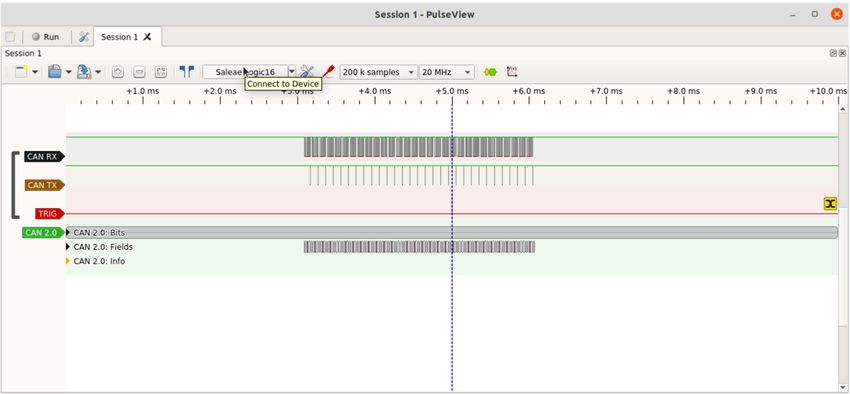
This produces a burst of frames and one of them is the one being looked for (a frame
with standard ID 0x412). A logic analyzer or oscilloscope can be set to trigger on a rising
edge on the TRIG pin on the CANPico board:
Copyright © 2021 Canis Automotive Labs Ltd. 24 / 32Zooming in to the trace shows the frame we are looking for:
There is a short delay (in this case about 50µs) between the end of the frame being looked
for and the trigger pulse due to this trigger being generated in software. The trigger
should be set up with a pre-trigger buffer large enough to contain a frame. Here the logic
analyzer has plenty of memory and the entire burst of frames we sent can be seen.
The logic analyzer software used in the examples above is the Sigrok PulseView tool
with the Saleae Logic 16 and the can2 protocol decoder4.
3.10 Trigger byte format
The trigger can be set using a block of 27 bytes, with the following format:
Byte Bits Description
0 7 If 1 then a CAN error frame will also fire the trigger
6:0 Reserved (must be set to 0)
1:4 29 IDE mask (1 = "must match", 0 = "don't care")
28:18 CIDA mask (for each bit, 1 = "must match", 0 = "don't care)
17:0 CIDB mask (for each bit, 1 = "must match", 0 = "don't care)
5:8 29 IDE match (1 = extended ID, 0 = standard ID)
28:18 CIDA value
17:0 CIDB value (only used if IDE match = 1)
9 7:4 Reserved (must be set to 0)
3:0 DLC mask (for each bit, 1 = "must match", 0 = "don't care)
10 7:4 Reserved (must be set to 0)
3:0 DLC value
11:18 7:0 Data byte mask (for each bit, 1 = "must match", 0 = "don't care)
19:26 7:0 Data byte value
The trigger will fire if the error trigger is set or if all the fields in the CAN frame with
must-match mask bits are set to the corresponding trigger values. If the frame has a
payload of less than 8 bytes then the data byte value of the CAN frame is undefined.
4
For more details about this protocol decoder see https://kentindell.github.io/can2/
Copyright © 2021 Canis Automotive Labs Ltd. 25 / 324 CANHack toolkit
The CANHack toolkit is software that bit-bangs the minimal parts of the CAN protocol
to mount various attacks on a CAN bus. It is designed to demonstrate how easy it is with
just software access to a pair of GPIO pins connected to RX and TX of a CAN transceiver
to attack a CAN bus right down at the protocol level, with many attacks that are invisible
to a simple bus monitor operating at the CAN frame level. In essence, any device on
CAN that can be compromised (e.g. via a buffer overrun remote execution vulnerability)
can mount these attacks on the bus.
It has been ported to the MicroPython SDK and will run on either of the CANPico and
CANHack hardware boards to drive GPIO pins that are connected to a CAN transceiver
(the CANPico and CANHack boards use the same GPIO pins for TX, RX and TRIG).
The CANHack toolkit is provided as a single class CANHack.
4.1 CANHack — CANHack toolkit
class CANHack( [ bitrate=500 ] )
Initializes the CANHack toolkit.
If running on a CANPico, this constructor must be called after the CAN controller TX
output is put into open drain mode (by setting the CAN controller tx_open_drain
parameter to True).
Raises
• ValueError – if bit_rate is not one of 500, 250, or 125
Methods
set_frame([can_id=0x7ff] [, remote=False] [, extended=False] [, data=None] [, set_dlc=False] [,
dlc=0] [, second=False] )
Set the specified frame buffer.
The frame buffer is an internal buffer in RAM in the toolkit that pre-defines the bit
sequence for a CAN frame (pre-calculating where the stuff bits go, etc.)
This function pre-computes the layout of a CAN frame into a frame buffer inside
the toolkit (it will set the shadow frame buffer is second is True because the Janus
Attack5 requires two separate CAN frames).
This method must be called prior to mounting an attack: the pre-computed bit
pattern in the frame buffer is used to synchronize the attack on a targeted frame.
Parameters
• can_id (int) – An 11-bit or 29-bit integer representing the CAN ID of the frame
• remote (bool) – True if the frame is a remote frame
5
For more details on the Janus Attack see
https://kentindell.github.io/2020/01/20/new-can-hacks/
Copyright © 2021 Canis Automotive Labs Ltd. 26 / 32• extended (bool) – True if can_id is a 29-bit CAN identifier
• data (bytes) – The payload of the CAN frame
• set_dlc (bool) – True if the DLC should be set to a specific value
• dlc (int) – the value of DLC if set_dlc is True
• second (bool) – True if this call is setting the shadow frame in preparation for
the Janus Attack
Raises
• ValueError – if the dlc value is > 15 or if the payload is more than 8 bytes or
remote is True and data is set
Returns None
get_frame( [, second=False] )
Return details of the specified frame buffer.
Parameters
• second (bool) – True if the details of the shadow frame buffer should be
returned
Return type tuple
Raises
• ValueError – if the selected frame buffer has not been set by a prior call to
set_frame()
The method returns an 8-element tuple of:
- A string representing the frame bitstream (including stuff bits) with '1' and
'0' characters for the bits
- A string representing where the stuff bits are located (with 'X' being a stuff
bit and '–' being a data bit)
- The integer index of the last arbitration bit in the bitstream
- The integer index of the last DLC bit in the bitstream
- The integer index of the last data bit in the bitstream
- The integer index of the last CRC bit in the bitstream
- The integer index of the last EOF bit in the bitstream
- A 15-bit integer of the CRC of the frame
send_frame([timeout=50000] [, second=False] [, retries=0])
Send a frame on the CAN bus.
Parameters
• timeout (int) – A value for how long we wait for bus idle before giving up
• second (bool) – True if the frame should come from the shadow frame buffer
Copyright © 2021 Canis Automotive Labs Ltd. 27 / 32• retries (int) – the number of times to try again to send the frame after loss of
arbitration or error
Raises
• ValueError – if the selected frame buffer has not been set by a prior call to
set_frame()
This function sends the specified frame on the CAN bus. It waits for the bus to
become idle and then starts transmitting, following the CAN protocol for
arbitration. If it loses arbitration or detects an error then it tries again, up to a
maximum set by retries.
This function can mount a traditional spoof attack on the bus where the frame
pretends to be from another node, avoiding the 'doom loop' problem with this
being mounted from a standard CAN controller (the 'doom loop' happens if the
spoof frame and the legitimate frame happen to win arbitration at the same time:
an error will be raised and arbitration will re-start and his will continue in a loop
until one of the devices has gone error passive or bus-off).
The timeout value is used as a limit on spin looping and depends on the target
CPU. For the RP2040 in the Raspberry Pi Pico a timeout value of 3440000 is one
second of real-time.
send_janus_frame([timeout=50000] [, sync_time=0] [, split_time=0], [, retries=0])
Sends the specified Janus frame on the CAN bus.
It waits for the bus to become idle and then starts transmitting, following the CAN
protocol for arbitration. If it loses arbitration or detects an error then it tries again,
up to a maximum set by retries.
A Janus frame is a CAN frame with two different contents, specified by the frame
buffer and shadow frame buffer. It must have the same ID and be the same number
of bits long, which means it must have the same number of stuff bits (although
they can be in different places).
Parameters
• timeout (int) – The timeout (a value of 3440000 corresponds to one second)
• sync_time (int) – The number of clock ticks to wait to ensure controllers have
synced (0 has a special meaning of 1/4 of a CAN bit time)
• split_time (int) – The number of clock ticks from the start of the bit before the
second CAN bit value is set (0 has a special meaning of 5/8th of a CAN bit
time)
• retries (int) – the number of times to try to send the frame after loss of
arbitration or error
Raises
• ValueError – if either frame buffer has not been set by a prior call to
set_frame()
Copyright © 2021 Canis Automotive Labs Ltd. 28 / 32spoof_frame([timeout=50000] [, overwrite=False] [, retries=0])
Target a frame and send a spoof version.
Parameters
• timeout (int) – The time to wait for the targeted frame to appear before giving
up (a value of 3440000 corresponds to one second)
• overwrite (bool) – Once the targeted frame has been detected, overwrite the
remainder with the selected spoof frame
• retries (int) – the number of times to try to send the frame after loss of
arbitration or error
Returns None
Raises
• ValueError – if the frame buffer has not been set by a prior call to set_frame()
If overwrite is True then the spoof frame is written over the top of the targeted
frame. If the targeted sender is error passive then it will not be able to signal an
error frame and other controllers will receive only the spoofed version of the
frame. If overwrite is set to False then the spoof frame is entered into arbitration
immediately following the end of the targeted frame.
error_attack([repeat=2] [, timeout=50000])
Repeatedly destroy a targeted frame with error frames.
Parameters
• timeout (int) – The time to wait for the targeted frame to appear before giving
up (a value of 3440000 corresponds to one second)
• repeat (int) – the number of times to repeat the attack
Returns True if the timeout occurred, False otherwise
Return type bool
Raises
• ValueError – if the frame buffer has not been set by a prior call to set_frame()
A CAN frame with the targeted frame's ID must be set using the set_frame() before
calling this method. When the ID of the targeted CAN frame has been seen then
an error is generated (six dominant bits) and all CAN controllers go into error
handling. The error delimiter is targeted for further repeating of the attack. With
this approach a targeted node can quickly be driven into the error passive or bus-
off state.
double_receive_attack([repeat=2] [, timeout=50000])
Cause a targeted frame to be received twice.
Copyright © 2021 Canis Automotive Labs Ltd. 29 / 32Parameters
• timeout (int) – The number of bit times to wait for the targeted frame to appear
before giving up
• repeat (int) – the number of times to repeat the attack
Returns True if the timeout occurred, False otherwise
Return type bool
Raises
• ValueError – if the frame buffer has not been set by a prior call to set_frame()
A CAN frame with the targeted frame's ID must be set using the set_frame() before
calling this method. When the ID of the targeted CAN frame has been seen then
an error is generated at the last bit of the EOF field, after the receivers have
accepted the CAN frame but before the transmitter has marked it as sent. This
causes the transmitter to signal an error and retransmit the frame, leading to it
being received twice.
freeze_doom_loop_attack([repeat=2] [, timeout=2000000])
Freeze the bus after a targeted frame has been successfully transmitted.
Parameters
• timeout (int) – The number of bit times to wait for the targeted frame to appear
before giving up
• repeat (int) – the number of times to repeat the attack
Returns None
Raises
• ValueError – if the frame buffer has not been set by a prior call to set_frame()
A CAN frame with the targeted frame's ID must be set using the set_frame() before
calling this method. When the ID of the targeted CAN frame has been seen then
an overload frame is generated after the last bit of the EOF field, after the receivers
have accepted the CAN frame and the transmitter has marked it as sent. This
causes the controllers to enter the overload frame recovery mode (like error
recovery, except the error counters are not incremented). At the end of the error
delimiter, another overload frame is generated until the number in the repeat
parameter is reached.
set_can_tx( [ recessive=True ] )
(Hardware diagnostic method) Set the CAN TX pin to recessive or dominant.
Parameters
• recessive (bool) – Set to True if the TX pin should be set recessive (i.e. high)
Copyright © 2021 Canis Automotive Labs Ltd. 30 / 32Returns True if CAN RX was recessive, False otherwise
Return type bool
This is intended for diagnostics to check that the TX and RX pins have been
identified and connected correctly.
square_wave()
(Hardware diagnostic method) Drive the CAN TX pin for 160 CAN bit times with a
square wave with a 50:50 duty cycle and a frequency of half the CAN bit rate.
The purpose of this function is for hardware bring-up to check that the CAN TX
pin is driven correctly.
Return type None
loopback()
(Hardware diagnostic method) Wait for a falling edge on CAN RX and then drive the
TRIG pin with the value of CAN RX for 160 bit times.
The purpose of this function is for hardware bring-up to check that the CAN RX
pin is connected correctly.
Return type None
get_clock()
(Hardware diagnostic method) Get the current time.
The purpose of this function is to check that the free-running counter has been
initialized properly and is counting correctly. Note: this is the free-running counter
used internally by the CANHack toolkit to measure time and is not the same as the
timer inside the CAN controller on the CANPico board used for timestamping.
Parameters
Returns the current time in pre-scaled CPU clock ticks
Return type int
reset_clock()
(Hardware diagnostic method) Reset the free-running counter to zero.
Return type None
send_raw()
(Hardware diagnostic method) Send the raw bitstream of a CAN frame on the CAN
TX pin.
Return type None
Raises
• ValueError – if the frame buffer has not been set by a prior call to set_frame()
The CAN frame to send must have been set with a call to set_frame() before calling
this method. This call does not enter into CAN arbitration or participate in the
Copyright © 2021 Canis Automotive Labs Ltd. 31 / 32CAN protocol, it merely sends a sequence of bits to the pin. Consequently the CAN
bus must be idle when this function is called.
Copyright © 2021 Canis Automotive Labs Ltd. 32 / 32You can also read


