Delayed Egress 7100, 7200 Series Exit Device
←
→
Page content transcription
If your browser does not render page correctly, please read the page content below
Installation Instructions

             Delayed Egress
             7100, 7200 Series Exit Device

                                                                                                                       Available on the following devices:
                                                                                                                                                      Rim
                                                                                                                                                   Mortise
                                                                                                                                              SquareBolt®
                                                                                                                                  Concealed Vertical Rod
                                                                                                                                    *Surface Vertical Rod

                                                                                     *Rod Guards Required (made by other manufacturers)
                   WARNING
          This product can expose you to
                                                                                                Attention Installer
          lead which is known to the state                                                      Any retrofit or other field modification to a fire rated opening
          of California to cause cancer and                                                     can potentially impact the fire rating of the opening, and
          birth defects or other reproductive                                                   Yale Locks & Hardware makes no representations or
                                                                                                warranties concerning what such impact may be in any
          harm. For more information go to
                                                                                                specific situation. When retrofitting any portion of an
          www.P65warnings.ca.gov.                                                               existing fire rated opening, or specifying and installing a new
                                                                                                fire-rated opening, please consult with a code specialist or
                                                                                                local code official (Authority Having Jurisdiction) to ensure
                                                                                                compliance with all applicable codes and ratings.
For technical support contact Yale® at 800.438.1951 x5033 or support@yalelocks.com

Copyright ©2018, 2020, 2021 ASSA ABLOY Access and Egress Hardware Group, Inc. All rights reserved. Reproduction in whole or in part                  80-9470-0162-000 04/21
without the express written permission of ASSA ABLOY Access and Egress Hardware Group, Inc. is prohibited.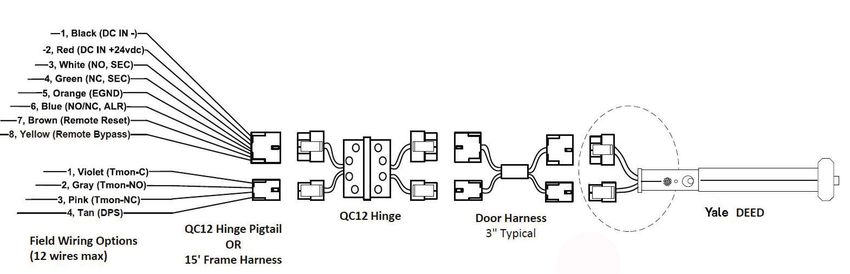
Delayed Egress
 7100, 7200 Series Exit Device
Installation Instructions

             TOC                Table of Contents

                1              Panic and Fire Related Devices . . . . . . . . . . . . . . . . . . . . . . . . . . . . . . . . . . . . . . . . . . . . . . . . .4

                    a          Checklist . . . . . . . . . . . . . . . . . . . . . . . . . . . . . . . . . . . . . . . . . . . . . . . . . . . . . . . . . . . . . . . . . . . . . .4

                    b          Required Components . . . . . . . . . . . . . . . . . . . . . . . . . . . . . . . . . . . . . . . . . . . . . . . . . . . . . . . . .4

                    c          Optional Components. . . . . . . . . . . . . . . . . . . . . . . . . . . . . . . . . . . . . . . . . . . . . . . . . . . . . . . . . .4

                    d          Electrical Specifications . . . . . . . . . . . . . . . . . . . . . . . . . . . . . . . . . . . . . . . . . . . . . . . . . . . . . . .4

                2              End Cover and PC Board Assembly . . . . . . . . . . . . . . . . . . . . . . . . . . . . . . . . . . . . . . . . . . . . . 5

                3              DIP Switch Settings . . . . . . . . . . . . . . . . . . . . . . . . . . . . . . . . . . . . . . . . . . . . . . . . . . . . . . . . . . . .6

                4              Installation of End Cover Asssembly to Device. . . . . . . . . . . . . . . . . . . . . . . . . . . . . . . . . . 7

                5              Device Mounting. . . . . . . . . . . . . . . . . . . . . . . . . . . . . . . . . . . . . . . . . . . . . . . . . . . . . . . . . . . . . . .8

                6              Wiring Layout: Input/Output Wiring Descriptions . . . . . . . . . . . . . . . . . . . . . . . . . . . . . . .9

                7              ElectroLynx Connector System for All Electrical Installation . . . . . . . . . . . . . . . . . . .10

                8              ElectroLynx Wiring Options Overview with QC8 Hinge . . . . . . . . . . . . . . . . . . . . . . . . . 11

                9              Installing Delayed Egress Exit Device . . . . . . . . . . . . . . . . . . . . . . . . . . . . . . . . . . . . . . . . . .12

                10             ElectroLynx Wiring Options Overview with QC12 Hinge . . . . . . . . . . . . . . . . . . . . . . . .13

                11             ElectroLynx Wiring Deed with “O” Trim Monitor Option and QC12 Hinge . . . . . . . .15

                12             ElectroLynx Wiring Deed with Electrified Trim (ET) Option and QC12 Hinge . . . . .17

                13             ElectroLynx Wiring Deed with “S” Latchbolt Monitor Option and QC12 Hinge . . .18

                14             Non-ElectroLynx Door Prep . . . . . . . . . . . . . . . . . . . . . . . . . . . . . . . . . . . . . . . . . . . . . . . . . . 20

                15             Wiring Diagram - Single Door Exit Only . . . . . . . . . . . . . . . . . . . . . . . . . . . . . . . . . . . . . . . .21

For technical support contact Yale® at 800.438.1951 x5033 or support@yalelocks.com

Copyright ©2018, 2020, 2021, ASSA ABLOY Access and Egress Hardware Group, Inc. All rights reserved. Reproduction in                                                 80-9470-0162-000 04/21
whole or in part without the express written permission of ASSA ABLOY Access and Egress Hardware Group, Inc. is prohibited.

                                                                                                     2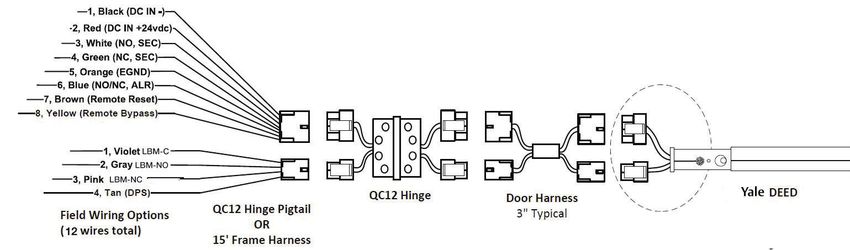
Delayed Egress
         7100, 7200 Series Exit Device
       Installation Instructions

             TOC                Table of Contents

                16             Wiring Diagram - Single Door with Remote Inputs & Monitoring Outputs. . . . . . . .21

                17             Wiring Diagram - “O” Trim Monitor Entry with External Door Position Switch . . 22

                18             Wiring Diagram - 690F Electrical Trim Control . . . . . . . . . . . . . . . . . . . . . . . . . . . . . . . . 22

                19             Wiring Diagram - 691F Electrical Trim Control . . . . . . . . . . . . . . . . . . . . . . . . . . . . . . . . 23

                20             Operating Instructions . . . . . . . . . . . . . . . . . . . . . . . . . . . . . . . . . . . . . . . . . . . . . . . . . . . . . . . 23

                21             Additional Options Non ElectroLynx Wiring . . . . . . . . . . . . . . . . . . . . . . . . . . . . . . . . . . . 24

                22             BOCA 15 Second Delay & BOCA 30 Second Delay . . . . . . . . . . . . . . . . . . . . . . . . . . . . 25

                23             NFPA 101 Requirements: 30 Second Delay . . . . . . . . . . . . . . . . . . . . . . . . . . . . . . . . . . . 25

                24             Troubleshooting . . . . . . . . . . . . . . . . . . . . . . . . . . . . . . . . . . . . . . . . . . . . . . . . . . . . . . . . . . . . . 26

                25             Appendix: Legacy Boards . . . . . . . . . . . . . . . . . . . . . . . . . . . . . . . . . . . . . . . . . . . . . . . . . . . . .27

                               Caution: Don’t change factory applied finishes.

                  NOTE:
                  •      Wiring method must be in accordance with CSA C22.1, Canadian Electrical Code,
                         Part I, Safety Standard for Electrical Installations, Section 32; and CAN/ULC-S524
                         Installation of Fire Alarm Systems.

For technical support contact Yale® at 800.438.1951 x5033 or support@yalelocks.com

Copyright ©2018, 2020, 2021, ASSA ABLOY Access and Egress Hardware Group, Inc. All rights reserved. Reproduction in                                       80-9470-0162-000 04/21
whole or in part without the express written permission of ASSA ABLOY Access and Egress Hardware Group, Inc. is prohibited

                                                                                                     3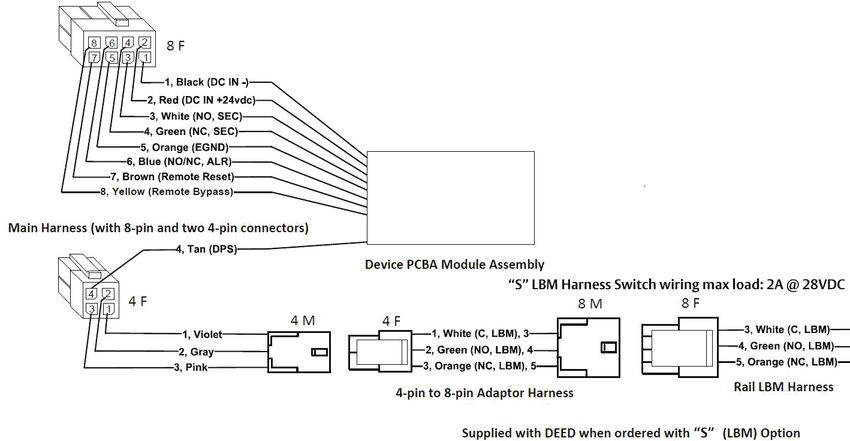
Delayed Egress
 7100, 7200 Series Exit Device
Installation Instructions

                1                   Panic and Fire Rated Devices

                a              Checklist
                               1.     Check device for shipping damage prior to installation and make sure all parts are on hand.
                               2. Identify options provided with device.
                               3. Identify model, type and hand of trim if applicable (see exit device and trim instructions for
                                  reversing hands).
                               4. Contact hardware supplier if device is damaged or missing parts.

                b              Required Components (Numbered list correlates with numbers in Figure 1)
                               1.     Delayed Egress Exit Device
                               2. 24VDC UL Listed Regulated and Filtered Power Supply with Fire Alarm Interface (recommend
                                  Securitron BPS 24-1 or 24-2 (UL294 Listed), depending on requirements). Power supply is NOT to
                                  be used in UL603 Burglar Alarm System.
                               3. Power transfer UL or ULC listed (2-10 wire depending on system)-Securitron (EPT) or equivalent.
                               4. Sign (MUST BE INSTALLED ON DOOR ABOVE DEVICE).
                               NOTE: The delayed egress system is to be installed in accordance with NFPA 101.

                c              Optional Components (Numbered list correlates with numbers in Figure 1)
                               5. Remote Annunciator
                                                                                                                                                      115 VAC
                               6. Door Position Switch (DPS)                                                                                          1 or 2A
                               7.     Standard Trim                                                                                              2.   60 Hz
                                                                                                              6.
                               8. Electrified Trim                                                                                                    Fire
                                                                                                                                                      Alarm
                               9.     Device and Trim Cylinder                                                                  4.                    Circuit
                                                                                                                        PUSH UNTIL ALARM              Required
                                                                                                                     SOUNDS. DOOR CAN BE
                                                                                                                    OPENED IN 15 SECONDS.
                d              Electrical Specifications*
                                                                                                7. Or 8.
                               Input Voltage 24VDC (+/-10%)
                               Wire Size:                                                                                                        5.
                                                                                                                                            3.
                               18 AWG Min (up to 100')                                                                    1.
                               Signal or Control 22AWG Min
                               Power Consumption:
                               Standard Device - 500mA
                                                                                                                   9.
                               Device with Electric Trim - 1.5A

                               *Follow Local Electrical Codes for Wiring.                                                                               Figure 1

                               NOTE: Components shown do not reflect all possible applications. Consult
                               manufacturer for special applications.
For technical support contact Yale® at 800.438.1951 x5033 or support@yalelocks.com

Copyright ©2018, 2020, 2021, ASSA ABLOY Access and Egress Hardware Group, Inc. All rights reserved. Reproduction in                                    80-9470-0162-000 04/21
whole or in part without the express written permission of ASSA ABLOY Access and Egress Hardware Group, Inc. is prohibited.

                                                                                                     4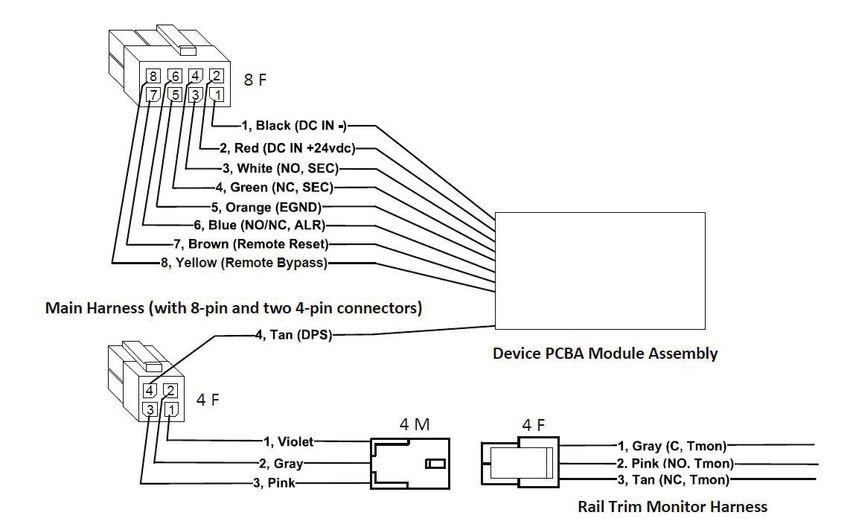
Delayed Egress
         7100, 7200 Series Exit Device
       Installation Instructions

                2                 End Cover and PC Board Assembly
                                                                                                                                          Circuit Board Assembly
                                                                                                         Indicator Light
                                                                                                         (LED)                                                          Figure 2

                                             Cylinder Nut                                                                                        Tabs
                                                                             Activator Legs

                       Arming Switch Activator

                       Order Separately
                                                                                                                                                                Lens Cover
             1-1/8”
             29mm

                                                   1-1/2”
                                                   38mm

          Typical Mortise    A02 Cam                  Collar
          Cylinder                                                              Rear Cover                                                              1-1/8” (29mm)
          1000-118-A02                                                          End Cap                                                                 Mortise Cylinder
                                                                                                                             Cylinder Collar
                                                                                                                                                        1000-118-A02
                     Cylinder and Collars                                                                                    (Order separately          (Order seperately)
         •     Use standard 1-1/8” mortise                                                                                   when required)
               cylinder with A02 cam. Corbin
               Russwin #1000-118-A02 collar
               is not required.
                                                                          Arming Switch Activator                            Label
         •     Use Corbin Russwin collar
                                                                   Activator Legs
               270F15 for optional 1-1/4” long                                       Circuit Board                                                                To Power
               cylinder.                                                                                                                                          Transfer
         •     Use Corbin Russwin collar
               654F07 for optional 1-1/2” long
               cylinder.
                                                                                                                                                    To Device Connection

               1.      Trim device to proper length as required.
                       36" Exit Device - 1" maximum can be trimmed
                       48" Exit Device - 6" maximum can be trimmed
               2. Carefully slide circuit board assembly into end Cover to ensure indicator light (LED) is not bent.
               3. Insert mortise cylinder into end cover with keyway horizontal, as shown.
               4. Slide arming switch activator over mortise cylinder so activator legs are on each side of switch.
               5. Insert flange of cylinder nut into arming switch activator to allow rotation of activator.
               6. Tighten cylinder nut on mortise cylinder and to secure circuit board assembly.
               7.      Verify assembly by rotating key counter clockwise and clockwise. Key should move freely and
                       arming switch should trip for both rotation directions. If key does not rotate freely, verify cylinder
                       nut was placed in correct orientation. If arming switch does not trip, activator legs on arming
                       switch activator can be bent to reduce or increase rotational travel.

For technical support contact Yale® at 800.438.1951 x5033 or support@yalelocks.com

Copyright ©2018, 2020, 2021, ASSA ABLOY Access and Egress Hardware Group, Inc. All rights reserved. Reproduction in                                              80-9470-0162-000 04/21
whole or in part without the express written permission of ASSA ABLOY Access and Egress Hardware Group, Inc. is prohibited

                                                                                                     5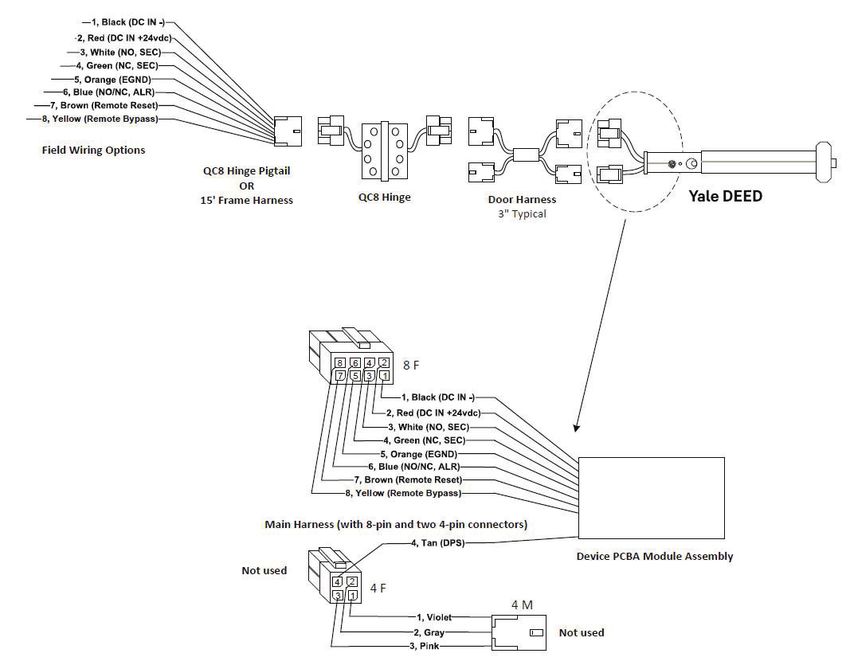
Delayed Egress
 7100, 7200 Series Exit Device
Installation Instructions

                3                 DIP Switch Settings
                                                                                                                                             S2
                              S2-1: Nuisance Audible may be selected ON (default) or
                              OFF.                                                                                                           Nuisance Audible

                              S2-2 and S2-3: Nuisance Delay time may be selected 0                                                           Nuisance Delay
                              (Immediate), 1, 2, or 3 (default) seconds.
                                                                                                                                             Nuisance Delay
                              S2-4 and S2-5: Reset Delay time may be selected 5, 10
                                                                                                                                             Reset Delay
                              (default), 20 or 40 seconds.
                                                                                                                                             Reset Delay
                              S2-6: Whether an external LBM is used for not used for this
                              product, the switch must be set ON (default) to Bypass.                                                        LBM Bypass
                              S2-6 OFF position is not used.
                                                                                                                                             DPS Bypass
                              S2-7: Switch must be set ON (default) to Bypass when an
                              external Door Position Switch (DPS) is NOT used, and OFF                                                       (Special) RAC
                              when an external DPS is used.

                                                                                                                              PCBA DIP SWITCH VIEW

                                        Nuisance Delay (seconds)
                                                   0        1       2        3
                                   S2-2            OFF      OFF     ON       ON
                                   S2-3            OFF      ON      OFF      ON
                                             Reset Delay (seconds)
                                                   5        10      20       40
                                   S2-4            OFF      OFF     ON       ON
                                   S2-5            OFF      ON      OFF      ON

                              * S2-8: When an external DPS is used and switch S2-8 ON, and 40 second reset delay (S2-4 and S2-5) are set
                              ON, after activation of momentary egress by cylinder key switch or external remote reset signal, if the Door/DPS is
                              open beyond 40sec the device will remain in momentary egress mode indefinitely and shall not enter alarm mode;
                              then once the Door/DPS is closed it will rearm immediately.

                              ** With S2-8 OFF (S2-4 and S2-5 set for 5, 10, 20 or 40sec), if door/DPS is open after selected time the alarm will
                              sound. Close door to reset and rearm device using cylinder key or remote reset signal.
                              If door/DPS is opened then closed before selected time expires, the device will rearm immediately.
                              If DPS is not used, is bypassed with S2-7 ON, the door will rearm immediately after 5, 10, 20 or 40 sec whether the
                              door is open or closed, with either S2-8 ON or OFF.
                              Ensure eight S2 Dip Switches are set per application before moving on to the next page of instructions.

For technical support contact Yale® at 800.438.1951 x5033 or support@yalelocks.com

Copyright ©2018, 2020, 2021, ASSA ABLOY Access and Egress Hardware Group, Inc. All rights reserved. Reproduction in                                  80-9470-0162-000 04/21
whole or in part without the express written permission of ASSA ABLOY Access and Egress Hardware Group, Inc. is prohibited.

                                                                                                     6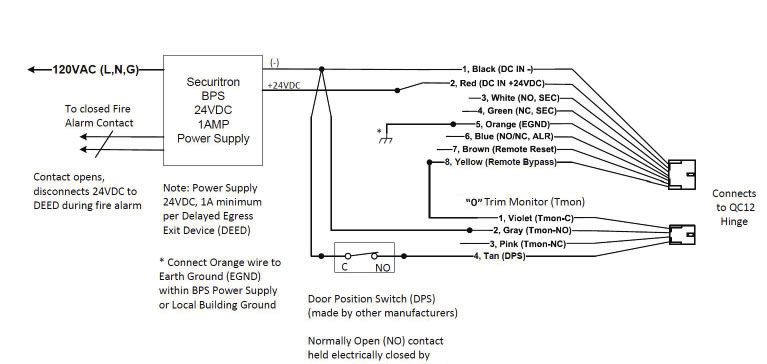
Delayed Egress
         7100, 7200 Series Exit Device
       Installation Instructions

                4                   Installation of End Cover Assembly to Device
                                                                                                                                                              Figure 3
                               1.     Turn end cover assembly over
                                      to circuit board side.
                               2. Ensure eight S2 Dip Switches
                                  are set for application (see
                                  previous page).
                               3. Slide end cover assembly into
                                  device, making sure not to
                                  pinch or crimp wires.
                               4. Connect device lock
                                  assembly harness to
                                  connector J1. Place wire
                                  connectors and excess wire between end cover and P.C. board. (Figure 3, Device End View)
                               5. Check all connections before proceeding.
                               6. Proceed to device mounting (see packed instructions).
                                                                                                                                                      Connector J2
                                                                                                                                                      To power transfer

                                                                                     Circuit Board

                                                                                                                                                     Connector J1 Plugs
                                                                                                                                                     into device

                                                                                                                                              Silicone dielectric
                                                                                                                                              grease is applied at the
                                          See DIP Switch settings on previous page
                                                                                                                                              factory onto J1 and J2
                                                                                                                                              connectors, terminals,
                               NO C NC for 2-pin jumper selection.                                                                            and wires here.
                               NO is the default position.

                                                                                                                             J5 detail view

                                                                                                                To Power Transfer

                                                                                                                 Device Assembly Harness

                                                                                                                For use on exterior doors

                               NOTE:
                               •      Review J5 Alarm Relay NO or NC selection above. If NC contact is required, remove PBCA/cover
                                      assembly from rail, move 2-pin jumper to NC, then re-install PCBA/cover on rail.
For technical support contact Yale® at 800.438.1951 x5033 or support@yalelocks.com

Copyright ©2018, 2020, 2021, ASSA ABLOY Access and Egress Hardware Group, Inc. All rights reserved. Reproduction in                                       80-9470-0162-000 04/21
whole or in part without the express written permission of ASSA ABLOY Access and Egress Hardware Group, Inc. is prohibited

                                                                                                     7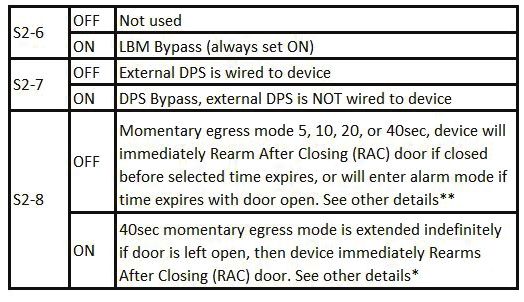
Delayed Egress
 7100, 7200 Series Exit Device
Installation Instructions

                5                   Device Mounting
                               1.     Refer to installation instructions included with device and trim for complete door and frame
                                      preparations. Refer to template #7477-00001 for wire access hole location.
                               2. Feed wires from power transfer through wire access hole in door. (Figure 4)
                               3. When required, mount outside trim to door (see trim installation instructions).
                               4. Mount device to door (see device installation instructions).
                               5. Do not install end cap until device has been wired and tested for operation (See wiring diagrams).
                               6. Check mechanical operation and proceed to wiring diagrams.
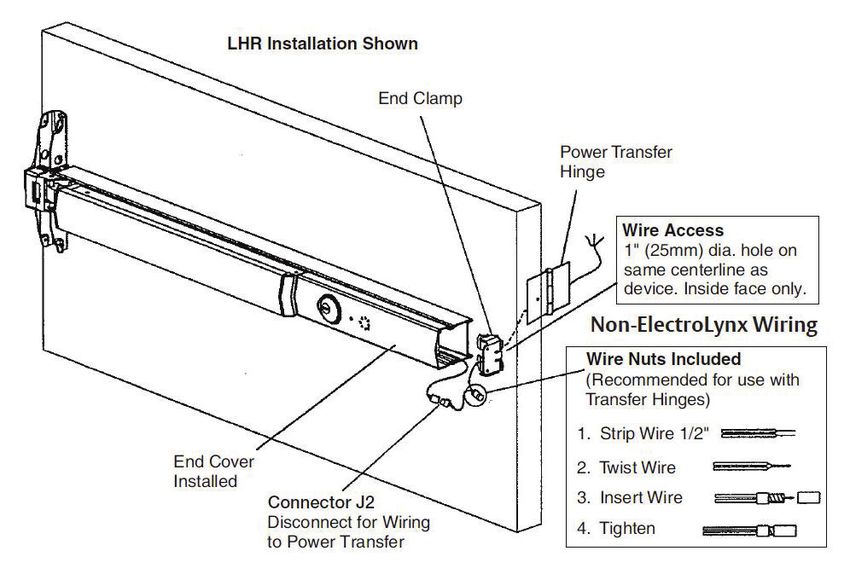
                               NOTE: Wire nuts can be inserted into wire access hole after making connections. Quick disconnect
                               can be used without removing wire nuts.
                               NOTE: For QC8 and QC12 ElectroLynx wiring, refer to Sections 8 and 10. ElectroLynx has pluggable
                               connectors, wire nuts are not needed.

                                                                                                                              Figure 3

                               NOTES:
                               •      Wires must be protected from abrasion.
                               •      For use with Class II circuits only.

For technical support contact Yale® at 800.438.1951 x5033 or support@yalelocks.com

Copyright ©2018, 2020, 2021, ASSA ABLOY Access and Egress Hardware Group, Inc. All rights reserved. Reproduction in            80-9470-0162-000 04/21
whole or in part without the express written permission of ASSA ABLOY Access and Egress Hardware Group, Inc. is prohibited.

                                                                                                     8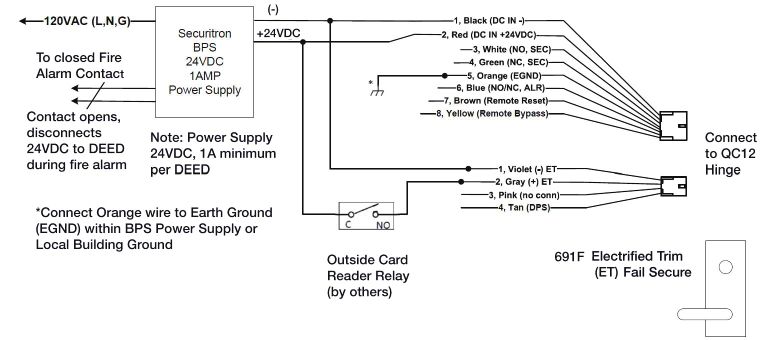
Delayed Egress
         7100, 7200 Series Exit Device
       Installation Instructions

                6                 Wiring Layout: Input/Output Wiring Descriptions
                                             J2 Connector                                                                                                  8-Pin
                                                                                                                                                        ElectroLynx
                                 (See Figure 5 on next page)                                                                                            Connector
                                 Pin Number             Input/Output            Wire Color                                   Description                Pin Number
                                        10                   Input                  Black           24VDC Power Supply (-Circuit Ground)                     1
                                        12                   Input                   Red            24VDC Power Supply (+Positive)                           2
                                                                                                    Secure Relay Output - Normally Open (NO)
                                                                                                    contact. Power off - contact is open
                                                                                                    Powered/armed - Relay energizes contact
                                        11                  Output                  White                                                                    3
                                                                                                    closes. After 15 or 30 seconds delay when
                                                                                                    device releases, the relay de-energizes, contact
                                                                                                    opens (same as Power off state).
                                                                                                    Secure Relay Output - Normally Closed (NC)
                                                                                                    contact. Power off - contact is closed.
                                                                                                    Powered/armed - Relay energizes, contact
                                        13                  Output                  Green                                                                    4
                                                                                                    opens. After 15 or 30 seconds delay when
                                                                                                    device releases, relay de-energizes, contact is
                                                                                                    closed (same as Power off state).

                                                                                                    Earth Ground connection to PCB mounting
                                       NC                    EGND                  Orange                                                                    5
                                                                                                    plate via ring terminal

                                                                                                    Alarm Relay Output - J5 jumper Selectable
                                                                                                    NO/NC contact that changes state when alarm
                                                                                                    cycle has been activated. Default shipped
                                                                                                    position - jumper is on NO contact setting.
                                         3                  Output                   Blue           Power off - contact is NO or NC as per jumper            6
                                                                                                    selection.Powered/armed - Relay energizes
                                                                                                    contact reverses state. When alarm cycle is
                                                                                                    activated - Relay de-energizes (same as Power
                                                                                                    off state).
                                                                                                    Remote Reset Input - Momentary input from
                                                                                                    key switch, pushbutton, etc. Will release
                                         8                   Input                 Brown            device for 5, 10, 20, or 40 seconds for egress or        7
                                                                                                    ingress and also reset device when in bypass or
                                                                                                    alarmed state.
                                                                                                    Remote Bypass Input - Momentary input from
                                                                                                    key switch, pushbutton, etc. Will maintain
                                         6                   Input                 Yellow           device in an unlocked state for normal device            8
                                                                                                    operation. Device must be rearmed by resetting
                                                                                                    from key switch on device or remote reset.

                              NOTE: ElectroLynx QC8 Hinge is only required if all eight wires are used. When DPS and any other
                              wiring options are on the 4-pin connector, the hinge is NOT required.
                              NOTE: Secure and Alarm Relay contacts are rated max load 1A @24VDC.

For technical support contact Yale® at 800.438.1951 x5033 or support@yalelocks.com

Copyright ©2018, 2020, 2021, ASSA ABLOY Access and Egress Hardware Group, Inc. All rights reserved. Reproduction in                                       80-9470-0162-000 04/21
whole or in part without the express written permission of ASSA ABLOY Access and Egress Hardware Group, Inc. is prohibited

                                                                                                     9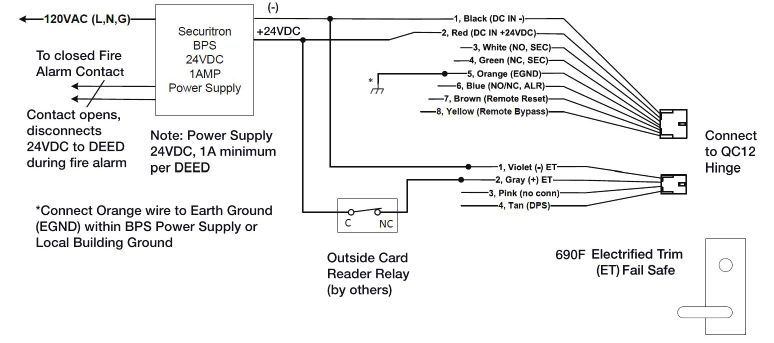
Delayed Egress
 7100, 7200 Series Exit Device
Installation Instructions

                6                   Wiring Layout: Input/Output Wiring Descriptions, continued
                                           J2 Connector (See Figure 5 below.)                                                               4-Pin ElectroLynx Connector

                                 Pin Number             Input/Output            Wire Color                                    Description                  Pin Number

                                        NC              Input/Output               Violet                      C, LBM or C, Trim Mon. or ET(-)                    1

                                        NC              Input/Output                Gray                    NO, LBM or NO, Trim Mon. or ET(+)                     2

                                        NC              Input/Output                Pink                           NC, LBM or NC, Trim Mon.                       3

                                         2                    Input                  Tan           Door Position Switch Input-Input sense for DPS                 4
                                                                                                                   switch option

                              NOTE: ElectroLynx QC12 Hinge is required if DPS and/or any options shown are required.

                                                                                                                                                           Top View

                                                                                                                                                         Bottom
                                                                                                                                                         View

                                                                                                                                                             Figure 4

                              NOTE: Refer to Section 25 if replacing legacy PCBA/wiring with new PCBA/wiring.

               7                    ElectroLynx Connector System for All Electrical Installation
                               1.    Mount exit device per instruction sheet provided.
                               2. Plug exit device connector into raceway connector in door. Feed through 1" (25mm) hole in door.
                                  Install rail mounting end clamp bracket with two (2) screws supplied. Install end cap.
                               3. Plug raceway connector from edge of door into electric hinge connector and feed wires back
                                  through door prep. Mount electric hinge to door.
                                     A. If wiring now, wire frame side wires, to wires on pigtail harness, on hinge as required by
                                        using connectors allowed by local code. Plug pigtail harness connector into electric hinge
                                        connector. Feed harness through frame prep and mount electric hinge.
                                     B. If wiring later, plug pigtail harness connector into electric hinge connector. Feed harness
                                        through frame prep and mount electric hinge.
For technical support contact Yale® at 800.438.1951 x5033 or support@yalelocks.com

Copyright ©2018, 2020, 2021, ASSA ABLOY Access and Egress Hardware Group, Inc. All rights reserved. Reproduction in                                           80-9470-0162-000 04/21
whole or in part without the express written permission of ASSA ABLOY Access and Egress Hardware Group, Inc. is prohibited.

                                                                                                    10
Delayed Egress
7100, 7200 Series Exit Device
Installation Instructions
7 ElectroLynx Connector System for All Electrical Installation, continued
Installation Notes:
1. Wiring to pigtail harness is per facility wiring requirement.
2. For an ElectroLynx system, go to function or monitor page(s) with your device.
3. Combinations of certain monitors can be used in each device. These instructions detail installation
of each monitor separately.
ElectroLynx Connector System Notes:
System is designed to be installation friendly, with plug connectors from electric hinge through door
to device. The only wiring required is loose wires on pigtail harness assembly on frame side of electric
hinge (included with QC Hinge). Combinations of certain switches and monitors can be used.
The plug and receptacle connectors are designed to mate and lock together. Plug connectors into each
other with locking mechanism aligned. Do NOT force connectors together any other way.
8 ElectroLynx Wiring Options Overview with QC8 Hinge
Figure 5
For technical support contact Yale® at 800.438.1951 x5033 or support@yalelocks.com
Copyright ©2018, 2020, 2021, ASSA ABLOY Access and Egress Hardware Group, Inc. All rights reserved. Reproduction in 80-9470-0162-000 04/21
whole or in part without the express written permission of ASSA ABLOY Access and Egress Hardware Group, Inc. is prohibited
11Delayed Egress
7100, 7200 Series Exit Device
Installation Instructions
9 Installing Delayed Egress Exit Device
Refer to Figure 6 for delayed egress exit device installation wiring.
NOTE: For ElectroLynx Hinge Connector System: Follow Section 6 wiring instructions.
For non-ElectroLynx door:
Remove connector at end of exit device and connect to incoming wires from power source using wire
nuts, butt splices, etc. See Section 14 for hole locations and sizes.
Locking mechanism
Female ElectroLynx system has wires with
receptacle connectors that snap together.
(8 circuit) Male plug (8 circuit)
Pigtail Harness with 8-Pin
Red +2
Connector (Provided with exit
Black - 1
device or QC8 hinge)
Green (NC) Sec 4
White (NO) Sec 3
Electric Hinge - QC8 with
Blue (NO/NC Alarm) 6
8-Pin Connectors
Orange (EGND) 5
Yellow (Remote Bypass) 8
Brown (Remote Reset) 7
Exit Device
Connector
3” Typical Raceway Harness with 8 &
4-Pin Connectors. (4-pin connectors
are not shown and are not used).
Note: Typical raceway location is shown. Other locations
may exist depending on door type.
Figure 6
For technical support contact Yale® at 800.438.1951 x5033 or support@yalelocks.com
Copyright ©2018, 2020, 2021, ASSA ABLOY Access and Egress Hardware Group, Inc. All rights reserved. Reproduction in 80-9470-0162-000 04/21
whole or in part without the express written permission of ASSA ABLOY Access and Egress Hardware Group, Inc. is prohibited.
12Delayed Egress
7100, 7200 Series Exit Device
Installation Instructions
10 ElectroLynx Wiring Options Overview with QC12 Hinge
Refer to Figure 7 on page 14 for “O” Monitor - Trim Actuated SPDT Switch wiring.
NOTE:
• Switch wiring max load: 2A @28VDC.
• Wire must be protected from abrasion.
• For use with Class II circuits only.
• For ElectroLynx QC12 Hinge Connector System: Follow Sections 11, 12, and 13 wiring instructions.
• For non-ElectroLynx door:
Remove connector at end of exit device and connect to incoming wires from power source using
wire nuts, butt splices, etc. See Section 14 for hole locations and sizes.
Note:
New wiring shown.
Items followed by * indicate NEW PCBA wiring OR NEW DEVICE wiring that differs from Legacy wiring. Pluggable
4-pin connections from Device Harness to Main Harness is for new QC12 hinge wiring method.
QC12 Hinge -
Wiring Options
Wiring to 8-pin and 4-pin connectors are REQUIRED (12 wires max)
- If external DPS wiring is REQUIRED (Set PCBA Dip Switch S2-7 OFF)
- If LBM, Trim Monitor, OR Electrified Trim Options are REQUIRED.
After routing two wires from ET through the chassis and the wire channel in back of rail then Install Molex Female
4-pin connector (supplied) onto pre-crimped female terminals ontoBlack wire pin 4-1, Red wire pin 4-2
For technical support contact Yale® at 800.438.1951 x5033 or support@yalelocks.com
Copyright ©2018, 2020, 2021, ASSA ABLOY Access and Egress Hardware Group, Inc. All rights reserved. Reproduction in 80-9470-0162-000 04/21
whole or in part without the express written permission of ASSA ABLOY Access and Egress Hardware Group, Inc. is prohibited
13Delayed Egress
7100, 7200 Series Exit Device
Installation Instructions
10 ElectroLynx Wiring Options Overview with QC12 Hinge, continued
Figure 7
For technical support contact Yale® at 800.438.1951 x5033 or support@yalelocks.com
Copyright ©2018, 2020, 2021, ASSA ABLOY Access and Egress Hardware Group, Inc. All rights reserved. Reproduction in 80-9470-0162-000 04/21
whole or in part without the express written permission of ASSA ABLOY Access and Egress Hardware Group, Inc. is prohibited.
14Delayed Egress
7100, 7200 Series Exit Device
Installation Instructions
11 ElectroLynx Wiring Deed with “O” Trim Monitor Option and QC12 Hinge
QC12 Hinge - Field Wiring Options
Wiring to 8-pin and 4-pin connectors is REQUIRED (12 wires max).
• If external DPS wiring is NOT REQUIRED, set PCBA Dip Switch S2-7 ON.
• If external DPS wiring is REQUIRED, set PCBA Dip Switch S2-7 OFF.
Supplied with DEED when ordered with “O” Trim Monitor (Tmon) Option
For technical support contact Yale® at 800.438.1951 x5033 or support@yalelocks.com
Copyright ©2018, 2020, 2021, ASSA ABLOY Access and Egress Hardware Group, Inc. All rights reserved. Reproduction in 80-9470-0162-000 04/21
whole or in part without the express written permission of ASSA ABLOY Access and Egress Hardware Group, Inc. is prohibited
15Delayed Egress
7100, 7200 Series Exit Device
Installation Instructions
11 ElectroLynx Wiring Deed with “O” Trim Monitor Option and QC12 Hinge, continued
Mechanical Trim
For technical support contact Yale® at 800.438.1951 x5033 or support@yalelocks.com
Copyright ©2018, 2020, 2021, ASSA ABLOY Access and Egress Hardware Group, Inc. All rights reserved. Reproduction in 80-9470-0162-000 04/21
whole or in part without the express written permission of ASSA ABLOY Access and Egress Hardware Group, Inc. is prohibited.
16Delayed Egress
7100, 7200 Series Exit Device
Installation Instructions
12 ElectroLynx Wiring Deed with Electrified Trim (ET) Option and QC12 Hinge
QC12 Hinge - Field Wiring
Options
Wiring to 8-pin and 4-pin
connectors is REQUIRED
(12 wires max).
• If external DPS wiring
is NOT REQUIRED, set
PCBA Dip Switch S2-7
ON.
• If external DPS wiring
is REQUIRED, set
PCBA Dip Switch S2-7
OFF.
Supplied with DEED when ordered Fail Safe or
Fail Secure Electrified Trim (ET)
*Requires field to route two wires from ET through
the chassis and the wire channel in back of rail then
install loose Molex Female 4-pin(*4F) connector
(supplied) onto pre-crimped female terminals onto
Black wire pin 4-1, Red wire pin 4-2.
690F Electrified Trim (ET)
Fail Safe
Or
691F Electrified Trim (ET)
Fail Secure
For technical support contact Yale® at 800.438.1951 x5033 or support@yalelocks.com
Copyright ©2018, 2020, 2021, ASSA ABLOY Access and Egress Hardware Group, Inc. All rights reserved. Reproduction in 80-9470-0162-000 04/21
whole or in part without the express written permission of ASSA ABLOY Access and Egress Hardware Group, Inc. is prohibited
17Delayed Egress
7100, 7200 Series Exit Device
Installation Instructions
13 ElectroLynx Wiring Deed with “S” Latchbolt Monitor Option and QC12 Hinge
QC12 Hinge - Field Wiring Options
Wiring to 8-pin and 4-pin connectors is REQUIRED (12 wires max).
• If external DPS wiring is NOT REQUIRED, set PCBA Dip Switch S2-7 ON.
• If external DPS wiring is REQUIRED, set PCBA Dip Switch S2-7 OFF.
For technical support contact Yale® at 800.438.1951 x5033 or support@yalelocks.com
Copyright ©2018, 2020, 2021, ASSA ABLOY Access and Egress Hardware Group, Inc. All rights reserved. Reproduction in 80-9470-0162-000 04/21
whole or in part without the express written permission of ASSA ABLOY Access and Egress Hardware Group, Inc. is prohibited.
18Delayed Egress
7100, 7200 Series Exit Device
Installation Instructions
13 ElectroLynx Wiring Deed with “S” Latchbolt Monitor Option and QC12 Hinge, continued
Mechanical Trim
For technical support contact Yale® at 800.438.1951 x5033 or support@yalelocks.com
Copyright ©2018, 2020, 2021, ASSA ABLOY Access and Egress Hardware Group, Inc. All rights reserved. Reproduction in 80-9470-0162-000 04/21
whole or in part without the express written permission of ASSA ABLOY Access and Egress Hardware Group, Inc. is prohibited
19Delayed Egress
7100, 7200 Series Exit Device
Installation Instructions
14 Non-ElectroLynx Door Prep
Refer to Figure 8 for non-ElectroLynx Door preparation.
NOTE:
• Do not scale drawing.
• Dimensions are in inches (") and millimeters (mm).
• LHR H.M. opening shown. Details are typical for all opening materials (both hands).
• This preparation is an addition to preparation shown on device template.
• See device template to locate centerline.
• Shields for wiring access recommended for insulated and composite doors.
• Locate and prepare wiring access holes when installing device. Figure 8
Exit Device Dim. A
7200 Series 1-11/16" (43mm)
7100 Series 2-5/16" (59mm)
Vertical Conducting Hinge or
Reference Approved Power Transfer
(made by other manufacturers)
Hinge Edge Detail
INSIDE FACE OF DOOR
Horizontal Clear Channel Access
Reference Required for Wire
Connection Hinge
1" (25mm) Dia.
(Wiring Access)
Horizontal Reference
Device Center line
(See Note 5)
Exit De vice End Clamp Mounting 5/8" Ref
Holes (For reference only) 5/16" Ref (16mm)
(8mm)
1-1/4" Re f
(32mm)
A
Hinge Edge
Of Door
HINGE EDGE DETAIL
For technical support contact Yale® at 800.438.1951 x5033 or support@yalelocks.com
Copyright ©2018, 2020, 2021, ASSA ABLOY Access and Egress Hardware Group, Inc. All rights reserved. Reproduction in 80-9470-0162-000 04/21
whole or in part without the express written permission of ASSA ABLOY Access and Egress Hardware Group, Inc. is prohibited.
20Delayed Egress
7100, 7200 Series Exit Device
Installation Instructions
15 Wiring Diagram - Single Door Exit Only
Operation:
Mechanical trim can be added for entry. Ingress by trim without touching device push bar rim will not
affect alarm if a door position switch is not being used. Refer to DPS wiring if necessary.
120 VAC
(-)
QC8 Securitron
+24VDC
Wire BPS
Connector Transfer Po wer
J2 Hinge *Connect to EGND Supply
(Device) To NC
Fire Alarm
Contacts
Figure 9
16 Wiring Diagram - Single Door With Remote Inputs & Monitoring Outputs
Operation:
Monitoring: Red LED indicates device is armed and secure. Activating device will sound alarm. (Figure
10)
Green LED will illuminate after 15 seconds. Device will release for exit (unsecure).
NOTE: If dry contacts are needed for signaling or monitoring, a 24VDC relay is recommended.
(-)
+24VDC
QC8
ALR NO/NC BLU
EGND ORG *Connect to EGND
*Connect EGND within
BPS Power Supply or
Local Building Ground
Figure 10
For technical support contact Yale® at 800.438.1951 x5033 or support@yalelocks.com
Copyright ©2018, 2020, 2021, ASSA ABLOY Access and Egress Hardware Group, Inc. All rights reserved. Reproduction in 80-9470-0162-000 04/21
whole or in part without the express written permission of ASSA ABLOY Access and Egress Hardware Group, Inc. is prohibited
21Delayed Egress
7100, 7200 Series Exit Device
Installation Instructions
17 Wiring Diagram - “O” Trim Monitor Entry with External Door Position Switch
* Door Position Switch (DPS) made by other manufacturers.
Operation:
Door Position Switch (DPS)* is used to activate alarm when door has been forced open. It also
prevents device from being armed when door is propped open.
“O” trim monitor switch, when activated, will bypass unit and allow entry. Unit must be manually
reset for rearming with cylinder key. (Figure 12)
NOTE: Requires “O” trim monitor switch on device for alarm shunting.
Figure 11
18 Wiring Diagram - 690F Electric Trim Control
Operation:
Fail Safe Trim allows normal access control for entry, and also allows entry during power failure or
fire alarm activation. (Figure 11)
Electric trim operation will not affect armed device.
Figure 12
For technical support contact Yale® at 800.438.1951 x5033 or support@yalelocks.com
Copyright ©2018, 2020, 2021, ASSA ABLOY Access and Egress Hardware Group, Inc. All rights reserved. Reproduction in 80-9470-0162-000 04/21
whole or in part without the express written permission of ASSA ABLOY Access and Egress Hardware Group, Inc. is prohibited.
22Delayed Egress
7100, 7200 Series Exit Device
Installation Instructions
19 Wiring Diagram - 691F Electric Trim Control
Operation:
Fail Secure Trim allows access control for entry. Outside trim will remain locked during power failure
or fire alarm activation. (Figure 13)
Electric trim operation will not affect armed device. Figure 13
20 Operating Instructions
There are three (3) modes of operation (Figure 14):
• Delayed Egress Momentary/
Reset
• Momentary Egress
• Bypass (Maintained) Egress
Delayed Egress Mode
1. Apply power to device. The initialization / self test sequence is as
LHR
follows: Shown Bypass/
Maintained
• Cover LED is RED for 2 seconds with horn sounding for 500ms.
• Cover LED is then GREEN for 2 seconds, followed by AMBER for 1 Figure 14
second with the 4 diagnositc LEDs illuminated.
• Cover LED is RED and green diagnostic LED is illuminated. The device is now armed, which
will not allow pushpad to retract latchbolt for immediate egress.
2. If the device is not functioning, refer to the Troubleshooting Guide.
Momentary Egress Mode (Figure 14)
1. With device armed, rotate key counter clockwise and return to center position (remove key).
2. Red LED will flash quickly, approximately two times every second. Device will release for momentary egress
for 10 seconds (factory set). 5, 10, 20 or 40 second reset delay may be selected using DIP switch positions
4 and 5.
3. After the reset delay time has elapsed, or if the cylinder key is rotated a second time counter clockwise
during a reset delay, the device shall re-arm. When an external DPS is used and door is opened and closed
during momentary egress, the selected reset delay shall be canceled and the device shall re-arm.
4. Device will now be back in delayed egress mode.
For technical support contact Yale® at 800.438.1951 x5033 or support@yalelocks.com
Copyright ©2018, 2020, 2021, ASSA ABLOY Access and Egress Hardware Group, Inc. All rights reserved. Reproduction in 80-9470-0162-000 04/21
whole or in part without the express written permission of ASSA ABLOY Access and Egress Hardware Group, Inc. is prohibited
23Delayed Egress
7100, 7200 Series Exit Device
Installation Instructions
20 Operating Instructions, continued
Bypass (Maintained) Egress Mode (Figure 14)
1. Rotate key clockwise, return key to center position and remove.
2. Red LED will flash slowly (one time every four seconds).
3. Device is disarmed, acting as a standard exit device which allows free egress.
Resetting device from Bypass Mode to Delayed Egress Mode (Page 23, Figure 14)
1. Rotate key counter clockwise, return to center position and remove.
2. Solid red LED will illuminate.
3. Device will be in delayed egress mode.
Delayed Egress Operation When Armed
Exit door is normally closed and latched. Delayed Egress device secures door in locked mode with solid red LED
indicating locked mode status. Depressing pushpad for three (3) seconds or less will sound device nuisance
beeps, twice every 1.2 seconds without initiating alarm. Depressing pushpad longer than three (3) seconds will
initiate an irreversible local audible alarm with a continuious tone and a visual amber indicator. After delay time
(15 or 30 seconds), device releases, LED changes to green, and the local audible alarm remains as a continuous
tone until reset by keyswitch. Remote monitoring contact outputs can be used to alert security personnel. Person
depressing pushpad is denied egress for 15 or 30 seconds (depending upon setup) and security personnel are
alerted.
NOTE: 30 seconds may be accepted by local jurisdiction.
Re-arm After Closing for Indefinite Delay
With 40 second momentary egress setting (S2-4 ON & S2-5 ON), S2-8 ON, and an external DPS is wired to the
PCBA-after activation of momentary egress by cylinder key switch or external remote reset signal, if the Door/DPS
is open beyond 40 seconds, it will remain in momentary egress mode indefinitely and shall not enter alarm mode.
Then once the Door/DPS is closed, it will re-arm immediately. With (S2-4 ON & S2-5 ON) S2-8 OFF for same
scenario as above, the device will enter alarm mode after 40 seconds if the Door/DPS is still open. If Door/DPS is
closed before 40 seconds, it will re-arm immediately.
21 Additional Options Non ElectroLynx Wiring
O Suffix Figure 9
Tan
Outside Trim Monitor Switch is a SPDT switch that monitors trim lever. NC
Gray C
Electrically Controlled Trim (Mortise Device) “Safe/Secure”
Pink NO
The Delayed Egress Exit Device is available with Fail Safe or Fail Secure
outside trim operation. In a fire condition, the Fail Safe trim will release for Outside Trim Monitor
entry. When Access control is used, the Fail Secure trim allows entry by Switch
means of a remote card reader, keyswitch, push button, etc. “O” Suffix
Note: If a Door Position Switch is not used, the trim will open the door Figure 8
without affecting the device in an armed condition (refer to wiring diagrams for
Orange
wiring). NC
White C
This option is used when outside trim is desired to be used with an external
Door Position Switch (by others). This switch will allow bypass (disarms Green NO
device) when the trim is used for ingress. The device will need to be reset Latchbolt Monitor
upon entry by means of the keyswitch on the device or a remote SPDT switch Switch
(refer to wiring diagrams for wiring). “S” Suffix
For technical support contact Yale® at 800.438.1951 x5033 or support@yalelocks.com
Copyright ©2018, 2020, 2021, ASSA ABLOY Access and Egress Hardware Group, Inc. All rights reserved. Reproduction in 80-9470-0162-000 04/21
whole or in part without the express written permission of ASSA ABLOY Access and Egress Hardware Group, Inc. is prohibited.
24Delayed Egress
7100, 7200 Series Exit Device
Installation Instructions
21 Additional Options Non ElectroLynx Wiring, continued
Note: If an external DPS is not used, Standard trim and Safe/Secure trim will allow entry without
affecting the device in an armed mode. The device will only be affected when the push pad is
depressed. Latchbolt monitor switch is a SPDT switch that monitors security of latchbolt or vertical
rods.
Latchbolt Monitor Switch
S Suffix
Latchbolt monitor switch is a SPDT switch that monitors security of latchbolt or vertical rods.
22 BOCA 15 Second Delay and BOCA 30 Second Delay
Upon depressing the pushpad for 1 second or longer, the device will sound an audible continuous tone
and allow the door to be opened within 15 (or 30) seconds. The alarm will remain as a continuous tone
until reset. Resetting of the alarm and re-arming of the device occurs automatically once the door has
been returned to the closed position for 30 seconds. The 30-second re-arming timer will re-start if the
pushpad is depressed or the door is re-opened before actual re-arming of the device occures. A DPS
(Door Position Switch) is required for the BOCA option.
NOTE: BOCA option is not suitable for installations in accordance with NFPA 101.
23 NFPA 101 Requirements: 30 Second Delay
Upon depressing the pushpad for 3 seconds or longer, the device will sound an audible continuous
tone and allow the door to be opened after 30 seconds. The alarm will remain as a continuous tone
until reset. Resetting of the alarm and re-arming of the device is accomplished by manual means only.
For technical support contact Yale® at 800.438.1951 x5033 or support@yalelocks.com
Copyright ©2018, 2020, 2021, ASSA ABLOY Access and Egress Hardware Group, Inc. All rights reserved. Reproduction in 80-9470-0162-000 04/21
whole or in part without the express written permission of ASSA ABLOY Access and Egress Hardware Group, Inc. is prohibited
25Delayed Egress
7100, 7200 Series Exit Device
Installation Instructions
24 Troubleshooting
Problem Solution
• Check all connections on circuit board and wire harness.
• Check for power 24VDC at power inputs (-black) and (+red) and
Power is applied, but
check polarity.
unit will not arm (No red
• Check wire transfer for any bad connections or broken wires.
LED).
• Check power output at power supply.
• Must be 24VDC regulated.
Device alarms contin-
• Check trigger mechanism wire harness on circuit board and all other
uously when power is
connections.
applied.
• Check pushpad activating switch in device.
Units with Door Position • Make sure DPS is wired (electrically closed - with door closed) into
Switch (made by other wire harness. Make sure DPS is working properly by using a meter to
manufacturers). check continuity when door is opened and closed.
Device allows mechanical
• Check for correct power, 24VDC regulated.
latchbolt retraction with
• Check for correct amperage on power supply (must be rated equal or
power applied and LED
greater than device, 500mA minimum).
shows armed.
Exit device latchbolt/rods • Refer to standard exit device installation instructions troubleshooting
will not latch properly. guide.
NOTE: If device is not working properly after troubleshooting, contact your local hardware distributor
or local Yale representative, or contact Yale.
Refer to the following table and notes for an explanation of each LED’s function.
Diagonistic LEDs Function
Yellow ON - LBM Bypass DIP switch position 7 is OFF-set ON
OFF- LBM Bypass DIP switch position is ON (normal operation)
Red (Push Rail Switch) ON- Rail Push Bar is depressed.
OFF- Rail Push Bar is released.
Orange (Door Status Switch) ON- Door Status Switch is open. Door is open/violated.
OFF- Door Status Switch is closed or DPS Bypass DIP switch position 6 is ON.
Green (Solenoid) ON- Rail Solenoid is energized. (+24 VDC from main board)
OFF- Rail Solenoid is de-energized.
For technical support contact Yale® at 800.438.1951 x5033 or support@yalelocks.com
Copyright ©2018, 2020, 2021, ASSA ABLOY Access and Egress Hardware Group, Inc. All rights reserved. Reproduction in 80-9470-0162-000 04/21
whole or in part without the express written permission of ASSA ABLOY Access and Egress Hardware Group, Inc. is prohibited.
26Delayed Egress
7100, 7200 Series Exit Device
Installation Instructions
24 Troubleshooting, continued
NOTES:
1. When the rail is armed (in Delayed Egress
Mode) and the door is closed and latched,
the Red End Cover LED and the Green
Diagnostic LED should be ON only. All other
LEDs should be OFF.
2. With the rail armed, depressing the
rail push bar slightly will turn the Red Yellow
Diagnostic LED ON. The rail should go into
alarm immediately (no nuisance delay) or Red
after being pressed for 1, 2, or 3-second
Orange
nuisance delay setting. The rail will be in the
Green
irreversible alarm mode - End Cover LED
is Amber with local audible beeping tone.
After a standard delay of 15 seconds (0r
30-second optional delay), the rail solenoid
de-energizes and passage is allowed. End
cover LED is green with alarm at a steady
tone which continues until reset by key
switch.
3. When a Door Status switch is used and the
door is opened, the Orange Diagnostic LED
will turn ON, which indicates that the door
is not closed. When not using a door status
switch, DIP switch position 7 must be set to
ON, Orange Diagnostic LED shall be off.
25 Appendix: Legacy Boards
There were two versions of legacy printed circuit boards where the wire colors, alarm, and secure relay
connections differed. Please refer to the below diagrams as a reference, if needed.
Blac k Negative
Red Positive
Connector Connector
White Remote Reset
Blue Remote Bypass
J2
Brown Secure RelayOutput (NO)
Orange Secure Relay Output (NC)
Ye llow Alarm Relay Output (NO )
Violet Alarm Relay Output (NC)
J1
To De vice; F actory Wired
Blac k Negative
Red Positive
Connector Connector
Brown Remote Reset
Ye llow Remote Bypass
J2
Orange Alarm Relay Output (NO )
Blue Alarm Relay Output (NC)
Green Secure Rel ay Output (NC)
White Secure Rel ay Output (NO)
J1
To De vice; F actory Wired
For technical support contact Yale® at 800.438.1951 x5033 or support@yalelocks.com
Copyright ©2018, 2020, 2021, ASSA ABLOY Access and Egress Hardware Group, Inc. All rights reserved. Reproduction in 80-9470-0162-000 04/21
whole or in part without the express written permission of ASSA ABLOY Access and Egress Hardware Group, Inc. is prohibited
27Trusted every day
Phone
1-855-557-5078
Customer Service Email
customerservice.yale@assaabloy.com
Technical Product Support Email
techsupport.yale@assaabloy.com
Order Entry Email
orders.yaleus@assaabloy.com
Fax
1-800-338-0965
Website
www.yalecommercial.com
Contact Us
U.S.A.
Yale Locks & Hardware
Address: 225 Episcopal Road
Berlin, CT 06037-4004
Tel: 1-800-438-1951
Fax: 1-800-338-0965
yalecommercial.com
Canada:
ASSA ABLOY Door Security Solutions Canada
Address: 160 Four Valley Drive
Vaughan, Ontario L4K 4T9 THE YALE BRAND, with its unparalleled global reach and
Tel: 1-800-461-3007 range of products, reassures more people in more countries
Fax: 1-800-461-8989 than any other consumer locking solution.
assaabloydss.ca
THE ASSA ABLOY GROUP is the world´s leading
International: manufacturer and supplier of locking solutions, dedicated to
ASSA ABLOY Americas International satisfying end-user needs for security, safety and convenience.
Tel: 1-905-821-7775
Yale Commercial is a business associated with ASSA ABLOY Access and Egress
Fax: 1-905-821-1429 Hardware Group, Inc., an ASSA ABLOY Group company. Copyright © 2018, 2020,
assaabloyai.com ASSA ABLOY Access and Egress Hardware Group, Inc. All rights reserved.
Reproduction in whole or in part without the express written permission of
ASSA ABLOY Access and Egress Hardware Group, Inc. is prohibited. Patent
pending and/or patent www.assaabloydss.com/patents.
Part of ASSA ABLOY 80-9470-0162-000 04/21You can also read


