Masterpact MTZ IEC Circuit Breakers and Switch-Disconnectors Maintenance Guide 03/2019 - IEC Circuit Breakers and Switch ...
←
→
Page content transcription
If your browser does not render page correctly, please read the page content below
Masterpact MTZ

                                       DOCA0099EN-03 03/2019

                Masterpact MTZ
                IEC Circuit Breakers and Switch-Disconnectors
                Maintenance Guide
                03/2019
DOCA0099EN-03

                www.schneider-electric.com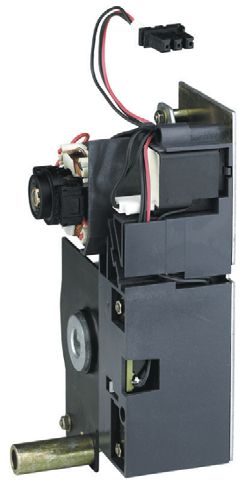
The information provided in this documentation contains general descriptions and/or technical character-
    istics of the performance of the products contained herein. This documentation is not intended as a
    substitute for and is not to be used for determining suitability or reliability of these products for specific user
    applications. It is the duty of any such user or integrator to perform the appropriate and complete risk
    analysis, evaluation and testing of the products with respect to the relevant specific application or use
    thereof. Neither Schneider Electric nor any of its affiliates or subsidiaries shall be responsible or liable for
    misuse of the information contained herein. If you have any suggestions for improvements or amendments
    or have found errors in this publication, please notify us.
    You agree not to reproduce, other than for your own personal, noncommercial use, all or part of this
    document on any medium whatsoever without permission of Schneider Electric, given in writing. You also
    agree not to establish any hypertext links to this document or its content. Schneider Electric does not grant
    any right or license for the personal and noncommercial use of the document or its content, except for a
    non-exclusive license to consult it on an "as is" basis, at your own risk. All other rights are reserved.
    All pertinent state, regional, and local safety regulations must be observed when installing and using this
    product. For reasons of safety and to help ensure compliance with documented system data, only the
    manufacturer should perform repairs to components.
    When devices are used for applications with technical safety requirements, the relevant instructions must
    be followed.
    Failure to use Schneider Electric software or approved software with our hardware products may result in
    injury, harm, or improper operating results.
    Failure to observe this information can result in injury or equipment damage.
    © 2019 Schneider Electric. All rights reserved.

2                                                                                                  DOCA0099EN-03 03/2019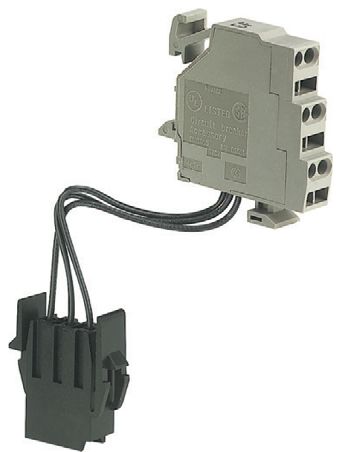
Table of Contents

                     Safety Information. . . . . . . . . . . . . . . . . . . . . . . . . . . . . . . . . . . . . . . . . . . .                                    5
                     About the Book . . . . . . . . . . . . . . . . . . . . . . . . . . . . . . . . . . . . . . . . . . . . . .                                   7
           Chapter 1 Maintenance Plan . . . . . . . . . . . . . . . . . . . . . . . . . . . . . . . . . . . . . . . . . . . .                                     9
                           Maintenance Practices . . . . . . . . . . . . . . . . . . . . . . . . . . . . . . . . . . . . . . . . . . . . . . . . . . . . .       10
                           Preventive Maintenance Frequency . . . . . . . . . . . . . . . . . . . . . . . . . . . . . . . . . . . . . . . . . . .                15
                           Maintenance After Prolonged Storage . . . . . . . . . . . . . . . . . . . . . . . . . . . . . . . . . . . . . . . . .                 18
                           Maintenance Schedule . . . . . . . . . . . . . . . . . . . . . . . . . . . . . . . . . . . . . . . . . . . . . . . . . . . . .        19
           Chapter 2 Parts to be Maintained and Why. . . . . . . . . . . . . . . . . . . . . . . . . . . . . . . . .                                             21
                           How to Maintain the Case . . . . . . . . . . . . . . . . . . . . . . . . . . . . . . . . . . . . . . . . . . . . . . . . . . .        22
                           How to Maintain the Arc Chutes . . . . . . . . . . . . . . . . . . . . . . . . . . . . . . . . . . . . . . . . . . . . . .            23
                           How to Maintain the Main Contacts . . . . . . . . . . . . . . . . . . . . . . . . . . . . . . . . . . . . . . . . . . . .             24
                           How to Maintain Power Connections. . . . . . . . . . . . . . . . . . . . . . . . . . . . . . . . . . . . . . . . . . .                25
                           How to Maintain the Chassis . . . . . . . . . . . . . . . . . . . . . . . . . . . . . . . . . . . . . . . . . . . . . . . . .         26
                           How to Maintain the Charging Mechanism . . . . . . . . . . . . . . . . . . . . . . . . . . . . . . . . . . . . . .                    27
                           How to Maintain Micrologic X Control Unit . . . . . . . . . . . . . . . . . . . . . . . . . . . . . . . . . . . . . .                 28
                           How to Maintain the Communication System . . . . . . . . . . . . . . . . . . . . . . . . . . . . . . . . . . . .                      30
                           How to Maintain Auxiliary Circuits . . . . . . . . . . . . . . . . . . . . . . . . . . . . . . . . . . . . . . . . . . . . .          31
                           How to Maintain Mechanical Interlocking Systems . . . . . . . . . . . . . . . . . . . . . . . . . . . . . . . .                       34
           Chapter 3 Preventive Maintenance Programs. . . . . . . . . . . . . . . . . . . . . . . . . . . . . . .                                                35
                           General Safety Instructions . . . . . . . . . . . . . . . . . . . . . . . . . . . . . . . . . . . . . . . . . . . . . . . . . .       36
                           Basic End-User Preventive Maintenance Program . . . . . . . . . . . . . . . . . . . . . . . . . . . . . . . .                         37
                           Standard End-User Preventive Maintenance Program . . . . . . . . . . . . . . . . . . . . . . . . . . . . .                            39
                           Manufacturer Preventive Maintenance Program . . . . . . . . . . . . . . . . . . . . . . . . . . . . . . . . . .                       40
                           Schneider Electric Expert Diagnostics Program Used by Field Service Representatives . . .                                             41
           Chapter 4 Device Aging. . . . . . . . . . . . . . . . . . . . . . . . . . . . . . . . . . . . . . . . . . . . . . . .                                 43
                           Causes of Aging . . . . . . . . . . . . . . . . . . . . . . . . . . . . . . . . . . . . . . . . . . . . . . . . . . . . . . . . . .   44
                           Influence of Temperature on Aging . . . . . . . . . . . . . . . . . . . . . . . . . . . . . . . . . . . . . . . . . . . .             45
                           Influence of Load on Aging . . . . . . . . . . . . . . . . . . . . . . . . . . . . . . . . . . . . . . . . . . . . . . . . . .        46
                           Influence of Relative Humidity on Aging . . . . . . . . . . . . . . . . . . . . . . . . . . . . . . . . . . . . . . . .               47
                           Influence of Salt Environment on Aging . . . . . . . . . . . . . . . . . . . . . . . . . . . . . . . . . . . . . . . .                48
                           Influence of Harmonics on Aging. . . . . . . . . . . . . . . . . . . . . . . . . . . . . . . . . . . . . . . . . . . . . .            49
                           Influence of Dust on Aging . . . . . . . . . . . . . . . . . . . . . . . . . . . . . . . . . . . . . . . . . . . . . . . . . .        50
                           Influence of Corrosive Atmosphere on Aging . . . . . . . . . . . . . . . . . . . . . . . . . . . . . . . . . . . .                    51
                           Influence of Vibration on Aging . . . . . . . . . . . . . . . . . . . . . . . . . . . . . . . . . . . . . . . . . . . . . . .         53
                           Influence of Operating Cycles on Aging . . . . . . . . . . . . . . . . . . . . . . . . . . . . . . . . . . . . . . . .                54
                           Influence of Interrupted Currents on Aging . . . . . . . . . . . . . . . . . . . . . . . . . . . . . . . . . . . . . .                55
       Appendices           .....................................................                                                                                57
        Appendix A Appendices . . . . . . . . . . . . . . . . . . . . . . . . . . . . . . . . . . . . . . . . . . . . . . . . .                                  59
                           Operating Limits for Masterpact MTZ IEC Devices . . . . . . . . . . . . . . . . . . . . . . . . . . . . . . . .                       60
                           Related Documents for Masterpact MTZ IEC Devices . . . . . . . . . . . . . . . . . . . . . . . . . . . . .                            62

DOCA0099EN-03 03/2019                                                                                                                                             3
4 DOCA0099EN-03 03/2019
Safety Information

Important Information

NOTICE
                        Read these instructions carefully, and look at the equipment to become familiar with the device before
                        trying to install, operate, service, or maintain it. The following special messages may appear throughout
                        this documentation or on the equipment to warn of potential hazards or to call attention to information that
                        clarifies or simplifies a procedure.

PLEASE NOTE
                        Electrical equipment should be installed, operated, serviced, and maintained only by qualified personnel.
                        No responsibility is assumed by Schneider Electric for any consequences arising out of the use of this
                        material.
                        A qualified person is one who has skills and knowledge related to the construction and operation of
                        electrical equipment and its installation, and has received safety training to recognize and avoid the
                        hazards involved.

DOCA0099EN-03 03/2019                                                                                                             5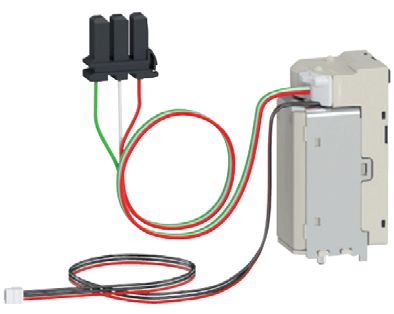
6 DOCA0099EN-03 03/2019
About the Book
At a Glance
Document Scope
Schneider Electric recommends a preventive maintenance program to ensure that devices retain the
operating and technical characteristics specified in the catalogs during their service life. Maintenance must
be carried out by trained and qualified personnel, in accordance with instructions specified in this
Masterpact™ MTZ maintenance guide.
This guide contains information on:
Maintenance frequency depending on the environmental and operating conditions and criticality of the
user application.
Maintenance required after prolonged storage.
Schneider Electric tools for maintenance assistance.
The parts of the Masterpact MTZ devices that must be maintained:
Elements of the breaking unit: case, arc chutes, and main contacts
Power connections
Chassis
Charging Mechanism
Micrologic™ X control unit
Communication system
Auxiliary circuits
Mechanical interlocking systems
The risks involved when a part is not fully operational.
The preventive maintenance program to be carried out, and the competence level required for each
program.
Environmental and operating conditions that cause accelerated aging of a device.
Limits governing the use of mechanical and electrical accessories and subassemblies.
Links to device guides and related documents that can help to maintain the Masterpact MTZ devices in
proper operating order.
Audience
This guide is intended for trained and qualified personnel in charge of equipment maintenance and for
Schneider Electric field service representatives in charge of equipment maintenance and diagnostics.
Validity Note
This guide applies to Masterpact MTZ IEC circuit breakers and switch-disconnectors.
DOCA0099EN-03 03/2019 7Online Information
The information contained in this document is likely to be updated at any time. Schneider Electric strongly
recommends that you have the most recent and up-to-date version available on www.schneider-
electric.com/docs.
The technical characteristics of the devices described in the present document also appear online. To
access the information online:
Step Action
1 Go to the Schneider Electric home page www.schneider-electric.com.
2 In the Search box type the reference of a product or the name of a product range.
Do not include blank spaces in the reference or product range.
To get information on grouping similar modules, use asterisks (*).
3 If you entered a reference, go to the Product Datasheets search results and click on the reference that
interests you.
If you entered the name of a product range, go to the Product Ranges search results and click on the
product range that interests you.
4 If more than one reference appears in the Products search results, click on the reference that interests
you.
5 Depending on the size of your screen, you may need to scroll down to see the datasheet.
6 To save or print a datasheet as a .pdf file, click Download XXX product datasheet.
The characteristics that are presented in the present document should be the same as those character-
istics that appear online. In line with our policy of constant improvement, we may revise content over time
to improve clarity and accuracy. If you see a difference between the document and online information, use
the online information as your reference.
Convention
In this guide, the term Masterpact MTZ device covers circuit breakers and switch-disconnectors.
Related Documents
Title of Documentation Reference Number
Masterpact MTZ - Basic and Standard End-User Maintenance Procedures for IEC Devices DOCA0103EN
Masterpact MTZ - Micrologic X Control Unit - User Guide DOCA0102EN
Micrologic Trip Units and Control Units - Firmware History DOCA0155EN
Trademark Notice
All trademarks are owned by Schneider Electric Industries SAS or its affiliated companies.
8 DOCA0099EN-03 03/2019Masterpact MTZ
Maintenance Plan
DOCA0099EN-03 03/2019
Chapter 1
Maintenance Plan
Maintenance Plan
What Is in This Chapter?
This chapter contains the following topics:
Topic Page
Maintenance Practices 10
Preventive Maintenance Frequency 15
Maintenance After Prolonged Storage 18
Maintenance Schedule 19
DOCA0099EN-03 03/2019 9Maintenance Plan
Maintenance Practices
Maintenance Strategy
You can define the optimal maintenance strategy according to criticality of your application by combining
four maintenance practices:
Corrective maintenance
Preventive maintenance
On-site condition maintenance
Predictive maintenance (condition-based maintenance)
Corrective Maintenance
Corrective maintenance:
Is carried out after fault recognition.
Is intended to put an item into a state in which it can perform a required function.
Corrective maintenance is recommended only for non-critical applications that have minimal impact in
business operations.
Preventive Maintenance
Preventive maintenance:
Is carried out in either of the following cases:
At predetermined frequency in accordance with established time intervals or number of units of use
but without previous condition investigation.
NOTE: The time intervals or number of units of use may be established from knowledge of the failure
mechanisms of the item.
According to prescribed criteria.
Is intended to reduce the probability of failure or the degradation of the functioning of an item.
Preventive maintenance is recommended for user applications with low to high criticality.
Preventive maintenance includes three programs:
Maintenance program that can be performed by the end user:
Basic end-user maintenance program
Standard end-user maintenance program
Maintenance program that can be performed by Schneider Electric Services:
Manufacturer maintenance program
Each preventive maintenance program is conducted during a scheduled outage as per maintenance
frequency or cycles of use in accordance with the recommendations defined in this guide (see page 15).
10 DOCA0099EN-03 03/2019Maintenance Plan
On-Site Condition Maintenance
On-Site condition maintenance is a Schneider Electric maintenance offer that includes the inspection
and/or testing (scheduled on request or planned), the analysis, and the resulting maintenance actions.
On-site condition maintenance programs (see page 41) enhance Manufacturer maintenance with the
following:
The OnSite Condition Essential program is recommended for devices in a user application with
moderate criticality. It includes ProDiag Trip Unit diagnostic.
The OnSite Condition Advanced program is recommended for devices in a user application with high
criticality. It includes the following diagnostics:
ProDiag Trip Unit
ProDiag Breaker
ProDiag Clusters for drawout Masterpact MTZ devices
Contact your Schneider Electric field service representative for more information.
Predictive Maintenance (Condition-Based Maintenance)
Predictive maintenance is condition-based maintenance carried out following a forecast derived from
repeated analysis or known characteristics and evaluation of the significant parameters of the degradation
of the item.
A Schneider Electric service bureau assesses data on behalf of the end user to validate and trigger
maintenance work orders, and schedule ensuing on-site maintenance.
Contact your Schneider Electric field service representative for more information.
EcoStruxure Facility Expert
EcoStruxure™ Facility Expert optimizes operations and maintenance, helping to ensure business
continuity, and provides insights to service providers or facility managers.
EcoStruxure Facility Expert is a real-time collaborative technology available on mobile devices and PCs
that enables managers and maintenance personnel to be connected with facilities and equipment.
Information exchange between users is simple and fast.
The QR code on Masterpact MTZ devices enables managers and maintenance personnel to access the
following automatic downloads through EcoStruxure Facility Expert:
The Masterpact MTZ device identifier.
Technical documentation.
The maintenance plan for the Masterpact MTZ device.
EcoStruxure Facility Expert helps maintenance personnel to diagnose issues remotely and manage
maintenance efficiently by:
Providing relevant information on critical assets.
Sending immediate state of the equipment and detailed information for diagnostics.
DOCA0099EN-03 03/2019 11Maintenance Plan
Defining Your Maintenance Plan
Low voltage circuit breakers, for example Masterpact MTZ circuit breakers, in a power distribution
infrastructure play a critical role in helping to protect the equipment and activity against cable overloads,
short-circuits, and insulation faults, helping to ensure safety, reliability, security, and sustainability.
If you are a plant manager, maintenance manager, facility manager, or safety manager, you are
responsible for helping to ensure your power distribution infrastructure with Masterpact MTZ devices works
in optimum conditions throughout its life cycle.
To achieve the necessary level of protection you need to have a maintenance plan to maintain each
Masterpact MTZ device (system and parts) in a satisfactory operational state for its useful service life, and
you must ensure that the plan is carried out.
This guide provides you with the insights necessary to build your own Masterpact MTZ maintenance plan,
tailored to your device operating conditions (determined by the level of external stress of your device), and
the environmental conditions impacting the aging and performance of your Masterpact MTZ device, and
the criticality of the application.
Schneider Electric recommends that you build your Masterpact MTZ maintenance plan according to:
The required preventive maintenance programs (see page 15):
Basic end-user maintenance program
Standard end-user maintenance program
Manufacturer maintenance program
The frequency of each maintenance program, defined by:
The environmental conditions and device operating conditions:
– Favorable (see page 15)
– Normal (see page 16)
– Severe (see page 16)
The criticality of the user application (see page 16):
– Low
– Moderate
– High
12 DOCA0099EN-03 03/2019Maintenance Plan
Example of Maintenance Plan
The following example is a preventive maintenance plan for three Masterpact MTZ devices operating
under different conditions in the facility.
The maintenance plan is based on the following parameters:
Number and types of maintenance programs: apply the three preventive maintenance programs
recommended by Schneider Electric:
Basic end-user maintenance program
Standard end-user maintenance program
Manufacturer maintenance program
Frequency for each maintenance program: determined according to the following:
Environmental and operating conditions
Criticality of the user application
Criteria Masterpact MTZ Masterpact MTZ Masterpact MTZ
device no. 1 device no. 2 device no. 3
Temperature 30 °C (86 °F) 25 °C (77 °F) 30 °C (86 °F)
Percent load (I/In) 67% 48% 85%
Relative humidity 75% 85% 70%
Corrosivity Urban zones, scattered industrial activity, and heavy traffic
Salt environment No salt mist No salt mist No salt mist
Dust Moderate level High level Low level
Vibration None None None
Environmental and operating conditions Normal Severe Severe
Criticality of the user application Low Moderate High
Maintenance program frequency
Basic end-user maintenance program Every year Every year Every year
Standard end-user maintenance program Every 2 years Every 2 years Every 2 years
Manufacturer maintenance program Every 5 years Every 3 years Every 2 years
Diagnostic services (ProDiag programs) Contact your Schneider Electric field service representative to plan
maintenance operations.
DOCA0099EN-03 03/2019 13Maintenance Plan
Based on the data above, the recommended maintenance plan for the three Masterpact MTZ devices is
as follows:
Maintenance plan for Masterpact MTZ no. 1 device, operating in normal operating conditions and with
user application with low criticality:
Maintenance plan Year 1 Year 2 Year 3 Year 4 Year 5 Year 6 Year 7 Year 8 Year 9 Year 10 Year 11 Year 12
Basic end-user ✔ – ✔ – – ✔ – ✔ – – ✔ –
maintenance program
Standard end-user – ✔ – ✔ – – ✔ – ✔ – – ✔
maintenance program
Manufacturer – – – – ✔ – – – – ✔ – –
maintenance program
Diagnostic services Contact your Schneider Electric field service representative to plan maintenance operations.
(ProDiag programs)
Maintenance plan for Masterpact MTZ no. 2 device, operating in severe operating conditions and with
user application with moderate criticality:
Maintenance plan Year 1 Year 2 Year 3 Year 4 Year 5 Year 6 Year 7 Year 8 Year 9 Year 10 Year 11 Year 12
Basic end-user ✔ – – ✔ – – ✔ – – ✔ – –
maintenance program
Standard end-user – ✔ – – ✔ – – ✔ – – ✔ –
maintenance program
Manufacturer – – ✔ – – ✔ – – ✔ – – ✔
maintenance program
Diagnostic services Contact your Schneider Electric field service representative to plan maintenance operations.
(ProDiag programs)
Maintenance plan for Masterpact MTZ no. 3 device, operating in severe operating conditions and with
user application with high criticality:
Maintenance plan Year 1 Year 2 Year 3 Year 4 Year 5 Year 6 Year 7 Year 8 Year 9 Year 10 Year 11 Year 12
Basic end-user ✔ – ✔ – ✔ – ✔ – ✔ – ✔ –
maintenance program
Standard end-user – – – – – – – – – – – –
maintenance program
Manufacturer – ✔ – ✔ – ✔ – ✔ – ✔ – ✔
maintenance program
Diagnostic services Contact your Schneider Electric field service representative to plan maintenance operations.
(ProDiag programs)
14 DOCA0099EN-03 03/2019Maintenance Plan
Preventive Maintenance Frequency
Preventive Maintenance Safety Instructions
Maintenance recommendations for each device are intended to maintain the equipment or subassemblies
in a satisfactory operational state for their useful service life.
Preventive maintenance schedule is calculated by the Micrologic X control unit from:
The operating conditions of the Masterpact MTZ device.
The criticality of the user application.
The Micrologic X control unit generates events to inform the user that maintenance needs to be planned
to conform to the preventive maintenance schedule.
WARNING
UNINTENDED EQUIPMENT OPERATION
Follow the recommendations for the maintenance given in the different chapters of this document, for
each part of the device which is maintainable.
Failure to follow these instructions can result in death, serious injury, or equipment damage.
If the recommended maintenance plan is not done as required, the service life of electrical distribution
equipment is reduced.
Maintenance Programs
The following table summarizes maintenance operations for the three preventive maintenance programs:
Maintenance program Maintenance description Performed by
Basic end-user Visual inspection and functional testing, Trained and qualified end-user personnel
maintenance replacement of inoperative accessories. Trained and qualified maintenance
services provider personnel
Schneider Electric field service
representative
Standard end-user Basic end-user maintenance, plus Trained and qualified maintenance
maintenance operational servicing and subassembly services provider personnel
tests. Schneider Electric field service
representative
Manufacturer maintenance Standard end-user maintenance, plus Schneider Electric field service
diagnostics and part replacements by representative
Schneider Electric Services.
Favorable Environmental Conditions and Device Operating Conditions
Environmental conditions and device operating conditions are considered to be favorable when all of the
following conditions are met:
Favorable environmental conditions and device operating conditions
Temperature Annual average ambient temperature outside the switchboard Ta < 25 °C (77 °F)
(IEC 61439-1).
Device installed in an air-conditioned room or in a ventilated switchboard.
Percent load < 50 % of In (daily process 8/24 h or continuous process 24/24 h)
Relative humidity < 50 %
Corrosive atmosphere Device installed in category 3C1 environment (see page 52) or in a closed room that
creates favorable operating conditions (air is conditioned and purified).
Salt environment None
Dust Negligible.
Device installed in a switchboard equipped with filters or a ventilated IP54 enclosure.
Vibration None
DOCA0099EN-03 03/2019 15Maintenance Plan
Normal Environmental Conditions and Device Operating Conditions
Environmental conditions and device operating conditions are considered to be normal when all of the
following conditions are met:
Normal environmental conditions and device operating conditions
Temperature Annual average ambient temperature outside the switchboard Ta < 25 °C (77 °F)
(IEC 61439-1)
Percent load < 80 % of In (daily process 8/24 h or continuous process 24/24 h)
Harmonics Harmonic current per phase < 30 % of In
Relative humidity < 70 %
Corrosive atmosphere Device installed in environment category 3C2 or 3C3 (IEC 60721-3-3) (see page 52)
Salt environment No salt mist
Dust Low level.
Device installed in a switchboard equipped with filters or a ventilated IP54 enclosure.
Vibration Permanent vibration < 0.2 g
Severe Environmental Conditions and Device Operating Conditions
Environmental conditions and device operating conditions are considered to be severe if any of the
following conditions are present:
Severe environmental conditions and device operating conditions
Temperature Annual average ambient temperature outside the switchboard Ta between
35 °C (95 °F) and 45 °C (113 °F) (IEC 61439-1)
Percent load > 80 % of In (daily process 8/24 h or continuous process 24/24 h)
Relative humidity > 80 %
Corrosive atmosphere Device installed in category 3C4 environment without any particular protection
(see page 52)
Salt environment Device installed less than 10 kilometers from the coast without any particular
protection
Dust High level.
Device not installed inside an enclosure equipped with filters or a ventilated IP54
enclosure.
Vibration Continuous vibrations between 0.2 g and 0.5 g
For example, severe environmental conditions and device operating conditions prevail in marine and wind
power applications.
Criticality of User Application
The following table describes the three criticality levels of user application.
Criticality level Description
Low The loss of function will cause minimal curtailment of operations or may require minimal
monetary investment to restore full operations. Normal contingency planning would
cover the loss.
Moderate The loss of function will have noticeable impact on the facility. It may have to suspend
some operations briefly. Some monetary investments may be necessary to restore full
operations. It may cause minor personal injury.
High The loss of function will cause personal injury or substantial economic damage. Loss
would not be disastrous, but the facility would have to suspend at least part of its
operations immediately and temporarily. Reopening the facility would require significant
monetary investments.
16 DOCA0099EN-03 03/2019Maintenance Plan
Recommended Frequency for the Basic End-User Maintenance Program
The following table indicates the recommended frequency to perform the Basic end-user maintenance
program according to operating conditions and criticality of the user application.
Operating conditions Criticality of user application
Low Moderate High
Favorable 2 years 2 years 2 years
Normal 1 year 1 year 1 year
Severe 1 year 1 year 1 year
Recommended Frequency for the Standard End-User Maintenance Program
The following table indicates the recommended frequency to perform the Standard end-user maintenance
program according to operating conditions and criticality of the user application.
Operating conditions Criticality of user application
Low Moderate High
Favorable 4 years 4 years 4 years
Normal 2 years 2 years 2 years
Severe 2 years 2 years 2 years
Recommended Frequency for the Manufacturer End-User Maintenance Program
The following table indicates the recommended frequency to perform the manufacturer end-user
maintenance program according to operating conditions and criticality of the user application.
Operating conditions Criticality of user application
Low Moderate High
Favorable 6 years 5 years 4 years
Normal 5 years 4 years 3 years
Severe 4 years 3 years 2 years
A complete check-up is recommended when tripping occurs due to a short-time or instantaneous short-
circuit.
DOCA0099EN-03 03/2019 17Maintenance Plan
Maintenance After Prolonged Storage
Storage Conditions
Devices must be stored in a dry, ventilated room, protected from rain, water, and chemical agents. They
must be protected against dust, rubble, and paint.
If stored for an extended period, the relative humidity in the room must be maintained below 70 %.
Storage temperature:
Devices without the Micrologic X control unit: -55 °C to +85 °C (-67 °F to +185 °F).
Devices with the Micrologic X control unit: -25 °C to +85 °C (-13 °F to +185 °F).
Devices must be stored in the open (OFF) position with the charging spring discharged.
Check-up and Maintenance After Prolonged Storage
After prolonged storage and if the storage conditions listed above were respected, the checks below must
be carried out to ensure correct device operation:
Part or subassembly Under two years of storage Over two years of storage
Device mechanisms Standard end-user program Manufacturer maintenance program
Micrologic X control unit Standard end-user program Manufacturer maintenance program
Device and chassis locking Standard end-user program Manufacturer maintenance program
Chassis Standard end-user program Manufacturer maintenance program
Auxiliary circuits – Manufacturer maintenance program
In addition, if the devices were stored under severe conditions (high temperature, corrosive atmosphere):
Check the surface condition of the metal parts (zinc) and the copper parts (silver coatings (Ag) on
connection terminals or tinning (Sn)).
Check the greasing for the device and chassis.
Clean and regrease the clusters and disconnecting contacts.
18 DOCA0099EN-03 03/2019Maintenance Plan
Maintenance Schedule
Overview
The Micrologic X control unit provides information to help with scheduling preventive maintenance
operations. It monitors maintenance programs performed and generates events to indicate that
maintenance is due.
For more information about the maintenance schedule function, refer to Masterpact MTZ - Micrologic X
Control Unit - User Guide (see page 8).
Operating Principle
The Micrologic X control unit generates events to indicate that maintenance is due.
The schedule for maintenance operations depends on:
The operating and environmental conditions of the Masterpact MTZ circuit breaker.
The criticality of the user application.
The date of the last maintenance program performed and declared by using EcoStruxure Power
Commission software.
Basic and standard end-user maintenance schedule events and Manufacturer maintenance schedule
events are calculated:
For the first event:
From the commissioning date of the circuit breaker, if this date is declared by using EcoStruxure
Power Commission software.
Otherwise from the assembly date of the circuit breaker.
For subsequent events, from the date of the previous maintenance program (Basic, Standard, or
Manufacturer) performed, if the date is declared by using EcoStruxure Power Commission software.
NOTE: Subsequent Manufacturer maintenance schedule events are calculated from the previous
Manufacturer maintenance program performed and declared by using EcoStruxure Power Commission
software.
If the date of the maintenance program performed is not declared by using EcoStruxure Power
Commission software, the Micrologic X control unit continues to use the commissioning date or assembly
date to calculate the maintenance schedule events.
Maintenance Schedule Settings
The maintenance schedule is determined from the following recorded parameters and declared settings.
The following parameters for environmental conditions are recorded by the Micrologic X control unit:
Temperature
Percent load
Harmonics
Relative humidity
Vibration
The following parameters for environmental conditions and user application criticality are declared by using
EcoStruxure Power Commission software (password-protected).
Setting Value Factory
setting
Environmental Corrosive atmosphere 3C1 (Rural area) 3C2
conditions 3C2 (Urban area)
3C3 (Immediate vicinity of industrial pollution)
3C4 (Inside polluting industrial premises)
Salt environment None (No salt mist) None
Moderate (Salt mist < 10 km from seaside)
Significant (Salt mist < 1 km from seaside)
Dust Low level Low level
Moderate level
High level
User application criticality Low Low
Moderate
High
DOCA0099EN-03 03/2019 19Maintenance Plan
Data Availability
Maintenance schedule data is as follows:
Data of the last maintenance program performed, if the data is declared by using EcoStruxure Power
Commission software:
Program performed: Basic, Standard, or Manufacturer
Date of maintenance operation
Name of service provider
Name of maintenance personnel
Data of the next maintenance program to be performed:
Program to be performed: Basic, Standard, or Manufacturer
Either the number of months before the program is due or the number of months it is overdue
Maintenance schedule data is available as follows:
On the Micrologic X display screen at: Home → Maintenance → Assistance → Maint.schedule
With EcoStruxure Power Commission software
With EcoStruxure Power Device app through Bluetooth or USB OTG connection
On a remote controller using the communication network
Predefined Events
The maintenance schedule function generates the following events:
Event History Severity
Schedule basic maintenance within one month Diagnostic Medium(1)
Schedule standard maintenance within one month Diagnostic Medium(2)
Schedule manufacturer maintenance within three months Diagnostic Medium(2)
(1) Disabled by default. Customizable with EcoStruxure Power Commission software.
(2) Enabled by default, with pop-up messages.
For information about recommended action on events, refer to the relevant document:
Masterpact MTZ1 - Circuit Breakers and Switch-Disconnectors - User Guide
Masterpact MTZ2/MTZ3 - Circuit Breakers and Switch-Disconnectors - User Guide
20 DOCA0099EN-03 03/2019Chapter 2
Parts to be Maintained and Why
Parts to be Maintained and Why
Overview
This chapter describes the maintenance that needs to be done on the fixed parts and mechanisms of the
Masterpact MTZ device, on the Micrologic X control unit, and on accessories, as well as why they need to
be maintained.
What Is in This Chapter?
This chapter contains the following topics:
Topic Page
How to Maintain the Case 22
How to Maintain the Arc Chutes 23
How to Maintain the Main Contacts 24
How to Maintain Power Connections 25
How to Maintain the Chassis 26
How to Maintain the Charging Mechanism 27
How to Maintain Micrologic X Control Unit 28
How to Maintain the Communication System 30
How to Maintain Auxiliary Circuits 31
How to Maintain Mechanical Interlocking Systems 34
21How to Maintain the Case
Functions
The case of the device:
Insulates the main contacts
Helps to protect the user against arcing effects
Provides a support for:
Mechanism
Control unit
Auxiliaries
Power connection
Withstands the thermal and electrodynamic stresses
generated during short-circuits
Degradation Factors
The factors which can cause degradation of the case are the following:
Dusty or dirty environment
Humidity
High ambient temperature
Shocks
Stresses due to high short-circuit currents
Potential Hazards
Performing regular maintenance on the case can help to avoid the potential hazards and consequences
listed in the following table.
Hazard Consequence
Personal injury Equipment damage
Arc flash Death or serious injury –
Insulation resistance of the case too Electric shock –
low and impulse voltage
Disruptive discharge – Degradation of the breaking unit
High short-circuit current – Degradation of the breaking unit
Preventive Action
The following table lists the preventive maintenance procedures to be performed to maintain the case of
the device.
Maintenance program Preventive action Procedure
Basic end-user preventive Check the general condition of the Device NII_Z_1
maintenance device.
Manufacturer preventive Measure the insulation resistance. Contact your Schneider Electric field
maintenance service representative.
For more information, refer to Preventive Maintenance Programs (see page 35).
22How to Maintain the Arc Chutes
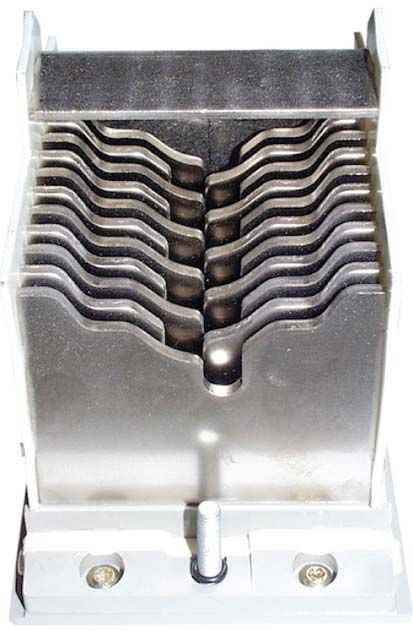
Functions
The arc chutes of the device:
Are mounted on each arc chamber of the breaking unit
Are composed of splitters and filters
The splitters of the arc chutes limit the stress exerted on the installation
by:
Helping to extinguish the arc
Absorbing the arc energy under normal electrical operations and
electric faults
The filters of the arc chutes filter the pressured gas expelled out of the
arc chamber and cool it to a temperature at which it is no longer ionized
and is therefore non-conductive.
Degradation Factors
The factors which can cause degradation of the arc chutes are the following:
Frequent switching operations at rated current
Stresses due to high short-circuit currents
Potential Hazards
Performing regular maintenance on the arc chutes can help to avoid the potential hazards and
consequences listed in the following table.
Hazard Consequence
Personal injury Equipment damage
Arc flash Death or serious injury –
Insulation resistance of the case too Electric shock –
low and impulse voltage
High short-circuit current – Degradation of the breaking unit
Preventive Action
The following table lists the preventive maintenance procedures to be performed to maintain the arc chutes
of the device.
Maintenance program Preventive action Procedure
Basic end-user preventive Check mounting of arc chutes and Breaking Unit NII_Z_1
maintenance filter cleanliness.
Standard end-user preventive Check the condition of the breaking Breaking Unit NIII_Z_1
maintenance unit.
For more information, refer to Preventive Maintenance Programs (see page 35).
23How to Maintain the Main Contacts
Functions
The main contacts of the device:
Are mounted in the arc chamber
Are composed of the fixed and the movable contacts
The movable contacts make (close) or break (open) the electrical
circuit under normal conditions (at rated current In) or fault
conditions (overload and short-circuit).
A Fixed contact
B Movable contact
Degradation Factors
The factors which can cause degradation of the main contacts are the following:
Frequent switching operations at rated current
Stresses due to high short-circuit currents
Potential Hazards
Performing regular maintenance on the main contacts can help to avoid the potential hazards and
consequences listed in the following table.
Hazard Consequence
Personal injury Equipment damage
Fire Death or serious injury –
Thermal dissipation due to high- – Degradation of the breaking unit
resistance contact
Preventive Action
The following table lists the preventive maintenance procedures to be performed to maintain the main
contacts of the device.
Maintenance program Preventive action Procedure
Standard end-user preventive Check the condition of the breaking Breaking unit NIII_Z_1
maintenance unit.
Manufacturer preventive Measure the contact resistance for Contact your Schneider Electric field
maintenance each pole. service representative.
For more information, refer to Preventive Maintenance Programs (see page 35).
24How to Maintain Power Connections
Functions
WARNING
HAZARD OF HEAT GENERATION
Power connections must never use other material than copper or aluminum.
Failure to follow these instructions can result in death, serious injury, or equipment damage.
Power connections are the links between devices and electrical distribution systems (for example,
busbars, cables). Connection terminals are used to make the links.
Degradation Factors
The factors which can cause degradation of the power connections are the following:
Vibration
Overheating
Incorrect tightening torque
Deteriorated washer
Potential Hazards
Performing regular maintenance on the power connections can help to avoid the potential hazards and
consequences listed in the following table.
Hazard Consequence
Personal injury Equipment damage
Fire Death or serious injury –
Thermal dissipation due to – Burning of the cable insulation
insufficient tightening torque
Preventive Action
The following table lists the preventive maintenance procedures to be performed to maintain the power
connections of the device.
Maintenance program Preventive action Procedure
Standard end-user preventive Check connection system. Power Connections NIII_Z_1
maintenance
For more information, refer to Preventive Maintenance Programs (see page 35).
25How to Maintain the Chassis
Functions
The chassis mechanism is used to rack the device in and out.
The sliding connections between the chassis and device are made up of two parts: clusters and
disconnecting contacts. Grease between the clusters and the disconnecting contacts facilitates the
connection and avoids damaging the silver-coated surface by reducing the racking-in friction.
Chassis and system of racking in and out Clusters and disconnecting contacts
Degradation Factors
The factors which can cause degradation of the chassis are the following:
Dusty environment
Shocks
Corrosive atmosphere
Idle for long periods of time
Incorrect operation
Potential Hazards
Performing regular maintenance on the chassis can help to avoid the potential hazards and consequences
listed in the following table.
Hazard Consequence
Personal injury Equipment damage
Safety shutter malfunction Electric shock –
Device remains jammed in connected – Jammed operation of the device in the
position. chassis (racking-in and racking-out)
Preventive Action
The following table lists the preventive maintenance procedures to be performed to maintain the chassis.
Maintenance program Preventive action Procedure
Basic end-user preventive Check device racking operation. Chassis NII_Z_1
maintenance
Check operation of safety shutters. Chassis NII_Z_3
Standard end-user preventive Clean chassis and check presence of Chassis NIII_Z_1
maintenance grease on chassis.
Check disconnecting contact clusters. Chassis NIII_Z_2
Manufacturer preventive Check connection/disconnection Contact your Schneider Electric field
maintenance torque. service representative.
Clean and regrease chassis of
Masterpact MTZ drawout devices.
For more information, refer to Preventive Maintenance Programs (see page 35).
26How to Maintain the Charging Mechanism
Functions
The charging mechanism is used to close the main contacts.
Degradation Factors
The factors which can cause degradation of the charging mechanism are the following:
Dusty or dirty environment
Shocks
Corrosive atmosphere
Idle for long periods of time
Potential Hazards
Performing regular maintenance on the charging mechanism can help to avoid the potential hazards and
consequences listed in the following table.
Hazard Consequence
Personal injury Equipment damage
Charging mechanism is jammed. – Jammed mechanism
Preventive Action
The following table lists the preventive maintenance procedures to be performed to maintain the charging
mechanism.
Maintenance program Preventive action Procedure
Basic end-user preventive Operate the device manually and Mechanism NII_Z_1
maintenance electrically.
Charge the device electrically with Mechanism NII_Z_2
MCH gear motor.
Check the complete closing of the Mechanism NII_Z_3
device poles.
Standard end-user preventive Check the MCH gear motor charging Mechanism NIII_Z_1
maintenance time at 0.85 Un.
Check the general condition of the Mechanism NIII_Z_2
mechanism.
Manufacturer preventive Check opening and closing forces. Contact your Schneider Electric field
maintenance Clean and regrease the mechanism. service representative.
For more information, refer to Preventive Maintenance Programs (see page 35).
27How to Maintain Micrologic X Control Unit
Functions
The control unit permanently monitors the electrical network and generates trip orders when electrical
faults are detected.
Electronic component qualification data is usually quoted for a
10-year lifetime by the component suppliers according to the device
mission profile. The control unit can operate more than 10 years,
depending on the operating environmental conditions (for example,
temperature, humidity, vibrations, mechanical shocks, corrosive
atmosphere).
Schneider Electric recommends that the field service representative
replaces the Micrologic X control unit and associated optional ESM
or M2C modules every 15 years. Each time the Micrologic X control
unit is replaced, the performer, the rating plug, and the sensor plug
must be replaced by the Schneider Electric field service
representative.
Firmware Update Policy
The Micrologic X control unit is the main component of the intelligent modular unit (IMU).
The primary reason for updating the firmware of a Micrologic X control unit is to obtain the latest IMU
features. If the latest IMU features are not required, it is not mandatory to update the firmware of the
Micrologic X control unit and the Enerlin’X devices of the IMU.
Use the latest version of EcoStruxure Power Commission software to update the firmware of the
Micrologic X control unit or an Enerlin’X device of the IMU.
After updating the firmware of one device, Schneider Electric recommends that you update the firmware
of the other devices in the IMU to keep consistency and avoid discrepancies between devices. Before
proceeding, check the compatibility of the other devices with the new firmware.
For more information about firmware update policy, refer to Micrologic Trip Units and Control Units -
Firmware History (see page 8).
Degradation Factors
The factors which can cause degradation of the control unit and electronic components are the following:
Shocks
Vibration
Humidity
High ambient temperature
Corrosive atmosphere
Potential Hazards
Performing regular maintenance on the control unit can help to avoid the potential hazards and
consequences listed in the following table.
Hazard Consequence
Personal injury Equipment damage
High short-circuit current and no – Degradation of the breaking unit
tripping order
28Preventive Action
The following table lists the preventive maintenance procedures to be performed to maintain the control
unit.
Maintenance program Preventive action Procedure
Basic end-user preventive Check the general condition of the Device NII_Z_1
maintenance device.
Standard end-user preventive Check overcurrent protection. Control Unit NIII_Z_1
maintenance
Manufacturer preventive Perform aging diagnostic to evaluate Contact your Schneider Electric field
maintenance when to preventively replace the service representative.
Micrologic X control unit.
For more information, refer to Preventive Maintenance Programs (see page 35).
29How to Maintain the Communication System
Functions
The communication system allows data transmission between the device and the remote controller. It can
be used to remotely operate (open/close) the device.
Maintenance, production, management, and other departments can use this function to manage energy
and assets, and monitor the quality of the electrical network.
In Masterpact MTZ circuit breakers, the device data can be accessed by using the ULP port module
connected to a communication interface and an appropriate software tool such as EcoStruxure Power
Commission software.
Masterpact MTZ devices with communication interface:
Degradation Factors
The factors which can cause degradation of the communication system are the following:
Vibration
Electro-magnetic field disturbances
Equipment and software breakdown
Modification of communication system architecture
Potential Hazards
Performing regular maintenance on the communication system can help to avoid the potential hazards and
consequences listed in the following table.
Hazard Consequence
Personal injury Equipment damage
Incorrect or no operation (critical to safety) Death or serious injury –
as a result of misleading information
Communication loss – Inappropriate functioning of devices,
communication interfaces or modules
on communication network
Incorrect decision taken as a result of – Inappropriate functioning of devices,
misleading information (status, metering, communication interfaces or modules
health) on communication network
Incorrect system management leading to – Inappropriate functioning of devices,
financial losses communication interfaces or modules
on communication network
Preventive Action
The following table lists the preventive maintenance procedures to be performed to maintain the
communication system.
Maintenance program Preventive action Procedure
Manufacturer preventive Check data transmission over the IFE Ethernet Contact your Schneider Electric field
maintenance interface or EIFE embedded Ethernet interface. service representative.
For more information, refer to Preventive Maintenance Programs (see page 35).
30How to Maintain Auxiliary Circuits
Functions
Auxiliary circuits are made of two parts, an electrical or mechanical accessory with the associated wiring:
Voltage releases (XF, MX, MN)
Gear motor (MCH)
Indication contacts (OF, CE, CT, CD, SDE, PF)
Auxiliary wiring links devices and transmits the following information:
Orders to the control devices
Status-condition information
Voltage Releases
The voltage releases (XF, MX, MN) can be standard or with diagnostic and communicating function (XF,
MX) or diagnostic function (MN).
The XF closing voltage release closes the circuit breaker instantaneously when powered if the spring
mechanism is charged.
The MX opening voltage release opens the circuit breaker instantaneously when powered.
The MN undervoltage release instantaneously opens the circuit breaker when its supply voltage drops to
a value between 35% and 70% of its rated voltage.
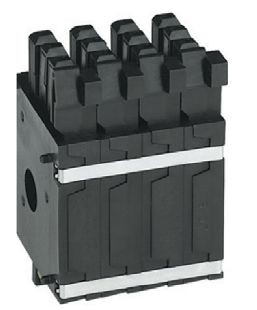
In Masterpact MTZ devices, diagnostic and/or communicating voltage
releases are continuously supervised by the control unit when they are
declared in EcoStruxure Power Commission software. If a breakdown or power
outage occurs, or the recommended number of operations is reached, an
alarm is generated to take action for replacement.
It is important to periodically check operation of the voltage releases at
minimum values. Whether the auxiliary needs to be replaced depends on the
operating conditions and environmental conditions.
It is recommended that you replace voltage releases every 15 years.
MCH Gear Motor
The MCH gear motor automatically recharges the operating mechanism springs as soon as the circuit
breaker is closed.
The MCH gear motor makes it possible to close the device immediately after opening. The spring charging
handle serves as a backup if the auxiliary voltage is interrupted.
Given the mechanical forces exerted to charge the
mechanism, periodic checks on the operation of the MCH
gear motor and the charging time are required to help
ensure the device closing function.
With Masterpact MTZ devices, the number of charging
operations is recorded, giving information on the remaining
useful life of the MCH gear motor.
31Indication Contacts
Contacts indicate the following information:
OF: position of the main contacts (opened or closed)
CE, CT, CD: position of the device in the chassis (connected, test, or disconnected)
SDE: trip due to an electrical fault
PF: the device is ready to close
This information enables a remote operator to respond as necessary. Incorrect indications can result in
erroneous device operation.
Improper contact performance can be caused by vibrations,
corrosion, or abnormal temperature rises.
Preventive maintenance consists in regularly checking that
contacts conduct or isolate correctly, depending on their
position.
Auxiliary Wiring
Auxiliary wiring is used to transmit the following information:
Orders to the various control devices
Status-condition information
Incorrect connections or damaged insulation can cause
unintended opening or non-operation of the circuit breaker.
The auxiliary wiring must be regularly inspected and replaced
as required, particularly in environments with vibrations, high
ambient temperatures, or corrosive atmosphere.
Degradation Factors
The factors which can cause degradation of the auxiliaries are the following:
High ambient temperature
Humidity
Corrosive atmosphere
Vibration
Potential Hazards
Performing regular maintenance on the auxiliaries can help to avoid the potential hazards and
consequences listed in the following table.
Hazard Consequence
Personal injury Equipment damage
Loose wiring Electric shock –
Loss of local control (open/close), Death or serious injury –
such as emergency stop
Loss of remote control (open/close) – Unwanted operation
Misleading information – Unwanted operation
32Preventive Action
The following table lists the preventive maintenance procedures to be performed to maintain the control
unit.
Maintenance program Preventive action Procedure
Basic end-user preventive Check auxiliary wiring and insulation. Auxiliaries NII_Z_1
maintenance
Standard end-user preventive Check operation of indication Auxiliaries NIII_Z_1
maintenance contacts (OF, PF).
Check closing operation with XF Auxiliaries NIII_Z_2
closing voltage release at 0.85 Un.
Check opening operation with MX Auxiliaries NIII_Z_3
opening voltage release at 0.70 Un.
Check closing and opening Auxiliaries NIII_Z_4
operations with MN undervoltage
release.
Check time delay of MNR delayed Auxiliaries NIII_Z_5
undervoltage release.
Manufacturer preventive Check opening time of MX opening Contact your Schneider Electric field
maintenance voltage release. service representative.
Check closing time of XF closing
voltage release.
Check opening time of MN
undervoltage release.
Preventively replace the voltage
releases XF, MX, MN.
For more information, refer to Preventive Maintenance Programs (see page 35).
33How to Maintain Mechanical Interlocking Systems
Functions
A source changeover system, either manual or automatic (ATS), enhances the continuity of service of an
electrical distribution system.
Mechanical interlocking between the devices in the source changeover system prevents the closing of
two devices simultaneously.
The use of mechanical interlocking for source-changeover systems using cables or connecting rods is
compulsory for Automatic Transfer Switch (ATS) applications.
A mechanical interlocking system is made of the following parts depending on the type of Masterpact MTZ
devices:
An interlocking plate on the side of each Masterpact MTZ device.
A set of cables or connecting rods linking the Masterpact MTZ devices.
The figure below illustrates a mechanical interlocking system by cable for source changeover between
two Masterpact MTZ2 devices:
Degradation Factors
The factors which can cause degradation of the mechanical interlocking system are the following:
Dusty or dirty environment
Vibration
Potential Hazards
Performing regular maintenance on the mechanical interlocking system can help to avoid the potential
hazards and consequences listed in the following table.
Hazard Consequence
Personal injury Equipment damage
Inappropriate or no operation of the Death or serious injury –
source changeover system
Preventive Action
The following table lists the preventive maintenance procedures to be performed to maintain the
mechanical interlocking system.
Maintenance program Preventive action Procedure
Basic end-user preventive Operate mechanical interlocking by Mechanical Interlocking NII_Z_1
maintenance cable.
Operate mechanical interlocking by Mechanical Interlocking NII_Z_2
rod.
For more information, refer to Preventive Maintenance Programs (see page 35).
34Chapter 3
Preventive Maintenance Programs
Preventive Maintenance Programs
What Is in This Chapter?
This chapter contains the following topics:
Topic Page
General Safety Instructions 36
Basic End-User Preventive Maintenance Program 37
Standard End-User Preventive Maintenance Program 39
Manufacturer Preventive Maintenance Program 40
Schneider Electric Expert Diagnostics Program Used by Field Service Representatives 41
35General Safety Instructions
General Safety Instructions
Read the following instructions carefully and make sure to follow them while performing a maintenance
program.
DANGER
HAZARD OF ELECTRIC SHOCK, EXPLOSION, OR ARC FLASH
Apply appropriate personal protective equipment (PPE) and follow safe electrical work practices. See
NFPA 70E or CSA Z462 or local equivalent.
This equipment must be installed and serviced by qualified electrical personnel.
Turn off all power supplying this equipment before performing maintenance inspections.
Assume that all circuits are live until they are de-energized, tested, grounded, and tagged. Consider
all sources of power, including the possibility of backfeeding and control power.
Always use a properly rated voltage sensing device to confirm that power is off.
Replace all devices, doors, and covers before turning on power to this equipment.
Beware of potential hazards and carefully inspect the work area for tools and objects that may have
been left inside the equipment.
Failure to follow these instructions will result in death or serious injury.
36You can also read


