Meet - PILOT'S GUIDE - MD302 Standby Attitude Module - Mid-Continent Instruments and Avionics
←
→
Page content transcription
If your browser does not render page correctly, please read the page content below
PILOT’S GUIDE

Meet
MD302 Standby Attitude Module

   REV. J   March 22, 2021   Manual Number 9017846
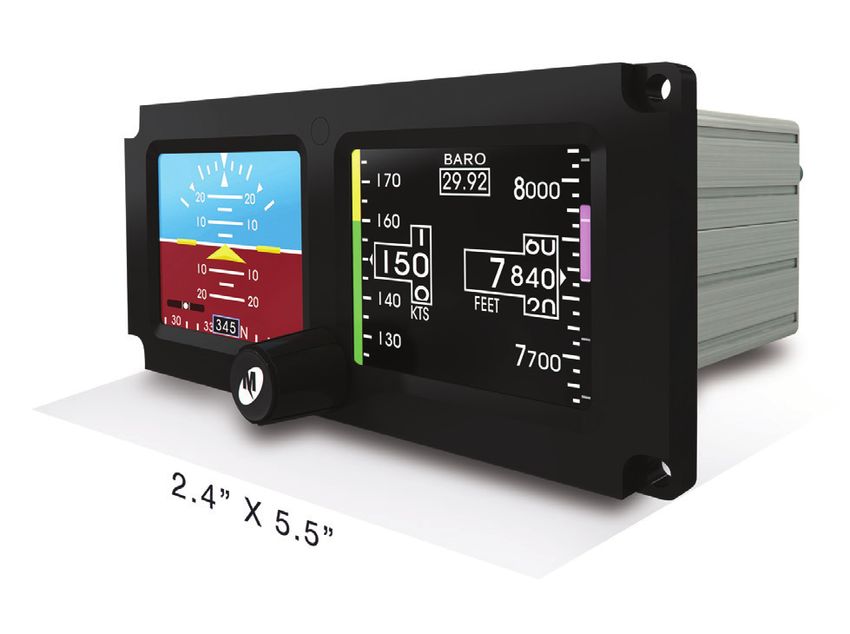
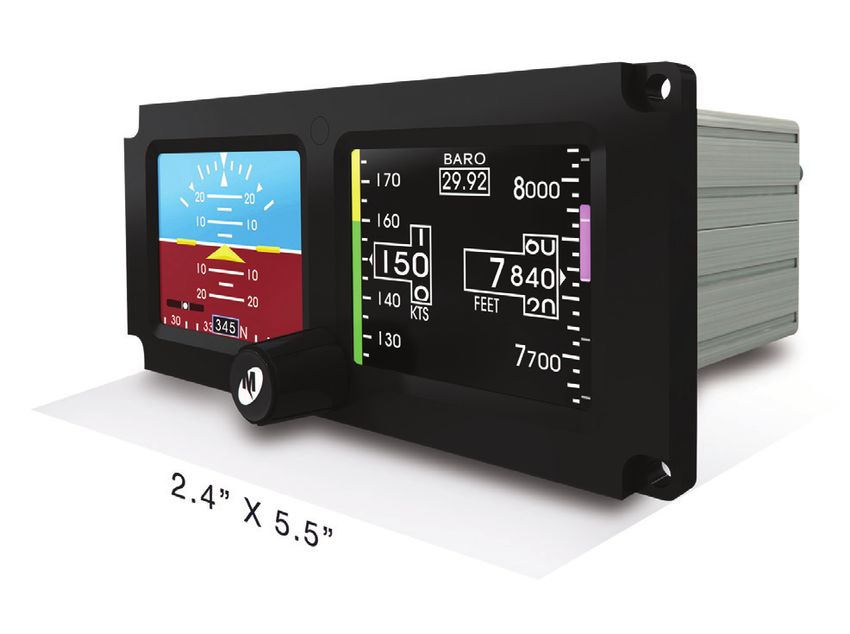
Congratulations on selecting one of the newest and most advanced
aviation products. The design team at Mid-Continent Instruments
and Avionics has incorporated over five decades of experience to
bring you unparalleled reliability and value in aviation. We are proud
to offer you the finest standby indicator in its class — SAM ® — the
MD302 Standby Attitude Module.

SAM is the industry’s first digital standby instrument to provide
attitude, altitude, airspeed, slip, vertical trend, and heading information
in an advanced, 2-inch format. The compact design and selectable
orientation (horizontal and vertical) ensures a perfect fit within any
panel. The self-contained, rechargeable, emergency battery offers
pilots an increased level of safety. All backed by Mid-Continent’s
world-class reputation for high quality and responsive service.

         J. Todd Winter
         President and CEO
         Mid-Continent Instruments and Avionics

REV. J   March 22, 2021   Manual Number 9017846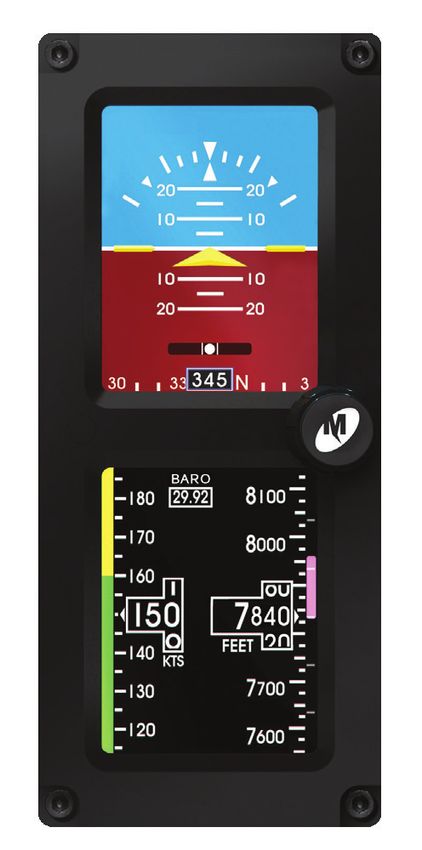
FORWARD

This manual contains information regarding the use and interpretation
of information presented to the pilot and crew during normal and
emergency operation of SAM — the MD302 Standby Attitude Module.
Operational instructions are intended for persons who operate aircraft
in accordance with applicable Federal Aviation Regulations (Title 14 CFR).

We welcome your comments concerning our product and this manual.
When reporting a specific problem, please describe it briefly and include
the manual part number, the paragraph or image number and page number.

Please e-mail or send comments and technical questions to:

                 Mid-Continent Instruments and Avionics
                 Attn: Technical Publications
                 9400 East 34th Street North
                 Wichita, Kansas 67226 USA
                 mcia@mcico.com

                             REV. J   March 22, 2021   Manual Number 9017846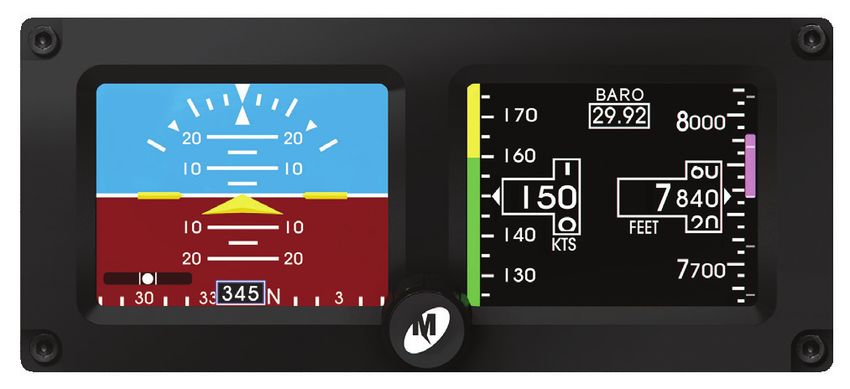
TABLE OF CONTENTS

IMPORTANT:
Read this entire guide prior to operating SAM — the MD302
Standby Attitude Module — in flight.
                                                     PAGE

USER INTERFACE                                          1
PRE-FLIGHT MODE                                         2
FLIGHT MODE                                             3
    Attitude Operation                                  4
    Slip Operation                                      7
    Heading Operation                                   8
    Altitude Operation                                 10
    Airspeed Operation                                 14
    Menu Operation                                     17
OPTIONS MENU                                           18
    ALT Units                                          19
    BARO Units                                         20
    Attitude Symbol                                    21
    ATT Mask                                           22
    ALT Trend                                          23
    INFO                                               24
		 Review Configuration                                25
		 Battery INFO                                        26
		 Software INFO                                       26
    Exit Menu                                          27
    Power OFF                                          28
    Brightness Adjustment                              29
EMERGENCY OPERATION                                    30
    In Flight                                          30
    On the Ground                                      32
ALERTS AND ANNUNCIATIONS                               33
SERVICE REMINDER                                       35
PRODUCT SPECIFICATIONS                                 39
LIMITED WARRANTY                                       40
PRODUCT REGISTRATION                                   41
USER INTERFACE
SAM is designed for simple and intuitive operation. The User Interface
provides quick interpretation of the flight information displayed.
The central Control Knob can be located at the bottom-center, middle-
left or middle-right of the unit bezel depending on the installation
orientation. This is the only user interface device on the unit.
The Control Knob has two functions: Push and Turn.
The Control Knob provides 16-detents per revolution and typically
changes the information it is controlling on the display one unit per
detent or click.
The Push function is used to select the highlighted option in a menu
or to enter and exit menus and control functions. The Push function
can also perform certain operations with a push-and-hold action.
REV. J March 22, 2021 Manual Number 9017846 1PRE-FLIGHT MODE
In Pre-flight Mode, power is applied to the unit and the Introduction
Screen appears during startup (Image 1).
During Pre-flight Mode, the Introduction Screen will be displayed
while the unit conducts an initial Power-up Built-in Test (PBIT) of
the system to validate operational readiness. This includes, among
others, a battery capacity measurement, an internal test to verify
software and memory, and confirmation that the internal settings
and identification of the unit match the Configuration Module
installed in the aircraft cable harness.
The Introduction Screen will be displayed for approximately five
seconds and will transition to Flight Mode when complete.
Image 1
PRE-FLIGHT MODE
INTRODUCTION SCREEN
2 REV. J March 22, 2021 Manual Number 9017846FLIGHT MODE
Image 2
FLIGHT MODE
HORIZONTAL ORIENTATION
Image 3
In Flight Mode, the
unit operates normally
by displaying six functions:
Attitude, Altitude,
Airspeed, Slip, Vertical
Trend, and Heading
Information (Images 2, 3).
FLIGHT MODE
VERTICAL ORIENTATION
REV. J March 22, 2021 Manual Number 9017846 3Flight Mode / ATTITUDE OPERATION The Attitude Indicator portion of the display (Image 4) will always appear on the top display when oriented vertically and can be configured to appear on the right or left display when oriented horizontally. The Attitude Indicator consists of seven parts: Horizon Line, Sky (blue), Ground (brown), Symbolic Airplane, Roll Scale, Pitch Scale and Slip Indicator. The Symbolic Airplane will always remain in the center of the display, with the background elements moving behind it to represent the aircraft’s position relative to the horizon. The symbol that represents the airplane can be selected during Flight Mode using the Options Menu (see Options Menu, page 21). The Roll Scale is depicted as an arc of graduations representing bank angles of 0° (triangle), 10°, 20°, 30°, 45° (small triangle) and 60°. The Roll Scale can be configured during installation to be fixed to the sky/horizon or fixed to the top of the display. The unit is operable and usable in a continuous and unlimited roll range of 360°+. CAUTION: The roll configuration must be set to match other attitude indicators in your panel. The Roll Pointer is the triangle just below the Roll Scale and represents the aircraft in relation to its bank angle. It is configured, by definition, to operate conversely to the Roll Scale behavior. That is, a rotating Roll Scale produces a fixed Roll Pointer and a fixed Roll Scale produces a rotating Roll Pointer. 4 REV. J March 22, 2021 Manual Number 9017846
Flight Mode / ATTITUDE OPERATION

The Pitch Scale is depicted as a series of graduations representing
pitch angles every 5°, with every 10° graduation being wider and
numbered. The unit is operable and usable in a continuous and
unlimited pitch range of 360°+.

                       ATTITUDE OPERATION

       Pitch Scale

                Roll/Bank Scale
                                                                Image 4

            Slip Indicator                        Horizon Line

       Symbolic Airplane

                     REV. J   March 22, 2021   Manual Number 9017846      5
Flight Mode / ATTITUDE OPERATION
A series of chevrons (^) will appear overlaid on the Pitch Scale
at attitudes greater than ± 45°. This is to indicate to the pilot the
direction of the horizon for quick reference when in an unusual pitch
attitude (Image 5). The chevrons always point toward the horizon line.
Image 5
60
50 60
40 50
30 40
30
ATTITUDE OPERATION
This image demonstrates 50° pitch up and
18° left turn. Red chevrons point to the horizon line.
6 REV. J March 22, 2021 Manual Number 9017846Flight Mode / SLIP OPERATION
The Slip Indicator portion of the display will appear at the bottom
of the Attitude Display (Image 5). If Heading Operation is enabled,
the Slip Indicator will appear to the left and above the Heading Window
in horizontal orientation, and directly above the Heading Window in
vertical orientation (Image 6).
The Slip Indicator is represented by a shaded translucent background
with two white lines around center and a white ball. When the ball is
maintained between the vertical lines during banking maneuvers, the
turn is considered “coordinated” without slip.
The Slip Indicator’s background becomes semi-transparent if the
Roll Scale or Roll Pointer pass behind the indicator. All other elements
remain visible.
REV. J March 22, 2021 Manual Number 9017846 7Flight Mode / HEADING OPERATION
Heading Operation can be configured during installation. The
heading information is comprised of a window showing the current
heading and a moving scale located along the bottom of the
display (Image 6). The Heading Scale is depicted as a series of
graduations every 10° with numbers every 30°, and letters for each
cardinal heading.
HEADING OPERATION
Pitch Scale Horizon Line
Roll/Bank Scale
Image 6
Slip Indicator Heading Window
Symbolic Airplane Heading Scale
8 REV. J March 22, 2021 Manual Number 9017846Flight Mode / HEADING OPERATION
Heading data source can be supplied in one of two ways: an external
source via ARINC 429 input (indicated by small gray arrows pointing
inward per Image 6) or from the MD32 Remote Magnetometer
(indicated by small gray arrows pointing outward). If ARINC input data
is lost, the display will read “---” (Image 7).
HEADING OPERATION
ARINC data loss shown below.
Image 7
ARINC DATA LOSS
REV. J March 22, 2021 Manual Number 9017846 9Flight Mode / ALTITUDE OPERATION The Altimeter Indicator portion of the display will always appear on the bottom display when oriented vertically and can be configured to appear on the right or left display when oriented horizontally (Image 8). The Altimeter consists of four parts: Altitude Window, Altitude Scale, Barometric Setting Window and optional Altitude/Vertical Trend Bar. The Altitude Window displays the current, barometric corrected altitude. The digits of the display are in increments of twenty and the window is expanded over this portion of the number to display a minimum spread of forty units. The numbers will ‘roll’ or scroll to assist in quick reference to the increasing or decreasing nature of the aircraft’s altitude. The hundreds, thousands and ten-thousands digits appear to the left of the tens digits with the thousands and ten-thousand digits slightly larger than the others. The Altitude Pointer (triangle) to the right of the window points to the associated position on the Altitude Scale of the current altitude. Altitude units of measure appear below the Altitude Window and can be changed during Flight Mode using the Options Menu (see Options Menu, page 19). The pilot may select feet or meters. The Altitude Scale is positioned vertically along the right margin of the display. The current altitude is always in the middle of the scale and indicated by the Altitude Pointer on the right side of the Altitude Window. The scale has numeric indications every one-hundred units with minor graduations every fifty units and sub-graduations every twenty-five units. In horizontal installations, the scale spans approximately 400 units from top to bottom. In vertical installations, the scale spans approximately 500 units from top to bottom. The scale will ‘roll’ or scroll to assist in quick reference to the increasing 10 REV. J March 22, 2021 Manual Number 9017846
Flight Mode / ALTITUDE OPERATION

                   ALTITUDE OPERATION
                 Altitude display shown below.

                                       Altitude/Vertical Trend Bar

Barometric Setting Window                      Altitude Scale

Image 8

                                                      Altitude
          Altitude Units of Measure                Window/Pointer

                 REV. J   March 22, 2021   Manual Number 9017846   11
Flight Mode / ALTITUDE OPERATION or decreasing nature of the aircraft’s altitude. The Barometric Window shows the currently set barometric pressure. It is identified by the abbreviation BARO and is located at the top center of the Airspeed/Altitude Display. Setting the current barometric pressure compensates the altitude for the appropriate environmental conditions. The barometric setting can be adjusted by turning the Control Knob while in Flight Mode. When adjusting the barometric pressure the digits will turn green (Image 9). When finished setting the pressure the digits will return to their original color. Barometric pressure units can be selected during Flight Mode using the Options Menu (see Options Menu, page 20). Note: If the unit is installed to receive ARINC data from the Primary Flight Display (PFD), the BARO value will automatically synchronize. When the two are synchronized two arrows will appear on either side of BARO (Image 10). Manually changing the MD302 barometric setting will override the external source. The Altitude Trend Bar is located along the right margin of the Altitude Display. This feature can be turned ON or OFF using the Options Menu (see Options Menu, page 23). The Altitude Trend Bar is magenta in color and originates at the current altitude on the Altitude Scale — always from the middle of the display, directly across from the Altitude Pointer. The height of the Trend Bar, above or below the current altitude, indicates the altitude of the aircraft on the Altitude Scale if the current vertical speed or ‘altitude trend’ is maintained over a period of six seconds. For example, as seen in Image 9, the current altitude is approximately 2,420 feet. The Trend Bar is at approximately 2,470 feet, indicating that the aircraft’s altitude will be 2,470 feet in six seconds if the current vertical speed or climb is maintained constant. The length of the Trend Bar will increase with increased dive or climb rates and approach zero or disappear entirely as the vertical speed reaches zero in level flight. 12 REV. J March 22, 2021 Manual Number 9017846
Flight Mode / ALTITUDE OPERATION

                                                       Image 9

     The Barometric Setting will turn green during adjustment.

                                                      Image 10

   Two arrows appear on either side of BARO when synchronized.

                   REV. J   March 22, 2021   Manual Number 9017846   13
Flight Mode / AIRSPEED OPERATION The Airspeed Indicator portion of the display will always appear on the bottom display when oriented vertically and can be configured to appear on the right or left display when oriented horizontally (Image 11). The Airspeed Indicator Display consists of three parts: Airspeed Window, Airspeed Scale and Airspeed Limitations or Range Markings. The Airspeed Window displays the current Indicated Airspeed (IAS). The digits of the display are enlarged for visibility and increment by one unit. The units will ‘roll’ or scroll to assist in quick reference as to the increasing or decreasing nature of the aircraft’s airspeed. The Airspeed Pointer (triangle) to the left of the window points to the associated position on the Airspeed Scale of the current airspeed. Airspeed units are available in Knots, KPH (kilometers per hour) or MPH (miles per hour). The unit of measure appears below the airspeed window and can be selected during installation in the Configuration Mode only. This selection is not available in Flight Mode. The Airspeed Scale is positioned vertically along the left margin of the display. The current airspeed is always in the middle of the scale and indicated by the Airspeed Pointer on the left side of the Airspeed Window. The Airspeed Scale has numeric indications every ten or twenty units depending on the unit of measure selected. Minor graduations appear every five or ten units, respectively. In horizontal installations, the scale spans approximately 50 or 100 units from top to bottom, depending on the unit of measure. In vertical installations, the scale spans approximately 80 or 160 units from top to bottom, depending on the unit of measure. The Airspeed Scale will ‘roll’ or scroll to assist in quick reference as to the increasing or decreasing nature of the aircraft’s airspeed. 14 REV. J March 22, 2021 Manual Number 9017846
Flight Mode / AIRSPEED OPERATION

                     AIRSPEED OPERATION
                 Airspeed display shown below.

Range Markings

   Airspeed Scale

                                                              Image 11

Airspeed            Airspeed Units
Window/Pointer

                 REV. J   March 22, 2021   Manual Number 9017846   15
Flight Mode / AIRSPEED OPERATION The Airspeed Limitations, also known as “V-speeds” or Range Marks, are indicated with colored range marking bands placed vertically along the left margin next to the Airspeed Scale. The colors and values of each bar can be set during installation in Configuration Mode by the installer only. This setting is not available in Flight Mode. Colors must be selected based on industry-defined colors and V-speed limits as defined by the aircraft’s specific Pilot’s Operating Handbook (POH). Range markings are represented by full-width bars, half-width bars and/or radial marks. A traditional ‘barber pole’ or ‘barber pole’ radial may also be displayed if the aircraft requires and provides the appropriate Vne, Vmo and/or Mmo values. 16 REV. J March 22, 2021 Manual Number 9017846
Flight Mode / MENU OPERATION

Menu operation is simple and intuitive.

Menu Title                    White text on a blue background at
                              the top of each menu and sub-menu

Current Item Selected         Highlighted by a white box and green
                              background

Selectable Items              Any selectable item on the menu is
                              indicated in white text

Submenu Items                 A > symbol indicates submenu
                              information is available upon selection

Unavailable Items             Information only — options that are
                              unavailable are indicated in gray text

Turning the Control Knob will scroll the green cursor highlight over the
available options within the current menu. By default, the currently set
value of each menu option is displayed in gray directly to the right of
each setting. Pressing the Control Knob for any highlighted item will
activate the selection, allowing adjustment to the right. Scroll to the
desired option and press the Control Knob to select it. The green
highlight will return to the menu options on the left and the new
value will be displayed in gray to the right.

After confirming any setting by selecting it, that setting will
immediately become active and be saved in memory, regardless
of whether the Exit Menu command is selected or if it times out
and automatically reverts to the Attitude Display.

Note: Unit will not time out and return to Attitude Display when in
Battery INFO or Review CFG screen.

                     REV. J   March 22, 2021   Manual Number 9017846   17
OPTIONS MENU
While in Flight Mode, the Options Menu is available to the pilot
or cockpit crew members. It offers multiple selections that are
available during flight and do not affect the aircraft-specific
configuration of the unit. Options are provided for convenience,
preference, or potentially necessary in-flight adjustments (Image 12).
The Options Menu can be accessed by pushing and holding
the Control Knob for approximately two seconds.
The brightness adjustment bar will appear briefly before the menu is
visible. The menu will appear in place of the Attitude Display and will
revert to the active Attitude Display if no activity occurs for ten seconds.
The Options Menu root menu includes: ALT Units, BARO Units,
Symbol, ATT Mask, ALT Trend, INFO, Exit Menu and Power OFF.
Image 12
OPTIONS MENU
18 REV. J March 22, 2021 Manual Number 9017846Options Menu / ALT UNITS
The ALT Units setting allows the user to select the altitude unit of
measure to either feet or meters. This feature is available during flight
in the event that the aircraft crosses territorial airspace that requires
or reports different altitude units (Image 13).
Image 13
ALT UNITS
REV. J March 22, 2021 Manual Number 9017846 19Options Menu / BARO UNITS
The BARO Units setting allows the user to select the altitude baro-
metric adjustment unit of measure to either IN HG (inches of mercury)
or MBAR (millibars). This feature is available during flight in the event
that the aircraft crosses territorial airspace that requires or reports
different barometric pressure units (Image 14).
Image 14
BARO UNITS
20 REV. J March 22, 2021 Manual Number 9017846Options Menu / ATTITUDE SYMBOL
The Symbol setting allows the user to select the type of symbolic
airplane on the Attitude Display to either delta-wing, split delta or
traditional. This feature is provided for pilot preference and to match
other instruments in the panel (Images 15, 16, 17, 18).
Image 15
Image 16 Image 17 Image 18
DELTA-WING SYMBOL SPLIT DELTA SYMBOL TRADITIONAL SYMBOL
REV. J March 22, 2021 Manual Number 9017846 21Options Menu / ATT MASK
The ATT Mask setting allows the user to turn the Attitude Mask ON
or OFF. The Attitude Mask provides gradient dimming of the corners
of the Attitude Display to give the aesthetic look of a round instrument
(Images 19, 20, 21).
Image 19
Image 20 Image 21
ATT MASK OFF ATT MASK ON
22 REV. J March 22, 2021 Manual Number 9017846Options Menu / ALT TREND
The ALT Trend setting allows the user to turn the Altitude Trend Bar
ON or OFF. The Altitude Trend Bar provides a graphical representation
of vertical speed near the Altitude Scale (see Altitude Operation, page
10). This feature is provided for pilot preference and convenience
(Image 22).
Image 22
ALT TREND
REV. J March 22, 2021 Manual Number 9017846 23Options Menu / INFO
The INFO submenu is found within the Options Menu (Image 23).
It offers multiple selections that are available during Flight Mode
that do not affect the aircraft-specific configuration of the unit. The
options available allow the user to access the Review Configuration
(Review CONFIG), Software INFO, and Battery INFO screens (Image 24).
Image 23
Image 24
24 REV. J March 22, 2021 Manual Number 9017846Options Menu / Info / REVIEW CONFIGURATION
The Review CONFIG selection (Image 24) allows the user to review
all of the values saved in unit memory previously set in Configuration
Mode during installation or maintenance. There are no selectable
options and this feature provides a view-only verification of information.
When selected, the Review CFG screen will appear and allow the user
to scroll through all of the configuration values (Image 25). Push the
Control Knob to return to the INFO submenu.
Image 25
REVIEW CONFIG
REV. J March 22, 2021 Manual Number 9017846 25Options Menu / Info / BATTERY INFO
Image 26 The Battery INFO selection
allows the user to view the
real-time status of the internal
battery.The information available
includes the Estimated Run Time
in minutes, the Temperature in
Celsius, the current battery State
of Charge percentage, the
Battery Capacity in milliamp-
BATTERY INFO
hours and battery Type (Type 1
= Lithium-ion, Type 2 = Nickel
metal hydride (NiMH)) (Image 26).
Options Menu / Info / SOFTWARE INFO
Image 27 Image 28
SOFTWARE INFO SOFTWARE INFO
MD302 SW VERSION MD32 SW VERSION
I.I.2 I.0.0
MD302 SOFTWARE INFO MD32 SOFTWARE INFO
The Software INFO selection allows the user to view the version of
software currently installed on the MD302 (Image 27). If an MD32
Remote Magnetometer is installed (Image 28), its software version will
be displayed as well.
26 REV. J March 22, 2021 Manual Number 9017846Options Menu / EXIT MENU
The Exit Menu action allows the user to manually exit the Options
Menu and return to the active Attitude Display. There are no selectable
options. After confirming any setting by selecting it, that setting will
become active and it will be saved in memory. This will occur regardless
of whether the Exit Menu command is selected or should it time out
after approximately ten seconds of inactivity and automatically revert
to the Attitude Display (Image 29).
Image 29
EXIT MENU
REV. J March 22, 2021 Manual Number 9017846 27Options Menu / POWER OFF
The Power OFF action allows the user to immediately turn the
unit OFF when it is operating on its internal battery. This item is
typically grayed out and unavailable in Flight Mode. This feature is
only provided to manually turn the unit OFF when the unit is on
internal battery power (Image 30).
See Emergency Operation for more information on Emergency
Operation when operating on battery power (page 32).
Image 30
POWER OFF
28 REV. J March 22, 2021 Manual Number 9017846Options Menu / BRIGHTNESS ADJUSTMENT
SAM can be configured to adjust its brightness based on the
aircraft’s manual lighting bus control or automatically, based on
the ambient lighting conditions using the photocell sensor on the
unit. For either option, the pilot or crew member can temporarily
override the current brightness and manually increase or
decrease brightness.
To adjust brightness, briefly press the Control Knob. The
brightness bar will appear overlaid on the Attitude Display
and turning the Control Knob will increase or decrease the
current setting (Image 31). A second push will remove the
brightness adjust bar before it times out.
While the unit remains powered, the manual adjustment will remain
saved and any change in the lighting bus or photocell sensor will
increase or decrease the brightness from the newly set manual
adjustment point.
When the unit is powered OFF, the manual adjustment will be
reset and default to the lighting response curve programmed
into memory per the settings in the Configuration Mode setup
by the installer.
Image 31
REV. J March 22, 2021 Manual Number 9017846 29Emergency Operation / IN FLIGHT
SAM is designed to operate reliably and provide the critical situational
awareness needed, even if the aircraft power systems fail. Should
this occur, the unit provides emergency operation by continuing to
perform seamlessly and uninterrupted in the Flight Mode.
SAM is available with an internal and field-replaceable battery, which
recharges during normal flight, contains a heater for low temperature
conditions and provides a minimum of one hour of operation — 2.5
hours when new.
If aircraft power to the unit is lost in flight, the unit will immediately
begin operating on internal battery power. This is indicated by a
green battery icon displayed in the top right of the Attitude
Display (Image 32).
Image 32
Fully charged battery.
Approximately one hour of operation remaining.
30 REV. J March 22, 2021 Manual Number 9017846Emergency Operation / IN FLIGHT
Should the battery power become low while in operation, the battery
icon will be displayed. This is identified by a black battery icon with
a red X on it. This indicates that there is less than 20% of battery
capacity left and may represent as little as ten minutes of backup
power available (Image 33).
Image 33
Battery almost depleted.
10 minutes or less of operation remaining.
REV. J March 22, 2021 Manual Number 9017846 31Emergency Operation / ON THE GROUND
If primary aircraft power to the unit is lost, the unit will
immediately begin operating on internal battery power. When
this occurs, as a result of normal landing and shut-down procedure,
the unit will recognize that there is minimal airspeed and determine
that the aircraft is on the ground. At the end of each flight, the
unit will display a warning message (Image 34).
The unit will begin counting down for 60 seconds and turn OFF
automatically.
If continued operation is desired, turn the Control Knob to highlight
ON and press to select. Select and press the OFF option to turn the
unit OFF immediately. If you would like to turn the unit OFF after
acknowledging the ‘Remain On’ option, enter the Options Menu
and select the Power OFF action (see Power OFF, page 28).
Image 34
POWERING DOWN OPERATION
Loss of power and no airspeed is sensed.
Shut-down in progress.
32 REV. J March 22, 2021 Manual Number 9017846ALERTS AND ANNUNCIATIONS
A brief summary of the unit’s dynamic limits are presented within
this section. If these limits are exceeded in flight, or should an error
occur that produces misleading information, the data in question will
be replaced with a red X (Images 35, 36, 37). A more complete list of
limitations can be found in the Specifications section of this Guide
(see Product Specifications, page 39).
Attitude
Pitch Angle No limits (360°+)
Pitch Rate 300° per second max
Roll Angle No limits (360°+)
Roll Rate 300° per second max
Altitude
Range -1,500 to +55,000 feet (available in meters)
Barometer 28.00 to 31.00 inches of mercury (available millibars)
Airspeed
Range Certified from 20 to 500 knots (available in mph or kph)
Image 35
The attitude display is absent due to exceedance of internal rate
sensors, loss of airspeed or other various reasons. This may self-correct,
but if the red X persists, the unit should be serviced immediately.
REV. J March 22, 2021 Manual Number 9017846 33ALERTS AND ANNUNCIATIONS
Image 36
The airspeed instrument is absent, possibly due to exceedance
of the pressure sensor range. This may self-correct, but if the
red X persists, the unit should be serviced immediately.
Image 37
The altimeter instrument is absent, possibly due to exceedance
of the pressure sensor range. This may self-correct, but if the
red X persists, the unit should be serviced immediately.
34 REV. J March 22, 2021 Manual Number 9017846SERVICE REMINDER
The service actions listed in this section represent partial Instructions
for Continued Airworthiness (ICA) which are recommended or required
by the FAA and/or the manufacturer.
Pressure System and Altimeter Verification
Per Federal Regulation 14 CFR 91.411, it is required that each static
pressure system and each altimeter have been tested and inspected
within the last twenty-four (24) months.
Field Calibration
The MD302 provides a Calibrate Pressure feature in Configuration
Mode, which allows field calibration of the MD302 pressure instruments
to offset any errors such that the displayed values are within required
tolerances for a given installation. An external pitot/static tester must
be connected to the MD302 with the pressures stabilized to 5,000 ft.
and 120 knots. See Installation Manual for additional details
regarding field calibration.
After Calibrating pressure, the airspeed and altitude functions
must be tested for the required tolerances across the operating
range of the aircraft.
REV. J March 22, 2021 Manual Number 9017846 35SERVICE REMINDER Software Updates Mid-Continent will have, on occasion, the need to update software versions on SAM for maintenance, improvements or the addition of functionality. With the unit’s easy, field-upgrade option, it does not have to be returned to the factory for software updates. In some cases, the unit may not have to be removed from the panel. Prepare the new software by loading it onto a USB memory device. It is recommended, but not necessary, that the USB device have no additional files on it. Loosen the screw and USB port cover on the back of the unit and insert the USB device. Load the factory-approved software onto the unit by following the procedure in the Installation Manual. Note the software version before and after this procedure, which is displayed on the initial pre-flight screen to verify proper installation. For more information visit flySAM.com. 36 REV. J March 22, 2021 Manual Number 9017846
SERVICE REMINDER

Battery Replacement

Regularly scheduled maintenance of the battery is not required.
The battery module is rated for an estimated life of six (6) years.
Extreme temperature, repeated full-depth discharges or other abuse
may reduce battery life.

A battery capacity check occurs each time the unit is powered on.
If the battery capacity is determined to provide at least 60 minutes
of operation, no message is displayed and the battery is good. If the
battery capacity warning appears, the battery pack may need to be
recharged (Image 38). The user may acknowledge the warning and
continue on to Flight Mode. However, emergency backup power
may be less than the required minimum capacity.

The battery will recharge itself when external power is applied to
the unit. If the battery capacity warning persists after recharging, the
battery pack may need to be replaced. Battery replacement can be
conducted without returning the unit to the factory by following the
procedure provided in the Installation Manual.

                                                    Image 38

          Initial battery capacity check is less than 60 minutes.

                       REV. J   March 22, 2021   Manual Number 9017846   37
SERVICE REMINDER Disposal Dispose of batteries in accordance with local, state and federal laws and regulations. Batteries do contain recyclable material. For recycle information, call (877) 273-2925 or visit www.call2recycle.org. Care and Cleaning The bezel of the unit is made of black anodized aircraft-grade aluminum. This provides a durable, chip-proof and corrosion-resistant finish. Each LCD display has a polymer polarizer on top of the glass. Both the bezel and the displays should be cleaned with a clean, lint-free cloth. Slightly dampen the cloth with water, if needed. Be cautious to avoid scratching or otherwise damaging the bezel and displays by applying excessive pressure. Do not use solvents, glass cleaners or other chemicals to clean SAM. Incidental contact with these or other fluids are unlikely to damage the unit, but should be avoided for cleaning or extended exposure. 38 REV. J March 22, 2021 Manual Number 9017846
PRODUCT SPECIFICATIONS

Power Input            10-32 VDC; 6W nominal, 40W max

Output                 ARINC 429 (high or low speed, see manual for specific labels)

Operating Range
Attitude               300° per second pitch, roll and yaw (max)
Altitude               -1,500 to +55,000 ft (-457 m to 16,764 m)
Airspeed               20 to 500 knots (23 to 575 mph) (37 to 926 kph)

Heading                Displayed via ARINC 429 input (external interface dependant)
		                     or optional MD32 Remote Magnetometer

Units of Measure
Altitude               Feet or meters
Barometric Setting     Inches of mercury, millibars
Airspeed               Knots, miles per hour or kilometers per hour

Panel Tilt             Configurable        -90° to +90° pitch

Panel Roll             Configurable        ±5° roll

Lighting               5, 14 and 28 VDC external input or internal photocell
		                     Programmable dimming curve

Pilot Interface        16-detent, push and turn knob

Weight                 1.6 lbs (0.73 kg)

Battery                Rechargeable, field-replaceable, internal battery
Technology             Lithium iron phosphate (Type 1) or
		                     nickel metal hydride (Type 2)
Run time               60 minutes minimum when fully chargedand properly
		                     maintained

Mounting               Front panel mounted

Mating Connectors      Mid-Continent P/N 9017646 kit contains custom
		                     DB15 connector with configuration module, pitot and
		                     static connectors

Certification
FAA / EASA / ANAC TSO certified to C2d, C3e, C4c, C6e, C10b, C106, C113a, C179a
RTCA DO-178B and DO-254 Design Assurance Level (DAL) A
RTCA DO-160G and RTCA DO-311 qualified

                          REV. J   March 22, 2021     Manual Number 9017846    39
LIMITED WARRANTY Mid-Continent Instruments and Avionics understands customer satisfaction is the cornerstone of our business. If you are dissatisfied for any reason, let us know. For assistance, contact a customer service representative at either of our two locations. We provide a limited warranty for all new SAM — MD302 Standby Attitude Modules for two (2) years after date of original sale. We will repair or replace a unit under warranty once the unit is returned and we verify the malfunction. After repair or replacement, items under warranty retain the unused portion of the original limited warranty period. Mid-Continent Instruments and Avionics warrants that all articles we furnish will conform to applicable specifications at time of shipment and be free from defects in workmanship and in materials. Our obligation will be limited to replacement or repair. Except for a warranty of title and the limited warranty set forth above, no other warranties, expressed or implied, or other obligations or liabilities shall apply. In no event will seller be liable for any incidental damages, consequential damages, special damages, indirect damages, loss of profits, loss of revenues or loss of use, even if informed of the possibility of such damages. Seller’s liability for damages arising out of, or relating to a product or order, is limited to the lower of catalog or contract price for the specific product that gives rise to the claim. To the extent permitted by applicable law, these limitations and exclusions will apply regardless of whether liability arises from breach of contract, warranty, tort (including but not limited to negligence), by operation or law, or otherwise. For complete warranty details, contact a Mid-Continent Instruments and Avionics customer service representative. 40 REV. J March 22, 2021 Manual Number 9017846
PRODUCT REGISTRATION

To register your unit, return the enclosed product registration card to:

		           Mid-Continent Instruments and Avionics
		           Attn: Product Support
		           9400 East 34th Street North
		           Wichita, Kansas 67226 USA

You may also visit flySAM.com/registration to enter the requested
information online.

                      REV. J   March 22, 2021   Manual Number 9017846   41
NOTES
REV. J March 22, 2021 Manual Number 9017846Compact. Flexible. Advanced.
2-inch attitude, altitude, airspeed,
slip, vertical trend and heading.
Selectable Field-upgradeable Emergency
Orientation Software Battery
flySAM.comKansas California 9400 East 34th Street North 16320 Stagg Street Wichita, Kansas 67226 USA Van Nuys, California 91406 USA Tel 316.630.0101 800.821.1212 Tel 818.786.0300 800.345.7599 Fax 316.630.0723 Fax 818.786.2734 mcia@mcico.com mcia@mcico.com Copyright © 2021 Mid-Continent Instrument Co., Inc. flySAM.com
You can also read


