TRICS Consortium Limited TRICS Good Practice Guide 2021 - December 2020 Author: Ian Coles
←
→
Page content transcription
If your browser does not render page correctly, please read the page content below
TRICS Consortium Limited

TRICS Good Practice Guide 2021

                                 December 2020

                                   Author: Ian Coles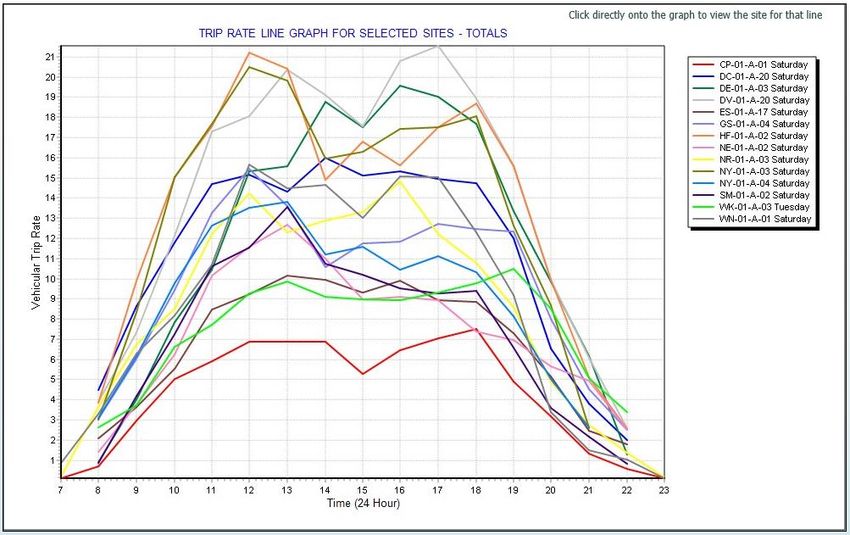
TRICS Good Practice Guide 2021

Contents
1.     Overview ........................................................................................................................................... 4
2.     Using the most up to date version of TRICS and archived versions.................................................. 5
3.     Understanding Land Use Definitions ................................................................................................ 6
4.     Site selection by Region, Location Type and other data fields ......................................................... 7
5.     The Use of Comment Boxes ............................................................................................................ 11
6.     Understanding Trip Rate Calculation Parameter Definitions .......................................................... 11
7.     How TRICS Defines Gross Floor Area (GFA) .................................................................................... 13
8.     The Method of TRICS Trip Rate Calculations................................................................................... 14
9.     Using Older TRICS Data ................................................................................................................... 15
10.    Seasonal Trip Rate Variation ........................................................................................................... 16
11.    Peak Hours and Days ....................................................................................................................... 17
12.    Avoiding the Production of Pre-Determined “Preferred” Trip Rates ............................................. 22
13.    Representative Sample Sizes and Cross Testing ............................................................................. 25
14.    Resurveys and Multiple-Surveys ..................................................................................................... 28
15.    Weighting Factors in Trip Rate Calculations and Manual Deselection ........................................... 30
16.    Trip Rates and Limits of Extrapolation ............................................................................................ 31
17.    Mixed Use Sites and TRICS .............................................................................................................. 35
18.    Understanding Count Type Definitions ........................................................................................... 37
19.    Understanding the TRICS Vehicle Occupants Count ....................................................................... 39
20.    Understanding the TRICS Servicing Vehicles Count ........................................................................ 42
21.    Correct Presentation of Trip Rates and Methods ........................................................................... 44
22.    The Standard Assessment Methodology (SAM) ............................................................................. 52
23.    TRICS Compliant Surveys and the Provision of Survey Data ........................................................... 54
Appendix A – A worked example of a Trip Rate Calculation scenario ...................................................... 57

Tables
Table 1 – General guide to site compatibility by Main Location type ......................................................... 9

TRICS Good Practice Guide 2021                                             1                                                           20/11/2020
TRICS Good Practice Guide 2021

Figures
Figure 1 – Extract of TRICS system information showing TRICS version number ....................................... 5
Figure 2 – Extract of Help section showing land use type definitions......................................................... 6
Figure 3 – Location fields and definitions button within a Site Details screen ........................................... 9
Figure 4 – TRICS Main Location definitions ............................................................................................... 10
Figure 5 – Comment Boxes are present within individual site records..................................................... 11
Figure 6 – Definitions of all trip rate parameters can be easily found ...................................................... 12
Figure 7 – The trip rate calculation factor is always displayed (top left) .................................................. 12
Figure 8 – The minimum survey cut-off date is defaulted to 8 Years ....................................................... 15
Figure 9 – TRICS output (highlighting survey dates) ................................................................................. 17
Figure 10 – Graphical display of trip rates showing peaks ........................................................................ 18
Figure 11 –Trip rate calculation results table ............................................................................................ 18
Figure 12 – Comparative survey trip rate graph for multiple sites ........................................................... 19
Figure 13 – TRICS output (highlighting survey days) ................................................................................. 20
Figure 14 – Graphical display of trip rates showing “double peaking” ..................................................... 21
Figure 15 – Scatterplot diagram identifying low/high relative trip generation ........................................ 23
Figure 16 – Trip rate parameter summary ................................................................................................ 23
Figure 17 – Calculation Reference code on TRICS outputs ....................................................................... 24
Figure 18 – “Audit Another TRICS User Session” box on the TRICS system Homescreen......................... 24
Figure 19 – Example of rank order screen with 85th/15th percentiles highlighted.................................... 26
Figure 20 – Example of “Cross Testing” of mean and median trip rates .................................................. 28
Figure 21 – Example of Site List showing Initial Surveys and Re-Surveys ................................................. 28
Figure 22 – Example of Site Details showing linkage to initial and re-survey details ............................... 28
Figure 23 – Example of Survey Selection screen showing “Most Recent Survey Only” and “Busiest
Survey” radio buttons................................................................................................................................ 30
Figure 24 – Example of trip rate results showing the “Estimate Trip Rates” Feature............................... 32
Figure 25 – Example of a 03/A scatterplot by Site Area (higher fluctuation in range) ............................. 33
Figure 26 – Example of a 03/A scatterplot by Dwellings (lower fluctuation in range).............................. 33
Figure 27 – Example of a scatterplot showing a lack of apparent visual correlation between GFA and
vehicle trips (manufactured example for illustrative purposes) ............................................................... 34
Figure 28 – Example of a scatterplot showing a visual correlation between GFA and vehicle trips (albeit
significantly influenced by external factors) ............................................................................................. 35
Figure 29 – Extract of Help screen showing count type definitions .......................................................... 37
Figure 30 – Example of a modal split pie chart ......................................................................................... 38
Figure 31 – Multi-Modal count types for Greater London (left) and outside of London (right) ............... 39
Figure 32 – Example of a TRICS® Vehicle Occupants count ...................................................................... 40
Figure 33 – Vehicle Occupants Split Graph in TRICS® ............................................................................... 41
Figure 34 – The Servicing/Standard Vehicle Percentages table in TRICS® ................................................ 43
Figure 35 – Example of Servicing Vehicle count ........................................................................................ 44
Figure 36 – Default sections to be included in a TRICS® PDF output with additional optional features also
shown ........................................................................................................................................................ 46
Figure 37 – Land Use selection and regional breakdown in a TRICS® PDF output.................................... 47
Figure 38 – Primary Filtering selections in a TRICS® PDF output .............................................................. 48
Figure 39 – Secondary Filtering selections in a TRICS® PDF output .......................................................... 49
Figure 40 – List of included sites in a TRICS® PDF output ......................................................................... 50
Figure 41 – The trip rate calculation results table in a TRICS® PDF output ............................................... 51
Figure 42 – The Parameter Summary in a TRICS® PDF output .................................................................. 52
Figure 43 – Example of a site list with SAM surveys highlighted .............................................................. 52
Figure 44 – Extract from the Travel Plan Monitoring Report .................................................................... 54

TRICS Good Practice Guide 2021                                                2                                                            20/11/2020

TRICS Good Practice Guide 2021

Appendix Figures
Figure A- 1 – Selecting the 03/A TRICS® land use sub-category (Houses Privately Owned) ..................... 57
Figure A- 2 – Selecting the Selecting the required minimum and maximum number of dwellings ......... 58
Figure A- 3 – Selecting the required range of parking spaces per dwelling .............................................. 58
Figure A- 4 – Selecting the required range of bedrooms per dwelling ..................................................... 58
Figure A- 5 – Selecting the minimum percentage of dwellings that are privately owned ........................ 59
Figure A- 6 – Selecting the main TRICS® location types to include ........................................................... 59
Figure A- 7 – Selecting the required population ranges within 1 mile and 5 miles radii .......................... 60
Figure A- 8 – The Progress Checklist at the stage where trip rate calculations can be undertaken ......... 60
Figure A- 9 – The TRICS® Filtering Summary ............................................................................................. 61
Figure A- 10 – The List of selected sites within the trip rate calculation process ..................................... 62
Figure A- 11 – The List of selected surveys within the trip rate calculation process ................................ 62
Figure A- 12 – The trip rate calculation results table ................................................................................ 63
Figure A- 13 – The rank order list table for 0800-0900 by departures...................................................... 64

TRICS Good Practice Guide 2021                                     3                                                    20/11/2020
TRICS Good Practice Guide 2021

1.      Overview

1.1.    This TRICS® Good Practice Guide supersedes the 2016 version of this document. It is fully
        endorsed by TRICS Consortium Limited and its six Shareholders (Dorset Council, Kent County
        Council, East Sussex County Council, West Sussex County Council, Surrey County Council and
        Hampshire County Council).

1.2.    The aim of this document is to provide guidance to users of TRICS® to encourage good practice
        when using the system, and to also provide guidance to parties tasked with auditing outputs
        produced by the system (which may appear in Transport Assessments or other documentation).
        Version 7.7.3 of the software (released in September 2020) has been used in all examples given
        within the document.

1.3.    TRICS® is a very flexible system providing a large amount of survey data across a wide range of
        development types, therefore allowing great potential variation in the calculation of both
        vehicular and multi-modal trip rates. Therefore, it is quite possible that two users of the system,
        applying different filtering criteria and ranges to a task, may end up producing different results.
        This guide is intended to assist users in ensuring that correct procedures and understanding of
        the system are practised in the production of trip rate calculations, and is also intended to
        provide guidance to assist in the correct and thorough auditing of TRICS® data once it is
        received by third parties.

1.4.    There are many areas within the system whereby careful selection criteria and ranges are
        important in achieving robust and reliable trip rates. This guidance is designed to assist users in
        this task.

1.5.    The correct way to build a selection of surveys for the purposes of calculating trip rates is to
        decide initial inclusion criteria, and then filter the database using the various options provided
        by the system to provide a representative sample. The incorrect method is to produce trip rates
        to fit a pre-determined and preferred trip rate figure. This guidance, if followed correctly, will
        assist users in avoiding such incorrect, “pre-determined” methods.

1.6.    Recipients of data generated by TRICS® need assurance that the data has been produced in
        accordance with the guidance contained within this document. Therefore, it is the responsibility
        of all TRICS® users to ensure that full details of how data was obtained, along with clear
        indications of what the data represents, are provided to data recipients. Additional assistance
        for auditors of reports where TRICS® data has been used can be found within Section 22 of this
        document.

1.7.    The principles covered in this guide apply to both traffic surveys and multi-modal surveys. It
        should be noted that multi-modal surveys were first introduced into the database in 2000,
        whilst traffic-only surveys were present from the very first versions of the database. Both traffic
        and multi-modal surveys are regularly added to the database through annual data collection
        programmes.

1.8.    Previous versions of this guidance have been widely used to reinforce data produced in
        accordance with the methods contained within this document. In cases of dispute, such as when
        conflicting sets of results are presented at Public Inquiries, it has often been the Good Practice
        Guide which has influenced Inspectors in their decision making.

TRICS Good Practice Guide 2021                      4                                        20/11/2020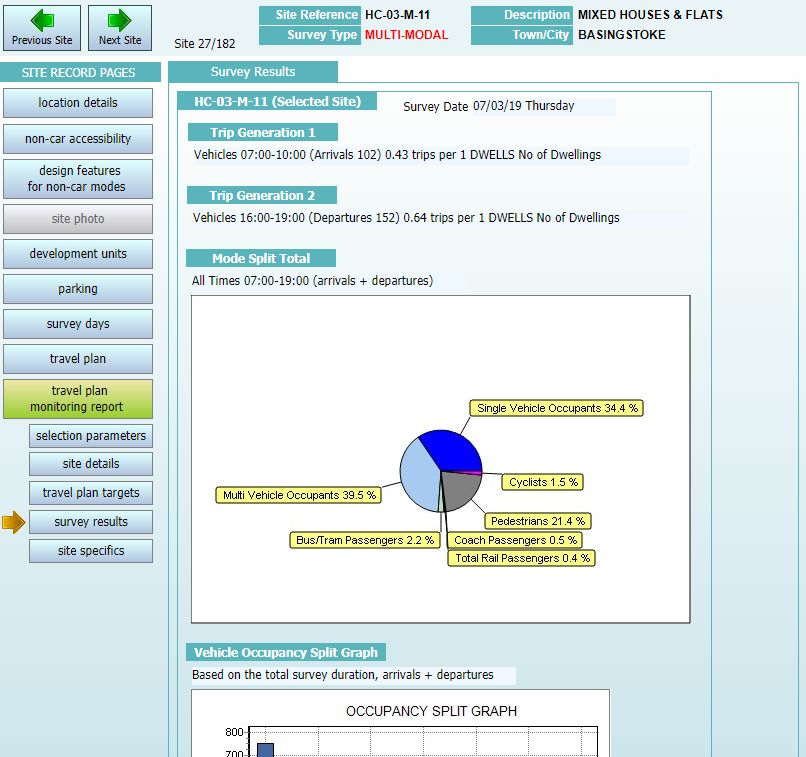
TRICS Good Practice Guide 2021

2.      Using the most up to date version of TRICS and archived
        versions
2.1.    TRICS® software and database updates are issued on a quarterly basis, these usually being in
        March, July, September, and December. New survey data is usually added to the database in
        each quarter, with new system features also added in quarterly updates as and when they are
        developed. The current series of TRICS® versions is Series 7. During 2020 there were four
        scheduled releases, these being 7.7.1 in March, 7.7.2 in July, 7.7.3 in September, and 7.7.4 in
        December.

2.2.    There is no set rule against using an earlier version of the system. However, users should always
        aim to use the most up to date version wherever possible. The version in use is indicated by the
        issue number, which is always present on the Homescreen of the system. With quarterly system
        updates new data is added to the database and, from time to time, some survey sites are
        removed from the database due to issues with their data, whilst others may be relocated from
        one land use sub-category to another (due to re-classification), and others may have some of
        their data corrected. All instances of deleted, corrected and relocated survey sites are stated
        within the list of new sites document for each quarterly system release, and these are available
        as PDF’s in the Library module of TRICS® (accessible via the “Library” icon at the top of all
        system screens). Users can often use the current up-to-date version of TRICS® to audit data
        supplied using an earlier version; it is only necessary to use an archived, older version of the
        system should there have been any changes made to the database that may have affected the
        selected set of survey sites being audited.

          Figure 1 – Extract of TRICS system information showing TRICS version number

2.3.    When using TRICS® online, users will by default always be operating the most up-to-date
        version of the system. However, users may on occasion require the use of an older version of
        TRICS® to audit trip rate calculations produced using a previous version of the system. This can
        be done by downloading an older version via the TRICS® software archive (which is accessible
        once logged in to the Members Area at www.trics.org. Section 21 provides further detail about
        the auditing of TRICS® data. If using older versions of the system, users should take care to
        ensure that there are no issues relating to survey sites that have subsequently been moved,
        amended or deleted (see 2.2), as the inclusion of such data could render the trip rate results
        unreliable and open to potential challenge.

2.4.    In instances where there is a conflict between two sets of TRICS® results, data that has been
        produced whilst adhering to the Good Practice Guide will be considered more representative
        and robust. This takes precedence over the actual version of the system being used. If in such a
        conflict both users have adhered to this guidance, then a further analysis of each method used
        to obtain the sets of results should be undertaken, following the principles contained within this
        guide, with the appropriate professional judgement applied thereafter.

TRICS Good Practice Guide 2021                      5                                       20/11/2020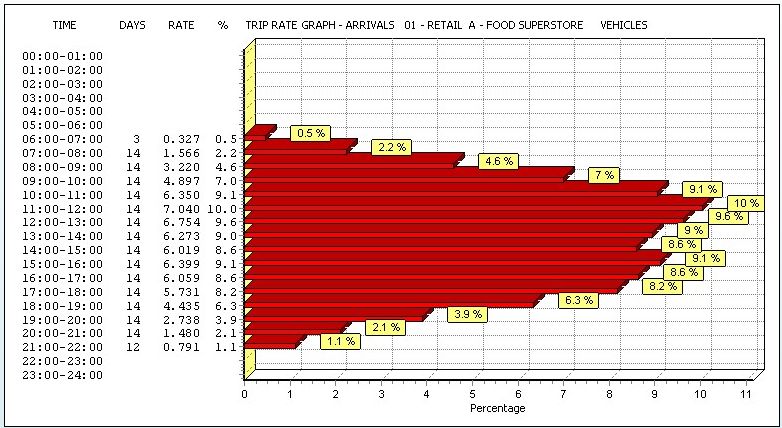
TRICS Good Practice Guide 2021

3.      Understanding Land Use Definitions

3.1.    Within TRICS® version 7.7.3 (issued in September 2020) there were 121 land use sub-categories,
        all of which are defined within the Help section of the system, accessible by clicking on the Help
        icon at the top of all TRICS® system screens.

          Figure 2 – Extract of Help section showing land use type definitions

3.2.    It is vital that users undertake trip rate calculations using land use sub-categories appropriate to
        their individual development scenarios. For example, a DIY Superstore is not compatible with a
        Builders Merchant site in TRICS® (and there are countless other examples). For more obscure
        development types users need to proceed with a greater degree of caution. The Miscellaneous
        category (16/A in the database) contains all sites that do not fit into any other specific sub-
        category. It is within the Miscellaneous sub-category that users should search if they are unable
        to find a suitable site in any other sub-category. However, there is no guarantee that users will
        find the type of development they are looking for. Also note that due to the mixed and varying
        nature of developments within this sub-category, trip rates cannot be calculated for 16/A
        Miscellaneous sites.

TRICS Good Practice Guide 2021                      6                                        20/11/2020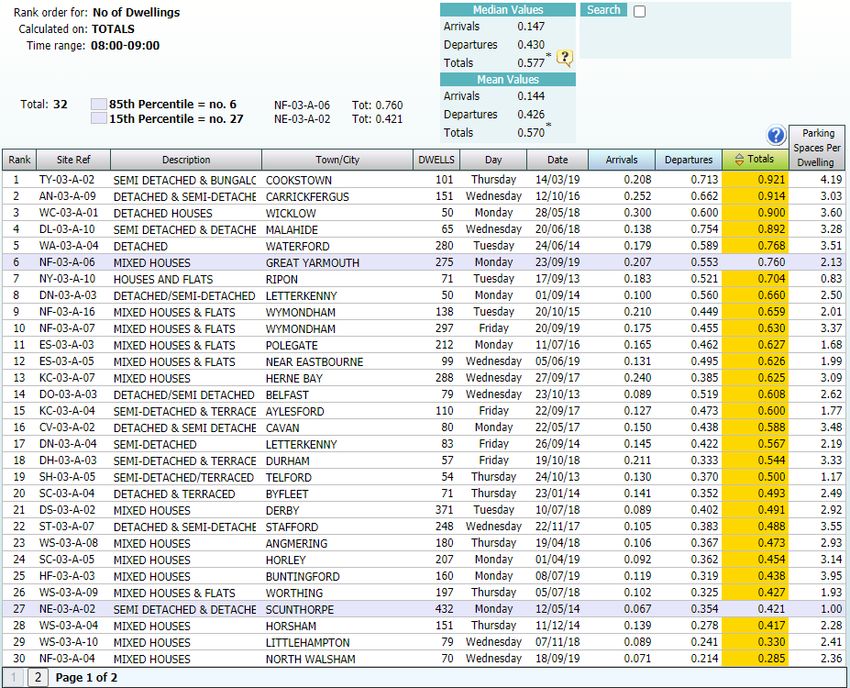
TRICS Good Practice Guide 2021

4.      Site selection by Region, Location Type and other data
        fields

4.1.    The issue of survey sites within the TRICS® database being included/excluded by specific regions
        has often been raised by users. This has led to TRICS® undertaking comparative research into
        trip rates split by region and by main TRICS® location type. This research was undertaken in two
        stages, with vehicular trip rate variation assessed in 2019, followed by an assessment of multi-
        modal trip rate variation in 2020. In both cases, key land use sub-categories were studied, these
        being 01/A (Food Superstore), 02/A (Office) and 03/A (Houses Privately Owned), with the aim of
        this research being to establish whether region or TRICS® location type produced any patterns
        of significant trip rate variation. The initial report on the vehicular analysis is available for
        download in the Library module of the TRICS® system. It is called “A Comparison of Vehicular
        Trip Rate Variation by TRICS® Regions and Location Types – Technical Note”. The second report,
        covering the multi-modal analysis, will soon also be made available within the Library module,
        and the subsequent version of the Good Practice Guide will be updated accordingly.

4.2.    In both stages of the vehicular research, trip rates were calculated per 100m2 of Gross Floor
        Area (for the Food Superstore and Office land use sub-categories) and per 1 dwelling for the
        Houses Privately Owned sub-category, with arrival, departure and total peak periods and full
        survey duration periods being covered. The percentages of trip rate variance were then
        calculated for each regional or location type grouping compared to trip rates for all survey sites
        in the sample used for each land use sub-category, and a system of rankings showed how the
        groupings compared to each other across the land uses, to see if any significant patterns
        emerged. It was from the presentation of sets of tables displaying these results that our
        conclusions were drawn.

4.3.    The vehicular analysis by region revealed no evidence of any clear, consistent pattern of
        vehicular trip rate variation, with any variation appearing to fluctuate randomly throughout. If
        there had been a clear basis for overall trip rate variation by region alone, then we would have
        seen certain regions ranking consistently lower or higher than others, but our study did not find
        this. Our conclusion from this is that a considerable number of other factors are influencing trip
        generation to a significantly greater degree than region alone.

4.4.    On the other hand, the vehicular analysis by location type did show an overall structured and
        consistent variation in trip rates. The ranked comparison of TRICS® location types showed the
        Edge of Town category ranking mostly at the top in terms of trip rates, with the Town
        Centre/Edge of Town Centre grouping of categories ranking mostly at the bottom. This suggests
        that, although there are of course numerous factors that can influence trip generation, TRICS®
        location type is certainly an important one of these.

4.5.    Therefore, our vehicular study revealed that there is a significantly higher correlation between
        location type and vehicular trip rates than there is between region and vehicular trip rates, with
        location type clearly showing a greater level of consistency and a clear, emerging pattern,
        compared to the apparent randomness of fluctuations when trip rates are split by region. Our
        subsequent multi-modal study, following the same structure of analysis as the vehicular study,
        found similar conclusions, and upon publication of the multi-modal technical note this guidance
        will be further updated accordingly. Therefore, our current guidance is that regional selection
        should not be a major consideration when applying trip rate calculation filtering criteria, whilst
        TRICS® location type appears to be one of the most influential factors in terms of trip
        generation, and therefore should be one of the main filtering considerations.

TRICS Good Practice Guide 2021                      7                                       20/11/2020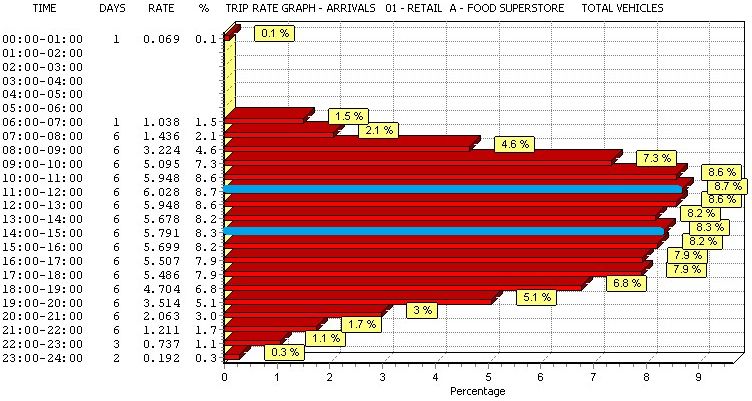
TRICS Good Practice Guide 2021

4.6.    Bearing in mind the results of our research, with hard data now being available, it is not
        considered good practice to exclude survey sites within the TRICS® database on the sole basis of
        such sites being located within any particular region. We consider that a more robust use of the
        TRICS® filtering process takes place on a case-by-case basis, taking into account the numerous
        factors that can influence trip generation, with the TRICS® location type being at the forefront
        of these.

4.7.    There are clearly some extreme exceptions to the above. For example, trip rates generated from
        a development within a major city centre would probably be somewhat different to those
        generated from the Shetland Islands, for obvious reasons. But if all local potential influencing
        factors are carefully considered, especially the TRICS® location type, there is no obvious reason
        why some trip rates generated from a site within, say, Glasgow, would not apply to a similar
        development within, for example, Greater Manchester. Similarly, some development scenarios
        in parts of London may be compatible in terms of trip generation with sites in other large cities.
        However, the importance of compatibility in terms of local population, vehicle ownership,
        location type, etc. cannot be stressed enough. It is within development data of individual TRICS®
        survey sites, through the use of the filtering process, where true potential compatibility should
        be established, rather than applying an automatic exclusion of certain regions, which could
        unnecessarily remove many actually compatible sites from a user’s selected dataset.

4.8.    Care should also be taken to ensure that data fields used in site selection filtering are relevant
        to each individual case. For example, using average levels of car ownership within a 5-mile
        radius of a development as a criteria in the filtering process would be more appropriate for a
        land use sub-category such as a food superstore than it would be for a residential development.
        For the latter, average car ownership per household within a 5-mile radius would probably not
        be as an effective or relevant a filter, as it is the car ownership level of the households within
        the particular residential development scenario that we would be interested in, and not that of
        the greater surrounding area. This and other factors including, for example, demographic
        considerations (amongst other things), when appropriate, should also be considered when
        deciding on the filtering criteria that is to be used, so that justification can be readily provided
        for each element of the database filtering criteria should it be required at any point. Therefore,
        users should always take care to ensure that each instance of filtering by TRICS® database field
        can be justified in the context of the type of development being analysed.

4.9.    A specific example where the correct filtering of a TRICS® database field is essential is when
        dealing with food superstore sites with or without petrol filling stations included in the survey
        count. If a proposed development is to include a PFS, then this should be reflected by the
        exclusion of sites within the database that do not include a PFS in their survey counts. Similarly,
        if a proposed development is not to include a PFS, then filtering should ensure that stores with a
        PFS included in their survey counts are excluded. This approach is necessary as surveys at food
        superstores with a PFS also record trips to the PFS only, in addition to trips to the store only and
        trips that take in both the store and the PFS in the same visit. It should be noted that individual
        TRICS® surveys at food superstores do not break down counts into trips to the PFS only, trips to
        the store only, or trips that include a visit to both the PFS and the store, with only the total trips
        in and out of the site as a whole being represented.

4.10.   As discussed above, we consider the TRICS® main location type to be one of the most important
        data fields in terms of site selection compatibility. It is reasonable to suggest that developments
        located in a town or city centre, with good local public transport accessibility will, as a general
        rule, achieve a different type of modal split to a similar development located in the countryside

TRICS Good Practice Guide 2021                       8                                         20/11/2020
TRICS Good Practice Guide 2021

        without local public transport accessibility. Mixing sites which are clearly incompatible in
        a dataset for trip rate calculations could potentially lead to misleading trip rates being
        generated. A general guide to compatibility by TRICS® main location category is shown in the
        table below.

          Table 1 – General guide to site compatibility by Main Location type

4.11.   Clearly there would be many potential “borderline” cases where compatibility between two or
        more different main location types might be possible. Therefore, Table 1 is not necessarily to be
        taken as an absolute table of rigid compatibility covering all cases. For example, a town or city
        centre may be very close to the town or city’s actual physical edge. Also, if you look at the
        “Suburban Area” category, which can include sites both in quiet residential areas a significant
        distance from a town/city centre, and sites within busy built-up areas just outside the edge of a
        town/city centre, you will see how wide-ranging this main location type can be (see Figure 4). To
        assist users in addressing these issues, and to provide greater clarity on location types on a site-
        by-site basis, in December 2007 additional location sub-categories were introduced, and the
        entire TRICS® database reviewed as a result. Users are now encouraged to examine both the
        main location and sub-location categories to identify compatibility of sites to be included in
        their selected datasets. We consider the best approach is to examine the location of the
        development scenario, and then combine this with an examination of compatibility through the
        TRICS® location type definitions. A full definition of location types and sub-types is accessible by
        clicking on the “Definitions” button next to the Location indicator on the Site Details screen of
        an individual TRICS® site record.

4.12.   In the first instance, it is recommended that users include sites across location types that are
        possibly compatible, and then examine the individual site locations in more detail using facilities
        such as Google Maps, before refining the dataset further if necessary using their professional
        judgement.

          Figure 3 – Location fields and definitions button within a Site Details screen

TRICS Good Practice Guide 2021                       9                                       20/11/2020
TRICS Good Practice Guide 2021
Figure 4 – TRICS Main Location definitions
4.13. There will be instances where the main location type mix within a selected set of surveys will
not be considered compatible. For example, a mix of sites containing both “Town Centre” and
“Free Standing (out of town)” main location types will most likely produce misleading and
unrepresentative trip rate results for a development assessment. If a mix of main location types
is used (see Table 1), it is the responsibility of the user generating the trip rates to ensure that
justification for the inclusion of the mix is provided. This can include geographical location
evidence, such as maps, etc.
4.14. Users should note that there is no compatibility matrix for location sub-categories, as they are
sub-sets which fall within the overall location type. However, users should consider the
relevance of these sub-categories when selecting surveys and use their professional judgement
accordingly.
TRICS Good Practice Guide 2021 10 20/11/2020TRICS Good Practice Guide 2021
5. The Use of Comment Boxes
5.1. Within individual TRICS® sites there is a wide variety of information available, assisting users in
the site selection process. Additional descriptive information is also displayed within comment
boxes, containing further site, development, parking, and survey count details, which
supplement the fixed data fields. This additional information is often important for a more
complete understanding of a development in the database, so users should are encouraged to
study comments, as such additional information may assist in determining the compatibility of a
site with a user’s development assessment scenario.
5.2. TRICS® Research Report 99/2 (“Research into Trip Rate Variation” by Harrison Webb) analysed
variations in trip rates at retail stores, taking into account factors such as consumer
expenditure, time series analysis, and the analysis of parking supply and peak demand. These
are just a few examples of some of the numerous additional factors which may affect trip rates,
that fall outside the data fields and calculation processes of the TRICS® database. A more recent
piece of research, Research Report 09/1 (“An econometric study of the relationship between
land use and vehicle trip generations” by David Broadstock) examined economic and
demographic influences, which again exist outside of the database and operations of TRICS®.
5.3. Comment box information is only visible within individual site, development, parking, travel
plan, and survey day screens. Comment boxes are not used in the site selection filtering process,
or at any other point within the system, being purely descriptive data fields. If full individual site
information is output to a PDF document, all comment box information will be automatically
included. Recipients of TRICS® trip generation results, if suspecting that a particular site may not
be compatible with the development scenario being assessed, should ask the user who supplied
the results to provide this further level of individual site detail, so that the comment
information can be examined. Therefore, it is in the user’s interest to ensure that comment
boxes are examined before sites are included in a selected set for calculation. This may not be
practical when dealing with very large sets of surveys, but when it comes to smaller data sets it
is highly recommended, as it could help in avoiding any potential conflict at a later stage.
Figure 5 – Comment Boxes are present within individual site records
6. Understanding Trip Rate Calculation Parameter Definitions
6.1. Trip rates can be calculated using a variety of data fields, known as trip rate calculation
parameters, and it is important that users understand the definitions of the various parameters
available. A full list of parameter definitions is available within the Help module, which users can
access by clicking on the Help icon whenever using the system.
TRICS Good Practice Guide 2021 11 20/11/2020TRICS Good Practice Guide 2021
Figure 6 – Definitions of all trip rate parameters can be easily found
6.2. Users should also understand the trip rate calculation factor, which is always displayed at the
top left hand corner of the trip rate calculation results screen (see Figure 7). In the case of Gross
Floor Area (GFA), the calculation factor is always 100m², so all trip rates produced by the system
using this calculation parameter are represented as trip rates per 100m² of GFA. For trip rates
calculated by Employees, the factor is trips per Employee, for Dwellings it is trips per Dwelling,
and for Site Area it is trips per Hectare. It is important that this is understood by the user and
incorporated into the results presented to the recipient of trip generation outputs. For example,
a GFA trip rate of 35.78 should be presented as “35.78 trips per 100m² of GFA”, along with
information on the time period, the count type and the trip direction (i.e. arrivals, departures or
total), so that the results can be fully understood. Section 21 provides more detail regarding the
correct presentation of TRICS® data.
Figure 7 – The trip rate calculation factor is always displayed (top left)
6.3. More recent sites within the database (for the relevant land use sub-categories) include a “GFA
Not in Use” figure, which represents GFA as defined within the TRICS® Help section that was not
in use at the time the survey was undertaken. Older data within TRICS® does not display this
figure. Where the “GFA Not in Use” figure is known, users have the option to include or exclude
the figure from the total GFA used in trip rate calculations. Users should note that with older
data, any obvious GFA not in use was identified and excluded wherever possible. Users should
always make it clear in their reports whether “GFA Not in Use” has been excluded through
TRICS Good Practice Guide 2021 12 20/11/2020TRICS Good Practice Guide 2021
TRICS® Settings (accessed via the Settings icon at the top of the screen). More detail on
how GFA is defined in TRICS® is provided in Section 7.
7. How TRICS Defines Gross Floor Area (GFA)
7.1. One of the most often used trip rate calculation parameters within the TRICS® system is Gross
Floor Area (GFA), which is represented in square metres. It is an option for trip rate calculation
across a wide variety of land use sub-categories within the database, and as discussed in Section
6 of this guide, trip rates calculated by GFA are displayed per 100m2 by default in results tables.
7.2. It is important for users to understand how TRICS® defines GFA. The TRICS® definition is long
established and is independent, in that it may not follow the definition of GFA provided by any
other organisation (and there are multiple definitions available). It is also important to
understand some slight variations of the definition of GFA within TRICS® for certain land use
sub-categories. The main definition of GFA, as provided in the TRICS® Help module, is the total
internal floor area of all floors within a site’s building (or buildings), including any mezzanine
floors. Internal floor areas will include all areas accessible to staff and visitors (for example
office space, canteens, storage areas, toilets, etc), but will exclude service areas (for example lift
shafts, stairwells, plant and visitor car parks etc).
7.3. For the 01/H (Garden Centre), 01/L (Builders Merchant) and 01/S (Mixed Bargain Retail Unit)
land use sub-categories, the GFA will also include external areas of developments, excluding
landscaping and parking. So, any outdoor sales, storage, or other active external areas
(following the general definition outlined in 7.2) will be included in the total GFA figure. This will
also apply to garden centres should they be included within a DIY Superstore (land use sub-
category 01/D). And this will also apply to garden centres, builders merchants and mixed
bargain retail units should they be part of a Retail Park site (land use sub-categories 01/J and
01/K).
7.4. For the 02/E (Warehousing – Self Storage) and 02/F (Warehousing – Commercial) land use sub-
categories, the GFA will also include external storage areas. So, any external areas of such
developments that are used for external storage (i.e. outside of the main building or buildings),
following the general definition outlined in 7.2, will be included in the total GFA figure. This will
also apply to warehouse units should they be included within a Business Park (land use sub-
category 02/B), or within an Industrial Estate (land use sub-category 02/D).
7.5. For the 14/A (Car Show Room) land use sub-category, the GFA will also include external sales
areas. So, any external areas of such developments that are used to display vehicles for sale,
following the general definition outlined in 7.2, will be included in the total GFA figure. This will
also apply to car show rooms should they be included within a Business Park (land use sub-
category 02/B), or within an industrial estate (land use sub-category 02/D).
7.6. When assessing development scenarios that include a development’s GFA, TRICS® users should
always be aware of the TRICS® GFA definition, if applicable including the exceptions outlined
above. So, in examining development proposal site plans, care should be given with regards to
what is included and not included in a site’s GFA within TRICS® development data. A planning
application may provide a GFA for a development, but that definition may not be the same as
the TRICS® definition which the data within the database is based upon. This means that in
some cases, reasonable adjustments to a proposed development’s GFA figure may be necessary
prior to undertaking TRICS® trip generation calculations, should the definitions of GFA differ.
TRICS Good Practice Guide 2021 13 20/11/2020TRICS Good Practice Guide 2021
Any such adjustments should be presented within reports written by the user to avoid
any potential misunderstandings.
8. The Method of TRICS Trip Rate Calculations
8.1. The TRICS® method used to generate trip rates is consistent for all land use sub-categories
within the database. It is a method that has been assessed and considered to be statistically
robust, and users should become familiar with it, so that the process of TRICS® calculations can
be fully understood.
8.2. TRICS® can calculate trip rates for an individual survey or can calculate the mean average trip
rates for any number of surveys within a single land use sub-category. Mean average trip rates
are calculated where there are at least two surveys included in a set as selected by a user. The
method of calculation can be broken down into three stages, which apply to each survey count
period and each direction (arrivals, departures, and totals).
8.3. The first stage of the process is obtaining mean trip rate parameter figures. For any individual
survey period and direction (for example Arrivals 0800-0900), all surveys in the selected set that
have count data present are included. Using Gross Floor Area (GFA) as an example of the
selected trip rate calculation parameter, the system adds the GFA figures for each included
development, and then divides the result by the number of included surveys, the end result
being the mean trip rate parameter figure (mTRP).
8.4. The second stage of the process is obtaining mean survey count figures. Again, this applies to all
survey periods and directions, and all surveys in the selected set that have count data present
are included. Again using the example of the Arrivals 0800-0900 count, and in this example
looking at the Total Vehicles count type, the system adds the Arrivals Total Vehicles 0800-0900
counts for each included survey, and then divides the result by the number of included surveys,
the end result being the mean arrivals count figure (mARR).
8.5. The third stage of the process is the final calculation that provides the trip rate generation
results. Using the mean trip rate parameter figure mTRP (see 8.3), and the mean arrivals survey
count figure mARR (see 8.4), the calculation (mARR/mTRP)x100 is undertaken. Note that
because GFA is used in this example the calculation factor of 100 has been used, as trip rates by
GFA are always represented in TRICS® per 100m2. For a different calculation parameter, for
example Dwellings, the trip rates would be displayed per dwelling, and therefore the calculation
simply be mARR/mTRP. The calculation is undertaken for all time periods and directions, which
is presented in the trip rate calculation results table.
8.6. It is important to note that mean average trip rates for a group of selected surveys should only
be presented as having been generated using TRICS® if they have been taken directly from the
trip rate calculation results table using the standard TRICS® method detailed above. TRICS® does
not endorse any other method of obtaining mean average trip generation rates other than the
standard method specified in this section. For example, users might decide to take a TRICS®
rank order list, which displays non-averaged trip rates by individual survey, ranked in relative
order of trip rate intensity, and then manually calculate a mean average of the trip rates in this
list. In such a case, the resulting figures would not have been generated by TRICS®, as the data
would have been manipulated by the user outside the processes of the TRICS® system. It is the
clear position of TRICS® that if its trip rate generation results are manipulated in any way by a
user outside of the standard calculation process, then the figures resulting from this
TRICS Good Practice Guide 2021 14 20/11/2020TRICS Good Practice Guide 2021
manipulation cannot be stated as having been generated by TRICS®. Therefore, any such
manipulation should be made very clear in any subsequent reporting, as should the fact
that the resulting figures have not been derived using TRICS®. Organisations tasked with
auditing TRICS® trip rate calculation results are encouraged to assess whether the TRICS®
method of calculation outlined in this section has been correctly applied.
9. Using Older TRICS Data
9.1. TRICS® contains survey data from as far back as the 1980’s to the present day, with a large data
collection programme undertaken every year. There are currently over 8,000 survey days in the
database. Users should note that within the trip rate calculation filtering process some survey
days will be automatically excluded by default from the selected set by a minimum date cut-off,
although this can be adjusted by users.
9.2. The default minimum survey date cut-off is set to the 1st of January, 8 years prior to the release
year of the latest version of TRICS®. For example, TRICS® version 7.7.3, which went live in
September 2020, had a cut-off default of 01/01/2012. The minimum cut-off date can be
amended by users to any required date. The 8-year default is particularly helpful in assisting
TRICS® system developers in determining future data collection programmes.
Figure 8 – The minimum survey cut-off date is defaulted to 8 Years
9.3. Although there is no fixed rule for amending the default survey date cut-off, TRICS® can provide
some guidance on the use of older TRICS® data and trip generation trends over time to assist
users in making informed professional judgements. The background to this guidance follows
technical research into trip generation trends that was undertaken by TRICS® in 2019. This
guidance, whilst not covering all development types, examined three key land use sub-
categories, these being 01/A (Food Superstores), 02/A (Offices), and 03/A (Houses Privately
Owned), across a timescale from 1989 until 2018, looking at trends over time in both vehicular
and multi-modal contexts. The findings of this research were presented at the 2019 TRICS® User
Meeting, and the PowerPoint presentation slides including text commentary can be freely
downloaded from www.trics.org.
9.4. Without being too speculative, this limited analysis shows, for a small number of land use
categories, a general apparent reduction in vehicular trips over time. This is also evident to a
certain degree for total people trips, although these appear to be more dynamic, with individual
modes showing more inconsistent trends. However, the research suggests an overall, general
shift towards non-vehicular modes over time has taken place. Users should understand that this
was just an initial, straightforward type of analysis, undertaken using TRICS® to calculate trip
rates, and that any anomalies that may have appeared in the results could have been caused by
TRICS Good Practice Guide 2021 15 20/11/2020TRICS Good Practice Guide 2021
a variety of factors. But TRICS® considers that this research has been a worthwhile
exercise that provides some interesting observations for discussion. What is clear from
this exercise is that TRICS® needs to continue to undertake large numbers of surveys as we
move forwards, as we look to continue to monitor trends over time. This technical analysis
could be repeated at regular intervals in the future.
9.5. Users are encouraged to obtain a statistically sound survey sample without the need to amend
the default survey date cut-off wherever possible. More recent data within the TRICS® database
can be considered more representative of current trip generation levels when assessing a new
development scenario, with older TRICS® data being more representative of historic trip
generation levels. The technical research into trip generation trends over time was not
exhaustive by development types, so the trends indicated in the results of this analysis would
not necessarily apply to land use sub-categories that were not assessed. Trip rate variation over
time may be lesser or greater for the land use sub-categories not covered by the research, and
users are encouraged to examine historic trends within the database when it is felt appropriate.
It is considered reasonable for users to extend the survey date cut-off to include older data in
instances where a data sample may be considered too small with the default cut-off date in
place. It is up to TRICS® users to decide on a case by case basis how to apply cut-off dates using
professional judgement, and users are encouraged to state their reasons for amending the cut-
off date within their reports.
9.6. Users applying any type of factoring to older TRICS® survey data should make this very clear
when presenting their results, as post-factored data cannot be considered data generated by
the TRICS® system. Data initially produced by TRICS®, prior to any factoring taking place, should
be first presented (as TRICS® data), and then the factored data (with details of the factoring
used and the reasoning for the factoring taking place) presented second. This will ensure that
the recipient of reports including trip generation data is made aware of the trip generation has
been produced by TRICS®, and any data that is a result of factoring. This practice is especially
important so that data can be audited correctly by a third party (also using TRICS®).
10. Seasonal Trip Rate Variation
10.1. For the use of TRICS® to be fully effective for a “typical peak day” development assessment
scenario, users should, when selecting surveys through the trip rate calculation filtering process,
aim to ensure that non-typical seasonal travel behaviour is avoided whenever practical and
possible. For example, trip rates for a golf course in January will probably be lower than in
August.
10.2. Research commissioned by TRICS®, entitled “Seasonality Research Report – TRICS® Research
Report 02/2”, examined seasonal variation in detail, across a variety of different land use sub-
categories. This report is available within the TRICS® Library module, but it should be considered
in the context of the time when the report was written in 2002. TRICS® encourages users to
examine seasonality of surveys within the database during the site selection process using their
professional judgement, being aware that seasonal variations in trip generation will differ in
scale for the many different development types available. Consideration should be given to
seasonal variation in sets of surveys that have a large enough sample size to provide this level of
filtering detail, as it is recognised that there will be instances where such fine tuning may not be
possible (and in such cases this does not reduce the validity of the trip generation obtained
through the use of TRICS®; the results would just need to be viewed in the context of the times
of the year when the surveys in the selected set were undertaken).
TRICS Good Practice Guide 2021 16 20/11/2020TRICS Good Practice Guide 2021
10.3. It is considered good practice for users to always present survey dates for all sites used in
the trip rate calculation process. This information is available within PDF and CSV outputs that
are generated by users following the calculation of trip rates.
Figure 9 – TRICS output (highlighting survey dates)
10.4. When examining a regular peak trip generation scenario, if there is sufficient survey data
available within the selected land use category to avoid using survey dates outside what would
be considered typical peak times of the year, such that removal of these days would not
compromise the robustness and representative integrity of the remaining data set (see Section
13), then users could remove “out of season” survey days. Leaving such surveys in the selected
set might be considered unnecessary in some situations, possibly leading to the generation of
artificially low trip rates. If the inclusion of “out of season” survey days cannot be avoided, this
should be made clear in reporting. On the other hand, users should also consider avoiding using
“extraordinary peak” surveys (e.g. the days leading up to Christmas for food superstores), when
attempting to provide data for more regular peak activity, as this might lead to the generation
of artificially high trip rates. In either case, it should be made clear in reporting whenever survey
data from “out of season” or “extraordinary peak” times has been included in a selected set.
10.5. If a user decides to include “out of season” survey data and then apply any factoring to the
subsequent trip generation results, then it should be made clear in reporting which data has
been produced using TRICS®, and which has been factored, as any factored results are no longer
considered to be TRICS® data. This is particularly important for auditing purposes. Any factors
used will need to be explained and justified, and it should also be made clear that the factoring
process has taken place outside the processes of TRICS®. It is highly recommended in such cases
where factoring does take place that the TRICS® results are displayed alongside any factored
results for comparative purposes.
11. Peak Hours and Days
11.1. When presenting TRICS® data it is considered good practice to provide trip rate calculation
results covering peak hours of activity alongside the generally accepted “road peak hours” (i.e.
0800-0900 weekday mornings and 1700-1800 weekday evenings). Given the wide range of
development types within TRICS®, the actual site peak hours (for arrivals and departures) may
not necessarily correspond with the road peaks. In cases where they do not, trip rates for both
road peaks and site peaks should be supplied if requested by the data recipient. To cover both
peaks, the supply of trip rate graphs is recommended. These can be accessed directly from the
trip rates calculation results screen.
TRICS Good Practice Guide 2021 17 20/11/2020TRICS Good Practice Guide 2021
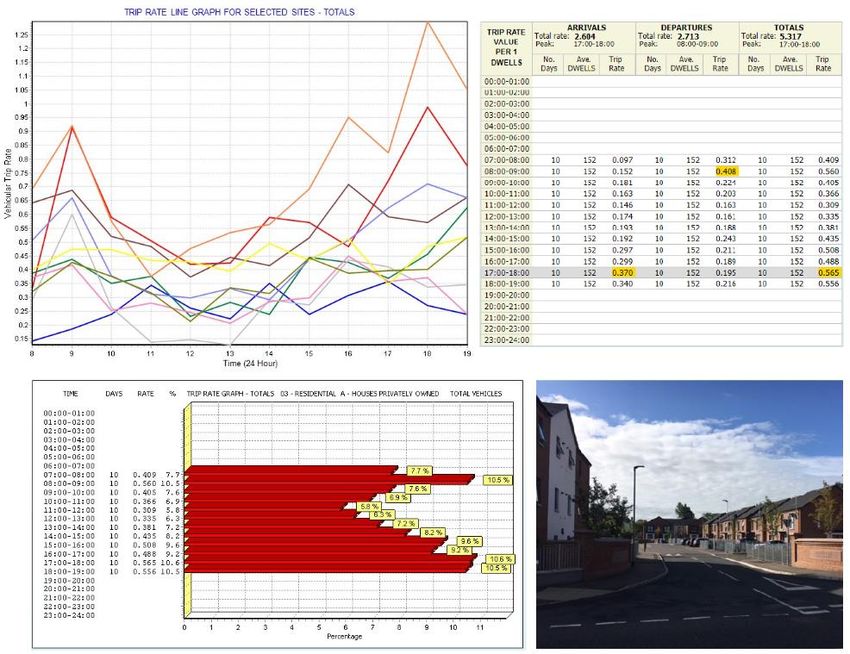
Figure 10 – Graphical display of trip rates showing peaks
11.2. When supplying peak trip rates, it should be made clear by the supplier whether the “peak”
represents the road peak or the hour or other period of peak activity at the site (or selected set
of sites). See Section 21 for further detail on how to correctly present TRICS® data.
11.3. The development peak trip rate hours are also displayed at the top of the trip rate calculation
results screen, as shown in the example below. These are site peaks, the actual busiest time
periods in terms of traffic/transport activity, rather than road peaks. By supplying the results
table and accompanying trip rate graphs, all peak information can be supplied in full to the data
recipient. The total trip rates are also shown in the example below – these are the trip rates for
the whole survey period, not to be confused with peak hour trip rates.
Figure 11 –Trip rate calculation results table
11.4. A visual example of the range of peaks and the fluctuation of trip generation across a range of
selected sites can be found when viewing the “Survey Selection” option within the trip rate
calculation process and then clicking on the “Graph” icon. A line graph that plots and compares
each individual site in a user’s selected set is then displayed, with time shown on the x-axis and
vehicular trip rates shown on the y-axis. This provides an excellent example of the range of trip
rates that TRICS® generates within a selected set of surveys, with the individual survey peaks
throughout the day clearly identified. This emphasises that TRICS® is not intended to provide an
TRICS Good Practice Guide 2021 18 20/11/2020TRICS Good Practice Guide 2021
exact “prediction” of trip rates for any given scenario. Instead this clearly demonstrates
that TRICS® provides a range that users can work with, something very important that
users should understand. TRICS® provides an average (mean) set of trip rate calculations in its
results tables (with an example given in Figure 11), but it is often the case that a wide range of
trip generation rates on a site by site basis have been used to get to the figures shown. As well
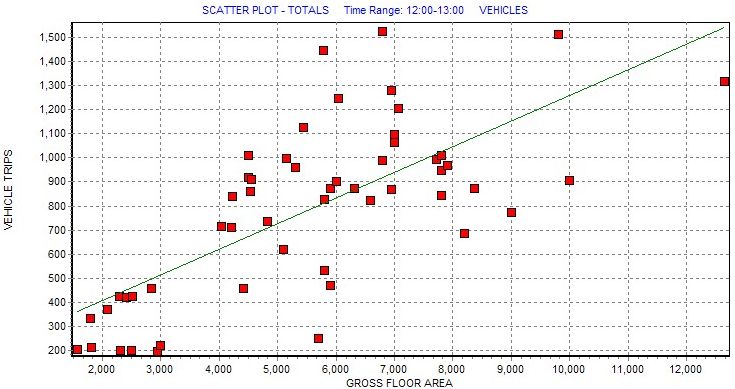
as the line graph displaying this phenomenon quite clearly, users can see this effect in other
representations such as within rank order lists and rank order scatterplot diagrams.
Figure 12 – Comparative survey trip rate graph for multiple sites
11.5. Users should not mix weekday and weekend surveys together in a selected set for trip rate
calculation, as the profiles of travel during the week compared with weekends typically differ to
a considerable degree; by mixing weekdays and weekends together a “hybrid” profile would
emerge, which is not representative of any day, and is something that could lead to artificially
inflated trip rates (see 11.7). For this reason, the day of the week for each survey included
should be included in trip generation reports, in summary form or in an appendix. In TRICS®
outputs such information is included by default, with an example shown in Figure 13.
TRICS Good Practice Guide 2021 19 20/11/2020You can also read


