Neon Transfection System - For transfecting mammalian cells, including primary and stem cells, with high transfection efficiency
←
→
Page content transcription
If your browser does not render page correctly, please read the page content below
user guide

Neon® Transfection System
For transfecting mammalian cells, including primary and stem cells, with
high transfection efficiency
Catalog Number MPK5000

Document Part Number 25-1055
Publication Number MAN0001557
Revision A.0

For Research Use Only. Not for use in diagnostic procedures.
For Research Use Only. Not for use in diagnostic procedures.

Information in this document is subject to change without notice.

DISCLAIMER
LIFE TECHNOLOGIES CORPORATION AND/OR ITS AFFILIATE(S) DISCLAIM ALL WARRANTIES WITH
RESPECT TO THIS DOCUMENT, EXPRESSED OR IMPLIED, INCLUDING BUT NOT LIMITED TO THOSE OF
MERCHANTABILITY, FITNESS FOR A PARTICULAR PURPOSE, OR NON-INFRINGEMENT. TO THE EXTENT
ALLOWED BY LAW, IN NO EVENT SHALL LIFE TECHNOLOGIES AND/OR ITS AFFILIATE(S) BE LIABLE,
WHETHER IN CONTRACT, TORT, WARRANTY, OR UNDER ANY STATUTE OR ON ANY OTHER BASIS FOR
SPECIAL, INCIDENTAL, INDIRECT, PUNITIVE, MULTIPLE OR CONSEQUENTIAL DAMAGES IN
CONNECTION WITH OR ARISING FROM THIS DOCUMENT, INCLUDING BUT NOT LIMITED TO THE USE
THEREOF.

Important Licensing Information: This product may be covered by one or more Limited Use Label
Licenses. By use of this product, you accept the terms and conditions of all applicable Limited Use Label
Licenses.

© 2014 Thermo Fisher Scientific Inc. All rights reserved. All trademarks are the property of Thermo
Fisher Scientific and its subsidiaries unless otherwise specified. Cy is a registered trademark of GE
Healthcare UK Limited. TaqMan is a registered trademark of Roche Molecular Systems, Inc., used under
permission and license.

ii
Contents
         Product contents .................................................................................................................................... v
         Unpacking the Neon® Transfection System ........................................................................................ vi
         Neon® Transfection System ................................................................................................................ vii

Introduction ........................................................................................................ 1
         About the product................................................................................................................................... 1
         Description of parts ............................................................................................................................... 3

Methods .............................................................................................................. 6
         Getting started ....................................................................................................................................... 6
         General guidelines ............................................................................................................................... 12
         Using the Neon® Transfection System ............................................................................................... 14
         Optimization protocol for DNA and siRNA .......................................................................................... 22
         Troubleshooting ................................................................................................................................... 31
         Neon® Device error messages ............................................................................................................ 33

Appendix ........................................................................................................... 34
         Repackaging the instrument ............................................................................................................... 34
         Product specifications ......................................................................................................................... 35
         Safety information ................................................................................................................................ 36
         Informations de sécurité ..................................................................................................................... 38
         Accessory products .............................................................................................................................. 40
         Technical support................................................................................................................................. 41

                                                                                                                                                               iii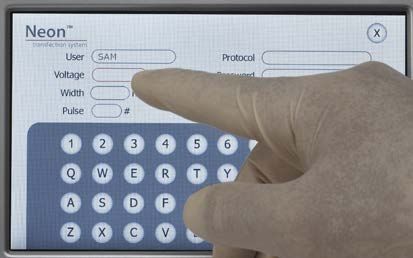
iv
Product contents

Upon receiving the        Examine the unit carefully for any damage incurred during transit. Any damage
device                    claims must be filed with the carrier. The warranty does not cover in-transit
                          damage. To register the device, activate your warranty, and be notified of important
                          updates, go to www.lifetechnologies.com/neon.

                                            ®                                               ®
Neon® Transfection The contents of the Neon Transfection Systems are listed below. The Neon
System             Transfection System is shipped at room temperature.
                          See page 3 for specifications and description of the Neon® Transfection System,
                          and page 6 to set up the device.

                                                   Product                         Quantity
                          Neon Transfection Device
                                ®
                                                                                       1
                          Specific Power Cord
                                                                                       4
                          (for US/Canada/Taiwan/Japan, Europe, and UK)
                          Neon® Pipette                                                1
                          Neon Pipette Station
                                ®
                                                                                       1
                          Instruction Manual                                           1

Neon® Kits                The Neon® Kits are used with the Neon® Transfection Systems for efficient
                          transfection of mammalian cells and are available separately from (page 40). The
                          kits are available in two formats for electroporation of 10 µL and 100 µL samples.
                          The following components are included with the Neon® Kit. The Neon® Kits are
                          shipped at room temperature.
                          Upon receipt, store the kit at room temperature. After use, store buffers at 4ºC
                          and all remaining kit components at room temperature.

                                           Neon® Kit, 10 µL                        Neon® Kit, 100 µL
          Item              Cat. no. MPK1025        Cat. no. MPK1096 Cat. no. MPK10025 Cat. no. MPK10096
                             (50 reactions)          (192 reactions)   (50 reactions)   (192 reactions)
 Neon® Tips                   25 tips (10 µL)         96 tips (10 µL)   25 tips (100 µL)      96 tips (100 µL)
 Neon Tubes
      ®
                                      5                       20               5                    20
 Resuspension Buffer R              1 mL                 3 × 1 mL           10 mL                 30 mL
 (Proprietary)
 Resuspension Buffer T              1 mL                 3 × 1 mL           10 mL                 30 mL
 (Proprietary)
 Electrolytic Buffer E              75 mL              2 × 150 mL       Not applicable        Not applicable
 (Proprietary)
 Electrolytic Buffer E2       Not applicable          Not applicable        75 mL               2 × 150 mL
 (Proprietary)

                                                                                                             v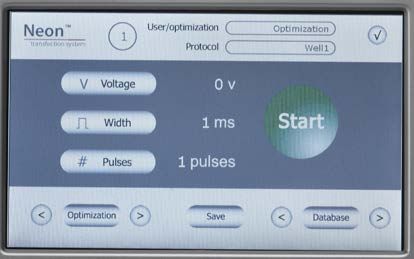
Unpacking the Neon® Transfection System
Unpacking      Follow the instructions below to unpack the Neon® Transfection System. The
instructions   weight of the Neon® device is 13.2 pounds (6 kg).
               1.   Cut plastic tapes and remove the outer box. Save the outer box and other
                    packaging material (in case you need to transport or ship the unit).
               2.   Remove the plastic bag from the top containing the manual, the Neon®
                    Pipette box containing the pipette, and then remove the plastic bag
                    containing the power cords from the box.
               3.   Remove the Neon® device and Neon® pipette station from the box and place
                    on a flat, level surface.
               4.   Set up the Neon® Transfection System as described on page 6.

vi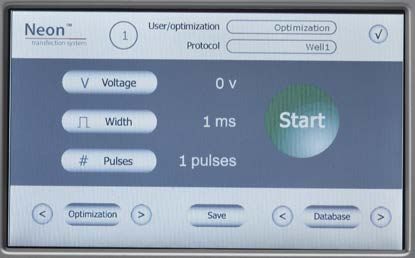
Neon® Transfection System

Front view              The front view of the Neon® device is shown below.

                                                                                          Touchscreen

Rear view               The rear view showing various parts of the Neon® device are shown below.
                        The USB port (need to unscrew the panel to view the port) is used to connect a
                        USB memory drive. The AC inlet is to connect to the power outlet on the wall,
                        and high voltage and sensor port is to connect the high voltage and sensor
                        connector of the Neon® Pipette Station to the unit.

             Sensor
             port
         High voltage                                                                      AC inlet
         port                                                                        Power switch

                                                                                           USB port panel

                                                               Fan

                                                                                                         vii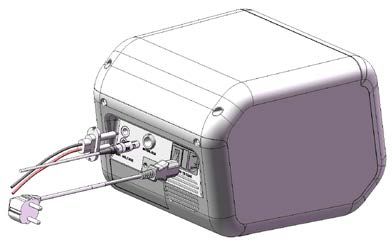
Neon® Pipette        The Neon® Pipette Station is supplied with a high voltage and sensor connector
Station              which connects the pipette station to the Neon® device. The Neon® Pipette with a
                     Neon® Tip and Neon® Tube is then used with the Neon® Pipette Station for
                     electroporation of mammalian cells. The Neon® Pipette Station contains two
                     electrodes.

                                                                                            Connector

User interface       The touchscreen user interface of the Neon® device consists of:
                     •   The touchscreen buttons to operate the device
                     •   The Digital Display that shows the protocol that is in use and various
                         parameters of the protocol.

           Digital
           display

       Touchscreen
       buttons

viii
Introduction

About the product

Neon®                The Neon® Transfection System is a novel, benchtop electroporation device
Transfection         that employs an electroporation technology by using the pipette tip as an
                     electroporation chamber to efficiently transfect mammalian cells including
System
                     primary and immortalized hematopoietic cells, stem cells, and primary cells.
                     The Neon® Transfection System efficiently delivers nucleic acids, proteins, and
                     siRNA into all mammalian cell types including primary and stem cells with a
                     high cell survival rate. The transfection is performed using as few as 1 × 10⁴ or
                     as many as 5 × 10⁶ cells per reaction using a sample volume of 10 µL or 100 µL
                     in a variety of cell culture formats (60 mm, 6-well, 48-well, and 24-well).
                     The Neon® Transfection System uses a single transfection kit (Neon® Kit) that
                     is compatible with various mammalian cell types including primary and stem
                     cells thereby avoiding the need to determine an optimal buffer for each cell
                     type.
                     The Neon® Transfection System offers open and transparent protocols that are
                     optimized for ease of use and simplicity. The Neon® device is preprogrammed
                     with one 24-well optimization protocol to optimize conditions for your nucleic
                     acid/siRNA and cell type, or you can program and store up to 50 cell-specific
                     protocols in the Neon® device database. Optimized protocols for many
                     commonly used cell types are also available on
                     www.lifetechnologies.com/neon for your convenience to maximize
                     transfection efficiencies for your cell types.
                     See page 3 for details on various parts of the system.

System               The Neon® Transfection System consists of:
components           •   Neon® Device
                         The Neon® Device is a simple, user friendly benchtop electroporation
                         device that employs the pipette tip as an electroporation chamber to
                         efficiently transfect mammalian cells including primary and immortalized
                         hematopoietic cells, stem cells, and primary cells. The device is
                         preprogrammed with a 24-well optimization protocol and supports a
                         database to store up to 50 user-specified protocols. See page 3 for details.
                     •   Neon® Pipette Station
                         The Neon® Pipette Station is a unique component of the system and holds
                         the Neon® Pipette during electroporation and protects the user from any
                         electrical shock exposures. The Neon® Tube which has an electrode near
                         the bottom is inserted into the pipette station to transfer the electric field
                         from the electrode inside the Neon® Tip. See page 3 for details.
                     •   Neon® Kits (not supplied with the device)
                         The Neon® Kits contain the Neon® Tips, Neon® Tubes, and buffers for
                         electroporation. The Neon® Kits are available in two formats for
                         electroporation of 10 µL or 100 µL samples (page 40 for ordering
                         information). See page 3 for details on Neon® Tips and Tubes.

  Neon® Transfection System                                                                               1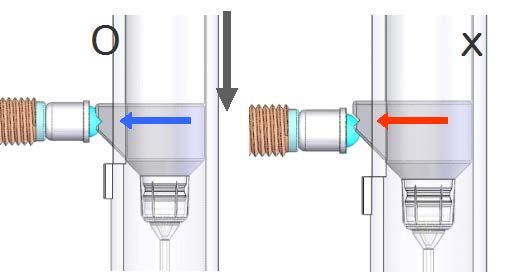
System overview   Unlike standard cuvette based electroporation, the Neon® Transfection System
                      uses a unique electroporation reaction chamber, the Neon® Tip that delivers a
                      high electric field to the biological sample. The Neon® Tip maximizes the gap
                      size between the two electrodes while minimizing the surface area of each
                      electrode. As a result, the sample experiences a more uniform electric field,
                      minimal pH change, less ion formation, and negligible heat generation.
                      This next generation electroporation technology overcomes many of the
                      limitations associated with standard cuvette based electroporation thereby
                      increasing transfection efficiency and cell viability, and providing an ergonomic
                      workflow.

                                                             V

                      The transfection occurs in the uniquely designed Neon® Tip using simple 3-step
                      procedure.
                      1. Load a mixture of harvested cells and molecules to be delivered (e.g., DNA,
                         RNA, siRNA) into the Neon® Tip.
                      2. Plug the Neon® Pipette with Neon® Tip into position in the Neon® Pipette
                         Station with Neon® Tube; select your protocol on the device, and press
                         Start.
                      3. Unplug the Neon® Pipette and transfer your transfected cells into a tissue
                         culture vessel containing the appropriate medium.

    Features           Important features of the Neon® Transfection System are listed below:
                       •   User-friendly Neon® device benchtop design that easily fits in your tissue
                           culture hood for easy, efficient transfection of a wide variety of
                           mammalian cells including primary and stem cells
                       •   Ability to transfect 1 × 10⁴–5 × 10⁶ cells per reaction in a sample volume of
                           10 µL or 100 µL in a variety of cell culture formats (60 mm, 6-well, 48-well,
                           and 24-well)
                       •   Utilizes a single buffer system for all cell types except primary suspension
                           blood cells
                       •   Simple touch screen interface for easy programming of electroporation
                           parameters
                       •   Available with one pre-programmed 24-well optimization protocol and
                           the option to customize up to 50 cell specific protocols
                       •   Built-in safety features in the device to enhance user safety

2                                                                    Neon® Transfection System
Description of parts
Neon® Device The Neon® device is a simple,
user friendly benchtop
electroporation device. When
used with a Neon® Pipette
Station and Neon® Kits, the
Neon® device efficiently
transfects mammalian cells
including primary and stem
cells. The device is
preprogrammed with a 24-well
optimization protocol and
supports a database to store up
to 50 user-specified protocols.
See page vii for a front and
rear view of the device.
Neon® Pipette The Neon® Pipette utilizes a positive displacement
pipette mechanism for pipetting mixtures
containing cells and nucleic acid or siRNA. The
Neon® Pipette is a fixed volume pipette and
permanently calibrated at the manufacturing stage
and does not require any further calibration.
The Neon® Pipette is designed for use with
Neon® Tips only. Do not use any other tips with
the Neon® Pipette.
Neon® Transfection System 3Neon® Pipette The Neon® Pipette Station is a unique component of the Neon® Transfection
Station system. It holds a Neon® Pipette during electroporation procedures. The
Neon® Pipette Station is equipped with many safety sensors and protection
mechanisms that protect the user from any exposures to an electrical shock.
The Neon® Pipette Station is connected to the Neon® device using the high
voltage and sensor connector (see page 6 for details).
The Neon® Pipette Station also holds the Neon® Tube which has an electrode
near the bottom that transfers the electric field from the electrode inside the
Neon® Tip.
Area to insert
®
Neon Tube
®
Neon
Pipette Connector
Station
Neon® Tube The Neon® Tube holds the Electrolytic Buffer during electroporation and is
inserted into the Neon® Pipette Station. The Neon® Pipette with the Neon® Tip is
then inserted into the Neon® Tube which has an electrode near the bottom that
transfers the electric field from the electrode inside the Neon® Tip. The Neon®
Tubes are supplied with Neon® Kits as well as available separately (page 40).
To avoid contamination, we strongly recommend using the tubes for a
maximum of 10 times only. We recommend changing tube and buffer when
switching to a different plasmid DNA/siRNA or cell type.
Tube Specifications:
Material: Polystyrene
Capacity: 2.5–4 mL
Buffer
Electrode
4 Neon® Transfection SystemNeon® Tips The Neon® Tips are disposable tips composed of a tip and piston used with the
Neon® Pipette. The Neon® Tips contain a gold-plated electrode to create a
disposable electric chamber for the delivery of a high electric field to biological
samples. The Neon® Tips are supplied with Neon® Kits in two formats to
support operating volumes of 10 µL and 100 µL, respectively (page 40 for
ordering information).
To ensure repeatability and eliminate variation of the transfection conditions
within or between experiments, we recommend that you do not use the
Neon® Tip for more than 2 times. Oxide formation at the piston surface area
can be generated if the tips are used more than 2 times, which decreases
electrode function of the piston.
Tip specifications:
Material: Polypropylene
Capacity: 10 µL or 100 µL
Mounting
stem Piston
Gold electrode
Tip
Neon® Transfection System 5Methods
Getting started
Install the Neon® 1. Unpack the Neon® device as instructed on page vi.
Device with Pipette 2. Four power cords are shipped with the device to ensure that the cord you use
Station is compatible with your local socket format.
3. Place the Neon® device on a level laboratory bench. Keep the area around the
unit clear to ensure proper ventilation of the unit.
Note: The Neon® device has a small footprint and can be easily set up in the tissue
culture hood for convenience.
4. For your safety: Position the device properly such that the power switch and
AC inlet located on the rear of the unit (page vii) are easily accessible. Be sure
to position the device such that it is easy to disconnect the unit.
Note: Since Neon® device is air-cooled, its surface may become hot during operation.
When installing the device, leave a space of more than 10 cm from the back of the device.
5. Place the Neon® Pipette Station near the Neon® device.
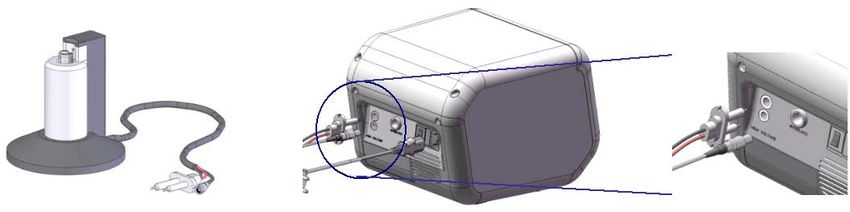
6. Connect the high voltage and sensor connector on the Neon® Pipette Station to
high voltage port and sensor port on the rear side of Neon® device,
respectively.
Be sure to align the ridge indicated by a white arrow on the sensor connector
on the Neon® Pipette Station with a groove indicated by a white dot on the
sensor port of the Neon® device (see figure below for details).
IMPORTANT! To connect or disconnect the sensor connector to the Neon®
device, always handle the sensor connector using the cord plug and not the
cord cable.
7. Ensure the AC power switch is in the Off position (page vii).
6 Neon® Transfection System8. Attach the power cord to the AC inlet on the rear of the Neon® device and then
to the electrical outlet. Use only properly grounded AC outlets and power
cords.
9. To turn on the power, press the main power switch on the rear of the unit to
ON position. The digital display shows start up screen (next page).
10. The Neon® device is operated by the touch screen on the front of the device.
You can easily input electroporation parameters by lightly touching the touch
screen with a finger tip or a touch screen pen. See next page for details.
You are ready to use the Neon® Transfection System. See page 14 for details.
Register the device Visit www.lifetechnologies.com/neon to register the device and activate your
warranty or extended warranty, and ensure that you receive product updates,
special offers, and faster service.
Electroporation There are three options to select an electroporation protocol for your cell type:
protocol options • If you already have the electroporation parameters for your cell type, input
the parameters in the Input Window (see below).
• If you wish to add cell-specific electroporation parameters to the database
on the device for future use, input the parameters in the Database Window
(page 9). You can also view our library of protocols for commonly used cell
types from www.lifetechnologies.com/neon and in put the parameters in
the Database Window (see below) for various cell types.
• If you do not have any specific electroporation parameters for your cell type
and wish to perform optimization, use the Optimization Window
(page 11).
Input values limit The Neon® device is designed to only input certain values and limits for each
value are listed below. If your input value exceeds the maximum value, an
error is displayed.
Input Voltage range: 500–2,500 V
Input Pulse Width range: 1–100 ms
Input Pulse Number range: 1–10
Neon® Transfection System 7Input window To create a cell specific protocol, if you already have the electroporation
parameters for your cell type:
1. Press the power switch (located on the rear side of the unit, page vii) to turn
ON the Neon® device. The unit checks to ensure that the Neon® Pipette
Station is connected to the device and then the start up screen is displayed.
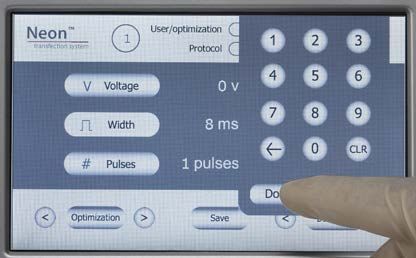
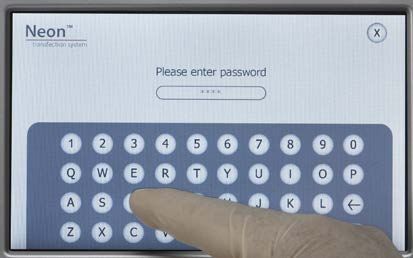
2. Press Voltage to activate the number key pad to input voltage value. Press
the desired voltage value and press Done to save the value.
Note: If any input value is out of the limit, an error message is displayed and the
lowest value of limit is automatically set.
3. Press Width to activate the number key pad to input width value. Press the
desired width value and press Done to save the value.
4. Press Pulses to activate the number key pad to input pulse value. Press the
desired pulse value and press Done to save the value.
5. If you wish to save these electroporation parameters, press Save on the
main screen to save the protocol in the database.
6. Press the desired protocol number button to edit the protocol. The selected
protocol is highlighted.
7. Once the Edit screen is displayed, enter the User name by pressing the key
pad buttons. The cursor automatically moves to the next field Protocol and
is highlighted red.
Continue to enter the information for Voltage, Width, and Pulse.
8. Press Enter to save the information in the database.
9. Proceed to preparing cells (pages 16–17) and DNA, and setting up the
Neon® Pipette Station for electroporation (page 14).
8 Neon® Transfection SystemDatabase window Enter cell-specific protocols into the database. The database can store up to
50 cell-specific protocols.
1. Press the power switch (located on the rear side of the unit, page vii) to
turn ON the Neon® device. The unit checks to ensure that the Neon®
Pipette Station is connected to the device and then the start up screen is
displayed.
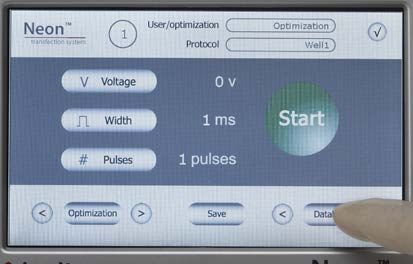
2. Press Database button to start the database window. To scroll through the
protocols in the database, use the right/left scroll buttons near the
Database button.
The Database window shows:
• Number button: Indicates protocol number
• User and Protocol: Displays the user and protocol name
• Parameters (Voltage, Width, Pulse): Displays the electroporation
parameter for each protocol
• Function buttons (Load, Edit, and Delete): Used to load, edit, or delete
a protocol. The function buttons are activated only after a protocol is
selected.
• Page scroll: To scroll to next or previous page
3. Press the desired protocol number button to edit the protocol. The selected
protocol is highlighted.
Neon® Transfection System 9Database window,
continued
4. Once the Edit screen is displayed, enter the User name by pressing the key
pad buttons. The cursor automatically moves to the next field Protocol
and is highlighted red.
Continue to enter the information for Voltage, Width, and Pulse.
If you wish to password protect the protocol, enter the Password (up to
7 characters) and Repeat Password information using the key pad.
5. Press Enter to save the information in the database. To exit the edit screen
without saving the parameters, press X.
6. The database window is displayed. Press the desired protocol and then
press Load to load electroporation parameters from the database.
7. Proceed to preparing cells (pages 16–17) and DNA, and setting up the
Neon® Pipette Station for electroporation (page 14).
8. To delete a protocol from the database, select the protocol by pressing the
protocol number button. Press Delete. If the protocol in the database was
password protected, a password screen is displayed. Enter the password
and press Enter to delete the protocol.
10 Neon® Transfection SystemOptimization Perform optimization of electroporation parameters using the preprogrammed
window 24-well optimization protocol. These protocols are locked and cannot be
edited.
1. Press the power switch (located on the rear side of the unit, page vii) to
turn ON the Neon® device. The unit checks to ensure that the Neon®
Pipette Station is connected to the device and then the start up screen is
displayed.
2. Press Optimization button to start the optimization window. To scroll
through the protocols, use the right/left scroll buttons near the
Optimization button.
The Optimization window shows:
• Number button: Indicates protocol number
• User and Protocol: Displays the optimization and well number
• Parameters (Voltage, Width, Pulse): Displays the electroporation
parameter for each protocol
• Load Function buttons: Used to load a protocol. The Load button is
activated only after a protocol is selected.
• Page scroll: To scroll to next or previous page
3. Press the desired protocol number button. The selected protocol is
highlighted. Press Load to load the protocol. To exit the screen without
loading the protocol, press X.
4. The electroporation parameters are displayed on the start up screen.
5. Proceed to preparing cells (pages 16–17) and DNA, and setting up the
Neon® Pipette Station for electroporation (page 14).
Upgrade the Upgrades for the Neon® device firmware are available. To download Neon®
firmware device firmware upgrades, go to www.lifetechnologies.com/neon. Follow
instructions on the page to download the upgrades.
Neon® Transfection System 11General guidelines
Recommended kits To use the Neon® device for electroporation of mammalian cells, you need to
purchase the Neon® Kits. Ordering information is on page 40. Do not use any
other kits with the unit.
To obtain the best results, follow these recommendations:
• Based on your initial results, you may need to optimize the electroporation
parameters for your cell type and DNA/siRNA. A preprogrammed 24-
well optimization protocol is included in the device for your convenience.
• Before using the device with your samples, ensure that you are able to
insert and use the Neon® Pipette and Tip correctly into the Neon® Pipette
Station (see page 14 for details).
• Wear gloves, laboratory coat, and safety glasses during electroporation.
• Always use the Neon® device with Neon® Kits for electroporation of
mammalian cells.
• The Neon® Transfection System is compatible for use with most
mammalian cells including primary and stem cells.
• Use high quality DNA and siRNA to obtain good transfection efficiency.
• Follow the guidelines on pages 16–17 for cell preparation.
• Use an appropriate GFP (green fluorescent protein) construct or siRNA
control (see next page for details) to determine transfection efficiency.
• Discard the Neon® Tips after 2 usages and Neon® Tubes after 10 usages as
a biological hazard. We strongly recommend changing tube and buffer
when switching to a different plasmid DNA/siRNA or cell type.
• Visit www.lifetechnologies.com/neon for a library of electroporation
protocols for commonly used cell types.
Recommended The Neon® Kits contain two Resuspension Buffers. Use the appropriate
buffers Resuspension Buffer based on the cell type as below. The cell-specific Neon®
transfection protocols available on www.lifetechnologies.com/neon indicate
the type of Resuspension buffer for use with each cell type.
Resuspension Buffer R:
Use Resuspension Buffer R with established adherent and suspension cell
lines such as 3T3-L1, HEK293, Cos7, C2C12, HeLa, HCT-15, PC-12, MDCK,
Raw264.7, U-2OS, CEM, HL-60, K-562, Jurkat, LCL, Ramos, U-937, as well as
primary adherent cells such as neuronal cells, stem cells, hepatocytes,
HUVEC, macrophage cells, dendritic cells.
Resuspension Buffer T:
Use Resuspension Buffer T with primary blood-derived suspension cells such
as T-cells, B-cells, NK cells, PBMC, monocytes.
12 Neon® Transfection SystemDNA quality and The quality and concentration of DNA used for electroporation plays an
amount important role for the transfection efficiency. We strongly recommend using
high quality plasmid purification kits such as PureLink™ HiPure Plasmid DNA
Purification Kits (page 40) to prepare DNA.
• Resuspend the purified DNA in deionized water or TE buffer (10 mM Tris-
HCl, 1 mM EDTA, pH 8.0) at a concentration between 1–5 µg/µL.
Concentrations may vary depending on cell type.
• The DNA amount should not exceed 10% of total volume used.
• Check the purity of the purified DNA preparation by measurement of the
A260/280 ratio. The ratio should be at least 1.8 for electroporation.
• The device has been routinely tested with 4–7 kb plasmids and plasmids up
to approximately 20 kb should not be a problem. Using plasmids larger than
20 kb will most likely lower transfection efficiency.
IMPORTANT!
Do not precipitate DNA with ethanol to concentrate DNA. Concentrated DNA
by ethanol precipitation shows poor transfection efficiency and cell viability due
to salt contamination.
siRNA quality and The quality and concentration of siRNA used for electroporation plays an
amount important role for the transfection efficiency. We strongly recommend using
high quality siRNA such as Stealth™, Silencer® Select, or Silencer® siRNA.
• The recommended starting siRNA concentration is 100–250 µM in nuclease-
free water.
• The siRNA amount should not exceed 10% of total volume used.
Controls GFP control
To initially assess transfection efficiency for your cell type using fluorescent
microscopy, we recommend using a plasmid encoding GFP (green fluorescent
protein) or any colored variant of GFP (Clontech or equivalent). For best
results, the vector encoding the GFP should have the following features:
• Strong promoter active in a variety of mammalian cells such as the
immediate early CMV (cytomegalovirus) promoter
• SV40 polyadenylation signals downstream of the GFP gene for proper
processing of the 3' end of the GFP mRNA.
• Antibiotic selection marker
• pUC origin of replication for propagation in E. coli
siRNA control
For siRNA experiments, use BLOCK-iT™ Fluorescent Oligo for electroporation
or Silencer® Select GAPDH Positive Control siRNA (page 40) to assess
transfection efficiency.
Neon® Transfection System 13Using the Neon® Transfection System
Introduction Instructions are provided in this section to use the Neon® device with the
Neon® Pipette Station and Neon® Kits for electroporation of mammalian cells.
General instructions to prepare cells for use with the Neon® Transfection
System are described below. For primary and stem cell types, use the
established methods developed in the laboratory.
See page 22 if you wish to use the preprogrammed optimization protocol.
Materials needed Ordering information is on page 40.
• Cells
• Neon® Kits
• High quality DNA at a concentration of 1–5 µg/µL in deionized water or
TE buffer, or high quality RNAi duplex at a concentration of 100–250 µM
in nuclease-free water (page 13)
• Cell culture plates containing the appropriate medium
• D-PBS or Phosphate buffered saline (PBS) without Ca2+ and Mg2+ (page 40)
• Trypsin/EDTA or TrypLE™ Express (Cat. no. 12563) for adherent cells
• Countess® Automated Cell Counter (page 40) or equivalent
If you are a first time user of the Neon® Transfection System, we recommend
that you review the protocol below and ensure that you are able to insert and
use the Neon® Pipette and Tip correctly into the Neon® Pipette Station (see
below for details) before you start using the system with your samples.
IMPORTANT! • To obtain the highest transfection efficiency and low non-specific effects,
optimize transfection conditions by varying electrical parameters as
described on page 22 using the pre-programmed optimization protocol in a
24-well format.
• Since the cell culture conditions vary from user to user, be sure to use low
passage number, actively dividing cells (for dividing cells)
• For siRNA transfection, the concentration of RNAi duplex required will vary
depending on the efficacy of the duplex. After the initial results, vary the
siRNA final concentration from 10–200 nM.
Note: The siRNA concentration in the Neon® transfection protocol refers to
the siRNA concentration in the culture medium and not to the siRNA
concentration in the electroporation mix in the Neon® Tip.
14 Neon® Transfection SystemSet up the Neon® 1. Ensure the Neon® Pipette Station is connected to the Neon® device (page 6).
Pipette Station 2. Fill the Neon® Tube with 3 mL of Electrolytic Buffer (use Buffer E for 10 µL
Neon® Tip and Buffer E2 for 100 µL Neon® Tip).
Note: Make sure that the electrode on the side of the tube is completely immersed in
buffer.
3. Insert the Neon® Tube into the Neon® Pipette Station until you hear a click
sound.
Note: Make sure that the side electrode of the Neon® tube is well connected to the
side ball plunger of the Neon® Pipette Station (see figure on the left below for correct
position).
4. The station is ready for use. Proceed to preparing cells, next page.
Neon® Transfection System 15Prepare adherent 1. Cultivate the required number of cells (see below).
cells 2. One–two days prior to electroporation, transfer the cells into flask with fresh
growth medium such that the cells are 70–90% confluent on the day of the
experiment.
5 × 10⁴–2 × 10⁵ cells per each 10 µL Neon® Tip for most optimized protocols.
5 × 10⁵–2 × 10⁶ cells per each 100 µL Neon® Tip for most optimized protocols.
3. Pre-warm an aliquot of culture medium containing serum, PBS (without Ca2+
and Mg2+), and Trypsin/EDTA solution to 37ºC.
4. Aspirate the media from cells and rinse the cells using PBS (without Ca2+ and
Mg2+).
5. Trypsinize the cells using Trypsin/EDTA or TrypLE Express (Cat. no. 12563).
6. After neutralization, harvest the cells in growth medium with serum
(~0.75 mL for 10 µL Neon® Tip or 7.5 mL for 100 µL Neon® Tip).
7. Take an aliquot of trypsinized cell suspension and count cells to determine
the cell density.
8. Transfer the cells to a 1.5 mL microcentrifuge tube or a 15 mL conical tube
and centrifuge the cells at 100–400 × g for 5 minutes at room temperature.
9. Wash cells with PBS (without Ca2+ and Mg2+) by centrifugation at 100–400 × g
for 5 minutes at room temperature.
10. Aspirate the PBS and resuspend the cell pellet in Resuspension Buffer R at a
final density of 1.0 × 10⁷ cells/mL. Gently pipette the cells to obtain a single
cell suspension.
Note: Avoid storing the cell suspension for more than 15–30 minutes at room
temperature, which reduces cell viability and transfection efficiency. The resuspension
cell density may be adjusted to accommodate the recommended cell numbers for the
electroporation protocol (page 18) or optimization protocols (pages 24–29).
11. Prepare 24-well plates by filling the wells with 0.5 mL of culture medium
containing serum and supplements without antibiotics and pre-incubate
plates in a humidified 37°C/5% CO2 incubator. If you are using other plate
format, see page 18 for plating medium volume recommendations.
16 Neon® Transfection SystemPrepare suspension 1. Cultivate the required number of cells (see below).
cells 2. One to two days prior to electroporation, transfer the cells into flask with
fresh growth medium such that the cells are 70–90% confluent on the day
of the experiment. For most cell lines, the cell density is ~1–3× 10⁶ cells/T-
25 flask.
1–5 × 10⁵ cells per each 10 µL Neon® Tip for most optimized protocols.
1–5 × 10⁶ cells per each 100 µL Neon® Tip for most optimized protocols.
3. Pre-warm an aliquot (500 µL per sample for 10 µL Neon® Tips or 5 mL for
100 µL Neon® Tips) of culture medium containing serum. Also prepare an
appropriate volume of PBS (without Ca2+ and Mg2+).
4. Take an aliquot of cell culture and count the cells to determine the cell
density.
5. Transfer the cells to a microcentrifuge tube or 15 mL conical tube and pellet
the cells by centrifugation at 100–400 × g for 5 minutes at room
temperature.
6. Wash the cells with PBS (without Ca2+ and Mg2+) and pellet the cells by
centrifugation at 100–400 × g for 5 minutes at room temperature.
7. Aspirate the PBS and resuspend the cell pellet in Resuspension Buffer R or
Resuspension Buffer T at a final density of 2.0 × 10⁷ cells/mL. Gently
pipette the cells to obtain a single cell suspension.
Note: Avoid storing the cell suspension for more than 15–30 minutes at room
temperature, which reduces cell viability and transfection efficiency. The
resuspension cell density maybe adjusted to accommodate the recommended cell
numbers for the electroporation protocol (page 18) or optimization protocols (pages
24–29).
8. Prepare 24-well plates by filling the wells with 0.5 mL of culture medium
containing serum and supplements without antibiotics and pre-incubate
plates in a humidified 37°C/5% CO2 incubator. If you are using other plate
format, see page 18 for plating medium volume recommendations.
Neon® Transfection System 17Electroporation 1. Make sure you have appropriate number of cells prepared as described on
protocol pages 16–17, have the plasmid DNA or siRNA at the suggested concentrations
(page 13), and prepare a plate containing culture medium without antibiotics
to transfer the electroporated cells.
For details on optimizing the transfection efficiency of your cells, see page 22.
2. For each electroporation sample, the recommended amount of plasmid DNA
or siRNA, cell number, and volume of plating medium per well are listed
below. Use Resuspension Buffer T for primary suspension blood cells.
siRNA Vol. plating Buffer R or
Format Cell Type DNA (µg) Neon® Tip Cell no.
(nM) medium Buffer T*
Adherent 0.25–0.5 10 µL 1–2 × 10⁴ 10 µL/well
96-well 10–200 100 µL
Suspension 0.5–1 10 µL 2–5 × 10⁴
10 µL/well
Adherent 0.25–1 10 µL 2.5–5 × 10⁴ 10 µL/well
48-well 10-200 250 µL
Suspension 0.5–2 10 µL 5–12.5 × 10 4
10 µL/well
Adherent 0.5–2 10 µL 0.5–1 × 10 5
10 µL/well
24-well 10-200 500 µL
Suspension 0.5–3 10 µL 1–2.5 × 10 5
10 µL/well
Adherent 0.5–3 10 µL 1–2 × 10⁵
10 µL/well
12-well 10-200 1 mL
Suspension 0.5–3 10 µL 2–5 × 10⁵
10 µL/well
0.5–3
(10 µL) 10 µL or
Adherent 10 µL/100 µL 2–4 × 10⁵ 100 µL/well
5–30
(100 µL)
6-well 10-200 2 mL
0.5–3
(10 µL) 10 µL or
Suspension 10 µL/100 µL 0.4–1 × 10⁶ 100 µL/well
5–30
(100 µL)
Adherent 5–30 100 µL
0.5–1 × 10⁶ 100 µL/well
60 mm 10-200 5 mL
Suspension 5–30 100 µL
1–2.5 × 10 6
100 µL/well
Adherent 5–30 100 µL
1–2 × 10⁶
100 µL/well
10 cm 10-200 10 mL
Suspension 5–30 100 µL
2–5 × 10⁶
100 µL/well
*Use Resuspension Buffer T for primary suspension blood cells.
3. Set up a Neon® Tube with 3 mL Electrolytic Buffer (use Buffer E for 10 µL
Neon® Tip and Buffer E2 for 100 µL Neon® Tip) into the Neon® Pipette Station
(page 15).
4. Set the desired pulse conditions on the device based on your cell type (page 7).
5. Transfer the appropriate amount of plasmid DNA/siRNA into a sterile, 1.5 mL
microcentrifuge tube.
6. Add cells to the tube containing plasmid DNA/siRNA and gently mix. See the
above table for cell concentration, DNA, and plating volumes to use.
7. To insert a Neon® Tip into the Neon® Pipette, press the push-button on the
pipette to the second stop to open the clamp.
18 Neon® Transfection SystemElectroporation 8. Insert the top-head of the Neon® Pipette into the Neon® Tip until the clamp
protocol, continued fully picks up the mounting stem of the piston (see below)
9. Gently release the push-button, continuing to apply a downward pressure on
the pipette, ensuring that the tip is sealed onto the pipette without any gaps.
Note: Ensure that the Neon® Pipette and Tip are tightly connected without a gap (see
figure on the left) for trouble-free pipetting and proper electrical connection.
10. Press the push-button on the Neon® Pipette to the first stop and immerse the
Neon® Tip into the cell-DNA/siRNA mixture. Slowly release the push-button
on the pipette to aspirate the cell-DNA/siRNA mixture into the Neon® Tip.
Note: Avoid air bubbles during pipetting as air bubbles cause arcing during
electroporation leading to lowered or failed transfection. If you notice air bubbles in the
tip, discard the sample and carefully aspirate the fresh sample into the tip again without
any air bubbles.
Neon® Transfection System 19Electroporation 11. Insert the Neon® Pipette with the sample vertically into the Neon® Tube placed
protocol, continued in the Neon® Pipette Station until you hear a click sound. Ensure that the
pipette projection is inserted into the groove of the pipette station.
Note: Ensure the metal head of the Neon® Pipette is tightly connected to the ball
plunger inside of the Neon® Pipette Station and to the Neon® Tube (see figure on the
left for the correct position).
12. Ensure that you have selected the appropriate electroporation protocol and
press Start on the touchscreen.
13. The Neon® device automatically checks for the proper insertion of the Neon®
Tube and Neon® Pipette before delivering the electric pulse.
Note: Monitor the Neon® Tip during electroporation to see if there is any arcing
(sparks) that is caused by the presence of bubbles in the tip. Arcing results in low
transfection efficiency and cell viability.
14. After delivering the electric pulse, Complete is displayed on the touchscreen
to indicate that electroporation is complete.
15. Slowly remove the Neon® Pipette from the Neon® Pipette Station and
immediately transfer the samples from the Neon® Tip by pressing the push-
button on the pipette to the first stop into the prepared culture plate
containing prewarmed medium.
Note: We strongly recommend loading electroporated cells into growth medium
without antibiotics that can greatly reduce the viability of your cells after transfection.
16. To discard the Neon® Tip, press push-button to the second stop into an
appropriate biological hazardous waste container.
20 Neon® Transfection SystemElectroporation 17. Repeat Steps 7–16 for the remaining samples.
protocol, continued Be sure to change the Neon® Tips after using it twice and Neon® Tubes
after 10 usages. Use a new Neon® Tip and Neon® Tube for each new
plasmid DNA sample.
18. Gently rock the plate to assure even distribution of the cells. Incubate the
plate at 37°C in a humidified CO2 incubator.
19. If you are not using the Neon® device, turn the power switch on the rear to
OFF.
20. Assay samples to determine the transfection efficiency (e.g., fluorescence
microscopy or functional assay) or gene knockdown (for siRNA).
Optimization Based on your initial results, you may need to optimize the electroporation
parameters for your cell type. See page 22 for using the 18-well or
preprogrammed 24-well optimization protocol on the Neon® device.
Cleaning and Clean the surface of the Neon® device and Neon® Pipette Station with a damp
maintenance cloth. Do not use harsh detergents or organic solvents to clean the unit. The
Neon® Pipette is permanently calibrated at the manufacturer and does not
require any further calibration.
Important! Avoid spilling any liquid inside of the Neon® Pipette Station to
prevent any build up of rust on the ball plunger in the pipette station.
In case you accidentally spill any liquid (e.g., buffer, water, coffee) inside the
Neon® Pipette Station, disconnect the station from the main device and wipe
the station using dry laboratory paper. Invert and allow the station to
completely dry for 24 hours at room temperature. Do not use the oven to dry
the Neon® Pipette Station. If the station does not work after drying, contact
Technical Support (page 41).
For any other repairs and service, contact Technical Support (page 41). Do not
perform any repairs or service on the Neon® device yourself as it is a high
voltage hazard and to avoid any damage to the unit or voiding your warranty.
Neon® Transfection System 21Optimization protocol for DNA and siRNA
Introduction Electroporation is mainly dependent on the combination of three electric
parameters such as the electric field, pulse width, and pulse number. Based on
your initial results, you may need to optimize the electroporation parameters
for your cell type especially the hard-to-transfect cells.
The Neon® device is preprogrammed with a 24-well optimization protocol
using the 10 µL or 100 µL Neon® Tip that allows you to quickly optimize
electric parameters for many adherent and suspension cell lines within days.
For primary blood suspension cells, use the 18-well optimization protocol
with Resuspension Buffer T as described on page 26.
Materials needed Ordering information is on page 40.
• Neon® 10 µL or 100 µL Kit
• Cells in Resuspension Buffer (prepared as described in pages 16–17)
• High quality DNA at a concentration of 1–5 µg/µL in deionized water or
TE buffer or high quality RNAi duplex at a concentration of 100–250 µM in
nuclease-free water (page 13)
• Cell culture plates containing the appropriate medium
Workflow General workflow for optimization is described below. For detailed protocols,
see the next page.
Optimization for plasmid
1. Perform 24-well optimization using the preprogrammed parameters.
2. Based on results from Step 1, perform optimization using narrower
(bracket) parameters.
3. Based on results from Step 2, further refine the parameters to obtain
optimal conditions (this is optional step).
Optimization for siRNA
1. Perform 24-well optimization using the preprogrammed parameters.
2. Based on results from Step 1, perform optimization using narrower
(bracket) parameters.
3. Based on results from Step 2, perform optimization by varying siRNA
final concentrations to 10 nM, 30 nM, 100 nM, and 200 nM.
22 Neon® Transfection SystemChoose the Based on your cell type, choose the appropriate optimization protocol as shown
appropriate below. Optimizations are generally required for cell types which are not in the
Neon® database but may also be needed for cell types that exist in the Neon®
optimization
database as cell culture conditions may vary between laboratories.
protocol
Neon® Transfection System 2324-well 1. Make sure you have cells prepared as described on pages 16–17, have the DNA
optimization or siRNA, and prepare a 24-well plate containing 0.5 mL culture medium with
serum and without antibiotics to transfer the electroporated cells. Prepare
protocol for
enough cells and plasmid DNA/siRNA for at least 30 transfections.
adherent and
2. For each electroporation sample using the 10 µL Neon® Tip in 24-well
suspension cell format, see table below. For using the 100 µL Neon® Tip in 24-well format,
lines—Day One adjust the amounts listed in the table below appropriately by 10-fold.
Resuspension
Cell type Cell no. DNA siRNA
Buffer R
Adherent 1 × 10⁵/well 0.5 µg DNA/well 50 pmol in 10 µL tip 10 µL/well
15 µg/plate 100 nM per well 285 µL/plate
Suspension 2 × 10⁵/well 1 µg DNA/well 100 pmol in 10 µL tip 10 µL/well
30 µg/plate 200 nM per well 270 µL/plate
3. Set up a Neon® Tube with 3 mL Electrolytic Buffer (use Buffer E for 10 µL
Neon® Tip and Buffer E2 for 100 µL Neon® Tip) into the Neon® Pipette
Station containing the cell-DNA/siRNA mixture as described on page 15.
4. Press Optimization and load the optimization protocols to begin
electroporation using the parameters listed below.
Pulse Pulse Pulse Results
Sample Well no.
voltage width no. Transfection efficiency Cell viability
1 A1 Use pre-optimized parameter or control without electroporation.
2 A2 1400 20 1
3 A3 1500 20 1
4 A4 1600 20 1
5 A5 1700 20 1
6 A6 1100 30 1
7 B1 1200 30 1
8 B2 1300 30 1
9 B3 1400 30 1
10 B4 1000 40 1
11 B5 1100 40 1
12 B6 1200 40 1
13 C1 1100 20 2
14 C2 1200 20 2
15 C3 1300 20 2
16 C4 1400 20 2
17 C5 850 30 2
18 C6 950 30 2
19 D1 1050 30 2
20 D2 1150 30 2
21 D3 1300 10 3
22 D4 1400 10 3
23 D5 1500 10 3
24 D6 1600 10 3
24 Neon® Transfection System24-well 5. After electroporation, immediately remove the Neon® Pipette and transfer
samples from the 10 µL Neon® Tip into prewarmed 0.5 mL culture
optimization medium.
protocol for
For 100 µL Neon® Tip, dilute samples 10-fold in 900 µL medium and
adherent and transfer 100 µL of the sample to 0.4 mL prewarmed culture medium.
suspension cell 6. Repeat Steps 3–5 for the remaining samples.
lines—Day One, 7. Gently rock the plate to assure even distribution of the cells. Incubate the
continued plate at 37°C in a humidified CO2 incubator.
8. Assay samples to determine the transfection efficiency (e.g., fluorescence
microscopy or functional assay) or gene knockdown (for siRNA). Select the
best conditions and proceed to the next day’s experiment, page 27.
Neon® Transfection System 2518-well 1. Make sure you have cells prepared as described on pages 16–17, have the
optimization DNA or siRNA, and prepare 18-wells of a 24-well plate containing 0.5 mL
culture medium with serum and without antibiotics to transfer the
protocol for primary
electroporated cells. Prepare enough cells and plasmid DNA or siRNA for
suspension blood at least 20 transfections.
cells—Day One 2. For each electroporation sample using the 10 µL Neon® Tip in 18-wells of a
24-well plate, see table below.
Resuspension
Cell type Cell no. DNA siRNA
Buffer T
Primary blood 1 µg DNA/well 100 pmol in 10 µL tip 10 µL/well
2 × 10⁵/well
suspension cells 20 µg/plate 200 nM per well 180 µL/plate
3. Set up a Neon® Tube with 3 mL Electrolytic Buffer E into the Neon® Pipette
Station and Neon® Tip containing the cell-DNA/siRNA mixture.
4. Input the electroporation parameters in the Input window and perform
electroporation using the parameters listed below.
Pulse Pulse Pulse Results
Sample Well no.
voltage width no. Transfection efficiency Cell viability
1 A1 Use pre-optimized parameter or control without electroporation.
2 A2 2000 20 1
3 A3 2050 20 1
4 A4 2100 20 1
5 A5 2150 20 1
6 A6 2200 20 1
7 B1 2250 20 1
8 B2 2300 20 1
9 B3 2350 20 1
10 B4 2400 15 1
11 B5 2450 15 1
12 B6 2500 15 1
13 C1 2000 15 2
14 C2 2050 15 2
15 C3 2100 15 2
16 C4 2150 15 2
17 C5 2200 15 2
18 C6 2250 15 2
5. After electroporation, immediately remove the Neon® Pipette and transfer
samples from the 10 µL Neon® Tip into prewarmed 0.5 mL culture medium.
6. Repeat Steps 3–5 for the remaining samples.
7. Gently rock the plate to assure even distribution of the cells. Incubate the plate
at 37°C in a humidified CO2 incubator.
8. Assay samples to determine the transfection efficiency (e.g., fluorescence
microscopy or functional assay) or gene knockdown (for siRNA). Select the
best conditions and proceed to the next day’s experiment, next page.
26 Neon® Transfection SystemOptimization Select the best transfection conditions obtained from the previous experiment
protocol—Day Two and fine-tune the optimization by narrowing the Pulse Voltage.
For example, if you obtained optimal conditions between 1,500 V, 20 ms and
1,400 V, 30 ms, (underlined in the table on the next page) perform optimization
using these narrower parameters as below.
1. Make sure you have cells prepared as described on pages 16–17, have the
DNA or siRNA, and prepare 18- or 24-wells of a 24-wells plate with 0.5 mL
culture medium with serum and without antibiotics to transfer the
electroporated cells.
2. For each electroporation sample using the 10 µL Neon® Tip, see table below.
For using the 100 µL Neon® Tip in 24-well format, adjust the amounts listed
in the table below appropriately by 10-fold.
Resuspension
Cell type Format Cell no. DNA siRNA
Buffer
Buffer R
0.5 µg DNA/well 50 pmol in 10 µL tip
Adherent 24-well 1 × 10 /well
5
10 µL/well
15 µg/plate 100 nM per well
285 µL/plate
Buffer R
1 µg DNA/well 100 pmol in 10 µL tip
Suspension 24-well 2 × 10 /well
5
10 µL/well
30 µg/plate 200 nM per well
270 µL/plate
Primary Buffer T
0.5–1 µg DNA/well 100 pmol in 10 µL tip
Suspension 18-well 1–2 × 10⁵/well 10 µL/well
20 µg/plate 200 nM per well
Blood Cells 180 µL/plate
3. Set up a Neon® Tube with 3 mL Electrolytic Buffer (use Buffer E for 10 µL
Neon® Tip and Buffer E2 for 100 µL Neon® Tip) into the Neon® Pipette
Station and Neon® Tip containing the cell-DNA/siRNA mixture.
4. Perform electroporation using the parameters listed on the next page:
Neon® Transfection System 27Optimization protocol—Day Two, continued
Sample Well no. Pulse Pulse Pulse Results
voltage width no. Transfection efficiency Cell viability
1 A1 1450 20 1
2 A2 1475 20 1
3 A3 1500 20 1
4 A4 1525 20 1
5 A5 1550 20 1
6 A5 1575 20 1
7 B1 1375 30 1
8 B2 1400 30 1
9 B3 1425 30 1
10 B4 1450 30 1
11 B5 1475 30 1
12 B6 1500 30 1
13 C1 Control containing DNA but no electroporation pulse.
5. After electroporation, immediately remove the Neon® Pipette and transfer
the samples from the 10 µL Neon® Tip into prewarmed 0.5 mL culture
medium.
For 100 µL Neon® Tip, dilute samples 10-fold in 900 µL medium and
transfer 100 µL of the sample to 0.4 mL prewarmed culture medium.
6. Repeat Steps 3–5 for the remaining samples.
7. Gently rock the plate to assure even distribution of the cells. Incubate the
plate at 37°C in a humidified CO2 incubator.
8. Assay samples to determine the transfection efficiency (e.g., fluorescence
microscopy or functional assay) or gene knockdown (for siRNA).
9. Select the best conditions and proceed to the next day’s experiment, next
page.
28 Neon® Transfection SystemOptional: For further optimization, repeat experiments by varying other conditions such
optimization as multiple pulsations. This is optional and depends on the cell type.
protocol—Day For siRNA, you can vary the amount of siRNA from 10–200 nM.
Three 1. Make sure you have cells prepared as described on pages 16–17, have the
DNA or siRNA, and prepare 18- or 24-wells of a 24-well plate containing
0.5 mL culture medium with serum and without antibiotics to transfer the
electroporated cells.
2. For each electroporation sample using the 10 µL Neon® Tip, see table
below.
For using the 100 µL Neon® Tip in 24-well format, adjust the amounts
listed in the table below appropriately by 10-fold.
Resuspension
Cell Type Format Cell no. DNA siRNA
Buffer
Buffer R
0.5 µg DNA/well 50 pmol in 10 µL tip
Adherent 24-well 1 × 10⁵/well 10 µL/well
15 µg/plate 100 nM per well
285 µL/plate
Buffer R
1 µg DNA/well 100 pmol in 10 µL tip
Suspension 24-well 2 × 10⁵/well 10 µL/well
30 µg/plate 200 nM per well
270 µL/plate
Primary Buffer T
0.5–1 µg DNA/well 100 pmol in 10 µL tip
Suspension 18-well 1–2 × 10⁵/well 10 µL/well
20 µg/plate 200 nM per well
Blood Cells 180 µL/plate
3. Set up a Neon® Tube with 3 mL Electrolytic Buffer (use Buffer E for
10 µL Neon® Tip and Buffer E2 for 100 µL Neon® Tip) into the Neon® Pipette
Station and Neon® Tip containing the cell-DNA/siRNA mixture.
4. Perform electroporation using the parameters listed on the next page:
Neon® Transfection System 29You can also read


