SAM 4.4 Release Supplemental - May 2021 Exostar SAM Team - Widescreen Size
←
→
Page content transcription
If your browser does not render page correctly, please read the page content below
SAM
  4.4 Release
Supplemental
           May 2021

     Exostar SAM Team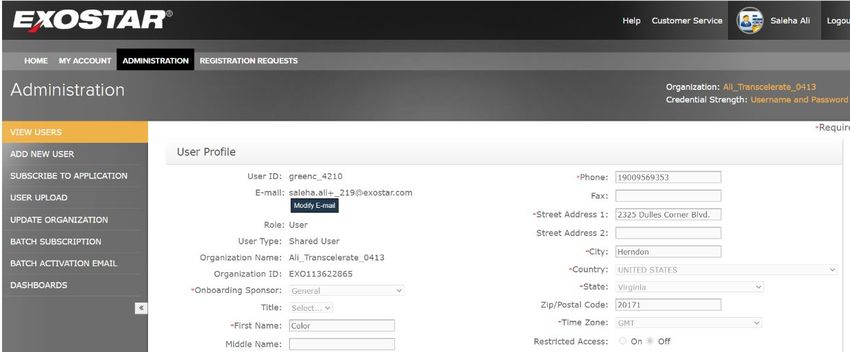
SAM 4.4 Feature changes
Feature changes
       Item                                                   Details                                                       Purpose                         JIRA Reference
 Set Password         Following additional text has been added to “Create a Password” page:                     To provide additional information           7826
                      “Create a password to set up your account. The checklist below will help you meet our     on setting up the password.
                      password strength requirements”.

 Security questions   Following additional text has been added to “Set security questions and answers” page:    To provide additional information           7825
 and answers          “Secure your account by setting your security questions and answers. These will be used   to the user on why they are
                      to recover your account and for additional security. Please answer all 4 questions”.      setting the security questions
                                                                                                                and answers.

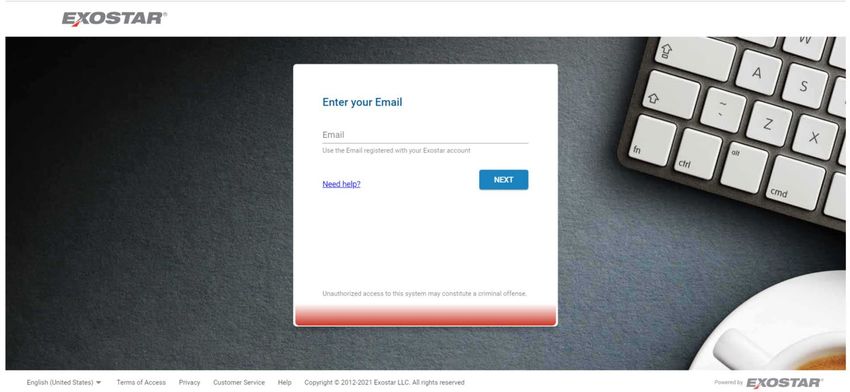
 Login page           SAM Login screen was updated as below.                                                    To ensure consistency with                  7815
                                                                                                                other IAM products.

                                                                                                                              Copyright 2021 Exostar LLC | All Rights Reserved   3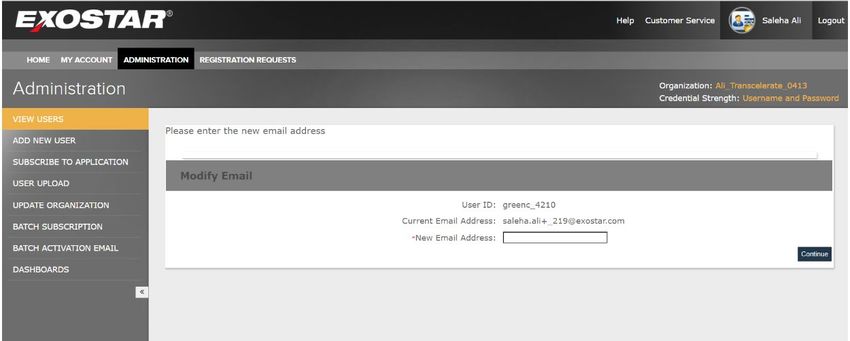
SAM-7826 – Set Password page update

 SAM-7826 – Set Password page update

 SAM application will have additional text on Create
 a Password page:

 " Create a password to set up your account.
 The checklist below will help you meet our
 password strength requirements."

                                                       Copyright 2021 Exostar LLC | All Rights Reserved   4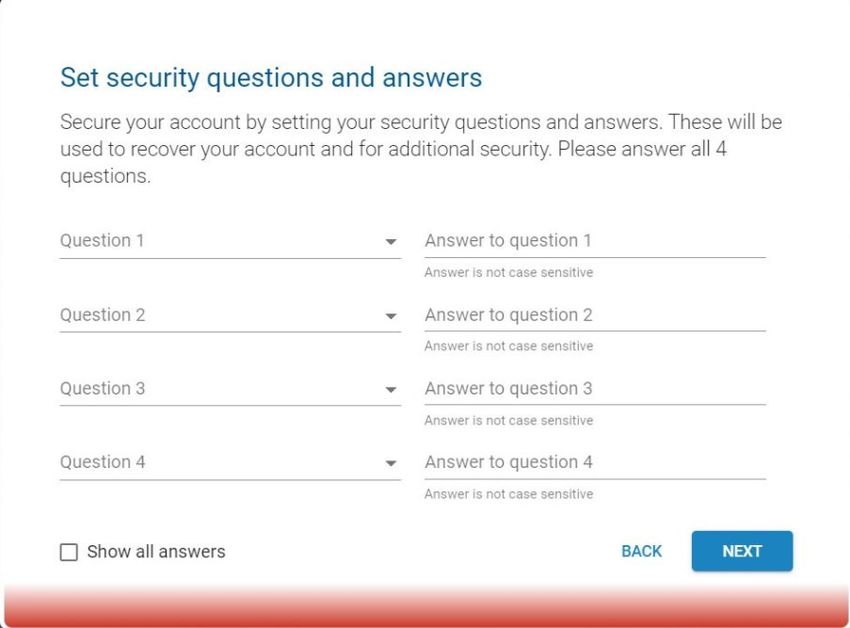
SAM-7825 - Security Q&A Update

 SAM-7825 - Security Q&A Update

 SAM shall add additional text on
 the Set security questions and
 answers page as follows:

 "Secure your account by setting
 your security questions and
 answers. These will be used to
 recover your account and for
 additional security. Please
 answer all 4 questions."

                                    Copyright 2021 Exostar LLC | All Rights Reserved   5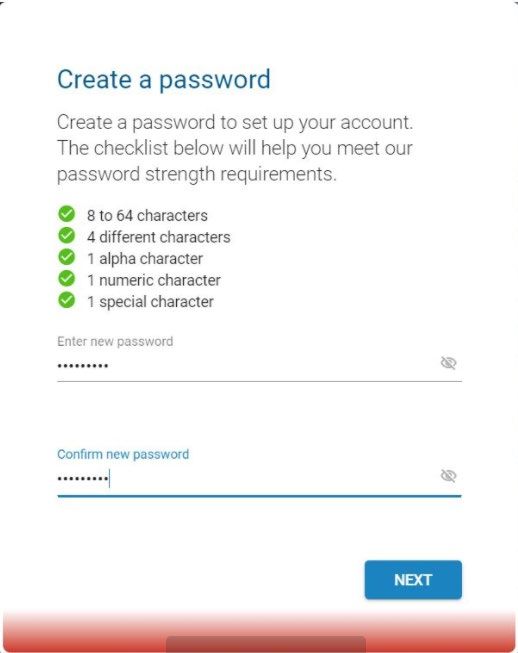
SAM-7815 - Security Q&A Update
                                                        Remove ”Exostar” from
                                                        "Enter your Email" section
Add Exostar to the left
corner of the Login screen.
                              Enter your Email text
                              should be in blue color

 NOTE: Customers please verify the following:
 1. Customer/SP specific Themes
 2. Customer specific Banners
 3. Customer specific Help Links                                                     Copyright 2021 Exostar LLC | All Rights Reserved   6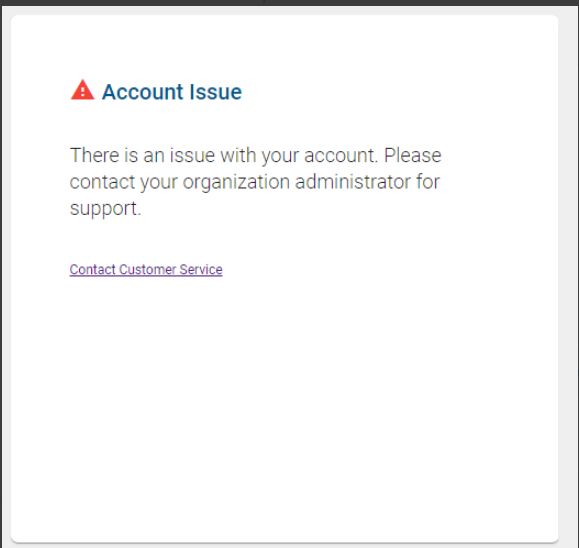
Feature changes
       Item                                                  Details                                                           Purpose                          JIRA Reference
 SAM Inviter API   The SAM Inviter API has been updated to only allow the «search users» function if at            This change will improve the                 7732
 search user       least one of the optional parameters are included alongside the required parameters.            capability to reduce the risk of
 updates                                                                                                           duplicate accounts being
                   The required parameters are:                                                                    created.
                         •    FirstName;
                         •    LastName; and                                                                        The search will better enable
                         •    EmailAddress                                                                         administrators to identify
                   The optional parameters are:                                                                    duplicate accounts prior to
                         •    Street;                                                                              account creation.
                         •    Phone;
                         •    City;                                                                                Note – the SAM Inviter API does
                         •    Province; and                                                                        not prevent admins from
                         •    Country                                                                              creating duplicate accounts.
                   Examples of a suitable search combinations include:
                         • FirstName, LastName, Email, Street
                         • FirstName, LastName, Email, Phone
                         • FirstName, LastName, Email, Street, Phone, City, Province, Country

 SAM Inviter API   SAM Inviter API shall perform an exact match search on the email address and will True if       This change will improve the                 7733
 search user       it’s a match if not False will be displayed.                                                    capability to reduce the risk of
 updates                                                                                                           duplicate accounts being
                                                                                                                   created.

 SAM Inviter API   SAM shall perform a fuzzy search on other parameters and display True if possible match         This change will improve the                 7734
 search user       exists, False if there is no match for the email address.                                       capability to reduce the risk of             7735
 updates           Note - During the matching process, even if the email is not a match while other attributes     duplicate accounts being                     7736
                   are a match the API will provide an output result of “true". If there are no matches then the   created.
                   API will provide an output result as “false".
                                                                                                                                  Copyright 2021 Exostar LLC | All Rights Reserved   7
SAM-7724 - SAM Inviter API search
Inviter API updates
1. Attached is new WSDL (double click on embedded file)
2. Inviter API Guide – estimates to be available by Thursday, 4/22
Copyright 2021 Exostar LLC | All Rights Reserved 8Feature changes
Item Details Purpose JIRA Reference
Housekeeping rule Historically, for services where housekeeping was enabled, inactive accounts were When users are deactivated 7722
changes deactivated after 180 days. their accounts are deleted.
SAM’s housekeeping processes will now suspend (not deactivate) inactive accounts after This change will only suspend
180 day for those services where housekeeping is enabled. the user accounts after 180
days of inactivity. This enables
System behaviour: administrators to unsuspend the
• If the user has not logged into their account for over 165 days, SAM will send a accounts on behalf of users as
suspension notification email to the user on the following dates: required.
• 42 days prior to suspension (138 days of non use); and
• 14 days prior to suspension (166 days of non use).
SAM will present a user logon error message should the user attempt to log in after the
180 day period.
Copyright 2021 Exostar LLC | All Rights Reserved 9SAM-7722 Change in Housekeeping rule
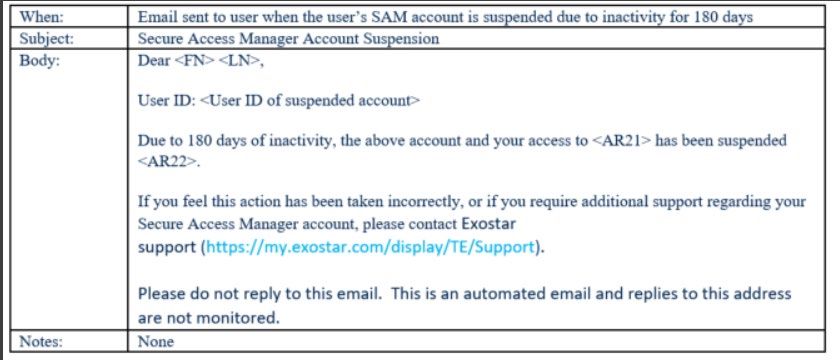
Housekeeping(HK) change:
Instead of deactivating users at the standard housekeeping intervals;
Housekeeping will now suspend the users
Email message sent at
The following are trigger when HK rules are met. specific intervals
New User logon error
message should the user
attempt to log in after the
180 day period.
Copyright 2021 Exostar LLC | All Rights Reserved 10SAM-7746 API Response for Region code in AMFindUsers
Item Details Purpose JIRA Reference
Provisioning SAM will include the Region Code information as part of the provisioning record for the To improve the provisioning 7746
Record to SIP will SIP application. process for SIP application
include Region users.
Code in the
response
After checking with SIP the change need to be code to Inviter API AMFindusers Response to add
The Region Code to the address.
Below details are not required and no WSDL change.
See below for response .
2600 Skywalker Dr.
Houston
Texas
US-TX
77058
US
Copyright 2021 Exostar LLC | All Rights Reserved 11SAM-7783 Enable Admins to change shared user email addresses
Item Details Purpose JIRA Reference
Admin initiated Org Admins, SP Admins and MPA’s can now initiate an email address change on behalf of Today only EPA’s have 7783
email address a shared user. permission to initiate email
changes • When the change is initiated, a notification email is sent to each SP Admin address changes.
where the impacted user is subscribed to their application(s).
• After the email address has changed Org Admins, SP Admins and MPA’s will be It is a time consuming process
notified that the email has changed. for the users to request the
• If they choose, SP Admins can opt out of the email notification updates. change and for the onboarding
teams to perform the changes.
Note: Today org admins can initiate email address change of a non-shared user. This
same functionality has been extended to other admins and to include shared users in this
release.
Copyright 2021 Exostar LLC | All Rights Reserved 12SAM-7783 Enable Admins to change shared user email
addresses
1. Login as Admin
2. View Users Tab, Click Modify
E-mail
3. ,
Click Continue
Copyright 2021 Exostar LLC | All Rights Reserved 13Defects addressed in this release
Item Details Comments JIRA Reference
1 Data field lengths not aligned throughout the system - Some of the data field lengths were not The data fields are now 7458
synchronized. The data fields are now synchronized as follows: synchronized.
2 RIDP user profile – Some user profile fields for RIDP users were editable. The RIDP user Profile RIDP user profile attributes are not 7460
should not be editable as the user profile is owned and managed by the Remote Identity Provide updateable.
and profile updates occur on subsequent assertions.
3 Adoption Module - When multiple new users were added via user upload, only the first user All users will now receive the First 7616
received the First time login instructions email. Time login instructions email
Note – this issue is only applicable for organizations that are not actively subscribed to
applications.
4 Inline Registration – The First Time Login email was missing the activation expiry date when a FTL email will have the activation 7345
user is created with an inline registration URL expiry date
Copyright 2021 Exostar LLC | All Rights Reserved 14Defects addressed in this release
Item Details Comments JIRA Reference
5 Housekeeping(HK) reminder email – Expired email activation links have been included in HK reminder emails have updated 7363
housekeeping reminder emails. with active activation links
6 Organization Managed Org (OMO) - When a user, who belongs to an Organization-Managed Terms and Conditions status will 7673
Org, is subscribed to an application via API, the application is not pending acceptance of the Terms display in Pending status until they
and Conditions as it should be. Instead, the org is subscribed, and no Terms and Conditions are are accepted
accepted.
7 SAM Inviter API error - Users were seeing a NotAuthorized error when reactivating the The Inviter API now reactivates the 7708
subscription for suspended application via inviter API. user without error
8 Provisioning - User status change from Suspended to Active was not updated automatically in Target systems will now be updated 7709
target systems. from Suspended to Active
9 Federation Assertion - Internal credential details were sent during the outgoing federation Internal credential details have been 7712
assertion. now removed from the assertions.
Copyright 2021 Exostar LLC | All Rights Reserved 15You can also read


