Broad-scale Applications of the Raspberry Pi: A Review and Guide for Biologists - EcoEvoRxiv
←
→
Page content transcription
If your browser does not render page correctly, please read the page content below
Broad-scale Applications of the Raspberry Pi:
A Review and Guide for Biologists
Jolle W. Jolles1,2,3,*

1 Zukunftskolleg,
                University of Konstanz, Universitätsstrasse 10, 78464 Konstanz, Germany
2 Departmentof Collective Behaviour, Max Planck Institute of Animal Behaviour, Universitätsstrasse 10, 78464 Konstanz, Germany
3 CREAF, Centre de Recerca Ecològica i Aplicacions Forestals, E08193 Bellaterra (Cerdanyola de Vallès), Catalonia, Spain

* Correspondence: j.w.jolles@gmail.com

The field of biology has seen tremendous technological progress in recent years, fuelled by the exponential growth in
processing power and high-level computing, and the rise of global information sharing. Low-cost single-board computers
are predicted to be one of the key technological advancements to further revolutionise this field. So far, an overview of
current uptake of these devices and a general guide to help researchers integrate them in their work has been missing. In
this paper I focus on the most widely used single board computer, the Raspberry Pi. Reviewing its broad applications and
uses across the biological domain shows that since its release in 2012 the Raspberry Pi has been increasingly taken up by
biologists, both in the lab, the field, and in the classroom, and across a wide range of disciplines. A hugely diverse range of
applications already exist that range from simple solutions to dedicated custom-build devices, including nest-box
monitoring, wildlife camera trapping, high-throughput behavioural recordings, large-scale plant phenotyping, underwater
video surveillance, closed-loop operant learning experiments, and autonomous ecosystem monitoring. Despite the breadth
of its implementations, the depth of uptake of the Raspberry Pi by the scientific community is still limited. The broad
capabilities of the Raspberry Pi, combined with its low cost, ease of use, and large user community make it a great research
tool for almost any project. To help accelerate the uptake of Raspberry Pi’s by the scientific community, I provide detailed
guidelines, recommendations, and considerations, and 30+ step-by-step guides on a dedicated accompanying website
(raspberrypi-guide.github.io). I hope with this paper to generate more awareness about the Raspberry Pi and thereby fuel
the democratisation of science and ultimately help advance our understanding of biology, from the micro- to the macro-
scale.

Keywords: automation, computing, data logging, electronics, Raspberry Pi, single-board computer, technology, tools

1. INTRODUCTION                                                        frugality of science, and thereby bring new opportunities
                                                                       for scientific inquiry to the developing world (Reardon,
The last few decades have seen tremendous technological                2013; Whitesides, 2011). A broad uptake and versatile use
progress that has transformed biological research (Chave,              of low-cost computers by the research community will also
2013; Snaddon et al., 2013). Advancements such as                      fuel the development of new methodologies and stimulate
automated image-based tracking, bio-logging, genetic                   interdisciplinary research and new lines of research to
barcoding, and remote sensing enable us to study plants,               open up (Freckleton & Iossa, 2010). Ultimately this will
animals, and ecosystems in more detail and faster, less                catalyse our understanding of biology (Allan et al., 2018;
intrusive ways than ever before (Anderson & Gaston, 2013;              Hughey et al., 2018) and may help us tackle pressing
Dell et al., 2014; Hebert et al., 2003; Hughey et al., 2018;           global issues of ecological and conservation concern (Arts
Kays et al., 2015). Driven by the rise of Open Science and             et al., 2015; Pimm et al., 2015).
global information sharing, new technologies and solutions                    By far the most popular single-board computer is the
have become highly accessible (Snaddon et al., 2013),                  Raspberry Pi (RPi), with over 30 million units sold since
with developments in 3D-printing and low-cost electronics              2012 (Raspberry Pi Foundation, 2019). Built on open-
enabling researchers to increasingly build their own lab               source principles, and driven by the non-profit incentive to
tools (Baden et al., 2015; Pearce, 2014).                              increase global access to computing and digital making,
      Aided by the exponential growth in computer power                this low-cost computer brings together external hardware,
and capabilities at decreasing costs, recent improvements              sensor, and controller interfaces, with user-friendly
in sensor technology and battery efficiency, and the rise of           programming capabilities, high connectivity, and desktop
the Internet of Things (IoT), low-cost single-board                    functionality (see further below). It is also the most widely
computers (SBCs) are predicted to be one of the key                    used low-cost computer by the biological research
technological advancements to further revolutionise                    community, and is employed in a broad range of projects
biological research (Allan et al., 2018). Developments over            spanning diverse topics and fields. While detailed
the last years have resulted in devices that provide                   applications have been described for specific audiences,
considerable customisation and control and enable                      so far, a broad overview that discusses the wide potential
scientists to create research tools and devices that meet              applications of the Raspberry Pi and a general guide for
their exact needs (Kwok, 2017; Ravindran, 2020).                       researchers to help decide if, when, and how to use them
Furthermore, these low-cost devices help push the                      has been missing.

                                                                   1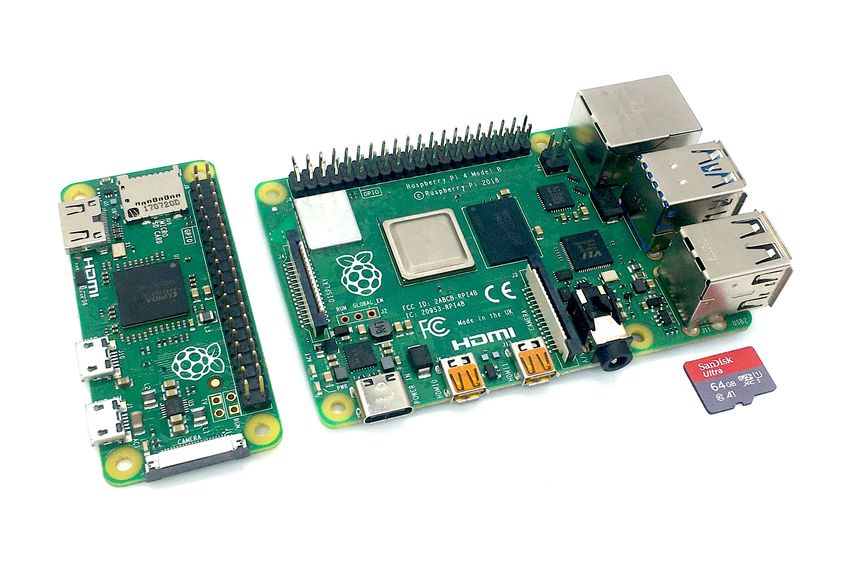
Here I provide a detailed account of the Raspberry                           scripts autonomously using a wide-range of computer
Pi, highlight its advantages and disadvantages, discuss its                         languages. The Raspberry Pi is different from a
wide-ranging applications by reviewing papers across the                            microcontroller, such as the Arduino or the recently
biological domain, and provide detailed recommendations,                            released Raspberry Pi Pico, which can be programmed to
guidelines, and considerations to help researchers                                  execute a single user-written program and communicate
integrate the Raspberry Pi in their work. Additionally,                             with sensors and other electronics.
detailed step-by-step tutorials (30+) are provided on a
dedicated website (raspberrypi-guide.github.io) that                                3. WHY USE THE RASPBERRY PI?
accompanies this paper. I hope with this work to raise
awareness for the Raspberry Pi as a versatile, low-cost                             The Raspberry Pi has been purposefully built as a highly
research tool, thereby helping more scientists to benefit                           flexible and powerful computer that is affordable for
from these low-cost micro-computers, and ultimately                                 anyone to solve problems - creatively. Its large number of
enhancing our understanding of biology from the micro-to                            assets easily outweigh its limitations (Table 1) and make
the macro-scale.                                                                    the Raspberry Pi a great research tool that can be used for
                                                                                    almost anything, from simple environmental monitoring and
                                                                                    recording of laboratory experiments, to autonomous field
                                                                                    measurement stations, and advanced closed-loop devices
                                                                                    that can read various input modules, trigger other actions
                                                                                    (e.g. to turn lights or servos on and off), and automatically
                                                                                    process data and send warning messages.
                                                                                            Raspberry Pi’s may enable scientists in terms of the
                                                                                    automated data collection and the acquisition of larger,
                                                                                    more extensive, and consistent datasets, and thereby help
                                                                                    overcome temporal and spatial under-sampling.
                                                                                    Furthermore, its remote monitoring capabilities help reduce
                                                                                    potential experimental errors, mitigate human observer
                                                                                    biases, and minimise disturbances that could otherwise
Figure 1. A RPi zero (left) and 4B model (right) with microSD card for scale.
                                                                                    lead to changes in local environmental conditions or a
                                                                                    (stress) response in experimental animals. The large
                                                                                    number of interfaces and broad connectivity of the
2. WHAT IS A RASPBERRY PI?                                                          Raspberry Pi enable the development of solutions that
                                                                                    provide a highly affordable alternative to expensive
The Raspberry Pi (Figure 1) is a low-cost, single-board                             research equipment that many researchers do not have the
computer (SBC) developed by the Raspberry Pi                                        budget for (Dolgin, 2018), such as operant conditioning
Foundation (raspberrypi.org), a UK-based charity. Since its                         devices, plant phenotyping systems, and confocal
first release in 2012, several generations of Raspberry Pi                          microscopes (Andre Maia Chagas et al., 2017; Stanton et
micro-computers have been released, which can be                                    al., 2020; Tausen et al., 2020). Its low cost also facilitates
categorised in three distinct models: The Raspberry Pi A,                           many devices to be employed simultaneously and simply
B, and Zero (a fourth model, the Compute Module, is                                 enables researchers to try out new ideas, opening the door
mainly used in industrial applications). The fundamentals                           for creative and novel solutions. Because of its small size,
of these three models (henceforth “Raspberry Pi’s”) are                             the Raspberry Pi can be integrated into almost any
highly similar (see also section 5), with each featuring a                          experimental setup and easily transported, and with its
system-on-a-chip that consists of an integrated CPU                                 wide-ranging power options can be left to run
(Central Processing Unit) and GPU (on-chip graphics                                 autonomously, in the field, for extended periods of time.
processing unit), on-board memory, and a power input of                                     Besides the Raspberry Pi, a diverse range of other
5V DC. All also have a port to connect a dedicated camera                           single-board computers exist, including the Odroid, the
as well as an array of general-purpose input/output (GPIO)                          BeagleBoard, the Banana Pi, and the NVIDIA Jetson Nano.
pins, which can be used to communicate with a wide                                  The main downside of these alternatives, many of which
range of electronics, from LEDs and buttons, to servos and                          mimic the Raspberry Pi in some way, is that they have
motors, power relays, and a huge range of sensors.                                  limited users support compared to the huge Raspberry Pi
Special expansion boards that connect to the GPIO pins,                             community and extensive and up-to-date online
called HATS (Hardware Attached on Top), can provide                                 documentation and tutorials (see raspberrypi.org). Also,
further functionality, ranging from power management,                               the software and hardware of many Raspberry Pi
RFID detection, motor controllers, and high-quality audio                           alternatives is not very actively maintained, and driver
recording. Most models also feature an Ethernet                                     support and third-party add-ons are often relatively poor.
connection and wireless (Wi-Fi and Bluetooth) connectivity,                         Still, for more advanced users and some specific cases
which, in combination with the GPIO ports, give the                                 one of the alternative boards may be preferable, such as
Raspberry Pi huge versatility. The Raspberry Pi has all the                         those featuring higher computing power. For some
functionalities of a standard computer. As such, you can                            applications it may also be preferable to not use a single-
connect a mouse, keyboard, and screen without any                                   board computer at all but use a micro-controller instead.
configuration and have control over an easy-to-use Linux                            Although the Raspberry Pi excels in terms of its processing
Desktop environment, or one of many other popular                                   power, connectivity, usability, and access to data storage,
operating systems, including Windows 10 IoT, and                                    microcontrollers are better for running single, repetitive
Android. The Raspberry Pi can also be used as a                                     tasks that do not require further user control. They also
headless, remotely controlled unit, and programmed to run                           only use a fraction of the energy of that of a single-board

                                                                                2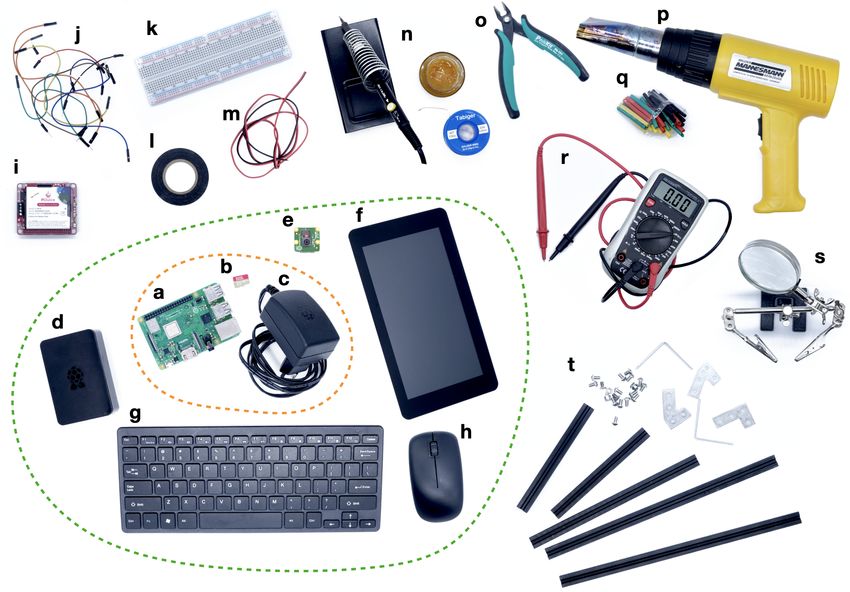
Table 1. Summary of pros and cons of the Raspberry Pi                             related work. As I focus on the scope of existing Raspberry
                                                                                  Pi applications, also unpublished work is included. Still,
Advantages                                                                        despite the broad and extensive literature search, the
Large processing power in a very compact board                                    studies presented are likely an underrepresentation of the
Large number of dedicated interfaces (UART, I2C, SPI, I2S, CSI, DSI) to           actual uptake of Raspberry Pi’s as papers do not always
connect a wide range of sensors and electrical components                         clearly mention its use or do so only very briefly.
High connectivity (HDMI, USB, Ethernet, Wi-Fi, Bluetooth)                         Nevertheless, it is very clear that the Raspberry Pi has
Low price, ranging from as little as €5 (RPi Zero; €60 for the RPi 4B, 8GB)
                                                                                  been increasingly integrated since its release (Figure 2)
                                                                                  and that already a hugely diverse range of applications
High ease of use with huge user community, extensive resources, and               exists (see Figure 3), which I discuss broadly categorised
easy to understand tutorials (see raspberrypi.org)
                                                                                  below.
Works both headless and as a full desktop computer

No extensive programming experience required and small learning curve             4.1 The Raspberry Pi as a dedicated image and
Easy to deploy and highly portable due to its small size
                                                                                  video recording device
Long-term automated image and video recording with high customisation             One of the foremost uses of the Raspberry Pi is as a low-
                                                                                  cost image and (HD) video-recording device. A very
Built-in HDMI capable graphics (up to 4K for latest models)
                                                                                  diverse range of applications exist that vary widely in their
Low power consumption (but higher than microcontrollers) and can be               capabilities and complexity. Prinz et al. (2016) used a
powered by wide range of external batteries and solar panels
                                                                                  battery-powered Raspberry Pi recording system to film the
Contains no moving parts and is silent                                            behaviour of woodpeckers in cavity nests. Similarly, H.
High customisability and flexibility as compared to commercial solutions          Watson used Raspberry Pi’s to record owls’ provisioning
                                                                                  behaviour (pers. comm. Dec 2020). Barlow and O’Neill
High transferability and backwards compatibility
                                                                                  (2020) used Raspberry Pi’s to automatically record
Disadvantages                                                                     pollinator visits for thousands of hours at remote field sites
Comes as a bare circuit board (but many compact cases are available)              based on small-scaled movement detections, while Tu et
                                                                                  al. (2016), Jones et al. (2020), and T. Landgraf (pers.
Not as powerful as a traditional PC
                                                                                  comm, Dec 2020) used Raspberry Pi’s to automatically
Some command-line programming and knowledge of electronics may be
                                                                                  record and detect honeybees at beehives and sugar
beneficial (but can be learned very quickly)
                                                                                  feeders. Ai et al. (2017) used Raspberry Pi’s to film RFID-
More advanced applications will require decent programming knowledge
and electronic skills, which is not needed for most commercial solutions
                                                                                  tagged honeybees from the initial molt for a number of
                                                                                  weeks to document the development of the waggle dance.
No built-in analog-to-digital conversion (can be easily added)
                                                                                  Bjerge et al. (2020) combined multiple light sources with
No power button or sleep mode (possible with power management HATS)               the Raspberry Pi camera to create an automated moth trap
Custom setups may complicate standardisation and replicability (but can
                                                                                  to monitor nocturnal insects. Also Leitch et al. (2020) used
be overcome by detailed standardised online documentation)                        the Raspberry Pi as a camera trap, to investigate the
                                                                                  dispersal of fruit flies. More generally, Nazir et al. (2017)
computer. Ultimately, working with the Raspberry Pi, or any                       describe the Raspberry Pi as the core of a low-cost flexible
other SBC or microcontroller for that matter, will not only                       camera trap platform that can be used for wildlife
provide many practical benefits, it will also help improve                        monitoring. Fink and colleagues (P. Fink, pers. comm. Jan
computing skills and further develop out-of-the-box                               2021) used Raspberry Pi’s to track limpets’ grazing
thinking, a characteristic paramount to scientific progress.                      movements in flowing water over a two-week period.
                                                                                  Johnson, Arrojwala et al. (2020) used the Raspberry Pi in
                                                                                  combination with depth sensors to automatically measure
4. OVERVIEW OF APPLICATIONS ACROSS THE                                            cichlids’ bower construction behaviour over multiple
BIOLOGICAL DOMAIN                                                                 weeks. Spierer et al. (2020) combined the Raspberry Pi
To determine how Raspberry Pi’s have so far been
implemented in biological research, I performed a
systematic search using Google Scholar and Web of
Science with ‘Raspberry Pi’ as main keyword (February
2021). To help restrict the search results to biological
applications, I ran different searches with keywords related
to discipline (e.g. ‘plant science’, ‘wildlife conservation’),
type of use (e.g. ‘automation’, ‘remote monitoring’), or
specific applications (e.g. ‘environmental sensing’, ‘RFID’).
I purposefully included papers across the biological
domain because certain disciplines are inherently more
technologically-focused while their methodologies are
broadly applicable. To widen my results, I made sure to
carefully check the references of all included papers for
further relevant work. To obtain the most up-to-date
studies, I also included searches on relevant preprint
                                                                                  Figure 2. Number of empirical studies, across the biological domain, that
servers (e.g. bioRxiv) and complemented my literature                             used the Raspberry Pi, shown per year since the release of the first model.
search with public messages on twitter (to 1700+                                  Studies are only discussed in the main text if they described a novel
followers), asking researchers to share Raspberry Pi-                             application.

                                                                              3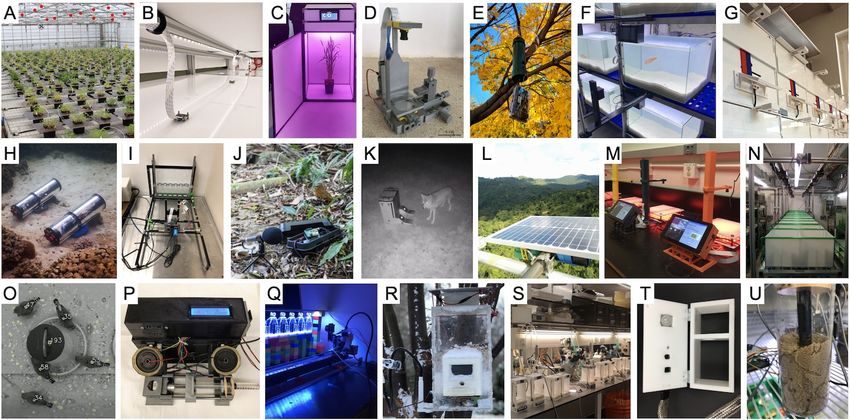
camera with a photoresistor to trigger recordings based on                          mouse respiration and pupil dilation. Finally, the Raspberry
changes in light levels to study the climbing behaviour of                          Pi has often been used to remotely observe animal
fruit flies. Wyse et al. (2019) used the Raspberry Pi camera                        experiments and thereby minimise potential disturbances
to record the terminal velocity of plant seeds at 90 fps to                         (e.g. A. Buatois, pers. comm. Jan 2021).
understand plant dispersal, while Johnson, Brodersen et
al. (2020) integrated it in a custom clamp system to take                           4.2 High-throughput and long-term recordings of
controlled, magnified images of xylem to investigate                                animal behaviour
drought tolerance in plants. Bontpart et al. (2020) used five
connected Raspberry Pi’s to create a single highly-detailed                         A number of studies have used arrays of Raspberry Pi’s for
(stitched) image of plant roots to analyse root system                              controlled and automated high-throughput image and
development. Saxena et al. (2018) also used a system of                             video recording. For example, Todd et al. (2017) used 16
linked Raspberry Pi cameras but used it to acquire video                            Raspberry Pi’s to film the rheotaxis behaviour of zebrafish
data of rats in a large open space, and used a connected                            in small swim tunnels. Jaime et al. (2018) used clusters of
Arduino to accurately synchronise the subunits. Weber and                           Raspberry Pi cameras to monitor the activity of flies
Fisher (2019) continuously recorded the behaviour of                                housed in tiny 96-well plates. Geissmann et al. (2017) used
multiple mating pairs of captive mice across several                                the Raspberry Pi as part of an advanced 3D-printed
reproductive cycles. Maia Chagas et al. (2017) developed                            device (Ethoscope) to track and profile fly behaviour in
an advanced solution that combines a Raspberry Pi, off-                             real-time using machine learning, and report the
the-shelf electronics, and 3D-printed mechanical parts to                           monitoring of 1400 flies simultaneously using 70 parallel
create a basic light and fluorescence microscope (FlyPi) to                         devices. Singh et al. (2019) built a continuous home-cage
study the behaviour of small animals such as fruit flies and                        monitoring system and used the near-infrared camera to
C. elegans (see also Nuñez et al., 2017). Wincott et al.                            automatically classify rodents’ sleep-wake cycles and
(2020) similarly developed an affordable, portable,                                 monitor holding conditions and welfare. Jolles et al. used a
automated microscope system using the Raspberry Pi                                  network of Raspberry Pi’s and custom developed software
specifically for teaching and outreach purposes. Pollina et                         for a range of studies (2017, 2019, 2020) to automatically
al. (2020) present a portable flow-through microscope to                            record the behaviour of individuals and groups of fish over
study planktonic communities that can be used in remote                             time and across different contexts. Martorell-Barceló et al.
field locations. Tadres and Louis (2020) used the                                   (2021) filmed individual fish continuously over multiple
Raspberry Pi to create a low-cost virtual reality platform                          days to investigate the repeatability of aggressive
(PiVR) that enables high-resolution, optogenetic, closed-                           behaviour, which they extended with deep learning to
loop experiments with small freely-moving animals at up to                          detect fish automatically over long periods of time
50 Hz. Kallmyer et al. (2019) and Privitera et al. (2020)                           (Signaroli, 2020). To further investigate the emergence of
used the near-IR camera for the automatic tracking of                               behavioural types, Laskowski et al. (pers. comm. Dec

Figure 3. A diverse range of Raspberry Pi applications: A) plant phenotyping (Tausen et al., 2020), B) high-throughput animal recordings (Jolles et al., 2017),
C) a dedicated plant growth cabinet (Ghosh et al., 2018), D) a 3D-printed microscope (FlyPi, Maia-Chagas et al., 2017), E) an RFID-equipped birdfeeder
(Youngblood, 2020), F) long-term monitoring of fish behaviour (Barceló et al., 2021), G) automated bird puzzle boxes (Chimento et al., 2020), H) an
autonomous underwater camera system (Lertvilai, 2020), I) automated quantification of fly climbing behaviour (Spierer et al., 2020), J) a field audio recorder for
bioacoustics (Whytock & Christie, 2017; Bradfer‐Lawrence et al., 2019), K) an operant conditioning device for wild mesocarnivores (Stanton et al., 2020), L)
autonomous ecosystem monitoring (Sethi et al. 2018), M) closed-loop virtual reality (Tadres & Louis, 2020), N) long-term recording of fish from birth (K.
Laskowski, pers. comm. Jan 2021), O) long-term monitoring of captive bird flocks (Alarcón-Nieto et al., 2018), P) an operant licking device (Longley et al.,
2017), Q) autonomous motor-controlled video recording (Heuschele et al., 2020), R) a smart birdfeeder to collect behavioural and environmental data (Philson
et al., 2018), S) high-throughput ethomics (Geissmann et al., 2017), T) real-time measurements of mouse activity, body temperature, and respiratory rate
(Kallmyer et al., 2019), and U) measurement of respiration of nest-building ants (A. Rathery, pers. comm. 2021).

                                                                                4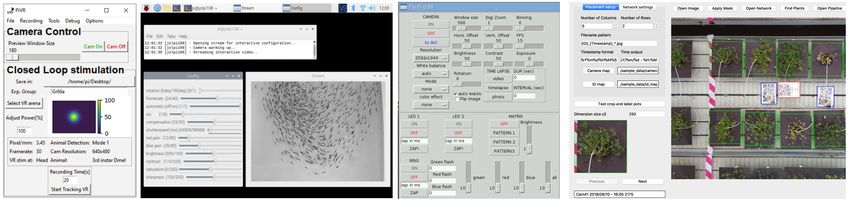
2020) used an array of 24 Raspberry Pi’s to automatically            a continuous underwater monitoring system that can be
record clonal fish from birth until 4 months of age,                 connected to and viewed remotely by means of a surface
continuously, on a second-by-second basis. Alarcón-Nieto             unit.
et al. (2018) and Wang et al. (2021) used multiple
Raspberry Pi’s as part of a long-term, automated recording           4.5 Electronic sensing and control to study
and monitoring system of groups of birds in outdoor                  animal behaviour and physiology
aviaries. Finally, Heuschele et al. (2020) automatically
filmed copepods in series of experimental tanks using a              Scientists have widely used the Raspberry Pi in
single Raspberry Pi on an automated motor-controlled                 combination with electronic sensors and actuators, in
platform.                                                            particular to study animal behaviour and physiology. For
                                                                     example, Longley et al. (2017) and Pasquali et al. (2017)
4.3 Plant phenotyping                                                used infrared-motion detectors to monitor the activity levels
                                                                     of rats and arctic invertebrates respectively. Kallmyer et al.
Raspberry Pi’s have also been used increasingly as a low-            (2019) used a thermal camera to monitor mouse body
cost, high-throughput solution for plant phenotyping, often          surface temperature, while Vickers & Schwarzkopf (2016)
coupled with open-source image processing tools and                  used temperature sensors to directly estimate transient
pipelines. For example, Dobescru et al. (2017) and Valle et          body temperatures of small lizards. Brem et al. (2020) used
al. (2017) used Raspberry Pi’s to automatically measure              the Raspberry Pi and thermocouple probes to study
plant growth. Minervini et al. (2017) developed a system             hibernation phenotypes of meadow jumping mice. Ardesch
using Raspberry Pi’s and custom imaging scripts for the              et al. (2017) used captive touch sensors to study rodents’
automatic phenotyping of rosette-shaped plants                       walking behaviour. A. Rathery (pers. comm. Jan 2021)
(Phenotiki). Similarly, Tovar et al. (2018) used Raspberry           used CO2 sensors to measure the metabolic rate of ants
Pi’s for the automatic imaging of seeds and shoots to                digging nests at different temperatures. Raab et al. (2021)
quantify plant shape, area, height, and colour. Tausen et al.        even used the Raspberry Pi to monitor the electric
(2020) extended the use of these kind of phenotyping                 behaviour of electric fish, including in remote locations in
solutions and implemented a large-scale, automated                   the Columbian jungle using car batteries. Noorshams et al.
image-capture system with a total of 180 networked                   (2017) controlled special load cells with the Raspberry Pi
Raspberry Pi’s with which they monitored 1800 individual             to get automatic weigh measurements of RFID-tagged
plants simultaneously over multiple months. Finally,                 mice (see also Bolaños et al., 2017). Youngblood (2020)
Gaggion et al. (2020) used a single Raspberry Pi and                 set up bird-feeders with RFID-readers for the remote
multiplex board with four cameras to record plant root               monitoring of wild bird populations, while Ferreira et al.
system growth dynamics over time.                                    (2020) used an RFID-equipped birdfeeder to automatically
                                                                     generate a large labelled dataset of bird photos for
4.4 Underwater video surveillance                                    machine learning. Similarly, Meniri et al. (2019) used an
                                                                     RFID reader to help automatically trap pit-tagged bats.
A number of studies have implemented the Raspberry Pi in             Ripperger et al. (2020) describe the Raspberry Pi as a
custom solutions for underwater video surveillance. Purser           central element of a custom-build wireless biologging
et al. (2020) used 3D-printed components to build a cheap            network, and Marshall et al. (2018) used the Raspberry Pi
marine camera system capable of deployment to depths of              as the main database server to communicate with
150 m. Williams et al. (2014) built a stereo motion-triggered        handheld devices for a long-term field project to study
camera trap that is deployable at depths up to 300m.                 banded mongooses.
Philips et al. (2019) used custom 3D-printed pressure                       A number of studies further implemented actuators or
housings to record with Raspberry Pi’s down to depths of             controlled electronic components with their Raspberry Pi
even 5500m. By combining the Raspberry Pi zero with a                applications. For example, Charlton and Merritt (2020)
power management board and a custom battery system,                  used haptic motors to vibrate aquaria to investigate
Mouy et al. (2020) were able to record video for up to 212           bioluminescence in glow-worm larvae. Hol et al. (2020)
hours underwater. Lertvilai (2020) build an automated                linked Raspberry Pi’s to peltier elements to regulate the
recording device specifically for autonomous zooplankton             temperature of an artificial substrate to study mosquito’s
surveys in the wild. And Hermann et al. (2020) developed             biting behaviour. Similarly, M. Stockenreiter (pers. comm.

 BOX 1. THE RASPBERRY PI AS A TOOL FOR TEACHING
 In addition to its use in research, the Raspberry Pi is a great tool for teaching. This is particularly the case for the fields of
 science, technology, engineering, and mathematics (STEM), as by building their own devices, students learn the basics
 of electronics, programming, biology, and physics. Indeed, the Raspberry Pi was explicitly developed with the main aim
 to bring and teach computing and open electronics and its wide-ranging possibilities to people around the world. But
 besides using the Raspberry Pi as a way to teach the basics of computational science (Fletcher & Mura, 2019), it can be
 used specifically to teach about the scientific process, from designing experiments, building instruments, collecting and
 analysing data, to interpreting results. Students could be presented with a scientific question and asked to solve it using
 a Raspberry Pi. Tasks could also focus on specific elements, such as to use a Raspberry Pi to teach about data
 collection (e.g. A. Halbritter, pers. comm. Dec 2020) or analysis (e.g. Tovar et al., 2018). Such a hands-on approach is
 superior for learning compared to more classical unidirectional teaching approaches (Miller, 2015). Unsurprisingly, an
 increasing number of organisations have been pushing free open-source hardware (FOSH) solutions for education (see
 Maia Chagas, 2018). A diverse collection of teaching resources can be found on raspberrypi.org.

                                                                 5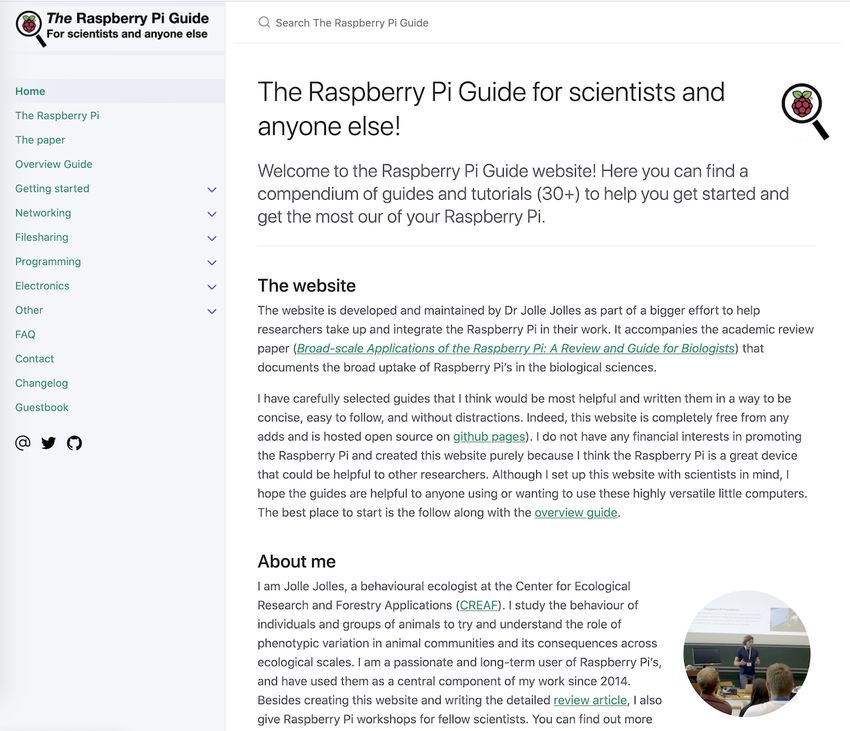
Dec 2020) used Raspberry Pi’s to control heating mats to             4.7 Bio-acoustics
investigate the effects of increased temperature on
cyanobacteria in natural plankton communities. Reemeyer              The Raspberry Pi has been used as a dedicated audio
and Rees (2020) used a galvanic oxygen sensor to control             recorder for bioacoustics, including for biodiversity and
the nitrogen flow in aquaria to investigate the influence of         habitat assessments. Whytock and Christie (2017)
dissolved oxygen on fishes’ metabolism. M. King (pers.               developed a setup consisting of a battery-powered
comm. Dec 2020) used stepper motors to simulate the                  Raspberry Pi, a dedicated audio card, an external
tides to investigate their influence on the (social) behaviour       microphone, and custom scripts to record audio of various
of marine arthropods. Philson et al. (2018) used the                 habitats and vocalisations of birds and bats for long
Raspberry Pi to build an automated bird feeder that                  periods of time (>1 month). Bradfer-Lawrence et al. (2019)
dispenses food using a servo-controller when a proximity             employed these devices successfully to acquire acoustic
sensor detects a bird. Finally, M. Oellermann (pers. com.            indices for 117 sites in Panama, and similar solutions have
Jan 2021) used the Raspberry Pi as part of a shuttle-box             been used by other follow-up studies, such as to
system that automatically controls pumps and heaters                 investigate the impacts of land use and organic farming on
based on an animal’s position to measure thermal                     bird diversity and vegetation structure (Dröge et al., 2021;
preferences.                                                         Myers et al., 2019). Furthermore, Beason et al. (2019)
                                                                     combined the system of Whytock and Christie with a
                                                                     dedicated bat audio recorder for the automatic recording
4.6 Autonomous learning experiments
                                                                     of ultrasonic bat calls. Sethi et al. (2018) describe a solar-
A broad range of studies have used the Raspberry Pi to               powered system based on the Raspberry Pi to record
create devices dedicated to facilitate controlled and                audio in remote field locations in Borneo over long periods
autonomous learning experiments. Some of the most                    of time and send data directly to the internet over the 3G
advanced solutions are capable of performing tasks                   phone network, including to stream to a public-facing
similar to those executed by high-end commercial                     website (Sethi et al., 2020). Similarly, the Orcasound
systems. For example, O’Leary et al. (2018) built an                 project (orcasound.net) uses a Raspberry Pi and
advanced yet low-cost touchscreen operant chamber                    connected hydrophones to provide live streams of
whereby an image is presented that, when touched by a                underwater recordings to help identify killer whales and
rat, releases food, plays a specific tone, and turns on a            other underwater sounds using citizen science. Caldas-
LED light, while an IR sensor detects food collection (see           Morgan et al. (2015) combined the Raspberry Pi with a
also Gurley, 2019). Buscher et al. (2020) also built a               custom-build hydrophone and a USB audio codec placed
sophisticated operant chamber system using the                       in a waterproof enclosure for autonomous underwater
Raspberry Pi that has electro-physiological and                      recordings. Lendvai et al. (2015) built a low-cost
optogenetic compatibility. Longley et al. (2017) built a             automated playback and recording system, by combining
rodent licking device using a capacitive touch sensor, a             the Raspberry Pi with an RFID reader to measure the
syringe pump, and a LED light to study operant                       responses of tree swallows to begging calls in the field.
conditioning. And Silasi et al. (2018) used the Raspberry Pi         Finally, Wilhite et al. (2020) used a Raspberry Pi, an
to develop a forelimb motor task and via an integrated               amplifier, and outdoor speakers for the playback of bird
RFID-tag reader autonomously and individually trained                calls in the field to help assess how acoustic recording
socially housed mice.                                                devices can help quantify bird populations.
       Chimento et al. (2020) used Raspberry Pi’s for the
automatic control and monitoring of pit-tagged birds                 4.8 Environmental monitoring
solving puzzle-boxes. Similarly, L. Zandberg et al. (pers.
comm. Jan 2021) used Raspberry Pi’s as operant feeders               A number of research groups have used Raspberry Pi’s for
to enable individual training on auditory cues of group-             the (long-term) monitoring of environmental conditions in
living birds in the lab and field. Stanton et al. (2020)             the lab (e.g. Gurdita et al., 2016; Longley et al., 2017;
developed an automated device to administer reversal                 Wilshin et al., 2018), and in greenhouses and plant growth
learning tests to raccoons, skunks, and coyotes without              chambers (e.g. Cabaccan et al., 2017; Shah & Bhatt,
needing extensive training or the involvement of an                  2017; Grindstaff et al., 2019), including accurate detection
experimenter. Arce and Stevens (2020) integrated the                 of environmental temperature, humidity, barometric
Raspberry Pi with an automatic dog-food dispenser and a              pressure, and light levels. Especially in combination with
touchscreen device to create an operant system to study              automated messaging services, such as to notify
canine cognition. A number of groups have also used the              experimenters when variables go out of range (e.g.
Raspberry Pi for automated learning and discrimination               Grindstaff et al., 2019; Gurdita et al., 2016; Tausen et al.,
tasks with fish, including the presentation of lights or             2020), this helps minimise fluctuations in environmental
images on LCD screens and the automatic release of food              factors that may influence experiments or the behaviour of
rewards from modified fish feeders (Lucon-Xiccato,                   animals, and thereby improves the accuracy and
Manabe, & Bisazza, 2019; Wallace, Rausch, Ramsey, &                  reproducibility of experiments. Building on these
Cummings, 2020; W. Toure, pers. comm. Jan 2021).                     capabilities, Ghosh et al. (2018) developed a special plant
Raspberry Pi’s are also currently used for visual learning           growth cabinet (growcab) that uses the Raspberry Pi to
tasks with mantis shrimp to investigate spectral sensitivity         help control light quality, intensity, and photoperiod to
(M. J. How, pers. comm. Jan 2021). Finally, Sehdev et al.            optimise speed breeding parameters. McBride and
(2019) used Raspberry Pi’s and automated rotating                    Courter (2019) and Philson et al. (2018) automatically
platforms as part of an automated learning and memory                acquired temperature, wind speed, and humidity of the
assay for walking flies.                                             micro-climates around bird-feeders in the field, and, using
                                                                     a manual sensor connected to a Raspberry Pi, Bardunias
                                                                     et al. (2020) made use of a Raspberry Pi to measure the

                                                                 6
humidity of termite mounds in the Namibian desert. Leitch At the time of writing, the Raspberry Pi 4 is the fastest
et al. (2020) used the Raspberry Pi to connect data on model, both in terms of its computing power (quad-core
wind speed using a connected anemometer. Griffiths et al. 1.5GHz; 2-8 GB RAM) and its connectivity, due to its USB
(2017, 2020) rigged kayaks with underwater environmental 3.0 ports (read/write speeds up to 300 Mbps), high-speed
sensors and a GPS sensor for the fine-scale mapping of Gigabit Ethernet (900 Mbps) and Wireless LAN (up to 100
the acoustic environment as well as for artistic purposes. In Mbps). It is however also the most power hungry (~3.4 W
general, autonomous environmental monitoring solutions on average; Zwetsloot, 2019). The Raspberry Pi Zero (W) is
using the Raspberry Pi seem relatively underused, despite half the physical size, lacks a considerable part of the
their great potential (see e.g. Sethi et al., 2018). connectivity, and has much lower processing power
(single-core 1GHz; 512 MB RAM), but only needs 0.8 W at
5. IMPLEMENTING THE RASPBERRY PI: GUIDE- idle, making it ideal for simpler, battery-powered solutions.
LINES, POINTERS, AND CONSIDERATIONS The Raspberry Pi 3A+ is an in-between model for users
that seek to balance per for mance with power
This section gives a practical overview of how to requirements. The Raspberry Pi 400 is a Raspberry Pi 4B
implement the Raspberry Pi in your work, providing integrated in a keyboard and lacks a camera port and
information for both complete beginners and more hence best for Desktop use. Finally, machine learning is
experienced users. A range of detailed step-by-step possible with the more powerful Raspberry Pi’s, but a
tutorials (30+) can be found on the website raspberrypi- dedicated Neural Compute Stick is still needed for real-
guide.github.io that accompanies this paper, many of time object detection.
which are linked to in the text (blue hyperlinks).
5.2 Installing and configuring the operating
system
Installing and configuring the operating system on the
Raspberry Pi is nowadays very straight forward. Using
another computer, simply download the Raspberry Pi
Imager (raspberrypi.org/downloads/), plug in the microSD
card, and select the desired operating system. The latest
version of Raspberry Pi OS (previously called Raspbian)
with Desktop is recommended. After the SD card is written,
plug it in the Raspberry Pi and start it up by connecting
power (see the installation guide for detailed steps and
further options). An alternative is to buy an SD card
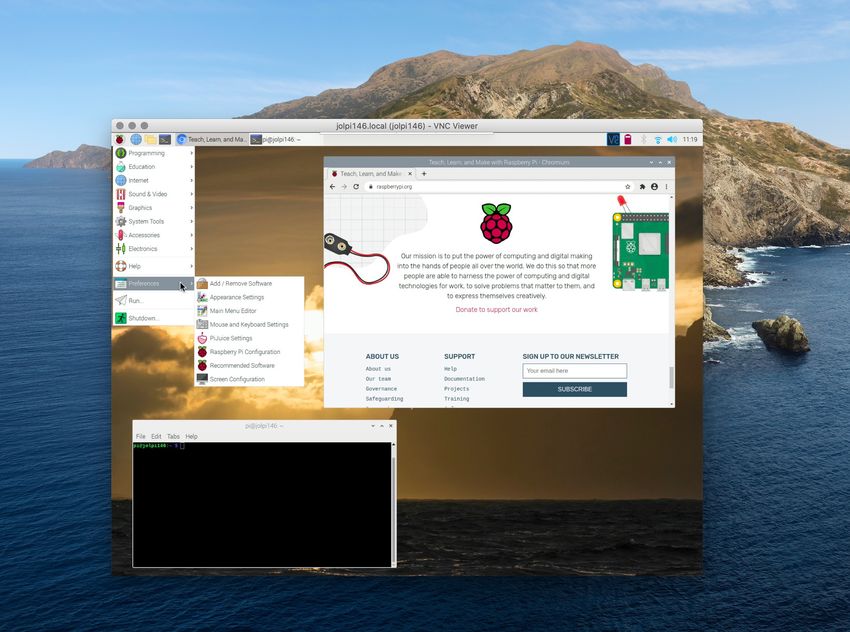
Figure 4. Screenshot of the open-source homage of the accompanying
preloaded with an installable version of the operating
website to this paper: raspberrypi-guide.github.io system (an SD card with “NOOBS”). Now to be able to
connect, you will need a screen, keyboard, and mouse.
However, with a couple of simple additional steps it is also
5.1 What hardware do you need?
possible to immediately run your freshly installed SD card
As a minimum (see Figure 5 for an overview), one only without these peripherals (headless setup). Upon first boot
needs a Raspberry Pi, a microSD card to store the in the Raspberry Pi OS Desktop environment, you will be
operating system and user data (at least 8 GB), and a guided through a short series of steps to help configure
power supply of 5V DC (at least 2.5A). The optimal model and update your system, but some additional configuration
depends strongly on the processing power and steps and security measures are recommended. It is also
connectivity required (see below). A keyboard, mouse, and
computer screen are also generally recommended for first-
time users, of which many small, cheap versions are
offered online. Although not actually needed, it is
recommended to have them as well as additional
Raspberry Pi’s, microSD cards and chargers where
possible for flexibility, backup, and testing. The Raspberry
Pi Touchscreen is a nice tool that can be used for
troubleshooting, such as when you are not able to connect
to your Raspberry Pi. No additional hardware is needed for
most straight-forward uses, but when building custom
electronic solutions, some or all of the following could be
needed: electrical tape, wire cutters, pliers, bread boards,
jumper wires, standard electrical wire, soldering
equipment, heat shrink sleeves, and a heat gun (see
Figure 5). Also, a soldering helping hand and a multi-meter
may come in handy. Finally, when building custom
Figure 5. An overview of everything you need to get started, with bare
solutions, aluminium profiles (e.g. from makerbeam.com) essentials in orange, and recommended equipment in green. a) Raspberry
are a great way to create a sturdy, organised structure. Pi, b) microSD card, c) compatible power source, d) case, e) Raspberry Pi
The different models of Raspberry Pi are all built with camera, f) (touch) screen, g) keyboard, h) mouse, i) power management
HAT, j) jumper wires, k) bread board, l) electrical tape, m) electrical wire, n)
broadly the same functionality but differ considerably in soldering equipment, o) wire cutters, p) heat gun, q) heat shrink sleeves, r)
processing speed, power requirements, and connectivity. multi-meter, s) helping hand, t) makerbeam profiles.
7quite straightforward to clone the SD card to not have to go By default, the Raspberry Pi will be given a dynamic
through all steps of setting-up your device again, such as IP-address when connected to a (local) Network, which
when you want to create (a network of) identical units. makes it easy to get connected. Although such a dynamic
Make sure you always shut down the Raspberry Pi before address should be fine for most uses, in some cases it is
you disconnect power to avoid losing data and potentially recommended to create a static IP-address to ensure a
corrupt the system. consistent connection (create static IP-address). When
working with arrays of Raspberry Pi’s, it is also best to set
5.3 Controlling the Raspberry Pi up a dedicated Local Area Network (LAN) with a specific
subnet to which individual Raspberry Pi’s can be easily
The Raspberry Pi can be controlled like any other desktop added. A centralised computer can then be used to
computer using a keyboard, mouse, and monitor, but there command all Raspberry Pi nodes and enable
are also various ways to command the Raspberry Pi communication via the internet (set up a LAN). Such a
remotely. SSH (Secure Shell) enables control from another system has been used successfully for systems of up to
device on the same network using the command line. It is 180 units (Tausen et al., 2020), and can be programmed to
pre-installed on Linux, Mac and some Windows operating perform hardware-intensive experiments in a distributed
systems and can also be installed on mobile devices and scalable way (e.g. Saunders & Wehr, 2020). When
(connecting via SSH). It is even possible to command your Raspberry Pi is primarily connected to the internet, it
multiple Raspberry Pi’s at once using a single terminal is recommended to install a firewall to keep your
window, such as with csshX (github.com/brockgr/csshx). If Raspberry Pi secure (securing your Raspberry Pi).
you prefer using the Desktop interface, such as when you In some cases, one may want a more direct
need the graphical interface, or are not comfortable using connection with the Raspberry Pi, such as when neither a
the command line, VNC (Virtual Network Computing; wireless nor a wired network is available. The first option is
Figure 6) is a great alternative to SSH. It allows you to to configure a direct computer-to-computer connection
remotely control the desktop interface of the Raspberry Pi using an Ethernet cable (direct Ethernet connection). The
from anywhere without the need of a monitor (connecting second option is to set up the Raspberry Pi as an access
via VNC). Raspberry Pi OS comes with RealVNC Connect point that generates its own Wi-Fi network to which the
software, so all you need to do is to install the VNC Viewer host device can connect. This is ideal for remote field
software on the other device you are connecting from. systems, but does require some configuration via the
Besides direct connections on a private network, also end- terminal (create wireless access point). Long-range high-
to-end encrypted cloud connections are possible (free for gain Wi-Fi dongles can help increase the network range of
non-commercial use). To help create secure remote the Raspberry Pi, which can be more than 150m when
access to your Raspberry Pi in other ways, such as to there are no obstructions (pers. obs.). It is also possible to
connect to the terminal or provide a local web-server, a connect the Raspberry Pi to the internet using a mobile
number of other services exist, including remote.it, ngrok, network dongle, such as the Huwaii E8372. You will need a
and dataplicity. sim card and data plan with a phone company, but then it
is mostly just plug-and-play. This is a great option as it will
5.4 Wired and wireless connectivity enable you to set up your Raspberry Pi to send data from
anywhere, such as from the Bornean rainforest (see Sethi
The Raspberry Pi models differ in their connectivity, with
et al., 2020), as long as a phone network is available.
some lacking an Ethernet port and/or Wi-Fi capabilities.
Long-distance radio frequency technologies such as LoRa,
Whether to use an Ethernet or wireless connection will
which enable the transfer of very small data packages over
depend on the needs of your project. The main benefits of
longer distances, may also be useful for some projects.
a wireless connection are greater flexibility in positioning
the Raspberry Pi and no need for Ethernet cables.
However, wireless networks can have issues with 5.5 Powering the Raspberry Pi
interference and do not have the stability and bandwidth 5.5.1 Power supply
that a wired connection can provide. Also, when using an
There are various ways to power the Raspberry Pi. The
Ethernet connection with a PoE HAT no dedicated power
standard charger supplied by the Raspberry Pi foundation
supply is needed (see below), facilitating (indoor)
is recommended for most uses, although any charger
positioning.
should work as long as it supplies 5V DC with a minimum
of 2.5A, depending on what peripherals are connected.
For the laboratory, and especially when working with arrays
of Raspberry Pi’s, a good alternative is Power over
Ethernet (PoE). PoE provides power via the Ethernet cable
and allows a networked device to be automatically turned
on and off remotely. By not requiring a dedicated charger,
it furthermore provides flexibility in the positioning of the
device as nearby power sockets are not needed and
reduces cable clutter. A PoE HAT and PoE-capable
network switch/injector will however be required. The
Raspberry Pi can also run on most USB power-banks, and
on 12V batteries with use of a DC/DC Step Down
converter. AGM and lithium-ion batteries are preferable
over standard lead-iron batteries because of their smaller
Figure 6. VNC is a great way to remotely use and control the Raspberry Pi. size and possibility to be positioned in any orientation.
8However, it should be noted that batteries in practice should be able to run without sun, and accounting for
supply less than their stated capacity, that capacity power loss in the system. For example, when there is 5h of
reduces over a battery’s lifetime, and that batteries can expected sun per day, the system should be able to run 3
only be discharged to a certain level. It is also possible to days without any sun, and energy efficiency is 70%, then
run the Raspberry Pi on solar energy. A small 5V 6W solar the solar panel should be at least 6W ((0.35A x 3h x 5V) x
panel can suffice for the most basic requirements, and 4d / 0.7 / 5). Real-life power consumption tests with your
larger, more permanent systems can be an ideal solution system are recommended before putting it to use (see
for many field systems, such as including a 12V/18V 50W Proppe et al. 2020 for further information).
solar panel, a solar charger, and a 12V battery (see
Proppe et al., 2020; Sethi et al., 2018). 5.6 Recording images and video
5.5.2 Power management 5.6.1 Official camera modules
The Raspberry Pi has no native power management All Raspberry Pi Models (except the 400) feature a Camera
program that enables power supply monitoring and Serial Interface to connect a camera module via a ribbon
automatisation. This means that when the supplied DC cable to the board. Two camera models are offered by the
power is too low, such as with unreliable power sources, or Raspberry Pi foundation, the v2 camera board (which
power drops completely, the Raspberry Pi will turn off supersedes the v1 5MP camera board) with an 8MP
abruptly, with the risk of losing data and corrupting the SD sensor, and the twice as expensive High-Quality (HQ)
card. A number of HATs exist, such as the PiJuice and camera with a 12MP sensor. The HQ camera can connect
Sleepy Pi, that provide power management tools. These C- and CS-mount interchangeable lenses and, with a lens
HATs can augment the DC power supply from a battery mount adapter, even DSLR lenses can be used. This
such that fluctuating DC power sources, such as from a enables huge flexibility in terms of the field-of-view and
connected solar panel, can be utilised effectively. They thus camera positioning and facilitates accurately setting
can also help create an Uninterrupted Power Supply the camera focus, which is difficult with the tiny v2 camera.
(UPS), such that in the case of a power outage it will A benefit of the latter model is that it does not condensate
automatically switch to battery input. Power management and is therefore more robust to environmental conditions.
HATs also enable intelligent wake-up modes and the The v2 camera board is also available as an infrared
automated initiation of user-defined scripts, which, in model (Pi Noir) that can capture near-IR wavelengths up to
combination with the true low power deep sleep state (< 1000nm. Although there is no infrared version of the HQ
1mA), can help to considerably reduce power Camera, its IR Filter can be removed.
consumption (boot automation with the PiJuice). The HQ camera can record still images at a higher
resolution (4056 x 3040 pixels) than the v2 models (3280 x
5.5.3 Power consumption 2464 pixels). However, as it is the GPU hardware not the
In general, Raspberry Pi’s consume little power, with the camera that sets the video recording limits, the video
most powerful model (currently the RPi 4B) under load recording capabilities of the cameras are actually the
consuming about the same as a LED light bulb (5.5W). same, with 1080p@30fps, 720p@60fps and 640p@90fps.
However, for battery-powered projects this can still quickly Although image quality tends to be higher for the HQ
rack up. A first thing to consider when trying to reduce camera, detailed testing shows that, with some effort,
power consumption is the model used (see above). images taken with the v2 camera can be similarly sharp
Although faster models may consume more energy, they (pers. obs.), and for example enables the tracking of small
will also do the work more quickly, so the optimal model will barcodes on moving birds and fish (e.g. Alarcón-Nieto et
ultimately depend on the kind of task and how often it al., 2018; pers. obs.). Both camera modules can also be
needs to be performed. Besides using a power connected to a microscope and, using custom 3D-
management HAT to reduce uptime, various procedures solutions whole-slide imaging is possible (auto-scope),
can help reduce power consumption even further (power facilitating image and video recording at the microscopic
consumption tricks). scale.
To estimate how much power your Raspberry Pi
project requires, and help decide on the appropriate size 5.6.2 Alternative camera options
of your batteries and solar panel, first determine your Besides the official Raspberry Pi camera modules, a
expected average power consumption based on your variety of third-party camera modules exists. The most
model, added peripherals, and expected processing advanced cameras are from Arducam, which offer a whole
power. Also take power loss into account when transferring suite of cameras, some of which can record up to 16
energy. For example, a Raspberry Pi 3A+ recording video megapixels, but tend to require special software. Also, a
will require about 350mA (half that of the 4B model, see number of cheaper cameras exist, some which come with
raspi.tv). A 12000mAh battery with 80% efficiency could IR lights. Most of these alternatives only offer 5MP
run this unit for about 27h. If you only need the device a resolution, which may not be an issue if recording video
couple of hours each day and make use of a power- (see above). Also some cameras are offered that have an
management HAT to put it in deep sleep the rest of the M12 lens mount, providing a cheaper alternative to C- and
day, you could use the same battery to power the device CS-mount lenses. Although camera modules tend to come
for 9 days. with a standard 15cm ribbon cable, lengths of 5cm to
To estimate the minimum size of a solar panel to 200cm are also available, increasing the flexibility for
power your project, first calculate the expected power positioning the camera. Rather than using a camera
consumption per day in Watt hours. Now calculate the module, it is also possible to use a standard USB webcam
minimum capacity of the system based on the expected (using USB webcams). Note however that the quality and
hours of sun per day, the number of days the system configurability of the camera modules are superior to a
9Figure 7. Various custom-build Graphical User Interfaces (GUI’s) for controlling the Raspberry Pi in an easy-to-use, standardised way, from left to right: PiVR
(Tadres & Louis, 2020); pirecorder (Jolles, 2020); FlyPi (Maia Chagas et a., 2017), and Greenotyper (Tausen et al., 2020).
standard USB webcam. Finally, it is also possible to Bluetooth microphone to the Raspberry Pi. Audio can be
connect and control a DSLR from the Raspberry Pi, such played back via the HDMI ports or the headphone jack,
as using the gphoto2 library, which may help provide and passive stereo speakers can be connected by means
increased image quality but with limited flexibility and of an amplifier (HAT), such as the IQaudio DigiAMP+. The
configurability. audio quality of the Raspberry Pi is good but for high-
quality playback a dedicated audio card or HAT will be
5.6.3 Recording software needed. As an alternative to Raspberry Pi-based systems,
There are a variety of software solutions to record with the some dedicated open acoustic devices exist, such as the
Raspberry Pi. First, one can control the camera module Audiomoth (Hill et al., 2018).
directly from the command line with the native raspicam
command line tools, which include raspistill to take still 5.8 Using electronic sensors and controllers
images and raspivid for videos. These provide a wide
range of recording options, including the possibility to The Raspberry Pi can connect with and control a huge
preview the camera stream, adjust the camera settings range of electronics via its general-purpose input and
(e.g. contrast, brightness, saturation, iso, shutter speed), output (GPIO) pins. Sensors that may be connected can
and set exposure mode and white balance. Recording measure a wide range of variables, including temperature,
commands have to be written on a single line but can be motion, sound, touch, light, humidity, moisture, and CO2,
integrated in bash scripts for automated recordings. and controllers range from simple buttons, switches, and
picamera (Jones, 2018) provides a pure Python interface joysticks, to controllable LEDs, stepper motors, servo’s,
to the Raspberry Pi camera module, greatly facilitating and peltier elements to peristaltic pumps. Relays make it
users to write their own recording scripts, including to possible to control the power (AC and DC) provided to
record and stream videos, capture consistent images and other electronics. Although connecting and working with
time-lapses, or record to NumPy arrays for immediate sensors and controllers requires some knowledge of
processing. pirecorder (Jolles, 2020), which builds on electronics, it is not too difficult to get started using a
picamera, was specifically developed with scientists in breadboard and jumper wires, and a large number of
mind, and provides a simple-to-use solution to run online tutorials can be found online (see e.g. temperature
controlled and automated image and video recordings monitoring). An easier solution might be to use the GrovePi
using optimal settings. It facilitates setting-up and HAT (dexterindustries.com/grovepi/), which makes
configuring the Raspberry Pi camera using interactive connecting sensors almost as simple as plug-and-play.
video stream functionalities, and enables the starting, It is also possible to read RFID tags with the
scheduling, and converting of a wide range of recordings Raspberry Pi. Although a range of commercially available
using simple commands. Motion (motion-project.github.io) animal RFID tags and readers are available, these cannot
is a highly customisable command line tool to monitor (easily) be integrated into custom applications due to their
video signals with motion detection, with MotionEye proprietary nature. However, a number of suppliers,
providing a user-friendly web frontend to control the motion including Loligo Systems, Cogniot, Eccel, and Sparkfun,
software from the browser (see also PiKrellCam). Finally, produce RFID HATs for the Raspberry Pi that can read ISO
RPi Cam Web Interface (elinux.org/RPi-Cam-Web- 11784 certified PIT tags for animal identification (at both
Interface) is another web interface for the Raspberry Pi 125 kHz and 134.2 kHz), and are already available for less
Camera module that provides high configurability and can than €1/tag. This offers a wide range of possible
be used for a wide variety of applications. experimental manipulations, where unique individuals are
automatically detected and in turn these detections can be
programmed to trigger specific actions, including
5.7 Recording and playing audio
playback of audio or visual stimuli, controlling servos, and
Increasingly Raspberry Pi’s are used as part of acoustic providing commands to external devices (see e.g. Bolaños
monitoring systems that record continuously or in response et al., 2017; Chimento et al., 2020; Noorshams et al., 2017;
to acoustic triggers, as well as an audio-playback device. Silasi et al., 2018; Youngblood, 2020).
The Raspberry Pi does not have any analog input ports. To
overcome this, you can make use of dedicated USB audio 5.9 Programming with the Raspberry Pi
cards (e.g. Creative Sound Blaster) or audio HATs (e.g.
IQaudio DAC+, Pisound) to connect a variety of One can get the most out of the Raspberry Pi by writing
microphones and record and play audio up to 24-bit and custom scripts to help control and automate tasks.
196 KHz. It is also possible to directly connect a USB or Although the Raspberry Pi OS provides an easy-to-use
10You can also read


